

Avis sur QuestionPro : avantages, inconvénients, fonctionnalités et tarifs
QuestionPro se distingue par la personnalisation poussée de ses sondages et la puissance de ses analyses, ce qui en fait un choix de premier plan pour les entreprises à la recherche d'informations détaillées.

Nous évaluons les outils indépendamment ; les commissions aident à financer nos tests. Consultez notre politique de transparence et notre méthodologie.
QuestionPro is a customer survey tool built for teams that need to collect, analyze, and act on customer feedback across multiple touchpoints. It covers everything from basic satisfaction surveys to more advanced research workflows, including conjoint analysis, sentiment analysis, and panel management. I'd consider it if you want more analytical depth and research flexibility than SurveyMonkey provides, but don't need the full complexity of an enterprise research platform. It's a strong middle ground for CX teams who've outgrown simple survey tools.
QuestionPro Evaluation Summary
4.7/5
- Pricing upon request
- Free demo available
Pourquoi faire confiance à nos recommandations de logiciels
6,700+
Reviews
20
Industry experts
16+
Evaluation factors
14
Years
Notre équipe teste et évalue des logiciels depuis 2012. En tant que leaders CX nous-mêmes, nous savons à quel point il est difficile — et important — de choisir le bon logiciel.
Pour ce guide, nous avons évalué les outils grâce à des tests pratiques et une recherche indépendante, en notant les outils selon nos critères de sélection.
Nos avis reflètent notre jugement éditorial humain, et non un argumentaire de vente.
 Gui DrusinaCreative Director
 Tim FisherVP of AI
QuestionPro Overview
In my opinion, QuestionPro stands out as a solid choice for customer surveys. It offers a comprehensive set of features that cater to diverse survey needs, from simple questionnaires to advanced analytics. Its user interface is intuitive, making it accessible for teams of all sizes. Compared to other survey tools like Qualtrics, its pricing is competitive, offering good value, especially for organizations that require robust data collection and complex survey analysis tools.
However, while its onboarding process is straightforward, some users might find the depth of features overwhelming initially. QuestionPro excels in providing excellent customer support, which can be a decisive factor for teams that value responsive assistance. It's particularly well-suited for businesses seeking a reliable tool for detailed customer insights.
Pros
- You can easily create surveys with its user-friendly interface.
- It offers a wide range of question types to fit your survey needs.
- You can access insightful analytics to understand your data better.
Cons
- You might find the reporting features less advanced than other tools.
- Some users experience a steep learning curve when starting with the platform.
- You could encounter limitations in customization for specific survey needs.
Is QuestionPro Right For Your Needs?
Who Would be a Good Fit for QuestionPro?
QuestionPro is an online survey software that is ideal for small to medium-sized businesses and research teams who need an intuitive platform for collecting and analyzing survey data. Its extensive feature set, including over 40 question types and customizable logic, makes it versatile for various industries. With user-friendly design, data visualization, and robust real-time reporting capabilities, it supports efficient data collection and insight generation, making it a valuable tool for your team's research needs.
- Market ResearchQuestionPro's robust reporting and data analysis tools make it perfect for market research, enabling your team to gather and interpret consumer insights effectively.
- Customer FeedbackFor customer service teams, QuestionPro offers customizable surveys and real-time analytics, helping you understand and improve customer satisfaction.
- Academic ResearchAcademic institutions benefit from QuestionPro's multilingual support and comprehensive survey formats and features, facilitating detailed and diverse data collection.
- Healthcare SurveysHealthcare providers can use QuestionPro's HIPAA-compliant tools to securely collect patient feedback and insights, ensuring privacy and data protection.
- Event ManagementEvent planners can leverage QuestionPro's integration capabilities to gather attendee feedback and improve future events through actionable insights.
- Product DevelopmentProduct teams can use QuestionPro to gather user feedback, helping your team prioritize features and improve product offerings based on customer needs.
Who Would be a Bad Fit for QuestionPro?
QuestionPro might not be ideal for small businesses or startups with limited resources and basic survey needs. Its extensive features can be overwhelming and unnecessary for simple feedback collection. Additionally, industries that require highly specialized data analysis tools, such as scientific research, might find QuestionPro's analytics lacking in depth and specificity. If your team prioritizes rapid deployment and simplified interfaces, the robust capabilities of QuestionPro may prove cumbersome for your work.
- Small StartupsIf you're a small startup with basic survey needs, QuestionPro's extensive features might be too complex and costly for your requirements.
- Scientific ResearchFor scientific research teams, the need for highly specific data analysis tools means QuestionPro's general capabilities might not suffice.
- Budget-Conscious TeamsTeams with tight budgets may find QuestionPro's pricing unfeasible, especially if only basic survey functionalities are needed.
- Quick Deployment NeedsIf your team needs rapid deployment and simplified tools, QuestionPro's comprehensive features might slow down your process.
- Non-Technical TeamsNon-technical teams may struggle with the complexity of QuestionPro's advanced features and methodology, which can hinder effective use.
Comment nous testons et évaluons les outils
Nous avons passé des années à bâtir, affiner et améliorer notre système de test et de notation des logiciels. Notre grille d’évaluation est conçue pour saisir les subtilités des sélections logicielles et ce qui fait qu’un outil est efficace, en se concentrant sur les éléments essentiels du processus de décision. Vous trouverez ci-dessous le détail de notre méthodologie d’évaluation et de notation selon sept critères. Cela nous permet de fournir une évaluation impartiale des logiciels basée sur les fonctionnalités principales, les options uniques, la facilité d’utilisation, l’intégration, la prise en main, l’assistance, les avis clients et le rapport qualité/prix.
Fonctionnalité principale (25% de la note totale)
Le point de départ de notre évaluation concerne toujours la fonctionnalité principale de l’outil. Possède-t-il les fonctions que l’on attend normalement, et ces fonctions sont-elles accessibles pour toutes les offres ? Nous attendons qu’un outil soit au niveau des capacités minimales de ses concurrents.
Fonctionnalités différenciantes (25% de la note totale)
Nous évaluons ici les fonctionnalités qui se distinguent de la fonction de base habituellement présente dans ce type de logiciel. Un score élevé récompense des fonctions spécialisées qui rendent le produit plus efficace ou unique et offrent une valeur ajoutée à l’utilisateur. Nous évaluons également la capacité à s’intégrer facilement avec d’autres solutions courantes, ce qui accroît l’intérêt et l’utilité de l’outil. Les logiciels qui proposent de nombreuses intégrations natives, des connexions tierces ou une API pour les intégrations personnalisées obtiennent une meilleure note.
Facilité d’utilisation (10% de la note totale)
Nous mesurons la rapidité et la simplicité pour effectuer les tâches clés avec l’outil. On valorise le design intuitif, les applications mobiles, les templates préconçus et la capacité à simplifier les tâches complexes.
Accompagnement à la prise en main (10% de la note totale)
L’adoption rapide est essentielle. Nous examinons donc la facilité pour un nouvel utilisateur à prendre l’outil en main avec peu de formation. Nous vérifions la rapidité d’installation et d’utilisation sans expérience préalable. Les meilleurs logiciels exigent peu ou pas de support pour démarrer.
Assistance (10% de la note totale)
Nous évaluons la réactivité et la facilité d’obtenir de l’aide par téléphone, chat ou base de connaissances. Les outils offrant un support humain en temps réel ont le meilleur score ; les chatbots sont moins bien valorisés.
Avis clients (10% de la note totale)
En plus de notre expertises, nous prenons en compte le score NPS (Net Promoter Score) accordé par les utilisateurs actuels et passés. Nous analysons la probabilité qu’ils réutilisent l’outil. Les outils à score élevé possèdent un excellent NPS utilisateur.
Rapport qualité/prix (10% de la note totale)
Après examen des autres critères, nous considérons le prix moyen des offres principales par rapport aux fonctionnalités essentielles évaluées. Les solutions offrant plus pour un prix inférieur obtiennent un meilleur score.
Core Features
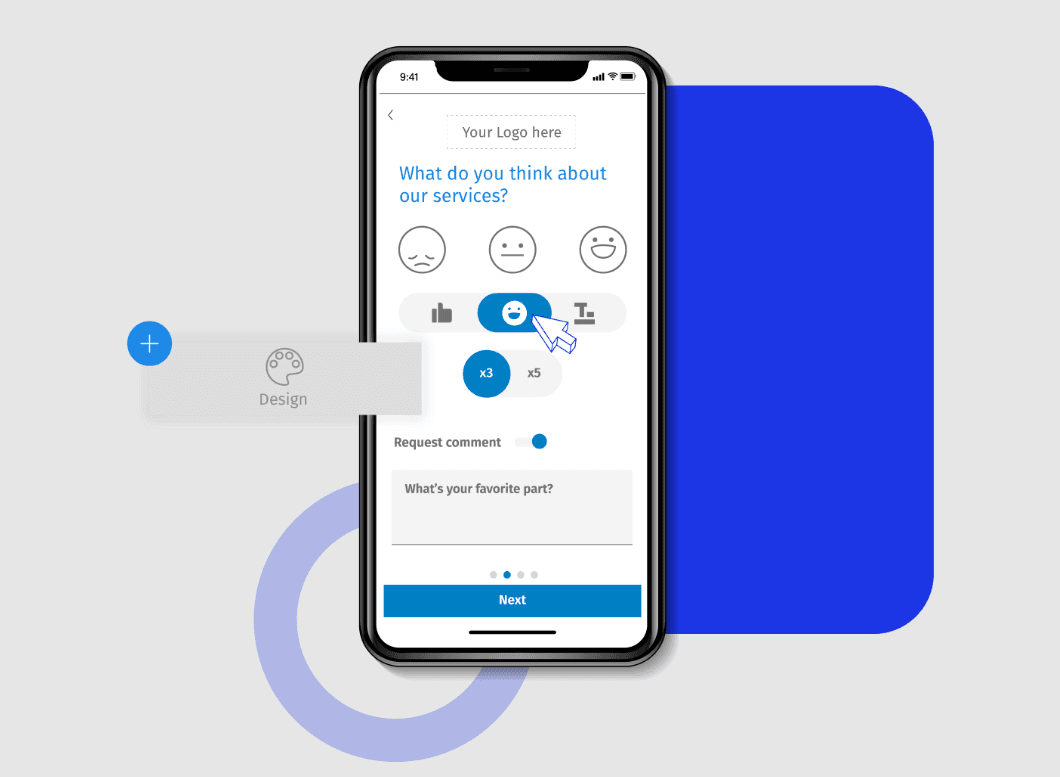
Survey Design: You can create surveys with over 20 professional themes and customizable logos, making it easy to tailor the look and feel to your brand. The visual layout is intuitive, allowing you to set up surveys quickly without technical know-how.
Logic and Branching: Use skip logic and advanced branching to personalize surveys based on responses. This feature helps you gather more relevant data by guiding respondents through a tailored path.
Data Integration: Export data to Google Sheets or SPSS for further analysis, streamlining your data workflow. This integration ensures your data is ready for in-depth analysis without manual entry.
Mobile Access: Conduct surveys on-the-go with a dedicated mobile app. This means you can reach respondents wherever they are, increasing response rates.
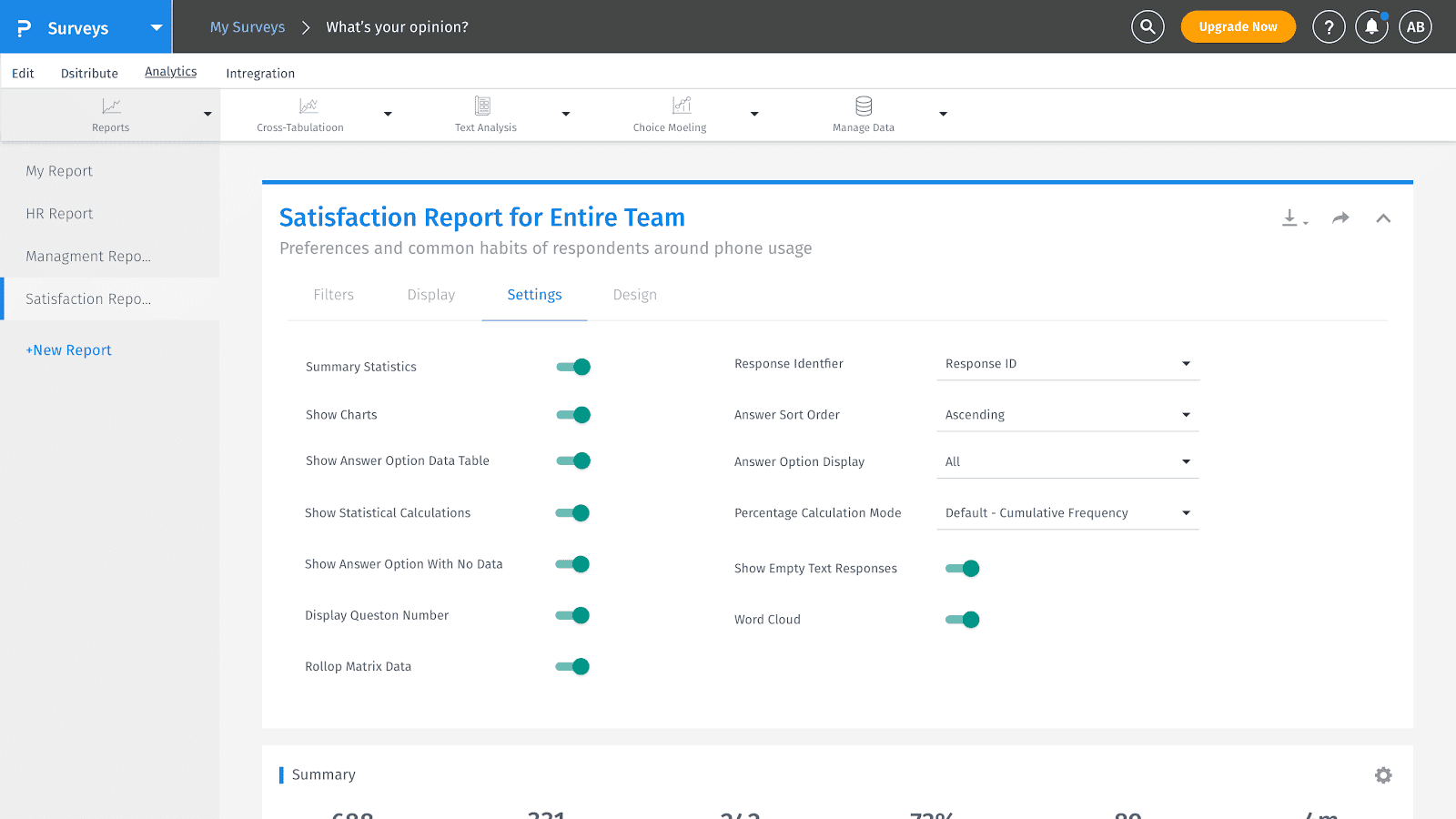
Analytics Tools: Access heatmap and sentiment analysis tools to gain insights into respondent behavior and feedback trends. The Net Promoter Score (NPS) tracking helps you measure customer loyalty effectively.
Multilingual Support: Use Questionpro’s survey builder to create surveys in multiple languages to reach a diverse audience. This feature is crucial for businesses operating in global markets, ensuring inclusivity and comprehensive data collection.
Ease of Use
QuestionPro stands out for its user-friendly design and intuitive navigation, making it accessible for both new and experienced users. Users appreciate its straightforward survey creation process, robust analytics, and seamless integration with various platforms. Many find the tool intuitive, with a well-organized dashboard and layout that simplifies data collection and analysis. While some mention a learning curve with advanced features, the overall consensus is positive, highlighting its efficiency in capturing and analyzing customer feedback effectively.
Integrations
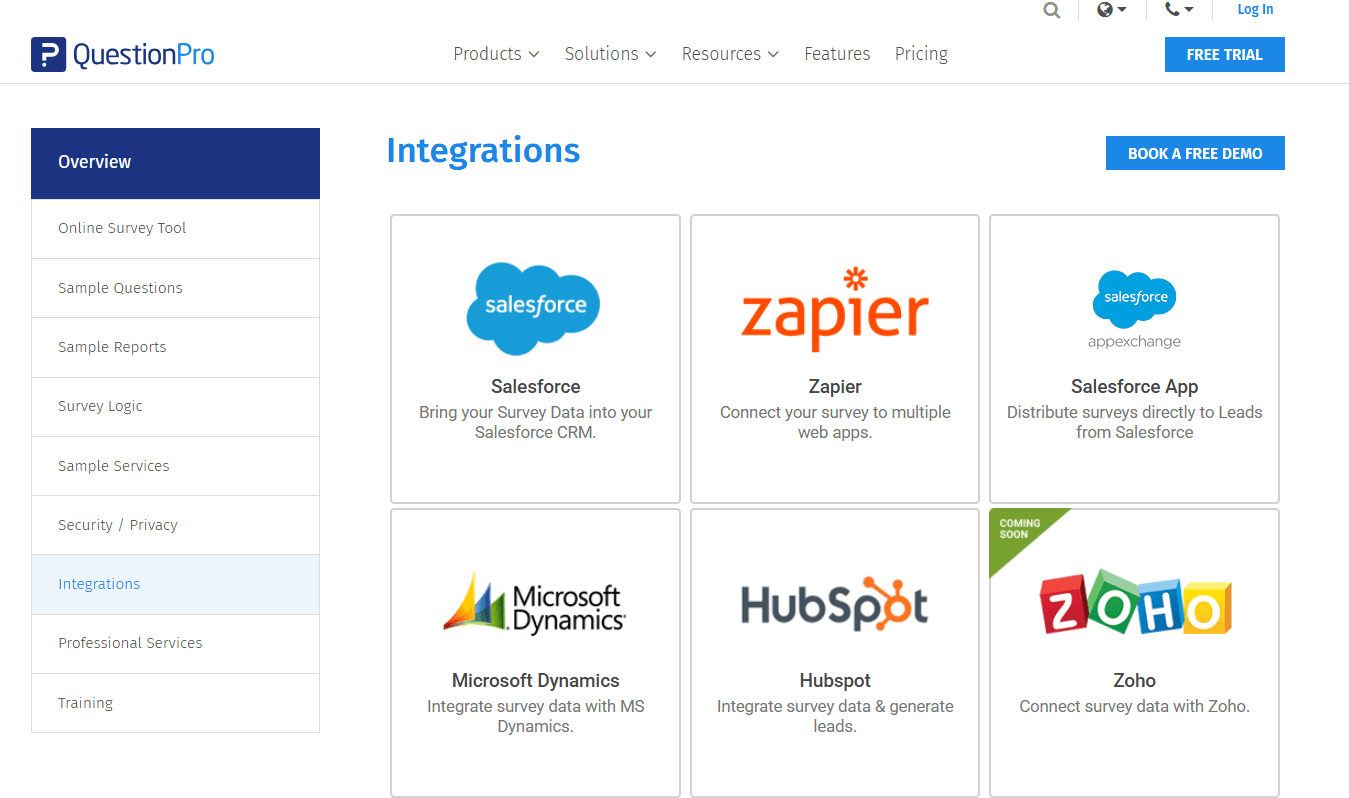
QuestionPro integrates with Salesforce, Zapier, Microsoft Dynamics, Hubspot, Zoho, SugarCRM, Google Sheets, Google Analytics, and Slack.
QuestionPro also provides an API, allowing for custom integrations and connections with third-party integration tools.
QuestionPro Specs
- Analytics: Yes
- API: Yes
- Batch Permissions & Access: Yes
- Calendar Management: Yes
- Contact Management: Yes
- Custom Reports: No
- Dashboard: Yes
- Data Export: Yes
- Data Import: Yes
- Data Visualization: Yes
- Email Integration: Yes
- External Integrations: Yes
- Feedback Management: Yes
- Google Apps Integration: Yes
- Marketing Automation: Yes
- Multi-Source Feedback: Yes
- Multi-User: Yes
- Net Promoter Score: Yes
- Notifications: Yes
- Online Surveys: Yes
- Paper Surveys: Yes
- Scheduling: Yes
- Sentiment Analysis: No
- Template Designer: Yes
- Workflow Management: No


