

10 migliori alternative a Miro per la collaborazione visiva nel 2026

Elenco delle migliori alternative a Miro


Una valida alternativa a Miro combina lavagne interattive, collaborazione semplice e integrazioni flessibili per supportare il modo in cui lavora il tuo team. Se stai cercando alternative a Miro, probabilmente vuoi strumenti in grado di gestire tutto, dal brainstorming in tempo reale alla mappatura continua dei progetti, con il giusto equilibrio tra facilità d'uso e funzionalità per lo stile del tuo team. Con così tante opzioni disponibili, è difficile capire quali soluzioni aumenteranno davvero il coinvolgimento e il lavoro di squadra. In questa guida troverai alternative testate e collaudate che possono aiutare il tuo team a collaborare visivamente, mantenere organizzate le idee e restare produttivo, indipendentemente da dove lavori.
Cos'è Miro?
Miro è una piattaforma online di lavagna collaborativa utilizzata per brainstorming, diagrammi, riunioni e pianificazione dei progetti. I team usano Miro per condividere visivamente le idee, gestire i flussi di lavoro e collaborare in tempo reale, anche quando lavorano da remoto. La sua tela flessibile e la varietà di modelli supportano qualsiasi attività, dalla mappatura strategica ai workshop creativi, rendendola una soluzione di riferimento per i team che hanno bisogno di uno spazio condiviso e interattivo.
Perché fidarsi dei nostri consigli sui software
Il nostro team testa e recensisce software dal 2012. In quanto leader CX noi stessi, sappiamo quanto sia difficile — e importante — scegliere il software giusto.
Per questa guida, abbiamo valutato gli strumenti attraverso test pratici e ricerche indipendenti, assegnando un punteggio agli strumenti in base ai nostri criteri di selezione.
Le nostre recensioni riflettono il nostro giudizio editoriale umano, non un discorso di vendita.
Tabella comparativa delle alternative a Miro
Questa tabella comparativa riassume i dettagli sui prezzi delle mie principali alternative a Miro:
| Tool | Best For | Trial Info | Price | ||
|---|---|---|---|---|---|
| 1 | Ideale per workshop interattivi in tempo reale | Piano gratuito disponibile | A partire da $3/editor/mese (fatturato annualmente) | Website | |
| 2 | Ideale per la collaborazione online su lavagne conforme al GDPR | Piano gratuito + periodo di prova gratuito disponibile | A partire da €5/utente/mese | Website | |
| 3 | Ideale per la creazione di diagrammi con flussi di processo avanzati | Prova gratuita + piano gratuito disponibili | A partire da $15/mese (fatturato annualmente) | Website | |
| 4 | Ideale per visualizzare i risultati del brainstorming del team | Prova gratuita di 30 giorni + piano gratuito + demo gratuita disponibile | A partire da $8.33/utente/mese (con fatturazione annuale) | Website | |
| 5 | Ideale per l'integrazione nativa con Microsoft 365 | Piano gratuito + prova gratuita di 30 giorni disponibile | Da $9.99/mese | Website | |
| 6 | Ideale per schizzi collaborativi in stile disegnato a mano | Prova gratuita di 14 giorni + piano gratuito disponibile | Da $6/utente/mese (con fatturazione annuale) | Website | |
| 7 | Ideale per collaborare durante le riunioni Zoom | Piano gratuito + demo gratuita disponibile | A partire da $2.07/utente/mese (con fatturazione annuale) | Website | |
| 8 | Ideale per la collaborazione visiva di livello enterprise | Piano gratuito + demo gratuita disponibile | Da $9,99/utente/mese (fatturazione annuale) | Website | |
| 9 | Ideale per la revisione dei progetti da parte di team remoti | Prova gratuita di 30 giorni + piano gratuito disponibile | Da €5/utente/mese | Website | |
| 10 | Ideale per il coinvolgimento interattivo nelle riunioni | Piano gratuito + demo gratuita disponibili | Da $24,90/utente/mese | Website |

Recensioni delle migliori alternative a Miro
Di seguito sono riportati i miei riepiloghi dettagliati delle migliori alternative a Miro incluse nel mio elenco. Le mie recensioni offrono un’analisi approfondita delle funzionalità, dei migliori casi d’uso e delle integrazioni di ciascuna piattaforma, per aiutarti a trovare quella più adatta a te.

FigJam
Ideale per workshop interattivi in tempo reale
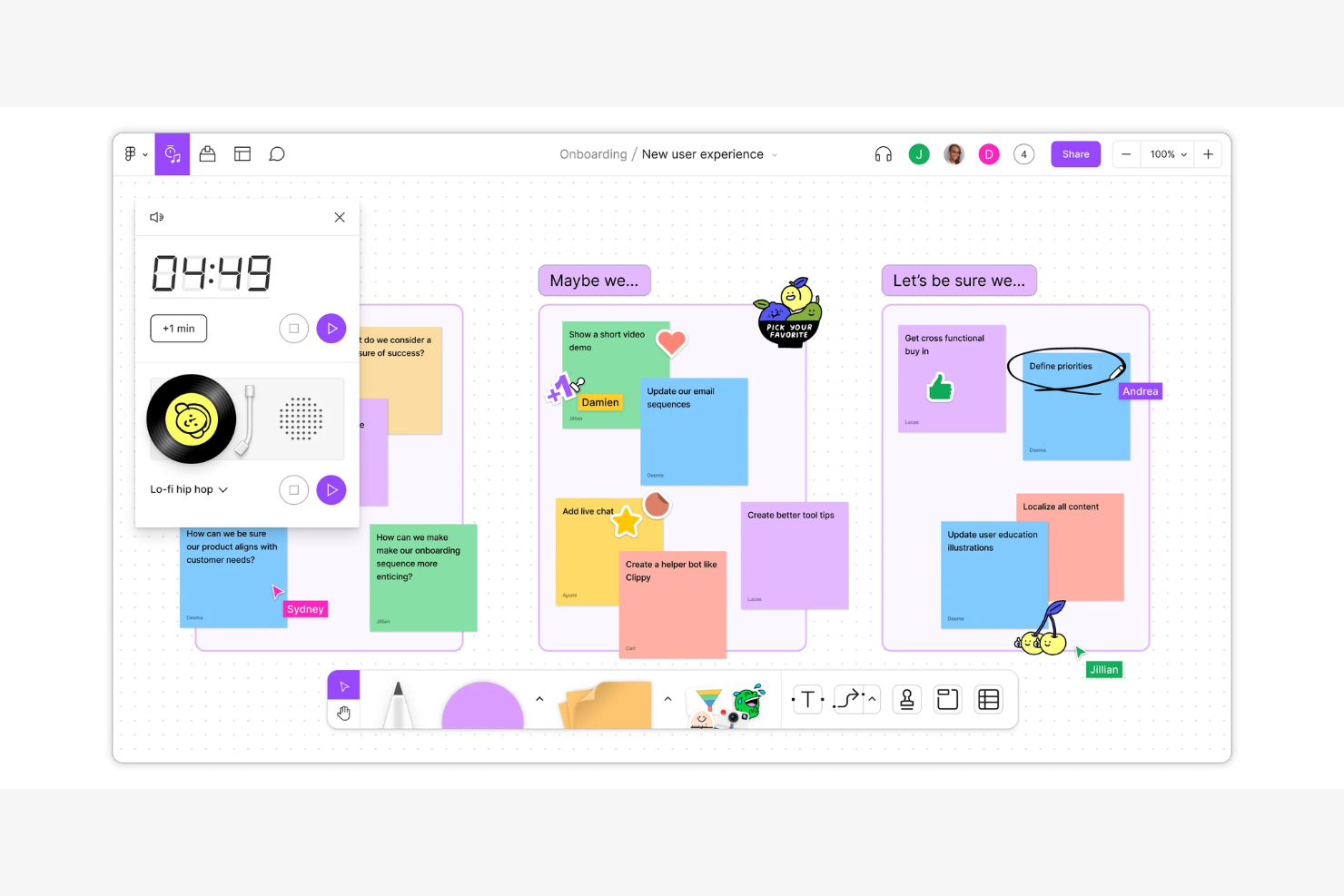
FigJam è una piattaforma di lavagna collaborativa sviluppata da Figma che supporta il brainstorming, la creazione di diagrammi, i flussi di lavoro agili e le sessioni strategiche—rendendola una scelta naturale per team di prodotto e design cross-funzionali che necessitano di uno spazio visivo condiviso che vada oltre ai semplici post-it.
Per chi è FigJam?
FigJam è particolarmente indicato per i team di prodotto e design di aziende di medie e grandi dimensioni che già lavorano all'interno dell'ecosistema Figma.
Perché FigJam è una valida alternativa a Miro
FigJam si guadagna un posto nella mia shortlist perché è davvero pensato per condurre workshop dal vivo, non solo per archiviare i risultati di questi ultimi. Adoro il timer integrato, i widget per le votazioni e la chat tramite cursore che permettono ai facilitatori di gestire sessioni strutturate senza cambiare scheda. In pratica, il mio team può condurre un'intera retrospettiva sprint o una critica di design completamente all'interno di FigJam, con reazioni in tempo reale e template strutturati che tengono tutto sotto controllo.
Funzionalità chiave di FigJam
- Incorporamento file Figma: Incorpora file di design Figma live direttamente sulla tua lavagna FigJam per le sessioni di revisione del design.
- Diagrammi potenziati dall'IA: Utilizza FigJam AI per generare automaticamente diagrammi, ordinare i post-it e riassumere i contenuti della lavagna.
- Linee di collegamento e forme: Crea flowchart, organigrammi e mappe di processo utilizzando una libreria integrata di connettori e forme.
- Plugin di widget: Espandi la tua lavagna con widget di terze parti come sondaggi, carte Asana e tracciatori di issue GitHub.
Integrazioni FigJam
FigJam beneficia dell’ampio ecosistema di integrazioni di Figma, con integrazioni native che includono Slack, Microsoft Teams, Zoom, Google Workspace, Jira, Confluence, Notion, Asana, Trello e Dropbox. Si collega inoltre a Zapier e dispone di un’API per integrazioni personalizzate.
Pros and Cons
Pros:
- Integrazione profonda con Figma per il passaggio di consegne del design
- Collaborazione in tempo reale con widget interattivi
- Ampia libreria di template per flussi di lavoro creativi
Cons:
- Meno forme disponibili per la creazione di diagrammi
- Nessuna video chat integrata nelle lavagne

Ideale per la collaborazione online su lavagne conforme al GDPR
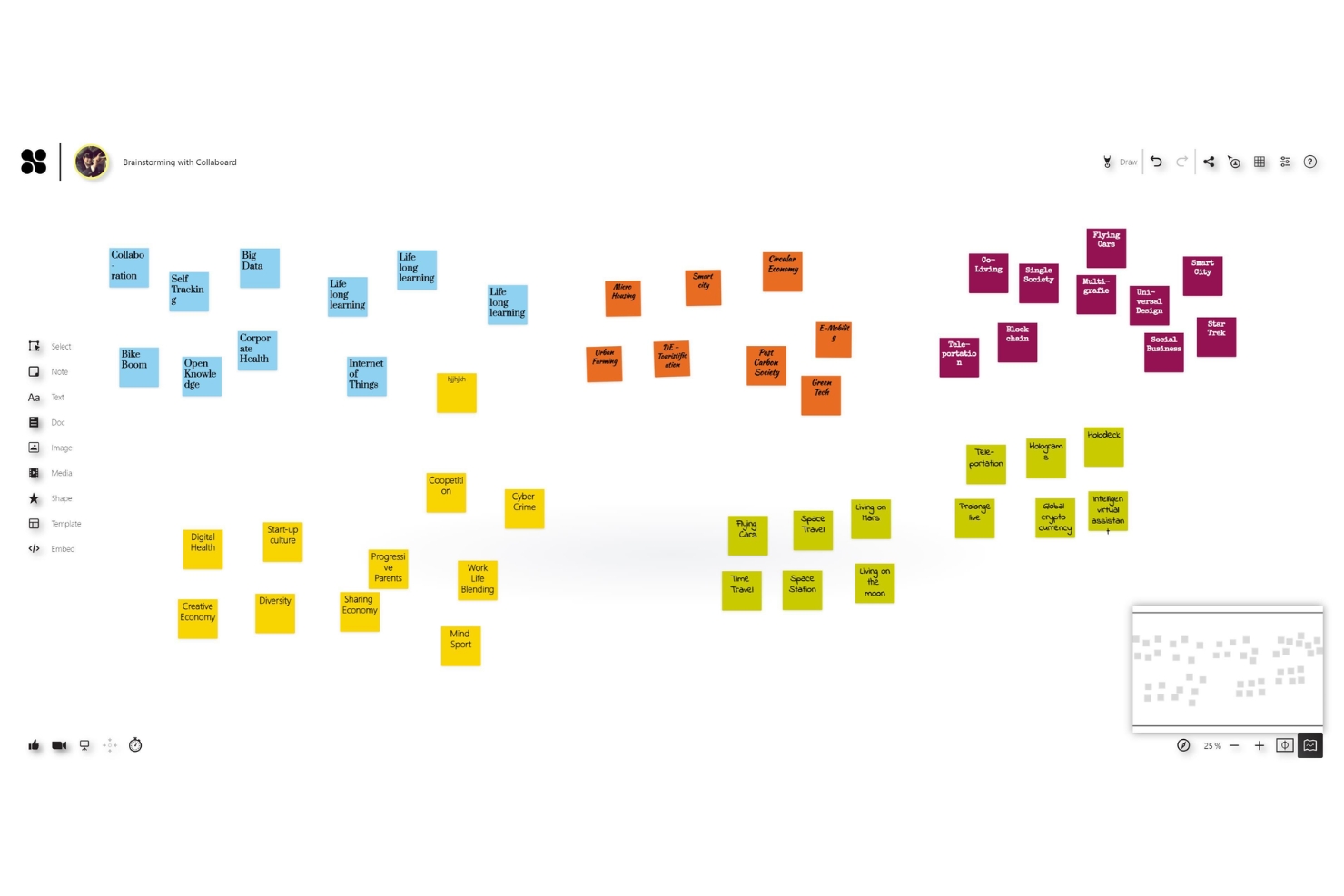
I team che necessitano di una lavagna digitale con rigidi controlli sulla residenza dei dati troveranno in Collaboard una soluzione progettata appositamente per la collaborazione visiva sicura, con uno spazio di lavoro basato su una tela per workshop, brainstorming e pianificazione dei progetti.
Per chi è più indicato Collaboard?
Collaboard è particolarmente adatto alle organizzazioni europee e ai team soggetti a rigorosi requisiti di conformità che non possono rischiare di archiviare i dati delle lavagne al di fuori dei centri dati approvati.
Perché Collaboard è una valida alternativa a Miro
Ho incluso Collaboard tra le mie migliori scelte perché la residenza dei dati è raramente una funzionalità prioritaria negli strumenti per lavagne e Collaboard la pone al centro. Puoi scegliere esattamente dove risiedono i tuoi dati: in Germania tramite Open Telekom Cloud, in Svizzera tramite Microsoft Azure oppure nella tua infrastruttura locale. Apprezzo anche l'opzione cloud confidenziale, che mantiene i dati crittografati end-to-end anche durante l'elaborazione attiva, impedendo a terze parti di accedere ai contenuti delle sessioni in qualsiasi momento.
Funzionalità principali di Collaboard
- Importazione di PDF da altre lavagne: Importa direttamente le lavagne da Miro, Mural e altri strumenti, trasformando i contenuti in elementi modificabili in Collaboard.
- Votazione e valutazione: Raccogli voti e valutazioni anonimi dai partecipanti direttamente sulla lavagna per supportare le decisioni di gruppo.
- Registro delle attività: Tieni traccia di ogni azione e modifica apportata a una lavagna, offrendo agli amministratori un resoconto completo dei contributi degli utenti.
- Gestione delle versioni: Salva e ripristina gli stati precedenti della lavagna in qualsiasi momento, così il tuo team può tornare a una versione precedente di qualsiasi lavagna.
Integrazioni di Collaboard
Collaboard offre integrazioni native con Microsoft Teams, Jira, Cisco Webex, Pexip, Nextcloud e Rocket.Chat. È disponibile un'API per le integrazioni personalizzate. Il supporto per Zapier non è documentato chiaramente.
Pros and Cons
Pros:
- Opzioni di ospitaggio locale e cloud con sede nell'UE
- Riconoscimento della scrittura a mano per la collaborazione su lavagne digitali
- Videoconferenze integrate per sessioni da remoto
Cons:
- Integrazioni di terze parti limitate rispetto a Miro
- Mancanza di strumenti specializzati per la creazione di diagrammi

Lucid
Ideale per la creazione di diagrammi con flussi di processo avanzati
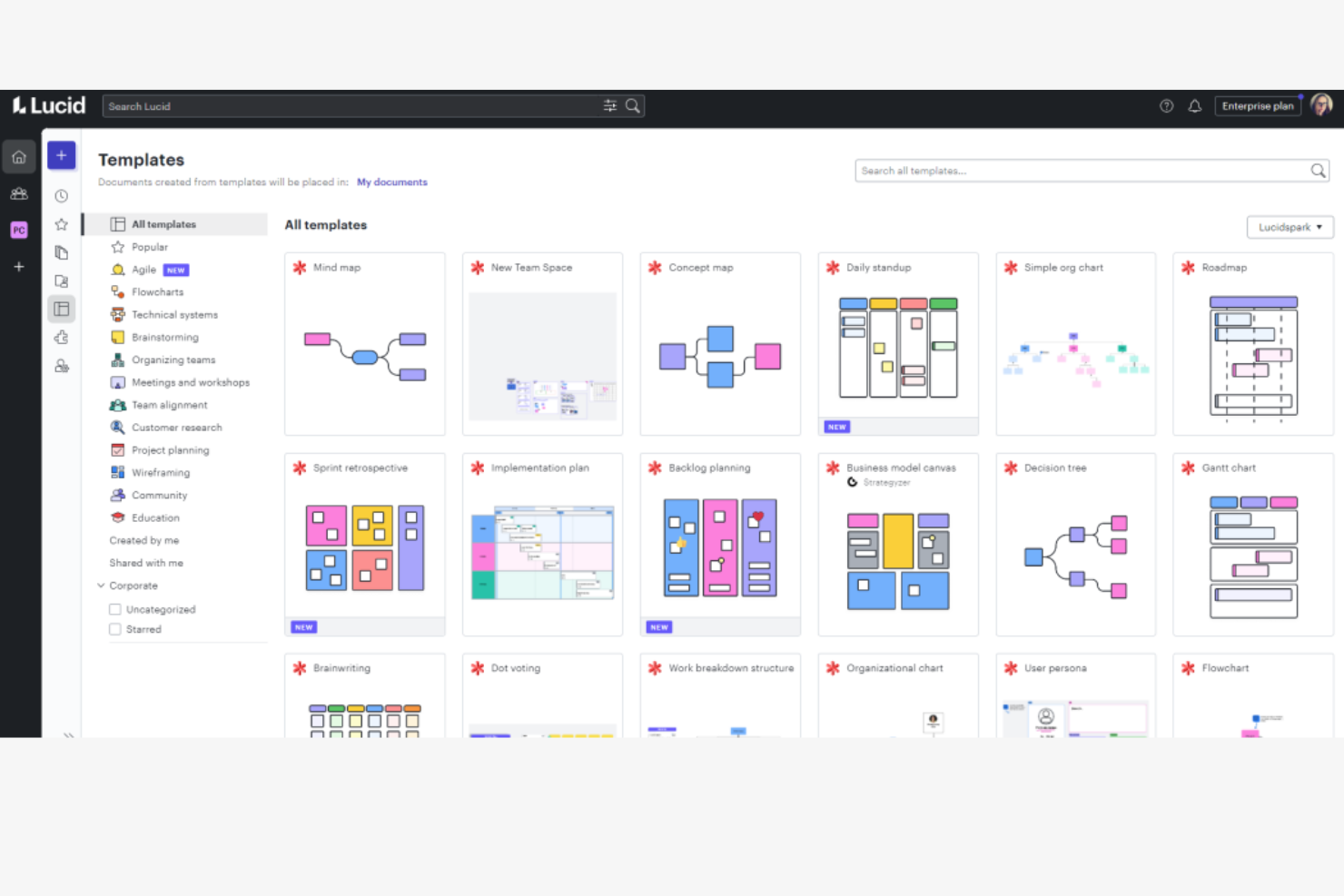
Lucid è una suite di strumenti per aree di lavoro visive che combina diagrammi, lavagne e visualizzazione dei dati in un'unica piattaforma, risultando quindi particolarmente adatta a ingegneri, architetti e analisti aziendali che devono mappare sistemi, processi e strutture organizzative complessi.
A chi è più adatto Lucid?
Lucid è particolarmente adatto ai team tecnici e operativi che necessitano di strumenti strutturati per la creazione di diagrammi, superiori a quelli offerti da una comune area di lavoro su lavagna.
Perché Lucid è una buona alternativa a Miro
Ho incluso Lucid tra le mie scelte principali perché la sua profondità nella creazione di diagrammi va ben oltre ciò che offre la lavagna di Miro. Lucidchart supporta nativamente librerie di forme per diagrammi BPMN, UML, ERD e di rete, permettendo al mio team di creare flussi di processo tecnicamente precisi senza ricorrere a soluzioni alternative. Mi affido anche alla sua funzionalità di collegamento dei dati, che ci consente di connettere dati aggiornati provenienti da fonti esterne direttamente ai diagrammi, così che rimangano accurati con l'evolversi dei processi.
Funzionalità principali di Lucid
- Creazione intelligente di diagrammi: Genera automaticamente diagrammi da fonti di dati importate, come file CSV o app cloud collegate.
- Contenitori intelligenti: Organizza gli elementi dei diagrammi in raggruppamenti dinamici che si aggiornano automaticamente quando il contenuto viene riorganizzato.
- Lavagna Lucidspark: Una lavagna virtuale dedicata alla generazione libera di idee e alla collaborazione di gruppo, separata dall'ambiente strutturato per la creazione di diagrammi di Lucidchart.
- Cronologia delle versioni: Consente di accedere alle versioni precedenti di qualsiasi diagramma o lavagna e di ripristinarle per tenere traccia delle modifiche nel tempo.
Integrazioni di Lucid
Lucid offre oltre 100 integrazioni tramite il suo catalogo, tra cui Confluence, Jira, Google Drive, Google Docs, Slack, Salesforce, Microsoft Teams, Figma, Asana e AWS. Si connette inoltre ad Azure, Google Cloud e BambooHR. Sono disponibili un'API e una piattaforma per sviluppatori per creare integrazioni personalizzate.
Pros and Cons
Pros:
- La creazione avanzata di diagrammi supporta la mappatura dei processi tecnici
- La formattazione condizionale evidenzia visivamente lo stato dei progetti
- La cronologia delle revisioni consente di ripristinare le versioni precedenti dei diagrammi
Cons:
- Strumenti limitati per la creazione di lavagne con schizzi a mano libera
- La collaborazione in tempo reale può rallentare con diagrammi di grandi dimensioni
Ideale per visualizzare i risultati del brainstorming del team
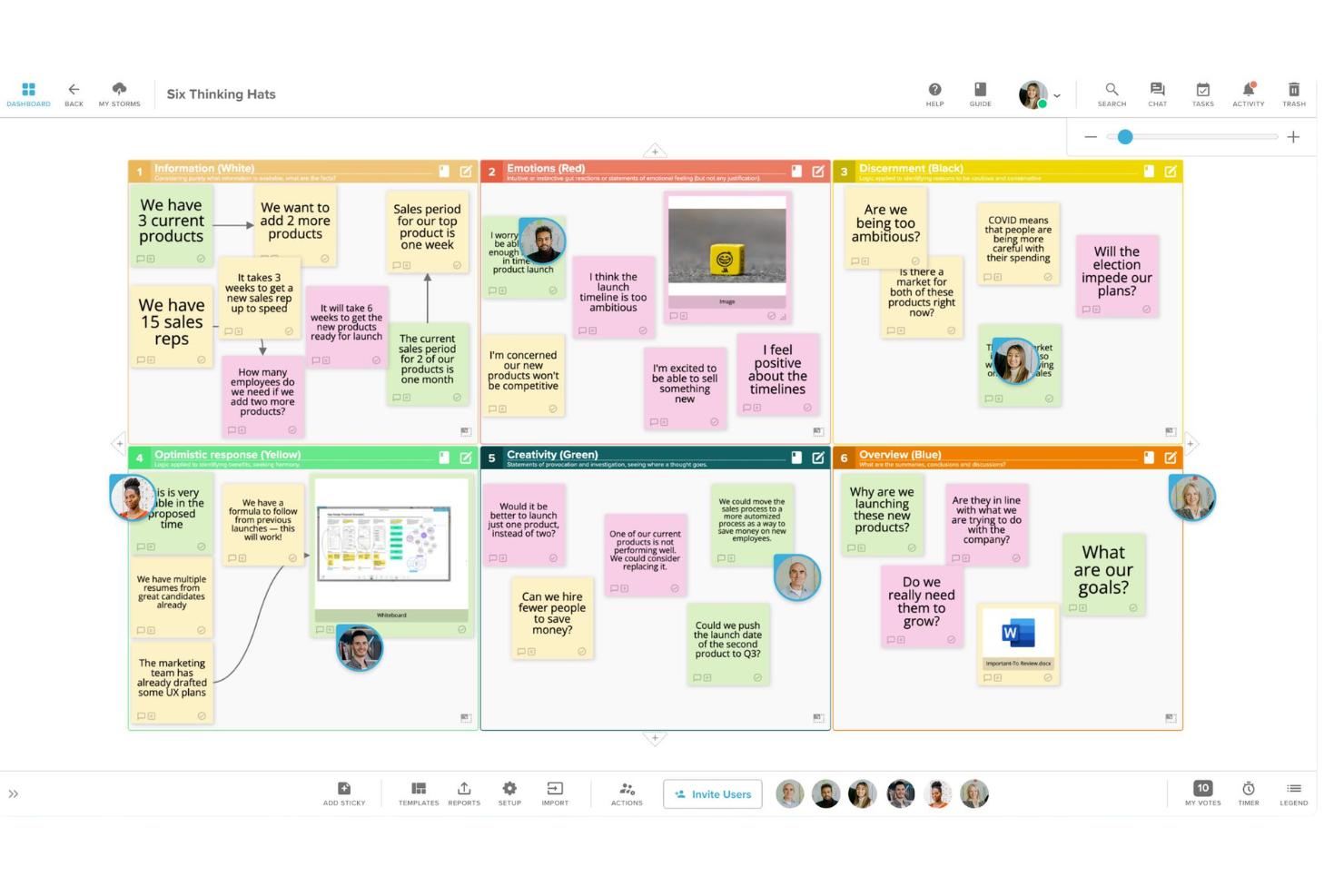
Progettato per trasformare il brainstorming grezzo in risultati organizzati, Stormboard offre ai team uno spazio di lavoro digitale strutturato con note adesive, strumenti di voto e report generati automaticamente che raccolgono ciò che è stato discusso e deciso.
A chi è più adatto Stormboard?
Stormboard è una soluzione adatta a facilitatori e responsabili di team di aziende di medie dimensioni che organizzano workshop ricorrenti e hanno bisogno che i risultati delle sessioni vengano documentati automaticamente.
Perché Stormboard è una buona alternativa a Miro
Ho incluso Stormboard tra le mie migliori scelte perché va oltre la maggior parte degli strumenti di lavagna digitale quando si tratta di raccogliere ciò che è realmente emerso da una sessione. La funzione a cui ricorro più spesso è l'esportazione con un clic in presentazioni modificabili, report sulle attività e analisi in fogli di calcolo, il che significa che i risultati del brainstorming non rimangono confinati alla lavagna. Apprezzo anche gli strumenti integrati per il voto e il raggruppamento, che consentono al mio team di dare priorità alle idee durante la sessione stessa, così da ottenere risultati ordinati per priorità e non soltanto una parete di note adesive.
Funzionalità principali di Stormboard
- Oltre 250 modelli: Scegli da una raccolta di modelli creati appositamente per workshop, retrospettive, pianificazione PI e altro ancora.
- Sotto-sessioni: Inserisci note adesive a forma di scheda indice all'interno di una bacheca principale per creare sessioni a più livelli senza ingombrare la tela principale.
- Sezioni magnetiche: Ordina automaticamente i contenuti delle sezioni in base al numero di voti, ai punti storia o alla data di creazione per individuare subito le priorità.
- Timer integrato: Gestisci attività con tempi prestabiliti direttamente all'interno di una sessione per mantenere le riunioni nei tempi previsti.
Integrazioni di Stormboard
Stormboard offre integrazioni native con Microsoft Teams, Microsoft 365, Google Drive, Jira, Rally, Azure DevOps, Webex, Zoom, Slack, Dropbox e Box. Si connette a Zapier e fornisce un'API per integrazioni personalizzate.
Pros and Cons
Pros:
- Modelli di riunione integrati per sessioni strutturate
- Strumenti di voto e sondaggi per decisioni di gruppo
- Esporta le bacheche in Word, Excel e PDF
Cons:
- Strumenti limitati per il disegno e la creazione di diagrammi
- Nessun accesso offline alle bacheche

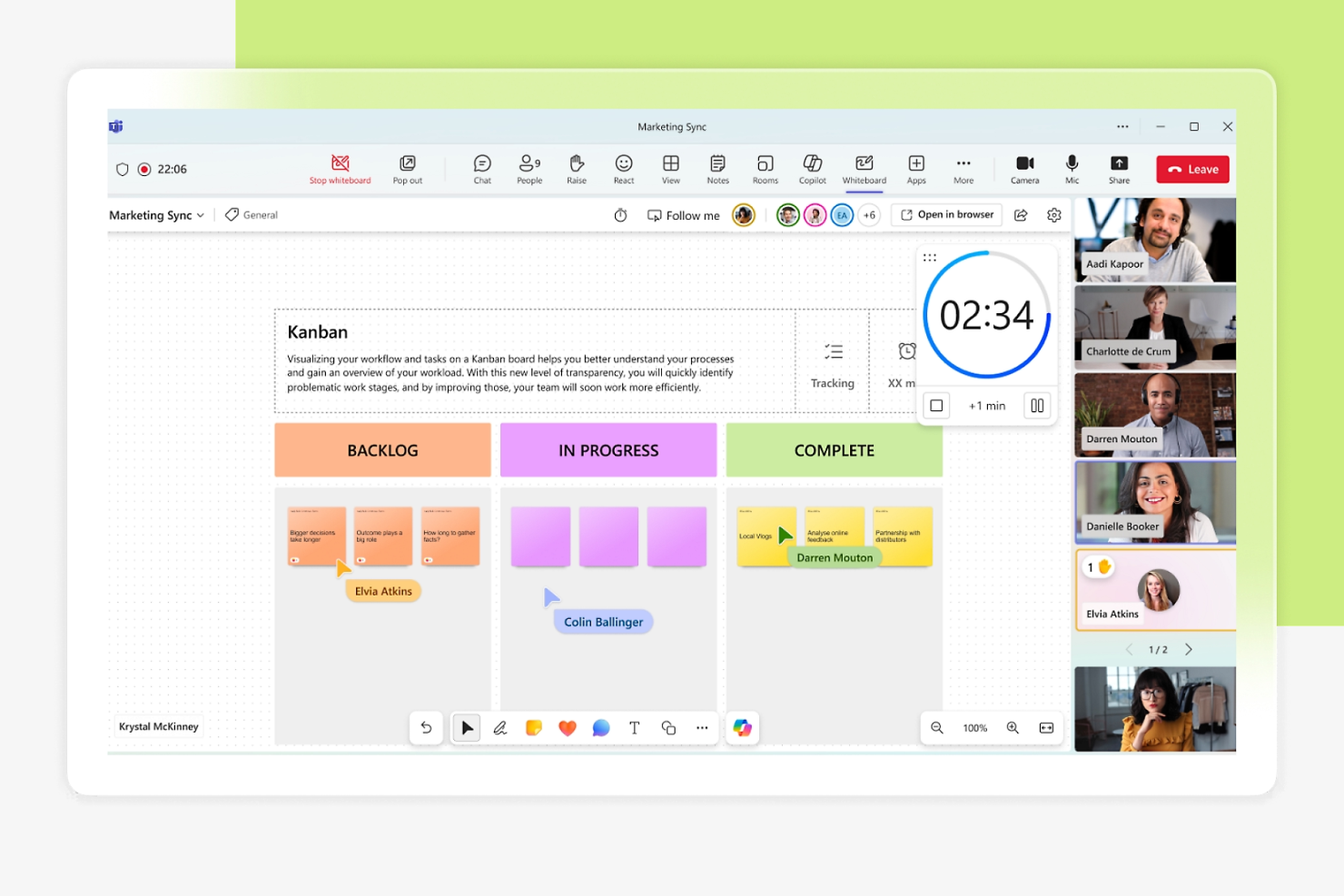
I team che già utilizzano Microsoft 365 troveranno Microsoft Whiteboard una soluzione naturale per schizzi collaborativi, brainstorming e pianificazione visiva direttamente all'interno del loro flusso di lavoro esistente.
Per chi è più adatto Microsoft Whiteboard?
Microsoft Whiteboard è particolarmente indicato per i team e le organizzazioni aziendali che hanno standardizzato Microsoft 365 in tutti i dipartimenti.
Perché Microsoft Whiteboard è una valida alternativa a Miro
Ho inserito Microsoft Whiteboard tra le mie scelte migliori perché è l'unico strumento di whiteboard che vive in modo nativo all'interno di Microsoft 365, senza necessità di accesso o configurazione separata. È abilitato automaticamente per i tenant Microsoft 365 idonei, anche in Teams. Mi affido anche alla sua funzione dei componenti Loop, che si sincronizza tra chat, riunioni, email e documenti in modo che le board restino collegate alle conversazioni in tempo reale. Le annotazioni consentono a tutti i partecipanti di una riunione Teams di segnare i contenuti durante la condivisione dello schermo, con cursori collaborativi che mostrano in tempo reale le modifiche di tutti i partecipanti.
Funzionalità principali di Microsoft Whiteboard
- Note adesive: Aggiungi note adesive digitali colorate alla lavagna per raccogliere e raggruppare idee durante le sessioni dal vivo.
- Inchiostro intelligente: Converte automaticamente le forme disegnate a mano libera in forme geometriche pulite mentre schizzi a mano libera.
- Libreria di template: Accedi a template predefiniti per brainstorming, retrospettive e pianificazione, per iniziare subito senza dover creare da zero una board.
- Modalità segui: Permette ai partecipanti di seguire la visuale del presentatore in tempo reale, mantenendo tutti sulla stessa sezione della lavagna.
Integrazioni di Microsoft Whiteboard
Microsoft Whiteboard si integra nativamente nell'ecosistema Microsoft, inclusi Microsoft Teams, OneDrive, SharePoint e le app Microsoft 365 come Word, Excel e PowerPoint. Supporta inoltre i componenti Loop di Microsoft per sincronizzare i contenuti tra chat, riunioni e documenti. È disponibile un'API Microsoft Graph per la gestione programmata delle risorse della lavagna.
Pros and Cons
Pros:
- Integrazione diretta con le riunioni Microsoft Teams
- Co-authoring in tempo reale con utenti Microsoft 365
- Note adesive e template per una pianificazione strutturata
Cons:
- Formati di esportazione limitati oltre a immagine e PDF
- Nessuno strumento di votazione o sondaggio integrato
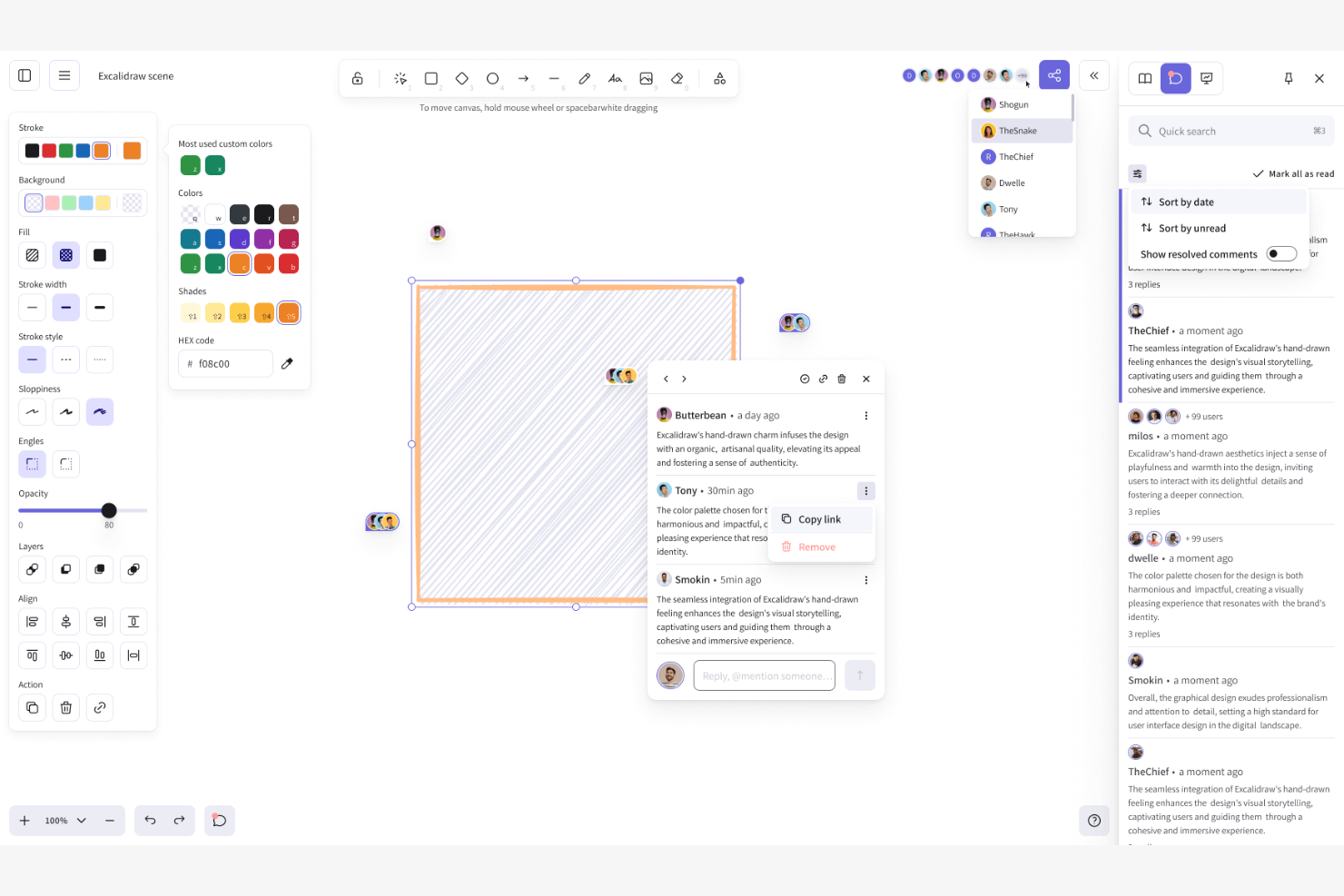
Excalidraw è una lavagna virtuale open source che offre ai team un'estetica disegnata a mano per abbozzare diagrammi, strutture preliminari e idee, rappresentando quindi una scelta naturale per sviluppatori e designer che desiderano un'alternativa leggera e priva di distrazioni agli strumenti per lavagne ricchi di funzionalità.
Per chi è più indicato Excalidraw?
Excalidraw è adatto a piccoli team tecnici e sviluppatori indipendenti che hanno bisogno di uno strumento leggero per gli schizzi, senza il sovraccarico di una piattaforma completa per lavagne collaborative.
Perché Excalidraw è una buona alternativa a Miro
Ho scelto Excalidraw come una delle opzioni migliori perché l'estetica degli schizzi disegnati a mano è davvero unica in questo settore. Ogni forma, freccia ed etichetta viene resa con un aspetto leggermente impreciso che mantiene i diagrammi in una fase esplorativa. Ho utilizzato la tela condivisa in tempo reale insieme alla libreria di forme integrata per abbozzare l'architettura dei sistemi e i flussi degli utenti con il mio team in tempo reale, senza che nessuno si sentisse vincolato a un'impaginazione rifinita troppo presto nel processo.
Funzionalità principali di Excalidraw
- Link condivisibile in sola lettura: Condividi la tua tela con gli utenti tramite un link che concede l'accesso ai contenuti senza autorizzare le modifiche.
- Dal testo al diagramma (IA): Genera diagrammi da un'istruzione testuale utilizzando l'interfaccia di chat IA integrata, senza dover disegnare manualmente.
- Presentazioni basate su riquadri: Organizza le sezioni della tua tela in riquadri e presentale come diapositive direttamente nello strumento.
- Esportazione PNG e SVG: Esporta i tuoi disegni in formato PNG, SVG o negli appunti per utilizzarli in documenti, specifiche o passaggi di consegne di progettazione.
Integrazioni di Excalidraw
Excalidraw può essere incorporato in Notion ed è disponibile come macro per Confluence tramite Atlassian Marketplace. Offre inoltre un'integrazione nativa con Webex Meetings per la collaborazione durante le chiamate. Excalidraw Plus offre un'API RESTful (attualmente in beta pubblica) per gestire programmaticamente scene, raccolte e spazi di lavoro.
Pros and Cons
Pros:
- Lo stile disegnato a mano favorisce le sessioni informali di brainstorming
- Open source con possibilità di auto-gestione disponibile
- Collaborazione in tempo reale senza dover creare un account
Cons:
- Limita i modelli alle opzioni create dagli utenti
- Manca il salvataggio automatico sul cloud per le lavagne gratuite

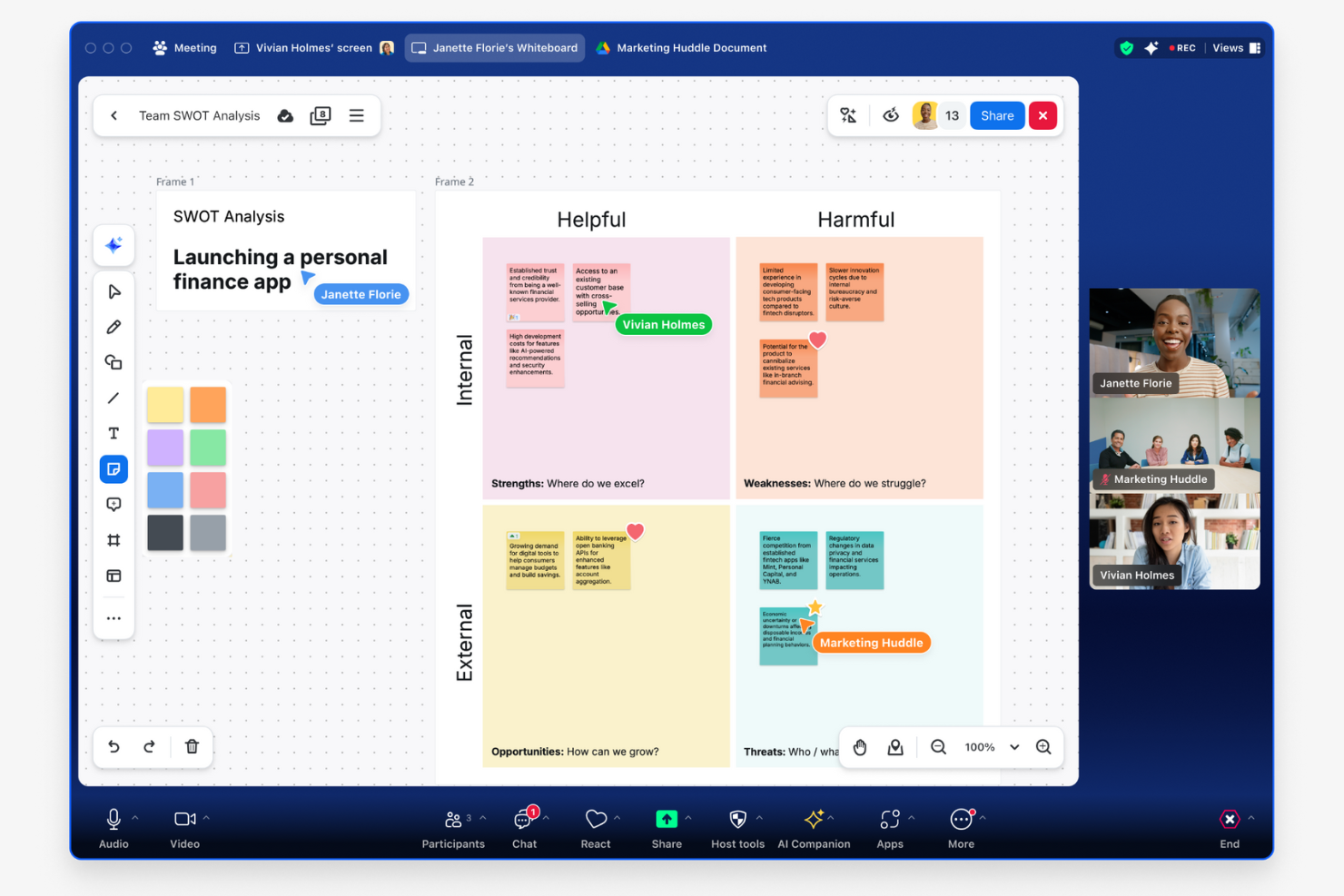
Zoom Whiteboard è uno strumento di collaborazione visiva integrato nella piattaforma Zoom che consente ai team di abbozzare, fare brainstorming e presentare idee su una tela condivisa durante o al di fuori delle riunioni video.
Per chi è più adatto Zoom Whiteboard?
Zoom Whiteboard è particolarmente adatto ai team che organizzano già le riunioni su Zoom e desiderano avere una lavagna integrata nel flusso di lavoro esistente.
Perché Zoom Whiteboard è una buona alternativa a Miro
Ho incluso Zoom Whiteboard tra le mie scelte principali perché è l'unico strumento di lavagna che si avvia direttamente all'interno di una riunione Zoom attiva con un clic, senza dover cambiare scheda o condividere link separati. Mi piace il fatto che le lavagne rimangano disponibili dopo la fine della chiamata, così la tela resta modificabile e condivisibile come documento dinamico. I connettori intelligenti mi consentono di creare diagrammi di flusso e diagrammi durante la riunione, mantenendo il lavoro visivo legato alla conversazione in tempo reale.
Funzionalità principali di Zoom Whiteboard
- Libreria di modelli: Accedi a modelli predefiniti per brainstorming, pianificazione e retrospettive, così puoi iniziare le sessioni senza creare una lavagna da zero.
- Note adesive: Aggiungi, assegna colori e raggruppa note adesive digitali direttamente sulla tela per organizzare le idee durante le sessioni collaborative.
- Evidenziazione del relatore: Fissa la tua visualizzazione in modo che tutti i partecipanti seguano la stessa sezione della tela durante le presentazioni strutturate.
- AI Companion per le lavagne: Genera mappe mentali, riepiloga le note adesive e crea contenuti sulla tela utilizzando AI Companion integrato di Zoom.
Integrazioni di Zoom Whiteboard
Zoom Whiteboard si connette agli strumenti di gestione delle attività di terze parti direttamente all'interno della tela della lavagna, tra cui Jira, Asana e Azure DevOps, per mantenere allineati i dati dei progetti senza cambiare contesto. Funziona inoltre all'interno dell'ecosistema Zoom, inclusi Zoom Meetings, Rooms, Zoom Chat, Mail, Calendar e Docs. Sono disponibili un'API e webhook per integrazioni personalizzate e Zoom si connette a Zapier.
Pros and Cons
Pros:
- Le lavagne si avviano istantaneamente durante le riunioni Zoom
- Le lavagne persistenti salvano i contenuti tra una sessione e l'altra
- Supporta disegni, note adesive e modelli
Cons:
- Accesso offline limitato alle lavagne
- Meno strumenti avanzati per la creazione di diagrammi rispetto a Miro

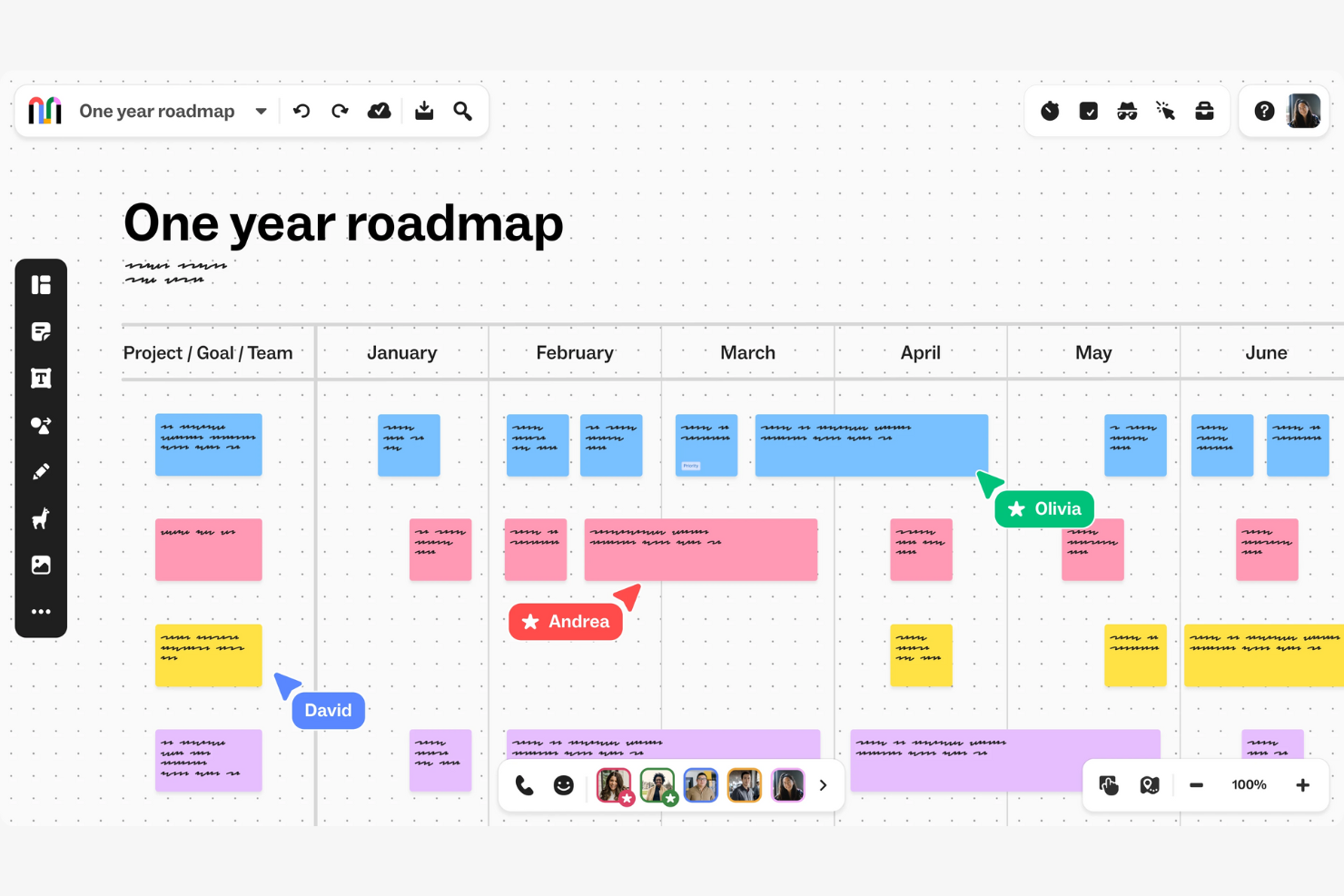
Mural è una piattaforma di collaborazione visiva pensata per grandi organizzazioni che necessitano di modalità strutturate e scalabili per condurre sessioni di design thinking, cerimonie agili e workshop trasversali tra team distribuiti.
Per chi è più adatto Mural?
Mural è particolarmente indicato per i team aziendali nei settori della consulenza, tecnologia e servizi finanziari che organizzano con frequenza workshop cross-funzionali su larga scala.
Perché Mural è una valida alternativa a Miro
Ho incluso Mural tra le mie scelte migliori perché gestisce la complessità organizzativa insita nella collaborazione su scala aziendale. Faccio affidamento sulla funzione Rooms per separare gli spazi di lavoro per team, cliente o progetto, mantenendo i contenuti organizzati all'interno di una grande organizzazione. Il provisioning SCIM e il supporto SSO facilitano la gestione degli accessi tra centinaia di utenti, senza lavoro manuale che rallenti i processi.
Funzionalità principali di Mural
- Potenti strumenti di facilitazione: Un toolkit integrato con timer, modalità privata, richiamo partecipanti e super lock per condurre workshop strutturati senza perdere il controllo della stanza.
- Pubblicazione di template personalizzati: Crea, salva e pubblica modelli in tutto lo spazio di lavoro così che i team possano riutilizzare metodi collaudati su larga scala.
- Funzione Outline: Guida i partecipanti passo dopo passo durante una sessione rivelando i contenuti in modo progressivo e mantenendo la concentrazione dove serve.
- Permessi flessibili sulla lavagna: Imposta accessi in sola visualizzazione, modifica o di livello facilitatore per ogni mural e controlla esattamente chi può cambiare cosa durante una sessione.
Integrazioni Mural
Mural offre oltre 40 integrazioni native, tra cui Slack, Jira, Asana, Confluence, Figma, GitHub, Salesforce, Zoom, Webex e una profonda integrazione nell'ecosistema Microsoft con Microsoft Teams, Microsoft 365, Microsoft Entra ID e Microsoft Copilot. Si collega tramite Zapier e offre una API per integrazioni personalizzate.
Pros and Cons
Pros:
- La modalità privata supporta sessioni di brainstorming riservate
- Più facilitatori possono gestire una singola lavagna
- Il pannello Outline aiuta ad organizzare workshop complessi
Cons:
- Manca la creazione di diagrammi con relazioni dati complesse
- La qualità della lavagna esportata può essere incostante
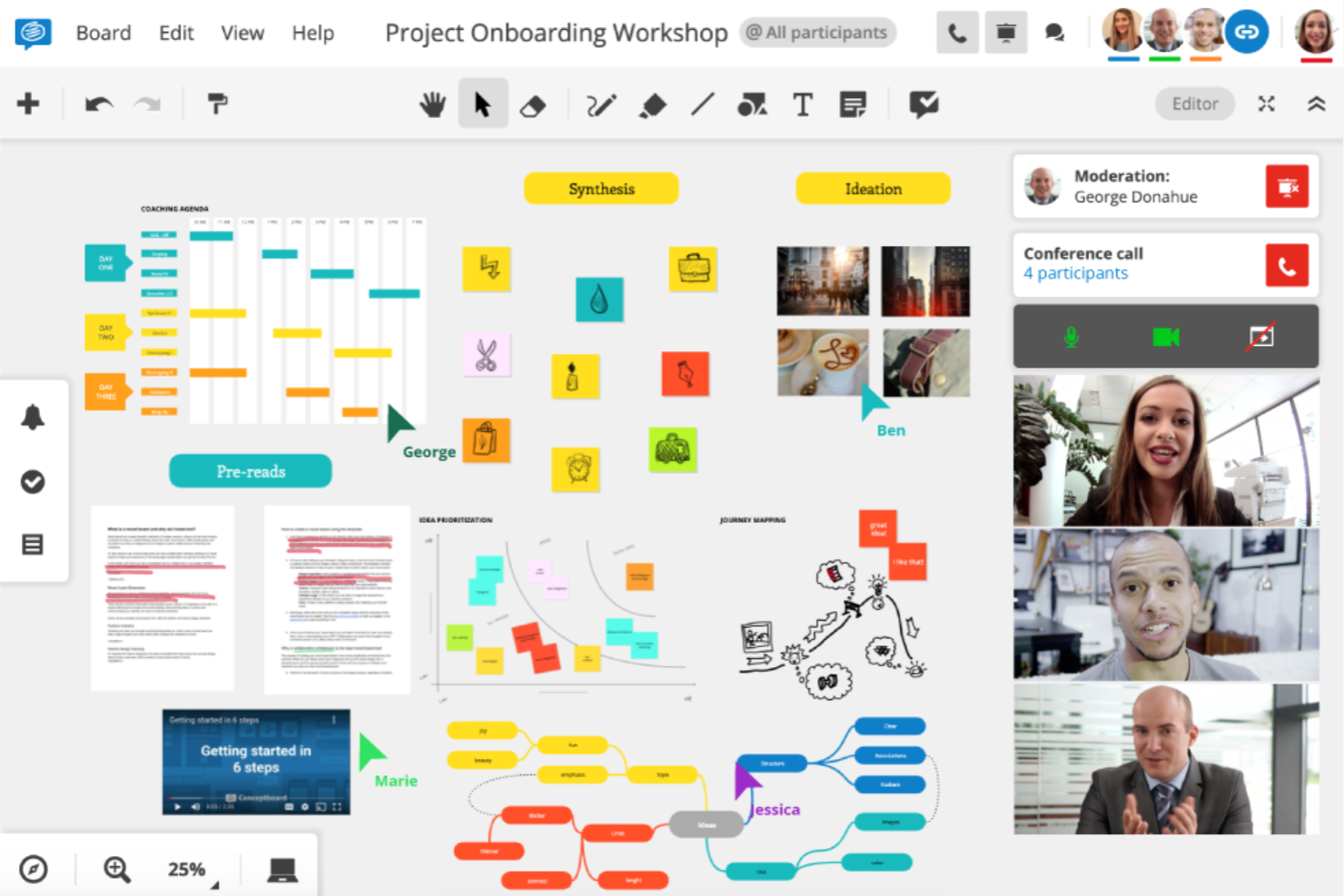
Conceptboard è una lavagna online che combina il brainstorming visivo con la gestione integrata delle attività, consentendo ai team distribuiti di passare dalla generazione di idee all'esecuzione dei progetti senza cambiare strumento.
Per chi è più adatto Conceptboard?
Conceptboard è una soluzione particolarmente adatta ai team creativi e di progettazione di aziende di medie dimensioni che necessitano di uno spazio visivo condiviso per la revisione strutturata dei progetti e la raccolta di feedback.
Perché Conceptboard è una buona alternativa a Miro
Ho incluso Conceptboard tra le mie scelte principali perché è uno dei pochi strumenti di lavagna progettati specificamente per flussi di lavoro strutturati di revisione dei progetti. Il sistema di commenti e annotazioni consente al mio team di associare feedback organizzati in discussioni direttamente ai progetti o ai documenti sulla tela, così i cicli di revisione rimangono organizzati in base al contesto anziché essere dispersi nelle email. Apprezzo anche il fatto che il tracciamento dei cursori mostri esattamente dove si trova ogni collaboratore sulla lavagna in tempo reale, evitando che le sessioni di revisione asincrone risultino scollegate.
Funzionalità principali di Conceptboard
- Bacheca delle attività Kanban: Crea strutture di attività in stile Kanban direttamente sulla tela per gestire e monitorare il lavoro senza abbandonare la lavagna.
- Tela infinita con accesso tramite browser: Lavora su uno spazio visivo illimitato da qualsiasi browser, senza dover installare nulla su alcun dispositivo.
- Raccolta di modelli: Avvia workshop, retrospettive e sessioni di pianificazione utilizzando modelli predefiniti anziché una lavagna vuota.
- Accesso degli ospiti tramite link: Invita collaboratori esterni a una lavagna utilizzando un link condivisibile, senza che i partecipanti debbano creare un account.
Integrazioni di Conceptboard
Conceptboard offre un numero più limitato di integrazioni native rispetto a strumenti come Miro, tra cui Microsoft Teams, Jira, Azure DevOps, Webex, Confluence, Google Drive, OneDrive e Dropbox.
Pros and Cons
Pros:
- I cursori in tempo reale mostrano l'attività dei membri del team
- I commenti organizzati in discussioni supportano discussioni dettagliate sui progetti
- La tela infinita gestisce lavagne grandi e complesse
Cons:
- Integrazioni limitate rispetto a Miro
- Nessuna funzione di videoconferenza integrata
Klaxoon
Ideale per il coinvolgimento interattivo nelle riunioni
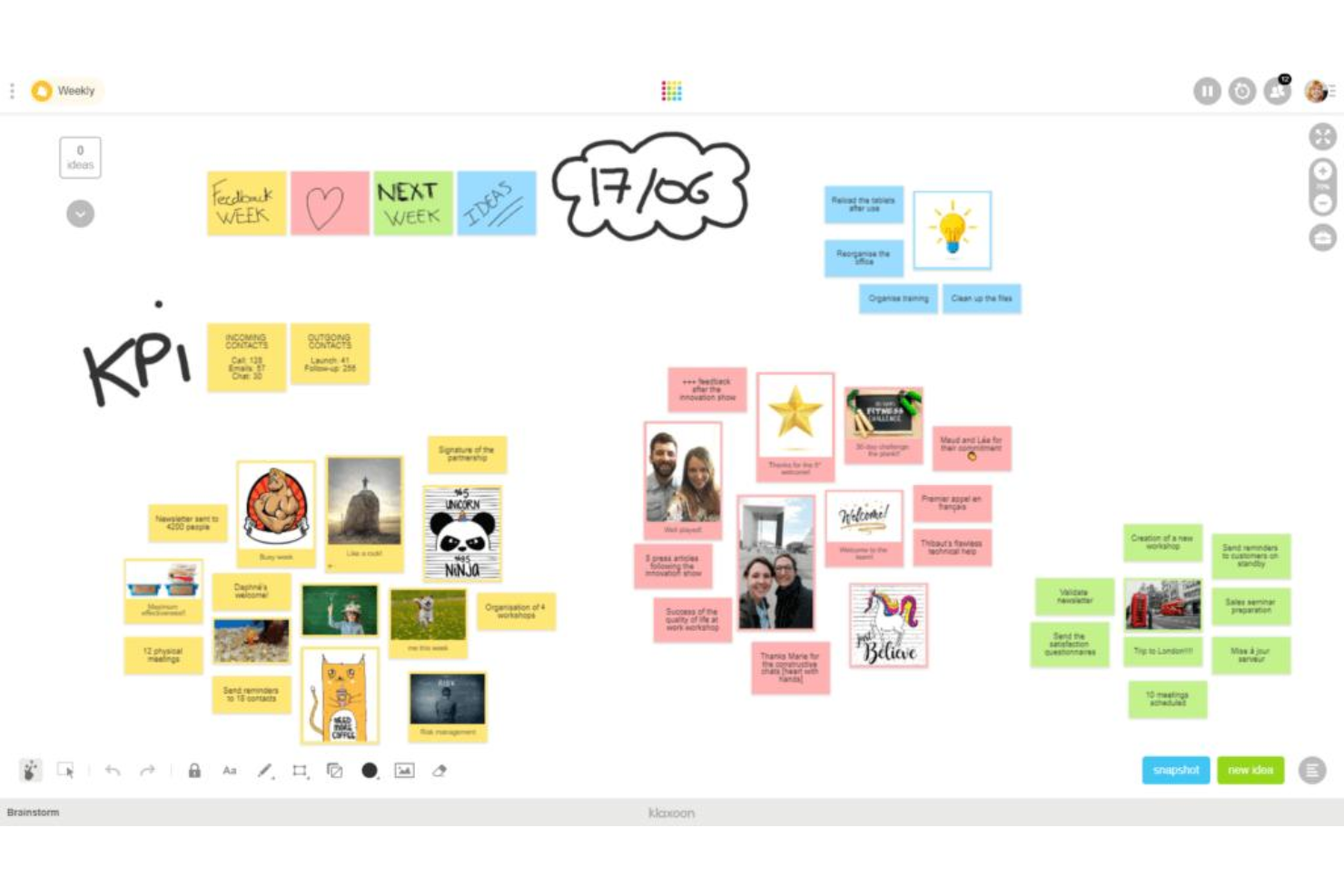
Klaxoon è una piattaforma per la collaborazione visiva e la facilitazione di riunioni che combina lavagne interattive, sondaggi, quiz e organizzazione delle idee assistita dall'IA per aiutare i team a svolgere workshop, retrospettive e sessioni di formazione più coinvolgenti.
Per chi è ideale Klaxoon?
Klaxoon è particolarmente indicato per team di formazione e sviluppo, facilitatori e professionisti HR che organizzano regolarmente workshop strutturati, sessioni di formazione o riunioni con grandi gruppi.
Perché Klaxoon è una valida alternativa a Miro
Ho scelto Klaxoon perché va oltre la classica lavagna digitale, integrando direttamente il coinvolgimento dei partecipanti nell'esperienza della riunione. In particolare, apprezzo i sondaggi, i quiz e le funzionalità live Q&A integrate, che consentono a tutti i partecipanti di contribuire in tempo reale, non solo alle voci più forti della stanza. La dashboard delle statistiche di coinvolgimento in tempo reale è una funzione che non ho visto altrove: traccia i livelli di partecipazione dei singoli utenti, così i facilitatori possono individuare chi si sta disimpegnando e intervenire subito.
Funzionalità principali di Klaxoon
- Organizzazione delle idee assistita dall'IA: riassumi, classifica e traduci i post-it e i contenuti della lavagna in gruppi organizzati con un solo clic.
- Modelli di workshop pronti all'uso: accedi a template preimpostati per retrospettive sprint, kick-off di progetto, brainstorming e altro ancora, tutti basati su metodi consolidati.
- Mappe mentali e roadmap visive: crea mappe mentali visuali e roadmap di progetto direttamente sulla lavagna per pianificare e allineare il team su priorità condivise.
- Generazione di piani d'azione: trasforma le idee raccolte sulle lavagne direttamente in piani d'azione o liste di attività, senza passare a un altro strumento di gestione progetti.
Integrazioni Klaxoon
Klaxoon offre integrazioni native con Microsoft Teams, OneDrive, Entra ID, MS Intune, Google Drive, Google Calendar, Google Docs, Jira, Wrike, Confluence, Adobe CC, Okta, Dropbox e Moodle. È disponibile su Zapier e fornisce un'API per integrazioni personalizzate.
Pros and Cons
Pros:
- Raggruppamento intelligente delle idee durante i brainstorming
- Videochiamata integrata direttamente sulla lavagna
- Gli ospiti accedono alle lavagne senza account
Cons:
- Configurazioni dettagliate delle lavagne diventano rapidamente complesse
- Funzionalità sovrapponibili a Zoom e Teams
Altre alternative a Miro
Ecco alcune alternative aggiuntive a Miro che non sono state incluse nel mio elenco, ma che vale comunque la pena valutare:
- Ziteboard
Ideale per la lavagna digitale leggera basata sul browser
- Canva Whiteboard
Ideale per modelli di layout visivo pronti all'uso


Come valuto le alternative a Miro
Per i team CX che organizzano laboratori di mappatura del percorso o sintetizzano ricerche VoC, divido la mia valutazione in requisiti di base che ogni strumento deve soddisfare e fattori distintivi che separano le soluzioni migliori.
Funzionalità fondamentali (requisiti essenziali per questo elenco)
Quando seleziono gli strumenti per il mio elenco, assegno a ciascuno un punteggio su una scala da 0 (non offre la funzionalità) a 5 (eccelle in quest'area) per ogni funzionalità fondamentale elencata di seguito. Quindi calcolo il punteggio totale dello strumento e lo converto in percentuale. Ogni strumento deve raggiungere un punteggio totale minimo del 65% per essere preso in considerazione.
- Area di lavoro visiva infinita: cerco uno spazio di lavoro senza limiti e zoomabile, in cui i team CX possano disporre mappe complete del percorso dall'inizio alla fine senza imbattersi nei limiti delle pagine o in problemi di prestazioni.
- Collaborazione in tempo reale: più facilitatori e parti interessate devono poter modificare simultaneamente una bacheca con cursori in tempo reale, commenti e indicatori di presenza durante i laboratori.
- Modelli pertinenti per il CX: verifico se lo strumento include modelli predefiniti per mappe del percorso, mappe dell'empatia, profili cliente e blueprint dei servizi, anziché soltanto bacheche generiche per il brainstorming.
- Note adesive e diagrammi: la piattaforma deve offrire note adesive, forme, connettori e disegno libero solidi, affinché i team possano raggruppare i risultati della ricerca e rappresentare graficamente i flussi dei punti di contatto.
- Strumenti per la facilitazione dei laboratori: funzionalità come votazioni, timer, modalità privata e navigazione guidata tra i riquadri sono importanti perché determinano quanto efficacemente si svolga realmente uno sprint di progettazione o un laboratorio CX da remoto.
- Integrazioni ed esportazione: valuto i collegamenti con gli strumenti che i team CX utilizzano già quotidianamente—Slack, Zoom, Jira, Figma—oltre alle opzioni di esportazione come PDF e PNG per condividere i risultati con la dirigenza.
Dopo aver stilato un elenco di strumenti che soddisfano questi criteri, considero ciò che distingue ciascuna piattaforma.
Fattori distintivi (ciò che differenzia i fornitori)
Ecco come confronto e metto a confronto i diversi fornitori:
Funzionalità di spicco
La sintesi basata sull'intelligenza artificiale è un importante fattore distintivo: cerco strumenti che raggruppino automaticamente le note adesive e facciano emergere i temi, risparmiando ore di organizzazione dopo un laboratorio di grandi dimensioni. Sono importanti anche le funzionalità avanzate di mappatura del percorso, come le corsie e le sovrapposizioni della percezione emotiva, perché consentono ai team di visualizzare i picchi e i cali emotivi attraverso i punti di contatto. Valuto anche le modalità di presentazione, poiché la possibilità di trasformare una bacheca di lavoro in una presentazione guidata e curata rende molto più semplice condividere i risultati CX con la dirigenza.
Oltre le funzionalità
Le certificazioni di sicurezza e conformità come SOC 2 e GDPR sono importanti quando le bacheche contengono dati reali dei clienti provenienti da sessioni di ricerca o programmi VoC. Valuto anche la scalabilità: verifico se una piattaforma resta reattiva quando più di 50 partecipanti si uniscono a un laboratorio dal vivo su una bacheca piena di centinaia di note adesive. Anche la struttura dei prezzi merita attenzione, in particolare il modo in cui un fornitore gestisce le licenze per editor e visualizzatori, poiché i laboratori CX coinvolgono spesso molti collaboratori ospiti che necessitano soltanto di un accesso temporaneo.
Perché cercare un'alternativa a Miro?
Sebbene Miro sia una buona scelta come strumento di gestione visiva delle attività, ci sono diversi motivi per cui alcuni utenti cercano soluzioni alternative. Potresti cercare un'alternativa a Miro perché…
- Hai bisogno di uno strumento che non richieda accesso o registrazione
- Il tuo team desidera integrazioni più avanzate con altri software per facilitare una migliore collaborazione tra i reparti
- Hai bisogno di accedere offline alle tue lavagne e ai tuoi documenti
- La tua organizzazione ha requisiti rigorosi in materia di residenza dei dati
- Preferisci un'interfaccia più semplice, con meno funzionalità, una curva di apprendimento più breve e una maggiore facilità d'uso
Se ti riconosci in una di queste situazioni, sei nel posto giusto. Il mio elenco include diverse opzioni di strumenti visivi per la gestione delle attività, più adatte a startup e team remoti che affrontano queste difficoltà con Miro e cercano soluzioni alternative.
Funzionalità principali di Miro
Ecco alcune delle funzionalità principali di Miro, per aiutarti a confrontare ciò che offrono le soluzioni alternative:
- Lavagna collaborativa: Più utenti possono disegnare, aggiungere note e modificare i contenuti in tempo reale per attività di brainstorming o pianificazione.
- Libreria di modelli: Accedi a un'ampia selezione di modelli per bacheche agili, sprint di progettazione, mappatura delle storie utente e molto altro.
- Tela infinita: Utilizza uno spazio di lavoro senza limiti che si espande man mano che crescono idee, diagrammi e flussi di lavoro.
- Videochat integrata: Avvia riunioni video direttamente all'interno della tua lavagna per discutere in tempo reale di modifiche o idee.
- Note adesive e forme: Trascina e rilascia elementi visivi come note adesive, frecce e forme per delineare flussi di lavoro e strategie.
- Modalità presentazione: Guida i partecipanti attraverso le bacheche passo dopo passo per workshop, riunioni o aggiornamenti del team.
- Opzioni di esportazione e condivisione: Scarica le bacheche come immagini, PDF o presentazioni e controlla l'accesso per i membri del team e gli ospiti.
- Integrazioni di terze parti: Collega Miro a piattaforme come Slack, Jira, Google Drive, Microsoft Teams e altre ancora per mantenere il lavoro sincronizzato.
- Commenti e @menzioni: Aggiungi feedback e tagga i colleghi per mantenere organizzate le conversazioni e collegarle al contesto dei contenuti della bacheca.
- Controlli di accesso e autorizzazioni: Definisci chi può visualizzare, modificare o commentare le bacheche per una collaborazione sicura con utenti interni ed esterni.