

10 opzioni di software per il punteggio di salute dei clienti da considerare nel 2026

Selezione di software per il punteggio di salute dei clienti


Il software per il punteggio di salute dei clienti monitora e analizza il coinvolgimento dei clienti, l’utilizzo del prodotto e la soddisfazione per aiutare il tuo team a identificare i rischi e le opportunità di crescita. Se stai cercando il miglior software per il punteggio di salute dei clienti, probabilmente devi prevedere il tasso di abbandono, dare priorità alle attività di contatto e fornire un supporto proattivo, senza affidarti a supposizioni o dati frammentati.
Questo elenco ti aiuterà a confrontare gli strumenti leader, comprendere le loro caratteristiche distintive e scegliere la soluzione giusta per monitorare il benessere dei clienti e favorire la fidelizzazione nel 2026.
Perché fidarsi dei nostri consigli sui software
Il nostro team testa e recensisce software dal 2012. In quanto leader CX noi stessi, sappiamo quanto sia difficile — e importante — scegliere il software giusto.
Per questa guida, abbiamo valutato gli strumenti attraverso test pratici e ricerche indipendenti, assegnando un punteggio agli strumenti in base ai nostri criteri di selezione.
Le nostre recensioni riflettono il nostro giudizio editoriale umano, non un discorso di vendita.
Riepilogo dei migliori software per il punteggio di salute dei clienti
Questa tabella comparativa riassume i dettagli dei prezzi delle mie migliori selezioni di software per il punteggio di salute dei clienti, per aiutarti a trovare quello più adatto al tuo budget e alle esigenze della tua azienda.
| Tool | Best For | Trial Info | Price | ||
|---|---|---|---|---|---|
| 1 | Ideale per la valutazione tramite IA di rischio abbandono e potenziale di crescita | Prova gratuita di 7 giorni + demo gratuita disponibile | A partire da $199/mese (fatturato annualmente) | Website | |
| 2 | Ideale per avvisi di rischio automatizzati | Demo gratuita disponibile | Prezzo su richiesta | Website | |
| 3 | Ideale per il monitoraggio in tempo reale degli account | Demo gratuita disponibile | Prezzi su richiesta | Website | |
| 4 | Ideale per l'aggregazione di dati da più fonti | Demo gratuita disponibile | Prezzi su richiesta | Website | |
| 5 | Ideale per il rilevamento precoce dell’abbandono | Demo gratuita disponibile | Da $59/postazione/mese (fatturazione annuale) | Website | |
| 6 | Ideale per piccole imprese | Prova gratuita di 14 giorni | Da $49/mese | Website | |
| 7 | Ideale per integrazioni con flussi di lavoro SaaS | Demo gratuita disponibile | Prezzo su richiesta | Website | |
| 8 | Ideale per metriche di salute personalizzabili | Demo gratuita disponibile | Prezzo su richiesta | Website | |
| 9 | Ideale per le funzionalità di previsione dei rinnovi | Demo gratuita disponibile | Prezzo su richiesta | Website | |
| 10 | Ideale per team di gestione dei key account | Demo gratuita disponibile | Prezzi su richiesta | Website |
Recensioni dei software per il punteggio di salute dei clienti
Di seguito trovi i miei riepiloghi dettagliati dei software per il punteggio di salute dei clienti inclusi nella mia selezione. Le mie recensioni offrono una panoramica dettagliata delle caratteristiche, dei casi d’uso migliori e delle integrazioni di ciascuna piattaforma, per aiutarti a trovare quella più adatta alle tue esigenze.

Ideale per la valutazione tramite IA di rischio abbandono e potenziale di crescita
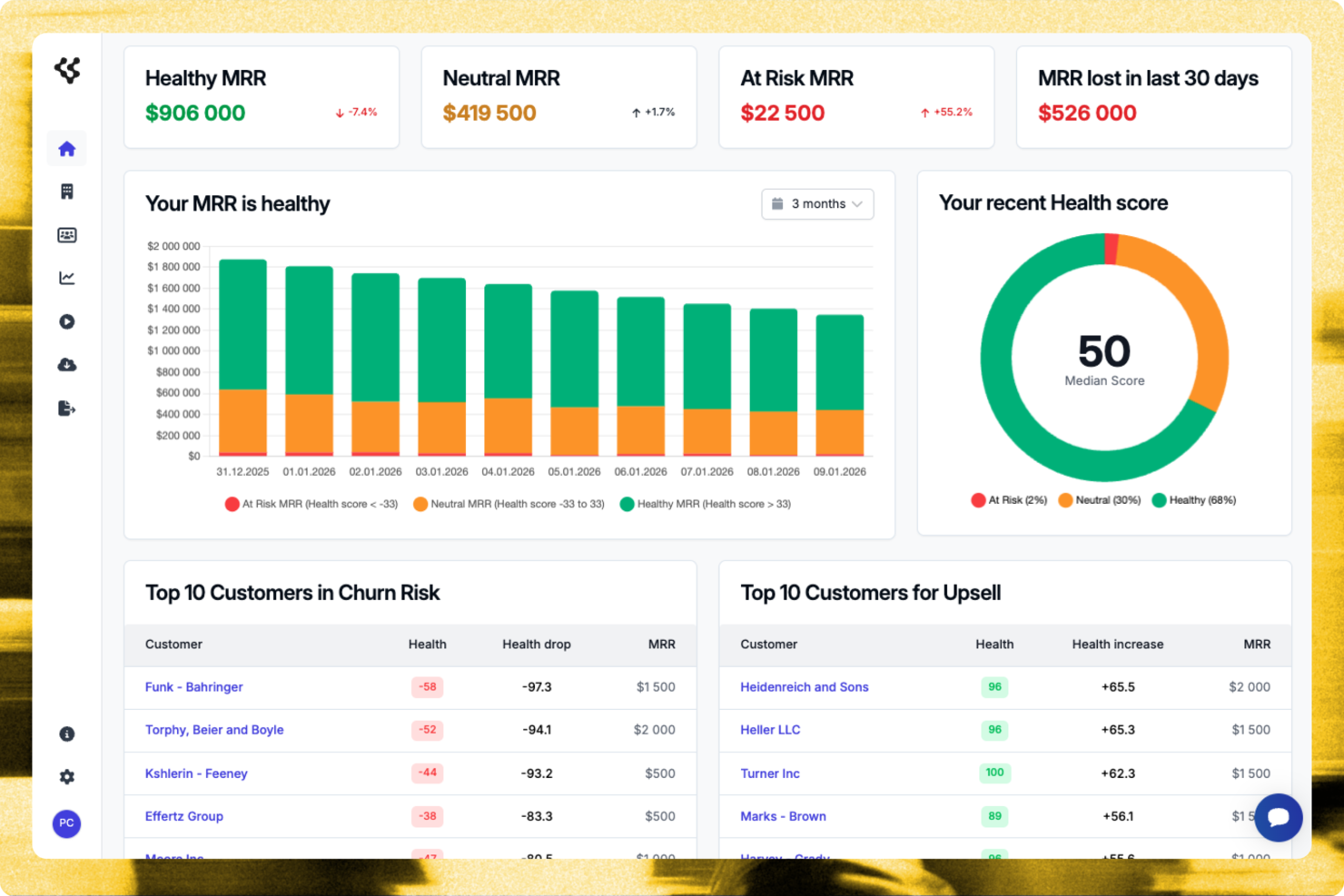
Customerscore.io è una piattaforma di valutazione della salute del cliente basata sull’intelligenza artificiale, pensata per i team SaaS. Analizza i dati dei clienti per valutare gli account a rischio di abbandono e con potenziale di crescita, spiega i fattori dietro ogni punteggio e aiuta a dare priorità ai clienti che necessitano di attenzione o sono pronti per espandersi.
Per chi è ideale Customerscore.io?
Customerscore.io è adatto ai team SaaS di customer success che desiderano valutazioni di rischio abbandono ed espansione guidate dall’IA, con spiegazioni dettagliate per dare priorità al coinvolgimento dei clienti.
Perché ho scelto Customerscore.io
Ho scelto Customerscore.io perché aiuta i team a dare priorità agli account corretti con punteggi di rischio abbandono e crescita basati sull’IA, invece di affidarsi a report costruiti manualmente. Ogni account riceve un punteggio aggiornato in tempo reale, con i fattori che lo determinano, facilitando la comprensione dei motivi per cui un cliente è a rischio o pronto per espandersi e permettendo di agire velocemente.
Funzionalità principali di Customerscore.io
- Punteggio rischio abbandono AI: Individua gli account con alta probabilità di abbandono tramite analisi della salute del cliente basata sull’IA.
- Punteggio espansione AI: Evidenzia gli account con alto potenziale di crescita in base ai comportamenti e agli indicatori di salute dei clienti.
- Individuazione automatica dei rischi: Spiega i fattori chiave che contribuiscono a ciascun punteggio di rischio abbandono o upsell per supportare decisioni rapide.
- Agente AI conversazionale: Permette di porre domande sulla salute dei clienti, sul rischio di abbandono e sulle opportunità di crescita utilizzando il linguaggio naturale.
Integrazioni di Customerscore.io
API nativa e webhooks, oltre al supporto per n8n. Altre integrazioni native non sono pubblicamente verificate.
Pros and Cons
Pros:
- Supporta l’automazione dei flussi di lavoro tramite API, webhooks e n8n
- Evidenzia automaticamente gli account a rischio e pronti per l’espansione
- Spiega i fattori alla base di ogni punteggio di rischio abbandono e crescita
Cons:
- La profondità dell’integrazione con i CRM potrebbe non eguagliare le piattaforme enterprise più grandi
- Meno orientato all’automazione avanzata di playbook per il customer success

Custify
Ideale per avvisi di rischio automatizzati
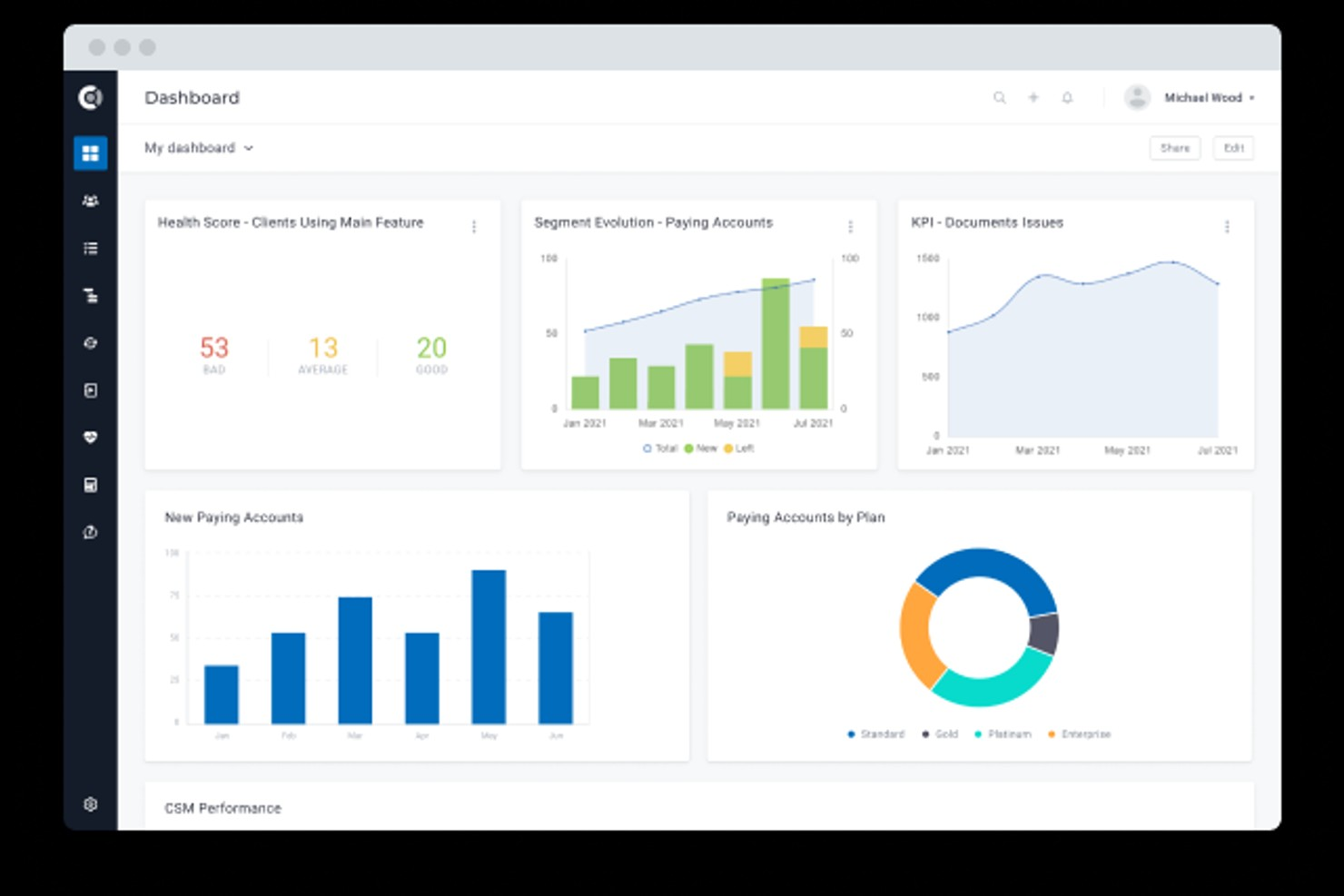
Custify è una piattaforma di customer success progettata per aziende SaaS che desiderano monitorare e migliorare la salute dei clienti. È ideale per i team che cercano approfondimenti automatizzati e una gestione proattiva delle relazioni con i clienti. Con Custify, puoi centralizzare i dati dei clienti e identificare i rischi prima che incidano sulla fidelizzazione.
A chi è rivolto Custify?
Customer success manager e account manager di aziende SaaS di piccole e medie dimensioni in Nord America ed Europa che automatizzano gli avvisi di rischio e il monitoraggio dell'engagement.
Perché ho scelto Custify
Ciò che distingue Custify è la sua attenzione sugli avvisi di rischio automatici che aiutano i team di customer success ad agire prima che i problemi si aggravino. Ho scelto Custify perché permette di impostare trigger personalizzati sui punteggi di salute che notificano automaticamente il team quando il comportamento di un cliente segnala un rischio di abbandono o un calo dell'engagement. La piattaforma fornisce anche una timeline degli eventi di rischio e delle azioni consigliate, così puoi dare la priorità rapidamente agli interventi. Questo approccio è particolarmente utile per le aziende SaaS che devono gestire un ampio portafoglio e non possono permettersi di perdere segnali di allarme precoce.
Caratteristiche principali di Custify
Altre funzionalità di Custify che supportano il punteggio di salute dei clienti includono:
- Modellazione personalizzata del punteggio di salute: Crea e adatta formule di punteggio di salute usando i tuoi dati e la tua logica.
- Segmentazione dei clienti: Raggruppa i clienti per fase del ciclo di vita, modelli di utilizzo o livello di rischio per azioni mirate.
- Automazione dei playbook: Imposta flussi di lavoro automatizzati per onboarding, rinnovi e opportunità di upsell.
- Profili cliente a 360 gradi: Visualizza in un unico posto tutte le interazioni del cliente, l’utilizzo del prodotto e la cronologia dell’account.
Integrazioni di Custify
Le integrazioni includono Salesforce, HubSpot, Zendesk, Intercom, Slack, Jira Service Management, Mixpanel, Pendo, Snowflake e altro ancora.
Pros and Cons
Pros:
- Formule di punteggio di salute personalizzate per esigenze complesse
- Aggrega dati da diversi sistemi aziendali
- Strumenti visivi per la mappatura del customer journey inclusi
Cons:
- Personalizzazione limitata per i dashboard di reportistica
- Alcune integrazioni richiedono configurazione manuale

Ideale per il monitoraggio in tempo reale degli account

ChurnZero offre ai team di customer success un modo per monitorare la salute dei clienti utilizzando dati in tempo reale e segnali di coinvolgimento. È particolarmente adatto per aziende SaaS e imprese basate su abbonamento che necessitano di monitorare l’attività dei clienti e intervenire rapidamente. I team che desiderano centralizzare le informazioni sui clienti e automatizzare il punteggio della salute troveranno l’approccio di ChurnZero particolarmente rilevante.
Per chi è migliore ChurnZero?
Responsabili e team di customer success in aziende SaaS di medie e grandi dimensioni in Nord America ed Europa che monitorano in tempo reale l’attività degli account e il coinvolgimento.
Perché ho scelto ChurnZero
Ho scelto ChurnZero perché il suo monitoraggio in tempo reale degli account si distingue per i team che devono agire rapidamente sui cambiamenti dello stato di salute dei clienti. La piattaforma aggiorna istantaneamente i punteggi di salute man mano che cambiano i comportamenti dei clienti, permettendo di identificare i primi segnali di allarme prima che diventino problemi maggiori. Apprezzo anche come ChurnZero visualizzi direttamente nel cruscotto i dati di coinvolgimento e le tendenze di utilizzo, rendendo facile individuare gli account a rischio. Avvisi automatici e playbook aiutano i team a rispondere subito ai cambiamenti dello stato di salute dei clienti senza perdere un colpo.
Funzionalità principali di ChurnZero
Altre funzionalità di ChurnZero per monitorare la salute dei clienti includono:
- Modelli personalizzati di punteggio della salute: Crea e adatta formule di punteggio sulla base dei tuoi dati e delle regole aziendali.
- Mappatura del percorso cliente: Visualizza i progressi di ogni account nelle fasi di onboarding, adozione e rinnovo.
- Report segmentati: Filtra e analizza i punteggi di salute per segmento cliente, linea di prodotto o responsabile account.
- Messaggistica in-app: Invia messaggi mirati agli utenti direttamente all’interno del prodotto in base al loro stato di salute.
Integrazioni di ChurnZero
Le integrazioni includono Salesforce, HubSpot, Slack, Microsoft Teams, Zendesk, Intercom, Pendo, QuickBooks, Zoom e altri.
Pros and Cons
Pros:
- Modelli di punteggio della salute altamente personalizzabili
- Avvisi in tempo reale per variazioni della salute degli account
- Segmentazione dettagliata per coorti di clienti
Cons:
- I percorsi clienti mancano di profondità nella gestione progetti
- Modifiche limitate al cruscotto nella versione Pro

Planhat
Ideale per l'aggregazione di dati da più fonti
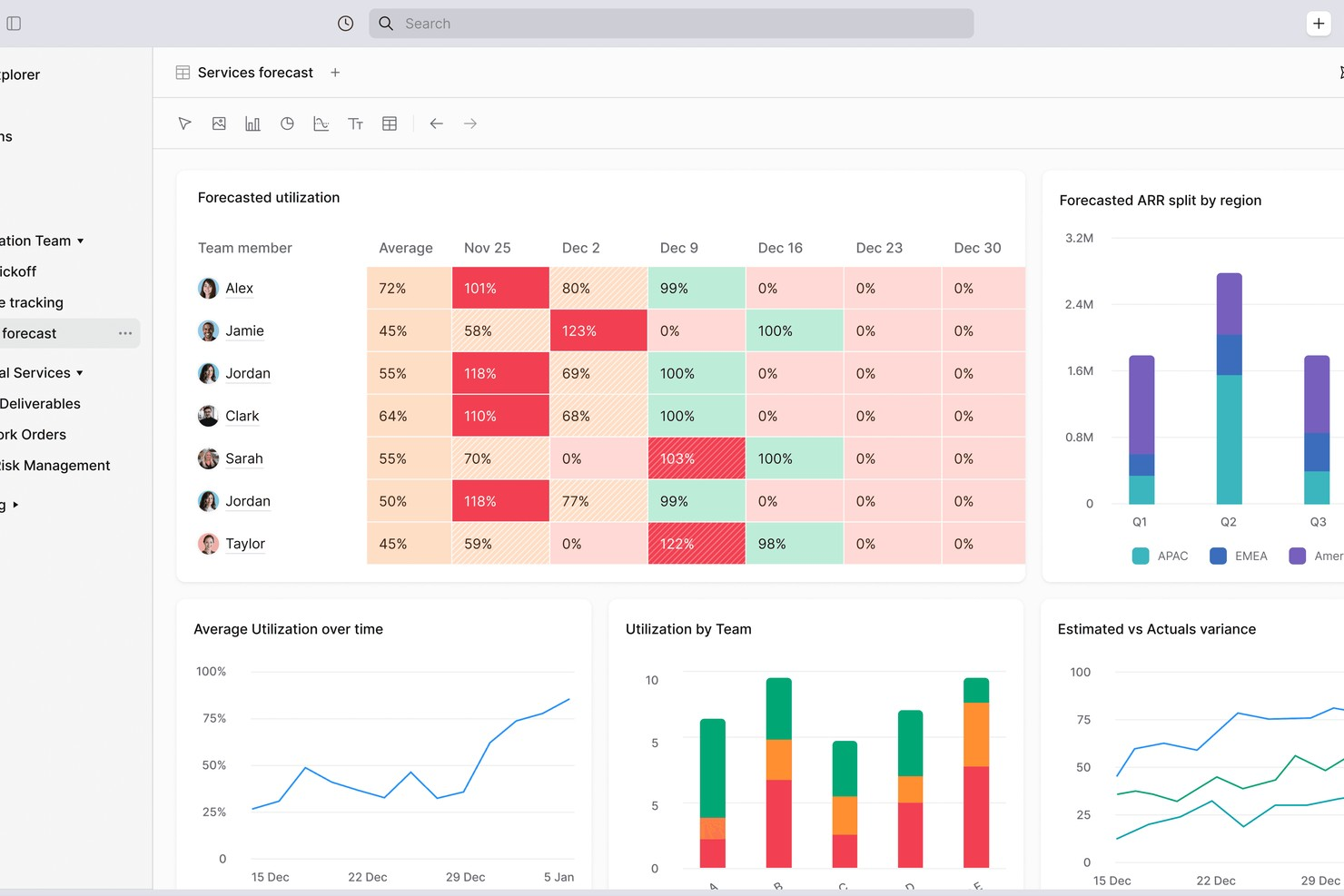
Planhat è una piattaforma per la gestione dei clienti progettata per i team che necessitano di monitorare e gestire la salute del cliente attraverso fonti di dati complesse. È particolarmente adatta per organizzazioni con più prodotti, regioni o sistemi di dati che desiderano una visione unificata del coinvolgimento dei clienti. I responsabili del successo clienti e i team operativi utilizzano Planhat per unire dati di utilizzo, assistenza e finanziari, consentendo decisioni più informate.
A chi è più adatto Planhat?
Team di customer success e account management in aziende SaaS di medie dimensioni che aggregano dati da più fonti per monitorare i propri account.
Perché ho scelto Planhat
Ho scelto Planhat perché riunisce i dati dei clienti da una vasta gamma di fonti, rendendo più semplice costruire punteggi di salute accurati e azionabili. La piattaforma di Planhat permette di combinare utilizzo del prodotto, ticket di supporto, metriche finanziarie e flussi di dati personalizzati in un unico profilo cliente. Questo livello di aggregazione è particolarmente prezioso per aziende con ambienti dati complessi o più divisioni aziendali. Con Planhat, posso ottenere una visione olistica della salute del cliente che va oltre le metriche superficiali.
Funzionalità principali di Planhat
Altre funzionalità di Planhat che supportano la valutazione della salute dei clienti includono:
- Modellazione personalizzata del punteggio di salute: Crea e modifica le formule dei punteggi di salute utilizzando la tua logica e i tuoi campi dati.
- Mappatura del percorso cliente: Visualizza e traccia i progressi dei clienti attraverso le diverse fasi del ciclo di vita.
- Avvisi e notifiche automatizzate: Imposta regole per notificare il tuo team quando i punteggi di salute cambiano o raggiungono determinate soglie.
- Dashboard basate sui ruoli: Fornisci a diversi team o utenti dashboard personalizzate in base alla loro funzione o area di interesse.
Integrazioni di Planhat
Le integrazioni includono Salesforce, HubSpot, Zendesk, Intercom, Slack, Jira, Mixpanel, Pendo, Snowflake e altro ancora.
Pros and Cons
Pros:
- Formule personalizzate del punteggio di salute per esigenze complesse
- Aggrega dati da molteplici sistemi aziendali
- Inclusi strumenti visivi per la mappatura del percorso cliente
Cons:
- La sincronizzazione con SFDC richiede competenze tecniche
- La logica dei permessi può essere restrittiva
Pylon
Ideale per il rilevamento precoce dell’abbandono

Pylon offre uno scoring della salute del cliente progettato per i team SaaS che desiderano individuare tempestivamente i rischi di abbandono. La piattaforma si rivolge ai responsabili del successo dei clienti e ai leader delle operazioni che necessitano di segnali azionabili dai dati di utilizzo del prodotto e di supporto. Il suo focus sugli avvisi tempestivi aiuta i team a intervenire prima che i conti diventino a rischio.
Per chi è più adatto Pylon?
Team di customer success e analisi in aziende SaaS in fase iniziale in Nord America ed Europa che desiderano rilevare segnali precoci di abbandono.
Perché ho scelto Pylon
Ciò che mi ha colpito di Pylon è quanto sia stato progettato appositamente per far emergere i rischi precoci di abbandono, una sfida comune ai team SaaS. La piattaforma analizza schemi di utilizzo del prodotto e interazioni con il supporto per segnalare gli account che potrebbero tendere al disimpegno. Mi piace che Pylon fornisca uno scoring automatico della salute basato su segnali in tempo reale, così i team possono agire prima che i problemi si aggravino. Questo approccio alla rilevazione proattiva lo rende una scelta forte per le aziende che vogliono ridurre l'abbandono prima che diventi un problema maggiore.
Funzionalità principali di Pylon
Altre funzionalità di Pylon che si distinguono per lo scoring della salute del cliente includono:
- Configurazione personalizzata dello scoring della salute: Personalizza i modelli di scoring per riflettere i segnali di rischio e le tappe fondamentali dei tuoi clienti.
- Avvisi automatici: Ricevi notifiche quando la salute di un account scende sotto le soglie impostate.
- Vista cronologica del cliente: Tieni traccia di tutti gli eventi chiave, le interazioni e i cambiamenti di stato dell’account in una sola cronologia.
- Strumenti di collaborazione per il team: Assegna responsabili, aggiungi note e coordina azioni di follow-up direttamente dalla piattaforma.
Integrazioni di Pylon
Le integrazioni includono Slack, Microsoft Teams, Discord, Salesforce, HubSpot, Attio, Pipedrive, PagerDuty, Opsgenie e altri.
Pros and Cons
Pros:
- Avvisi in tempo reale per account a rischio
- Modelli di scoring della salute personalizzabili per SaaS
- Tracciamento dettagliato della cronologia delle attività dei clienti
Cons:
- Dipendenza marcata da Slack/Teams
- La reportistica si basa fortemente su tag manuali

Akita
Ideale per piccole imprese
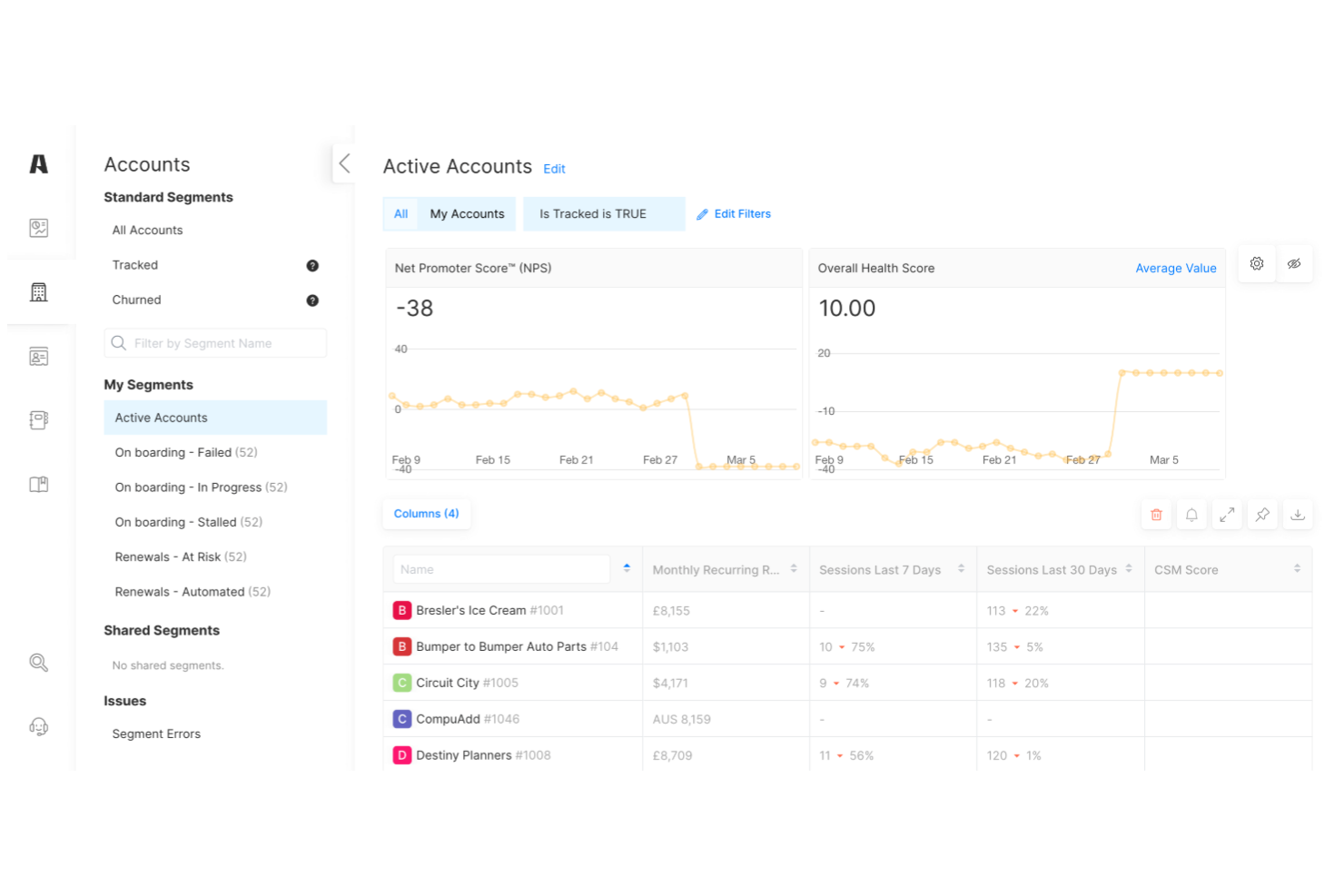
Akita offre un software per la valutazione della salute del cliente pensato per le piccole e medie imprese. La piattaforma aiuta i team a monitorare il coinvolgimento dei clienti, identificare i rischi di abbandono e dare priorità alle attività di contatto. La configurazione semplice e il focus su insight azionabili la rendono interessante per le aziende che desiderano migliorare la fidelizzazione senza strumenti aziendali complessi.
Per chi è ideale Akita?
Team di customer success di piccole imprese in Nord America ed Europa che adottano strumenti leggeri per monitorare la salute e il coinvolgimento degli account.
Perché ho scelto Akita
Ciò che mi ha colpito di Akita è il modo in cui adatta la valutazione della salute del cliente alle esigenze delle piccole imprese, senza sommergere gli utenti con la complessità dei sistemi aziendali. La piattaforma consente di costruire modelli personalizzati di valutazione della salute utilizzando dati provenienti dal tuo CRM, dai ticket di assistenza e dall'utilizzo del prodotto, così puoi monitorare ciò che conta davvero per la tua azienda. Apprezzo anche il fatto che Akita offra dashboard chiare e azionabili che aiutano i team più piccoli a individuare rapidamente gli account a rischio e a dare priorità al follow-up. Per le aziende che cercano un approccio focalizzato e gestibile alla valutazione della salute dei clienti, Akita si distingue come una scelta pratica.
Funzionalità principali di Akita
Altre funzionalità di Akita che supportano la valutazione della salute del cliente includono:
- Playbook automatizzati: Avvia workflow o compiti specifici in base ai cambiamenti del punteggio di salute del cliente.
- Avvisi rischio di abbandono: Ricevi notifiche quando i clienti mostrano primi segni di disimpegno o rischio.
- Visuale cronologica del cliente: Tieni traccia di tutte le interazioni e tappe del cliente in un unico flusso cronologico.
- Report segmentati: Analizza punteggi di salute e trend per segmento di cliente, prodotto o team.
Integrazioni di Akita
Le integrazioni includono Salesforce, HubSpot, Intercom, Zendesk, Slack, QuickBooks, Mailchimp, Freshdesk, Pipedrive e altri.
Pros and Cons
Pros:
- Playbook automatizzati per il coinvolgimento dei clienti
- Modelli personalizzati di valutazione della salute per piccoli team
- Avvisi di rischio abbandono basati su dati in tempo reale
Cons:
- Opzioni di analisi avanzate e reportistica limitate
- Non supporta la messaggistica in-app

Vitally
Ideale per integrazioni con flussi di lavoro SaaS
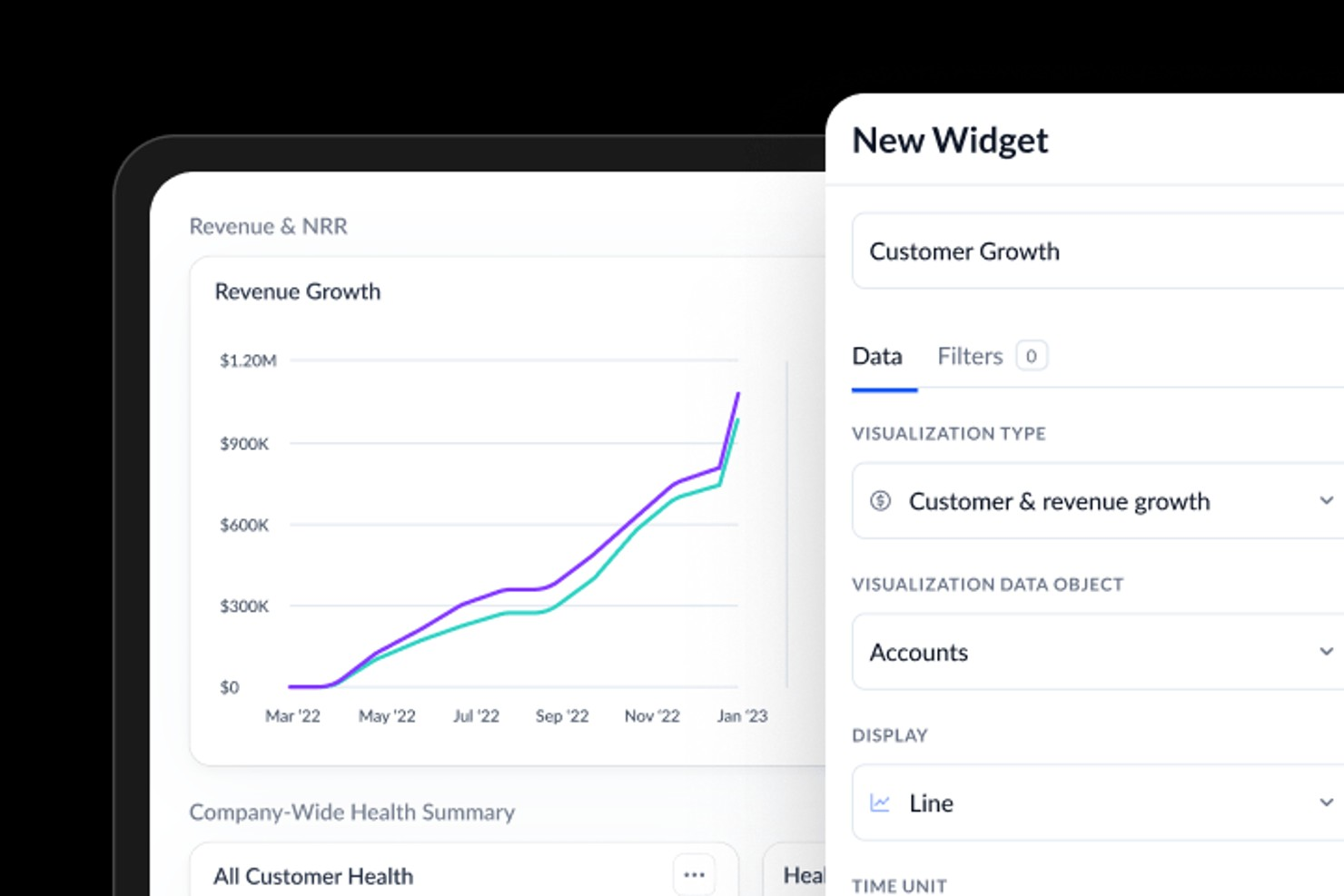
Vitally è una piattaforma di customer success pensata per i team SaaS che desiderano unificare i dati dei clienti e i flussi di lavoro. È ideale per le organizzazioni che vogliono collegare gli score di salute dei clienti alle operazioni quotidiane e alla collaborazione. I team possono utilizzare Vitally per centralizzare le informazioni, automatizzare i processi e mantenere la visibilità dello stato di salute dei clienti tra i vari reparti.
A chi è più adatto Vitally?
Team di customer success e di prodotto in aziende SaaS di piccole e medie dimensioni in tutto il mondo che integrano i flussi di lavoro tra diversi sistemi rivolti ai clienti.
Perché ho scelto Vitally
Ho scelto Vitally perché collega direttamente lo scoring della salute dei clienti agli strumenti SaaS che i team utilizzano già ogni giorno. Le integrazioni dei flussi di lavoro di Vitally consentono di attivare task, avvisi e playbook in strumenti come Slack, Jira e Salesforce in base ai cambiamenti di salute in tempo reale. Questo significa che i customer success manager possono agire sulle informazioni sulla salute senza dover cambiare piattaforma o perdere il contesto. Per le aziende SaaS che si affidano a una stretta collaborazione e risposte rapide, questo livello di integrazione rende lo scoring della salute molto più operativo.
Funzionalità principali di Vitally
Altre funzionalità di Vitally che supportano lo scoring della salute dei clienti includono:
- Costruttore personalizzato di score di salute: Crea e modifica formule di punteggio utilizzando le tue fonti dati e la tua logica.
- Segmentazione di account e utenti: Raggruppa i clienti per fase del ciclo di vita, utilizzo del prodotto o attributi personalizzati per un monitoraggio mirato.
- Playbook automatizzati: Configura flussi di lavoro basati su regole che attivano azioni o comunicazioni in base a variazioni dello score di salute.
- Feed attività sulla timeline del cliente: Visualizza una cronologia di tutte le interazioni con il cliente, utilizzo del prodotto e aggiornamenti dello score di salute in un unico posto.
Integrazioni Vitally
Le integrazioni includono Salesforce, HubSpot, Zendesk, Intercom, Slack, Jira, Gmail, Outlook, Mixpanel e Stripe.
Pros and Cons
Pros:
- Formule per score di salute personalizzabili per SaaS
- Integrazioni native con le principali piattaforme SaaS
- Playbook automatizzati per flussi di lavoro basati sulla salute
Cons:
- Nessuna funzione integrata per sondaggi ai clienti
- Nessuna app mobile per accesso in mobilità

Totango
Ideale per metriche di salute personalizzabili

Totango offre ai team di successo del cliente la possibilità di progettare e monitorare metriche di salute che si adattano alle loro esigenze aziendali specifiche. È una scelta solida per le organizzazioni che cercano flessibilità nella definizione di cosa significhi salute del cliente per i loro prodotti o servizi. I team che desiderano allineare la valutazione della salute con flussi di lavoro e percorsi cliente specifici possono trovare Totango particolarmente utile.
Per chi è ideale Totango?
Team di successo del cliente e di operations in organizzazioni di medie e grandi dimensioni a livello globale che monitorano metriche di salute e KPI personalizzabili.
Perché ho scelto Totango
Ho scelto Totango perché offre ai team il pieno controllo su come definire e misurare la salute del cliente. Puoi creare scorecard di salute personalizzate utilizzando qualsiasi combinazione di metriche, dall’utilizzo del prodotto alle interazioni con il supporto, e modificarle man mano che l’azienda evolve. Mi piace anche che Totango permetta di impostare diversi modelli di salute per diversi segmenti di clientela, così non sei vincolato a un unico modello. Questa flessibilità è particolarmente preziosa per le organizzazioni con percorsi cliente complessi o più linee di prodotto.
Funzionalità principali di Totango
Altre funzionalità di Totango che supportano il monitoraggio della salute del cliente includono:
- Libreria SuccessBLOCs: Accesso a moduli predefiniti per flussi di lavoro comuni del successo cliente, inclusi onboarding, adozione e rinnovo.
- Assegnazione automatica delle attività: Assegna azioni di follow-up ai membri del team in base a cambiamenti o traguardi nella salute del cliente.
- Mappatura del percorso cliente: Visualizza l’avanzamento di ogni account attraverso le fasi definite del ciclo di vita e attiva azioni nei punti chiave.
- Avvisi in tempo reale: Ricevi notifiche istantanee quando i punteggi di salute del cliente diminuiscono o si verificano eventi importanti.
Integrazioni Totango
Le integrazioni includono Salesforce, Zendesk, HubSpot, Slack, Microsoft Outlook, Gmail e altro.
Pros and Cons
Pros:
- Modelli di salute personalizzati per diversi segmenti
- SuccessBLOC predefiniti per un implementazione rapida
- Avvisi automatici per variazioni nel punteggio di salute
Cons:
- Personalizzazione limitata per le visualizzazioni delle dashboard
- Le opzioni di reportistica sono meno flessibili

Ideale per le funzionalità di previsione dei rinnovi
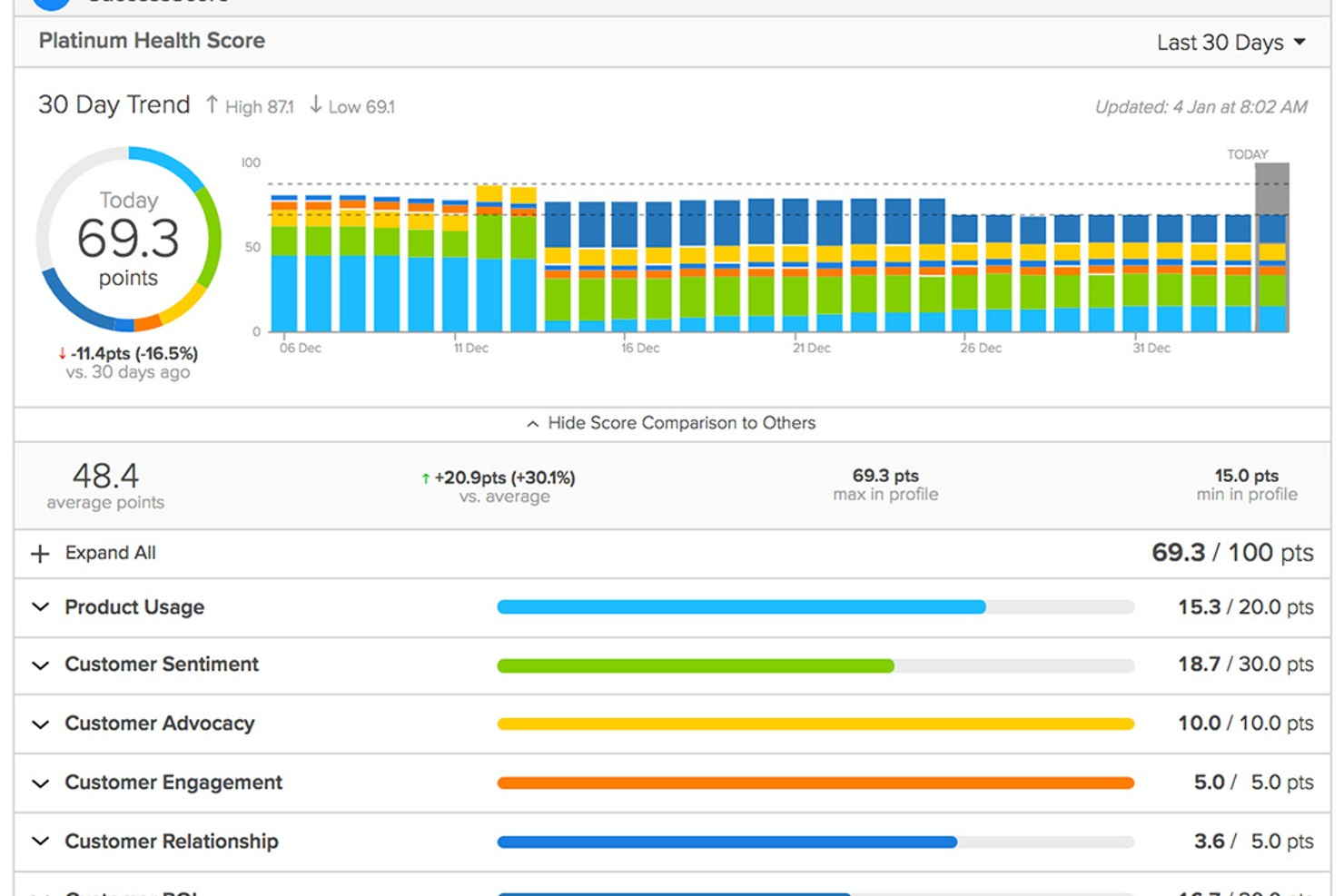
ClientSuccess è una piattaforma di customer success progettata per i team che desiderano gestire la salute degli account e la retention in un unico luogo. È particolarmente adatta per aziende SaaS e responsabili del successo del cliente che necessitano di una visibilità chiara sulle relazioni e sull’engagement dei clienti. La piattaforma ti aiuta a monitorare il sentiment dei clienti, controllare l’attività degli account e coordinare gli sforzi di rinnovo all’interno del team.
Per chi è ideale ClientSuccess?
Team di gestione rinnovi e account in organizzazioni SaaS di medie dimensioni che prevedono i rinnovi e monitorano la salute degli account a livello globale.
Perché ho scelto ClientSuccess
Ciò che distingue ClientSuccess è come integra la previsione dei rinnovi nel cuore della gestione della salute del cliente. La piattaforma permette di tracciare le date di rinnovo, prevedere la probabilità di rinnovo e visualizzare i pipeline di rinnovo insieme ai punteggi di salute cliente. Apprezzo la possibilità di impostare metriche di salute personalizzate e collegarle direttamente al rischio di rinnovo, rendendo più semplice dare priorità agli account che richiedono attenzione. Questo focus sulla previsione dei rinnovi rende ClientSuccess una scelta efficace per i team che vogliono ridurre l’abbandono e migliorare i risultati di retention.
Funzionalità principali di ClientSuccess
Altre funzionalità di ClientSuccess che supportano il punteggio e la gestione della salute cliente includono:
- Sondaggi sul sentiment clienti: Raccogli e traccia il sentiment dei clienti direttamente all’interno della piattaforma per informare i punteggi di salute.
- Gestione dei cicli di successo: Mappa e monitora i percorsi dei clienti con fasi di ciclo di vita personalizzabili.
- Monitoraggio di compiti e attività: Assegna, programma e monitora le azioni di follow-up per ciascun account.
- Avvisi e notifiche automatiche: Ricevi notifiche sui cambiamenti nella salute del cliente o sulle principali tappe degli account.
Integrazioni ClientSuccess
Le integrazioni includono Salesforce, HubSpot, Slack, Microsoft Teams, Zendesk, Jira, Gmail, Intercom, Pendo e altre ancora.
Pros and Cons
Pros:
- Modelli di punteggio di salute personalizzabili per SaaS
- Avvisi in tempo reale per account a rischio
- Tracciamento dettagliato della timeline delle attività dei clienti
Cons:
- Le funzionalità SmartCS AI richiedono il piano premium
- Le analisi possono essere lente con grandi quantità di dati

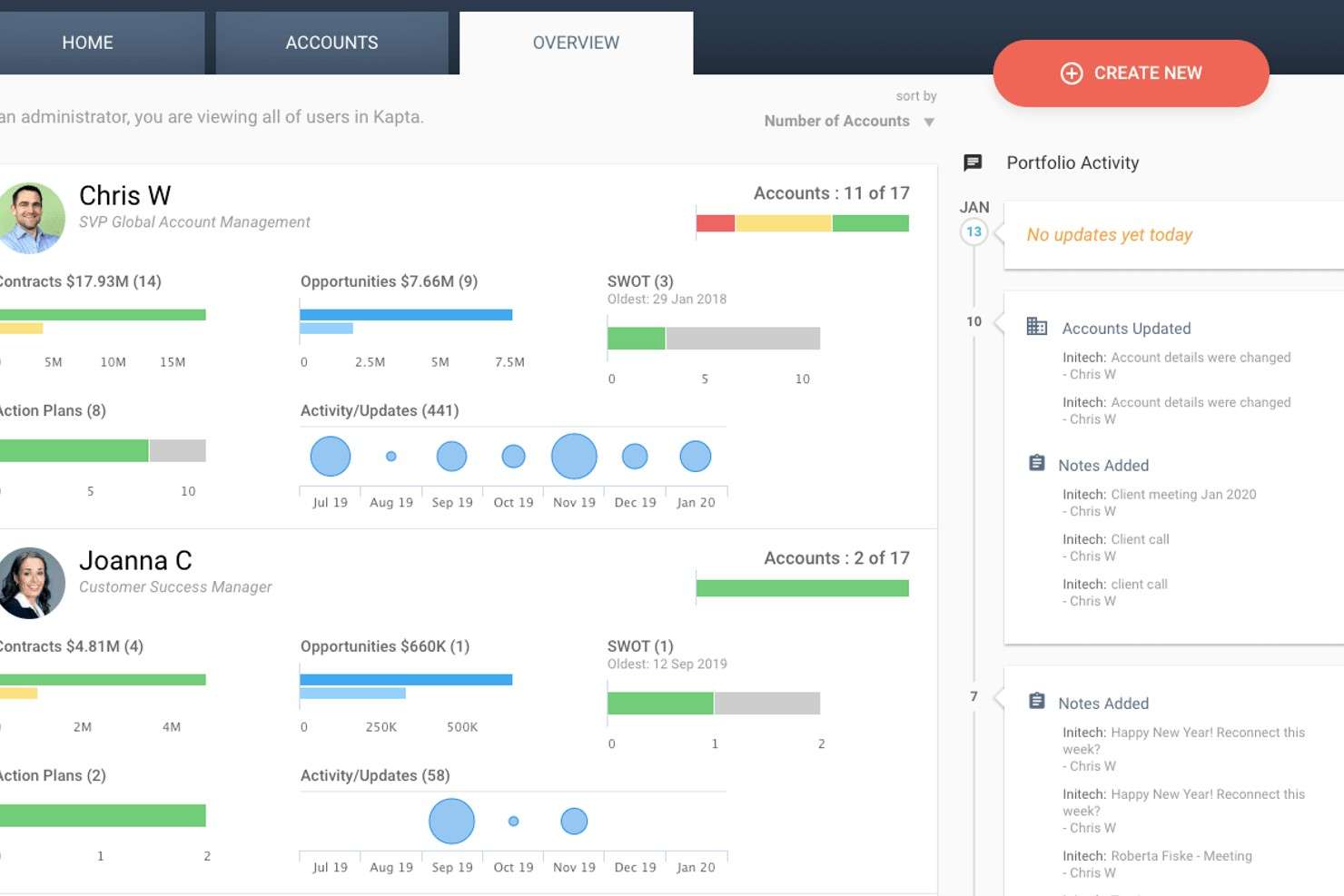
Kapta offre una valutazione dello stato di salute dei clienti, progettata per team che gestiscono relazioni strategiche con i clienti. La piattaforma è ideale per account manager e professionisti del successo del cliente che devono monitorare lo stato di salute e l’engagement dei principali clienti. Il focus sugli insight operativi aiuta i team a identificare rischi e opportunità all’interno dei loro account più importanti.
A chi è più adatto Kapta?
Responsabili dei principali account in medie organizzazioni che gestiscono rapporti con clienti a livello enterprise e account strategici su scala globale.
Perché ho scelto Kapta
Ciò che distingue Kapta, a mio avviso, è il modo in cui è stato costruito appositamente per i team di gestione dei key account che devono monitorare e intervenire sullo stato di salute dei clienti a livello strategico. La piattaforma permette di definire criteri personalizzati di valutazione della salute basati su piani di account, traguardi della relazione e coinvolgimento degli stakeholder, elementi essenziali per gestire relazioni B2B complesse. Apprezzo anche il fatto che Kapta colleghi direttamente gli score di salute ai piani d’azione sugli account, così i team possono rapidamente concordare i prossimi passi quando emergono rischi o opportunità. Questo approccio, focalizzato su insight operativi specifici per l’account, rende Kapta particolarmente adatto alle organizzazioni che considerano i key account come parte centrale della loro strategia aziendale.
Funzionalità principali di Kapta
Altre funzionalità di Kapta che supportano la valutazione dello stato di salute dei clienti includono:
- Monitoraggio automatico delle attività: Assegna e monitora attività collegate alle iniziative sulla salute degli account direttamente sulla piattaforma.
- Sondaggi sul parere dei clienti: Raccogli feedback strutturati dagli stakeholder chiave per informare gli score di salute.
- Dashboard per dirigenti: Visualizza metriche e tendenze dello stato di salute degli account in tempo reale per tutto il portafoglio.
- Integrazione con sistemi CRM: Sincronizza dati e aggiornamenti degli account con Salesforce e le principali piattaforme CRM.
Integrazioni di Kapta
Le integrazioni includono Salesforce, HubSpot, Microsoft Dynamics, Microsoft Teams, Zoho, Slack, Mailchimp, e molte altre.
Pros and Cons
Pros:
- Valutazione dello stato di salute personalizzabile per i principali account
- Promemoria automatici per le azioni di follow-up
- Pianificazione degli account collegata a metriche di salute
Cons:
- Forte attenzione all’inserimento manuale per la gestione dei key account
- Workflow rigido per modelli non B2B
Altri software per il punteggio di salute dei clienti
Ecco alcune ulteriori opzioni di software per il punteggio di salute dei clienti che non sono entrate nella mia selezione, ma che vale comunque la pena valutare:
- Staircase AI by Gainsight
Ideale per insight sulle relazioni guidati dall’IA
- Skalin
Ideale per la segmentazione clienti B2B
- Velaris
Ideale per una visione unificata del percorso cliente


Come Valuto i Software per il Customer Health Score
Divido la mia valutazione tra criteri di base—come il punteggio composito e gli avvisi di rischio abbandono del cliente—e fattori differenzianti che separano le piattaforme CS di livello enterprise dalle soluzioni più leggere e automatizzate.
Funzionalità Core (Requisiti Fondamentali per Questa Lista)
Quando seleziono gli strumenti per la mia lista, valuto ciascuno su una scala da 0 (non offre la funzionalità) a 5 (eccelle in quest’area) per ogni funzionalità principale elencata di seguito. Successivamente, calcolo il punteggio totale dello strumento in percentuale. Ogni strumento deve raggiungere un punteggio totale minimo del 65% per essere considerato.
- Punteggio di Salute Composito: Valuto se uno strumento combina più input di dati—come utilizzo del prodotto, ticket di supporto, NPS e stato della fatturazione—per generare un punteggio ponderato, invece di basarsi su un singolo indicatore.
- Modelli di Punteggio Personalizzabili: Ogni team CS definisce la salute del cliente in modo diverso, quindi cerco strumenti che permettono di costruire e modificare regole, pesi e soglie di punteggio in base al proprio ciclo di vita cliente.
- Integrazioni con le Fonti Dati: Il punteggio è valido solo quanto i suoi dati. Verifico la presenza di connessioni native a CRM, piattaforme di analisi prodotto, strumenti di supporto e sistemi di fatturazione che alimentano il modello di salute.
- Avvisi di Rischio Abbandono: Le notifiche automatiche quando un punteggio scende sotto una certa soglia sono fondamentali. Esamino se gli avvisi attivano attività per il CSM, email o messaggi Slack in base a regole configurabili.
- Segmentazione e Visione Portfolio: I CSM devono poter filtrare i clienti per livello di salute, segmento o portafoglio. Valuto come ogni strumento organizza e visualizza i dati di salute a livello di portfolio.
- Storico dei Punteggi: I dati sulle tendenze mostrano se un account sta migliorando o peggiorando nel tempo. Cerco visualizzazioni cronologiche che evidenziano le variazioni di punteggio insieme agli eventi che le hanno causate.
Una volta che dispongo di una lista di strumenti che soddisfano questi criteri, considero cosa distingue ciascuna piattaforma.
Fattori Differenzianti (Cosa Rende Un Fornitore Unico)
Ecco come confronto i diversi fornitori:
Funzionalità Distintive
Il punteggio predittivo tramite AI è un elemento di forte differenziazione. Cerco modelli che prevedano la probabilità di churn dai pattern storici, invece di affidarsi esclusivamente a logiche basate su regole. Anche i playbook automatici sono importanti: un calo di punteggio dovrebbe poter attivare un’attività CSM o un’email di escalation senza passaggi manuali. Valuto se una piattaforma collega i punteggi di salute a risultati economici come NRR e tassi di rinnovo, aiutando i leader CS a dimostrare ai dirigenti l’impatto misurabile del lavoro di customer success.
Oltre le Funzionalità
Considero quanto rapidamente una piattaforma consenta di ottenere un punteggio funzionante. Alcuni strumenti offrono modelli preimpostati per SaaS o B2B, mentre altri richiedono settimane di mappatura dati. L’integrazione nello stack tecnologico è altrettanto importante: verifico se i punteggi si sincronizzano bidirezionalmente con il tuo CRM, così che i commerciali possano vedere i dati di salute senza cambiare strumento. Valuto anche la scalabilità del modello di pricing, poiché una tariffazione per record cliente può diventare rapidamente onerosa man mano che cresce il portafoglio, rispetto a una licenza su base piattaforma.
Come scegliere un software per il punteggio di salute dei clienti
È facile perdersi in lunghi elenchi di funzionalità e strutture tariffarie complesse. Per aiutarti a rimanere concentrato mentre affronti il tuo processo unico di selezione del software, ecco una lista di fattori da tenere a mente:
| Fattore | Considerazioni |
|---|---|
| Scalabilità | Il software sarà in grado di gestire il volume attuale e previsto dei tuoi clienti? Valuta se supporta più team, aree geografiche o unità aziendali durante la crescita. |
| Integrazioni | Si connette nativamente al tuo CRM, agli strumenti di assistenza e di analisi? Verifica la presenza di integrazioni dirette per evitare l’inserimento manuale dei dati o la dipendenza da servizi di terze parti. |
| Possibilità di personalizzazione | Puoi adattare le formule del punteggio di salute, i segmenti e gli avvisi al tuo modello aziendale? Cerca strumenti flessibili per creare regole e mappare i campi. |
| Semplicità d’uso | Il tuo team lo adotterà rapidamente? Valuta l’interfaccia, la navigazione e la quantità di formazione necessaria per l’uso quotidiano. |
| Implementazione e onboarding | Quanto tempo richiederà la configurazione e quali risorse saranno necessarie? Informati sul supporto alla migrazione, sui servizi di onboarding e sui materiali formativi disponibili. |
| Costo | I livelli di prezzo sono chiari e prevedibili? Considera i limiti per gli utenti, i costi aggiuntivi e se il valore è in linea con il tuo budget e il ritorno sull’investimento previsto. |
| Misure di sicurezza | Il fornitore soddisfa i tuoi standard di privacy e sicurezza dei dati? Verifica la conformità a normative come il GDPR e consulta le sue politiche di gestione dei dati. |
| Disponibilità dell’assistenza | Quali canali di assistenza sono disponibili e in quali orari? Valuta se hai bisogno di supporto 24 ore su 24, 7 giorni su 7, di un account manager dedicato o di risorse self-service. |
Che cos’è il software per il punteggio di salute dei clienti?
Il software per il punteggio di salute dei clienti è uno strumento che monitora, calcola e visualizza lo stato complessivo degli account dei clienti utilizzando dati provenienti da più fonti. Aiuta i team a monitorare il coinvolgimento, identificare i clienti a rischio e dare priorità alle attività di contatto sulla base di indicatori di salute in tempo reale.
Centralizzando queste informazioni, il software supporta una gestione proattiva dei clienti e promuove strategie di fidelizzazione tra i team che si occupano di assistenza, successo dei clienti e operazioni di servizio.
Funzionalità
Quando selezioni un software per il punteggio di salute dei clienti, presta attenzione alle seguenti funzionalità chiave:
- Calcolo del punteggio di salute: Combina più punti dati, come l'utilizzo del prodotto, i ticket di assistenza e le risposte ai sondaggi, in un unico punteggio monitorabile che riflette lo stato del cliente.
- Segmentazione personalizzata: Consente di raggruppare i clienti per settore, fase del ciclo di vita o altri criteri, così da monitorare le tendenze relative alla salute e personalizzare le strategie di coinvolgimento.
- Avvisi automatizzati: Notifica al tuo team quando il punteggio di salute di un cliente diminuisce o raggiunge determinate soglie, aiutandoti ad agire rapidamente per prevenire l'abbandono.
- Integrazione dei dati: Si connette al tuo CRM e agli strumenti di assistenza e analisi per acquisire i dati pertinenti dei clienti e ottenere un punteggio di salute più accurato.
- Dashboard e report: Fornisce visualizzazioni e report che semplificano il monitoraggio dei punteggi di salute, l'individuazione delle tendenze e la condivisione delle informazioni con le parti interessate.
- Monitoraggio della cronologia: Registra le principali interazioni ed eventi relativi ai clienti in una visualizzazione cronologica, fornendo ai team il contesto del percorso di ciascun account.
- Automazione dei manuali operativi: Permette di attivare flussi di lavoro o attività specifici in base ai cambiamenti nella salute del cliente, ad esempio inviando email di ricontatto o programmando controlli periodici.
- Accesso basato sui ruoli: Consente di controllare chi può visualizzare o modificare i punteggi di salute e i dati correlati, favorendo la collaborazione e mantenendo al contempo la sicurezza dei dati.
Funzionalità comuni di intelligenza artificiale dei software per il punteggio di salute dei clienti
Oltre alle funzionalità standard dei software per il punteggio di salute dei clienti elencate sopra, molte di queste soluzioni stanno integrando l'intelligenza artificiale con funzionalità come:
- Modellazione predittiva dell'abbandono: Utilizza l'apprendimento automatico per analizzare i dati storici e prevedere quali clienti hanno maggiori probabilità di abbandonare, consentendo ai team di intervenire tempestivamente.
- Rilevamento automatizzato dei rischi: Analizza continuamente i modelli di comportamento dei clienti per segnalare sottili segnali di insoddisfazione o disimpegno che potrebbero sfuggire al monitoraggio manuale.
- Analisi del sentimento: Analizza le comunicazioni dei clienti, come email, registri delle chat e risposte ai sondaggi, per rilevare sentimenti positivi o negativi e adeguare di conseguenza i punteggi di salute.
- Raccomandazioni sulla migliore azione successiva: Suggerisce azioni personalizzate o strategie di contatto per ciascun account sulla base dell'analisi dei dati dei clienti e della cronologia del coinvolgimento guidata dall'intelligenza artificiale.
- Rilevamento delle anomalie: Identifica cambiamenti insoliti nell'attività dei clienti o nei punteggi di salute, avvisando i team affinché esaminino i potenziali problemi prima che si aggravino.
Vantaggi
L'implementazione di un software per il punteggio di salute dei clienti offre diversi vantaggi al tuo team e alla tua azienda. Eccone alcuni che puoi aspettarti:
- Gestione proattiva dei rischi: Gli avvisi automatizzati e l'analisi predittiva aiutano il tuo team a identificare e affrontare gli account a rischio prima che i problemi si aggravino.
- Maggiore fidelizzazione dei clienti: I punteggi di salute in tempo reale e la segmentazione consentono attività di contatto mirate, aumentando la probabilità di conservare i clienti di valore.
- Processo decisionale basato sui dati: Dashboard e report centralizzati forniscono informazioni utili, supportando strategie più consapevoli tra i team di assistenza e successo dei clienti.
- Flussi di lavoro ottimizzati: L'automazione dei manuali operativi e l'integrazione con gli strumenti esistenti riducono il lavoro manuale e favoriscono ricontatti tempestivi sulle esigenze dei clienti.
- Maggiore collaborazione: L'accesso basato sui ruoli e le cronologie condivise offrono a tutte le parti interessate una visione unificata dello stato e della cronologia dei clienti.
- Coinvolgimento personalizzato: La segmentazione personalizzata e le raccomandazioni basate sull'intelligenza artificiale consentono di adattare le comunicazioni e gli interventi alla situazione specifica di ciascun cliente.
- Inserimento e raggiungimento più rapidi del valore: La configurazione guidata, i modelli e le risorse formative aiutano i team ad adottare rapidamente il software e a iniziare a vedere i risultati.
Costi e prezzi
La selezione di un software per il punteggio di salute dei clienti richiede la comprensione dei vari modelli e piani tariffari disponibili. I costi variano in base alle funzionalità, alle dimensioni del team, ai componenti aggiuntivi e ad altri fattori. La tabella seguente riassume i piani più comuni, i relativi prezzi medi e le funzionalità tipicamente incluse nelle soluzioni software per il punteggio di salute dei clienti:
Tabella comparativa dei piani per il software di valutazione dello stato di salute dei clienti
| Tipo di piano | Prezzo medio | Funzionalità comuni |
|---|---|---|
| Piano gratuito | $0 | Monitoraggio di base dello stato di salute, integrazioni limitate, dashboard semplici e assistenza via e-mail. |
| Piano personale | $49-500/mese | Segmentazione personalizzata, avvisi automatici, reportistica di base e accesso per un singolo utente. |
| Piano aziendale | $1,000 – $2,500/mese | Integrazioni avanzate, strumenti per la collaborazione tra team, automazione dei flussi di lavoro, dashboard migliorate e assistenza prioritaria. |
| Piano per grandi aziende | $1,500 – $12,000+/mese | Modelli personalizzati dello stato di salute, onboarding dedicato, sicurezza avanzata, accesso API e gestione dedicata dell'account. |
Domande frequenti sul software di valutazione dello stato di salute dei clienti
Ecco alcune risposte alle domande comuni sul software di valutazione dello stato di salute dei clienti:
Come vengono calcolati i punteggi dello stato di salute dei clienti?
I punteggi dello stato di salute dei clienti vengono calcolati combinando dati provenienti da fonti come l’utilizzo del prodotto, i ticket di assistenza, le risposte ai sondaggi e la cronologia dei pagamenti. Ogni dato viene ponderato in base alla sua importanza per la tua azienda e il software genera un unico punteggio che riflette lo stato complessivo di ciascun cliente.
Posso personalizzare la formula del punteggio dello stato di salute per la mia azienda?
Sì, la maggior parte dei software di valutazione dello stato di salute dei clienti consente di personalizzare la formula. Puoi modificare le fonti di dati incluse, impostare pesi diversi per ciascun fattore e definire le soglie per stabilire cosa è sano, a rischio o critico.
Quali tipi di dati possono essere integrati nel software di valutazione dello stato di salute dei clienti?
In genere puoi integrare i dati del CRM, i sistemi di ticket di assistenza, le analisi del prodotto, le piattaforme di fatturazione e gli strumenti per il feedback dei clienti. In questo modo il software può raccogliere un’ampia gamma di segnali per creare un punteggio dello stato di salute più accurato e completo.
Con quale rapidità i team possono iniziare a utilizzare il software di valutazione dello stato di salute dei clienti dopo l'acquisto?
La maggior parte dei team può iniziare entro pochi giorni o alcune settimane, a seconda della complessità dei dati e delle integrazioni. Molte piattaforme offrono risorse per l’onboarding, come tour del prodotto, modelli e video di formazione, per accelerare l’adozione.
Cosa devo cercare nella sicurezza del software di valutazione dello stato di salute dei clienti?
Cerca funzionalità come la crittografia dei dati, i controlli degli accessi basati sui ruoli, i registri di controllo e la conformità a standard come il GDPR. Chiedi ai fornitori informazioni sulle loro politiche di gestione dei dati e sulle eventuali certificazioni di sicurezza di terze parti in loro possesso.