

Le piattaforme di accoglienza dei clienti basate sull'IA sono strumenti software che utilizzano l'intelligenza artificiale per automatizzare, personalizzare e migliorare il processo di accoglienza dei nuovi clienti e guidarli verso il raggiungimento del valore. Se stai cercando le migliori piattaforme di accoglienza dei clienti basate sull'IA, probabilmente vuoi ridurre il lavoro manuale, offrire esperienze coerenti e aiutare i clienti a raggiungere il successo più rapidamente, senza sacrificare la qualità o la supervisione. Scegliere la piattaforma giusta può aiutare il tuo team a gestire volumi maggiori, adattare l'accoglienza alle esigenze di ciascun cliente e misurare ciò che funziona. In questo elenco troverai opzioni affidabili che affrontano le sfide reali dell'accoglienza e supportano i tuoi obiettivi di soddisfazione e fidelizzazione dei clienti.
Perché fidarsi dei nostri consigli sui software
6,700+
Reviews
20
Industry experts
16+
Evaluation factors
14
Years
Il nostro team testa e recensisce software dal 2012. In quanto leader CX noi stessi, sappiamo quanto sia difficile — e importante — scegliere il software giusto.
Per questa guida, abbiamo valutato gli strumenti attraverso test pratici e ricerche indipendenti, assegnando un punteggio agli strumenti in base ai nostri criteri di selezione.
Le nostre recensioni riflettono il nostro giudizio editoriale umano, non un discorso di vendita.
 Gui DrusinaCreative Director
 Tim FisherVP of AI
Tabella comparativa delle piattaforme di accoglienza dei clienti basate sull'IA
Questa tabella comparativa riassume i dettagli dei prezzi delle mie migliori selezioni di piattaforme di accoglienza dei clienti basate sull’IA:
| Tool | Best For | Trial Info | Price | ||
|---|---|---|---|---|---|
| 1 | Ideale per portali cliente di inserimento basati su collegamenti | Prova gratuita di 14 giorni | A partire da 59 € per utente al mese (con fatturazione annuale) | Website | |
| 2 | Ideale per spazi di lavoro per l’onboarding dei clienti | Piano gratuito + demo gratuita disponibile | Da $350/mese (fatturazione annuale) | Website | |
| 3 | Ideale per esperienze di onboarding utente contestuali | Prova gratuita di 14 giorni + demo gratuita disponibile | A partire da $299/mese (fatturazione annuale) | Website | |
| 4 | Ideale per esperienze di onboarding senza codice | Prova gratuita + demo gratuita disponibili | Prezzi su richiesta | Website | |
| 5 | Ideale per il monitoraggio trasparente dei progetti di onboarding | Demo gratuita disponibile | Prezzi su richiesta | Website | |
| 6 | Ideale per la guida all'onboarding in-app e l'analisi dei dati | Prova gratuita di 30 giorni + piano gratuito + demo gratuita disponibile | Prezzo su richiesta | Website | |
| 7 | Ideale per monitoraggio e automazione delle attività di onboarding | Demo gratuita + prova gratuita disponibile | Da $15.000/mese | Website | |
| 8 | Ideale per workflow di onboarding guidati dall'AI | Piano gratuito + prova gratuita + demo gratuita disponibili | A partire da $19/mese | Website | |
| 9 | Ideale per pipeline di onboarding visive | Prova gratuita di 14 giorni + demo gratuita disponibile | Da $18/postazione/mese (fatturazione annuale) | Website | |
| 10 | Ideale per il supporto onboarding AI per team di customer success | Piano gratuito + demo gratuita disponibili | Da $40/mese (fatturato annualmente) | Website |


Recensioni delle piattaforme di accoglienza dei clienti basate sull'IA
Di seguito trovi i miei riepiloghi dettagliati delle migliori piattaforme di accoglienza dei clienti basate sull’IA entrate nel mio elenco ristretto. Le mie recensioni offrono uno sguardo approfondito alle funzionalità, alle capacità e alle integrazioni di ciascuna piattaforma per aiutarti a trovare quella più adatta a te.
 Ideale per portali cliente di inserimento basati su collegamenti
- Prova gratuita di 14 giorni
- A partire da 59 € per utente al mese (con fatturazione annuale)
Visit WebsiteCustomer Rating:4.9/5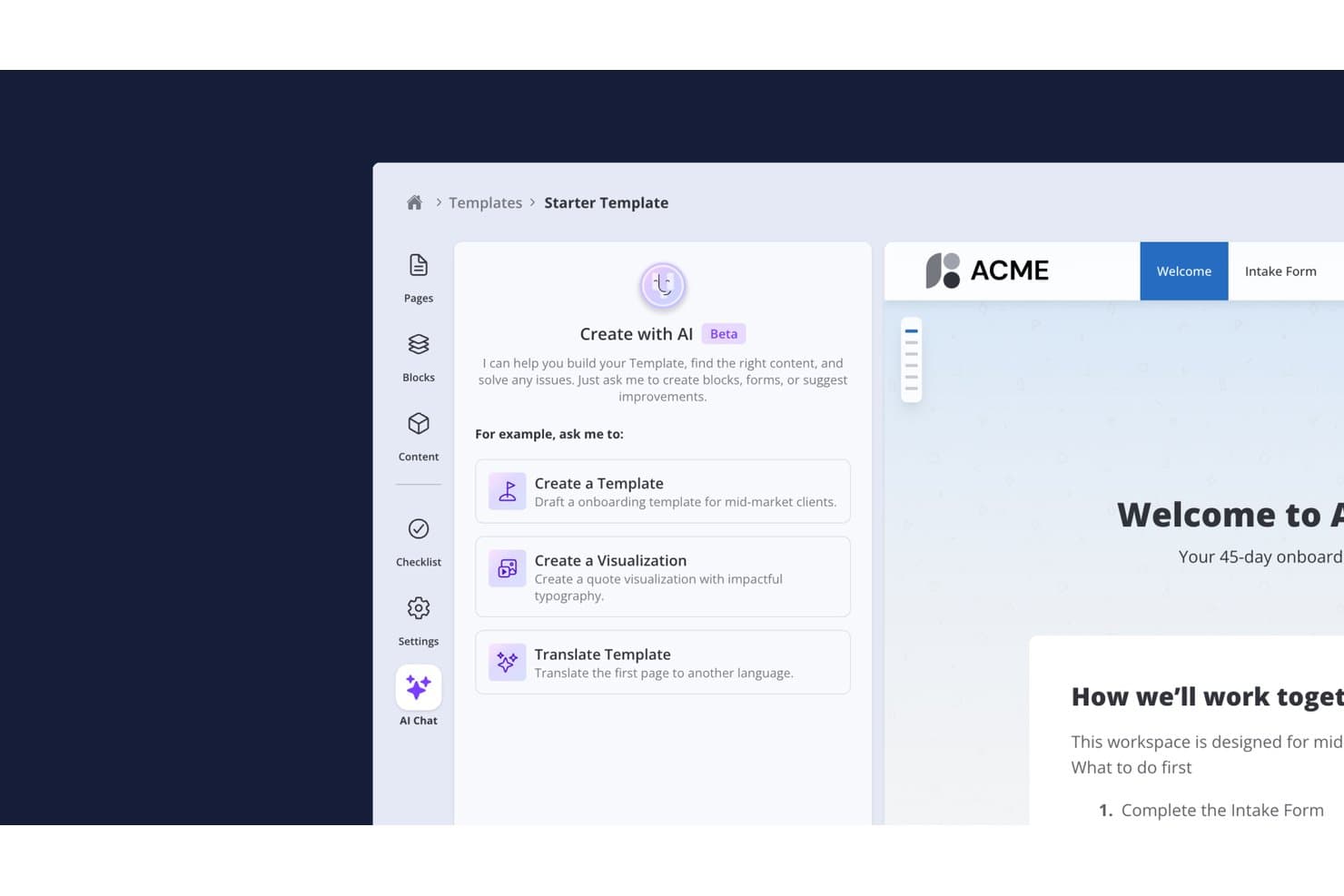
Valuecase consente agli utenti di creare modelli di inserimento con un assistente di conversazione basato sull'IA. Valuecase è una piattaforma di inserimento dei clienti basata sull'IA che consente ai team di creare portali cliente personalizzati con il proprio marchio e senza accesso, con piani di attività, monitoraggio dei traguardi, moduli condizionali, conversazioni dal vivo e automazione dei flussi di lavoro basata sull'IA.
Per chi è più adatto Valuecase?
Valuecase è particolarmente adatto ai team SaaS B2B e di servizi professionali il cui inserimento dei clienti si basa su spazi di lavoro condivisi, piani di attività strutturati e un'esperienza cliente fluida che non richiede l'accesso dei clienti.
Perché ho scelto Valuecase
Valuecase è entrato nella mia rosa dei preferiti perché il suo modello di portale cliente basato su collegamenti elimina il principale punto di attrito nell'inserimento: convincere i clienti ad accedere. Ogni Spazio viene fornito come URL condivisibile, così i clienti possono consultare le attività, compilare moduli condizionali e monitorare i traguardi senza creare un account. Apprezzo anche il fatto che l'agente IA integrato generi automaticamente guide operative complete per l'inserimento a partire dai documenti caricati e scriva aggiornamenti settimanali sullo stato nel CRM di HubSpot o Salesforce, mantenendo informato il team interno senza alcuna attività di reporting manuale.
Funzionalità principali di Valuecase
- Moduli con diramazione condizionale: I moduli si adattano in tempo reale in base alle risposte dei clienti, quindi ogni cliente risponde solo alle domande pertinenti alla propria configurazione.
- Diagramma di Gantt e monitoraggio dei traguardi: Le tempistiche visive del progetto consentono sia al team sia al cliente di vedere esattamente a che punto si trova l'inserimento in qualsiasi momento.
- Blocchi di contenuti generati dall'IA: L'agente IA crea piani di attività, blocchi a fisarmonica, tabelle dei prezzi e visualizzazioni HTML personalizzate direttamente dai documenti caricati o dalle istruzioni.
- Sincronizzazione automatica dello stato nel CRM: L'agente IA scrive automaticamente aggiornamenti settimanali sullo stato dell'inserimento su HubSpot o Salesforce, senza alcun inserimento manuale da parte del team.
Integrazioni di Valuecase
Valuecase offre sei integrazioni native con HubSpot, Salesforce, Slack, Microsoft Teams, Gmail e Google Calendar. Supporta inoltre l'accesso API e i webhook a partire dal piano Crescita, oltre a Make.com e Zapier.
Pros and Cons
Pros:
- L'IA automatizza le attività e i contenuti dell'inserimento
- I portali senza accesso semplificano la collaborazione con i clienti
- Guide operative basate sull'IA a partire dai documenti caricati
Cons:
- Nessun chatbot IA rivolto ai clienti integrato nell'app
- Le analisi avanzate richiedono piani di livello superiore
Learn more about Valuecase: 2Ideale per spazi di lavoro per l’onboarding dei clienti
Dock
- Piano gratuito + demo gratuita disponibile
- Da $350/mese (fatturazione annuale)
Visit WebsiteCustomer Rating:4.9/5
Dock centralizza l’onboarding, le scadenze e la collaborazione con i clienti. Dock offre spazi di lavoro collaborativi progettati per l’onboarding e la gestione dei progetti dei clienti. È particolarmente adatto per i team di customer success e onboarding in aziende SaaS o agenzie che desiderano centralizzare risorse, scadenze e comunicazione in un’unica piattaforma. Se vuoi offrire ai clienti un’esperienza di onboarding trasparente e interattiva, Dock ti aiuta a organizzare ogni fase e risorsa in un unico hub condiviso.
Per chi è ideale Dock?
Dock è una scelta eccellente per i team di customer success e onboarding in aziende SaaS e agenzie che gestiscono progetti rivolti ai clienti.
Perché ho scelto Dock
Ho scelto Dock perché i suoi spazi di lavoro collaborativi sono pensati appositamente per l’onboarding e la gestione dei progetti dei clienti. La piattaforma consente di creare hub condivisi dove clienti e team interni possono accedere a checklist di onboarding, scadenze dei progetti e risorse chiave in un unico posto. Apprezzo come Dock supporti la collaborazione in tempo reale, permettendo a entrambe le parti di commentare, caricare file e monitorare i progressi insieme. Questo approccio consente ai team di onboarding di offrire un’esperienza più trasparente e interattiva, particolarmente preziosa per aziende SaaS e agenzie che gestiscono più progetti per i clienti.
Caratteristiche principali di Dock
Altre funzionalità che rendono Dock utile per i team di onboarding includono:
- Opzioni di branding personalizzate: Aggiungi il logo dell’azienda, i colori e il dominio per personalizzare ogni spazio di lavoro per i tuoi clienti.
- Assegnazione e monitoraggio delle attività: Assegna attività ai membri del team o ai clienti e monitora la loro esecuzione direttamente all’interno dello spazio di lavoro.
- Libreria di modelli: Utilizza modelli predefiniti per scenari comuni di onboarding e progetto per accelerare la configurazione.
- Condivisione dei documenti e controllo delle versioni: Carica, condividi e gestisci documenti con la cronologia delle versioni integrata per mantenere tutti allineati.
Integrazioni di Dock
Le integrazioni includono Salesforce, HubSpot, Gong, Zoom, Microsoft Teams, Chorus, Fathom, Avoma, Loom e altri.
Pros and Cons
Pros:
- Spazi di lavoro collaborativi per clienti e team
- Libreria di modelli per flussi di onboarding ripetibili
- Condivisione documenti con funzionalità di controllo versione
Cons:
- Manca di chat o strumenti di messaggistica integrati
- Bug e caricamenti lenti possono ostacolare i flussi di lavoro
Learn more about Dock: Ideale per esperienze di onboarding utente contestuali
- Prova gratuita di 14 giorni + demo gratuita disponibile
- A partire da $299/mese (fatturazione annuale)
Visit WebsiteCustomer Rating:4.7/5
Userpilot crea flussi di onboarding e adozione personalizzati direttamente nell'app. Se vuoi creare esperienze di onboarding personalizzate senza programmare, Userpilot merita attenzione. È pensato per i team di prodotto e i customer success manager che hanno bisogno di guidare gli utenti all'interno delle app web con flussi in-app mirati. Userpilot ti aiuta a risolvere le difficoltà nell'onboarding e a favorire l'adozione delle funzionalità tramite suggerimenti contestuali basati sul comportamento.
Per chi è ideale Userpilot?
Userpilot è adatto ai team di prodotto e customer success delle aziende SaaS che desiderano creare e ottimizzare l’onboarding in-app senza il supporto degli sviluppatori.
Perché ho scelto Userpilot
Ciò che mi colpisce di Userpilot è la possibilità di creare flussi di onboarding ed esperienze in-app senza scrivere una riga di codice. Questo è particolarmente utile per i team di prodotto e customer success che vogliono lanciare rapidamente un onboarding personalizzato, senza attendere il supporto degli sviluppatori. Mi piace che sia possibile attivare tooltip, checklist e modali in base al comportamento dell’utente, così da rendere l’onboarding pertinente e tempestivo. Il visual editor semplifica la progettazione e l’aggiornamento dei contenuti di onboarding man mano che il prodotto evolve.
Funzionalità principali di Userpilot
Altre funzionalità che rendono Userpilot prezioso per i team di onboarding includono:
- A/B test per i flussi di onboarding: Metti a confronto diverse esperienze di onboarding per vedere quali contenuti o sequenze portano a un maggiore coinvolgimento degli utenti.
- Widget centro risorse: Aggiungi un centro assistenza in-app personalizzabile così che gli utenti possano accedere a guide, FAQ e supporto senza uscire dal prodotto.
- Segmentazione utenti: Personalizza i contenuti di onboarding per specifici gruppi di utenti in base ad attributi, comportamenti o fase del ciclo di vita.
- Analisi basata su eventi: Tieni traccia delle azioni degli utenti e delle tappe principali dell’onboarding per misurare l’impatto dei flussi e identificare i punti di abbandono.
Integrazioni Userpilot
Le integrazioni includono HubSpot, Salesforce, Segment, Google Tag Manager, Zendesk, Google Analytics, Intercom, Amplitude, Mixpanel, Heap e altri.
Pros and Cons
Pros:
- Builder senza codice per i flussi di onboarding
- A/B test per l'esperienza di onboarding
- Analisi basata su eventi per il monitoraggio dell’onboarding
Cons:
- La logica di segmentazione diventa difficile da gestire su larga scala
- Personalizzazione limitata per elementi UI avanzati
Learn more about Userpilot: Ideale per esperienze di onboarding senza codice
- Prova gratuita + demo gratuita disponibili
- Prezzi su richiesta
Visit WebsiteCustomer Rating:4.7/5
Appcues crea flussi di onboarding senza codice e coinvolgimento degli utenti. Se desideri progettare flussi di onboarding senza dipendere dagli sviluppatori, Appcues merita attenzione. È pensato per i team di prodotto e le aziende SaaS che devono lanciare rapidamente onboarding in-app, annunci e sondaggi. Appcues ti aiuta a guidare gli utenti, raccogliere feedback e incentivare l'adozione—tutto da una piattaforma senza codice.
Per chi è ideale Appcues?
Appcues è adatto a team di prodotto SaaS e responsabili della crescita presso startup e aziende di medie dimensioni che desiderano lanciare e iterare flussi di onboarding senza il supporto degli sviluppatori.
Perché ho scelto Appcues
Ho scelto Appcues perché il suo builder di onboarding senza codice è pensato appositamente per i team che vogliono lanciare e aggiornare esperienze in-app senza coinvolgimento degli sviluppatori. L'editor drag-and-drop consente di progettare checklist di onboarding, tooltip e modali direttamente nel prodotto, permettendo un rapido adattamento alle esigenze degli utenti. Apprezzo anche le opzioni di targeting e trigger offerti da Appcues, così puoi mostrare i contenuti più adatti agli utenti giusti nel momento giusto. Queste funzionalità lo rendono particolarmente adatto ai team SaaS che hanno bisogno di procedere rapidamente e iterare sui flussi di onboarding senza attendere risorse di sviluppo.
Funzionalità principali di Appcues
Altre funzionalità che rendono Appcues utile per i team di onboarding includono:
- A/B testing: Conduci esperimenti sui flussi di onboarding per confrontarne le performance e ottimizzare il coinvolgimento degli utenti.
- Targeting basato su eventi: Attiva contenuti di onboarding in base a specifiche azioni o traguardi degli utenti all'interno del tuo prodotto.
- Sondaggi in-app: Raccogli feedback degli utenti direttamente nei flussi di onboarding per individuare punti di attrito.
- Supporto multilingue: Offri esperienze di onboarding in diverse lingue per servire una base utenti globale.
Integrazioni di Appcues
Le integrazioni includono Segment, HubSpot, Salesforce, Intercom, Zendesk, Mixpanel, Amplitude, FullStory, Google Analytics, Slack e altri.
Pros and Cons
Pros:
- L'A/B testing misura l'impatto dell'adozione dell'onboarding
- Gli strumenti di feedback sono integrati direttamente nella piattaforma
- I flussi di onboarding mobile sono supportati nativamente
Cons:
- Le analisi richiedono l'esportazione dei dati per approfondimenti più dettagliati
- Il prezzo cresce rapidamente con il numero di utenti attivi mensili
Learn more about Appcues: Ideale per il monitoraggio trasparente dei progetti di onboarding
- Demo gratuita disponibile
- Prezzi su richiesta
Visit WebsiteCustomer Rating:4.7/5
GUIDEcx monitora i progetti di onboarding, le attività e la comunicazione con gli stakeholder. Se stai cercando una piattaforma per automatizzare e monitorare i progetti di onboarding dei clienti, GUIDEcx merita di essere presa in considerazione. È progettata per i team responsabili del successo dei clienti e dell'implementazione che devono coordinare attività, tempistiche e comunicazioni con gli stakeholder interni ed esterni. GUIDEcx contribuisce a ridurre i ritardi nell'onboarding e mantiene tutti responsabili durante l'intero processo.
Per chi è più adatto GUIDEcx?
GUIDEcx è particolarmente adatta ai team responsabili del successo dei clienti e dell'implementazione presso aziende B2B che gestiscono progetti complessi di onboarding dei clienti.
Perché ho scelto GUIDEcx
Ciò che distingue GUIDEcx è l'attenzione rivolta ai piani di progetto automatizzati e al monitoraggio dell'onboarding dei clienti. La piattaforma consente di creare flussi di lavoro dettagliati per l'onboarding, con assegnazioni automatiche delle attività, promemoria e monitoraggio dei progressi, così nulla viene trascurato. Mi piace il fatto che GUIDEcx offra sia ai team interni sia ai clienti visibilità su ogni fase del processo di onboarding, contribuendo a mantenere tutti allineati e responsabili. Queste funzionalità la rendono una scelta eccellente per le organizzazioni che devono gestire progetti di onboarding complessi e articolati in più fasi, con diversi stakeholder.
Funzionalità principali di GUIDEcx
Oltre ai piani di progetto automatizzati e al monitoraggio dell'onboarding, GUIDEcx offre diverse altre funzionalità che supportano i team responsabili dell'onboarding dei clienti:
- Autorizzazioni basate sui ruoli: Controlla l'accesso e la visibilità per gli utenti interni ed esterni in base ai rispettivi ruoli in ciascun progetto.
- Modelli personalizzabili: Crea e riutilizza modelli di progetto per l'onboarding adattati ai processi della tua organizzazione.
- Notifiche automatiche: Invia notifiche tempestive via e-mail e nell'app per informare gli stakeholder sugli aggiornamenti e sulle scadenze.
- Dashboard rivolte ai clienti: Offri ai clienti visibilità in tempo reale sullo stato del progetto, sulle attività e sui passaggi successivi tramite dashboard dedicate.
Integrazioni di GUIDEcx
Le integrazioni includono Salesforce, HubSpot, Microsoft Teams e altro ancora.
Pros and Cons
Pros:
- Flussi di lavoro automatizzati per l'onboarding con dipendenze tra le attività
- Dashboard rivolte ai clienti per una visibilità in tempo reale sul progetto
- Autorizzazioni basate sui ruoli per una collaborazione sicura
Cons:
- La modifica in blocco delle attività tra più progetti è inefficiente
- I report non offrono riepiloghi tra progetti senza interventi manuali
Learn more about GUIDEcx: Ideale per la guida all'onboarding in-app e l'analisi dei dati
- Prova gratuita di 30 giorni + piano gratuito + demo gratuita disponibile
- Prezzo su richiesta
Visit WebsiteCustomer Rating:4.4/5
Pendo personalizza l'onboarding, raccoglie feedback e analizza i percorsi degli utenti. Pendo è pensato per i team che desiderano offrire esperienze di onboarding personalizzate direttamente all'interno dei loro prodotti digitali. È particolarmente adatto per aziende SaaS e product manager che hanno bisogno di guidare gli utenti, raccogliere feedback e analizzare i percorsi di onboarding in un unico luogo. Se desideri ridurre gli ostacoli all'onboarding e capire dove gli utenti incontrano difficoltà, Pendo offre soluzioni mirate.
A Chi Si Rivolge Pendo?
Pendo è ideale per product manager e team SaaS di aziende di medie e grandi dimensioni che vogliono migliorare l'onboarding in-app e il coinvolgimento degli utenti.
Perché Ho Scelto Pendo
Ho scelto Pendo perché la sua guida in-app e le sue analisi sono costruite appositamente per ottimizzare l'onboarding dei clienti. La piattaforma permette di creare walkthrough di onboarding mirati e tooltip che compaiono direttamente all'interno del prodotto, così gli utenti ricevono aiuto esattamente quando ne hanno bisogno. Apprezzo anche il fatto che le analisi di Pendo mostrino chiaramente dove gli utenti abbandonano o incontrano difficoltà durante l'onboarding, rendendo più semplice perfezionare i flussi. Queste funzionalità rendono Pendo una scelta valida per team che desiderano migliorare costantemente l'onboarding in base al comportamento reale degli utenti.
Caratteristiche Principali di Pendo
Altre funzionalità che rendono Pendo utile per i team di onboarding includono:
- Centro risorse: Crea un hub centralizzato all'interno della tua app dove gli utenti possono accedere a guide di onboarding, FAQ e risorse di supporto.
- Raccolta feedback: Raccogli feedback degli utenti direttamente in-app tramite sondaggi e questionari per identificare i punti critici dell'onboarding.
- Segmentazione: Rivolgi contenuti di onboarding a gruppi specifici di utenti in base a comportamento, ruolo o tipo di account.
- Supporto per onboarding mobile: Offri flussi di onboarding e guide all'interno di app mobile, non solo applicazioni web.
Integrazioni di Pendo
Le integrazioni includono HubSpot, Intercom, Jira, Marketo, Okta, Salesforce, Segment, Zendesk, Slack, Tableau, BigQuery, Catalyst, Figma, G2 e altri.
Pros and Cons
Pros:
- Le guide in-app possono essere personalizzate per segmento di utenti
- Le analisi mostrano chiaramente i punti di abbandono nell'onboarding
- Il centro risorse centralizza i contenuti di onboarding e supporto
Cons:
- La configurazione del tagging delle funzionalità è complicata con UI dinamiche
- Il prezzo basato su MAU cresce rapidamente con l'aumento dei volumi
 Ideale per monitoraggio e automazione delle attività di onboarding
- Demo gratuita + prova gratuita disponibile
- Da $15.000/mese
Visit WebsiteCustomer Rating:4.5/5
OnRamp automatizza percorsi e workflow di onboarding personalizzati. Se hai bisogno di automatizzare e personalizzare percorsi di onboarding complessi, OnRamp merita attenzione. È pensato per team nei settori SaaS, fintech e altre industrie digitali che desiderano offrire onboarding su misura su larga scala. OnRamp ti aiuta a coordinare attività, contenuti e comunicazioni affinché i nuovi clienti ricevano un’esperienza guidata e coerente.
Per chi è più adatto OnRamp?
OnRamp è ideale per aziende SaaS e fintech di medie e grandi dimensioni che devono automatizzare e personalizzare i flussi di lavoro di onboarding dei clienti.
Perché ho scelto OnRamp
Ciò che mi ha colpito di OnRamp è la sua attenzione ai percorsi di onboarding automatizzati con personalizzazione basata sull’intelligenza artificiale. Per i team che devono offrire esperienze di onboarding personalizzate su larga scala, OnRamp permette di creare workflow dinamici che si adattano alle esigenze e ai comportamenti di ciascun cliente. Apprezzo come la piattaforma utilizzi l’IA per suggerire i passi successivi, attivare comunicazioni e mostrare contenuti rilevanti in automatico. Questo approccio aiuta a ridurre il lavoro manuale delle squadre di onboarding garantendo a ogni cliente un’esperienza guidata e rilevante.
Funzionalità principali di OnRamp
Altre funzionalità che rendono OnRamp interessante per i team di onboarding includono:
- Assegnazione e monitoraggio delle attività: Assegna attività di onboarding ai clienti o ai membri del team interno e monitora i progressi in tempo reale.
- Template di onboarding personalizzabili: Crea e riutilizza template di onboarding su misura per diversi segmenti di clientela o prodotti.
- Knowledge base integrata: Fornisci ai clienti accesso diretto ad articoli di supporto e risorse rilevanti all’interno del flusso di onboarding.
- Promemoria e notifiche automatiche: Imposta promemoria automatici per mantenere clienti e team aggiornati durante tutto il processo di onboarding.
Integrazioni OnRamp
Le integrazioni includono Salesforce, HubSpot, Marketo, ActiveCampaign, Gong, Mailchimp, Stripe, Slack, Zoom, Jira e altro.
Pros and Cons
Pros:
- Il portale clienti guida gli utenti tramite workflow strutturati
- Visibilità in tempo reale sull’onboarding e sui progressi
- Allinea i team sales e CS su obiettivi di onboarding condivisi
Cons:
- Richiede una forte integrazione con CRM/strumenti, aumentando i tempi di configurazione
- La progettazione dei workflow dipende da processi interni strutturati
Learn more about OnRamp: Ideale per workflow di onboarding guidati dall'AI
- Piano gratuito + prova gratuita + demo gratuita disponibili
- A partire da $19/mese
Visit WebsiteCustomer Rating:4.3/5
Relevance AI automatizza l’onboarding con workflow e personalizzazione basati su AI. Se desideri automatizzare l’onboarding con workflow flessibili basati su AI, Relevance AI merita attenzione. È pensato per i team che devono progettare, implementare e perfezionare i percorsi di onboarding senza necessità di un pesante lavoro di programmazione. Relevance AI ti aiuta a connettere i dati, automatizzare le decisioni e personalizzare i passaggi dell’onboarding per ciascun cliente.
Per chi è ideale Relevance AI?
Relevance AI è perfetto per i team di prodotto e operativi di aziende SaaS che vogliono automatizzare e personalizzare i flussi di onboarding senza scrivere codice.
Perché ho scelto Relevance AI
Ciò che distingue Relevance AI è l’approccio no-code alla creazione di workflow di onboarding alimentati dall’AI. L’ho scelto perché puoi progettare visivamente i percorsi di onboarding, automatizzare i punti decisionali e personalizzare i passaggi per ogni cliente—tutto senza scrivere codice. Il builder drag-and-drop di workflow e i blocchi logici basati su AI sulla piattaforma permettono di iterare rapidamente e adattare i processi di onboarding man mano che le esigenze cambiano. Questa flessibilità è particolarmente preziosa per i team che vogliono sperimentare con diversi flussi o scalare l’onboarding senza dover dipendere dalle risorse di ingegneria.
Funzionalità principali di Relevance AI
Oltre al suo builder di workflow no-code, ecco alcune altre funzionalità che rendono Relevance AI utile per i team dedicati all’onboarding:
- Connettori di dati cliente: Si collega a diverse fonti di dati per importare informazioni sui clienti e offrire un onboarding più personalizzato.
- Messaggistica automatizzata per i clienti: Invia email automatiche, messaggi in-app o notifiche basandosi sui progressi dell’onboarding o sugli eventi scatenanti.
- Cruscotto di analytics: Offre dati in tempo reale sulle performance del funnel di onboarding e sull’engagement dei clienti.
- Controlli di accesso basati sui ruoli: Permette di gestire permessi e accessi per i diversi membri del team impegnati nei progetti di onboarding.
Integrazioni di Relevance AI
Le integrazioni includono Ably, Abyssale, ADP, AdRoll, Adyen, Agrello, Ahrefs, Basecamp, Slack, BitBucket, Brevo, Breezy HR e altri.
Pros and Cons
Pros:
- Onboarding guidato dall’AI che si adatta al comportamento degli utenti
- Builder visivo di workflow per i percorsi di onboarding
- Analytics integrato per la performance dell’onboarding
Cons:
- Le opzioni di branding sono limitate nei piani inferiori
- I report non offrono funzioni avanzate di segmentazione
Learn more about Relevance AI: Ideale per pipeline di onboarding visive
- Prova gratuita di 14 giorni + demo gratuita disponibile
- Da $18/postazione/mese (fatturazione annuale)

monday CRM gestisce i flussi di lavoro di onboarding con automazione e tracciamento. Se hai bisogno di una piattaforma flessibile per gestire l'onboarding dei clienti, monday CRM offre un approccio altamente visivo e personalizzabile. È una soluzione ideale per i team che vogliono adattare i flussi di lavoro di onboarding ai propri processi specifici e monitorare ogni fase in un unico posto. monday CRM ti aiuta a centralizzare la comunicazione, automatizzare le attività ripetitive e mantenere i progetti di onboarding sempre in movimento.
Per chi è consigliato monday CRM?
monday CRM è adatto ai team a contatto con i clienti di piccole e medie imprese che necessitano di flussi di onboarding personalizzabili e monitoraggio dei progetti.
Perché ho scelto monday CRM
Quello che mi ha colpito di monday CRM è quanto a fondo sia possibile personalizzare i flussi di onboarding e automatizzare i passaggi ripetitivi. La piattaforma permette di creare pipeline di onboarding con fasi, campi e automazioni personalizzate che rispecchiano esattamente il processo del tuo team. Apprezzo il fatto che sia possibile attivare azioni—come assegnare compiti, inviare promemoria o aggiornare gli stati—in base a specifiche tappe dell'onboarding. Questo livello di flessibilità rende monday CRM una scelta vincente per i team che devono adattare l'onboarding a diversi segmenti di clientela o prodotti.
Funzionalità principali di monday CRM
Altre funzionalità che rendono monday CRM utile per i team di onboarding includono:
- Gestione documenti: archivia, condividi e organizza i documenti di onboarding direttamente all'interno di ogni scheda cliente.
- Vista Timeline e Gantt: visualizza l'avanzamento dell'onboarding e le dipendenze tramite timeline interattiva e diagrammi di Gantt.
- Promemoria automatici: imposta promemoria automatici per le attività e le scadenze chiave, così da tenere i progetti sotto controllo.
- Bacheche collaborative: utilizza bacheche condivise per assegnare compiti, commentare e comunicare con i membri del team durante tutto il processo di onboarding.
Integrazioni di monday CRM
Le integrazioni includono Slack, Microsoft Teams, GitHub, QuickBooks, Salesforce, Stripe, Pipedrive, LinkedIn e altro ancora.
Pros and Cons
Pros:
- Pipeline di onboarding personalizzabili per diversi segmenti
- Archivio documenti integrato per materiali di onboarding
- Varie visualizzazioni di progetto tra cui timeline e Gantt
Cons:
- Nessuna automazione nativa di onboarding basata su AI
- Visione trasversale dei progetti frammentata
Learn more about monday CRM: 10Ideale per il supporto onboarding AI per team di customer success
Trupeer
- Piano gratuito + demo gratuita disponibili
- Da $40/mese (fatturato annualmente)

Trupeer automatizza l'onboarding e monitora la salute dei clienti con l'IA. Trupeer è pensato per i team di customer success e onboarding che desiderano automatizzare e personalizzare i percorsi di onboarding utilizzando l'IA. È particolarmente utile per aziende SaaS e fornitori di servizi che cercano di monitorare la salute e il coinvolgimento dei clienti fin dal primo giorno. Se hai bisogno di una piattaforma che combina l'automazione dei flussi di lavoro di onboarding con insight fruibili sui clienti, Trupeer unisce entrambi in un unico spazio di lavoro.
Per chi è Trupeer?
Trupeer è ideale per i team di customer success e onboarding delle aziende SaaS che vogliono automatizzare i percorsi di onboarding e monitorare la salute dei clienti.
Perché ho scelto Trupeer
Ciò che mi ha colpito di Trupeer è l'approccio centrato sull'IA per creare percorsi di onboarding personalizzati, fornendo allo stesso tempo insight in tempo reale sulla salute dei clienti. Trovo particolarmente utile come la piattaforma adatti automaticamente i passaggi di onboarding in base al coinvolgimento e ai segnali di rischio del cliente, permettendo ai team di intervenire tempestivamente quando necessario. Il punteggio della salute del cliente e le analisi dei percorsi di Trupeer offrono ai team di onboarding e successo una visione chiara della situazione di ogni cliente. Per chiunque desideri combinare un'automazione guidata dall'IA con una conoscenza operativa sui processi di onboarding, Trupeer si distingue come soluzione su misura.
Funzionalità principali di Trupeer
Altre funzionalità che rendono Trupeer utile per i team di onboarding includono:
- Assegnazione automatica delle attività: Assegna le attività di onboarding ai membri del team in base alle regole del flusso di lavoro e ai segmenti di clientela.
- Libreria di playbook: Offre una raccolta di playbook di onboarding predefiniti che possono essere personalizzati per diversi tipi di cliente.
- Portale clienti: Fornisce ai clienti un portale dedicato per monitorare l'avanzamento dell'onboarding e accedere alle risorse.
- Monitoraggio delle tappe fondamentali: Consente ai team di impostare, monitorare e rendicontare le tappe cruciali dell'onboarding per ciascun cliente.
Integrazioni Trupeer
Le integrazioni includono Make, monday.com, SurveyMonkey, Pipedrive, Slite, Coda, Freshdesk, Gitbook, Confluence e altri.
Pros and Cons
Pros:
- Libreria di playbook per modelli di flusso di lavoro di onboarding
- Assegnazione automatica delle attività in base al segmento di clientela
- Portale cliente per il monitoraggio dei progressi di onboarding
Cons:
- Impossibile ri-registrare singoli segmenti senza riavviare i flussi di lavoro
- Estensione solo per Chrome limita la flessibilità della piattaforma
Learn more about Trupeer:
Altre piattaforme di accoglienza dei clienti basate sull'IA
Ecco alcune altre opzioni di piattaforme di accoglienza dei clienti basate sull’IA che non sono entrate nel mio elenco ristretto, ma che vale comunque la pena prendere in considerazione:
Come Valuto le Piattaforme di Onboarding Clienti con AI
Ogni strumento in questa lista deve offrire funzionalità di intelligenza artificiale che abbiano un impatto reale—accorciando i cicli di onboarding, segnalando account a rischio o personalizzando i percorsi senza bisogno di intervento manuale. Ho suddiviso la mia valutazione in funzionalità di base che ogni piattaforma deve avere per qualificarsi e fattori differenzianti che distinguono un buon prodotto da uno eccellente.
Funzionalità di Base (Requisiti Minimi per Questa Lista)
Quando seleziono gli strumenti per la mia lista, valuto ciascuno su una scala da 0 (non offre la funzionalità) a 5 (eccelle in quest'area) per ogni funzionalità di base elencata qui sotto. Poi, calcolo il punteggio totale dello strumento trasformandolo in una percentuale. Ogni strumento deve raggiungere un punteggio minimo totale del 65% per essere preso in considerazione per l'inclusione.
- Automazione dei Flussi di Lavoro tramite AI: Cerco intelligenza artificiale che attivi compiti, assegni responsabili e faccia progredire gli account attraverso i traguardi—come avviare automaticamente una fase di migrazione dati una volta completata la chiamata di avvio.
- Percorsi di Onboarding Personalizzati: Ogni strumento dovrebbe adattare i percorsi di onboarding grazie all'AI, modificando contenuti e tempistiche in base al segmento di cliente, livello di prodotto o comportamento dell'utente in tempo reale.
- Guida Conversazionale tramite AI: Valuto se la piattaforma fornisce un assistente AI o chatbot che accompagna i nuovi utenti nella configurazione e risponde alle domande sul prodotto direttamente in-app, non solo tramite una FAQ statica.
- Analytics Predittiva per l'Onboarding: La piattaforma dovrebbe mostrare punteggi di rischio e previsioni di adozione generati dall'AI, aiutando i team a individuare gli account a rischio di blocco prima che si disimpegnino.
- Portale di Onboarding per il Cliente: Controllo che esista uno spazio condiviso dove i clienti possano seguire l'avanzamento, accedere ai documenti e collaborare con il vostro team—strumenti come GUIDEcx e Rocketlane gestiscono questa funzione in modo diverso ma entrambi la offrono.
- Integrazioni con CRM & Dati di Prodotto: Contano le connessioni native con CRM, strumenti di analisi di prodotto e piattaforme di comunicazione, visto che lo strato di AI dipende da dati unificati per fornire raccomandazioni accurate.
Una volta identificati gli strumenti che soddisfano i criteri, considero cosa rende unica ciascuna piattaforma.
Fattori Differenzianti (Cosa Distingue i Fornitori)
Ecco come confronto i vari fornitori:
Funzionalità Distintive
La generazione automatica di contenuti è una grande differenza. Cerco piattaforme che creano automaticamente email di onboarding, guide di formazione o descrizioni delle attività in base al contesto dell'account, risparmiando ore di scrittura ripetitiva al team CS. Anche la valutazione del sentiment e della salute clienti è importante—i migliori strumenti analizzano le risposte dei clienti e i segnali di coinvolgimento per segnalare insoddisfazione prima che diventi critica. Valuto inoltre se le piattaforme offrono un generatore di workflow senza codice, che permette ai responsabili dell'onboarding di progettare e modificare flussi guidati dall'AI senza dover attendere l'intervento degli sviluppatori.
Oltre le Funzionalità
Valuto la rapidità con cui una piattaforma rende operativo il team e se offre playbook o modelli preconfigurati per ridurre i tempi di avvio. La complessità nell'implementazione varia molto—alcuni fornitori richiedono settimane di training dell'AI sui vostri dati, altri sono pronti in pochi giorni. Sicurezza dei dati e governance dell'AI hanno anch'esse un peso reale, soprattutto su come vengono gestiti i dati personali dei clienti nei modelli AI, se supportano la compliance SOC 2 e la possibilità di escludere dati di training. Anche la scalabilità è fondamentale. Verifico che lo strumento supporti sia approcci ad alto coinvolgimento umano sia automatizzati (tech-touch) man mano che la vostra base clienti cresce.
Come scegliere le piattaforme di accoglienza dei clienti basate sull'IA
È facile perdersi in lunghi elenchi di funzionalità e strutture tariffarie complesse. Per aiutarti a rimanere concentrato mentre affronti il tuo processo di selezione del software, ecco un elenco di fattori da tenere a mente:
| Fattore | Cosa considerare |
|---|---|
| FattoreScalabilità | Cosa considerareLa piattaforma supporterà il volume della tua accoglienza mentre la tua base clienti cresce o cambia? Considera i limiti degli utenti, la capacità dei flussi di lavoro e gli aumenti di prezzo ai livelli superiori. |
| FattoreIntegrazioni | Cosa considerareLo strumento si connette nativamente al tuo CRM, ai sistemi di assistenza, analisi o comunicazione? Verifica la presenza di integrazioni dirette, non solo di soluzioni alternative basate su API o Zapier. |
| FattorePersonalizzazione | Cosa considerarePuoi adattare i percorsi di accoglienza, i modelli e le notifiche ai tuoi processi e al tuo marchio? Fai attenzione ai flussi di lavoro rigidi o alle opzioni di modifica limitate. |
| FattoreSemplicità d'uso | Cosa considerareQuanto velocemente il tuo team e i tuoi clienti possono imparare a usare la piattaforma? Cerca una navigazione chiara, esigenze formative minime e pannelli di controllo intuitivi. |
| FattoreImplementazione e accoglienza | Cosa considerareQuali risorse, tempi e forme di assistenza sono necessari per iniziare a utilizzare la piattaforma? Informati sull'assistenza per la migrazione, sugli specialisti dell'accoglienza e sui tempi tipici per ottenere valore. |
| FattoreCosto | Cosa considerareI livelli tariffari sono trasparenti e prevedibili man mano che cresci? Prima di impegnarti, considera i costi nascosti, i componenti aggiuntivi obbligatori e i termini contrattuali. |
| FattoreMisure di sicurezza | Cosa considerareLa piattaforma soddisfa i tuoi standard di privacy e sicurezza dei dati? Cerca la crittografia, i controlli degli accessi e la conformità a normative come il GDPR o lo SOC 2. |
| FattoreDisponibilità dell'assistenza | Cosa considerareQuali canali di assistenza e tempi di risposta vengono offerti? Valuta se hai bisogno di supporto 24 ore su 24, 7 giorni su 7, di assistenza dedicata per l'accoglienza o di risorse autonome per il tuo team. |
Cosa sono le piattaforme di accoglienza dei clienti basate sull'IA?
Le piattaforme di onboarding dei clienti basate sull'intelligenza artificiale sono soluzioni software per l'onboarding che utilizzano l'intelligenza artificiale per automatizzare, personalizzare e gestire il modo in cui i nuovi utenti e i nuovi clienti iniziano a utilizzare un prodotto o un servizio. Queste piattaforme utilizzano agenti di intelligenza artificiale per guidare gli utenti attraverso un onboarding passo dopo passo, fornire tutorial, assegnare attività e attivare azioni di follow-up tempestive. Offrono informazioni basate sui dati e monitorano le metriche chiave per aiutare i team a ottimizzare le prestazioni dell'onboarding, ridurre il tasso di abbandono e migliorare la soddisfazione dei clienti. Nell'ambito di un insieme più ampio di strumenti per l'onboarding, aiutano le organizzazioni a semplificare il percorso di onboarding e a garantire che gli utenti raggiungano più rapidamente il valore atteso.
Funzionalità
Quando selezioni piattaforme di onboarding dei clienti basate sull'intelligenza artificiale, presta attenzione alle seguenti funzionalità chiave:
- Gestione automatizzata dei flussi di lavoro: automatizza l'assegnazione e il monitoraggio delle attività di onboarding, garantendo che ogni cliente segua un processo strutturato senza interventi manuali.
- Percorsi di onboarding personalizzati: utilizza l'intelligenza artificiale per adattare le fasi e i contenuti dell'onboarding alle esigenze, al settore o ai modelli di utilizzo di ciascun cliente, offrendo un'esperienza più pertinente.
- Valutazione dello stato di salute del cliente: analizza continuamente i dati relativi al coinvolgimento e all'attività per fornire indicatori in tempo reale dei progressi del cliente e dei potenziali rischi.
- Monitoraggio delle tappe fondamentali: consente ai team di definire, monitorare e rendicontare le tappe fondamentali dell'onboarding, facilitando l'individuazione di colli di bottiglia o ritardi.
- Guida all'interno dell'app: offre procedure guidate interattive, suggerimenti o liste di controllo all'interno del prodotto per aiutare gli utenti a completare direttamente nell'applicazione le fasi dell'onboarding.
- Analisi e reportistica: fornisce dashboard e report sui progressi dell'onboarding, sui tassi di completamento e sul coinvolgimento dei clienti per orientare i miglioramenti dei processi.
- Notifiche e promemoria automatizzati: invia avvisi tempestivi ai clienti e ai team interni riguardo alle attività imminenti, alle scadenze o alle azioni necessarie.
- Portali rivolti ai clienti: offrono ai clienti uno spazio dedicato per visualizzare lo stato del proprio onboarding, accedere alle risorse e comunicare con il team responsabile dell'onboarding.
- Librerie di procedure operative e modelli: forniscono flussi di lavoro e modelli di onboarding predefiniti, personalizzabili per diversi segmenti di clientela o prodotti.
- Funzionalità di integrazione: si connettono agli strumenti di gestione delle relazioni con i clienti, di assistenza e di comunicazione per sincronizzare i dati e semplificare l'onboarding tra i diversi sistemi.
Vantaggi
L'implementazione di piattaforme di onboarding dei clienti basate sull'intelligenza artificiale offre diversi vantaggi al tuo team e alla tua azienda. Eccone alcuni:
- Riduzione del tempo necessario per ottenere valore: i flussi di lavoro automatizzati e la guida all'interno dell'app aiutano i clienti a completare rapidamente le fasi dell'onboarding, consentendo loro di iniziare a vedere i risultati prima.
- Esperienze di onboarding coerenti: le procedure operative standardizzate e il monitoraggio delle tappe fondamentali garantiscono che ogni cliente riceva un processo di onboarding affidabile e di alta qualità.
- Maggiore coinvolgimento dei clienti: i percorsi personalizzati e i promemoria automatizzati mantengono i clienti coinvolti e motivati durante tutto l'onboarding.
- Rilevamento precoce dei rischi: la valutazione dello stato di salute del cliente e l'analisi in tempo reale evidenziano i potenziali problemi prima che influiscano sulla fidelizzazione.
- Riduzione del carico di lavoro manuale: l'automazione delle attività e delle notifiche ripetitive libera il team, che può concentrarsi su attività di maggior valore.
- Informazioni utili all'azione: la reportistica dettagliata e l'analisi offrono visibilità sulle prestazioni dell'onboarding e sulle aree in cui migliorare i processi.
- Migliore collaborazione tra i team: le funzionalità di integrazione e i portali rivolti ai clienti facilitano l'allineamento tra i team interni e i clienti durante l'onboarding.
Costi & prezzi
La selezione di una piattaforma di onboarding dei clienti basata sull'intelligenza artificiale richiede la comprensione dei vari modelli e piani tariffari disponibili. I costi variano in base alle funzionalità, alle dimensioni del team, ai componenti aggiuntivi e ad altri fattori. La tabella seguente riassume i piani più comuni, i relativi prezzi medi e le funzionalità tipicamente incluse nelle soluzioni di piattaforma per l'onboarding dei clienti basate sull'intelligenza artificiale:
Tabella comparativa dei piani per le piattaforme di onboarding dei clienti basate sull'intelligenza artificiale
| Tipo di piano | Prezzo medio | Caratteristiche comuni |
|---|---|---|
| Tipo di pianoPiano gratuito | Prezzo medio$0 | Caratteristiche comuniAutomazione di base dei flussi di lavoro, modelli di onboarding limitati, accesso per un singolo utente e assistenza via e-mail. |
| Tipo di pianoPiano personale | Prezzo medio$10-$25/utente/mese | Caratteristiche comuniAssegnazione automatizzata delle attività, monitoraggio delle tappe fondamentali, analisi di base e integrazioni limitate. |
| Tipo di pianoPiano aziendale | Prezzo medio$30-$60/utente/mese | Caratteristiche comuniPercorsi di onboarding personalizzabili, valutazione della salute dei clienti, report avanzati e collaborazione tra più utenti. |
| Tipo di pianoPiano aziendale | Prezzo medio$70-$150/utente/mese | Caratteristiche comuniAssistenza dedicata per l'onboarding, accesso API, sicurezza avanzata, integrazioni personalizzate e assistenza garantita da SLA. |
Domande frequenti sulle piattaforme di onboarding dei clienti con IA
Ecco alcune risposte alle domande più comuni sulle piattaforme di onboarding dei clienti con IA:
In che modo le piattaforme di onboarding dei clienti con IA personalizzano il processo di onboarding?
Le piattaforme di onboarding dei clienti con IA utilizzano i dati dei profili dei clienti, dei loro comportamenti e delle interazioni precedenti per personalizzare le fasi, i contenuti e le comunicazioni dell’onboarding. Questo contribuisce a garantire che ogni cliente riceva indicazioni e risorse pertinenti in base alle proprie esigenze e ai propri obiettivi specifici.
Queste piattaforme possono integrarsi con gli strumenti CRM o di assistenza esistenti?
Sì, la maggior parte delle piattaforme di onboarding dei clienti con IA offre integrazioni con i più diffusi strumenti CRM, di assistenza e comunicazione. Ciò consente di sincronizzare i dati dei clienti, automatizzare i flussi di lavoro tra i sistemi e mantenere una visione unificata del percorso del cliente.
Quali misure di sicurezza dovrei cercare in una piattaforma di onboarding con IA?
Cerca funzionalità come la crittografia dei dati, i controlli degli accessi basati sui ruoli, i registri di audit e la conformità a standard come il GDPR o SOC 2. Queste misure di sicurezza aiutano a proteggere le informazioni sensibili dei clienti e garantiscono che la tua organizzazione soddisfi i requisiti normativi.
Quanto tempo occorre per implementare una piattaforma di onboarding dei clienti con IA?
I tempi di implementazione variano in base alla piattaforma e alla complessità, ma la maggior parte delle soluzioni può essere configurata nel giro di poche settimane. Fattori come la migrazione dei dati, le esigenze di integrazione e la formazione del team possono influire sulle tempistiche; chiedi quindi ai fornitori quali sono le durate tipiche dell’onboarding e quale assistenza è disponibile.
Le piattaforme di onboarding dei clienti con IA sono adatte alle piccole imprese?
Sì, molte piattaforme offrono piani scalabili e interfacce intuitive che funzionano bene per le piccole imprese. Cerca soluzioni con prezzi flessibili, configurazione semplice e funzionalità essenziali in linea con le tue attuali esigenze di onboarding, senza complessità inutili.