

I 10 migliori software per l’onboarding dei clienti del 2026

10 I migliori software per l'onboarding dei clienti


Il software per l'onboarding dei clienti aiuta a trasformare i nuovi utenti in clienti soddisfatti e fedeli nel lungo periodo, senza il caos dei passaggi manuali, delle attività dimenticate o dei percorsi poco chiari. Tuttavia, non tutti gli strumenti per l'onboarding sono uguali e una configurazione errata può compromettere anche le migliori strategie di CX.
Ho lavorato con team che fanno crescere esperienze SaaS, di e-commerce e orientate ai servizi, e una cosa è chiara: l'onboarding non è solo un momento una tantum. È un percorso strutturato e ripetibile che definisce il tono di tutto ciò che segue. Ho testato e recensito i migliori software per l'onboarding dei clienti per aiutarti a semplificare l'attivazione, ridurre il tasso di abbandono e creare fiducia fin dal primo giorno.
Perché fidarsi dei nostri consigli sui software
Il nostro team testa e recensisce software dal 2012. In quanto leader CX noi stessi, sappiamo quanto sia difficile — e importante — scegliere il software giusto.
Per questa guida, abbiamo valutato gli strumenti attraverso test pratici e ricerche indipendenti, assegnando un punteggio agli strumenti in base ai nostri criteri di selezione.
Le nostre recensioni riflettono il nostro giudizio editoriale umano, non un discorso di vendita.
Tabella riepilogativa delle migliori soluzioni software per l'onboarding dei clienti
| Tool | Best For | Trial Info | Price | ||
|---|---|---|---|---|---|
| 1 | Ideale per la formazione onboarding automatizzata | Prova gratuita di 14 giorni | Prezzo su richiesta | Website | |
| 2 | Ideale per collegare l'onboarding dei clienti ai sistemi aziendali | Demo gratuita disponibile | Prezzi su richiesta | Website | |
| 3 | Ideale per gli spazi di avvio dei clienti senza accesso | Prova gratuita di 14 giorni | A partire da €59/utente/mese | Website | |
| 4 | Ideale per la creazione di corsi basata sull’IA | Piano gratuito + demo gratuita disponibile | A partire da $119/mese (fatturazione annuale) | Website | |
| 5 | Ideale per spazi di collaborazione clienti sicuri | Piano gratuito + prova gratuita + demo gratuita disponibili | A partire da $99/mese | Website | |
| 6 | Ideale per i tour interattivi del prodotto | Prova gratuita di 14 giorni + piano gratuito + demo gratuita disponibile | A partire da $174/mese (fatturazione annuale) | Website | |
| 7 | Ideale per percorsi di apprendimento personalizzati | Demo gratuita + prova gratuita disponibile | Prezzo su richiesta | Website | |
| 8 | Ideale per i modelli di onboarding pronti all’uso | Prova gratuita di 14 giorni + demo gratuita disponibile | Da $19/utente/mese (fatturato annualmente) | Website | |
| 9 | Ideale per piani di successo reciproci passo passo | Piano gratuito + demo gratuita disponibile | Da $350/mese (fatturazione annuale) | Website | |
| 10 | Ideale per creare video tutorial con AI | Prova gratuita di 7 giorni + piano gratuito + demo gratuita disponibili | Da $18/creatore/mese (fatturazione annuale) | Website |


Panoramica dei 20 migliori software per l'onboarding dei clienti
Ecco una breve descrizione di ogni strumento per l’onboarding dei clienti, per illustrarne il caso d’uso migliore, alcune funzionalità degne di nota e schermate che offrono un’istantanea dell’interfaccia utente.

SkyPrep
Ideale per la formazione onboarding automatizzata
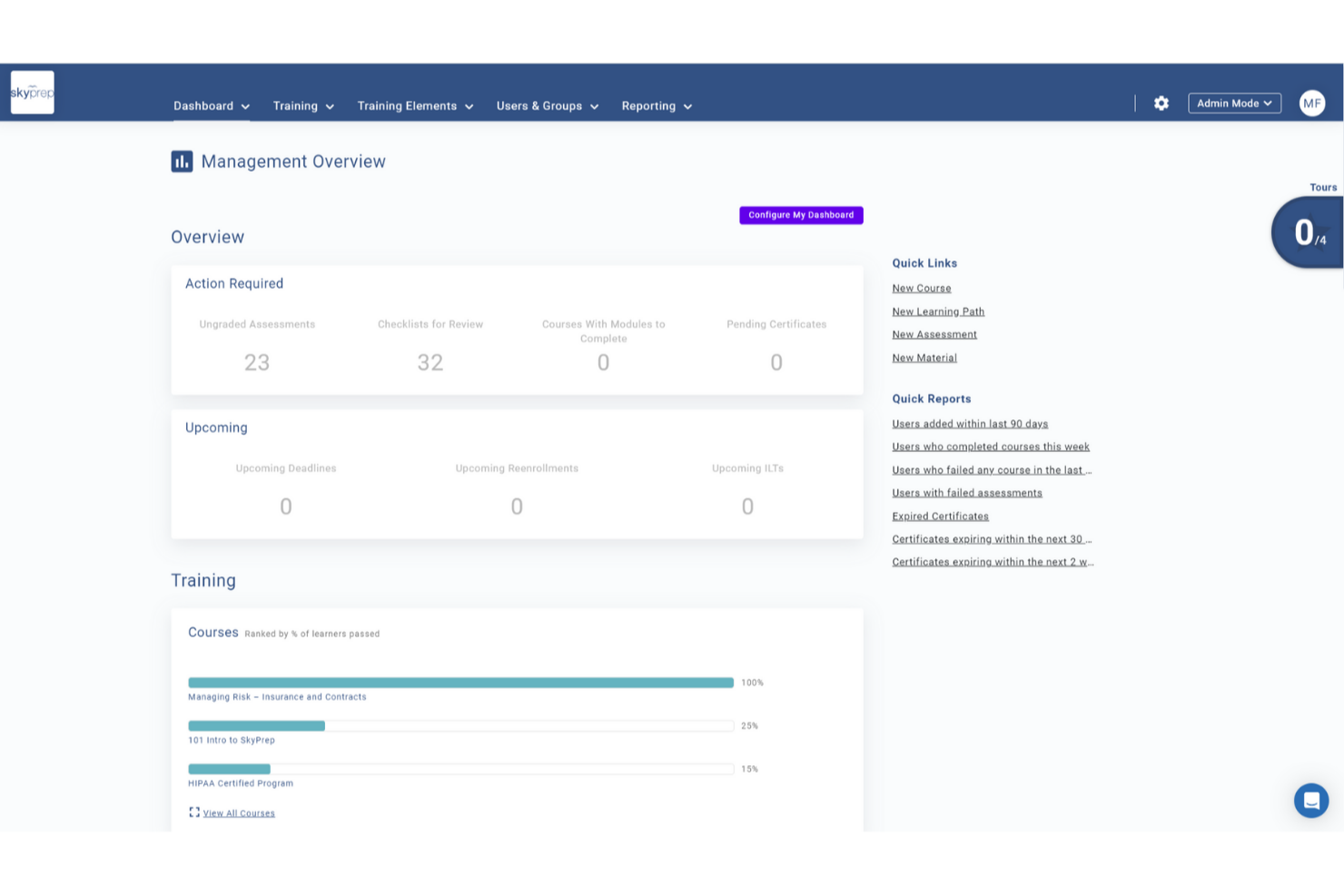
Il software di onboarding clienti di SkyPrep è progettato per le organizzazioni che desiderano migliorare i propri processi di formazione e costruire relazioni più solide con i clienti. Offre una creazione di contenuti flessibile e iscrizioni automatiche, consentendo al tuo team di offrire esperienze formative coinvolgenti che aumentano l'adozione del prodotto e la fedeltà del cliente. Che tu operi in un settore tecnologico o in un'azienda orientata ai servizi, la piattaforma intuitiva di SkyPrep aiuta a gestire e monitorare efficientemente i percorsi di onboarding, assicurando che i tuoi clienti siano ben preparati e sicuri nell'utilizzare i tuoi prodotti o servizi.
Perché ho scelto SkyPrep
Ho scelto SkyPrep per il suo forte focus sull'automazione della formazione di onboarding, fondamentale per le aziende che vogliono offrire esperienze clienti coerenti e coinvolgenti. Le iscrizioni automatiche della piattaforma garantiscono che i nuovi clienti vengano assegnati tempestivamente ai corsi rilevanti, riducendo il setup manuale e permettendo al tuo team di concentrarsi su attività più strategiche. Inoltre, le conferme digitali di SkyPrep forniscono un modo sicuro per attestare la comprensione di policy e conformità, creando registri affidabili e riducendo l'onere amministrativo. Grazie ai suoi robusti strumenti di monitoraggio e analisi delle performance, puoi facilmente monitorare i progressi dei clienti e individuare aree che necessitano supporto, colmando efficacemente le lacune di conoscenza e migliorando la fidelizzazione.
Caratteristiche principali di SkyPrep
Oltre alle sue potenti capacità di onboarding automatizzato, SkyPrep offre una varietà di funzionalità per migliorare l'esperienza formativa dei clienti.
- Coinvolgimento degli apprendenti: SkyPrep integra elementi di gamification e design moderno per rendere l'apprendimento interattivo e coinvolgente per i tuoi clienti.
- LMS multi-tenant: Questa funzione permette di gestire piattaforme separate per diversi clienti o filiali sotto un unico account, mantenendo organizzazione e chiarezza.
- Aula virtuale: SkyPrep offre strumenti per la formazione a distanza, garantendo ai tuoi clienti un accesso semplice alle sessioni da qualsiasi luogo.
- Funzionalità basate su intelligenza artificiale: La piattaforma sfrutta l'intelligenza artificiale per migliorare le esperienze di apprendimento e semplificare la creazione dei contenuti, rendendola più accessibile al tuo team.
Integrazioni di SkyPrep
Le integrazioni includono BambooHR, ADP, SAML 2.0, OKTA, G Suite, Office365, OpenSesame, Stripe, PayPal e un'API per integrazioni personalizzate.
Pros and Cons
Pros:
- L'interfaccia intuitiva semplifica la navigazione per tutti gli utenti
- Supporta diversi formati di contenuto, migliorando l'esperienza di apprendimento
- Gli strumenti di reportistica completi facilitano il monitoraggio dei progressi degli apprendenti
Cons:
- Manca un'app mobile dedicata per l'accesso in mobilità
- L'accesso offline limitato ai materiali formativi riduce la flessibilità

Continu
Ideale per collegare l'onboarding dei clienti ai sistemi aziendali
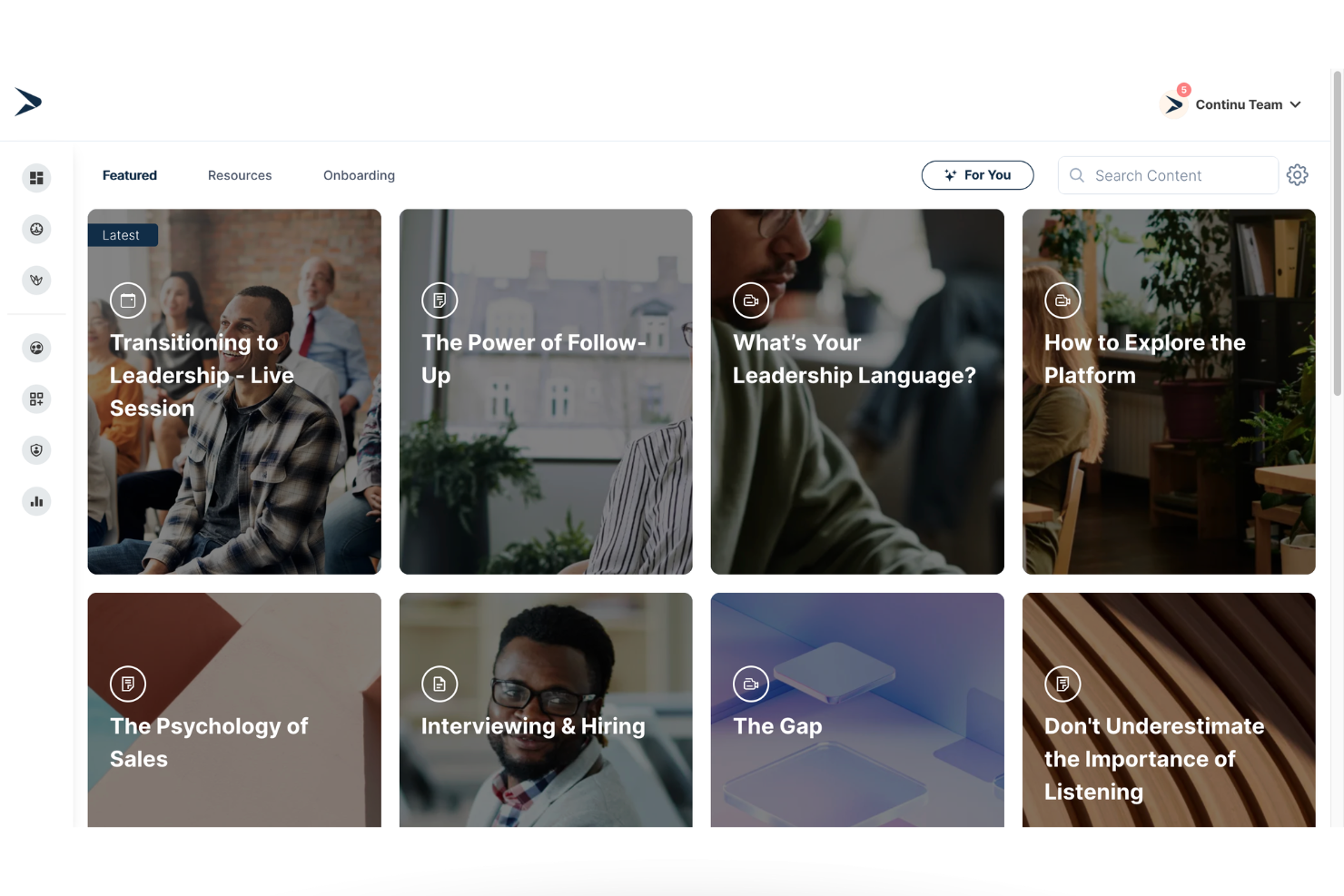
Continu è una piattaforma per l'onboarding e la formazione dei clienti, progettata per offrire programmi di formazione strutturati, automatizzare i percorsi di onboarding e collegare la formazione dei clienti ai sistemi aziendali esistenti.
Per chi è più adatto Continu?
Continu è particolarmente adatto alle aziende B2B di medie e grandi dimensioni che devono formare clienti, partner o committenti attraverso programmi di formazione strutturati e collegati al loro più ampio ecosistema tecnologico.
Perché ho scelto Continu
Ho scelto Continu per la sua stretta integrazione dei dati di onboarding con i sistemi aziendali. L'integrazione con Salesforce consente ai team di monitorare i progressi dell'onboarding dei clienti direttamente insieme alle attività degli account, facilitando il collegamento tra il coinvolgimento nella formazione e le metriche di adozione e fidelizzazione. La piattaforma supporta inoltre l'iscrizione e l'assegnazione automatizzate dei contenuti, così i nuovi clienti ricevono i materiali di onboarding appropriati senza doverli assegnare manualmente.
Funzionalità principali di Continu
- Percorsi di formazione: Crea percorsi di onboarding strutturati che organizzano video, corsi e documenti in un ordine definito.
- Percorsi guidati: Progetta programmi di onboarding passo dopo passo che guidano i clienti attraverso le principali tappe di attivazione.
- Segmentazione intelligente: Assegna automaticamente i contenuti in base al ruolo, al livello del prodotto o al segmento di clientela.
- Continu Insights: Monitora i progressi e il coinvolgimento nell'onboarding attraverso dashboard in tempo reale.
Integrazioni di Continu
Le integrazioni includono Salesforce, Workday, BambooHR, Slack, Google Workspace, Okta e Zoom. È disponibile un'API per le integrazioni personalizzate.
Pros and Cons
Pros:
- Solida integrazione con Salesforce per una visibilità completa sui progressi dell'onboarding
- I percorsi di formazione strutturati supportano l'attivazione dei clienti
- La segmentazione automatizzata riduce la configurazione manuale dell'onboarding
Cons:
- I prezzi non sono pubblicamente trasparenti
- Più adatto all'uso aziendale rispetto ai piccoli team
New Product Updates from Continu
Continu Adds Smarter Content Management
Continu adds Intelligent Tagging and Descriptions and richer content details to improve how learning content is organized and maintained. These updates reduce manual work and give teams more consistent, detailed content records. For more information, visit Continu’s official site.
 .
.
Ideale per gli spazi di avvio dei clienti senza accesso
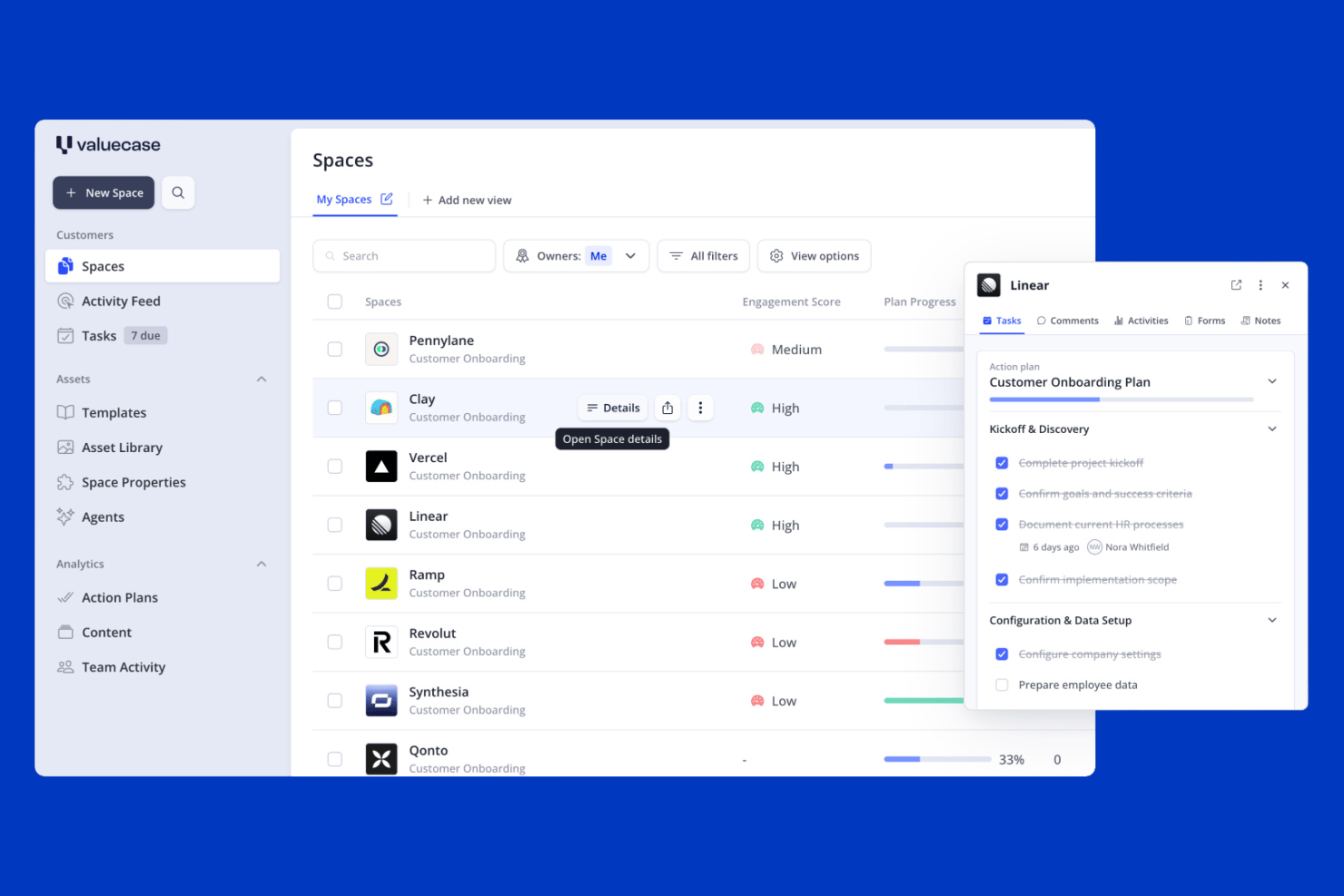
Valuecase è una piattaforma per l'avvio dei clienti basata su Spazi brandizzati e senza accesso, che combinano gestione delle attività, monitoraggio delle tappe fondamentali, moduli, contenuti incorporati e chat dal vivo in un unico link condiviso.
Per chi è più adatto Valuecase?
Valuecase è particolarmente adatto ai team dedicati al successo dei clienti e all'avvio di aziende SaaS B2B che desiderano offrire ai clienti un'esperienza di avvio curata e strutturata senza richiedere la creazione di un account.
Perché ho scelto Valuecase
Ho incluso Valuecase tra le mie scelte principali perché risolve un punto di frizione a cui tengo molto: fare in modo che i clienti partecipino effettivamente al loro avvio. Ogni Spazio viene condiviso tramite un unico link senza accesso richiesto, così i clienti possono interagire con il loro piano, le attività e i contenuti incorporati senza creare un account. Mi piace anche il fatto che l'IA possa generare un modello completo di avvio a partire da un PDF caricato o dalla trascrizione di una riunione, riducendo notevolmente i tempi di configurazione. La chat dal vivo integrata collega le conversazioni direttamente ad attività specifiche, mantenendo tutto in un unico luogo invece di disperderlo tra le conversazioni via e-mail.
Funzionalità principali di Valuecase
- Visualizzazione del diagramma di Gantt: Cronologia visiva che mappa tutte le attività e le tappe fondamentali dell'avvio per l'intera durata del progetto, disponibile in tutti i piani.
- Logica condizionale dei moduli: I moduli adattano il flusso delle domande in base alle risposte dei clienti, permettendo di raccogliere le informazioni giuste da ogni segmento di clientela.
- Pannello di controllo tra clienti: Una visualizzazione centrale che mostra lo stato dell'avvio, gli elementi in ritardo e le metriche di coinvolgimento dell'intero portafoglio clienti.
- Automazione basata su regole: I trigger del tipo 'se succede questo, allora fai quello' inviano promemoria via e-mail, sbloccano fasi dei contenuti e aggiornano i campi del CRM in base all'attività o all'inattività del cliente.
Integrazioni di Valuecase
Valuecase offre integrazioni native con HubSpot, Salesforce, Slack e Microsoft Teams. Fornisce inoltre un'API pubblica, webhook, Valuecase MCP e connessioni tramite Zapier, Make e Albato.
Pros and Cons
Pros:
- I clienti accedono all'avvio senza barriere di accesso
- L'IA genera piani di avvio completi a partire dai file caricati
- Gli Spazi con marchio personalizzato riuniscono attività e comunicazioni
Cons:
- Le integrazioni CRM sono disponibili solo nei piani superiori
- La modifica degli Spazi attivi non dispone della funzionalità di aggiornamento in blocco

Ideale per la creazione di corsi basata sull’IA
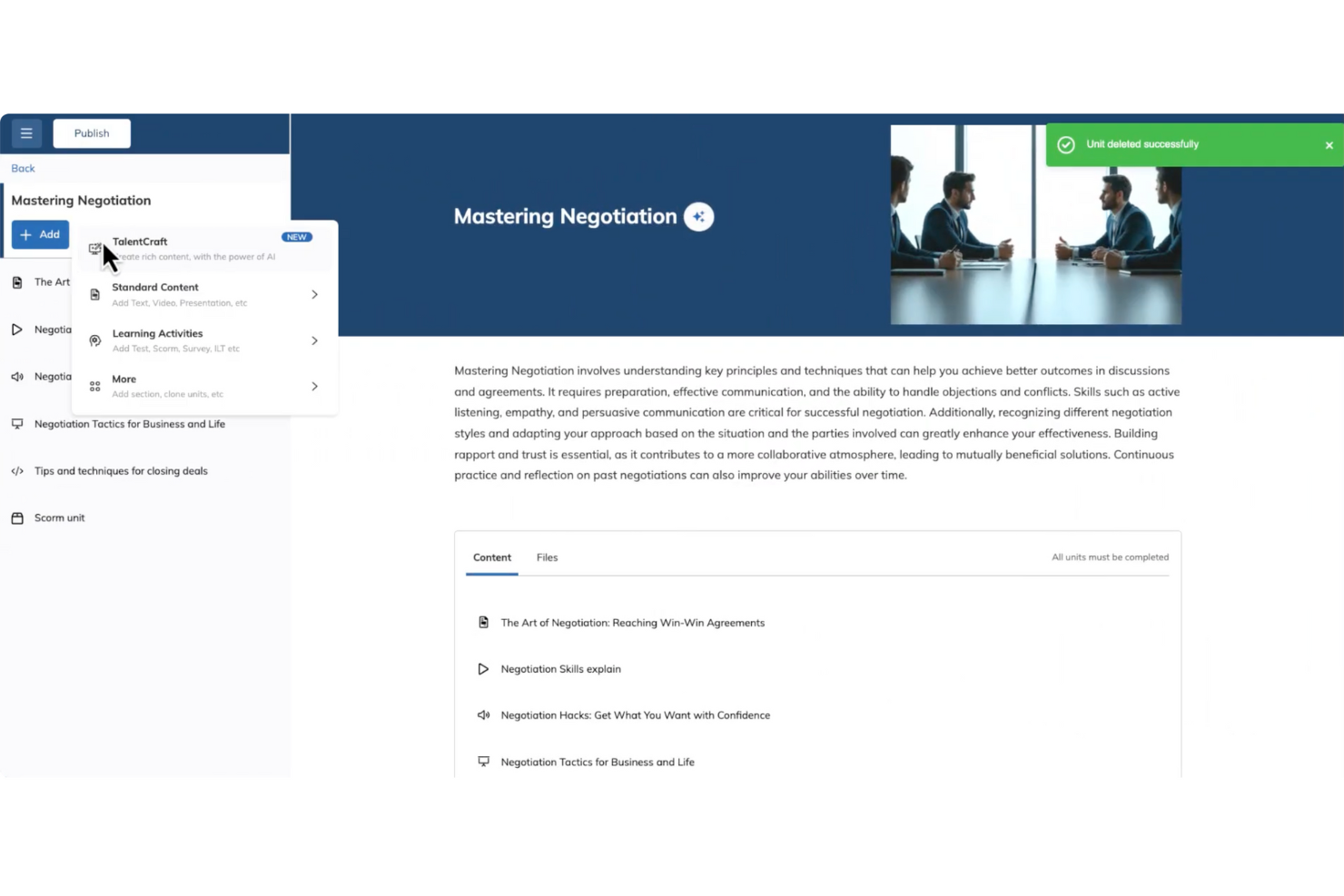
Gestire l’onboarding dei clienti può essere una sfida, ma TalentLMS aiuta i team a gestirlo attraverso una formazione strutturata e percorsi di apprendimento. Supporta le aziende di diversi settori che hanno bisogno di un modo semplice per integrare i clienti utilizzando contenuti formativi chiari e organizzati. Con strumenti per la creazione dei corsi e materiali didattici riutilizzabili, TalentLMS aiuta i team a fornire esperienze di onboarding coerenti su larga scala.
Perché ho scelto TalentLMS
Ho scelto TalentLMS per la sua capacità di supportare l’onboarding dei clienti grazie alla creazione di corsi strutturati e a percorsi formativi flessibili. Permette ai team di creare e adattare rapidamente i contenuti di onboarding per rispondere alle diverse esigenze dei clienti. Le valutazioni e le certificazioni integrate rendono più semplice monitorare i progressi e confermare il completamento dell’apprendimento. Insieme, queste funzionalità aiutano i team a offrire una formazione di onboarding coerente e misurabile.
Funzionalità principali di TalentLMS
Oltre alla creazione di corsi guidata dall’IA, TalentLMS offre:
- Formazione basata sulle competenze: Questa funzionalità consente di personalizzare l’esperienza di onboarding in base alle singole competenze, garantendo che ogni cliente riceva una formazione pertinente alle sue necessità.
- Accessibilità da mobile: Con il supporto per dispositivi mobili, il tuo team può accedere ai materiali formativi in qualsiasi momento e luogo, facilitando l’apprendimento continuo.
- Report in tempo reale: Reportistica e analisi complete consentono di monitorare i progressi degli utenti e le prestazioni dei corsi, assicurando che il processo di onboarding sia sempre sotto controllo.
- Opzioni di personalizzazione: Dal branding al white labeling, TalentLMS offre varie opzioni di personalizzazione per allineare la piattaforma all’identità della tua azienda.
Integrazioni TalentLMS
Le integrazioni includono Zoom, Salesforce, Shopify, WordPress, BambooHR, Zapier, GoToMeeting, Microsoft Teams, Google Analytics e Slack.
Pros and Cons
Pros:
- Valutazioni integrate supportano la misurazione delle competenze e la certificazione
- Chiare funzioni di raggruppamento degli utenti supportano strutture formative complesse
- Funzionalità personalizzabili rispondono a diverse esigenze formative, migliorando l’esperienza utente
Cons:
- Gli strumenti di collaborazione integrati sono basilari rispetto a community di apprendimento dedicate
- File multimediali di grandi dimensioni possono richiedere soluzioni di hosting esterne
New Product Updates from TalentLMS
TalentLMS Adds Learning Paths, AI Video, and Learner Experience Updates
TalentLMS introduced updates across learning management, content creation, and learner experience, including Learning Paths for Groups, AI video generation in TalentCraft, video bookmarking, and expanded administration tools. For more information, visit TalentLMS’s official site.

Moxo
Ideale per spazi di collaborazione clienti sicuri

Moxo è una piattaforma per l'onboarding dei clienti che riunisce automazione dei flussi di lavoro, raccolta di documenti, firme elettroniche, messaggistica sicura e monitoraggio delle attività in un unico spazio di lavoro per gestire le interazioni con i clienti.
Per chi è più adatto Moxo?
Moxo è adatto ai team di servizi professionali—come quelli nei servizi finanziari, legali o di consulenza—che gestiscono rapporti continuativi con i clienti e ad alto volume di documenti.
Perché ho scelto Moxo
Moxo è una delle mie scelte migliori perché adoro come ogni interazione con il cliente avvenga all'interno di uno spazio di lavoro dedicato e criptato, invece che dispersa tra thread di email e drive condivisi. In pratica, ciò significa che il mio team può raccogliere documenti, gestire approvazioni e scambiare messaggi con i clienti in un unico posto, con tutti i dati criptati sia in transito che a riposo. I controlli di accesso granulari basati sui ruoli sono un vero elemento distintivo: posso stabilire esattamente chi vede cosa in ogni fase dell'onboarding, il che è fondamentale quando si gestiscono documenti finanziari o legali sensibili. La cronologia di audit di 7 anni è un'altra caratteristica su cui faccio affidamento, soprattutto quando lavoro con clienti in settori regolamentati.
Caratteristiche principali di Moxo
- Costruttore di flussi drag-and-drop: Crea sequenze di onboarding multi-step con attività, richieste di file, moduli e approvazioni, tutto organizzato in un editor visuale.
- Firme elettroniche: Raccogli firme legalmente vincolanti direttamente all'interno dello spazio di lavoro cliente, senza doverli indirizzare a uno strumento esterno.
- Branding personalizzato: Applica il tuo logo, colori e dominio al portale clienti, in modo che ogni punto di contatto rifletta il tuo brand.
- Videoriunioni integrate: Organizza videochiamate con i clienti direttamente nella piattaforma senza passare a un altro strumento.
Integrazioni di Moxo
Moxo offre connettori di sincronizzazione dati diretti con Salesforce, HubSpot, Microsoft Dynamics, Zoho, Wealthbox, Redtail, Filevine, Global Relay, Smarsh e Xero, oltre a integrazioni documentate per DocuSign, Stripe, Slack, Jira, Google Drive, Dropbox, Box, OneDrive, Zendesk e QuickBooks. Si collega anche con Zapier e offre una REST API e webhook per integrazioni personalizzate.
Pros and Cons
Pros:
- Infrastruttura conforme SOC 2 Type II e GDPR
- Chat integrata, video e condivisione schermo
- Costruttore drag-and-drop con template riutilizzabili
Cons:
- Nessun timer integrato per il monitoraggio delle attività
- La configurazione iniziale richiede molto tempo
Ideale per i tour interattivi del prodotto
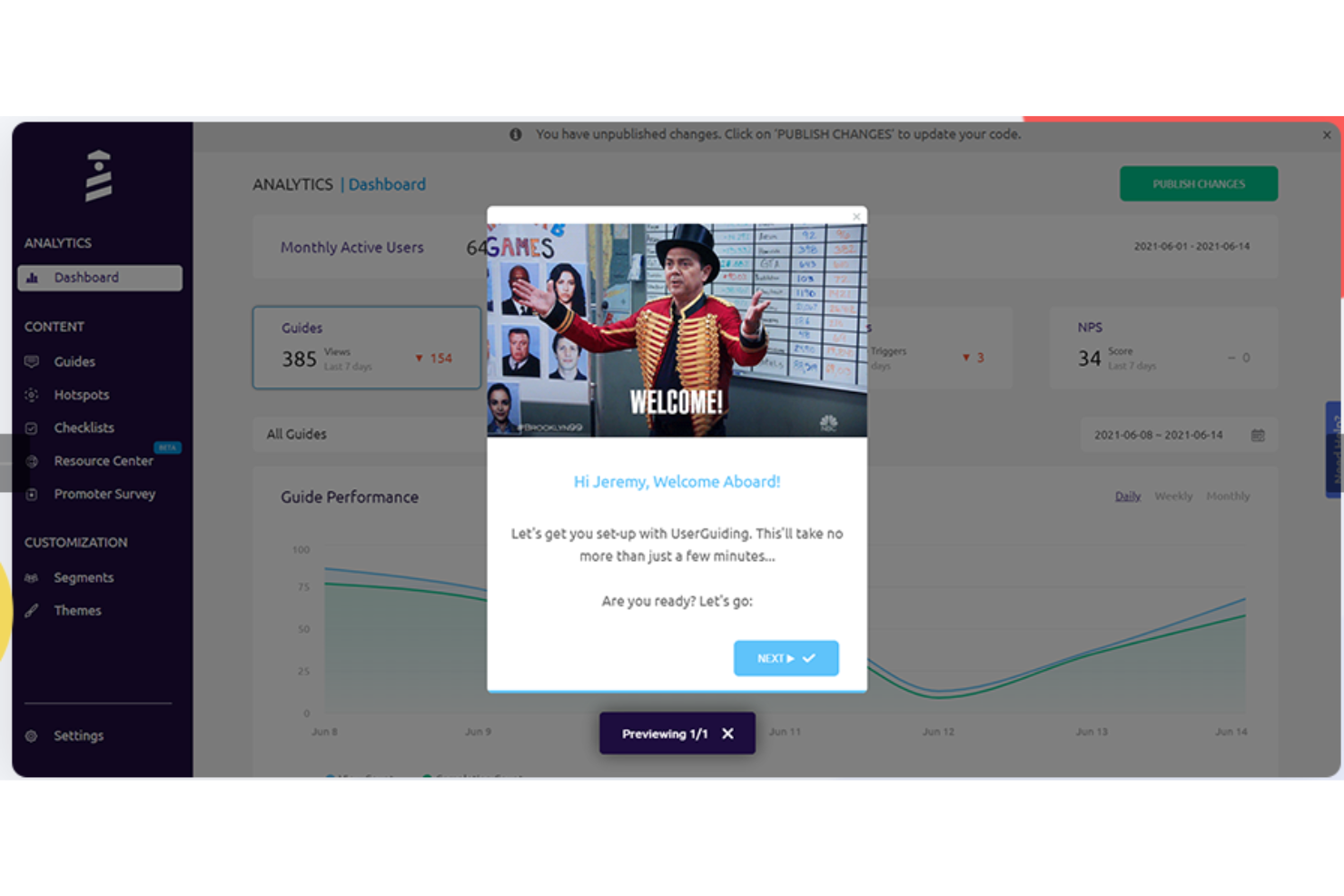
UserGuiding offre una soluzione no-code con tour interattivi del prodotto, checklist di onboarding e sondaggi in-app. Questa piattaforma è particolarmente interessante per le piccole imprese e le aziende tecnologiche che desiderano aumentare il coinvolgimento degli utenti senza competenze tecniche avanzate. Integrandosi con gli strumenti già in uso e ponendo l'accento sulla sicurezza dei dati, UserGuiding semplifica il processo di onboarding offrendo preziose informazioni tramite l’analisi dati, affrontando efficacemente le sfide legate all’adozione degli utenti e all’attivazione del prodotto.
Perché ho scelto UserGuiding
Ho scelto UserGuiding perché eccelle nella creazione di tour interattivi del prodotto che trasformano l'onboarding degli utenti. Puoi sfruttare tour e tooltip personalizzabili per guidare gli utenti nelle loro prime esperienze, riducendo la frustrazione e aumentando il coinvolgimento. La funzionalità di segmentazione della piattaforma permette di fornire contenuti personalizzati, assicurando che ogni utente riceva un'esperienza su misura. Queste capacità non solo riducono la curva di apprendimento, ma aumentano anche la soddisfazione degli utenti, rendendo UserGuiding una scelta ideale per snellire i processi di onboarding.
Funzionalità principali di UserGuiding
Oltre ai suoi tour interattivi del prodotto, UserGuiding offre una suite completa di funzionalità pensate per migliorare il processo di onboarding dei clienti:
- Checklist di onboarding: Queste checklist guidano passo passo gli utenti attraverso le attività essenziali, assicurando che non vengano tralasciate azioni fondamentali durante le prime interazioni con il prodotto.
- Tooltip e hotspot: Queste funzionalità offrono una guida contestuale evidenziando parti specifiche dell’applicazione, aiutando gli utenti a comprendere funzionalità complesse durante la navigazione.
- Sondaggi in-app: Raccogli feedback immediati degli utenti con sondaggi personalizzabili che possono essere avviati in momenti chiave del percorso utente, permettendo di adattare e migliorare il processo di onboarding in tempo reale.
- Centri risorse: Questa funzione crea un hub centralizzato per tutorial, FAQ e altri contenuti utili, dando agli utenti un accesso facile alle informazioni necessarie per avere successo con il tuo prodotto.
Integrazioni UserGuiding
Le integrazioni includono Amplitude, Salesforce, Intercom, Mixpanel, Segment, Slack, Google Analytics, Google Tag Manager, Woopra e HubSpot.
Pros and Cons
Pros:
- Interfaccia intuitiva che semplifica i processi di onboarding
- Efficace nella creazione di guide interattive e tooltip
- Riduzione dei ticket di supporto grazie a walkthrough efficaci del prodotto
Cons:
- Opzioni di personalizzazione e controllo sull’analisi dei dati limitate
- Roadmap lenta per l’introduzione di nuove funzionalità

Absorb
Ideale per percorsi di apprendimento personalizzati
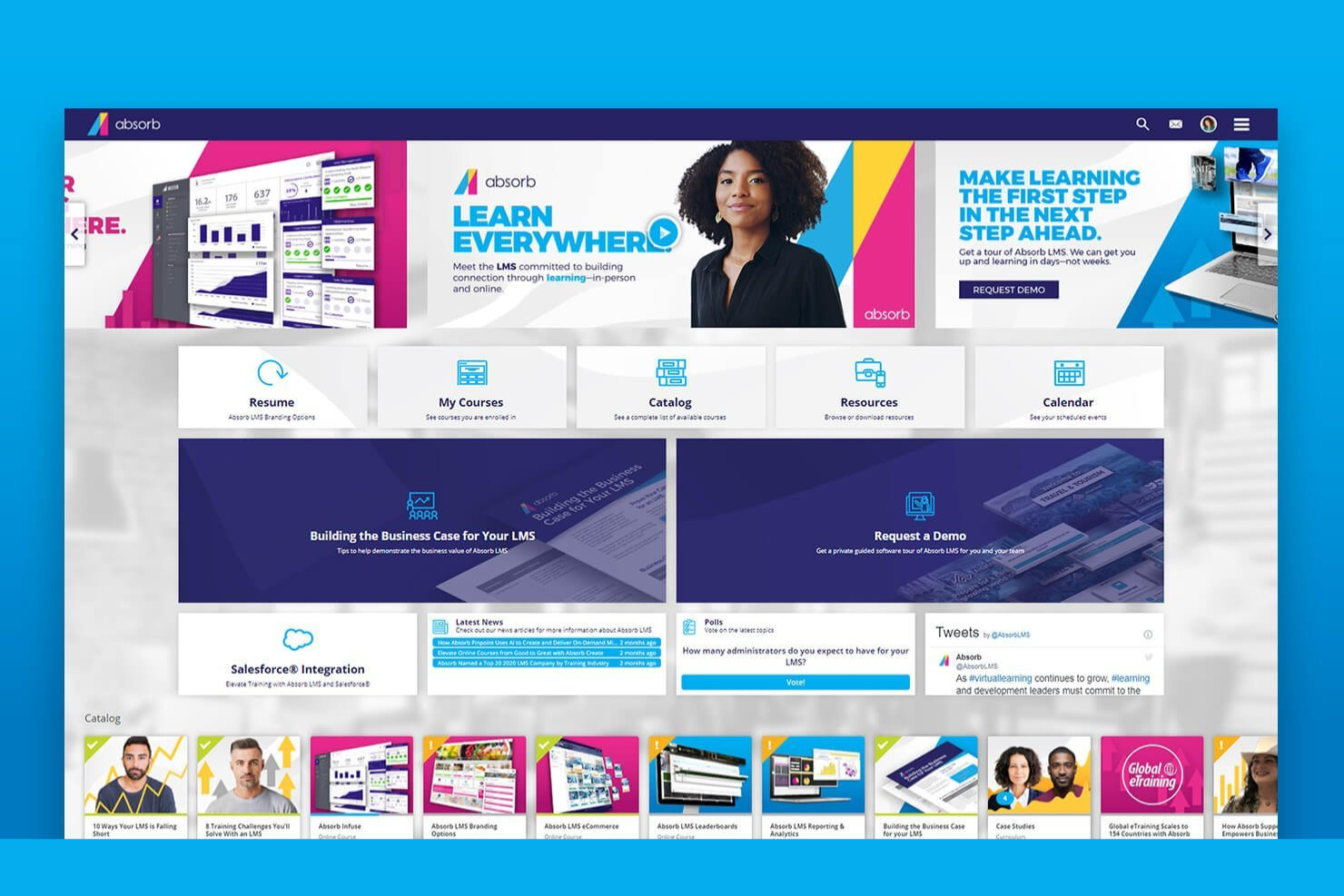
Absorb offre una soluzione su misura per chi desidera arricchire i propri processi di onboarding dei clienti. Questo sistema di gestione dell'apprendimento si rivolge a imprese di vari settori, con l'obiettivo di fornire una formazione completa e migliorare la soddisfazione dei clienti. Grazie a percorsi di apprendimento personalizzati, Absorb mira a ridurre l'abbandono e aumentare la fidelizzazione, assicurando che i tuoi clienti comprendano e apprezzino appieno le tue offerte.
Perché ho scelto Absorb
Ho scelto Absorb per la sua caratteristica distintiva dei percorsi di apprendimento personalizzati, fondamentali per un onboarding clienti efficace. Questo sistema permette di adattare i programmi di formazione ai singoli utenti, abbandonando modelli generici e concentrandosi su ruoli e bisogni specifici. Con strumenti come Absorb Create per lo sviluppo dei corsi e Absorb Analyze per il monitoraggio delle prestazioni, puoi creare un'esperienza formativa che aumenta coinvolgimento e fidelizzazione. Sfruttando la personalizzazione guidata dall'intelligenza artificiale, Absorb garantisce che il processo di onboarding sia non solo efficiente, ma anche in linea con gli stili di apprendimento unici del tuo pubblico.
Caratteristiche principali di Absorb
Oltre ai suoi percorsi di apprendimento personalizzati, Absorb offre una varietà di funzionalità che lo rendono una scelta solida per il software di onboarding dei clienti.
- Modulo eCommerce: semplifica la vendita di corsi online, consentendo alla tua organizzazione di monetizzare facilmente i contenuti formativi.
- Checklist Osservative: colma il divario tra apprendimento online e applicazione reale monitorando la verifica delle competenze durante la formazione sul campo.
- Accessibilità Mobile: garantisce che il tuo team possa accedere ai materiali didattici in qualsiasi momento e luogo, adattandosi a orari e ubicazioni diversi.
- Conformità SCORM: supporta vari formati di corso, assicurando compatibilità e coerenza su dispositivi e piattaforme differenti.
Integrazioni Absorb
Le integrazioni includono Salesforce, HubSpot, Zoom, WebEx, Workday, SAP SuccessFactors, BambooHR, ADP, Dayforce, ServiceNow, Google Workspace e altro ancora.
Pros and Cons
Pros:
- Si integra con i sistemi HR
- Supporta un'ampia gamma di formati di contenuto, incluso SCORM
- Include strumenti con intelligenza artificiale per una creazione dei corsi semplificata
Cons:
- I processi di iscrizione multipla necessitano miglioramenti
- Opzioni di personalizzazione limitate per le dashboard amministrative
New Product Updates from Absorb
Absorb Aura Adds Claude and ChatGPT Connections
Absorb Aura now connects to Claude or ChatGPT via MCP, enabling users to ask questions about their learning and the LMS directly inside the AI tool after a simple setup. For more information, visit Absorb's official site.
 .
.
Ideale per i modelli di onboarding pronti all’uso

Per chi desidera migliorare l’esperienza di onboarding dei clienti, Rocketlane offre una combinazione unica di automazione guidata dall’IA, spazi di lavoro collaborativi e monitoraggio in tempo reale dei progetti. Progettato appositamente per le aziende di servizi moderne, garantisce la consegna dei progetti nei tempi e nei budget previsti. Se il tuo obiettivo è aumentare l’efficienza e rafforzare le relazioni con i clienti, Rocketlane mette a disposizione strumenti per personalizzare i piani di progetto e ottimizzare l’allocazione del personale, rendendolo una scelta ideale per i tuoi processi di onboarding.
Perché ho scelto Rocketlane
Ho scelto Rocketlane perché i suoi modelli pronti all’uso semplificano la creazione dei processi di onboarding dei clienti, affrontando la sfida della standardizzazione dei flussi di lavoro. Il modello di Passaggio da Vendite a Successo assicura transizioni senza soluzione di continuità catturando le informazioni critiche dal team vendite, mentre il modello di Pianificazione Pre-Kickoff definisce dettagli e obiettivi del progetto, offrendo chiarezza fin dall’inizio. Inoltre, il modello di Piano di Comunicazione del Progetto stabilisce strategie di comunicazione chiare, fondamentale per mantenere responsabilità e soddisfazione del cliente. Queste funzionalità, insieme, semplificano l’onboarding, rendendo Rocketlane una soluzione ideale per le aziende che vogliono migliorare l’efficienza e ridurre l’abbandono dei clienti.
Caratteristiche principali di Rocketlane
Oltre ai modelli pronti all’uso, Rocketlane offre una serie di funzionalità pensate per soddisfare ogni esigenza di onboarding dei clienti:
- Portale clienti personalizzabile: Questa funzionalità consente di creare un portale personalizzato per ogni cliente, arricchendo l’esperienza di onboarding e assicurando l’accesso a tutte le risorse necessarie in un unico punto.
- Visualizzazioni della timeline: Con viste complete della timeline, il team può monitorare immediatamente l’avanzamento dei progetti, assicurando la puntualità delle attività e il rispetto delle scadenze.
- Moduli integrati per la raccolta dati: Rocketlane fornisce moduli integrati che agevolano la raccolta dati dai clienti, semplificando il processo di acquisizione delle informazioni e garantendo accuratezza.
- Visibilità a 360° sul progetto: Questa funzione offre una supervisione completa su tutti gli aspetti di un progetto, permettendo di monitorare i progressi, risolvere prontamente eventuali problemi e mantenere trasparenza con i clienti.
Integrazioni di Rocketlane
Le integrazioni includono Slack, Salesforce, Jira, Zapier, Workato, HubSpot, Google Calendar e Outlook Calendar.
Pros and Cons
Pros:
- Consente viste dettagliate delle timeline per monitorare i progressi
- Fornisce modelli personalizzabili per standardizzare i processi di onboarding
- Migliora il coinvolgimento dei clienti grazie ai portali personalizzati
Cons:
- Pianificazione degli scenari limitata
- Personalizzazione limitata delle funzionalità di reporting predefinite
New Product Updates from Rocketlane

Rocketlane Introduces Governance and Workforce Agents
Rocketlane introduces Governance Agents and Workforce Agents to automate delivery processes and recurring tasks. These updates help teams enforce rules and streamline project execution. For more information, visit Rocketlane’s official site.
 .
.
Dock
Ideale per piani di successo reciproci passo passo
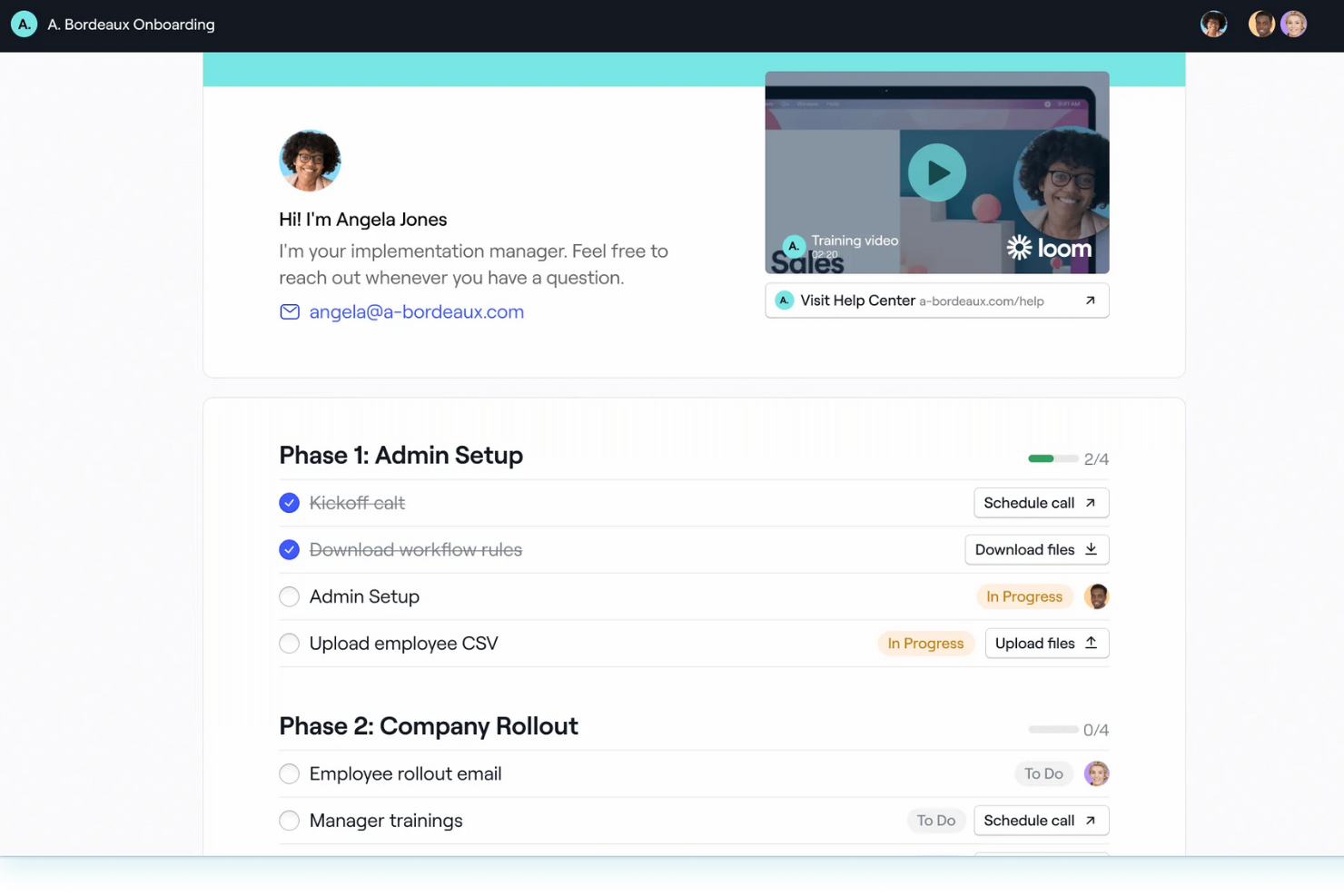
Dock offre una piattaforma di onboarding unica che risponde alle esigenze dei team di customer success e vendite. Fornendo hub di onboarding personalizzati, Dock garantisce che piani di progetto, contenuti e moduli siano facilmente accessibili in un ambiente collaborativo, riducendo la dipendenza da email e riunioni. La sua perfetta integrazione con strumenti come HubSpot e Salesforce lo rende una scelta versatile per le aziende che desiderano creare esperienze di onboarding efficienti monitorando al contempo il coinvolgimento e i progressi dei clienti.
Perché ho scelto Dock
Ho scelto Dock per la sua eccezionale capacità di creare piani di successo reciproci passo passo, fondamentale per l'onboarding dei clienti. I portali di onboarding personalizzati di Dock permettono di condividere piani di progetto e contenuti in uno spazio collaborativo, eliminando la necessità di continui scambi di email. Grazie a modelli predefiniti e hub di risorse self-service, il tuo team può garantire un processo di onboarding coerente ed efficiente, concentrandosi sul coinvolgimento e sulla fidelizzazione dei clienti. L'integrazione di Dock con strumenti CRM come HubSpot e Salesforce ne potenzia ulteriormente l'utilità, rendendolo una soluzione versatile per i team che desiderano monitorare e ottimizzare il percorso di onboarding.
Funzionalità chiave di Dock
Oltre alla capacità di creare piani di successo reciproci passo passo, Dock offre una suite di funzionalità pensate per ottimizzare il processo di onboarding dei clienti.
- Workspace con template: Consentono al tuo team di avviare rapidamente modelli di onboarding personalizzati, assicurando un'esperienza coerente e su misura per ogni cliente.
- Moduli di sondaggio e caricamento di file: È possibile raccogliere dati necessari in modo efficiente, poiché Dock offre moduli integrati e opzioni di caricamento che semplificano la raccolta delle informazioni.
- Campi dinamici: Importando dati dei clienti dai CRM, questa funzione personalizza il processo di onboarding, rendendolo più rilevante e coinvolgente per i tuoi clienti.
- Analisi e reportistica: Dock offre approfondimenti sull'engagement dei clienti e sui progressi dell'onboarding, aiutandoti a monitorare le interazioni e migliorare l'esperienza del cliente.
Integrazioni Dock
Le integrazioni native di Dock includono HubSpot e Salesforce. Inoltre, Dock mette a disposizione un'API per integrazioni personalizzate.
Pros and Cons
Pros:
- I campi dinamici di Dock personalizzano efficacemente l'esperienza di onboarding
- Moduli di sondaggio integrati e caricamento di file semplificano la raccolta dati
- Reportistica e analisi complete aiutano a monitorare il coinvolgimento dei clienti
Cons:
- Il software potrebbe non offrire abbastanza personalizzazione per esigenze avanzate
- Gli utenti trovano la configurazione iniziale complessa e dispendiosa in termini di tempo

Guidde
Ideale per creare video tutorial con AI
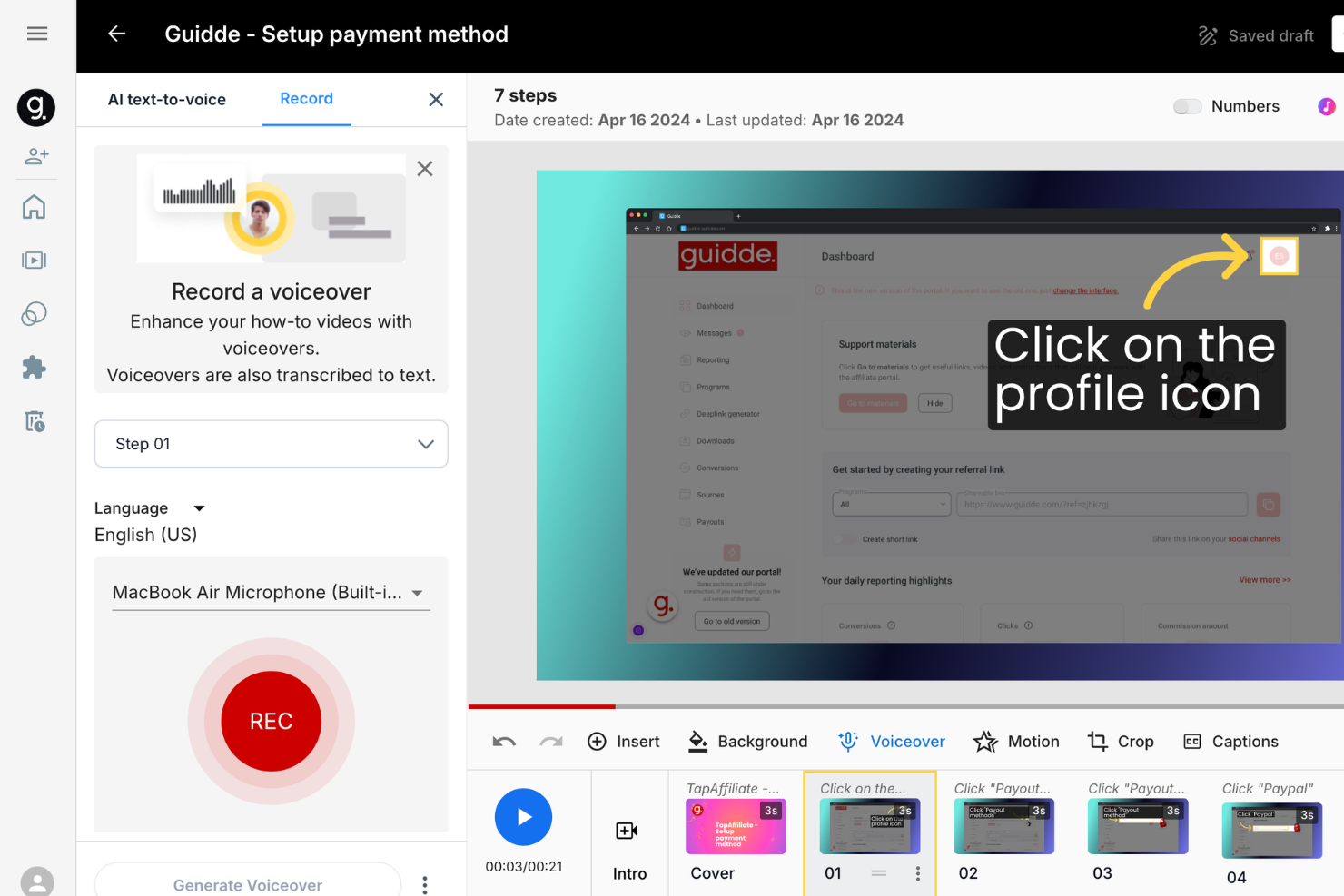
Guidde offre una soluzione guidata dall'intelligenza artificiale che eleva l'esperienza di onboarding dei clienti consentendo di creare rapidamente documentazione video coinvolgente. È pensato per le aziende che desiderano migliorare i processi di onboarding con strumenti come Magic Mic per una narrazione chiara e Magic Capture per una registrazione dei flussi di lavoro senza sforzo. Questa piattaforma è ideale per i settori che si concentrano sull'onboarding dei dipendenti, la formazione dei clienti e la collaborazione aziendale, aiutando a ridurre i ticket di assistenza e aumentare il coinvolgimento dei clienti.
Perché ho scelto Guidde
Ho scelto Guidde perché la sua serie unica di funzionalità basate sull'AI risponde in modo specifico all'esigenza di creare velocemente video tutorial efficaci, un aspetto cruciale dell'onboarding dei clienti. Lo strumento Magic Capture permette di registrare flussi di lavoro facilmente, mentre Magic Mic offre doppiaggi generati dall'intelligenza artificiale che aggiungono chiarezza ai tuoi tutorial. Fornendo contenuti video concisi esattamente quando servono, Guidde incrementa il coinvolgimento degli utenti e riduce il numero di richieste di supporto, risultando ideale per i team che vogliono ottimizzare i processi di onboarding. Questo approccio non solo aumenta la fiducia del cliente, ma consente anche di snellire gli sforzi formativi dell'organizzazione.
Caratteristiche principali di Guidde
Oltre alle sue capacità di creazione video basate su AI, Guidde offre diverse funzionalità che potenziano il processo di onboarding dei clienti:
- Guidde Create: Trasforma rapidamente le registrazioni dei flussi di lavoro in tutorial professionali, assicurando che il tuo team possa fornire istruzioni chiare e strutturate.
- Broadcasting: Fornisce contenuti personalizzati agli utenti nel momento giusto, migliorando l'apprendimento e assicurando che le informazioni siano ricevute quando sono più rilevanti.
- Enterprise Solutions: Centralizza i processi per migliorare la collaborazione in tutta l'organizzazione, consentendo strategie di onboarding più coese.
- Customer Education: Si focalizza sull'aumento della fiducia del cliente attraverso strategie di onboarding efficaci, mirate a ridurre le richieste di assistenza e migliorare la soddisfazione degli utenti.
Integrazioni Guidde
Le integrazioni includono Microsoft Dynamics 365, SAP, Dropbox, Notion e Salesforce.
Pros and Cons
Pros:
- Cattura i flussi di lavoro senza problemi, rendendo i processi complessi facili da seguire
- Snellisce la creazione dei video, riducendo notevolmente i tempi di formazione
- Interfaccia intuitiva che semplifica la documentazione video
Cons:
- Allineamento di audio/narrazione talvolta richiede regolazioni manuali
- La scelta delle opzioni vocali AI non sempre risulta naturale
Altre opzioni
Ecco alcune altre opzioni che non sono rientrate nella lista principale.
- Userflow
Ideale per tracciare le interazioni degli utenti in tempo reale
- Whatfix
Ideale per migliorare l'esperienza di onboarding con feedback integrato
- Intercom
Ideale per migliorare l'esperienza utente con l'automazione
- WalkMe
Migliore soluzione senza codice per creare heatmap delle attività dei clienti
- Pendo
Ideale per stimolare il coinvolgimento degli utenti tramite i dati
- Drip
Ideale per esperienze di onboarding personalizzate
- Under.io
Ideale per ridurre i processi manuali nell'onboarding
- Compass
Ideale per l'assistenza via chat AI-driven
- Hopscotch
Miglior soluzione no-code per inviare messaggi in-app
- Chameleon
Miglior onboarding self-service per la riduzione dei ticket
- Document360
Ideale per approfondimenti Pro Analytics
- Stonly
La migliore soluzione no-code per costruire centri assistenza self-service
- Product Fruits
Ideale per tour interattivi dell'utente
- Trupeer
Ideale per l'inserimento dei clienti basato su video con l'AI
- Synergy Learning
Ideale per percorsi di onboarding guidati da LMS


Che cos'è il software per l'onboarding dei clienti?
Il software per l'onboarding dei clienti è una piattaforma che guida i nuovi clienti nelle fasi iniziali di utilizzo di un prodotto o servizio. Semplifica le attività di onboarding, personalizza l'esperienza e aiuta gli utenti a raggiungere più rapidamente il valore.
Come valuto il software di onboarding clienti
Analizzo questi strumenti su due livelli: se un CSM può effettivamente gestire l'onboarding di un cliente dall'avvio al go-live (criteri di accettazione), e poi cosa distingue una piattaforma dall'altra (differenziatori).
Funzionalità principali (requisiti base per questa lista)
Quando seleziono gli strumenti per la mia lista, valuto ciascuno su una scala da 0 (non offre la funzionalità) a 5 (eccelle in quest’area) per ogni funzionalità principale elencata sotto. Quindi calcolo il punteggio totale dello strumento in percentuale. Ogni strumento deve raggiungere un punteggio totale minimo del 65% per essere considerato per l’inclusione.
- Template di workflow di onboarding: Verifico se è possibile creare template riutilizzabili e sequenziati per diversi segmenti di clienti, come un piano enterprise rispetto a un percorso SMB self-service.
- Portale rivolto al cliente: Ogni strumento dovrebbe fornire ai clienti uno spazio personalizzato dove visualizzare il loro piano, completare attività e caricare file, invece di dover rincorrere aggiornamenti via email.
- Monitoraggio di attività e tappe fondamentali: Valuto come vengono assegnate le attività sia ai contatti interni che a quelli lato cliente, incluse le date di scadenza, le dipendenze e le suddivisioni per milestone.
- Visibilità sui progressi e reportistica: Dashboard che mostrano la salute dell’onboarding a livello di portafoglio, tendenze time-to-value e colli di bottiglia sono più rilevanti delle semplici viste sullo stato dei progetti.
- Automazione e notifiche: Cerco promemoria basati su trigger, regole di escalation e automazioni in caso di cambiamento di stato che mantengano i progetti in movimento senza bisogno di interventi manuali.
- Integrazioni con CRM e stack CS: Lo strumento dovrebbe sincronizzare i dati di onboarding con piattaforme come Salesforce, HubSpot o Gainsight in modo che i dati dei clienti rimangano aggiornati in tutti i sistemi.
Una volta che ho una lista di strumenti che soddisfano questi criteri, considero cosa distingue ciascuna piattaforma.
Fattori differenzianti (Cosa distingue i fornitori)
Ecco come confronto e metto in risalto i diversi fornitori:
Caratteristiche distintive
Gli health score specifici per l’onboarding sono un grande elemento di differenziazione. Gli strumenti che uniscono il completamento delle attività, la velocità nel raggiungere le tappe e l’attività di accesso danno ai CSM un segnale anticipato quando un account rischia di rallentare, prima ancora che il cliente lo segnali. Valuto anche se una piattaforma offre tour guidati in-app, che consentono ai clienti di seguire i passaggi di configurazione del prodotto senza dover aspettare una call programmata. Un hub di comunicazione integrato completa il tutto, mantenendo email, note e aggiornamenti collegati a ciascun progetto di onboarding invece che dispersi nelle caselle di posta.
Oltre le funzionalità
Qui la scalabilità conta molto. Controllo se una piattaforma può gestire onboarding di alto livello per aziende con piani progetto dedicati, insieme a modalità tech-touch per PMI tramite flussi automatizzati. Anche il supporto fornito dal vendor fa la differenza: alcuni offrono specialisti dedicati che aiutano a creare i primi playbook, altri invece forniscono solo documentazione e knowledge base. Per i team che gestiscono dati sensibili dei clienti, considero la certificazione SOC 2 Type II, il supporto SSO e controlli di accesso basati sui ruoli per verificare che lo strumento rispetti i requisiti di sicurezza enterprise.
Come scegliere il software per l'onboarding dei clienti
È facile perdersi in lunghi elenchi di funzionalità e strutture tariffarie complesse. Per aiutarti a rimanere concentrato mentre affronti il tuo esclusivo processo di selezione del software, ecco una checklist dei fattori da tenere presenti:
| Fattore | Cosa considerare |
|---|---|
| Scalabilità | Valuta se il software può crescere insieme alla tua attività. Ti servirà una soluzione in grado di gestire un numero maggiore di utenti e una complessità crescente senza perdere prestazioni. |
| Integrazioni | Assicurati che il software si integri perfettamente con i sistemi esistenti, come gli strumenti CRM e di analisi, per semplificare i flussi di lavoro e garantire la coerenza dei dati. |
| Personalizzazione | Cerca opzioni che ti consentano di adattare le funzionalità alle esigenze specifiche della tua attività, così da integrarle facilmente nei tuoi processi e nella tua identità visiva. |
| Semplicità d'uso | Scegli un software che il tuo team possa imparare e utilizzare rapidamente senza una formazione approfondita, riducendo il tempo necessario per ottenere valore e la frustrazione degli utenti. |
| Budget | Valuta il costo rispetto ai limiti del tuo budget. Considera non solo il prezzo iniziale, ma anche i costi ricorrenti, come gli abbonamenti e i potenziali componenti aggiuntivi. |
| Misure di sicurezza | Assicurati che siano presenti solide misure di protezione dei dati, tra cui la crittografia e la conformità agli standard del settore, per proteggere le informazioni dei clienti e della tua attività. |
Tendenze del software per l'onboarding dei clienti nel 2026
Il software per l'onboarding dei clienti si sta evolvendo per soddisfare le esigenze aziendali in continua trasformazione. Ecco le principali tendenze da tenere d'occhio.
Personalizzazione basata sull'IA
La personalizzazione basata sull'IA adatta l'esperienza di onboarding ai singoli clienti. Questa tendenza migliora il coinvolgimento e la soddisfazione offrendo contenuti personalizzati. Aumenta inoltre l'efficienza automatizzando le interazioni personalizzate.
Strumenti interattivi per l'onboarding
Gli strumenti interattivi per l'onboarding, come i tutorial con elementi di gioco e le simulazioni, stanno diventando sempre più diffusi. Questi strumenti rendono il processo di onboarding più coinvolgente e piacevole. Aiutano inoltre gli utenti a conservare meglio le informazioni, rendendo la formazione dei clienti più semplice ed efficace.
Funzionalità di integrazione fluida
Le funzionalità di integrazione fluida sono essenziali per il software di onboarding dei clienti. Questa tendenza consente uno scambio di dati senza sforzo tra sistemi diversi. Garantisce un'esperienza cliente uniforme e senza intoppi.
Analisi e reportistica avanzate
Le analisi e la reportistica avanzate offrono informazioni più approfondite sul processo di onboarding. Questa tendenza aiuta le aziende a individuare le aree di miglioramento. Consente inoltre di prendere decisioni basate sui dati per ottenere risultati migliori.
Focus sulla privacy e sulla sicurezza dei dati
In 2026, prestare attenzione alla privacy e alla sicurezza dei dati è fondamentale. Il software per l'onboarding dei clienti integra solide misure di sicurezza. Questa tendenza garantisce la conformità alle normative e rafforza la fiducia dei clienti.
Funzionalità del software per l'onboarding dei clienti
Quando scegli un software per l'onboarding dei clienti, presta attenzione alle seguenti funzionalità chiave:
- Gestione automatizzata dei flussi di lavoro: Questa funzionalità organizza e semplifica ogni fase del processo di onboarding, assicurando che i nuovi clienti sappiano sempre cosa fare dopo. Mi piace molto il modo in cui trasforma un processo talvolta caotico in una macchina ben oliata che consente di risparmiare una grande quantità di lavoro manuale.
- Esperienze di onboarding personalizzabili: Puoi adattare i percorsi di onboarding alle esigenze, alle preferenze o ai segmenti dei singoli clienti. In questo modo ogni cliente riceve un'esperienza pertinente e utile, non una lista di controllo generica, e si sente sinceramente accolto fin dal primo giorno.
- Monitoraggio delle attività e promemoria: Il monitoraggio integrato mantiene tutti aggiornati, con elenchi chiari delle attività da svolgere e promemoria tempestivi inviati direttamente ai clienti (e anche al tuo team). Di' addio al temuto momento del «Abbiamo dimenticato quella fase?».
- Strumenti di comunicazione integrati: Messaggistica, modelli di e-mail e chat in tempo reale fanno parte del pacchetto, rendendo semplice mantenere organizzate e accessibili le conversazioni con i nuovi clienti. Puoi rispondere alle domande o ricordare loro qualcosa al momento giusto, senza dover più cercare nella posta in arrivo.
- Gestione dei documenti: Condividi, archivia e richiedi in modo sicuro documenti importanti (come contratti o moduli di conformità) direttamente dalla piattaforma. Apprezzo il fatto di non dover più gestire allegati e-mail o frugare nelle cartelle.
- Pannelli di controllo dei progressi: I pannelli di controllo visivi e facili da leggere consentono a te e ai tuoi clienti di vedere esattamente a che punto siete, cosa è stato completato e cosa viene dopo. È gratificante vedere la barra di avanzamento avvicinarsi gradualmente al completamento.
- Integrazione della firma elettronica: Consenti ai clienti di completare gli accordi o firmare i moduli digitalmente all'interno della piattaforma. In questo modo elimini le difficoltà legate alla stampa e alla scansione, mantenendo tutto legale e tracciabile.
- Raccolta dei feedback: I sondaggi integrati e le richieste di feedback raccolgono le impressioni e i punti critici dei clienti proprio quando completano l'onboarding, permettendoti di modificare e migliorare il processo in tempo reale. Il tuo prossimo gruppo di clienti ne trarrà vantaggio immediatamente.
Funzionalità comuni dell'IA nei software per l'onboarding dei clienti
Oltre alle funzionalità standard del software per l'onboarding dei clienti elencate sopra, molte di queste soluzioni integrano l'IA con funzionalità come:
- Analisi del sentiment: l'IA esamina i messaggi e i feedback dei clienti per valutare il loro stato d'animo o livello di frustrazione, avvisandoti quando qualcuno potrebbe aver bisogno di maggiore attenzione, così puoi intervenire tempestivamente prima che un piccolo problema diventi un motivo per rinunciare.
- Verifica automatizzata dei documenti: i sistemi basati sull'IA analizzano e autenticano rapidamente i documenti inviati, come documenti d'identità o contratti, accelerando i tempi di approvazione e rilevando errori che potrebbero sfuggire a una persona.
- Raccomandazioni personalizzate per l'inserimento: l'IA analizza i dati dei clienti per suggerire a ogni persona i passaggi, le risorse o le funzionalità del prodotto più pertinenti, evitando di offrire a tutti un'esperienza uguale per ogni esigenza.
- Valutazione predittiva del coinvolgimento: analizzando i dati relativi all'attività e ai comportamenti passati dei clienti, l'IA può prevedere quali nuovi utenti potrebbero incontrare difficoltà o rischiare di abbandonare il percorso, dando al tuo team la possibilità di intervenire prima che sia troppo tardi.
- Assistenti conversazionali per l'inserimento: questi chatbot intelligenti guidano i clienti durante l'inserimento in tempo reale, rispondendo alle domande e indirizzandoli verso il passaggio successivo: sono come allenatori amichevoli sempre disponibili.
- Automazione intelligente delle attività: l'IA individua le attività amministrative ripetitive e le automatizza, liberando tempo e riducendo la possibilità che il tuo team commetta errori.
Vantaggi del software per l'inserimento dei clienti
Il software per l'inserimento dei clienti offre numerosi vantaggi sia agli utenti sia alle organizzazioni. Ecco i principali benefici che puoi aspettarti dall'utilizzo di questo tipo di software.
- Maggiore fidelizzazione dei clienti: offrendo un'esperienza di inserimento fluida, le aziende possono aumentare la soddisfazione dei clienti e ridurre i tassi di abbandono.
- Maggiore efficienza: l'automazione delle attività ripetitive consente ai team di concentrarsi su attività più strategiche, migliorando la produttività complessiva.
- Maggiore coinvolgimento dei clienti: i processi di inserimento personalizzati fanno sentire i clienti apprezzati e compresi, portando a livelli di coinvolgimento più elevati.
- Informazioni più approfondite sui dati: analisi e report completi offrono informazioni preziose sul comportamento dei clienti e sull'efficacia dell'inserimento.
- Processi semplificati: le integrazioni con altri strumenti e i flussi di lavoro personalizzabili contribuiscono a creare un processo di inserimento coerente ed efficiente.
Questi vantaggi evidenziano l'importanza del software per l'inserimento dei clienti nel promuovere la fidelizzazione e l'efficienza operativa. Investire in questo tipo di software può portare a miglioramenti significativi sia nell'esperienza dei clienti sia nelle prestazioni aziendali.
Costi e prezzi del software per l'inserimento dei clienti
Quando valuti un software per l'inserimento dei clienti, è essenziale comprendere le diverse opzioni di piani e prezzi disponibili. I vari piani rispondono a esigenze diverse, dalle piccole imprese alle grandi aziende. Di seguito ho delineato le strutture di prezzo e le funzionalità tipiche di questi piani per aiutarti a prendere una decisione informata.
| Tipo di piano | Prezzo medio | Funzionalità comuni |
|---|---|---|
| Gratuito | $0 | Strumenti di inserimento di base, utenti limitati, report di base |
| Base | $20/mese | Flussi di lavoro automatizzati, modelli standard, supporto via e-mail |
| Professionale | $50/mese | Analisi avanzate, flussi di lavoro personalizzabili, integrazioni |
| Aziendale | $100+/mese | Supporto dedicato, sicurezza avanzata, personalizzazione completa |
Domande frequenti sul software per l'onboarding dei clienti
Ecco alcune domande a cui volevo rispondere sul software per l’onboarding di clienti, utenti e consumatori:
In che modo il software per l'onboarding dei clienti migliora la fidelizzazione?
Quali KPI dovrei monitorare per misurare il successo dell'onboarding con il software per l'onboarding dei clienti?
Come posso personalizzare le esperienze di onboarding per diversi segmenti di clienti?
Quali integrazioni dovrei considerare prioritarie nella valutazione del software per l'onboarding dei clienti?
Quali sono i tipi di software per l'onboarding?
In che modo l'IA migliora l'efficacia del software per l'onboarding dei clienti?
Quali sono gli errori più comuni da evitare nell'implementazione del software per l'onboarding dei clienti?
Un onboarding completo dei clienti è fondamentale
Un onboarding completo dei clienti definisce il tono per la fidelizzazione a lungo termine, tuttavia molti team hanno difficoltà a gestire processi incoerenti e una visibilità limitata. Il software di onboarding giusto risolve questo problema automatizzando i flussi di lavoro, monitorando le tappe fondamentali e mantenendo i team allineati, offrendo al contempo ai clienti un'esperienza fluida e scalabile. Con questi strumenti puoi ridurre il tasso di abbandono, aumentare l'attivazione e liberare il tuo team, permettendogli di concentrarsi sulle relazioni anziché sulle attività manuali.
Iscriviti alla newsletter di CX Lead per ricevere direttamente nella tua casella di posta suggerimenti dai principali esperti del settore.