

Med så mange ulike programvareløsninger for brukerstøtte tilgjengelig er det vanskelig å finne ut hvilken som passer best for dine behov – særlig hvis du vil bruke gratis programvare for brukerstøtte. Du vet at du ønsker programvare som kan hjelpe deg med å håndtere viktige støtteoppgaver og løse kundehenvendelser effektivt, men du må finne ut hvilket system som passer best.
I denne artikkelen vil jeg gjøre dette valget enklere ved å dele mine innsikter om den beste gratis programvaren for brukerstøtte for håndtering av kundehenvendelser uten at det påvirker resultatet ditt.
Why Trust Our Software Recommendations
6,700+
Reviews
20
Industry experts
16+
Evaluation factors
14
Years
Our team has been testing and reviewing software since 2012. As CX leaders ourselves, we know how difficult—and important—it is to choose the right software.
For this guide, we evaluated tools using hands-on testing and independent research, scoring tools using our selection criteria.
Our reviews reflect our human editorial judgment, not a sales pitch.
 Gui DrusinaCreative Director
 Tim FisherVP of AI
Sammenligningstabell: Gratis programvare for brukerstøtte
Denne sammenligningstabellen oppsummerer prisdetaljene for mine beste utvalgte gratis programmer for brukerstøtte.
| Tool | Best For | Trial Info | Price | ||
|---|---|---|---|---|---|
| 1 | Best for omnichannel customer service software | 15-day free trial | Pricing upon request | Website | |
| 2 | Best for collaborative email-based ticket handling | 30-day free trial | From $24/user/month (billed annually) | Website | |
| 3 | Best for AI-driven ticket automation | Free plan available; 14-day free trial | From $16/user/month | Website | |
| 4 | Best for its 15 years on the market | Free trial + free demo available | Pricing upon request | Website | |
| 5 | Best for its mix of live support and chatbots | Free plan available; 7-day free trial | From $24.17/month (billed annually) | Website | |
| 6 | Best for collaboration features | Free plan + free demo available | From $29/user/month | Website | |
| 7 | Best for AI-powered ticket management | 14-day free trial | From $9/seat/month (billed annually) | Website | |
| 8 | Best for multiple service level agreements | Free plan available | Free to use | Website | |
| 9 | Best for automated ticket quality assurance | 14-day free trial | From $25/user/month (billed annually) | Website | |
| 10 | Best chat widget for websites and apps | 14-day free trial and free demo available | From $19/user/month (billed annually) | Website |


Anmeldelser av den beste gratis programvaren for brukerstøtte
Her er en kort beskrivelse av hver gratis programvare for brukerstøtte, med informasjon om det beste bruksområdet for hvert verktøy, noen bemerkelsesverdige funksjoner og skjermbilder som gir et inntrykk av brukergrensesnittet.
 Best for omnichannel customer service software
- 15-day free trial
- Pricing upon request
Visit WebsiteCustomer Rating:4.4/5
The Zoho Desk dashboard shows you which tickets are currently in progress. Zoho Desk is a cloud-based help desk solution that helps you manage support tickets through a customer service portal. The software collects interactions received by email, phone, chat, social media, or forms. Features include ticket assignment, notification rules, service escalations, and time-based actions.
You can set workflow rules to reduce the need for human intervention, schedule reports, and measure customer happiness rates. A graphical dashboard makes it easy to analyze customer satisfaction levels. You can also customize the system by renaming tabs, adding new departments, or customizing email templates.
This tool integrates with business applications such as Google Workspace, ScreenMagic, Jira, Slack, and Salesforce.
ZohoDesk offers a free plan for up to three agents.
Learn more about Zoho Desk: Best for collaborative email-based ticket handling
- 30-day free trial
- From $24/user/month (billed annually)
Visit WebsiteCustomer Rating:4.8/5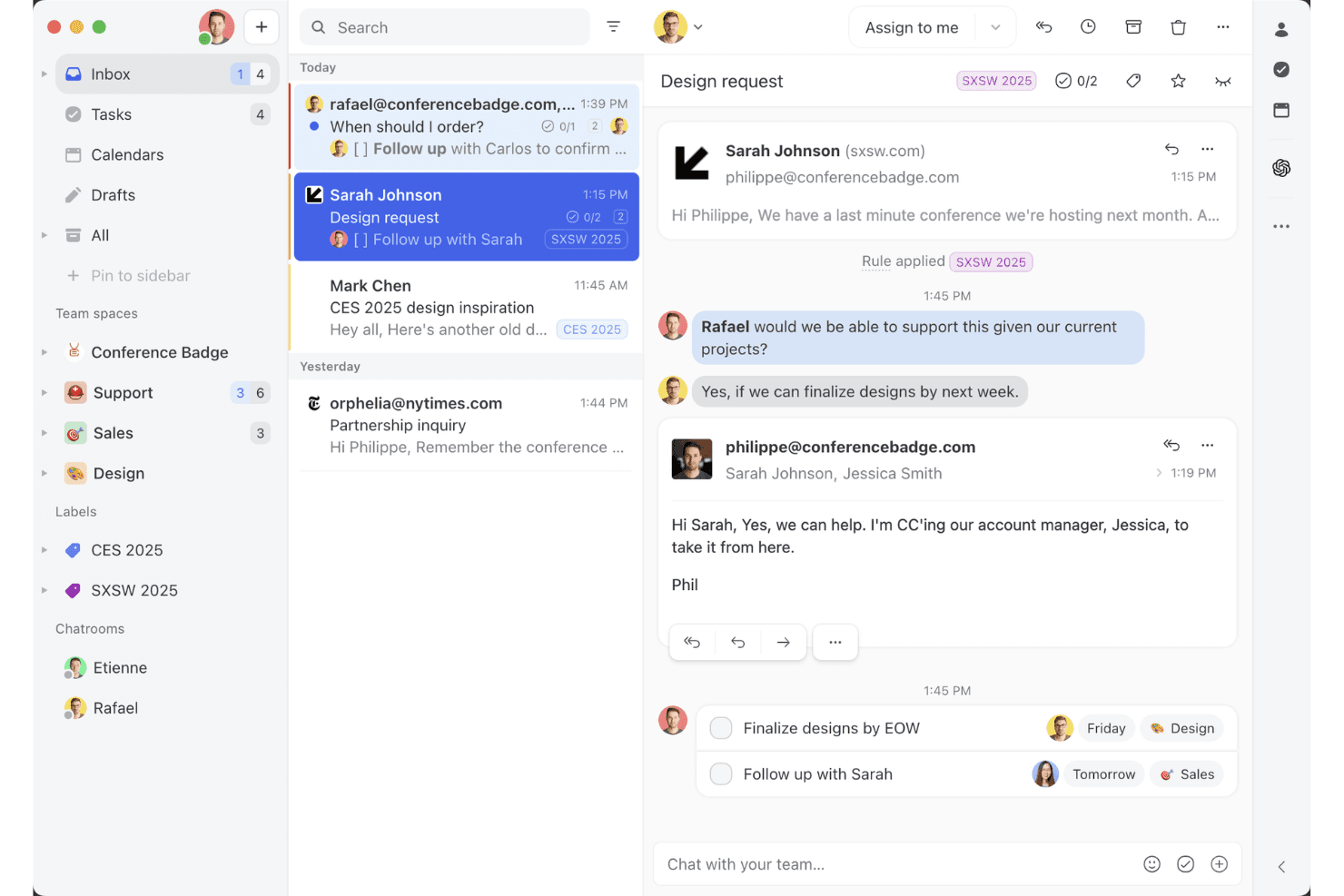
Missive’s shared inbox view shows how teams can collaborate on email threads, assign tasks, and manage client conversations in one workspace. Missive is a collaborative, multi-channel team inbox platform that centralizes email, SMS, WhatsApp, social messaging, live chat, and voice conversations with powerful assignment, automation, and real-time agent collaboration features.
Who Is Missive Best For?
Teams who want a collaborative shared inbox that centralizes multi-channel customer conversations in a familiar email-style interface.
Why I Picked Missive
I picked Missive because it makes collaborative email-based ticket handling easy for CX teams juggling multiple channels. I use features like real-time collaborative drafting and internal chat on conversations, which helps my team resolve cases without email chaos. Assignments, rules-based routing, and multi-channel inboxes keep everything visible and actionable.
Missive Key Features
- Multi-channel inbox: Centralizes email, SMS, WhatsApp, Instagram, Messenger, live chat, and voice conversations in one workspace.
- Rules-based automation: Allows up to 1,000 custom rules for routing, auto-tagging, escalations, and auto-replies.
- Missive MCP Server: Connect external AI clients (like Claude or ChatGPT) to mcp.missiveapp.com to search CX conversations, check calendars, and draft replies—keeping human approval required before sending.
- Real-time audit trails: Tracks every action and assignment on conversations with full user and timestamp logs.
- Mobile and desktop apps: Offers native apps for iOS, Android, macOS, Windows, and full web parity for on-the-go access.
Missive Integrations
Missive offers 25+ native integrations, including Aircall, HubSpot, Salesforce, Asana, Trello, ClickUp, Notion, Dialpad, Shopify, Stripe, Google Drive, Dropbox, and Zapier. Productive and Business plans also unlock custom REST API access and the new MCP Server when turned on by an admin.
What's Free?
Missive offers a 30-day free trial that unlocks all features, but does not provide a free-forever plan. After the trial, you’ll need to choose a paid plan to keep using the platform.
Pros and Cons
Pros:
- Guest access for external collaborators
- Real-time team chat on every conversation
- True shared inbox for multi-channel messages
Cons:
- No native knowledge base or CSAT
- No free-forever plan available
Learn more about Missive: Best for AI-driven ticket automation
- Free plan available; 14-day free trial
- From $16/user/month
Visit WebsiteCustomer Rating:4.6/5
SparrowDesk’s omnichannel inbox centralizes customer conversations, ticket status, priority levels, and agent assignments in a single dashboard. For those seeking a free help desk software solution, SparrowDesk offers an intriguing option with its AI-driven capabilities designed to automate a significant portion of support tickets. If you're a business aiming to enhance customer support efficiency, this platform provides a quick setup and powerful AI agents that can resolve queries instantly, helping you maintain consistency and improve response times. With SparrowDesk, you can tackle the challenges of managing customer interactions across various channels, ensuring a seamless experience for both your team and your customers.
Why I Picked SparrowDesk
I picked SparrowDesk for its unique ability to automate support tickets through AI agents, which is particularly appealing for those looking for free help desk software. This automation not only reduces the workload on your support team but also ensures that customer queries are handled swiftly and accurately. Additionally, the platform's omnichannel communication feature allows you to manage emails and chats within a single inbox, enhancing the efficiency of your support operations. These capabilities make SparrowDesk a strong contender for businesses aiming to streamline their customer support processes.
SparrowDesk Key Features
In addition to its automation and omnichannel communication, I also found the following features noteworthy:
- AI Copilot: Assists agents with instant summaries and context-aware replies, ensuring they have quick access to relevant information.
- Service Level Agreements (SLAs): Allows you to set and track performance metrics to ensure your team meets customer expectations.
- Multilingual Support: Provides the ability to communicate with customers in multiple languages, broadening your reach and improving customer satisfaction.
- Customizable Views: Enables you to tailor the dashboard to fit your specific needs, providing a personalized user experience.
SparrowDesk Integrations
Native integrations are not currently listed by SparrowDesk.
Pros and Cons
Pros:
- SLA tracking supports measurable support performance
- Omnichannel inbox centralizes customer conversations
- AI agents reduce manual ticket handling workload
Cons:
- Native integrations not publicly listed
- No free forever plan available
Learn more about SparrowDesk: Best for its 15 years on the market
- Free trial + free demo available
- Pricing upon request
Visit WebsiteCustomer Rating:4.2/5
ServiceDesk Plus provides a unified dashboard that incorporates multiple data and analytics, which includes SLA violations and change requests. ServiceDesk Plus is the full-stack service management software for enterprises from ManageEngine. It provides a wide range of IT solutions that support IT service management (ITSM) workflows, no-code customizations, advanced reporting, native integrations, and smart automation.
One of the key features of ServiceDesk Plus is its 13 distinct ITIL4-compatible practices including incident management, change enablement, and request management to help you improve your operations. The software also comes with comprehensive problem management features that provide IT support teams the ability to categorize, analyze, and resolve issues, while also identifying issues that are similar or repetitive so they can close tickets at a much faster pace.
The platform’s change management system is another feature that is designed to help IT teams better implement IT modifications with reduced risk, thanks to more streamlined planning, approval, and implementation processes. ServiceDesk Plus also has an integrated knowledge management system, a virtual assistant feature, and AI capabilities.
On the client side, the platform offers self-service portals where people can create requests and follow up on the status. It also has a live chat for real-time support, a knowledge base where you can record solutions to common problems for users, and help desk mobile apps that can help you get support whenever you need it.
Other capabilities of ServiceDesk Plus include automatic ticket routing, and escalation rule creation to avoid SLA violations.
Learn more about ManageEngine ServiceDesk Plus: Best for its mix of live support and chatbots
- Free plan available; 7-day free trial
- From $24.17/month (billed annually)
Visit WebsiteCustomer Rating:4.7/5
Tidio's drag-and-drop editor lets users create chatbots for various workflows depending on triggers and conditions. Tidio is a live chat software solution that helps customer experience teams cater to customer needs and queries. The cloud-based platform includes a ticketing system, knowledge base, chatbot builder, and live chat tool. It provides detailed insights into customer interactions, helping customer experience teams identify areas for improvement.
Tidio's platform is designed to help customer experience teams manage all aspects of the customer journey, from first contact to resolution. Its chatbots automate repetitive tasks such as providing information about product availability or answering FAQs, allowing users to provide 24/7 customer support.
Tidio also offers human agent assistance which helps resolve more complex issues. Its live chat feature can track data and analyze customer behavior, which can help you improve the customer experience. Additionally, you can use this feature to proactively reach out to customers and offer them help before they even have to ask for it. Finally, Tidio’s ticketing system allows you to prioritize inquiries and ensure that all customers receive a response on time.
Tidio offers 25+ integrations, including email integration, which is helpful for having multiple email inboxes. Integrations include Zendesk, Google Analytics, Pipedrive, Mailchimp, OpenCart, and thousands more through Zapier.
Pricing for Tidio starts at $25/month and offers a 7-day free trial.
Learn more about Tidio: Best for collaboration features
- Free plan + free demo available
- From $29/user/month
Visit WebsiteCustomer Rating:4.6/5
Collaborate on support tickets in the HelpDesk shared inbox. HelpDesk is easy-to-use software with all the features you need to manage support. The tool brings email, messaging, and chat into a single dashboard so you can respond to communication easily. And it gives each agent full visibility into the customer’s support history to provide context into their issues.
I like the collaboration features. They make it easy for agents to tag other people in a post to get specialist help. And these conversations are clearly marked as private so you know the customer can’t see it. It’s also easy for agents to see when people are already working on a ticket to avoid collisions.
The tool has several automation features that speed up support. A useful one is that you can automate replies based on keywords in the message. For example, if the text contains the word “refund,” you can automatically send a message with instructions about how to request a refund.
Other time-saving features include the ability to create templated responses and perform bulk actions.HelpDesk connects with Zapier to enable integrations.
It costs $34 per agent per month for the team plan. This also comes with unlimited viewer roles. You can sign up for a free trial on the website.
Learn more about HelpDesk: Best for AI-powered ticket management
- 14-day free trial
- From $9/seat/month (billed annually)
Visit WebsiteCustomer Rating:4.6/5
monday Service's ticket dashboard provides a breakdown of tickets and other important metrics. monday Service is a versatile service management platform designed to improve service-related workflows across departments like IT, HR, legal, procurement, and customer support. It is highly customizable, allowing you to automate repetitive tasks through no-code automation so you can focus on more strategic activities.
Its AI-powered automation enhances ticket management by automatically tagging and routing tickets based on priority, department, and urgency, ensuring timely resolutions. The ability to customize workflows also makes it easy to adapt the platform to the specific needs of your CX team, making your processes more efficient.
With real-time communication features, you can comment on tickets, share files, and update each other on the progress of customer issues, ensuring everyone is aligned. The platform’s integrations with other tools, such as Slack, Microsoft Teams, and email, also help consolidate communication.
monday Service offers a 14-day free trial.
Learn more about monday service: Best for multiple service level agreements
- Free plan available
- Free to use
Visit WebsiteCustomer Rating:4.7/5
Raiseaticket offers powerful features on a free platform. Raiseaticket is a cloud-based help desk platform that organizes communications between customers and support agents. The software offers workflows to eliminate cluttered mailboxes and unaddressed support request issues. It also provides data-driven performance insights, data summarization, and quantifiable metrics.
You can assign tickets to teams or agents, attach files, add notes, and track the time spent on each ticket. Both email and portal-originated communications can be managed through a unified system. Raiseaticket allows you to create different SLAs for different customers.
Raiseaticket offers a free plan that includes a comprehensive range of features.
Learn more about Raiseaticket: Best for automated ticket quality assurance
- 14-day free trial
- From $25/user/month (billed annually)
Visit WebsiteCustomer Rating:4.6/5
Collaborate on emails in real time with Front’s shared inbox—assign conversations, loop in teammates, and see who’s reading or replying, all in one place. Front brings shared inbox and collaboration features to teams looking for a modern help desk solution. It’s designed for businesses that want to manage customer conversations across email, chat, and social channels in one place. If you need a tool that helps your team organize, assign, and respond to support requests efficiently, Front is worth considering.
Who Is Front Best For?
Front is a good fit for customer support and service teams in small to midsize businesses that need to manage high volumes of customer inquiries across multiple channels.
Why I Picked Front
Quality assurance is a top priority for support teams that want to maintain high standards across every customer interaction. I picked Front because it offers automated ticket quality assurance tools that review conversations for tone, completeness, and adherence to internal guidelines. With features like rule-based quality checks and conversation analytics, teams can quickly identify tickets that need attention or coaching. This automation helps ensure that every response meets your team’s standards without requiring manual review of every ticket.
Front Key Features
Some other features in Front that help teams manage support requests efficiently include:
- Shared inbox management: Organize and assign incoming messages from multiple channels to the right team members in one unified inbox.
- Collision detection: Get real-time alerts when another teammate is viewing or replying to the same conversation to avoid duplicate responses.
- Canned responses: Save and reuse message templates for common questions to speed up replies and maintain consistency.
- Analytics and reporting: Track metrics like response times, conversation volume, and team performance with built-in dashboards and reports.
Front Integrations
Integrations include Salesforce, Slack, Shopify, Aircall, Asana, Pipedrive, Twitter (X), Microsoft Outlook 365, Dialpad, and Todoist.
What's Free?
Front offers a free 14-day trial of its Professional plan. After the trial, continued use requires a paid subscription, and there is no free-forever plan available.
Pros and Cons
Pros:
- AI features for drafting, summarizing, and translation
- Automation rules for ticket routing and tagging
- Shared inbox supports real-time team collaboration
Cons:
- Voice support requires third-party integrations
- Ticketing lacks advanced sorting and export options
Learn more about Front: 10Best chat widget for websites and apps
Intercom
- 14-day free trial and free demo available
- From $19/user/month (billed annually)
Visit WebsiteCustomer Rating:4.4/5
The Intercom help desk inbox provides agents with essential context. It lets customers contact your support team from within your product or website, as well as via channels like social media and email. Meanwhile, agents can access important customer information such as past conversations and issue details. The stand out features are all the self-help options.
You can add resources to your chat widget and even customize what shows up depending on the page.Or you can use proactive support functionality to solve customer problems before they even occur. For example, you can send automated messages when users perform a particular action, such as spending a certain amount of time on a particular page.
Other self-help options include the ability to create product tours to help people get up to speed with your features, and automated messages that go out when customers show signs of struggling with your product.
The tool also has plenty of features that streamline live help. These include a help desk ticketing system, collaboration, ticket routing, and templated responses.
Intercom has a starter plan for very small businesses that costs $74 per month when billed annually. Larger businesses should contact the sales team for pricing information.
Annen gratis programvare for brukerstøtte
Her er noen flere alternativer for programvare for brukerstøtte som også tilbyr gratisabonnementer eller prøveperioder. Selv om disse verktøyene ikke kom med på kortlisten min, er de likevel verdt å ta en titt på:
- 11ProProfs Help DeskBest for a CX shared inbox
- 12Spiceworks Help DeskBest help desk software for IT teams
- 13ManageEngine ServiceDesk PlusBest for IT support
- 14Jira Service ManagementBest for advanced customization options
- 15Odoo HelpdeskBest for a kanban view of customer support activity
- 16GladlyHelp desk solution with advanced telephony features
- 17FrontBest for collaborative customer service
- 18ngDeskBest for combining sales, support, and marketing
- 1914.aiBest intent-aware customer response engine
- 20HiverBest for turning Gmail into a help desk
- 21LiveAgentBest for a popular chat widget
- 22LiveChatBest free help desk software for call centers
- 23Help ScoutBest for creating proactive contact automations
- 24ZendeskHelp desk with advanced service features
- 25Zoho AssistBest for providing remote access support
- 26FreshdeskBest for integrated ticketing across email and social
Have an account? Log In
How I Evaluate Free Help Desk Software
I evaluate free help desk tools in two layers: the baseline every tool must meet—like real ticketing and a permanent free plan—and the factors that make one a better fit than another.
Core Functionality (Table Stakes For This List)
When I'm selecting tools for my list, I rank each one on a scale from 0 (does not offer the functionality) to 5 (excels in this area) for each core functionality listed below. Then, I calculate the tool's total score into a percentage. Each tool needs to achieve a minimum total score of 65% to be considered for inclusion.
- Free Plan Availability: I check whether each tool offers a permanent free tier—not just a 14- or 30-day trial—that gives a small support team real, ongoing access to core help desk features.
- Ticket Management: Each tool should let agents create, assign, prioritize, and track tickets through resolution, with options like tags, statuses, and custom fields to organize a growing queue.
- Multi-Channel Inbox: I look for tools that pull customer messages from at least email and one other channel—like chat or a web form—into a single queue so agents aren't toggling between platforms.
- Agent Collaboration: Support rarely lives with one person, so I evaluate whether agents can leave internal notes, hand off tickets, or use role-based permissions to split work across a team.
- Knowledge Base or Self-Service: I look for a customer-facing FAQ page or knowledge base where teams can publish answers to common questions like shipping policies or account setup steps to reduce ticket volume.
- Reporting & SLA Tracking: Basic metrics on ticket volume, first response time, and resolution time help team leads spot bottlenecks, so I evaluate what reporting ships with the free plan.
Once I have a list of tools that meet this criteria, I consider what sets each platform apart.
Differentiating Factors (What Sets Vendors Apart)
Here's how I compare and contrast different vendors:
Standout Features
AI-powered features like auto-triage and suggested replies make a real difference when a two-person team is handling dozens of tickets a day. I also look for a live chat widget that agents can manage alongside email tickets—it's a channel customers increasingly expect. Built-in CSAT surveys matter too, since they let team leads measure service quality right after resolution without plugging in a separate survey tool.
Beyond Features
The upgrade path from free to paid matters—I check whether a tool lets you grow into higher tiers without migrating your data or retraining your team. Integrations are equally important. A free help desk that connects to your CRM or Slack keeps agents working in one place instead of copying details between tabs. I also evaluate onboarding resources, since free plans rarely include dedicated support. Good documentation, community forums, and in-app setup guides make the difference between a smooth rollout and a stalled one.
Slik velger du gratis programvare for brukerstøtte
Komplekse funksjonslister og prisstrukturer kan gjøre det vanskelig å finne ut hva du egentlig får med gratis programvare for brukerstøtte. For å hjelpe deg med å holde fokus mens du går gjennom prosessen med å velge programvare, er det noen faktorer du bør ha i tankene:
| Faktor | Hva du bør vurdere |
|---|---|
| FaktorOmfanget av gratistilbudet | Hva du bør vurdereKontroller hva som er inkludert i gratisabonnementet. Sørg for at det dekker viktige funksjoner som billettsystem og støtte på flere kanaler, uten skjulte kostnader. |
| FaktorSkalerbarhet | Hva du bør vurdereVurder om programvaren kan vokse sammen med teamet ditt. Se etter alternativer som tilbyr sømløse oppgraderinger til betalte abonnementer etter hvert som behovene dine øker. |
| FaktorIntegrasjoner | Hva du bør vurdereKontroller kompatibiliteten med eksisterende verktøy som CRM eller e-post. Sømløs integrasjon kan spare teamet ditt for tid og redusere manuelt arbeid. |
| FaktorBrukervennlighet | Hva du bør vurdereSørg for at grensesnittet er intuitivt og enkelt å navigere i. Et brukervennlig design reduserer opplæringstiden og hjelper teamet ditt raskt i gang. |
| FaktorStøttealternativer | Hva du bør vurdereVurder kundestøtten som er tilgjengelig for gratisbrukere. Se etter direktechat, e-poststøtte og omfattende veiledninger som kan hjelpe teamet ditt ved behov. |
| FaktorTilpasning | Hva du bør vurdereFinn ut hvor omfattende tilpasningsmulighetene er. Muligheten til å tilpasse programvaren til arbeidsflyten din kan øke produktiviteten og passe bedre med teamets prosesser. |
| FaktorBrukerbegrensninger | Hva du bør vurdereKontroller om det er en begrensning på antallet brukere i gratisabonnementet. Sørg for at det dekker størrelsen på teamet ditt uten at du tvinges til å oppgradere. |
| FaktorSikkerhet | Hva du bør vurdereVurder sikkerhetsfunksjonene som tilbys. Sørg for tiltak for databeskyttelse, som kryptering og samsvar med bransjestandarder, for å beskytte kundedata. |
Hva er gratis brukerstøtteprogramvare?
Gratis brukerstøtteprogramvare er skybaserte verktøy som hjelper kundestøtteteam med å organisere, spore og løse kundehenvendelser, uten månedlige kostnader.
Disse kostnadsfrie SaaS-løsningene dekker de grunnleggende funksjonene du forventer av brukerstøtteprogramvare, inkludert et billettsystem for sporing av problemer, grunnleggende automatiseringsmuligheter for repetitive oppgaver og kommunikasjonsverktøy som hjelper kundeserviceteam med å samarbeide om billetter eller eskalere dem etter behov. De er en kostnadseffektiv måte å forbedre effektiviteten i kundeservicedriften på uten å pådra seg flere månedlige kostnader.
Funksjoner
La oss se nærmere på funksjonene som vanligvis finnes i brukerstøtteprogramvare, og hvilke som vanligvis er inkludert i gratis kontra betalte abonnementer.
Funksjoner som vanligvis finnes i gratis brukerstøtteprogramvare
- Billettbehandling: Organiserer kundehenvendelser i håndterbare billetter for enkel sporing og løsning.
- E-postintegrasjon: Kobler e-posten din til brukerstøtteverktøyet for å effektivisere kommunikasjonen med kundene.
- Oppretting av kunnskapsbase: Gjør det mulig å opprette et arkiv med vanlige spørsmål og veiledninger for selvbetjent støtte.
- Støtte på flere kanaler: Gjør det mulig å håndtere henvendelser fra ulike kanaler som e-post, chat og sosiale medier.
- Grunnleggende rapportering: Gir innsikt i støtteytelsen gjennom enkle rapporter om billettstatus og responstider.
Funksjoner som vanligvis finnes i betalt brukerstøtteprogramvare
- Avansert analyse: Tilbyr detaljert innsikt i teamets ytelse og målinger av kundetilfredshet.
- KI-drevet chatbot: Automatiserer svar på vanlige spørsmål, slik at støtteagentene får mer tid til komplekse problemer.
- Tilpassbare kontrollpaneler: Lar deg tilpasse grensesnittet slik at det viser nøkkeltall og innsikt som er relevante for teamet ditt.
- Integrasjon med sosiale medier: Gjør det mulig å administrere kundeinteraksjoner direkte på plattformer som Facebook og Twitter.
- Flerspråklig støtte: Gir mulighet til å tilby kundestøtte på flere språk, noe som øker den globale rekkevidden.
Fordeler
Implementering av gratis brukerstøtteprogramvare gir flere fordeler for teamet og virksomheten din. Her er noen av fordelene du kan se frem til:
- Kostnadseffektiv løsning: Tilbyr viktige støttefunksjoner uten at det krever et stort budsjett, noe som gjør den ideell for oppstartsbedrifter og små virksomheter.
- Forbedret organisering: Håndtering av supportsaker bidrar til å holde kundehenvendelser organisert, slik at teamet ditt kan behandle forespørsler mer effektivt.
- Bedre kommunikasjon: E-postintegrasjon sørger for at alle kundeinteraksjoner er samlet på ett sted, noe som legger til rette for bedre kommunikasjon.
- Selvbetjeningsalternativer: En kunnskapsbase lar kundene finne svar på egen hånd, noe som reduserer belastningen på supportteamet ditt.
- Rask konfigurering: Brukervennlige grensesnitt og enkel innføring gjør at teamet ditt kan begynne å bruke programvaren med minimal opplæring.
- Skalerbarhet: Mange verktøy tilbyr oppgraderingsalternativer, slik at du kan skalere i takt med at virksomheten vokser, uten å miste de opprinnelige dataene.
- Støtte på flere kanaler: Håndtering av henvendelser fra ulike plattformer sikrer at ingen kundehenvendelser blir oversett, og forbedrer tjenestekvaliteten.
Kostnader og priser
Jeg forstår at du kom til denne artikkelen på jakt etter den beste programvaren for brukerstøtte som er tilgjengelig gratis. Siden gratisabonnementer imidlertid bare tilbyr begrensede funksjoner, er det en god sjanse for at du må oppgradere abonnementet ditt i fremtiden.
Tabellen nedenfor oppsummerer vanlige abonnementer, gjennomsnittsprisene deres og typiske funksjoner som inngår i løsninger for brukerstøtte:
Sammenligningstabell for programvare for brukerstøtte
| Abonnementstype | Gjennomsnittspris | Vanlige funksjoner |
|---|---|---|
| AbonnementstypeGratisabonnement | Gjennomsnittspris$0 | Vanlige funksjonerGrunnleggende håndtering av supportsaker, e-poststøtte og en begrenset kunnskapsbase. |
| AbonnementstypePrivatabonnement | Gjennomsnittspris$5-$25/user/month | Vanlige funksjonerAvansert håndtering av supportsaker, grunnleggende rapportering og integrasjoner med e-post- og chatteplattformer. |
| AbonnementstypeForretningsabonnement | Gjennomsnittspris$30-$60/user/month | Vanlige funksjonerTilpassbare kontrollpaneler, støtte på flere kanaler og forbedrede funksjoner for analyse og rapportering. |
| AbonnementstypeVirksomhetsabonnement | Gjennomsnittspris$70-$100/user/month | Vanlige funksjonerFunksjoner drevet av kunstig intelligens, avanserte sikkerhetsalternativer samt dedikert kontoadministrasjon og kundestøtte. |
Vanlige spørsmål om gratis helpdesk-programvare
Her er svarene på noen vanlige spørsmål om gratis helpdesk-programvare.
Kan gratis helpdesk-programvare integreres med andre verktøy?
Ja, mange gratis helpdesk-verktøy tilbyr integrasjoner med annen programvare, for eksempel e-postplattformer og CRM-systemer. Disse integrasjonene bidrar til å effektivisere arbeidsflyten til teamet ditt ved å koble sammen ulike systemer, slik at det blir enklere å håndtere kundeinteraksjoner uten å måtte bytte mellom applikasjoner.
Hvordan fungerer gratis helpdesk-programvare?
Gratis helpdesk-programvare tilbyr mange av de samme funksjonene som betalt helpdesk-programvare. Disse verktøyene er ofte startnivåene i abonnementer som utvides til dyrere alternativer når du legger til mer omfattende funksjonalitet eller flere brukere. Noen av verktøyene på denne listen er freemium-abonnementer (det vil si gratis for alltid), mens andre tilbyr en gratis prøveperiode i et begrenset tidsrom.
Hvor sikker er gratis helpdesk-programvare?
Gratis helpdesk-programvare inkluderer ofte grunnleggende sikkerhetsfunksjoner som datakryptering og sikre tilgangskontroller. For mer avanserte sikkerhetsalternativer kan det imidlertid hende at du må vurdere betalte abonnementer. Sjekk alltid leverandørens sikkerhetspolicyer for å sikre at de oppfyller virksomhetens krav.
Er det en grense for antall brukere i gratisabonnementer?
De fleste gratis helpdesk-programvareløsninger har en grense for antall brukere eller agenter. Denne grensen varierer fra leverandør til leverandør, så det er viktig å sjekke spesifikasjonene for hvert verktøy for å sikre at det passer teamets størrelse uten at du må oppgradere.
Hvilken type kundestøtte er tilgjengelig for gratisbrukere?
Kundestøtte for gratisbrukere omfatter vanligvis tilgang til nettbaserte ressurser som vanlige spørsmål, kunnskapsbaser og brukerfora. Noen leverandører kan tilby kundestøtte via e-post, men direktechat og telefonstøtte er vanligvis forbeholdt betalte abonnementer.
Finnes det tilpasningsmuligheter i gratis helpdesk-programvare?
Gratis helpdesk-programvare tilbyr ofte grunnleggende tilpasningsmuligheter, for eksempel endring av saksfelter eller profilering av grensesnittet. For mer omfattende tilpasning kan det hende at du må oppgradere til et betalt abonnement som tillater mer detaljert personlig tilpasning etter virksomhetens behov.