

Programvare for kundeservice innen netthandel gir teamet ditt verktøyene dere trenger for å håndtere spørsmål, klager og forespørsler fra kunder på tvers av kanaler – slik at dere kan tilby raskere kundestøtte, nøyaktig ordreinformasjon og en personlig opplevelse i stor skala. Hvis du vil øke effektiviteten uten å gå på bekostning av kvaliteten, er det viktig å velge riktig plattform. I denne veiledningen går jeg gjennom hva du bør se etter, og hjelper deg med å finne alternativer som passer arbeidsflyten, kundenes behov og teamets mål.
Why Trust Our Software Recommendations
6,700+
Reviews
20
Industry experts
16+
Evaluation factors
14
Years
Our team has been testing and reviewing software since 2012. As CX leaders ourselves, we know how difficult—and important—it is to choose the right software.
For this guide, we evaluated tools using hands-on testing and independent research, scoring tools using our selection criteria.
Our reviews reflect our human editorial judgment, not a sales pitch.
 Gui DrusinaCreative Director
 Tim FisherVP of AI
Sammenligningstabell for programvare for kundeservice innen netthandel
Denne sammenligningstabellen oppsummerer prisopplysningene for mine beste utvalgte programmer for kundeservice innen netthandel:
| Tool | Best For | Trial Info | Price | ||
|---|---|---|---|---|---|
| 1 | Best for ecommerce self-service portals | Free plan available | From $69/user/month (billed annually) | Website | |
| 2 | Best for brand-aligned AI automation | Free plan available; 7-day free trial | From $24.17/month (billed annually) | Website | |
| 3 | Best for multichannel chat and chatbot tools | 14-day free trial + free demo available | From $26.1/user/month (billed annually) | Website | |
| 4 | Best for Shopify-native order actions | Free demo + 30-day free trial available | From $40/month | Website | |
| 5 | Best for natively integrated AI agents | 14-day free trial and free demo available | From $19/user/month (billed annually) | Website | |
| 6 | Best for unified customer context | Free demo available | Pricing upon request | Website | |
| 7 | Best for marketplace and storefront integration | 14-day free trial + free demo available | From $39/user/month (billed annually) | Website | |
| 8 | Best for lifelong conversation history | Free demo available | Pricing upon request | Website | |
| 9 | Best for AI-driven order actions at checkout | 14-day free trial | From $49.50/month | Website | |
| 10 | Best for no-code AI support automation | Free demo available | Pricing upon request | Website |


Anmeldelser av den beste programvaren for kundeservice innen netthandel
Nedenfor finner du mine detaljerte oppsummeringer av den beste programvaren for kundeservice innen netthandel som kom med på kortlisten min. Anmeldelsene mine gir et detaljert innblikk i funksjonene, integrasjonene og de beste bruksområdene for hver plattform, slik at du kan finne den som passer best for deg.
 Best for ecommerce self-service portals
- Free plan available
- From $69/user/month (billed annually)
Visit WebsiteCustomer Rating:4.9/5
Richpanel offers a unified customer service inbox that displays customer conversations, tags, product interactions, and order history in a single dashboard. Richpanel is an AI-native ecommerce helpdesk that combines an omnichannel inbox, autonomous AI agents, order management actions, and self-service tools across Shopify, Magento, WooCommerce, and BigCommerce.
Who Is Richpanel Best For?
Richpanel is a strong fit for DTC brands and ecommerce support teams that want customers to resolve their own order issues without ever contacting an agent.
Why I Picked Richpanel
I picked Richpanel as one of the best because of how far its self-service portal goes beyond basic order tracking. Customers can initiate returns, trigger exchanges, and manage subscriptions without ever opening a ticket, and the exchange-first flow actively steers shoppers toward store credit instead of refunds. I also love that the AI takes real Shopify actions, like canceling orders or swapping items, directly inside the portal.
Richpanel Key Features
- Omnichannel inbox: Consolidates email, live chat, SMS, Facebook, Instagram, WhatsApp, TikTok, and Amazon messages into a single shared workspace.
- AI model selection: Choose from Claude, GPT, Gemini, DeepSeek, or Kimi as your AI engine, with each model verified against 10,000+ tests before activation.
- Voice of Customer AI: Surfaces your top customer intents and sentiment trends on a weekly basis so your team can spot patterns without manually reviewing tickets.
- Subscription management actions: Agents and AI can skip, pause, cancel, or reschedule subscription orders directly through Recharge, Loop, Skio, Appstle, and Stay.ai.
Richpanel Integrations
Richpanel offers 20+ integrations, including Shopify, Magento, WooCommerce, BigCommerce, Recharge, Loop Subscriptions, Skio, AfterShip, ShipHero, and Aircall. It also supports API and webhooks for custom integrations.
Pros and Cons
Pros:
- Exchange-first flows protect retained revenue
- AI performs real order actions
- Self-service resolves tracking and returns
Cons:
- New pricing model creates uncertainty
- Some actions require human approval
Learn more about Richpanel: Best for brand-aligned AI automation
- Free plan available; 7-day free trial
- From $24.17/month (billed annually)
Visit WebsiteCustomer Rating:4.7/5
Tidio offers a live chat inbox with customer data, Shopify integration, and messenger conversation management in one dashboard. Tidio is an ecommerce customer service platform that combines a shared omnichannel inbox, AI-powered chat automation, ticketing, and native Shopify order management into a single tool.
Who Is Tidio Best For?
Tidio is a strong fit for DTC ecommerce brands and small support teams that want AI to handle customer conversations in a voice that actually sounds like their brand.
Why I Picked Tidio
I've included Tidio in my top picks because it's the only tool here that lets you teach your AI exactly how to sound. Lyro Guidance lets you set tone, emoji use, and communication style, with custom personas by customer type or VIP status, so the AI handles conversations in your brand's voice, not a generic one. Paired with Lyro Smart Actions, that same AI can check order status, start returns, and generate labels autonomously.
Tidio Key Features
- Omnichannel shared inbox: Unifies live chat, email, Instagram, Facebook Messenger, and WhatsApp into one inbox with full customer history.
- Flows automation builder: A drag-and-drop visual builder with 40+ ecommerce templates for cart recovery, discount prompts, and shipping FAQs.
- Shopify order side panel: Lets agents view cart contents, order history, and apply discount codes directly from the conversation.
- Lyro Copilot reply assistant: Suggests responses to agents from your knowledge base and can summarize tickets or rewrite replies in your brand's tone.
Tidio Integrations
Tidio offers 120+ integrations, including Shopify, WooCommerce, BigCommerce, Zendesk, Salesforce, Intercom, HubSpot, Klaviyo, and ShipStation. It also supports Tidio OpenAPI, MCP connectors, and Zapier.
Pros and Cons
Pros:
- Shared inbox preserves customer context
- AI takes real order actions
- Lyro follows your brand voice
Cons:
- No dedicated self-service help center
- Reporting lacks deeper operational detail
Learn more about Tidio: Best for multichannel chat and chatbot tools
- 14-day free trial + free demo available
- From $26.1/user/month (billed annually)
Visit WebsiteCustomer Rating:4.7/5
Re:amaze offers a unified inbox interface with automated bot responses, customer activity tracking, and Shopify cart integration for ecommerce support. Re:amaze is an ecommerce customer service platform that brings together a shared omnichannel inbox, AI-powered chatbots, live chat, and native integrations with Shopify, BigCommerce, and WooCommerce.
Who Is Re:amaze Best For?
Re:amaze is a strong fit for DTC brands and ecommerce support teams running on Shopify, BigCommerce, or WooCommerce who need order management and chat tools in one place.
Why I Picked Re:amaze
I picked Re:amaze as one of the best because it handles more customer channels out of the box than almost anything else I've seen at this price point. The Hello Bot, Order Bot, and FAQ Bot cover the most common ecommerce questions automatically, while the AI Agent now answers across chat, email, and SMS. I especially like the AI Pre-Filter, which tags and routes incoming conversations before they even hit the queue.
Re:amaze Key Features
- Shopify order actions: Agents can refund, cancel, create draft orders, and edit customer addresses directly inside a conversation without leaving the inbox.
- Multi-brand support: One account manages several stores or brands across different ecommerce platforms, each with store-specific roles and settings.
- Cues and push campaigns: Triggered messages—including cart abandonment reminders and upsell prompts—fire automatically based on visitor behavior and shopping data.
- Shopify attributed orders report: Links support conversations to orders and refunds, giving teams a view of how support activity connects to revenue.
Re:amaze Integrations
Re:amaze offers native integrations with Shopify, BigCommerce, WooCommerce, ReCharge, Loop Returns, and ShipStation, plus ChannelReply for Amazon, eBay, Walmart, and Etsy. It also supports Twilio, Stripe, an API for custom integrations, and Zapier.
Pros and Cons
Pros:
- Multichannel inbox includes social and SMS
- Revenue attribution connects support activity to sales
- Refunds and cancellations happen inside conversations
Cons:
- AI quality remains inconsistent in reviews
- Search struggles with complex queries
Learn more about Re:amaze: Best for Shopify-native order actions
- Free demo + 30-day free trial available
- From $40/month
Visit WebsiteCustomer Rating:4.6/5
Gorgias offers a customer support inbox with ticket details, customer profile, and AI-assisted responses in a unified helpdesk interface. Gorgias is an ecommerce customer service platform that centralizes email, chat, SMS, voice, and social media into one inbox while giving agents direct access to order data, automation tools, and AI-driven ticket resolution.
Who Is Gorgias Best For?
Gorgias is a strong fit for Shopify-based ecommerce teams that need agents to take real order actions—refunds, edits, cancellations—directly from the support inbox.
Why I Picked Gorgias
Gorgias earns its spot on my shortlist because of how deeply it embeds Shopify order actions into the support workflow. I love that agents can issue refunds, edit orders, apply discounts, and cancel shipments without ever leaving the ticket view. On top of that, the AI Agent handles over 130 Shopify-specific actions autonomously, including live carrier tracking and return label generation, with a published 50% automation rate on WISMO tickets alone.
Gorgias Key Features
- Omnichannel inbox: Consolidates email, live chat, SMS, WhatsApp, Instagram, Facebook, and voice into a single shared helpdesk view.
- AutoQA scoring: AI automatically scores every agent interaction, giving team leads visibility into quality across all tickets without manual review.
- Revenue attribution reporting: Tracks pre-sale conversations, converted tickets, and total sales influenced by support, available on Pro and Advanced plans.
- Voice of Customer analysis: Scans conversations and reviews to surface trends and spikes—down to individual SKUs—so you can catch issues like shipping delays early.
Gorgias Integrations
Gorgias lists 100+ integrations, including native connections with Shopify, Shopify Plus, BigCommerce, and Magento 2. It also connects with Recharge, Loop Returns, AfterShip Tracking, Klaviyo, and Gorgias Voice, with API support for custom actions.
Pros and Cons
Pros:
- Revenue attribution connects support with sales
- AI handles refunds, returns, and tracking
- Shopify order actions happen inside tickets
Cons:
- Self-service requests still require agent approval
- AI automation can produce costly overages
Learn more about Gorgias: Best for natively integrated AI agents
- 14-day free trial and free demo available
- From $19/user/month (billed annually)
Visit WebsiteCustomer Rating:4.4/5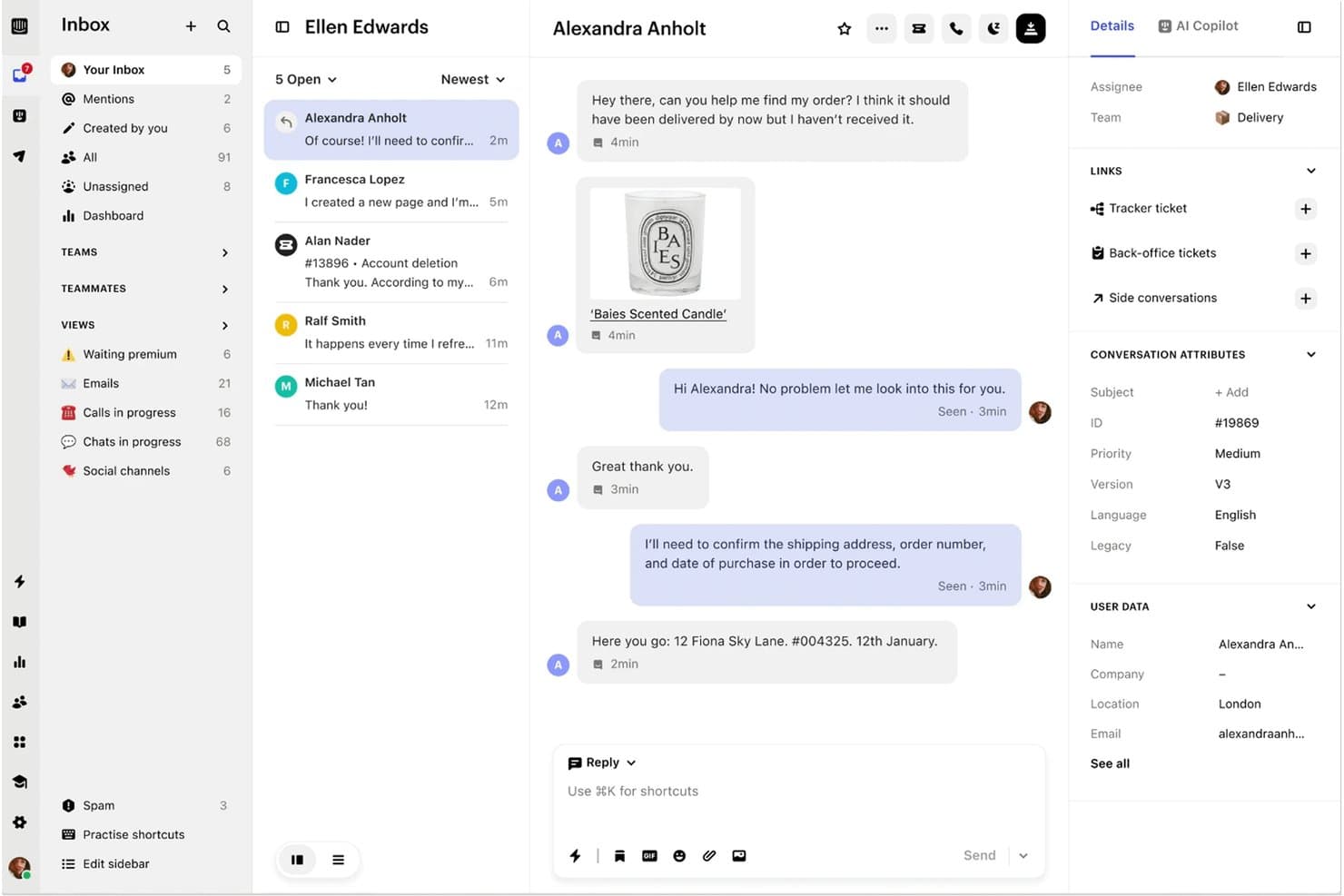
Intercom offers a shared inbox interface where agents can manage customer conversations, view conversation attributes, and access user data in a unified dashboard. Intercom is a customer service platform that combines an omnichannel inbox, AI-powered chat and voice agents, helpdesk automation, and Shopify-native order management tools into a single workspace.
Who Is Intercom Best For?
Intercom is a strong fit for CX operations teams at Shopify-based brands that want a single platform where AI agents handle resolution and human agents manage escalations.
Why I Picked Intercom
I picked Intercom as one of the best because its AI agent, Fin, is built directly into the helpdesk rather than bolted on. That means when Fin handles a WISMO question or initiates a refund, it's working from the same order data and conversation history your human agents see. I also love how Fin Procedures auto-draft ecommerce workflows for returns, exchanges, and cancellations based on your Shopify store's actual policies, so there's no scripting from scratch.
Intercom Key Features
- Omnichannel inbox: A single shared inbox that pulls conversations from chat, email, phone, SMS, WhatsApp, Instagram, Facebook, Discord, and Slack into one workspace.
- Revenue Attribution report: Tracks revenue Fin generates on Shopify by linking purchases to conversations where Fin discussed the product within a 14-day window.
- Order Status app: Lets customers look up their orders by order number and email directly in the Messenger widget, without starting a support conversation.
- Custom report builder: A drag-and-drop report builder with 10 chart types, custom filters, drill-downs, and period comparisons for tracking agent and AI performance.
Intercom Integrations
Intercom offers native integrations with Shopify, Stripe, Klaviyo, Salesforce, and HubSpot, plus Marketplace integrations such as Mirakl. It also supports API, Data Connectors, and MCP for custom ecommerce connections.
Pros and Cons
Pros:
- Revenue attribution links support to sales
- Human agents inherit complete conversation context
- Fin resolves routine ecommerce questions autonomously
Cons:
- Fin accuracy depends on knowledge quality
- Returns and exchanges lack dedicated portal
 Best for unified customer context
- Free demo available
- Pricing upon request
Visit WebsiteCustomer Rating:4.5/5
Kustomer offers a unified conversation view where support agents can read customer inquiries, draft email replies, and manage multiple open conversations from a single interface. Kustomer is a CRM-based customer service platform that unifies omnichannel conversations, order data, and AI automation into a single customer timeline.
Who Is Kustomer Best For?
Kustomer is a strong fit for CX operations managers and heads of customer experience at mid-to-large ecommerce brands who need a single view of every customer across channels, orders, and interactions.
Why I Picked Kustomer
I picked Kustomer because its customer timeline model is genuinely different from ticket-based tools. Every channel, order, and interaction for a given customer lives in one scrollable view, so agents never have to toggle between systems to understand context. I also love that agents can issue Shopify refunds, cancellations, and reships directly from that same view, without ever opening a separate tab. That combination of full history plus in-workspace order actions is what earns it the unified customer context label.
Kustomer Key Features
- Concierge AI agent: Handles end-to-end customer requests on chat, email, SMS, WhatsApp, and voice using the full customer timeline, with confidence thresholds that control when it acts or escalates.
- CSAT surveys: Deployable across every channel, with targeting by customer or conversation attributes, delayed sending, and multilingual support.
- Data Explorer: Lets you ask plain-language questions about your CX data and get AI-generated insights without building custom reports manually.
- Multi-brand support: Supports up to 300 brands with separate knowledge bases, themes, and language settings in a single workspace.
Kustomer Integrations
Kustomer offers native integrations with Shopify, Adobe Commerce, BigCommerce, TikTok Shop, Recharge, Loop Returns, AfterShip, Narvar, LoyaltyLion, and Amazon Connect. Its Open API, GraphQL, webhooks, and Cards SDK support custom ecommerce connections.
Pros and Cons
Pros:
- AI handles repetitive requests with guardrails
- Agents complete order actions in-workspace
- Unified customer timelines preserve full context
Cons:
- No native returns or tracking portal
- Reports of lag during busy periods
Learn more about Kustomer: Best for marketplace and storefront integration
- 14-day free trial + free demo available
- From $39/user/month (billed annually)

eDesk offers a unified mailbox view where support tickets are organized by query type, sender, and response deadline. eDesk is an ecommerce help desk that unifies marketplace messages, storefront orders, and customer conversations from email, live chat, and social channels into a single inbox.
Who Is eDesk Best For?
eDesk suits ecommerce support teams managing multiple storefronts and marketplace channels who need order context and customer messages in one place.
Why I Picked eDesk
I picked eDesk because no other help desk on my list pulls Amazon, eBay, Walmart, TikTok Shop, and Mirakl messages into a single inbox natively. When a customer messages you across three marketplaces about the same order, you see it all in one thread alongside full order history and shipping status. I also love that agents can issue full or partial Shopify refunds, cancel orders, and create replacements directly from the ticket panel without ever leaving eDesk.
eDesk Key Features
- AI Agent with guardrails: eDesk's AI Agent handles return, cancellation, and order-status queries using your approved procedures, then hands off to a human if it isn't confident enough.
- HandsFree auto-response: Automatically sorts incoming messages into 20+ question categories and replies using pre-approved templates, with no agent involvement required.
- Live chat with contextual prompts: The chat widget triggers targeted offers or social proof based on the page a shopper is currently viewing.
- eDesk Insights reporting: Tracks ticket volume, response times, agent performance, and AI resolution rates across channels, with CSAT surveys available on Growth and higher plans.
eDesk Integrations
eDesk connects with 300+ apps and channels, including Shopify, Amazon, eBay, Walmart, TikTok Shop, Mirakl, BigCommerce, WooCommerce, AfterShip, and ShipStation. Its REST API supports custom integrations, with advanced API features on Professional and custom APIs on Enterprise.
Pros and Cons
Pros:
- Support responds quickly to issues
- Resolves routine queries with guarded AI
- Centralizes complex ecommerce conversations clearly
Cons:
- Returns self-service remains incomplete
- Agent reporting lacks sufficient detail
Learn more about eDesk:

Gladly offers an AI-powered Sidekick assistant that summarizes customer issues and suggests next steps, enabling agents to resolve damaged delivery exchanges quickly with personalized VIP responses. Gladly is an ecommerce customer service platform that unifies chat, email, SMS, voice, and social channels into a single, ticket-free customer record, with agentic AI that autonomously handles returns, cancellations, and order tracking.
Who Is Gladly Best For?
Gladly is a strong fit for mid-market and enterprise ecommerce brands that need every customer interaction—across every channel—unified in one continuous, ticket-free record.
Why I Picked Gladly
I picked Gladly as one of the best because no other platform treats every customer interaction as a single, ongoing conversation rather than a series of disconnected tickets. Every channel—chat, email, SMS, voice, and social—feeds into one lifelong customer record, so when a shopper emails about a return they started in chat last month, your agent sees the full history instantly. I also love that Gladly's agentic AI can autonomously process that return, check eligibility, and close the loop without any human involvement.
Gladly Key Features
- Agentic AI resolution: Gladly's AI reasons through multi-step requests, calling tools like Loop and Recharge to process returns, cancellations, and subscription changes without agent involvement.
- People Match routing: Automatically connects customers to the most suitable human agent based on skills, history, and context when AI handoff is needed.
- Dual-outcome AI pricing: Charges separately for full AI resolutions and AI-assisted agent interactions, so you pay based on actual outcomes rather than seat counts or deflections.
- Multi-brand configuration: Run separate channel setups, routing rules, and knowledge bases for different brands or regions from a single Gladly instance.
Gladly Integrations
Gladly offers native integrations with Shopify, Magento, BigCommerce, Loop, Recharge, Recurly, ShipHero, AfterShip, and Narvar. It also provides a REST API and App Platform for custom integrations.
Pros and Cons
Pros:
- Native voice keeps support in one workspace
- Agentic AI resolves complex ecommerce requests
- Lifelong threads preserve complete customer context
Cons:
- Legacy ticket teams need workflow adjustment
- Reporting depth draws recurring reviewer criticism
Learn more about Gladly: 9Best for AI-driven order actions at checkout
Fin
- 14-day free trial
- From $49.50/month
Visit WebsiteCustomer Rating:4.5/5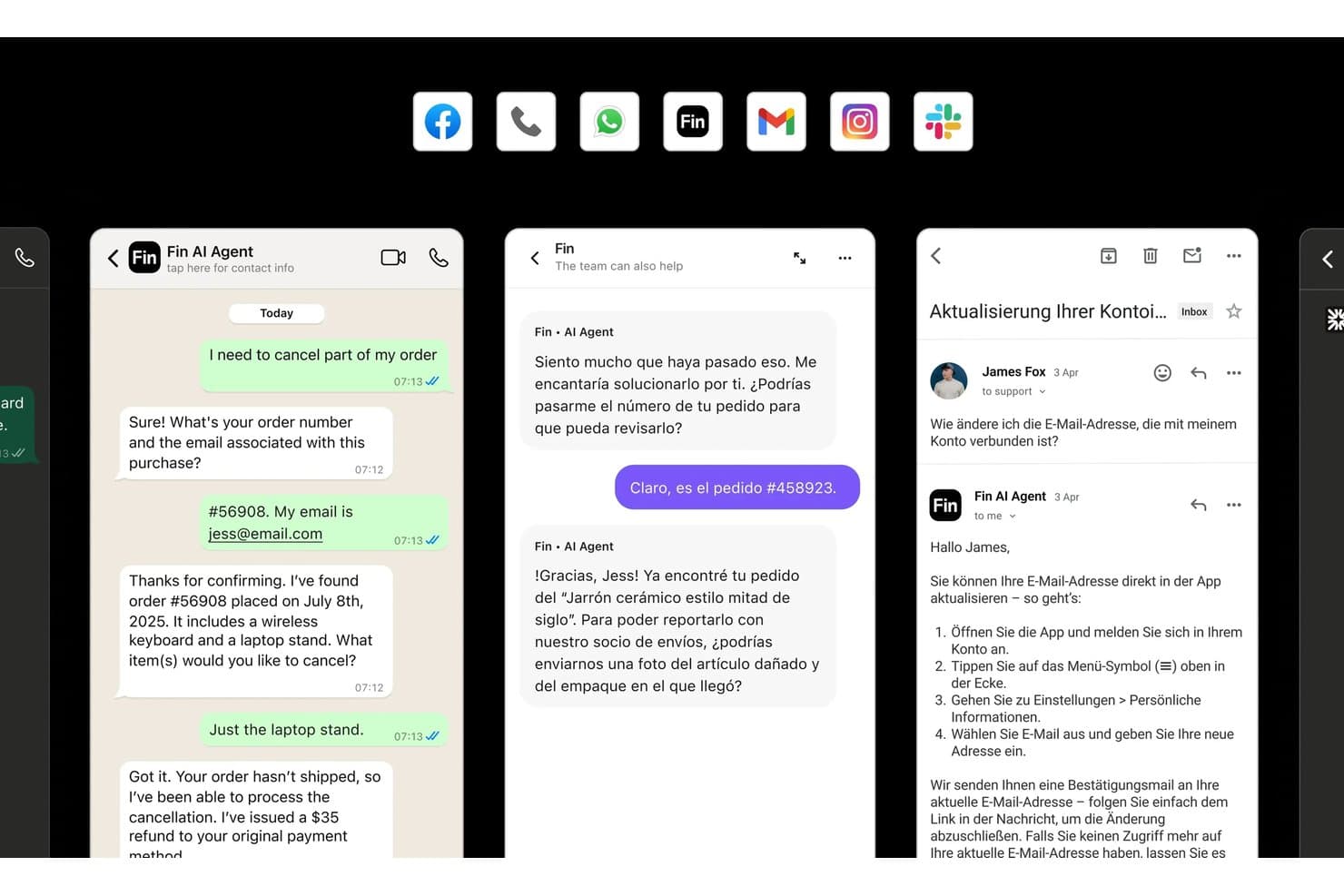
Fin handles customer support across WhatsApp, chat, and email in multiple languages. Fin is an AI-powered ecommerce customer service platform that handles support conversations, automates order actions like refunds and exchanges, and integrates with your existing helpdesk or Intercom's native inbox.
Who Is Fin Best For?
Fin is a strong fit for Shopify merchants who want AI to handle refunds, exchanges, and order changes without agent involvement.
Why I Picked Fin
I picked Fin as one of the best because its AI doesn't just suggest actions—it completes them. When a customer asks for a refund or exchange, Fin's multi-step Procedures verify the order, process the action in Shopify, and close the ticket without any agent involvement. I also love that it handles damaged-item claims by reviewing customer photos and auto-issuing refunds when eligible. That level of autonomous order execution is what sets it apart.
Fin Key Features
- Omnichannel inbox: Manages conversations from email, chat, WhatsApp, SMS, Instagram, voice, Slack, and more in one unified workspace.
- CX Score: Automatically scores sentiment across 100% of conversations without requiring customers to fill out surveys.
- Shopify agent sidebar: Gives human agents live access to order details, line items, addresses, and fulfillment status directly inside the inbox.
- 45+ language support: Handles customer conversations in over 45 languages with real-time translation built in.
Fin Integrations
Fin lists 59+ integrations, including Shopify, Intercom, Salesforce Service Cloud, HubSpot Service Hub, Zendesk, Gorgias, Freshdesk, WooCommerce, BigCommerce, and Stripe. It supports custom integrations through its REST API and Zapier.
Pros and Cons
Pros:
- Audits AI and human conversations
- Resolves ecommerce questions around the clock
- Completes refunds and exchanges autonomously
Cons:
- No dedicated returns or tracking portal
- Occasionally closes tickets with wrong answers
Learn more about Fin:

Zowie centralizes customer conversations with order history in one view. Zowie is an AI-powered ecommerce customer service platform that combines an omnichannel inbox, no-code automation tools, and order management actions to handle customer conversations across chat, email, SMS, voice, and social channels.
Who Is Zowie Best For?
Zowie is a strong fit for CX operations managers and heads of customer experience at mid-market to enterprise ecommerce brands who need to automate high volumes of support without involving engineering.
Why I Picked Zowie
I've included Zowie in my top picks because its no-code Agent Studio lets CX teams build and update automations without touching code, using plain-language Playbooks written the way you'd brief a new hire. I love that the AI doesn't just answer questions: it executes full return and refund flows inside the conversation, including order lookup, eligibility checks, and sending a return label via email and SMS. Supervisor then scores 100% of those AI-handled conversations automatically, so nothing slips through unreviewed.
Zowie Key Features
- Omnichannel inbox: A unified helpdesk that consolidates chat, email, SMS, voice, WhatsApp, and Instagram into a single view with full AI decision context at handoff.
- Live translation: Translates conversations in both directions across 175 languages directly inside the inbox, without a third-party tool.
- Supervisor conversation scoring: Automatically scores 100% of conversations handled by AI or human agents against custom scorecards covering tone, resolution, and policy adherence.
- Email CSAT surveys: Sends branded post-conversation satisfaction surveys by queue, with configurable send delays and topic-based exclusion rules.
Zowie Integrations
Zowie integrates with Shopify, Magento, BigCommerce, Salesforce Commerce Cloud, Zendesk, Salesforce, Freshdesk, Genesys, Stripe, and ReCharge. It also supports REST API, A2A, and JavaScript, Python, and Node.js SDKs for custom integrations.
Pros and Cons
Pros:
- Supervisor scores every conversation automatically
- AI executes returns and refunds end-to-end
- No-code Playbooks empower CX-owned automation
Cons:
- Complex workflows can introduce configuration issues
- No native tracking or returns portal
Learn more about Zowie:
Annen programvare for kundeservice innen netthandel
Her er noen flere alternativer innen programvare for kundeservice i netthandel som ikke kom med på kortlisten min, men som likevel er verdt å se nærmere på:
- 11Salesforce Agentforce ServiceBest for advanced workflow customization
- 12SienaBest for AI-first agentless ticket resolution
- 13ZendeskBest for enterprise-grade AI automation
- 14FreshdeskBest for guided AI onboarding
- 15HappyFoxBest for multi-platform ecommerce store support
- 16Help ScoutBest for intuitive omnichannel inbox
- 17DelightChatBest for WhatsApp and social commerce integration
- 18Outvio DeskBest for post-purchase experience management
- 19YumaBest for outcome-based AI ticket resolution
- 20Rep AIBest for AI that sells and supports in one chat
How I Evaluate Ecommerce Customer Service Software
I split my evaluation into baseline requirements—like native Shopify integration and omnichannel inbox—and the differentiators that separate a good CX platform from a great one.
Core Functionality (Table Stakes For This List)
When I'm selecting tools for my list, I rank each one on a scale from 0 (does not offer the functionality) to 5 (excels in this area) for each core functionality listed below. Then, I calculate the tool's total score as a percentage. Each tool needs to achieve a minimum total score of 65% to be considered for inclusion.
- Omnichannel Inbox: I check whether email, chat, social DMs, and SMS funnel into one agent workspace so reps aren't toggling between tabs during a rush.
- Ecommerce Platform Integration: Native connectors to Shopify, BigCommerce, WooCommerce, or Magento should surface order and customer data right inside the ticket.
- Order Management Actions: Agents need to process refunds, cancellations, and exchanges without leaving the support interface to log into the store's admin panel.
- Automation & AI Assistance: I look for macros, routing rules, and AI-driven replies that handle repetitive WISMO and returns inquiries without agent involvement.
- Self-Service Tools: A branded help center, chatbot, or order tracking portal that lets customers resolve common questions on their own around the clock matters here.
- CX Analytics & Reporting: Dashboards should cover CSAT, first response time, resolution time, and agent performance tied to ecommerce-specific KPIs.
Once I have a list of tools that meet the criteria, I consider what sets each platform apart.
Differentiating Factors (What Sets Vendors Apart)
Here's how I compare and contrast different vendors:
Standout Features
AI-powered automation is where I see the widest gap between vendors. Some offer basic intent detection, while others deploy autonomous AI agents that resolve full WISMO and returns conversations end-to-end. Self-service portals matter just as much—branded return and exchange flows that customers complete without contacting an agent can drastically cut ticket volume during peak seasons. I also evaluate sentiment analytics that connect CSAT scores to revenue metrics like repeat purchase rate, giving CX leaders data they can bring to budget conversations.
Beyond Features
Pricing model is a big differentiator. I look at whether a vendor charges per agent, per ticket, or per conversation, since seasonal DTC brands can see ticket volume spike dramatically during holiday periods. Ecommerce platform compatibility goes deeper than just having a Shopify connector; I evaluate whether the integration supports two-way sync for refunds, subscriptions, and multi-store setups. Time-to-value also matters, especially whether a platform ships with pre-built macros and workflows for common ecommerce scenarios like WISMO and returns.
Slik velger du programvare for kundeservice innen netthandel
Det er lett å gå seg vill i lange funksjonslister og kompliserte prisstrukturer. For å hjelpe deg med å holde fokus mens du går gjennom den unike prosessen med å velge programvare, har jeg laget en sjekkliste over faktorer du bør ha i tankene:
| Faktor | Hva bør vurderes |
|---|---|
| FaktorSkalerbarhet | Hva bør vurderesVil verktøyet støtte både rolige perioder og høysesong? Spør om hastighetsgrenser, brukerbegrensninger og økte kostnader etter hvert som virksomheten vokser. |
| FaktorIntegrasjoner | Hva bør vurderesKan plattformen kobles direkte til netthandelsløsningen og markedsføringsverktøyene dine, eller kreves det tredjepartskoblinger? |
| FaktorTilpasningsmuligheter | Hva bør vurderesKan du tilpasse arbeidsflyter, merkevareprofilering og automatiseringer slik at de samsvarer med merkevarens kundeserviceopplevelse? Hvilke ressurser vil dette kreve? |
| FaktorBrukervennlighet | Hva bør vurderesVil kundebehandlere og ledere raskt komme i gang? Ta hensyn til opplæringstiden for teamet og eventuelle tidligere utfordringer med nye verktøy. |
| FaktorImplementering og innføring | Hva bør vurderesEr lanseringen selvbetjent, veiledet eller basert på omfattende personlig hjelp? Hva er den forventede tidsplanen for å gå live, og hvem skal stå for konfigureringen? |
| FaktorKostnad | Hva bør vurderesHvordan skaleres prisen – etter kundebehandler, billett, ordre eller bruk? Hvor er det størst sannsynlighet for ekstra kostnader eller uventede gebyrer? |
| FaktorSikkerhetstiltak | Hva bør vurderesHvilke kontroller beskytter kundedataene? Be om dokumentasjon på kryptering, sertifiseringer og administratorrettigheter. |
| FaktorTilgjengelig kundestøtte | Hva bør vurderesNår er leverandørens kundestøtte tilgjengelig, og hvordan får du kontakt med dem? Vil lokale tidssoner og responstider dekke behovene dine hele året? |
Hva er programvare for kundeservice innen netthandel?
Programvare for kundeservice innen netthandel er en digital plattform som hjelper nettbutikker med å administrere, spore og svare på kundehenvendelser på tvers av flere kanaler, som e-post, chat, sosiale medier og SMS. Disse systemene gir kundeserviceteam et sentralisert arbeidsområde, kobler seg direkte til ordredata, automatiserer svar på rutinespørsmål og gjør det mulig for både kundebehandlere og kunder å løse problemer raskt.
Funksjoner i programvare for kundeservice innen netthandel
Når du velger programvare for kundeservice innen netthandel, bør du se etter følgende nøkkelfunksjoner:
- Omnikanal-innboks: Samler inn og administrerer kundemeldinger fra e-post, direktechat, sosiale medier og SMS i ett samlet kontrollpanel for kundebehandlere.
- Innebygde integrasjoner for netthandel: Kobler seg direkte til større netthandelsplattformer, slik at kundebehandlere ser informasjon om bestillinger, produkter og levering sammen med hver samtale.
- Handlinger for ordrebehandling: Lar kundebehandlere behandle refusjoner, opprette returer og endre bestillinger direkte i arbeidsområdet for kundestøtte uten å bytte system.
- Automatisering og KI-assistanse: Automatiserer svar på vanlige spørsmål, ruter saker basert på regler og foreslår svar for å hjelpe team med å løse saker raskere.
- Selvbetjeningsportaler: Lar kunder få tilgang til hjelpeartikler, spore bestillinger og starte forespørsler om retur eller bytte på egen hånd, slik at antallet innkommende saker reduseres.
- Sporing av kundehistorikk: Gir en komplett tidslinje over tidligere interaksjoner, kjøp og kundestøttehenvendelser for hver kunde i kundeprofilen.
- CSAT- og tilbakemeldingsundersøkelser: Samler inn kundetilfredshetspoeng og tilbakemeldinger etter kundestøtteinteraksjoner, slik at du får innsikt i kundebehandlernes prestasjoner og opplæringsbehov.
- Ytelsesrapportering: Tilbyr detaljerte analysekontrollpaneler som sporer saksmengde, første svartid, løsningsgrad og teamets effektivitet.
- Flerspråklig støtte: Gjør det mulig å tilby kundestøtte på flere språk for å betjene internasjonale kunder og opprettholde enhetlighet på tvers av regioner.
- Rollebaserte tillatelser: Kontrollerer hvem som kan få tilgang til, redigere eller se sensitiv kundeinformasjon, og begrenser bestemte handlinger til spesifikke teammedlemmer.
Fordeler med programvare for kundeservice innen netthandel
Implementering av programvare for kundeservice innen netthandel gir flere fordeler for teamet og virksomheten din. Her er noen av fordelene du kan se frem til:
- Raskere svartider: Sentraliserte innbokser og automatisert ruting hjelper kundebehandlere med å håndtere kundespørsmål og problemer uten unødvendige forsinkelser.
- Mer personlig kundestøtte: Integrerte ordredata og kundehistorikk gjør det mulig for kundebehandlere å tilpasse svarene til hver enkelt kunde, noe som forbedrer den samlede opplevelsen.
- Høyere effektivitet for kundebehandlere: KI-baserte svar, verktøy for ordrebehandling og makroer minimerer manuelle oppgaver, slik at kundebehandlerne kan løse flere saker på kortere tid.
- Økt kundetilfredshet: Selvbetjeningsverktøy og enhetlige samtaleopplevelser på tvers av kanaler hjelper kundene med å få svar når og på den måten de ønsker.
- Bedre beslutningsgrunnlag: Innebygde analyser og CSAT-tilbakemeldinger gir innsikt i hva som fungerer, hvor teamet kan forbedre seg, og hvordan kundestøtten bidrar til å beholde kunder.
- Skalerbarhet i perioder med høy belastning: Automatiserte arbeidsflyter og brukervennlige kontrollpaneler hjelper team med å håndtere sesongsvingninger og uventede økninger i saksmengden uten å miste oversikten.
- Forbedret datasikkerhet: Rollebaserte tillatelser og funksjoner for overholdelse av regelverk beskytter sensitiv kundeinformasjon og støtter sikker drift etter hvert som virksomheten vokser.
Kostnader og priser for programvare for kundeservice innen netthandel
Når du velger programvare for kundeservice innen netthandel, må du forstå de ulike prismodellene og abonnementene som er tilgjengelige. Kostnadene varierer basert på funksjoner, teamstørrelse, tillegg og mer. Tabellen nedenfor oppsummerer vanlige abonnementer, gjennomsnittsprisene deres og typiske funksjoner som er inkludert i programvareløsninger for kundeservice innen netthandel:
Sammenligningstabell for abonnementer for programvare for kundeservice innen netthandel
| Abonnementstype | Gjennomsnittspris | Vanlige funksjoner |
|---|---|---|
| AbonnementstypeGratisabonnement | Gjennomsnittspris$0 | Vanlige funksjonerGrunnleggende omnikanal-innboks, begrensede integrasjoner, grunnleggende automatisering og støtte via fellesskap eller bare e-post. |
| AbonnementstypePersonlig abonnement | Gjennomsnittspris$5-$25/bruker/måned | Vanlige funksjonerFlerkanalsinnboks, standardautomatisering, grunnleggende rapportering, begrensede integrasjoner for netthandel og e-poststøtte. |
| AbonnementstypeBedriftsabonnement | Gjennomsnittspris$25-$75/bruker/måned | Vanlige funksjonerAvanserte automatiseringer, full integrasjon med netthandel, selvbetjeningsportaler, ytelsesanalyse og chatstøtte. |
| AbonnementstypeStorbedriftsabonnement | Gjennomsnittspris$75-$150/bruker/måned | Vanlige funksjonerTilpassede arbeidsflyter, dedikert kundeansvarlig, avanserte sikkerhetskontroller, funksjoner for overholdelse av regelverk og prioritert kundestøtte. |
Vanlige spørsmål om programvare for kundeservice innen netthandel
Her er noen svar på vanlige spørsmål om programvare for kundeservice innen netthandel:
Hvordan integreres programvare for kundeservice innen netthandel med nettbutikken min?
De fleste plattformer for brukerstøtte tilbyr direkte integrasjoner med ledende netthandelssystemer som Shopify, WooCommerce eller Magento. Dette gjør det mulig for teamet ditt å se bestillinger, behandle returer og administrere kundedata direkte i det sentrale billettsystemet. Dette skaper en direkte arbeidsflyt for kundestøtte innen netthandel, både for medarbeidere og kunder.
Kan programvare for kundeservice innen netthandel bidra til å redusere antallet henvendelser?
Ja, moderne verktøy bruker automatiserte svar, standardsvar og automatiseringsregler sammen med selvbetjeningsportaler og KI-drevne chatboter. Når kundene finner svar på egen hånd, kan du avlede rutinemessige henvendelser, redusere den gjennomsnittlige løsningstiden og forbedre den generelle kundeopplevelsen.
Hva bør jeg vurdere når jeg velger en prisplan?
Se på teamets størrelse, forventet antall henvendelser og nødvendige integrasjoner. Vurder om prisen beregnes per medarbeider, billett eller samtale, og om avansert støtte for flere kanaler eller verktøy for SLA-håndtering medfører ekstra kostnader. Velg en plan som passer både budsjettet og de langsiktige vekstmålene dine.
Er sensitive kunde- og bestillingsdata sikre på disse plattformene?
Ja, anerkjent programvare for kundeservice innen netthandel inkluderer sikkerhetstiltak som datakryptering, rollebaserte tillatelser for teamsamarbeid og samsvar med standarder som GDPR eller PCI-DSS. Gå alltid gjennom leverandørens dokumentasjon og sertifiseringer for å være sikker på at løsningen oppfyller kravene dine.
Kan disse verktøyene støtte flere butikker eller merkevarer?
Mange plattformer støtter drift av flere butikker eller merkevarer, slik at du kan administrere henvendelser fra ulike nettbutikker i ett enkelt grensesnitt for medarbeidere og én kundedatabase. Se leverandørens dokumentasjon for spesifikke detaljer om funksjoner for administrasjon av flere butikker.