

O software de satisfação do cliente ajuda as equipas de CX a medir, analisar e melhorar a forma como os clientes se sentem relativamente às suas experiências. Se tem dificuldades com métricas de CSAT pouco claras, um baixo volume de feedback ou ciclos atrasados entre obter informações e agir sobre elas, o software de satisfação do cliente pode ajudá-lo a transformar feedback valioso em ação.
Neste artigo, partilho as minhas perspetivas sobre o melhor software de satisfação do cliente para o ajudar a compreender as necessidades, experiências e expectativas dos seus clientes, para que os possa manter satisfeitos e envolvidos.
O que é o software de satisfação do cliente?
O software de satisfação do cliente é uma ferramenta utilizada para recolher e analisar o feedback dos clientes, de modo a medir e melhorar o grau de satisfação dos clientes com as suas experiências. É utilizado para obter informações que impulsionam melhorias nos produtos, aperfeiçoamentos dos serviços e relações mais fortes com os clientes. Isto é conseguido através de funcionalidades como a recolha de feedback, a análise de sentimentos e a análise integrada.
Why Trust Our Software Recommendations
6,700+
Reviews
20
Industry experts
16+
Evaluation factors
14
Years
Our team has been testing and reviewing software since 2012. As CX leaders ourselves, we know how difficult—and important—it is to choose the right software.
For this guide, we evaluated tools using hands-on testing and independent research, scoring tools using our selection criteria.
Our reviews reflect our human editorial judgment, not a sales pitch.
 Gui DrusinaCreative Director
 Tim FisherVP of AI
Tabela comparativa de software de satisfação do cliente
Esta tabela comparativa resume os detalhes básicos de cada uma das minhas principais escolhas de software de satisfação do cliente.
| Tool | Best For | Trial Info | Price | ||
|---|---|---|---|---|---|
| 1 | Best for real-time online monitoring | Free trial available | From $199/month (billed annually) | Website | |
| 2 | Best automated surveys with real-time insights | Free plan available | From $19/user/month (billed annually) | Website | |
| 3 | Best for scalable feedback workflows | 7-day free trial | From $55/user/month | Website | |
| 4 | Best CSAT surveys and follow-up workflow | 10-day free trial | From $114/month (billed annually) | Website | |
| 5 | Best for AI automation for routine tasks | Free trial available | From $39/user/month (billed annually) | Website | |
| 6 | Best for AI-powered customer insights | Free demo available | Pricing upon request | Website | |
| 7 | Best for customizable customer satisfaction surveys | Free plan available | From $18/month | Website | |
| 8 | Best for small businesses | Free plan available | From $30/user/month (billed annually) | Website | |
| 9 | Best for customer journey tracking with NPS | 14-day free trial available | Pricing upon request | Website | |
| 10 | Best to survey users directly from your app or website | Free trial available | From $96/month (billed annually) | Website |


Visão geral dos 10 melhores softwares de satisfação do cliente
Eis a minha avaliação do melhor software de satisfação do cliente que pode utilizar atualmente, juntamente com breves descrições das suas principais funcionalidades e uma breve explicação do motivo pelo qual fazem parte da lista.
 Best for real-time online monitoring
- Free trial available
- From $199/month (billed annually)
Visit WebsiteCustomer Rating:4.7/5
Brand24 gathers insights from 25 million online sources, tracking them in real-time. Brand24 is a powerful AI social listening tool that helps businesses monitor and analyze their online presence and reputation. The tool also provides resources and support to help businesses make the most of their social media and online marketing efforts, ultimately aiming to improve customer satisfaction and brand reputation.
Why I picked Brand24: Brand24 helps businesses to track brand mentions across various online platforms, providing real-time alerts and sentiment analysis. The tool is designed for marketing professionals and companies of all sizes, offering features such as influencer scoring, competitor analysis, and customizable reports.
The platform provides data for brand reputation, marketing, influencer marketing, market research, and public relations. Overall, Brand24 is praised for its immediacy in data relay and nuanced sentiment analysis, making it particularly suitable for businesses that prioritize immediate customer engagement.
Brand24 Standout Features and Integrations:
Standout features include advanced sentiment analysis to segment online mentions into positive, negative, or neutral categories, automated reporting features, and reach tracking, which helps users to evaluate their marketing efforts and benchmark against competitors by tracking the reach of their brand mentions. Users can also measure and report their PR coverage by creating reports that provide powerful and reliable metrics.
Integrations include Slack, Trackdesk, LinkedIn, Spotify, Telegram, Instagram, Facebook, Reddit, TikTok, YouTube, X (formerly known as Twitter), and Tripadvisor.
Pros and Cons
Pros:
- Provides multi-language support
- Provides real-time alerts and customizable filters
- Easy to set up and use
Cons:
- May not be affordable for small businesses
- Mobile app can be difficult to use
Learn more about Brand24: Best automated surveys with real-time insights
- Free plan available
- From $19/user/month (billed annually)
Visit WebsiteCustomer Rating:4.4/5
This is what the survey creator looks like in SurveySparrow. SurveySparrow is an online survey tool that allows you to collect feedback from your team and customers. The platform allows you to distribute your surveys on multiple channels, including social media and forums, enabling you to gain meaningful insights about your users.
Why I picked SurveySparrow: SurveySparrow made my list thanks to its simple and straightforward survey creator. The creator uses a drag-and-drop functionality to help you personalize your surveys, and you can share each survey you create on social media or forums to collect feedback from your users.
SurveySparrow Standout Features and Integrations:
Standout features include mobile-first surveys, video surveys, chat surveys, and offline surveys. I like SurveySparrow’s smart surveys. This type of survey allows you to use conditional logic branching to show only relevant questions to your respondents, enabling you to collect answers that are specific to each customer segment.
Integrations include social media platforms, CRMs, and customer success solutions, such as Facebook, Salesforce, Intercom, Aweber, Google Contacts, HubSpot, WordPress, MailChimp, Rybbon, Zendesk, and Slack. You can access more integrations through Zapier. SurveySparrow also offers a REST API to enable custom integrations, as needed.
Pros and Cons
Pros:
- Audio surveys automatically transcribe participants answers
- The survey design makes the experience great for respondents
- Platform is easy to master
Cons:
- Surveys don’t collect partial answers if the respondent quits before answering all the questions
- Limited font personalization
Learn more about SurveySparrow: Best for scalable feedback workflows
- 7-day free trial
- From $55/user/month
Visit WebsiteCustomer Rating:4.4/5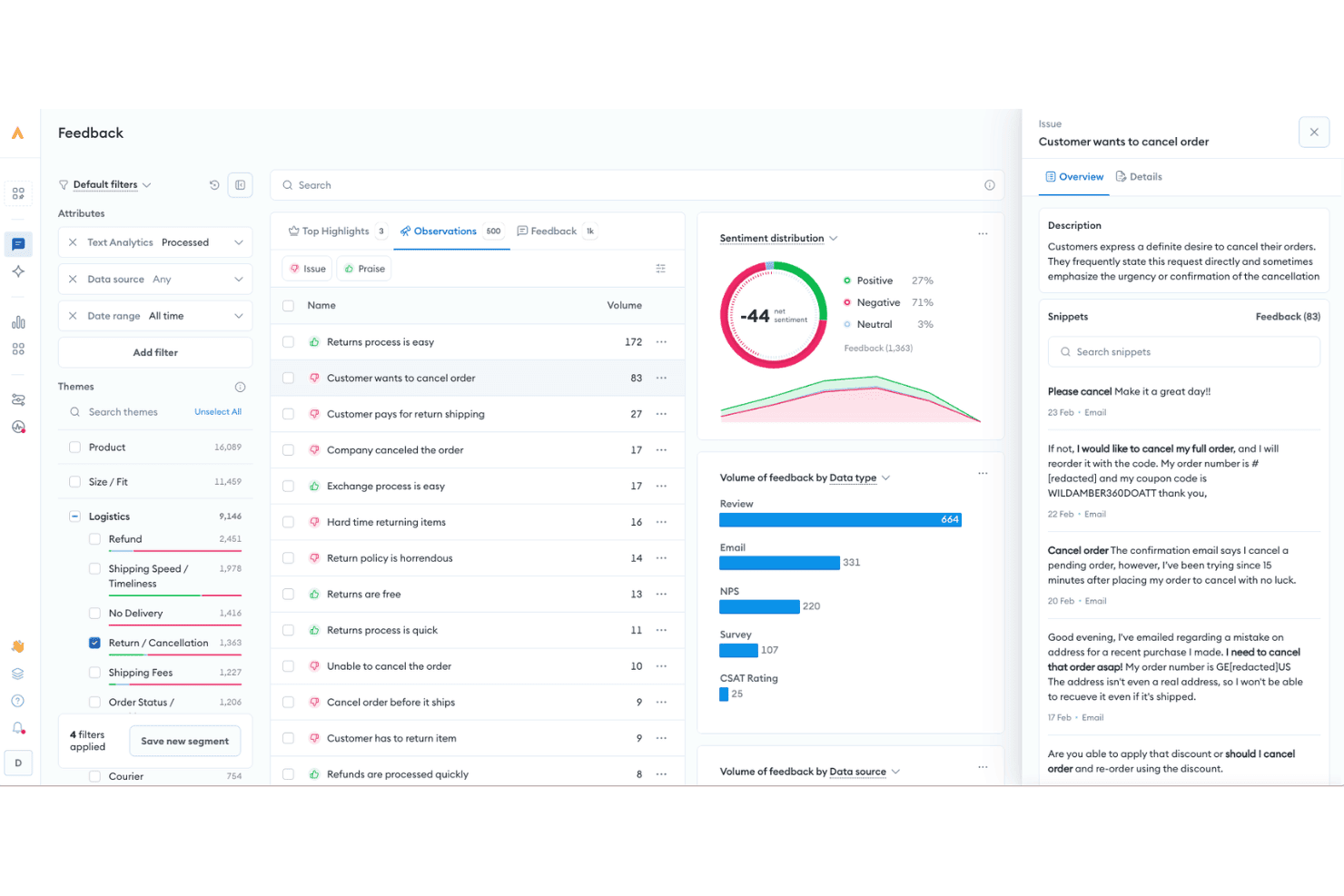
Alchemer uses AI to analyze customer feedback, identify recurring issues, and track sentiment across reviews, emails, surveys, and other sources. Alchemer is a feedback management platform that combines survey distribution, sentiment analysis, closed-loop automation, and 400+ integrations to support CSAT, NPS, and VoC programs across the full customer journey.
Who Is Alchemer Best For?
Alchemer suits mid-market and enterprise CX and VoC teams running structured feedback programs across multiple channels and business systems.
Why I Picked Alchemer
I've included Alchemer in my top picks because its no-code Connect workflow builder genuinely changes how feedback moves through a CX stack. I can set up a rule that routes a detractor NPS response directly into Zendesk as a support ticket, or fires a Slack alert to a customer success manager, without writing a single line of code. The bidirectional Salesforce sync is another feature I rely on: I pull CRM data into surveys to personalize them, then push results back to update contact records automatically.
Alchemer Key Features
- AI-powered feedback analytics: Uses natural language processing for automated sentiment scoring, theme detection, and topic clustering on open-ended survey responses.
- Omnichannel survey distribution: Supports survey delivery via email, SMS, in-app prompts, web links, QR codes, and kiosk/offline modes.
- Customizable reporting dashboards: Provides real-time dashboards with advanced segmentation, export options, and customizable shareable reports.
- Role-based permissions: Lets administrators assign specific permissions and data access to different teams or departments.
Alchemer Integrations
Alchemer offers over 400 native integrations, including Salesforce, Zendesk, HubSpot, ServiceNow, Jira, Tableau, Slack, Shopify, Power BI, and Google Sheets, and provides an API for custom integrations.
Pros and Cons
Pros:
- Strong closed-loop automation for detractor follow-up
- Supports complex, multi-touchpoint VoC programs
- Highly customizable survey logic and branching
Cons:
- Advanced workflows require significant configuration time
- Reporting UI feels dated versus competitors
Learn more about Alchemer: Best CSAT surveys and follow-up workflow
- 10-day free trial
- From $114/month (billed annually)
Visit WebsiteCustomer Rating:4.6/5
Survicate allows users to build surveys using a drag-and-drop creator without the need for coding. Survicate is a survey software tool designed to collect feedback from customers and website visitors. Its aim is to help businesses understand customer preferences, improve products and services, and make informed decisions based on collected feedback.
Why I picked Survicate: I selected Survicate for this list because it allows businesses to conduct surveys across multiple channels, including email, web, mobile, and in-app, to gather insights from customers and website visitors. Survicate surveys can be used to measure key satisfaction metrics such as Net Promoter Score (NPS), Customer Satisfaction Score (CSAT), and Customer Effort Score (CES). They can also be tailored using various templates and can feature custom logos, brand colors, and messages to maintain brand consistency across surveys.
I also like that Survicate's follow-up workflows automatically trigger actions based on CSAT survey responses, enabling businesses to promptly engage with dissatisfied customers, escalate issues to support teams, or initiate personalized follow-ups to improve customer retention and satisfaction.
Survicate Standout Features and Integrations
Features include a drag-and-drop creator for survey creation, a centralized feedback hub, automated feedback collection, real-time analytics to understand survey responses at a glance, and email embedding. I also like that Survicate uses advanced targeting to show surveys when users are most likely to answer, such as after a certain action is taken on a website or at a specific point in the customer journey.
Integrations include ActiveCampaign, Drip, Amplitude, HubSpot, Intercom, Mailchimp, Salesforce, FullStory, Zendesk, and Microsoft Teams.
Pros and Cons
Pros:
- Provides real-time feedback collection
- Able to capture partial responses
- Easy to set up and use
Cons:
- Limited maximum response limit per month
- Survey visuals can be inconsistent
Learn more about Survicate: Best for AI automation for routine tasks
- Free trial available
- From $39/user/month (billed annually)
Visit WebsiteCustomer Rating:4.4/5
eDesk uses AI-powered summaries and responses inside a unified inbox to help support teams resolve customer issues faster. eDesk is an AI-driven customer support platform built for ecommerce businesses. It helps teams streamline support operations and improve customer satisfaction by centralizing customer interactions in one place. eDesk is designed for ecommerce retailers and customer service teams that need faster response times and more consistent customer engagement. Reducing fragmented communication and inefficient workflows, it helps teams handle inquiries more effectively and turn support conversations into sales opportunities.
Why I Picked eDesk
I picked eDesk for its ability to bring all customer conversations into a single unified inbox, making it easier to manage and prioritize support requests. Its AI automation handles routine tasks, allowing support teams to spend more time resolving complex issues and responding faster. The 24/7 chatbot support also ensures customers can get help at any time, which helps improve overall satisfaction and encourages repeat business.
eDesk Key Features
In addition to its standout features, eDesk offers several other functionalities that can greatly benefit your team:
- Pre-sales Support: This feature allows your team to handle inquiries from potential customers, helping to convert them into sales.
- Feedback Management: eDesk facilitates the collection and analysis of customer feedback, enabling you to make informed improvements to your service.
- Real-time Reporting: With this feature, you gain insights into support operations, allowing you to optimize processes and enhance customer satisfaction.
- Knowledge Base: eDesk provides a centralized repository for information, helping your team reduce customer queries and improve service efficiency.
eDesk Integrations
Integrations include Amazon, eBay, Walmart, Shopify, Magento, WooCommerce, Facebook, WhatsApp, and Etsy.
Pros and Cons
Pros:
- Strong ecommerce marketplace integrations
- AI automation reduces response workload
- Unified inbox across sales channels
Cons:
- Interface learning curve for beginners
- Pricing scales quickly for teams
Learn more about eDesk: Best for AI-powered customer insights
- Free demo available
- Pricing upon request
Visit WebsiteCustomer Rating:4.6/5
The main dashboard of Velaris provies an overview of customer satisfaction metrics and key performance indicators. Velaris is a comprehensive customer success platform designed to help SaaS businesses thrive by proactively engaging with customers and ensuring they achieve their desired outcomes. The tool offers features like data and analytics, automation, and collaboration to provide actionable insights for customer success teams.
Why I picked Velaris: Velaris offers AI-powered analytics, providing deep insights into customer behavior and satisfaction. The platform's ability to consolidate all customer data into a single, intuitive interface allows businesses to gain a 360-degree view of their customers.
The inclusion of sentiment analysis further allows businesses to gauge customer feelings and address issues before they escalate, ensuring a more personalized and effective customer service experience. Additionally, Velaris offers customizable success plans and playbooks, which standardize processes and ensure consistency in customer interactions.
Velaris Standout Features and Integrations:
Standout features include an automation builder, which allows businesses to create flexible automation workflows with an intuitive drag-and-drop interface. Additionally, the AI Copilot leverages AI to provide proactive customer success management, including sentiment analysis and auto-creation of high-impact tasks.
Integrations include Slack, Microsoft Teams, Intercom, MailChimp, Outlook, Google Drive, HubSpot, Jira, and Salesforce.
Pros and Cons
Pros:
- AI-powered analytics to provide valuable insights
- Collaboration features to engage with customers
- Allows users to manage all customer information in one place
Cons:
- Initial setup may be complex
- Could offer more integrations
Learn more about Velaris: Best for customizable customer satisfaction surveys
- Free plan available
- From $18/month
Visit WebsiteCustomer Rating:5/5
Formsuite collects NPS, CSAT, and CES data with AI analysis and alerts. Formsuite is a survey and feedback platform designed to collect and analyze customer satisfaction data. It supports NPS, CSAT, and CES surveys with conditional logic, AI-powered response analysis, and automated alerts for low satisfaction scores.
Who Is Formsuite Best For?
Formsuite is a strong fit for small to mid-sized teams that need flexible, no-code tools to measure customer satisfaction without implementing a full-scale CX management platform.
Why I Picked Formsuite
I picked Formsuite because it offers a high degree of design control while still supporting structured satisfaction metrics. Teams can fully customize the look and feel of surveys to match their brand, including white-labeling on higher-tier plans. Combined with conditional branching and AI-powered summaries, this makes it easy to collect CSAT or NPS data and quickly understand what’s driving positive or negative responses.
Formsuite Key Features
- NPS, CSAT & CES templates: Built-in survey formats for tracking loyalty, satisfaction, and effort.
- Conditional logic: Dynamically adjusts follow-up questions based on satisfaction scores.
- AI response analysis: Automatically detects sentiment and highlights recurring themes.
- Detractor alerts: Sends notifications when low satisfaction scores are submitted.
Formsuite Integrations
Formsuite connects with tools like Google Sheets, Slack, Google Analytics, and Stripe. It primarily integrates with third-party platforms through Zapier and supports webhooks for custom workflows.
Pros and Cons
Pros:
- Strong survey design customization and white-label options
- AI-assisted sentiment summaries reduce manual analysis
- Conditional logic improves relevance of follow-up questions
Cons:
- Relies on Zapier for most third-party integrations
- Lacks built-in ticketing or customer support workflow tools
Learn more about Formsuite: Best for small businesses
- Free plan available
- From $30/user/month (billed annually)
Visit WebsiteCustomer Rating:4.6/5
Here’s what the customer satisfaction survey template looks like in SurveyMonkey. SurveyMonkey is a survey and feedback management solution that enables you to collect and interpret feedback in order to improve your product. The platform offers a wide variety of survey templates, allowing you to start collecting customer information with ease.
Why I picked SurveyMonkey: I picked SurveyMonkey for my top 10 list because it offers a free plan and a selection of customer satisfaction survey templates, making it ideal for small businesses who are just starting to collect customer feedback. The platform has a clean interface and is easy to use, so you don’t need to be an experience CX specialist to identify actionable insights.
Despite its playful design, SurveyMonkey is a robust feedback collection tool that can help businesses of all sizes learn more about their users.
SurveyMonkey Standout Features and Integrations:
Standout features include online polls, a CSAT score assessment, multi-channel response collection, and advanced survey logic. I like the fact that SurveyMonkey allows you to export your results in data formats that are compatible with presentation programs such as Microsoft PowerPoint or Google Slides because this makes it so much easier for novice users to showcase their work.
Integrations include CRM systems, email marketing platforms, and marketing automation solutions, such as Salesforce, HubSpot, Microsoft Dynamics, Mailchimp, Constant Contact, Marketo, Pardot, Tableau, Power BI, and Google Analytics. SurveyMonkey also offers a REST API so you can set up additional custom integrations as needed.
Pros and Cons
Pros:
- Good branding options
- Allows you to invite team members to analyze feedback
- Flexible, customizable tool
Cons:
- Setting up surveys with advanced logic could be easier
- The free survey templates offer limited design customization options
Learn more about SurveyMonkey: Best for customer journey tracking with NPS
- 14-day free trial available
- Pricing upon request
Visit WebsiteCustomer Rating:4.7/5
Zonka Feedback helps you collect customer feedback across email, SMS, WhatsApp, kiosks, websites, apps, and QR codes. Zonka Feedback is an AI-powered customer feedback platform that collects, centralizes, and analyzes NPS, CSAT, and CES survey responses across email, SMS, WhatsApp, web, in-app, and kiosk channels.
Who Is Zonka Feedback Best For?
CX and VoC teams at mid-market businesses running feedback programs across both physical and digital touchpoints will find Zonka a strong fit.
Why I Picked Zonka Feedback
I picked Zonka Feedback because its Contact and User Journey Tracking feature maps NPS responses directly to specific touchpoints in the customer lifecycle. That means I can see exactly where satisfaction drops, whether it's post-onboarding, after a support ticket, or at renewal. I also rely on its AI Impact Analysis, which connects feedback themes directly to NPS score changes, so I know which issues are actually moving the needle.
Zonka Feedback Key Features
- Omnichannel survey builder: Create CSAT, NPS, and CES surveys for email, SMS, WhatsApp, web, and kiosk with logic branching and branding.
- Unified feedback hub: Centralize feedback from surveys, helpdesk tickets, live chat, and online reviews in one platform.
- Role-based dashboards: Deliver real-time insights tailored to executives, frontline agents, or VoC analysts with customizable widgets.
- Compliance controls: Support GDPR and HIPAA compliance, ISO certification, and configurable data residency for secure customer data management.
Zonka Feedback Integrations
Zonka Feedback offers native integrations with Salesforce, HubSpot, Zendesk, Intercom, Freshdesk, Jira, Slack, Microsoft Teams, Google Sheets, and Mailchimp. It also supports Zapier and provides an API for custom integrations.
Pros and Cons
Pros:
- Automated ticketing and case closure workflows
- Real-time text analytics across languages
- Journey-based feedback mapped to lifecycle stages
Cons:
- Included starting from lower-tier plans
- Survey design options can feel limiting
Learn more about Zonka Feedback: Best to survey users directly from your app or website
- Free trial available
- From $96/month (billed annually)
Visit WebsiteCustomer Rating:4.7/5
Surveys are the easiest tool to collect customer satisfaction and Product Fruits lets you build them in minutes. Product Fruits is a comprehensive platform designed to facilitate user onboarding for web-based applications. It provides a variety of tools such as tours, walkthroughs, checklists, hints, surveys, and feedback mechanisms to guide users through the application.
Why I picked Product Fruits: I selected Product Fruits as a customer satisfaction software due to its personalized onboarding experiences which can significantly improve product activation rates, conversions, and NPS scores, while reducing the number of support tickets.
Product Fruits enables businesses to collect feedback from customers, track feature requests, and analyze data to make data-driven decisions. The tool provides a collaborative platform where teams can create and share surveys, engage in discussions, and evaluate feedback to understand customer needs and preferences.
Product Fruits Standout Features & Integrations
Features include interactive tours and walkthroughs, onboarding checklists, and hints and tooltips, all of which guide users through an application and highlight its main functionalities. The tool also provides a feedback widget and in-app survey functionalities (including NPS surveys), allowing businesses to gather user feedback and measure satisfaction.
Integrations include pre-built connections to mixpanel, Heap, Google Analytics, Slack, Smartlook, Segment, customer.io, and HubSpot.
Pros and Cons
Pros:
- Can be implemented without a developer
- The product is GDPR compliant
- You only pay on monthly active users
Cons:
- Only a subset of features works with the Chrome extension
- No support for native iOS/Android apps
Learn more about Product Fruits:
Outras opções
Eis algumas outras excelentes soluções de satisfação do cliente que encontrei durante a minha pesquisa. Embora não tenham entrado na minha lista das 10 melhores, também deve analisá-las:
- 11FrontBest for cross-team customer request routing
- 12PendoBest for in-app customer satisfaction assessment
- 13TotangoBest for SaaS scale-ups
- 14Qualtrics XM Frontline DigitalBest for automated dropoff detection
- 15DelightedBest for mobile-first CSAT surveys
- 16GetFeedbackBest for feedback tracking
- 17SimplesatBest for easy-to-follow dashboards
- 18Kimola AnalyticsBest for external feedback gathering
- 19InputKitBest for managing unsatisfied customers
- 20Creatio AI CRMBest for automated customer feedback
- 21HiverBest for integrating CSAT surveys
- 22LiveAgentBest for multi-channel communications
- 23SogolyticsBest for CSAT dashboard and analytics
- 24NextivaBest for customer sentiment analysis
- 25ZendeskBest for built-in CSAT tracking
- 26ChurnZeroBest for tracking health and churn
- 27KeatextBest for sentiment analysis
- 28AskNicelyBest for measuring the satisfaction potential of customer interactions
- 29NICE SatmetrixBest for uncovering churn blind spot
- 30Customer ThermometerBest for fast survey creation
How I Evaluate Customer Satisfaction Software
I evaluate these tools in two layers: baseline requirements like NPS/CSAT distribution and closed-loop alerts, and differentiators that separate purpose-built VoC platforms from basic survey tools.
Core Functionality (Table Stakes For This List)
When I'm selecting tools for my list, I rank each one on a scale from 0 (does not offer the functionality) to 5 (excels in this area) for each core functionality listed below. Then, I calculate the tool's total score into a percentage. Each tool needs to achieve a minimum total score of 75% to be considered for inclusion.
- Survey Creation & Distribution: I check whether the tool supports CSAT, NPS, and CES surveys across channels like email, in-app, SMS, and web—not just one delivery method.
- Centralized Feedback Collection: Every tool should pull feedback from multiple sources into one place, so teams aren't toggling between survey responses, chat logs, and support tickets.
- Sentiment & Text Analytics: I look for automated analysis of open-ended responses, like AI tagging themes across thousands of post-interaction comments instead of manual review.
- Dashboards & Reporting: Real-time dashboards that let you filter by segment, timeframe, or channel matter here—static CSV exports alone won't cut it for CX leaders tracking trends.
- Closed-Loop Follow-Up Workflows: I evaluate whether the platform triggers alerts or routes cases when scores dip, so a detractor response after onboarding reaches the right team fast.
- CX Stack Integrations: The tool should connect with your CRM, helpdesk, and communication platforms to keep satisfaction data where your team already works.
Once I have a list of tools that meet the criteria, I consider what sets each platform apart.
Differentiating Factors (What Sets Vendors Apart)
Here's how I compare and contrast different vendors:
Standout Features
I look for AI-powered summaries that surface themes across thousands of responses, saving VoC analysts hours of manual tagging. Journey-based feedback mapping is another differentiator, letting teams trigger surveys at specific touchpoints like post-onboarding or after a renewal call. Benchmarking data also matters. Tools that offer industry or peer comparisons give CX leaders the context they need to present NPS or CSAT trends to stakeholders with real meaning.
Beyond Features
Compliance matters when you're collecting feedback that includes personal data. I check for GDPR and SOC 2 compliance, plus configurable data residency options for teams operating across regions. Implementation speed is equally important—I evaluate whether the platform offers pre-built survey templates and onboarding support to get a program live in weeks, not months. Pricing transparency also plays a role, since response-based pricing can spiral fast for high-volume support teams.
Usabilidade
Melhorar a satisfação do cliente não é uma tarefa fácil – mas isso não significa que a aplicação em que confia também deva ser difícil de utilizar. Selecionei software fácil de utilizar, para que possa, juntamente com a sua equipa, recolher e agir sobre o feedback sem contratempos.
Integrações de software
É praticamente impossível avaliar a satisfação dos seus clientes quando depende dos dados fornecidos por uma única ferramenta. Por isso, as soluções que escolhi disponibilizam múltiplas integrações e acesso à API, para que as possa incluir no ecossistema da sua aplicação.
Relatórios & informações acionáveis
Ter uma ferramenta excelente a recolher dados dos clientes é positivo, mas não é suficiente para uma avaliação precisa da satisfação do cliente. No entanto, as ferramentas que incluí na minha análise utilizam os seus dados e interpretam-nos em relatórios claros, para que possa obter informações acionáveis e começar rapidamente a implementar soluções.
Análise de sentimentos
Ser capaz de detetar o sentimento subjacente ao feedback de um utilizador pode ser uma grande ajuda para reduzir as suas taxas de abandono, pois permite identificar rapidamente os clientes insatisfeitos e tomar medidas para resolver a situação.
Preços
O software de satisfação do cliente está disponível em diferentes gamas de preços. No entanto, incluí apenas ferramentas que, na minha opinião, o ajudarão a atingir os seus objetivos e lhe proporcionarão um bom retorno do investimento.
Perguntas frequentes
Quer saber mais sobre software de satisfação do cliente? Eis algumas perguntas comuns que as pessoas fazem – respondidas, claro:
Qual é a diferença entre software de satisfação do cliente, software de experiência do cliente e software de sucesso do cliente?
Não há como negar que existe alguma sobreposição entre estes tipos de soluções. No entanto, a principal diferença entre elas é aquilo que foram concebidas para medir:
- O software de satisfação do cliente foi concebido para medir o grau de satisfação da sua base de utilizadores com o seu produto enquanto o utilizam.
- O software de experiência do cliente foi concebido para medir os sentimentos do utilizador relativamente ao seu produto ao longo da jornada do cliente – desde o momento em que ouviu falar da sua solução, passando pela aquisição, integração e utilização, até ao eventual abandono ou à transformação num defensor da marca.
- O software de sucesso do cliente foi concebido para medir a capacidade dos seus clientes utilizarem o seu produto para alcançarem os seus objetivos – trata-se, por isso, de medir se a sua solução é um bom facilitador do sucesso do cliente (daí o nome).
Que métricas essenciais deve acompanhar para monitorizar a satisfação do cliente?
Embora possa acompanhar várias métricas de satisfação do cliente, não irá errar se se limitar aos KPIs utilizados pela maioria das equipas de sucesso do cliente:
- Pontuação de satisfação do cliente (CSAT)
- Pontuação líquida de promotores (NPS)
- Taxa de abandono do cliente
- Valor do cliente ao longo da vida (CLV)
Como realizar uma auditoria da experiência do cliente?
A realização de uma auditoria da experiência do cliente é um processo complexo que envolve várias etapas, tais como:
- Defina os seus objetivos: Deve ter objetivos específicos em mente, como reduzir o abandono ou aumentar o número de promotores.
- Recolha dados: Envie inquéritos, entreviste os seus clientes, acompanhe palavras-chave nas redes sociais, entre outras ações, para recolher muitos dados dos utilizadores.
- Analise os dados: Procure tendências e valores atípicos. Descubra o que os seus clientes esperam do seu produto e em que aspetos não consegue proporcionar valor.
- Escolha as áreas a melhorar: Nenhuma empresa no mundo consegue resolver tudo de uma só vez. Selecione as áreas de melhoria que pretende abordar com base nas suas necessidades – importância, limitações de tempo, orçamento, disponibilidade da equipa, entre outros fatores.
- Meça os seus resultados: Acompanhe o impacto das suas alterações na experiência do cliente e faça anotações detalhadas.
- Reavalie: Uma única auditoria da experiência do cliente é valiosa, mas esse valor diminui ao longo do tempo. Deve reavaliar sempre a situação e encontrar novas oportunidades de melhoria através de mais auditorias.
Outras análises de software centrado no cliente
Eis alguns outros tipos de software centrado no cliente que poderá querer considerar se leva a sério a melhoria da satisfação dos seus clientes: