

Brand24 Review: Pros, Cons, Features and Pricing
Brand24 excels in user-friendly analytics, offering your team intuitive insights that make brand monitoring straightforward and effective.

We review tools independently, and commissions help fund our testing. See our transparency policy, our methodology, or suggest a tool.
Brand24 is an AI-powered brand monitoring software that tracks online mentions of your brand across social media and web platforms. It's ideal for PR teams, marketing departments, and customer service managers in tech startups, retail, and hospitality industries. Brand24 offers real-time insights to help you strengthen reputation management, and enhance online presence.
Brand24 addresses challenges like real-time brand tracking and sentiment analysis for marketing and PR teams. In this article, I'll cover Brand24's features, pros and cons, use cases, pricing, etc., so you can decide if this software aligns with your brand tracking and management needs, from social media monitoring to optimizing your marketing strategy.
Brand24 Evaluation Summary

4.7/5
- From $199/month (billed annually)
- 14-day free trial
Why Trust Our Software Recommendations
6,700+
Reviews
20
Industry experts
16+
Evaluation factors
14
Years
Our team has been testing and reviewing software since 2012. As CX leaders ourselves, we know how difficult—and important—it is to choose the right software.
For this guide, we evaluated tools using hands-on testing and independent research, scoring tools using our selection criteria.
Our reviews reflect our human editorial judgment, not a sales pitch.
 Gui DrusinaCreative Director
 Tim FisherVP of AI
Brand24 Overview
In my opinion, Brand24 is a solid choice for brand monitoring, especially if your team values intuitive analytics and real-time insights. It excels in user-friendliness and offers a comprehensive set of features that are easy to navigate. However, the onboarding could be improved with more guided tutorials. Compared to other tools, Brand24 stands out for its responsive customer support and effective sentiment analysis. It's best suited for small to medium-sized businesses in tech and retail sectors looking for straightforward brand monitoring without the high costs associated with some competitors. If you’re judging based on user interface and ease of use, Brand24 is a top contender for social listening and growing brand awareness.
Pros
- You get real-time alerts for brand mentions on social media platforms and review sites, keeping your team informed instantly.
- The user interface is intuitive, making it easy for anyone to navigate.
- Sentiment analysis helps you understand how your brand is perceived.
Cons
- You might find the onboarding process lacking in detailed tutorials for teams new to social listening tool workflows.
- Some users report occasional inaccuracies in sentiment analysis, especially with hashtags and nuanced customer feedback.
- Advanced reporting features could be more comprehensive for detailed insights for marketing campaigns.
Is Brand24 Right For Your Needs?
Who Would be a Good Fit for Brand24?
Brand24 is a great fit for small businesses in the SaaS, retail, and hospitality industries. If your team needs to track brand mentions and sentiment in real-time, Brand24 offers intuitive tools that make monitoring effortless. Marketing and PR departments will appreciate its easy-to-use interface and real-time alerts, ensuring you're always aware of what's being said about your brand. Customer service teams can leverage sentiment analysis to improve customer interactions and brand perception.
- Tech StartupsBrand24 helps your startup stay on top of online conversations with real-time alerts and easy sentiment tracking so you can improve your online reputation.
- Retail BusinessesFor retail, Brand24's social media listening tools offer insights into customer opinions about your products and services.
- Hospitality IndustryUse Brand24 to monitor guest feedback, reviews and mentions on news sites, helping you improve service and address issues quickly.
- Marketing DepartmentsYour marketing team can use Brand24 for competitor analysis, social media management, tracking campaign impact and brand reach across various platforms.
- PR TeamsPR teams benefit from Brand24's real-time alerts, allowing you to manage and respond to mentions swiftly.
- Customer Service ManagersManagers can use sentiment analysis to gauge customer satisfaction and adjust service strategies accordingly.
Who Would be a Bad Fit for Brand24?
Brand24 might not be the best choice for large enterprises or industries needing detailed, advanced reporting features. If your team requires in-depth data analytics or complex reporting, you might find Brand24's capabilities lacking. Enterprises with extensive data needs may feel limited by its reporting functions. Similarly, if your organization relies heavily on guided onboarding, Brand24's current setup may not meet your expectations.
- Large EnterprisesBrand24's reporting features may not meet the complex data needs of large corporations.
- Financial ServicesFirms needing detailed analytics and compliance tracking might find Brand24 lacking in necessary features.
- Data-Intensive IndustriesIndustries requiring extensive data analytics tools will find Brand24's capabilities insufficient for their needs.
- Analytical TeamsIf your team needs deep analytical insights, Brand24's reporting might fall short.
- Regulatory ComplianceOrganizations with strict regulatory requirements may need more comprehensive monitoring tools.
- Advanced Tech FirmsHigh-tech companies needing detailed tech-specific analysis might find Brand24's features too basic.
How We Test & Score Tools
We’ve spent years building, refining, and improving our software testing and scoring system. The rubric is designed to capture the nuances of software selection and what makes a tool effective, focusing on critical aspects of the decision-making process.
Below, you can see exactly how our testing and scoring works across seven criteria. It allows us to provide an unbiased evaluation of the software based on core functionality, standout features, ease of use, onboarding, customer support, integrations, customer reviews, and value for money.
Core Functionality (25% of final scoring)
The starting point of our evaluation is always the core functionality of the tool. Does it have the basic features and functions that a user would expect to see? Are any of those core features locked to higher-tiered pricing plans? At its core, we expect a tool to stand up against the baseline capabilities of its competitors.
Standout Features (25% of final scoring)
Next, we evaluate uncommon standout features that go above and beyond the core functionality typically found in tools of its kind. A high score reflects specialized or unique features that make the product faster, more efficient, or offer additional value to the user.
We also evaluate how easy it is to integrate with other tools typically found in the tech stack to expand the functionality and utility of the software. Tools offering plentiful native integrations, 3rd party connections, and API access to build custom integrations score best.
Ease of Use (10% of final scoring)
We consider how quick and easy it is to execute the tasks defined in the core functionality using the tool. High scoring software is well designed, intuitive to use, offers mobile apps, provides templates, and makes relatively complex tasks seem simple.
Onboarding (10% of final scoring)
We know how important rapid team adoption is for a new platform, so we evaluate how easy it is to learn and use a tool with minimal training. We evaluate how quickly a team member can get set up and start using the tool with no experience. High scoring solutions indicate little or no support is required.
Customer Support (10% of final scoring)
We review how quick and easy it is to get unstuck and find help by phone, live chat, or knowledge base. Tools and companies that provide real-time support score best, while chatbots score worst.
Customer Reviews (10% of final scoring)
Beyond our own testing and evaluation, we consider the net promoter score from current and past customers. We review their likelihood, given the option, to choose the tool again for the core functionality. A high scoring software reflects a high net promoter score from current or past customers.
Value for Money (10% of final scoring)
Lastly, in consideration of all the other criteria, we review the average price of entry level plans against the core features and consider the value of the other evaluation criteria. Software that delivers more, for less, will score higher.
Core Features
Real-Time Alerts: You get instant notifications when your brand is mentioned online, keeping your team updated on the go. This helps you react quickly to both positive and negative mentions.
Sentiment Analysis: Brand24 analyzes the tone of mentions, so you can understand public perception. It's great for gauging customer feelings about your brand.
Mention Tracking: Track mentions across social media channels including Tiktok, Instagram, Linkedin, as well as blogs and forums. This comprehensive coverage ensures you don't miss any important conversations.
Influencer Score: Identify key influencers talking about your brand. It helps you target those who can amplify your brand message effectively.
Keyword Filtering: Filter mentions by specific keywords to focus on what's important to you. This feature streamlines your monitoring efforts.
Data Export: Export your data for further analysis or reporting. It's handy for sharing insights with your team or stakeholders.

Standout Features
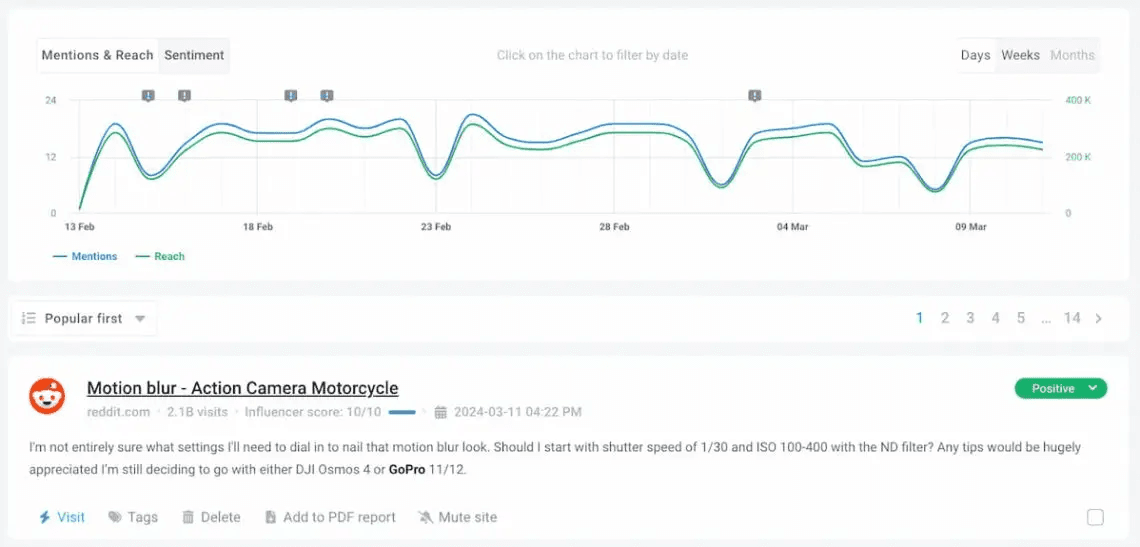
Discussion Volume Chart: This visual tool shows you the volume of discussions over time. It helps you easily spot trends and spikes in brand mentions.
Customizable Dashboards: Tailor your dashboard to fit your monitoring needs. It provides a personalized view, making data more accessible and relevant to your work.
Ease of Use
Brand24 is remarkably user-friendly, making it easy for your team to navigate its features without much hassle. The intuitive interface allows even non-tech-savvy users to track mentions and analyze sentiment effortlessly. Customizable dashboards let you tailor the view to suit your specific monitoring needs, enhancing usability.
Compared to other tools, Brand24 stands out for its straightforward setup and immediate access to real-time data, ensuring you spend less time learning and more time acting on insights.

Onboarding
Brand24's onboarding process is straightforward, but it could benefit from more detailed tutorials and guided steps. While the basic setup is quick, some users might find the lack of in-depth resources a bit challenging. The available support, including customer service, is responsive and helpful, ensuring your team gets the assistance needed. However, offering more comprehensive onboarding materials would enhance the initial experience and help new users realize the software's full potential more quickly.

Customer Support
Brand24 offers responsive customer support that users generally find reliable and helpful. The support team is quick to address queries, ensuring your team gets timely assistance when needed. Live chat and email support provide direct access to help, making it easier to resolve issues. Although some users wish for more extensive self-help resources, the personal touch of Brand24's support team often compensates for this, giving you confidence in the assistance available.

Integrations
Brand24 integrates with Slack, LinkedIn, Microsoft Teams, and many others. Brand24 also offers an API for custom integrations.
Brand24 has partnerships across social Media, PR, branding, and digital marketing, helping brands find trusted expertise. Partners include dfusion, Markapasos, ProGlobal, Futuraform, Lexema, and more.

Value for Money
Brand24’s pricing is clearly tiered and aligns with its feature depth, making it a practical choice for small teams through large agencies. Plans scale by keywords, monthly mentions, update frequency, users, and AI capabilities, and a 14‑day free trial is available.
- Individual: $199/mo ($149/mo annually). 3 keywords, 2K mentions/mo, 1 user, updates every 12h, AI Sentiment Analysis.
- Team: $299/mo ($249/mo annually). 7 keywords, 10K mentions/mo, unlimited users, hourly updates, priority support, AI Sentiment Analysis.
- Pro: $399/mo ($299/mo annually). 12 keywords, 40K mentions/mo, unlimited users, realtime updates, priority support, Lightning Search, AI Sentiment, Events Detection, Brand Assistant, AI Insights (2 projects), AI Topics (2 projects).
- Business: $599/mo ($499/mo annually). 25 keywords, 100K mentions/mo, unlimited users, realtime updates, priority support, Lightning Search, AI Sentiment, Events Detection, Brand Assistant, AI Insights (5 projects), unlimited AI Topics, AI Emotion Analysis, Client Success Lead, advanced reports.
- Enterprise: From $999/mo (annual). Custom keywords and mentions, unlimited users, realtime updates, priority support, full AI suite (unlimited AI Insights/Topics, Emotion Analysis), advanced reports, dedicated consulting.

New Product Updates from Brand24
 Opens new window
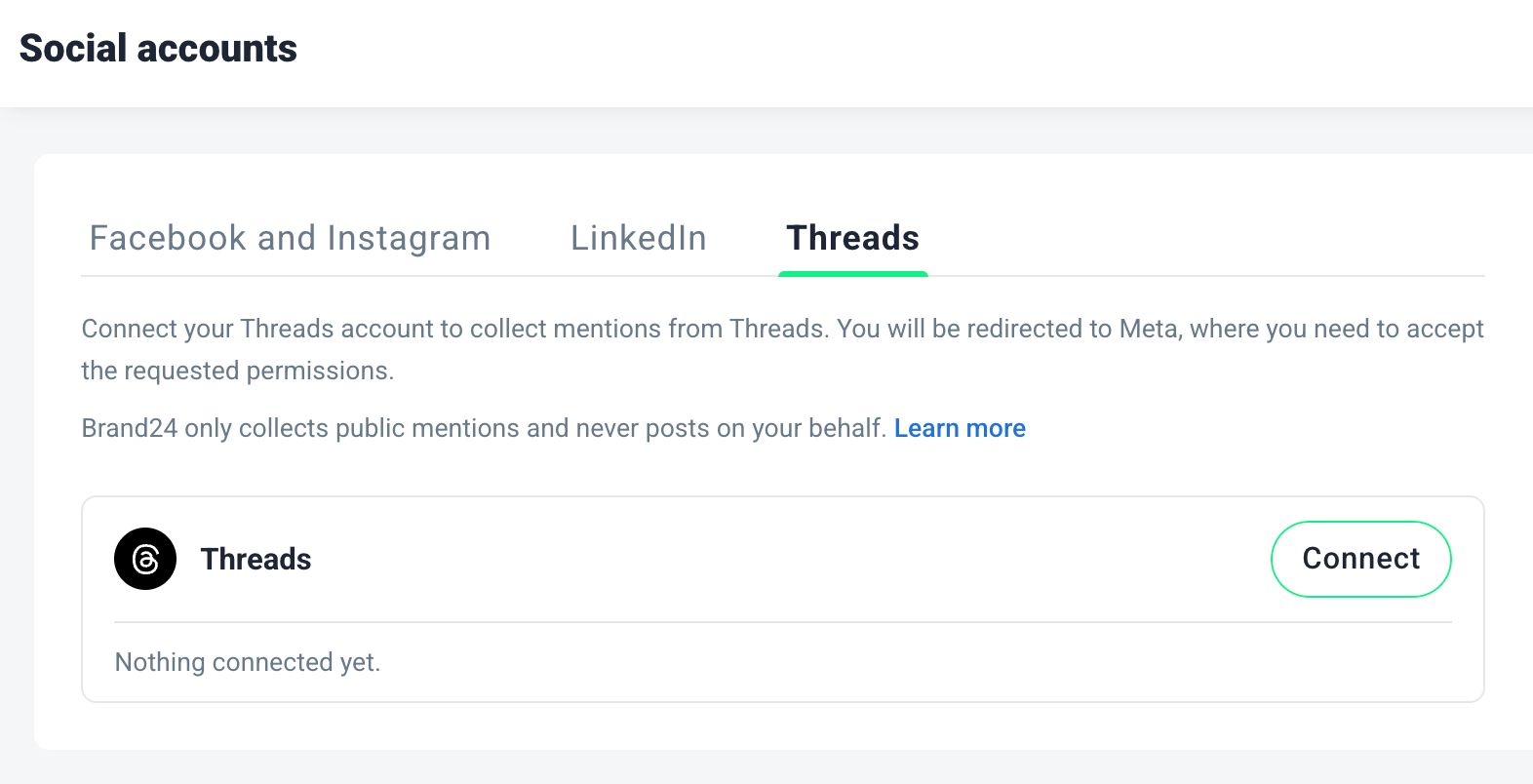
Brand24 Adds Threads Monitoring
Brand24 adds Threads as a monitoring source for public posts and comments connected to project keywords. Users can connect a Threads account and review matching conversations alongside mentions from other supported sources. Highlights include:
- Threads Monitoring: Track public Threads posts and comments that match project keywords.
- Keyword Tracking: Monitor relevant conversations based on the terms already used in Brand24 projects.
- Trend Discovery: Spot emerging discussions, narratives, and customer questions on Threads.
- Campaign Monitoring: Follow reactions to launches, campaigns, and competitor activity.
- Unified Mention Tracking: Review Threads conversations alongside other social media and web mentions.
Visit Brand24’s official site for more details.
 Opens new window
Brand24 Adds TikTok Video Transcriptions for Mention Tracking
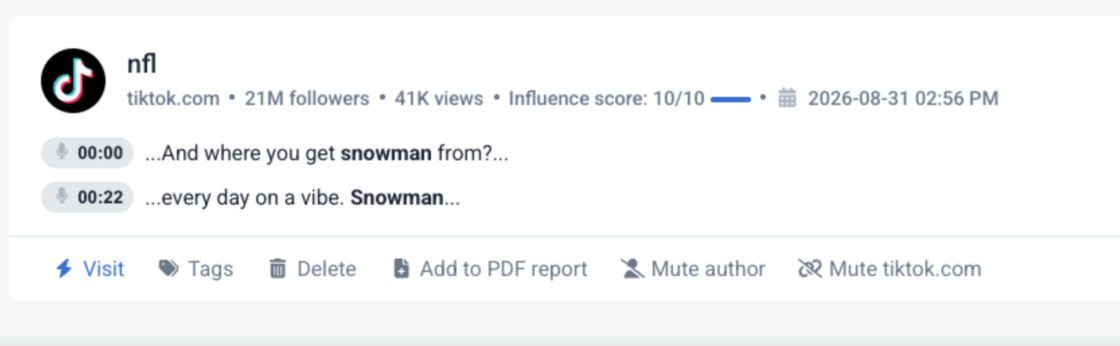
Brand24 has expanded TikTok monitoring by transcribing video audio to find mentions that would otherwise be missed. This helps you discover more relevant conversations and quickly verify why a TikTok matched your tracked keywords. Highlights include:
- Spoken Keyword Detection: Finds tracked keywords mentioned inside TikTok videos.
- Expanded Mention Discovery: Captures videos even when keywords are absent from descriptions.
- Transcript Fragments: Shows the relevant spoken context for each detected mention.
- Timestamps: Identifies when the keyword appears in the video.
- TikTok Monitoring: Expands social listening beyond text-based metadata.
Visit Brand24’s official site for more details.
 Opens new window
Brand24 Adds Installable Web App With Push Notifications
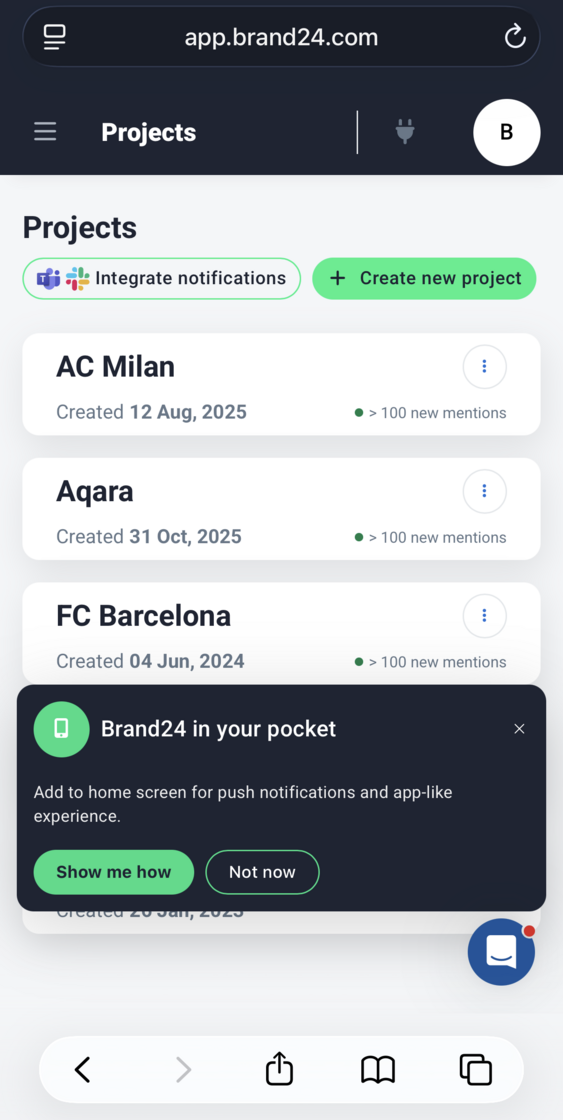
Brand24 can now be installed directly from a browser on Android, iPhone, iPad, Windows, macOS, and ChromeOS without using an app store. Users get the same projects, filters, and data as the browser dashboard, along with configurable push notifications for selected mentions. Highlights include:
- Installable Web App: Lets users install Brand24 directly from a browser across supported mobile and desktop devices.
- Full Dashboard Access: Provides the same projects, filters, and monitoring data available in the browser.
- Push Notifications: Sends alerts for selected mentions directly to a phone or computer.
- Notification Controls: Lets users choose a project, apply filters, and set notification frequency.
- Cross-Device Access: Supports Android, iOS, Windows, macOS, and ChromeOS.
Visit Brand24’s official site for more details.
 Opens new window
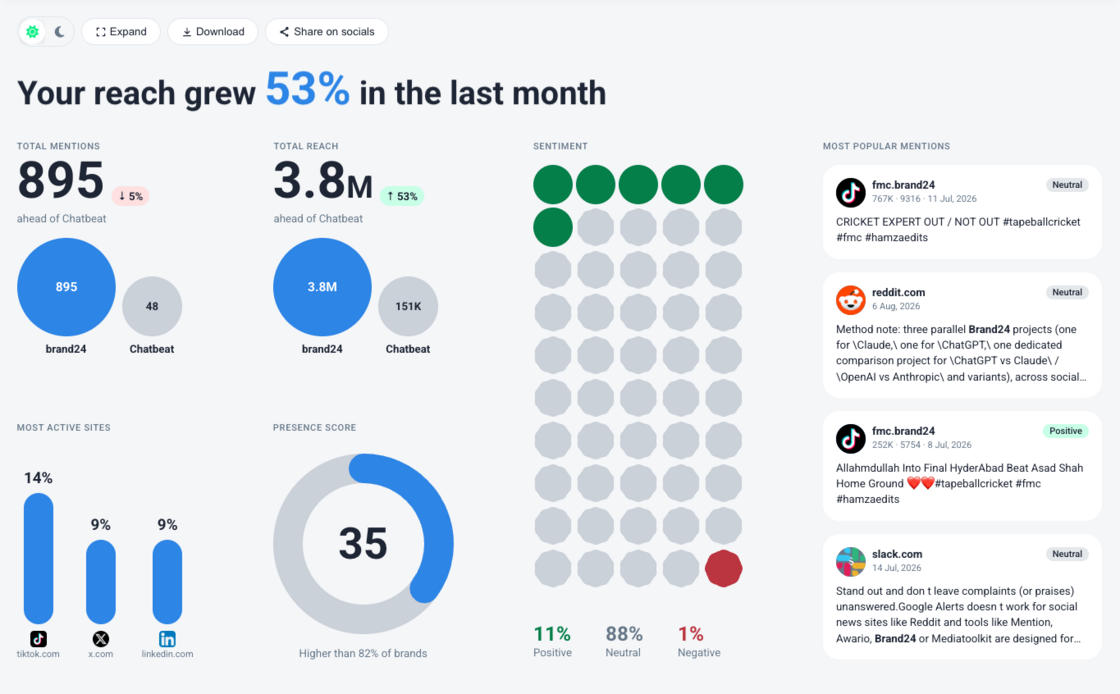
Brand24 Revamps Infographic View With Comparisons and Downloads
Brand24 adds side-by-side period and competitor comparisons, one-click downloads, light and dark mode, and mobile support to the Infographic view. The redesigned experience makes brand performance easier to scan, compare, and share across reports and presentations. Highlights include:
- Performance Comparisons: Compares key metrics with the previous period and tracked competitors.
- One-Click Downloads: Lets users download the Infographic quickly for reports and presentations.
- Light and Dark Mode: Provides display options for different screens and presentation styles.
- Mobile Support: Makes the Infographic responsive for viewing on smaller devices.
Visit Brand24’s official site for more details.
 Opens new window
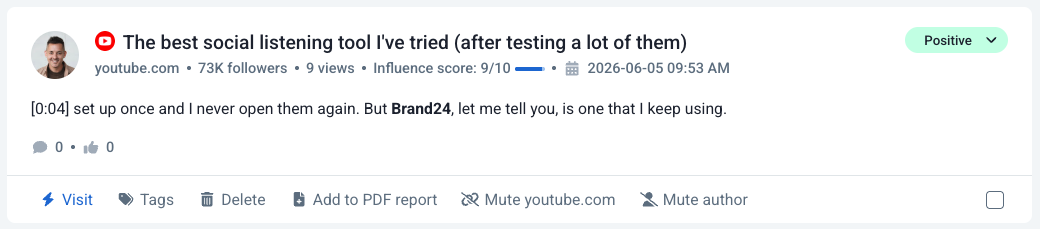
Brand24 Adds Spoken Mention Detection for YouTube Videos
Brand24 has expanded YouTube monitoring to capture brand mentions spoken in a video’s audio, not just those written in titles or descriptions. This helps you find more coverage, review context more quickly, and respond or report with greater confidence. Highlights include:
- Spoken Mention Detection: Analyzes YouTube captions to find brand mentions that appear only in video audio.
- Timestamped Results: Shows the exact time a brand is mentioned so teams can review video context faster.
- Video Filters and Alerts: Helps teams track YouTube mentions and receive notifications for important conversations.
Visit Brand24’s official site for more details.
 Opens new window
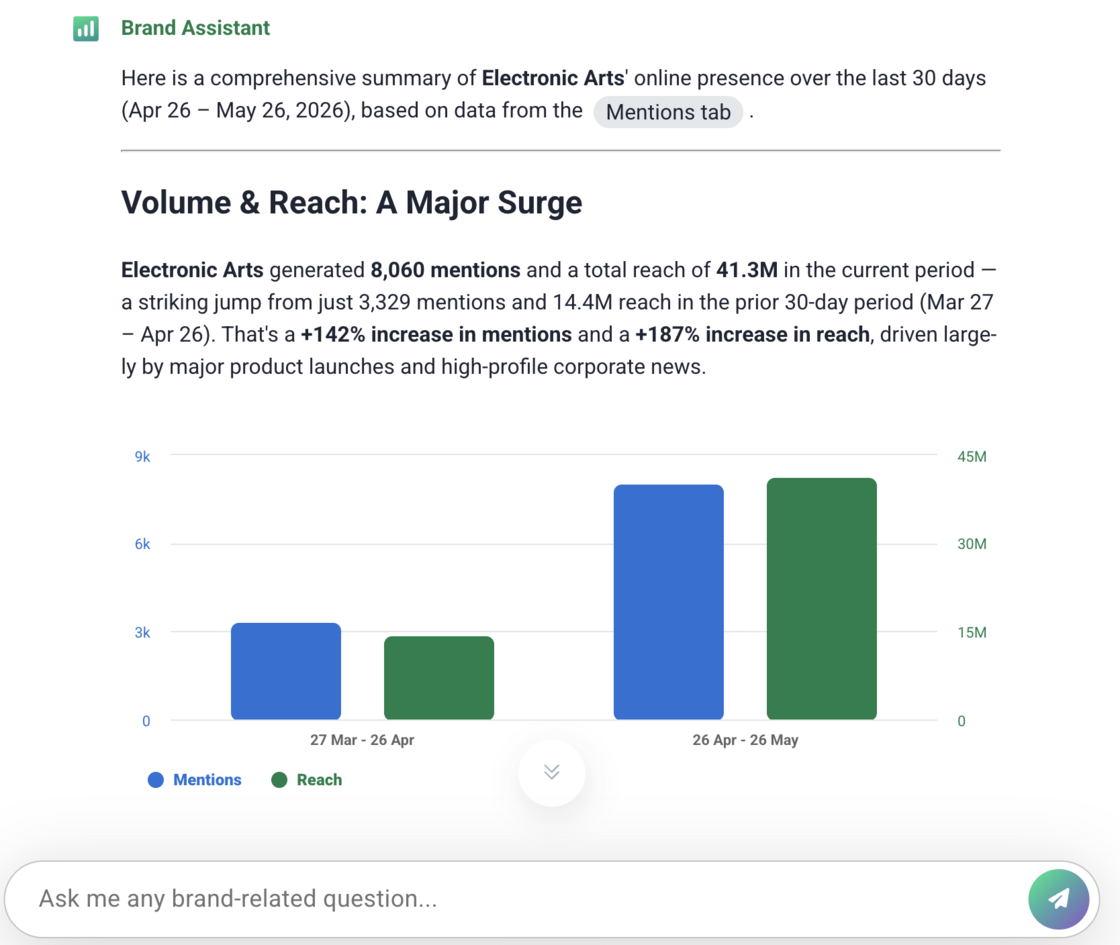
Brand24 Adds Brand Assistant 2.0 With Web Search and Charts
Brand24 adds Brand Assistant 2.0 with improved reasoning, data visualizations, and web research features to enhance AI-powered analysis. This update helps teams answer complex questions, explore insights, and review external information more efficiently. Highlights include:
- Improved AI Reasoning: Analyze complex questions and generate more complete answers using the right data sources.
- Inline Chart Insights: View column, pie, and line charts directly alongside supporting AI-generated insights.
- Open Web Search: Search websites, review pages, and gather external context directly from Brand Assistant.
Visit Brand24’s official site for more details.
 Opens new window
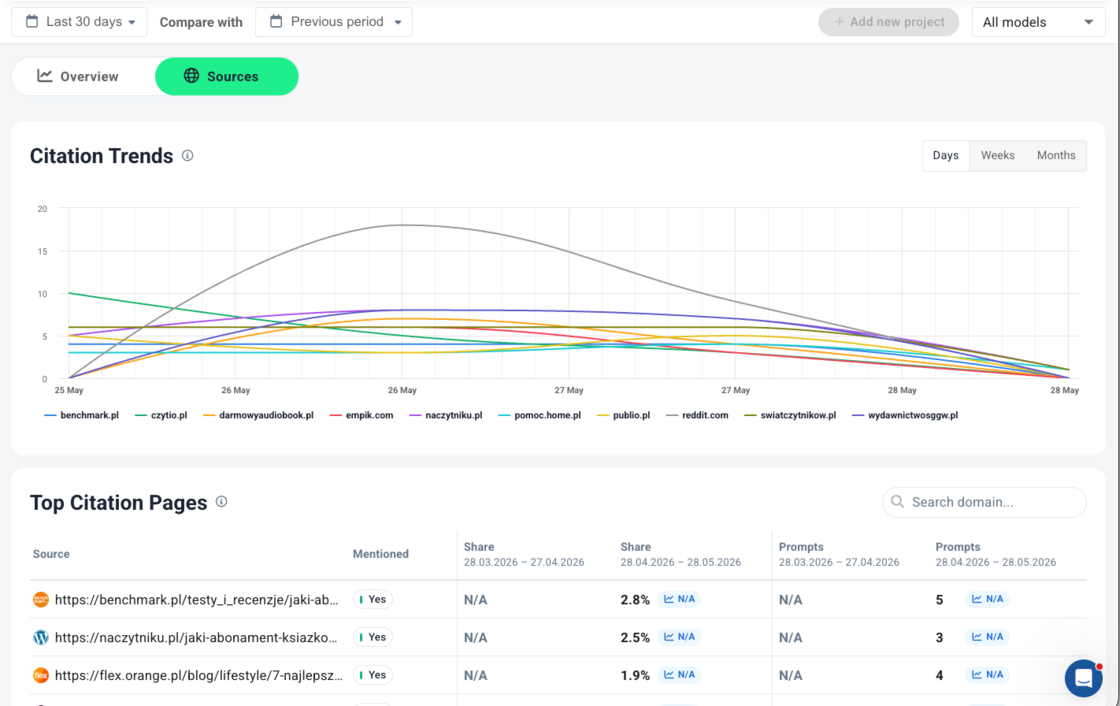
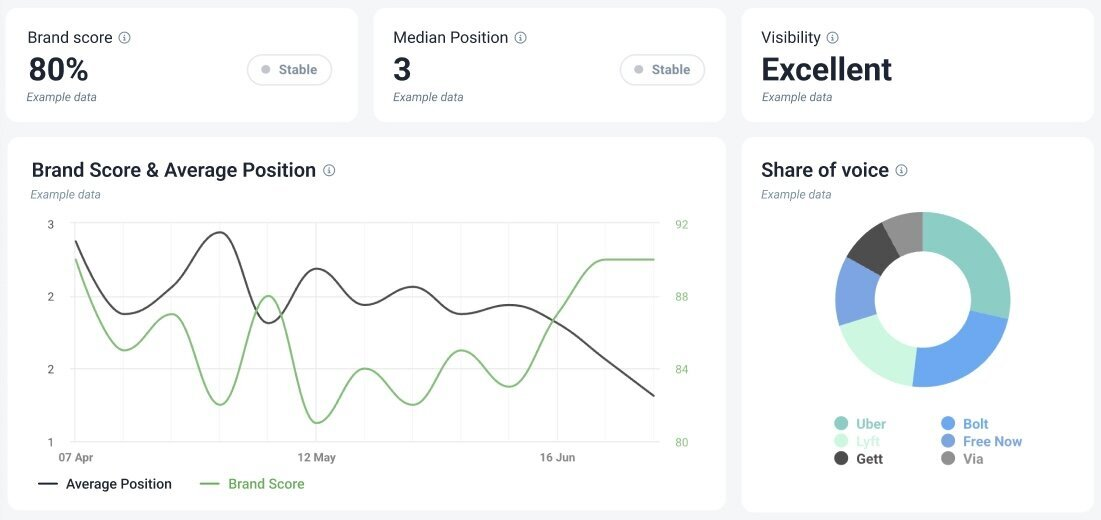
Brand24 Adds AI Visibility Sources for LLM Citation Insights
Brand24 adds AI Visibility Sources with citation tracking, source analysis, and AI model insights to improve LLM visibility monitoring. This update helps teams identify where their brand appears and which sources impact AI-generated responses. Highlights include:
- Citation Source Tracking: View websites and sources most frequently referenced by AI models.
- Source Performance Insights: Analyze source types, comparison tables, and visibility impact across citations.
- AI Model Citation Data: See which AI models generate the most citations for better visibility analysis.
Visit Brand24’s official site for more details.
 Opens new window
Brand24 Adds Self-Serve AI Visibility Tracking
Brand24 introduces a new AI Visibility add-on experience that lets teams activate and monitor AI brand visibility directly from their dashboard. The update helps brands track how AI tools reference and discuss them across major AI platforms. Highlights include:
- AI Visibility Dashboard: Teams can monitor brand mentions and visibility across leading AI tools from one panel.
- Support for Major AI Platforms: The feature tracks responses from ChatGPT, Gemini, Claude, Perplexity, and Google AI Overview.
- Self-Serve Activation: Users can activate AI Visibility directly from their Brand24 panel by entering their domain or brand name.
- Automatic AI Visibility Trial: New projects now include a 14-day AI Visibility trial with monitored prompts across multiple AI models.
Visit Brand24’s official site for more details.
Brand24 Enhances AVE Calculation
Brand24 updates its AVE calculation to reflect rising digital advertising costs and inflation across media markets. This improves reporting accuracy by aligning earned media value with current market conditions without requiring any user action. Highlights include:
- Updated AVE Model: Incorporates inflation and digital ad cost trends for more accurate valuations.
- Improved Media Value Accuracy: Provides more realistic estimates of earned media exposure.
Visit Brand24’s official site for more details.
Brand24 Specs
- API: Yes
- Brand Management: Yes
- Dashboard: Yes
- External Integrations: Yes
- Feedback Management: No
- Google Apps Integration: No
- Multi-Site: No
- Multi-User: Yes
- Net Promoter Score: No
- Notifications: Yes
- Review Monitoring: Yes
- Sentiment Analysis: Yes
- Social Media Monitoring: Yes
- Social-Media Integration: Yes
Brand24 FAQs
Brand24 Company Overview & History
Brand24, founded in 2011, is a media monitoring company based in Wrocław, Poland. It specializes in social media analytics and sentiment analysis, providing tools to measure marketing effectiveness. The company is publicly traded on the Warsaw Stock Exchange under the ticker symbol B24 and was acquired by Prowly.com, a subsidiary of Semrush, in 2024. Brand24 monitors 100,000 brands globally and has collected 25 billion mentions as of 2025. Notable clients include Intel and IKEA, and the company is known for its innovative tools and data-driven marketing solutions.
Brand24 Major Milestones
- 2011: Brand24 was founded in Wrocław, Poland.
- 2013: Recognized as Poland's Best Web App.
- 2018: Valuation increased to PLN 90 million.
- 2024: Acquired by Prowly.com, a subsidiary of Semrush.
- 2025: Monitors 100,000 brands and collects 25 billion mentions.