

10 Best Customer Success Software of 2026

10 Customer Success Software Shortlist


Customer success software helps your team proactively manage accounts, reduce churn, and identify growth opportunities. If you’re struggling with fragmented data, inconsistent onboarding, reactive customer management, or limited visibility into account risk and renewal potential, the right customer success software can address most of those issues.
In this article, I’ll review the best customer success software on the market that can help you scale customer retention efforts and enhance satisfaction.
Why Trust Our Software Recommendations
Our team has been testing and reviewing software since 2012. As CX leaders ourselves, we know how difficult—and important—it is to choose the right software.
For this guide, we evaluated tools using hands-on testing and independent research, scoring tools using our selection criteria.
Our reviews reflect our human editorial judgment, not a sales pitch.
The Best Customer Success Software Solutions Summary Table
Here’s a side-by-side comparison of my top 20 picks:
| Tool | Best For | Trial Info | Price | ||
|---|---|---|---|---|---|
| 1 | Best for preventing silent churn | 7-day free trial + free demo available | From $199/month (billed annually) | Website | |
| 2 | Best for AI-powered customer support | 14-day free trial | From $19/user/month (billed annually) | Website | |
| 3 | Best for AI-driven sentiment insights | 14-day free trial + free plan + free demo available | Pricing upon request | Website | |
| 4 | Best for closed-loop customer issue resolution | Free demo available | Pricing upon request | Website | |
| 5 | Best for proactive customer engagement | Free plan available | From $25/user/month (billed annually) | Website | |
| 6 | Best for tracking customer health scores | Free demo available | Pricing upon request | Website | |
| 7 | Best for lifecycle automation features | 14-day free trial | From $45/user/month (billed annually) | Website | |
| 8 | Best for its customer behavior analysis | Free plan available; 7-day free trial | From $24.17/month (billed annually) | Website | |
| 9 | Best for unified customer interactions | 14-day free trial | From $19/user/month (billed annually) | Website | |
| 10 | Best with enterprise-grade security and privacy | 7-day free trial + free plan + free demo available | From $32/month (billed annually) | Website |


Best Customer Success Software Reviews
Here’s a brief description of each customer success app to showcase each tool’s best use case, some noteworthy features, and screenshots to give a snapshot of the user interface.

Best for preventing silent churn
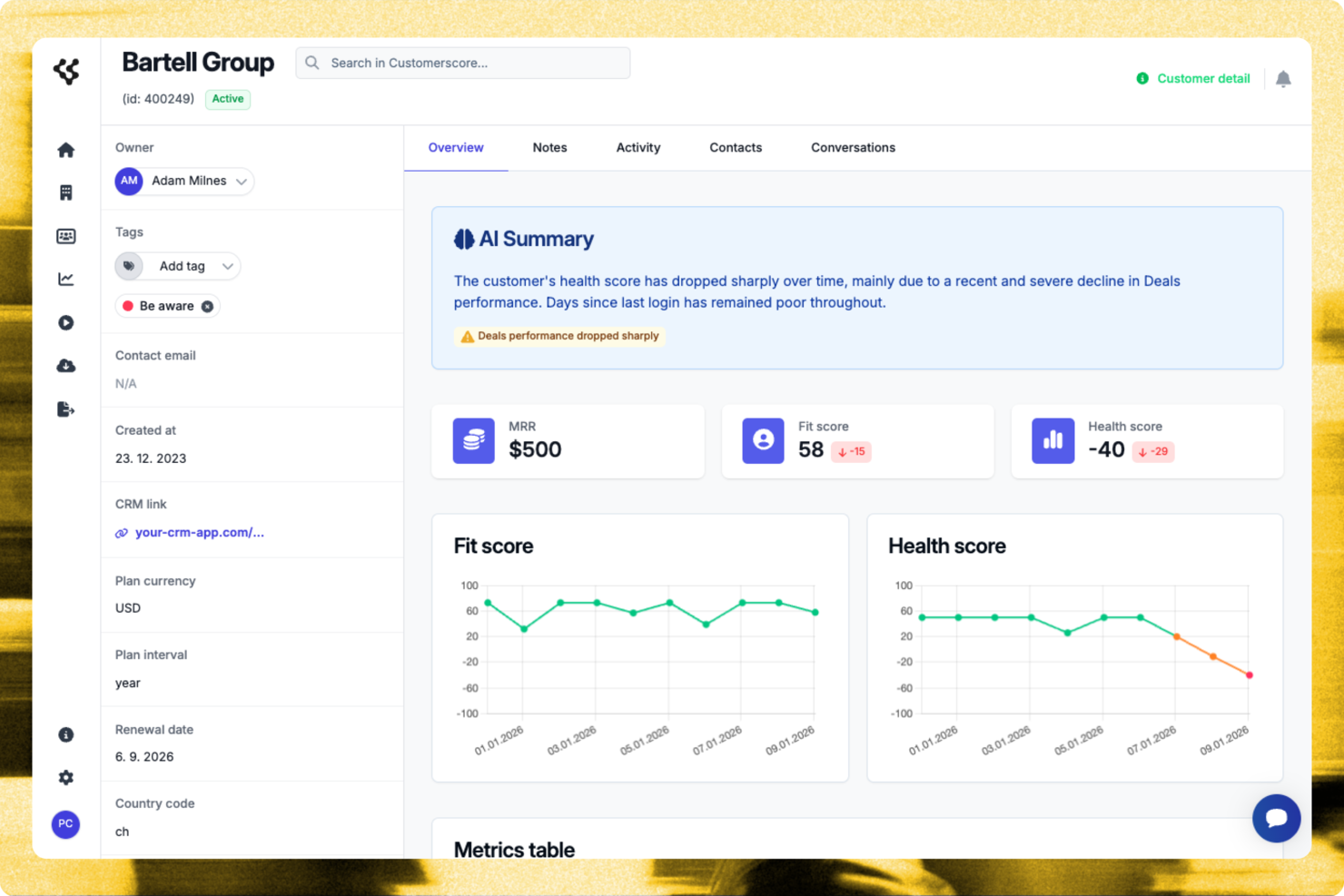
Customerscore.io lets CX teams and SaaS businesses track customer health, predict churn, and automate engagement so they can focus on the accounts that need attention most.
Who Is Customerscore.io Best For?
Customerscore.io is a strong fit for SaaS companies with dedicated customer success teams who need to monitor account health and act on churn signals before they escalate.
Why I Picked Customerscore.io
Customerscore.io earns its spot on my shortlist because it directly tackles the problem of silent churn—customers who quietly disengage and cancel without ever raising a support ticket. I like how its AI-based health scoring pulls signals from across your stack (usage data, billing, support activity) and triggers automated workflows the moment a score drops, so no at-risk account slips through unnoticed. That means my team can run a churn prevention playbook that fires a personalized check-in email when a health score falls below 60, without anyone manually reviewing a dashboard. The renewal protection workflow is another feature I find genuinely useful—it flags low-usage accounts 30 days before renewal and kicks off proactive outreach automatically.
Customerscore.io Key Features
- Expansion workflow automation: Triggers an upsell email automatically when a customer's usage hits 80% of their plan limit.
- Onboarding activation triggers: Sends a tutorial email on day 14 if a key feature hasn't been adopted yet.
- Multi-source signal detection: Pulls engagement, billing, and support data from tools like Mixpanel, Stripe, and Intercom into a single health view.
- Impact measurement dashboard: Tracks at-risk accounts detected, save rate, and ARR protected so you can see exactly what's working.
Customerscore.io Integrations
Customerscore.io offers native integrations with Intercom, Mixpanel, Stripe, HubSpot, Salesforce, Segment, and Zapier. An API is available for custom integrations.
Pros and Cons
Pros:
- Strong native CRM integrations
- Actionable upsell opportunity insights
- Clear churn risk visibility
Cons:
- Learning curve for analytics
- Pricing not publicly disclosed

Best for AI-powered customer support

Freshdesk is a cloud-based customer success platform designed for CX teams who need to manage support requests, automate workflows, and deliver consistent service across channels like email, chat, and social media.
Who Is Freshdesk Best For?
Freshdesk is a good fit for small to mid-sized businesses that need a scalable, multichannel support platform without heavy IT overhead.
Why I Picked Freshdesk
Freshdesk earns its spot on my shortlist because its Freddy AI suite handles the full support lifecycle, not just one stage. I particularly like Freddy AI Copilot, which gives agents real-time reply suggestions, live translations, and ticket summaries so they can respond faster without sacrificing accuracy. Freddy AI Agent autonomously resolves repetitive queries around the clock, freeing my team from answering the same questions repeatedly. Freddy AI Insights rounds it out by surfacing proactive alerts and answering leadership questions about support trends on demand.
Freshdesk Key Features
- Omnichannel shared inbox: Manage customer conversations from email, chat, phone, and social media in a single unified inbox.
- Skill-based ticket assignment: Automatically route incoming tickets to agents based on their specific skills or expertise areas.
- SLA policy management: Set and enforce multiple SLA policies to track response and resolution time targets across different customer segments.
- Knowledge base: Build a multilingual self-service portal where customers can find answers without contacting your support team.
Freshdesk Integrations
Freshdesk offers 1,000+ native integrations, including Salesforce, HubSpot, Jira, Slack, Shopify, Mailchimp, Google Workspace, Microsoft Teams, WhatsApp, Zoom, and Zapier. An API is available for custom integrations.
Pros and Cons
Pros:
- Strong reporting and analytics tools for performance insights
- Intuitive interface supports fast adoption
- AI chatbots and automation reduce repetitive tasks
Cons:
- Advanced AI features require additional setup and training
- Customisation capabilities limited
New Product Updates from Freshdesk

Freshdesk Adds Voice AI Agents in Freshcaller
Freshdesk introduces Voice AI Agents available through Freshcaller Marketplace apps to handle routine calls and reduce queues. This feature enables automated call handling with real-time, conversational support. For more information, visit Freshdesk's official site.

Best for AI-driven sentiment insights

SurveySparrow gives CX teams a way to collect, analyze, and act on customer feedback using conversational surveys and automation, helping businesses in any industry understand customer needs and improve satisfaction.
Who Is SurveySparrow Best For?
SurveySparrow is a strong fit for mid-sized to enterprise businesses that run ongoing customer feedback programs and need a dedicated tool for survey design, distribution, and analysis.
Why I Picked SurveySparrow
SurveySparrow earns its spot on my shortlist because of CogniVue, its AI-powered text analytics engine that offers more than basic sentiment scoring. CogniVue automatically extracts and categorizes topics from open-ended responses, so my team doesn't have to tag hundreds of comments to determine what customers are talking about. The key driver analysis is particularly useful—it surfaces the root causes behind CX metrics like NPS, so I can see not just that satisfaction dropped, but which topics are driving it. The topic monitoring feature tracks sentiment shifts in real time, allowing me to catch emerging issues before they become patterns.
SurveySparrow Key Features
- Ticket management: Converts survey responses into assignable, trackable tickets so your team can follow up on customer issues directly from the platform.
- Recurring surveys: Schedules and automates surveys to go out at set intervals, keeping a continuous pulse on customer satisfaction without manual effort.
- Omnichannel feedback collection: Distributes surveys via email, web embed, QR code, SMS, and social media to capture feedback across every customer touchpoint.
- Visual workflows: Triggers automated actions based on survey responses using a no-code workflow builder with conditional logic.
SurveySparrow Integrations
SurveySparrow offers 40+ native integrations, including Salesforce, HubSpot, Slack, Google Sheets, Intercom, Zendesk, Mailchimp, Freshdesk, Microsoft Teams, Shopify, and Zapier. An API is also available for custom integrations.
Pros and Cons
Pros:
- Ideal for tracking satisfaction across CX programs
- AI analyzes text feedback for tone and emotion
- Conversational surveys increase response and engagement rates
Cons:
- Limited depth in custom analytics and reporting
- Complex logic setup can challenge non-technical users

Best for closed-loop customer issue resolution

Sogolytics gives CX teams in service-driven businesses a way to capture, analyze, and act on customer feedback with advanced survey tools and automated follow-up workflows that improve customer relationships and drive measurable outcomes.
Who Is Sogolytics Best For?
Sogolytics is a strong fit for mid-size to enterprise organizations with dedicated CX or customer insights teams that need structured feedback programs tied to action.
Why I Picked Sogolytics
Sogolytics earns its spot as one of the best on my shortlist because of how well it handles the full arc of a customer issue—from the moment feedback comes in to the moment it's resolved. I love that SogoConnect, its help desk ticketing module, automatically routes incoming feedback to the right team and starts a response timer, so nothing sits unacknowledged. When an issue needs urgent attention, my team can manually or automatically escalate it to "Critical" status, triggering alerts to the right people. The alerts and action plans feature in SogoCX adds another layer, letting my team set up automated notifications when CX metrics dip below a threshold and build structured follow-up plans tied directly to those signals.
Sogolytics Key Features
- Omnichannel survey distribution: Send feedback requests via email, SMS, web, QR codes, and in-app channels from a single platform.
- Key driver analysis: Identify which specific touchpoint variables have the greatest statistical impact on NPS, CSAT, or CES scores.
- Customer journey mapping: Visualize CX data across multiple touchpoints in a single view, using tags to group and compare stages or segments.
- NLP-powered text analysis: Automatically categorize and extract sentiment from open-ended responses without manually reviewing each one.
Sogolytics Integrations
Sogolytics offers native integrations with Salesforce, HubSpot, Microsoft Teams, Slack, Zendesk, Google Sheets, Mailchimp, and Zapier. An API is also available for custom integrations.
Pros and Cons
Pros:
- Good for both employee and customer feedback
- Strong template library speeds survey creation
- Easy charting and export of feedback results
Cons:
- Older data format compatibility can cause issues
- Interface requires scrolling and feels cluttered
New Product Updates from Sogolytics
Sogolytics Adds Teams and Slack Surveys and Custom Automations
Sogolytics adds native Microsoft Teams and Slack survey distribution, a Custom Automations Builder, Derived Fields, PointClickCare integration, and authenticator-based MFA. These updates expand survey distribution and workflow automation while adding new data management and security capabilities. For more information, visit Sogolytics’ official site.
 .
.
Best for proactive customer engagement

Help Scout gives CX teams in SaaS, ecommerce, and service-based businesses a shared inbox, customer profiles, and automation tools to manage conversations, deliver personalized support, and keep customer relationships on track.
Who Is Help Scout Best For?
Help Scout is a strong fit for small to mid-sized teams that handle high volumes of customer conversations and need a straightforward, collaborative tool without a steep learning curve.
Why I Picked Help Scout
Help Scout earns its spot as one of the best on my shortlist because of how well it handles proactive customer engagement without requiring a separate tool. I particularly like the Messages feature, which lets my team send targeted in-app or on-site messages triggered by specific customer behaviors—like time on page, URL, or number of visits—so we can reach customers at exactly the right moment during onboarding or a critical product step. Help Scout's built-in NPS and sentiment surveys let me measure how customers are feeling without adding another platform. The Beacon widget ties it all together by surfacing knowledge base articles in-app before a customer even thinks to reach out.
Help Scout Key Features
- Shared inbox: Manage email, chat, phone, and social conversations from a single inbox, with automatic conversation assignment to the right team member.
- Customer profiles: Pull in customer data and full conversation history from connected apps directly into each support thread, without switching tools.
- Workflow automation: Set up rule-based workflows to auto-assign, tag, and route conversations based on conditions like sender, subject line, or keyword.
- Saved replies: Store and reuse pre-written responses to common questions so agents can reply to repeat inquiries without drafting from scratch.
Help Scout Integrations
Help Scout offers 90+ native integrations, including Salesforce, HubSpot, Slack, Jira, Shopify, Mailchimp, Google Workspace, Trello, Intercom, Aircall, and Zapier. An API is available for custom integrations.
Pros and Cons
Pros:
- Strong analytics for tracking team performance
- Proactive messaging reduces churn and boosts engagement
- Centralized inbox simplifies communication management
Cons:
- Customization options for knowledge base are limited
- Some advanced chat features only in higher tiers
New Product Updates from Help Scout

Help Scout Adds Automatic Conversation Reassignment
Help Scout can now automatically unassign conversations when the assigned teammate has been away long enough, keeping replies moving so others can pick them up. For more information, visit Help Scout's official site.
 .
.
Velaris
Best for tracking customer health scores

Velaris gives CX teams and customer success managers a unified platform to monitor customer journeys, automate workflows, and surface actionable insights that help reduce churn and drive account growth.
Who Is Velaris Best For?
Velaris is a strong fit for B2B SaaS companies with dedicated customer success teams looking to move from reactive support to proactive account management.
Why I Picked Velaris
I picked Velaris as one of the best because of how much control it gives you over health score configuration. Most tools give you a fixed formula—Velaris lets you build health scores from scratch using the exact metrics that matter to your business, whether that's product usage, support ticket volume, NPS ratings, or any custom data point you pull in. I also like that scores roll up across the organization, account, and contact level, so my team can spot a struggling contact within an otherwise healthy account. Additionally, the CSM Pulse feature lets CSMs layer in their own manual ratings, which means the score reflects both the data and the human judgment that no algorithm fully replaces.
Velaris Key Features
- Playbooks: Build standardized, step-by-step playbooks that trigger automatically based on customer behavior or lifecycle stage.
- Visual workflow builder: Design automated workflows using custom triggers to send comms, update records, or alert your team.
- Surveys: Create and send NPS, CSAT, and CES surveys directly within the platform to collect structured customer feedback.
- AI account intelligence: Generate instant historical overviews of any account, pulling together activity, comms, and context in one view.
Velaris Integrations
Velaris offers native integrations with Salesforce, HubSpot, Intercom, Zendesk, Slack, Microsoft Teams, Google Workspace, Jira, and Zapier. An API is available for custom integrations.
Pros and Cons
Pros:
- Automation workflows reduce manual tracking and outreach
- Dynamic health scoring adapts to lifecycle changes
- Centralized view combines usage, sentiment, and engagement
Cons:
- Fewer integrations available
- Smaller orgs may underuse the platform’s full scope

Best for lifecycle automation features
TeamSupport is a customer success platform built for B2B support and CX teams who need to manage complex client relationships, streamline communication, and proactively address customer needs throughout the entire lifecycle.
Who Is TeamSupport Best For?
TeamSupport is a strong fit for B2B companies with dedicated customer support or success teams managing ongoing client relationships across multiple accounts.
Why I Picked TeamSupport
I picked TeamSupport as one of the best because its Playbooks feature handles lifecycle automation end-to-end. Playbooks covers onboarding, churn prevention, renewals, and upsell motions in a single workflow layer—no external tools or manual checklists required. When a deal closes in Salesforce or HubSpot, Playbooks automatically creates a new customer record and kicks off an onboarding workflow. It also triggers churn prevention flows when a health score drops, so my team responds to risk signals before they escalate.
TeamSupport Key Features
- Customer Distress Index: A proprietary scoring system that monitors engagement patterns and sentiment across all customer touchpoints to flag at-risk accounts.
- AI agent: An AI-powered agent that handles routine support questions, gathers information, and hands off complex issues to human agents.
- Unified task view: A single view of all open items organized by customer, user, ticket, or product across your entire account portfolio.
- Advanced analytics dashboard: Pre-built and customizable reporting templates with real-time metrics alerting to track account-level performance.
TeamSupport Integrations
TeamSupport offers native integrations with Salesforce, HubSpot, Jira, Slack, Mailchimp, Microsoft Teams, and QuickBooks, and connects with Zapier. An API is available for custom integrations.
Pros and Cons
Pros:
- Customizable customer self service hub
- Real time sentiment insights
- AI powered ticket automation
Cons:
- Limited mobile app functionality
- Knowledge base lacks configurability

Tidio
Best for its customer behavior analysis

Tidio gives CX teams in ecommerce and online businesses a way to connect with customers through live chat, AI chatbots, and multichannel messaging, helping them resolve issues with faster responses and personalize support at scale.
Who Is Tidio Best For?
Tidio is a strong fit for small to mid-sized ecommerce businesses that need a combined live chat, automation, and customer support solution without a heavy enterprise setup.
Why I Picked Tidio
I picked Tidio as one of the best because I love how its analytics dashboard gives my team a real window into customer behavior, not just support metrics. The live visitor list shows exactly which pages visitors are browsing in real time, so my team can reach out with context before a customer even asks a question. I also use the Flows performance analytics to spot where users drop off in automated conversation paths, which reveals where the experience breaks down. The conversation-related metrics, like missed conversations and first response time, help me identify patterns in when customers need us most and adjust scheduling accordingly.
Tidio Key Features
- Lyro AI chatbot: Tidio's AI agent handles customer questions automatically by pulling answers from your support content.
- Multichannel inbox: Manage conversations from live chat, email, and social channels in one shared inbox.
- Canned responses: Create and store pre-written replies that agents can quickly insert during live chat conversations.
- Ticketing system: Convert customer conversations into tickets and assign them to specific agents for follow-up.
Tidio Integrations
Tidio offers 20+ native integrations, including Shopify, WooCommerce, Wix, BigCommerce, Mailchimp, HubSpot, Zendesk, Google Analytics, Facebook Messenger, Instagram, and Zapier. An API is available for custom integrations.
Pros and Cons
Pros:
- Simple setup with highly rated customer support
- Visitor monitoring reveals engagement and drop-off points
- AI chatbots and live chat track behavior
Cons:
- Chatbot triggers can deplete usage limits quickly
- Some users report lag under heavy usage

Zendesk
Best for unified customer interactions

Zendesk gives CX teams in businesses of all sizes a single platform to manage customer conversations, support tickets, and engagement across channels, helping teams deliver fast, consistent service and resolve issues promptly.
Who Is Zendesk Best For?
Zendesk is a strong fit for mid-size to enterprise CX and support teams that handle high volumes of customer interactions across multiple channels.
Why I Picked Zendesk
Zendesk earns its spot on my shortlist because of how well it brings every customer interaction into one place—email, chat, voice, social, and messaging all feed into a single agent workspace. I like that agents can see the full conversation history across channels without switching tools, so they can pick up where a previous interaction left off. My team also relies on Zendesk's unified customer profiles, which surface account details, past tickets, and interaction context right alongside the conversation. That kind of visibility cuts down on the back-and-forth customers hate and helps agents respond with real context from the start.
Zendesk Key Features
- AI-powered ticket routing: Automatically assigns incoming tickets to the right agent based on availability, skills, and workload across all channels.
- Omnichannel routing: Directs conversations from email, voice, messaging, and social into a single queue so agents never have to manually sort incoming requests.
- Knowledge base builder: Lets teams create, manage, and surface self-service articles using generative AI to turn historical tickets into help center content.
- Custom reporting dashboards: Gives CX teams prebuilt and fully customizable dashboards to track ticket volume, agent performance, and service trends.
Zendesk Integrations
Zendesk offers 1,500+ native integrations through its marketplace, including Salesforce, Slack, Jira, Shopify, Mailchimp, HubSpot, Google Workspace, Microsoft Teams, Zoom, Trello, and Zapier. An API is available for custom integrations.
Pros and Cons
Pros:
- Extensive integrations with CRM, telephony and social systems
- Automates routing and response workflows, reducing manual tasks
- Brings email, chat, phone and social into one workspace
Cons:
- Advanced features locked behind higher-tier add-ons or customisation
- Setup and configuration are complex and resource-intensive
New Product Updates from Zendesk
Zendesk Updates AutoQA Tone Scoring
Zendesk updates AutoQA tone scoring to focus on professional conduct instead of inferred emotions. This gives QA teams a more concrete basis for evaluating agent responses. For more information, visit Zendesk’s official site.

Chatbase
Best with enterprise-grade security and privacy
Chatbase is an AI chatbot platform for customer success teams that lets you build, deploy, and manage custom AI agents, automate support workflows, and connect chatbots to your business data and systems.
Who Is Chatbase Best For?
Chatbase suits customer success teams at growing businesses that need to automate support and connect chatbots to their internal systems.
Why I Picked Chatbase
I picked Chatbase as one of the best because it gives my team enterprise-grade security and privacy controls that are essential for handling sensitive customer data. I like that Chatbase offers features like data encryption, audit logs, and strict access management. In practice, that means my team can confidently deploy AI chatbots in regulated industries without worrying about compliance gaps.
Chatbase Key Features
- Custom AI agent builder: Create and train AI chatbots using your own business data and documents.
- Multilingual support: Deploy chatbots that can interact with customers in multiple languages.
- Conversation analytics: Track and analyze chatbot interactions to identify trends and improve responses.
- API access: Integrate Chatbase with your existing business systems and workflows using robust APIs.
Chatbase Integrations
Chatbase offers native integrations with Zendesk, Notion, Slack, Stripe, Salesforce, Cal.com, Calendly, WhatsApp, and Messenger. It also connects with Make and Zapier, and provides an API for custom integrations.
Pros and Cons
Pros:
- Conversation analytics dashboard highlights user trends
- Widget customization matches company branding easily
- API access for advanced business system integration
Cons:
- Lacks advanced workflow automation tools
- No built-in live agent handoff feature
Other Customer Success Software
Here are a few more that didn’t make the top list.
- Weav
For integrating unified customer operations
- Missive
For collaborative customer communication
- Nextiva
For personalized customer journey orchestration
- Dock
For client-facing workspaces
- ChurnZero
For managing customer churn risks
- Guidde
For creating how-to videos with AI
- Planhat
Multichannel customer success software
- Front
For cross-team workflow coordination
- GUIDEcx
For customer & client onboarding
- Catalyst
Customer success software for upselling & retention
- Skilljar
Customer success software for customer education
- Podium
Customer success software for SMS & text marketing
- Sprout Social
For centralizing social inboxes
- Akita
For reducing customer churn
- Guru
For AI customer response suggestions
- Front
For managing customer communication
- Quidget
For AI-powered live chat automation
- Hiver
For delivering enhanced customer experiences
- Product Fruits
For collecting detailed customer onboarding feedback
- eDesk
For ecommerce support teams
- Custify
Customer success software for SaaS-centric companies.
- LiveAgent
Customer support software with a ticket management system.
- Accelo
Professional services automation software for handling customer tickets.
- Gainsight
Customer success and product experience software to help increase product adoption and reduce churn.
- UserGuiding
For no-code onboarding tools
- CustomerSuccessBox
AI-powered customer success platform for driving product adoption.
- ClientSuccess
Customer success platform for building healthy customer relationships.
- Vitally
Customer success platform for identifying trends and leveraging insights towards improved customer health scores.
- Conversica
Cloud-based software for attracting new customers and retaining existing ones with the help of virtual assistants.
- Totango
For tracking & managing customer health scores


How I Evaluate Customer Success Software
I split my evaluation into two layers: the core capabilities—like health scoring, churn alerts, and lifecycle playbooks—that qualify a tool for the list, and the differentiators that separate the best from the rest.
Core Functionality (Table Stakes For This List)
When I'm selecting tools for my list, I rank each one on a scale from 0 (does not offer the functionality) to 5 (excels in this area) for each core functionality listed below. Then, I calculate the tool's total score into a percentage. Each tool needs to achieve a minimum total score of 65% to be considered for inclusion.
- Customer Health Scoring: I look for configurable, multi-factor health scores—tools where you can weight inputs like support ticket trends, login frequency, and NPS responses per account segment.
- Churn Risk & Alerts: Early warning systems matter here. I evaluate whether a platform surfaces at-risk accounts automatically and routes alerts to the right CSM before renewal conversations start.
- Lifecycle Playbooks & Automation: Each tool should let you build triggered playbooks for key stages like onboarding, adoption check-ins, and QBRs rather than relying on manual task creation.
- Product Usage Analytics: I check whether the platform ingests telemetry data and translates it into adoption metrics—things like feature-level engagement, license utilization, and usage trends over time.
- Renewal & Expansion Management: Tools like Gainsight and ChurnZero handle this differently, so I evaluate whether the platform offers pipeline views, revenue forecasting, and NRR/GRR tracking in one place.
- Unified Customer View & Integrations: A CSM shouldn't need four tabs open to prep for a call. I look for a single account timeline pulling data from CRM, support, billing, and product systems.
Once I have a list of tools that meet this criteria, I consider what sets each platform apart.
Differentiating Factors (What Sets Vendors Apart)
Here's how I compare and contrast different vendors:
Standout Features
Predictive AI is a big differentiator. I evaluate whether a platform can forecast churn or expansion likelihood based on behavioral patterns—not just flag accounts that already look bad. Customer-facing workspaces also stand out. Shared success plans where your customers track onboarding milestones or review QBR outcomes turn CS from a back-office function into a visible partnership. I also look at in-app engagement tools, since triggering adoption nudges or NPS surveys inside the product removes friction that email outreach can't solve.
Beyond Features
Integration depth matters a lot here. I check whether a platform syncs bidirectionally with your CRM and billing system, since stale data in a health score is worse than no health score at all. Implementation timelines also vary widely—some platforms get a ten-person CS team live in weeks, while others require months of professional services. I also evaluate segment fit, because a tool built for enterprise high-touch motions often overwhelms a lean SMB team running digital-led CS.
How to Choose Customer Success Software
It’s easy to get bogged down in long feature lists and complex pricing structures. To help you stay focused as you work through your unique software selection process, here’s a checklist of factors to keep in mind:
| Factor | What to Consider |
|---|---|
| Scalability | Ensure the software can grow with your business. Look for solutions that handle increased customer data and more users without sacrificing performance. |
| Integrations | Check if it connects seamlessly with your existing tools like CRMs and communication platforms to streamline processes. |
| Customizability | You need software that can be tailored to your specific workflows and customer touchpoints for maximum efficiency. |
| Ease of Use | Choose software that's intuitive for your team to learn and use daily, minimizing training time and increasing productivity. |
| Budget | Align the software's pricing with your financial constraints. Consider both upfront costs and ongoing fees to avoid surprises. |
| Security Safeguards | Ensure robust data protection measures are in place to protect customer information and comply with regulations. |
Trends in Customer Success Software
It is crucial for customer success managers and customer support teams to stay aware of trends in customer success software to optimize their strategies and enhance customer experiences. By keeping up with the latest advancements, CSMs can leverage innovative features and functionalities offered by software solutions to drive customer success.
Additionally, staying informed about emerging trends allows CSMs to adapt their workflows, streamline processes, and stay ahead of the competition in the rapidly evolving landscape of customer success. Here are four recent trends to be aware of in 2026:
AI-Driven Analytics for Comprehensive Customer Insights
AI is revolutionizing how customer data is analyzed and utilized, allowing CSMs to collect and view comprehensive customer data easily. AI can also help track customer interactions and provide customer insights using several features, including automated data processing, predictive analytics, and personalization.
Try implementing AI-driven analytics tools to gain deeper customer insights. This will not only save time but also help in tailoring your services to meet customer needs more effectively.
Want to know more about collecting and storing data for customer success? Check out our article on free customer database software.
Unified Communication Platforms
Unified communication platforms are becoming essential for closing communication and collaboration gaps among different teams. Through customer success software, this can offer benefits such as centralized communication, integration with other CRM tools, and real-time collaboration for problem-solving among teams.
Adopt a unified communication platform to enhance team collaboration, ensuring that everyone is on the same page and working towards a common goal, such as maximizing customer success and satisfaction.
Mobile Accessibility and Cloud-Based Solutions
By adopting mobile and cloud-based solutions, you can efficiently manage high volumes of customer interactions with features like remote access, allowing team members to access customer data from anywhere for quicker remote support, and real-time updates via mobile applications, ensuring that all team members are consistently informed and aligned with the latest customer interactions. This approach enhances flexibility and scalability in customer interaction management.
Advanced Reporting and Dashboard Customization
This trend highlights the shift towards enhancing efficiency by reducing manual processes through features like customizable reports that can be tailored to focus on business-critical metrics, automated report generation to save time, and interactive dashboards that facilitate quick, informed decision-making.
Investing in customer success software with these advanced features allows for better automation and customization of data analysis, freeing up time for more strategic tasks and addressing key challenges in customer success operations.
What is Customer Success Software?
Customer success software is a platform that helps businesses track customer health, engagement, and outcomes to proactively drive retention and growth. It’s used to monitor usage, identify risks, and ensure customers receive ongoing value from your product or service.
Features of Customer Success Software
When selecting customer success software, keep an eye out for the following key features:
- Comprehensive customer profiles: Collect and organize all essential customer data in a single, easy-to-navigate overview. This holistic perspective lets you personalize customer interactions and quickly understand each client’s journey, so no one ever feels like just another ticket in your system.
- Automated communication tools: Schedule emails, set up reminders, and trigger alerts to streamline how you reach out to customers. By automating these touchpoints, you can keep communication consistent and friendly—no more “Oops, forgot to follow up!” moments.
- Usage tracking: Monitor how customers are engaging with your product in real time. This feature spots trends in customer behavior, so you can jump in with timely support or spot opportunities for upgrades long before someone thinks about churning.
- Health scoring metrics: Calculate and update customer health scores based on their usage patterns, support interactions, and overall satisfaction. Think of these scores as your early warning system, alerting you to customers who might need a helping hand before things go south.
- Task and workflow automation: Let the software handle repetitive tasks like assigning follow-ups or updating status fields. Automating these workflows frees you up to strategize and build meaningful relationships, instead of wrestling with spreadsheets.
- Success planning tools: Set up individualized goals and milestones for each customer. You’ll be able to track progress, celebrate wins together, and guide customers toward getting the most out of your product—all while building loyalty that sticks.
- Feedback collection mechanisms: Send out surveys or prompt customers for in-app feedback. Having direct channels for gathering insights means you can adapt quickly to changing needs and demonstrate that you genuinely care about their input.
- Reporting and analytics: Dive into dashboards that translate your customer success efforts into data you can act on. These analytics make it easy to spot what’s working, adjust your approach, and show off your team’s impact.
- Integration capabilities: Connect seamlessly with CRM, marketing, and help desk tools so that all customer info stays up to date and accessible from one place. These integrations help you deliver smooth, coordinated service without breaking a sweat.
- Onboarding support: Offer new users interactive guides, tutorials, and resources right within the software. Solid onboarding sets the stage for long-term customer happiness and reduces those pesky “How do I get started?” support tickets.
Common Customer Success Software AI Features
Beyond the standard customer success software features listed above, many of these solutions are incorporating AI with features like:
- Predictive churn analysis: AI analyzes patterns in customer behavior to forecast which users are most likely to churn. This lets you proactively reach out with tailored retention strategies before it’s too late.
- Automated sentiment analysis: The software scans emails, chats, and feedback to detect customer sentiment in real time. You get a quick read on who’s thrilled and who’s frustrated, so you can prioritize your outreach accordingly.
- Personalized content recommendations: AI suggests relevant articles, tutorials, or product updates based on each customer’s usage and preferences. This keeps users engaged with tips and resources that actually matter to them.
- Automated case prioritization: With a little AI magic, support tickets and requests get sorted and prioritized according to urgency, likelihood of escalation, or customer value—so you always tackle the most important issues first.
- Intelligent customer journey mapping: AI draws from customer interactions and product use to map out the ideal journey for each account. You can then step in at just the right time, turning “meh” users into raving fans.
- Dynamic health score adjustments: Instead of relying solely on static metrics, AI recalibrates health scores on the fly as new data comes in, which helps you stay laser-focused on at-risk customers as things change.
Benefits of Customer Success Software
Customer success software offers a wide range of benefits that can have a ripple effect throughout your entire organization. After all, a 2021 study from Forrester found that companies with a customer-led approach to investing in technology grew 1.8 times faster than their competitors.
By choosing the right customer success software, you can expect the following benefits:
1. Enhanced Customer Retention: This software helps your team proactively address customer needs and concerns, leading to higher satisfaction rates and reduced churn. By identifying at-risk customers early, retention strategies can be implemented effectively.
2. Data-Driven Insights: Customer success software provides analytics and reporting tools that offer deep insights into customer behavior and preferences. This data enables you make informed decisions that improve customer loyalty, experiences and outcomes.
3. Increased Operational Efficiency: Automating routine tasks such as follow-ups, ticketing, and customer queries with customer success software frees up team members to focus on more strategic activities. This boosts productivity and optimizes resource utilization.
4. Personalized Customer Interactions: The software allows for tracking and understanding the customer journey to customize communication and services based on individual customer data. Personalized interactions are more likely to increase customer engagement and loyalty.
5. Scalable Customer Engagement: As your business grows, managing increasing volumes of customer interactions becomes challenging. Customer success software scales to handle this growth, maintaining the quality of customer service without requiring proportional increases in staffing.
The strategic use of this technology not only enhances the customer journey but also drives sustainable business growth by keeping customer satisfaction at the forefront.
Costs & Pricing for Customer Success Software
Customer success software offers a variety of pricing and plan options, each tailored to cater to different business needs and sizes. Familiarizing yourself with these plans and their features is crucial for choosing a software solution that aligns with your organization's goals and budget constraints. Here's a snapshot of typical plan options you might encounter:
| Plan Type | Average Price | Common Features |
|---|---|---|
| Free | $0 | Basic analytics, limited customer profiles, email support |
| Basic | $25 per user/month | Enhanced customer profiles, email & chat support, basic reporting |
| Professional | $75 per user/month | Full customer lifecycle tracking, advanced reporting, integrations, priority support |
| Enterprise | $150 per user/month | Custom features, dedicated account manager, 24/7 support, AI capabilities |
When selecting a plan, consider the complexity of your customer relationships, the scale of your customer base, and the level of support and customization you anticipate needing. The right customer success software should not only meet your current needs but also scale with your organization, ensuring a good balance between functionality and cost to maximize value and effectively support your business's customer success objectives.
FAQs About Customer Success
Here are some answers to FAQs about customer success software that CX teams use.
What are customer success software types?
Customer success software typically falls into three main types: all-in-one platforms, specialized tools, and analytics solutions. All-in-one platforms combine onboarding, health scoring, and engagement in a single tool. Specialized tools focus on a specific need, like surveys, feedback, or renewals. Analytics solutions provide deep insights into customer data for tracking retention and upsell opportunities. Choosing the right type depends on your team’s goals, current pain points, and how well a tool integrates with your workflow.
How can I measure the ROI of customer success software?
You can measure ROI by tracking metrics such as customer retention rates, expansion revenue, reduction in churn, and improvements in Net Promoter Score (NPS). Compare these before and after software implementation. Account for time saved by automating manual tasks, improved team productivity, and increased upsell opportunities. Reporting these concrete results will help justify your investment to stakeholders.
What integrations should I prioritize when choosing customer success software?
Prioritize integrations with your CRM (like Salesforce or HubSpot), support ticketing systems, and communication tools such as Slack or email platforms. Seamless integration with your existing stack ensures customer data is always up to date and reduces manual work. For customer success leaders, strong integrations with analytics and billing tools are especially valuable for full-lifecycle visibility and reporting.
How do customer success platforms help reduce churn?
Customer success platforms help reduce churn by delivering early warning signals with health scores, automating follow-up processes, and surfacing at-risk accounts. Features like usage tracking, automated check-ins, and personalized engagement make it easier to intervene proactively. This helps your team build stronger relationships and resolve issues before customers consider leaving.
What are common mistakes to avoid when implementing customer success software?
Common mistakes include skipping the needs assessment, underestimating data migration challenges, and not involving frontline users in setup. Don’t neglect to train your team or set clear success criteria. Avoid over-customizing workflows at the start—get quick wins with core features first, then iterate. Change management is key for high adoption.
Can customer success software improve cross-functional collaboration?
Yes, customer success software can improve collaboration by centralizing customer data and making it easy to share insights with sales, product, and support teams. Features like shared notes, task assignments, and executive dashboards keep everyone aligned. This helps you break down silos and drive a unified customer experience.
What do you think about this list?
Customers who get what they need from products and services are happy customers and will continue to bring revenue to your company. Attracting new customers is more costly and time-consuming than retaining current ones. So companies need to focus on customer success.
Customer success software is an excellent tool to help you address customer concerns and deliver exceptional services to help turn casual customers into loyal fans.
Aside from customer success software, there are other useful tools your company can use to grow your business and attract new customers, and you can read about them when you subscribe to The CX Lead.