

As melhores alternativas ao Google Voice oferecem chamadas VoIP flexíveis, mensagens de texto fiáveis, configuração simples e excelentes opções de integração — sem o prender ao ecossistema da Google. Se está à procura de alternativas ao Google Voice, provavelmente quer mais funcionalidades, melhor qualidade de chamada ou suporte para equipas que ultrapassaram o nível básico. Talvez precise de encaminhamento avançado de chamadas, análise ou uma gestão de números mais simples à medida que a sua empresa cresce. Este guia oferece uma visão clara das melhores alternativas ao Google Voice, para que possa comparar as suas principais opções e escolher uma solução VoIP que corresponda à forma como a sua equipa trabalha.
O que é o Google Voice?
O Google Voice é um serviço VoIP baseado na nuvem que permite aos utilizadores fazer chamadas, enviar mensagens de texto e gerir mensagens de voz utilizando um único número de telefone em vários dispositivos. É popular pela sua configuração simples, pelo acesso através do navegador e pela integração com outras ferramentas do Google Workspace. As equipas recorrem frequentemente ao Google Voice para gerir chamadas básicas, utilizar números unificados e beneficiar de comunicações flexíveis — mas o serviço fica aquém das necessidades das empresas que precisam de funcionalidades avançadas ou de soluções telefónicas mais especializadas.
Why Trust Our Software Recommendations
6,700+
Reviews
20
Industry experts
16+
Evaluation factors
14
Years
Our team has been testing and reviewing software since 2012. As CX leaders ourselves, we know how difficult—and important—it is to choose the right software.
For this guide, we evaluated tools using hands-on testing and independent research, scoring tools using our selection criteria.
Our reviews reflect our human editorial judgment, not a sales pitch.
 Gui DrusinaCreative Director
 Tim FisherVP of AI
Tabela comparativa das alternativas ao Google Voice
Esta tabela comparativa resume os detalhes de preços das minhas principais alternativas ao Google Voice:
| Tool | Best For | Trial Info | Price | ||
|---|---|---|---|---|---|
| 1 | Best for small business scalability | Free trial available | From $15/user/month (billed annually) | Website | |
| 2 | Best international phone number options | Free plan + 14-day trial + free demo available | From $25/user/month (billed annually) | Website | |
| 3 | Best analytics dashboard for call performance | 7-day free trial + free demo available | From $15/user/month (billed annually) | Website | |
| 4 | Best real-time transcription features | 14-day free trial + free demo available | Pricing upon request | Website | |
| 5 | Best SMS and calling automation | 14-day free trial | From $29/user/month (billed annually) | Website | |
| 6 | Best app integrations for support teams | Free demo available | Pricing upon request | Website | |
| 7 | Best for voice support in helpdesk tickets | 14-day free trial | From $55/user/month (billed annually) | Website | |
| 8 | Best for omnichannel customer engagement | Free trial available | From $75/user/month (billed annually) | Website | |
| 9 | Best AI-powered call routing | Free demo available | From $119/seat/month | Website | |
| 10 | Best unified communications platform | 14-day free trial | From £18/user/month | Website |


Avaliações das melhores alternativas ao Google Voice
Seguem-se os meus resumos detalhados das melhores alternativas ao Google Voice que entraram na minha lista restrita. As minhas avaliações apresentam uma análise detalhada das funcionalidades, integrações e melhores casos de utilização de cada plataforma, para o ajudar a encontrar a mais adequada para si.
 Best for small business scalability
- Free trial available
- From $15/user/month (billed annually)
Visit WebsiteCustomer Rating:4.5/5
Nextiva's NextivaONE app features a clean dialpad interface and an organized contacts list with presence indicators and quick-call buttons. Nextiva is a unified VoIP and collaboration platform for small and midsize businesses that want to manage calls, video meetings, messaging, analytics, and customer interactions in a single app with strong scalability and automation.
Who Is Nextiva Best For?
Small businesses and distributed teams that need a scalable, feature-rich VoIP system to support growth and unified communications.
Why Nextiva Is a Good Google Voice Alternative
I picked Nextiva as one of the best because I can scale from a single small office to multiple locations, manage all business calls and messages in one app, and automate call routing with built-in AI tools as my team grows.
Nextiva Key Features
- Voicemail transcription: Voicemails are automatically converted to text so you can read messages in the app or by email.
- Threaded conversations: Call history, texts, and chats with each contact are displayed in a single timeline for context.
- HD video meetings: Host unlimited video conferences with HD quality, screen sharing, and chat for remote collaboration.
- Contact center integrations: Connect with CRM, helpdesk, and industry-specific apps to handle customer communications within your workflows.
Nextiva Integrations
Nextiva offers native integrations with Salesforce, HubSpot, Zendesk, ServiceNow, Zoho, Microsoft Teams, Bullhorn, Pipedrive, Oracle Sales Cloud, and Outlook Calendar. An API is available for custom integrations.
Pros and Cons
Pros:
- Advanced call routing with built-in AI
- Centralizes calls, video, chat, and SMS
- Scales easily from one to many users
Cons:
- Fewer international number options available
- Requires stable internet for reliable calls
 Best international phone number options
- Free plan + 14-day trial + free demo available
- From $25/user/month (billed annually)
Visit WebsiteCustomer Rating:4.2/5
CloudTalk displays a power dialer campaign interface with client info, call activity history, and lead statuses in a single unified view. CloudTalk is a business VoIP platform designed for companies that need advanced call routing, global number coverage, and deep integrations—ideal for sales or support teams handling international communication at scale.
Who Is CloudTalk Best For?
CloudTalk suits global customer support teams and sales operations that need reliable international calling and integrations across multiple business systems.
Why CloudTalk Is a Good Google Voice Alternative
I picked CloudTalk as one of the best because I can activate international phone numbers in over 160 countries, manage global call routing, and ensure local presence for sales or support without juggling multiple providers.
CloudTalk Key Features
- AI voice agents: Use AI-powered receptionists and specialists to handle, qualify, and route incoming calls automatically.
- Live call monitoring: Listen, whisper, or barge into live calls for quality assurance and training.
- Power dialer and parallel dialer: Automate high-volume outbound calling with features that accelerate sales and support workflows.
- CRM and helpdesk integrations: Connect CloudTalk with tools like HubSpot, Salesforce, and Zendesk for data syncing.
CloudTalk Integrations
CloudTalk offers 100+ native integrations, including HubSpot, Salesforce, Zendesk, Freshdesk, Pipedrive, Zoho CRM, Microsoft Dynamics 365, Intercom, Aircall, Slack, and Zapier. An API is available for custom integrations.
Pros and Cons
Pros:
- AI-powered live call transcription available
- Advanced call routing and IVR options
- Local numbers in over 160 countries
Cons:
- Limits simultaneous file attachments
- Outbound international calls can increase costs
 Best analytics dashboard for call performance
- 7-day free trial + free demo available
- From $15/user/month (billed annually)
Visit WebsiteCustomer Rating:4.7/5
Ringover allows admins to configure detailed technical and supervisor access rights, including group and IVR selections, for individual users. Ringover is a cloud-based VoIP platform designed for sales, support, and distributed teams that need advanced call analytics, AI features, and real-time performance tracking well beyond what Google Voice and basic phone systems offer.
Who Is Ringover Best For?
Sales and customer service teams in mid-size or growing businesses that require advanced call management, analytics, and AI-driven performance insights.
Why Ringover Is a Good Google Voice Alternative
I picked Ringover as one of the best because I rely on its analytics dashboard for in-depth call performance tracking, real-time monitoring, and AI-powered coaching. My team uses built-in dashboards to analyze call volume, duration, and outcomes while instantly spotting trends across agents.
Ringover Key Features
- Omnichannel messaging: Connect with customers via SMS, WhatsApp, Messenger, Instagram, and email from a single platform.
- Customizable IVR and call routing: Set up multi-level IVR menus and advanced call distribution rules for efficient handling.
- 100+ CRM and helpdesk integrations: Sync call activity and contacts with systems like Salesforce, HubSpot, and Zendesk.
- Call recording and transcription: Automatically record calls and generate searchable transcriptions for easy review.
Ringover Integrations
Ringover offers 100+ native integrations, including Salesforce, HubSpot, Zendesk, Zoho, Pipedrive, Bullhorn, Microsoft 365, and Google Workspace. An API is available for custom integrations.
Pros and Cons
Pros:
- Omnichannel messaging beyond standard calls
- Real-time call monitoring and coaching features
- Advanced analytics dashboard for call insights
Cons:
- SMS support is limited by country and plan
- Limited bulk data extraction
 Best real-time transcription features
- 14-day free trial + free demo available
- Pricing upon request
Visit WebsiteCustomer Rating:4.3/5
Dialpad's Contact Centers interface displays agent status, queue types, and active toggle controls across multiple contact center queues. Dialpad is a cloud-based VoIP platform designed for businesses that want AI-powered calling, messaging, and meetings with integrated productivity tools to support both remote and hybrid teams looking for a modern Google Voice alternative.
Who Is Dialpad Best For?
Dialpad suits customer support and sales teams in growing companies that want unified communications powered by AI on one platform.
Why Dialpad Is a Good Google Voice Alternative
I picked Dialpad as one of the best because I use its real-time transcription to capture every detail of customer calls, and the AI-driven call summaries give my team instant insights right after meetings. Voice-to-text accuracy consistently stands out in my workflow.
Dialpad Key Features
- AI agent workspace: Lets agents manage calls, messages, and tasks from a single dashboard.
- Omnichannel routing: Distributes voice, SMS, and chat interactions automatically to the right agent.
- CRM integrations: Connect with tools like Salesforce, HubSpot, and Zendesk to sync customer data.
- Enterprise compliance controls: Include features like audit logs, SOC 2, and HIPAA-ready security.
Dialpad Integrations
Dialpad offers native integrations with Google Workspace, Microsoft 365, Salesforce, HubSpot, Zendesk, Slack, Front, Okta, Zoho CRM, and ServiceNow. An API is available for custom integrations.
Pros and Cons
Pros:
- Scalable for both small and large teams
- Automated call summaries and action items
- Extensive historical call logs
Cons:
- Reporting features can be limiting for call centers
- SMS coverage limited in some regions
 Best SMS and calling automation
- 14-day free trial
- From $29/user/month (billed annually)
Visit WebsiteCustomer Rating:4.1/5
JustCall displays a real-time dashboard with live call metrics, call volume charts, and performance statistics including service level and answer time. JustCall is a cloud-based VoIP platform designed for sales, support, and service teams that need advanced calling, SMS automation, and cost-effective unified communication tools with deep CRM integrations and AI-powered workflow tools to modernize customer business communications.
Who Is JustCall Best For?
Sales, customer service, and fast-growing startups looking for multi-channel communication, AI-powered workflow automation, and deep CRM connectivity to meet all their business needs.
Why JustCall Is a Good Google Voice Alternative
I picked JustCall as one of the best because I can automate SMS and calling with AI-powered tools, like SMS campaigns and voice workflows, that help my team handle high communication volumes and personalize outreach far beyond what a basic Google Voice number offers for simple personal use.
JustCall Key Features
- Multi-level IVR: Set up interactive voice menus to route incoming calls to the right team or agent automatically.
- Call recording and logs: Automatically record all calls and access searchable call logs for performance and compliance needs.
- Click-to-call browser extension: Place outbound calls directly from CRM and helpdesk tools using a Chrome extension.
- Local and international numbers: Instantly provision local phone numbers in over 70 countries for outbound and inbound calling.
JustCall Integrations
JustCall offers 100+ native integrations, including Salesforce, HubSpot, Zoho CRM, Pipedrive, Copper, Zendesk, Freshdesk, Intercom, ActiveCampaign, and Slack. Zapier and an API are also available for custom integrations.
Pros and Cons
Pros:
- Instant local numbers in 70+ countries
- AI-powered call analysis and coaching tools
- Advanced SMS and calling automation options
Cons:
- AI features limited to highest-tier plans
- High data usage requirements
 Best app integrations for support teams
- Free demo available
- Pricing upon request
Visit WebsiteCustomer Rating:4.4/5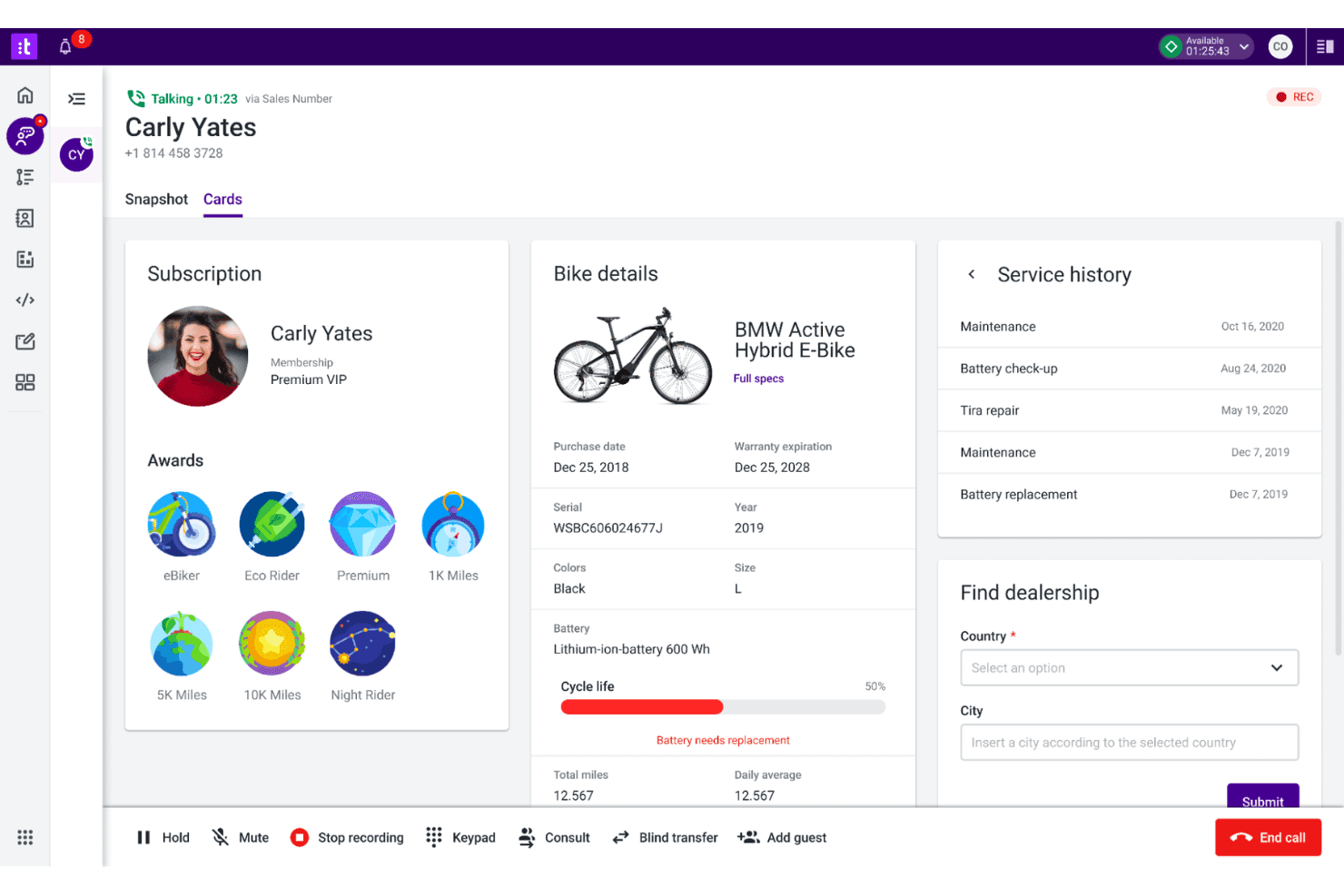
Talkdesk displays a live customer call interface with subscription details, bike product information, service history, and a dealership finder tool. Talkdesk is a cloud-based contact center platform designed for support teams and organizations that want advanced integrations, smart automation, and multichannel communications beyond the basics of Google Voice.
Who Is Talkdesk Best For?
Support leaders at midsize to enterprise companies who need deep app integrations and flexible call center workflows.
Why Talkdesk Is a Good Google Voice Alternative
I picked Talkdesk as one of the best Google Voice alternatives because I can connect it to my CRM, helpdesk, and messaging apps without extra hassle. My team uses its prebuilt app marketplace and advanced workflow automation to centralize channel management and customer data.
Talkdesk Key Features
- AI-powered agent assistance: Agents get real-time recommendations and automated call summaries to support conversations.
- Speech analytics: Analyze voice interactions using sentiment detection and keyword spotting tools.
- Omnichannel support: Route and handle contacts across voice, SMS, web chat, email, and social channels.
- Call recording and quality management: Record calls and score them for quality directly within the platform.
Talkdesk Integrations
Talkdesk offers native integrations with Salesforce, Zendesk, Slack, Microsoft Teams, ServiceNow, Google Workspace, Microsoft 365, Shopify, Zoom, and Oracle Service Cloud, and provides an API for custom integrations.
Pros and Cons
Pros:
- Flexible interactive voice response builder
- Advanced call routing and workflow builder
- AI-powered agent assistance for voice calls
Cons:
- No native fax transmission capabilities
- Lacks built-in hardware provisioning
Learn more about Talkdesk: Best for voice support in helpdesk tickets
- 14-day free trial
- From $55/user/month (billed annually)
Visit WebsiteCustomer Rating:4.4/5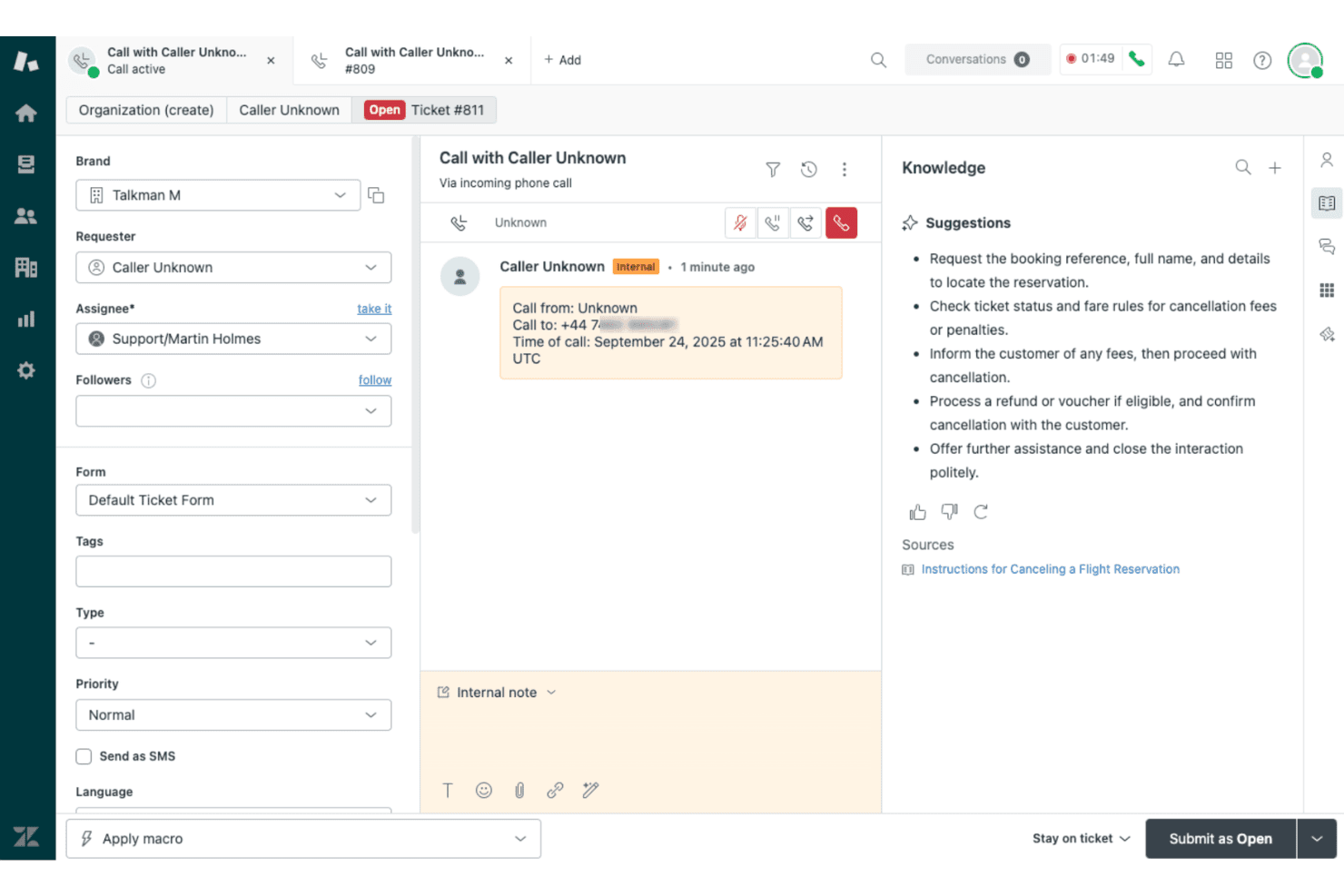
Zendesk Voice displays an active incoming call ticket with AI-powered knowledge suggestions for flight cancellation steps. Zendesk Voice is a native cloud telephony solution built for customer support teams that want every call routed, recorded, and resolved inside the same helpdesk workspace they already use for email, chat, and messaging.
Who Is Zendesk Voice Best For?
Zendesk Voice is a strong fit for mid-sized to enterprise support teams managing high call volumes across multiple channels from a centralized helpdesk.
Why Zendesk Voice Is a Good Best Google Voice Alternatives
I picked Zendesk Voice as one of the best because it turns every inbound call into a ticket automatically. When a customer calls, the interaction lands directly in the agent workspace alongside existing email and chat threads, so agents resolve calls with full context rather than switching tools. Voice Copilot surfaces real-time suggestions mid-call, and post-call AI writes the summary straight into the ticket record without any manual logging.
Zendesk Voice Key Features
- Unified agent workspace: Calls, chats, emails, and messages all appear in a single Zendesk ticket view for a complete customer conversation history.
- Quality assurance monitoring: Supervisors can review 100% of voice and digital interactions for compliance and performance.
- Advanced call analytics: Real-time dashboards and historical reporting provide detailed insights on call volume, agent activity, and resolution times.
- Zendesk Marketplace integrations: Connects with 1,800+ apps to embed telephony alongside CRM, collaboration, and workflow tools.
Zendesk Voice Integrations
Zendesk Voice offers native integrations with Amazon Connect, Microsoft Teams, Slack, and Jira, and supports over 1,800 apps through the Zendesk Marketplace. An API is available for custom integrations.
Pros and Cons
Pros:
- Real-time call monitoring and supervisor features
- AI-generated call summaries in ticket records
- Voice calls logged directly as helpdesk tickets
Cons:
- Requires entire team to use Zendesk workspace
- SMS capabilities less robust than top providers
Learn more about Zendesk Voice: Best for omnichannel customer engagement
- Free trial available
- From $75/user/month (billed annually)
Visit WebsiteCustomer Rating:4.4/5
Genesys Cloud CX offers an Admin panel with sections for Account Settings, People & Permissions, Directory, Integrations, Documents, and Contact Center management. Genesys Cloud CX is a unified communications and contact center platform designed for organizations that want advanced voice, digital, and AI customer engagement beyond what traditional VoIP tools like Google Voice deliver.
Who Is Genesys Cloud CX Best For?
Enterprises and large customer service teams handling high volumes of voice, digital, and AI-powered interactions across multiple channels.
Why Genesys Cloud CX Is a Good Google Voice Alternative
I picked Genesys Cloud CX because I can manage voice, chat, SMS, and social interactions all in one place, making it easy for my team to deliver connected experiences. I appreciate how omnichannel routing and AI-powered engagement let us unify communications beyond what Google Voice provides.
Genesys Cloud CX Key Features
- Integrated call recording: Capture, store, and review voice interactions automatically for compliance and quality assurance.
- Custom IVR design: Build interactive voice response menus with drag-and-drop tools to automate call handling.
- Workforce management suite: Schedule, forecast, and monitor team activity with built-in tools for large-scale operations.
- Real-time analytics dashboard: View live metrics and performance indicators for every communication channel.
Genesys Cloud CX Integrations
Genesys Cloud CX offers native integrations with Salesforce, Microsoft Teams, Zendesk, Zoom, Amazon Lex, and Google Cloud Dialogflow, plus an API for custom integrations. Additional integrations are available through the AppFoundry marketplace.
Pros and Cons
Pros:
- Supports complex call routing and escalation
- Offers advanced AI-powered automation and analytics
- Handles high call volumes across channels
Cons:
- Lacks standalone desktop client options
- Requires significant setup and configuration
Learn more about Genesys Cloud CX: Best AI-powered call routing
- Free demo available
- From $119/seat/month
Visit WebsiteCustomer Rating:4.1/5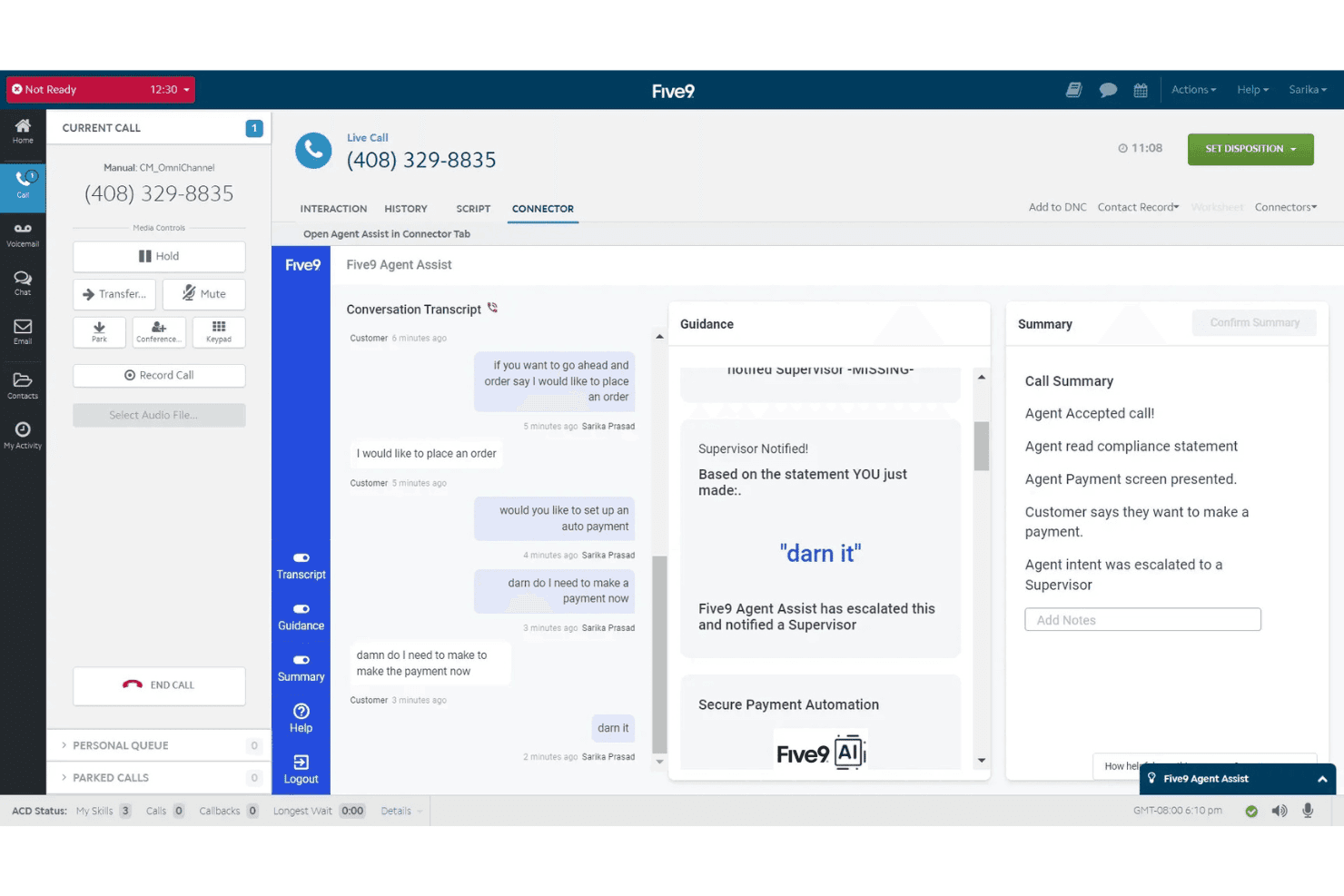
Five9 offers an AI-powered Agent Assist feature that transcribes live calls, provides real-time guidance, escalates flagged statements to supervisors, and generates automatic call summaries. Five9 is a cloud-based contact center solution designed for businesses that need advanced call routing, omnichannel communication, and AI-driven voice interactions—ideal for large teams that want to move beyond the basics of Google Voice and standard VoIP platforms.
Who Is Five9 Best For?
Large enterprise contact centers and support teams that need scalable, AI-powered call handling and deep CRM integrations.
Why Five9 Is a Good Google Voice Alternative
I picked Five9 as one of the best because its AI-powered call routing directs voice traffic to the right agents based on context and intent. I use features like real-time transcription and automated post-call summaries to boost agent productivity at scale.
Five9 Key Features
- Omnichannel communication: Connect with customers over voice, chat, email, SMS, and social messaging in one platform.
- CRM integrations: Sync customer data with Salesforce, ServiceNow, Microsoft Dynamics, Zendesk, and more.
- Workforce management: Schedule, forecast, and monitor agent performance using built-in WEM tools.
- Quality monitoring: Record, score, and review calls for agent coaching and compliance control.
Five9 Integrations
Five9 offers native integrations with Salesforce, ServiceNow, Microsoft Teams, Zoom, RingCentral, Oracle, Zendesk, and AT&T Office@Hand. An API is available for custom integrations.
Pros and Cons
Pros:
- Real-time analytics for live call monitoring
- Omnichannel support for voice, chat, and SMS
- AI routes calls to best available agent
Cons:
- Needs dedicated local network infrastructure
- Minimum seat requirement for all plans
Learn more about Five9: Best unified communications platform
- 14-day free trial
- From £18/user/month
Visit WebsiteCustomer Rating:4.2/5
RingCentral offers a unified messaging interface with team channels, direct messages, and a mobile notification panel for seamless collaboration. RingCentral is a cloud-based communications platform designed for businesses that want unified voice calling, SMS, video meetings, and team messaging with strong integration, AI, and compliance options as a Google Voice alternative.
Who Is RingCentral Best For?
RingCentral fits multi-location and hybrid teams in healthcare, finance, education, and other regulated industries that prioritize unified communication and compliance.
Why RingCentral Is a Good Google Voice Alternative
I picked RingCentral as one of the best because I can unify calling, SMS, team chat, video meetings, and webinars on one platform, plus rely on AI-driven call routing and advanced compliance for regulated industries.
RingCentral Key Features
- Call queue management: Organize, route, and prioritize inbound calls for teams or departments.
- Visual voicemail: Access, manage, and transcribe voicemails directly from the dashboard.
- Multi-level auto attendant: Set up dynamic call menus with custom greetings and routing rules.
- Customizable call analytics: Track usage, performance, and trends with built-in reporting dashboards.
RingCentral Integrations
RingCentral offers native integrations with Salesforce, HubSpot, Microsoft Teams, Zendesk, ServiceNow, Google Workspace, Slack, Box, Okta, and Dropbox. An API is available for custom integrations.
Pros and Cons
Pros:
- Centralized voice, chat, SMS, and meetings
- HIPAA and PCI compliance for regulated industries
- AI-powered receptionist handles inbound calls
Cons:
- Limited external storage options
- Extra charges for exceeding fair usage limits
Learn more about RingCentral:
Outras alternativas ao Google Voice
Eis algumas opções adicionais de alternativas ao Google Voice que não entraram na minha lista restrita, mas que vale a pena consultar:
- 11QuoBest for shared team phone numbers
- 12AircallBest for collaborative calling workflows
- 138x8Best advanced call security options
- 14MightyCallBest for freelancer call management
- 15VonageBest API customization for workflows
- 16GoTo ConnectBest visual call flow editor
- 17Zoom PhoneBest for integrating with video meetings
How I Evaluate Google Voice Alternatives
I start by checking whether a platform covers the core VoIP basics Google Voice offers—calling, texting, routing, and CRM integrations. Then I look at differentiators like AI transcription or global number coverage that set one tool apart.
Core Functionality (Table Stakes For This List)
When I'm selecting tools for my list, I rank each one on a scale from 0 (does not offer the functionality) to 5 (excels in this area) for each core functionality listed below. Then, I calculate the tool's total score as a percentage. Each tool needs to achieve a minimum total score of 75% to be considered for inclusion.
- VoIP Calling: I check for reliable cloud-based calling with business numbers, including local and toll-free options across multiple regions.
- Business SMS/Texting: Teams fielding order confirmations or appointment reminders need SMS and MMS from a business number, so I evaluate messaging depth.
- Call Routing & IVR: I look for auto-attendants, ring groups, and multi-level IVR menus that let support teams direct callers without manual transfers.
- Voicemail & Transcription: A busy support queue generates missed calls, so I evaluate whether voicemail transcriptions are accurate and easy to search.
- Multi-Device Access: I check that desktop, mobile, and web apps offer consistent features so agents can handle calls from the office or on the go.
- CX Tool Integrations: Platforms should connect to CRMs and helpdesks like Salesforce, HubSpot, or Zendesk to log calls and surface customer context automatically.
Once I have a list of tools that meet the criteria, I consider what sets each platform apart.
Differentiating Factors (What Sets Vendors Apart)
Here's how I compare and contrast different vendors:
Standout Features
AI call intelligence is a big differentiator—platforms like Dialpad and Five9 offer real-time transcription, sentiment analysis, and post-call summaries that help QA teams coach agents without reviewing every recording manually. I also look at international DID coverage, since distributed teams need local numbers in the regions they serve. CRM-embedded dialling matters too. Click-to-call, screen pops, and automatic call logging inside tools like Salesforce or HubSpot save agents from constant context-switching between apps.
Beyond Features
Number porting matters when you're migrating a team off Google Voice—I evaluate how smooth and fast each vendor makes it to transfer existing business numbers. Compliance is another key factor, especially for teams in healthcare or finance that need HIPAA or PCI-DSS certifications. I also compare pricing structures closely, since some platforms charge per user while others bundle minutes differently, and features like voicemail transcription that Google Voice includes for free can carry extra costs elsewhere.
Por que procurar uma alternativa ao Google Voice?
Embora o Google Voice seja uma boa escolha de software VoIP, existem vários motivos pelos quais alguns utilizadores procuram soluções alternativas. Pode estar à procura de uma alternativa gratuita ao Google Voice ou de um sistema telefónico empresarial pago que se adapte melhor às necessidades da sua empresa em crescimento, porque…
- Precisa de encaminhamento avançado de chamadas, de uma rececionista virtual ou de uma IVR multinível
- Pretende ter números de telefone disponíveis a nível mundial ou números gratuitos fora das regiões abrangidas pelo Google Voice
- Necessita de conformidade com a HIPAA ou a PCI-DSS para setores regulamentados
- Procura integrações mais aprofundadas com CRM e serviços de assistência
- Está a ultrapassar os planos económicos para um único utilizador ou as limitações para equipas pequenas
- Precisa de apoio ao cliente em direto 24 horas por dia, 7 dias por semana, em vez de apenas opções de autoatendimento
Se alguma destas situações lhe parece familiar, veio ao sítio certo. A minha lista das melhores alternativas ao Google Voice inclui vários fornecedores de VoIP e soluções de comunicação — como a Grasshopper ou a Openphone — mais adequados para equipas que enfrentam estes desafios com um número Google Voice normal e procuram planos de preços alternativos.
Principais funcionalidades do Google Voice
Eis algumas das principais funcionalidades do Google Voice, para ajudar a comparar e contrastar o que as soluções alternativas oferecem:
- Chamadas VoIP: Faça e receba chamadas telefónicas utilizando uma ligação Wi-Fi ou à Internet, em vez de linhas fixas tradicionais ou de um telefone de secretária dedicado.
- Mensagens de texto empresariais: Envie e receba mensagens SMS e usufrua de mensagens de texto ilimitadas a partir de um número empresarial, diretamente no seu dispositivo ou computador.
- Transcrição de mensagens de voz: Obtenha transcrições automáticas das mensagens de voz, para poder analisá-las rapidamente e definir a prioridade das suas respostas.
- Acesso em vários dispositivos: Utilize um único número no seu computador, na aplicação móvel para Android ou iOS, ou no tablet, para uma experiência de comunicação unificada.
- Reencaminhamento de chamadas: Direcione as chamadas recebidas para outros números ou dispositivos, para nunca perder um pedido importante de um cliente.
- Integração com o Google Workspace: Sincronize com o Gmail, o Calendário e os Contactos para simplificar os fluxos de trabalho diários dos membros da equipa que já utilizam produtos Google.
- Saudações personalizadas: Grave diferentes saudações personalizadas para grupos, equipas de pequenas empresas ou indivíduos, proporcionando um contacto mais adaptado com os clientes.
- Filtragem básica de chamadas: Consulte os dados do autor da chamada e decida se deve atender, encaminhar ou bloquear chamadas, para gerir as interrupções com maior facilidade.
- Portabilidade do número: Transfira um número de telefone existente para o Google Voice através da portabilidade numérica, o que ajuda a reduzir as dificuldades ao migrar de outro fornecedor de serviços.
- Não incomodar: Defina o seu estado para encaminhar as chamadas diretamente para o correio de voz quando precisar de tempo sem distrações ou estiver ausente do escritório.