

Prestar um serviço excecional ao cliente é mais desafiante do que nunca. Enquanto profissional da experiência do cliente, conhece a pressão para corresponder às expectativas crescentes e, ao mesmo tempo, gerir os recursos de forma eficiente. É aqui que entra o software de automatização do atendimento ao cliente, que oferece soluções para simplificar tarefas complexas e melhorar a produtividade da sua equipa.
Neste artigo, partilharei as minhas principais escolhas de ferramentas de automatização que podem ajudar a enfrentar estes desafios. Estas ferramentas não servem apenas para poupar tempo — servem para melhorar as interações com os seus clientes e garantir que cada experiência conta. Continue a ler para descobrir quais as soluções de software que podem ser ideais para as suas necessidades.
Why Trust Our Software Recommendations
6,700+
Reviews
20
Industry experts
16+
Evaluation factors
14
Years
Our team has been testing and reviewing software since 2012. As CX leaders ourselves, we know how difficult—and important—it is to choose the right software.
For this guide, we evaluated tools using hands-on testing and independent research, scoring tools using our selection criteria.
Our reviews reflect our human editorial judgment, not a sales pitch.
 Gui DrusinaCreative Director
 Tim FisherVP of AI
Tabela de comparação de software de automatização do atendimento ao cliente
Esta tabela de comparação resume os detalhes de preços das minhas principais escolhas de software de automatização do atendimento ao cliente:
| Tool | Best For | Trial Info | Price | ||
|---|---|---|---|---|---|
| 1 | Best for pricing based on resolved tickets | Free demo + 30-day free trial available | From $1.20/resolution | Website | |
| 2 | Best help desk with dedicated mobile application | Free trial available | From $19/user/month (billed annually) | Website | |
| 3 | Best for L1–L3 AI ticket resolution | Free plan + free demo available | From $150/month (billed annually) | Website | |
| 4 | Best for real-time reporting and analytics | Free demo available | From $30/user/month (billed annually) | Website | |
| 5 | Best scalable automation software | Free trial available | From $75/user/month | Website | |
| 6 | Best for customizable ticket management | 15-day free trial | Pricing upon request | Website | |
| 7 | Best for helpdesk auto-replies | 30-day free trial | From $199/month | Website | |
| 8 | Best for real-time data syncing | 7-day free trial + free plan + free demo available | From $32/month (billed annually) | Website | |
| 9 | Best AI-powered interaction insights | Free plan available | From $29/month (billed annually) | Website | |
| 10 | Best for automated customer email rules | 30-day free trial + free demo available | From $14/user/month (billed annually) | Website |


Avaliações do melhor software de automatização do atendimento ao cliente
Eis uma breve descrição de cada um dos melhores softwares de automatização do atendimento ao cliente. Mostrarei o que cada um faz melhor, para quem é mais adequado, além de capturas de ecrã que destacam algumas das funcionalidades.
 1Best for pricing based on resolved tickets
Yuma
- Free demo + 30-day free trial available
- From $1.20/resolution
Visit WebsiteCustomer Rating:3.3/5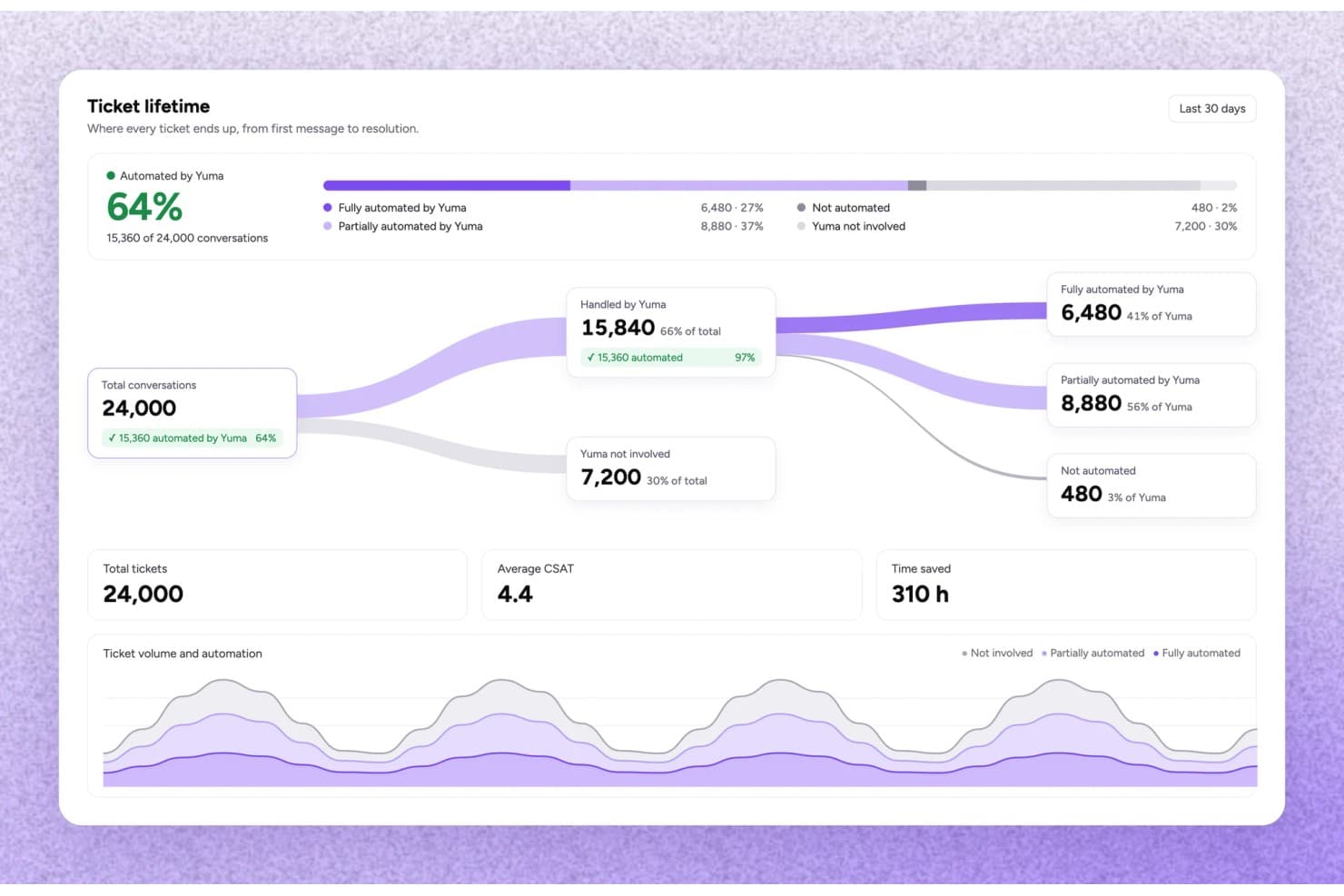
Yuma tracks ticket automation rates and time saved across conversations. Yuma is an ecommerce-focused customer service automation platform that uses AI agents to handle support tickets end to end—covering order changes, refunds, returns, subscription requests, and shipment questions—across email, chat, SMS, and social channels.
Who Is Yuma Best For?
Yuma is built for ecommerce brands—particularly in fashion, beauty, and consumer electronics—that need an AI agent to fully resolve support tickets, not just draft replies.
Why I Picked Yuma
Yuma's outcome-based pricing is what earns it a spot on my shortlist: you pay only for tickets the AI fully resolves without any human involvement, so your costs scale directly with the value you receive. I love that this model is backed by specific guardrails, like Hard Limits that cap refund amounts the AI can approve and Gradual Rollout that lets you release a new playbook to a fraction of conversations before going wide. In practice, that means I can grow automation confidently without worrying about runaway costs or unchecked AI decisions.
Yuma Key Features
- Handbook playbook system: A versioned, centralized set of brand pages, playbooks, and procedures that governs how the AI handles every customer conversation.
- Outbound event triggers: Starts automated email or SMS conversations based on commerce events like order placement, parcel delivery, or abandoned checkout.
- Media Brain: Opens and analyzes images, videos, and PDFs within a conversation to support defect claims, SKU matching, and receipt extraction.
- 180+ language support: Auto-detects a customer's language and responds accordingly, including regional dialects and right-to-left scripts.
Yuma Integrations
Yuma lists 60+ integrations, including native Shopify, Gorgias, and Zendesk connections, plus Recharge, Klaviyo, Loop Returns, and AfterShip. It supports custom integrations through APIs and MCP servers.
Pros and Cons
Pros:
- Maintains support during high-volume periods
- Automates refunds, returns, and order changes
- Resolves order-status tickets without agent involvement
Cons:
- Designed for ecommerce, not SaaS support
- Needs clean policies and operational data
Learn more about Yuma: Best help desk with dedicated mobile application
- Free trial available
- From $19/user/month (billed annually)
Visit WebsiteCustomer Rating:4.4/5
Easily auto-assign and sort tickets by importance. Freshdesk (a product of Freshworks Inc.) is a customer service platform used to manage support tickets and workflows across multiple communication channels. It supports email, chat, phone, and social media inquiries, allowing teams to handle customer interactions within a single system.
Why I picked Freshdesk: I picked Freshdesk for its mobile application, which allows support teams to manage requests while away from their desks. The app supports ticket tracking, internal collaboration, and customer responses directly from a mobile device. Features such as push notifications, offline access to tickets, and voice support help teams stay informed and continue work without relying on a desktop setup.
Standout features & integrations:
Features include automation tools that support ticket categorization, prioritization, and routing based on predefined rules such as agent workload or expertise. Freddy AI is available within the platform to assist with these workflows as part of the existing ticketing system. Reporting tools provide visibility into response activity, resolution timelines, and customer feedback.
Integrations include Slack, Microsoft Teams, Shopify, Salesforce, Jira, QuickBooks, Zapier, Zoho CRM, HubSpot, and Google Workspace.
Pros and Cons
Pros:
- Omnichannel support in one dashboard
- AI-driven ticket categorization
- Mobile app with full help desk access
Cons:
- Occasional delays in mobile app syncing
- Some advanced features require add-ons
Learn more about Freshdesk: Best for L1–L3 AI ticket resolution
- Free plan + free demo available
- From $150/month (billed annually)
Visit WebsiteCustomer Rating:4.5/5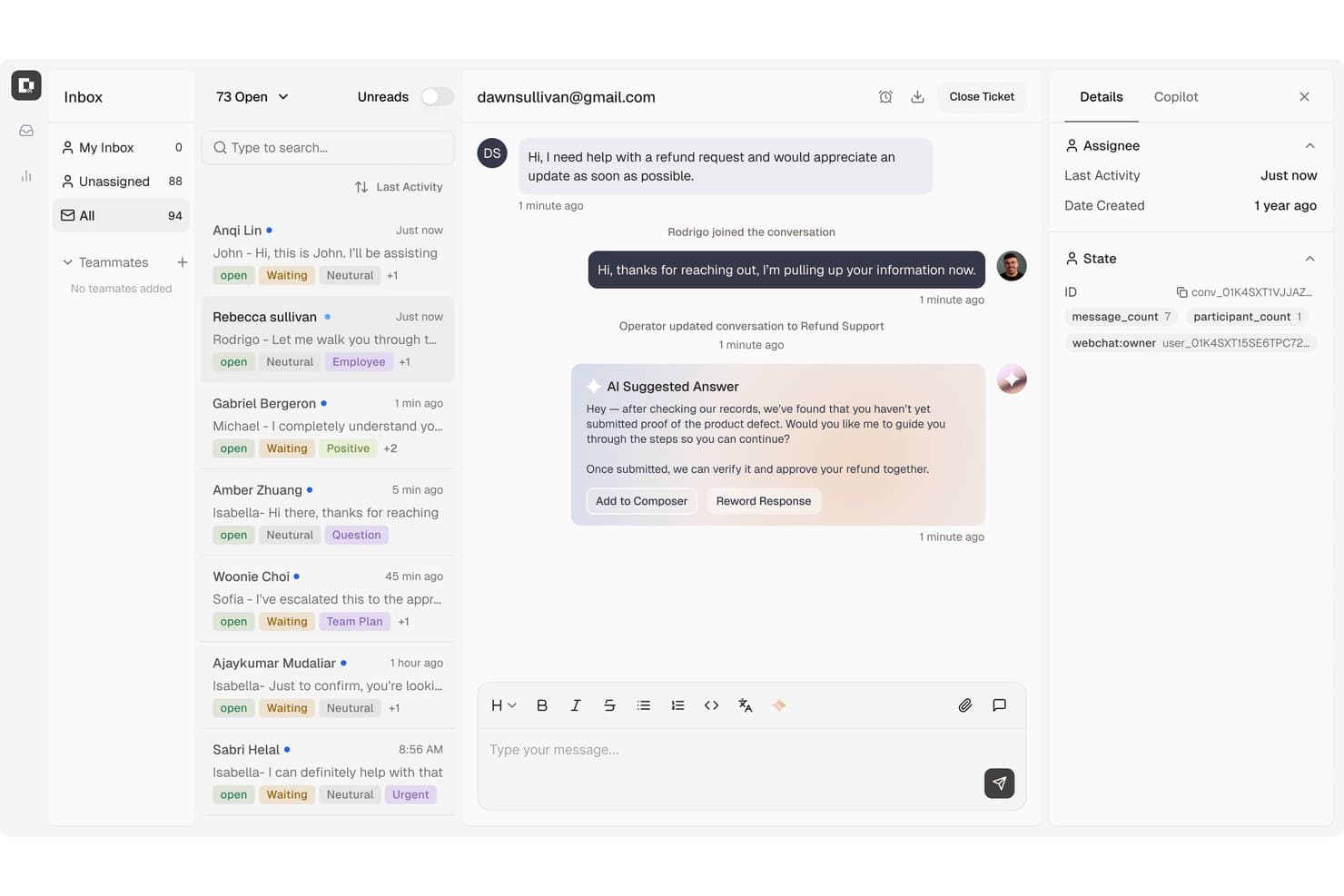
Botpress surfaces AI-suggested replies to speed up customer support. Botpress Desk is an AI-powered helpdesk platform that handles support tickets across L1 through L3, with automated routing, knowledge base-driven deflection, multi-channel coverage, and native integrations with Zendesk and Intercom.
Who Is Botpress Best For?
Botpress Desk is a strong fit for support operations teams that need AI to handle the full ticket spectrum—from routine L1 deflection to complex L3 resolution—without replacing their existing Zendesk or Intercom setup.
Why I Picked Botpress
I picked Botpress as one of the best because it's built to handle the full ticket spectrum—L1 through L3—without routing everything to a human agent. I particularly like how its AI actions can issue refunds, update CRM records, and pull live subscription data mid-conversation, so agents only step in when genuinely needed. Sentiment-based escalation and confidence-threshold handoffs keep that line between bot and human precise.
Botpress Key Features
- Ticket enrichment: Surfaces account health, subscription status, recent activity, and prior ticket history directly within each conversation for faster agent context.
- Multi-channel coverage: Supports webchat, email, WhatsApp, Slack, Discord, Telegram, Instagram, and Facebook Messenger from a single platform.
- Context-rich handoff: Transfers the full conversation history, an AI-generated summary, agent notes, and a suggested next step when escalating to a human.
- Zendesk and Intercom sync: Syncs workspace and customer data natively with Zendesk or Intercom and creates pre-enriched tickets for human handoff.
Botpress Integrations
Botpress offers native integrations with Zendesk, Intercom, WhatsApp, Slack, Discord, Telegram, Instagram, Messenger, and Facebook. It also provides HTTP Chat, Admin, Files, Tables, and Runtime APIs for custom integrations.
Pros and Cons
Pros:
- Reviewers praise its visual bot builder
- Enriches tickets with account and history context
- Automates refunds and customer-record updates
Cons:
- Reviewers say advanced setup can challenge nontechnical teams
- Reviewers report inconsistent results across knowledge bases
Learn more about Botpress: Best for real-time reporting and analytics
- Free demo available
- From $30/user/month (billed annually)
Visit WebsiteCustomer Rating:5/5
RingCentral provides automated insights and analytics in a centralized dashboard. RingCentral is a comprehensive customer service automation software that uses an AI-driven approach to communication. It caters to businesses of all sizes across a wide range of industries, ensuring you can provide tailored support based on your customers' needs.
Why I Picked RingCentral: The platform is compatible across many different channels. This means that it not only supports queries based on a customer's preferred methods but it also collects real-time data and analytics across all channels, giving you a holistic overview of customer experience and agent performance. These AI-driven reports include metrics like call volumes, agent activities, customer sentiment, and trending topics.
Standout Features & Integrations
Standout features include AI to handle tasks throughout the customer query process. These functionalities include IVR/self-service, automatic callback, AI-enabled virtual agents, and call deflection. Additionally, the AI assistant can take real-time call notes, provide writing and translation for digital messages, and offer conversation insights for quicker, higher-quality service.
Other notable features include intelligent routing, which matches customer queries with the right resources based on the chosen communication channel, intent of the message, agent skill profiles, CRM data, and more. RingCentral also offers real-time automated coaching to help improve customer interactions.
Integrations include Microsoft Teams, Salesforce, Google Workspace, Beetexting, HubSpot, Asana, Zendesk, Appointment Reminder, Aha!, Trello, Zapier, Automator, and more.
Pros and Cons
Pros:
- Comprehensive analytics and reporting
- Includes advanced AI features for self-service
- Offers omnichannel support
Cons:
- Can be a learning curve for new users
- Pricing structure may be higher
Learn more about RingCentral Contact Center: Best scalable automation software
- Free trial available
- From $75/user/month
Visit WebsiteCustomer Rating:4.4/5
Salesforce Service Cloud provides organizations with a workflow builder to automate certain processes, including handling customer cases and other processes. Salesforce Service Cloud is a customer service automation software with features that help businesses scale their service processes as they grow. This solution helps teams manage customer queries, resolve cases, and connect customers with the right people to resolve issues through live chat while streamlining the entire process with only a few clicks.
Why I Picked Salesforce Service Cloud: Salesforce Service Cloud makes complicated processes easier with the platform’s builders. These builders are low- and no-code, making it easy to automate workflows, simplify complex processes, and adapt processes with a flexible customer service platform.
Standout Features & Integrations
Features include case management to automatically create cases from web queries and emails, send auto-responses, and route cases to certain queues or agents to resolve cases at a faster rate. The platform also effectively helps businesses manage their workflows and handle large numbers of cases through auto-responses and auto-assignments, which improves the quality of customer service.
Utilizing Salesforce Service Cloud’s automation features helps improve a company’s efficiency in handling cases. Lightning Flow Automation can also be used by Essentials and Professional users for five processes and flows each, while Enterprise and Unlimited users can create an unlimited number of processes and workflows. This means the relatively affordable Service Cloud plans are still useful and functional for smaller businesses.
Integrations include Slack, Mailchimp, QuickBooks, Zendesk, HubSpot, Dropbox, Google Workspace, Microsoft Teams, SurveyMonkey, and JIRA.
Pros and Cons
Pros:
- Easy to learn and use
- Includes pre-built integrations
- Uses AI for automations
Cons:
- Could use better email functionality
- Can be expensive for small teams
Learn more about Agentforce Service (formerly Service Cloud): Best for customizable ticket management
- 15-day free trial
- Pricing upon request
Visit WebsiteCustomer Rating:4.4/5
Zoho Desk's ticket management system is highly customizable, with the option to automate various tasks. Zoho Desk is a comprehensive customer support and help desk software designed to assist businesses in managing their customer service operations efficiently. It offers a variety of features including ticket management, self-service options, and robust reporting and analytics.
Why I Picked Zoho Desk: Zoho Desk has a robust ticket management system, which allows businesses to efficiently track and manage customer inquiries. It allows for the assignment of tickets to specific team members or departments, improving response times and ensuring that the appropriate personnel handle each inquiry. Additionally, the ticket management system includes tools for tracking the status of tickets and analyzing customer inquiries.
Standout Features & Integrations
Features include tools for automating routine customer support tasks, such as workflow rules and macros, which can trigger specific actions based on predefined conditions. This automation reduces the manual workload on support agents, allowing them to focus on more complex issues. Additionally, Zoho Desk offers a self-service portal where customers can find answers to common questions and resolve issues independently.
Integrations include Google Workspace, Microsoft Office 365, Slack, Jira, Trello, Asana, Dropbox, OneDrive, Box, GitHub, Bitbucket, Zendesk, Salesforce, HubSpot, Intercom, Freshdesk, and other Zoho apps.
Pros and Cons
Pros:
- Omnichannel support integration
- AI-powered automation features
- Affordable pricing for small businesses
Cons:
- Mobile app needs improvement
- Limited third-party integrations
Learn more about Zoho Desk:

My AskAI integrates with your existing helpdesk like HubSpot and has the feature to automatically notify a human agent and leave an internal comment when a user requests to speak to a person. My AskAI is an AI customer service agent platform that plugs into existing helpdesks like Zendesk, Intercom, and Freshdesk to autonomously handle customer inquiries, auto-tag tickets, and trigger automated actions across chat, email, and messaging channels.
Who Is My AskAI Best For?
My AskAI is a strong fit for SaaS and ecommerce support teams that already run a helpdesk and want to layer in AI-driven ticket deflection without switching platforms.
Why I Picked My AskAI
I've included My AskAI in my top picks because its self-learning knowledge base does something I haven't seen elsewhere: it spots gaps in your documentation and generates new articles from resolved past tickets automatically. That means your helpdesk auto-replies get sharper over time without any manual curation. I also like that the AI tagging feature classifies and tags incoming Zendesk tickets in real time, keeping your queue organized even during high-volume surges.
My AskAI Key Features
- Multi-channel coverage: Delivers automated support across chat, email, WhatsApp, and Messenger using built-in helpdesk integrations.
- Automated knowledge syncing: Continuously ingests and updates information from your knowledge base, website, and documentation sources.
- AI-powered ticket tagging: Automatically classifies and tags incoming support tickets from platforms like Zendesk in real time.
- Slack and Teams chatbot: Provides an internal AI assistant for employee support and quick answers within Slack and Microsoft Teams.
My AskAI Integrations
My AskAI offers native integrations with Zendesk, Intercom, Gorgias, Freshdesk, HubSpot, and Freshchat.
Pros and Cons
Pros:
- Connects to existing helpdesks without migration
- Self-learning knowledge base fills documentation gaps
- Automatically deflects repetitive helpdesk tickets
Cons:
- Automation analytics lack depth for enterprise teams
- No native voice channel automation support
Learn more about My AskAI: Best for real-time data syncing
- 7-day free trial + free plan + free demo available
- From $32/month (billed annually)
Visit WebsiteCustomer Rating:4.4/5
Chatbase is an AI chatbot platform that automates support across websites and messaging apps using your data. Chatbase is an AI chatbot platform that automates customer service conversations across websites and messaging channels. It stands out for its ability to sync chatbots with live business data, allowing teams to deliver automated responses that reflect real-time information.
Who Is Chatbase Best For?
Chatbase suits support teams and businesses that want to automate customer service interactions using customizable chatbots connected to internal data sources.
Why I Picked Chatbase
I picked Chatbase because it connects chatbots directly to live business systems through APIs and webhooks. This enables real-time data syncing, so customers receive current information such as order status, account details, or inventory availability. Instead of relying only on static knowledge bases, teams can automate responses that reflect changing data. Security controls and role-based permissions help manage access while scaling automation.
Chatbase Key Features
- No-code chatbot builder: Build and customize AI chatbots using a drag-and-drop interface without coding.
- Multi-channel deployment: Deploy chatbots across web, messaging apps, and other digital channels from a single dashboard.
- Custom data source integration: Connect your chatbot to PDFs, websites, or knowledge bases to answer customer questions with your own data.
- Conversation analytics: Track chatbot interactions and performance with built-in analytics and reporting tools.
Chatbase Integrations
Integrations include Slack, WhatsApp, Facebook Messenger, and automation platforms such as Make. API and webhook access are available for custom integrations.
Pros and Cons
Pros:
- No-code builder for fast chatbot creation
- Multi-channel support including web and messaging apps
- Real-time data syncing with business systems
Cons:
- Some integrations require manual API setup
- Limited built-in escalation to human agents
Learn more about Chatbase:

Weav offers a detailed performance report dashboard showing conversation metrics for customer service teams. Weav is a customer service automation platform that combines AI agents, chatbots, a shared inbox, agent-assist tools, training, and reporting to automate and manage customer support across channels.
Who Is Weav Best For?
Weav is a good fit for ecommerce and SaaS support teams that want to automate customer interactions without fully removing human agents from the loop.
Why I Picked Weav
I've included Weav in my top picks because of how it surfaces AI-powered insights directly within live agent conversations. The Ask Weav feature pulls answers from your existing documentation and resolved tickets in real time, so agents aren't switching tabs or guessing. I also like that Weav's reporting tracks resolution outcomes at the conversation level, giving teams concrete data on where AI assist actually changes the result.
Weav Key Features
- AI chatbots: Deploy customer-facing chatbots trained on your product documentation to resolve incoming queries without human involvement.
- Smart escalation: Build routing rules that automatically hand off conversations to the right human agent when AI can't resolve the issue.
- Conversation tone and prohibited phrase controls: Set your agent's tone, response length, and a list of off-limits words to keep every reply on-brand.
- Unified inbox: Manage AI-handled and human-handled conversations in one shared workspace, with full cross-channel conversation history intact.
Weav Integrations
Weav offers a smaller set of native integrations, including Stripe, Shopify, and Google Drive, along with custom actions that let AI agents connect to third-party APIs during conversations. A REST API and real-time webhooks are available for custom integrations.
Pros and Cons
Pros:
- Internal knowledge tool for agents
- Fact-checked sources shown with replies
- Tone and response controls per agent
Cons:
- Free plan caps AI messages at 20
- Limited third-party app integrations
Learn more about Weav: 10Best for automated customer email rules
Missive
- 30-day free trial + free demo available
- From $14/user/month (billed annually)
Visit WebsiteCustomer Rating:4.8/5
Missive lets you set automated rules to sort, classify, and route incoming emails using AI. Missive is a shared inbox and collaborative email platform that centralizes email, SMS, WhatsApp, and social messaging into a unified workspace with AI-powered routing rules, automated triage, and agent-assist drafting tools.
Who Is Missive Best For?
Missive is a strong fit for small-to-midsize support teams that manage high volumes of customer email and need smart, rule-based routing without a complex enterprise setup.
Why I Picked Missive
I picked Missive as one of the best because its AI Rules engine is genuinely impressive for email-heavy support teams. Using plain-language prompts, it classifies incoming messages by content, like detecting a frustrated customer and escalating automatically, without any training data required. I also love that it pairs this with workload-balancing assignment methods, like least-busy-first, so routed emails actually land with the right agent at the right time.
Missive Key Features
- Multi-provider AI support: Connect to OpenAI, Anthropic, or Google Gemini—or bring your own API key—to power drafts, summaries, and translations inside the inbox.
- Omnichannel unified inbox: Manage email, SMS, WhatsApp, Instagram, Facebook Messenger, and live chat from a single workspace.
- Canned responses with shortcodes: Save and trigger pre-written reply snippets using shortcodes for faster, consistent agent responses.
- Missive MCP Server: Connect external AI tools (like Claude or ChatGPT) to query customer service data, check calendars, and draft replies—while keeping agent approval required before sending.
Missive Integrations
Missive integrates with HubSpot, Salesforce, Pipedrive, Shopify, Stripe, Notion, Linear, Twilio, WhatsApp Business, and Facebook Messenger. Productive and Business plans include an Open REST API, webhooks, Zapier, and its new MCP Server (requires admin activation).
Pros and Cons
Pros:
- Flexible automation built with plain-language rules
- Omnichannel inbox supports email, SMS, messaging
- AI classifies and routes emails automatically
Cons:
- Not designed for full ticket lifecycle tracking
- No native chatbot or self-service portal
Learn more about Missive:
Outro software de automatização do atendimento ao cliente
Eis mais algumas opções de software de gestão de relações com clientes que não entraram na minha lista dos 10 melhores.
- 11ZendeskBest for AI-driven customer interactions
- 12monday serviceBest for smart ticket routing
- 13FrontBest for automated shared inbox routing
- 14CrescendoBest AI-driven call quality assurance
- 15NinjaOneBest for unified IT management
- 16HiverBest for Gmail-based customer support
- 17QuidgetBest for automating repetitive frontline support
- 18UDESKBest for its highly customizable ticketing system
- 19Creatio AI CRMBest for service request management
- 20HiverBest for managing shared inboxes in Gmail
- 21LiveAgentBest for optimized ticket distribution
- 22TidioBest for AI-powered chatbots
- 23NeopleBest for integrating with existing workflows
- 24StreakBest Gmail manager for hiring
- 25LiveChatBest for multi-channel live chats
- 26KayakoBest multi-departmental integration software
- 27TenfoldBest customer service software for a growing sales team
- 28SysAidBest for internal service departments
- 29IssuetrakBest for omnichannel ticket management
- 30HelpCrunchBest popup customization tool
How I Evaluate Customer Service Automation Software
I look at two layers when evaluating these tools: the baseline capabilities like AI chatbot resolution and automated ticket routing, and the differentiators that set the best options apart.
Core Functionality (Table Stakes For This List)
When I'm selecting tools for my list, I rank each one on a scale from 0 (does not offer the functionality) to 5 (excels in this area) for each core functionality listed below. Then, I calculate the tool's total score into a percentage. Each tool needs to achieve a minimum total score of 75% to be considered for inclusion.
- AI Chatbot or Virtual Agent: I evaluate whether the bot can autonomously resolve common requests like order status checks or password resets, not just collect info and hand off.
- Omnichannel Automation: Each tool should apply the same automation logic across email, chat, social, and messaging—so a customer switching channels doesn't restart the process.
- Automated Ticket Routing & Triage: I look for AI-driven classification that tags, prioritizes, and assigns tickets based on intent and urgency rather than simple keyword matching.
- Knowledge Base Integration: The platform should pull from a connected KB to generate or suggest answers in real time, both for self-service bots and agent-facing workflows.
- Workflow Automation Builder: I check for a visual, no-code builder that lets CX ops teams create multi-step workflows like automated follow-ups or escalation chains on their own.
- Agent Assist & Suggested Replies: Strong tools surface AI-drafted responses, conversation summaries, and next-step recommendations so agents spend less time on repetitive typing.
Once I have a list of tools that meet the criteria, I consider what sets each platform apart.
Differentiating Factors (What Sets Vendors Apart)
Here's how I compare and contrast different vendors:
Standout Features
Multilingual AI support matters when your customer base spans multiple regions. I check whether a platform can detect language and respond natively without requiring separate bot builds for each one. Sentiment and intent analytics are equally valuable, especially for triggering automatic escalations when frustration is detected mid-conversation. I also look at automation performance dashboards that track deflection rates and resolution quality, since those metrics directly show whether your automation is actually reducing agent workload.
Beyond Features
CRM and helpdesk integrations are one of the first things I check. A tool that connects natively to platforms like Zendesk, Salesforce, or Freshdesk keeps customer context intact across every automated interaction. Pricing structure also matters—I evaluate whether vendors charge per resolution, per conversation, or per seat, since this directly affects ROI as ticket volume scales. Security is another key factor, particularly SOC 2 Type II and GDPR compliance, and I look for PCI-DSS or HIPAA readiness when the tool will handle sensitive data in industries like fintech or healthcare.
Como escolher um software de automatização do atendimento ao cliente
É fácil ficar perdido em longas listas de funcionalidades e estruturas de preços complexas. Para o ajudar a manter o foco enquanto percorre o seu processo específico de seleção de software, eis uma lista de fatores a ter em conta:
| Fator | O que considerar |
|---|---|
| FatorEscalabilidade | O que considerarCertifique-se de que o software pode crescer com a sua empresa. Verifique se consegue lidar com um número crescente de utilizadores e volumes de dados. |
| FatorIntegrações | O que considerarProcure compatibilidade com as ferramentas que já utiliza, como sistemas de CRM, para garantir um fluxo de dados contínuo. |
| FatorPersonalização | O que considerarDetermine se pode adaptar o software ao fluxo de trabalho e aos requisitos específicos da sua equipa. |
| FatorFacilidade de utilização | O que considerarAvalie se a interface é intuitiva, permitindo que a sua equipa se familiarize rapidamente sem necessitar de formação extensa. |
| FatorOrçamento | O que considerarAnalise o custo total, incluindo taxas ocultas, para garantir que está de acordo com os seus planos financeiros. |
| FatorMedidas de segurança | O que considerarVerifique se o software dispõe de medidas de segurança robustas para proteger os dados sensíveis dos clientes. |
| FatorOpções de suporte | O que considerarVerifique se existe um suporte ao cliente fiável, incluindo disponibilidade e canais como assistência por chat ou telefone. |
| FatorAnálise de dados | O que considerarConsidere se o software fornece relatórios esclarecedores para o ajudar a melhorar as estratégias de atendimento ao cliente. |
Tendências no software de automatização do atendimento ao cliente
À medida que o serviço de apoio ao cliente continua a evoluir, adaptando-se às exigências em mudança das organizações e adotando avanços tecnológicos como a inteligência artificial (AI). Eis várias tendências emergentes que estão atualmente a influenciar o desenvolvimento de software de automatização do serviço de apoio ao cliente:
- Tecnologias de Reconhecimento de Emoções: A incorporação da deteção de emoções para avaliar o sentimento dos clientes durante as interações representa uma mudança revolucionária. Esta funcionalidade única visa humanizar as interações digitais, permitindo uma comunicação mais empática e eficaz.
- Gestão Integrada das Relações com os Clientes (CRM): A procura por sistemas de CRM estreitamente integrados nas plataformas de automatização do serviço de apoio ao cliente realça a importância de ter uma visão de 360 graus do cliente. Esta funcionalidade é essencial para prestar um serviço personalizado e acompanhar o histórico do cliente em todos os pontos de contacto.
- Melhorias na Inteligência Artificial Conversacional: As inovações na inteligência artificial conversacional, que tornam os chatbots e os assistentes virtuais capazes de lidar com questões mais complexas, representam a funcionalidade que evolui mais rapidamente. Isto reflete o objetivo de automatizar mais tarefas do serviço de apoio ao cliente sem comprometer a qualidade da interação.
- Foco nas Ferramentas de Autosserviço: A ênfase na melhoria das ferramentas de autosserviço, incluindo bases de conhecimento mais intuitivas e chatbots avançados, indica uma mudança no sentido de capacitar os clientes para resolverem os seus próprios problemas de forma eficiente. Esta evolução responde à procura por uma resolução imediata sem aumentar necessariamente a intervenção humana direta.
- Análises e Informações em Tempo Real: Os avanços nas análises e informações em tempo real para acompanhar as conversas com os clientes e a produtividade dos agentes evidenciam o movimento do setor no sentido de uma tomada de decisões baseada em dados. Esta tendência responde à necessidade de melhoria contínua com base em métricas acionáveis.
À medida que a tecnologia avança, os profissionais do serviço de apoio ao cliente podem esperar que o software de automatização se torne cada vez mais intuitivo e centrado no cliente, transformando-se essencialmente em plataformas de automatização da experiência do cliente, que simplificam ainda mais as complexidades da gestão das interações com os clientes e melhoram a experiência global do serviço.
O que é o Software de Automatização do Serviço de Apoio ao Cliente?
O software de automatização do serviço de apoio ao cliente é uma ferramenta baseada na nuvem que as empresas utilizam para tornar os seus serviços de apoio mais eficientes e eficazes. Automatiza tarefas simples, como enviar respostas rápidas a perguntas frequentes, organizar as mensagens dos clientes nas categorias certas e acompanhar as conversas à medida que passam de um agente de apoio para outro.
Com este software, as equipas de apoio podem tratar de mais questões sem ficarem sobrecarregadas, e a empresa pode prestar assistência 24 horas por dia, mesmo quando os agentes humanos não estão disponíveis. Tudo isto aumenta a produtividade das equipas de serviço de apoio ao cliente e ajuda a manter um elevado nível de envolvimento dos clientes.
Funcionalidades
O software de automatização é uma ferramenta essencial para melhorar a eficiência e a eficácia do serviço de apoio ao cliente, sobretudo ao lidar com um afluxo de tarefas repetitivas, problemas complexos e o acompanhamento das interações. Aqui, analiso as funcionalidades mais importantes a ter em conta no software de automatização do serviço de apoio ao cliente.
- Encaminhamento automatizado de pedidos - Direciona as questões para o agente ou departamento adequado com base em critérios predefinidos. Isto garante que os clientes recebem ajuda da pessoa mais qualificada, acelerando os tempos de resolução.
- Portais de autosserviço - Permitem que os clientes encontrem respostas para perguntas comuns sem necessitarem de assistência direta. Isto reduz o volume geral de pedidos de apoio, libertando os agentes para resolverem questões mais complexas.
- Assistentes de conversação com inteligência artificial - Oferecem respostas imediatas às questões dos clientes, 24 horas por dia, 7 dias por semana. Os assistentes de conversação conseguem tratar uma vasta gama de tarefas simples, garantindo que os agentes humanos ficam disponíveis para necessidades de apoio mais complexas.
- Sistema de pedidos personalizável - Permite criar um sistema de pedidos adaptado às necessidades específicas da empresa. Esta funcionalidade é essencial para organizar e definir eficazmente as prioridades dos problemas dos clientes.
- Apoio multicanal - Consolida as interações com os clientes provenientes de vários canais numa única plataforma. Esta integração perfeita garante que nenhuma questão dos clientes fica sem resposta, independentemente do canal de comunicação utilizado.
- Ferramentas de análise e elaboração de relatórios - Fornecem informações sobre as operações de serviço ao cliente e a produtividade dos agentes. Ao analisar os dados, as empresas podem identificar áreas a melhorar e tomar decisões fundamentadas.
- Gestão do conhecimento - Centraliza as informações, tornando-as facilmente acessíveis tanto aos clientes como aos agentes. Isto promove uma resolução eficiente dos problemas e uma qualidade de apoio consistente.
- Automatização dos fluxos de trabalho - Simplifica as tarefas repetitivas através de regras e acionadores predefinidos. A automatização destas tarefas reduz a possibilidade de erro humano e aumenta a eficiência operacional.
- Recolha de opiniões dos clientes - Facilita a recolha das opiniões dos clientes e dos respetivos níveis de satisfação. As opiniões são essenciais para a melhoria contínua e para adaptar os serviços de modo a satisfazer as expectativas dos clientes.
- Acompanhamento do desempenho dos agentes - Monitoriza os principais indicadores de desempenho (KPIs) para avaliar e melhorar a produtividade dos agentes. Compreender o desempenho dos agentes ajuda a otimizar as estratégias de formação e desenvolvimento.
A adoção de software de automatização do serviço ao cliente com estas funcionalidades pode transformar significativamente a forma como a sua equipa interage com os clientes. À medida que a sua empresa continua a evoluir, o investimento em ferramentas avançadas de automatização continuará, sem dúvida, a ser um pilar fundamental de estratégias de serviço ao cliente bem-sucedidas.
Vantagens
O software de automatização do serviço ao cliente foi concebido para melhorar todos os aspetos do fluxo de trabalho do seu apoio ao cliente. Ao incorporar ferramentas avançadas de automatização do serviço ao cliente, a sua equipa pode reduzir as tarefas manuais, melhorar a tomada de decisões através de informações baseadas em dados e descobrir estratégias práticas para reforçar a eficácia do seu serviço ao cliente. Eis cinco vantagens principais da utilização deste software pela sua equipa:
- Maior eficiência e produtividade: A automatização trata rapidamente das tarefas repetitivas, permitindo que a sua equipa se concentre nas necessidades mais complexas dos clientes. Esta mudança não só acelera os tempos de resposta, como também otimiza a carga de trabalho da sua equipa para uma melhor produtividade.
- Maior satisfação dos clientes: Com funcionalidades como assistentes de conversação disponíveis 24 horas por dia, 7 dias por semana, e opções de autosserviço, os clientes usufruem de um apoio mais rápido e autónomo. Este acesso imediato à ajuda melhora a experiência geral do cliente, promovendo a lealdade e a satisfação.
- Melhor qualidade do serviço: Ao automatizar as questões de rotina e encaminhar os problemas mais complexos para os agentes certos, a qualidade do seu serviço melhora. Os fluxos de trabalho automatizados garantem que cada interação com o cliente é tratada com o nível adequado de atenção e competência.
- Informações baseadas em dados para uma melhor tomada de decisões: As capacidades analíticas do software permitem analisar detalhadamente as interações com os clientes e o desempenho do serviço. Estas informações permitem-lhe tomar decisões fundamentadas, adaptar melhor os seus serviços às expectativas dos clientes e identificar áreas a melhorar.
- Escalabilidade: À medida que a sua empresa cresce, o software de automatização do serviço ao cliente acompanha esse crescimento, gerindo um volume cada vez maior de questões sem ser necessário aumentar proporcionalmente a sua equipa de apoio. Esta escalabilidade garante que a qualidade do seu serviço ao cliente se mantém elevada, mesmo quando a procura varia ou aumenta.
Para as organizações que procuram aperfeiçoar as suas operações de serviço ao cliente, reduzir as cargas de trabalho manuais e aumentar a satisfação dos clientes, o software de automatização do serviço ao cliente apresenta uma proposta convincente. Estes sistemas não só aumentam a eficácia e a precisão do serviço ao cliente, como também contribuem para uma maior satisfação dos clientes e uma gestão mais estratégica do serviço ao cliente.
Processo e implementação da automatização da experiência do cliente: boas práticas
A automatização da experiência do cliente (CX) ajuda as empresas a proporcionar interações mais rápidas, eficientes e personalizadas, reduzindo simultaneamente os custos. No entanto, uma implementação bem-sucedida exige uma abordagem ponderada para garantir que a automatização melhora, em vez de prejudicar, a experiência do cliente. Siga estas boas práticas para alcançar os melhores resultados:
- Defina objetivos claros – Estabeleça objetivos específicos, como tempos de resposta mais rápidos, maior satisfação do cliente ou redução de custos.
- Compreenda as necessidades dos clientes – Identifique os pontos problemáticos e automatize tarefas como perguntas frequentes, acompanhamento de encomendas e recomendações.
- Escolha as ferramentas certas – Utilize chatbots de IA, automatização de CRM, fluxos de trabalho de e-mail e portais de autosserviço.
- Equilibre a automatização com o contacto humano – Automatize tarefas rotineiras, mas mantenha agentes humanos para questões complexas.
- Personalize as interações – Tire partido dos dados dos clientes para fazer com que as respostas automatizadas pareçam relevantes e envolventes.
- Garanta um apoio omnicanal – Integre a automatização no e-mail, chat, redes sociais e telefone para proporcionar uma experiência contínua.
- Teste e otimize continuamente – Monitorize o desempenho, recolha feedback e aperfeiçoe os fluxos de trabalho automatizados.
- Dê prioridade à segurança e conformidade dos dados – Cumpra os regulamentos para proteger as informações dos clientes e manter a confiança.
Potenciais desvantagens da automatização do atendimento ao cliente
Embora a automatização do atendimento ao cliente ofereça muitas vantagens, também apresenta algumas potenciais desvantagens. Eis algumas das principais:
- Falta de contacto humano – As respostas automatizadas podem parecer impessoais, frustrando os clientes que precisam de empatia ou de assistência personalizada.
- Capacidade limitada de resolução de problemas – Os bots e a IA têm dificuldades com questões complexas ou invulgares, o que exige a intervenção humana.
- Frustração dos clientes – Uma automatização mal concebida pode conduzir a ciclos intermináveis, dificultando o contacto dos clientes com um agente humano.
- Custos iniciais elevados – A implementação de ferramentas avançadas de automatização pode ser dispendiosa e exigir um tempo de configuração considerável.
- Preocupações com a privacidade dos dados – A automatização depende dos dados dos clientes, suscitando preocupações relacionadas com a segurança e a conformidade regulamentar.
- Manutenção e atualizações – Os sistemas automatizados precisam de monitorização e atualizações regulares para se manterem eficazes e relevantes.
- Potencial perda de postos de trabalho – A dependência excessiva da automatização pode reduzir os postos de trabalho no atendimento ao cliente, afetando o emprego.
Custos e preços
O custo do software de automatização do atendimento ao cliente pode variar bastante. Depende do número de funcionalidades de que necessita e da dimensão das suas operações de atendimento ao cliente. Reunimos uma variedade de opções, desde ferramentas simples para equipas pequenas até sistemas avançados para grandes empresas.
Eis uma análise dos diferentes planos e dos respetivos custos:
| Tipo de plano | Preço médio | Funcionalidades comuns |
|---|---|---|
| Tipo de planoGrátis | Preço médio$0 | Funcionalidades comunsAutomatização básica, sistema de gestão de pedidos, relatórios limitados |
| Tipo de planoBásico | Preço médio$10 - $50/ agente/mês | Funcionalidades comunsSistemas de gestão de pedidos melhorados, regras de automatização, análise básica |
| Tipo de planoProfissional | Preço médio$50 - $100/ agente/mês | Funcionalidades comunsApoio multicanal, análise avançada, maiores capacidades de automatização |
| Tipo de planoEmpresarial | Preço médio$100+/ agente/mês | Funcionalidades comunsFluxos de trabalho personalizáveis, análise abrangente, apoio prioritário, acesso à API |
Ao escolher um plano de software de automatização do atendimento ao cliente, pense cuidadosamente naquilo de que a sua equipa realmente precisa e em quanto pode gastar. Um plano que lhe disponibilize as funcionalidades certas sem exceder o orçamento é uma escolha inteligente. Pode começar por um plano gratuito para verificar se funciona para si e, depois, mudar para planos mais avançados à medida que a sua empresa cresce e as suas necessidades mudam.