

Intercom, işletmelerin müşterilerle etkili bir şekilde etkileşim kurmasına yardımcı olan gerçek zamanlı canlı sohbet ve mesajlaşma özellikleriyle tanınan, yaygın olarak kullanılan bir müşteri hizmetleri yazılımıdır. Ancak bazı kullanıcılar, daha yüksek maliyeti veya sınırlı özelleştirme seçenekleri nedeniyle alternatifler arayabilir.
Müşteri deneyimi yazılımları konusundaki deneyimimi kullanarak, önde gelen Intercom alternatiflerinden birkaçını test edip inceledim. Ardından, özel ihtiyaçlarınıza en uygun seçenekleri belirlemenize yardımcı olmak için ayrıntılı incelemeler hazırladım.
Intercom Nedir?
Intercom, canlı sohbet ve mesajlaşma yoluyla gerçek zamanlı müşteri etkileşimini kolaylaştıran bir müşteri hizmetleri yazılımıdır. Destek ekipleri, pazarlamacılar ve satış profesyonelleri, müşteri etkileşimlerini iyileştirmek ve hızlı yardım sunmak için Intercom'u kullanır.
Canlı sohbet, hedefli mesajlaşma ve müşteri verilerini takip etme gibi temel özellikler, kişiselleştirilmiş iletişim ve verimli destek sağlar. Genel olarak Intercom, ekiplerin müşteri etkileşimlerini etkili bir şekilde yönetmesine yardımcı olarak müşteri deneyiminin tamamını geliştirir.
Why Trust Our Software Recommendations
6,700+
Reviews
20
Industry experts
16+
Evaluation factors
14
Years
Our team has been testing and reviewing software since 2012. As CX leaders ourselves, we know how difficult—and important—it is to choose the right software.
For this guide, we evaluated tools using hands-on testing and independent research, scoring tools using our selection criteria.
Our reviews reflect our human editorial judgment, not a sales pitch.
 Gui DrusinaCreative Director
 Tim FisherVP of AI
Intercom Alternatifleri Karşılaştırma Tablosu
Bu karşılaştırma tablosu, en iyi Intercom alternatifleri seçimlerimin fiyatlandırma ayrıntılarını özetlemektedir:
Sorted by: Default
| Tool | Starting Price | Website | |
|---|---|---|---|
Best with industry-specific integrations | 4.4 out of 5 | $31/agent/month 30-day free trial | Book Demo |
Best for agentic AI support | 4.6 out of 5 | $16/agent/month Free plan + 14-day trial + free demo available | Website |
Best for conversation-based AI support pricing | 4.5 out of 5 | $150/month Free plan + free trial + free demo available | Website |
Best for automated triage & sentiment analysis | 4.7 out of 5 | $25/user/month 7-day free trial + free demo available | Book Demo |
Best for customer-first service | 4.5 out of 5 | $25/user/month Free plan + 15-day free trial + free demo available | Website |
Best for intelligent ticket routing | 4.4 out of 5 | $29/user/month 14-day free trial available | Book Demo |
Best for collaborative shared inbox replies | 4.8 out of 5 | $14/user/month 30-day free trial available | Website |
Best for Microsoft Teams integration | 4.8 out of 5 | $12/user/month Free plan + 21-day trial + demo available | Website |
Best for unlimited contacts | 4.8 out of 5 | $12/user/month 14-day free trial available | Website |
Best for real-time analytics | 4.6 out of 5 | $9/month 7-day free trial | Website |


En İyi Intercom Alternatifleri İncelemeleri
Aşağıda, kısa listeme giren en iyi Intercom alternatiflerinin ayrıntılı özetlerini bulabilirsiniz. İncelemelerim, size en uygun aracı bulmanıza yardımcı olmak için her aracın temel özelliklerine, artılarına & eksilerine, entegrasyonlarına ve ideal kullanım alanlarına ayrıntılı bir bakış sunmaktadır.
 Best with industry-specific integrations
- 30-day free trial
- From $31/agent/month (billed annually)
Visit WebsiteCustomer Rating:4.4/5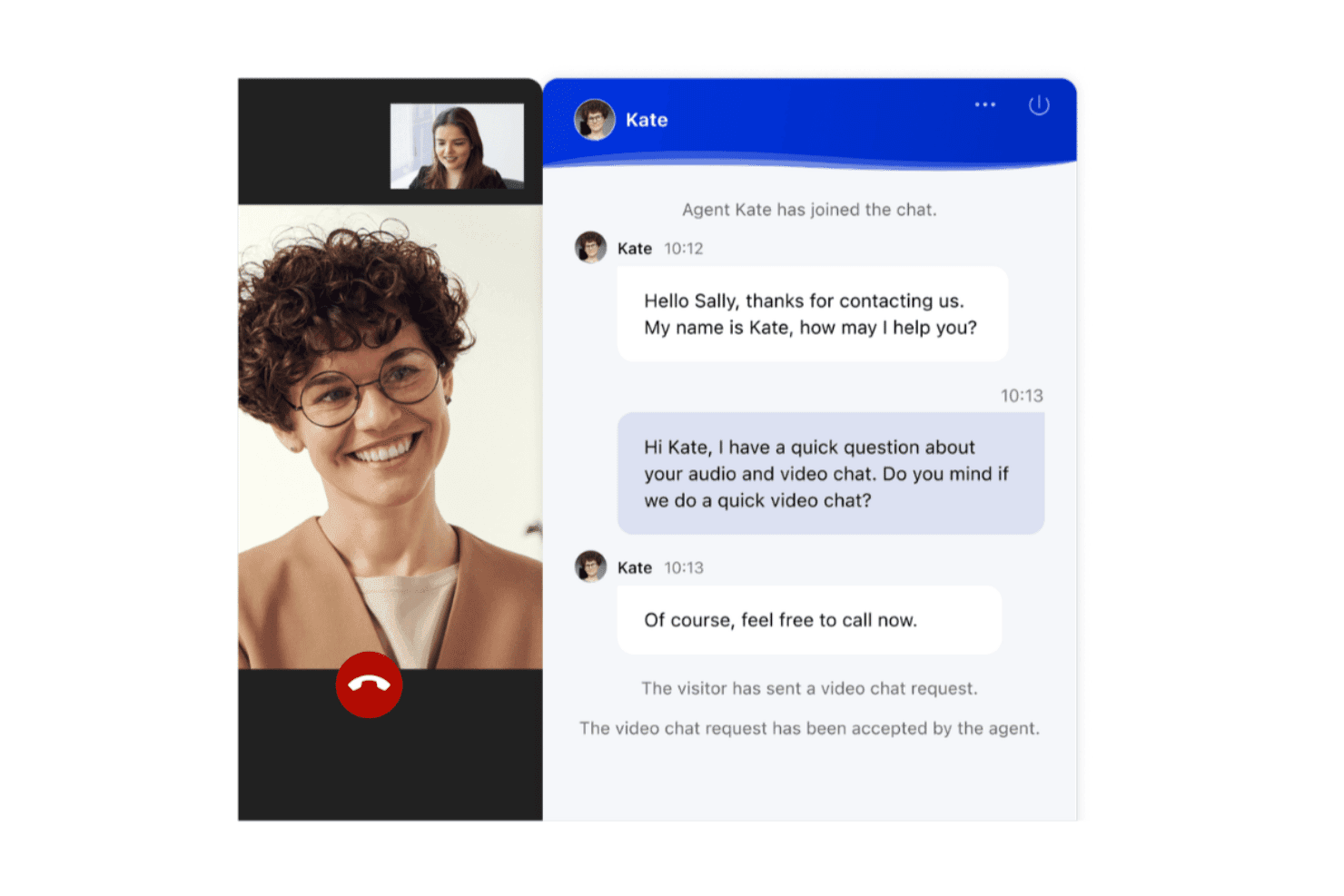
Comm100 supports live video and text chat between agents and visitors. Comm100 is an AI customer engagement platform for support teams in higher education, gaming, finance, healthcare, and government, where automated answers must be accurate, fully traceable, and deployable on-premises if required.
Who is Comm100 Best for?
Comm100 fits mid-size to enterprise support teams in regulated sectors like universities managing admissions, 24/7 iGaming operators, credit unions, healthcare providers, and public agencies needing HIPAA, PCI DSS, accessibility, or data residency compliance.
Why Comm100 Is a Good intercom alternatives
Comm100 earns a shortlist spot for unified communication channels and high answer accuracy. The AI Agent answers strictly from connected sources—such as URLs, policy files, SharePoint, Google Drive, or Confluence. The AI Agent, live chat, ticketing, and messaging work together across all digital messaging channels, keeping automated responses and escalation logic consistent regardless of entry point.
Comm100 Key Features
- AI Agent: Delivers NLP responses grounded in connected sources to guarantee accuracy.
- Custom actions: Configures the AI Agent to complete tasks like booking appointments or checking balances.
- On-premises deployment: Offers on-premise hosting to satisfy strict data residency regulations.
- Detailed reporting dashboard: Tracks resolution rates, agent response times, and CSAT in one view.
Comm100 Integrations
Comm100 offers native integrations with Salesforce, Zendesk, Shopify, Google Analytics, and Microsoft Dynamics 365. It also provides an API for custom integrations.
Pros and Cons
Pros:
- Covers Telegram, X, LINE, and WeChat natively.
- SOC 2 Type II, HIPAA, ISO 27001, and GDPR compliant
- Adapts tone from plain-text instructions
Cons:
- Answer quality depends on knowledge base quality.
- CRM integration mapping can require effort
Learn more about Comm100: Best for agentic AI support
- Free plan + 14-day trial + free demo available
- From $16/agent/month (billed annually)
Visit WebsiteCustomer Rating:4.6/5
SparrowDesk analyzes incoming tickets and generates suggested replies with contextual data from your knowledge sources. SparrowDesk is an AI-first customer service platform designed to bridge the gap between fast-paced live chat and formal help desk accountability. It serves as a central hub for support teams to manage email and chat without losing the historical context of the customer journey. This tool addresses the challenge of managing high ticket volumes, providing a user-friendly platform that can significantly reduce response times.
Why I Picked SparrowDesk
I chose SparrowDesk because it moves beyond traditional chatbots to offer an agentic AI solution. While most tools use AI to suggest answers or route tickets, SparrowDesk’s Luna engine functions as an autonomous member of your team that can execute multi-step tasks across your connected systems. Plus, I appreciate the easy handoffs to human agents, which ensure that complex issues are addressed with a personal touch. Additionally, the platform’s continuous learning from past interactions helps improve the quality of responses over time. As a result, it’s an ideal choice for businesses that want an AI capable of independently resolving complex workflows, like processing a refund or updating a subscription.
SparrowDesk Key Features
In addition to its strong automation capabilities, SparrowDesk offers several other features that make it a compelling choice:
- Omnichannel Communication: Manage email and chat interactions within a single inbox, simplifying your team’s workflow.
- Service Level Agreements (SLAs): Define and track service expectations to ensure consistent support quality.
- Customizable Views: Tailor your dashboard to display the most relevant information for your team’s needs.
- Multilingual Support: Cater to a diverse customer base by providing support in multiple languages.
SparrowDesk Integrations
Integrations include Attio, SurveySparrow, HubSpot, and Okta.
Pros and Cons
Pros:
- Offers a no-code workflow builder
- Automated handovers to human agents
- Transparent and predictable pricing
Cons:
- Limited sentiment analysis tools
- No native voice or phone support
Learn more about SparrowDesk: Best for conversation-based AI support pricing
- Free plan + free trial + free demo available
- From $150/month (billed annually)
Visit WebsiteCustomer Rating:4.5/5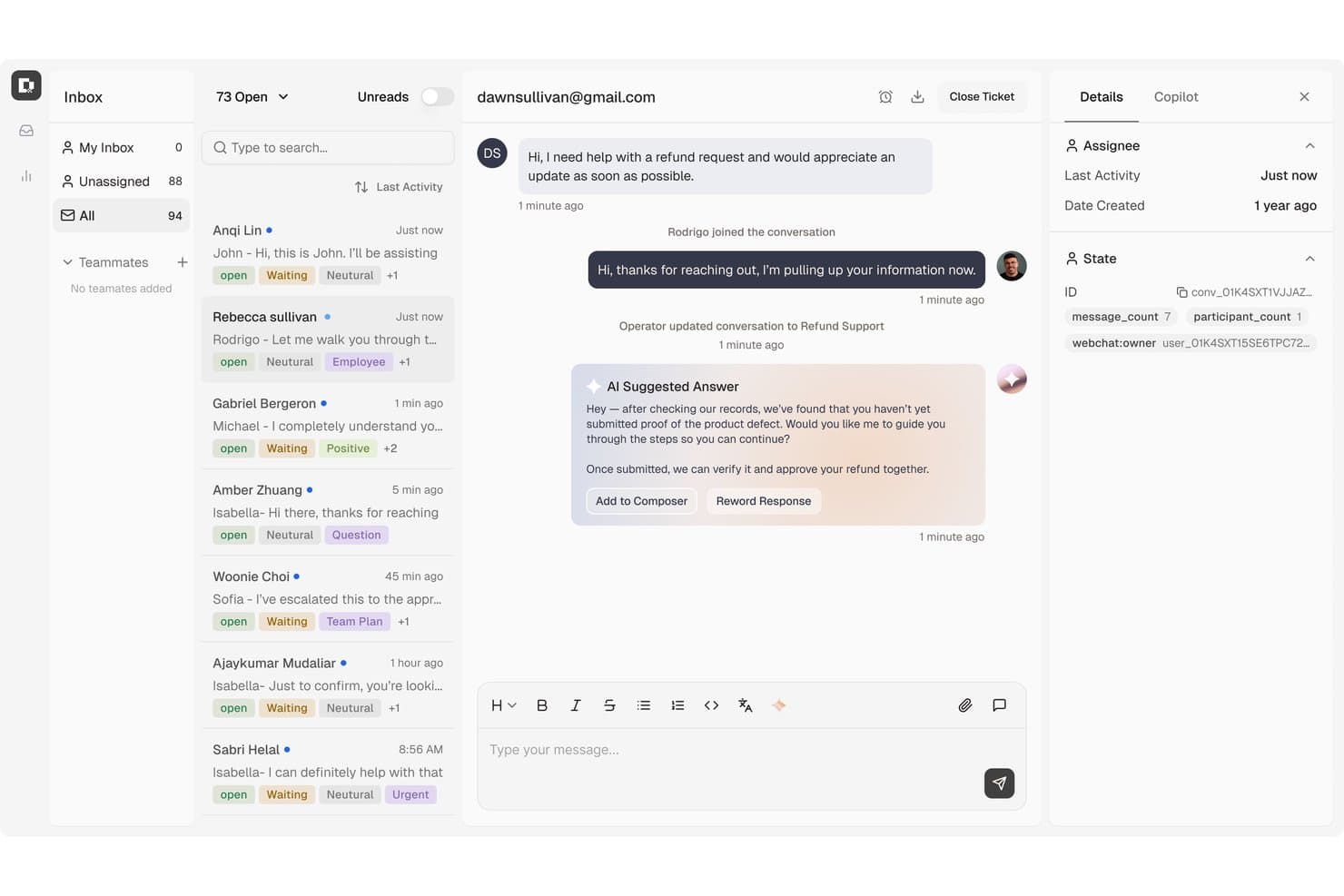
Botpress surfaces AI-suggested replies to speed up customer refund support. Botpress is a conversational AI platform that helps support teams answer routine questions, guide customers through self-service, and route complex issues to human agents.
Who Is Botpress Best For?
Support teams that want to build conversational AI agents to handle customer questions and guide users through self-service.
Why I Picked Botpress
I picked Botpress as an Intercom alternative for conversation-based AI support. Its agents can search configured knowledge bases to answer questions about your help content, then hand a conversation to a live agent when a customer needs more help.
Botpress Key Features
- Visual agent builder: Design agent behavior with a drag-and-drop interface.
- Integrations: Connect agents to helpdesk platforms, communication channels, and business tools.
- Analytics dashboard: Track users, sessions, messages, and conversation trends.
- Customizable Webchat: Embed a chat interface on your site and adjust its appearance.
Botpress Integrations
Botpress Hub offers integrations with HubSpot, Salesforce, Intercom, Freshchat, LiveChat, and Chatwoot, including options for handing conversations to human agents. Botpress also provides an API for custom integrations.
Pros and Cons
Pros:
- Visual flow controls support tailored service journeys
- Answers questions from configured support knowledge bases
- Routes unresolved AI conversations to human agents
Cons:
- Conversation analytics offer limited troubleshooting detail
- Complex workflows often require JavaScript expertise
Learn more about Botpress: Best for automated triage & sentiment analysis
- 7-day free trial + free demo available
- From $25/user/month (billed annually)
Visit WebsiteCustomer Rating:4.7/5
Hiver provides a user-friendly onboarding interface for new users. For businesses seeking a reliable alternative to Intercom, Hiver offers a compelling solution with its AI-driven customer service platform. Tailored for enterprises, mid-sized businesses, and startups, Hiver addresses the need for efficient email management and customer support. The platform enhances team productivity through features such as an omnichannel inbox and collaborative tools, making it ideal for sectors like technology, healthcare, and education.
Why I Picked Hiver
I picked Hiver because it excels at providing a streamlined omnichannel communication experience. Its AI-driven features, such as automated triage and sentiment analysis, directly address common challenges in customer support by optimizing response times and improving resolution rates. With these tools, your team can deliver faster and more efficient service, ensuring customer satisfaction remains high.
Hiver Key Features
In addition to its standout AI capabilities, I also found several other features beneficial for your team:
- Live Chat: Engage with customers in real-time, providing immediate support and enhancing user satisfaction.
- Workflow Automation: Automate repetitive tasks to free up your team’s time for more complex customer inquiries.
- Knowledge Base: Create a centralized repository of information that customers can access for self-service support.
- Analytics: Gain insights into your team’s performance and customer interactions to make data-driven improvements.
Hiver Integrations
Integrations include Salesforce, HubSpot, Shopify, Slack, Mailchimp, Jira, Trello, Asana, QuickBooks, and Zendesk.
Pros and Cons
Pros:
- Omnichannel inbox centralizes customer communication
- AI tools accelerate response drafting
- Workflow automation reduces manual tasks
Cons:
- Limited integrations restrict platform flexibility
- Heavy reliance on Google Workspace
Learn more about Hiver: Best for customer-first service
- Free plan + 15-day free trial + free demo available
- From $25/user/month (billed annually)
Visit WebsiteCustomer Rating:4.5/5
Help Scout offers email management, live chat, and self-service tools for teams. Help Scout is a customer service platform designed for teams that value personalized customer interactions. It supports businesses by providing tools for email management, live chat, and customer self-service.
Why it's a good Intercom alternative: Help Scout focuses on a customer-first experience with features like shared inboxes and customer profiles to boost team collaboration. Its simple interface makes it easy for your team to manage conversations without feeling overwhelmed. Using the software’s customer-centric approach, your team can provide empathetic and effective support, making it a solid alternative to Intercom.
Standout features & integrations:
Features include a shared inbox for team collaboration, knowledge base integration, customer satisfaction ratings, automated workflows, email integration, live chat support, beacon functionality for proactive support, and reporting and analytics.
Integrations include Slack, Salesforce, HubSpot, Jira, Trello, Mailchimp, Shopify, Magento, WooCommerce, and Google Workspace.
Pros and Cons
Pros:
- Customer-first approach
- Supports team collaboration
- Effective email management
Cons:
- Limited customization options
- Basic reporting features
Learn more about Help Scout: Best for intelligent ticket routing
- 14-day free trial available
- From $29/user/month (billed annually)
Visit WebsiteCustomer Rating:4.4/5
Freshdesk centralizes your tickets from multiple channels and provides contact details to help improve your interactions. Freshdesk is an AI-driven customer service platform designed to streamline support processes and enhance user experience, making it an appealing choice for small to medium-sized businesses. It addresses challenges like complex customer interactions and the need for quicker response times, offering a centralized workspace and automation tools.
Why I Picked Freshdesk
I picked Freshdesk as an Intercom alternative because of its strong focus on automation and AI-driven insights, which are crucial for teams looking to enhance efficiency and customer satisfaction. The platform's automated ticketing system intelligently routes queries, ensuring that your team can focus on resolving issues rather than managing them.
Additionally, the integration of Freddy AI provides real-time insights and suggestions, empowering your support team to make informed decisions swiftly.
Freshdesk Key Features
Aside from its automation and AI capabilities, Freshdesk offers several features that enhance its functionality as an Intercom alternative.
- Omnichannel Support: This feature allows you to manage customer interactions across multiple platforms, including email, chat, phone, and social media, all from a single interface.
- Customizable Ticketing System: You can tailor the ticketing process to fit your workflow, ensuring that your team operates in the most efficient way possible.
- Team Collaboration Tools: Freshdesk provides tools for internal team communication, making it easier to collaborate on complex issues and enhance overall productivity.
- Self-Service Portal: This feature empowers customers to find answers to common queries through a knowledge base, reducing the load on your support team.
Freshdesk Integrations
Integrations include Slack, Microsoft Teams, Shopify, Playvox, Freshservice, Freshchat, Freshcaller, Freshsales, Freshteam, and Freshsurvey.
Pros and Cons
Pros:
- AI automation improves response times and reduces workload.
- Omnichannel support integrates various communication platforms.
- Customizable dashboards provide real-time support metrics.
Cons:
- Mobile app lacks some advanced features available on desktop, limiting on-the-go support.
- Lacks integrated calling solutions, requiring separate tools.
Learn more about Freshdesk: Best for collaborative shared inbox replies
- 30-day free trial available
- From $14/user/month (billed annually)
Visit WebsiteCustomer Rating:4.8/5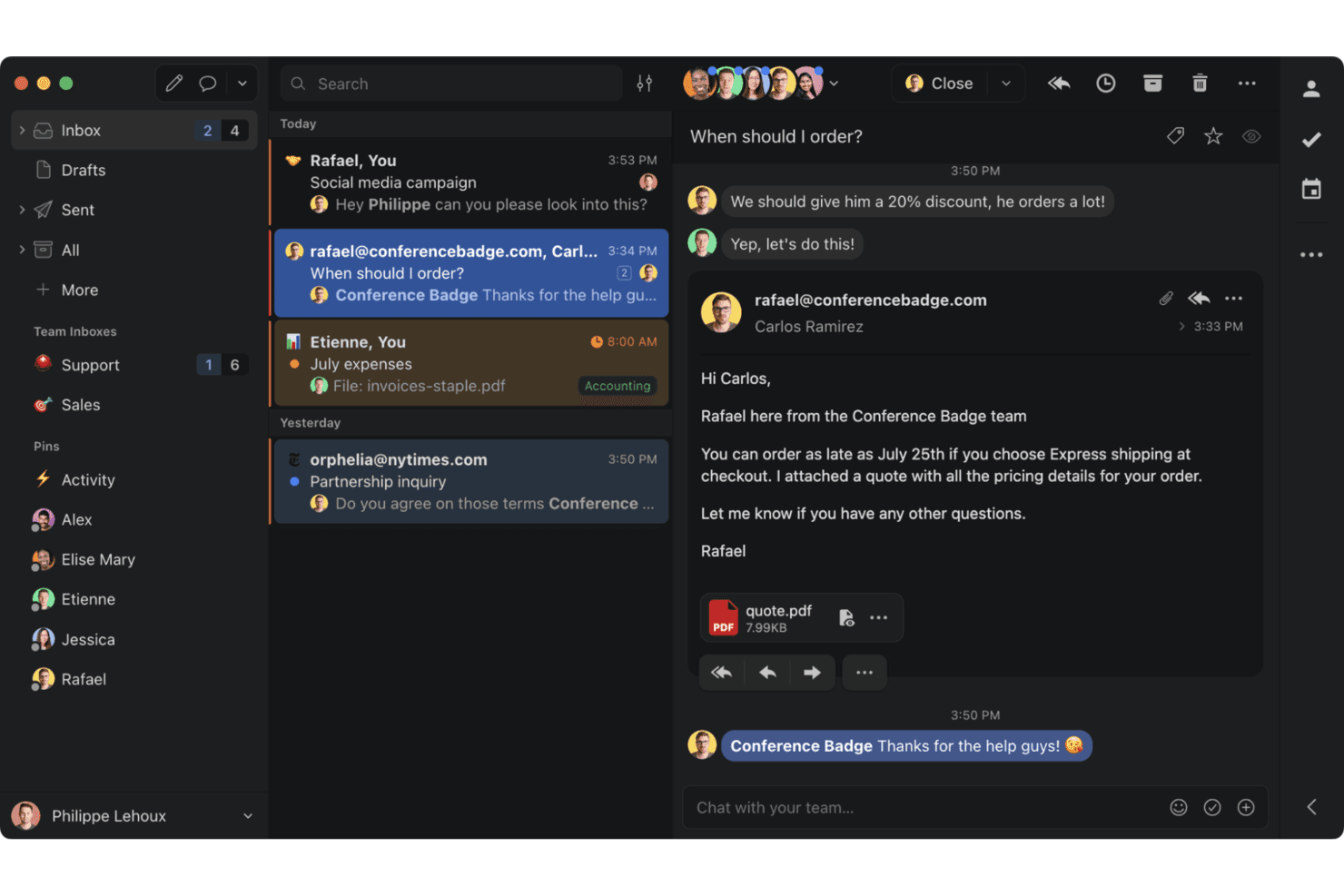
Missive is a team email platform for managing shared inboxes and tasks efficiently. Missive is a shared inbox and team communication platform designed for support teams that need to handle customer conversations together, track threads, and keep everyone aligned in fast-paced environments.
Who Is Missive Best For?
Missive suits support and service teams that need real-time collaboration while managing shared inboxes across multiple communication channels.
Why Missive Is a Good Best Intercom Alternatives
I like Missive because my team can draft and edit replies together in real time, see full message history across email, chat, and SMS channels, and assign conversations or escalate threads without losing visibility. This keeps everyone aligned and speeds up our customer response workflow.
Missive Key Features
- Channel integrations: Connects shared inboxes to email, SMS, Facebook, Twitter, and other channels in one view.
- Roles and permissions: Lets admins control access and visibility for individual team members and groups.
- Internal chat and comments: Allows teammates to chat and leave side-comments directly within customer conversations.
- Missive MCP Server: Connect external AI tools (like Claude or ChatGPT) to query support threads, check calendars, and draft replies—while keeping agent review required before sending.
- Rules and automation: Supports custom workflows using automation rules for tagging, assignment, and routing messages.
Missive Integrations
Missive offers native integrations with Gmail, Google Workspace, Microsoft 365, Outlook, Twitter, Facebook, Twilio, and Dropbox. It connects with Zapier, provides an API for custom integrations, and includes its new MCP Server on Productive and Business plans (requires admin activation).
Pros and Cons
Pros:
- Clear roles and conversation assignments
- Internal chat keeps discussions off email
- Real-time team collaboration on replies
Cons:
- No built-in knowledge base or help center
- Workflow automation less flexible than competitors
Learn more about Missive: Best for Microsoft Teams integration
- Free plan + 21-day trial + demo available
- From $12/user/month (billed annually)
Visit WebsiteCustomer Rating:4.8/5
Desk365 shows and manages support tickets directly inside Microsoft Teams. Desk365 is an AI-powered helpdesk solution tailored for businesses seeking an alternative to Intercom. Its integration with Microsoft Teams and multi-channel ticketing system makes it an appealing choice for teams aiming to enhance productivity and customer engagement. By automating workflows and providing a customizable knowledge base, Desk365 addresses the challenges of efficiently managing support across industries.
Why I Picked Desk365
I picked Desk365 for its unique integration with Microsoft Teams, which allows for streamlined communication and ticket management directly within the platform. This feature is particularly beneficial for teams already using Microsoft 365, providing a cohesive experience without the need to switch between multiple tools. Additionally, Desk365's AI-driven automation capabilities reduce the workload on support agents by handling repetitive tasks and generating knowledge base content, making it a compelling choice for businesses looking to optimize their support processes.
Desk365 Key Features
In addition to its seamless Microsoft Teams integration, Desk365 offers:
- Omni-Channel Ticketing System: Allows you to manage support tickets raised via email, support portal, web widget, and web forms.
- Customizable Knowledge Base: Enables your team to create and manage support articles tailored to your business needs.
- Asset Management: Provides tools for tracking and managing company assets, ensuring efficient resource allocation.
- Enterprise-Grade Security: Ensures data protection with SOC 2 Type 2 certification and GDPR compliance.
Desk365 Integrations
Integrations include Microsoft Teams, Microsoft 365, Azure Active Directory, Power Automate, and Microsoft Outlook. Desk365 also supports custom integrations through APIs and webhooks.
Pros and Cons
Pros:
- Native Microsoft Teams integration enables ticket management directly within Teams
- Workflow customization allows teams to configure ticket fields and routing rules
- Customizable ticket workflows support different operational support processes
Cons:
- Reporting capabilities may be limited for teams needing advanced analytics
- Admin portal theme customization options are limited
Learn more about Desk365: Best for unlimited contacts
- 14-day free trial available
- From $12/user/month (billed annually)
Visit WebsiteCustomer Rating:4.8/5
HelpCrunch offers live chat, email automation, and a knowledge base for teams. HelpCrunch is a customer communication tool designed for support, marketing automation, and sales teams. It offers live chat, email automation, and a knowledge base.
Why it's a good Intercom alternative: HelpCrunch lets you manage unlimited contacts on all plans, which works well for growing businesses. Plus, you can customize the chat widget to match your brand’s look and feel. It also includes automated messaging and email follow-ups to boost customer engagement. With its flexible and customizable features, HelpCrunch gives your team what you need for effective communication.
Standout features & integrations:
Features include live chat, chatbot, knowledge base, email marketing, pop-ups, shared inbox, mobile apps and SDK, customizable chat widget, auto messages, help desk, reports and analytics, integrations, and multilingual support.
Integrations include Slack, Zapier, WordPress, Shopify, Wix, Pipedrive, HubSpot, Squarespace, Magento, and Mailchimp.
Pros and Cons
Pros:
- Customizable chat widget
- Supports multilingual communication
- Unlimited contacts on all plans
Cons:
- Limited advanced features
- Limited reporting capabilities
Learn more about HelpCrunch:

GoSquared offers real-time analytics and communication tools for customer engagement. GoSquared is a customer engagement platform providing real-time analytics and communication tools. It's ideal for businesses that want to better understand and engage their website visitors.
Why it's a good Intercom alternative: GoSquared gives you real-time website analytics, keeping your team informed about visitor behavior as it happens. With features like live chat and visitor timelines, your team can engage with customers at the right moment. Additionally, its easy-to-read dashboards offer quick insights into how visitors interact with your site, helping you make decisions almost instantly.
Standout features & integrations:
Features include real-time web analytics, live chat, customer data hub, marketing automation, intuitive dashboards, campaign tracking, event tracking, device usage insights, engagement metrics, daily email reports, integrations with third-party tools, GDPR compliance, API access, customizable alerts, and team collaboration features.
Integrations include Slack, Zapier, WordPress, Google Analytics, Salesforce, HubSpot, Shopify, Drift, Clearbit, and Stripe.
Pros and Cons
Pros:
- Real-time data insights
- Easy-to-use dashboards
- Enhances visitor engagement
Cons:
- Limited customization options
- May need additional setup time
Learn more about GoSquared:
Diğer Intercom Alternatifleri
Kısa listeme giremeyen ancak yine de göz atmaya değer bazı ek Intercom alternatifleri şunlardır:
- 11CrispBest for centralizing messages
- 12KustomerBest for AI-driven CRM
- 13Assembled AIBest for machine learning-based forecasting
- 14BoldDeskBest for budget-friendly plans
- 15DevRevBest for unifying support and dev
- 16ZendeskBest for comprehensive customer service
- 17UserpilotBest for user engagement tools
- 18SAAS FirstBest for omnichannel communication
- 19JustReplyBest for Slack-centric teams
- 20LiveAgentBest for unified ticket management
- 21UserGuidingBest for an AI assistant
- 22TidioBest AI support agent
- 23Zoho DeskBest for data privacy focus
- 24Customer.ioBest for targeted messaging campaigns
- 25FreshdeskBest for multichannel support
- 26GleapBest for in-app bug reporting
- 27Customerly Best for email marketing integration
How I Evaluate Intercom Alternatives
I split my evaluation into three parts, with core functionality weighted most: can the tool support real-time chat across channels and centralize conversations into a shared team inbox? Then I look for standout features like custom bot workflow builders or transparent seat-free pricing. Finally, I consider onboarding support and integration depth with tools like Salesforce or Slack.
Core Functionality (Table Stakes For This List)
When I'm selecting tools for my list, I score each one on a scale from 0 (does not offer the functionality) to 5 (excels in this area) for each core functionality listed below. I then convert the total into a percentage to help assess each tool's overall fit, with extra weight on any functionalities I’ve deemed essential.
- Live Chat & Messaging (Essential): I look for reliable website and in-app chat, with routing and channel support that fit how customers contact your team.
- Shared Team Inbox (Essential): I assess whether agents can assign, tag, and discuss conversations from multiple channels in one place, including during busy handoffs.
- Chatbots & Automation: I consider how bots answer common questions, use rules or AI to route requests, and hand off unresolved issues to an agent.
- Knowledge Base: I look for searchable help content that customers can reach from chat, and that bots can use to answer routine questions.
- Customer Data & Segmentation: I check whether teams can use customer attributes and behavior to prioritize support or target relevant messages.
- Outbound Messaging: I evaluate whether teams can trigger or schedule messages around actions such as onboarding steps, feature launches, or product announcements.
Once I have a list of tools that meet the criteria, I consider what sets each platform apart.
Differentiating Factors (What Sets Vendors Apart)
Here's how I compare and contrast different vendors:
Standout Features
I look for visual, no-code workflow builders that let non-technical teams design custom bot actions—like auto-routing refund requests or escalating billing issues—without waiting on a developer. Transparent, seat-free pricing also matters. Usage- or resolution-based models help growing teams avoid the per-agent cost spikes common with Intercom. I check for co-browsing and session replay too, since sharing a customer's live screen cuts troubleshooting time on complex issues like checkout errors or account setup.
Beyond Features
I check whether pricing scales with conversation volume or agent count, since a plan that looks affordable at five seats can double in cost once you grow past twenty. Migration tooling matters too—moving contacts, macros, and conversation history out of Intercom is painful without dedicated import support or a CSM guiding the cutover. I also evaluate native integrations with CRMs like Salesforce and HubSpot, because agents who have to tab between systems lose context mid-conversation.
Neden Intercom Alternatifi Aramalısınız?
Intercom değerli bir yazılım olsa da bazı kullanıcıların alternatif çözümler aramasının çeşitli nedenleri vardır. Aşağıdaki nedenlerden biri veya daha fazlası için bir Intercom alternatifi arıyor olabilirsiniz…
- Daha düşük fiyatlandırma seçeneklerine ihtiyacınız vardır
- Daha fazla özelleştirme seçeneğine ihtiyaç duyarsınız
- Daha iyi entegrasyon seçenekleri istersiniz
- Daha iyi ölçeklenebilirlik arıyorsunuzdur
- Gelişmiş veri gizliliği özelliklerine ihtiyacınız vardır
Bunlardan herhangi biri size uyuyorsa doğru yere geldiniz. Listemde, Intercom alternatifi çözümler arayan ekipler için daha uygun olan çeşitli müşteri hizmetleri yazılımı seçenekleri yer alıyor.
Intercom Alternatifleri İçin Temel Özellikler
Alternatif çözümlerin neler sunduğunu karşılaştırmanıza yardımcı olmak için Intercom'un temel özelliklerinden bazıları şunlardır:
- AI Sohbet Robotları ve Temsilcileri: Müşterileriniz için anında destek sağlayan temsilciler sunarak ekip üyelerinizin daha karmaşık görevlere odaklanmasını sağlar.
- Çok Kanallı ve Çok Dilli Destek: Çeşitli kanallardaki görüşmeleri tek bir gelen kutusunda bir araya getirerek ekibinizin bunları verimli bir şekilde yönetmesine yardımcı olur.
- Yardım Merkezi: Destek içerikleri için bir platform sunarak müşterilerinizin kanallar genelinde ihtiyaç duydukları yardımı kolayca bulmasını sağlar.
- AI Yardımcı Pilot: Uzman yanıtlar oluşturarak temsilcilerinize yardımcı olur, yanıt sürelerini ve müşteri deneyimlerini iyileştirir.
- AI Destekli Gelen Kutusu: Verimlilik ve iş birliği için tasarlanan bu ortak gelen kutusu, ekibinizin verimliliğini artırır.
- Talep Yönetim Sistemi: Sorunların çözümünü kolaylaştırır ve bağlamı koruyarak ekibinizin müşteri sorunlarının takibini kaybetmemesini sağlar.
- Telefon Desteği: Ekibinizin sorunları etkili bir şekilde gidermesine yardımcı olmak için arama, video ve ekran paylaşımı özellikleri sunar.
- Raporlama Araçları: Ekibinizin destek operasyonlarını takip etmesine yardımcı olmak için gerçek zamanlı içgörüler ve özelleştirilebilir raporlar sunar.
- İş Akışları: Kod gerektirmeyen görsel bir oluşturucuyla tekrarlayan görevleri otomatikleştirerek ekibinizin zamanını serbest bırakır.
- Bilgi Merkezi: Müşterileriniz için AI ve self servis seçeneklerini desteklemek üzere içerik yönetimini merkezileştirir.