

Bir müşteri deneyimi yöneticisi olarak memnuniyeti artırma ve maliyetleri azaltma taleplerini sürekli olarak dengelemek zorundasınız. Kaynakları verimli bir şekilde yönetirken müşteri beklentilerini karşılamak kolay değildir. Müşteri self servis yazılımları tam da bu noktada devreye girer. Bu yazılımlar, müşterilerinizin yanıtları kendi başlarına bulmalarını sağlayarak ekibinizin zamanını daha karmaşık sorunlara ayırmasına olanak tanır.
İhtiyaçlarınıza en uygun seçeneği bulmanıza yardımcı olmak için çeşitli yazılım çözümlerini test edip inceledim. Deneyimlerime göre doğru araç önemli bir fark yaratabilir. En iyi seçimlerime ilişkin tarafsız incelemelerimi paylaşacak ve bunların özel zorluklarınızı nasıl ele alabileceğine odaklanacağım. Ekibinizi gerçekten destekleyebilecek ve müşteri hizmetleri stratejinizi geliştirebilecek seçenekleri birlikte inceleyelim.
Why Trust Our Software Recommendations
6,700+
Reviews
20
Industry experts
16+
Evaluation factors
14
Years
Our team has been testing and reviewing software since 2012. As CX leaders ourselves, we know how difficult—and important—it is to choose the right software.
For this guide, we evaluated tools using hands-on testing and independent research, scoring tools using our selection criteria.
Our reviews reflect our human editorial judgment, not a sales pitch.
 Gui DrusinaCreative Director
 Tim FisherVP of AI
Müşteri Self Servis Yazılımları Karşılaştırma Tablosu
Bu karşılaştırma tablosu, en iyi müşteri self servis yazılımı seçimlerimin fiyatlandırma ayrıntılarını özetler:
Sorted by: Default
| Tool | Starting Price | Website | |
|---|---|---|---|
Best for conversational AI-driven ticket deflection | 4.5 out of 5 | $150/month Free plan + free trial + free demo available | Website |
Best with real-time chat support | 4.5 out of 5 | $25/user/month Free plan + 15-day free trial + free demo available | Website |
Best with multilingual AI agent support | 4.4 out of 5 | $32/month 7-day free trial + demo available | Website |
Best with AI-powered agent coaching capabilities | 5.0 out of 5 | Pricing upon request Free demo available | Website |
Best for AI-fueled, chat-based support | 4.8 out of 5 | $12/user/month 14-day free trial available | Website |
Best for small business needs | 4.8 out of 5 | $19/month 14-day free trial | Website |
Best for AI-based multi-channel support | 4.7 out of 5 | $26.1/user/month 14-day free trial + free demo available | Website |
Best for AI-managed customer journeys | 4.5 out of 5 | Pricing upon request Free demo available | Website |
Best for AI-backed, developer-focused teams | 4.5 out of 5 | Pricing upon request Free plan + free demo available | Website |
Best for AI-guided CRM and customer engagement | 4.4 out of 5 | $20/user/month 14-day free trial | Website |


En İyi Müşteri Self Servis Yazılımları İncelemesi
Aşağıda, kısa listeme giren en iyi müşteri self servis yazılımlarına ilişkin ayrıntılı özetlerimi bulabilirsiniz. İncelemelerim, her aracın temel özelliklerini, artılarını ve eksilerini, entegrasyonlarını ve ideal kullanım alanlarını ayrıntılı şekilde ele alarak sizin için en uygun seçeneği bulmanıza yardımcı olur.
 Best for conversational AI-driven ticket deflection
- Free plan + free trial + free demo available
- From $150/month (billed annually)
Visit WebsiteCustomer Rating:4.5/5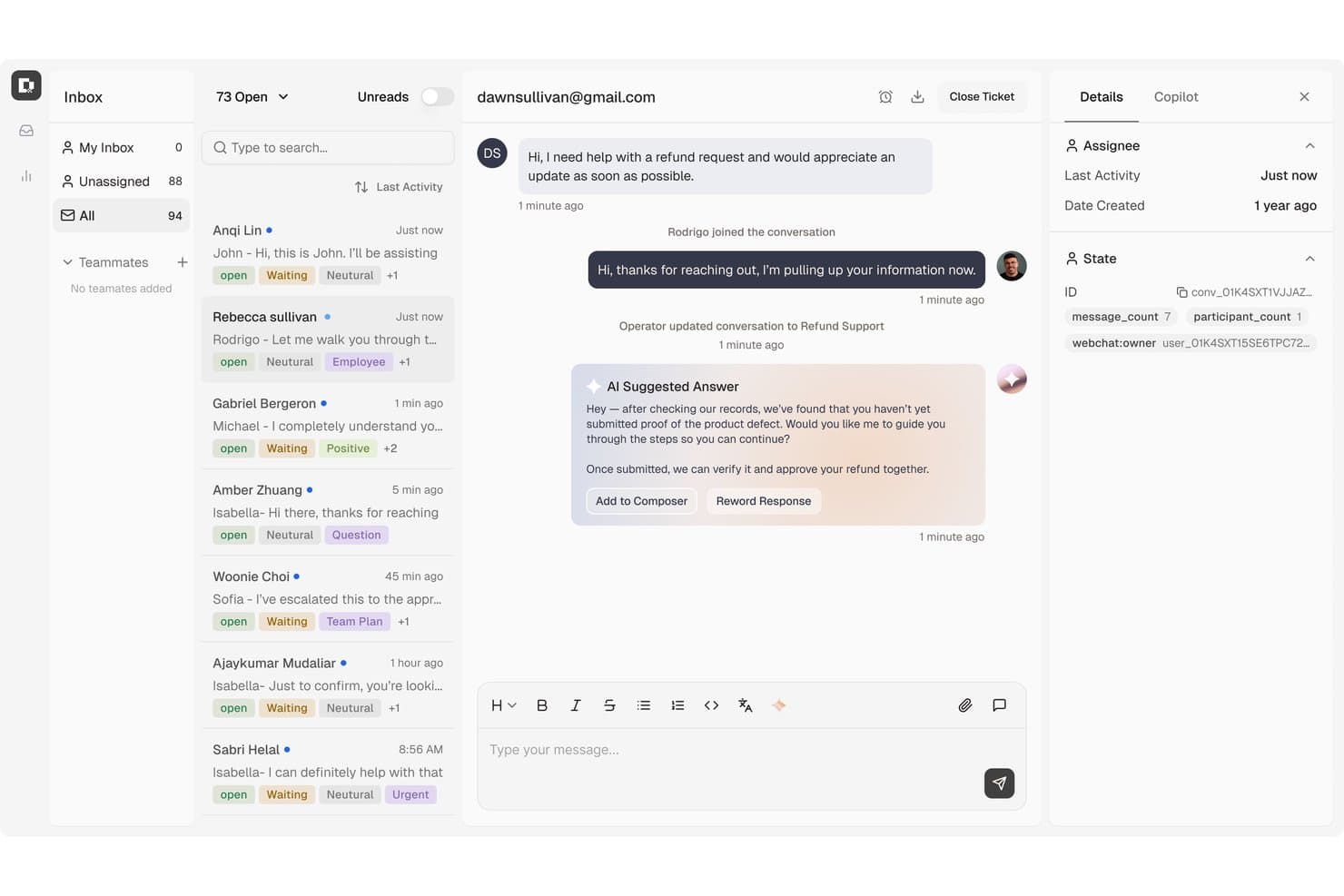
Botpress surfaces AI-suggested replies to speed up customer refund support. Botpress is an AI agent builder that handles customer self-service through conversational agents, a public Help Center, and a built-in helpdesk with knowledge-base-referencing ticket deflection across web, WhatsApp, email, and other messaging channels.
Who Is Botpress Best For?
Botpress is a strong fit for technical teams that want to build conversational AI agents to handle customer self-service across chat, messaging, and voice channels.
Why I Picked Botpress
I've included Botpress in my top picks because it handles ticket deflection through actual conversation rather than static FAQ pages. Its AI agents pull directly from connected Knowledge Bases to answer policy questions, order status requests, and password resets across webchat, WhatsApp, and email, without routing anything to a human. I also like that Botpress Desk surfaces knowledge-gap reports, so you can see exactly where your AI is falling short and fill those gaps before they become repeat tickets.
Botpress Key Features
- Multilingual AI responses: Support agents automatically detect and reply in the customer's language across all connected channels.
- Multi-channel agent deployment: Publish AI agents to Webchat, WhatsApp, Telegram, Instagram, Messenger, Slack, and voice via Twilio from a single build.
- Conversation Insights and sentiment analysis: View conversation analytics, sentiment trends, and AI-generated summaries to understand how customers are interacting with your agents.
- Escalation and handoff with context: When a conversation needs a human, Botpress transfers it with full history, notes, and an AI-generated summary already attached.
Botpress Integrations
Botpress connects to Zendesk and Intercom through Botpress Desk, while its Zendesk integration syncs knowledge-base content and manages tickets. It also offers Chat, Admin, Files, Tables, and Runtime APIs, plus marketplace integrations including Salesforce, HubSpot, Shopify, and Slack.
Pros and Cons
Pros:
- Conversation reports reveal interaction patterns
- Automates repetitive customer support questions
- Answers draw from connected knowledge bases
Cons:
- Adding knowledge bases can change results
- Free reports lack custom date ranges
Learn more about Botpress: Best with real-time chat support
- Free plan + 15-day free trial + free demo available
- From $25/user/month (billed annually)
Visit WebsiteCustomer Rating:4.5/5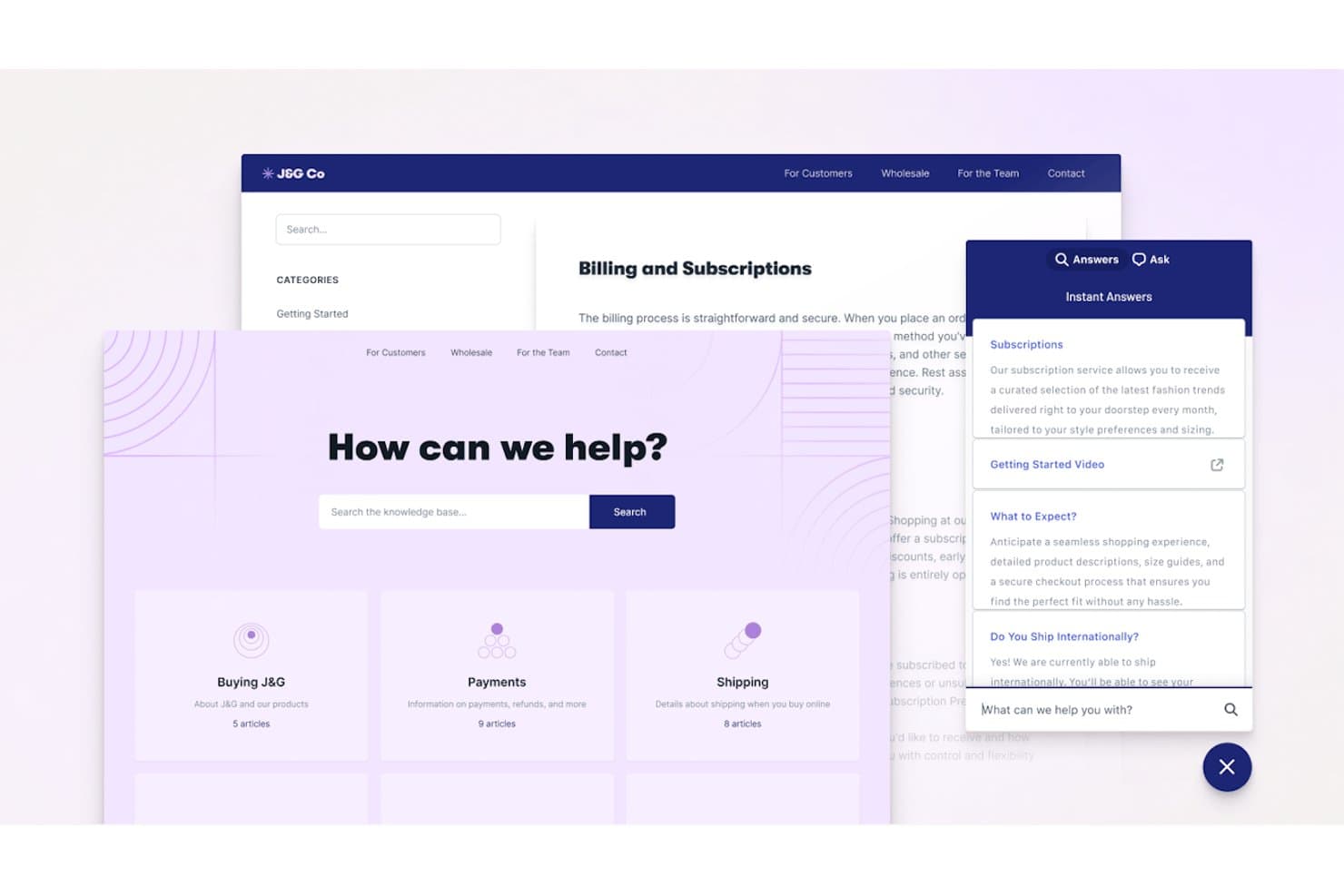
Help Scout offers a knowledge base and AI-powered instant answers widget to help customers self-serve with subscriptions, shipping, and billing topics. Help Scout is a customer support and self-service platform that combines a shared inbox, an embeddable knowledge base widget, Docs (help center), and an AI-powered chatbot for automated customer query resolution.
Who Is Help Scout Best For?
Help Scout is a strong fit for SMB and mid-market SaaS teams that want self-service and live chat support managed from a single, straightforward platform.
Why I Picked Help Scout
I picked Help Scout as one of the best because its Beacon widget blends real-time chat and self-service in a way I find genuinely smart. Before a customer types a single message, Beacon proactively surfaces relevant Docs articles. Live chat only appears when agents are online, so customers never start a conversation that goes unanswered. AI Answers handles the rest autonomously, resolving questions directly from your knowledge base without agent involvement.
Help Scout Key Features
- Docs knowledge base: Build unlimited knowledge bases with categories, custom branding, and powerful search.
- Workflows automation: Set up rules to automatically route, tag, or assign conversations based on triggers you define.
- Multi-channel inbox: Manage customer messages from email, WhatsApp, Instagram, Messenger, SMS, and voice in one shared workspace.
- In-app messaging: Send targeted announcements, onboarding tips, and satisfaction surveys directly inside your product or website.
Help Scout Integrations
Help Scout offers native integrations with Salesforce, HubSpot, Slack, Jira, Shopify, Mailchimp, Aircall, Google Workspace, Trello, and Zapier. An API is available for custom integrations.
Pros and Cons
Pros:
- Docs is fast to build and publish
- AI Answers resolves tickets without agent involvement
- Beacon surfaces help articles before chat opens
Cons:
- Knowledge base lacks native multi-language capabilities
- Deflection analytics are basic compared to competitors
Learn more about Help Scout: Best with multilingual AI agent support
- 7-day free trial + demo available
- From $32/month (billed annually)
Visit WebsiteCustomer Rating:4.4/5
Chatbase homepage highlighting its AI agent builder for creating and deploying automated customer support experiences. Chatbase is an AI chatbot platform designed for businesses and support teams who want to automate customer self service, reduce repetitive inquiries, and deliver instant, accurate answers across digital channels.
Who Is Chatbase Best For?
Chatbase suits support teams and businesses that want to automate customer interactions and provide instant answers across multiple digital channels.
Why I Picked Chatbase
I picked Chatbase as one of the best because I can train its AI agents on my own content and have them respond in over 95 languages. My team uses Chatbase to support customers in their preferred language, which is especially useful for global audiences. I also like that the platform automatically detects the user's language and switches responses accordingly.
Chatbase Key Features
- Custom chatbot builder: Create AI chatbots tailored to your brand and knowledge base.
- File and URL upload: Train bots using PDFs, text files, or website URLs for accurate responses.
- Widget customization: Adjust the look and feel of the chat widget to match your site.
- Conversation analytics: Track user interactions and chatbot performance with built-in analytics tools.
Chatbase Integrations
Integrations include Make, Zendesk, Notion, Slack, Stripe, Salesforce, Cal.com, Calendly, WhatsApp, and Messenger. An API is also available for custom integrations.
Pros and Cons
Pros:
- Enables direct integration with popular business tools
- Provides detailed analytics on chatbot conversations
- Allows training bots with custom files and URLs
Cons:
- Branding removal only on higher-tier plans
- Limited advanced workflow automation options
Learn more about Chatbase: Best with AI-powered agent coaching capabilities
- Free demo available
- Pricing upon request
Visit WebsiteCustomer Rating:5/5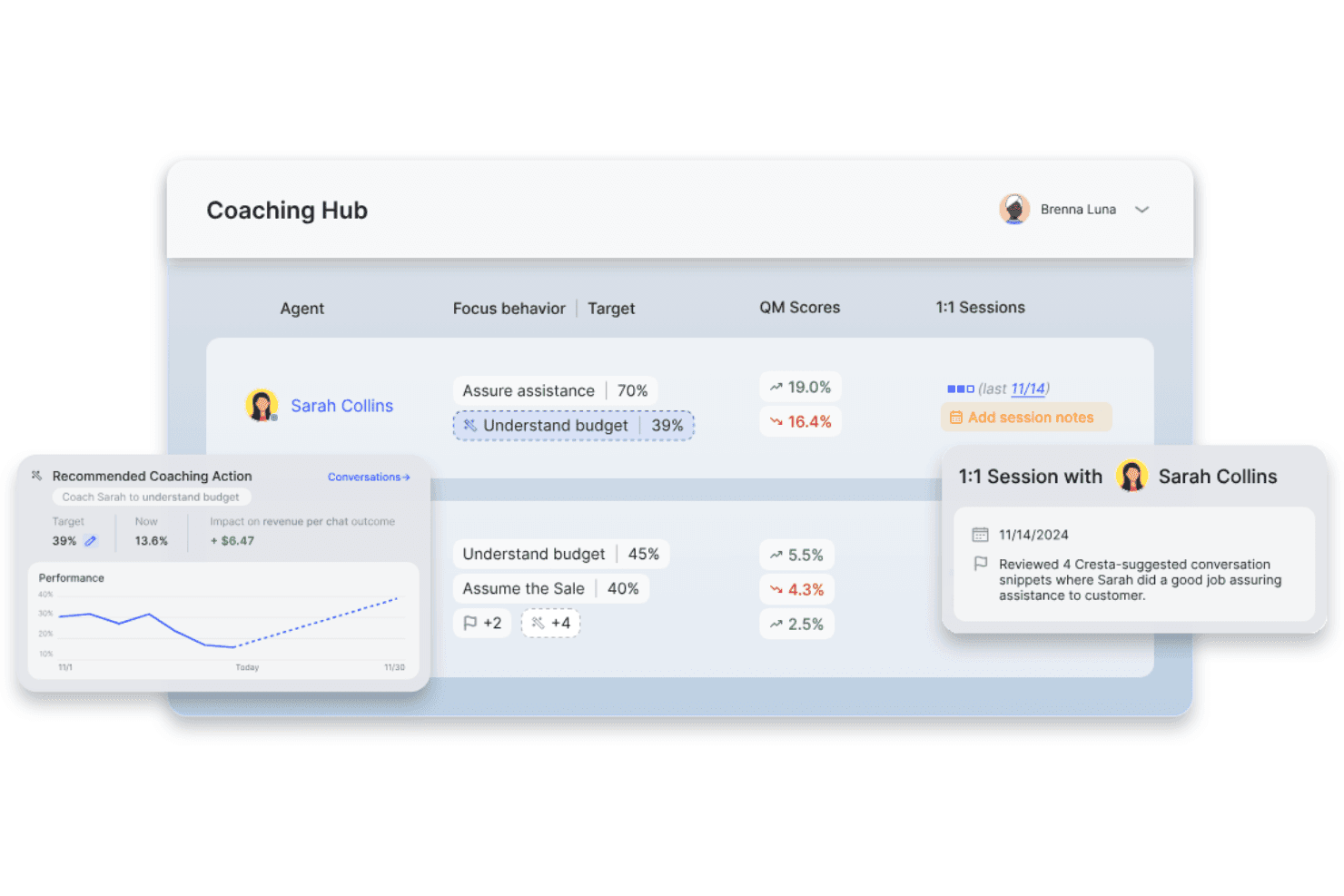
Cresta displays a virtual call center coaching hub with agent performance metrics, coaching recommendations, and quality management scores. Cresta is an AI-powered customer self-service platform that combines conversational AI agents, enterprise knowledge search, and intelligent automation to help businesses resolve customer inquiries across voice and digital channels.
Who Is Cresta Best For?
Cresta suits enterprise contact centers and customer support teams looking to optimize large-scale, omnichannel service operations with AI-powered automation.
Why I Picked Cresta
I picked Cresta as one of the best because my team benefits from live AI-powered agent coaching capabilities that suggest responses in real time, surface knowledge, and help us drive measurable ticket deflection across channels.
Cresta Key Features
- Omnichannel deployment: Connects with voice, chat, SMS, WhatsApp, and web channels for unified support automation.
- Knowledge Agent integration: AI searches and surfaces relevant knowledge base content in real time during conversations.
- Advanced analytics dashboard: Tracks ticket deflection rates, customer interactions, and performance insights across channels.
- CRM and CCaaS integrations: Seamlessly connects with Salesforce, Zendesk, AWS Connect, and other enterprise platforms.
Cresta Integrations
Cresta offers native integrations with Salesforce, Twilio, Pipedrive, BigCommerce, Five9, Zendesk, and more. An API is available for custom integrations.
Pros and Cons
Pros:
- AI agent containment across channels
- Advanced conversational analytics and insights
- Real-time agent coaching from AI
Cons:
- Limited knowledge base authoring features
- No branded customer self-service portal
Learn more about Cresta: Best for AI-fueled, chat-based support
- 14-day free trial available
- From $12/user/month (billed annually)
Visit WebsiteCustomer Rating:4.8/5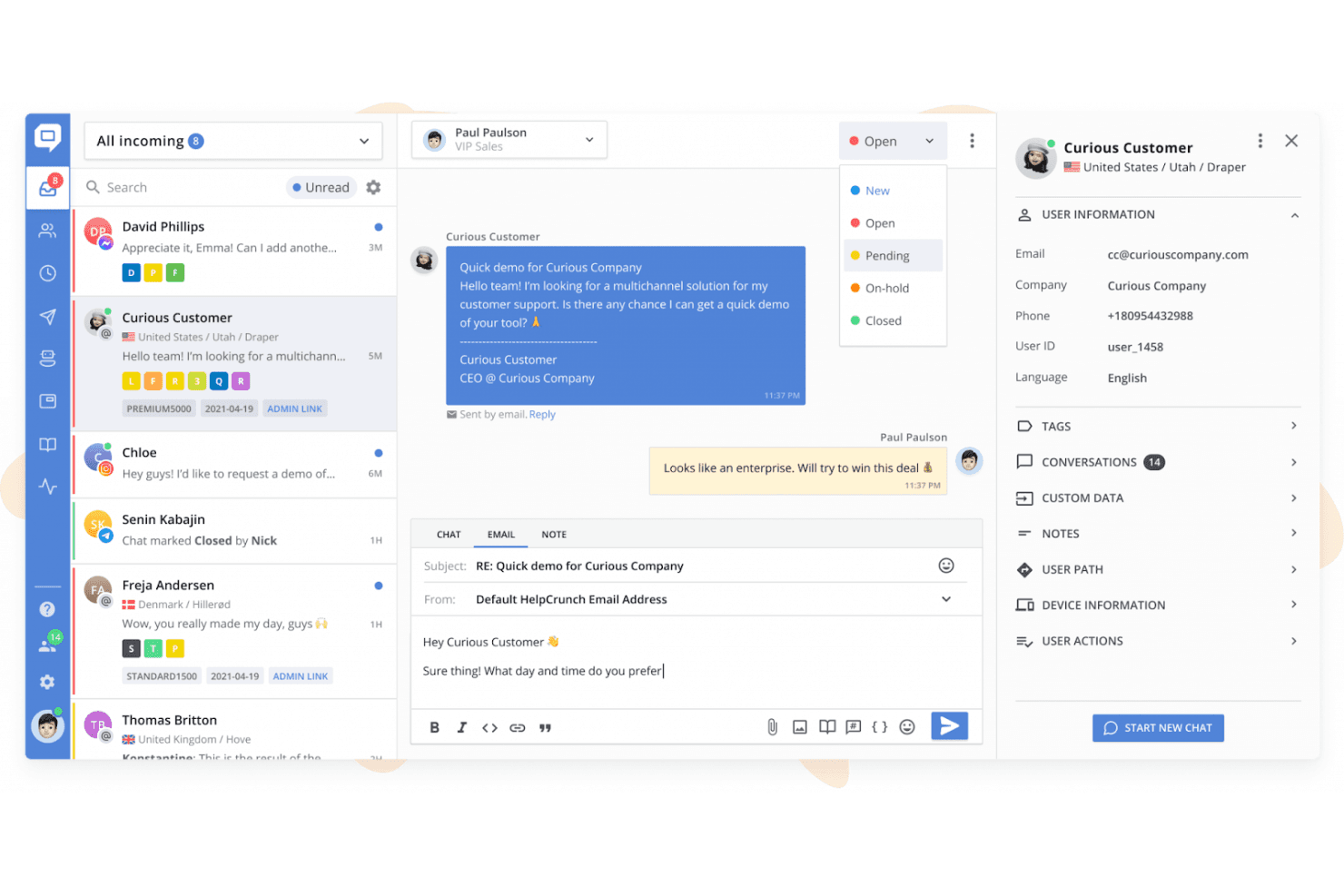
HelpCrunch’s shared inbox brings customer chats, email outreach, conversation statuses, and customer details into one workspace. HelpCrunch is an omnichannel customer support platform that combines live chat, a multilingual knowledge base, AI agents, chatbot flows, and a shared inbox across channels like WhatsApp, Messenger, and Telegram.
Who Is HelpCrunch Best For?
HelpCrunch is a strong fit for small and mid-sized businesses that need an affordable, all-in-one support platform without the overhead of enterprise tools like Intercom or Zendesk.
Why I Picked HelpCrunch
HelpCrunch earns its spot as one of the best on my shortlist because I love how AI Agents are trained on your knowledge base articles and custom answers, resolving common questions 24/7 without agent involvement. The KB embeds directly inside the chat widget, so customers get contextual article suggestions mid-conversation rather than being redirected to a separate help center. I've also found that the AI-driven self-service extends across WhatsApp, Telegram, and Messenger without extra configuration.
HelpCrunch Key Features
- Multilingual knowledge base: Create and manage help content in multiple languages with one-click language switching.
- Advanced customization options: Personalize widget appearance and knowledge base branding using custom CSS and JavaScript.
- Shared inbox for omnichannel support: Route, organize, and manage conversations from email, WhatsApp, Messenger, Telegram, and more in one unified inbox.
- Built-in analytics and reporting: Monitor help center usage, chat volume, resolution rates, and content performance from built-in dashboards.
HelpCrunch Integrations
HelpCrunch offers native integrations with Slack, WhatsApp, Facebook Messenger, Instagram, Telegram, and HubSpot, and provides an API for custom integrations.
Pros and Cons
Pros:
- Multi-language knowledge base with one-click switching
- Knowledge base embeds inside the chat widget
- AI agents resolve tickets without agent handoff
Cons:
- Reporting lacks advanced deflection rate modeling
- No community forum or peer discussion boards
Learn more about HelpCrunch:
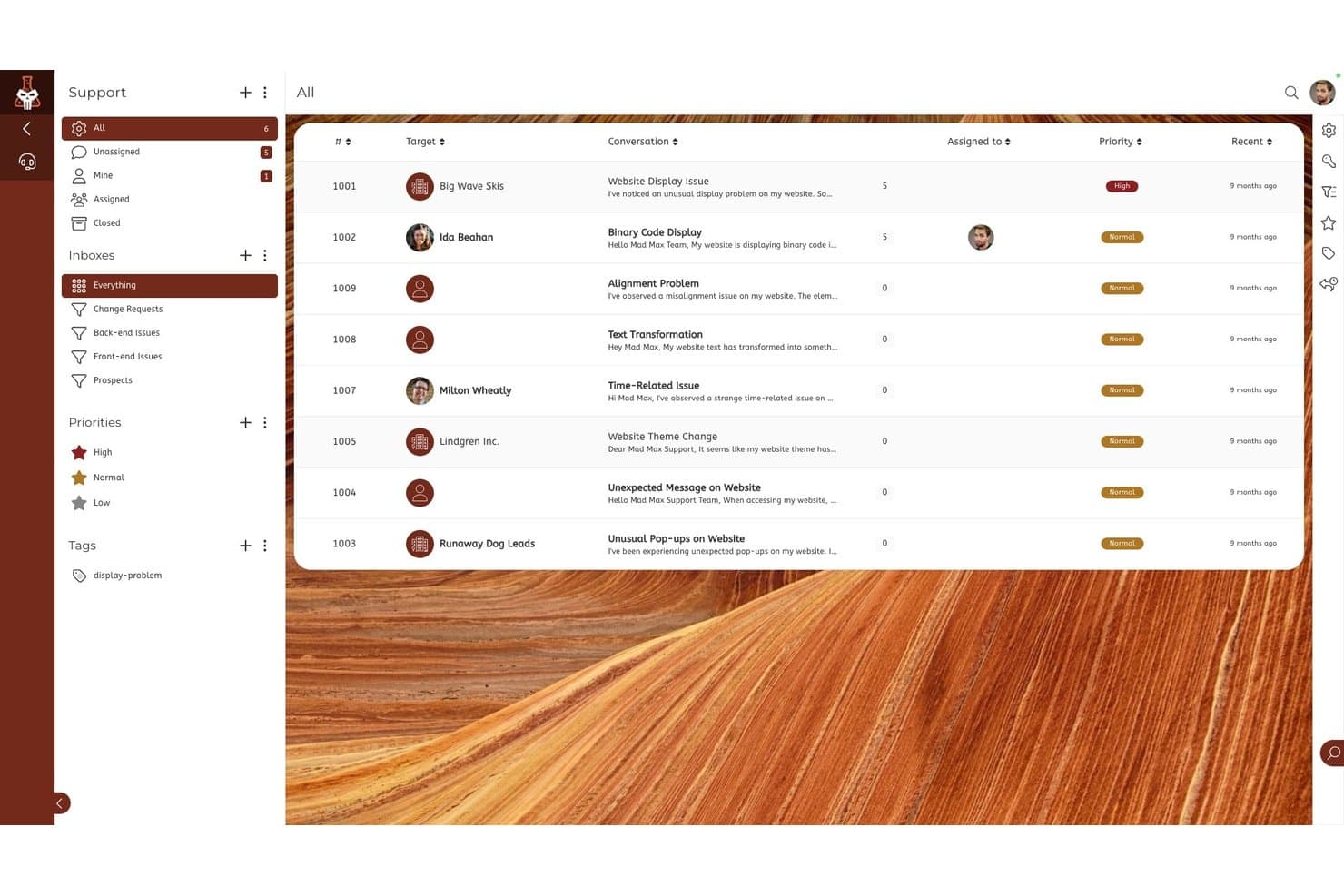
SuiteDash offers a support ticket management view with prioritized conversations, inbox categories, and assignee tracking for customer service teams. SuiteDash is an all-in-one business management platform that combines a white-labeled client portal, support ticketing, file exchange, invoicing, appointment scheduling, and secure messaging in a single flat-rate workspace.
Who Is SuiteDash Best For?
SuiteDash fits small service-based businesses and agencies that manage ongoing client relationships and want to replace multiple point solutions with one platform.
Why I Picked SuiteDash
I've included SuiteDash in my top picks because it packs deep client self-service tools into a flat-rate workspace built for small teams. Its FLOWs onboarding toolkit lets clients complete multi-step intake processes without any back-and-forth, and the white-labeled portal lets them submit support tickets, pay invoices, and share files under your brand. In practice, that means I can set up the portal once and let clients handle intake, payments, and file requests entirely on their own schedule.
SuiteDash Key Features
- Support tickets toolkit: Lets customers submit, track, and manage support requests within the branded portal.
- Community forum module: Creates dedicated online spaces for peer-to-peer discussions and client engagement.
- White-label mobile app: Offers a custom-branded mobile app experience for clients to access their portal on the go.
- Role-based permissions and portals: Enables different client, team, and contractor experiences within one workspace for granular access control.
SuiteDash Integrations
Native integrations are not clearly documented. SuiteDash provides an API for custom integrations.
Pros and Cons
Pros:
- Supports ticket submission within client portal
- Built-in client onboarding via FLOWs automation
- White-labeled portal with full branding control
Cons:
- Knowledge base tools are very limited
- No native AI chatbot functionality
Learn more about SuiteDash: Best for AI-based multi-channel support
- 14-day free trial + free demo available
- From $26.1/user/month (billed annually)
Visit WebsiteCustomer Rating:4.7/5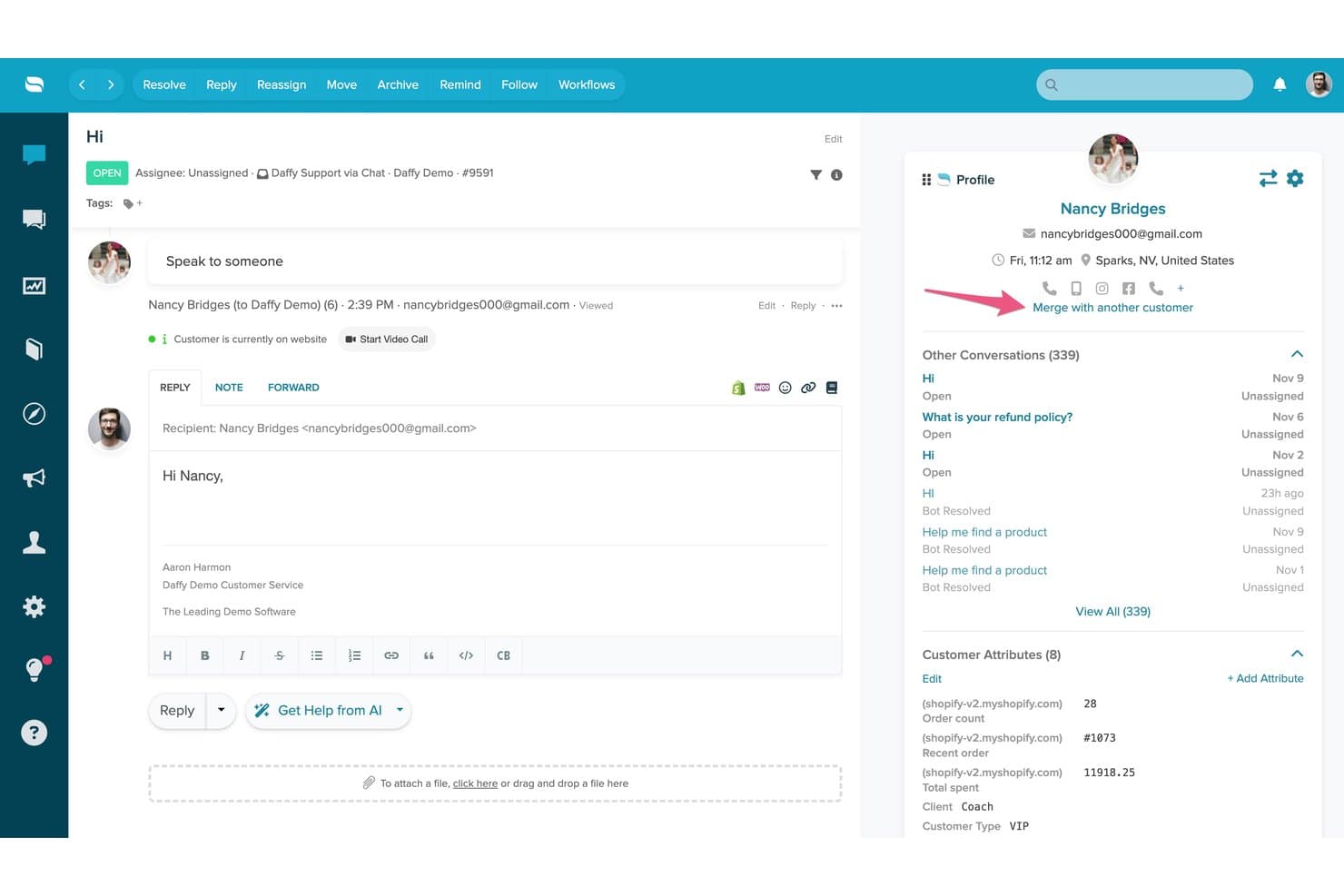
Re:amaze offers a unified customer conversation view with profile details, conversation history, and a reply editor featuring AI assistance tools. Re:amaze is a helpdesk and customer messaging platform that combines a multi-channel shared inbox, AI-powered chatbots, a self-service FAQ/Help Center, and live chat into a single support interface.
Who Is Re:amaze Best For?
Re:amaze is a strong fit for small to mid-sized ecommerce businesses that need to manage customer support across multiple channels from one place.
Why I Picked Re:amaze
Re:amaze earns its spot as one of the best on my shortlist because its AI Agent is trained directly on your FAQ content, which means it can resolve customer questions autonomously across chat, SMS, email, and social channels without agent involvement. I particularly like how the embedded chat widget surfaces relevant FAQ articles before a customer even submits a message. The AI Intents feature (Pro and above) adds another layer by recognizing customer intent and routing or responding accordingly.
Re:amaze Key Features
- Customizable FAQ and help center: Create, organize, and publish searchable articles to support customer self-service.
- Multi-brand management: Manage support operations for multiple brands or stores from a single account.
- Proactive automated cues: Trigger targeted, automated messages based on user behavior or conditions.
- Real-time live dashboard: Monitor customer activity, conversations, and staff engagement across all channels as it happens.
Re:amaze Integrations
Re:amaze offers native integrations with Shopify, BigCommerce, WooCommerce, Stripe, Instagram, Facebook, Twitter, SMS, and Slack, and provides an API for custom integrations.
Pros and Cons
Pros:
- Help center and live chat included natively
- Multi-channel inbox covers email, social, and SMS
- AI agent resolves tickets without human involvement
Cons:
- Knowledge base has limited multilingual support
- Reporting lacks depth vs. dedicated platforms
Learn more about Re:amaze: Best for AI-managed customer journeys
- Free demo available
- Pricing upon request
Visit WebsiteCustomer Rating:4.5/5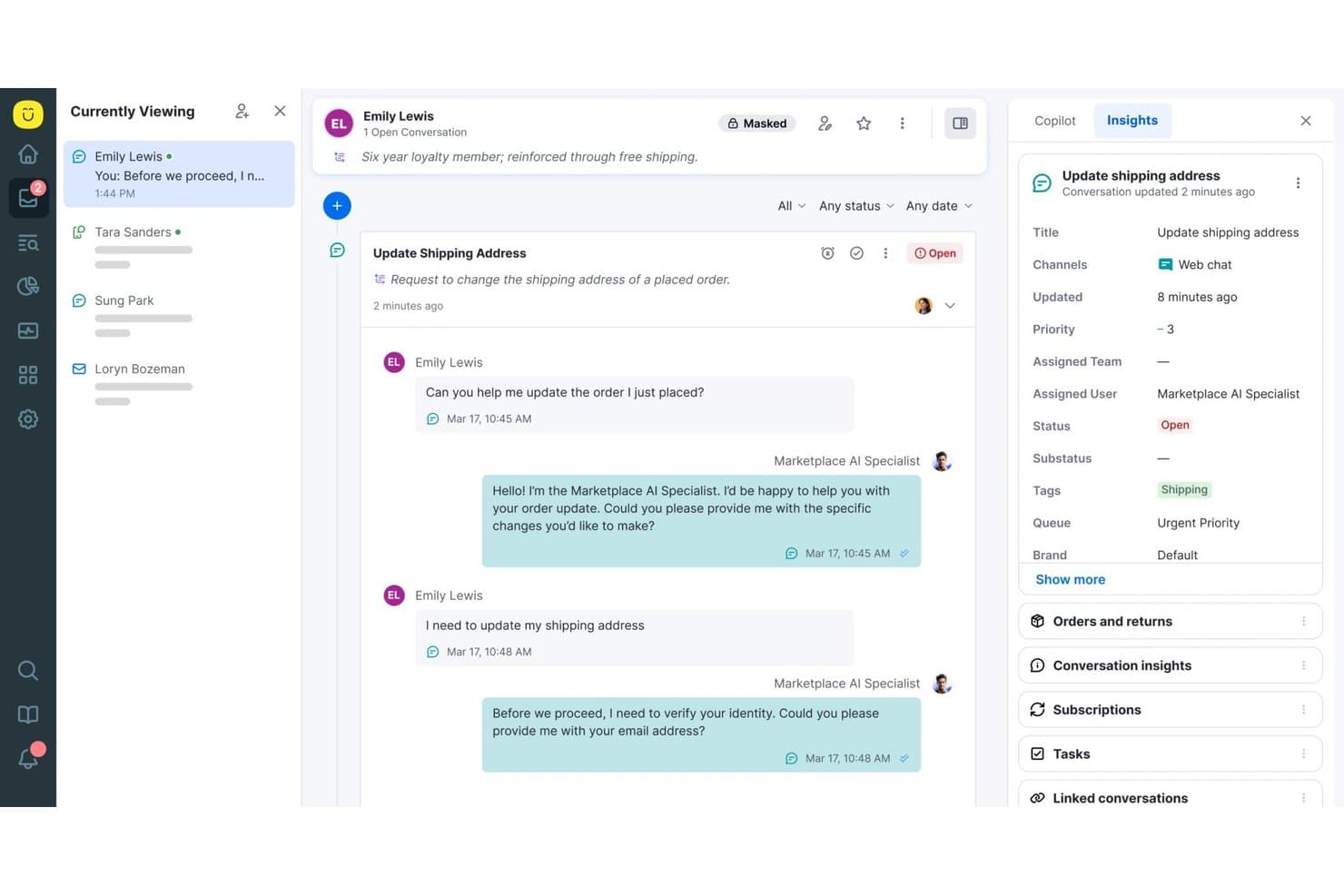
Kustomer offers a unified conversation view with AI-assisted support, real-time customer insights, and conversation tagging for streamlined self-service workflows. Kustomer is an AI-native customer service CRM platform that combines a self-service knowledge base, a branded customer portal, omnichannel AI agents, and automated workflows for managing customer interactions at scale.
Who Is Kustomer Best For?
Kustomer is a strong fit for mid-market to enterprise B2C brands with high support volumes that need AI-driven self-service across multiple digital channels.
Why I Picked Kustomer
Kustomer earns its spot as one of the best on my shortlist because of how its Concierge AI agent handles self-service end-to-end. I love that it doesn't just answer questions but executes actions, like processing a return or updating an order, without handing off to a human agent. The AI Reasoning Engine makes every decision traceable, so I can see exactly why a customer received a specific resolution, which is rare at this level of automation.
Kustomer Key Features
- Omnichannel customer timeline: Stores every customer interaction from all channels in a single, unified timeline.
- Custom objects and workflows: Lets you build complex routing, automation, and business rules tailored to your support process.
- Public and private knowledge base: Offers both a customer-facing help center and an internal reference library with access controls.
- AI-powered analytics and team pulse: Delivers real-time dashboards, usage metrics, and sentiment analysis for team and content performance.
Kustomer Integrations
Kustomer offers native integrations with Salesforce, Shopify, Slack, Facebook, Instagram, WhatsApp, and more, and provides an API for custom integrations.
Pros and Cons
Pros:
- Highly configurable workflows for complex operations
- Omnichannel conversation history in one timeline
- AI agent autonomously completes customer actions
Cons:
- Enterprise implementation requires significant technical resources
- Reporting dashboards need more granular filters
Learn more about Kustomer: Best for AI-backed, developer-focused teams
- Free plan + free demo available
- Pricing upon request
Visit WebsiteCustomer Rating:4.5/5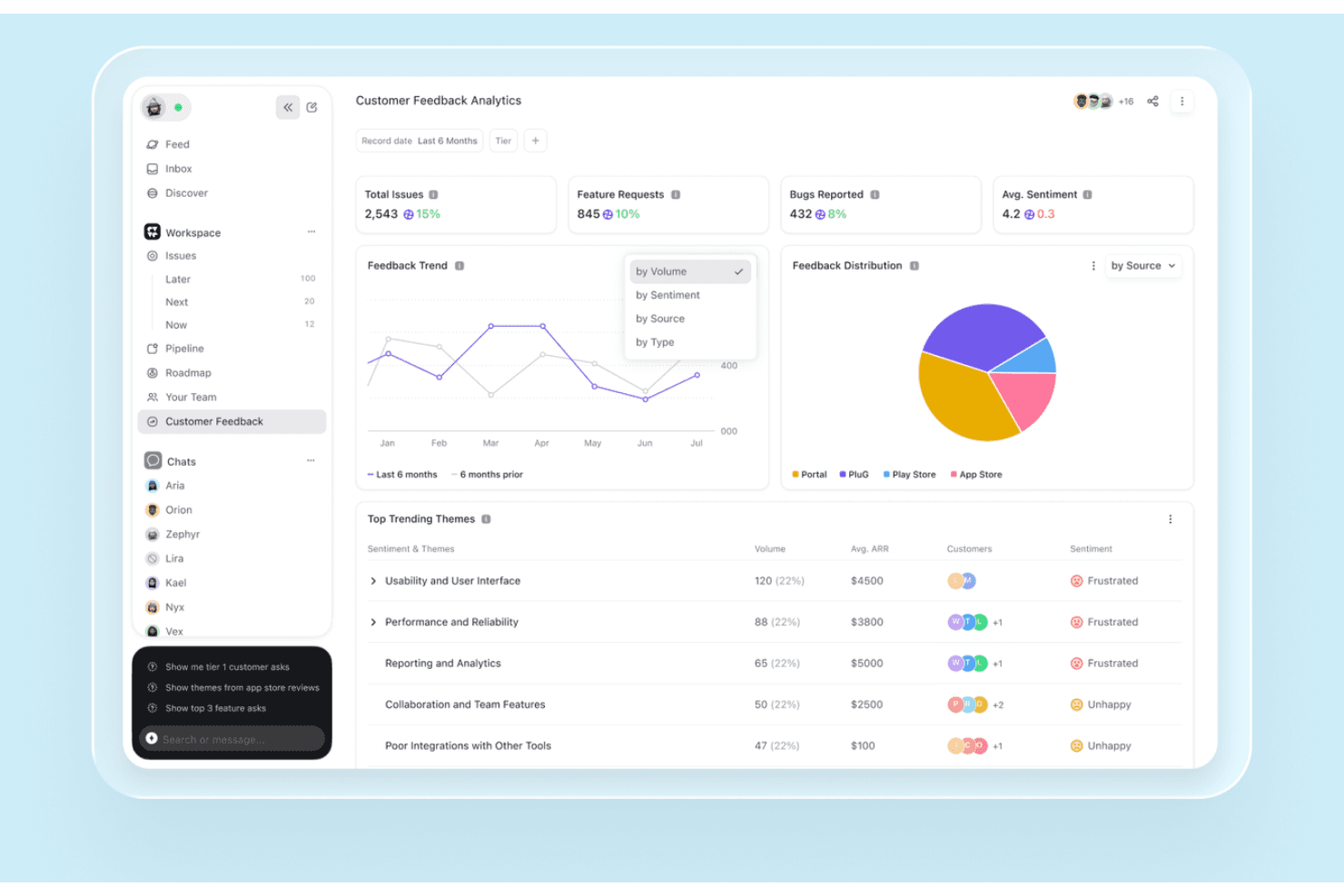
DevRev’s Customer Feedback Analytics dashboard tracks feedback trends, feature requests, reported bugs, sentiment, and recurring customer themes. DevRev is an AI-powered customer support and self-service platform that combines a knowledge base, conversational AI agents, a customer portal, and federated live-data search across connected enterprise systems into a single unified workspace.
Who Is DevRev Best For?
DevRev is a strong fit for SaaS and tech companies where support, product, and engineering teams need to work from a shared view of customer issues.
Why I Picked DevRev
I picked DevRev because its Agent Studio lets me build AI agents that autonomously resolve tickets and take real actions, with no coding required. What really sets it apart is how every resolved ticket connects directly to a product part or engineering work item, so my team can see exactly which customer issues drive the most product decisions. The live AirSync layer means search results pull from current data across CRM records, tickets, docs, and meeting notes, not stale snapshots.
DevRev Key Features
- PLuG widget: Embeds automated support and AI-powered responses directly into your website or app.
- Customer portal: Lets customers log in to submit, track, and manage tickets or provide feedback in a branded environment.
- AirSync data connectors: Syncs structured and unstructured data from tools like Jira, Salesforce, and Google Drive for unified search and context.
- Observe App: Monitors customer behavior, feedback, and sentiment with built-in analytics for experience teams.
DevRev Integrations
DevRev offers native integrations with Jira, Salesforce, Slack, GitHub, Google Drive, Notion, and Twilio, and provides an API for custom integrations.
Pros and Cons
Pros:
- Federated live search across all connected tools
- Connects support tickets directly to engineering workstreams
- AI agents resolve tickets without human input
Cons:
- Knowledge base tooling less mature than competitors
- Steeper onboarding for non-technical CX teams
Learn more about DevRev: Best for AI-guided CRM and customer engagement
- 14-day free trial
- From $20/user/month
Visit WebsiteCustomer Rating:4.4/5
HubSpot Service Hub centralizes ticketing, feedback, and customer support. HubSpot Service Hub is an AI-guided customer service platform designed for businesses looking to boost their customer support through CRM integration. It serves a wide range of industries by offering tools for ticketing, customer feedback, and knowledge base management.
Why I picked HubSpot Service Hub: Its strong CRM integration makes it ideal for businesses that want a unified view of customer interactions. It also offers a knowledge base feature, allowing you to create and share valuable insights with customers. These capabilities make it a solid choice for improving customer service operations.
Standout Features and Integrations:
Features include a customer feedback tool that lets you gather insights directly from your users. The knowledge base feature helps your team create and share helpful articles. HubSpot Service Hub also offers a ticketing system to manage customer inquiries efficiently.
Integrations include Salesforce, Slack, Zapier, Mailchimp, Shopify, WordPress, and more.
Pros and Cons
Pros:
- Scalable for growing businesses
- Easy knowledge base setup
- Customizable reporting features
Cons:
- Mandatory, expensive onboarding fees
- Advanced features gated by high tiers
Learn more about HubSpot Service Hub:
Diğer Müşteri Self Servis Yazılımları
İşte kısa listeme giremeyen ancak yine de göz atmaya değer bazı ek müşteri self servis yazılımı seçenekleri:
- 11EngagewareBest for AI-enabled support in regulated fields
- 12KnackBest for AI-powered custom portal creation
- 13BettermodeBest for community engagement
- 14Salesforce Agentforce ServiceBest for AI-driven enterprise support
- 15StonlyBest for AI-supported interactive guides
- 16TidioBest with no-code automation flows
- 17TeamSupportBest for B2B, AI-assisted customer support
- 18CustifyBest for proactive customer retention
- 19GainsightBest for customer success management
- 20LiveHelpNowBest for extensive help desk tools
- 21WalkMeBest for user onboarding assistance
- 22Zoho DeskBest for integrated CRM features
- 23FreshworksBest intuitive ticketing system
- 24ZendeskBest for scalable support solutions
- 25LiveAgent Best for real-time chat support
How I Evaluate Customer Self-Service Software
I split my evaluation into three parts, giving the most weight to core functionality: create searchable help content and surface relevant answers before customers submit tickets. Next, I look for standout features like step-by-step troubleshooting flows. Finally, I consider beyond-feature value, including onboarding, support, and pricing.
Core Functionality (Table Stakes For This List)
When I'm selecting tools for my list, I score each one on a scale from 0 (does not offer the functionality) to 5 (excels in this area) for each core functionality listed below. I then convert the total into a percentage to help assess each tool's overall fit, with extra weight on any functionalities I’ve deemed essential.
- Knowledge Base (Essential): I look for clear article organization, editing workflows, and ways to keep instructions current as products and support processes change.
- Search (Essential): I assess whether customers can find relevant answers using everyday phrasing, including when they don’t know the exact product term.
- Case Deflection: I check whether relevant help appears during ticket creation, such as troubleshooting steps for a login or setup issue.
- Community Forums: I consider how customers can find and discuss peer solutions, and whether teams can organize and moderate those discussions.
- Analytics & Reporting: I look for search and article data that reveal unanswered questions, outdated guidance, and opportunities to improve self-service.
- Multi-Channel Access: I assess whether customers can reach consistent help on web and mobile, including through embedded support in a product.
Once I have a list of tools that meet the criteria, I consider what sets each platform apart.
Differentiating Factors (What Sets Vendors Apart)
Here's how I compare and contrast different vendors:
Standout Features
I look for generative AI answers that synthesize content from multiple articles into a single, conversational response—not just a list of links. When a customer asks "how do I reset my billing cycle," the answer should pull from account, billing, and policy articles in one reply. I also evaluate content gap detection, which flags searches that return weak or no results so your team knows exactly what to write next. In-product contextual help matters too: I check whether widgets surface relevant guidance based on the screen a user is on, like showing setup steps inside an onboarding flow.
Beyond Features
I evaluate how well each tool connects to existing helpdesk and CRM platforms. A chatbot that escalates without passing conversation history forces customers to repeat themselves—so I check whether handoffs carry full context into tools like Zendesk or Salesforce. I also look at deflection measurement, since support leaders need clear data tying self-service usage to actual ticket reduction. Finally, content governance matters: teams managing multi-product catalogs need approval workflows and version history to keep outdated articles from reaching customers.
Müşteri Self Servis Yazılımı Nasıl Seçilir?
Uzun özellik listeleri ve karmaşık fiyatlandırma yapıları içinde kaybolmak kolaydır. Kendinize özgü yazılım seçim sürecinizi yürütürken odağınızı korumanıza yardımcı olmak için göz önünde bulundurmanız gereken faktörleri içeren bir kontrol listesi hazırladım:
| Faktör | Göz önünde bulundurulması gerekenler |
|---|---|
| FaktörÖlçeklenebilirlik | Göz önünde bulundurulması gerekenlerYazılım işletmenizle birlikte büyüyebilir mi? Kullanıcı sınırlarını ve depolama kapasitesini göz önünde bulundurun. Maliyetleri büyük ölçüde artırmadan büyümenize uyum sağlayan esnek planları tercih edin. |
| FaktörEntegrasyonlar | Göz önünde bulundurulması gerekenlerKullandığınız mevcut araçlarla bağlantı kurabiliyor mu? CRM sistemleri, e-posta platformları ve günlük olarak kullandığınız diğer yazılımlarla uyumluluğunu kontrol edin. Verilerinizi izole eden araçlardan kaçının. |
| FaktörÖzelleştirilebilirlik | Göz önünde bulundurulması gerekenlerYazılımı iş akışlarınıza uyacak şekilde uyarlayabilir misiniz? Kullanıcı arayüzlerini ve iş akışlarını ekibinizin süreçlerine uygun şekilde özelleştirme seçenekleri arayın. |
| FaktörKullanım kolaylığı | Göz önünde bulundurulması gerekenlerYazılım sezgisel mi? Ekip üyelerinin kapsamlı bir eğitim almadan yazılımda gezinebildiğinden emin olun. Kullanıcı dostu bir arayüz zamandan tasarruf sağlayabilir ve hayal kırıklığını azaltabilir. |
| FaktörUygulama ve işe alıştırma | Göz önünde bulundurulması gerekenlerYazılımı kurup çalışır duruma getirmek ne kadar sürecek? Kurulum ve eğitim için ihtiyaç duyacağınız kaynakları göz önünde bulundurun. Rehberli işe alıştırma ve destek sunan araçları tercih edin. |
| FaktörMaliyet | Göz önünde bulundurulması gerekenlerFiyatlandırma bütçenizle ne ölçüde örtüşüyor? Yalnızca liste fiyatını değil, eğitim veya premium destek gibi gizli maliyetleri de göz önünde bulundurun. |
| FaktörGüvenlik önlemleri | Göz önünde bulundurulması gerekenlerYazılım verilerinizi nasıl koruyor? Bilgilerinizin güvende kalması için şifreleme, düzenli güvenlik güncellemeleri ve sektör standartlarına uyumluluk arayın. |
| FaktörDestek erişilebilirliği | Göz önünde bulundurulması gerekenlerİhtiyaç duyduğunuzda ne tür bir yardım sunuluyor? Sorunlar ortaya çıktığında size yardımcı olacak 7/24 destek, özel müşteri yöneticileri veya topluluk forumları olup olmadığını kontrol edin. |
Müşteri Self Servis Yazılımı Nedir?
Müşteri self-servis yazılımı, müşterilere bir destek temsilcisiyle iletişime geçmeden yanıt bulma, sorunları çözme ve rutin görevleri tamamlama yolları sunar. Buna bilgi tabanları, müşteri portalları, yapay zekâ aracıları, Sık Sorulan Sorular, topluluk forumları, IVR ve mobil self-servis dâhil olabilir.
Modern platformlar, daha ilgili yanıtlar sunmak, rutin talepleri otomatikleştirmek ve insan desteği gerektiğinde müşterileri bir temsilciye yönlendirmek için müşteri ve hesap verilerini de kullanabilir. Amaç destekli yardımı ortadan kaldırmak değil, temsilcileri daha karmaşık sorunlar için hazır tutarken müşterilerin basit sorunları kendi başlarına çözmelerini sağlamaktır.
Temel Müşteri Self-Servis Kanalları
Müşteri self-servisi, müşterilerin ne yapması gerektiğine ve yardımı nasıl almayı tercih ettiklerine bağlı olarak çeşitli kanallar üzerinden sunulabilir. En güçlü kurulumlar genellikle tek bir kanala bağlı kalmak yerine birden fazla seçeneği bir araya getirir.
Yapay Zekâ Aracıları
Yapay zekâ aracıları, müşteri sorularını yorumlayabilir, ilgili bilgileri bulabilir ve bir temsilcinin müdahalesi olmadan rutin talepleri karşılayabilir. Daha gelişmiş araçlar, yanıtları yönlendirmek veya sipariş kontrolü ya da hesap bilgilerini güncelleme gibi işlemleri tamamlamak için müşteri bağlamını ve amacını kullanabilir.
Bilgi Tabanları
Bilgi tabanları, müşterilere nasıl yapılır kılavuzlarına, sorun giderme adımlarına, politikalara ve ürün belgelerine aranabilir erişim sunar. Metnin tek başına yeterli olmadığı durumlarda makalelere videolar, ekran görüntüleri ve diyagramlar da eklenebilir.
Müşteri Portalları
Müşteri portalları, müşterilere desteğe erişebilecekleri ve rutin görevleri yönetebilecekleri güvenli, kişiselleştirilmiş bir alan sunar. Platforma bağlı olarak bir portal, destek taleplerinin gönderilmesine ve izlenmesine odaklanabilir veya hesap bilgilerini, siparişleri, abonelikleri, faturalandırmayı, belgeleri ve diğer hizmetleri yönetmeye yönelik daha kapsamlı self-servis seçenekleri sunabilir.
Doğru portal türü, müşterilerin gerçekte neyi başarması gerektiğine bağlıdır. Basit bir destek portalı, talep görünürlüğü ve bilgi erişimi için yeterli olabilirken daha karmaşık müşteri ilişkileri, kimlik doğrulamalı ve hesaba özel iş akışları gerektirebilir.
Sık Sorulan Sorular
Sık Sorulan Sorular, yaygın ve basit sorulara hızlı yanıtlar sağlar. Sorun giderme, müşteriye özel bilgiler veya çözüm için birden fazla adım gerektirmeyen sorunlarda en iyi şekilde işe yarar.
Topluluk Forumları
Topluluk forumları, müşterilerin soru sormasına ve diğer kullanıcılardan öğrenmesine olanak tanır. Müşterilerin farklı kullanım senaryolarına sahip olduğu ve deneyimli kullanıcıların paylaştığı çözümlerden veya tavsiyelerden yararlanabildiği durumlarda özellikle kullanışlıdır.
Etkileşimli Sesli Yanıt (IVR)
IVR, müşterilerin bir temsilciyle hemen konuşmadan bilgi bulmak ve basit talepleri tamamlamak için telefon menülerini veya sesli komutları kullanmasını sağlar. Ayrıca daha karmaşık sorunları doğru destek ekibine yönlendirmeden önce bilgi toplayabilir.
Mobil Self-Servis
Mobil uygulamalar, müşterilere telefonlarından hesap yönetimine, destek içeriklerine, sipariş takibine, hizmet taleplerine ve diğer self-servis iş akışlarına erişim sağlayabilir.
Müşteri Self-Servis Başarısı Nasıl Ölçülür?
Self-servis, kaç müşterinin onu kullandığına göre değil, sorunlarını gerçekten çözüp çözemediklerine göre değerlendirilmelidir. Verimlilik ve müşteri sonuçlarına ilişkin metriklerin bir birleşimini takip edin:
| Metrik | Size Ne Söyler? |
|---|---|
| MetrikSelf-servis çözüm oranı | Size Ne Söyler?Müşterilerin bir sorunu temsilci yardımı olmadan ne sıklıkta çözdüğü |
| MetrikYönlendirmeyi önleme oranı | Size Ne Söyler?Self-servis sayesinde kaç potansiyel destek iletişiminin önlendiği |
| MetrikÜst makama yönlendirme oranı | Size Ne Söyler?Self-servis etkileşimlerinin ne sıklıkta hâlâ bir temsilci gerektirdiği |
| MetrikArama başarı oranı | Size Ne Söyler?Müşterilerin destek içeriğinizde arama yaparken yararlı yanıtlar bulup bulamadığı |
| MetrikÇözüm süresi | Size Ne Söyler?Müşterilerin sorunları self-servis yoluyla ne kadar hızlı çözdüğü |
| MetrikMüşteri memnuniyeti (CSAT) | Size Ne Söyler?Müşterilerin self-servis deneyiminden memnun olup olmadığı |
| MetrikÇözüm başına maliyet | Size Ne Söyler?Self-servisin, sorunları temsilci destekli desteğe kıyasla ne kadar verimli çözdüğü |
| MetrikOrtalama işlem süresi (AHT) | Size Ne Söyler?Self-servisin, hâlâ insan desteği gerektiren sorunları çözmek için temsilcilerin harcadığı süreyi azaltıp azaltmadığı |
Yalnızca talep önleme oranını optimize etmeyin. Başarısız bir aramanın ardından müşterinin aramayı bırakması, önlenmiş bir destek talebi gibi görünebilir; ancak sorun çözülmemiştir. Self servis hizmetinin gerçekten işe yarayıp yaramadığını daha net görmek için talep önlemeyi çözüm, eskalasyon ve memnuniyetle birlikte değerlendirin.
Müşteri Self Servis Yazılımı Nasıl Uygulanır
İyi bir kullanıma sunma süreci, mevcut tüm özellikleri etkinleştirmekle değil, müşterilerin gerçekten kendi başlarına çözmek istediği sorunlarla başlar. Uygulamayı odaklı tutmak için bu kontrol listesini kullanın:
| ✓ | Müşteri self servis hizmetini kullanıma sunmadan önce… |
|---|---|
| ✓☐ | Müşteri self servis hizmetini kullanıma sunmadan önce…Yüksek hacimli talepleri belirleyin; müşterilerin temsilci desteği olmadan gerçekçi bir şekilde çözebileceği talepleri tespit edin. |
| ✓☐ | Müşteri self servis hizmetini kullanıma sunmadan önce…Yeni sisteme taşımadan önce mevcut içeriğinizi denetleyin; güncel olmayan, yinelenen veya eksik bilgileri belirleyin. |
| ✓☐ | Müşteri self servis hizmetini kullanıma sunmadan önce…Self servis sorunu çözemediğinde müşterilerin bir temsilciye ulaşabilmesi için eskalasyon yollarını tanımlayın. |
| ✓☐ | Müşteri self servis hizmetini kullanıma sunmadan önce…Gerektiğinde CRM, destek masası, hesap veya ürün sistemlerinizden doğru müşteri verilerini bağlayın. |
| ✓☐ | Müşteri self servis hizmetini kullanıma sunmadan önce…Arama, yapay zekâ yanıtları, izinler, mobil erişim ve temsilciye aktarımlar genelinde müşteri deneyimini test edin. |
| ✓☐ | Müşteri self servis hizmetini kullanıma sunmadan önce…Kullanıma sunmadan önce çözüm, talep önleme, eskalasyon ve CSAT için başlangıç ölçümlerini belirleyin. |
| ✓☐ | Müşteri self servis hizmetini kullanıma sunmadan önce…Self servis deneyiminizdeki eksiklikleri belirlemek için başarısız aramaları, çözülemeyen soruları ve eskalasyonları kullanarak kullanıma sunduktan sonra iyileştirme yapın. |
İyi tanımlanmış sınırlı sayıda kullanım senaryosuyla başlayın ve buradan genişleyin. Müşteri sorunlarını güvenilir biçimde çözen daha küçük bir self servis deneyimi, eksik veya güncel olmayan yanıtlarla dolu büyük bir deneyimden daha kullanışlıdır.
İnsan Desteğine Ne Zaman Aktarım Yapılacağını Bilin
Self servis hizmetinin net sınırları olmalıdır. Otomasyonun sorunu çözmesinin olası olmadığı durumlarda müşterilerin bir temsilciye ulaşmasını sağlamak için aktarım kuralları belirleyin.
| Aktarım Tetikleyicisi | Ne Yapılmalı |
|---|---|
| Aktarım TetikleyicisiDüşük yapay zekâ güveni | Ne YapılmalıBelirsiz bir yanıt sunmak yerine etkileşimi bir temsilciye yönlendirin. |
| Aktarım TetikleyicisiTekrarlanan başarısız denemeler | Ne YapılmalıBaşarısız aramalardan, sohbet robotu yanıtlarından veya aynı talebin tekrar tekrar farklı biçimde ifade edilmesinden sonra aktarım yapın. |
| Aktarım TetikleyicisiOlumsuz duygu | Ne Yapılmalıİfadeler hayal kırıklığına, aciliyete veya memnuniyetsizliğe işaret ettiğinde temsilciye aktarımı önceliklendirin. |
| Aktarım TetikleyicisiHassas talepler | Ne YapılmalıGüvenlik, itirazlar, iptaller veya karmaşık faturalandırmayla ilgili sorunları uygun bir temsilciye ya da ekibe yönlendirin. |
| Aktarım TetikleyicisiHesaba özgü karmaşıklık | Ne YapılmalıÇözüm için self servis sisteminin gerçekleştiremeyeceği izinler, değerlendirme veya işlemler gerektiğinde aktarım yapın. |
Aktarım sırasında müşterinin yeniden başlamak zorunda kalmaması için görüşme geçmişini, arama terimlerini, görüntülenen içeriği, gerçekleştirilmeye çalışılan işlemleri ve aktarım nedenini koruyun.
Ardından sorun türüne göre aktarım oranlarını ve tekrarlanan iletişimleri izleyin. Aynı talepler sürekli olarak temsilcilere ulaşıyorsa bu, temel içeriği, yapay zekâ yanıtını veya otomatik iş akışını iyileştirmeniz gerektiğinin bir göstergesidir.
Özellikler
Müşteri self servis yazılımı seçerken aşağıdaki temel özelliklere dikkat edin:
- Bilgi tabanı yönetimi: Yardım makaleleri, SSS'ler, kılavuzlar, videolar, diyagramlar ve diğer destek içeriklerini oluşturun, düzenleyin, arayın ve güncelleyin.
- Yapay zekâ destekli içerik oluşturma: Bilgi içeriklerini taslak hâline getirmek, özetlemek, çevirmek veya güncellemek ve olası içerik boşluklarını belirlemek için üretken yapay zekâyı kullanın.
- Yapay zekâ aracıları ve sohbet robotları: Soruları yanıtlayın, müşteri amacını belirleyin, ilgili bilgileri alın ve rutin destek taleplerini otomatikleştirin.
- Müşteri portalları: Müşterilere hesaplarını yönetebilecekleri, taleplerini takip edebilecekleri, belgelere erişebilecekleri ve kişiselleştirilmiş destek bilgilerini bulabilecekleri güvenli bir alan sağlayın.
- Hizmet katalogları: Müşterilerin mevcut hizmetlere göz atmasını ve önceden tanımlanmış formlar ile iş akışları üzerinden standartlaştırılmış talepler göndermesini sağlayın.
- Çok kanallı self servis: Self servis hizmetini web, mobil, mesajlaşma, sohbet ve diğer müşteri temas noktalarında kullanılabilir hâle getirin.
- Arama ve içerik keşfi: Müşterilerin arama, filtreler, öneriler ve bağlamsal sonuçlar aracılığıyla ilgili yanıtları hızla bulmasına yardımcı olun.
- Üst birime aktarma ve temsilciye devretme: Çözülemeyen sorunları, müşterinin daha önce denediklerine ilişkin bağlamı koruyarak bir destek temsilcisine aktarın.
- Analiz ve raporlama: Self servis etkinliğinin arama, çözüm, engelleme, üst birime aktarma, içerik performansı ve diğer göstergelerini takip edin.
- Entegrasyonlar: Doğru ve müşteriye özel bilgiler sağlamak için self servisi CRM, yardım masası, hesap, ürün ve ihtiyaç duyulan diğer sistemlere bağlayın.
Avantajlar
Müşteri self servis yazılımını uygulamak, ekibiniz ve işletmeniz için çeşitli avantajlar sağlar. Faydalanabileceğiniz birkaç avantaj şunlardır:
- Azalan destek iş yükü: Müşterilerin bilgi tabanları ve sohbet robotları aracılığıyla yanıt bulmasını sağlayarak ekibinizin tekrarlayan sorun giderme işlemlerine daha az zaman ayırmasını sağlayabilirsiniz.
- Artan müşteri memnuniyeti: Topluluk forumları ve self servis portalları aracılığıyla self servis çözümlere hızlı erişim, kullanıcı deneyimini iyileştirebilir ve müşteri sadakati oluşturabilir.
- Maliyet tasarrufu: Otomasyon ve verimli bilet sistemleri, kapsamlı müşteri destek personeline duyulan ihtiyacı en aza indirerek operasyonel maliyetleri düşürür.
- Artan verimlilik: Gerçek zamanlı bildirimler ve entegrasyon özellikleri, sorunsuz operasyonların yürütülmesine ve müşteri ihtiyaçlarına uygulama içinde hızlı yanıt verilmesine yardımcı olur.
- Daha iyi karar alma: Analiz ve raporlama, müşteri davranışları ve destek etkileşimleri hakkında içgörüler sunarak stratejilerinizi geliştirmenize yardımcı olur.
- Geliştirilmiş erişilebilirlik: Çok dilli destek, tüm müşteri bölgelerine erişim sağlayarak erişim alanınızı genişletir ve hizmetin kapsayıcılığını artırır.
Maliyetler ve Fiyatlandırma
Müşteri self servis yazılımını seçmek, mevcut çeşitli fiyatlandırma modellerinin ve planların anlaşılmasını gerektirir. Maliyetler özelliklere, ekip büyüklüğüne, eklentilere ve daha fazlasına göre değişir. Aşağıdaki tabloda yaygın planlar, ortalama fiyatları ve müşteri self servis yazılımı çözümlerinde genellikle bulunan özellikler özetlenmiştir:
Plan Karşılaştırma Tablosu
| Plan Türü | Ortalama Fiyat | Yaygın Özellikler |
|---|---|---|
| Plan TürüÜcretsiz Plan | Ortalama Fiyat$0 | Yaygın ÖzelliklerTemel bilgi tabanı, sınırlı destek ve topluluk forumları. |
| Plan TürüKişisel Plan | Ortalama Fiyat$12-$49/kullanıcı/ay | Yaygın ÖzelliklerSohbet desteği, bilet sistemi ve temel analiz. |
| Plan Türüİşletme Planı | Ortalama Fiyat$30-$75/kullanıcı/ay | Yaygın ÖzelliklerGelişmiş özelleştirme, entegrasyon özellikleri ve çok dilli destek. |
| Plan TürüKurumsal Plan | Ortalama Fiyat$80-$3600/ay | Yaygın ÖzelliklerTüm özelliklere sahip platform, özel hesap yöneticisi ve özel analizler. |
Müşteri Öz Hizmet Yazılımı SSS
Müşteri öz hizmet yazılımı hakkında sık sorulan bazı soruların yanıtları:
İşletmemin müşteri öz hizmet yazılımına ihtiyacı olup olmadığını nasıl anlarım?
Ekibiniz destek talepleriyle başa çıkmakta zorlanıyorsa müşteri öz hizmet yazılımı yardımcı olabilir. Bu yazılım, müşterilerin yanıtları kendi başlarına bulmalarını sağlayarak personelinizin üzerindeki yükü azaltır. Yanıt sürelerini ve müşteri memnuniyetini iyileştirmek istiyorsanız bu seçeneği değerlendirin. Tekrarlayan sorularla sık sık ilgileniyorlarsa küçük işletmeler bile bu yazılımdan yararlanabilir.
Müşteri öz hizmet yazılımı mevcut sistemlerimle entegre olabilir mi?
Evet, çoğu müşteri yardım masası yazılımı entegrasyon özellikleri sunar. Yazılımın CRM’nizi, e-postanızı veya diğer işletme araçlarınızı destekleyip desteklemediğini kontrol edin. Entegrasyonlar, verilerin sorunsuz bir şekilde akmasını ve operasyonel verimliliği destekler. Kuruluşunuz genelinde tutarlılığı korumak ve yazılımın değerini en üst düzeye çıkarmak için bu önemlidir.
Müşteri öz hizmet yazılımı ne kadar güvenlidir?
Güvenlik sağlayıcıya göre değişir, ancak güçlü güvenlik önlemleri standarttır. Veri şifreleme, düzenli güncellemeler ve GDPR gibi standartlara uyumluluk gibi özellikleri arayın. Bir araç seçmeden önce müşteri verilerinizi korumaya yardımcı olması için güvenlik önlemlerini değerlendirin. Bu, hassas bilgileri işleyen sektörler için özellikle önemlidir.
Müşteri öz hizmet yazılımına geçiş yaparken neleri göz önünde bulundurmalıyım?
Veri aktarımı ve ekip eğitimi de dâhil olmak üzere geçiş sürecini göz önünde bulundurun. Kesintileri en aza indirmek için işe alım sürecinde destek sunan bir sağlayıcı seçin. Yazılımın mevcut iş akışlarınızla ne ölçüde uyumlu olduğunu değerlendirin. Geçişi dikkatli bir şekilde planlamak, ekibinizin sorunsuz bir şekilde uyum sağlamasına ve yeni aracın avantajlarını en üst düzeye çıkarmasına yardımcı olabilir.
Müşteri ve Çalışan Öz Hizmet Portalları Arasındaki Fark Nedir?
Müşteri öz hizmet portalları, dış müşterilerin yanıt bulması, hesaplarını yönetmesi, taleplerini takip etmesi ve rutin destek görevlerini tamamlaması için oluşturulmuştur. Çalışan öz hizmet portalları ise kurum içi kullanıma yöneliktir ve genellikle çalışanlara insan kaynakları, bordro, BT desteği, şirket politikaları ve iş yeri hizmet taleplerine erişim sağlar.
Müşteri Öz Hizmet Yazılımının Yatırım Getirisini (ROI) Nasıl Hesaplarsınız?
Yazılımın uygulanması ve işletilmesi maliyetini destek maliyetlerindeki ve müşteri sonuçlarındaki değişikliklerle karşılaştırın. Talep yönlendirmesini azaltma, öz hizmet çözüm oranları, çözüm başına maliyet, temsilci iş yükü ve müşteri memnuniyeti gibi ölçütlere bakın. Amaç yalnızca talep hacmini azaltmak değildir. Müşteriler öz hizmeti bırakıp başka yerlerden yardım aramak yerine sorunlarını başarıyla çözüyorlarsa elde edilen tasarruf gerçek bir ROI’yi temsil eder.