

Bir işletmeyi yönetmek sayısız görevi aynı anda yürütmek anlamına gelir ve bilgileri verimli bir şekilde yönetmek çoğu zaman en büyük zorluklardan biridir. Müşterilerle doğrudan iletişim kuran bir yönetici olarak, müşterileriniz ve ekibiniz için hızlı ve doğru yanıtların değerini bilirsiniz. Ücretsiz bilgi tabanı yazılımları, bütçenizi zorlamadan bilgileri düzenlemenize ve paylaşmanıza yardımcı olarak hayat kurtarıcı olabilir.
Size en iyi seçimlerimi sunmak için çok sayıda seçeneği test edip inceledim. Bu çözümler temel özellikleri sunar ve dağınık bilgiler, güncel olmayan vikiler ve zaman alan aramalar gibi yaygın sorunların üstesinden gelmenize yardımcı olur. İhtiyaçlarınıza uygun en iyi ücretsiz planları ve deneme sürümlerini bulacaksınız.
Bu makalede seçenekler arasında size rehberlik edecek ve ekibinize en uygun olanı seçmenize yardımcı olacağım.
Why Trust Our Software Recommendations
6,700+
Reviews
20
Industry experts
16+
Evaluation factors
14
Years
Our team has been testing and reviewing software since 2012. As CX leaders ourselves, we know how difficult—and important—it is to choose the right software.
For this guide, we evaluated tools using hands-on testing and independent research, scoring tools using our selection criteria.
Our reviews reflect our human editorial judgment, not a sales pitch.
 Gui DrusinaCreative Director
 Tim FisherVP of AI
Ücretsiz Bilgi Tabanı Yazılımları Karşılaştırma Tablosu
Kısa listeme giren araçların her biri için temel maliyetler şunlardır:
Score legend (out of 5)
- Excellent4.5–5
- Good4–4.4
- Average3–3.9
- Below average2–2.9
- Poor1–1.9
Sorted by: Default
| Tool | Starting Price | Website | |||||||
|---|---|---|---|---|---|---|---|---|---|
Best for step-by-step interactive guides | 3.7 out of 5 | 4 | 4 | 3 | 5 | 3 | 3 | Pricing upon request Free demo + 14-day free trial available | Website |
Best for customer self-service portals | 3.0 out of 5 | 4 | 3 | 2 | 3 | 3 | 3 | $29/user/month 14-day free trial available | Book Demo |
Best with AI-powered ticket routing | 3.7 out of 5 | 4 | 4 | 1 | 5 | 5 | 3 | $25/user/month 14-day free trial + free demo available | Website |
Best for social collaboration | 4.7 out of 5 | 5 | 5 | 5 | 5 | 3 | 5 | Pricing upon request Free demo available | Website |
Best for open-source customization | 4.7 out of 5 | 5 | 4 | 5 | 5 | 4 | 5 | €1/user/month Free plan + up to 30-day trial + free demo available | Website |
Best for free RBAC and SSO on a solo knowledge base | 4.7 out of 5 | 5 | 4 | 4 | 5 | 5 | 5 | $0.99/user/month Free demo + 15-day free trial available | Website |
Best for knowledge base analytics tied to a live inbox | 4.2 out of 5 | 4 | 4 | 3 | 5 | 5 | 4 | $25/user/month Free plan + 15-day free trial + free demo available | Website |
Best for docs-as-code knowledge publishing | 4.3 out of 5 | 5 | 4 | 3 | 5 | 4 | 5 | $77/month Free plan + 14-day trial + demo available | Website |
Best for AI-generated KB articles from tickets | 4.5 out of 5 | 4 | 5 | 5 | 5 | 5 | 3 | $95/month Free plan available | Website |
Best for large-scale documentation | 4.5 out of 5 | 5 | 4 | 5 | 4 | 4 | 5 | Free to use Free to use | Website |


En İyi Ücretsiz Bilgi Tabanı Yazılımları İncelemeleri
Aşağıda, kısa listeme giren en iyi ücretsiz bilgi tabanı yazılımlarının ayrıntılı özetlerini bulabilirsiniz. İncelemelerim, size en uygun aracı bulmanıza yardımcı olmak için her aracın temel özelliklerine, artılarına ve eksilerine, entegrasyonlarına ve ideal kullanım alanlarına ayrıntılı bir bakış sunar. Bu araçlardan bazıları tamamen ücretsiz bir sürüm sunarken diğerleri ücretsiz deneme süresi sunar. İncelemelerimin her birine nelerin ücretsiz olduğuna dair bir not ekledim.
 Best for step-by-step interactive guides
- Free demo + 14-day free trial available
- Pricing upon request
Visit WebsiteCustomer Rating:4.8/5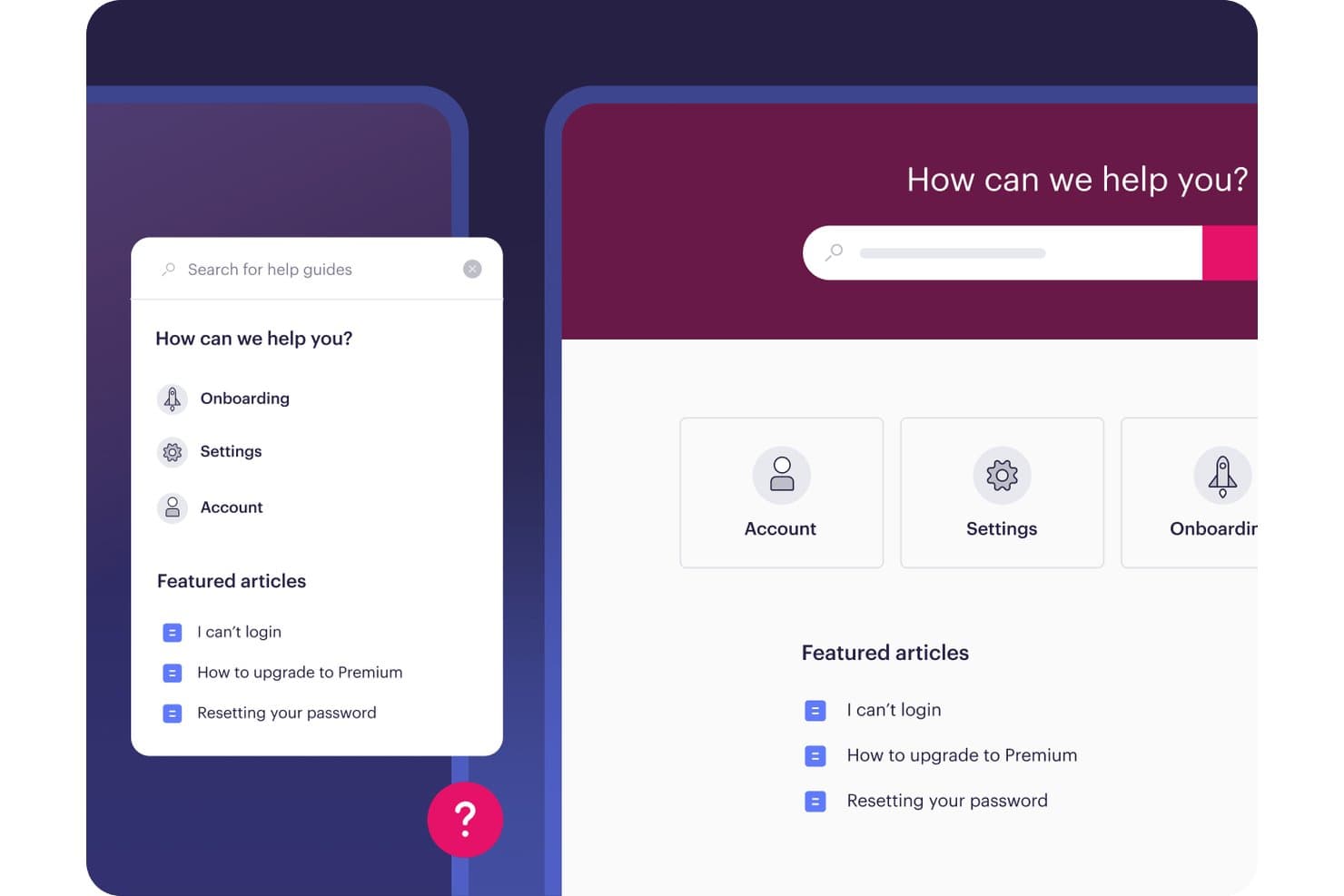
Stonly offers a knowledge base interface with categorized help topics, featured articles, and a search bar available in both mobile widget and desktop views. Stonly is a knowledge base and interactive guide platform that lets support teams build step-by-step guides, decision trees, AI-powered answers, and self-service help centers through a no-code editor.
Who Is Stonly Best For?
Stonly suits small to mid-size SaaS companies where support and customer success teams need to guide users through complex workflows without relying on engineering resources.
Why I Picked Stonly
I picked Stonly as one of the best because its branching decision trees set it apart from traditional article-based knowledge bases. Instead of pointing customers to a long-form article, I can build a guide that routes each user through only the steps relevant to their situation. The in-app widget then surfaces that guidance directly inside the product, so users never have to leave their workflow to find an answer.
Stonly Key Features
- WYSIWYG content editor: Build visually rich articles with support for images, links, tables, and formatting.
- Multi-language knowledge bases: Maintain and publish content in multiple languages for diverse customer bases.
- Helpdesk and ticketing integrations: Connect Stonly with platforms like Zendesk and Salesforce for seamless workflow syncing.
- Analytics and content reporting: Track usage, search queries, and article performance with built-in dashboards.
Stonly Integrations
Stonly offers native integrations with Zendesk, Salesforce, Intercom, Freshdesk, Front, and Slack. An API is also available for custom integrations.
What's Free?
Stonly offers a 14-day free trial of its Small Business plan. After the trial ends, you're moved to a free Basic plan that includes 400 guide views per month, up to 5 published guides with a single language and 100 steps per guide, and 1 team member.
Pros and Cons
Pros:
- Guides surface in-product without leaving the workflow
- No-code guide builder requires zero developer involvement
- Branching guides create personalized user journeys
Cons:
- Article editing less capable than dedicated alternatives
- Free plan view limits restrict growing teams
Learn more about Stonly: Best for customer self-service portals
- 14-day free trial available
- From $29/user/month (billed annually)
Visit WebsiteCustomer Rating:4.4/5
Freshdesk knowledge base supports customer self-service portals with organized help articles. Freshdesk is a customer service platform with an integrated knowledge base, combining ticket management, self-service portals, article authoring, and analytics within one system.
Who Is Freshdesk Best For?
Teams piloting a customer-facing help center who want ticket management and a public self-service portal in one platform.
Why I Picked Freshdesk
I picked Freshdesk as one of the best because I’ve set up branded customer self-service portals using its built-in knowledge base, tight ticket integration, and article authoring. I rely on its hierarchical content structure to organize FAQs and troubleshooting guides, and I appreciate that portal publishing controls let me scope content visibility across customer and agent audiences.
Freshdesk Key Features
- Integrated ticketing system: Manage customer support tickets, dispatch, and responses directly alongside your knowledge base articles.
- AI-powered article drafting: Use Freddy AI to suggest and generate knowledge base articles from ticket replies and other interactions.
- REST API and webhooks: Connect Freshdesk to third-party applications and automate workflows using developer-friendly APIs.
- Marketplace app integrations: Access over 1,000 native integrations for tools like Slack, Salesforce, Shopify, and WhatsApp to extend your help center’s capabilities.
Freshdesk Integrations
Freshdesk connects to 1,000+ marketplace integrations, including Slack, Microsoft Teams, Salesforce, HubSpot, Shopify, Atlassian Jira, WhatsApp, Zoom, and Google Calendar. Developer-friendly REST APIs and webhooks support custom integrations across CRMs, collaboration tools, and customer channels.
What's Free?
Freshdesk offers a 14-day free trial of all features, but it doesn't include a free-forever plan. After the trial, you’ll need to pick a paid plan to keep your help center live. Some features and integrations may be limited or unavailable during the trial period.
Pros and Cons
Pros:
- Portal supports hierarchical content organization
- AI can draft knowledge base articles
- Branded customer self-service portal included
Cons:
- Most advanced features require paid tier
- Free plan limited to 6 months
Learn more about Freshdesk: Best with AI-powered ticket routing
- 14-day free trial + free demo available
- From $25/user/month (billed annually)
Visit WebsiteCustomer Rating:4.6/5
Front enables teams to collaborate on customer conversations and access shared knowledge efficiently. Front brings shared inbox and knowledge management features together for teams that handle high volumes of customer communication. If you’re looking for a solution that blends collaborative email, ticketing, and a basic help center, Front may fit your workflow. It’s especially useful for support, operations, or account management teams that want to centralize conversations and internal knowledge in one place.
Who Is Front Best For?
Front is a good fit for customer support and operations teams in midsize businesses that need to manage shared inboxes and centralize customer knowledge.
Why I Picked Front
I picked Front for this list because its AI-powered ticket routing stands out for teams that need to manage customer inquiries efficiently while maintaining a knowledge base. The platform uses AI to automatically assign incoming messages to the right team member based on topic, urgency, or customer history, which helps prevent bottlenecks and ensures faster responses. This routing works alongside Front’s shared inbox and knowledge base features, so teams can quickly reference or update help articles as they resolve tickets. For support teams juggling high volumes of requests, this combination of AI-driven workflow and accessible knowledge resources is especially valuable.
Front Key Features
Some other features in Front that support knowledge management and team collaboration include:
- Internal comments: Add private notes and context to conversations without leaving the shared inbox.
- Help center builder: Create and organize public or private help articles for customers or internal teams.
- Analytics dashboard: Track message volume, response times, and team performance with built-in reporting tools.
- Template library: Store and reuse pre-written responses and knowledge articles to maintain consistency across customer interactions.
Front Integrations
Integrations include Salesforce, HubSpot, Asana, Slack, Microsoft Dynamics 365, Aircall, Twilio, ClickUp, Zendesk Sell, GitHub, Zoom, and more.
What's Free?
Front offers a free 14-day trial of its Professional plan. After the trial, continued use requires a paid subscription, and there is no free-forever plan available.
Pros and Cons
Pros:
- Enables creation of onboarding guides within the platform
- Provides analytics for knowledge base usage
- Allows internal comments on knowledge base articles
Cons:
- Lacks built-in multilingual knowledge base support
- Knowledge base customization options are limited
Learn more about Front: Best for social collaboration
- Free demo available
- Pricing upon request
Visit WebsiteCustomer Rating:4.5/5
eXo Platform lets users search and filter content by type across spaces. eXo Platform is an open-source digital workplace suite combining a knowledge base, wiki, document management, social networking, and AI-powered search within one collaborative platform.
Who Is eXo Platform Best For?
Teams needing an internal knowledge hub with integrated collaboration, social networking, and customizable permissions—especially in privacy-sensitive or regulated industries.
Why I Picked eXo Platform
I picked eXo Platform because I see real value in its combination of knowledge base, wiki, and document management tied directly to social networking features like activity streams, comments, and gamification. This approach fits teams that want collaboration woven into their knowledge workflows, not bolted on. AI-guided authoring and granular permissions give my team flexible, privacy-first control without sacrificing engagement.
eXo Platform Key Features
- Unified search functionality: Search across articles, documents, people, and spaces with AI-powered relevance and semantic capabilities.
- Fine-grained permissions: Control access at the role, group, and page level for secure internal knowledge management.
- Spaces and taxonomy management: Organize content using spaces, folders, categories, tags, and metadata for easy navigation.
- Multilingual support: Create and manage knowledge base content in multiple languages, including right-to-left language compatibility.
eXo Platform Integrations
eXo Platform offers integrations via LDAP, SAMLv2, OAuth2, OpenID Connect, WebDAV, CMIS, and iCal. Native connectors for OnlyOffice and Jitsi are available in the Enterprise edition. Developers can build custom integrations using REST APIs and the add-on manager. No built-in integration with Zendesk, Intercom, or Freshdesk.
What's Free?
eXo Platform offers a free-forever Community edition with core knowledge base, wiki, and collaboration features. This plan is self-hosted, so your team is responsible for installation, updates, and support—advanced integrations and official support require a paid plan.
Pros and Cons
Pros:
- Built-in AI for search and authoring
- Unlimited users and articles for free
- Combines wiki, KB, and social collaboration
Cons:
- No help center theme or deflection analytics
- Requires self-hosting and IT resources
Learn more about eXo Platform: Best for open-source customization
- Free plan + up to 30-day trial + free demo available
- From €1/user/month (billed annually)
Visit WebsiteCustomer Rating:4.4/5
XWiki organizes help content with tutorials, features, and support links. XWiki is an open-source knowledge base platform that lets teams author, organize, and publish articles with real-time collaboration, granular permissions, page hierarchies, and multilingual support.
Who Is XWiki Best For?
XWiki is a strong fit for teams with technical resources who want full control to customize and self-host a powerful knowledge base platform.
Why I Picked XWiki
I picked XWiki as one of the best because its open-source customization lets me fully tailor page hierarchies, permissions, and article workflows for any knowledge base scenario. I've used its AppWithinMinutes builder to create structured content types and leveraged the AI assistant to automate article translation for global teams.
XWiki Key Features
- Advanced permission system: Assign granular rights at the page, space, group, or user level to control knowledge base access.
- Hierarchical content structure: Organize information with nested pages, drag-and-drop menus, and tags for intuitive navigation.
- Real-time collaborative editing: Multiple users can edit articles together and leave comments or annotations directly on pages.
- Office document import and export: Attach, preview, and convert Word, Excel, PowerPoint, and PDF documents within your knowledge base.
XWiki Integrations
XWiki offers 700+ marketplace integrations, including REST API for custom automation, LDAP/Active Directory, Google Drive, SAML, Entra ID (Azure AD), Confluence Migration Toolkit, SharePoint, and MediaWiki. It supports draw.io diagrams and connects to Microsoft 365 files via Pro Apps.
What’s Free?
XWiki offers a free, open source version that you can self-host with unlimited users and core features. Cloud hosting is paid, but you’ll get a 30-day free trial to test all functionalities before committing.
Pros and Cons
Pros:
- Native AI assistant for translation and search
- Advanced real-time collaborative editing features
- Free self-hosted version with unlimited users
Cons:
- UI feels complex and somewhat outdated
- Setup and deep customization need technical skill
Learn more about XWiki: Best for free RBAC and SSO on a solo knowledge base
- Free demo + 15-day free trial available
- From $0.99/user/month (billed annually)
Visit WebsiteCustomer Rating:4.5/5
ProProfs Knowledge Base lets users edit and publish articles with a rich-text editor. ProProfs Knowledge Base is a cloud-based knowledge management platform that lets teams build public help centers and internal knowledge bases with WYSIWYG authoring, RBAC, SSO, analytics, and native integrations for ticketing and chat platforms.
Who Is ProProfs Knowledge Base Best For?
Solo CX leaders or small teams who need a quick, no-cost way to launch both public and internal knowledge bases with built-in RBAC and SSO.
Why I Picked ProProfs Knowledge Base
I picked ProProfs Knowledge Base because I can set up both public and internal knowledge bases with real RBAC and SSO controls on its free plan. Setting up SAML or JWT for truly private sites with just one user is rare at no cost. I can also import content from Word and PDF straight into my solo FAQ without hitting a paywall.
ProProfs Knowledge Base Key Features
- Multi-level folder hierarchy: Organize articles and FAQs into nested folders and categories for clear site structure.
- WYSIWYG editor with revision history: Create, edit, and restore knowledge base articles easily with version comparison and rollback capabilities.
- Help widget and ticket forms: Embed on-page widgets and forms to deflect tickets and offer contextual support directly from your help site.
- Third-party integrations: Connect with tools like Zendesk, Freshdesk, HubSpot, Salesforce, and Google Analytics for streamlined support workflows.
ProProfs Knowledge Base Integrations
ProProfs Knowledge Base offers 30+ native integrations, including Zendesk, Freshdesk, Salesforce, HubSpot, Google Analytics, Hotjar, JIRA, Tidio Chat, Slack, and Microsoft Clarity. It also provides an API for custom integrations and connects natively to the broader ProProfs suite.
What's Free?
ProProfs Knowledge Base offers a free-forever plan for solo users. You get one author, RBAC, SSO, and basic integrations, but advanced features, more users, or advanced analytics require a paid plan.
Pros and Cons
Pros:
- Supports content import from Word and PDF
- Allows both public and internal knowledge bases
- Free plan includes SSO and RBAC controls
Cons:
- AI search features only on paid tiers
- Free plan capped at one author
Learn more about ProProfs Knowledge Base: Best for knowledge base analytics tied to a live inbox
- Free plan + 15-day free trial + free demo available
- From $25/user/month (billed annually)
Visit WebsiteCustomer Rating:4.5/5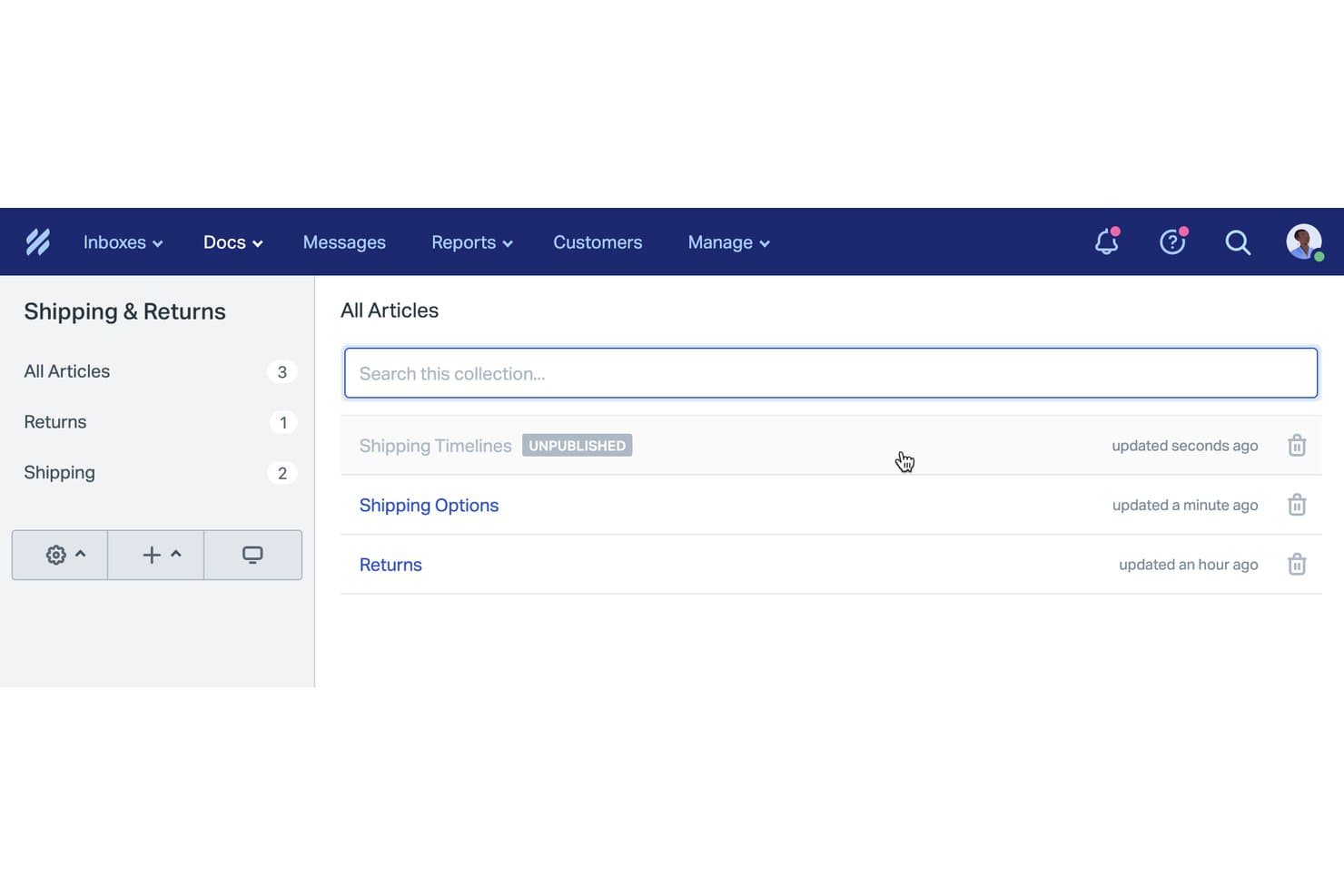
Help Scout organizes knowledge base articles into categorized collections. Help Scout Docs is a cloud-based knowledge base platform that lets you build public or internal help centers, organize articles in collections, and manage content alongside a shared inbox with analytics and AI-powered authoring tools.
Who Is Help Scout Best For?
Help Scout is a solid choice for small support teams who want a help center tightly integrated with their shared inbox and analytics.
Why I Picked Help Scout
I picked Help Scout because its knowledge base analytics are tightly connected to your team’s live inbox, so you can see failed searches and real customer questions as they happen. I like that you can surface these insights to improve articles and plug gaps fast. My team finds value in being able to deploy both public and internal content, with analytics guiding ongoing help center improvements.
Help Scout Key Features
- WYSIWYG article editor: Create and format help content visually with support for images, video, and embedded media.
- Collections and categories hierarchy: Organize articles into collections and categories for a clear, searchable structure.
- Custom domain hosting: Publish your Docs site on your own branded subdomain without extra setup.
- Beacon support widget: Embed articles directly in your app or website so users can find answers without leaving the page.
Help Scout Integrations
Help Scout offers 100+ native integrations, including Slack, HubSpot, Salesforce, Jira, Shopify, Aircall, Mailchimp, and Crowdin. The free plan supports 1 app integration. An API is available for custom integrations, and Beacon can be embedded in websites or apps.
What's Free?
Help Scout offers a free-forever plan, but you can only connect one user and one app integration. The free plan has limited features compared to paid plans, so you may outgrow it quickly if your team scales.
Pros and Cons
Pros:
- AI writing assistance improves article quality
- Agents insert articles directly in conversations
- Analytics highlight content gaps and failed searches
Cons:
- No customer commenting on articles
- Free plan limits to 10 articles
Learn more about Help Scout: Best for docs-as-code knowledge publishing
- Free plan + 14-day trial + demo available
- From $77/month (billed annually)

GitBook flags broken links across your documentation automatically. GitBook is a knowledge base software platform with block-based editing, Git integration, and advanced AI-driven publishing features designed for both product documentation and help centers.
Who Is GitBook Best For?
Solo founders, indie developers, and technical teams who want a docs-as-code experience or need to publish developer-facing knowledge bases without budget approval.
Why I Picked GitBook
I picked GitBook because its docs-as-code workflow, with GitHub/GitLab sync and block-based editing, lets me quickly publish developer-ready knowledge bases. I like using the built-in AI Docs Linter for content quality checks and the reusable content blocks to scale updates across product docs. The perpetual free plan gives solo builders real, production-ready authoring capabilities.
GitBook Key Features
- Block-based visual editor: Create documentation visually with full Markdown support, embeds, images, diagrams, and custom components.
- GitHub and GitLab two-way sync: Sync content with Git repositories to support docs-as-code workflows even on the free plan.
- Role-based permissions: Assign admin, editor, reviewer, commenter, and viewer roles for granular access control in paid plans.
- Helpdesk and analytics integrations: Connect GitBook with platforms like Intercom, Freshdesk, Google Analytics, and Mixpanel to centralize support and reporting.
GitBook Integrations
GitBook offers 30+ native integrations, including GitHub, GitLab, Intercom, Freshdesk, HelpScout, Front, Google Analytics, Mixpanel, Amplitude, HubSpot, and Slack. It also provides an API for custom integrations and supports content embedding from sources like Canva, Loom, Figma, and Mermaid.
What's Free?
GitBook offers a free-forever plan with public workspaces, block-based editing, and Git sync. The free plan is limited to one private workspace and doesn’t include advanced permissions or most integrations—you’ll need a paid plan to access those.
Pros and Cons
Pros:
- AI-ready content for smart chatbot usage
- Git sync for real docs-as-code workflow
- Best-in-class block-based editor experience
Cons:
- Key AI features locked behind paid tiers
- Free plan supports only one user
Learn more about GitBook: 9Best for AI-generated KB articles from tickets
Enjo
- Free plan available
- From $95/month
Visit WebsiteCustomer Rating:4.8/5
Enjo lets users generate help center docs from a URL instantly. Enjo is an AI-powered knowledge base solution that offers a self-serve help center, auto-generates articles from tickets and docs, and integrates with tools like Confluence, Notion, Google Drive, and Zendesk.
Who Is Enjo Best For?
Enjo is a strong match for teams who want to launch a public or internal help center powered by AI, with unlimited human collaborators and no upfront budget approval.
Why I Picked Enjo
I picked Enjo because I can auto-generate knowledge base articles from support tickets and documents, then quickly launch a self-serve help center with AI-powered search and direct answers. In my workflow, I’ve used the bulk edit and article drafting via natural language prompts to keep customer help content fresh without manual effort.
Enjo Key Features
- AI-powered semantic search: Returns direct answers from your content using natural language processing instead of just basic keyword matching.
- Multi-brand and multilingual centers: Launch separate help centers for different products or regions with support for over 100 languages.
- Custom domain and SEO controls: Customize URLs, add SEO settings, and use your branding even on the free plan.
- Deep third-party integrations: Sync knowledge from Confluence, SharePoint, Google Drive, Notion, Zendesk, and more into one unified index.
Enjo Integrations
Enjo offers native integrations with Confluence, SharePoint, Google Drive, Notion, Zendesk, Jira, Salesforce, ServiceNow, Slack, Microsoft Teams, Guru, HubSpot, Okta, Stripe, Azure DevOps, Bitbucket Cloud, and Box. It also provides an API for custom integrations.
What’s Free?
Enjo offers a free-forever plan with unlimited human collaborators, so you can launch a help center and try core features without budget approval. Some advanced features and integrations may be reserved for paid plans.
Pros and Cons
Pros:
- Supports over 100 languages natively
- Free plan offers unlimited human collaborators
- AI drafts articles from tickets automatically
Cons:
- Staleness detection for articles is limited
- Free tier limits AI reply volume
Learn more about Enjo:

MediaWiki organizes wiki content with navigation, search, and editing tools. MediaWiki is an open-source knowledge base platform that powers public and internal wikis with advanced article authoring, structured content organization, powerful search, and granular access controls.
Who Is MediaWiki Best For?
MediaWiki suits technical teams or organizations with in-house admin resources who need a scalable, customizable knowledge base for extensive documentation.
Why I Picked MediaWiki
I picked MediaWiki as one of the best because it’s unmatched for large-scale documentation, letting my team set up unlimited articles, leverage powerful content structuring with namespaces and templates, and handle multilingual resources all in a single, truly free platform. In my experience, nothing else manages sprawling, multi-author wikis at this scale.
MediaWiki Key Features
- VisualEditor WYSIWYG editor: Lets you edit and format articles with images, tables, and templates, without learning wiki syntax.
- Granular access controls: Built-in group and per-page permissions allow admins to manage who can read, edit, or manage specific content areas.
- Extensive extension ecosystem: Thousands of community-contributed add-ons enable you to add custom search, workflows, authentication, and structured data capabilities.
- Multilingual support: Provides full interface localization and interlanguage linking, making it easy to manage global knowledge bases.
MediaWiki Integrations
MediaWiki offers integrations through extensions for LDAP, SAML, OAuth (including Google and Azure Active Directory), Wikimedia Commons, and its Action/REST API. Extensions like Semantic MediaWiki, Cargo, and Wikibase add structured data. No native helpdesk connectors are provided.
What's Free?
MediaWiki is completely free and open-source with no user or feature limits. You can self-host unlimited wikis, articles, and users without paying a license or subscription fee.
Pros and Cons
Pros:
- Advanced granular permissions for content access
- Handles multilingual wikis out of the box
- Unlimited articles and users with no caps
Cons:
- Out-of-the-box interface looks like Wikipedia
- Self-hosting requires web server admin skills
Learn more about MediaWiki:
Diğer Ücretsiz Bilgi Tabanı Yazılımları
Ücretsiz planlar veya deneme sürümleri sunan bazı ek bilgi tabanı yazılımı seçenekleri şunlardır. Bu araçlar kısa listeme girmemiş olsa da yine de göz atmaya değer:
- 11phpMyFAQBest for multilingual support
- 12ClickUpBest for all-in-one docs and task-linked wikis
- 13Zoho DeskBest for helpdesk-native ticket deflection
- 14NuclinoBest for real-time collaborative editing
- 15FlowluBest for project management-linked wikis
- 16NotionBest for integrated task management
- 17Bitrix24 Best for CRM-linked internal knowledge bases
- 18SlabBest for internal team wiki
- 19BookStackBest for book-like organization
- 20DokuWikiBest for no-database wiki file storage
How I Evaluate Free Knowledge Base Software
I evaluate these tools in two layers—core requirements every free knowledge base must nail, like article editing, search, and publishing controls, then differentiators like AI drafting and analytics.
Core Functionality (Table Stakes For This List)
When I'm selecting tools for my list, I rank each one on a scale from 0 (does not offer the functionality) to 5 (excels in this area) for each core functionality listed below. Then, I calculate the tool's total score into a percentage. Each tool needs to achieve a minimum total score of 65% to be considered for inclusion.
- Free Plan Availability: I check whether the vendor offers a genuinely free forever tier that includes knowledge base features—not just a 14-day trial that locks you out.
- Article Authoring & Editor: A good editor lets you format articles, embed screenshots, and add links without switching to HTML or relying on a developer.
- Content Organization: I look at how each tool handles categories, subcategories, and collections—especially whether you can build a logical help center structure that customers can browse.
- Search Functionality: The search bar is often the first thing a frustrated customer reaches for, so I evaluate whether results are accurate, fast, and go beyond simple title matching.
- Public & Internal Publishing: Some teams need a customer-facing help center and an internal agent reference—I check whether the tool supports both or limits you to one audience.
- Access Controls & Permissions: I evaluate whether you can assign distinct roles so content writers can draft articles, reviewers can approve them, and end-users only see what's relevant.
Once I have a list of tools that meet this criteria, I consider what sets each platform apart.
Differentiating Factors (What Sets Vendors Apart)
Here's how I compare and contrast different vendors:
Standout Features
Analytics matter here. I look for tools that track which articles get views, which search queries return no results, and where customers drop off. Those gaps tell you exactly what content to create next. Customer feedback loops—like article ratings or "was this helpful?" prompts—pair well with that data by adding direct user input. I also evaluate helpdesk integrations, since surfacing KB articles inside a support agent's ticket view cuts resolution time. AI-assisted drafting is a newer differentiator worth watching across tools like Zendesk and Freshdesk.
Beyond Features
Free plan generosity varies wildly. I check how many articles, users, and admin seats each vendor includes before paywalls kick in—and whether branding or watermarks clutter your help center. Time-to-value also matters when you're spinning up a KB without a budget. Tools like HelpDocs and Document360 offer templates that get you live fast, while others require more manual setup. SEO is easy to overlook, but I evaluate whether free tiers include custom domains, meta tags, and sitemaps so your articles actually surface in search results where customers start looking.
Ücretsiz Bilgi Tabanı Yazılımı Nasıl Seçilir
Karmaşık özellik listeleri ve fiyatlandırma yapıları, ücretsiz bilgi tabanı yazılımından gerçekte ne elde ettiğinizi anlamanızı zorlaştırabilir. Yazılım seçim sürecinizde ilerlerken odağınızı korumanıza yardımcı olmak için göz önünde bulundurmanız gereken bazı faktörleri aşağıda bulabilirsiniz:
| Faktör | Dikkat Edilmesi Gerekenler |
|---|---|
| FaktörÜcretsiz teklif kapsamı | Dikkat Edilmesi GerekenlerEk beklenmedik maliyetlerle karşılaşmadan ekibinizin ihtiyaçlarını karşıladığından emin olmak için kullanıcı sayısı ve depolama alanı gibi ücretsiz planın sınırlamalarını kontrol edin. |
| FaktörÖlçeklenebilirlik | Dikkat Edilmesi GerekenlerYazılımın ekibinizle birlikte büyüyüp büyüyemeyeceğini değerlendirin. İhtiyaçlarınız arttığında ücretli planlara kolayca yükseltme olanağı sunan seçenekleri tercih edin. |
| FaktörEntegrasyonlar | Dikkat Edilmesi Gerekenlerİş akışlarını sorunsuz ve bağlantılı tutmak için yazılımın Slack veya Google Workspace gibi hâlihazırda kullandığınız araçlarla entegre olduğundan emin olun. |
| FaktörKullanım Kolaylığı | Dikkat Edilmesi GerekenlerEkibinizin kolayca kullanabileceği kullanıcı dostu bir arayüz arayın. Dik bir öğrenme eğrisi, benimsemeyi yavaşlatabilir ve verimliliği azaltabilir. |
| FaktörGüvenlik | Dikkat Edilmesi GerekenlerYazılımın veri koruma önlemlerini doğrulayın. Bilgilerinizi güvende ve emniyette tutmak için sektör standartlarına uygun olduğundan emin olun. |
| FaktörÖzelleştirme | Dikkat Edilmesi GerekenlerEkibinizin iş akışına ve tarzına uyacak şekilde özelleştirilebilir şablonlar veya markalama seçenekleriyle yazılımı ihtiyaçlarınıza göre uyarlayıp uyarlayamayacağınızı kontrol edin. |
| FaktörDestek | Dikkat Edilmesi GerekenlerSorunlar ortaya çıktığında ekibinize yardımcı olmak için canlı sohbet ve yardım merkezleri de dâhil olmak üzere müşteri desteğinin kullanılabilirliğini değerlendirin. |
| FaktörMobil Erişim | Dikkat Edilmesi GerekenlerEkibinizin hareket hâlindeyken bilgilere erişebilmesi ve ofis dışında da verimliliğini sürdürebilmesi için yazılımın bir mobil uygulama veya duyarlı tasarım sunduğundan emin olun. |
Ücretsiz Bilgi Bankası Yazılımı Nedir?
Bilgi bankası yazılımı, kuruluşların bilgileri verimli bir şekilde depolamasına, yönetmesine ve paylaşmasına yardımcı olan bir araçtır. Bu araçlar genellikle temel özellikleri ücretsiz olarak sağlayan ücretsiz planlar veya deneme sürümleriyle birlikte gelir. Çoğunlukla müşteri destek ekipleri, BT departmanları ve her büyüklükteki işletme tarafından kullanılan bu yazılımlar, bilgiye erişilebilirliği ve iş birliğini iyileştirerek değer sunar. Makale oluşturma, arama işlevi ve kullanıcı izinleri gibi özellikler bilgileri düzenlemeye, şirket içi ekip verimliliğini artırmaya ve güvenli erişim sağlamaya yardımcı olur.
Ücretsiz Bilgi Bankası Yazılımının Özellikleri
Bilgi bankası yazılımlarında yaygın olarak bulunan özellikleri ve hangilerinin genellikle ücretsiz ve ücretli planlara dâhil olduğunu inceleyelim.
Tipik Ücretsiz Bilgi Bankası Yazılımı Özellikleri
- Makale oluşturma: Kullanıcıların içerikleri verimli bir şekilde yazmasına ve düzenlemesine olanak tanıyarak bilgilerin kolayca erişilebilir olmasını sağlar.
- Arama işlevi: Bilgilerin hızlı bir şekilde bulunmasını sağlayarak zamandan tasarruf ettirir ve verimliliği artırır.
- Kullanıcı izinleri: İçeriğe erişimi kontrol ederek yalnızca yetkili kullanıcıların bilgileri görüntüleyebilmesini veya düzenleyebilmesini sağlar.
- Sürüm denetimi: Belgelerdeki değişiklikleri izleyerek gerektiğinde kullanıcıların önceki sürümlere geri dönmesine olanak tanır.
- Mobil erişim: Bilgi bankasına mobil cihazlardan erişme olanağı sunarak bilgilerin hareket hâlindeyken de kullanılabilir olmasını sağlar.
- Temel şablonlar: Kullanıcıların tutarlı ve profesyonel görünümlü belgeleri hızlıca oluşturmasına yardımcı olmak için önceden tasarlanmış düzenler sunar.
- Temel analizler: Kullanıcı etkileşimi ve içerik performansı hakkında bilgiler sunarak popüler makalelerin belirlenmesine yardımcı olur.
- Çok dilli destek: İçeriklerin birden fazla dilde oluşturulmasına ve bunlara erişilmesine olanak tanıyarak farklı ekiplerin ihtiyaçlarını karşılar.
Genellikle Ücretli Bilgi Bankası Yazılımı Özellikleri
- Gelişmiş analizler: Bilgi yönetimi stratejilerini iyileştirmek için kullanıcı davranışı ve içerik etkililiği hakkında derinlemesine bilgiler sunar.
- Yapay zekâ destekli arama: Akıllı öneriler ve tavsiyelerle arama özelliklerini geliştirerek bilgiye erişimi iyileştirir.
- Özel markalama: Uyumlu bir kullanıcı deneyimi sunmak için arayüzün şirket markasına uyacak şekilde özelleştirilmesine olanak tanır.
- CRM ile entegrasyon: Müşteri desteğini güçlendirmek ve hizmet sunumunu iyileştirmek için bilgi bankasını CRM sistemlerine bağlar.
- Gelişmiş özelleştirme: Platformu belirli iş ihtiyaçlarına ve iş akışlarına uyacak şekilde kapsamlı olarak uyarlama olanağı sunar.
- İş akışı otomasyonu: Tekrarlayan görevleri otomatikleştirerek verimliliği artırır ve kullanıcıların manuel iş yükünü azaltır.
- Öncelikli destek: Teknik sorunlar ve talepler konusunda yardımcı olmak için daha hızlı yanıt süreleri ve özel destek kanalları sunar.
- Tek oturum açma (SSO): Mevcut kimlik bilgileriyle erişime izin vererek kullanıcı kimlik doğrulamasını basitleştirir, güvenliği ve kullanıcı kolaylığını artırır.
Ücretsiz Bilgi Bankası Yazılımının Faydaları
Ücretsiz bilgi tabanı yazılımını uygulamak, ekibiniz ve işletmeniz için çeşitli avantajlar sağlar. İşte yararlanabileceğiniz birkaç avantaj:
- Maliyet tasarrufu: Ücretsiz planlar, finansal bir taahhütte bulunmadan bilgileri yönetmenize ve paylaşmanıza olanak tanır; bu da onları bütçesine dikkat eden ekipler için ideal kılar.
- Geliştirilmiş erişilebilirlik: Mobil erişim ve arama işlevi sayesinde ekibiniz, nerede olursa olsun bilgileri bulabilir ve kullanabilir.
- Daha güçlü iş birliği: Gerçek zamanlı düzenleme ve kullanıcı izinleri, ekibinizin etkili bir şekilde birlikte çalışmasına yardımcı olur ve herkesin bilgilere doğru erişime sahip olmasını sağlar.
- Düzenli bilgiler: Makale oluşturma ve sürüm denetimi gibi özellikler, bilgi tabanınızı düzenli ve güncel tutarak gereksiz tekrarları ve karmaşayı azaltır.
- Hızlı dağıtım: Temel şablonlar ve sezgisel arayüzler hızlı kurulum olanağı sunar; böylece ekibiniz yazılımdan hemen yararlanmaya başlayabilir.
- Ölçeklenebilirlik: Ücretsiz planlar genellikle yükseltme seçenekleri içerir ve bilgi tabanınızın ekibiniz ve ihtiyaçlarınız büyüdükçe gelişmesine olanak tanır.
- Çok dilli destek: Farklı ekiplerin ihtiyaçlarını karşılayan bu özellik, dil farklılıklarının bilgi paylaşımını ve iş birliğini engellememesini sağlar.
Ücretsiz Bilgi Tabanı Yazılımının Maliyetleri ve Fiyatlandırması
Bu makaleye ücretsiz planlara sahip en iyi bilgi tabanı yazılımı seçeneklerini aradığınız için geldiğinizi biliyorum. Ancak ücretsiz planlar yalnızca sınırlı özellikler sunduğundan, gelecekte planınızı yükseltmeniz gerekme ihtimali oldukça yüksektir.
Aşağıdaki tablo, bilgi tabanı yazılımı çözümlerinde yaygın planları, ortalama fiyatlarını ve genellikle sunulan özellikleri özetlemektedir:
Bilgi Tabanı Yazılımı için Plan Karşılaştırma Tablosu
| Plan Türü | Ortalama Fiyat | Yaygın Özellikler |
|---|---|---|
| Plan TürüÜcretsiz Plan | Ortalama Fiyat$0 | Yaygın ÖzelliklerTemel makale oluşturma, arama işlevi, kullanıcı izinleri, mobil erişim ve temel şablonlar. |
| Plan TürüKişisel Plan | Ortalama Fiyat$0.83-$10/kullanıcı/ay | Yaygın ÖzelliklerMaksimum depolama kapasitesi, özelleştirme seçenekleri, entegrasyonlar ve öncelikli destek. |
| Plan Türüİşletme Planı | Ortalama Fiyat$10-16/kullanıcı/ay | Yaygın ÖzelliklerGelişmiş analizler, yapay zekâ destekli arama, özel markalama ve iş akışı otomasyonu. |
| Plan TürüKurumsal Plan | Ortalama Fiyat$20+/kullanıcı/ay | Yaygın ÖzelliklerTek oturum açma (SSO), özel hesap yöneticisi, gelişmiş güvenlik özellikleri ve kapsamlı özelleştirme. |
Ücretsiz Bilgi Tabanı Yazılımı SSS
Ücretsiz bilgi tabanı yazılımı hakkında sık sorulan soruların bazı yanıtları:
Ücretsiz bilgi tabanı yazılımını bir yardım masası sistemi olmadan kullanabilir miyim?
Evet, ücretsiz bilgi tabanı yazılımını bir yardım masası sisteminden bağımsız olarak kullanabilirsiniz. Bilgileri depolamak ve paylaşmak için tasarlanmıştır; bu da onu ek araçlar olmadan self servis destek sunmak veya dahili belgeleri düzenlemek isteyen ekipler için kullanışlı kılar.
Ücretsiz bilgi tabanı yazılımı ne kadar güvenlidir?
Güvenlik sağlayıcıya göre değişir, ancak çoğu ücretsiz bilgi tabanı yazılımı kullanıcı izinleri ve veri şifreleme gibi temel güvenlik özelliklerini içerir. Kuruluşunuzun gereksinimlerini karşıladığından emin olmak için her platformun güvenlik önlemlerini incelemeniz önemlidir.
Ücretsiz planlarda kullanıcı sayısıyla ilgili sınırlamalar var mı?
Evet, birçok ücretsiz bilgi tabanı yazılımı planında kullanıcı sınırı vardır. Bu sınırlar değişiklik gösterir; bu nedenle yükseltme yapmanız gerekmeden ekibinizin büyüklüğünü karşılayabildiğinden emin olmak için her sağlayıcının ücretsiz planının ayrıntılarını kontrol edin.
Ücretsiz bilgi tabanı yazılımının depolama sınırlamaları nelerdir?
Ücretsiz planlar genellikle barındırabileceğiniz içerik miktarını etkileyebilecek depolama sınırlamalarıyla birlikte gelir. Yazılımın mevcut ihtiyaçlarınızı karşıladığından emin olmak ve depolama gereksinimleriniz artarsa yükseltmeyi değerlendirmek için bu sınırları anlamanız önemlidir.
Ücretsiz bilgi tabanı yazılımını diğer araçlarla entegre edebilir miyim?
Birçok ücretsiz bilgi tabanı yazılımı seçeneği Slack veya Google Workspace gibi popüler platformlarla entegrasyonlar sunar, ancak entegrasyonların sayısı ve türü ücretli planlara kıyasla sınırlı olabilir. Mevcut iş akışlarınızla uyumlu olduğundan emin olmak için entegrasyon seçeneklerini kontrol edin.
Ücretsiz bilgi tabanı yazılımı için müşteri desteği mevcut mu?
Ücretsiz planlar için müşteri desteği genellikle sınırlıdır. Bazı sağlayıcılar topluluk forumları veya çevrimiçi belgeler aracılığıyla temel destek sunar, ancak özel destek kanallarına erişim çoğu zaman ücretli bir plan gerektirir.