

Die 10 besten Softwarelösungen zur Kundeneinführung im Jahr 2026

10 Die beste Software zur Kundeneinführung


Software zur Kundeneinführung hilft Ihnen dabei, neue Nutzer in erfolgreiche, langfristige Kunden zu verwandeln – ohne das Chaos manueller Übergaben, übersehener Schritte oder unklarer Abläufe. Doch nicht alle Lösungen zur Kundeneinführung sind gleich, und die falsche Einrichtung kann selbst die besten CX-Strategien ausbremsen.
Ich habe mit Teams gearbeitet, die SaaS-, E-Commerce- und serviceorientierte Erlebnisse skalieren, und eines ist klar: Die Kundeneinführung ist kein einmaliger Moment. Sie ist eine strukturierte, wiederholbare Reise, die den Ton für alles Folgende angibt. Ich habe die beste Software zur Kundeneinführung getestet und bewertet, damit Sie die Aktivierung optimieren, die Abwanderung reduzieren und vom ersten Tag an Vertrauen aufbauen können.
Warum Sie unseren Software-Empfehlungen vertrauen können
Unser Team testet und bewertet Software seit 2012. Als CX-Führungskräfte selbst wissen wir, wie schwierig – und wichtig – es ist, die richtige Software auszuwählen.
Für diesen Leitfaden haben wir Tools mithilfe von praktischen Tests und unabhängiger Recherche bewertet und dabei unsere Bewertungskriterien angewendet.
Unsere Bewertungen spiegeln unser menschliches redaktionelles Urteilsvermögen wider, keine Verkaufsstrategie.
Zusammenfassungstabelle der besten Softwarelösungen zur Kundeneinführung
| Tool | Best For | Trial Info | Price | ||
|---|---|---|---|---|---|
| 1 | Am besten für automatisiertes Onboarding-Training | 14-tägige kostenlose Testphase + kostenlose Demo verfügbar | Preise auf Anfrage | Website | |
| 2 | Am besten geeignet, um Kunden-Onboarding mit Unternehmenssystemen zu verbinden | Kostenlose Demo verfügbar | Preis auf Anfrage | Website | |
| 3 | Am besten für Kundenbereiche zur Implementierung ohne Anmeldung | 14-tägige kostenlose Testversion | Ab 59 €/Benutzer/Monat | Website | |
| 4 | Am besten geeignet für KI-gestützte Kurserstellung | Kostenloser Plan + kostenlose Demo verfügbar | Ab $119/Monat (bei jährlicher Abrechnung) | Website | |
| 5 | Am besten geeignet für sichere Kollaborationsräume mit Kunden | Kostenloser Plan + kostenlose Testversion + kostenlose Demo verfügbar | Ab $99/Monat | Website | |
| 6 | Am besten geeignet für interaktive Produkttouren | Kostenloser Plan + kostenlose Demo verfügbar | Ab $174/Monat (bei jährlicher Abrechnung) | Website | |
| 7 | Am besten geeignet für personalisierte Lernpfade | Kostenlose Demo + kostenlose Testphase verfügbar | Preise auf Anfrage | Website | |
| 8 | Am besten geeignet für vorgefertigte Onboarding-Vorlagen | 14-tägige kostenlose Testphase + kostenlose Demo verfügbar | Ab $19/Teammitglied/Monat (jährliche Abrechnung) | Website | |
| 9 | Am besten geeignet für Schritt-für-Schritt-Erfolgspläne | Kostenloser Tarif verfügbar | Ab $350/Monat | Website | |
| 10 | Am besten geeignet für die Erstellung von How-to-Videos mit KI | 7-tägige kostenlose Testversion + Gratis-Tarif + kostenlose Demo verfügbar | Ab $18/Ersteller/Monat (jährliche Abrechnung) | Website |


Übersichten der 20 besten Softwarelösungen zur Kundeneinführung
Hier finden Sie eine kurze Beschreibung jeder Lösung zur Kundeneinführung. Sie zeigt den besten Anwendungsfall und einige bemerkenswerte Funktionen jeder Lösung und enthält Screenshots, die einen Eindruck von der Benutzeroberfläche vermitteln.

SkyPrep
Am besten für automatisiertes Onboarding-Training

Die Customer-Onboarding-Software von SkyPrep wurde für Organisationen entwickelt, die ihre Schulungsprozesse optimieren und stärkere Kundenbeziehungen aufbauen möchten. Sie bietet flexible Möglichkeiten zur Inhaltserstellung und automatisierte Einschreibungen, sodass Ihr Team ansprechende Schulungserlebnisse bereitstellen kann, die die Produktadoption und Kundenbindung verbessern. Egal, ob Sie in einer technologieorientierten Branche oder in einem dienstleistungsorientierten Unternehmen tätig sind: Die intuitive Plattform von SkyPrep hilft Ihnen, Onboarding-Prozesse effizient zu verwalten und zu verfolgen, sodass Ihre Kunden gut vorbereitet und sicher im Umgang mit Ihren Produkten oder Dienstleistungen sind.
Warum ich SkyPrep gewählt habe
Ich habe SkyPrep wegen seines starken Fokus auf die Automatisierung des Onboarding-Trainings ausgewählt, was für Unternehmen entscheidend ist, die ihren Kunden ein konsistentes und fesselndes Erlebnis bieten wollen. Die automatisierten Einschreibungen der Plattform stellen sicher, dass neuen Kunden umgehend relevante Kurse zugewiesen werden. Das minimiert manuellen Aufwand und ermöglicht Ihrem Team, sich auf strategischere Aufgaben zu konzentrieren. Darüber hinaus sorgen digitale Bestätigungen von SkyPrep für eine sichere Richtlinien- und Compliance-Bestätigung, schaffen zuverlässige Nachweise und reduzieren den Verwaltungsaufwand. Mithilfe der umfangreichen Analyse- und Nachverfolgungsmöglichkeiten können Sie den Fortschritt Ihrer Kunden bequem überwachen, Unterstützungsbedarf erkennen und Wissenslücken wirksam schließen, um die Kundenbindung zu erhöhen.
SkyPrep Hauptfunktionen
Neben den starken automatisierten Onboarding-Funktionen bietet SkyPrep eine Vielzahl an Features, die Ihr Kundenschulungserlebnis verbessern.
- Lernerengagement: SkyPrep setzt Gamification und modernes Design ein, um das Lernen für Ihre Kunden interaktiv und motivierend zu gestalten.
- Multi-Tenant-LMS: Mit dieser Funktion verwalten Sie eigene Plattformbereiche für verschiedene Kunden oder Filialen innerhalb eines Kontos und behalten so Übersicht und Struktur.
- Virtuelles Klassenzimmer: SkyPrep stellt Werkzeuge für Online-Schulungen bereit, sodass Ihre Kunden von überall aus problemlos an Trainings teilnehmen können.
- KI-gestützte Funktionen: Die Plattform nutzt künstliche Intelligenz, um das Lernerlebnis zu verbessern und die Inhaltserstellung zu erleichtern – so wird es Ihrem Team zugänglicher gemacht.
SkyPrep Integrationen
Zu den Integrationen gehören BambooHR, ADP, SAML 2.0, OKTA, G Suite, Office365, OpenSesame, Stripe, PayPal sowie eine API für individuelle Anbindungen.
Pros and Cons
Pros:
- Die benutzerfreundliche Oberfläche vereinfacht die Navigation für alle Nutzer
- Unterstützt verschiedene Inhaltsformate und bereichert so das Lernerlebnis
- Umfassende Berichtswerkzeuge ermöglichen die Fortschrittsverfolgung der Lernenden
Cons:
- Keine dedizierte mobile App für den mobilen Zugriff verfügbar
- Eingeschränkter Offline-Zugriff auf Schulungsmaterialien reduziert Flexibilität

Continu
Am besten geeignet, um Kunden-Onboarding mit Unternehmenssystemen zu verbinden
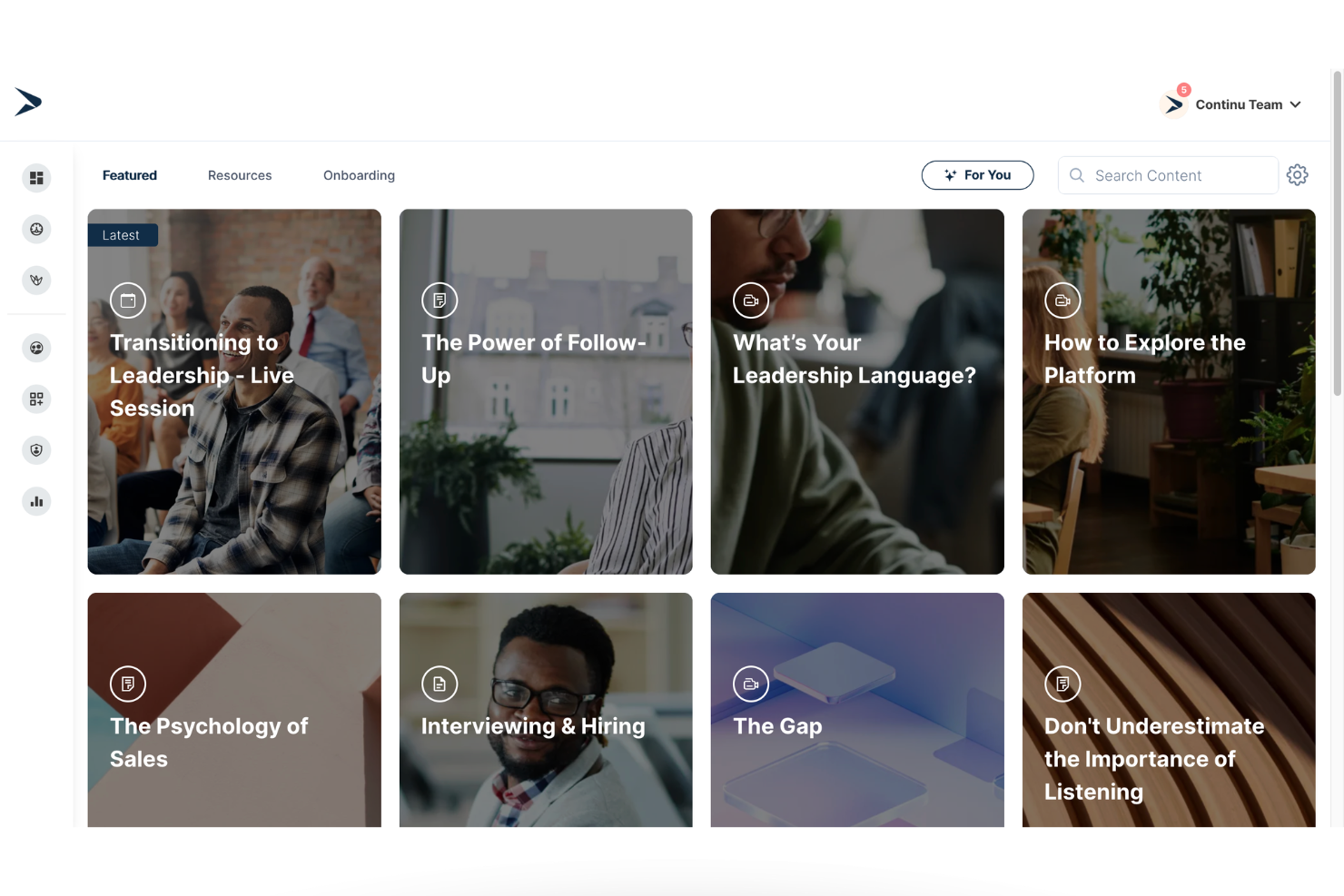
Continu ist eine Plattform für Kunden-Onboarding und -Lernen, die darauf ausgelegt ist, strukturierte Schulungsprogramme bereitzustellen, Onboarding-Abläufe zu automatisieren und die Kundenschulung mit bestehenden Geschäftssystemen zu verbinden.
Für wen ist Continu am besten geeignet?
Continu eignet sich besonders für mittelständische bis große B2B-Unternehmen, die Kunden, Partner oder Auftraggeber mithilfe strukturierter Schulungsprogramme onboarden müssen, die mit ihrem umfassenderen Technologie-Stack verknüpft sind.
Warum ich Continu ausgewählt habe
Ich habe Continu ausgewählt, weil die Plattform Onboarding-Daten eng mit Unternehmenssystemen integriert. Die Salesforce-Integration ermöglicht es Teams, den Fortschritt des Kunden-Onboardings direkt neben den Kontoaktivitäten zu verfolgen. Dadurch lassen sich Lernengagement sowie Kennzahlen zur Nutzung und Kundenbindung leichter miteinander verknüpfen. Die Plattform unterstützt außerdem die automatische Anmeldung und Inhaltszuweisung, sodass neue Kunden die passenden Onboarding-Materialien ohne manuelle Bereitstellung erhalten.
Wichtige Funktionen von Continu
- Lernpfade: Erstellen Sie strukturierte Onboarding-Pfade, die Videos, Kurse und Dokumente in einer festgelegten Reihenfolge anordnen.
- Abläufe: Gestalten Sie schrittweise Onboarding-Programme, die Kunden durch wichtige Aktivierungsmeilensteine führen.
- Intelligente Segmentierung: Weisen Sie Inhalte automatisch basierend auf Rolle, Produktstufe oder Kundensegment zu.
- Continu Insights: Überwachen Sie den Onboarding-Fortschritt und das Engagement über Echtzeit-Dashboards.
Continu-Integrationen
Zu den Integrationen gehören Salesforce, Workday, BambooHR, Slack, Google Workspace, Okta und Zoom. Für benutzerdefinierte Integrationen ist eine API verfügbar.
Pros and Cons
Pros:
- Leistungsstarke Salesforce-Integration für Transparenz beim Onboarding-Fortschritt
- Strukturierte Lernabläufe unterstützen die Kundenaktivierung
- Automatisierte Segmentierung reduziert den manuellen Aufwand bei der Einrichtung des Onboardings
Cons:
- Preise sind nicht öffentlich transparent
- Für den Einsatz in Unternehmen besser geeignet als für kleine Teams
New Product Updates from Continu
Continu Adds Smarter Content Management
Continu adds Intelligent Tagging and Descriptions and richer content details to improve how learning content is organized and maintained. These updates reduce manual work and give teams more consistent, detailed content records. For more information, visit Continu’s official site.
 .
.
Am besten für Kundenbereiche zur Implementierung ohne Anmeldung
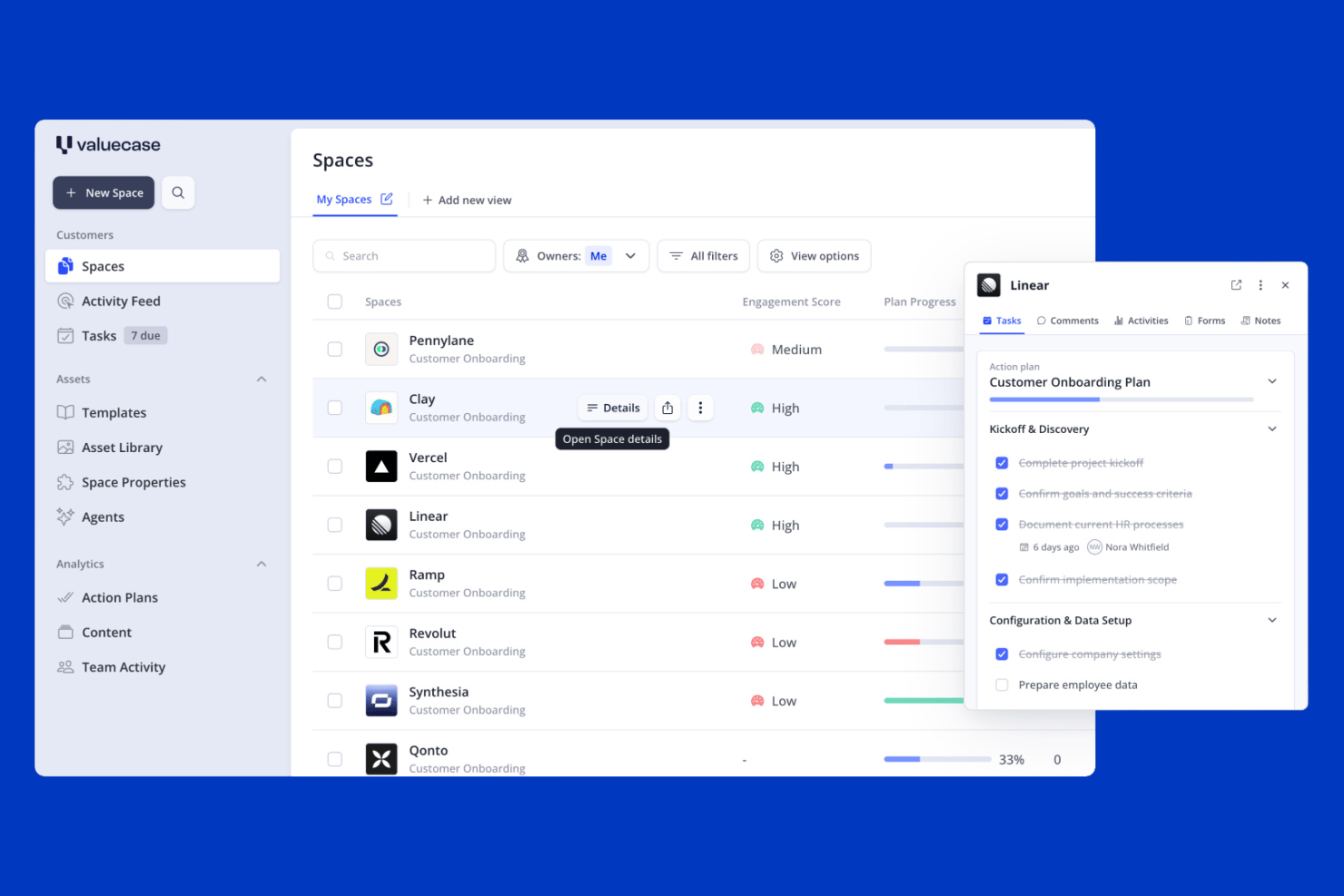
Valuecase ist eine Plattform für die Kundenimplementierung, die auf markenbezogenen Kundenbereichen ohne Anmeldung basiert und Aufgabenverwaltung, Meilensteinverfolgung, Formulare, eingebettete Inhalte und Live-Chat in einem einzigen gemeinsamen Link kombiniert.
Für wen ist Valuecase am besten geeignet?
Valuecase eignet sich besonders für Kundenerfolgs- und Implementierungsteams von B2B-SaaS-Unternehmen, die ihren Kunden eine hochwertige, strukturierte Implementierungserfahrung bieten möchten, ohne dass diese ein Konto erstellen müssen.
Warum ich Valuecase ausgewählt habe
Ich habe Valuecase in meine Top-Auswahl aufgenommen, weil es einen Reibungspunkt löst, der mir besonders wichtig ist: dass Kunden tatsächlich an ihrer Implementierung teilnehmen. Jeder Bereich wird als einzelner Link geteilt, für den keine Anmeldung erforderlich ist. Dadurch können Kunden mit ihrem Plan, ihren Aufgaben und eingebetteten Inhalten interagieren, ohne ein Konto zu erstellen. Außerdem gefällt mir, dass die KI aus einer hochgeladenen PDF-Datei oder einem Besprechungsprotokoll eine vollständige Implementierungsvorlage erstellen kann, wodurch sich die Einrichtungszeit erheblich verkürzt. Der integrierte Live-Chat verknüpft Unterhaltungen direkt mit bestimmten Aufgaben, sodass alles an einem Ort bleibt, anstatt sich über E-Mail-Verläufe zu verteilen.
Die wichtigsten Funktionen von Valuecase
- Gantt-Diagrammansicht: Visuelle Zeitleiste, die alle Implementierungsaufgaben und Meilensteine über die gesamte Projektdauer hinweg abbildet und in jedem Tarif verfügbar ist.
- Bedingte Formularlogik: Formulare passen ihren Fragenablauf basierend auf den Kundenantworten an, sodass Sie von jedem Kundensegment die richtigen Informationen erfassen können.
- Kundenübergreifendes Dashboard: Zentrale Ansicht mit dem Implementierungsstatus, überfälligen Elementen und Interaktionskennzahlen für Ihr gesamtes Kundenportfolio.
- Regelbasierte Automatisierung: Wenn-dies-dann-das-Auslöser senden E-Mail-Erinnerungen, schalten Inhaltsphasen frei und aktualisieren CRM-Felder basierend auf der Aktivität oder Inaktivität des Kunden.
Valuecase-Integrationen
Valuecase bietet native Integrationen mit HubSpot, Salesforce, Slack und Microsoft Teams. Darüber hinaus stehen eine öffentliche API, Webhooks, Valuecase MCP sowie Verbindungen über Zapier, Make und Albato zur Verfügung.
Pros and Cons
Pros:
- Kunden können ohne Anmeldung auf die Implementierung zugreifen
- KI erstellt vollständige Implementierungspläne aus hochgeladenen Dateien
- Markenbezogene Bereiche bündeln Aufgaben und Kommunikation
Cons:
- CRM-Integrationen sind nur in höheren Tarifen verfügbar
- Beim Bearbeiten aktiver Bereiche fehlt eine Funktion für Massenaktualisierungen

Am besten geeignet für KI-gestützte Kurserstellung
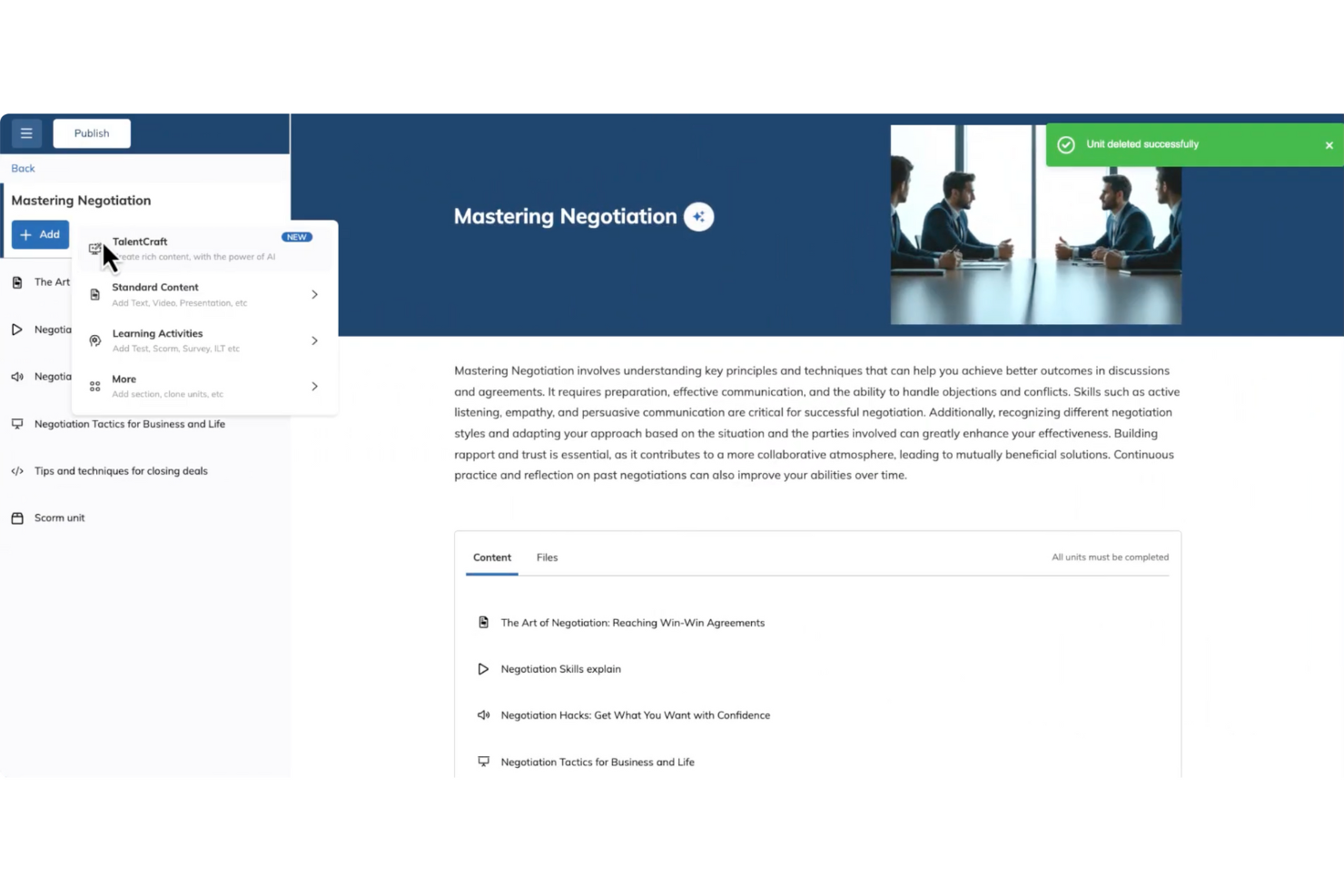
Die Verwaltung des Kunden-Onboardings kann herausfordernd sein, aber TalentLMS hilft Teams, diese Aufgabe durch strukturierte Schulungen und Lernpfade zu meistern. Es unterstützt Unternehmen in unterschiedlichen Branchen, die eine einfache Möglichkeit zur Einarbeitung ihrer Kunden mit klaren, organisierten Trainingsinhalten benötigen. Mit Tools zur Kurserstellung und wiederverwendbarem Lernmaterial unterstützt TalentLMS Teams dabei, einheitliche Onboarding-Erfahrungen in großem Umfang bereitzustellen.
Warum ich TalentLMS gewählt habe
Ich habe TalentLMS aufgrund der Möglichkeit ausgewählt, das Kunden-Onboarding durch strukturierte Kurserstellung und flexible Trainingspfade zu unterstützen. Teams können damit Onboarding-Inhalte schnell erstellen und anpassen, um auf verschiedene Kundenbedürfnisse einzugehen. Integrierte Bewertungen und Zertifizierungen erleichtern es, den Fortschritt zu verfolgen und den Abschluss des Lernprozesses zu bestätigen. Zusammengenommen helfen diese Funktionen Teams, ein konsistentes und messbares Onboarding-Training zu liefern.
Wichtige Funktionen von TalentLMS
Zusätzlich zur KI-gestützten Kurserstellung bietet TalentLMS:
- Kompetenzbasierte Schulungen: Diese Funktion ermöglicht es Ihnen, Onboarding-Erlebnisse auf spezifische Kompetenzen zuzuschneiden, sodass jeder Kunde eine auf seine Bedürfnisse zugeschnittene Schulung erhält.
- Mobile Zugänglichkeit: Mit Unterstützung für mobile Endgeräte kann Ihr Team jederzeit und überall auf Schulungsmaterialien zugreifen, was kontinuierliches Lernen erleichtert.
- Echtzeit-Analysen: Umfassendes Reporting und Analytics ermöglichen das Überwachen des Lernfortschritts und der Kursleistung, damit Ihr Onboarding-Prozess auf Kurs bleibt.
- Anpassungsoptionen: Von Branding bis White-Labeling bietet TalentLMS verschiedene Möglichkeiten, die Plattform an die Identität Ihres Unternehmens anzupassen.
TalentLMS Integrationen
Integrationen umfassen Zoom, Salesforce, Shopify, WordPress, BambooHR, Zapier, GoToMeeting, Microsoft Teams, Google Analytics und Slack.
Pros and Cons
Pros:
- Integrierte Bewertungen ermöglichen Kompetenzmessung und Zertifizierung
- Klare Gruppierungsfunktionen für Lernende unterstützen komplexe Trainingsstrukturen
- Anpassbare Funktionen erfüllen verschiedene Trainingsbedürfnisse und verbessern die Nutzererfahrung
Cons:
- Die integrierten Kollaborationstools sind im Vergleich zu dedizierten Lern-Communities eher einfach
- Große Multimedia-Dateien erfordern möglicherweise externe Hosting-Lösungen
New Product Updates from TalentLMS
TalentLMS Adds Learning Paths, AI Video, and Learner Experience Updates
TalentLMS introduced updates across learning management, content creation, and learner experience, including Learning Paths for Groups, AI video generation in TalentCraft, video bookmarking, and expanded administration tools. For more information, visit TalentLMS’s official site.

Moxo
Am besten geeignet für sichere Kollaborationsräume mit Kunden
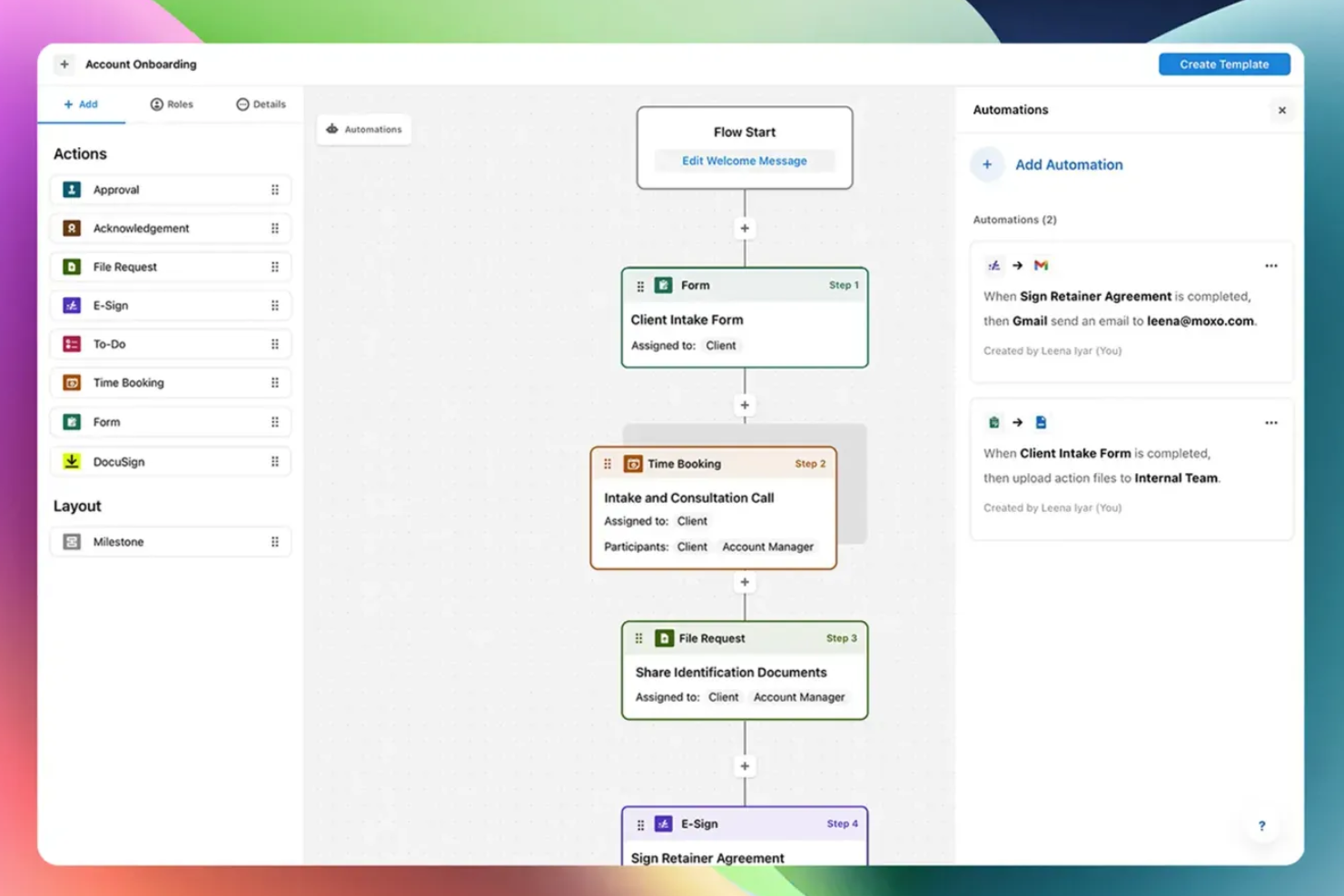
Moxo ist eine Plattform für die Kundenaufnahme, die Workflow-Automatisierung, Dokumentensammlung, elektronische Unterschriften, sichere Nachrichtenübermittlung und Aufgabenverfolgung in einem einzigen Arbeitsbereich für die Verwaltung von Kundeninteraktionen vereint.
Für wen ist Moxo am besten geeignet?
Moxo ist besonders passend für Teams im Bereich professionelle Dienstleistungen – etwa in Finanzdienstleistungen, der Rechtsberatung oder dem Consulting –, die kontinuierliche, dokumentenlastige Kundenbeziehungen betreuen.
Warum ich Moxo gewählt habe
Moxo ist einer meiner Favoriten, weil mir gefällt, dass jede Kundeninteraktion in einem dedizierten, verschlüsselten Arbeitsbereich stattfindet statt über verstreute E-Mail-Threads und geteilte Laufwerke. In der Praxis bedeutet das, dass mein Team Dokumente sammeln, Genehmigungen einholen und Nachrichten mit Kunden an einem Ort austauschen kann, wobei alle Daten während der Übertragung und Speicherung verschlüsselt sind. Die fein abgestuften, rollenbasierten Zugriffsrechte sind ein echtes Alleinstellungsmerkmal: Ich kann genau festlegen, wer in welcher Phase des Onboardings was sieht – das ist besonders wichtig beim Umgang mit sensiblen Finanz- oder Rechtsdokumenten. Die 7-jährige Prüfungshistorie ist ein weiteres Merkmal, auf das ich mich verlasse, besonders in der Arbeit mit Kunden aus regulierten Branchen.
Wichtige Funktionen von Moxo
- Drag-and-drop Workflow-Builder: Erstellen Sie mehrstufige Onboarding-Sequenzen mit Aufgaben, Dateianforderungen, Formularen und Genehmigungen in einem visuellen Editor.
- Elektronische Unterschriften: Sammeln Sie rechtlich verbindliche Unterschriften direkt im Kundenarbeitsbereich, ohne die Kunden zu externen Tools weiterzuleiten.
- White-Label-Branding: Wenden Sie Ihr Logo, Ihre Farben und Ihre Domain auf das Kundenportal an, sodass jeder Onboarding-Kontaktpunkt Ihre Marke widerspiegelt.
- Video-Meetings in der App: Führen Sie Videocalls mit Kunden direkt auf der Plattform durch, ohne zu einem separaten Konferenztool wechseln zu müssen.
Moxo-Integrationen
Moxo bietet direkte Daten-Synchronisations-Connectoren für Salesforce, HubSpot, Microsoft Dynamics, Zoho, Wealthbox, Redtail, Filevine, Global Relay, Smarsh und Xero, sowie dokumentierte Integrationen für DocuSign, Stripe, Slack, Jira, Google Drive, Dropbox, Box, OneDrive, Zendesk und QuickBooks. Zudem besteht eine Anbindung an Zapier, sowie eine REST-API und Webhooks für individuelle Integrationen.
Pros and Cons
Pros:
- Infrastruktur nach SOC 2 Typ II und DSGVO konform
- Integrierter Chat, Video und Bildschirmfreigabe
- Drag-and-drop-Builder mit wiederverwendbaren Vorlagen
Cons:
- Kein integrierter Aufgaben-Timer für die Nachverfolgung
- Einrichtung erfordert anfangs viel Konfigurationsaufwand
Am besten geeignet für interaktive Produkttouren
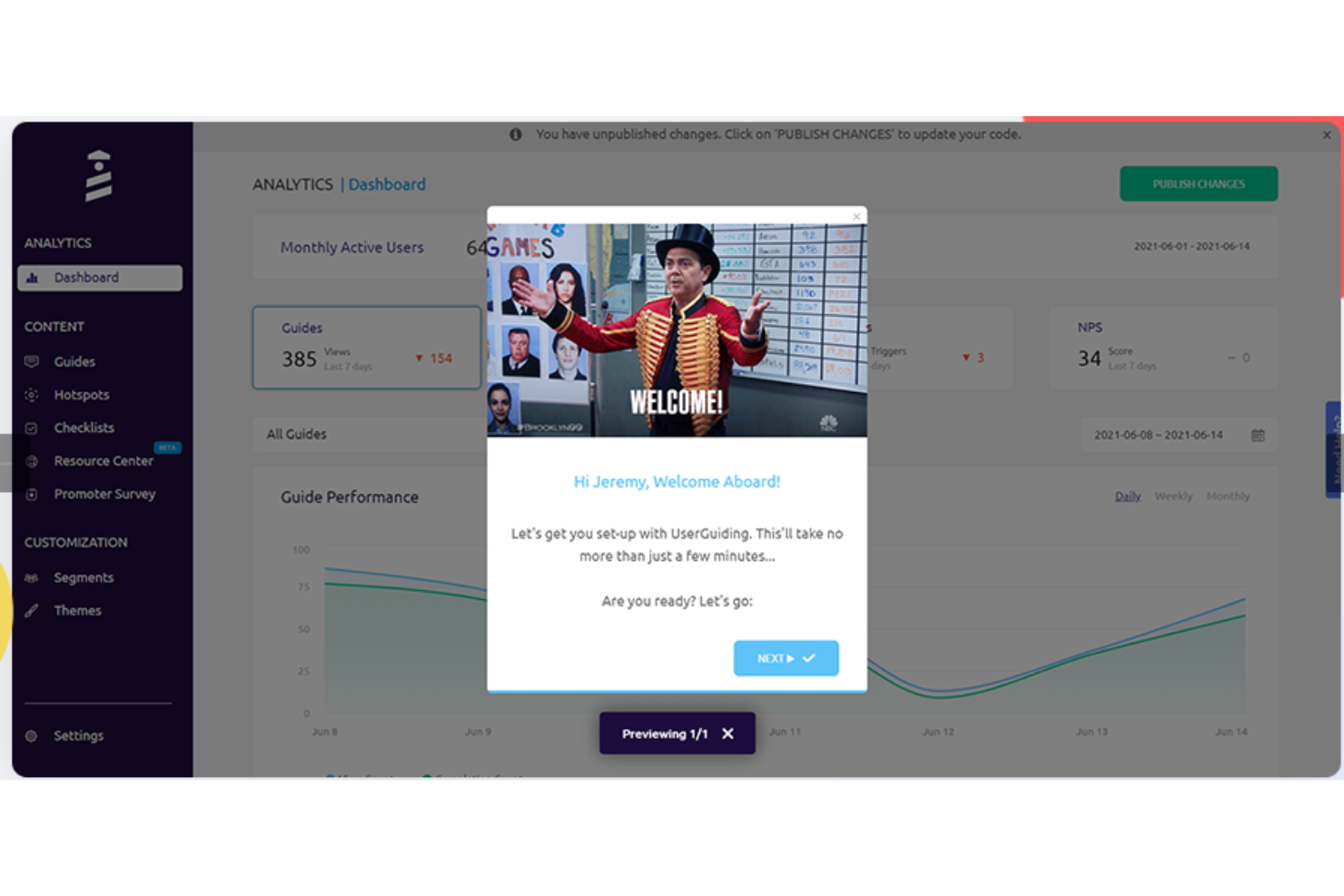
UserGuiding bietet eine No-Code-Lösung mit interaktiven Produkttouren, Onboarding-Checklisten und In-App-Umfragen. Diese Plattform ist besonders für kleine Unternehmen und Technologieunternehmen attraktiv, die das Nutzerengagement ohne umfangreiche technische Kenntnisse steigern möchten. Durch die Integration mit bestehenden Tools und einen Schwerpunkt auf Datensicherheit vereinfacht UserGuiding den Onboarding-Prozess und bietet wertvolle Erkenntnisse durch Analysen, wodurch Herausforderungen bei Nutzerakzeptanz und Produktaktivierung effektiv adressiert werden.
Warum ich UserGuiding ausgewählt habe
Ich habe UserGuiding ausgewählt, weil es sich bei der Erstellung interaktiver Produkttouren auszeichnet, die das Nutzer-Onboarding transformieren. Mit den anpassbaren Touren und Tooltips können Sie Nutzer durch ihre ersten Schritte führen, Frustration verringern und das Engagement steigern. Die Segmentierungsfunktion der Plattform ermöglicht es Ihnen, personalisierte Inhalte bereitzustellen, sodass jeder Nutzer eine individuell zugeschnittene Erfahrung erhält. Diese Fähigkeiten verkürzen nicht nur die Lernkurve, sondern steigern auch die Nutzerzufriedenheit, was UserGuiding zu einer idealen Wahl für die Optimierung von Onboarding-Prozessen macht.
UserGuiding-Hauptfunktionen
Neben den interaktiven Produkttouren bietet UserGuiding eine umfassende Suite an Funktionen zur Verbesserung Ihres Kunden-Onboardings:
- Onboarding-Checklisten: Diese Checklisten führen Nutzer Schritt für Schritt durch wichtige Aufgaben, damit sie keine entscheidenden Aktionen während ihrer ersten Interaktionen mit Ihrem Produkt verpassen.
- Tooltips und Hotspots: Diese Funktionen bieten kontextbezogene Anleitungen, indem sie bestimmte Bereiche Ihrer Anwendung hervorheben und Nutzern helfen, komplexe Funktionen bei der Navigation zu verstehen.
- In-App-Umfragen: Sammeln Sie direktes Nutzerfeedback mit anpassbaren Umfragen, die an wichtigen Punkten in der Benutzerreise ausgelöst werden können, sodass Sie den Onboarding-Prozess in Echtzeit anpassen und verbessern können.
- Resource Centers: Dieses Feature erstellt ein zentrales Hub für Tutorials, FAQs und weitere hilfreiche Inhalte, sodass Nutzer einfachen Zugriff auf alle Informationen haben, die sie für den Erfolg mit Ihrem Produkt benötigen.
UserGuiding-Integrationen
Zu den Integrationen gehören Amplitude, Salesforce, Intercom, Mixpanel, Segment, Slack, Google Analytics, Google Tag Manager, Woopra und HubSpot.
Pros and Cons
Pros:
- Benutzerfreundliche Oberfläche, die Onboarding-Prozesse vereinfacht
- Effektiv in der Erstellung von interaktiven Guides und Tooltips
- Reduzierung der Support-Tickets durch effektive Produkt-Walkthroughs
Cons:
- Begrenzte Anpassungsoptionen und eingeschränkte Kontrolle über Datenanalysen
- Langsame Produktentwicklung bei neuen Features

Absorb
Am besten geeignet für personalisierte Lernpfade
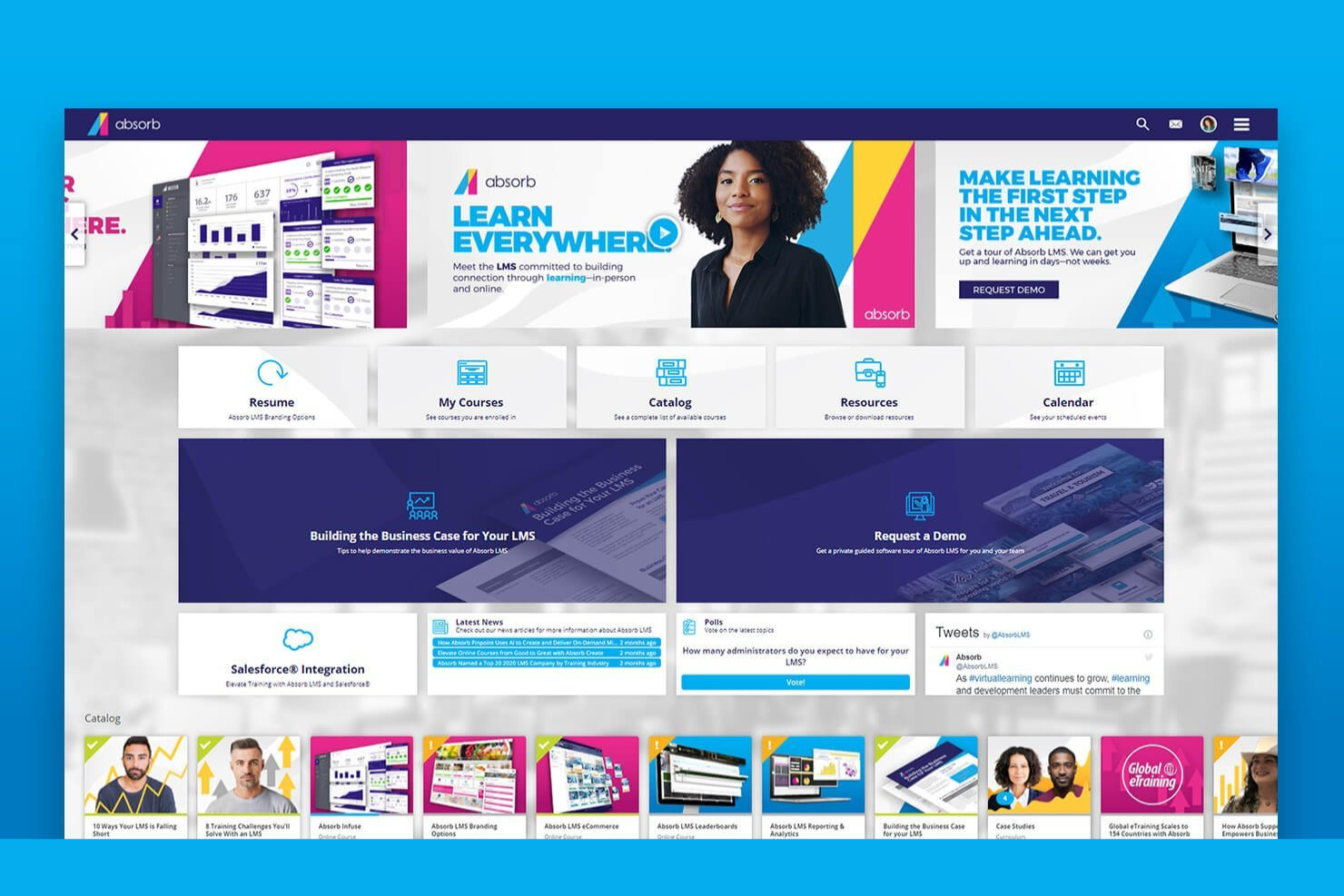
Absorb bietet eine maßgeschneiderte Lösung für Unternehmen, die ihre Kunden-Onboarding-Prozesse verbessern möchten. Dieses Learning Management System richtet sich an Unternehmen aus verschiedenen Branchen und legt den Fokus auf umfassende Schulung und die Steigerung der Kundenzufriedenheit. Durch personalisierte Lernpfade verfolgt Absorb das Ziel, die Abwanderungsrate zu senken und die Kundenbindung zu erhöhen, damit Ihre Kundschaft Ihre Angebote vollständig versteht und schätzt.
Warum ich Absorb gewählt habe
Ich habe mich für Absorb wegen der herausragenden Funktion der personalisierten Lernpfade entschieden, die für ein effektives Kunden-Onboarding unerlässlich ist. Mit diesem System lassen sich Trainingsprogramme individuell auf einzelne Lernende zuschneiden, sodass Sie weg von allgemeinen Modellen gehen und sich auf spezifische Rollen und Bedürfnisse konzentrieren können. Mit Tools wie Absorb Create für die Kursentwicklung und Absorb Analyze für die Leistungsüberwachung können Sie ein Lernerlebnis gestalten, das Engagement und Bindung fördert. Dank KI-gestützter Individualisierung sorgt Absorb dafür, dass Ihr Onboarding-Prozess nicht nur effizient ist, sondern auch optimal auf die individuellen Lernstile Ihrer Zielgruppe abgestimmt wird.
Absorb Hauptfunktionen
Neben den personalisierten Lernpfaden bietet Absorb eine Vielzahl von Funktionen, die die Software zu einer leistungsfähigen Lösung für das Kunden-Onboarding machen.
- eCommerce-Modul: Vereinfacht den Verkauf von Online-Kursen und ermöglicht es Ihrem Unternehmen, Trainingsinhalte problemlos zu monetarisieren.
- Beobachtungs-Checklisten: Schließt die Lücke zwischen Online-Lernen und Praxis, indem die Kompetenzüberprüfung im Training am Arbeitsplatz erfasst wird.
- Mobile Zugänglichkeit: Stellt sicher, dass Ihr Team Lernmaterialien jederzeit und überall abrufen kann – unabhängig von Zeitplänen und Standorten.
- SCORM-Kompatibilität: Unterstützt verschiedene Kursformate und gewährleistet so die Kompatibilität und Konsistenz auf unterschiedlichen Geräten und Plattformen.
Absorb Integrationen
Zu den Integrationen gehören Salesforce, HubSpot, Zoom, WebEx, Workday, SAP SuccessFactors, BambooHR, ADP, Dayforce, ServiceNow, Google Workspace und viele mehr.
Pros and Cons
Pros:
- Integriert sich mit HR-Systemen
- Unterstützt zahlreiche Inhaltsformate, einschließlich SCORM
- Enthält KI-gesteuerte Tools für eine effiziente Kurserstellung
Cons:
- Prozesse für Massenanmeldungen müssen verbessert werden
- Begrenzte Anpassungsmöglichkeiten für Admin-Dashboards
New Product Updates from Absorb
Absorb Aura Adds Claude and ChatGPT Connections
Absorb Aura now connects to Claude or ChatGPT via MCP, enabling users to ask questions about their learning and the LMS directly inside the AI tool after a simple setup. For more information, visit Absorb's official site.
 .
.
Am besten geeignet für vorgefertigte Onboarding-Vorlagen
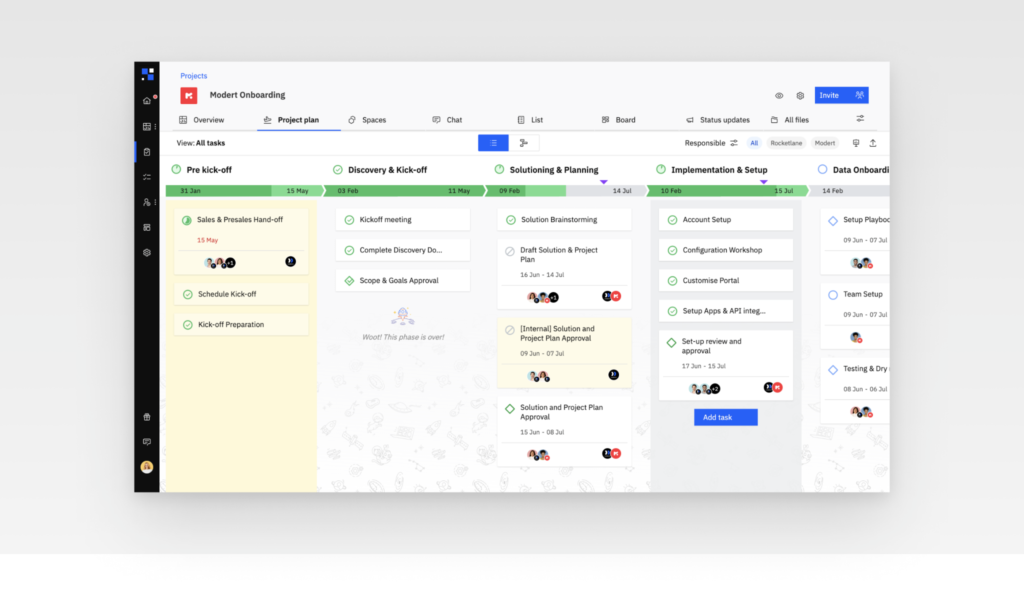
Für alle, die ihre Kunden-Onboarding-Erfahrung verbessern möchten, bietet Rocketlane eine einzigartige Kombination aus KI-gestützter Automatisierung, kollaborativen Arbeitsbereichen und Echtzeit-Projektverfolgung. Speziell für moderne Dienstleistungsunternehmen entwickelt, sorgt Rocketlane dafür, dass Projekte termingerecht und im Budget abgeschlossen werden. Wenn Sie darauf abzielen, die Effizienz zu steigern und Kundenbeziehungen zu stärken, stellt Rocketlane Werkzeuge zur Verfügung, mit denen Sie Projektpläne individuell anpassen und den Personaleinsatz optimieren können – ideal für Ihre Onboarding-Prozesse.
Warum ich Rocketlane ausgewählt habe
Ich habe mich für Rocketlane entschieden, weil seine vorgefertigten Vorlagen die Erstellung von Kunden-Onboarding-Prozessen vereinfachen und so die Herausforderung der Standardisierung von Arbeitsabläufen adressieren. Die 'Sales-to-Success Handoff'-Vorlage sorgt für nahtlose Übergänge, indem sie entscheidende Informationen vom Vertrieb erfasst, während die 'Pre-Kickoff Planning'-Vorlage Projektdetails und Ziele von Anfang an klar definiert. Darüber hinaus etabliert die Vorlage für Projektkommunikation einen klaren Kommunikationsplan, was für die Einhaltung von Verantwortlichkeiten und die Erhöhung der Kundenzufriedenheit entscheidend ist. Diese Funktionen verschlanken das Onboarding und machen Rocketlane zur idealen Lösung für Unternehmen, die ihre Effizienz steigern und Abwanderung reduzieren wollen.
Wichtige Funktionen von Rocketlane
Neben den vorgefertigten Vorlagen bietet Rocketlane eine Vielzahl an Funktionen, die auf Ihre Kunden-Onboarding-Bedürfnisse zugeschnitten sind:
- Anpassbares Kundenportal: Mit dieser Funktion können Sie für jeden Kunden ein persönliches Portal erstellen, das sein Onboarding-Erlebnis verbessert und Zugriff auf alle benötigten Ressourcen an einem Ort ermöglicht.
- Zeitachsen-Ansichten: Dank umfassender Zeitachsen-Ansichten kann Ihr Team den Projektfortschritt auf einen Blick verfolgen, um sicherzustellen, dass alle Aufgaben im Zeitplan liegen und Fristen eingehalten werden.
- Eingebaute Formulare zur Datenerhebung: Rocketlane stellt integrierte Formulare bereit, die die Datenerhebung bei Kunden erleichtern, den Informationsaustausch vereinfachen und für Genauigkeit sorgen.
- 360° Projekttransparenz: Diese Funktion gewährt vollständige Transparenz über alle Aspekte eines Projekts, sodass Sie Fortschritte überwachen, Probleme zeitnah angehen und Transparenz gegenüber Ihren Kunden bewahren können.
Rocketlane-Integrationen
Zu den Integrationen zählen Slack, Salesforce, Jira, Zapier, Workato, HubSpot, Google Calendar und Outlook Calendar.
Pros and Cons
Pros:
- Ermöglicht detaillierte Zeitachsenansichten zur Fortschrittsüberwachung
- Stellt anpassbare Vorlagen zur Vereinheitlichung von Onboarding-Prozessen bereit
- Stärkt die Kundenbindung durch personalisierte Kundenportale
Cons:
- Eingeschränkte Szenarioplanung
- Begrenzte Anpassungsmöglichkeiten bei Standardberichten
New Product Updates from Rocketlane

Rocketlane Introduces Governance and Workforce Agents
Rocketlane introduces Governance Agents and Workforce Agents to automate delivery processes and recurring tasks. These updates help teams enforce rules and streamline project execution. For more information, visit Rocketlane’s official site.
 .
.
Dock
Am besten geeignet für Schritt-für-Schritt-Erfolgspläne
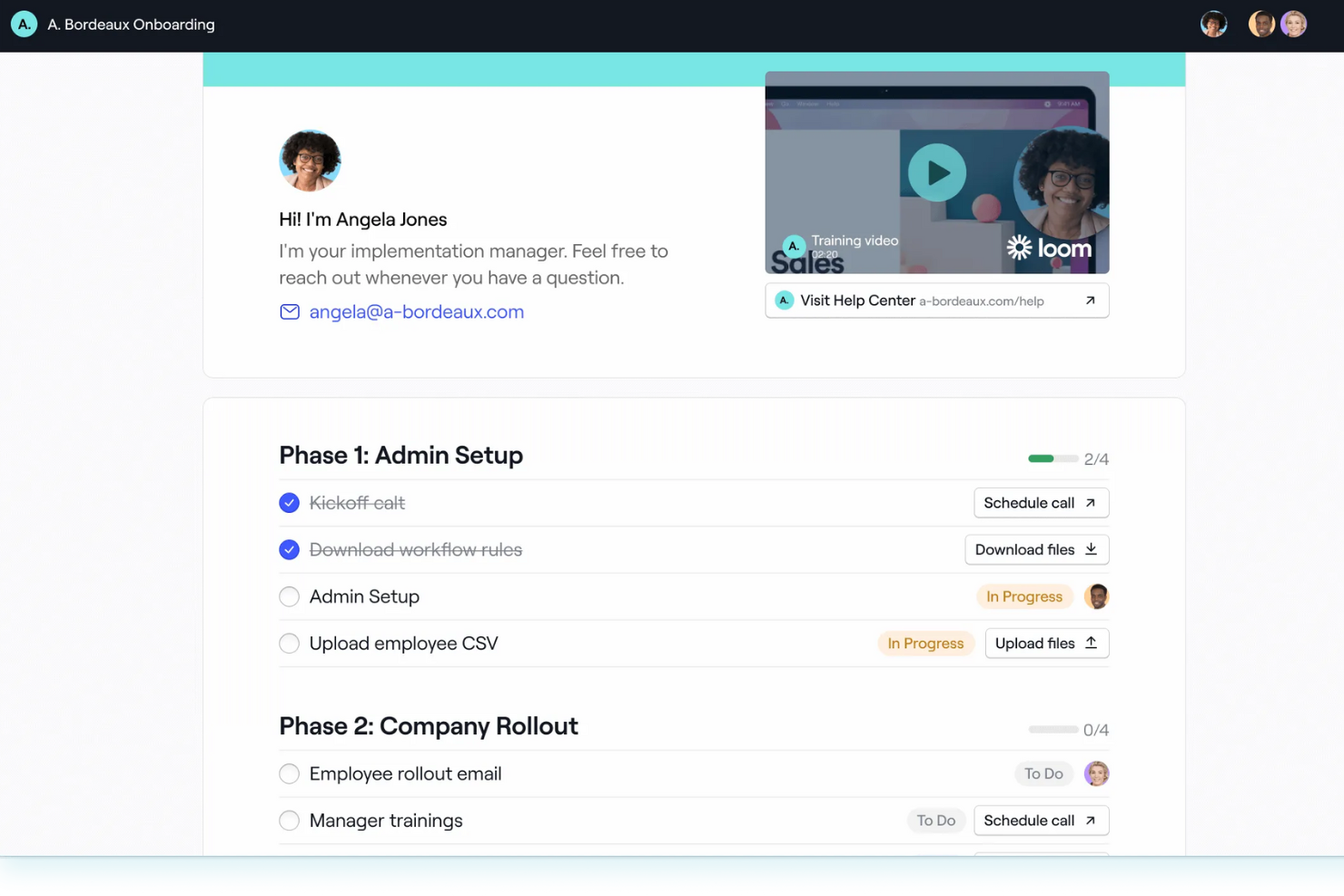
Dock bietet eine einzigartige Onboarding-Plattform, die den Bedürfnissen von Customer Success- und Vertriebsteams gerecht wird. Durch personalisierte Onboarding-Hubs stellt Dock sicher, dass Projektpläne, Inhalte und Formulare in einer kollaborativen Umgebung jederzeit zugänglich sind, wodurch die Abhängigkeit von E-Mails und Meetings verringert wird. Dank der nahtlosen Integration mit Tools wie HubSpot und Salesforce ist Dock eine vielseitige Wahl für Unternehmen, die effiziente Onboarding-Erlebnisse schaffen und gleichzeitig das Kundenengagement sowie den Fortschritt verfolgen möchten.
Warum ich Dock gewählt habe
Ich habe Dock aufgrund der herausragenden Fähigkeit ausgewählt, Schritt-für-Schritt-Erfolgspläne zu erstellen, was für das Kunden-Onboarding entscheidend ist. Docks personalisierte Onboarding-Portale ermöglichen es, Projektpläne und Onboarding-Inhalte in einem kollaborativen Raum zu teilen, sodass ständiges Hin- und Herschreiben entfällt. Mit vorgefertigten Vorlagen und Self-Service-Ressourcen-Hubs kann Ihr Team einen konsistenten und effizienten Onboarding-Prozess gewährleisten und sich dabei auf das Kundenengagement und die -bindung konzentrieren. Die Integration von Dock mit CRM-Tools wie HubSpot und Salesforce erhöht den Nutzen zusätzlich und macht es zu einer vielseitigen Option für Teams, die den Onboarding-Prozess verfolgen und optimieren möchten.
Dock Hauptfunktionen
Neben der Fähigkeit, Schritt-für-Schritt-Erfolgspläne zu erstellen, bietet Dock eine Reihe von Funktionen, die darauf ausgelegt sind, Ihren Kunden-Onboarding-Prozess zu optimieren.
- Vorlagenbasierte Arbeitsbereiche: Diese ermöglichen es Ihrem Team, personalisierte Onboarding-Vorlagen schnell zu erstellen, wodurch für jeden Kunden ein konsistentes und maßgeschneidertes Erlebnis gewährleistet wird.
- Umfrageformulare und Datei-Uploads: Sie können erforderliche Daten effizient erfassen, da Dock integrierte Formulare und Upload-Optionen bietet, um die Informationsbeschaffung zu vereinfachen.
- Dynamische Felder: Indem Kundendaten aus CRMs übernommen werden, personalisiert dieses Feature den Onboarding-Prozess und macht ihn für Ihre Kunden relevanter und ansprechender.
- Analysen und Berichte: Dock liefert Einblicke in das Kundenengagement und den Onboarding-Fortschritt, sodass Sie Interaktionen verfolgen und das Kundenerlebnis verbessern können.
Dock-Integrationen
Zu den nativen Integrationen von Dock gehören HubSpot und Salesforce. Darüber hinaus stellt Dock eine API für individuelle Integrationen zur Verfügung.
Pros and Cons
Pros:
- Docks dynamische Felder personalisieren das Onboarding-Erlebnis effektiv
- Integrierte Umfrageformulare und Datei-Uploads erleichtern die Datenerfassung
- Umfassende Berichte und Analysen helfen, das Kundenengagement zu verfolgen
Cons:
- Die Software bietet möglicherweise nicht genügend Anpassungsmöglichkeiten für fortgeschrittene Anforderungen
- Nutzer empfinden die Ersteinrichtung als zeitaufwändig und komplex

Guidde
Am besten geeignet für die Erstellung von How-to-Videos mit KI
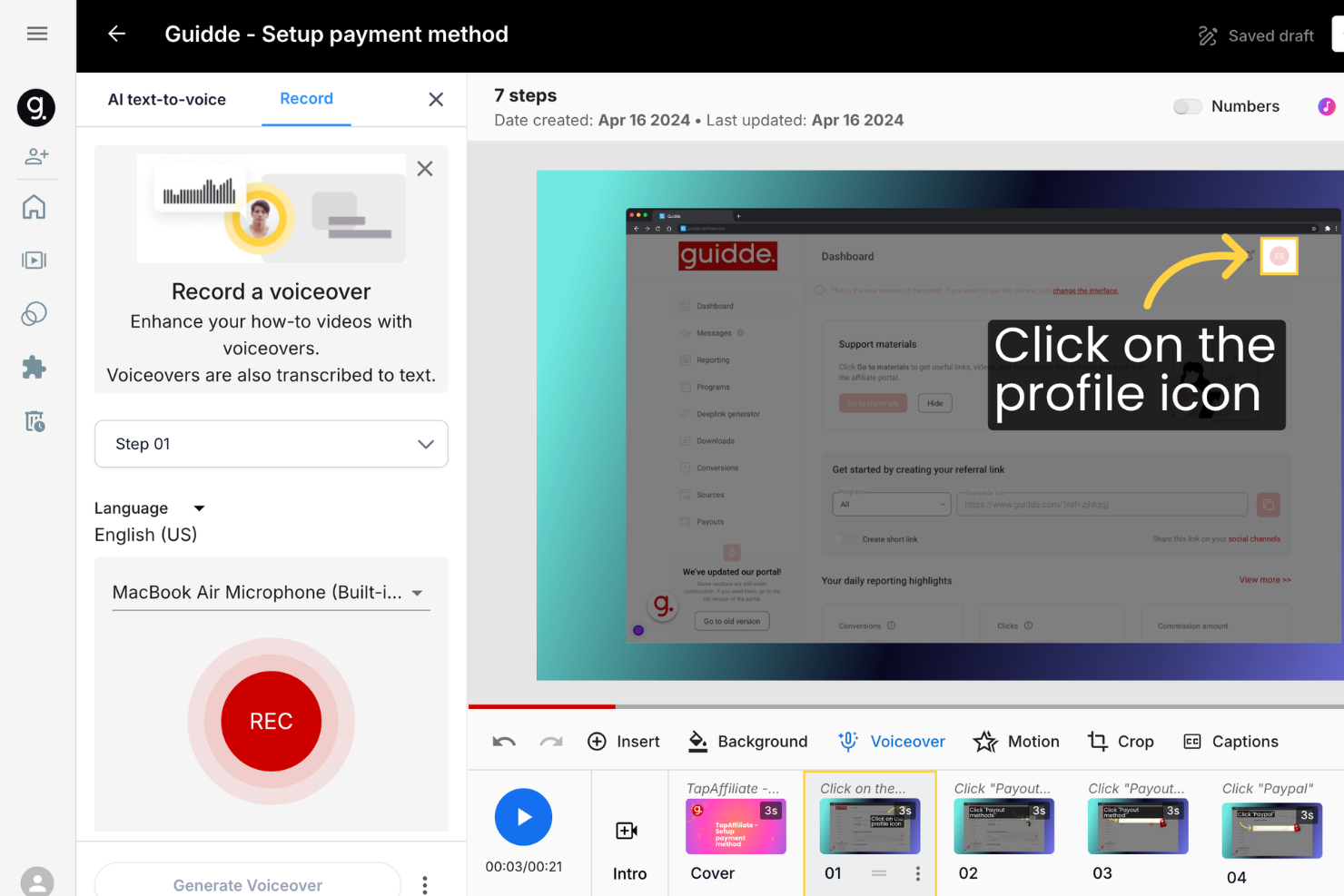
Guidde bietet eine KI-gesteuerte Lösung, die Ihr Kundeneinführungserlebnis verbessert, indem Sie ansprechende Videodokumentationen schnell erstellen können. Die Plattform ist speziell auf Unternehmen zugeschnitten, die ihre Onboarding-Prozesse verbessern möchten, mit Tools wie Magic Mic für klare Sprachaufnahmen und Magic Capture für mühelose Workflow-Aufzeichnungen. Sie eignet sich ideal für Branchen, die sich auf Mitarbeiter-Onboarding, Kundenschulung und unternehmensweite Zusammenarbeit konzentrieren, um Support-Tickets zu reduzieren und die Kundenbindung zu steigern.
Warum ich Guidde gewählt habe
Ich habe Guidde gewählt, weil das einzigartige KI-basierte Funktionspaket gezielt das Bedürfnis anspricht, ansprechende How-to-Videos schnell zu erstellen – ein entscheidender Aspekt beim Kunden-Onboarding. Mit dem Magic Capture Tool lassen sich Workflows mühelos aufzeichnen, während der Magic Mic KI-generierte Sprachkommentare liefert und somit mehr Klarheit in Ihre Anleitungen bringt. Indem Guidde prägnante Videoinhalte genau dann bereitstellt, wenn sie gebraucht werden, steigert es die Benutzerbindung und reduziert die Anzahl an Support-Anfragen – ideal für Teams, die ihre Onboarding-Prozesse optimieren möchten. Dieser Ansatz stärkt nicht nur das Kundenvertrauen, sondern trägt auch dazu bei, die Schulungsmaßnahmen in Ihrem Unternehmen zu optimieren.
Wichtige Funktionen von Guidde
Neben den KI-gesteuerten Möglichkeiten zur Videoerstellung bietet Guidde zahlreiche Funktionen, die Ihren Kundeneinführungsprozess verbessern:
- Guidde Create: Wandelt Ihre aufgenommenen Workflows schnell in professionelle Anleitungen um, damit Ihr Team klare und strukturierte Hilfestellungen geben kann.
- Broadcasting: Liefert maßgeschneiderte Inhalte genau zum richtigen Zeitpunkt an die Nutzer und fördert damit das Lernen sowie den Erhalt von Informationen, wenn sie am relevantesten sind.
- Enterprise Solutions: Zentralisiert Prozesse, um die Zusammenarbeit im gesamten Unternehmen zu verbessern und damit eine einheitliche Onboarding-Strategie zu ermöglichen.
- Customer Education: Setzt darauf, das Selbstvertrauen der Kunden durch effektive Onboarding-Strategien zu stärken, mit dem Ziel, Support-Anfragen zu reduzieren und die Nutzerzufriedenheit zu erhöhen.
Guidde-Integrationen
Integrationen umfassen Microsoft Dynamics 365, SAP, Dropbox, Notion und Salesforce.
Pros and Cons
Pros:
- Nimmt Workflows nahtlos auf, wodurch komplexe Prozesse einfach nachvollziehbar werden
- Strafft die Videoerstellung und reduziert die Schulungszeit erheblich
- Benutzerfreundliche Oberfläche vereinfacht die Videodokumentation
Cons:
- Die Abstimmung von Audio und Kommentar muss manchmal manuell angepasst werden
- Die Auswahl an KI-Stimmen klingt nicht immer natürlich
Weitere Optionen
Hier sind einige weitere Lösungen, die es nicht in die Top-Liste geschafft haben.
- Userflow
Am besten geeignet für das Verfolgen von Nutzerinteraktionen in Echtzeit
- Whatfix
Am besten geeignet zur Verbesserung des Onboarding-Erlebnisses durch integriertes Feedback
- Intercom
Am besten geeignet, um das Nutzererlebnis mit Automatisierung zu verbessern
- WalkMe
E codefreie Lösung zur Erstellung von Heatmaps für Kundenaktivitäten
- Pendo
Am besten geeignet, um die Benutzerbindung mit Daten zu fördern
- Drip
Am besten geeignet für personalisierte Onboarding-Erlebnisse
- Under.io
Am besten zur Reduzierung manueller Prozesse beim Onboarding geeignet
- Compass
Am besten geeignet für KI-basierte Chat-Unterstützung
- Hopscotch
E No-Code-Lösung für den Versand von In-App-Nachrichten
- Chameleon
Es Self-Service-Onboarding zur Vermeidung von Support-Tickets
- Document360
Am besten geeignet für Pro Analytics-Einblicke
- Stonly
E No-Code-Lösung zum Aufbau von Self-Service-Hilfezentren
- Product Fruits
Am besten geeignet für interaktive Nutzertouren
- Trupeer
Am besten für videobasierte Kundenaufnahme mit KI
- Synergy Learning
Am besten geeignet für LMS-gestützte Onboarding-Prozesse


Was ist Software zur Kundeneinführung?
Software zur Kundeneinführung ist eine Plattform, die neue Kunden durch die ersten Phasen der Nutzung eines Produkts oder einer Dienstleistung führt. Sie optimiert Aufgaben zur Kundeneinführung, personalisiert die Erfahrung und hilft Nutzern, schneller einen Mehrwert zu erzielen.
So bewerte ich Kunden-Onboarding-Software
Ich betrachte diese Tools auf zwei Ebenen: Kann ein Customer Success Manager (CSM) das Onboarding eines Kunden tatsächlich vom Kick-off bis zum Go-live steuern (Akzeptanzkriterien), und wodurch hebt sich eine Plattform von den anderen ab (Unterscheidungsmerkmale).
Kernfunktionen (Mindestanforderungen für diese Liste)
Bei der Auswahl der Tools für meine Liste bewerte ich jedes auf einer Skala von 0 (bietet die Funktion nicht) bis 5 (exzelliert in diesem Bereich) für jede der unten genannten Kernfunktionen. Anschließend berechne ich die Gesamtnote des Tools in Prozent. Jedes Tool muss eine Mindestpunktzahl von 65 % erreichen, um in die Auswahl zu kommen.
- Onboarding-Workflow-Vorlagen: Ich prüfe, ob wiederverwendbare, aufeinanderfolgende Vorlagen für verschiedene Kundensegmente erstellt werden können, z. B. einen Enterprise-Plan im Vergleich zu einem Self-Service-SMB-Ablauf.
- Kundenportal: Jedes Tool sollte den Kunden einen gebrandeten Bereich bieten, in dem sie ihren Plan einsehen, Aufgaben erledigen und Dateien hochladen können, anstatt Updates per E-Mail hinterherzulaufen.
- Aufgaben- & Meilenstein-Tracking: Ich bewerte, wie Aufgaben zwischen internen und kundenseitigen Ansprechpartnern zugewiesen werden, einschließlich Fälligkeitsterminen, Abhängigkeiten und Gruppierungen von Meilensteinen.
- Transparenz & Berichterstattung zum Fortschritt: Dashboards, die den Onboarding-Status des Portfolios, Time-to-Value-Trends und Engpässe anzeigen, sind wichtiger als einfache Projektstatus-Ansichten.
- Automatisierung & Benachrichtigungen: Ich achte auf auslösende Erinnerungen, Eskalationsregeln und Statusänderungs-Automatisierungen, durch die Projekte ohne manuellen Folgeaufwand aktiv bleiben.
- CRM- & Customer Success Stack-Integrationen: Das Tool sollte Onboarding-Daten mit Plattformen wie Salesforce, HubSpot oder Gainsight synchronisieren, damit Kundendaten in allen Systemen aktuell bleiben.
Sobald ich eine Liste von Tools habe, die diese Kriterien erfüllen, sehe ich mir an, wodurch sich jede Plattform abhebt.
Unterscheidungsmerkmale (Was Anbieter besonders macht)
So vergleiche ich die verschiedenen Anbieter:
Herausragende Funktionen
Onboarding-spezifische Gesundheits-Scores sind ein wichtiger Unterschied. Tools, die Aufgabenabschluss, Meilenstein-Geschwindigkeit und Login-Aktivität kombinieren, geben CSMs ein frühes Signal, wenn ein Konto ins Stocken gerät, noch bevor der Kunde das Problem anspricht. Ich prüfe auch, ob eine Plattform geführte Einführungen im Produkt bietet, mit denen sich Kunden schrittweise durch die Einrichtung bewegen können, ohne auf einen geplanten Call warten zu müssen. Ein integrierter Kommunikations-Hub rundet das Ganze ab, indem E-Mails, Notizen und Updates bei jedem Onboarding-Projekt bleiben, statt auf verschiedene Posteingänge verteilt zu sein.
Über Funktionen hinaus
Skalierbarkeit spielt hier eine große Rolle. Ich prüfe, ob eine Plattform sowohl High-Touch-Onboarding für Unternehmen mit individuellen Projektplänen als auch automatisiertes Tech-Touch-Onboarding für kleine Betriebe abbilden kann. Auch der Support des Anbieters macht einen Unterschied. Einige bieten dedizierte Spezialisten, die beim Aufbau der ersten Playbooks helfen, während andere nur mit Dokumentation und Wissensdatenbank unterstützen. Für Teams, die mit sensiblen Kundendaten arbeiten, schaue ich auf SOC 2 Typ II-Zertifizierung, SSO-Unterstützung und rollenbasierte Zugriffskontrollen, um zu bestätigen, dass das Tool den Sicherheitsanforderungen von Unternehmen entspricht.
So wählen Sie Software zur Kundeneinführung aus
Bei langen Funktionslisten und komplexen Preisstrukturen verliert man leicht den Überblick. Damit Sie sich bei der individuellen Auswahl Ihrer Software auf das Wesentliche konzentrieren können, finden Sie hier eine Checkliste mit Faktoren, die Sie berücksichtigen sollten:
| Faktor | Was Sie beachten sollten |
|---|---|
| Skalierbarkeit | Prüfen Sie, ob die Software mit Ihrem Unternehmen wachsen kann. Sie benötigen eine Lösung, die eine steigende Nutzerzahl und zunehmende Komplexität bewältigt, ohne an Leistung einzubüßen. |
| Integrationen | Stellen Sie sicher, dass sich die Software nahtlos in Ihre bestehenden Systeme wie CRM- und Analysewerkzeuge integrieren lässt, um Arbeitsabläufe und die Datenkonsistenz zu optimieren. |
| Anpassbarkeit | Achten Sie auf Optionen, mit denen Sie Funktionen an Ihre spezifischen Geschäftsanforderungen anpassen können, sodass die Lösung mühelos zu Ihren Prozessen und Ihrem Markenauftritt passt. |
| Benutzerfreundlichkeit | Wählen Sie eine Software, die Ihr Team schnell erlernen und nutzen kann, ohne umfangreiche Schulungen zu benötigen. So verkürzen Sie die Zeit bis zum Mehrwert und verringern Frustrationen bei den Nutzern. |
| Budget | Bewerten Sie die Kosten im Verhältnis zu Ihren Budgetvorgaben. Berücksichtigen Sie nicht nur den anfänglichen Preis, sondern auch laufende Kosten wie Abonnementgebühren und mögliche Zusatzoptionen. |
| Sicherheitsvorkehrungen | Stellen Sie sicher, dass robuste Maßnahmen zum Datenschutz vorhanden sind, einschließlich Verschlüsselung und der Einhaltung von Branchenstandards, um Ihre Kunden- und Geschäftsinformationen zu schützen. |
Trends bei Software zur Kundeneinführung im Jahr 2026
Software für das Kunden-Onboarding entwickelt sich weiter, um den sich wandelnden Geschäftsanforderungen gerecht zu werden. Hier sind die wichtigsten Trends, die Sie im Auge behalten sollten.
KI-gestützte Personalisierung
KI-gestützte Personalisierung passt das Onboarding-Erlebnis an die einzelnen Kunden an. Dieser Trend verbessert die Interaktion und Zufriedenheit, indem maßgeschneiderte Inhalte bereitgestellt werden. Außerdem steigert er die Effizienz, indem personalisierte Kontaktpunkte automatisiert werden.
Interaktive Onboarding-Tools
Interaktive Onboarding-Tools wie spielerische Tutorials und Simulationen werden immer beliebter. Diese Tools machen den Onboarding-Prozess ansprechender und unterhaltsamer. Sie helfen den Nutzern außerdem dabei, Informationen besser zu behalten, wodurch die Kundenschulung einfacher und effektiver wird.
Nahtlose Integrationsmöglichkeiten
Nahtlose Integrationsmöglichkeiten sind für Software zum Kunden-Onboarding unverzichtbar. Dieser Trend ermöglicht einen mühelosen Datenaustausch zwischen verschiedenen Systemen. Dadurch wird ein reibungsloses und einheitliches Kundenerlebnis gewährleistet.
Erweiterte Analysen und Berichte
Erweiterte Analysen und Berichte liefern tiefere Einblicke in den Onboarding-Prozess. Dieser Trend hilft Unternehmen, Verbesserungsmöglichkeiten zu erkennen. Außerdem ermöglicht er datengestützte Entscheidungen für bessere Ergebnisse.
Fokus auf Datenschutz und Sicherheit
Ein Fokus auf Datenschutz und Sicherheit ist in 2026 von größter Bedeutung. Software für das Kunden-Onboarding integriert robuste Sicherheitsmaßnahmen. Dieser Trend gewährleistet die Einhaltung von Vorschriften und schafft Vertrauen bei den Kunden.
Funktionen von Software für das Kunden-Onboarding
Achten Sie bei der Auswahl einer Software für das Kunden-Onboarding auf die folgenden wichtigen Funktionen:
- Automatisierte Workflow-Verwaltung: Diese Funktion organisiert und optimiert jeden Schritt des Onboarding-Prozesses und stellt sicher, dass neue Kunden immer wissen, was als Nächstes zu tun ist. Ich finde es großartig, wie sie einen manchmal chaotischen Prozess in eine gut geölte Maschine verwandelt, die Ihnen jede Menge manuelle Arbeit abnimmt.
- Anpassbare Onboarding-Erlebnisse: Sie können Onboarding-Abläufe an die individuellen Bedürfnisse, Vorlieben oder Segmente der Kunden anpassen. So erhält jeder Kunde ein relevantes und hilfreiches Erlebnis – keine allgemeine Checkliste –, sodass er sich vom ersten Tag an wirklich willkommen fühlt.
- Aufgabenverfolgung und Erinnerungen: Die integrierte Nachverfolgung sorgt dafür, dass alle auf dem gleichen Stand bleiben, mit klaren Aufgabenlisten und rechtzeitigen Erinnerungen, die direkt an Ihre Kunden (und auch an Ihr Team) gesendet werden. Verabschieden Sie sich von dem gefürchteten Moment: „Haben wir diesen Schritt vergessen?“
- Integrierte Kommunikationstools: Nachrichten, E-Mail-Vorlagen und Echtzeit-Chat sind Teil des Pakets und machen es einfach, Gespräche mit neuen Kunden organisiert und zugänglich zu halten. Sie können Fragen beantworten oder genau zum richtigen Zeitpunkt einen Impuls geben – kein Durchsuchen Ihres Posteingangs mehr.
- Dokumentenverwaltung: Teilen, speichern und fordern Sie wichtige Dokumente (wie Verträge oder Compliance-Formulare) sicher innerhalb der Plattform an. Ich schätze es, dass ich nie wieder mit E-Mail-Anhängen jonglieren oder Ordner durchsuchen muss.
- Fortschritts-Dashboards: Visuelle, leicht verständliche Dashboards zeigen Ihnen (und Ihren Kunden) genau, wo die Dinge stehen, was erledigt ist und was als Nächstes ansteht. Es ist einfach befriedigend zu sehen, wie sich der Fortschrittsbalken der Fertigstellung nähert.
- Integration elektronischer Signaturen: Lassen Sie Kunden Vereinbarungen abschließen oder Formulare innerhalb der Plattform digital unterschreiben. Dadurch entfallen die Probleme mit dem Drucken und Scannen, während alles rechtssicher und nachvollziehbar bleibt.
- Feedback-Erfassung: Integrierte Umfragen und Feedback-Aufforderungen erfassen die Eindrücke und Probleme der Kunden genau dann, wenn sie das Onboarding abschließen. So können Sie Ihren Prozess in Echtzeit anpassen und verbessern. Ihre nächste Kundengruppe profitiert sofort davon.
Häufige KI-Funktionen von Software für das Kunden-Onboarding
Über die oben aufgeführten Standardfunktionen von Software für das Kunden-Onboarding hinaus integrieren viele dieser Lösungen KI mit Funktionen wie:
- Stimmungsanalyse: KI überprüft Kundennachrichten und Feedback, um deren Stimmung oder Frustrationsgrad einzuschätzen, und benachrichtigt Sie, wenn jemand möglicherweise zusätzliche Aufmerksamkeit benötigt – damit Sie mit Unterstützung einspringen können, bevor aus einem kleinen Problem ein Ausschlusskriterium wird.
- Automatisierte Dokumentenprüfung: KI-gestützte Systeme scannen und authentifizieren eingereichte Dokumente (wie Ausweise oder Verträge) schnell, verkürzen Genehmigungszeiten und erkennen Fehler, die einem Menschen möglicherweise entgehen würden.
- Personalisierte Empfehlungen für die Kundeneinführung: KI analysiert Kundendaten, um für jede Person die relevantesten Schritte, Ressourcen oder Produktfunktionen vorzuschlagen, sodass niemand eine „Einheitslösung-für-alle“-Erfahrung erhält.
- Prognostische Bewertung der Interaktion: Durch die Auswertung von Daten zu Kundenaktivitäten und früherem Verhalten kann KI vorhersagen, welche neuen Benutzer möglicherweise Schwierigkeiten haben oder abzuspringen drohen – so erhält Ihr Team die Möglichkeit, rechtzeitig einzugreifen.
- Dialogbasierte Bots zur Kundeneinführung: Diese intelligenten Chatbots führen Kunden in Echtzeit durch die Kundeneinführung, beantworten Fragen und leiten sie zum nächsten Schritt – stellen Sie sich das als freundlichen Coach vor, der niemals schläft.
- Intelligente Aufgabenautomatisierung: KI erkennt sich wiederholende Verwaltungsaufgaben und automatisiert sie, wodurch Sie Zeit sparen und das Fehlerrisiko Ihres Teams verringern.
Vorteile von Software zur Kundeneinführung
Software zur Kundeneinführung bietet sowohl Benutzern als auch Organisationen zahlreiche Vorteile. Hier sind die wichtigsten Vorteile, die Sie von der Nutzung dieser Art von Software erwarten können.
- Verbesserte Kundenbindung: Durch die Bereitstellung einer nahtlosen Erfahrung bei der Kundeneinführung können Unternehmen die Kundenzufriedenheit steigern und die Abwanderungsraten senken.
- Höhere Effizienz: Die Automatisierung sich wiederholender Aufgaben ermöglicht es Teams, sich auf strategischere Tätigkeiten zu konzentrieren, und verbessert die Gesamtproduktivität.
- Stärkere Kundenbindung: Personalisierte Prozesse zur Kundeneinführung sorgen dafür, dass sich Kunden wertgeschätzt und verstanden fühlen, was zu einem höheren Maß an Interaktion führt.
- Bessere Dateneinblicke: Umfassende Analysen und Berichte liefern wertvolle Einblicke in das Kundenverhalten und die Wirksamkeit der Kundeneinführung.
- Optimierte Prozesse: Integrationen mit anderen Tools und anpassbare Arbeitsabläufe tragen dazu bei, einen einheitlichen und effizienten Prozess zur Kundeneinführung zu schaffen.
Diese Vorteile verdeutlichen die Bedeutung von Software zur Kundeneinführung für die Förderung der Kundenloyalität und der betrieblichen Effizienz. Die Investition in diese Art von Software kann zu erheblichen Verbesserungen sowohl bei der Kundenerfahrung als auch bei der Unternehmensleistung führen.
Kosten und Preise von Software zur Kundeneinführung
Bei der Bewertung von Software zur Kundeneinführung ist es wichtig, die verschiedenen verfügbaren Tarif- und Preisoptionen zu verstehen. Unterschiedliche Tarife richten sich an unterschiedliche Anforderungen – von kleinen Unternehmen bis hin zu großen Konzernen. Im Folgenden habe ich die typischen Preisstrukturen und Funktionen dieser Tarife zusammengefasst, damit Sie eine fundierte Entscheidung treffen können.
| Tarifart | Durchschnittlicher Preis | Übliche Funktionen |
|---|---|---|
| Kostenlos | $0 | Grundlegende Werkzeuge zur Kundeneinführung, begrenzte Benutzerzahl, einfache Berichte |
| Basis | $20/Monat | Automatisierte Arbeitsabläufe, Standardvorlagen, E-Mail-Support |
| Professionell | $50/Monat | Erweiterte Analysen, anpassbare Arbeitsabläufe, Integrationen |
| Unternehmen | $100+/Monat | Dedizierter Support, erweiterte Sicherheit, vollständige Anpassungsmöglichkeiten |
Häufig gestellte Fragen zur Kundeneinführungssoftware
Hier sind einige Fragen, die ich zur Software für die Einführung von Kunden, Klienten und Benutzern beantworten wollte:
Wie verbessert Kundeneinführungssoftware die Kundenbindung?
Welche KPIs sollte ich verfolgen, um den Erfolg der Einführung mit Kundeneinführungssoftware zu messen?
Wie kann ich Einführungserlebnisse für verschiedene Kundensegmente personalisieren?
Welche Integrationen sollte ich bei der Bewertung von Kundeneinführungssoftware priorisieren?
Welche Arten von Einführungssoftware gibt es?
Wie verbessert KI die Wirksamkeit von Kundeneinführungssoftware?
Welche häufigen Fehler sollten bei der Implementierung von Kundeneinführungssoftware vermieden werden?
Umfassende Kundenaufnahme ist entscheidend
Eine umfassende Kundenaufnahme schafft die Grundlage für langfristige Kundenbindung, doch viele Teams haben mit uneinheitlichen Prozessen und begrenzter Übersicht zu kämpfen. Die richtige Software für die Kundenaufnahme löst dieses Problem, indem sie Arbeitsabläufe automatisiert, Meilensteine verfolgt und Teams aufeinander abstimmt – und gleichzeitig Kunden eine reibungslose, skalierbare Erfahrung bietet. Mit diesen Tools können Sie die Abwanderung reduzieren, die Aktivierung steigern und Ihrem Team mehr Zeit geben, sich auf Beziehungen statt auf manuelle Aufgaben zu konzentrieren.
Abonnieren Sie den CX-Lead-Newsletter, um Tipps von führenden Experten der Branche direkt in Ihrem Posteingang zu erhalten.