

Avis sur Zoho Analytics : avantages, inconvénients, fonctionnalités et tarifs
Zoho Analytics se distingue par son interface intuitive et son intégration fluide avec la suite Zoho, rendant l’analyse des données accessible à votre équipe.

Nous évaluons les outils indépendamment ; les commissions aident à financer nos tests. Consultez notre politique de transparence et notre méthodologie.
Zoho Analytics is a big data customer analytics platform that lets CX teams build dashboards, blend data from multiple sources, and surface trends across the customer journey. I'd consider it if your team needs self-service reporting without depending on a data engineering team to pull every insight. Compared to Tableau, Zoho Analytics delivers much of the same analytical depth at a significantly lower price point—making it a practical fit for mid-sized teams that need real answers without the enterprise overhead.
Zoho Analytics Evaluation Summary

4.3/5
- From $30/month (billed annually)
- 15-day free trial
Pourquoi faire confiance à nos recommandations de logiciels
6,700+
Reviews
20
Industry experts
16+
Evaluation factors
14
Years
Notre équipe teste et évalue des logiciels depuis 2012. En tant que leaders CX nous-mêmes, nous savons à quel point il est difficile — et important — de choisir le bon logiciel.
Pour ce guide, nous avons évalué les outils grâce à des tests pratiques et une recherche indépendante, en notant les outils selon nos critères de sélection.
Nos avis reflètent notre jugement éditorial humain, et non un argumentaire de vente.
 Gui DrusinaCreative Director
 Tim FisherVP of AI
Zoho Analytics Overview
Pros
- You can easily create custom reports and dashboards without needing technical expertise.
- User-friendly interface that allows your team to quickly access and analyze data from a range of data sources.
- The tool provides strong data visualization capabilities to help you make sense of complex data sets.
Cons
- Some users find the customer support response time slower than expected.
- The initial setup can be a bit challenging for teams without prior experience.
- Advanced users might find the depth of reporting options limited in lower-tier plans.
Is Zoho Analytics Right For Your Needs?
Who Would be a Good Fit for Zoho Analytics?
Small to medium-sized businesses and teams in marketing, finance, and operations would benefit from Zoho Analytics. If your team needs to create custom reports without heavy IT involvement, Zoho's intuitive interface and robust visualization tools make it easy. For example, marketing teams can track campaign performance, while finance departments can analyze budgetary data efficiently. Its capacity to handle data from various sources allows diverse departments to gain insights quickly, aligning well with organizations looking for accessible yet powerful analytics.
- Small BusinessesZoho Analytics provides an affordable and comprehensive analytics software that small businesses can leverage without needing a large IT team.
- Marketing TeamsYou can track and visualize campaign data effectively, helping your team make informed decisions on marketing strategies.
- Finance DepartmentsThe BI platform's ability to integrate financial data from multiple sources allows your finance team to keep a close eye on budgets and financial performance.
- Operations ManagersOperations teams can benefit from its real-time data analytics to monitor and optimize workflow processes efficiently.
- Retail BusinessesYou can analyze customer purchase trends and inventory data to make smarter stocking and sales strategies.
- Project ManagersWith its reporting capabilities, project managers can track project progress and resource allocation easily, keeping projects on track.
Who Would be a Bad Fit for Zoho Analytics?
Large enterprises with complex data needs and advanced analytics requirements might find Zoho Analytics lacking. If your team relies heavily on real-time data processing and advanced machine learning capabilities, Zoho's offerings may not suffice. Enterprises needing highly customizable solutions with extensive third-party integrations may also struggle, as Zoho's customization options and integration support might not meet your expectations.
- Large EnterprisesZoho Analytics may not scale well with the extensive data and complex analytics requirements typical of large enterprises.
- Data ScientistsThe tool lacks advanced machine learning capabilities that data scientists require for predictive analytics and complex modeling and forecasting.
- Tech-Savvy TeamsTeams with advanced technical skills might find Zoho's simplicity limiting, as it doesn't offer extensive customization.
- Industry SpecialistsSpecialized industries needing niche analytics features may find Zoho's generalized toolset insufficient.
- Real-Time AnalystsIf your work demands real-time data processing, Zoho's capabilities might not be robust enough for your needs.
- Custom SolutionsSeekers Organizations needing a highly tailored BI tool or self-service customization might find Zoho's customization options too restrictive.
Comment nous testons et évaluons les outils
Nous avons passé des années à bâtir, affiner et améliorer notre système de test et de notation des logiciels. Notre grille d’évaluation est conçue pour saisir les subtilités des sélections logicielles et ce qui fait qu’un outil est efficace, en se concentrant sur les éléments essentiels du processus de décision. Vous trouverez ci-dessous le détail de notre méthodologie d’évaluation et de notation selon sept critères. Cela nous permet de fournir une évaluation impartiale des logiciels basée sur les fonctionnalités principales, les options uniques, la facilité d’utilisation, l’intégration, la prise en main, l’assistance, les avis clients et le rapport qualité/prix.
Fonctionnalité principale (25% de la note totale)
Le point de départ de notre évaluation concerne toujours la fonctionnalité principale de l’outil. Possède-t-il les fonctions que l’on attend normalement, et ces fonctions sont-elles accessibles pour toutes les offres ? Nous attendons qu’un outil soit au niveau des capacités minimales de ses concurrents.
Fonctionnalités différenciantes (25% de la note totale)
Nous évaluons ici les fonctionnalités qui se distinguent de la fonction de base habituellement présente dans ce type de logiciel. Un score élevé récompense des fonctions spécialisées qui rendent le produit plus efficace ou unique et offrent une valeur ajoutée à l’utilisateur. Nous évaluons également la capacité à s’intégrer facilement avec d’autres solutions courantes, ce qui accroît l’intérêt et l’utilité de l’outil. Les logiciels qui proposent de nombreuses intégrations natives, des connexions tierces ou une API pour les intégrations personnalisées obtiennent une meilleure note.
Facilité d’utilisation (10% de la note totale)
Nous mesurons la rapidité et la simplicité pour effectuer les tâches clés avec l’outil. On valorise le design intuitif, les applications mobiles, les templates préconçus et la capacité à simplifier les tâches complexes.
Accompagnement à la prise en main (10% de la note totale)
L’adoption rapide est essentielle. Nous examinons donc la facilité pour un nouvel utilisateur à prendre l’outil en main avec peu de formation. Nous vérifions la rapidité d’installation et d’utilisation sans expérience préalable. Les meilleurs logiciels exigent peu ou pas de support pour démarrer.
Assistance (10% de la note totale)
Nous évaluons la réactivité et la facilité d’obtenir de l’aide par téléphone, chat ou base de connaissances. Les outils offrant un support humain en temps réel ont le meilleur score ; les chatbots sont moins bien valorisés.
Avis clients (10% de la note totale)
En plus de notre expertises, nous prenons en compte le score NPS (Net Promoter Score) accordé par les utilisateurs actuels et passés. Nous analysons la probabilité qu’ils réutilisent l’outil. Les outils à score élevé possèdent un excellent NPS utilisateur.
Rapport qualité/prix (10% de la note totale)
Après examen des autres critères, nous considérons le prix moyen des offres principales par rapport aux fonctionnalités essentielles évaluées. Les solutions offrant plus pour un prix inférieur obtiennent un meilleur score.
Core Features
Data Visualization: Create engaging charts, graphs, and dashboards that help your team understand complex data at a glance. This feature allows you to present data in a visually appealing way, enhancing decision-making.
Custom Reporting: Build tailored Zoho reports to suit your specific needs without needing technical expertise. You can easily drag and drop elements to create reports that best fit your objectives.
Data Blending: Combine data from different sources to get a comprehensive view of your business. This data integration and blending feature enables you to analyze data holistically, providing deeper insights.
Collaboration Tools: Share reports and dashboards with your team to foster collaboration and transparency. You can set permissions to control who views or edits the data.
Real-Time Analytics: Access up-to-date insights to make timely decisions. This feature ensures your team always works with the latest data.
Scheduled Reporting: Automate the delivery of reports to keep your team informed without manual intervention. Set schedules to send reports at regular intervals to relevant stakeholders.

Ease of Use
Zoho Analytics is generally user-friendly, thanks to its intuitive interface and straightforward setup, making it accessible for teams without a technical background. The drag-and-drop functionality in report building simplifies the process, allowing you to create custom views effortlessly. While some users note a learning curve with more advanced features, the overall experience is smooth compared to other tools. Your team can quickly get up to speed, benefiting from clear visualizations and easy data access.

Integrations
Zoho Analytics integrates natively with Zoho apps such as Zoho CRM, Zoho Campaigns, and Zoho One. It also integrates with Salesforce, Microsoft Dynamics, HubSpot, Google Analytics, MailChimp, Eventbrite, Shopify, and WooCommerce.
Zoho Analytics also offers API connectors and connects with third-party integration tools like Zapier.

New Product Updates from Zoho Analytics
 Opens new window
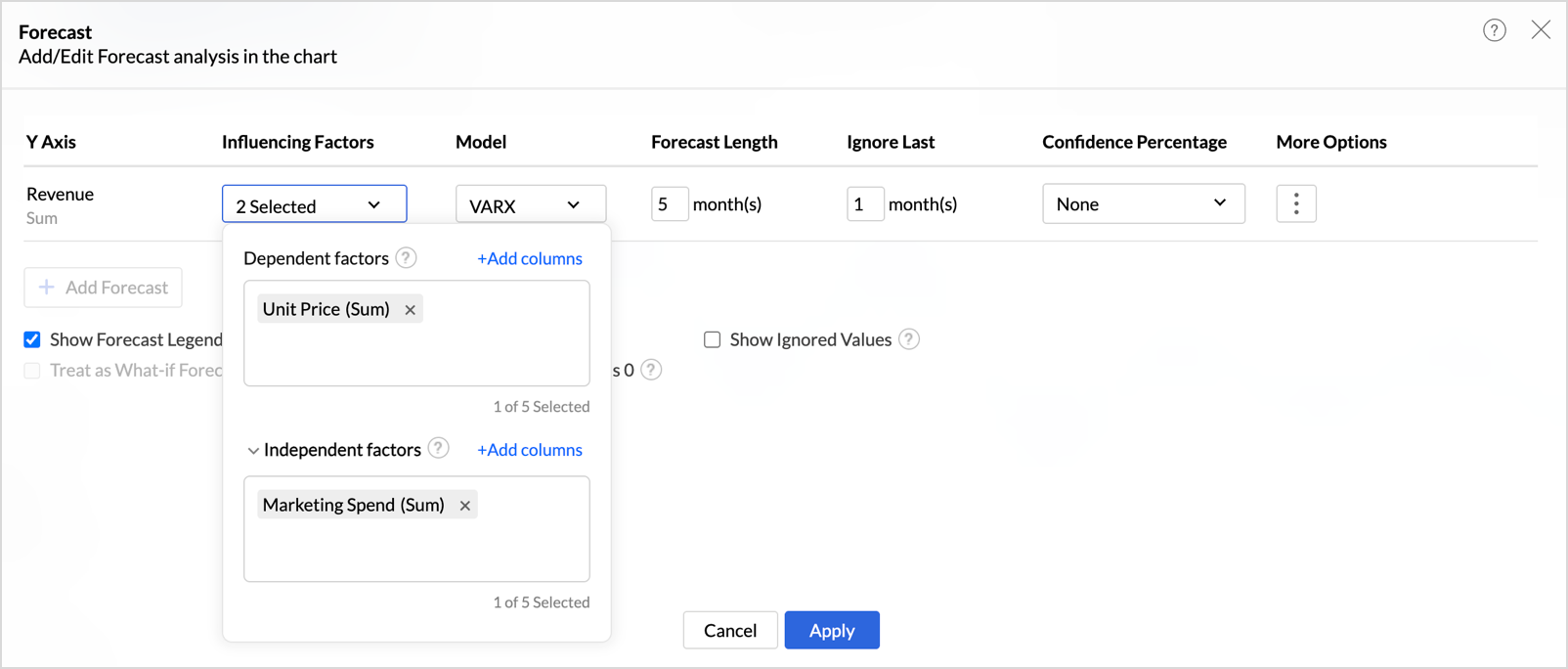
Zoho Analytics Adds Exogenous Variables to Multivariate Forecasting
Zoho Analytics has enhanced multivariate forecasting by adding support for exogenous variables. This helps you build forecasts that reflect real-world influences and produce more context-aware predictions. Highlights include:
- Exogenous Variables: Adds external drivers to multivariate forecasting models.
- VARX Forecasting: Uses the VARX model to incorporate related external factors.
- External Drivers: Supports inputs such as marketing spend, discounts, and seasonality.
Visit Zoho Analytics’ official site for more details.
Zoho Analytics Specs
- A/B Testing: No
- Access Management: No
- Analytics: Yes
- API: Yes
- Conversion Tracking: No
- Custom Reports: No
- Customer Management: No
- Dashboards: Yes
- Data Export: Yes
- Data Import: Yes
- Data Mining: No
- Data Visualization: Yes
- External Integrations: Yes
- Forecasting: Yes
- Inventory Tracking: No
- Keyword Tracking: No
- Link Tracking: No
- Multi-User: Yes
- Notifications: Yes
- Project Management: No
- Reports: Yes
- Scenario Planning: No
- SEO: No
- Supplier Management: No
- Visualization: Yes


