

10 alternative a Power BI per la visualizzazione dei dati nel 2026

10 Le migliori alternative a Power BI


Una valida alternativa a Power BI offre al tuo team una modellazione flessibile dei dati, cruscotti interattivi e un'integrazione affidabile con le fonti di dati esistenti. Se stai cercando opzioni diverse da Power BI, probabilmente hai bisogno di una piattaforma di analisi aziendale che soddisfi le tue esigenze di reportistica, supporti i tuoi flussi di lavoro e sia adatta alle dimensioni della tua organizzazione.
Questo elenco ti aiuterà a confrontare le principali alternative a Power BI, evidenziando i punti di forza di ciascuno strumento, così potrai prendere una decisione informata per la tua strategia di analisi dei dati.
Che cos'è Power BI?
Power BI è uno strumento di analisi aziendale di Microsoft che aiuta le organizzazioni a visualizzare, analizzare e condividere informazioni sui dati. Si connette a diverse fonti di dati, consentendo agli utenti di creare cruscotti e report che supportano il processo decisionale basato sul cloud. Power BI è ampiamente utilizzato da analisti, team che si occupano di dati e dirigenti aziendali che hanno bisogno di solide funzionalità di analisi e informazioni in tempo reale per monitorare le prestazioni e individuare le tendenze.
La piattaforma include funzionalità avanzate per la modellazione e la trasformazione dei dati, ma alcuni utenti potrebbero dover affrontare una curva di apprendimento ripida quando lavorano con flussi di lavoro più complessi. Sebbene offra un'interfaccia intuitiva per la reportistica di base, alcuni casi d'uso richiedono comunque competenze tecniche, soprattutto per l'analisi dei dati a livello aziendale.
Tabella comparativa delle alternative a Power BI
Questa tabella comparativa riassume i dettagli sui prezzi delle mie principali alternative a Power BI:
| Tool | Best For | Trial Info | Price | ||
|---|---|---|---|---|---|
| 1 | Ideale per l'analisi e l'architettura lakehouse dei dati | Prova gratuita di 14 giorni + piano gratuito disponibile | Prezzi su richiesta | Website | |
| 2 | Ideale per esplorazione visiva interattiva | Prova gratuita + piano gratuito disponibile | A partire da $15/utente/mese (fatturazione annuale) | Website | |
| 3 | Ideale per la personalizzazione dell’analisi embedded | Piano gratuito disponibile | Da $9/utente/progetto/mese | Website | |
| 4 | Ideale per la condivisione in tempo reale di dashboard | Prova gratuita di 30 giorni + demo gratuita disponibile | Prezzi su richiesta | Website | |
| 5 | Ideale per l'integrazione complessa dei dati | Prova gratuita di 7 giorni + demo disponibile | Prezzi su richiesta | Website | |
| 6 | Ideale per l’allineamento della pianificazione aziendale | Demo gratuita disponibile | Prezzo su richiesta | Website | |
| 7 | Ideale per approfondimenti sui dati basati su IA | Prova gratuita di 30 giorni disponibile | Da $11,25/utente/mese | Website | |
| 8 | Ideale per la personalizzazione di analisi embedded | Piano gratuito disponibile | Prezzo su richiesta | Website | |
| 9 | Ideale per il tracciamento dei clienti su più canali | Piano gratuito + demo gratuita disponibili | Prezzo su richiesta | Website | |
| 10 | Ideale con modellazione dati associativa | Prova gratuita disponibile | Da $300/10 utenti/mese (fatturazione annuale) | Website |

Perché fidarsi dei nostri consigli sui software
Il nostro team testa e recensisce software dal 2012. In quanto leader CX noi stessi, sappiamo quanto sia difficile — e importante — scegliere il software giusto.
Per questa guida, abbiamo valutato gli strumenti attraverso test pratici e ricerche indipendenti, assegnando un punteggio agli strumenti in base ai nostri criteri di selezione.
Le nostre recensioni riflettono il nostro giudizio editoriale umano, non un discorso di vendita.
Recensioni delle alternative a Power BI
Di seguito trovi i miei riepiloghi dettagliati delle migliori alternative a Power BI incluse nella mia selezione. Le mie recensioni offrono una panoramica approfondita delle funzionalità, delle integrazioni e dei casi d’uso migliori di ogni piattaforma, per aiutarti a trovare quella più adatta a te.
Ideale per l'analisi e l'architettura lakehouse dei dati
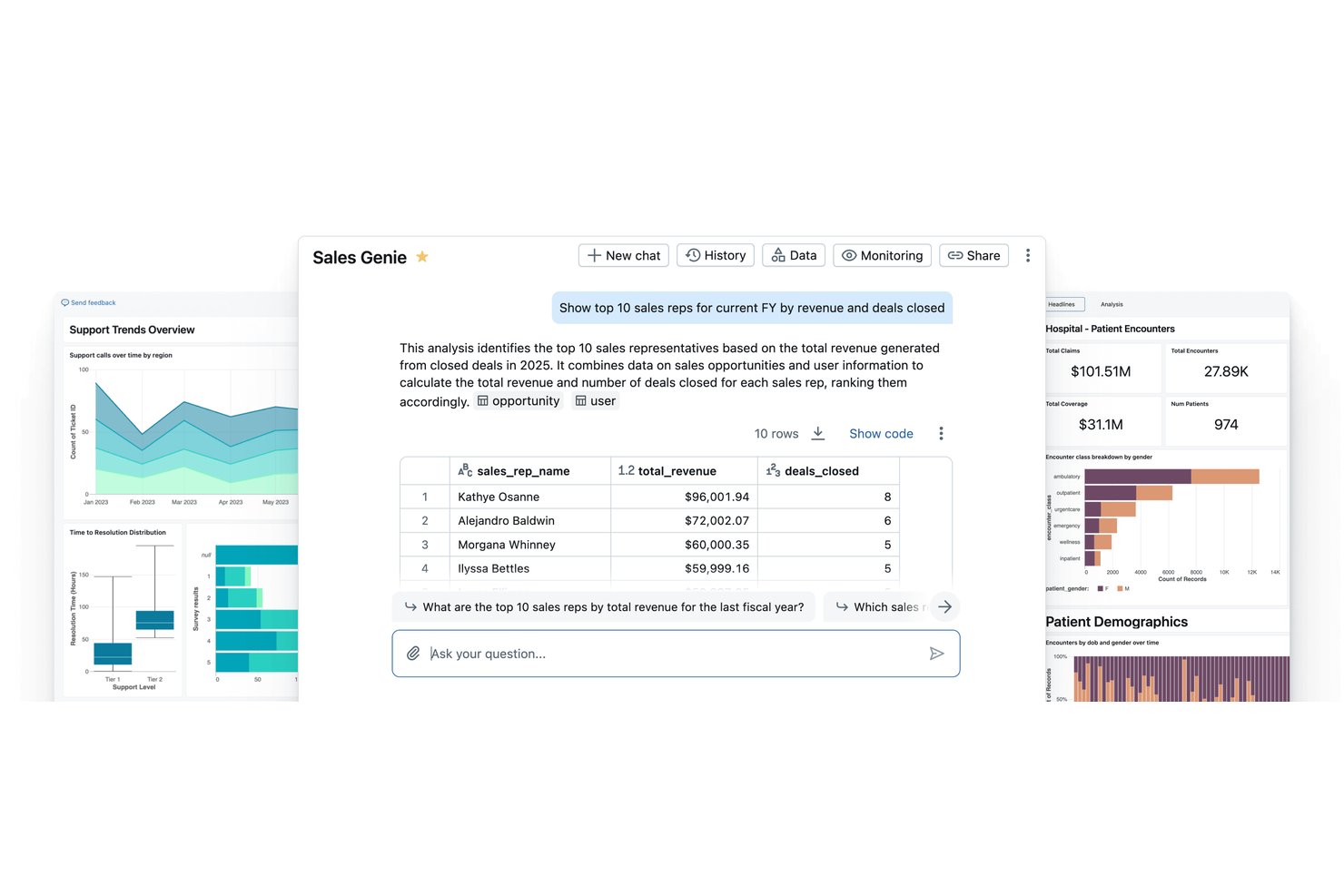
Databricks è una piattaforma lakehouse per i dati, progettata per i team di ingegneria dei dati e di intelligenza artificiale che devono unificare pipeline di dati su larga scala, analisi e apprendimento automatico in un unico ambiente governato.
Per chi è più adatto Databricks?
Databricks è una soluzione particolarmente adatta ai team aziendali che si occupano di dati e intelligenza artificiale e gestiscono pipeline di dati complesse e ad alto volume in ambienti cloud.
Perché Databricks è una buona alternativa a Power BI tra quelle selezionate
Ho scelto Databricks come una delle migliori soluzioni perché riunisce in un unico lakehouse governato ciò che Power BI richiede a due piattaforme di svolgere: elaborazione dei dati e business intelligence. Apprezzo il modo in cui Unity Catalog applica simultaneamente un unico livello di governance a dati, dashboard e modelli di intelligenza artificiale, così il mio team non deve gestire le autorizzazioni tra strumenti non collegati. Genie, l'interfaccia in linguaggio naturale integrata nelle dashboard AI/BI, consente al mio team di interrogare in modo conversazionale i dati aggiornati del lakehouse senza scrivere query SQL.
Funzionalità principali di Databricks
- Orchestrazione Lakeflow: Orchestrazione di pipeline ETL e di dati in streaming complesse tra più origini e destinazioni.
- Versionamento di Delta Lake: Conservazione delle versioni storiche dei dataset per garantire la completa derivazione dei dati, il ripristino e la verificabilità.
- Integrazioni Partner Connect: Connessione rapida a strumenti esterni di BI, ML e gestione dei dati tramite l'ecosistema di integrazione di Databricks.
- Governance di Unity Catalog: Applicazione di criteri unificati di sicurezza, controllo e governance dei dati a tutte le risorse analitiche della piattaforma.
Integrazioni di Databricks
Databricks offre integrazioni native con Salesforce, Google BigQuery, Amazon Redshift, Snowflake, Google Sheets e Tableau, oltre a un'API per le integrazioni personalizzate.
Pros and Cons
Pros:
- Unifica nativamente l'ingegneria dei dati e la BI
- Gestisce dataset enormi su scala aziendale
- Le dashboard AI/BI supportano le query in linguaggio naturale
Cons:
- Richiede conoscenze di SQL per la maggior parte delle analisi
- Non è progettato per utenti aziendali non tecnici

Tableau
Ideale per esplorazione visiva interattiva
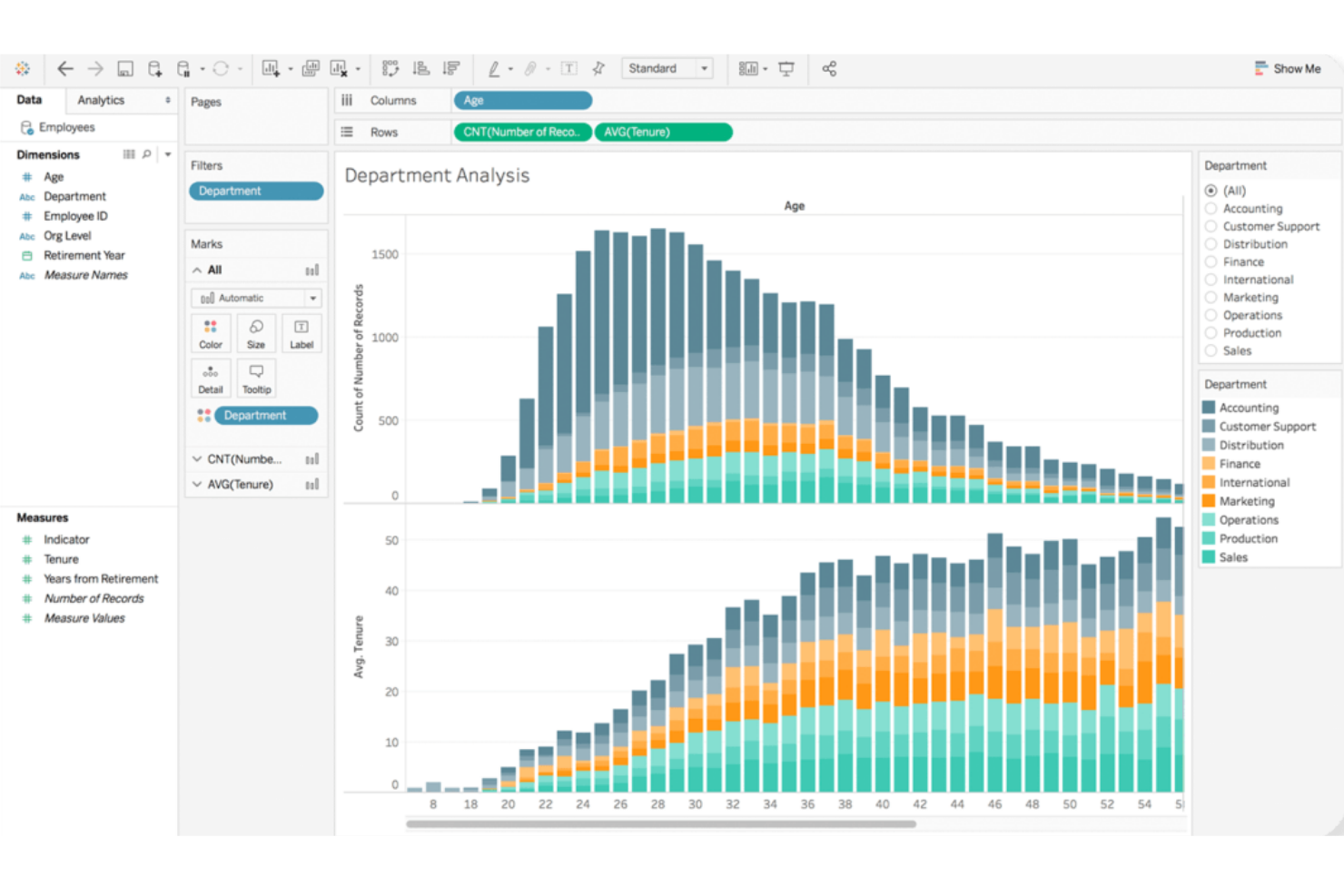
Tableau si distingue per i team che necessitano di un'esplorazione dei dati altamente interattiva e visiva. È una scelta eccellente per analisti e utenti aziendali che vogliono approfondire set di dati complessi e scoprire insight tramite dashboard intuitivi con il drag-and-drop. Se la tua organizzazione dà valore a una narrazione flessibile e visuale con i dati, Tableau offre un approccio diverso rispetto allo stile di reporting più strutturato di Power BI.
Perché Tableau è una valida alternativa a Power BI
La forza di Tableau nell'esplorazione visiva interattiva lo rende una delle migliori scelte per i team che vogliono andare oltre dashboard statici. Ho scelto Tableau per la sua capacità di permettere agli utenti di approfondire i dati, filtrare in tempo reale e creare visualizzazioni personalizzate con semplici azioni di drag-and-drop. Il motore VizQL della piattaforma traduce le azioni dell'utente in interrogazioni, così puoi vedere immediatamente i cambiamenti riflessi nei tuoi grafici e tabelle. Questo livello di interattività ti aiuta a scoprire tendenze e anomalie che potrebbero passare inosservate con strumenti di reporting più rigidi come Power BI.
Funzionalità principali di Tableau
Altre funzionalità di Tableau che potrebbero interessare il tuo team includono:
- Preparazione dei dati con Tableau Prep: Prepara, pulisci e modella i tuoi dati in modo visivo prima dell'analisi usando l'interfaccia dedicata di Tableau Prep.
- Connessioni dati live e in-memory: Connettiti ai dati in tempo reale oppure utilizza estratti in memoria per prestazioni più rapide, a seconda delle tue esigenze.
- Collaborazione e condivisione: Condividi in modo sicuro dashboard con colleghi o stakeholder tramite Tableau Server o Tableau Cloud.
- Dashboard ottimizzati per dispositivi mobili: Progetta dashboard che si adattano automaticamente ai dispositivi mobili, rendendo gli insight accessibili ovunque.
Integrazioni Tableau
Le integrazioni includono Salesforce CRM, Google Analytics, Amazon Redshift, Snowflake, Microsoft SQL Server, Oracle, SAP HANA, Google BigQuery, Dropbox e ServiceNow.
Pros and Cons
Pros:
- Creazione di dashboard altamente flessibile con drag-and-drop
- Ottimo supporto per visualizzazioni avanzate dei dati
- Gestisce senza problemi set di dati grandi e complessi
Cons:
- Maggiore richiesta di risorse per l'implementazione on-premises
- Le formule personalizzate possono essere complesse da implementare

Looker
Ideale per la personalizzazione dell’analisi embedded
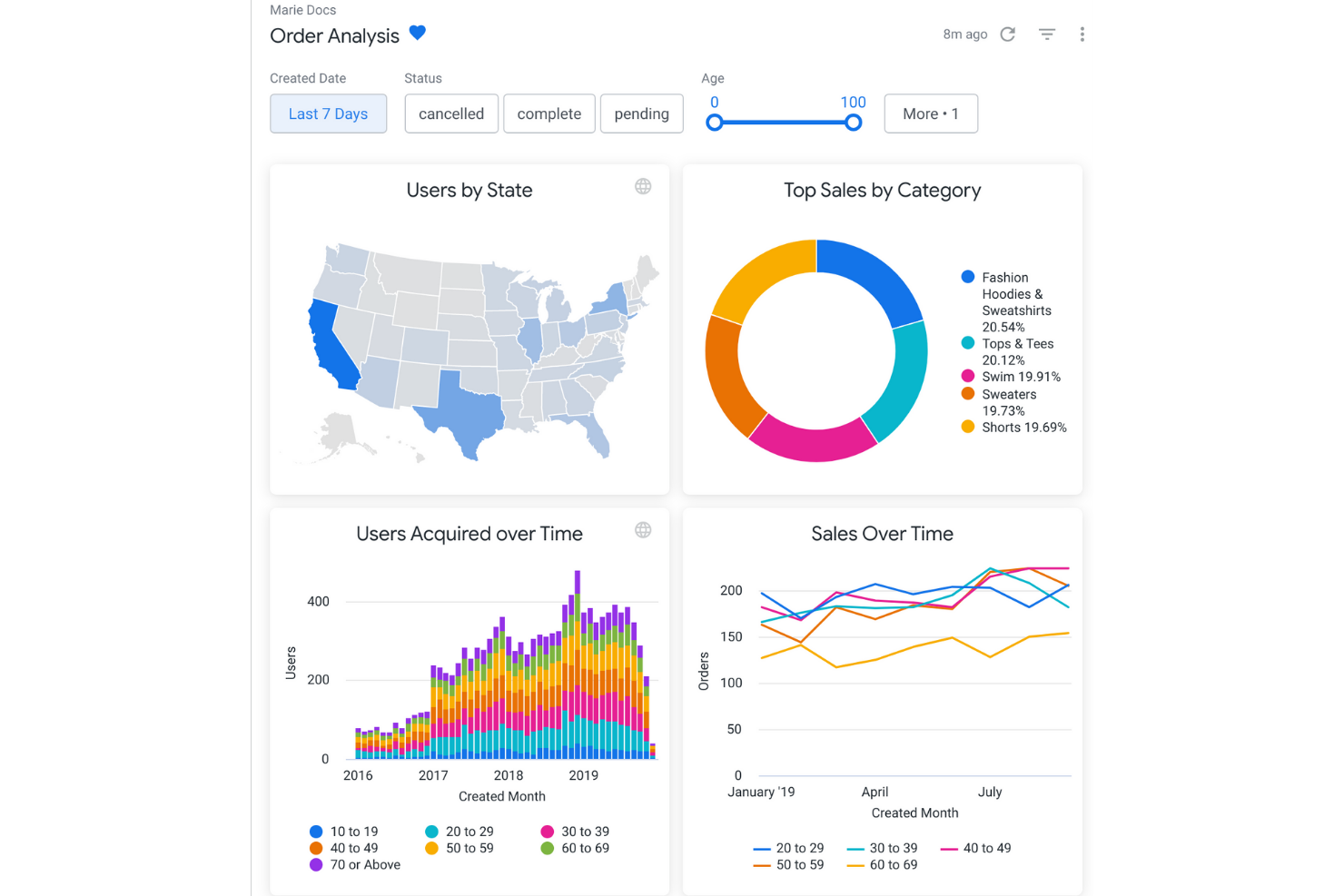
Se il tuo team ha bisogno di offrire analisi altamente personalizzate all’interno dei propri prodotti o portali, Looker è pensato per garantire flessibilità nell’analisi incorporata. È ideale per fornitori SaaS, product manager e team dati che vogliono controllare aspetto, esperienza utente e interattività delle analisi per l’utente finale. A differenza di Power BI, il layer di modellazione di Looker e il suo approccio tramite API permettono di personalizzare a fondo le esperienze con i dati e integrare l’analisi direttamente nei tuoi flussi di lavoro.
Perché Looker è una valida alternativa a Power BI
Looker si distingue per i team che devono incorporare analisi direttamente nei propri prodotti o portali rivolti ai clienti. Ho scelto Looker perché il suo layer semantico di modellazione (LookML) consente di definire e riutilizzare la logica aziendale, semplificando la manutenzione di analisi coerenti su diversi ambienti.
Le API e gli strumenti per sviluppatori permettono una personalizzazione di dashboard, visualizzazioni ed esperienze utente ben oltre ciò che Power BI offre solitamente per casi d’uso embedded. Questo rende Looker una scelta eccellente se vuoi fornire analisi su misura che rispecchino le esigenze di brand e workflow della tua azienda.
Funzionalità principali di Looker
Altre funzionalità utili di Looker per il tuo team includono:
- Report programmati: Automatizza la consegna di report a utenti o gruppi secondo una pianificazione stabilita.
- Interfaccia di esplorazione dei dati: Gli utenti possono esplorare, filtrare e ruotare i dati direttamente nei dashboard.
- Sicurezza a livello di riga: Controllo dell’accesso ai dati a livello granulare per diversi utenti o gruppi.
- Integrazione con il controllo versione: Gestione dei modelli LookML e degli asset analitici tramite controllo versione basato su Git.
Integrazioni di Looker
Le integrazioni includono BigQuery, Snowflake, Redshift, Databricks, Microsoft SQL Server, PostgreSQL, MySQL, Oracle, Google Sheets e Salesforce.
Pros and Cons
Pros:
- LookML consente la modellazione riutilizzabile della logica aziendale
- Le opzioni di embedding supportano una profonda integrazione nei prodotti
- Consegna programmata di report e dashboard
Cons:
- Nessun supporto nativo per il deployment on-premise
- Richiede conoscenza di SQL per la modellazione avanzata
Domo
Ideale per la condivisione in tempo reale di dashboard
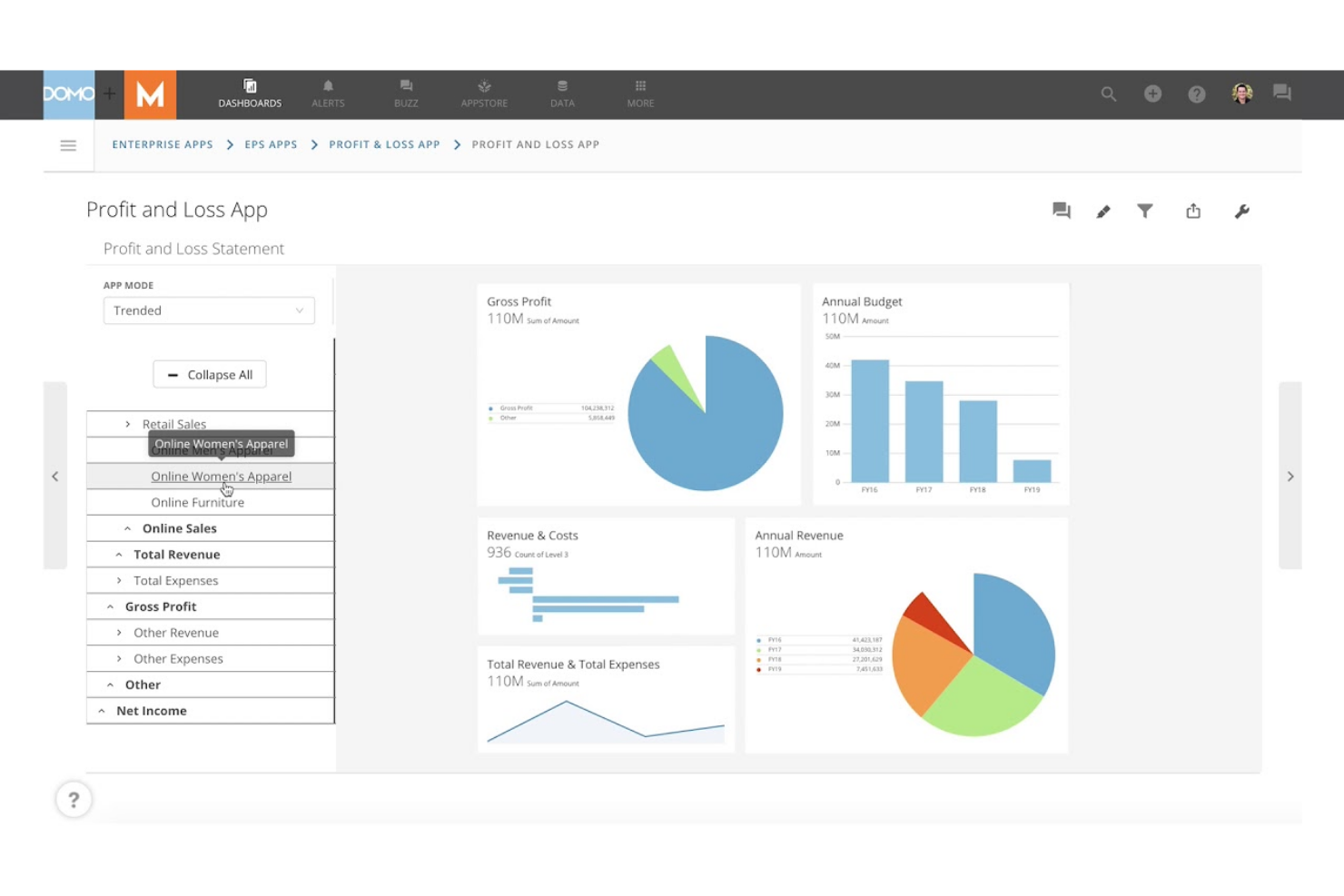
Domo è pensato per i team che hanno bisogno di condividere dashboard live e aggiornamenti dei dati tra dipartimenti o sedi diverse. È particolarmente utile per i responsabili delle operazioni, analisti ed executive che si affidano a informazioni aggiornate al minuto per prendere decisioni rapide. A differenza di Power BI, Domo punta sulla condivisione dei dati in tempo reale e sulla collaborazione, così tutti sono allineati non appena sono disponibili nuove informazioni.
Perché Domo è una valida alternativa a Power BI
Se il tuo team ha bisogno di condividere dashboard e dati in tempo reale, Domo è progettato proprio per questo scopo. Ho scelto Domo perché permette di pubblicare dashboard live che si aggiornano istantaneamente con l'arrivo di nuovi dati, così tutti vedono gli stessi numeri nello stesso momento.
Domo offre inoltre funzioni di condivisione interattiva, tra cui avvisi personalizzabili e accesso da mobile, che aiutano i team distribuiti a restare connessi agli ultimi insight. Questo focus sulla collaborazione in tempo reale rende Domo una valida alternativa a Power BI per le organizzazioni che non possono permettersi di aspettare i refresh programmati.
Funzionalità principali di Domo
Altre funzionalità di Domo che potrebbero essere utili al tuo team includono:
- Kit per la creazione di app: Crea app dati personalizzate utilizzando strumenti drag-and-drop e template predefiniti.
- Trasformazione dati (Magic ETL): Pulisci, unisci e trasforma i dati visivamente senza dover scrivere codice.
- Controlli di data governance: Imposta permessi dettagliati e monitora l'utilizzo dei dati in tutta l'organizzazione.
- Connettori predefiniti per i dati: Collega centinaia di fonti di dati, comprese app cloud, database e fogli di calcolo.
Integrazioni con Domo
Le integrazioni includono Salesforce, Google Analytics, Facebook Ads, Twitter, Instagram, Shopify, HubSpot, Marketo, LinkedIn e Microsoft Dynamics.
Pros and Cons
Pros:
- Aggiornamenti in tempo reale delle dashboard per visibilità immediata
- Magic ETL consente la trasformazione visiva dei dati
- App mobile per accedere ai dati ovunque
Cons:
- Il prezzo non è trasparente né pubblicamente disponibile
- Le analisi avanzate richiedono componenti aggiuntivi separati
Sisense
Ideale per l'integrazione complessa dei dati
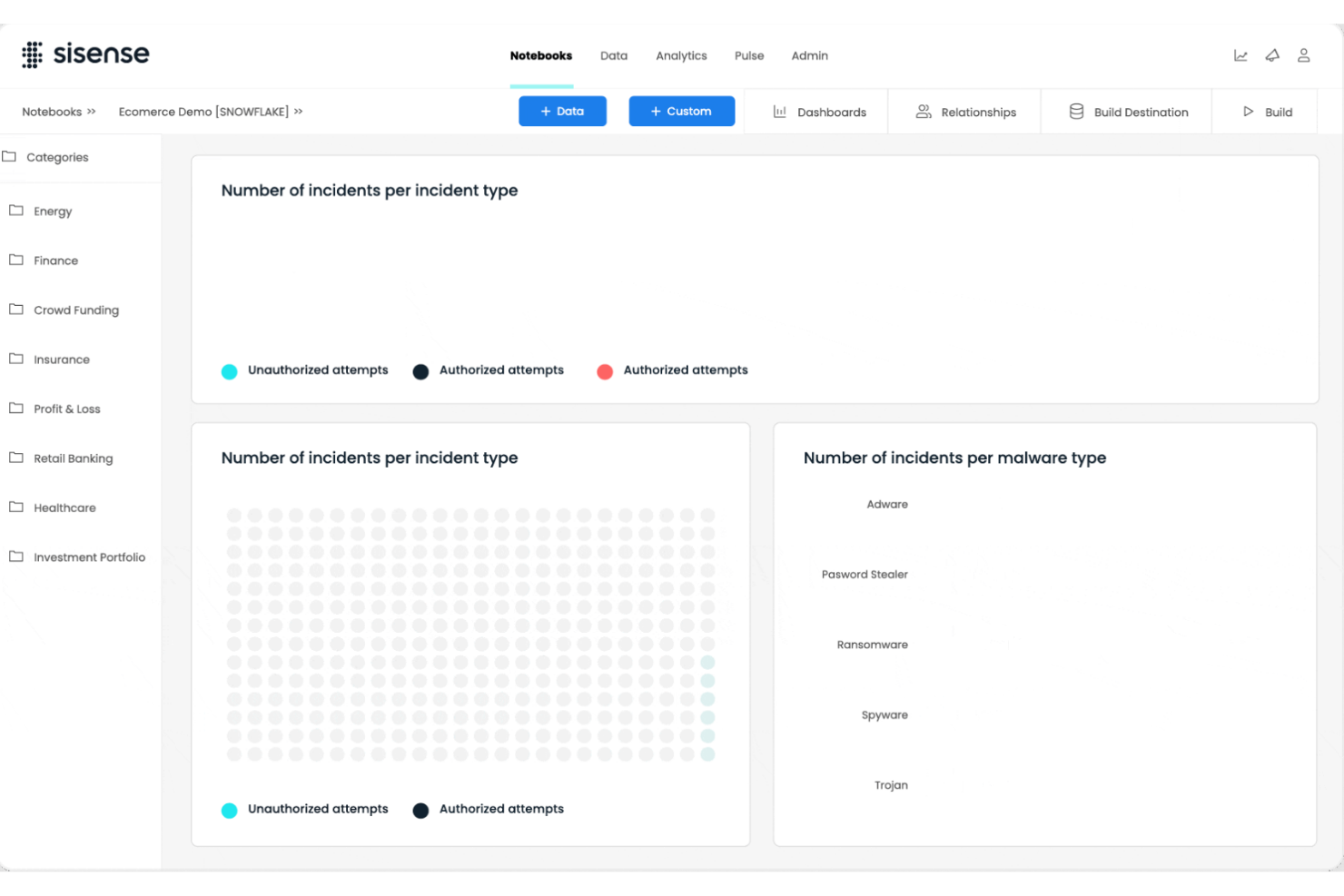
Per i team che gestiscono dati provenienti da molte fonti e in diversi formati, Sisense offre capacità avanzate per l'integrazione complessa dei dati. È particolarmente adatto a data engineer, responsabili dell'analisi e team IT che necessitano di combinare, trasformare e analizzare grandi insiemi di dati o dati eterogenei. A differenza di Power BI, la tecnologia in-chip di Sisense e la modellazione flessibile dei dati permettono di unificare e interrogare dati su cloud, ambienti locali e ibridi senza pesanti attività di pre-elaborazione.
Perché Sisense è una valida alternativa a Power BI
Se la tua azienda ha bisogno di riunire dati da molte fonti diverse, Sisense è progettato per scenari di integrazione dati complessi. Ho scelto Sisense perché la sua tecnologia Elasticube permette di combinare e modellare dati da ambienti cloud, on-premise e ibridi senza necessità di pesanti preparazioni dei dati.
Il motore di analisi in-chip elabora rapidamente grandi insiemi di dati, supportando l'analisi in tempo reale anche quando i dati sono molto frammentati. Questo rende Sisense una scelta solida per le organizzazioni che devono unificare e analizzare dati provenienti da sistemi multipli, spesso incompatibili.
Funzionalità principali di Sisense
Altre funzionalità di Sisense che possono essere utili per il tuo team includono:
- White labeling: Personalizza dashboard e analisi con il tuo brand e i tuoi elementi di design.
- Approfondimenti guidati dall'IA: Utilizza funzionalità IA integrate per individuare automaticamente tendenze e anomalie nei tuoi dati.
- Costruttore di dashboard drag-and-drop: Crea dashboard interattive senza scrivere codice.
- Controlli di accesso basati sui ruoli: Imposta permessi dettagliati per utenti e gruppi e gestisci la visibilità e le azioni sui dati.
Integrazioni Sisense
Le integrazioni comprendono Snowflake, Amazon Redshift, Google BigQuery, Databricks, Azure Synapse, MySQL, PostgreSQL, Oracle, Microsoft SQL Server e Salesforce.
Pros and Cons
Pros:
- Gestisce dataset ampi e complessi senza rallentamenti
- White labeling supporta portali analitici personalizzati con il proprio brand
- L'elaborazione in-chip accelera le prestazioni delle dashboard
Cons:
- Le modifiche al modello dati richiedono la reindicizzazione completa
- Tipologie di visualizzazione limitate rispetto ai concorrenti

Ideale per l’allineamento della pianificazione aziendale
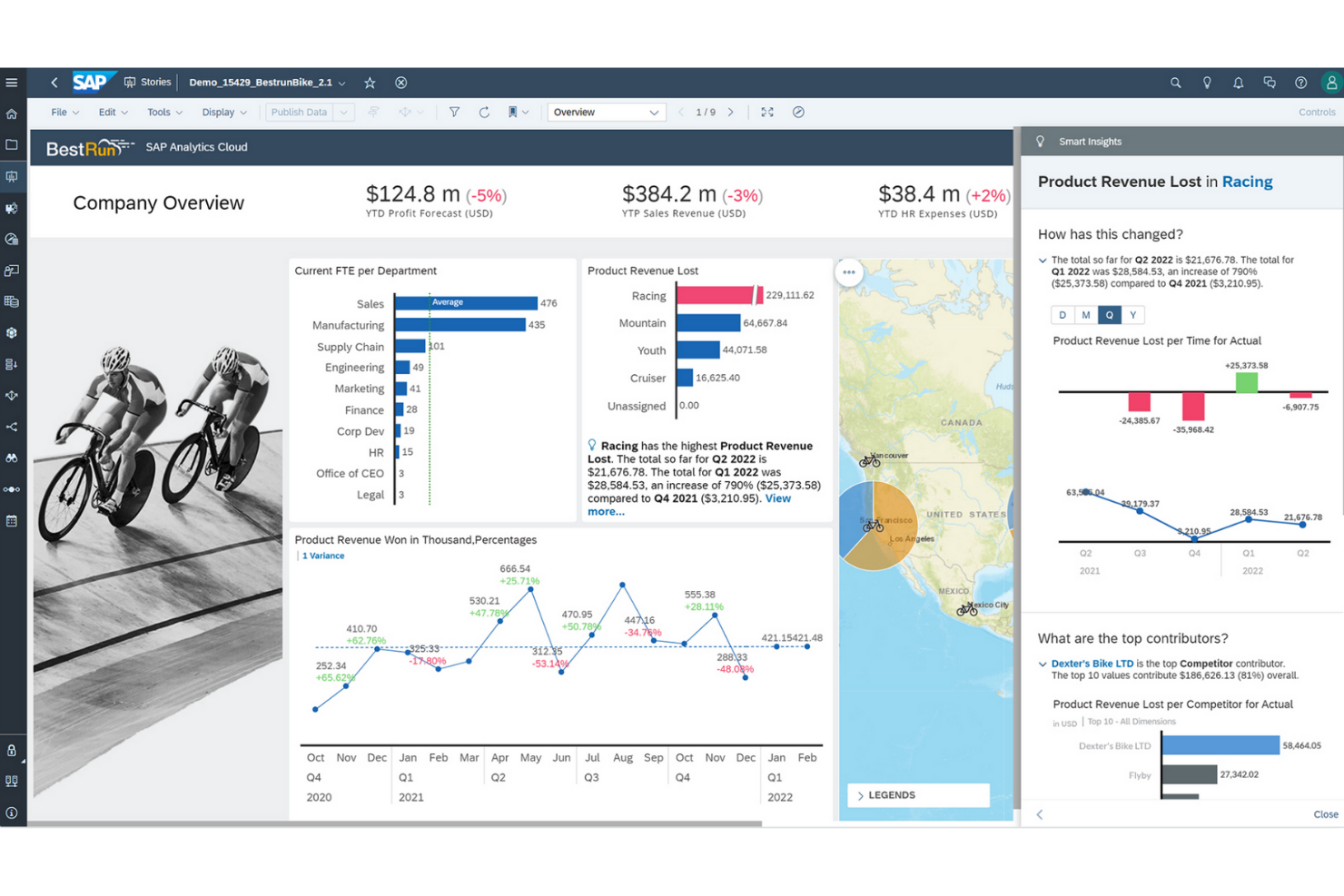
Per le organizzazioni che hanno bisogno di collegare l’analisi dei dati con la pianificazione aziendale, SAP Analytics Cloud offre un approccio unificato. Le grandi aziende e i team finanziari spesso lo scelgono per allineare previsione, budgeting e reportistica su un'unica piattaforma. A differenza di Power BI, SAP Analytics Cloud integra pianificazione, analisi predittiva e business intelligence per un supporto decisionale end-to-end.
Perché SAP Analytics Cloud è una valida alternativa a Power BI
Ciò che distingue SAP Analytics Cloud è la profonda integrazione tra analisi dei dati e pianificazione aziendale su un’unica piattaforma. L’ho scelto per i team che hanno la necessità di collegare pianificazione finanziaria, previsione e reportistica senza passare da uno strumento all’altro. I flussi di lavoro di pianificazione integrati e le analisi predittive aiutano le organizzazioni ad allineare strategia ed esecuzione tra i reparti. Questo rende SAP Analytics Cloud una scelta forte per le imprese che desiderano unificare business intelligence e pianificazione in un unico ambiente.
Funzionalità principali di SAP Analytics Cloud
Altre funzionalità di SAP Analytics Cloud che possono essere utili al tuo team includono:
- Smart Insights: genera automaticamente spiegazioni per tendenze e anomalie nei dati.
- Live Data Connectivity: connessione diretta a fonti dati SAP e non-SAP senza replica dei dati.
- Strumenti di collaborazione: commenta, condividi e assegna attività direttamente su report e dashboard.
- Accesso da mobile: visualizza e interagisci con le dashboard su dispositivi iOS e Android.
Integrazioni SAP Analytics Cloud
Le integrazioni includono SAP HANA, SAP S/4HANA, SAP BW/4HANA, soluzioni SAP BusinessObjects, SAP Business Planning and Consolidation, OData e Google BigQuery.
Pros and Cons
Pros:
- Strumenti integrati per la pianificazione aziendale e la previsione
- Integrazione nativa con i sistemi SAP ERP
- Funzionalità di analisi predittiva per utenti business
Cons:
- Personalizzazione delle visualizzazioni limitata rispetto a
- Problemi di prestazioni di Power BI con grandi volumi di dati


Se stai cercando una piattaforma di business intelligence con analisi avanzate basate sull’intelligenza artificiale, IBM Cognos Analytics merita considerazione. È progettata per le organizzazioni che desiderano ottenere approfondimenti più approfonditi dai propri dati grazie alla preparazione automatica dei dati e alle interrogazioni in linguaggio naturale. A differenza di Power BI, IBM Cognos Analytics punta sulla scoperta dei dati tramite intelligenza artificiale e l’analisi guidata per gli utenti di tutte le funzioni aziendali.
Perché IBM Cognos Analytics è una valida alternativa a Power BI
IBM Cognos Analytics si distingue per le sue analisi dei dati potenziate dall’IA, che vanno oltre quanto offerto dalla maggior parte delle piattaforme di business intelligence. L’ho scelto per i team che vogliono una preparazione dei dati automatizzata e interrogazioni in linguaggio naturale per aiutare utenti di qualsiasi livello di abilità a individuare tendenze e pattern.
L’Assistente IA della piattaforma può generare visualizzazioni e suggerire insight in base alle tue domande, rendendo più accessibile l’esplorazione dei dati. Questo focus su IA integrata e analisi guidata fa di IBM Cognos Analytics una valida alternativa a Power BI per le organizzazioni che desiderano sfruttare l’analisi avanzata senza un notevole impegno manuale.
Funzionalità principali di IBM Cognos Analytics
Altre funzionalità utili di IBM Cognos Analytics per il tuo team includono:
- Strumenti di modellazione dei dati: Crea e gestisci modelli di dati direttamente nella piattaforma.
- Creazione dashboard personalizzate: Progetta dashboard interattivi con componenti drag-and-drop.
- Reportistica programmata: Automatizza la generazione e la consegna dei report su una pianificazione predefinita.
- Analisi geospaziale: Visualizza e analizza i dati utilizzando strumenti di mappatura integrati.
Integrazioni di IBM Cognos Analytics
Le integrazioni includono IBM Planning Analytics, IBM SPSS Statistics, IBM watsonx, Microsoft Fabric, SAP BW/4HANA, Amazon Web Services, Microsoft Azure, Google Cloud Platform e Slack.
Pros and Cons
Pros:
- L’Assistente IA genera insight da interrogazioni in linguaggio naturale
- Modellazione dei dati integrata per set di dati complessi
- Reportistica programmata automatizza la consegna dei report ricorrenti
Cons:
- Le opzioni di progettazione dei dashboard sono meno flessibili
- Gli strumenti di preparazione dei dati richiedono competenze tecniche


Se il tuo team ha bisogno di offrire analitiche altamente personalizzate all'interno dei tuoi prodotti o portali, Looker è progettato per la massima flessibilità nell'analisi embedded. È ideale per i fornitori SaaS, i product manager e i team dati che desiderano controllare l'aspetto, il design e l’interattività delle analitiche per gli utenti finali. A differenza di Power BI, il livello di modellazione di Looker e l'approccio guidato dalle API permettono di adattare le esperienze sui dati e integrare direttamente le analisi nei tuoi flussi di lavoro.
Perché Looker è una valida alternativa a Power BI
Looker si distingue per i team che devono integrare direttamente gli strumenti di analisi nei propri prodotti o portali rivolti ai clienti. Ho scelto Looker perché il suo livello semantico di modellazione (LookML) consente di definire e riutilizzare la logica aziendale, facilitando il mantenimento di analisi coerenti in diversi ambienti.
Le API e gli strumenti per sviluppatori permettono di personalizzare dashboard, visualizzazioni ed esperienze utente ben oltre quanto Power BI solitamente offre per i casi di uso embedded. Per questo motivo, Looker è una scelta eccellente se desideri offrire analitiche su misura che rispettino il tuo brand e le esigenze operative.
Funzionalità principali di Looker
Altre funzionalità di Looker che potrebbero essere utili per il tuo team includono:
- Report programmati: Automatizza l'invio dei report a utenti o gruppi secondo una pianificazione stabilita.
- Interfaccia di esplorazione dei dati: Gli utenti possono approfondire, filtrare e ruotare i dati direttamente nelle dashboard.
- Sicurezza a livello di riga: Controlla l'accesso ai dati in modo granulare per utenti o gruppi diversi.
- Integrazione con il controllo versione: Gestisci i modelli LookML e gli asset analitici tramite un controllo versione basato su Git.
Integrazioni Looker
Le integrazioni includono BigQuery, Snowflake, Redshift, Databricks, Microsoft SQL Server, PostgreSQL, MySQL, Oracle, Google Sheets e Salesforce.
Pros and Cons
Pros:
- LookML consente la modellazione della logica aziendale riutilizzabile
- Le opzioni di embedding supportano un'integrazione profonda nei prodotti
- Consegna programmata di report e dashboard
Cons:
- Non supporta nativamente il deployment on-premises
- Richiede conoscenze SQL per la modellazione avanzata

Ideale per il tracciamento dei clienti su più canali
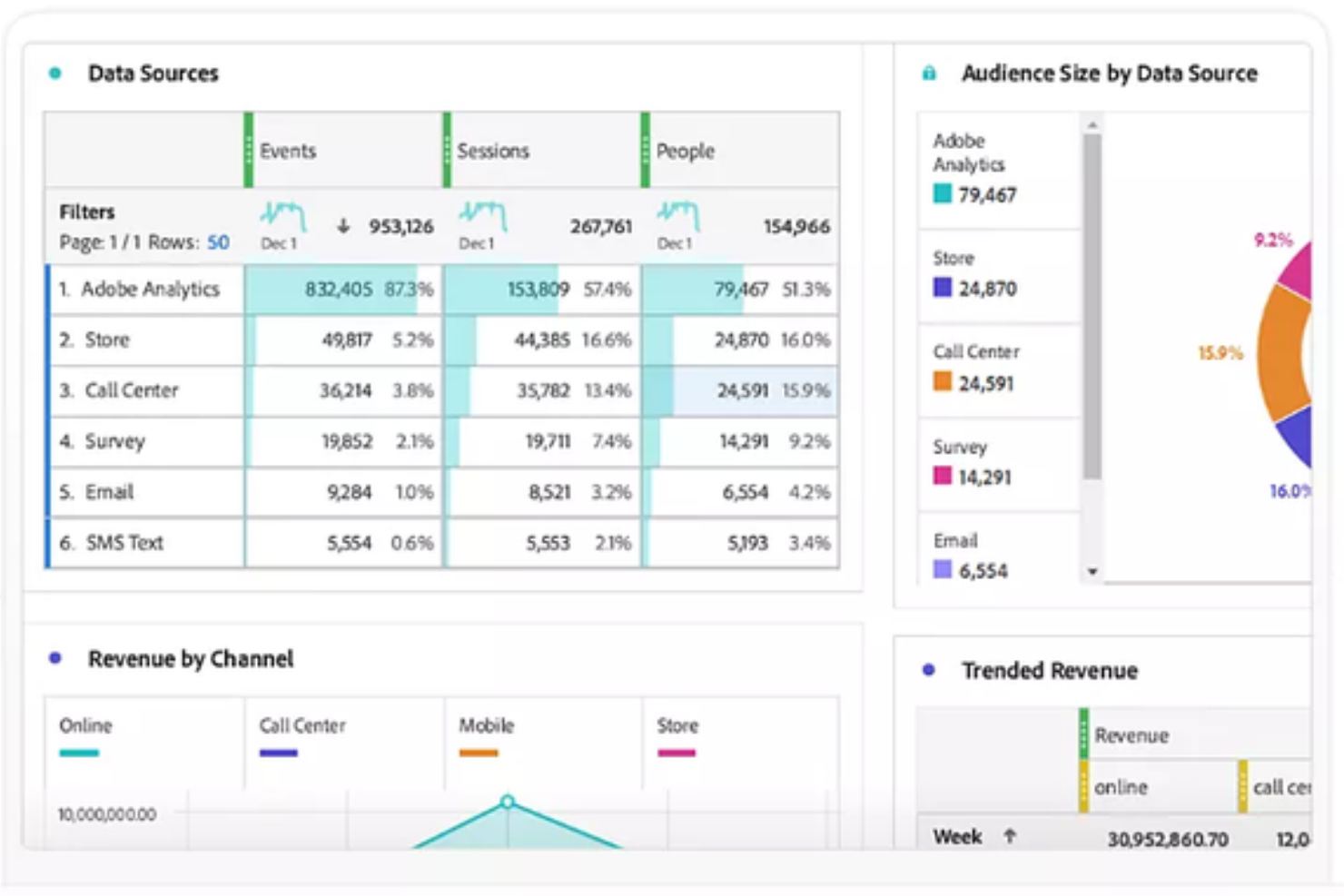
Adobe Customer Journey Analytics (CJA) è una piattaforma di analisi specializzata che unifica dataset provenienti da fonti web, mobile e offline in un'unica interfaccia. Offre ai team aziendali un modo per unificare e analizzare le interazioni con i clienti su ogni canale. Se hai bisogno di approfondimenti più dettagliati sui percorsi dei clienti e di una modellazione dati più flessibile rispetto a quanto offre Power BI, questa piattaforma fa al caso tuo.
Per chi è ideale Adobe Customer Journey Analytics?
Team di analisi aziendale nei settori retail, finanziario o turistico che necessitano di unificare e analizzare i percorsi dei clienti su più canali digitali e offline.
Perché Adobe Customer Journey Analytics è una valida alternativa a Power BI
Ho scelto Adobe Customer Journey Analytics perché permette al mio team di mappare e analizzare i percorsi dei clienti su ogni canale, non solo sui touchpoint digitali. Grazie alla funzionalità di unificazione dei dati omnicanale, posso vedere come gli utenti si spostano dal web al negozio fisico fino al call center in un’unica visualizzazione. Apprezzo molto il modo in cui visualizza percorsi complessi e multi-step che Power BI non riesce a gestire in modo nativo. Questo ci offre un quadro molto più chiaro del comportamento dei clienti su tutta la nostra attività.
Caratteristiche principali di Adobe Customer Journey Analytics
- Identity stitching: Unifica automaticamente diversi ID, come cookie e indirizzi email, in un unico profilo centrato sulla persona.
- Analysis Workspace: Uno spazio di lavoro flessibile per costruire report di abbandono e di flusso tramite azioni drag-and-drop invece che SQL.
- Elaborazione retroattiva dei dati: Consente di modificare le definizioni dei dati o correggere errori di tracciamento senza dover reimportare o aggiornare il set di dati originale.
- Didascalie intelligenti: Utilizza l’IA per scrivere sommari in linguaggio naturale su tendenze e anomalie, aiutando gli utenti non tecnici a comprendere i dati.
Integrazioni di Adobe Customer Journey Analytics
Adobe Customer Journey Analytics offre integrazioni native in tutto l’ecosistema Adobe Experience Cloud, tra cui Adobe Analytics, Adobe Audience Manager e Adobe Target. Offre anche un’API per integrazioni personalizzate e supporta collegamenti a fonti dati esterne tramite Adobe Experience Platform.
Pros and Cons
Pros:
- Segmentazione avanzata per analisi dettagliate dei percorsi
- Controlli di accesso basati sui ruoli per la governance dei dati
- Integrazione nativa con Adobe Experience Cloud
Cons:
- Maggiore complessità di configurazione rispetto a Power BI
- Meno visualizzazioni predefinite rispetto a Power BI

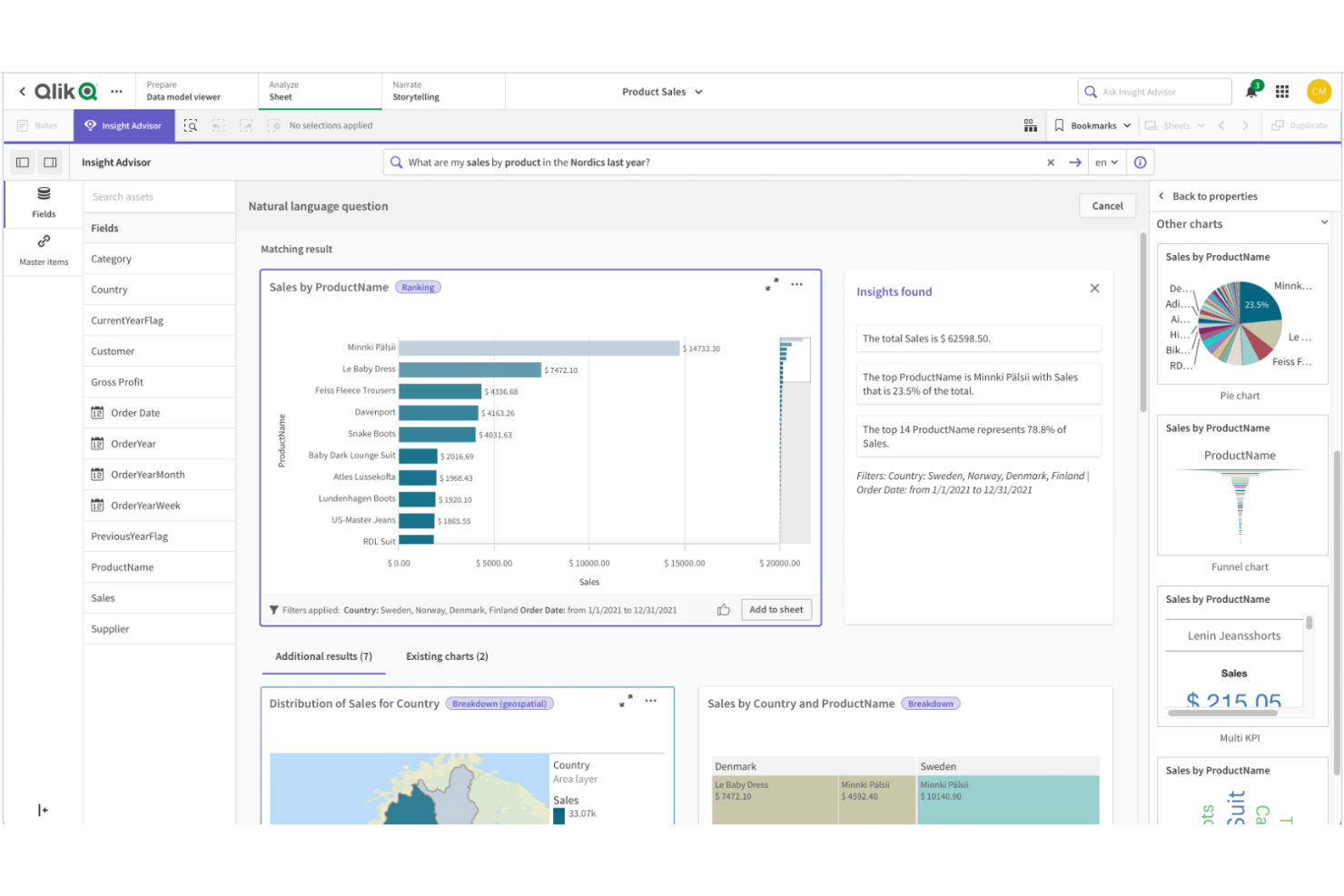
Qlik Sense è progettato per i team che hanno bisogno di esplorare dati complessi e interconnessi provenienti da più fonti. Il suo motore di modellazione dati associativa consente agli utenti di navigare liberamente tra le relazioni nei dati, facilitando l'individuazione di schemi e connessioni nascosti. Se la tua azienda si affida ad analisi flessibili e approfondite su set di dati diversi, Qlik Sense offre un approccio unico rispetto all’esplorazione dati più lineare di Power BI.
Perché Qlik Sense è una valida alternativa a Power BI
Ciò che distingue Qlik Sense è la sua modellazione dati associativa, che ti permette di esplorare le relazioni tra i dati senza essere limitato a gerarchie predefinite. Ho scelto Qlik Sense perché il suo motore consente agli utenti di cliccare su qualsiasi punto dati e vedere istantaneamente dati correlati e non correlati, rendendo più semplice scoprire intuizioni che potrebbero sfuggire con strumenti più lineari come Power BI.
Le funzioni interattive di selezione e filtraggio della piattaforma aiutano a seguire il proprio percorso di analisi, invece di attenersi a una struttura di approfondimento prestabilita. Questo approccio è particolarmente utile per i team che devono analizzare dati complessi provenienti da più fonti e vogliono la libertà di indagare le connessioni in autonomia.
Funzionalità principali di Qlik Sense
Altre funzionalità di Qlik Sense che potrebbero essere utili per il tuo team includono:
- Visualizzazione dati self-service: Gli utenti possono creare e personalizzare dashboard e report senza il supporto IT.
- Analitica aumentata: Le funzionalità integrate di IA e machine learning supportano l'acquisizione di intuizioni dai dati e forniscono suggerimenti.
- Implementazione multi-cloud: Qlik Sense può essere distribuito on-premise, in un cloud privato o tramite Qlik Cloud per una maggiore flessibilità nelle infrastrutture.
- Avvisi sui dati: Configura avvisi automatici per notificare gli utenti quando i dati soddisfano condizioni o soglie specifiche.
Integrazioni di Qlik Sense
Le integrazioni includono Amazon Web Services, Google Cloud, Microsoft Azure, Snowflake, SAP, Databricks, Cloudera, Salesforce, Oracle e Dropbox.
Pros and Cons
Pros:
- AI integrata che assiste nell'analisi dei dati
- Opzioni di implementazione multi-cloud per un hosting flessibile
- Solido governo dei dati e controlli di sicurezza
Cons:
- Il linguaggio di scripting differisce dagli standard SQL
- Meno modelli predefiniti rispetto a Power BI
Altre alternative a Power BI
Ecco alcune alternative aggiuntive a Power BI che non sono state incluse nella mia selezione, ma che vale comunque la pena considerare:
- Metabase
Ideale per la massima flessibilità di deployment open-source
- Zoho Analytics
Ideale per la programmazione automatica dei report
- Strategy
Ideale per reportistica aziendale scalabile
- Infor Birst
Ideale per l'architettura dei dati in rete


Come valuto le alternative a Power BI
Divido la mia valutazione in due livelli: le funzionalità di base che uno strumento deve possedere per essere preso in considerazione e i fattori distintivi che cerco quando i team CX devono monitorare NPS, CSAT e dati dei clienti provenienti da più fonti.
Funzionalità di base (requisiti essenziali per questo elenco)
Quando seleziono gli strumenti da inserire nel mio elenco, assegno a ciascuno un punteggio su una scala da 0 (non offre la funzionalità) a 5 (eccelle in quest'area) per ogni funzionalità di base indicata di seguito. Quindi, calcolo il punteggio totale dello strumento e lo converto in percentuale. Ogni strumento deve raggiungere un punteggio totale minimo del 65% per essere preso in considerazione.
- Dashboard interattive: cerco funzionalità di filtro incrociato, analisi dettagliate e aggiornamenti in tempo reale che consentano ai team CX di monitorare le tendenze dell'NPS o le variazioni del CSAT senza dover ricreare i report.
- Connettori per dati provenienti da più fonti: ogni strumento deve disporre di connettori nativi per CRM, strumenti per sondaggi e piattaforme per contact center, così che i team possano unificare in un'unica vista i dati provenienti da Salesforce, Zendesk o Qualtrics.
- Creazione autonoma dei report: valuto se un analista CX può creare una dashboard sul tasso di abbandono o segmentare il feedback dei clienti usando il trascinamento della selezione, senza scrivere codice SQL né attendere il team dati.
- Modellazione e trasformazione dei dati: combinare i dati dei ticket con i punteggi dei sondaggi richiede join, campi calcolati e preparazione dei dati: verifico come ogni strumento gestisce visivamente queste trasformazioni.
- Condivisione e collaborazione: valuto quanto sia semplice per i team programmare l'invio settimanale dei riepiloghi CSAT ai dirigenti, incorporare le dashboard nei portali interni e controllare gli accessi con autorizzazioni basate sui ruoli.
- IA e analisi avanzate: gli strumenti che offrono query in linguaggio naturale, rilevamento automatico delle anomalie o valutazione predittiva del tasso di abbandono consentono ai team CX di ottenere informazioni utili più rapidamente, quindi valuto quali funzionalità siano integrate.
Una volta ottenuto un elenco di strumenti che soddisfano questi criteri, considero ciò che distingue ciascuna piattaforma.
Fattori distintivi (ciò che differenzia i fornitori)
Ecco come confronto i diversi fornitori:
Funzionalità distintive
L'analisi del testo e del sentiment è un importante fattore distintivo: cerco strumenti in grado di analizzare le risposte aperte ai sondaggi e assegnare automaticamente tag ai temi, risparmiando ore di codifica manuale. Anche i modelli CX preconfigurati per dashboard NPS, CSAT e sul tasso di abbandono sono importanti, perché riducono i tempi di configurazione per i team privi di ingegneri BI dedicati. Vale la pena valutare anche la compatibilità multipiattaforma, poiché l'app desktop di Power BI è disponibile solo per Windows e molti team CX lavorano su macOS o necessitano di un accesso completo basato sul browser.
Oltre le funzionalità
La struttura dei prezzi è molto importante quando i team CX includono dirigenti e agenti che si limitano a visualizzare le dashboard. Verifico se un fornitore offre licenze gratuite per gli utenti visualizzatori o accesso in sola lettura, in modo da non dover pagare il prezzo pieno per utenti passivi. Anche il livello di integrazione con lo stack tecnologico CX è un fattore importante: i connettori nativi per strumenti come Salesforce, Zendesk e Qualtrics dovrebbero andare oltre le importazioni di base e supportare sincronizzazioni pianificate. Valuto inoltre il livello di sicurezza, in particolare la sicurezza a livello di riga per segmentare i dati dei clienti in base alla regione o al team durante la gestione di informazioni personali identificabili (PII).
Perché cercare un'alternativa a Power BI?
Sebbene Power BI sia uno degli strumenti di analisi più utilizzati, alcuni acquirenti di software cercano alternative più adatte ai loro flussi di lavoro, alle esigenze tecniche o al budget. Potresti prendere in considerazione altre opzioni perché…
- Desideri un'interfaccia più intuitiva, con funzionalità di analisi dei dati più avanzate e maggiore facilità d'uso per gli utenti non tecnici
- Hai bisogno di un'interfaccia più semplice basata sul trascinamento della selezione per creare cruscotti più velocemente
- Il tuo team desidera funzionalità avanzate e opzioni di personalizzazione senza richiedere lo stesso livello di competenze tecniche
- Stai cercando strumenti di analisi più convenienti per team in crescita
- Hai bisogno di un supporto migliore per connettere e analizzare dati provenienti da diverse fonti
- Desideri accedere più rapidamente a informazioni in tempo reale senza una configurazione complessa
- La tua organizzazione ha bisogno di una soluzione che si adatti più facilmente alle esigenze aziendali
Se ti riconosci in una di queste situazioni, questo elenco mette in evidenza diverse valide alternative che offrono funzionalità di analisi flessibili, flussi di lavoro più semplici e un migliore allineamento con esigenze aziendali differenti.
Funzionalità principali di Power BI
Ecco alcune delle funzionalità principali di Power BI, per aiutarti a confrontare le proposte delle soluzioni alternative:
- Creazione di cruscotti e rapporti interattivi
- Integrazione con i servizi Microsoft 365 e Azure
- Strumenti per la modellazione e la trasformazione dei dati
- Trasmissione e monitoraggio dei dati in tempo reale
- Interrogazioni in linguaggio naturale con funzionalità di domande e risposte
- Distribuzione programmata e automatizzata dei rapporti
- Catalogo di visualizzazioni personalizzate
- Applicazione mobile per l'accesso in mobilità
- Sicurezza a livello di riga per la governance dei dati
- Collaborazione e condivisione all'interno di Microsoft Teams