

10 Migliori Strumenti Gestione Feedback per 2026

10 Migliori Strumenti di Gestione del Feedback: La Shortlist


Gli strumenti di gestione del feedback aiutano il tuo team a raccogliere, organizzare e agire in base ai suggerimenti dei clienti senza essere sopraffatti dal rumore. Sono progettati per centralizzare i feedback provenienti da più canali, evidenziare pattern rilevanti e chiudere il cerchio con i clienti.
Ho valutato questi strumenti in base a come supportano la raccolta, il tagging, l’analisi, le integrazioni e i workflow dal feedback all’azione. Questa guida analizza le migliori piattaforme di gestione del feedback per diverse dimensioni di team e obiettivi, così puoi costruire esperienze migliori.
Cos’è uno Strumento di Gestione del Feedback?
Uno strumento di gestione del feedback è una piattaforma digitale che aiuta le aziende a raccogliere, organizzare e analizzare i feedback di clienti o dipendenti. Semplifica il modo in cui i team raccolgono insight ed è usato per orientare le decisioni di prodotto, migliorare il servizio e monitorare la soddisfazione nel tempo. Spesso gioca un ruolo cruciale nell’ottimizzazione dello sviluppo prodotto, nel migliorare l’assistenza clienti e nell’aumentare la fidelizzazione.
Tabella Comparativa dei Migliori Software di Gestione del Feedback
Ecco una tabella comparativa che riassume le informazioni di base delle mie migliori scelte per la gestione del feedback. Puoi confrontare prezzi e disponibilità di prove gratuite o demo fianco a fianco, così da trovare il software migliore per il tuo budget e le tue esigenze aziendali.
| Tool | Best For | Trial Info | Price | ||
|---|---|---|---|---|---|
| 1 | Ideale per unificare i feedback dei clienti | Demo gratuita disponibile | Prezzo su richiesta | Website | |
| 2 | Ideale per unificare le fonti di feedback | Demo gratuita disponibile | Prezzo su richiesta | Website | |
| 3 | Ideale per la progettazione avanzata di sondaggi e analisi | Demo gratuita disponibile | Prezzo su richiesta | Website | |
| 4 | Ideale per la raccolta di feedback multicanale | Demo gratuita disponibile | Prezzi su richiesta | Website | |
| 5 | Ideale per automatizzare l'analisi dei feedback dei clienti | Prova gratuita di 14 giorni | A partire da $19/mese (fatturazione annuale) | Website | |
| 6 | Ideale per trasformare il feedback in insight attuabili | Prova gratuita di 7 giorni + demo gratuita disponibile | Da $55/utente/mese | Website | |
| 7 | Ideale per il monitoraggio del feedback dei clienti e delle richieste di funzionalità | Piano gratuito disponibile | A partire da $19/mese | Website | |
| 8 | Ideale per feedback visivo con contesto | Piano gratuito disponibile | Da $29/mese (fatturato annualmente) | Website | |
| 9 | Ideale per programmi completi di raccolta feedback dei clienti | Prova di 10 giorni | Da $56/mese | Website | |
| 10 | Ideale per richieste automatiche di recensioni dei clienti | Prova gratuita di 14 giorni | Da $39/agente/mese | Website |

Le 20 Recensioni Migliori di Strumenti di Gestione del Feedback
Ho fornito riassunti dettagliati delle migliori opzioni di strumenti di gestione del feedback e spiegato perché ho incluso ogni sistema in questa lista.

Ideale per unificare i feedback dei clienti
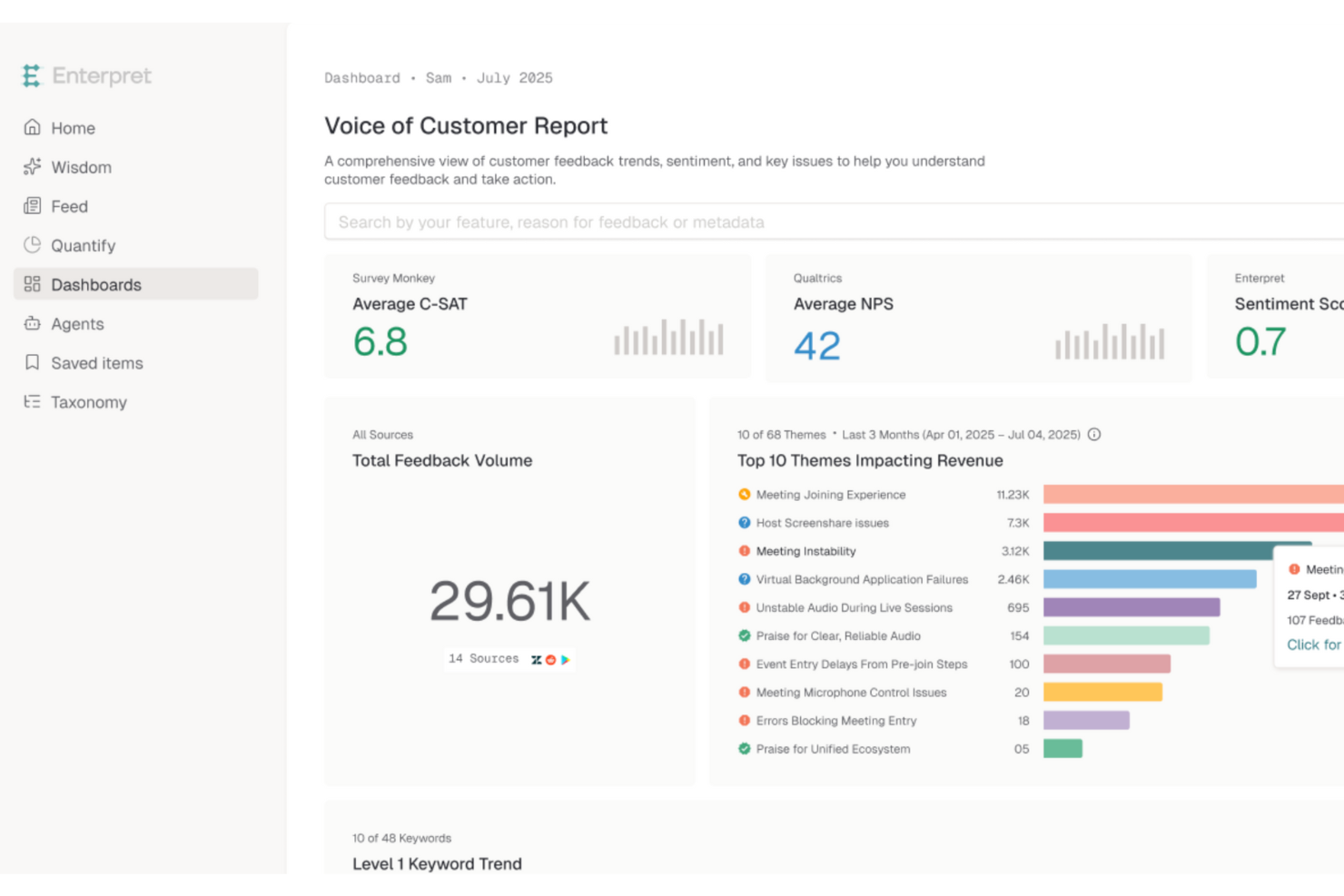
Enterpret è una piattaforma di customer intelligence basata sull'IA progettata per le aziende che desiderano migliorare la gestione del prodotto e l'esperienza cliente attraverso un'analisi dettagliata dei feedback. Consolidando i feedback provenienti da oltre 50 fonti, Enterpret si rivolge alle organizzazioni che vogliono trasformare le opinioni dei clienti in strategie operative. Offre funzionalità avanzate come tassonomia adattiva e agenti IA per automatizzare la risoluzione, affrontando la sfida di gestire grandi quantità di feedback e convertirle in preziose informazioni aziendali.
Perché ho scelto Enterpret
Ho scelto Enterpret per la sua capacità unica di unificare i feedback dei clienti da più fonti e trasformarli in insight azionabili. La tassonomia adattiva della piattaforma consente di organizzare i feedback per temi e impatto, facilitando la priorità degli interventi sul prodotto. Inoltre, gli agenti IA di Enterpret automatizzano i flussi di lavoro, riducendo significativamente il tempo dedicato alle attività manuali dal team. Questa combinazione di funzionalità rende Enterpret una scelta ideale per le aziende che desiderano semplificare la gestione dei feedback e migliorare i processi decisionali.
Funzionalità principali di Enterpret
Oltre a unificare i feedback dei clienti, Enterpret offre:
- Customer Knowledge Graph: questa funzione fornisce insight contestuali collegando i feedback agli elementi aziendali correlati, migliorando la comprensione delle esigenze dei clienti.
- Interrogazione in linguaggio naturale: ti permette di estrarre insight dai feedback tramite semplici domande, rendendo l'analisi dei dati più accessibile.
- Visualizzazione dashboard: offre dashboard personalizzabili per visualizzare tendenze e modelli nei feedback, facilitando migliori decisioni.
- Rilevamento delle anomalie: ti avvisa in caso di picchi o cali anomali nei feedback, così puoi rispondere tempestivamente a nuove problematiche.
Integrazioni di Enterpret
Le integrazioni includono Zendesk, Intercom, Salesforce, Amplitude, Gong, JIRA, Mixpanel, Slack, Snowflake e AWS Connect.
Pros and Cons
Pros:
- Tagging e tassonomia automatizzati tramite IA organizzano i feedback automaticamente.
- Consolida i feedback per una comprensione completa del cliente.
- Si integra con le principali piattaforme per un flusso dati senza interruzioni.
Cons:
- Personalizzazione limitata nella categorizzazione dei feedback.
- Alcuni utenti segnalano problemi di ritardo.

Ideale per unificare le fonti di feedback
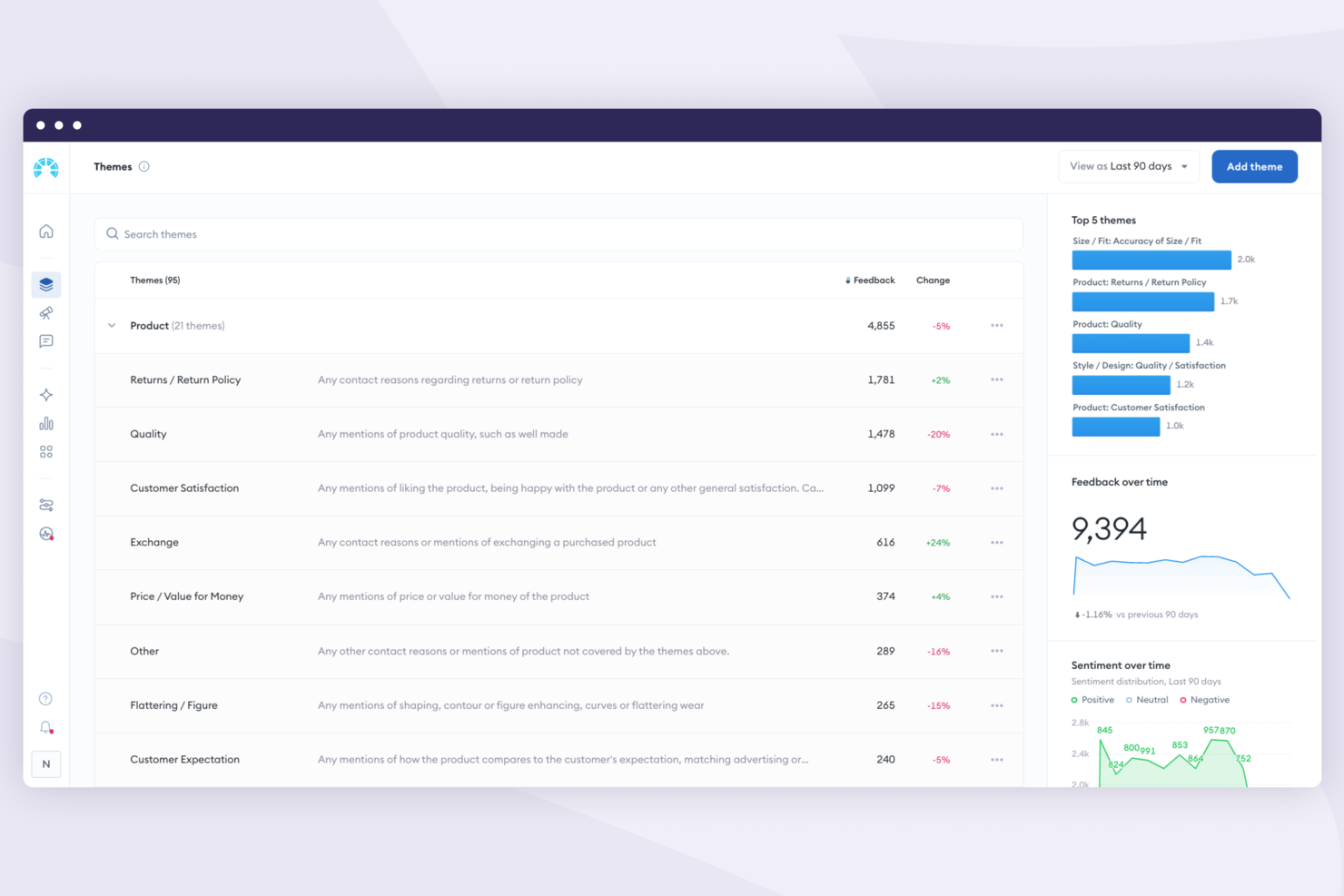
Chattermill è una piattaforma di analisi del feedback progettata per aiutare le aziende a trasformare le opinioni dei clienti in miglioramenti concreti. Riunisce i feedback provenienti da sondaggi, recensioni, ticket di assistenza e altri canali, utilizzando l'analisi basata sull’IA per individuare temi ricorrenti, cambiamenti di sentimento e problemi frequenti. Questo la rende particolarmente preziosa per i team di esperienza cliente e prodotto che necessitano di una visione chiara delle priorità più importanti
Perché ho scelto Chattermill
Ho scelto Chattermill per la sua eccezionale capacità di unificare fonti di feedback frammentate in una visione unica e coesa. La funzione di analisi del sentimento guidata da IA della piattaforma offre insight immediati, consentendo al tuo team di individuare rapidamente tendenze e risolvere proattivamente le problematiche dei clienti. Inoltre, il sistema di avvisi in tempo reale di Chattermill garantisce di non perdere mai segnalazioni critiche, permettendo risposte tempestive che possono migliorare sensibilmente la soddisfazione dei clienti.
Funzionalità chiave di Chattermill
Oltre all’analisi del sentimento tramite IA e agli avvisi in tempo reale, ecco alcune altre funzionalità che potrebbero interessarti:
- Integrazione multicanale: Integra facilmente feedback da sondaggi, social media e piattaforme di assistenza clienti in un unico sistema centralizzato.
- Dashboard di analisi avanzata: Offre una dashboard personalizzabile che presenta dati e insight in modo chiaro e sintetico, aiutandoti a prendere decisioni informate.
- Tagging automatico: Classifica automaticamente il feedback per argomento o sentimento, riducendo la necessità di inserimento dati manuale e consentendo un’analisi più rapida.
- Misurazione dell’impatto: Traccia l’effetto dei feedback su metriche aziendali come Net Promoter Score (NPS) e Customer Satisfaction (CSAT), offrendo un collegamento diretto tra insight e performance aziendale.
Integrazioni di Chattermill
Le integrazioni includono Zendesk, SurveyMonkey, Salesforce, Trustpilot, Intercom, Medallia, Qualtrics, Recharge, Sprinklr e Thingtesting.
Pros and Cons
Pros:
- Analisi di sentiment e tematiche guidata da IA
- Supporto all'integrazione del feedback multicanale
- Dashboard di analisi personalizzabili disponibili
Cons:
- Nessuno strumento nativo di raccolta feedback
- Prezzi non pubblicamente divulgati

Ideale per la progettazione avanzata di sondaggi e analisi
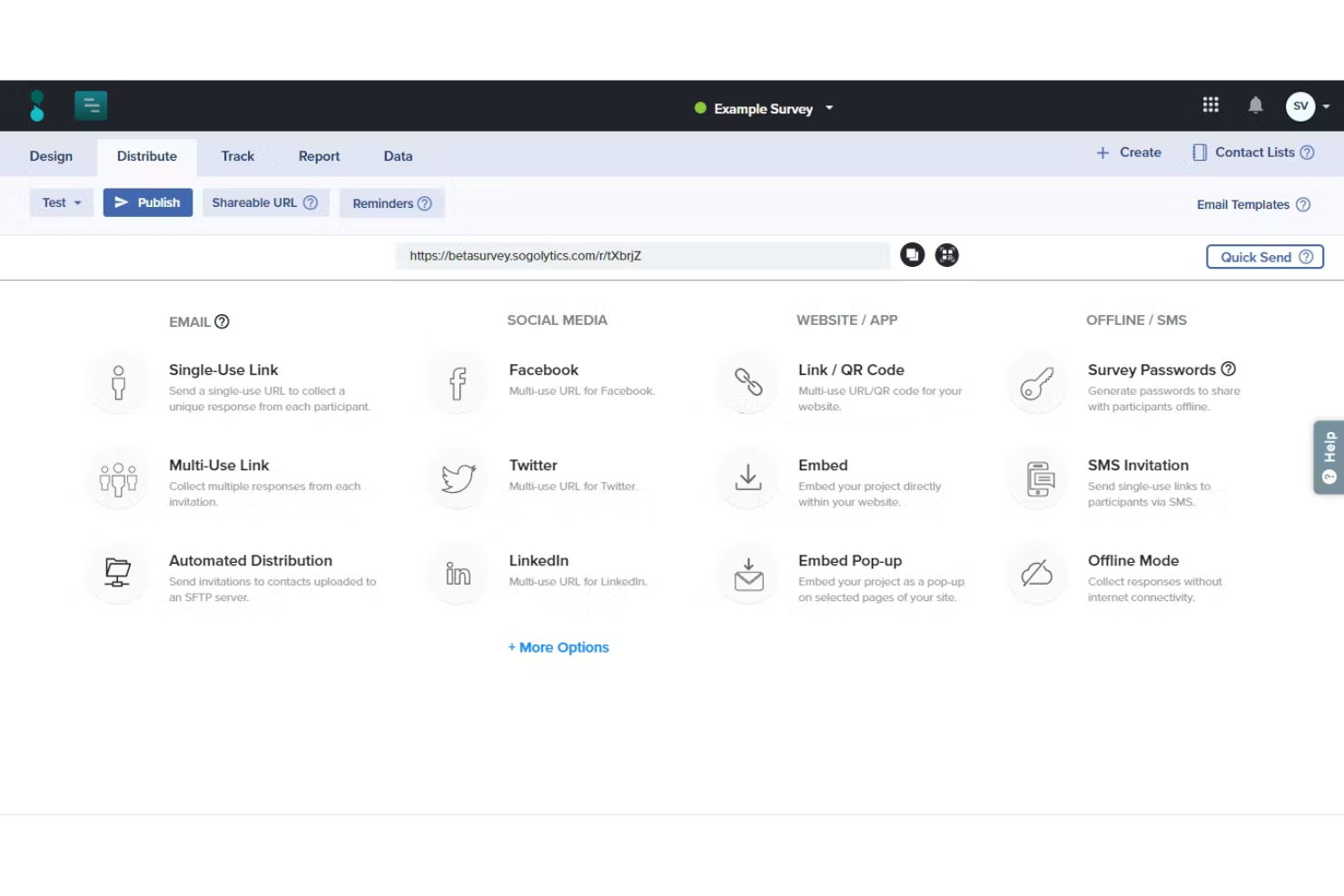
Sogolytics è uno strumento avanzato di gestione del feedback progettato per aiutare organizzazioni di tutte le dimensioni a raccogliere, analizzare e agire sui feedback critici provenienti da vari stakeholder. Il design intuitivo della piattaforma e le sue funzionalità robuste la rendono una buona scelta per chiunque abbia bisogno di strumenti affidabili e approfonditi per la raccolta e l'analisi dei dati.
Perché ho scelto Sogolytics: Uno dei motivi per cui Sogolytics si distingue come strumento di gestione del feedback sono le sue potenti capacità analitiche. La piattaforma offre report in tempo reale e analisi delle tendenze delle risposte, consentendo agli utenti di ottenere insight immediati sui propri dati. Funzionalità avanzate di reporting come l'analisi incrociata e la formattazione condizionale aiutano a individuare schemi e trend all'interno dei feedback, rendendo più facile trarre conclusioni significative. Inoltre, l'Omni report di Sogolytics offre una visione completa di tutti i dati raccolti.
Un'altra caratteristica di rilievo è la capacità della piattaforma di personalizzare l'esperienza dei sondaggi. Sogolytics include strumenti come promemoria automatici e inviti ai sondaggi personalizzati. Dispone inoltre di avanzate logiche di ramificazione e salto, per garantire che ai rispondenti vengano presentate solo domande pertinenti.
Funzionalità e integrazioni principali:
Le funzionalità includono modelli di sondaggio pronti all'uso che si adattano a diversi scopi, dalla soddisfazione del cliente al coinvolgimento dei dipendenti. Supporta anche sondaggi anonimi e dispone di un'interfaccia drag-and-drop intuitiva che semplifica la creazione dei questionari, consentendo agli utenti di progettare sondaggi professionali senza una conoscenza tecnica approfondita.
Le integrazioni includono Google Drive, HubSpot, Mailchimp, Microsoft Teams, Salesforce, Slack, SurveyMonkey, Trello, Webhooks e Zendesk.
Pros and Cons
Pros:
- Metriche avanzate e KPI personalizzabili
- Ampia scelta di template e opzioni di design per i sondaggi
- Supporta più lingue
Cons:
- La versione gratuita offre funzionalità limitate
- Alcune funzionalità avanzate possono richiedere un periodo di apprendimento
New Product Updates from Sogolytics
Sogolytics Adds Teams and Slack Surveys and Custom Automations
Sogolytics adds native Microsoft Teams and Slack survey distribution, a Custom Automations Builder, Derived Fields, PointClickCare integration, and authenticator-based MFA. These updates expand survey distribution and workflow automation while adding new data management and security capabilities. For more information, visit Sogolytics’ official site.
 .
.
Ideale per la raccolta di feedback multicanale
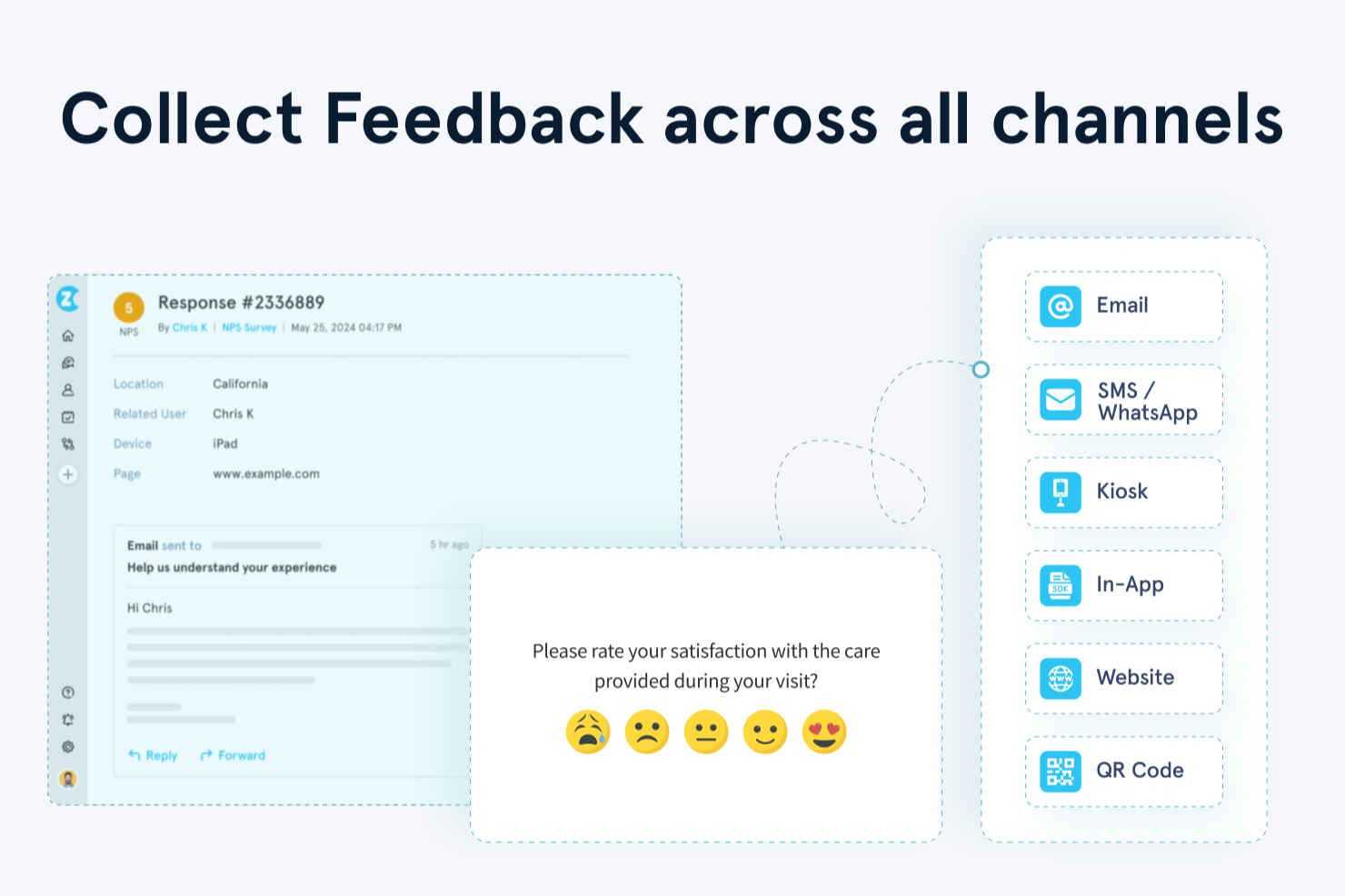
Zonka Feedback è una piattaforma per la gestione dei feedback multicanale che consente di creare sondaggi, raccogliere risposte dei clienti tramite web, email, SMS, applicazioni e canali offline e analizzare i risultati con report basati sull'intelligenza artificiale e flussi di lavoro del team a ciclo chiuso.
Per chi è più adatto Zonka Feedback?
Zonka Feedback è ideale per i team dedicati all'esperienza cliente e all'assistenza nelle aziende di medie e grandi dimensioni nei settori dell'ospitalità, della sanità, della vendita al dettaglio e del SaaS.
Perché ho scelto Zonka Feedback
Ho scelto Zonka Feedback come una delle migliori soluzioni perché copre ogni canale attraverso cui i clienti forniscono feedback. La maggior parte degli strumenti gestisce abbastanza bene email e web, ma Zonka supporta anche sondaggi tramite SMS, WhatsApp, SDK integrato nelle applicazioni, codici QR e chioschi offline da un'unica piattaforma. Ogni canale non è solo un'opzione di distribuzione: i sondaggi via email supportano domande integrate, così i clienti possono rispondere senza mai aprire un link, mentre i sondaggi via SMS si collegano direttamente a Twilio o Plivo per il monitoraggio della consegna. Questo tipo di configurazione specifica per canale consente di non compromettere la qualità solo per adottare un approccio multicanale.
Funzionalità principali di Zonka Feedback
- Analisi del sentiment basata sull'intelligenza artificiale: assegna tag alle risposte in base al sentiment e ai temi, così puoi individuare modelli ricorrenti tra grandi volumi di feedback senza una revisione manuale.
- Assegnazione di attività a ciclo chiuso: assegna attività di follow-up ai membri del team direttamente da una risposta, con regole di escalation per i casi irrisolti.
- Logica e ramificazione dei sondaggi: consente di mostrare o saltare domande in base alle risposte precedenti, per mantenere i sondaggi brevi e pertinenti per ogni partecipante.
- Avvisi sulle risposte in tempo reale: invia notifiche istantanee quando arriva un punteggio basso o una risposta negativa, così il team può intervenire tempestivamente.
Integrazioni di Zonka Feedback
Zonka Feedback offre integrazioni native con Salesforce, HubSpot, Zendesk, Freshdesk, Intercom, HelpScout, Front, Pipedrive, Slack, Microsoft Teams, Jira, Google Sheets e altro ancora. Si collega a Zapier, Make e Integrately. I webhook e un'API supportano le integrazioni personalizzate.
Pros and Cons
Pros:
- Modalità chiosco integrata per la raccolta in loco
- Assegnazione automatica di tag basata sull'intelligenza artificiale per le risposte a testo libero
- Avvisi in tempo reale sui punteggi negativi
Cons:
- Limiti al numero di risposte nei piani di livello inferiore
- I report con i dati grezzi sono difficili da interpretare

Ideale per automatizzare l'analisi dei feedback dei clienti
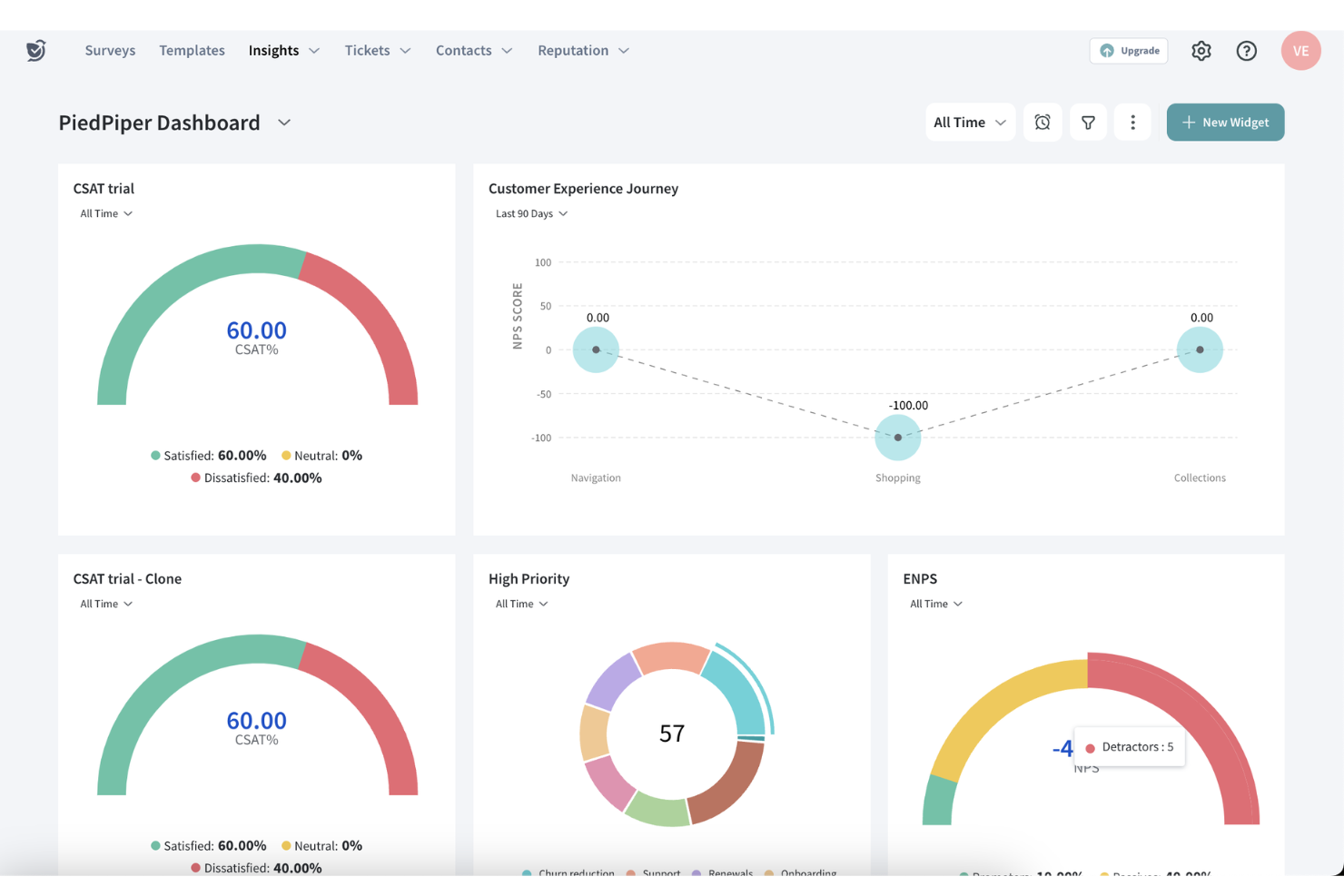
SurveySparrow è una piattaforma completa di Voice of Customer (VOC) progettata per migliorare l'esperienza del cliente, catturando e analizzando i feedback su più canali, come email, social media e app di messaggistica come WhatsApp.
Perché ho scelto SurveySparrow: SurveySparrow si distingue per le sue analisi potenziate dall'intelligenza artificiale, che consentono di individuare i fattori di fidelizzazione, i sentiment dei clienti e le metriche chiave dell'esperienza. Con strumenti come CogniVue, puoi automatizzare la trasformazione dei feedback grezzi in insight azionabili, aiutando il tuo team a prendere decisioni basate sui dati. La piattaforma supporta anche follow-up automatizzati di customer satisfaction (CSAT), permettendo al tuo team di risolvere rapidamente i problemi e aumentare la soddisfazione complessiva dei clienti.
Un ulteriore motivo per scegliere SurveySparrow è la sua capacità di condurre sondaggi su diversi canali, inclusi WhatsApp, SMS, siti web e anche offline. Questa flessibilità permette di raggiungere il pubblico ovunque esso si trovi, aumentando i tassi di risposta e garantendo una raccolta dati diversificata. Inoltre, i sondaggi sul customer effort score (CES) e i sondaggi Net Promoter Score (NPS) transazionali aiutano a valutare la facilità d’uso del servizio e la soddisfazione dopo le interazioni.
Funzionalità e integrazioni principali:
Le funzionalità includono integrazione con sistemi di ticketing, automazione dei sondaggi, sondaggi multilingue, analisi in tempo reale, KPIs visuali su dashboard, capacità di sondaggi offline, analisi del sentiment dei clienti, raccolta di feedback sui prodotti, sondaggi NPS transazionali, sondaggi personalizzati tramite link web, monitoraggio del feedback sugli eventi e insight basati sui dati.
Le integrazioni includono Gmail, Google Sheets, Slack, Microsoft Teams, Salesforce, HubSpot, Zendesk, Jira Software Cloud, NetSuite, Pipedrive, QuickBooks Online e Mailchimp.
Pros and Cons
Pros:
- Offre template personalizzabili per i sondaggi
- Ottima analisi dei feedback tramite IA
- Supporta sondaggi multilingue
Cons:
- Funzionalità di analisi dei sentiment disponibili solo nei piani superiori
- Opzioni di configurazione limitate nei piani base

Alchemer
Ideale per trasformare il feedback in insight attuabili
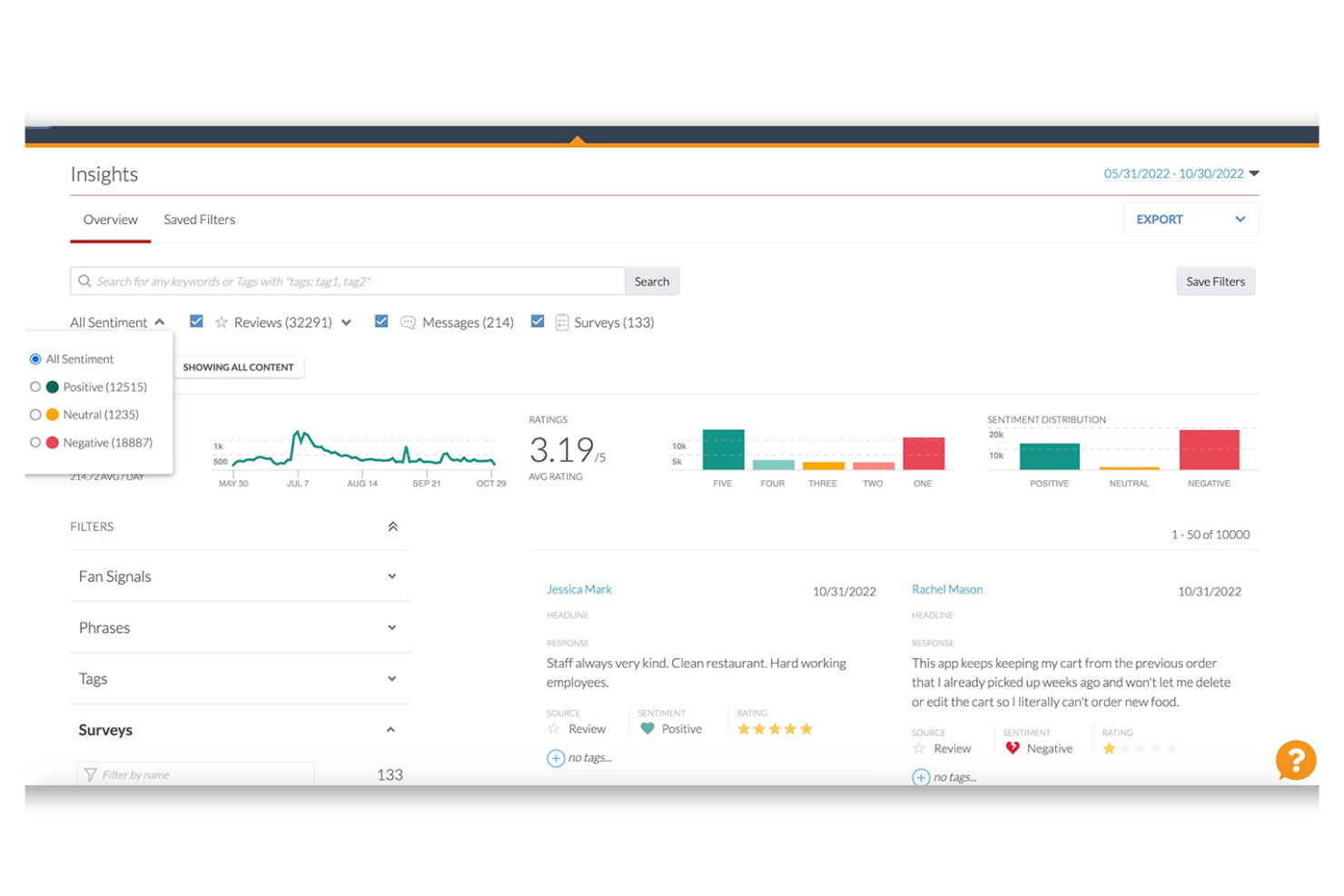
Per chi cerca una soluzione per ottimizzare la raccolta e l'analisi del feedback, Alchemer si distingue come una piattaforma adattabile pensata per migliorare il coinvolgimento dei clienti e ricavare insight. Questo strumento è particolarmente interessante per aziende di diversi settori come governo, istruzione e vendita al dettaglio, dove comprendere il sentiment dei clienti è fondamentale per favorire miglioramenti.
Perché ho scelto Alchemer
Ho scelto Alchemer perché eccelle nel trasformare il feedback in insight attuabili, un aspetto cruciale della gestione del feedback. Le sue interazioni in-app con i clienti ti permettono di coinvolgere direttamente gli utenti e valutare il sentiment tramite funzionalità come Love Dialogs e Rating Dialogs. Inoltre, la funzione di personalizzazione dell'esperienza consente di allineare il design delle interazioni al tuo brand, compreso il supporto multilingue, fondamentale per pubblici eterogenei. Gli strumenti di reportistica e analisi della piattaforma offrono metriche dettagliate sul sentiment e il coinvolgimento dei clienti, assicurando che tu rimanga informato e reattivo alle loro esigenze.
Funzionalità chiave di Alchemer
Oltre alle sue proposte uniche di valore, ecco alcune altre funzionalità che potresti trovare utili:
- Sondaggi personalizzabili: Progetta sondaggi che rispecchiano l'identità del tuo brand, con opzioni per vari tipi di domande e logiche per migliorare la qualità delle risposte.
- Raccolta di feedback in tempo reale: Raccogli e analizza il feedback mentre viene fornito, permettendo risposte rapide e adattamenti alle esigenze dei clienti.
- Dashboard basati sui ruoli: Offri insight personalizzati e strumenti di reportistica ai diversi membri del team, assicurando che i dati rilevanti siano accessibili alle persone giuste.
- Analisi basata sull'IA: Sfrutta la tecnologia IA per approfondire sentiment e trend dei clienti, fornendo una comprensione più completa del feedback.
Integrazioni di Alchemer
Le integrazioni includono Salesforce, HubSpot, Zendesk, Slack, Tableau, Marketo e Shopify.
Pros and Cons
Pros:
- Dashboard basati sui ruoli facilitano l'accesso mirato ai dati
- Il supporto multilingue amplia le possibilità di coinvolgimento del pubblico
- Aggiornamenti continui e nuove funzionalità mantengono la piattaforma attuale
Cons:
- Alcuni utenti segnalano la necessità di analisi più avanzate
- La creazione di sondaggi da mobile può essere piuttosto impegnativa

Canny
Ideale per il monitoraggio del feedback dei clienti e delle richieste di funzionalità
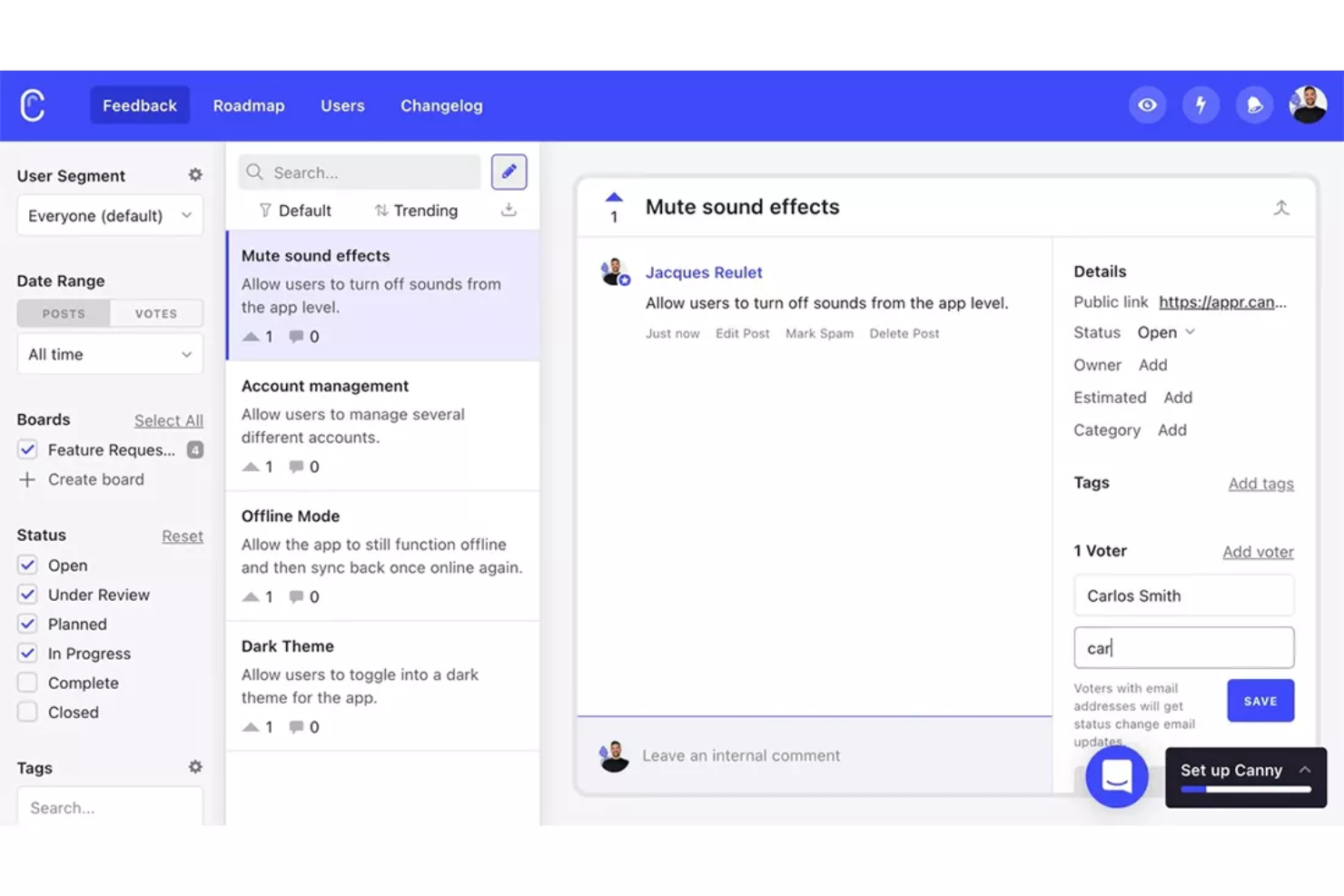
Canny è uno strumento di gestione del feedback che aiuta specificamente le aziende a raccogliere e monitorare i feedback dei clienti e le richieste di funzionalità. Colma efficacemente il divario tra aziende e la loro base utenti, rendendolo uno strumento ideale per lo sviluppo e il miglioramento del prodotto.
Perché ho scelto Canny: Nella mia valutazione, Canny si è distinto per il suo focus sul tracciamento del feedback e delle richieste di funzionalità, una componente essenziale nella definizione dello sviluppo futuro del prodotto. In particolare, ho scelto Canny per la sua trasparenza nella gestione del feedback, che consente alle aziende e ai loro utenti di seguire il ciclo di vita delle richieste di funzionalità.
La piattaforma offre diversi canali attraverso cui i clienti possono inviare le loro richieste, come una bacheca pubblica per il feedback, widget in-app e integrazioni con strumenti come Intercom e Slack. Canny poi aiuta le aziende a categorizzare e taggare le richieste di funzionalità in base a diversi criteri, come area del prodotto, segmento di clientela o livello di priorità.
Caratteristiche principali & integrazioni:
Le funzionalità includono bacheche per i feedback, pubblicazione delle roadmap e sistemi di voto che permettono agli utenti di votare sulle richieste di funzionalità, consentendo alle aziende di valutare la popolarità e la richiesta di idee o miglioramenti specifici. Queste funzionalità possono aiutare le aziende a organizzare i feedback, dare priorità alle richieste di funzionalità e comunicare i propri piani.
Le integrazioni includono Intercom, Slack, GitHub, HubSpot, Discord, Microsoft Teams, Google Workspace, Okta SSO, Google Analytics e Jira.
Pros and Cons
Pros:
- Facile da configurare
- La pubblicazione della roadmap aumenta la trasparenza
- Il sistema di voto incentiva il coinvolgimento degli utenti
Cons:
- L'interfaccia utente potrebbe essere più intuitiva
- Capacità limitate di reportistica avanzata

Userback
Ideale per feedback visivo con contesto
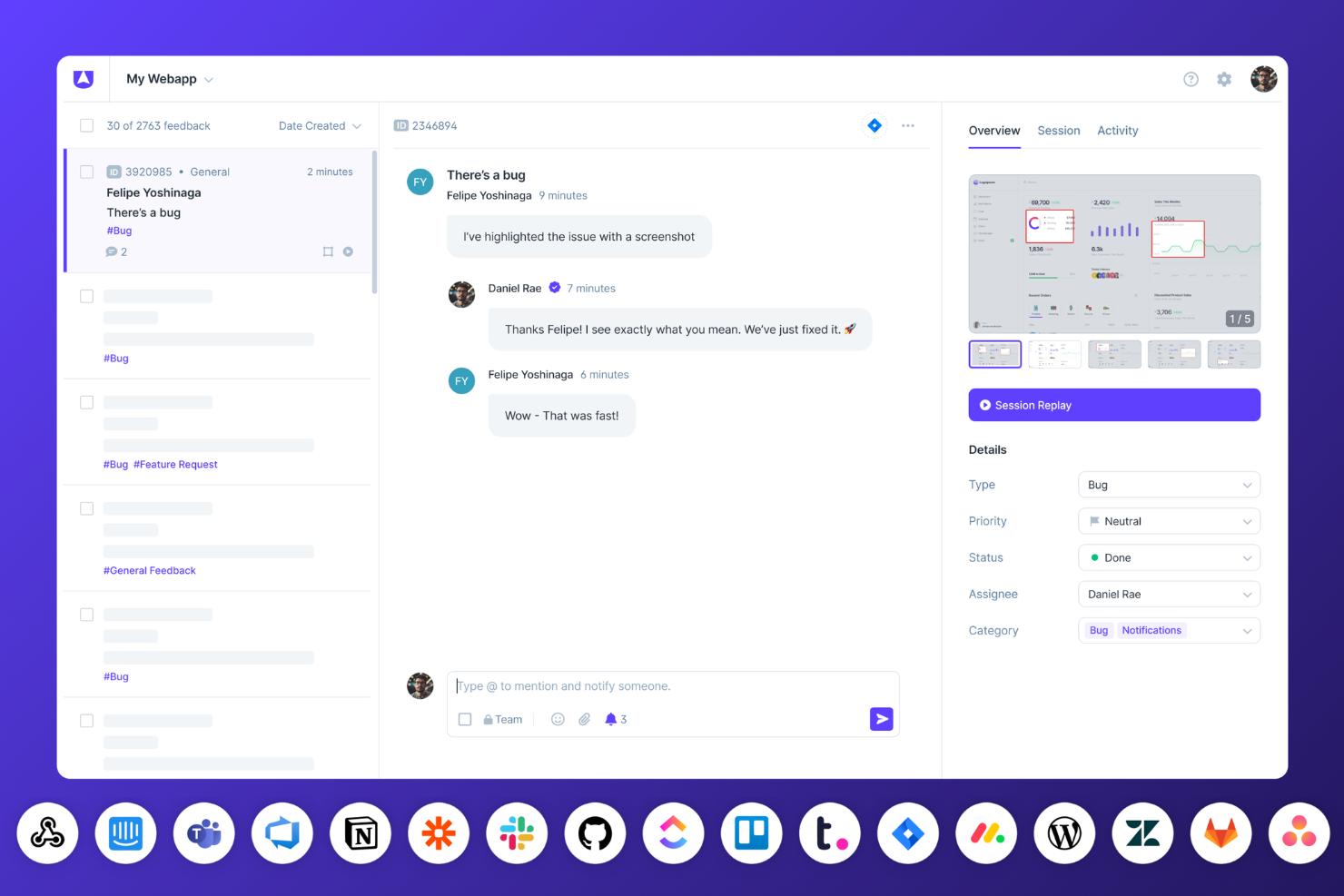
Userback offre una soluzione su misura che semplifica la raccolta e l'analisi dei feedback degli utenti. Con funzionalità come widget di feedback, sondaggi per gli utenti e session replay, il tuo team può raccogliere informazioni utili e rispondere alle esigenze degli utenti con precisione. Integrandosi nel tuo flusso di lavoro esistente, Userback aiuta ad eliminare le supposizioni e favorisce la collaborazione, stimolando il miglioramento del prodotto e la soddisfazione dei clienti.
Perché ho scelto Userback
Ho scelto Userback per la sua eccezionale capacità di fornire feedback visivo con profondità contestuale, ideale per i team che vogliono catturare accuratamente le esperienze degli utenti. Grazie a funzionalità come screenshot annotati e registrazioni dello schermo, puoi ricevere riscontri che evidenziano problemi specifici direttamente sulle immagini, eliminando le ambiguità. Questo approccio consente al tuo team di comprendere meglio le sfide degli utenti e di dare la giusta priorità agli interventi di miglioramento. Integrando questi strumenti di feedback visivo nel tuo flusso di lavoro, puoi rispondere rapidamente alle esigenze degli utenti e migliorare lo sviluppo complessivo del prodotto.
Funzionalità principali di Userback
Oltre alle sue capacità di feedback visivo, Userback offre una gamma di funzionalità progettate per elevare il processo di gestione dei feedback.
- Widget di Feedback: Questa funzione consente di raccogliere feedback direttamente dal tuo sito web o dalla tua applicazione, rendendo semplice per gli utenti condividere i loro commenti senza abbandonare la pagina.
- Sondaggi per gli utenti: Personalizza e invia sondaggi per raccogliere riscontri dettagliati e comprendere meglio le esperienze e le preferenze degli utenti.
- Feature Portal: Coinvolgi gli utenti offrendo loro un portale dedicato dove possono suggerire nuove funzionalità e votare quelle esistenti, favorendo un senso di comunità e partecipazione.
- Session Replay: Registra e rivedi le sessioni degli utenti per ottenere una comprensione più profonda di come interagiscono con il tuo prodotto, aiutandoti a individuare le aree di miglioramento.
Integrazioni di Userback
Le integrazioni includono Jira, Slack, ClickUp, Intercom, Asana, Linear, Notion, GitHub, Microsoft Teams e Zendesk.
Pros and Cons
Pros:
- Supporta feedback visivo con screenshot, annotazioni e video
- Offre roadmap pubbliche e votazione sulle funzionalità
- Dashboard centralizzata per organizzare e dare priorità ai feedback
Cons:
- Le prestazioni possono risentirne in certi ambienti web
- Occasionali problemi con esportazione dati e reportistica
New Product Updates from Userback

Userback Mobile SDK Adds In-App Surveys
Userback’s Mobile SDK now supports in-app surveys, enabling iOS and Android users to submit NPS, CSAT, and other survey responses without leaving your app. For more information, visit Userback's official site.
 .
.
Ideale per programmi completi di raccolta feedback dei clienti
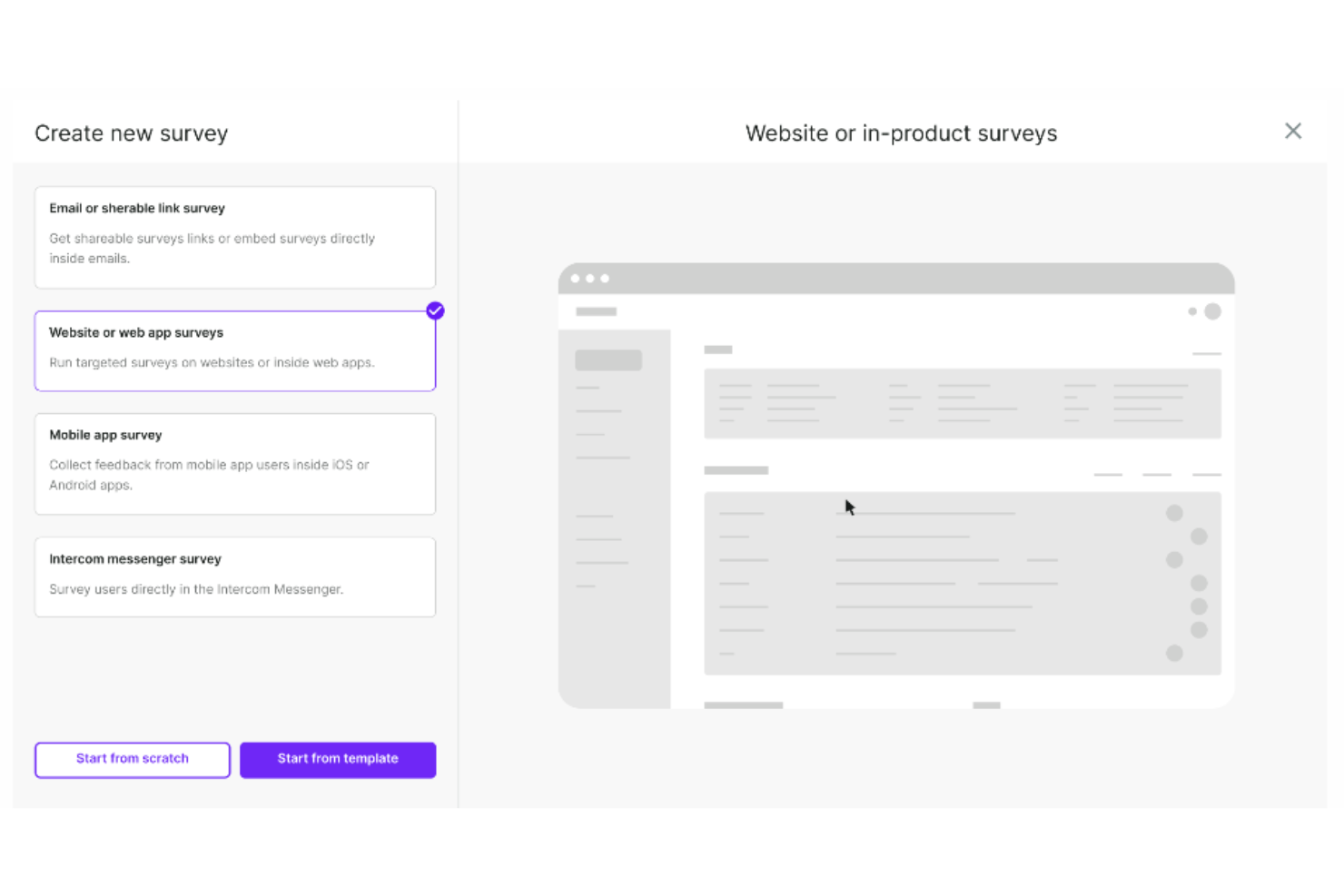
Survicate è una piattaforma di sondaggi multicanale che aiuta i tuoi team a raccogliere feedback e informazioni da clienti, utenti e visitatori del sito web. I sondaggi condotti tramite questo software raggiungono un tasso di risposta medio del 30%, rispetto al 5% di media degli altri sondaggi online.
Perché ho scelto Survicate: Questa piattaforma è stata inclusa nella mia lista perché facilita la raccolta dei feedback da più fonti. Grazie a ciò, può offrire spunti su tutti i touchpoint dell’utente, aiutando a costruire una visione completa del percorso cliente. Può anche raccogliere dati da sondaggi parzialmente completati, assicurando che nessun feedback venga trascurato.
I sondaggi possono misurare indicatori chiave di soddisfazione del cliente, inclusi Net Promoter Score (NPS), Customer Satisfaction Score (CSAT) e Customer Effort Score (CES). È possibile aggiungere il branding personalizzato per garantire un’esperienza utente coerente e configurare molteplici tipi di domande.
Funzionalità principali e integrazioni:
Le funzionalità includono modelli predefiniti e personalizzabili che coprono le aree più comuni della soddisfazione del cliente. Puoi anche impostare i sondaggi affinché appaiano solo quando vengono compiute azioni chiave, indirizzando gli utenti quando sono più propensi a partecipare. Il software dispone inoltre di funzionalità AI che supportano la creazione e l’analisi rapida dei sondaggi.
Le integrazioni includono ActiveCampaign, Drip, Amplitude, HubSpot, Intercom, Mailchimp, Salesforce, FullStory, Zendesk e Microsoft Teams.
Pros and Cons
Pros:
- Interfaccia e widget facili da usare
- Assistenza clienti rapida ed efficace
- Possibilità di creare sondaggi mirati
Cons:
- Le integrazioni non sono disponibili nel piano freemium
- Limite massimo di risposte mensili
New Product Updates from Survicate

Survicate MCP Support Now Available
Survicate now supports MCP, letting teams use AI tools like Claude, ChatGPT, and Slack to explore survey results, analyze responses and insights, and draft new surveys. For more information, visit Survicate's official site.
 .
.
eDesk
Ideale per richieste automatiche di recensioni dei clienti

Per le aziende del settore ecommerce che cercano uno strumento efficace per la gestione dei feedback, eDesk offre una soluzione interessante. È progettato per migliorare l'esperienza del supporto clienti automatizzando le interazioni e fornendo analisi approfondite sui feedback, rendendolo ideale per i rivenditori online che desiderano ottimizzare le proprie operazioni di assistenza clienti. Affrontando le sfide nella gestione delle recensioni e delle interazioni dei clienti su più piattaforme, eDesk consente al tuo team di offrire un servizio eccezionale e costruire relazioni durature con i clienti.
Perché ho scelto eDesk
Ho scelto eDesk per la sua capacità unica di automatizzare le richieste di recensione, una funzionalità che risponde direttamente all'esigenza di raccogliere feedback in modo efficiente. Le Smart Review Requests di eDesk si rivolgono automaticamente ai clienti soddisfatti, aumentando la probabilità di ricevere feedback positivi. Inoltre, l'Automazione AI gestisce una parte significativa delle interazioni con i clienti, permettendo al tuo team di concentrarsi su questioni più complesse. Queste caratteristiche, combinate con approfondimenti in tempo reale sui feedback dei clienti, rendono eDesk uno strumento prezioso per le aziende che vogliono migliorare i propri processi di gestione dei feedback.
Funzionalità Chiave di eDesk
Oltre alle richieste automatiche di recensioni da parte dei clienti, eDesk offre:
- Smistamento Ticket guidato dall’AI: Garantisce che le richieste dei clienti vengano indirizzate ai membri del team più adatti, migliorando la precisione delle risposte.
- Risposte Automatiche: Fornisce risposte immediate alle domande comuni dei clienti, riducendo i tempi di attesa e aumentando la soddisfazione del cliente.
- Chatbot attivo 24/7: Offre supporto continuo, assicurando che le domande dei clienti siano affrontate tempestivamente, anche fuori dall'orario lavorativo.
- Strumenti di Reportistica Completi: Permette al tuo team di monitorare e analizzare le tendenze dei feedback, aiutandoti a prendere decisioni basate sui dati per migliorare il servizio clienti.
Integrazioni di eDesk
Le integrazioni includono Amazon, eBay, Shopify, WhatsApp, Facebook e oltre 200 altre piattaforme, consentendo una gestione senza soluzione di continuità delle interazioni con i clienti su più canali.
Pros and Cons
Pros:
- Integra dati degli ordini dettagliati per un servizio clienti migliorato
- Sincronizzazione dei dati degli ordini senza interruzioni con i principali marketplace
- Le automazioni AI riducono le attività di supporto ripetitive
Cons:
- Pensato principalmente per l’ecommerce, è meno flessibile per altri settori
- Le funzioni di reportistica e analisi, seppur presenti, risultano meno personalizzabili rispetto a dashboard più orientate all’enterprise
New Product Updates from eDesk
eDesk Adds Amazon Order Cancellations to Ticket View
eDesk now lets support teams cancel Amazon orders directly from the ticket view, reducing the need to switch to Seller Central when handling cancellation requests. For more information, visit eDesk’s official site.
 .
.Altri Strumenti di Gestione del Feedback
Qui sotto trovi una lista di altri strumenti di gestione del feedback che ho selezionato ma che non sono rientrati nella top 20.
- SurveyMonkey
Ideale per creare sondaggi dettagliati e personalizzabili
- Typeform
Ideale per creare moduli coinvolgenti e interattivi
- Nicereply
Ideale per misurare i punteggi di soddisfazione del cliente
- UseResponse
Ideale per team di supporto clienti omnicanale
- Uservoice
Ideale per una gestione completa del feedback sul prodotto
- Sprig
Ideale per analizzare feedback su larga scala con l'IA
- Qualtrics
Ideale per ricerche avanzate sull'esperienza utente
- Google Forms
Ideale per la semplicità e la condivisione facile dei moduli
- Zoho Survey
Ideale per integrare il feedback dei sondaggi con il CRM
- Trustpilot Business
Ideale per raccogliere e sfruttare le recensioni dei clienti
- GetFeedback
Ideale per utenti Salesforce che cercano un feedback integrato
- Feedbackify
Ideale per la raccolta di feedback specifici sul sito web da parte dei clienti
- Zeda.io
Ideale per feedback guidati dall'IA per approfondimenti sui prodotti
- PathPro
Ideale per la votazione e la prioritizzazione delle funzionalità


Come valuto gli strumenti di gestione del feedback
Scompongo la mia valutazione in requisiti di base—come la raccolta multicanale e i flussi di lavoro a ciclo chiuso—e fattori differenzianti che distinguono un buon strumento da quello giusto per il tuo programma CX.
Funzionalità principali (requisiti essenziali per questa lista)
Quando seleziono gli strumenti per la mia lista, valuto ciascuno su una scala da 0 (non offre la funzionalità) a 5 (eccelle in quest'area) per ciascuna delle funzionalità principali elencate di seguito. Quindi calcolo il punteggio totale dello strumento in percentuale. Ogni strumento deve raggiungere un punteggio totale minimo del 65% per essere preso in considerazione per l'inclusione.
- Raccolta di feedback multicanale: Verifico se lo strumento cattura le risposte tramite email, web, in-app, SMS e canali social, in modo che il tuo team possa raggiungere i clienti ovunque si trovino.
- Metodologie di survey: Ogni strumento dovrebbe supportare survey con modelli, logica di salto e ramificazione per adattarsi a diversi punti di contatto come post-acquisto o onboarding.
- Analisi del testo e del sentimento: Valuto quanto bene lo strumento elabora risposte aperte—cercando punteggi di sentimento automatizzati, rilevamento dei temi e categorizzazione oltre il semplice tagging di parole chiave.
- Flussi di lavoro a ciclo chiuso per il feedback: Qui conta la capacità di indirizzare feedback negativi verso casi, assegnare referenti e monitorare i follow-up. Cerco trigger di allerta e percorsi di escalation integrati nello strumento.
- Reportistica e dashboard: Le dashboard dovrebbero mostrare i KPI della CX come i trend NPS e la CSAT per segmento, con visualizzazioni basate sul ruolo così che un direttore CX veda dati diversi rispetto a un team leader di front line.
- Integrazioni con la CX stack: Esamino i connettori nativi con CRM, helpdesk e piattaforme di comunicazione—ad esempio sincronizzare la risposta di un detrattore al survey con il suo record Salesforce o Zendesk.
Una volta che ho una lista di strumenti che soddisfano i criteri, considero ciò che distingue ciascuna piattaforma.
Fattori di differenziazione (Cosa distingue i fornitori)
Ecco come confronto e metto a confronto i diversi fornitori:
Funzionalità distintive
La generazione di insight alimentata dall'AI è un importante fattore di differenziazione. Gli strumenti che riassumono automaticamente migliaia di risposte aperte e fanno emergere i principali driver di soddisfazione fanno risparmiare ore di tagging manuale ai team CX. Valuto anche se una piattaforma collega il feedback alle fasi specifiche del percorso del cliente—come onboarding o rinnovo—così puoi identificare dove l'esperienza si interrompe. L'analisi predittiva aggiunge un ulteriore livello, segnalando account a rischio di abbandono in base a trend di sentimento negativi prima ancora che il tuo team riceva una richiesta di supporto.
Oltre le funzionalità
La scalabilità è importante quando si valutano strumenti di gestione del feedback. Guardo quanto bene una piattaforma gestisce volumi crescenti di risposte e implementazioni multi-regione e multi-lingua—specialmente per i team che gestiscono programmi CX su diversi brand. La sicurezza dei dati è un altro fattore chiave, poiché il feedback dei clienti spesso contiene informazioni sensibili. Verifico la conformità a GDPR e SOC 2, le opzioni di residenza dei dati e i controlli di accesso basati sul ruolo. Anche il supporto all'implementazione incide; i fornitori che offrono strategist CX dedicati o specialisti onboarding tendono ad aiutare i team ad avviare più rapidamente i programmi VoC.
Vantaggi degli Strumenti di Gestione del Feedback
Gli strumenti di gestione del feedback offrono diversi vantaggi:
- Aiutano a raccogliere sistematicamente preziosi insight dei clienti, supportando le aziende nel comprendere preferenze, punti dolenti e l’esperienza complessiva.
- Consentono un’interazione in tempo reale con i clienti, promuovendo risposte immediate alle loro richieste e accrescendo la soddisfazione.
- Offrono solide capacità di analisi dei dati, trasformando i dati grezzi del feedback in insight attuabili per il miglioramento aziendale.
- Semplificano il processo di raccolta dei feedback, rendendolo più efficiente e meno dispendioso in termini di tempo.
- Facilitano l’integrazione con altri sistemi aziendali come CRM o software di help desk, garantendo un flusso dati fluido e una visione a 360° del cliente.
Caratteristiche degli Strumenti di Gestione del Feedback
Quando selezioni strumenti di gestione del feedback, tieni d’occhio le seguenti caratteristiche chiave:
- Dashboard centralizzato: Questa funzione raccoglie tutto il tuo feedback in un unico luogo facile da navigare, rendendo semplice visualizzare, ordinare e gestire le risposte senza dover passare da una piattaforma all'altra.
- Raccolta multicanale: Raccogli facilmente feedback da una varietà di canali come email, moduli web, app mobili e social media. Questo ti consente di raggiungere il tuo pubblico ovunque si trovi e ti assicura di non perdere mai informazioni preziose.
- Notifiche automatiche: Resta aggiornato ricevendo avvisi in tempo reale quando arrivano nuovi feedback, così puoi affrontare rapidamente eventuali problemi o rispondere ai complimenti prima che qualcosa sfugga al controllo.
- Strumenti di sondaggio personalizzabili: Adatta domande, scale di valutazione e design alle tue esigenze uniche. Con questa flessibilità puoi chiedere esattamente ciò che conta per te e il tuo pubblico.
- Analisi e reportistica: Trasforma una grande quantità di feedback grezzi in informazioni chiare e azionabili. Report dettagliati e analisi visive ti aiutano a individuare tendenze, scoprire problemi nascosti e vedere il quadro generale in un solo colpo d'occhio.
- Funzionalità di integrazione: Collegati senza problemi agli strumenti che già usi, come sistemi CRM, help desk o piattaforme di comunicazione. Puoi sincronizzare i feedback direttamente nel tuo flusso di lavoro senza passaggi aggiuntivi.
- Segmentazione utenti: Ordina i feedback per gruppi di utenti, dati demografici o tipologie di clienti. Questo ti permette di personalizzare le risposte e vedere quali segmenti richiedono maggiore attenzione, offrendo un'esperienza più personale.
- Controlli di accesso: Proteggi le informazioni sensibili concedendo il giusto livello di accesso alle persone appropriate. Questo ti aiuta a gestire la privacy e a mantenere sicuri i processi di raccolta feedback.
- Tagging e categorizzazione del feedback: Organizza rapidamente le risposte assegnando tag e collegandole a specifici argomenti o temi. Questo riduce il tracciamento manuale e ti aiuta a identificare più velocemente le problematiche ricorrenti.
Costi e prezzi degli strumenti di gestione del feedback
I prezzi degli strumenti di gestione del feedback tendono a variare notevolmente in base alle funzionalità specifiche, al numero di utenti e alla scala delle operazioni. In genere, puoi aspettarti di pagare da $10 a oltre $100 per utente al mese, a seconda delle funzionalità e delle caratteristiche di cui hai bisogno. Le soluzioni a livello enterprise con funzionalità avanzate possono avere costi superiori.
La maggior parte degli strumenti di gestione del feedback funziona con un modello in abbonamento, in cui gli utenti pagano una quota mensile o annuale per accedere al servizio. La tariffa spesso cresce in relazione al numero di utenti o al volume di dati di feedback elaborati. Alcuni offrono anche una struttura di prezzi a livelli, con funzionalità e capacità più avanzate disponibili nei livelli di prezzo più alti.
Domande Frequenti
Ecco alcune risposte alle domande più comuni sugli strumenti di gestione dei feedback:rnu003cdiv class=u0022text-sm space-y-2 h-fullu0022u003ernu003ch2 class=u0022text-xl font-boldu0022u003eCome scegliere uno strumento di gestione dei feedbacku003c/h2u003ernÈ facile perdersi tra lunghi elenchi di funzionalità e strutture di prezzo complesse. Per aiutarti a rimanere concentrato durante il processo di selezione del software, ecco una checklist di fattori da tenere a mente:rnrnFattore | Cosa considerarenScalabilità | Stima il volume di feedback, utenti e team per i prossimi 12–36 mesi. Controlla i limiti su record, allegati e progetti. Fai attenzione agli aumenti di prezzo dopo soglie utenti o risposte. Conferma i limiti di esportazione e la conservazione dei dati per non rimanere vincolato quando il volume cresce.nIntegrazioni | Elenca i tuoi strumenti CRM, supporto, analytics e sviluppo. Verifica la presenza di connettori nativi o la copertura API, la direzione della sincronizzazione (monodirezionale o bidirezionale), la frequenza, il mapping delle identità e il recupero storico dei dati. Chiedi dei limiti di chiamate API e delle tariffe per connettori o SSO.nPersonalizzazione | Puoi modellare la tua tassonomia (tag, campi, categorie) senza compromettere i report? Definisci le regole su chi può modificare gli schemi. Evita la sovrapersonalizzazione che frammenta i dati. Assicurati di poter versionare le modifiche e controllare le revisioni per mantenere la coerenza tra i team.nFacilità d’uso | Esegui una prova con 5–10 utenti. Misura il tempo necessario per raccogliere, eliminare i duplicati e trovare feedback. Controlla le visualizzazioni per ruolo e il carico amministrativo per mantenere la tassonomia. Una curva di apprendimento ripida rallenta l’adozione; pianifica la formazione di conseguenza.nImplementazione e onboarding | Chi gestirà SSO, integrazioni, migrazione dati e progettazione della tassonomia? Conferma i pacchetti di onboarding del fornitore, i formati di formazione e l’accesso a una sandbox. Mappa le dipendenze temporali con l’IT interno e i responsabili di sistema. Pianifica il rilascio graduale per team per gestire il cambiamento.nCosto | Calcola il costo totale di proprietà: licenze (per utente/risposta/workspace), implementazione, formazione, connettori, SSO, API, storage ed esportazione. Identifica penalità per superamenti e minimi contrattuali. Prevedi il prezzo su 12, 24 e 36 mesi in base alla crescita di organico e volume.nSicurezza | Pretendi SSO/SAML, MFA, cifratura dei dati in transito/a riposo, accessi per ruolo, log di controllo, backup con RPO/RTO dichiarati e risposta agli incidenti. Richiedi SOC 2 o ISO 27001, summary di recenti penetration test e lista dei subfornitori. Se necessario, assicurati opzioni di residenza dei dati.rnrnFonti:rnu003cul class=u0022list-disc list-inside pl-5u0022u003ern tu003cli class=u0022list-item list-inside whitespace-normalu0022u003eRecensione Productboard (PRD Human-Created Content)u003c/liu003ern tu003cli class=u0022list-item list-inside whitespace-normalu0022u003eReport di mercato Productboard (PRD Human-Created Content)u003c/liu003ern tu003cli class=u0022list-item list-inside whitespace-normalu0022u003eReport di mercato ProdPad (PRD Human-Created Content)u003c/liu003ernu003c/ulu003ernu003c/divu003e
Quali sono gli strumenti di gestione dei feedback più economici e più costosi?
Anche se i prezzi possono variare e cambiare nel tempo, ad oggi Google Forms rappresenta una delle opzioni più convenienti poiché gratuita per l’uso di base. Gli strumenti di gestione dei feedback più economici spesso iniziano con piani gratuiti limitati o livelli a basso costo, ma con funzionalità e integrazioni ridotte. Le soluzioni più costose, come Qualtrics o Medallia, offrono analisi avanzate, integrazioni profonde e supporto a un prezzo maggiore.
Esistono strumenti di gestione dei feedback gratuiti?
Sì, alcuni strumenti di gestione dei feedback prevedono versioni gratuite, come Google Forms, SurveyMonkey o il piano base di Typeform. Questi vanno bene per sondaggi semplici ma non includono automatismi, analisi avanzate o integrazioni di cui spesso hanno bisogno i team CX durante la crescita. Valuta bene i limiti delle versioni gratuite prima di integrarli nel tuo processo di customer experience.
In che modo gli strumenti di gestione dei feedback migliorano la strategia di customer experience?
Gli strumenti di gestione dei feedback ti aiutano a raccogliere, analizzare e attivare insight sui clienti in tempo reale. Evidenziando trend e criticità, queste piattaforme ti consentono di dare priorità alle iniziative CX, monitorare i miglioramenti e mostrare l’impatto agli stakeholder. Permettono anche di segmentare le risposte per azioni mirate.
Quali integrazioni dovrei privilegiare nelle piattaforme di gestione dei feedback?
Dovresti privilegiare le integrazioni con CRM, help desk, strumenti di analisi e marketing automation. Queste connessioni garantiscono che i feedback siano collegati a profili clienti reali, attivino azioni per il team di assistenza e offrano una visione completa delle criticità nel percorso. Integrazioni fluide fanno risparmiare tempo al team e aiutano a chiudere il ciclo col cliente.
Come supportano conformità e privacy dei dati gli strumenti di gestione dei feedback?
La maggior parte dei software affidabili di gestione dei feedback offre strumenti per rispettare GDPR, CCPA e altri standard attraverso crittografia, controlli di accesso e audit regolari. Come responsabile CX, verifica sempre la documentazione del fornitore per certificazioni di conformità e assicurati che soddisfi i requisiti di protezione dati della tua azienda.
Quali funzionalità aiutano il mio team a chiudere il cerchio con i clienti?
Cerca funzionalità come avvisi automatici, gestione dei casi e workflow di risposta. Queste ti aiutano a riconoscere rapidamente i feedback e assegnare le attività ai membri giusti del team. Strumenti con messaggistica integrata, sondaggi di follow-up o integrazione con sistemi di ticket rendono più facile risolvere i problemi dei clienti e comunicare i miglioramenti.
Come si misura il ROI dei software di gestione dei feedback?
Puoi misurare il ROI monitorando indicatori chiave come l’aumento di NPS/CSAT, la riduzione del churn o un miglioramento della retention dopo l’implementazione. Collega i miglioramenti ai risultati di business e ai risparmi derivanti da automazione o maggiore efficienza. Riferisci regolarmente questi dati per dimostrare il valore alla leadership.
Altre recensioni di software
Se hai voglia di immergerti nel mondo del feedback dei clienti, sentiti libero di consultare alcuni dei nostri altri articoli sull’argomento:
- Software per il Feedback dei Clienti
- Software per la Gestione dei Reclami
- Software per la Gestione delle Recensioni dei Clienti
Considerazioni finali
Spero che questa guida ti sia stata utile mentre affronti il processo di scelta dello strumento di gestione del feedback più adatto alle tue esigenze. Queste sono solo alcune delle tante soluzioni disponibili e la scelta giusta dipenderà sempre dalle necessità della tua azienda, dalle preferenze di usabilità e dai vincoli di budget. Dalle soluzioni economiche come Google Forms a piattaforme avanzate come Medallia, il mercato offre un’ampia gamma di opzioni adatte a casi d’uso diversi. Potrebbero persino esserci alcune gemme nascoste che mi sono sfuggite in questa carrellata.
Infine, se vuoi rimanere aggiornato sugli strumenti per la gestione del feedback o su qualsiasi argomento legato al mondo della customer experience, iscriviti alla nostra newsletter per ricevere gli ultimi approfondimenti dagli esperti del settore!