I 10 migliori software per il Net Promoter Score & strumenti per sondaggi del 2026

10 Elenco dei migliori software per il Net Promoter Score


Il software per il Net Promoter Score (NPS) aiuta i team CX a raccogliere, analizzare e utilizzare il sentiment dei clienti in modo da generare valore per l’azienda. Se stai valutando strumenti per sondaggi NPS, è probabile che i tuoi dati sembrino inaffidabili, che tu raccolga punteggi senza riuscire a trasformarli in azioni concrete o che tu sia bloccato nel limbo dello spam dei sondaggi. Forse sei sotto pressione perché devi collegare il feedback ai ricavi.
Con oltre un decennio di esperienza nel settore CX, ho visto quanto facilmente il feedback possa essere sommerso, interpretato male o ignorato. Il software giusto non si limita a inviare sondaggi; ti aiuta a chiudere il ciclo e a far emergere informazioni utili per le decisioni relative alla fidelizzazione, alla crescita e al prodotto.
In questo articolo ho esaminato i migliori software NPS e strumenti per sondaggi per aiutarti a raccogliere feedback su larga scala, individuare tempestivamente il rischio di abbandono e migliorare la fidelizzazione dei clienti. Che tu sia agli inizi o voglia sostituire uno strumento che non sta dando risultati, qui troverai consigli pratici basati sull’esperienza.
Che cos’è il software NPS?
Il software per il Net Promoter Score (NPS) è uno strumento che raccoglie e analizza il feedback dei clienti per calcolare quanti clienti siano promotori attivi del tuo marchio, dei tuoi prodotti o dei tuoi servizi. Viene utilizzato per misurare il sentiment, identificare le tendenze e migliorare l’esperienza del cliente nei principali punti di contatto.
Gli strumenti NPS ti consentono di analizzare la fidelizzazione dei clienti e lo stato di salute complessivo del tuo marchio nel tempo.
Perché fidarsi dei nostri consigli sui software
Il nostro team testa e recensisce software dal 2012. In quanto leader CX noi stessi, sappiamo quanto sia difficile — e importante — scegliere il software giusto.
Per questa guida, abbiamo valutato gli strumenti attraverso test pratici e ricerche indipendenti, assegnando un punteggio agli strumenti in base ai nostri criteri di selezione.
Le nostre recensioni riflettono il nostro giudizio editoriale umano, non un discorso di vendita.
Tabella comparativa dei software per il Net Promoter Score
Questa tabella comparativa riassume le informazioni di base su ciascuna delle mie migliori selezioni di software NPS.
| Tool | Best For | Trial Info | Price | ||
|---|---|---|---|---|---|
| 1 | Ideale per la distribuzione multi-canale di sondaggi NPS | Demo gratuita disponibile | Prezzo su richiesta | Website | |
| 2 | Ideale per il tracciamento del percorso cliente con NPS | Prova gratuita di 14 giorni + demo gratuita disponibile | Prezzo su richiesta | Website | |
| 3 | Migliore creazione di sondaggi NPS con l'IA | Prova gratuita di 14 giorni | A partire da $19/mese (fatturato annualmente) | Website | |
| 4 | Ideale per NPS personalizzabile oltre i semplici sondaggi | Prova gratuita di 7 giorni + demo gratuita disponibile | Da $55/utente/mese | Website | |
| 5 | I migliori sondaggi NPS con workflow integrati | Prova di 10 giorni | Da $56/mese | Website | |
| 6 | Ideale per l'NPS integrato nell'app con il contesto della registrazione delle sessioni | Piano gratuito disponibile | A partire da $29/mese (con fatturazione annuale) | Website | |
| 7 | Ideale per sondaggi mobili coinvolgenti | Piano gratuito disponibile | Da $19/mese | Website | |
| 8 | Ideale per sondaggi NPS a rilascio personalizzato | Disponibile piano gratuito | Da $25/mese (fatturazione annuale) | Website | |
| 9 | Il miglior software per net promoter score con un piano gratuito | Piano gratuito disponibile | Da $30/utente/mese (fatturato annualmente) | Website | |
| 10 | Miglior software NPS per tradurre i sondaggi in diverse lingue | Prova gratuita fino a 100 risposte | Da $49/mese/fino a 300 risposte | Website |

Panoramica dei 20 migliori software NPS
Ecco brevi descrizioni di ciascuna delle mie 20 migliori scelte di software per il Net Promoter Score, che mostrano i punti di forza di ogni sistema, oltre a schermate che illustrano alcune delle funzionalità. Inoltre, se desideri avere ancora più opzioni da valutare, ho incluso ulteriori alternative bonus qui sotto.

Ideale per la distribuzione multi-canale di sondaggi NPS
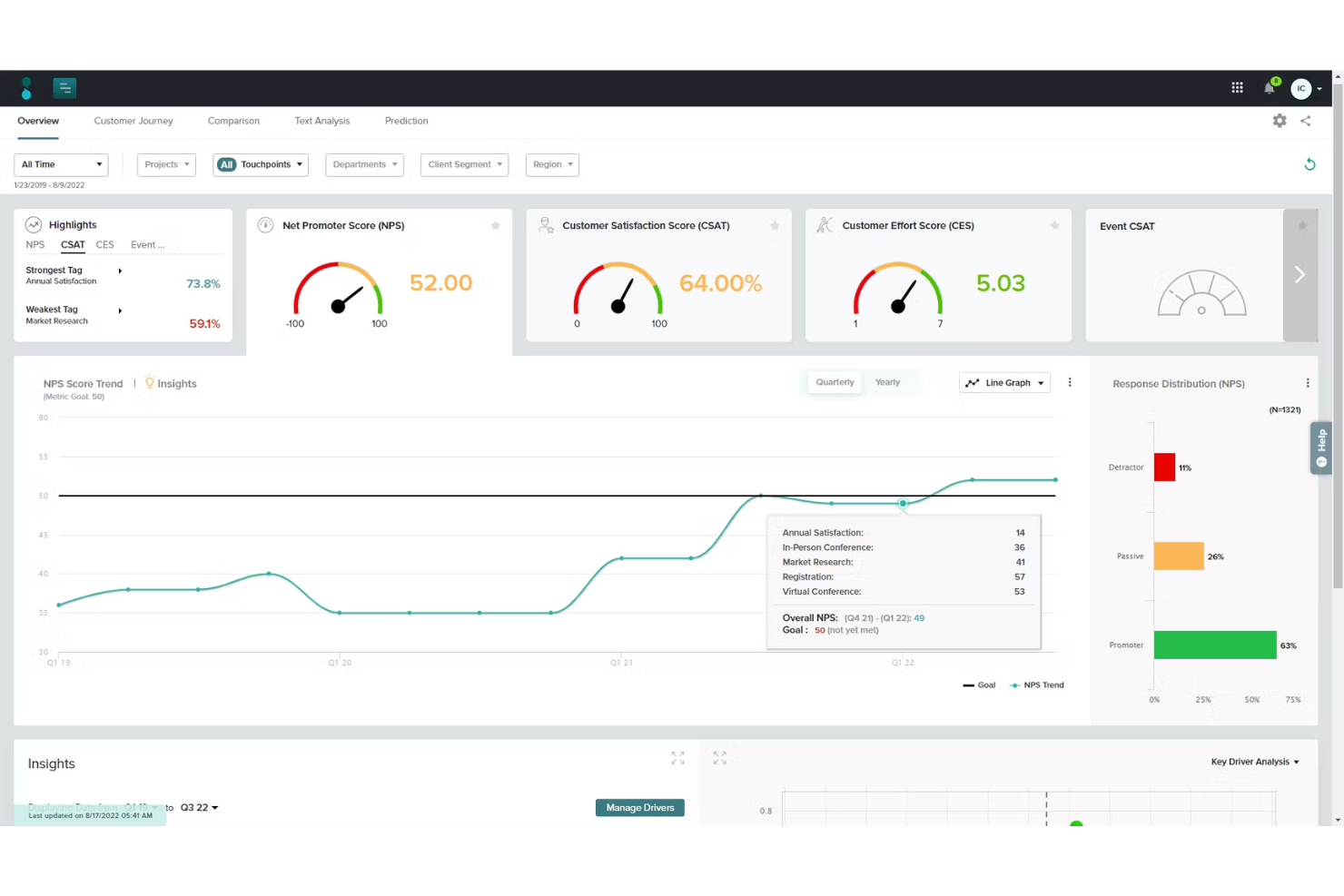
Sogolytics è una piattaforma avanzata per la gestione di sondaggi online e feedback, progettata per aiutare le aziende a raccogliere preziose informazioni attraverso varie tipologie di sondaggi. Offre una soluzione completa per creare, distribuire e analizzare sondaggi, consentendo alle organizzazioni di prendere decisioni basate sui dati.
Perché ho scelto Sogolytics: Sogolytics si distingue per le sue solide funzionalità specificamente pensate per il monitoraggio e l'analisi dell'NPS. La piattaforma permette di creare sondaggi NPS personalizzati che possono essere distribuiti su più canali. Offre anche reportistica e analisi in tempo reale, permettendo alle aziende di monitorare l'NPS in tempo reale e agire rapidamente sui feedback. La possibilità di segmentare i rispondenti in base ai loro punteggi NPS aiuta le organizzazioni a individuare promotori, passivi e detrattori, consentendo follow-up mirati e strategie di coinvolgimento personalizzate
Funzionalità principali e integrazioni di Sogolytics:
Le funzionalità includono logica avanzata dei sondaggi, distribuzione multicanale, analisi in tempo reale, promemoria automatici, modelli di sondaggio personalizzabili, opzioni per sondaggi anonimi, analisi del sentiment, strumenti per la creazione di quiz e reportistica dettagliata.
Le integrazioni includono Salesforce, Zapier, Google Analytics, Slack, Microsoft Teams, HubSpot e Mailchimp.
Pros and Cons
Pros:
- Solida logica e diramazioni per sondaggi complessi
- Distribuzione multicanale copre mobile, email, web
- Analisi approfondite e segmentazione per insight orientati all'azione
Cons:
- Il layout dell'interfaccia può risultare affollato e datato
- Alcune funzionalità avanzate richiedono un tempo di configurazione considerevole
New Product Updates from Sogolytics
Sogolytics Adds Teams and Slack Surveys and Custom Automations
Sogolytics adds native Microsoft Teams and Slack survey distribution, a Custom Automations Builder, Derived Fields, PointClickCare integration, and authenticator-based MFA. These updates expand survey distribution and workflow automation while adding new data management and security capabilities. For more information, visit Sogolytics’ official site.
 .
.
Ideale per il tracciamento del percorso cliente con NPS
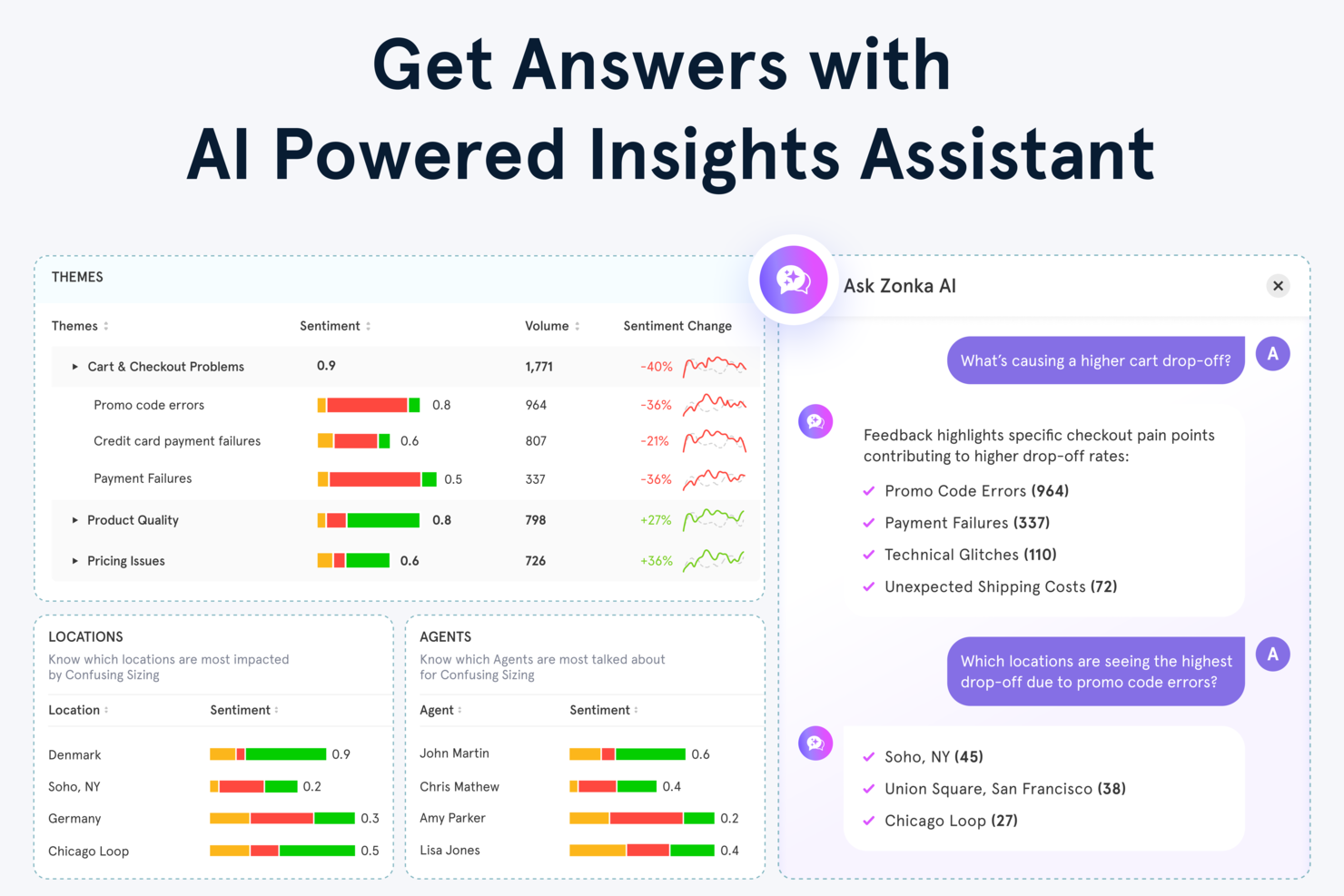
Zonka Feedback è una piattaforma di raccolta feedback dei clienti e NPS potenziata dall'IA che combina distribuzione di sondaggi multicanale, calcolo dei punteggi in tempo reale, flussi di lavoro a ciclo chiuso e analisi tematica guidata dall'intelligenza artificiale su email, SMS, web, in-app e punti di contatto offline.
Per chi è ideale Zonka Feedback?
Zonka Feedback è pensata per i team dedicati all'Esperienza Cliente e al customer success di piccole e medie imprese che devono gestire programmi NPS su vari punti di contatto e chiudere rapidamente il ciclo del feedback.
Perché ho scelto Zonka Feedback
Zonka Feedback si guadagna un posto tra i migliori nella mia shortlist per l'efficacia con cui collega i punteggi NPS a momenti specifici del percorso cliente. Apprezzo particolarmente la funzione di tracciamento dei contatti e dei percorsi utenti, che consente di vedere esattamente in quale fase del ciclo di vita è stato assegnato un punteggio, ad esempio durante l'onboarding, il rinnovo o dopo l'assistenza. L'Analisi di Impatto NPS mette inoltre in evidenza quali fasi del percorso generano risposte negative, così so esattamente dove concentrarmi inizialmente.
Funzionalità principali di Zonka Feedback
- Analisi testuale con IA: Evidenzia automaticamente i temi comuni e il sentiment nelle risposte NPS a testo libero.
- Motore di sondaggi multilingue: Permette di creare e distribuire sondaggi in più lingue.
- Dashboard basate sul ruolo: Offre visualizzazioni analitiche e permessi distinti per dirigenti, manager e utenti di prima linea.
- Integrazioni native con CRM e helpdesk: Si collega direttamente a strumenti come Salesforce, HubSpot, Zendesk e Intercom per sincronizzare i dati NPS.
Integrazioni di Zonka Feedback
Zonka Feedback offre integrazioni native con Salesforce, HubSpot, Zendesk, Intercom, Freshdesk, Jira, Slack, Microsoft Teams, Google Sheets e Mailchimp. Supporta anche Zapier e dispone di API per integrazioni personalizzate.
Pros and Cons
Pros:
- Collega i punteggi NPS a specifici percorsi cliente
- IA integrata per analisi dei feedback a testo libero
- Supporta raccolta sondaggi tramite chioschi e offline
Cons:
- Personalizzazione dei report talvolta limitata per i team
- La configurazione delle funzionalità avanzate richiede apprendimento

Migliore creazione di sondaggi NPS con l'IA
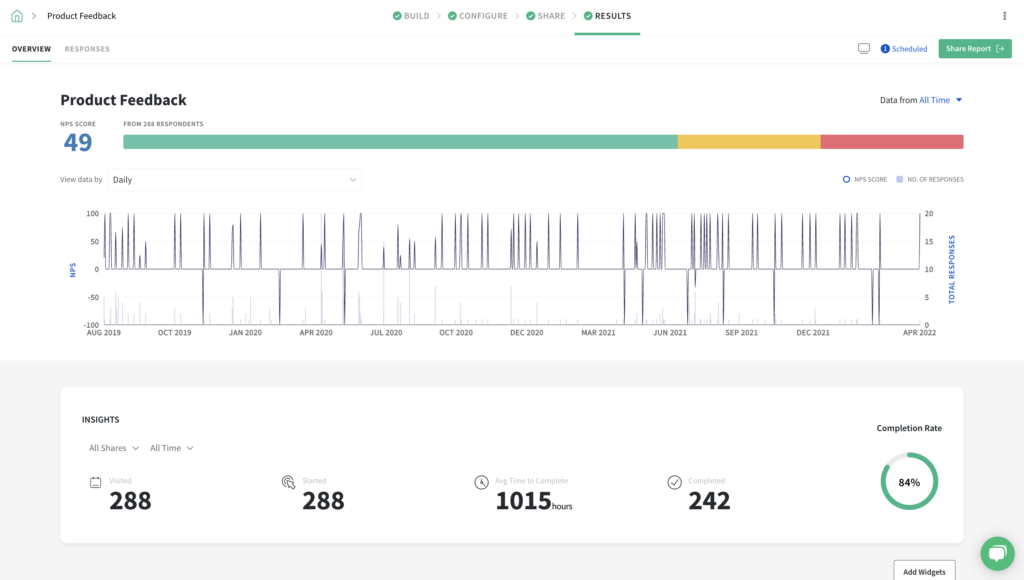
SurveySparrow offre una soluzione dinamica di software per Net Promoter Score che si adatta a una vasta gamma di settori. Questo strumento è particolarmente interessante per le organizzazioni che desiderano aumentare la fidelizzazione e la soddisfazione dei clienti attraverso sondaggi personalizzabili e analisi dei dati in tempo reale. Che tu operi nell'assistenza sanitaria, nell'istruzione, nel retail o in qualsiasi altro settore, SurveySparrow fornisce le risorse necessarie per comprendere e migliorare le esperienze dei clienti integrandosi con i sistemi esistenti e offrendo un'interfaccia intuitiva per un coinvolgimento continuo.
Perché ho scelto SurveySparrow
Ho scelto SurveySparrow per la sua funzione di sondaggi alimentati dall'IA, che si distingue nel panorama dei software per Net Promoter Score. Questa funzione consente di creare sondaggi personalizzabili in modo efficiente, generando fino a 10 domande in pochi secondi e adattandosi a diversi formati come domande a scelta multipla e domande aperte. L'integrazione con i sistemi CRM facilita un'analisi approfondita dei dati, permettendo al tuo team di ricavare informazioni utili dal feedback dei clienti. Inoltre, le sue opzioni di condivisione multicanale rendono più semplice raggiungere il tuo pubblico, assicurando una raccolta di feedback completa che può guidare miglioramenti significativi nella soddisfazione dei clienti.
Caratteristiche principali di SurveySparrow
Oltre alle sue capacità di sondaggi alimentati dall'IA, SurveySparrow offre una gamma di funzionalità che lo rendono una scelta versatile per il software Net Promoter Score.
- Sondaggi Conversazionali: Trasforma i sondaggi in esperienze coinvolgenti e conversazionali per aumentare i tassi di risposta e raccogliere feedback più approfonditi.
- Dashboard Esecutiva: Visualizza i dati dei sondaggi utilizzando vari tipi di grafici per comprendere meglio i feedback dei clienti e le tendenze.
- Gestione dei Ticket: Converte le risposte ai sondaggi in attività operative, consentendo al tuo team di dare priorità e affrontare efficacemente i feedback dei clienti.
- Workflow e Automazioni: Semplifica i processi automatizzando le azioni in base alle risposte ai sondaggi, assicurando follow-up tempestivi e il completamento delle attività.
Integrazioni di SurveySparrow
Le integrazioni includono Salesforce, HubSpot, Zendesk, Mailchimp, Slack, Google Sheets, Microsoft Teams, Intercom, Freshdesk e Shopify.
Pros and Cons
Pros:
- Il formato di sondaggio conversazionale tende a migliorare i tassi di risposta NPS
- Supporta flussi NPS integrati all'interno del prodotto o del contesto UX
- Si integra perfettamente con strumenti CRM e di collaborazione
Cons:
- La profondità dell'analisi—specialmente per grandi programmi NPS—è limitata
- La complessità della logica può inizialmente confondere gli utenti non tecnici

Alchemer
Ideale per NPS personalizzabile oltre i semplici sondaggi
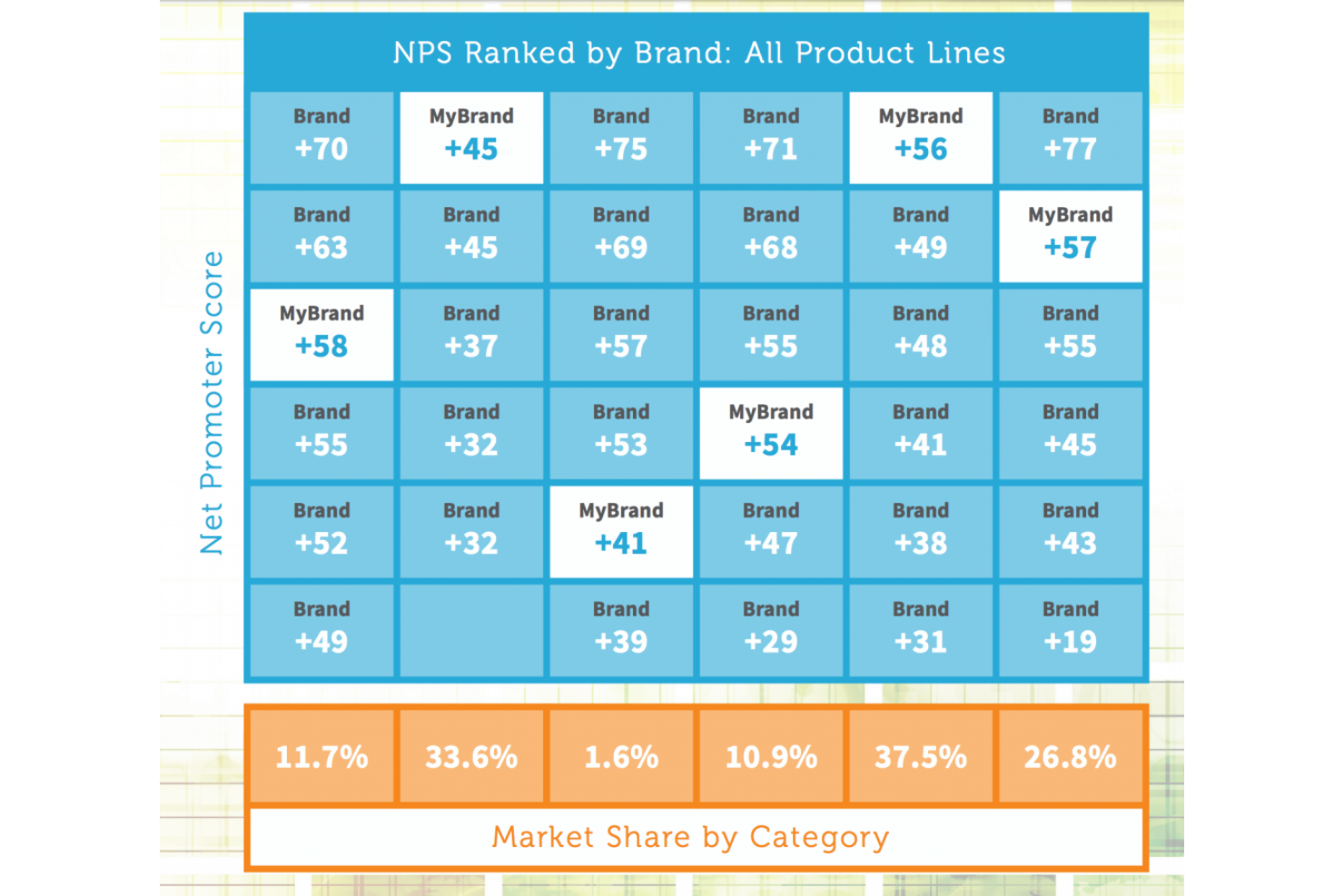
Alchemer offre una piattaforma flessibile per i team che necessitano di raccogliere, analizzare e agire sul feedback dei clienti tramite sondaggi Net Promoter Score. È particolarmente adatta alle organizzazioni che desiderano personalizzare i flussi di lavoro dei sondaggi e integrare i feedback nei sistemi aziendali esistenti. Se cerchi una soluzione che si adatti a requisiti complessi e supporti reportistica avanzata, Alchemer merita considerazione.
Per chi è più adatto Alchemer?
Alchemer è ideale per organizzazioni di medie e grandi dimensioni che necessitano di capacità avanzate di personalizzazione dei sondaggi e integrazione a supporto dei team di customer experience, prodotto o operations.
Perché ho scelto Alchemer
Quando ho bisogno di un software per Net Promoter Score che si colleghi facilmente al resto del mio stack tecnologico, Alchemer si distingue per le sue ampie opzioni di integrazione. Con il supporto per oltre 400 sistemi aziendali, posso automatizzare il flusso dei dati NPS verso piattaforme di CRM, marketing e analisi senza interventi manuali. Questo livello di connettività significa che posso attivare in tempo reale azioni di follow-up o avvisi in base alle risposte NPS. Inoltre, apprezzo il fatto che le integrazioni di Alchemer aiutino a centralizzare i feedback, facilitando la condivisione delle informazioni tra i team.
Funzionalità principali di Alchemer
Altre funzionalità di Alchemer a supporto dei programmi NPS includono:
- Modelli di sondaggio NPS: Modelli predefiniti permettono di lanciare rapidamente sondaggi Net Promoter Score e personalizzarli secondo il tuo brand.
- Controlli di accesso basati sui ruoli: Assegna permessi agli utenti in base al loro ruolo, garantendo che i dati sensibili dei feedback siano accessibili solo ai membri del team autorizzati.
- Distribuzione automatizzata dei sondaggi: Programma e invia i sondaggi NPS attraverso diversi canali, inclusi email, SMS e link web.
- Dashboard di reportistica avanzata: Visualizza le tendenze NPS e segmenta i risultati per gruppo di clienti, prodotto o regione per analisi più approfondite.
Integrazioni di Alchemer
Le integrazioni includono Salesforce, Microsoft Dynamics 365, HubSpot, Zendesk, Slack, Power BI, Tableau, Snowflake, Marketo e Google Sheets.
Pros and Cons
Pros:
- Single sign-on SAML 2.0 per un accesso sicuro
- Logica avanzata dei sondaggi e opzioni di ramificazione
- Monitoraggio e avvisi in tempo reale delle risposte NPS
Cons:
- Alcune analisi avanzate richiedono piani di livello superiore
- La personalizzazione dei sondaggi può essere complessa per i nuovi utenti

I migliori sondaggi NPS con workflow integrati
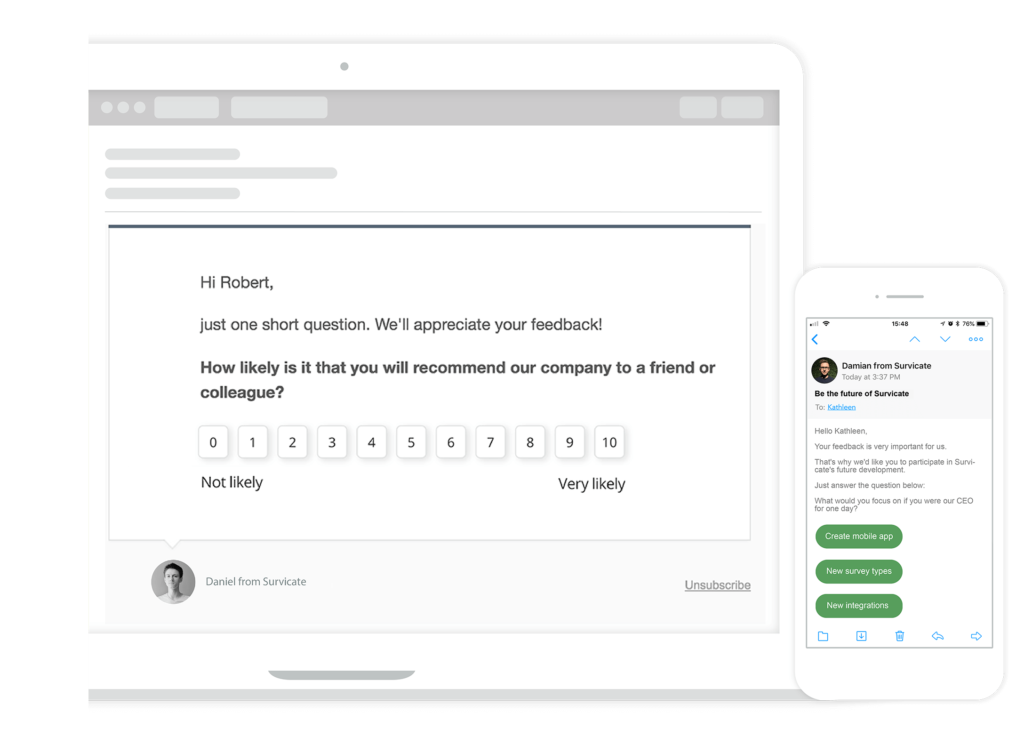
Survicate è uno strumento di sondaggi online per misurare NPS, CSAT, CES e altre variabili del servizio clienti. Dispone di sondaggi personalizzabili che permettono di cambiare colori, font e layout e di personalizzare il sondaggio per renderlo unico. Puoi utilizzare Survicate per automatizzare i sondaggi in base ai comportamenti dei clienti come l'intenzione di uscita, la durata delle visite sul sito e la velocità di scorrimento della pagina.
Perché ho scelto Survicate: Comprendere i dati NPS può guidarti su come migliorare i tuoi prodotti e servizi, e Survicate offre una funzione di analisi integrata per aiutarti. Ti consente di vedere i tassi di completamento NPS su diversi canali, sapendo quali non suscitano risposte dai clienti. Inoltre, i workflow integrati di Survicate automatizzano la raccolta dei dati NPS e le azioni successive attivando sondaggi, segmentando i rispondenti in base ai loro punteggi e integrando il feedback in strumenti CRM, email o di gestione attività.
Funzionalità e integrazioni principali:
Le funzionalità di rilievo includono una serie di metodi di distribuzione dei sondaggi, tra cui la condivisione di link, email e moduli incorporati. Inoltre, Survicate offre una logica di ramificazione delle domande che aiuta a creare un'esperienza di sondaggio personalizzata e mirata.
Il software include anche un Feedback Hub dove tutti i feedback raccolti possono essere visualizzati in un'unica posizione, aiutando i membri del team ad analizzare i dati e trarre conclusioni operative.
Integrazioni includono Mailchimp, Marketo, Microsoft Teams e Google Analytics.
Pros and Cons
Pros:
- Supporto NPS multicanale per raggiungere gli utenti tramite web/email/app
- Segmentazione e filtraggio avanzati aiutano ad analizzare i risultati NPS
- Permette di incorporare sondaggi all'interno di prodotti o siti web per il contesto
Cons:
- La logica avanzata e i workflow personalizzati richiedono configurazione
- Alcune opzioni di visualizzazione delle analisi sono basiche
New Product Updates from Survicate

Survicate MCP Support Now Available
Survicate now supports MCP, letting teams use AI tools like Claude, ChatGPT, and Slack to explore survey results, analyze responses and insights, and draft new surveys. For more information, visit Survicate's official site.
 .
.
Userback
Ideale per l'NPS integrato nell'app con il contesto della registrazione delle sessioni
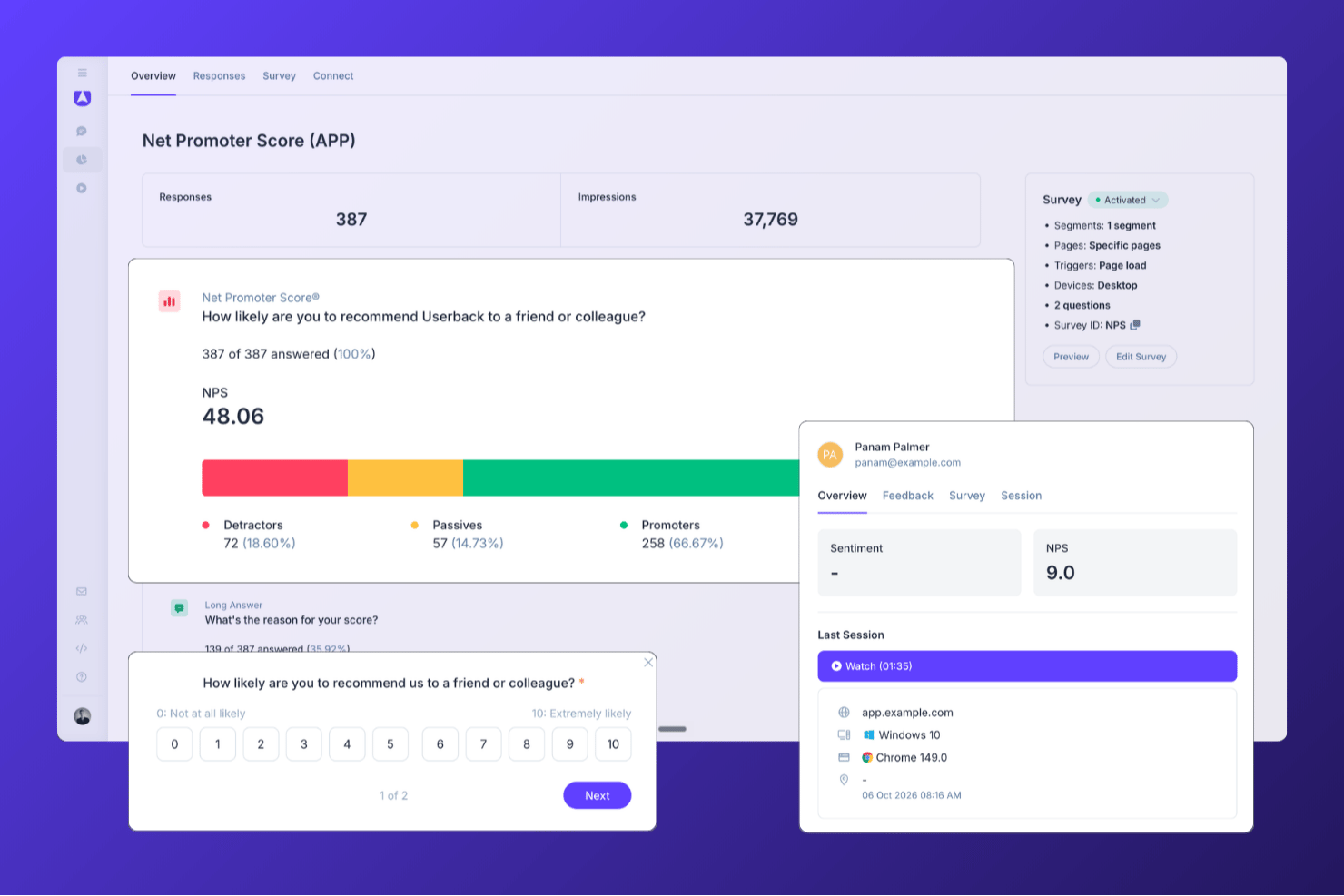
Userback è una piattaforma per la raccolta dei riscontri sui prodotti che combina sondaggi NPS, CSAT e CES integrati nell'app con la registrazione delle sessioni, l'analisi dei riscontri basata sull'IA e flussi di lavoro automatizzati a ciclo chiuso.
Per chi è più adatto Userback?
Userback è particolarmente adatto ai team di prodotto che vogliono raccogliere l'NPS integrato nell'app insieme alla registrazione delle sessioni, così da poter vedere esattamente cosa hanno sperimentato gli utenti prima di inviare un punteggio.
Perché ho scelto Userback
Userback si è guadagnato un posto nella mia rosa di candidati perché abbina i sondaggi NPS integrati nell'app alla registrazione delle sessioni: quando un utente assegna al tuo prodotto un punteggio di 3, puoi guardare esattamente cosa ha sperimentato prima di inviare quel punteggio. Mi piace molto il modo in cui la selezione basata sul comportamento consente di attivare il sondaggio NPS in uno specifico momento nell'app, ad esempio dopo che un utente ha completato un flusso di lavoro fondamentale, invece di inviarlo indiscriminatamente all'intero elenco. L'automazione dei riscontri basata sull'IA indirizza quindi automaticamente le risposte dei detrattori al membro del team appropriato, sincronizzando gli aggiornamenti di stato con strumenti come Jira o Slack.
Funzionalità principali di Userback
- Modelli di sondaggio NPS, CSAT e CES: Modelli di sondaggio predefiniti per tutte e tre le principali metriche di soddisfazione, ciascuno con una scala di valutazione standard e una domanda successiva a testo libero.
- Attivatori dei sondaggi basati sul comportamento e sugli eventi: I sondaggi possono essere attivati da eventi specifici nell'app, segmenti di utenti, pagine target o tipo di dispositivo, per raggiungere gli utenti giusti al momento giusto.
- Categorizzazione e instradamento dei riscontri tramite IA: L'IA assegna automaticamente tag alle risposte ricevute in base a tema e sentiment, quindi le indirizza al membro del team appropriato con scadenze configurabili.
- Sincronizzazione bidirezionale delle integrazioni: Gli aggiornamenti di stato fluiscono in entrambe le direzioni tra Userback e strumenti collegati come Jira, ClickUp e Linear, mantenendo visibile la risoluzione dei riscontri nell'intero insieme di strumenti.
Integrazioni di Userback
Userback offre oltre 20 integrazioni native, tra cui Zendesk, Intercom, Jira, Slack, ClickUp, Linear e Microsoft Teams, oltre a REST API, webhook e Zapier.
Pros and Cons
Pros:
- Combina i sondaggi NPS con la registrazione delle sessioni
- Selezione basata sul comportamento per i messaggi NPS integrati nell'app
- L'IA indirizza i riscontri dei detrattori ai team
Cons:
- Nessuna distribuzione nativa dei sondaggi tramite e-mail o SMS
- I sondaggi NPS non sono disponibili nel piano gratuito
New Product Updates from Userback

Userback Adds Sites, Tasks, and Centralized Feedback Channels
Userback replaces Projects with Sites, adds Tasks as a feedback type, and centralizes feedback channels. These updates bring feedback, surveys, ideas, and replays into a more unified workflow. For more information, visit Userback’s official site.
 .
.
Ideale per sondaggi mobili coinvolgenti
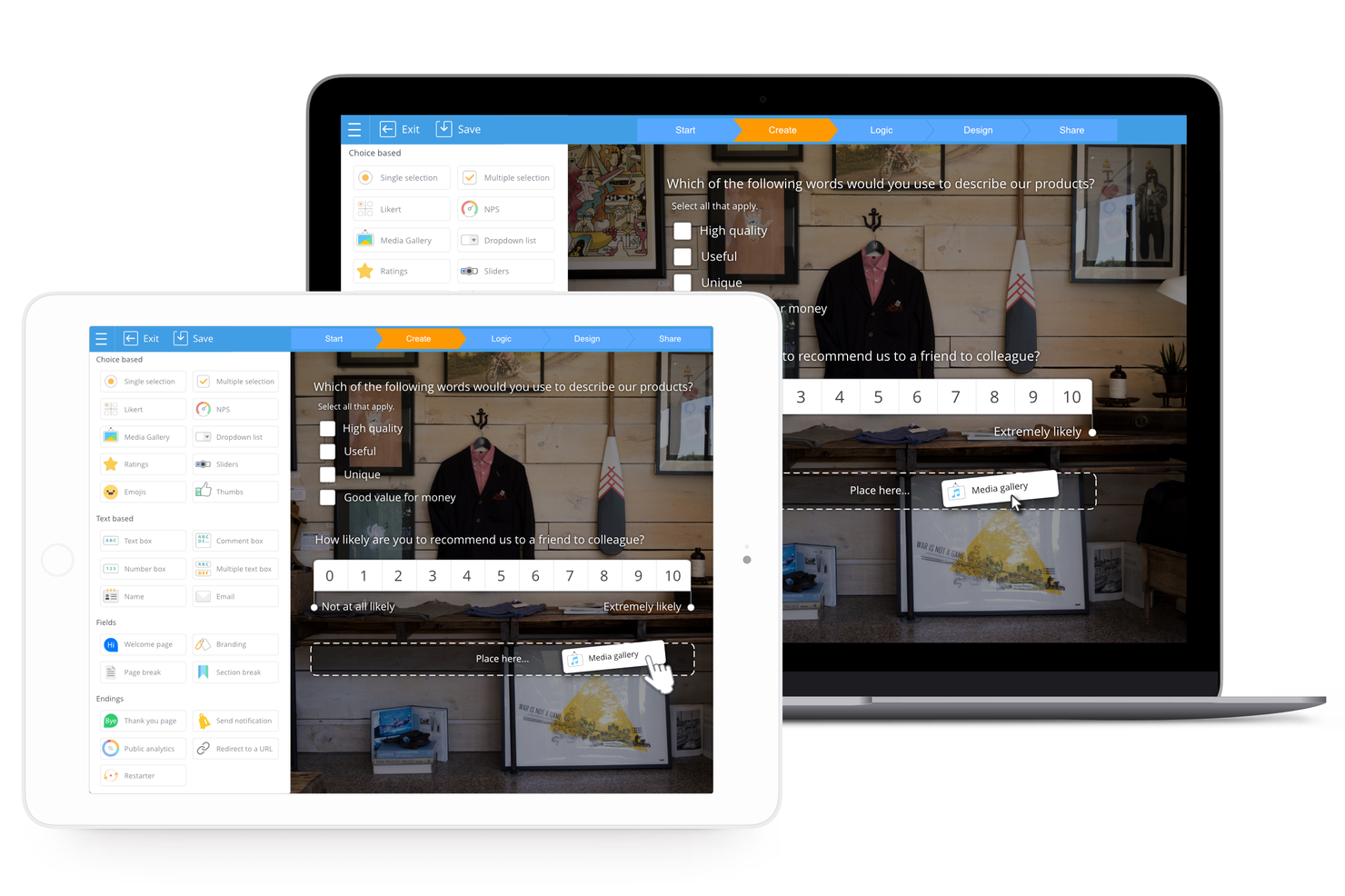
SurveyLegend è una piattaforma basata su web progettata per creare, distribuire e analizzare sondaggi, moduli e questionari. L'accento posto sul design pronto per dispositivi mobili e sugli elementi interattivi la rende una scelta adatta per condurre sondaggi coinvolgenti su dispositivi mobili, soddisfacendo il crescente numero di utenti che preferiscono interagire con i contenuti in movimento.
Perché ho scelto SurveyLegend: Ho selezionato SurveyLegend per la sua interfaccia intuitiva, che semplifica la creazione di sondaggi visivamente accattivanti e coinvolgenti sia su desktop che su dispositivi mobili. Ciò che distingue SurveyLegend è l'attenzione per l'estetica del design, che consente la creazione di sondaggi personalizzati con una varietà di tipi e campi di domande, come la selezione di immagini e il caricamento di file. Credo che SurveyLegend sia il migliore per sondaggi mobili coinvolgenti grazie alla sua ottimizzazione per dispositivi mobili, che garantisce un'esperienza fluida ai rispondenti che utilizzano smartphone o tablet, aumentando così potenzialmente i tassi di risposta e la qualità dei feedback ricevuti.
Funzionalità principali e integrazioni:
Le funzionalità includono eleganti modelli predefiniti, localizzazione linguistica, raccolta di risposte offline e numerose opzioni di personalizzazione, come branding personalizzato e formattazione delle domande, logica condizionale e pulsanti e icone personalizzabili.
Le integrazioni includono Google Drive, Dropbox, Mailchimp e Salesforce, oltre a piattaforme social come Facebook e Twitter per la condivisione dei sondaggi.
Pros and Cons
Pros:
- Esperienza di sondaggio altamente visiva e mobile-responsive per NPS
- Rapido da configurare per semplici sondaggi NPS con stile
- Interfaccia chiara che supporta anche utenti con poca esperienza nei sondaggi
Cons:
- Logica, ramificazioni e segmentazione limitate
- Le funzionalità di gestione della scala e dei ruoli sono meno mature

Ideale per sondaggi NPS a rilascio personalizzato

Mouseflow è uno strumento di analisi completo progettato per offrire approfondimenti dettagliati sul comportamento degli utenti sui siti web. Offre una varietà di funzionalità, tra cui la riproduzione delle sessioni, heatmap, funnel, analisi dei moduli e strumenti di raccolta feedback dagli utenti. Registrando le interazioni degli utenti e visualizzandole tramite report e registrazioni, Mouseflow consente alle aziende di comprendere come i visitatori navigano all'interno dei propri siti.
Perché ho scelto Mouseflow: Lo strumento consente di creare sondaggi con attivazione personalizzata che possono essere posizionati strategicamente nei diversi touchpoint del percorso utente. Supporta diversi tipi di sondaggi, tra cui NPS, scelta multipla, testo libero e scale di valutazione, assicurando così che le aziende possano raccogliere feedback precisi e contestuali, contribuendo direttamente a un Net Promoter Score (NPS) accurato.
Caratteristiche e integrazioni principali di Mouseflow:
Le funzionalità che completano gli strumenti di feedback includono la riproduzione delle sessioni, che permette di visionare le registrazioni delle singole sessioni utente, e le heatmap, che offrono una rappresentazione visiva dell’interazione utente e mettono in evidenza le aree di una pagina web più e meno cliccate.
Le integrazioni includono HubSpot, AB Tasty, Convert Experiences, BigCommerce, WooCommerce, Google Analytics, Google Tag Manager, Zendesk, Omniconvert, Adobe Target, Shopify, Intercom, WordPress e altri.
Pros and Cons
Pros:
- Utile per integrare widget NPS e feedback dove l’esperienza utente è importante.
- Gli utenti riferiscono che aiuta a scoprire il ‘perché’ dietro i bassi punteggi NPS
- Combina l’analisi del comportamento (heatmap, riproduzione delle sessioni) con strumenti di raccolta feedback
Cons:
- Configurazione e filtri possono risultare complessi per team senza esperienza di analisi
- I moduli di sondaggio/feedback non dispongono di funzionalità avanzate

Il miglior software per net promoter score con un piano gratuito
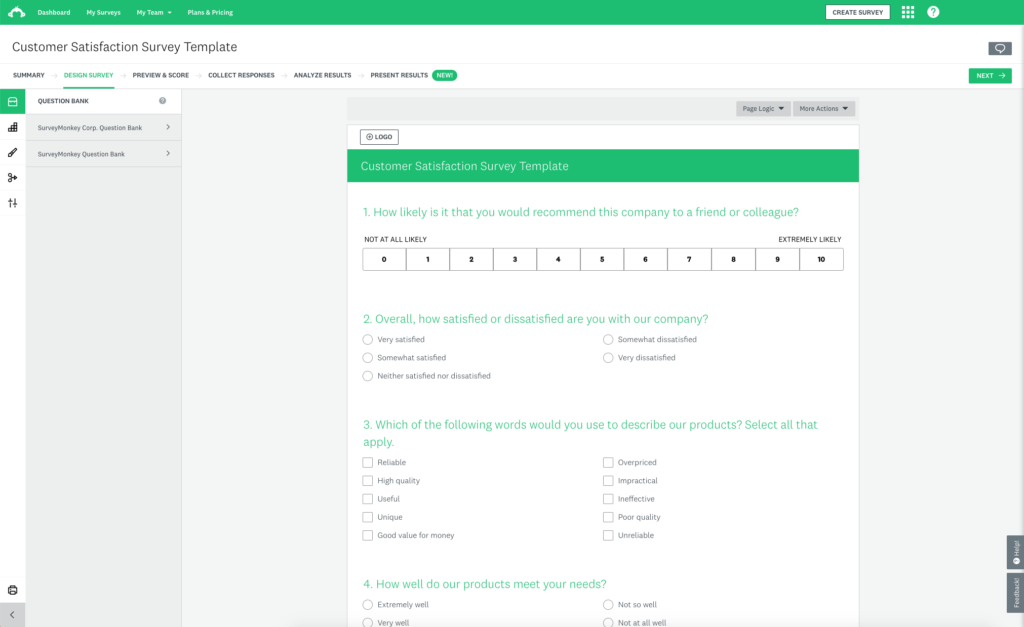
SurveyMonkey è uno strumento di sondaggi completo che offre un piano gratuito con sondaggi preimpostati per aiutarti a iniziare. Con il piano gratuito, puoi creare un sondaggio con un massimo di 10 domande e raccogliere fino a 100 risposte per sondaggio.
Perché ho scelto SurveyMonkey: Il loro piano gratuito include molte funzionalità utili per le quali spesso bisogna pagare in altri strumenti di sondaggi, tra cui logica di salto, esportazione dei dati, una selezione di tipi di domande, funzionalità di analisi e reportistica di base e semplici visualizzazioni per aiutarti a comprendere più facilmente i tuoi dati. Puoi visualizzare statistiche riassuntive come il conteggio e la percentuale delle risposte.
Mi piace anche il fatto che puoi integrare il software per net promoter score di SurveyMonkey con Salesforce per arricchire la tua dashboard Salesforce incorporando i calcoli dell'NPS.
Caratteristiche distintive e integrazioni di SurveyMonkey:
SurveyMonkey è un ottimo software per il net promoter score perché ti consente di invitare i clienti a fornire feedback in tempo reale dopo aver utilizzato il tuo prodotto. Puoi integrare SurveyMonkey nel tuo sito web per valutare l'NPS senza interrompere l'esperienza di acquisto dei clienti. SurveyMonkey ti permette inoltre di indirizzare un determinato gruppo demografico per ottenere l'NPS di un gruppo specifico di clienti.
Utilizzando SurveyMonkey, puoi anche raccogliere metadati sugli utenti del sito come il tipo di browser, la posizione e il dispositivo per ottimizzare l'esperienza online dei clienti.
Le integrazioni includono Slack, Microsoft Teams, Akita, Freshservice, HubSpot, Zendesk, Google Sheets, Google Analytics, Adobe Analytics, A/B Tasty, Zoho CRM, Gainsight e Salesforce.
Pros and Cons
Pros:
- Ampia libreria di template e tipologie di domanda
- Distribuzione facile tramite link web, invito email o panel
- Potente logica di ramificazione e analisi per NPS e oltre
Cons:
- Il piano gratuito è molto limitato nella profondità dei sondaggi e dell'analisi
- Interfaccia pensata per uso generale piuttosto che per flussi di lavoro NPS

SatisMeter
Miglior software NPS per tradurre i sondaggi in diverse lingue

SatisMeter è uno strumento per la raccolta di feedback che consente di misurare la soddisfazione dei clienti in diversi punti di contatto. Dispone di modelli predefiniti che permettono di lanciare rapidamente sondaggi CES, NPS, CSAT o PMF. Puoi utilizzare SatisMeter per creare sondaggi ricorrenti e automatizzati che ti aiutano a risparmiare tempo mentre misuri costantemente la soddisfazione dei clienti.
Perché ho scelto SatisMeter: Non tutti i clienti parlano o leggono l'inglese, e SatisMeter è il miglior software NPS per te se desideri tradurre i tuoi sondaggi in diverse lingue. SatisMeter traduce automaticamente i sondaggi in base alle impostazioni della lingua del dispositivo utilizzato dai tuoi clienti, così puoi sondare una clientela con nazionalità e preferenze linguistiche differenti. Puoi anche tradurre manualmente un sondaggio per raggiungere specifici segmenti di clientela.
Funzionalità principali e integrazioni di SatisMeter:
Le funzionalità aggiunte di recente includono permessi utente per progetto, possibilità di selezionare più risposte, nuovi filtri dati per trimestre, una funzionalità di ritardo dell'invio del sondaggio, trigger per eventi di sondaggio e popup sovrapposti.
Integrazioni disponibili con altri strumenti per la soddisfazione dei clienti, tra cui Salesforce, CustomerGauge, Bigcommerce, Productboard e Slack. Puoi collegare SatisMeter a un account Zapier a pagamento per accedere ad app premium.
Pros and Cons
Pros:
- Strumento intuitivo per monitorare NPS, CSAT e feedback in tempo reale
- Gli utenti lodano la rapidità nelle risposte del supporto e negli aggiornamenti della piattaforma
- Sondaggi facili da incorporare in app o tramite link web
Cons:
- La segmentazione avanzata/la creazione di report personalizzati risulta limitata
- Mancano funzionalità di tagging e classificazione dei problemi
Altre opzioni di software per il Net Promoter Score
Ecco alcuni altri software per sondaggi NPS che non sono rientrati nell’elenco principale, ma che vale comunque la pena prendere in considerazione. Puoi utilizzare uno qualsiasi di questi sistemi NPS per raggiungere i clienti nei punti di contatto fondamentali della loro interazione con l’intera organizzazione.
- Nicereply
La migliore soluzione leggera per un software NPS intuitivo
- ProProfs Survey Maker
Ideale per sondaggi, pop-up, sidebar e questionari in-app.
- Podium
Ideale per feedback contestuali, come identificare da quale canale arrivano i rispondenti
- Sprig
Ideale per raccogliere e analizzare feedback dei clienti su larga scala con l'IA
- CustomerSure
Il miglior software NPS per accedere a molteplici canali di feedback: email, SMS, in-app e sul sito web
- Orbitrics
Ideale per domande aperte opzionali dopo l'NPS
- InputKit
Il miglior software NPS per piccole aziende e start-up
- Jotform
Ideale per aziende B2B che vogliono creare e implementare rapidamente sondaggi NPS
- UserGuiding
Ideale per raccogliere insights in tempo reale
- Product Fruits
Il miglior software di onboarding utenti che include NPS e sondaggi in-app
- Velaris
Ideale per la raccolta automatica dei feedback


Come Valuto i Software Net Promoter Score
Valuto gli strumenti NPS su due livelli: la base che un tool deve avere—come la valutazione automatica e i workflow a ciclo chiuso—e gli elementi di differenziazione che distinguono le migliori opzioni per i team CX.
Funzionalità Principali (Requisiti Minimi per Questa Lista)
Quando seleziono gli strumenti per la mia lista, valuto ciascuno su una scala da 0 (non offre la funzionalità) a 5 (eccelle in quest'area) per ogni funzionalità di base elencata di seguito. Successivamente, calcolo il punteggio totale dello strumento trasformandolo in percentuale. Ogni tool deve raggiungere un punteggio totale minimo del 65% per essere incluso.
- Generatore di Sondaggi NPS: Cerco un modello NPS dedicato con la scala 0–10, domanda di follow-up e opzioni di personalizzazione del brand—non solo un generico generatore di moduli con un campo valutazione.
- Distribuzione Multi-Canale dei Sondaggi: Che sia tramite un prompt in-app dopo l'onboarding o un'email post-supporto, verifico che gli strumenti possano raggiungere i clienti su almeno tre canali.
- Calcolo Automatico del Punteggio: È importante la categorizzazione in tempo reale di promotori, passivi e detrattori con dashboard NPS aggiornata in tempo reale—valuto se i calcoli avvengono automaticamente.
- Segmentazione e Analisi delle Tendenze: Osservo come ciascun tool permette di suddividere i punteggi per coorte, linea di prodotto o regione e monitorare i cambiamenti nel tempo per individuare pattern emergenti.
- Workflow di Feedback a Ciclo Chiuso: Strumenti come Medallia e Qualtrics inviano automaticamente gli avvisi di detrattore ai responsabili dell'account. Valuto come ogni piattaforma gestisce i trigger per il follow-up e l'assegnazione dei compiti.
- Integrazioni con CRM e Tool Aziendali: Collegare i dati NPS alle anagrafiche cliente in strumenti come Salesforce o HubSpot è essenziale, quindi verifico la presenza di connettori nativi, accesso API aperto e supporto webhook.
Una volta individuati gli strumenti che soddisfano i criteri, considero cosa distingue ciascuna piattaforma.
Fattori di Differenziazione (Cosa Distingue i Fornitori)
Ecco come confronto e metto a confronto i vari fornitori:
Funzionalità Distintive
L'analisi testuale potenziata dall'AI è un importante elemento distintivo. Valuto se uno strumento riesce a individuare temi ricorrenti da migliaia di risposte aperte senza necessità di tag manuali. Sono rilevanti anche i dati di benchmarking: sapere che il tuo punteggio è 42 ha poco senso finché non puoi confrontarlo con quello del tuo settore. Guardo anche ai segnali predittivi di abbandono, dove le piattaforme correlano pattern dei detrattori con i dati di rinnovo o uso per segnalare account a rischio prima che lascino.
Oltre le Funzionalità
Analizzo attentamente anche la struttura dei prezzi. Alcuni fornitori fanno pagare per risposta, altri per utente o contatto, e il modello giusto dipende dal volume delle indagini e dalla dimensione del team. La conformità è cruciale quando i sondaggi NPS raccolgono dati personali dei clienti—verifico la conformità al GDPR, la certificazione SOC 2 e le opzioni di residenza dei dati. Il time-to-value è un altro elemento di valutazione, poiché un team CX che lancia il primo programma NPS relazionale necessita di template preconfigurati e avvio rapido, non di un'implementazione che duri mesi.
Come scegliere il software per il Net Promoter Score
È facile perdersi in lunghi elenchi di funzionalità e strutture tariffarie complesse. Per aiutarti a mantenere la concentrazione mentre affronti il tuo processo di selezione del software, ecco una lista di fattori da tenere a mente:
| Fattore | Elementi da considerare |
|---|---|
| Scalabilità | Il software può crescere insieme alla tua azienda? Cerca soluzioni in grado di gestire un volume maggiore di dati e un numero crescente di utenti senza problemi di prestazioni. |
| Integrazioni | Si integra con i sistemi esistenti, come il CRM o il software di assistenza? Assicurati che il flusso di dati tra le piattaforme sia continuo, per evitare l'inserimento manuale dei dati. |
| Personalizzazione | Puoi adattare il software alle tue esigenze specifiche? Verifica se consente di personalizzare sondaggi, branding e report in base al tuo flusso di lavoro. |
| Semplicità d'uso | Il software è intuitivo per il tuo team? Un'interfaccia complessa può ostacolarne l'adozione. Cerca opzioni facili da usare e con una navigazione semplice. |
| Implementazione e onboarding | Quanto tempo occorrerà per rendere il software operativo? Valuta l'assistenza e le risorse formative offerte dal fornitore per garantire una transizione senza problemi. |
| Costo | Ci sono costi nascosti? Confronta i modelli di prezzo e verifica la presenza di eventuali addebiti aggiuntivi per utenti o funzionalità extra. |
| Misure di sicurezza | In che modo il software protegge i tuoi dati? Verifica che sia conforme agli standard del settore e che offra crittografia e controlli degli accessi. |
| Disponibilità dell'assistenza | Quale assistenza offre il fornitore? Considera la disponibilità del servizio clienti e dell'assistenza tecnica in caso di problemi. |
Funzionalità del software per il Net Promoter Score
Quando scegli un software per il Net Promoter Score, presta attenzione alle seguenti funzionalità chiave:
- Personalizzazione dei sondaggi: Crea, modifica e personalizza il branding dei sondaggi in modo che riflettano il tono e lo stile della tua organizzazione, così potrai entrare facilmente in contatto con il tuo pubblico e raccogliere gli insight più importanti.
- Distribuzione multicanale: Invia i sondaggi tramite e-mail, SMS, web o messaggi nell'app, così potrai raggiungere gli utenti ovunque si trovino e massimizzare il tasso di risposta.
- Analisi in tempo reale: Accedi ai feedback man mano che arrivano, individuando le tendenze e agendo sugli insight senza ritardi. Questo ti aiuta ad affrontare rapidamente i problemi e a migliorare l'esperienza dei clienti.
- Flussi di lavoro automatizzati per il follow-up: Configura attivatori per rispondere automaticamente ai detrattori, ai clienti passivi o ai promotori. Questo approccio semplificato ti consente di fornire risposte tempestive e dimostrare ai clienti che dai valore al loro contributo.
- Segmentazione delle risposte: Suddividi i dati per tipologia di cliente, segmento, area geografica o altre categorie, così potrai capire come si sentono i diversi gruppi e adattare di conseguenza le tue strategie.
- Monitoraggio storico: Monitora i punteggi NPS nel tempo, rendendo più semplice vedere cosa cambia, comprendere l'impatto dei tuoi sforzi e celebrare i tuoi progressi.
- Integrazione dei dati: Collega i dati NPS al CRM, all'help desk o alle piattaforme di marketing, ottenendo una visione più completa del percorso del cliente e agendo più facilmente in base a ciò che apprendi.
- Controlli delle autorizzazioni: Decidi chi, all'interno del tuo team, può visualizzare o gestire i dati dei sondaggi, mantenendo al sicuro le informazioni sensibili e assicurandoti che siano accessibili solo alle persone autorizzate.
Funzionalità comuni dell'IA nei software per il Net Promoter Score
Oltre alle funzionalità standard dei software per il Net Promoter Score elencate sopra, molte di queste soluzioni stanno integrando l'IA con funzionalità come:
- Analisi del sentiment: Interpreta automaticamente le risposte aperte ai sondaggi per determinare se il feedback è positivo, negativo o neutro, facendoti risparmiare ore di lavoro e portando alla luce insight che potresti aver trascurato.
- Rilevamento predittivo dell'abbandono: Utilizza l'IA per segnalare i clienti con la maggiore probabilità di abbandono, così potrai adottare misure proattive per fidelizzarli prima che sia troppo tardi.
- Estrazione automatica dei temi: Permetti all'IA di raggruppare i feedback in argomenti o temi comuni, rendendo più semplice individuare le cause alla base dei punteggi NPS e dare priorità ai miglioramenti.
- Suggerimenti di risposta basati sull'IA: Ricevi consigli sulle azioni di follow-up per i diversi tipi di feedback, aiutandoti a interagire con i clienti in modo significativo senza dover dubitare del tuo approccio.
- Riepilogo dei testi: Trasforma i commenti lunghi dei clienti in insight rapidi e facilmente comprensibili, così potrai mantenere il polso della situazione senza perderti in una quantità eccessiva di dati.
Vantaggi del software per il Net Promoter Score
L'implementazione di un software per il Net Promoter Score offre diversi vantaggi al tuo team e alla tua azienda. Ecco alcuni dei benefici che puoi aspettarti:
- Informazioni basate sui dati: Il software aiuta a prendere decisioni informate fornendo informazioni basate sul feedback e sui punteggi dei clienti.
- Collaborazione migliorata: Migliora la collaborazione del team, consentendo a più utenti di contribuire al feedback dei clienti e alla strategia.
- Segmentazione dei clienti: Il software consente di segmentare il feedback in base al tipo di cliente, aiutando a comprendere le diverse esigenze dei clienti.
- Interfaccia intuitiva: Un design intuitivo facilita la navigazione e l'utilizzo efficace del software da parte dei membri del team.
- Funzionalità di integrazione: Il software può essere integrato con gli strumenti esistenti, consentendo un'integrazione fluida nei flussi di lavoro attuali.
- Scalabilità: Supporta la crescita della tua azienda adattandosi all'aumento del feedback e dei dati sui clienti.
- Allineamento strategico: Il software garantisce che le attività del team siano allineate agli obiettivi aziendali strategici, mantenendo una chiara attenzione alle metriche di soddisfazione dei clienti.
Costi e prezzi del software per il Net Promoter Score
La scelta di un software per il Net Promoter Score richiede la comprensione dei vari modelli di prezzo e dei piani disponibili. I costi variano in base alle funzionalità, alle dimensioni del team, ai componenti aggiuntivi e ad altri fattori. La tabella seguente riassume i piani più comuni, i relativi prezzi medi e le funzionalità tipicamente incluse nelle soluzioni software per il Net Promoter Score:
Tabella di confronto dei piani per il software per il Net Promoter Score
| Tipo di piano | Prezzo medio | Funzionalità comuni |
|---|---|---|
| Piano gratuito | $0 | Creazione di sondaggi di base, numero limitato di risposte e analisi di base. |
| Piano personale | $10-$30/utente/mese | Personalizzazione del marchio, limiti moderati alle risposte e integrazioni di base. |
| Piano aziendale | $50-$100/utente/mese | Analisi avanzate, strumenti di collaborazione del team e assistenza prioritaria. |
| Piano aziendale avanzato | Prezzi personalizzati | Accesso completo all'API, assistenza dedicata, gestione avanzata degli utenti e opzioni SSO. |
FAQ: tutto sul NPS e sulla soddisfazione dei clienti
Cerchi maggiori informazioni sul ciclo di feedback dei clienti e su come misurare la soddisfazione dei clienti? Ecco alcune risposte alle domande più frequenti:
Come puoi utilizzare i dati del Net Promoter Score?
Puoi utilizzare i dati NPS per identificare i clienti fedeli, individuare le cause dell’insoddisfazione e promuovere miglioramenti organizzativi. La maggior parte degli strumenti per i sondaggi NPS consente di automatizzare le azioni successive con i detrattori, celebrare i promotori e impostare avvisi interni per gli account a rischio. Analizzando i commenti e la suddivisione dei punteggi, puoi condividere informazioni utili con i team di prodotto, assistenza e leadership. Collegare i dati NPS a specifici percorsi dei clienti consente di individuare con precisione i punti in cui le esperienze si interrompono, così da poter risolvere rapidamente i problemi e misurare nel tempo i risultati dei cambiamenti.
Esiste uno strumento gratuito per calcolare il punteggio NPS?
Sì, esistono diverse opzioni software per il NPS che offrono piani gratuiti a tempo indeterminato o versioni di prova. In genere, consentono di creare semplici sondaggi NPS, distribuirli via e-mail o sul web e visualizzare pannelli di controllo del feedback in tempo reale. Piattaforme popolari come SurveyMonkey, Hotjar e Startquestion offrono opzioni gratuite, ma ricorda che i piani gratuiti potrebbero limitare la frequenza dei sondaggi, il volume delle risposte, le opzioni di identità del marchio e le funzionalità di esportazione dei dati. Se stai valutando strumenti NPS per il tuo team, provane alcuni per capire quale si adatta meglio al tuo flusso di lavoro, alle tue esigenze di dati e ai futuri piani di integrazione.
Se cerchi qualcosa di analogico, lo strumento gratuito originale per il Net Promoter Score è una calcolatrice, seguita da un foglio di calcolo Excel.
Come integro il software NPS con il mio CRM o sistema di assistenza?
La maggior parte delle principali piattaforme NPS offre un’integrazione semplice con i principali CRM o sistemi di assistenza, mettendo a disposizione connettori nativi per Salesforce, HubSpot, Zendesk, Intercom e altri. L’integrazione consente di attivare sondaggi NPS dopo le interazioni con l’assistenza o in fasi chiave del percorso, registrare le risposte nelle schede dei clienti e automatizzare i flussi di lavoro in base ai risultati dei sondaggi. Alcuni strumenti forniscono API o funzionano con middleware come Zapier o Make se hai bisogno di connessioni più complesse o personalizzate. Prima di scegliere una piattaforma, consulta il catalogo delle integrazioni predefinite e verifica se la configurazione richiede codice o un supporto tecnico specializzato.
Cosa devo cercare quando scelgo un software NPS per il mio team?
Dai priorità a un software che consenta di creare e lanciare facilmente sondaggi, con modelli abbastanza flessibili da adattarsi a diversi punti di contatto. Cerca funzionalità di analisi avanzate per suddividere i punteggi per segmento di clientela, fase del percorso o canale. Solide capacità di integrazione ti consentono di collegare i dati NPS a strumenti CRM, di assistenza o di analisi aziendale, rendendoli utilizzabili da tutto il team. Funzionalità come l’automazione dei flussi di lavoro, gli strumenti per la gestione del feedback a ciclo chiuso e i pannelli di controllo basati sui ruoli ti aiuteranno a scalare il tuo programma di esperienza del cliente. Verifica le risorse di supporto di ogni soluzione, le certificazioni di sicurezza, le opzioni di identità del marchio personalizzata e quanto bene il prezzo si adatti all’utilizzo previsto.
Quali sono le buone pratiche per aumentare i tassi di risposta ai sondaggi NPS?
Per aumentare i tassi di risposta ai sondaggi NPS:
- Mantieni i sondaggi brevi—solitamente una o due domande—così sarà facile completarli su qualsiasi dispositivo.
- Personalizza le comunicazioni includendo il nome del cliente e facendo riferimento alla sua interazione più recente con il tuo marchio.
- I sondaggi via e-mail tendono a ottenere risultati migliori quando vengono inviati subito dopo un evento importante, come un acquisto o una chiamata all’assistenza.
- Assicurati di spiegare perché stai chiedendo un feedback e come utilizzerai i risultati per migliorare la sua esperienza.
- Puoi anche sperimentare diverse righe dell’oggetto, promemoria per chi non ha risposto ed elementi interattivi per i sondaggi all’interno dell’app, così da aumentare il coinvolgimento.
In che modo il software NPS può aiutare a chiudere il ciclo di feedback?
Le piattaforme NPS aiutano a chiudere il ciclo di feedback segnalando automaticamente le risposte negative per le azioni successive, assegnando ticket e inviando promemoria al team CX. Molti strumenti consentono di creare flussi di lavoro, in modo che i detrattori ricevano comunicazioni personalizzate o che i responsabili vengano avvisati dei problemi urgenti. Puoi impostare SLA per i tempi di risposta e monitorare quali contatti sono stati risolti o richiedono un’escalation. Chiudere il ciclo non migliora soltanto la soddisfazione dei clienti, ma dimostra anche che il loro feedback porta a cambiamenti concreti, favorendo in definitiva la fedeltà e la promozione del marchio.
Il software NPS può monitorare le tendenze nel tempo e segmentare le risposte?
Sì, la maggior parte degli strumenti NPS fornisce analisi basate sul tempo, così puoi monitorare l’evoluzione dei punteggi mese dopo mese o in seguito a iniziative importanti. La segmentazione avanzata consente di suddividere le risposte per linea di prodotto, area geografica, team o profilo del cliente, aiutandoti a individuare quali aree stanno migliorando e quali richiedono maggiore attenzione. Queste informazioni possono essere visualizzate nei pannelli di controllo, esportate per analisi più approfondite o utilizzate per orientare le revisioni aziendali trimestrali. Grazie al monitoraggio e alla segmentazione continui, puoi dimostrare il ROI delle iniziative legate all’esperienza del cliente e concentrare le risorse sui fattori che hanno il maggiore impatto sulla fedeltà.
Altri software per il feedback dei clienti
Il software NPS non è l'unica soluzione da prendere in considerazione. Già che ci sei, potresti trovare esattamente ciò che cerchi in questi altri strumenti per sondaggi di feedback:
- Software per il feedback dei clienti
- Software per sondaggi online
- Software per la gestione dell'esperienza del cliente
- Software per l'analisi dei sondaggi
- Strumenti gratuiti per sondaggi