I 10 migliori software per il feedback dei clienti del 2026

10 Migliori software per il feedback dei clienti: selezione


Il software per il feedback dei clienti aiuta i team CX, di prodotto e di assistenza a eliminare le supposizioni e a capire cosa pensano davvero i clienti. Tuttavia, trovare uno strumento che fornisca informazioni utili (e non solo affaticamento da sondaggi) è più facile a dirsi che a farsi.
In questa guida ho analizzato i migliori strumenti per il feedback dei clienti, che aiutano a chiudere più rapidamente il ciclo di feedback, a individuare le cause profonde e a trasformare il feedback grezzo in risultati concreti per l’azienda. Che tu stia cercando di migliorare la fidelizzazione, verificare l’adattamento prodotto-mercato o semplicemente avvicinarti di più ai tuoi clienti, troverai una soluzione adatta al tuo stack tecnologico e alla fase in cui ti trovi.
Perché fidarsi dei nostri consigli sui software
Il nostro team testa e recensisce software dal 2012. In quanto leader CX noi stessi, sappiamo quanto sia difficile — e importante — scegliere il software giusto.
Per questa guida, abbiamo valutato gli strumenti attraverso test pratici e ricerche indipendenti, assegnando un punteggio agli strumenti in base ai nostri criteri di selezione.
Le nostre recensioni riflettono il nostro giudizio editoriale umano, non un discorso di vendita.
Tabella comparativa dei software per il feedback dei clienti
Questa tabella comparativa riassume i dettagli di base di ciascuno dei miei migliori software selezionati per il feedback dei clienti.
| Tool | Best For | Trial Info | Price | ||
|---|---|---|---|---|---|
| 1 | Ideale per il feedback centralizzato dei clienti | Demo gratuita disponibile | Prezzo su richiesta | Website | |
| 2 | Ideale per l'etichettatura dei temi tramite IA | Demo gratuita disponibile | Prezzo su richiesta | Website | |
| 3 | Ideale per assistente di linguaggio naturale | Demo gratuita disponibile | Prezzi su richiesta | Website | |
| 4 | I migliori sondaggi clienti flessibili con ramificazioni logiche condizionali | Prova gratuita di 14 giorni | Da $19/mese (fatturato annualmente) | Website | |
| 5 | Ideale per la raccolta di feedback multilingue | Prova gratuita di 14 giorni + demo gratuita disponibile | Prezzo su richiesta | Website | |
| 6 | Ideale per insight sui feedback basati su IA | Prova gratuita di 7 giorni + demo disponibile | Da $55/utente/mese | Website | |
| 7 | Ideale per sondaggi CSAT integrati | Prova gratuita di 14 giorni + demo gratuita disponibile | Da $19/agente/mese (fatturazione annuale) | Website | |
| 8 | Ideale per tracciare il feedback dei clienti e le richieste di funzionalità | Piano gratuito disponibile | Da $19/mese | Website | |
| 9 | Ideale per feedback visivi con annotazione schermata | Piano gratuito disponibile | Da $29/mese (fatturato annualmente) | Website | |
| 10 | Ideale per analytics e cicli di feedback sui clienti | Demo gratuita disponibile | Da $45/mese (fatturati annualmente) | Website |


Recensioni dei migliori software per il feedback dei clienti
Ecco brevi descrizioni delle mie 20 migliori soluzioni software per il feedback dei clienti, che illustrano il caso d’uso migliore e le funzionalità più importanti di ciascuno strumento, oltre a schermate che offrono una panoramica della relativa interfaccia utente. Ho incluso anche ulteriori soluzioni bonus qui sotto, se desideri prendere in considerazione ancora più opzioni.

Ideale per il feedback centralizzato dei clienti
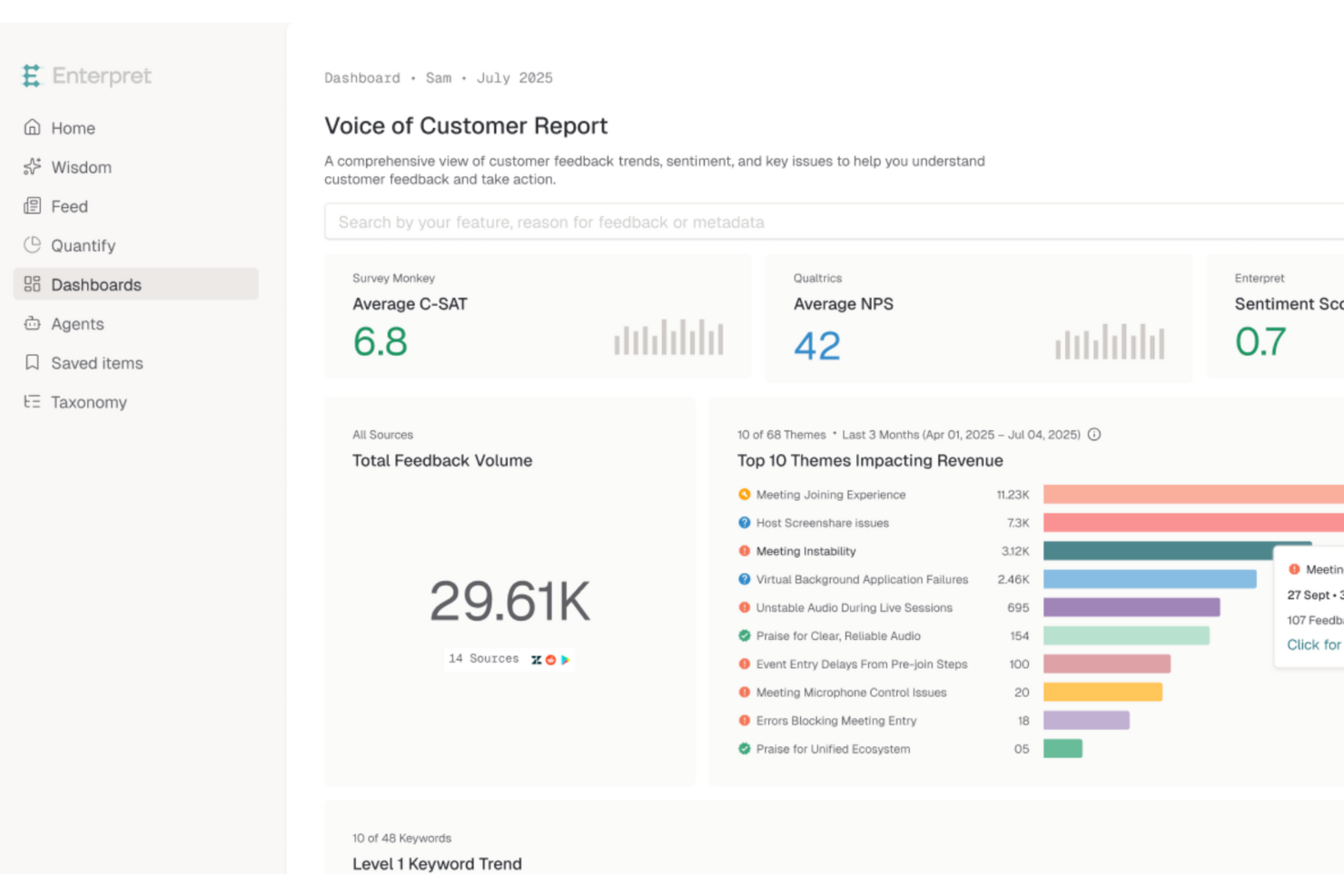
Enterpret è una piattaforma potenziata dall'AI progettata per trasformare il modo in cui le aziende comprendono e agiscono sui feedback dei clienti. Si rivolge alle aziende che desiderano migliorare l'esperienza cliente, offrendo insight azionabili provenienti da diverse fonti di feedback. La piattaforma risolve il problema dei segnali clienti dispersi, consentendo alle aziende di identificare e rispondere rapidamente alle esigenze e preferenze dei clienti.
Per chi è ideale Enterpret?
Per product manager e team di customer experience nelle aziende di medie e grandi dimensioni in tutto il mondo che centralizzano il feedback proveniente da molteplici canali cliente.
Perché ho scelto Enterpret
Ho scelto Enterpret per la sua capacità unica di integrare feedback da oltre 50 fonti e trasformarli in insight azionabili grazie ad analisi guidate dall'AI. Questa caratteristica è fondamentale per le aziende che desiderano centralizzare il feedback dei clienti e ottenere una comprensione completa dei loro sentimenti. Inoltre, la tassonomia adattiva e il knowledge graph dei clienti di Enterpret forniscono approfondimenti contestuali approfonditi, permettendo ai team di identificare tendenze e prendere decisioni informate.
Funzionalità principali di Enterpret
Oltre alla centralizzazione dei feedback dei clienti, Enterpret offre:
- Agenti AI: Automatizzano risposte e azioni basate sui feedback dei clienti per aumentare l'efficienza nella gestione delle preoccupazioni.
- Tema di feedback personalizzabili: Permette alle aziende di adattare i temi del feedback in base alle esigenze specifiche, garantendo che gli insight più rilevanti vengano prioritizzati.
- Insight in tempo reale: Fornisce analisi aggiornate al minuto sui feedback dei clienti, consentendo rapidi aggiustamenti strategici e una risoluzione proattiva dei problemi.
- Strumenti di visualizzazione dei feedback: Offre grafici e diagrammi per aiutare i team a visualizzare tendenze e modelli nei feedback dei clienti per una pianificazione strategica più efficace.
Integrazioni di Enterpret
Le integrazioni includono Salesforce, Zendesk, Slack, Microsoft Teams, Intercom, HubSpot, Freshdesk, Jira, Asana e Trello.
Pros and Cons
Pros:
- L'analisi guidata dall'AI offre suggerimenti azionabili sulle tendenze dei clienti
- La categorizzazione automatica consente di risparmiare tempo nell'analisi dei feedback
- Raccoglie feedback da molteplici fonti, offrendo insight completi
Cons:
- Gli utenti segnalano occasionali problemi di ritardo
- I riassunti generati dall'AI possono talvolta essere incoerenti

Ideale per l'etichettatura dei temi tramite IA
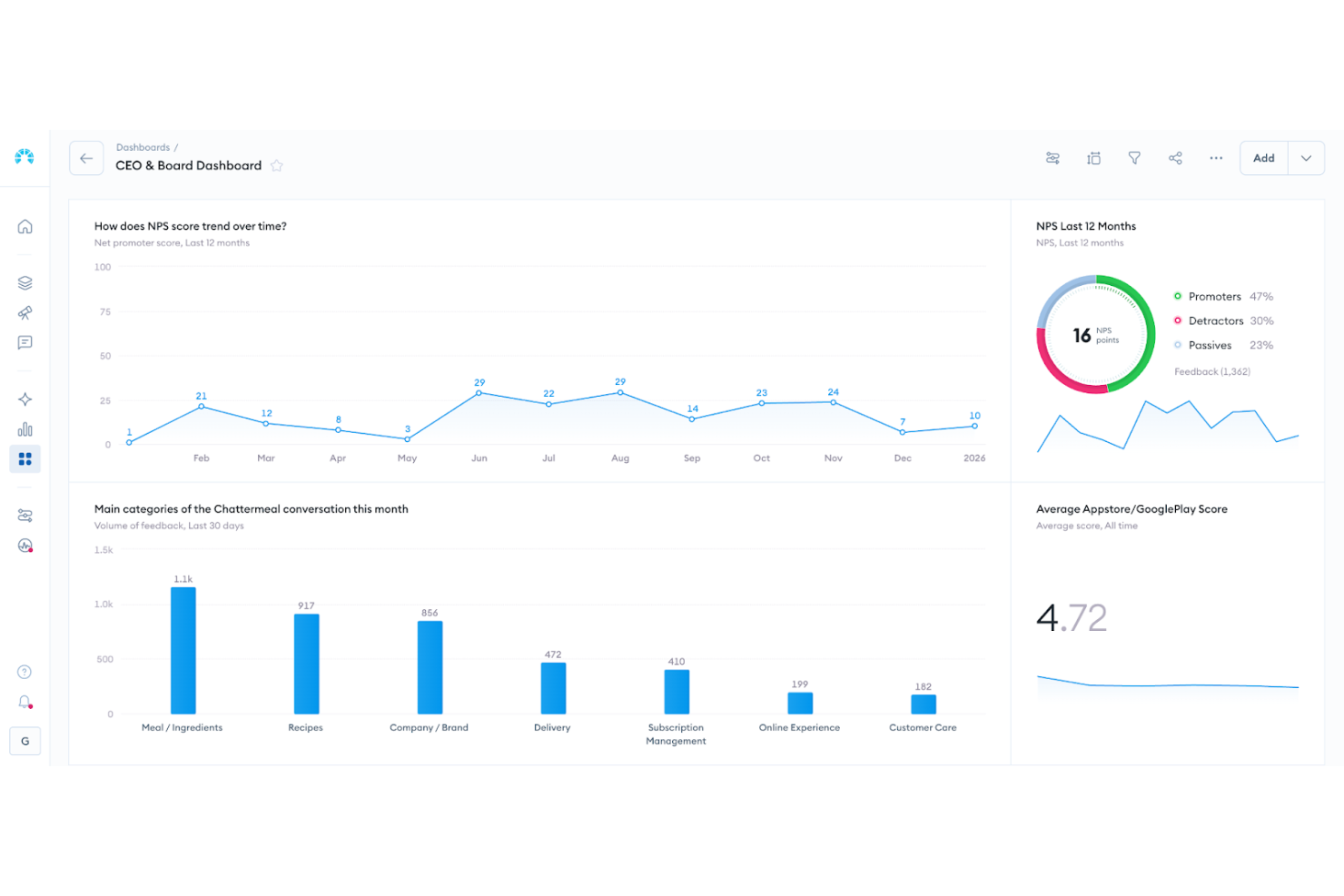
Chattermill è pensato per le aziende che desiderano trasformare il feedback dei clienti in azioni significative e strategiche. Supporta organizzazioni orientate al cliente in settori come retail, finanza e tecnologia che mirano a rafforzare l'esperienza del cliente e a guidare lo sviluppo del prodotto. Utilizzando analisi basate sull'IA, Chattermill individua tendenze, evidenzia problemi emergenti e aiuta a dare priorità ai miglioramenti, consentendoti di prendere decisioni basate sui dati e restare in sintonia con le esigenze e i comportamenti dei clienti in evoluzione.
Perché ho scelto Chattermill
Ho scelto Chattermill per le sue sofisticate analisi basate sull'intelligenza artificiale che unificano i feedback provenienti da più canali in un'unica piattaforma. Questa funzionalità permette di comprendere rapidamente il sentiment e le preferenze dei clienti senza dover analizzare un'infinità di dati. L'etichettatura istantanea tramite IA dei temi e del sentiment garantisce che il tuo team possa individuare subito questioni e tendenze critiche. Inoltre, gli avvisi automatici sui cambiamenti significativi del sentiment ti tengono informato, consentendo interventi tempestivi per migliorare la soddisfazione del cliente.
Funzionalità principali di Chattermill
Oltre alle capacità analitiche di base di Chattermill, ho trovato utili anche le seguenti funzionalità per il software di feedback dei clienti:
- Gestione Unificata del Feedback: Consolida i feedback provenienti da diverse fonti in un'unica piattaforma, offrendo una visione completa degli insight dei clienti.
- Monitoraggio delle Tendenze: Tiene traccia dei cambiamenti nel sentiment dei clienti nel tempo, aiutando a identificare schemi e ad anticipare le esigenze future.
- Misurazione dell'Impatto su NPS e CSAT: Valuta come i temi del feedback influenzano le metriche chiave di performance, guidando la pianificazione strategica.
- Avvisi Automatici: Notifica approfondimenti critici e cambiamenti nel sentiment dei clienti, permettendo una gestione proattiva.
Integrazioni di Chattermill
Le integrazioni includono Zendesk, Typeform, Salesforce, Trustpilot, Sprinklr, Google Cloud Platform, Dropbox, HubSpot, Slack e Amazon S3.
Pros and Cons
Pros:
- Tracciamento del sentiment in tempo reale
- Etichettatura dei temi tramite IA
- Modelli di sentiment specifici per settore
Cons:
- Prezzi non pubblicamente disponibili
- Può richiedere onboarding aziendale

Unwrap
Ideale per assistente di linguaggio naturale
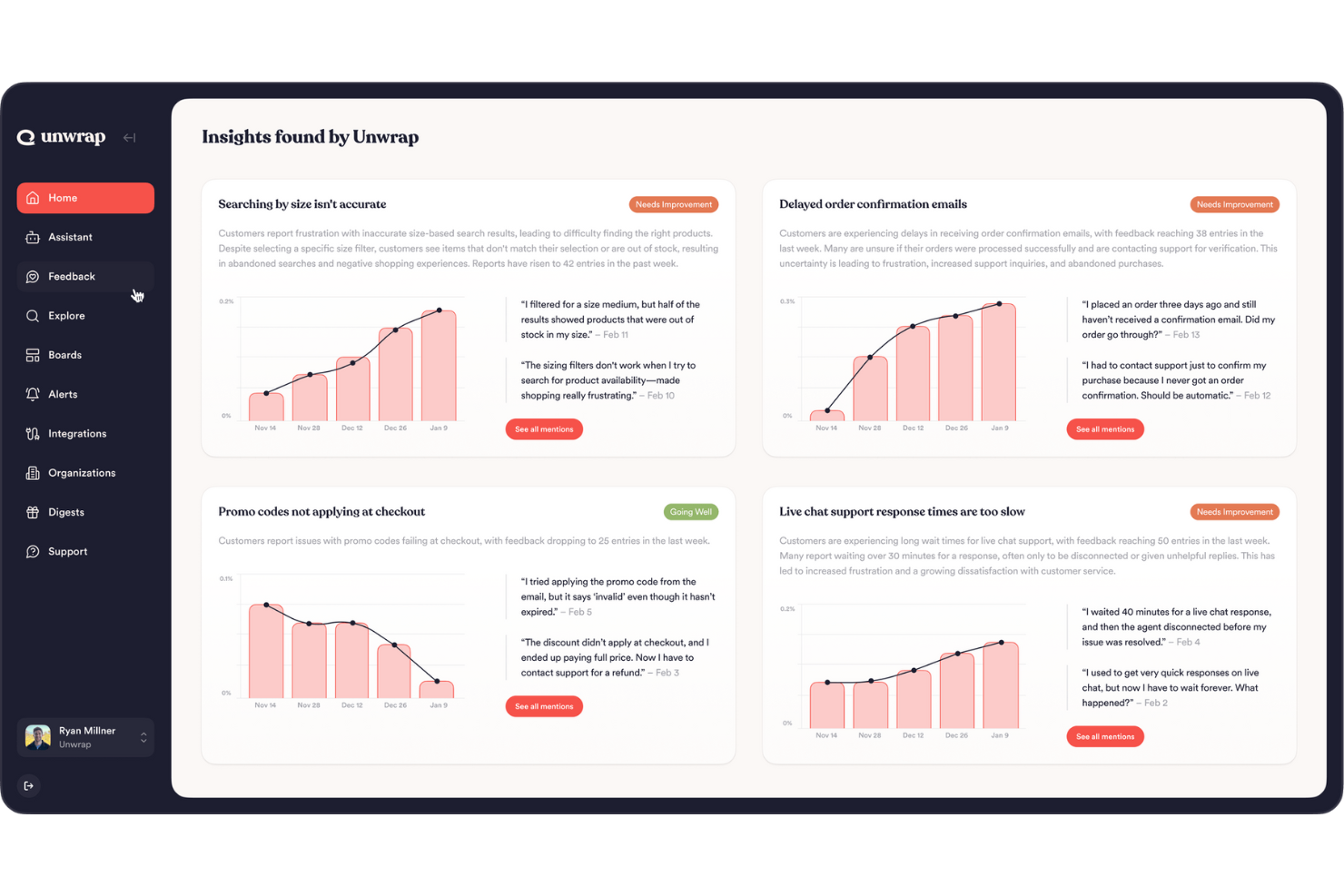
Unwrap è una piattaforma basata sull'intelligenza artificiale che migliora la raccolta e l'analisi del feedback dei clienti, rendendola ideale per chi desidera trasformare le intuizioni in decisioni informate. Se svolgi un ruolo in cui comprendere la voce del cliente è fondamentale, come l'assistenza clienti o lo sviluppo prodotto, la capacità di Unwrap di trasformare dati grezzi in informazioni utilizzabili può fare la differenza. La piattaforma affronta le comuni sfide come il sovraccarico di dati e l'analisi manuale offrendo etichettatura automatica e rilevamento delle tendenze, così puoi concentrarti sulle azioni strategiche invece che sull'elaborazione dei dati.
Per chi è Unwrap?
Analisti di prodotto e CX in organizzazioni di medie dimensioni a livello globale che utilizzano strumenti di linguaggio naturale per interpretare il feedback dei clienti su larga scala.
Perché ho scelto Unwrap
Ho scelto Unwrap per il suo approccio innovativo nell'automatizzare l'analisi del feedback dei clienti, un aspetto cruciale del software di raccolta feedback. L'Auto Tagger è particolarmente degno di nota in quanto organizza i feedback in categorie intuitive, risparmiando tempo ed energia. Inoltre, le dashboard personalizzabili forniscono una visione chiara delle osservazioni dei clienti, facilitando il monitoraggio delle tendenze e il processo decisionale basato sui dati. Per chi vuole anticipare le nuove esigenze dei clienti, gli avvisi automatici garantiscono di essere sempre informati su cambiamenti significativi o nuovi schemi nel feedback.
Caratteristiche principali di Unwrap
Oltre ai suoi punti di forza unici, ho trovato anche altre funzionalità che rendono Unwrap una soluzione interessante per la gestione del feedback dei clienti:
- Assistente di linguaggio naturale: Questa funzione consente di interrogare facilmente i dati di feedback, offrendo intuizioni e risposte immediate alle domande più urgenti.
- Accessibilità trasversale all'organizzazione: Progettato per essere utilizzato in vari ruoli all'interno dell'azienda, garantendo che il feedback venga gestito in modo tempestivo ed efficace.
- Sicurezza e conformità dei dati: Unwrap è conforme a SOC 2 Tipo II e GDPR, con particolare attenzione alla privacy e sicurezza dei dati.
- Interfaccia intuitiva: La piattaforma è facile da navigare, richiede una configurazione minima e favorisce l'adozione diffusa all'interno del team.
Integrazioni di Unwrap
Le integrazioni includono Slack, Salesforce, Zendesk, HubSpot, Intercom, Microsoft Teams, Jira, Asana, Trello e Google Workspace.
Pros and Cons
Pros:
- Centralizza il feedback da più fonti
- Identifica temi e tendenze di sentiment
- Automatizza l'analisi del feedback su larga scala
Cons:
- Meno efficace con basso volume di feedback
- Opzioni di personalizzazione avanzata limitate

I migliori sondaggi clienti flessibili con ramificazioni logiche condizionali
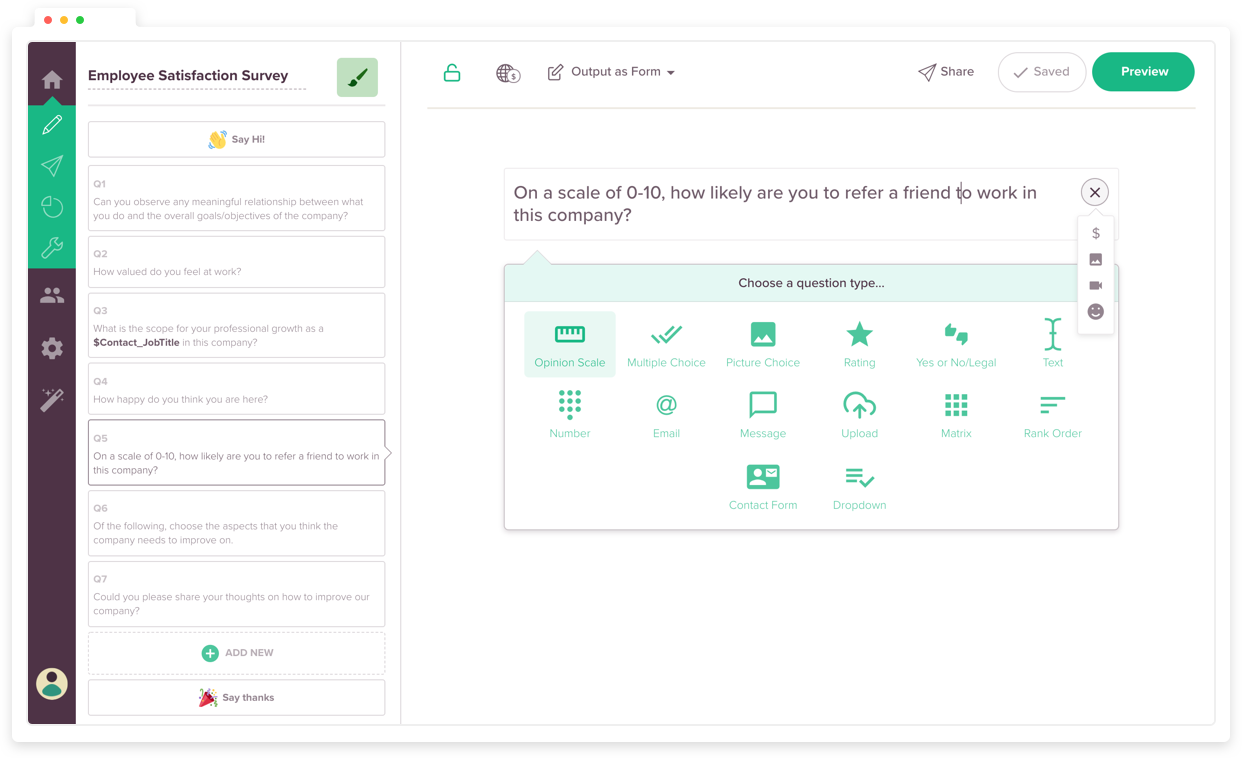
SurveySparrow offre una soluzione dinamica per trasformare i feedback dei clienti in approfondimenti attuabili, rendendolo ideale per settori come la sanità, l’istruzione e l’ospitalità. Il suo design mobile-first e i diversi tipi di sondaggi, inclusi NPS e sondaggi offline, assicurano che tu possa raccogliere feedback in qualsiasi momento e ovunque. Grazie a funzionalità come l’integrazione con chatbot e i workflow personalizzabili, puoi approfondire il coinvolgimento dei clienti e favorire la crescita aziendale.
Per chi è ideale SurveySparrow?
Team di esperienza cliente e ricerca in aziende di medie dimensioni in Nord America ed Europa che gestiscono sondaggi flessibili con logica condizionale.
Perché ho scelto SurveySparrow
Ho scelto SurveySparrow per i suoi sondaggi clienti flessibili con ramificazioni logiche condizionali. Questa funzione consente di personalizzare le domande del sondaggio in base alle risposte precedenti, garantendo che i feedback raccolti siano rilevanti e utili. La capacità dello strumento di gestire la raccolta dati offline e supportare più lingue ne aumenta ulteriormente l’adattabilità a diverse esigenze aziendali. Grazie a queste funzionalità, SurveySparrow è una scelta eccellente per affinare il processo di raccolta dei feedback dei clienti.
Caratteristiche principali di SurveySparrow
Oltre ai suoi sondaggi clienti flessibili con ramificazioni logiche condizionali, SurveySparrow offre diverse altre funzionalità che ne aumentano l’utilità come software per il feedback dei clienti.
- Sondaggi Conversazionali: Crea sondaggi coinvolgenti che trasformano la raccolta dei feedback in un’esperienza interattiva.
- Supporto multilingue: Conduci sondaggi in più lingue per raggiungere un pubblico diversificato.
- Raccolta feedback omnicanale: Condividi sondaggi su varie piattaforme, tra cui social media, email e codici QR.
- Workflow Visivi: Automatizza le azioni in base alle risposte ai sondaggi per ottimizzare il tuo processo di feedback.
Integrazioni SurveySparrow
Le integrazioni includono Salesforce, HubSpot, Mailchimp, Zendesk, Slack, Google Sheets, Trello, Intercom, Freshdesk e Microsoft Teams.
Pros and Cons
Pros:
- Facile creare sondaggi con variabili dinamiche
- Si integra con Zendesk per feedback via chat
- Interfaccia intuitiva con molte funzionalità utili
Cons:
- Personalizzazione limitata restringe la flessibilità del design nei sondaggi
- Problemi di allineamento drag-and-drop complicano il processo di creazione dei sondaggi

Ideale per la raccolta di feedback multilingue
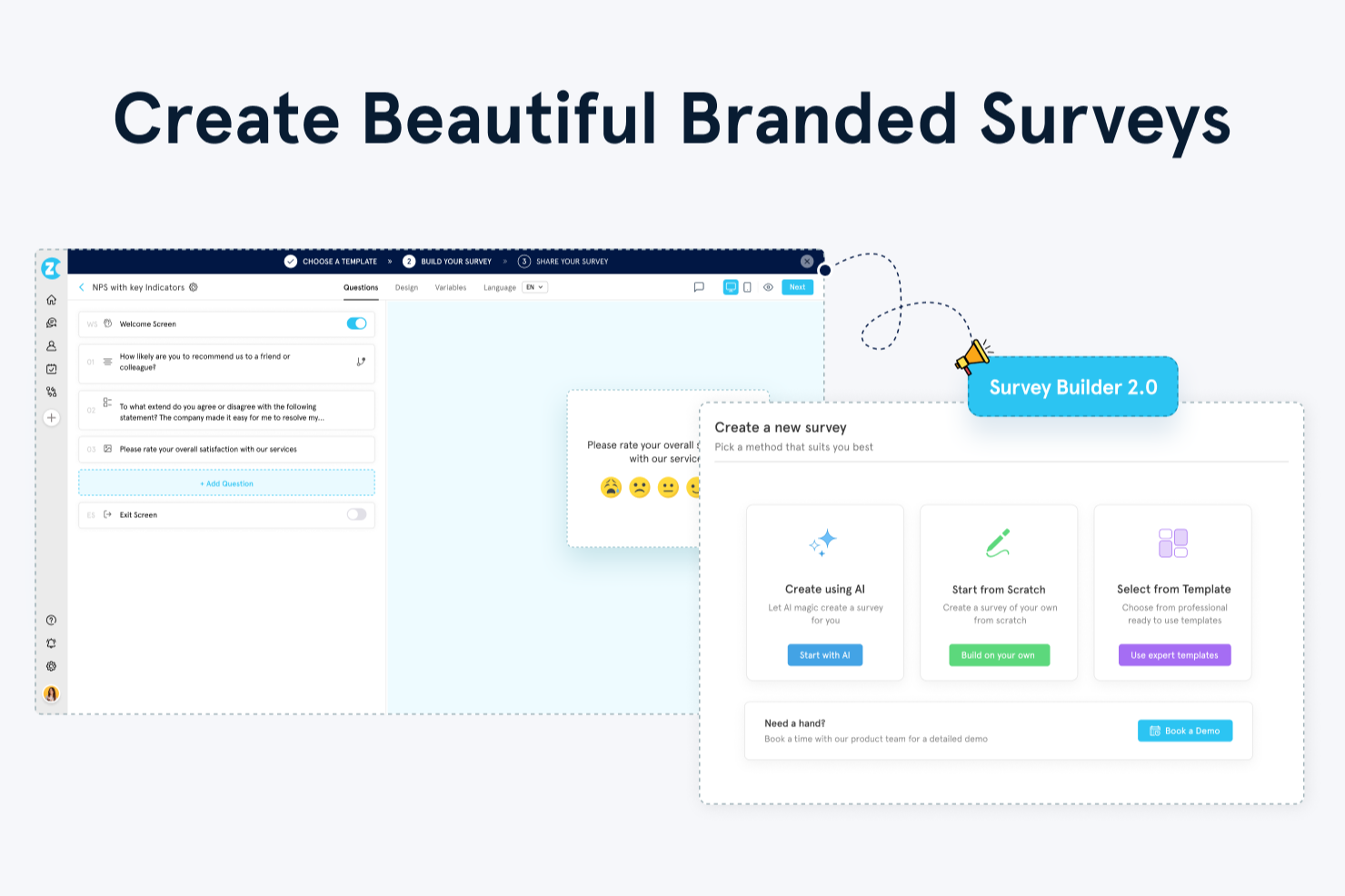
Zonka Feedback è uno strumento di raccolta del feedback dei clienti basato su sondaggi che unisce la distribuzione multicanale, il monitoraggio dei metriche CX, l’analisi potenziata dall’IA e la gestione dei casi a ciclo chiuso in un’unica piattaforma.
Per chi è ideale Zonka Feedback?
Zonka Feedback è ideale per i team CX e supporto di aziende di medie e grandi dimensioni che necessitano di raccogliere feedback su molteplici canali e punti di contatto.
Perché ho scelto Zonka Feedback
Ho inserito Zonka Feedback tra le mie scelte principali perché le sue capacità di sondaggio multilingue vanno ben oltre una semplice opzione di cambio lingua. Puoi costruire sondaggi in oltre 30 lingue, inclusi sistemi di scrittura da destra a sinistra come arabo e urdu, con regolazione automatica del layout affinché il sondaggio venga visualizzato correttamente per ogni partecipante. La traduzione IA con un solo clic elimina la necessità di traduzioni individuali per ogni domanda. I partecipanti possono anche cambiare lingua a sondaggio in corso, riducendo così gli abbandoni quando qualcuno si accorge che la lingua predefinita non è la propria.
Funzionalità chiave di Zonka Feedback
- Modelli NPS, CSAT e CES: Modelli di sondaggi preimpostati per le tre metriche CX fondamentali, pronti all’uso senza doverli creare da zero.
- Analisi del sentiment basata su IA: Etichetta le risposte a testo libero con punteggi di sentiment per evidenziare schemi su grandi volumi di feedback.
- Gestione dei casi a ciclo chiuso: Assegna attività di follow-up ai membri del team direttamente dalle risposte negative così che nessun feedback rimanga senza risposta.
- Avvisi in tempo reale sulle risposte: Attiva notifiche istantanee all’arrivo di una risposta al sondaggio, filtrate per punteggio, segmento o canale.
Integrazioni di Zonka Feedback
Zonka Feedback si integra con Salesforce, HubSpot, Zendesk, Freshdesk, Intercom, HelpScout, Front, Pipedrive, Slack, Microsoft Teams, Jira, Google Sheets e Zoom. Funziona anche con Zapier, Make e Integrately per l’automazione. Webhook e API consentono integrazioni personalizzate.
Pros and Cons
Pros:
- Avvisi in tempo reale sulle risposte negative ai feedback
- I sondaggi funzionano anche senza connessione internet
- Monitora NPS, CSAT e CES direttamente sulla piattaforma
Cons:
- I report non offrono una visione analitica più approfondita
- Le opzioni per la configurazione iniziale possono risultare troppo numerose

Alchemer
Ideale per insight sui feedback basati su IA

Alchemer è una soluzione di livello aziendale pensata per le organizzazioni che devono andare oltre la raccolta statica dei dati, puntando a cicli di feedback strategici. Pensata per settori che vanno dal SaaS al retail ad alto volume, la piattaforma eccelle nel catturare dati di grande valore e nell'integrarli direttamente nei processi aziendali esistenti. Concentrandosi sia sul 'come' che sul 'dove' della raccolta dati, Alchemer risponde all’esigenza critica di un sistema centralizzato che colmi il divario tra il sentimento dei clienti e il processo decisionale dei dirigenti.
Perché ho scelto Alchemer
Ho inserito Alchemer in questa lista grazie al sofisticato motore Alchemer Pulse, che risolve il problema dell’'universo nero' del feedback testuale libero. Mentre la maggior parte degli strumenti fatica a gestire dati non strutturati, Pulse utilizza l’intelligenza artificiale per categorizzare automaticamente i temi e il sentimento in tempo reale, consentendo ai team di dare immediata priorità a richieste prodotto o interventi sui servizi. È una scelta convincente per team CX maturi che devono sintetizzare grandi volumi di feedback globali in un unico racconto coerente per gli stakeholder.
Caratteristiche principali di Alchemer
Oltre agli insight guidati dall’IA, ho trovato utili anche le seguenti funzionalità:
- Sondaggi personalizzabili: Adatta i moduli di feedback alle specifiche esigenze della tua azienda, assicurandoti di raccogliere i dati realmente rilevanti.
- Raccolta feedback in tempo reale: Coinvolgi i clienti su vari canali come SMS, email e notifiche in-app, ottenendo insight immediati.
- Indirizzamento automatico del feedback: Invia il feedback direttamente ai team competenti per un’analisi e una risposta rapide, migliorando l’efficienza operativa.
- App mobile e digital intercepts: Coinvolgi gli utenti nell’immediato con prompt temporizzati in modo preciso e 'micro-sondaggi' all’interno di app mobili e siti web, raccogliendo feedback senza interrompere il percorso utente.
Integrazioni di Alchemer
Le integrazioni includono Salesforce, Microsoft Dynamics, HubSpot, Slack, Zendesk, Tableau, Google Analytics, Marketo e Adobe Analytics.
Pros and Cons
Pros:
- Offre una vasta gamma di tipologie di domande per esigenze di feedback diversificate
- Capacità avanzate di analisi con opzioni di filtraggio ed esportazione
- Consente una logica di sondaggio personalizzabile per la raccolta dati su misura
Cons:
- La versione gratuita manca di significative funzionalità di analytics e logiche avanzate
- Alcuni utenti possono considerare il costo elevato rispetto alle funzionalità offerte

Ideale per sondaggi CSAT integrati
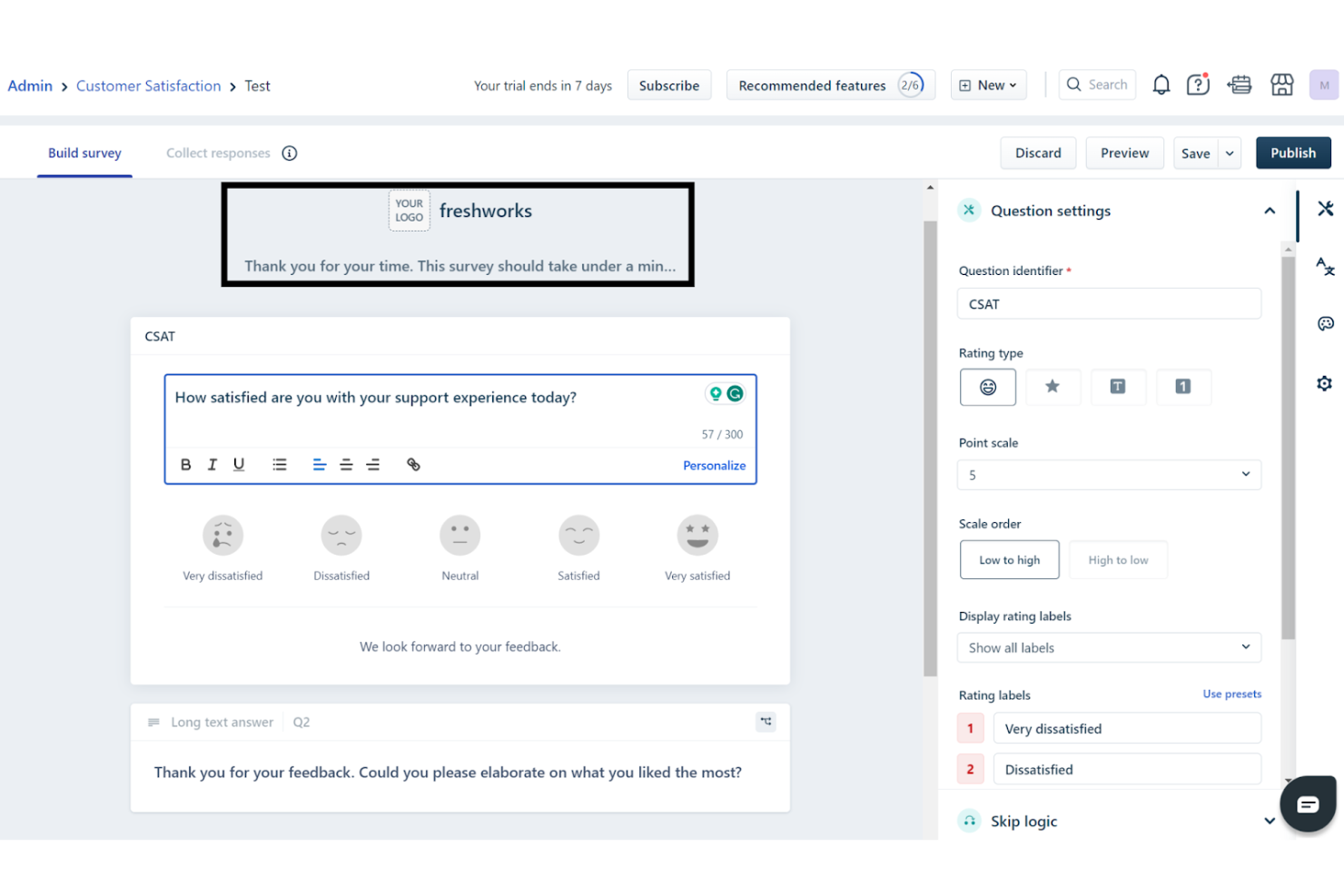
Freshdesk consente al tuo team di trasformare le interazioni con i clienti grazie alla sua piattaforma basata sull’IA, progettata per migliorare i processi di supporto e ottimizzare la gestione del feedback. È pensato per aziende di diversi settori, offrendo un ambiente di lavoro centralizzato che favorisce la comunicazione e una risoluzione più rapida delle richieste dei clienti.
Per chi è più indicato Freshdesk?
Responsabili del supporto clienti e team di assistenza di piccole e medie imprese in Nord America ed Europa che gestiscono interazioni di supporto e raccolgono feedback CSAT su un’unica piattaforma.
Perché ho scelto Freshdesk
Ho scelto Freshdesk perché integra nativamente la raccolta del feedback dei clienti all’interno del tuo flusso di supporto, consentendoti di misurare soddisfazione e lealtà senza dover creare soluzioni aggiuntive. Il suo generatore di sondaggi CSAT consente di inviare indagini personalizzabili attivate nei momenti chiave, come la risoluzione dei ticket, collegando ogni risposta all’interazione originale e all’agente di supporto.
Puoi anche estendere Freshdesk con app disponibili nel marketplace che integrano sondaggi NPS e CES direttamente nel tuo helpdesk, mantenendo il sentiment dei clienti sempre allineato alle metriche di supporto. Per i team che desiderano feedback sia contestuali che quantitativi — collegati a eventi concreti di assistenza invece che a intuizioni frammentarie — questi strumenti di feedback integrati e integrabili fanno di Freshdesk una scelta solida.
Caratteristiche principali di Freshdesk
Oltre alle sue funzionalità principali, apprezzo anche che offra:
- Strumenti self-service: Freshdesk mette a disposizione un portale clienti personalizzabile e una knowledge base multilingue, permettendo agli utenti di trovare soluzioni in autonomia.
- Gestione del routing e SLA: Automatizza la categorizzazione, la priorità e l’instradamento dei ticket, garantendo risposte tempestive e una gestione efficiente del feedback.
- Funzionalità di sicurezza: Implementa il controllo degli accessi basato sui ruoli e la whitelist degli IP per proteggere i dati sensibili dei clienti.
- Gestione degli orari lavorativi: Permette di definire gli orari di lavoro del team di supporto e automatizzare i flussi per garantire assistenza continua.
Integrazioni di Freshdesk
Tra le integrazioni ci sono Slack, Microsoft Teams, Shopify, Google Workspace, Jira, Salesforce, HubSpot, Zoom, Mailchimp e WooCommerce. È disponibile un’API per integrazioni personalizzate.
Pros and Cons
Pros:
- I sondaggi possono essere automatizzati alla risoluzione dei ticket
- L’automazione tramite IA migliora i tempi di risposta e riduce il carico di lavoro.
- Il supporto omnicanale integra diverse piattaforme di comunicazione.
Cons:
- Le opzioni native per i sondaggi sono basiche rispetto agli strumenti dedicati
- L’app mobile manca di alcune funzionalità avanzate disponibili su desktop, limitando il supporto in mobilità.
New Product Updates from Freshdesk

Freshdesk Adds Voice AI Agents in Freshcaller
Freshdesk introduces Voice AI Agents available through Freshcaller Marketplace apps to handle routine calls and reduce queues. This feature enables automated call handling with real-time, conversational support. For more information, visit Freshdesk's official site.

Canny
Ideale per tracciare il feedback dei clienti e le richieste di funzionalità
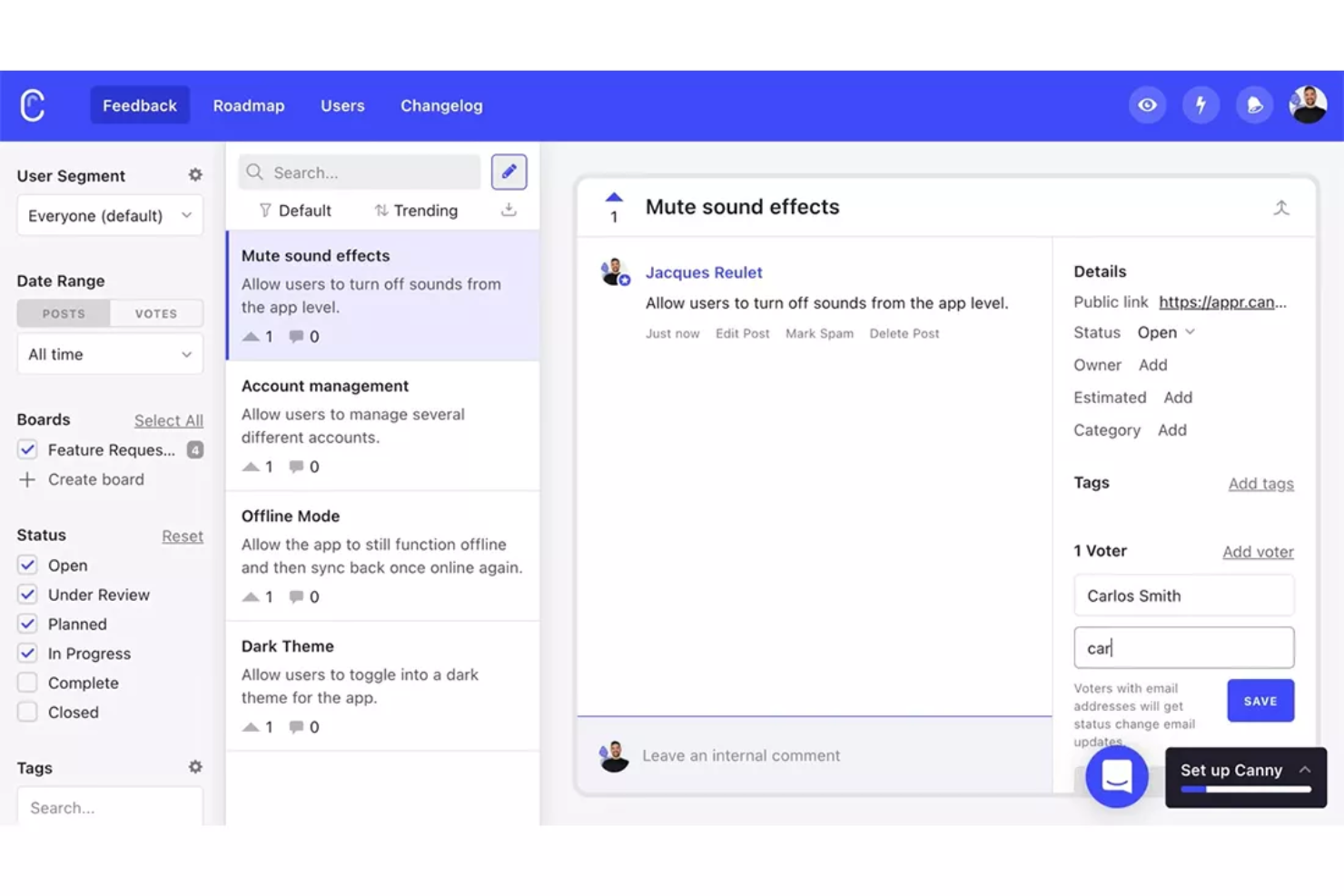
Se hai bisogno di un modo per organizzare e dare priorità al feedback sui prodotti, Canny offre una soluzione mirata. I team di prodotto e le aziende SaaS lo utilizzano per raccogliere, monitorare e agire sulle richieste di funzionalità dei clienti. Canny ti aiuta a chiudere il cerchio rendendo facile aggiornare gli utenti mentre i loro suggerimenti avanzano nella tua roadmap.
A chi è più adatto Canny?
Product manager di aziende software che organizzano i suggerimenti dei clienti e determinano le priorità della roadmap in base alle richieste tracciate.
Perché ho scelto Canny
Canny si distingue per la capacità di monitorare i feedback dei clienti e le richieste di funzionalità in modo trasparente e organizzato. Ho scelto Canny perché offre ai team una bacheca pubblica dove gli utenti possono inviare idee e votare ciò che è loro più importante. Le funzionalità di tracciamento dello stato e changelog ti aiutano a tenere informati i clienti mentre le loro richieste vengono gestite nel tuo processo di sviluppo. Questa configurazione facilita la priorità della roadmap in base agli input reali dei clienti.
Funzionalità principali di Canny
Oltre alle bacheche pubbliche e al tracciamento dello stato, Canny offre diverse altre funzionalità per la gestione del feedback dei clienti:
- Bacheche private: Configura bacheche visibili solo ai team interni o a utenti selezionati per raccogliere feedback riservati.
- Segmentazione utenti: Filtra e analizza i feedback in base al tipo di utente, all’azienda o ad altri attributi personalizzati.
- Campi personalizzati: Aggiungi campi dati extra ai post di feedback per fornire più contesto o categorizzare le richieste.
- Accesso API: Usa l’API di Canny per automatizzare la raccolta dei feedback o sincronizzare i dati con i tuoi tool esistenti.
Integrazioni di Canny
Le integrazioni includono Jira, GitHub, ClickUp, Linear, Azure DevOps, Asana, Intercom, Zendesk, Salesforce e HubSpot.
Pros and Cons
Pros:
- Interfaccia pulita e intuitiva per inviare feedback
- La funzione changelog mostra chiaramente gli aggiornamenti sui progressi del prodotto
- Team di supporto estremamente reattivo e fondatori dedicati
Cons:
- Nessuna modalità scura; il widget stona con l’interfaccia
- Manca una funzione di ricerca globale per i feedback

Userback
Ideale per feedback visivi con annotazione schermata
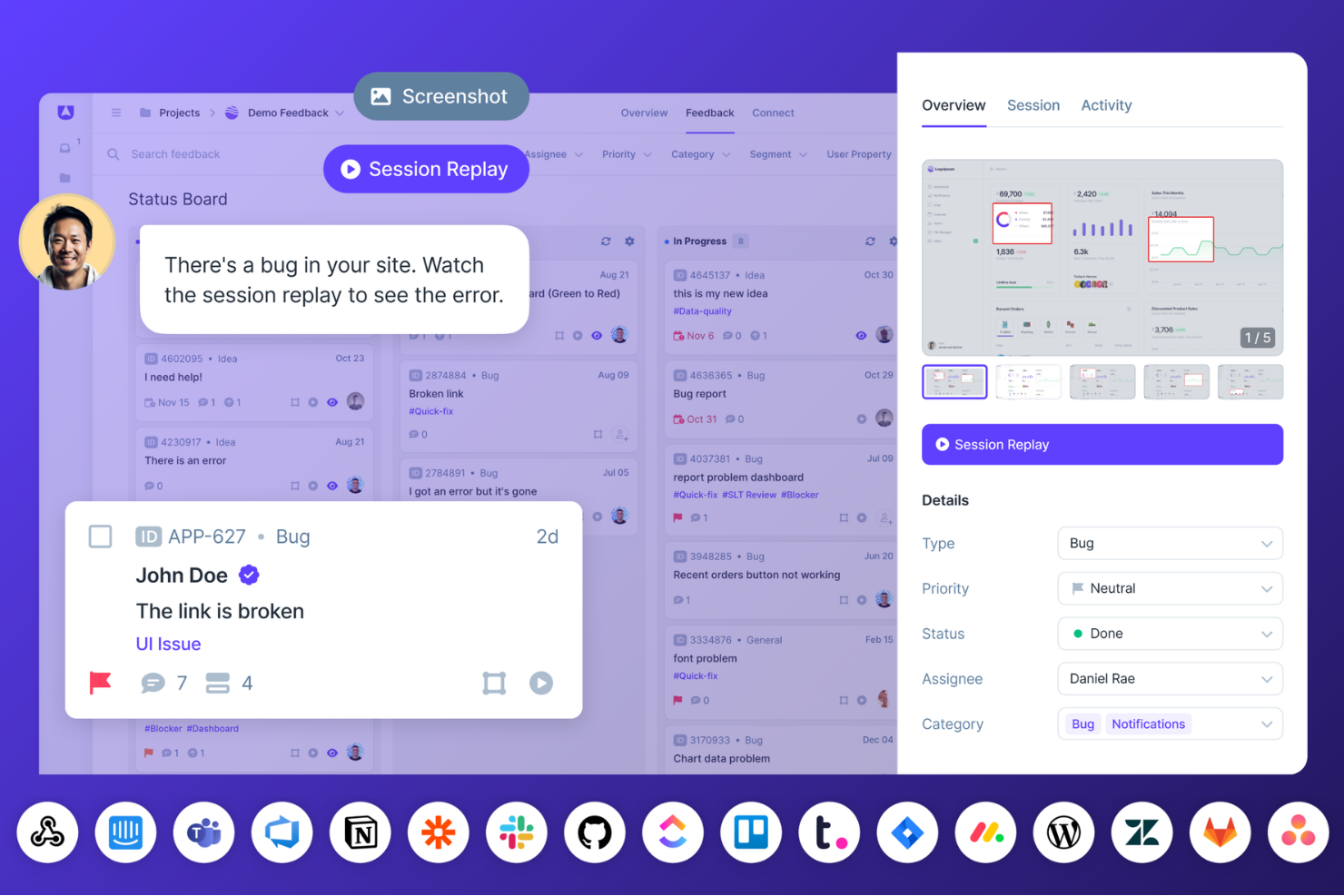
Userback è pensato per i team che desiderano migliorare la raccolta e la gestione del feedback. Si rivolge alle aziende che vogliono comprendere meglio le esperienze degli utenti, semplificare la segnalazione dei bug e migliorare lo sviluppo del prodotto. Offrendo strumenti come widget per il feedback, replay delle sessioni e sondaggi agli utenti, Userback affronta la sfida di raccogliere spunti utilizzabili dagli utenti, rendendolo una scelta ideale per product manager e team di sviluppo che vogliono perfezionare le proprie offerte.
Perché ho scelto Userback
Ho scelto Userback per la sua capacità unica di fornire un contesto visivo al feedback tramite funzionalità come annotazione sullo schermo e registrazioni video. Questi strumenti permettono al tuo team di vedere esattamente ciò che vivono gli utenti, facilitando l'identificazione e la risoluzione dei problemi. Inoltre, la funzionalità di replay delle sessioni offre una riproduzione delle interazioni degli utenti, consentendo una comprensione più approfondita del loro comportamento.
Funzionalità principali di Userback
Oltre alle sue capacità di feedback visivo, Userback offre:
- Widget per il feedback: Consentono agli utenti di inviare feedback direttamente dall'applicazione o dal sito web, rendendo facile raccogliere le opinioni degli utenti in tempo reale.
- Sondaggi agli utenti: Sondaggi personalizzabili permettono la raccolta strutturata di feedback mirati a specifici gruppi di utenti o a esigenze particolari.
- Roadmap pubblica: Condividi i tuoi piani di sviluppo con gli utenti, consentendo loro di votare e commentare le funzionalità, aumentando trasparenza e coinvolgimento.
- Strumenti di automazione: Semplificano il processo di feedback automatizzando i compiti ripetitivi, garantendo che il team possa concentrarsi sulle priorità.
Integrazioni Userback
Le integrazioni includono Jira, Slack, GitHub, Trello, WordPress, Zendesk, Wrike, Teamwork, Webhooks e Zapier. È disponibile anche un'API per integrazioni personalizzate.
Pros and Cons
Pros:
- Widget di feedback personalizzabili raccolgono facilmente gli input degli utenti
- Cruscotto centralizzato per organizzare i feedback dei clienti
- Si integra senza problemi con i flussi di lavoro di project management
Cons:
- Alcune funzionalità mancanti rispetto alle piattaforme di feedback più grandi
- Capacità utenti e controlli avanzati limitati nei piani inferiori
New Product Updates from Userback

Userback Mobile SDK Adds In-App Surveys
Userback’s Mobile SDK now supports in-app surveys, enabling iOS and Android users to submit NPS, CSAT, and other survey responses without leaving your app. For more information, visit Userback's official site.
 .
.
TeamSupport
Ideale per analytics e cicli di feedback sui clienti
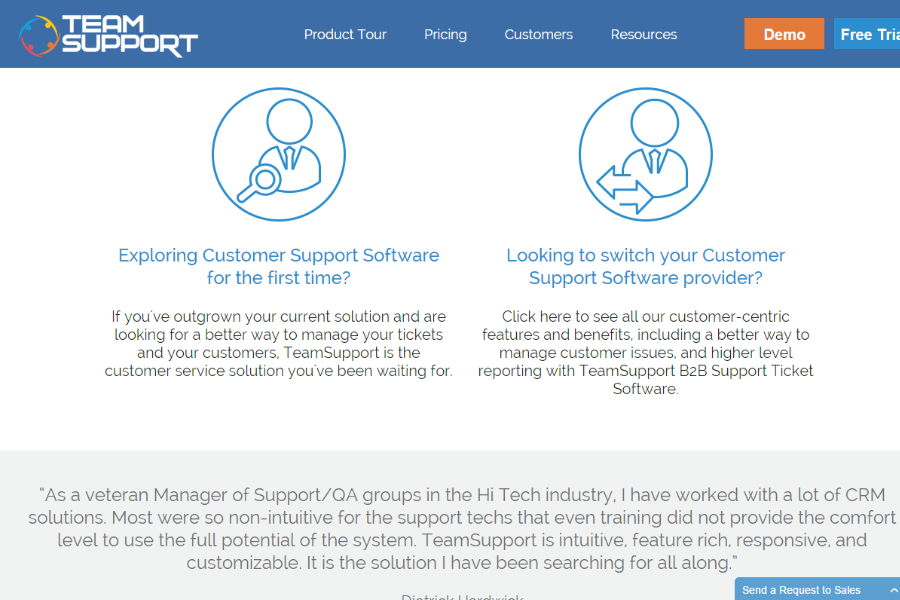
TeamSupport risponde alle complesse esigenze delle aziende B2B che cercano un modo efficace per gestire il feedback dei clienti. Concentrandosi su collaborazione e comunicazione, si rivolge a settori che richiedono un sistema robusto per gestire le interazioni e i dati dei clienti. Questo strumento è particolarmente vantaggioso per chi desidera aumentare la soddisfazione dei clienti e ottimizzare i propri processi di assistenza.
Per chi è TeamSupport?
I responsabili del supporto clienti in aziende B2B di medie dimensioni situate in Nord America ed Europa che monitorano analytics e cicli di feedback strutturati.
Perché ho scelto TeamSupport
Ho scelto TeamSupport per le sue avanzate funzionalità di analytics sui clienti e di gestione dei cicli di feedback, che sono fondamentali per le aziende che vogliono migliorare le strategie di assistenza clienti. Le funzionalità di comunicazione in tempo reale del software, compresa la chat live, ti permettono di coinvolgere immediatamente i clienti insieme al tuo team, assicurando che le loro necessità vengano ascoltate. Inoltre, il sistema di ticketing completo aiuta a gestire e tracciare i feedback in modo efficiente, facilitando l'identificazione di trend e aree di miglioramento.
Funzionalità principali di TeamSupport
Oltre ai potenti strumenti di analytics e comunicazione:
- Indice di Distress del Cliente (CDI): Questa funzionalità ti aiuta a identificare e dare priorità ai clienti che necessitano di attenzione immediata.
- Gestione collaborativa dei ticket: Permette ai team di lavorare insieme senza interruzioni per risolvere le problematiche dei clienti.
- Knowledge base personalizzabile: Offre un'opzione self-service per i clienti che vogliono trovare autonomamente le risposte, riducendo il carico sullo staff di supporto.
- Tagging dei prodotti: Consente di tracciare in dettaglio e analizzare le interazioni dei clienti con prodotti specifici.
Integrazioni di TeamSupport
Le integrazioni includono Salesforce, HubSpot, Microsoft Teams, SAP Sales and Service Clouds, Jira Software, Nicereply, MS Dynamics, Dropbox, Beanstalk e un'API disponibile per integrazioni personalizzate.
Pros and Cons
Pros:
- Automazione ticket basata su AI
- Insight in tempo reale sul sentiment
- Hub self-service clienti personalizzabile
Cons:
- Knowledge base poco configurabile
- Funzionalità app mobile limitate
Altri software per il feedback dei clienti
Ecco alcune altre opzioni interessanti che non sono rientrate nella mia lista dei 20 migliori software per il feedback dei clienti, ma che vale comunque la pena esaminare:
- Survicate
Ideale per raccogliere insight dai clienti
- Hotjar (by Contentsquare)
Il miglior strumento di analisi utenti con funzioni di feedback e sondaggi
- Qualaroo
Ideale per la raccolta di feedback in tempo reale
- Intercom
La migliore messaggistica aziendale con feedback integrato
- Pendo
Miglior software di feedback per segmenti di clienti
- Clootrack
Ideale per temi non supervisionati che guidano le decisioni
- Gainsight
Il miglior feedback per analisi e report sull'utilizzo del prodotto
- Usersnap
Ideale per la raccolta di feedback visivi
- Lumoa
Ideale per insight dai feedback in tempo reale
- GatherUp
Migliore raccolta del feedback clienti per le recensioni aziendali
- AskNicely
Ideale per connettori a piattaforme di recensioni di terze parti
- InputKit
Migliori sondaggi automatici per il feedback sul servizio clienti
- Jotform
I migliori moduli digitali personalizzabili per la raccolta di feedback
- Hiver
Ideale per la consolidazione di una casella di posta omnicanale
- LiveAgent
Ideale per trasformare i feedback in ticket
- UserGuiding
Ideale per le sue microsurvey per i clienti con approfondimenti in tempo reale
- Sogolytics
Ideale per sondaggi cliente avanzati con l’IA
- Product Fruits
Ideale per il suo widget di feedback e la funzione di sondaggi in-app
- ReviewFlowz
Ideale per la generazione di recensioni SaaS
- PathPro
Ideale per un sistema di voto delle funzionalità


Software correlati per il feedback dei clienti
Se non hai ancora trovato qui ciò che stai cercando, dai un’occhiata a questi software correlati per il feedback dei clienti che abbiamo testato e valutato.
- Software per il servizio clienti
- Software per help desk
- Software per call center
- Piattaforma di messaggistica per i clienti
- Piattaforma per l’esperienza digitale
- Strumenti di analisi del sentiment
Che cos’è il software per il feedback dei clienti?
Il software per il feedback dei clienti è una piattaforma che raccoglie, gestisce e analizza il feedback proveniente dai diversi punti di contatto con i clienti. Aiuta le aziende a far emergere informazioni utili per migliorare prodotti, servizi ed esperienze.
Come valuto i software di feedback clienti
Analizzo le piattaforme di feedback clienti su due livelli: i requisiti fondamentali, come i workflow closed-loop e l’analisi del sentiment, e i fattori differenzianti che rendono una soluzione più adatta al tuo team CX.
Funzionalità principali (Requisiti minimi per questa lista)
Quando seleziono i tool per la mia lista, valuto ciascuno su una scala da 0 (non offre la funzionalità) a 5 (eccelle in questa area) per ogni funzione principale elencata di seguito. Successivamente, calcolo il punteggio totale dello strumento in percentuale. Ogni strumento deve raggiungere un punteggio minimo totale del 65% per essere preso in considerazione.
- Distribuzione sondaggi multi-canale: Verifico la possibilità di distribuire sondaggi tramite email, web, in-app, SMS e mobile da una sola piattaforma—e se i dati delle risposte si unificano in una vista unica.
- Template di sondaggi per metriche CX: Template preimpostati di NPS, CSAT e CES devono essere pronti al lancio con configurazione minima, per consentire a un team CX di iniziare a raccogliere metriche strutturate dal primo giorno.
- Analisi testuale e del sentiment: Valuto quanto il tool sia efficace nell’evidenziare temi e sentiment dalle risposte aperte, come segnalare un aumento nelle lamentele sulle spedizioni tra migliaia di commenti ai sondaggi.
- Workflow di feedback closed-loop: È importante la capacità di attivare alert, assegnare casi e follow-up—soprattutto per i team che devono rispondere rapidamente ai detrattori prima che aumenti il rischio di abbandono.
- Reportistica e dashboard: Cerco segmentazione, monitoraggio dei trend e viste basate sui ruoli affinché un analista VoC e un responsabile delle operations CS possano estrarre dal dashboard i dati di cui hanno bisogno.
- Integrazioni con la CX stack: Strumenti come Salesforce, Zendesk e HubSpot sono centrali nei flussi di lavoro CX, quindi verifico la presenza di connettori nativi e accesso API aperto per mantenere i dati di feedback connessi.
Dopo aver identificato i tool che soddisfano questi criteri, considero cosa distingue ciascuna piattaforma dalle altre.
Fattori differenzianti (Cosa distingue i fornitori)
Ecco come confronto e metto in risalto i diversi fornitori:
Funzionalità di spicco
Le funzionalità di insight basate sull’IA sono un fattore chiave di differenziazione—cerco tool che riassumano automaticamente migliaia di risposte a testo libero ed evidenzino le cause principali senza etichettatura manuale. La raccolta di feedback basata sul percorso è altrettanto importante, soprattutto quando il team deve individuare esattamente dove, durante l’onboarding o il rinnovo, i clienti incontrano attriti. L’analisi predittiva aggiunge un altro livello, aiutando gli analisti VoC a identificare account a rischio di abbandono prima ancora che compaia un punteggio da detrattore.
Oltre alle funzionalità
Presto molta attenzione a scalabilità e struttura dei prezzi—verifico se una piattaforma addebita in base al volume delle risposte, al numero di utenti, o entrambi, e come variano i costi all’estendere il programma di feedback da una a cinque regioni. Anche la conformità è fondamentale. I team che gestiscono dati personali dei clienti necessitano della certificazione SOC 2 Type II e dell’adeguamento al GDPR, oltre a opzioni di residenza dei dati per operare in diverse giurisdizioni. Valuto inoltre il time-to-value: uno strumento con forti risorse di onboarding e template preimpostati consente a un team CX di raccogliere insight settimane prima rispetto a una soluzione che richiede ampi servizi professionali.
Come scegliere il software per il feedback dei clienti
È facile perdersi in lunghi elenchi di funzionalità e strutture tariffarie complesse. Per aiutarti a rimanere concentrato mentre affronti il tuo processo di selezione del software, unico per le tue esigenze, ecco un elenco di fattori da tenere a mente:
| Fattore | Cosa considerare |
|---|---|
| Scalabilità | Assicurati che il software possa crescere insieme alla tua attività. Dovrebbe gestire un aumento dei dati e del numero di utenti senza problemi di prestazioni. |
| Integrazioni | Cerca un software che si connetta agli strumenti esistenti utilizzati dal tuo team, come i sistemi CRM o le piattaforme di posta elettronica, per semplificare i flussi di lavoro. |
| Personalizzazione | Il software dovrebbe consentire la personalizzazione per adattarsi ai tuoi processi, ad esempio modificando i moduli di feedback o i cruscotti in base a esigenze specifiche. |
| Facilità d'uso | Scegli una piattaforma intuitiva per tutti i membri del team. Una curva di apprendimento ripida può rallentare l'adozione e ridurre l'efficacia. |
| Budget | Considera non solo il costo iniziale, ma anche le spese continuative. Assicurati che rientri nei tuoi piani finanziari senza costi nascosti. |
| Misure di sicurezza | Verifica che siano presenti solide misure di sicurezza per proteggere i dati sensibili dei clienti dalle violazioni e rispettare normative come il GDPR. |
| Strumenti di reportistica | Assicurati che il software offra funzionalità complete di reportistica che aiutino ad analizzare il feedback in modo efficiente, trasformando i dati in informazioni utili per l'azione. |
| Assistenza clienti | Scegli un fornitore con solidi servizi di assistenza per supportare il tuo team durante l'implementazione e la risoluzione dei problemi. |
Tendenze nei software per il feedback dei clienti
L'evoluzione dei software per il feedback dei clienti è caratterizzata da diverse tendenze distintive che riflettono un passaggio verso approcci più coinvolgenti, integrati e ricchi di informazioni per raccogliere il feedback dei clienti.
Ecco una panoramica sintetica delle principali tendenze:
- Raccolta e analisi olistica del feedback: le soluzioni complete che raccolgono feedback attraverso molteplici punti di contatto acquisiscono un quadro completo delle esperienze dei clienti, offrendo alle aziende una comprensione più dettagliata e sfumata dei propri clienti.
- Maggiore coinvolgimento e tassi di risposta: si sta verificando un evidente spostamento verso meccanismi di feedback più coinvolgenti e interattivi. L'uso di interfacce conversazionali e l'automazione della raccolta del feedback nei momenti cruciali aumentano i tassi di risposta, rendendo il processo più intuitivo e meno invasivo per i clienti.
- Priorità all'accessibilità e alla facilità d'uso: assicurandosi che questi strumenti siano semplici e accessibili a tutti gli utenti, le aziende possono ampliare la propria portata e garantire che nessun feedback prezioso vada perso a causa di barriere tecnologiche o carenze progettuali.
- Minore importanza dei sondaggi tradizionali: il passaggio dai sondaggi tradizionali e lunghi a moduli di feedback più dinamici e coinvolgenti indica un panorama in evoluzione. Questa tendenza riflette una più ampia consapevolezza dei limiti di tempo dei clienti e della necessità di processi di feedback che non siano solo efficienti, ma anche in grado di raccogliere informazioni di alta qualità.
Nel complesso, queste tendenze indicano un futuro in cui i meccanismi di feedback dei clienti saranno più integrati, reattivi e focalizzati sull'utente. Questa evoluzione suggerisce che le aziende avranno accesso a informazioni più approfondite e utili per l'azione, consentendo loro di costruire relazioni più solide e consapevoli con i propri clienti.
Funzionalità dei software per il feedback dei clienti
Quando scegli un software per il feedback dei clienti, presta attenzione alle seguenti funzionalità chiave:
- Feedback nell'app: Raccogli i pensieri immediati degli utenti senza costringerli a uscire dall'esperienza del tuo prodotto. Il feedback nell'app consiste nel raccogliere impressioni e reazioni in tempo reale, solitamente tramite brevi sondaggi che compaiono senza interruzioni all'interno del software, aiutandoti a ottenere risposte più genuine e tempestive.
- Sondaggi automatizzati: Configura sondaggi che si attivano automaticamente dopo interazioni o eventi specifici. Questa funzionalità mantiene attivo il ciclo di feedback in modalità automatica, rendendo più semplice raccogliere opinioni aggiornate e imparziali proprio quando le esperienze dei clienti sono ancora ben presenti—senza doverli ricontattare.
- Strumenti per la creazione di sondaggi: Crea sondaggi, quiz e questionari personalizzati utilizzando intuitivi strumenti di trascinamento o pratici modelli. Un potente strumento per la creazione di sondaggi ti offre la flessibilità di porre le domande che ti interessano davvero, rendendo il processo più semplice (e meno intimidatorio) sia per te sia per i partecipanti.
- Analisi: Analizza in profondità tutti i dati di feedback che raccogli. Grazie alle analisi integrate, puoi individuare schemi, comprendere le tendenze dei clienti e identificare le aree problematiche, trasformando le opinioni individuali in miglioramenti aziendali concreti.
- Segmentazione: Suddividi i feedback in base a diversi gruppi di utenti, considerando dati demografici, cronologia degli acquisti o coinvolgimento. La segmentazione ti permette di capire cosa dicono pubblici specifici, così puoi personalizzare le risposte e modificare il tuo prodotto o servizio per ottenere il massimo impatto.
- Flussi di lavoro: Automatizza la gestione dei feedback in arrivo, dall'instradamento alle azioni successive. Con i flussi di lavoro, puoi assicurarti che ogni feedback riceva la giusta attenzione—assegnando attività, attivando avvisi o persino inviando automaticamente messaggi di ringraziamento—così nulla viene trascurato.
- Richieste di funzionalità: Monitora, assegna priorità e organizza i suggerimenti per nuove funzionalità o miglioramenti. Questa funzionalità trasforma il ciclo di feedback dei clienti in un collegamento diretto con l'innovazione del prodotto, aiutandoti a concentrare gli sforzi di sviluppo sugli aggiornamenti che gli utenti desiderano davvero.
- Creazione di moduli: Crea moduli di feedback flessibili e personalizzati, adatti ai diversi punti di contatto nel percorso dell'utente. Uno strumento per la creazione di moduli ti permette di porre domande mirate, sia che tu stia valutando la soddisfazione dopo un acquisto sia che stia raccogliendo opinioni sulle interazioni con l'assistenza.
- Analisi del sentiment: Comprendi automaticamente le sfumature emotive del feedback dei tuoi clienti. L'analisi del sentiment evidenzia se gli utenti sono frustrati, entusiasti o si trovano in una situazione intermedia, aiutandoti a capire meglio su cosa concentrarti maggiormente o dove modificare la tua strategia.
Vantaggi del software per il feedback dei clienti
Sfruttando un software per il feedback dei clienti, le aziende possono entrare direttamente in contatto con le esigenze della propria clientela, ottenendo informazioni preziose che contribuiscono allo sviluppo dei prodotti, al miglioramento dei servizi e alle strategie per l'esperienza del cliente. Ecco cinque vantaggi principali del software per il feedback dei clienti:
- Informazioni sulle esigenze e preferenze dei clienti: Consente di personalizzare con precisione prodotti e servizi. Questo collegamento diretto con il feedback dei clienti chiarisce ciò che gli utenti desiderano realmente, permettendo alle aziende di perfezionare la propria offerta e di assicurarsi che soddisfi efficacemente le esigenze del mercato.
- Individuazione delle aree di miglioramento: Identifica le difficoltà specifiche all'interno dell'esperienza del cliente. Analizzando sistematicamente il feedback dei clienti, le aziende possono individuare e affrontare tempestivamente i problemi, migliorando la qualità complessiva del servizio e dei prodotti offerti.
- Processo decisionale basato sui dati: Supporta scelte strategiche consapevoli. Il feedback dei clienti fornisce una solida base di dati, aiutando le aziende a superare le supposizioni e a prendere decisioni fondate su esperienze e preferenze reali degli utenti.
- Maggiore soddisfazione e fidelizzazione dei clienti: Costruisce relazioni più solide con i clienti. Agire sulla base del feedback dimostra ai clienti che le loro opinioni sono importanti, favorendo un senso di appartenenza e fidelizzazione. Questo può portare a una maggiore fidelizzazione dei clienti e a un passaparola positivo.
- Mantenimento della competitività: Garantisce la rilevanza in un mercato dinamico. Un feedback regolare aiuta le aziende a rimanere allineate alle aspettative dei clienti e al passo con le tendenze in evoluzione, consentendo loro di adattarsi rapidamente e mantenere un vantaggio competitivo.
Costi e prezzi del software per il feedback dei clienti
Che tu gestisca una piccola startup o una grande azienda, è disponibile un'ampia gamma di opzioni software per il feedback dei clienti, ciascuna con il proprio insieme di funzionalità, capacità e piani tariffari. Queste soluzioni possono variare da semplici strumenti per sondaggi a piattaforme complete di gestione del feedback, adattandosi a diverse esigenze e budget aziendali.
Per chi ha poca o nessuna esperienza nell'utilizzo di software di questo tipo, comprendere le varie opzioni dei piani e i relativi prezzi può essere un passaggio fondamentale per scegliere lo strumento più adatto alla propria azienda.
| Tipo di piano | Prezzo medio | Funzionalità comuni |
|---|---|---|
| Gratuito | $0 | Sondaggi di base, Risposte limitate, Supporto via email, Analisi di base |
| Base | $10 - $50/mese | Opzioni avanzate per i sondaggi, Risposte illimitate, Supporto via email e chat, Analisi di base, Branding personalizzato |
| Professionale | $50 - $200/mese | Strumenti completi per la raccolta dei feedback, Analisi avanzate, Accesso multiutente, Integrazione con i sistemi CRM, Supporto prioritario |
| Aziendale | $200+/mese | Canali di feedback personalizzabili, Suite completa di analisi, Account manager dedicato, Integrazioni personalizzate, Supporto 24/7 |
Quando si valuta un software per il feedback dei clienti, è importante analizzare sia le esigenze attuali e future sia il proprio budget. Inizia con un piano che offra le funzionalità essenziali di cui hai bisogno oggi, sapendo che potrai effettuare l'upgrade man mano che la tua azienda cresce e le tue esigenze diventano più sofisticate.
FAQ sul software per il feedback dei clienti
Ecco alcune domande a cui volevo rispondere mentre scrivevo su quale strumento fornisce feedback sull’esperienza del cliente.
Quali tipi di feedback può raccogliere il software per il feedback dei clienti?
Il software per il feedback dei clienti può raccogliere vari tipi di input, come sondaggi, NPS, CSAT, commenti a risposta aperta, suggerimenti sui prodotti e valutazioni in-app. Puoi raccogliere feedback tramite e-mail, SMS, pop-up sul sito web e widget incorporati. Alcune piattaforme acquisiscono anche feedback vocali o analizzano le interazioni con l’assistenza clienti, aiutandoti a comprendere l’esperienza nei principali punti di contatto. Scegli strumenti che offrano flessibilità nei formati, così da poter adattare i canali di feedback al percorso del cliente.
Come posso creare un sistema di feedback dei clienti?
Inizia mappando i punti di attrito che vuoi misurare nel percorso del cliente. Seleziona uno strumento software che supporti più canali di feedback e si integri con i tuoi sistemi principali. Stabilisci obiettivi chiari, come monitorare l’NPS o identificare i problemi dell’assistenza. Utilizza modelli o automazioni per programmare le attività di contatto. La maggior parte delle piattaforme consente di attivare sondaggi dopo un acquisto, dopo un’interazione con l’assistenza o in corrispondenza di altre tappe importanti. Esamina regolarmente i risultati e calibra il sistema in base all’evoluzione delle esigenze aziendali.
In che modo questi strumenti per il feedback dei clienti gestiscono la privacy dei dati e la conformità al GDPR?
La maggior parte degli strumenti principali è conforme al GDPR e offre controlli per la conservazione dei dati, la gestione del consenso e l’accesso degli utenti. Cerca piattaforme che forniscano registri di controllo, opzioni di anonimizzazione e archiviazione sicura dei dati all’interno della tua area geografica. Esamina sempre l’informativa sulla privacy e le impostazioni di ogni fornitore per assicurarti di poter soddisfare i requisiti aziendali e le aspettative dei clienti.
Il software per il feedback dei clienti può aiutare a identificare le tendenze dei clienti nel tempo?
Sì, il software per il feedback dei clienti può analizzare le risposte nel tempo per individuare schemi e variazioni nel sentiment, nell’NPS o nei punteggi di soddisfazione. La maggior parte degli strumenti dispone di dashboard e report sulle tendenze che consentono di filtrare i risultati per data, team o prodotto. Questo permette ai responsabili della CX di comprendere facilmente i cambiamenti a lungo termine e di affrontare in modo proattivo i problemi emergenti o sfruttare lo slancio positivo.
Come posso automatizzare le azioni successive in base al feedback dei clienti?
Nella maggior parte delle piattaforme puoi impostare regole per attivare avvisi automatici, inoltrare il feedback negativo all’assistenza o inviare e-mail di ringraziamento dopo una risposta. L’integrazione con i CRM o con gli strumenti per i flussi di lavoro consente di assegnare attività successive o di inoltrare i problemi urgenti ai livelli superiori. L’automazione garantisce che nessun feedback venga trascurato e mantiene il tuo team responsabile senza richiedere un impegno manuale.
Quali integrazioni dovrei cercare nel software per il feedback dei clienti?
Dai priorità alle integrazioni con il tuo CRM (come Salesforce o HubSpot), il sistema di assistenza (Zendesk, Intercom) e le piattaforme di comunicazione (Slack, Teams). Sono utili anche i collegamenti agli strumenti di e-mail marketing e di analisi. Le integrazioni fluide consentono di centralizzare gli insight sui clienti, automatizzare la raccolta dei feedback e agire più rapidamente sulla base dei risultati.
Come posso aumentare i tassi di risposta alle richieste di feedback dei clienti?
Mantieni i sondaggi brevi e pertinenti. Personalizza gli inviti e comunica ai clienti come verranno utilizzati i loro contributi. Invia le richieste dopo un’interazione significativa, ad esempio dopo una chiamata all’assistenza o la consegna di un prodotto. Alcuni strumenti consentono di inviare promemoria o offrire incentivi, ma bilancia sempre frequenza e valore per evitare l’affaticamento da sondaggi.
Quali sono alcuni errori da evitare quando si implementa un software per il feedback dei clienti?
Non raccogliere feedback senza un piano chiaro per agire di conseguenza: i clienti si accorgono quando i loro contributi non portano a nulla. Evita di sommergere i clienti con troppe richieste e non affidarti a un solo tipo di sondaggio. Il mancato coinvolgimento dei team interni chiave può rallentare l’adozione. Testa il processo su piccola scala per individuare i problemi del flusso di lavoro prima della messa online.