

Programvare for AI-kundestøtte bruker kunstig intelligens til å automatisere, effektivisere og forbedre kundeserviceinteraksjoner på tvers av chat, e-post og andre kanaler. Hvis du ser etter den beste AI-programvaren for kundestøtte, ønsker du sannsynligvis å håndtere større mengder forespørsler, redusere svartiden og levere konsekvente opplevelser – uten å ofre kvalitet eller personlig tilpasning.
Ved å velge riktig plattform kan teamet ditt løse problemer raskere, hente ut innsikt fra samtaler og frigjøre tid til mer komplekse kundehenvendelser. I denne veiledningen finner du en grundig undersøkt kortliste over pålitelige verktøy for AI-kundestøtte, slik at du kan sammenligne funksjoner og ta en informert beslutning.
Why Trust Our Software Recommendations
6,700+
Reviews
20
Industry experts
16+
Evaluation factors
14
Years
Our team has been testing and reviewing software since 2012. As CX leaders ourselves, we know how difficult—and important—it is to choose the right software.
For this guide, we evaluated tools using hands-on testing and independent research, scoring tools using our selection criteria.
Our reviews reflect our human editorial judgment, not a sales pitch.
 Gui DrusinaCreative Director
 Tim FisherVP of AI
Sammenligningstabell for AI-programvare for kundestøtte
Denne sammenligningstabellen oppsummerer prisdetaljene for mine beste utvalgte AI-programmer for kundestøtte:
| Tool | Best For | Trial Info | Price | ||
|---|---|---|---|---|---|
| 1 | Best for AI automation in regulated industries | 30-day free trial | From $31/agent/month (billed annually) | Website | |
| 2 | Best for AI agents that act, not just answer | Free plan + free demo available | From $150/month (billed annually) | Website | |
| 3 | Best with task-specific AI model fine-tuning | Free demo available | Pricing upon request | Website | |
| 4 | Best for B2B account-level churn risk signals | 14-day free trial | From $45/user/month (billed annually) | Website | |
| 5 | Best for analytics-driven call routing | 14-day free trial | From $25/user/month (billed annually) | Website | |
| 6 | Best for custom AI chatbot creation | 7-day free trial + free plan + free demo available | From $32/month (billed annually) | Website | |
| 7 | Best for AI chatbots and lead capture | Free plan available; 7-day free trial | From $24.17/month (billed annually) | Website | |
| 8 | Best for shared inbox support teams | 14-day free trial | From $49/month | Website | |
| 9 | Best for conversational customer messaging | 14-day free trial and free demo available | From $19/user/month (billed annually) | Website | |
| 10 | Best for unified customer conversation management | Free demo available | Pricing upon request | Website |


Anmeldelser av AI-programvare for kundestøtte
Nedenfor finner du mine detaljerte sammendrag av den beste AI-programvaren for kundestøtte som kom med på kortlisten. Anmeldelsene mine gir en detaljert gjennomgang av funksjonene, mulighetene og integrasjonene til hver plattform, slik at du kan finne den beste for deg.
 Best for AI automation in regulated industries
- 30-day free trial
- From $31/agent/month (billed annually)
Visit WebsiteCustomer Rating:4.4/5
Comm100 blends AI agents with live agent handoff and AI Copilot suggestions. Comm100 is an omnichannel AI customer support platform that combines an AI agent, agent assist copilot, AI knowledge management, conversation analytics, and automated QA across live chat, voice, messaging, and social channels.
Who Is Comm100 Best For?
Comm100 is a strong fit for contact centers in regulated industries—healthcare, finance, government, and education—where data residency, compliance certifications, and on-premises deployment aren't optional.
Why I Picked Comm100
I picked Comm100 as one of the best because it's the only platform on my list that offers full on-premises deployment, which is non-negotiable for teams in healthcare, government, or finance where data residency rules out cloud-only tools. I also love that its AI Agent generates responses exclusively from verified knowledge sources, preventing hallucinations in high-stakes conversations. On top of that, AI QA automatically scores 100% of interactions, not a sampled subset.
Comm100 Key Features
- AI Agent: Uses natural language processing to answer customer questions based on connected knowledge sources.
- Custom actions: Configure the AI Agent to complete tasks during conversations, including booking appointments, checking balances, and triggering custom workflows.
- On-premises deployment: Supports on-premises deployment for organizations with specific data residency or regulatory requirements.
- Reporting dashboard: Track chatbot resolution rates, agent response times, and customer satisfaction scores from a centralized dashboard.
Comm100 Integrations
Comm100 offers native integrations with Salesforce, HubSpot, Microsoft Dynamics 365, Zendesk, Shopify, Confluence, ServiceNow, SharePoint Online, Google Drive, and Twilio. It also supports open REST APIs, webhooks, SAML/LDAP SSO, MCP, and Zapier.
Pros and Cons
Pros:
- Hallucination prevention with verified knowledge sources
- Supports SOC 2 Type II, HIPAA, ISO 27001, and GDPR compliance
- Supports configurable tones and natural-language instructions
Cons:
- AI responses rely on the quality of connected knowledge sources
- Some users report challenges with CRM integrations
Learn more about Comm100: Best for AI agents that act, not just answer
- Free plan + free demo available
- From $150/month (billed annually)
Visit WebsiteCustomer Rating:4.5/5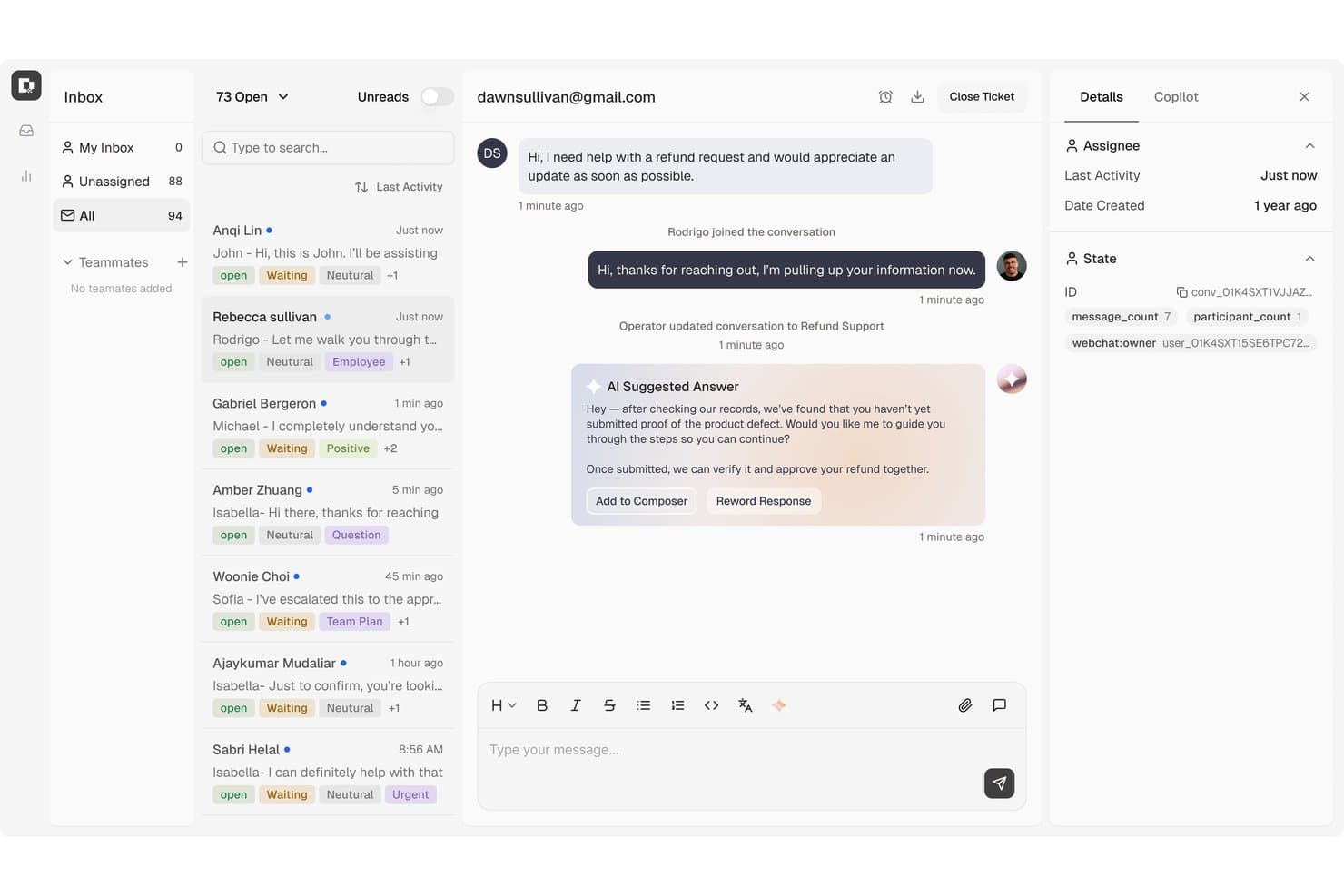
Botpress surfaces AI-suggested replies to speed up customer support. Botpress Desk is an AI helpdesk that handles support tickets across channels like email, webchat, WhatsApp, and Slack, with AI agents that can resolve L1–L3 issues, escalate to humans, and execute multi-step workflows like refunds and account lookups.
Who Is Botpress Best For?
Botpress Desk is a strong fit for support teams that need AI agents to do more than surface answers—think executing refunds, checking account status, and handling L1–L3 tickets end-to-end.
Why I Picked Botpress
I picked Botpress as one of the best because it's built around AI agents that don't just surface answers but actually complete the work, like processing a refund or pulling up account status mid-conversation. I love how its playbooks let you define multi-step support logic in plain language, so L1 through L3 tickets can be handled end-to-end without a human stepping in. Pair that with a knowledge-base copilot that drafts replies grounded in your help content, and agents spend far less time on tickets that practically resolve themselves.
Botpress Key Features
- Omnichannel conversation routing: Automatically routes incoming conversations to the right team using capacity-based assignment and business hours rules across email, webchat, WhatsApp, Slack, and more.
- AI-drafted ticket replies: Agents can generate AI-written draft responses directly in the ticket composer, grounded in your connected knowledge base.
- Knowledge-gap reports: Botpress surfaces gaps in your help content based on questions the AI couldn't confidently answer, so you know exactly what to document next.
- CSAT surveys: Localized customer satisfaction surveys are sent automatically after ticket resolution, with support for multiple languages and channel-aware delivery logic.
Botpress Integrations
Botpress Desk offers native integrations with Zendesk and Intercom, plus documented HubSpot ticket actions. Its Chat, Admin, Files, Tables, and Runtime APIs, along with an MCP server, support custom integrations.
Pros and Cons
Pros:
- Flexible flows support channel-based customer inquiries
- Answers can draw on trusted help content
- Agents can execute multi-step support workflows
Cons:
- Usage costs can be hard to forecast
- Complex conversations need extra prompt testing
Learn more about Botpress: Best with task-specific AI model fine-tuning
- Free demo available
- Pricing upon request
Visit WebsiteCustomer Rating:5/5
Cresta offers AI-generated answer suggestions and automated customer greetings to help agents resolve inquiries faster during live chat. Cresta is an AI customer support software platform designed for customer-facing teams that need advanced conversational AI, omnichannel agent assistance, ticket automation, AI knowledge management, and analytics tools.
Who Is Cresta Best For?
Large customer support teams and contact centers in highly regulated or complex industries looking for customizable AI-driven CX solutions.
Why I Picked Cresta
I picked Cresta as one of the best because I can fine-tune its AI models for highly specific workflows, process language, and customer intents. My team uses Cresta to automate nuanced chat and voice support scenarios where off-the-shelf bots usually fail.
Cresta Key Features
- Real-time agent coaching: Delivers on-screen prompts and guidance to agents while live with customers.
- Omnichannel support integration: Connects seamlessly to chat, voice, email, and major CRM platforms.
- Automated conversation summarization: Instantly generates post-interaction summaries for every customer conversation.
- AI-driven quality management: Monitors interactions for compliance and coaching opportunities using custom quality criteria.
Cresta Integrations
Cresta offers native integrations with Salesforce, Twilio, Zendesk, Genesys Cloud, and Amazon Connect. An API is available for custom integrations.
Pros and Cons
Pros:
- Offers automated conversation summaries and insights
- Provides real-time coaching during live conversations
- Enables model fine-tuning for niche workflows
Cons:
- Limited end-user-facing chatbot customization options
- Requires time and data for optimal setup
Learn more about Cresta: Best for B2B account-level churn risk signals
- 14-day free trial
- From $45/user/month (billed annually)
Visit WebsiteCustomer Rating:4.5/5
TeamSupport's AI assistant suggests actionable next steps for open tickets. TeamSupport is a B2B-focused AI customer support platform that combines ticket management, AI-powered agent assist, automated triage, live chat, and account-level customer health intelligence.
Who Is TeamSupport Best For?
TeamSupport is a strong fit for B2B SaaS support teams that need to monitor account health and catch churn risk before it reaches the renewal conversation.
Why I Picked TeamSupport
TeamSupport earns its spot on my shortlist because no other helpdesk tool I've evaluated gives B2B support teams this level of account-level churn visibility. I'm particularly drawn to the Customer Distress Index, which aggregates ticket volume, sentiment, escalation patterns, and resolution speed into a single account health score, flagging at-risk customers before renewal conversations begin. Paired with Revenue Shield's Value Decay signals, your team can intervene proactively rather than reactively.
TeamSupport Key Features
- AI Assist copilot: Drafts contextual ticket replies by pulling from conversation history, past resolved tickets, and knowledge base articles simultaneously.
- AI ticket triage: Automatically classifies, routes, and pre-populates new tickets with account context—including product, urgency, and customer tier—without agent input.
- Multilingual response generation: Translates agent replies on the fly, letting your team support global customers without switching tools or workflows.
- Answer Bot: A self-service chatbot grounded directly in your knowledge base, surfacing AI-matched answers to customer questions before a ticket is ever created.
TeamSupport Integrations
TeamSupport offers integrations with Salesforce, HubSpot, Microsoft Dynamics 365, Jira, Azure DevOps, Slack, and Microsoft Teams. It also provides a REST API and custom data mapping for custom integrations.
Pros and Cons
Pros:
- AI copilot suggests contextual replies and coaching
- Account-level ticketing and customer health insights
- Proactive churn-risk signals for B2B accounts
Cons:
- No automated QA scoring for conversations
- No native voice AI or call support
Learn more about TeamSupport: Best for analytics-driven call routing
- 14-day free trial
- From $25/user/month (billed annually)
Visit WebsiteCustomer Rating:4.4/5
CloudTalk’s dashboard shows AI-driven call history and contact management. CloudTalk is a cloud-based call center platform that combines AI Voice Agents, conversation intelligence, smart call routing, and CRM integrations to handle inbound and outbound customer support calls.
Who Is CloudTalk Best For?
CloudTalk is a strong fit for mid-sized support and sales teams that run high-volume phone operations and need AI-assisted call handling alongside deep CRM connectivity.
Why I Picked CloudTalk
I picked CloudTalk as one of the best because of how tightly its analytics layer connects to call routing decisions. The real-time analytics dashboard tracks live KPIs like wait times, abandonment rates, and agent occupancy, and that data feeds directly into AI Smart Queueing to adjust routing on the fly. I also find the skills-based and condition-based routing genuinely useful—calls get matched to agents based on intent and customer history, not just availability. Add sentiment analysis from the AI Conversation Intelligence add-on, and you get a clear picture of what's actually driving call outcomes.
CloudTalk Key Features
- AI Voice Agents: Deploy AI Receptionist and AI Specialist bots to handle inbound calls, answer FAQs, and resolve routine queries without a live agent.
- Visual call flow designer: Build and edit IVR menus and routing logic using a drag-and-drop interface.
- Call recording: Automatically record calls for quality assurance, compliance, and agent coaching.
- Live call monitoring: Supervisors can listen in, whisper to agents, or join active calls in real time.
CloudTalk Integrations
Integrations include Salesforce, Zendesk, HubSpot, Pipedrive, Zoho CRM, Gong, Zapier, Freshdesk, Help Scout, and Intercom.
Pros and Cons
Pros:
- Real-time sentiment analysis during calls
- International phone numbers across 160+ countries
- AI call summaries auto-sync to CRM
Cons:
- Call quality depends on internet speed
- No native video or team messaging
 Best for custom AI chatbot creation
- 7-day free trial + free plan + free demo available
- From $32/month (billed annually)
Visit WebsiteCustomer Rating:4.4/5
Chatbase launches no-code chatbots for instant support and lead capture. If you’re looking to add an AI chatbot to your website or messaging channels, Chatbase offers a no-code platform designed for quick deployment. It’s a strong option for small businesses, agencies, and teams looking to automate customer support without requiring extensive technical resources. Chatbase helps you create custom chatbots that answer questions, capture leads, and provide instant support around the clock.
Who Is Chatbase Best For?
Chatbase is a good fit for small businesses and agencies that want to deploy custom AI chatbots on their websites or messaging platforms without coding.
Why I Picked Chatbase
What drew me to Chatbase is its focus on letting you build custom AI chatbots for your website or messaging channels without any coding. This is especially useful if you want to tailor your chatbot’s responses to your business’s unique FAQs, product details, or support workflows. I like that you can upload documents or provide URLs to train the bot, so it gives accurate, context-aware answers to customer questions.
For teams that need a fast, flexible way to automate support and lead capture, Chatbase’s no-code builder and custom training options make it stand out.
Chatbase Key Features
In addition to its custom chatbot builder and training options, here are some other features that stand out:
- Multi-channel deployment: Deploy your chatbot on websites, WhatsApp, Facebook Messenger, and other messaging platforms.
- Conversation analytics: Track user interactions, common questions, and chatbot performance with built-in analytics tools.
- Customizable chat widget: Adjust the look, feel, and branding of the chat widget to match your website or app.
- Team collaboration: Invite team members to manage, edit, and monitor chatbots within a shared workspace.
Chatbase Integrations
Integrations include Zendesk, Notion, Slack, Stripe, Salesforce, Cal.com, Calendly, WhatsApp, Messenger, and more.
Pros and Cons
Pros:
- Team collaboration with shared workspaces
- Built-in analytics for conversation tracking
- Custom chatbot training with documents and URLs
Cons:
- No built-in ticketing or case management
- No live agent handoff functionality
Learn more about Chatbase: Best for AI chatbots and lead capture
- Free plan available; 7-day free trial
- From $24.17/month (billed annually)
Visit WebsiteCustomer Rating:4.7/5
Tidio combines chatbots and messaging to speed small-team support. If you’re looking for AI-powered live chat and helpdesk tools built for small businesses, Tidio is worth a look. It combines chatbots, automation, and multichannel messaging in one platform. Tidio helps teams respond faster and manage customer conversations without needing a large support staff.
Who Is Tidio Best For?
Tidio fits small businesses and ecommerce shops that want to automate customer support and manage live chat across multiple channels.
Why I Picked Tidio
What stands out to me about Tidio is how it brings AI-powered live chat and helpdesk features together in a way that’s accessible for small businesses. The platform’s AI chatbot can handle common customer questions instantly, while live chat lets agents step in for more complex issues.
I also like that Tidio supports multichannel messaging, so you can manage conversations from your website, Facebook Messenger, and Instagram in one place. This combination makes Tidio a strong fit for teams that want to automate support without losing the personal touch.
Tidio Key Features
Some other features in Tidio that are especially useful for AI customer support teams include:
- Ticketing system: Lets you organize, assign, and track customer support requests from multiple channels in one dashboard.
- Visitor monitoring: Shows real-time website visitor activity so you can proactively reach out or offer help.
- Canned responses: Allows agents to quickly insert pre-written replies for common questions to save time.
- Customizable chat widgets: Enable you to tailor the look, feel, and behavior of chat windows to match your brand and website needs.
Tidio Integrations
Integrations include Shopify, Zendesk, Salesforce, HubSpot, WordPress, Messenger, Instagram, WhatsApp, Intercom, and more.
Pros and Cons
Pros:
- Customizable chat widgets for brand consistency
- Real-time visitor tracking for proactive support
- AI chatbot handles repetitive customer questions
Cons:
- Limited multi-brand visibility
- Pricing scales quickly with usage
Learn more about Tidio: Best for shared inbox support teams
- 14-day free trial
- From $49/month
Visit WebsiteCustomer Rating:4.7/5
Groove organizes support in a shared inbox for quick, clear team responses daily. Groove offers a shared inbox and knowledge base platform designed for small teams that want to manage customer conversations efficiently. It’s a good fit for startups and growing businesses looking for a straightforward way to organize support requests and centralize customer information. With features that help teams collaborate and respond quickly, Groove addresses the challenge of keeping customer support organized without unnecessary complexity.
Who Is Groove Best For?
Groove is well-suited for small businesses and startups that need a simple, collaborative customer support solution.
Why I Picked Groove
I picked Groove because its shared inbox and knowledge base are purpose-built for small teams that need to manage customer conversations without extra complexity. The shared inbox lets multiple team members collaborate on support tickets, assign conversations, and leave internal notes, which helps prevent duplicate responses and missed messages.
I also appreciate how the knowledge base feature allows teams to create and update self-serve articles, reducing repetitive questions and freeing up agent time. For small businesses looking for an AI customer support solution that keeps things organized and accessible, Groove’s focus on simplicity and collaboration stands out.
Groove Key Features
Some other features that make Groove useful for AI customer support teams include:
- Automated workflows: Set up rules to automatically assign, tag, or prioritize incoming conversations based on custom criteria.
- Collision detection: Get real-time alerts when another team member is viewing or replying to the same conversation to avoid duplicate responses.
- Customer profiles: View a complete history of each customer’s interactions, including previous tickets and contact details, in one place.
- Reporting and analytics: Access built-in reports to track metrics like response times, ticket volume, and team performance.
Groove Integrations
Integrations include Slack, Stripe, Shopify, Recharge, Messenger, Instagram, MailChimp, Trello, Jira, HubSpot, and more.
Pros and Cons
Pros:
- Collision detection prevents duplicate agent replies
- Knowledge base reduces repetitive support questions
- Shared inbox supports multi-agent collaboration
Cons:
- Lacks sentiment analysis for incoming messages
- No built-in AI chatbot functionality
 Best for conversational customer messaging
- 14-day free trial and free demo available
- From $19/user/month (billed annually)
Visit WebsiteCustomer Rating:4.4/5
Intercom automates personalized support across chat, bots, and messaging. Intercom offers an AI-first customer service platform designed for teams that want to automate and personalize support at scale. It’s a strong choice for SaaS companies, ecommerce brands, and digital businesses looking to deliver proactive help through chat, bots, and messaging. Intercom helps reduce repetitive workload and ensures customers get fast, relevant answers across channels.
Who Is Intercom Best For?
Intercom fits SaaS and digital businesses that want to automate and personalize customer support through AI-driven chat and messaging.
Why I Picked Intercom
What stands out about Intercom is its AI-first approach to customer service, which goes beyond simple automation. The platform’s AI bots handle common questions, triage conversations, and proactively reach out to customers before issues escalate. I picked Intercom because its AI can suggest relevant help articles in real time and automate personalized responses across chat, email, and messaging. This makes it a strong fit for teams that want to deliver proactive, always-on support without overwhelming human agents.
Intercom Key Features
Some other Intercom features that support AI-driven customer support include:
- Inbox workspace: Agents manage all conversations from multiple channels in a single, unified inbox.
- Customizable workflows: Teams can design automated flows for routing, escalation, and follow-up based on customer data.
- Help center builder: Create and update a branded knowledge base with AI-powered article suggestions.
- Conversation ratings: Collect customer feedback directly within chat conversations to monitor support quality.
Intercom Integrations
Integrations include Salesforce, Slack, HubSpot, Jira Cloud, Stripe, Google Analytics, WhatsApp, Instagram, Statuspage, and more.
Pros and Cons
Pros:
- Proactive messaging reduces repetitive inquiries
- Multilingual support for global customer bases
- AI bots handle high chat volumes automatically
Cons:
- Occasional delays in AI-generated responses
- Limited AI customization for niche workflows
 10Best for unified customer conversation management
Kustomer
- Free demo available
- Pricing upon request
Visit WebsiteCustomer Rating:4.5/5
Kustomer centralizes support and personalizes service with workflow automation. Kustomer is a customer service platform designed for teams that want to manage conversations across channels in a single workspace. It’s a strong fit for businesses that prioritize personalized support and need a unified view of each customer’s history. If your team handles high volumes of inquiries and values automation, Kustomer can help simplify complex support workflows.
Who Is Kustomer Best For?
Kustomer suits mid-sized to large customer service teams that need unified, AI-driven support across multiple channels.
Why I Picked Kustomer
What drew me to Kustomer is its unified timeline, which brings every customer interaction—across chat, email, SMS, and social—into a single, searchable thread. This approach makes it much easier for support teams to see the full context of each customer’s journey and respond with relevant, personalized help.
I also appreciate how Kustomer’s AI tools automate routine tasks and surface suggested responses right in the agent workspace. These features make Kustomer a strong choice for teams that want to deliver fast, context-aware support without toggling between multiple systems.
Kustomer Key Features
Some other features that make Kustomer stand out for AI customer support teams include:
- AI-powered intent detection: Automatically identifies customer intent to route conversations and suggest next steps.
- Custom workflow automation: Lets you build automated processes for repetitive tasks and escalations.
- Integrated knowledge base: Provides agents and customers with searchable, AI-suggested help articles during conversations.
- Real-time reporting and analytics: Tracks team performance, conversation trends, and customer satisfaction across all channels.
Kustomer Integrations
Integrations include Shopify, Salesforce, Slack, Facebook, Instagram, WhatsApp, Gmail, Twilio, TikTok Shop, and more.
Pros and Cons
Pros:
- Integrated knowledge base surfaces relevant articles
- Intent detection routes conversations automatically
- The unified timeline shows all customer interactions
Cons:
- Automation is hard to debug at scale
- Timeline UI slows simple ticket views
Learn more about Kustomer:
Annen AI-programvare for kundestøtte
Her er noen flere alternativer innen AI-programvare for kundestøtte som ikke kom med på kortlisten min, men som likevel er verdt å undersøke:
- 11CoSupport AIBest for AI-assisted support responses
- 12ZendeskBest for AI-powered omnichannel support
- 13FreshdeskBest for automated support workflows
- 14GenesysBest for AI-driven customer engagement
- 15TalkdeskBest for AI contact center solutions
- 16AdaBest for no-code AI chatbots
- 17AiseraBest for generative AI support automation
- 18QuidgetBest for voice-based chatbot support
- 19HiverBest for Gmail-based support teams
- 20Agentforce Service (formerly Service Cloud)Best for AI-driven service management
- 21HappyFoxBest for omnichannel support automation
- 22ProProfs Help DeskBest for AI ticketing and knowledge base
- 23GorgiasBest for ecommerce helpdesk automation
- 24Observe.AIBest for conversation intelligence insights
- 25ServiceNowBest for enterprise service automation
- 26CrescendoBest for AI voice and chat support
- 27Kore.aiBest for enterprise conversational AI
- 28Zoho DeskBest for AI-powered ticket management
- 29NiCE Cognigy.AIBest for low-code AI agent building
- 30Level AIBest for support, QA, and agent coaching
How I Evaluate AI Customer Support Software
Every tool here has to go beyond AI branding—I look for platforms where AI actually deflects tickets, drafts replies, and flags emerging issues. I split my evaluation into core functionality a tool needs to qualify, and the differentiating factors that set one vendor apart from another.
Core Functionality (Table Stakes For This List)
When I'm selecting tools for my list, I rank each one on a scale from 0 (does not offer the functionality) to 5 (excels in this area) for each core functionality listed below. Then, I calculate the tool's total score into a percentage. Each tool needs to achieve a minimum total score of 75% to be considered for inclusion.
- AI Chatbot or Virtual Agent: I evaluate whether the AI can hold real multi-turn conversations and resolve common requests like order status checks or password resets autonomously.
- Agent Assist Copilot: Real-time draft suggestions, tone adjustments, and context-aware rewrites within the agent workspace are what I look for here.
- Intelligent Ticket Automation: The platform should use AI to detect intent and route tickets by topic, urgency, and required skill—not just keyword-matching rules.
- AI-Powered Knowledge Management: I check whether AI responses are grounded in connected help center content and whether the tool can flag knowledge gaps or draft new articles.
- Conversation Summarization & Insights: Auto-generated summaries after each interaction save agents real time, and I look for sentiment tagging and trend surfacing on top of that.
- Omnichannel Support Integration: A tool should connect AI capabilities across email, chat, social, and messaging—or plug into platforms like Zendesk, Salesforce, or Freshdesk.
Once I have a list of tools that meet this criteria, I consider what sets each platform apart.
Differentiating Factors (What Sets Vendors Apart)
Here's how I compare and contrast different vendors:
Standout Features
Agentic AI that goes beyond answering questions is a major differentiator. I look for tools where the AI can execute tasks like processing a refund or updating a shipping address without handing off to a human. A no-code bot builder also matters—CX teams need to adjust AI flows without waiting on engineering. I evaluate AI-powered QA scoring too, since it lets leaders review 100% of conversations instead of sampling a handful manually each week.
Beyond Features
Pricing structure is worth close attention—some vendors charge per resolution, others per seat or per conversation, and the math changes fast as AI deflection scales. I also evaluate data security posture, checking for SOC 2 Type II certification and clear policies on whether customer data is used to train underlying LLMs. AI governance rounds out my review: I look for confidence scoring, hallucination guardrails, and dashboards that report on actual resolution and deflection rates so CX leaders can prove ROI.
Slik velger du AI-programvare for kundestøtte
Det er lett å gå seg vill i lange funksjonslister og komplekse prismodeller. For å hjelpe deg med å holde fokus mens du går gjennom den unike prosessen med å velge programvare, får du her en sjekkliste over faktorer du bør ha i bakhodet:
| Faktor | Hva du bør vurdere |
|---|---|
| FaktorSkalerbarhet | Hva du bør vurdereVil programvaren håndtere dagens og det forventede støttevolumet ditt etter hvert som virksomheten vokser? Vurder brukergrenser, samtalegrenser og prishopp. |
| FaktorIntegrasjoner | Hva du bør vurdereKan verktøyet kobles direkte til CRM-systemet, brukerstøttesystemet eller meldingsplattformene dine? Kontroller at det er kompatibelt med den eksisterende teknologiplattformen din. |
| FaktorTilpasningsmuligheter | Hva du bør vurdereKan du tilpasse arbeidsflyter, merkevareprofil og svar slik at de passer til prosessene og kundenes forventninger? Se etter fleksible konfigurasjonsmuligheter. |
| FaktorBrukervennlighet | Hva du bør vurdereVil teamet ditt kunne administrere og oppdatere systemet uten omfattende opplæring eller teknisk støtte? Test grensesnittet og administrasjonskontrollene. |
| FaktorImplementering og innføring | Hva du bør vurdereHvor lang tid tar det å komme i gang? Spør om støtte ved migrering, ressurser for innføring og vanlig tid til de første resultatene. |
| FaktorKostnad | Hva du bør vurdereEr prisnivåene tydelige og forutsigbare etter hvert som bruken øker? Vær oppmerksom på skjulte gebyrer, kostnader ved overskridelser eller nødvendige tillegg. |
| FaktorSikkerhetstiltak | Hva du bør vurdereOppfyller programvaren standardene dine for personvern og datasikkerhet? Gå gjennom kryptering, tilgangskontroller og samsvarssertifiseringer. |
| FaktorTilgjengelig kundestøtte | Hva du bør vurdereHvilke støttekanaler og åpningstider tilbys? Vurder om du trenger hjelp døgnet rundt, dedikert kundeansvar eller støtte på flere språk. |
Hva er AI-programvare for kundestøtte?
Programvare for AI-kundestøtte er en type kundeserviceprogramvare som bruker kunstig intelligens og maskinlæring til å automatisere og forbedre kundestøtteinteraksjoner på tvers av digitale kanaler. Disse verktøyene kan svare på vanlige spørsmål, rute henvendelser og tilby personlig tilpasset støtte gjennom en AI-assistent eller AI-medpilot, slik at team kan håndtere forespørsler mer effektivt.
Ved å muliggjøre avlasting av supportsaker, forbedre kvalitetssikringen og støtte tjenestearbeidsflyter fra start til slutt, hjelper programvare for AI-kundestøtte virksomheter med å levere raskere og mer ensartede opplevelser og forbedre viktige måltall som CSAT. Mange plattformer fremhever også kundehistorier og casestudier for å vise hvordan team forbedrer effektiviteten samtidig som de frigjør menneskelige kundebehandlere til mer komplekse problemer.
Funksjoner
Når du velger programvare for AI-kundestøtte, bør du se etter følgende viktige funksjoner:
- Automatiserte chatboter: KI-drevne boter som håndterer rutinemessige kundespørsmål og gir umiddelbare svar på tvers av chat-, meldings- eller nettkanaler.
- Naturlig språkbehandling: Teknologi som gjør det mulig for programvaren å forstå, tolke og svare på kundehenvendelser på et samtalebasert språk.
- Støtte for flere kanaler: Muligheten til å håndtere kundeinteraksjoner på tvers av ulike plattformer, som nettchat, e-post, SMS og sosiale medier, fra ett enkelt grensesnitt.
- Ruting av supportsaker: Automatisk tildeling av kundehenvendelser til riktig kundebehandler eller avdeling basert på emne, hvor mye det haster eller kundeprofil.
- Integrasjon med kunnskapsbase: Sømløs tilkobling til interne eller eksterne kunnskapsressurser, slik at AI-en kan hente nøyaktige svar fra oppdatert dokumentasjon.
- Analyse og rapportering: Verktøy som sporer samtaletrender, svartider, kundetilfredshet og andre måltall for å hjelpe team med å overvåke og forbedre kvaliteten på kundestøtten.
- Tilpassbare arbeidsflyter: Muligheter for å utforme og justere automatiserte prosesser, eskaleringsforløp og svarmaler slik at de passer organisasjonens behov.
- Overføring til kundebehandler: Sømløs overføring av samtaler fra AI til menneskelige kundebehandlere når problemer krever personlig oppfølging eller avansert feilsøking.
- Sentimentanalyse: AI-drevet identifisering av kundenes følelser og intensjoner, slik at team kan prioritere hastehenvendelser eller sensitive interaksjoner.
- Sikkerhets- og samsvarskontroller: Funksjoner som beskytter kundedata, administrerer brukertillatelser og støtter samsvar med personvernforskrifter.
Fordeler
Implementering av programvare for AI-kundestøtte gir flere fordeler for teamet og virksomheten. Her er noen av fordelene du kan se frem til:
- Raskere svartider: Automatiserte chatboter og direktemeldinger sikrer at kundene får svar uten å måtte vente i kø.
- Tilgjengelighet døgnet rundt: KI-drevne systemer kan håndtere henvendelser hele døgnet og støtte kunder utenfor vanlig arbeidstid.
- Ensartet kundestøtte: Automatiserte arbeidsflyter og integrasjon med kunnskapsbaser bidrar til å levere nøyaktige og standardiserte svar hver gang.
- Redusert arbeidsbelastning for kundebehandlere: Ved å håndtere gjentakende spørsmål og enkle oppgaver frigjør AI menneskelige kundebehandlere, slik at de kan fokusere på komplekse eller sensitive problemer.
- Handlingsrettet innsikt: Innebygd analyse og sentimentanalyse gir data om kundenes behov, tilfredshet og trender innen kundestøtte.
- Skalerbarhet: AI-løsninger kan håndtere store mengder interaksjoner uten behov for ekstra ansatte eller ressurser.
- Forbedret kundetilfredshet: Personlig tilpassede, tidsriktige og pålitelige kundestøtteopplevelser bidrar til å bygge tillit og lojalitet hos kundene.
Kostnader og priser
Valg av programvare for AI-kundestøtte krever en forståelse av de ulike prismodellene og abonnementene som er tilgjengelige. Kostnadene varierer basert på funksjoner, teamstørrelse, tillegg og mer. Tabellen nedenfor oppsummerer vanlige abonnementer, gjennomsnittsprisene deres og typiske funksjoner som er inkludert i programvareløsninger for AI-kundestøtte:
Sammenligningstabell for abonnementer for programvare for AI-kundestøtte
| Plantype | Gjennomsnittspris | Vanlige funksjoner |
|---|---|---|
| PlantypeGratisabonnement | Gjennomsnittspris$0 | Vanlige funksjonerGrunnleggende chatbot-funksjonalitet, begrenset antall samtaler per måned, støtte for én kanal og grunnleggende analyse. |
| PlantypePersonlig abonnement | Gjennomsnittspris$10-$30/bruker/måned | Vanlige funksjonerStøtte for flere kanaler, enkle integrasjoner, grunnleggende tilpasning og e-poststøtte. |
| PlantypeBedriftsabonnement | Gjennomsnittspris$30-$80/bruker/måned | Vanlige funksjonerAvanserte integrasjoner, analyse og rapportering, ruting av saker, teamsamarbeid og arbeidsflytautomatisering. |
| PlantypeForetaksabonnement | Gjennomsnittspris$80-$200+/bruker/måned | Vanlige funksjonerTilpassede SLA-er, dedikert kundeansvar, avansert sikkerhet, funksjoner for overholdelse av regelverk og prioritert støtte. |
Vanlige spørsmål om AI-programvare for kundestøtte
Her er noen svar på vanlige spørsmål om AI-programvare for kundestøtte:
Kan AI-programvare for kundestøtte erstatte menneskelige medarbeidere fullstendig?
Nei, AI-programvare for kundestøtte kan ikke erstatte menneskelige medarbeidere fullstendig. Selv om den håndterer rutinespørsmål og oppgaver, krever komplekse eller sensitive problemer fortsatt menneskelig dømmekraft og empati. De fleste bedrifter bruker AI til å støtte medarbeidere, ikke til å erstatte dem.
Hvordan integreres AI-programvare for kundestøtte med eksisterende systemer?
Det meste av AI-programvare for kundestøtte kobles til populære CRM-systemer, brukerstøttesystemer og meldingsplattformer gjennom innebygde integrasjoner eller API-er. Før du velger et verktøy, bør du kontrollere kompatibiliteten med de nåværende systemene dine for å unngå datasiloer og manuelle omveier.
Er AI-programvare for kundestøtte sikker ved håndtering av sensitive data?
Ja, anerkjent AI-programvare for kundestøtte inneholder sikkerhetstiltak som kryptering, tilgangskontroller og sertifiseringer for overholdelse av regelverk. Gå alltid gjennom leverandørens sikkerhetsdokumentasjon, og sørg for at praksisen deres samsvarer med organisasjonens krav til personvern og datasikkerhet.
Hvor lang tid tar det å implementere AI-programvare for kundestøtte?
Implementeringstiden varierer etter verktøy og kompleksitet. Noen plattformer tilbyr rask konfigurering med maler og veiledet oppstart, mens andre kan kreve flere uker til integrasjon og opplæring. Be leverandørene om typiske tidsrammer og tilgjengelige ressurser for oppstart.
Hvilke typer bedrifter har størst nytte av AI-programvare for kundestøtte?
Bedrifter med store mengder kundehenvendelser, repetitive støtteoppgaver eller et globalt kundegrunnlag har størst nytte av dette. AI er særlig nyttig innen netthandel, SaaS, telekom og finansielle tjenester, men kan skape verdi i alle bransjer med digitale kundeinteraksjoner.