

Groove Review: Pros, Cons, Features and Pricing
Groove stands out for small to medium-sized businesses with its user-friendly design and affordability, making it a top choice for teams looking to boost productivity.

We review tools independently, and commissions help fund our testing. See our transparency policy, our methodology, or suggest a tool.
Groove is a customer service SaaS platform and ticketing system built to help support teams manage their work in a simpler, more intuitive way.
While it may not be the most feature-heavy solution on the market, it delivers a strong balance of usability, essential tools, and solid value, making it especially appealing to small and mid-sized businesses. With customizable workflows, a clean interface, and responsive support, Groove helps teams stay organized without overwhelming them with complexity. However, it does come with limitations, particularly in advanced reporting and enterprise-level customization.
Below, we break down Groove’s strengths, weaknesses, and overall fit to help you determine whether it’s the right customer service platform for your team.
Groove HQ Evaluation Summary

4.6/5
- From $24/user/month (billed annually)
- 30-day free trial
Why Trust Our Software Recommendations
6,700+
Reviews
20
Industry experts
16+
Evaluation factors
14
Years
Our team has been testing and reviewing software since 2012. As CX leaders ourselves, we know how difficult—and important—it is to choose the right software.
For this guide, we evaluated tools using hands-on testing and independent research, scoring tools using our selection criteria.
Our reviews reflect our human editorial judgment, not a sales pitch.
 Gui DrusinaCreative Director
 Tim FisherVP of AI
Groove HQ Overview
In my opinion, Groove offers a solid choice for customer service teams looking for reliable help desk software. Its core features meet the essential needs, while standout features give it an edge over some competitors. The platform is relatively easy to use, making it accessible for teams without extensive technical expertise. Onboarding is straightforward, with resources to help your team get started. Customer support is responsive, although the lack of phone support might be a drawback for some. Groove's pricing is competitive, offering good value for its features. It suits small to medium-sized businesses seeking an efficient tool without the complexities of more advanced systems. If your team values ease of use and solid support, groove could be a worthy addition to your customer service toolkit.
Pros
- Responsive customer support helps you resolve issues fast.
- The interface is intuitive, making it easy for your team to learn quickly.
- Responsive customer support helps you resolve issues fast.
Cons
- You might find the reporting features limited for in-depth analysis.
- Some users have noted occasional glitches that need attention.
- Advanced features and templates may require a learning curve for your team.
Is Groove HQ Right For Your Needs?
Who Would be a Good Fit for Groove HQ?
Groove is most likely to be a good fit if you're part of a small to medium-sized business. It's designed for teams that require efficient ticketing and knowledge management. Groove’s integrations with tools like Shopify, Slack, and Salesforce make it even more useful for teams that want to keep customer conversations connected across different channels. The platform’s user-friendly interface and robust reporting tools also make it a practical choice for improving your support operations.
- Small BusinessesGroove's pricing and features are ideal for small businesses needing a cost-effective customer support solution.
- E-commerceWith integrations like Shopify, Groove is perfect for handling customer inquiries efficiently in online retail.
- Customer Support TeamsGroove’s ticketing and omnichannel inboxes streamline communication, making it an excellent fit for customer support teams.
- Remote WorkforcesGroove's cloud-based setup and mobile app support remote work, allowing your team to provide support on the go.
- Tech StartupsFor startups needing scalable support, groove's API and integration capabilities provide the flexibility needed to work with different tech stacks.
- Marketing AgenciesGroove helps account managers manage client communications effectively with its collaborative platform and internal tools.
Who Would be a Bad Fit for Groove HQ?
If you're a large enterprise with complex customer service needs, Groove might not be the best fit. Its feature set is more suited to small to medium-sized businesses that don't require extensive customization or integrations. If your operations demand advanced CRM reporting, deep integration with other enterprise systems, or highly customized workflows, Groove's offerings might fall short. It's designed with simplicity and ease of use in mind, which might not align with the more complex demands of larger organizations.
- Large EnterprisesGroove lacks the advanced features and integrations that large enterprises often need for complex customer service operations.
- Highly Regulated IndustriesIf you're in a highly regulated industry, Groove's compliance features might not meet your stringent requirements.
- Custom Workflow NeedsFor teams needing heavily customized workflows, Groove's capabilities might not be flexible enough to accommodate your specific processes.
- Advanced Reporting RequirementsIf your team relies on detailed analytics and reporting, Groove's basic reporting tools may not be sufficient.
- Multi-Departmental CoordinationFor organizations needing extensive coordination across multiple departments, Groove may not provide the necessary collaborative tools to support those workflows.
- Tech-Savvy TeamsIf your team is highly tech-savvy and requires cutting-edge technology, Groove's simple interface might feel limiting.
How We Test & Score Tools
We’ve spent years building, refining, and improving our software testing and scoring system. The rubric is designed to capture the nuances of software selection and what makes a tool effective, focusing on critical aspects of the decision-making process.
Below, you can see exactly how our testing and scoring works across seven criteria. It allows us to provide an unbiased evaluation of the software based on core functionality, standout features, ease of use, onboarding, customer support, integrations, customer reviews, and value for money.
Core Functionality (25% of final scoring)
The starting point of our evaluation is always the core functionality of the tool. Does it have the basic features and functions that a user would expect to see? Are any of those core features locked to higher-tiered pricing plans? At its core, we expect a tool to stand up against the baseline capabilities of its competitors.
Standout Features (25% of final scoring)
Next, we evaluate uncommon standout features that go above and beyond the core functionality typically found in tools of its kind. A high score reflects specialized or unique features that make the product faster, more efficient, or offer additional value to the user.
We also evaluate how easy it is to integrate with other tools typically found in the tech stack to expand the functionality and utility of the software. Tools offering plentiful native integrations, 3rd party connections, and API access to build custom integrations score best.
Ease of Use (10% of final scoring)
We consider how quick and easy it is to execute the tasks defined in the core functionality using the tool. High scoring software is well designed, intuitive to use, offers mobile apps, provides templates, and makes relatively complex tasks seem simple.
Onboarding (10% of final scoring)
We know how important rapid team adoption is for a new platform, so we evaluate how easy it is to learn and use a tool with minimal training. We evaluate how quickly a team member can get set up and start using the tool with no experience. High scoring solutions indicate little or no support is required.
Customer Support (10% of final scoring)
We review how quick and easy it is to get unstuck and find help by phone, live chat, or knowledge base. Tools and companies that provide real-time support score best, while chatbots score worst.
Customer Reviews (10% of final scoring)
Beyond our own testing and evaluation, we consider the net promoter score from current and past customers. We review their likelihood, given the option, to choose the tool again for the core functionality. A high scoring software reflects a high net promoter score from current or past customers.
Value for Money (10% of final scoring)
Lastly, in consideration of all the other criteria, we review the average price of entry level plans against the core features and consider the value of the other evaluation criteria. Software that delivers more, for less, will score higher.
Core Features
Ticket Management: Groove's ticket management system lets you track and manage customer inquiries efficiently. You can categorize and prioritize support requests, making sure nothing falls through the cracks. This helps your team respond faster, which improves overall customer satisfaction.
Knowledge Base: Create a self-service portal with Groove's knowledge base, where customers can find answers to common questions. This reduces your team's workload and empowers customers to solve issues on their own.
Customer Support Dashboard: The dashboard gives you a real-time view of your support operations. Monitor key metrics and track team performance to maintain high-quality customer service.
Email Integration: Groove integrates with your email to streamline communication. It allows you to manage customer interactions from a single platform, enhancing your team’s productivity.
Automation Rules: Set up automation rules to handle repetitive tasks. This feature saves your team time and reduces human error by automating ticket assignments and responses.
Reporting and Analytics: Gain insights into your customer service operations with detailed reports. Use analytics to identify trends and optimize service quality.

Standout Features
Customizable Ticketing System: Groove's ticketing system is highly customizable, allowing you to adapt it to your specific workflow. This flexibility enables you to make sure the platform fits into your existing processes, enhancing efficiency.
Shared Inbox: Groove's shared inbox feature promotes collaboration by allowing multiple team members to manage customer conversations and make internal notes. This helps keep everyone on the same page and improves response times.
.png&w=3840&q=75)
Ease of Use
Groove's user interface is straightforward, making it easy for your team to get started. It doesn’t require extensive training, and its clean design helps reduce the learning curve. Users appreciate how simple it is to navigate between features, which saves time and minimizes frustration. Groove’s intuitive layout makes it a solid choice for managing customer interactions, helping you and your team focus on delivering excellent service rather than wrestling with complicated software.

Onboarding
Groove's onboarding is straightforward, making it easy for your team to get started quickly. Users appreciate the interactive guides and tutorials that help you understand key features without overwhelming you. The support resources, like video guides and a dedicated help center, offer valuable assistance if any questions come up. This approach means you and your team can start seeing value from the software relatively fast, helping you focus on improving customer service immediately.
Customer Support
Groove's customer support is rated average by users. You can expect prompt responses through chat, but there’s no phone support, which some might find disappointing. The support team provides clear instructions and screenshots to help you troubleshoot issues. While the chat support is generally appreciated, the lack of diverse support channels means it might not meet all your needs compared to other help desk solutions, such as Zendesk, Freshdesk, or Help Scout.
Integrations
Groove integrates with Slack, Stripe, Shopify, Recharge, Messenger, Instagram, MailChimp, Trello, Jira, Hubspot, Zapier, and Salesforce.
Groove also offers an API for building custom integrations and connects with third-party integration tools.

Value for Money
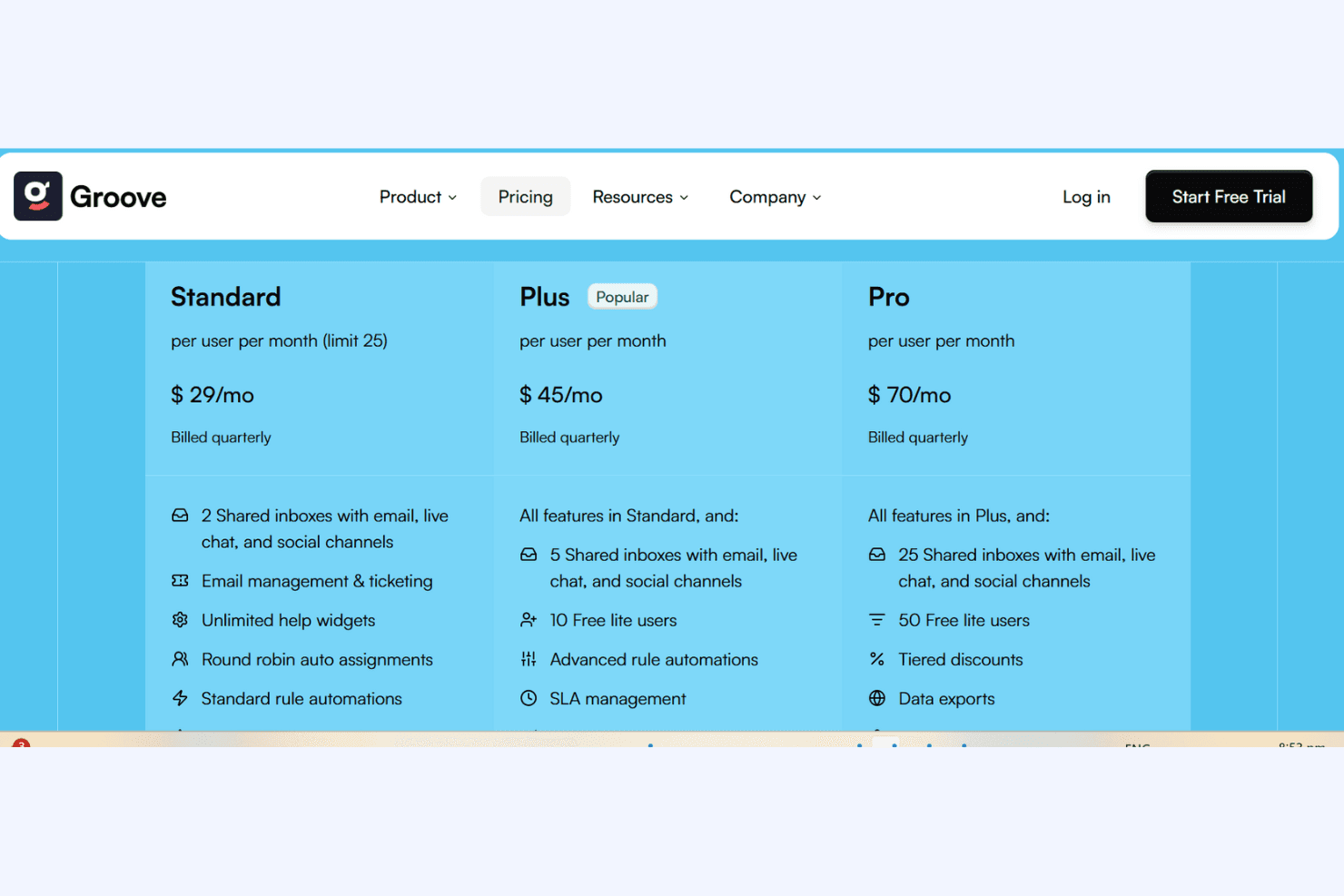
Groove offers competitive value for money with its flexible pricing structure. Users appreciate the affordability of its plans, which align well with the features provided. The pricing tiers cater to different business needs, so you only pay for what your team requires. A free trial is also available, allowing teams to evaluate the software before committing.
- Standard: $29/month, offering basic features for small teams.
- Plus: $45/month, offering more advanced integrations and analytics.
- Pro: $70/month, a full suite of features for larger teams.
Groove HQ Specs
- API: Yes
- Calendar Management: No
- Chat: Yes
- Contact Management: Yes
- Contact Sharing: No
- Customer Management: Yes
- Data Export: Yes
- Data Import: No
- Email Integration: Yes
- External Integrations: Yes
- Google Apps Integration: No
- History/Version Control: Yes
- Marketing Automation: Yes
- Multi-User: Yes
- Notifications: Yes
- Scheduling: No
- Supplier Management: No
Groove HQ FAQs
Groove HQ Company Overview & History
Groove (commonly referred to as Groove HQ) was founded in 2013 by Alex Turnbull. The platform’s primary goal was to build a help-desk tool and support platform that was simple, user-friendly, and free from the unnecessary complexity found in many enterprise support systems.
From the beginning, the company positioned itself around helping teams manage customer conversations in a streamlined way, particularly for businesses that found large systems over-engineered for their needs.
Groove tends to appeal to small-to-medium teams rather than large enterprises, and today, the company serves an estimated 6,000 businesses worldwide.
Groove Major Milestones
2013: Founded by Alex Turnbull
2024: Groove announced strategic investment from the WPBeginner Growth Fund.