

VoIP-apper for softtelefoner lar deg foreta og motta forretningssamtaler direkte fra datamaskinen eller mobilenheten din ved hjelp av et hodesett, slik at enhver skjerm kan fungere som bedriftens telefonlinje. For ledere innen kundestøtte og kundeopplevelse betyr dette fleksibel og kostnadseffektiv kommunikasjon uten at du må håndtere maskinvare eller kompliserte oppsett.
Hvis du leter etter de beste løsningene for å forbedre kundesamtalene, holde teamet tilkoblet og tilpasse deg etter hvert som virksomheten utvikler seg, hjelper denne veiledningen deg med å sammenligne de beste alternativene og velge riktig verktøy med trygghet.
Why Trust Our Software Recommendations
6,700+
Reviews
20
Industry experts
16+
Evaluation factors
14
Years
Our team has been testing and reviewing software since 2012. As CX leaders ourselves, we know how difficult—and important—it is to choose the right software.
For this guide, we evaluated tools using hands-on testing and independent research, scoring tools using our selection criteria.
Our reviews reflect our human editorial judgment, not a sales pitch.
 Gui DrusinaCreative Director
 Tim FisherVP of AI
Sammenligningstabell for VoIP-apper for softtelefoner
| Tool | Best For | Trial Info | Price | ||
|---|---|---|---|---|---|
| 1 | Best for international calling analytics | 14-day free trial | From $25/user/month (billed annually) | Website | |
| 2 | Best for global virtual phone numbers | 10-day free trial | From $18/user/month (billed annually) | Website | |
| 3 | Best for Freshworks-based call routing | 14-day free trial | From $15/user/month (billed annually) | Website | |
| 4 | Best for Workspace-based business calling | Free plan available | From $10/user/month | Website | |
| 5 | Best for customer-facing team communications | Free demo available | From $15/user/month (billed annually) | Website | |
| 6 | Best for AI-powered call notes | 14-day free trial + free demo available | Pricing upon request | Website | |
| 7 | Best for multi-device business communications | 14-day free trial | From £18/user/month | Website | |
| 8 | Best for sales dialers and SMS workflows | 14-day free trial | From $29/user/month (billed annually) | Website | |
| 9 | Best for small-business calling and desk phones | Not available | From $19.95/user/month | Website | |
| 10 | Best for Zoom-based business calling | Free demo available | From $10.50/user/month | Website |


Anmeldelser av VoIP-apper for softtelefoner
Nedenfor finner du mine detaljerte sammendrag av de beste VoIP-appene for softtelefoner som kom med på kortlisten min. Anmeldelsene mine gir et detaljert innblikk i funksjonene, integrasjonene og de beste bruksområdene for hver plattform, slik at du kan finne den beste for deg.
 Best for international calling analytics
- 14-day free trial
- From $25/user/month (billed annually)
Visit WebsiteCustomer Rating:4.4/5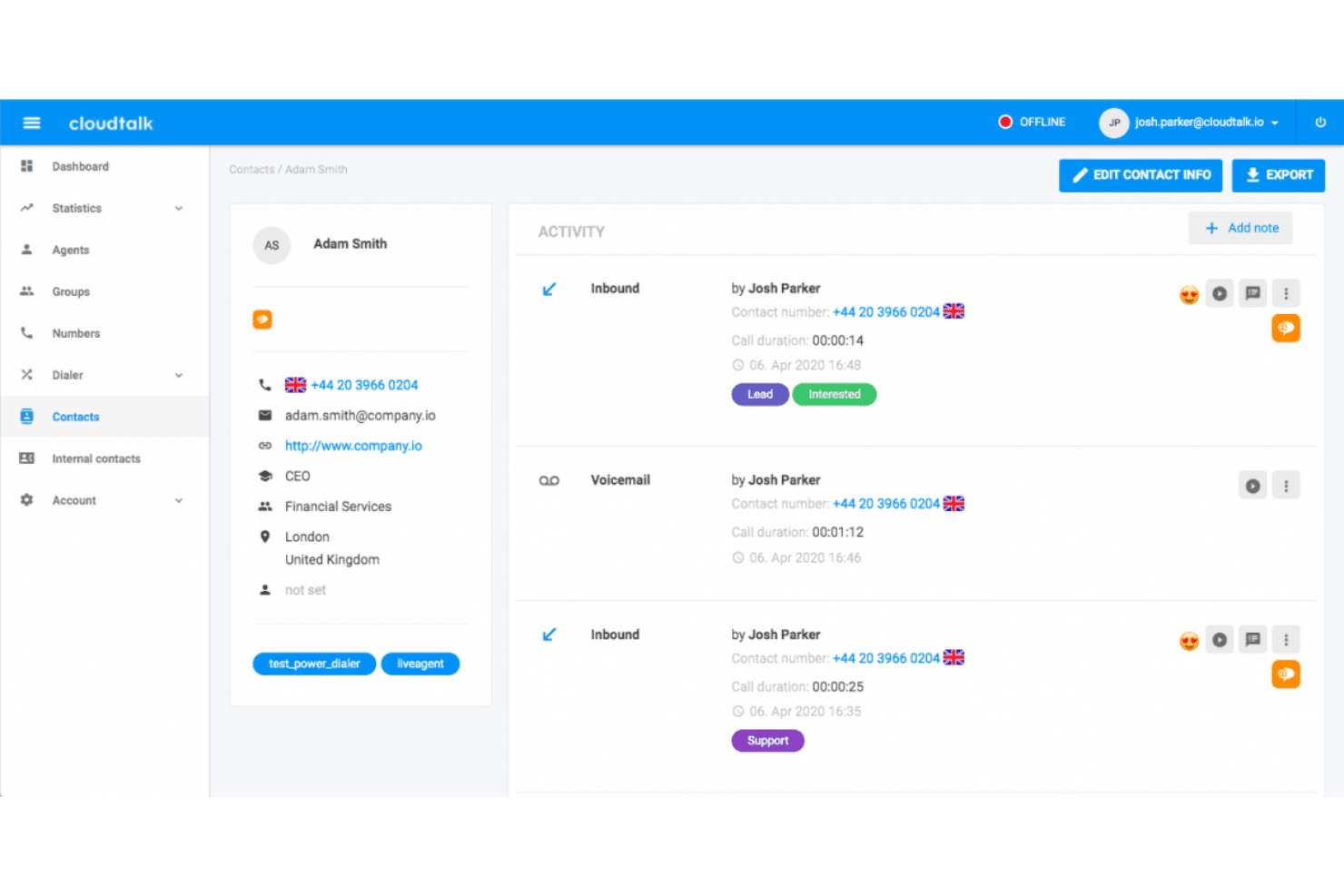
CloudTalk displays a detailed contact profile with call activity history, tags, voicemail logs, and agent interaction records. CloudTalk is a cloud-based VoIP softphone platform combining AI-powered dialers, global calling across 160+ countries, CRM integrations, real-time call analytics, and multi-channel messaging in a single interface.
Who Is CloudTalk Best For?
CloudTalk suits growing sales and support teams that manage high call volumes across multiple countries and need detailed agent performance visibility.
Why I Picked CloudTalk
I've included CloudTalk in my top picks because its real-time analytics go deeper than most softphones when calls span multiple countries. The custom dashboards break down call volume, duration, and agent activity by region, queue, or time period, all without manual exports. The AI Conversation Intelligence layer adds sentiment scoring and searchable transcripts on top, so I can review how specific agents are performing across different international markets.
CloudTalk Key Features
- Smart dialer: Queue up multiple calls from lists and contacts to automate outbound dialing workflows.
- Skill-based routing: Assign incoming calls to available agents based on expertise or language criteria.
- IVR call flow designer: Build multi-level interactive menus with drag-and-drop controls for self-service or routing.
- Softphone apps for all devices: Access the softphone via Mac, Windows, browser, iOS, and Android without extra hardware.
CloudTalk Integrations
CloudTalk offers 100+ native integrations, including Salesforce, HubSpot, Zendesk, Pipedrive, Intercom, Zoho CRM, Freshdesk, Gorgias, Slack, Microsoft Teams, and Zapier. An API is available for custom integrations.
Pros and Cons
Pros:
- Strong uptime with global carrier redundancy
- AI transcription available on all paid plans
- Deep analytics across international call queues
Cons:
- Call quality drops on poor network connections
- Mobile app less reliable than desktop version
 Best for global virtual phone numbers
- 10-day free trial
- From $18/user/month (billed annually)
Visit WebsiteCustomer Rating:4.4/5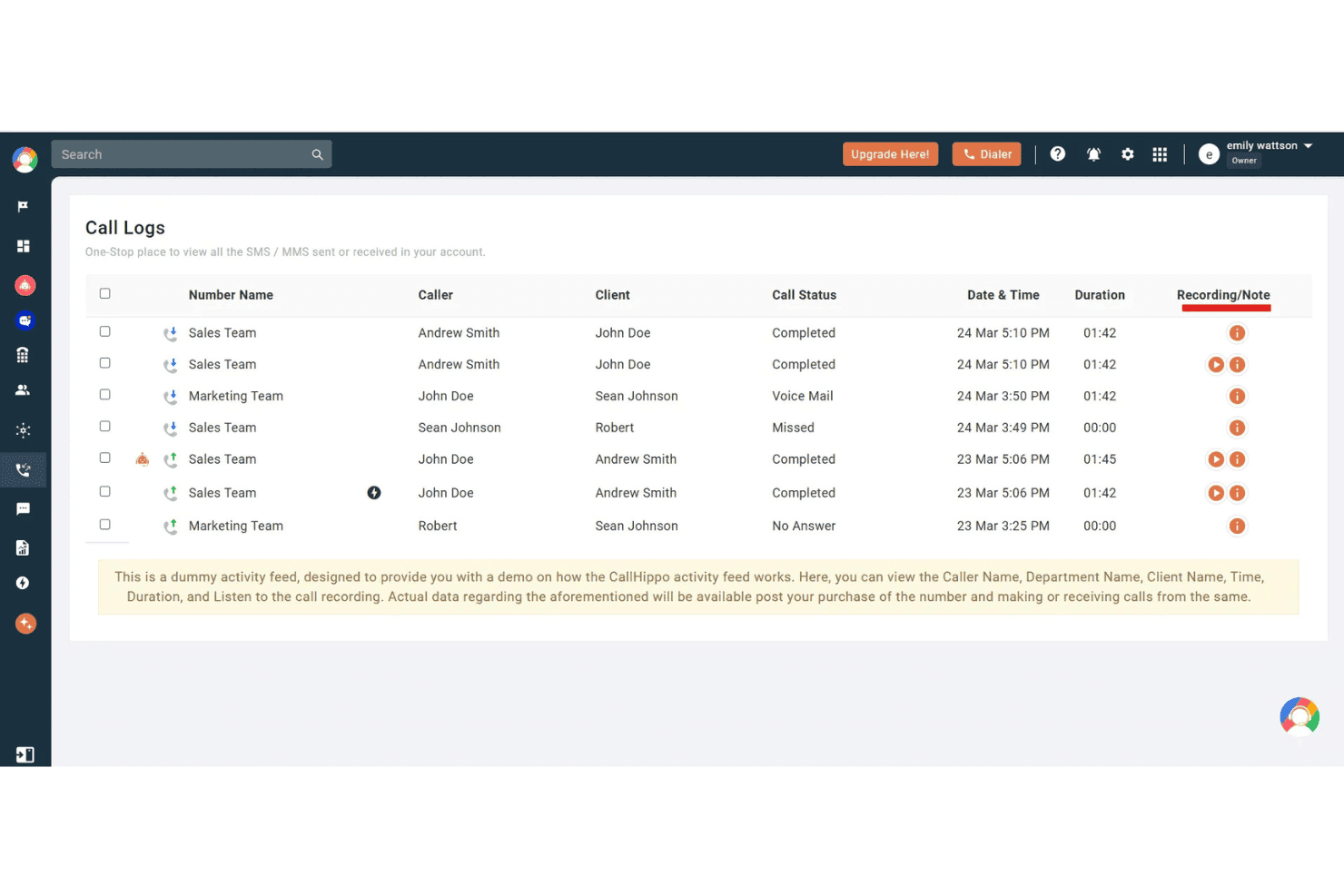
CallHippo displays a Call Logs dashboard showing caller details, call status, duration, and recording options for team activity. CallHippo is a cloud telephony platform with softphone apps for web, desktop, and mobile. It offers virtual phone numbers in 150+ countries alongside AI-powered calling, omnichannel messaging, and contact center routing.
Who Is CallHippo Best For?
It's a strong fit for small to mid-sized sales and support teams that need local phone presence across multiple countries without complex infrastructure.
Why I Picked CallHippo
I've included CallHippo in my top picks because the depth of its global number coverage sets it apart from most softphone apps. You can provision local, toll-free, or mobile numbers in 150+ countries within minutes, and Smart DID Routing automatically presents the correct local caller ID based on the destination country. I also like the AI Global Connect feature, which detects a contact's local time zone before dialing to prevent calls landing outside business hours.
CallHippo Key Features
- Omnichannel inbox: Manage calls, SMS, WhatsApp, Telegram, email, and chat messages from one unified dashboard.
- Call center controls: Use IVR menus, smart call routing, call queues, barging, whisper, and monitoring for live agent coaching.
- CRM and helpdesk integrations: Connect directly with Salesforce, HubSpot, Zoho, Zendesk, Freshdesk, and more to log call activity.
- Real-time analytics dashboards: Monitor team and agent call metrics, performance KPIs, and historical trends in a customizable dashboard.
CallHippo Integrations
CallHippo offers native integrations with Salesforce, HubSpot, Zoho CRM, Zendesk, Freshdesk, Pipedrive, Intercom, Shopify, Slack, and Microsoft Teams. An API is available for custom integrations.
Pros and Cons
Pros:
- Live call monitoring with whisper and barge
- AI transcription and post-call summaries included
- Virtual numbers available in 150+ countries
Cons:
- Mobile app less stable than web client
- Call quality issues reported on low bandwidth
 Best for Freshworks-based call routing
- 14-day free trial
- From $15/user/month (billed annually)
Visit WebsiteCustomer Rating:4.1/5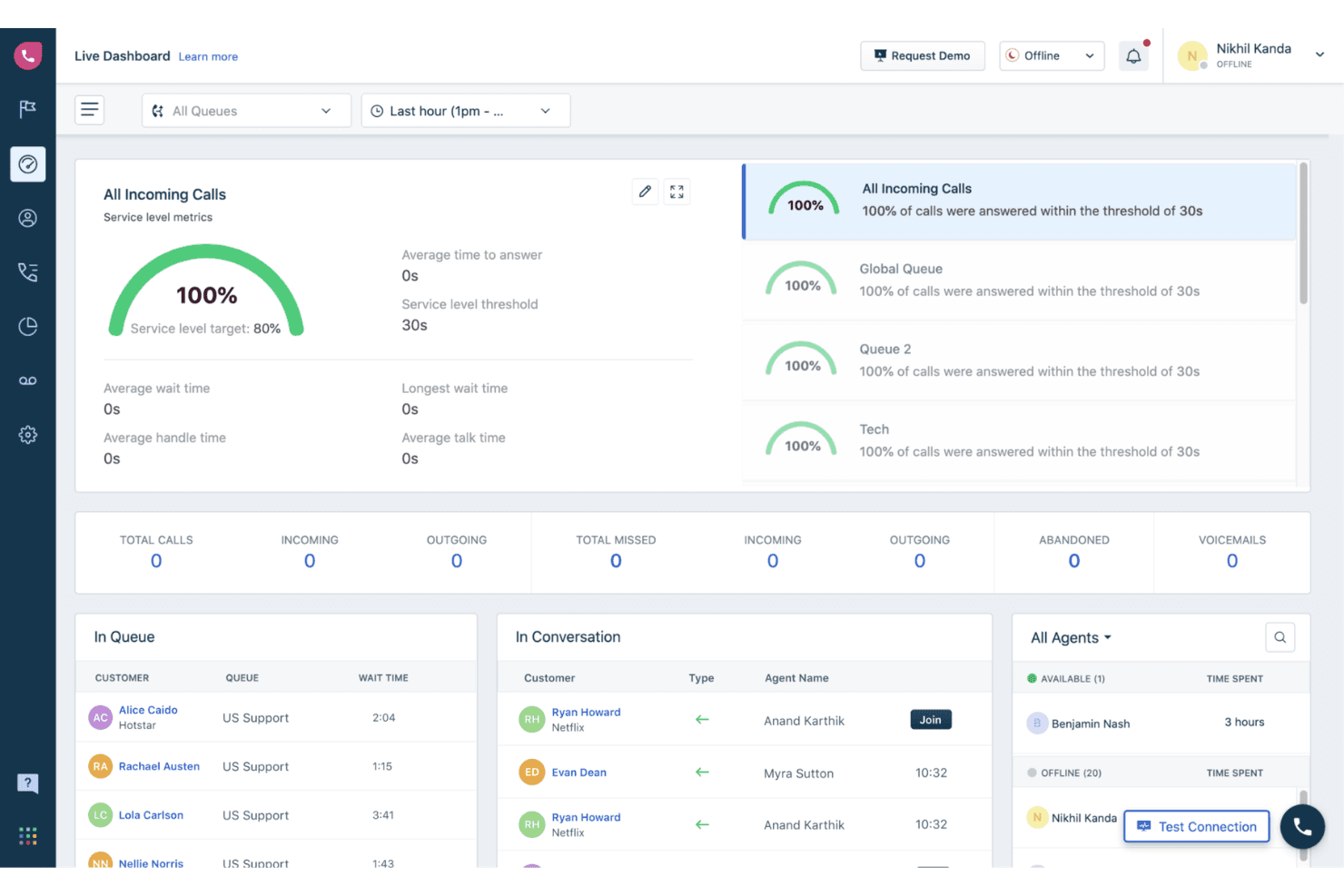
Freshcaller offers a live dashboard with real-time metrics including service level tracking, call queues, agent status, and active conversations. Freshcaller is a cloud-based VoIP contact center solution that lets agents place and receive calls via browser, mobile app, or SIP handset, with multi-level IVR, call routing, recording, and real-time analytics built in.
Who Is Freshcaller Best For?
Freshcaller is a strong fit for support teams already using the Freshworks ecosystem who need a tightly connected call center and helpdesk setup.
Why I Picked Freshcaller
I've included Freshcaller in my top picks because its call routing is purpose-built for teams running on Freshworks. Inbound calls can be routed using conditions tied directly to Freshdesk or Freshsales data, so the right agent gets the right call based on CRM context. I also rely on its smart escalation rules and live call barging, which let supervisors step into active calls and coach agents in real time without disrupting the customer.
Freshcaller Key Features
- Multi-level IVR system: Build custom call menus with nested options to direct callers where they need to go.
- Call recording with storage: Automatically record calls and access recordings directly from the call log.
- Real-time agent status: See live agent availability, including ready, busy, and do-not-disturb, for more effective routing.
- Global phone number coverage: Access local and toll-free numbers from over 90 countries for international presence.
Freshcaller Integrations
Freshcaller offers native integrations with Freshdesk, Freshsales, Salesforce, HubSpot, and Slack. An API is available for custom integrations.
Pros and Cons
Pros:
- Real-time agent availability visible across teams
- Barge and whisper on active calls
- IVR routing needs no coding
Cons:
- Less suited for non-Freshworks tech stacks
- Reporting dashboards lack deep customization options
Learn more about Freshcaller: Best for Workspace-based business calling
- Free plan available
- From $10/user/month
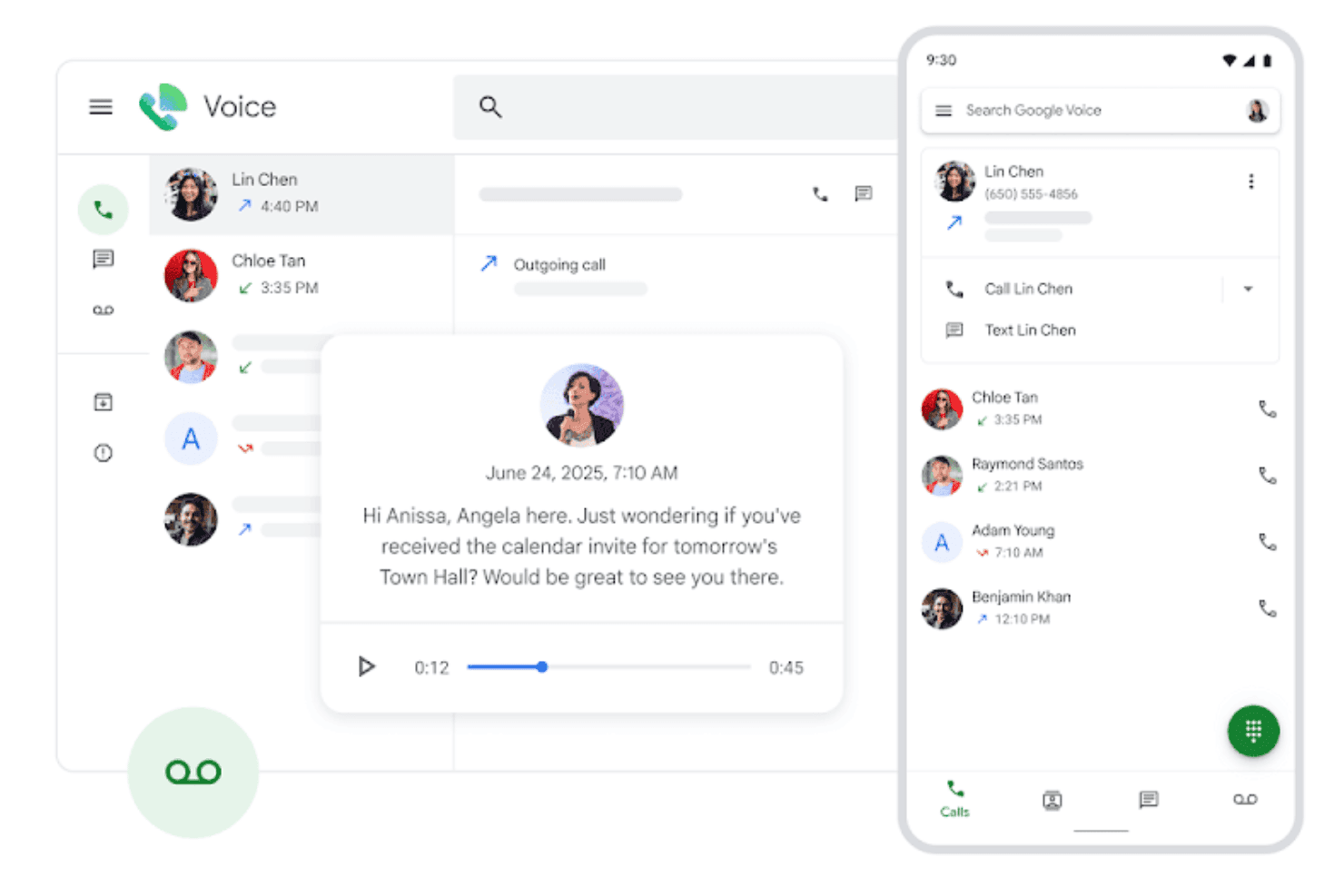
Google Voice displays a unified interface for managing calls, voicemails, and contact interactions across desktop and mobile views. Google Voice is a cloud-based VoIP softphone built into the Google Workspace ecosystem, offering calling, video calls, SMS, voicemail transcription, and AI-powered spam filtering across mobile, desktop, and desk phones.
Who Is Google Voice Best For?
Google Voice is a natural fit for small businesses and distributed teams already running on Google Workspace who need a lightweight business phone system without added infrastructure.
Why I Picked Google Voice
I've included Google Voice in my top picks because it's the only VoIP softphone that's fully native to Google Workspace. Calls route directly through Gmail, voicemails transcribe automatically into your inbox, and the multi-level auto attendant handles call routing without any separate admin platform. My team uses the Vault integration to keep call records in the same discovery and retention system as email.
Google Voice Key Features
- Multi-device calling: Make and receive calls from mobile devices, laptops, or supported desk phones with one number.
- Spam call blocking: Uses Google AI to detect and block spam callers before the phone rings.
- SIP Link integration: Connect existing PSTN services and desk phones to Google Voice through certified session border controllers.
- Google Calendar routing: Routes incoming calls based on your Google Calendar working hours settings.
Google Voice Integrations
Google Voice offers native integrations with Google Workspace apps, including Google Meet and Google Calendar, and provides an API for custom integrations.
Pros and Cons
Pros:
- Works across mobile, desktop, and desk phones
- AI-powered voicemail transcription included
- Native Google Workspace sync across all apps
Cons:
- No built-in call recording on starter plan
- Limited call analytics for contact center teams
Learn more about Google Voice: Best for customer-facing team communications
- Free demo available
- From $15/user/month (billed annually)
Visit WebsiteCustomer Rating:4.5/5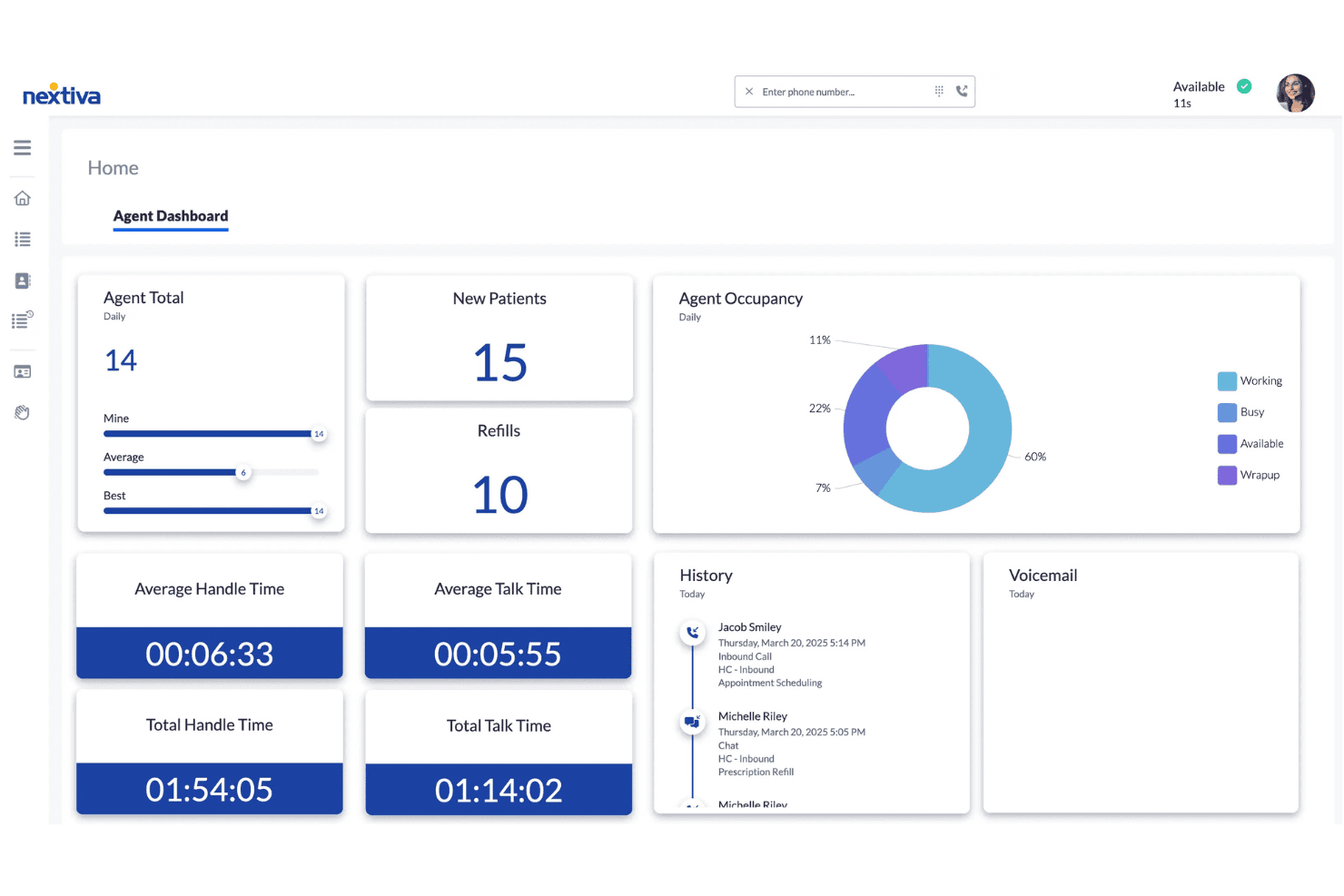
Nextiva's Agent Dashboard displays real-time call metrics, occupancy charts, handle times, and interaction history for contact center agents. Nextiva is a cloud-based VoIP and unified communications platform that combines softphone calling, SMS, video meetings, team chat, and AI-powered call management across desktop and mobile apps.
Who Is Nextiva Best For?
Nextiva is a strong fit for customer support and contact center teams that need a single platform for voice, messaging, and AI-assisted call handling.
Why I Picked Nextiva
I picked Nextiva as one of the best because the NextivaONE app keeps my whole customer-facing team on voice, SMS, and chat without switching between tools. The AI Voice Agent handles inbound calls 24/7, routing inquiries and answering FAQs before a live agent picks up. I also rely on AI call transcription and summary to review customer interactions quickly, without replaying full recordings.
Nextiva Key Features
- Multi-level auto attendant: Set up advanced call routing menus for different departments or schedules.
- Team presence and status: See real-time availability of colleagues for easier call transfers and coordination.
- Contact center analytics: Access dashboards with live and historical metrics on agent performance and call activity.
- Browser and mobile softphone apps: Make and receive calls from web browsers, Windows, macOS, iOS, and Android devices.
Nextiva Integrations
Nextiva offers native integrations with Salesforce, HubSpot, Microsoft Teams, Google Workspace, Outlook, and Microsoft Dynamics, and provides an API for custom integrations.
Pros and Cons
Pros:
- Reliable HD audio on desktop and mobile clients
- Unified voice, SMS, and chat in one app
- AI call summaries reduce manual post-call documentation
Cons:
- Reporting dashboards have a steep initial learning curve
- Mobile app occasionally drops calls on poor connections
 Best for AI-powered call notes
- 14-day free trial + free demo available
- Pricing upon request
Visit WebsiteCustomer Rating:4.3/5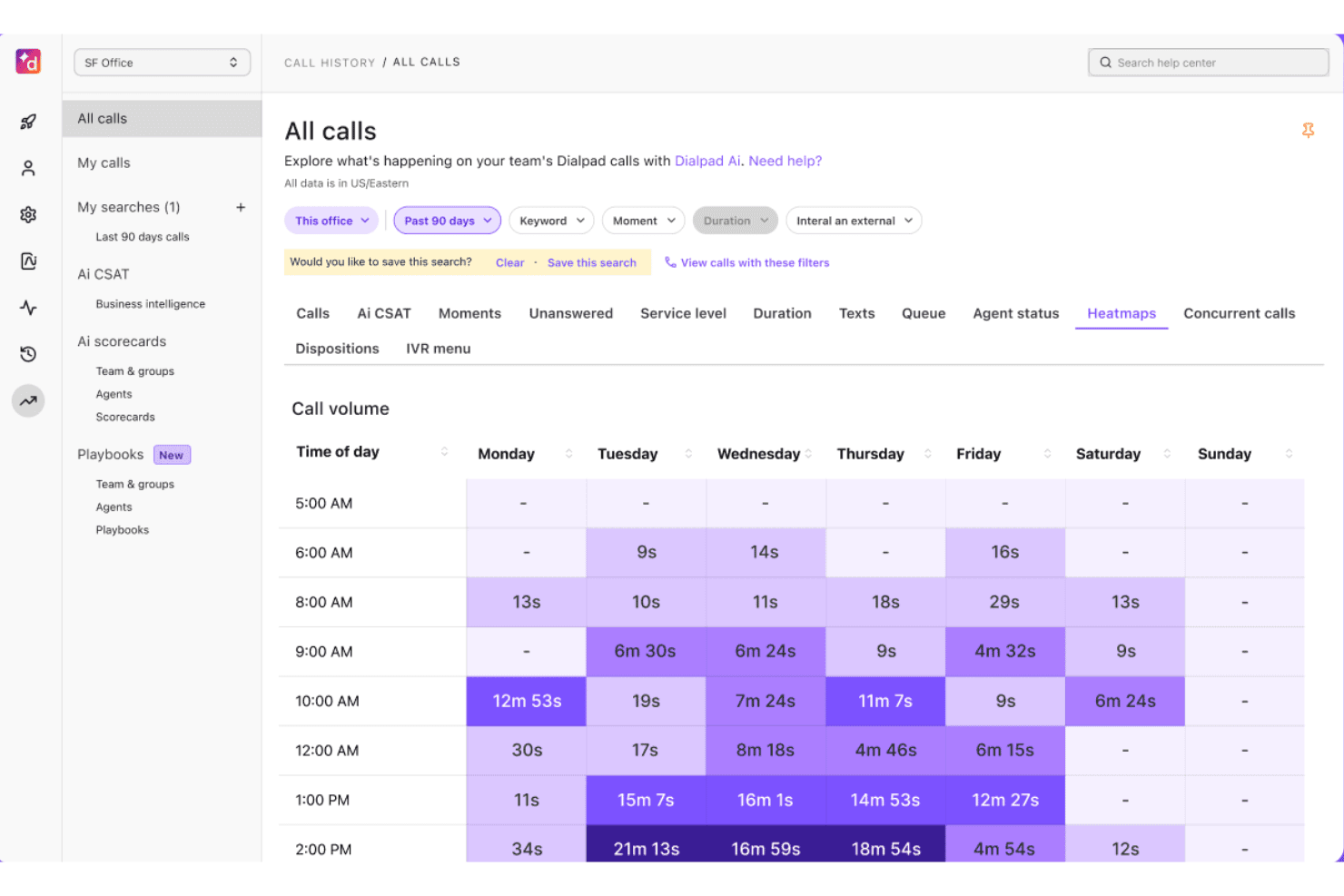
Dialpad offers a call volume heatmap view showing call durations by day and time of day across a 90-day period. Dialpad is an AI-native cloud communications platform that unifies voice calling, SMS, messaging, and video meetings in a single softphone app built on its own proprietary large language model, DialpadGPT.
Who Is Dialpad Best For?
Dialpad suits small to midsize customer support and sales teams—particularly those running on Google Workspace—who need a cloud phone system with built-in AI call documentation.
Why I Picked Dialpad
Dialpad earns its spot on my shortlist because its AI Recaps feature automatically generates structured call summaries and action items after every conversation, powered by its proprietary DialpadGPT model. Real-time transcription runs live during calls, so nothing gets missed even in fast-moving support interactions. I also like that AI CSAT scoring runs automatically on 91% of calls, giving my team consistent post-call performance data without any manual review process.
Dialpad Key Features
- Multi-device softphone: Make and receive calls on desktop, mobile, tablet, or web.
- Unified team messaging: Chat and share files with coworkers in the same app as calls.
- Native CRM integrations: Connects directly with platforms like Salesforce, HubSpot, and Zendesk.
- Real-time presence: See agent availability and status instantly to streamline call routing and collaboration.
Dialpad Integrations
Dialpad offers native integrations with Salesforce, HubSpot, Zendesk, Google Workspace, Microsoft 365, ServiceNow, Zoho CRM, Okta, Bullhorn, and Clio. An API is available for custom integrations.
Pros and Cons
Pros:
- Works across desktop, mobile, and web browser
- Real-time transcription runs during live calls
- AI-generated call summaries after every conversation
Cons:
- Call quality can drop on weak connections
- AI features locked behind higher-tier plans
 Best for multi-device business communications
- 14-day free trial
- From £18/user/month
Visit WebsiteCustomer Rating:4.2/5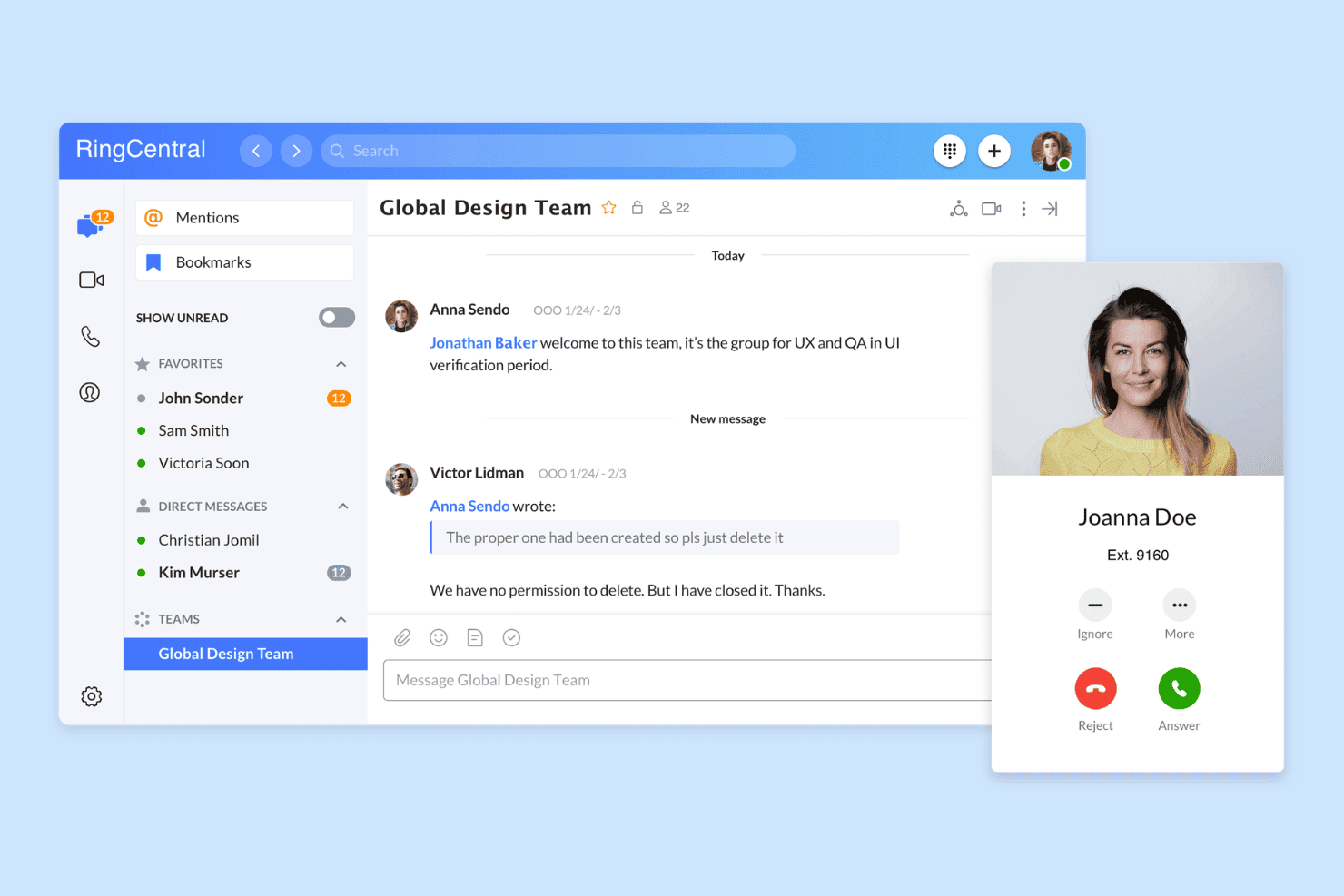
RingCentral offers a unified messaging and calling interface with team chat, direct messages, and incoming call notifications in one platform. RingCentral is a cloud-based UCaaS platform that combines VoIP calling, video meetings, business SMS, and team messaging into a single softphone app across desktop, mobile, and web.
Who Is RingCentral Best For?
It's a strong fit for mid-sized businesses with distributed or remote teams that need a single platform for managing voice communications across multiple devices and locations.
Why I Picked RingCentral
RingCentral earns its spot on my shortlist because of how consistently it handles voice across every device in my setup. I particularly like the call flip feature, which lets you transfer a live call from your desktop softphone to your mobile app mid-conversation without any interruption. Presence status also syncs in real time across desktop, mobile, and web, so my team always sees accurate availability no matter which device someone is working from.
RingCentral Key Features
- AI-powered call summaries: Automatically generates searchable, AI-driven summaries for every call to speed up review and QA.
- Integrated team messaging: Offers built-in chat and group messaging directly alongside calling functions in the softphone app.
- Omnichannel contact centre: Supports voice, SMS, web chat, and social messaging in one dashboard for CX teams.
- Native CRM integrations: Connects with Salesforce, HubSpot, and Zendesk to pull up customer records and auto-log activities.
RingCentral Integrations
RingCentral offers native integrations with Salesforce, HubSpot, Zendesk, Microsoft Teams, Google Workspace, Slack, and ServiceNow, and provides an API for custom integrations.
Pros and Cons
Pros:
- AI transcription covers every recorded call
- Real-time presence synced across all platforms
- Call flip works live mid-conversation
Cons:
- Interface feels cluttered for call-only users
- Mobile app frequently drains battery faster
Learn more about RingCentral: Best for sales dialers and SMS workflows
- 14-day free trial
- From $29/user/month (billed annually)
Visit WebsiteCustomer Rating:4.1/5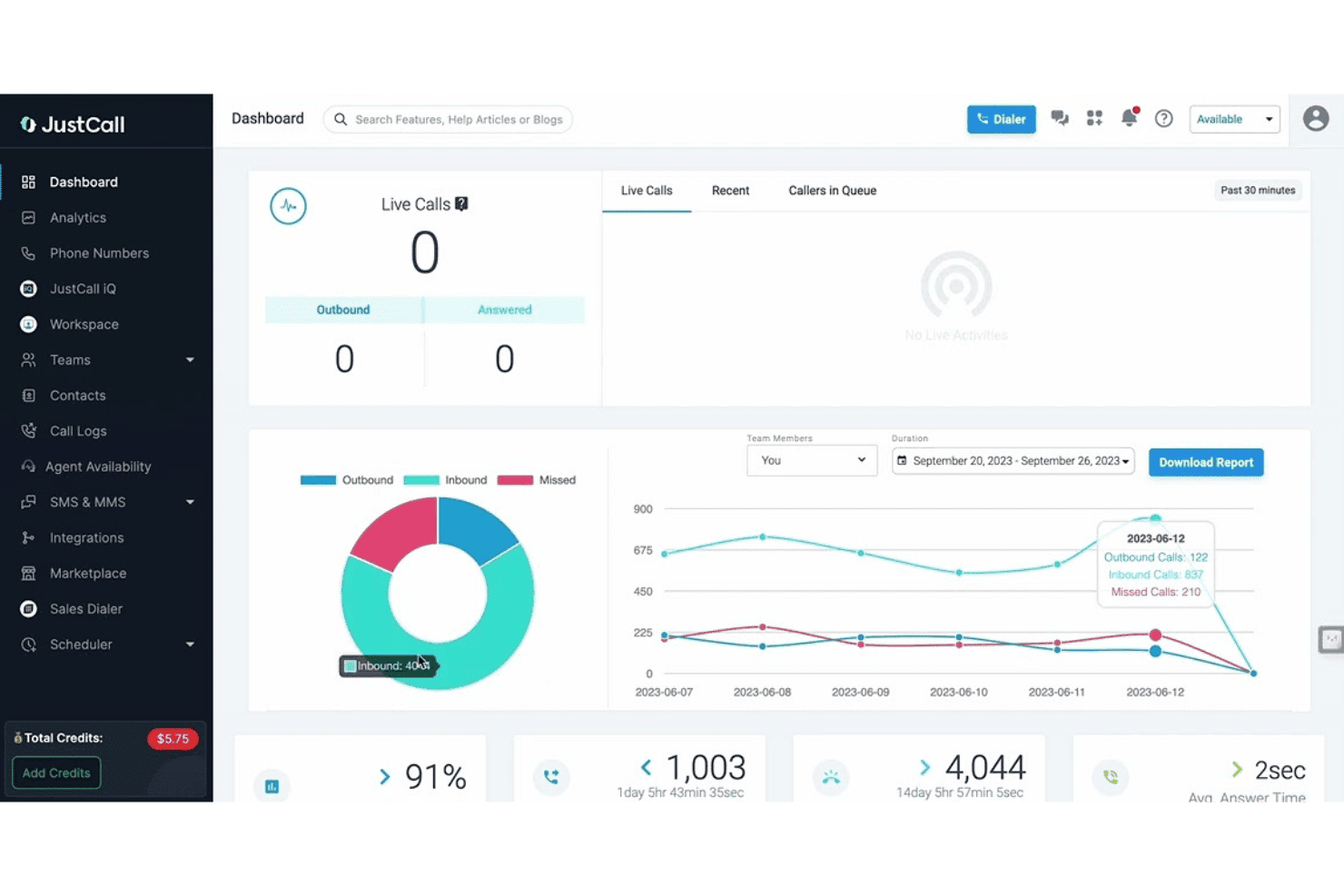
JustCall offers a real-time dashboard with live call monitoring, call analytics charts, and team performance metrics including inbound, outbound, and missed call breakdowns. JustCall is a cloud-based VoIP softphone platform combining voice calling, SMS and MMS messaging, AI conversation intelligence, and multi-line auto-dialer capabilities across desktop, mobile, and web.
Who Is JustCall Best For?
JustCall is a strong fit for outbound sales teams and SMB-to-mid-market customer support operations that need voice, SMS, and dialer tools in one place.
Why I Picked JustCall
I picked JustCall as one of the best because its multi-line predictive dialer (up to 10 simultaneous lines) and Dynamic Dialer genuinely set it apart from most softphone apps that only offer basic click-to-dial. I also like how SMS workflows and bots run natively inside the same platform, so my team can trigger automated follow-up sequences without switching tools. The local presence dialing feature, which displays a number matching the prospect's area code, adds a layer of functionality that most standalone softphone apps skip entirely.
JustCall Key Features
- Real-time agent presence: Displays agent availability status across web, desktop, and mobile for efficient routing.
- Native CRM integrations: Connects natively with Salesforce, HubSpot, Zoho, and Zendesk for click-to-dial and automatic call logging.
- Automatic call recording: Captures and stores every call for easy playback and quality assurance.
- Live call monitoring: Lets supervisors listen, whisper, or barge into ongoing calls for coaching and oversight.
JustCall Integrations
JustCall offers 100+ native integrations, including Salesforce, HubSpot, Zoho CRM, Pipedrive, Zendesk, Freshdesk, Intercom, Help Scout, Slack, and Microsoft Teams. An API is available for custom integrations.
Pros and Cons
Pros:
- AI transcription on every recorded call
- SMS workflows and bots run natively
- Predictive dialer supports up to 10 lines
Cons:
- Reporting dashboards offer limited customization options
- Mobile app call quality can be inconsistent
 Best for small-business calling and desk phones
- Not available
- From $19.95/user/month
Visit WebsiteCustomer Rating:3/5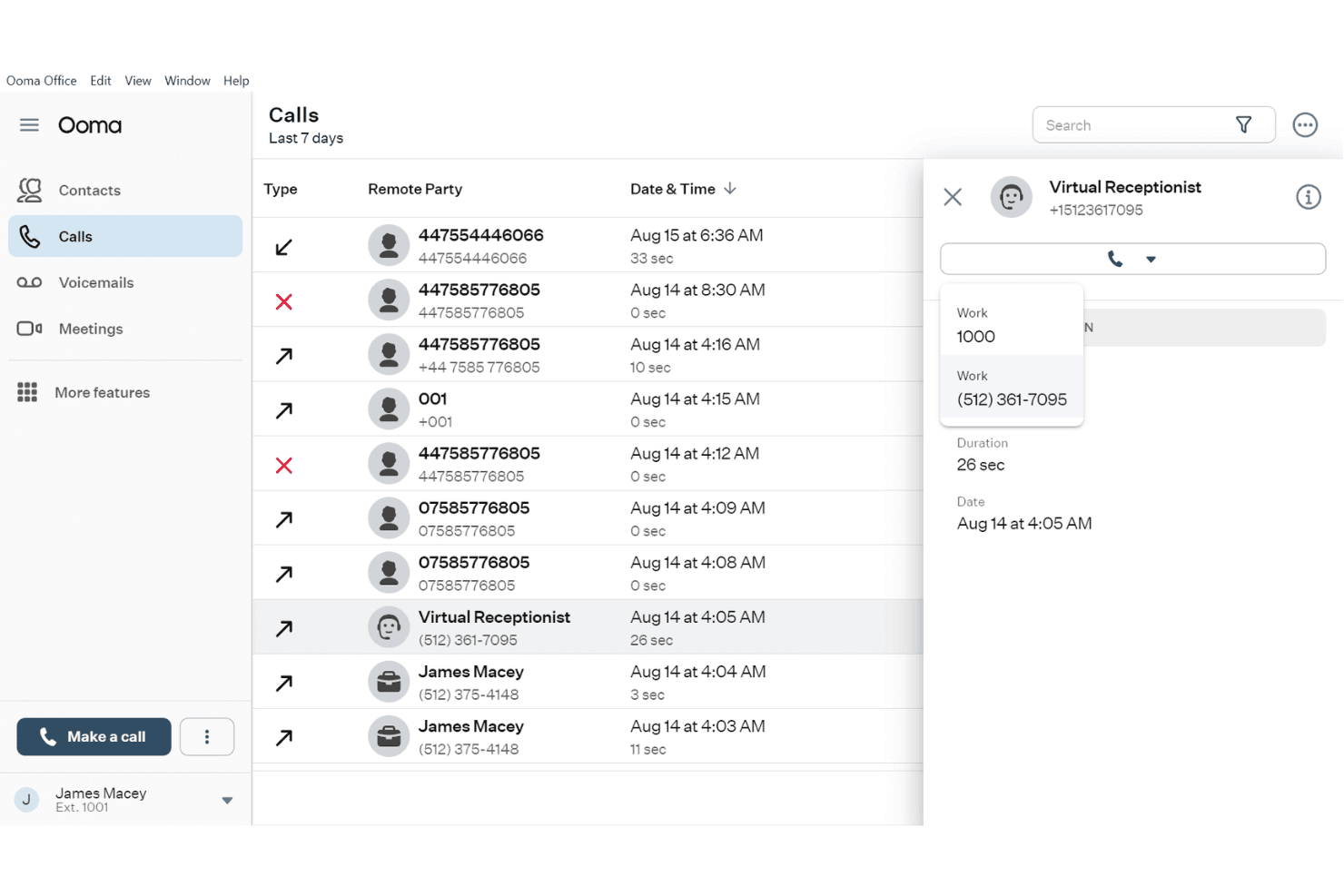
Ooma Office displays a detailed call history log with contact details, call duration, and a Virtual Receptionist dropdown panel. Ooma Office is a cloud-based VoIP phone system for small businesses that combines a desktop and mobile softphone, call management controls, SMS, videoconferencing, and CRM integrations in one platform.
Who Is Ooma Office Best For?
Ooma Office is a strong fit for small and mid-sized businesses that want a full-featured phone system without the complexity or cost of enterprise VoIP platforms.
Why I Picked Ooma Office
I picked Ooma Office as one of the best because it genuinely bridges desk phones and softphone apps in a way few SMB-focused platforms do. Call Flip lets me transfer an active call from my desk phone to the mobile softphone mid-conversation without dropping it. Simultaneous ring means incoming calls hit both the desk phone and the softphone app at once, so my team never misses a call when moving between spaces.
Ooma Office Key Features
- AI call transcription and summaries: AI-powered transcriptions and automated call summaries on Pro Plus plans.
- CRM integration: Connects with platforms like Salesforce, HubSpot, and Zoho to sync contacts and call logs.
- Team chat and presence: Built-in team messaging and real-time presence indicators for improved coordination.
- Call analytics dashboard: Detailed call metrics and leaderboards help you track agent and team activity.
Ooma Office Integrations
Ooma Office offers native integrations with Salesforce, HubSpot, Zendesk, Zoho, Pipedrive, Microsoft Dynamics 365, SugarCRM, and Google and Microsoft 365. It also connects with Zapier and provides an API for custom integrations.
Pros and Cons
Pros:
- Includes built-in video conferencing on mobile
- Call Flip moves live calls between devices
- Supports physical desk phones alongside softphone
Cons:
- AI transcription requires the pricier Pro Plus
- Mobile app stability has frustrated some users
Learn more about Ooma Office: Best for Zoom-based business calling
- Free demo available
- From $10.50/user/month
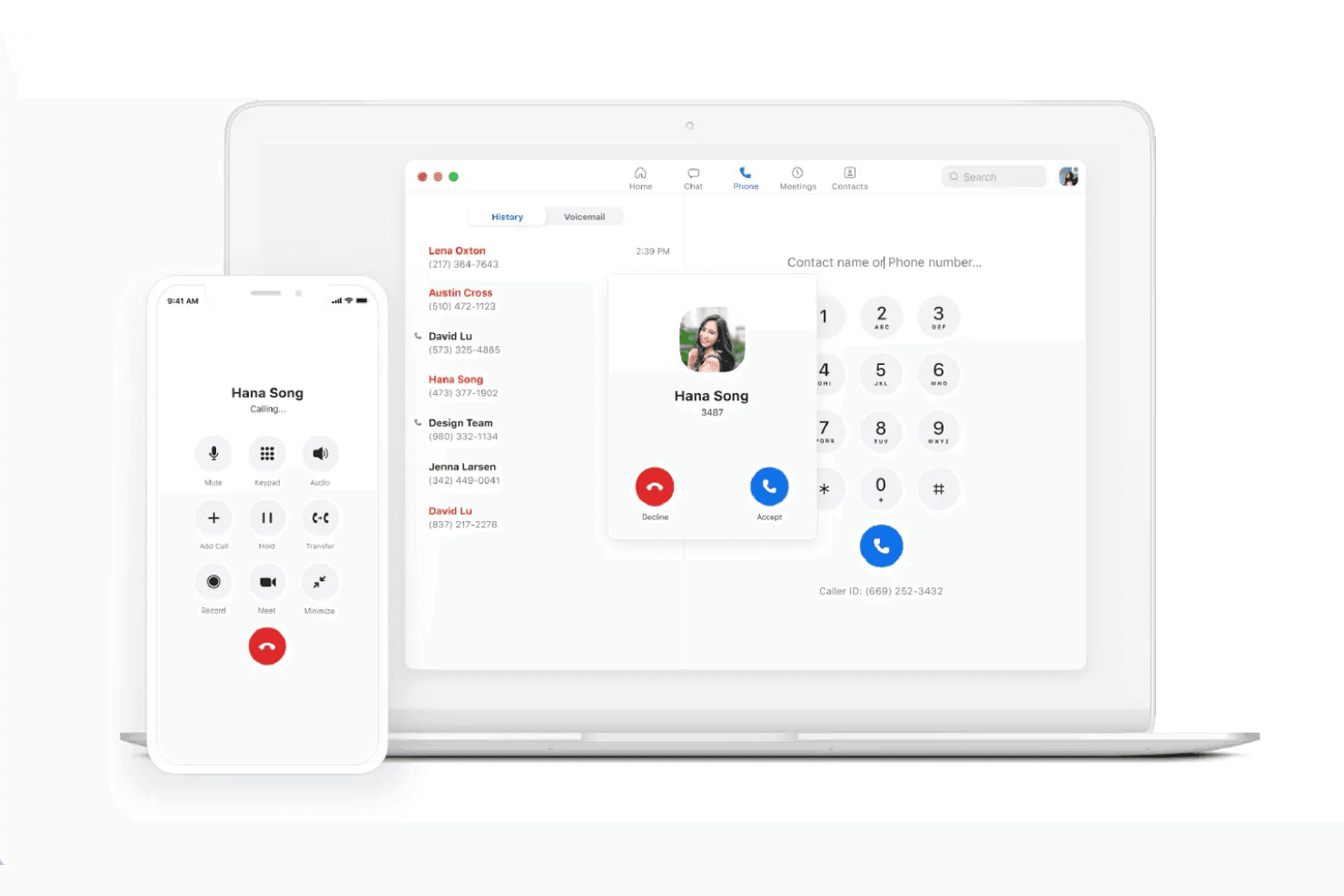
Zoom Phone displays an incoming call interface from Hana Song across both desktop and mobile apps, with call history, a dial pad, and call controls visible. Zoom Phone is a cloud-based VoIP softphone that brings together inbound and outbound PSTN calling, SMS/MMS, voicemail transcription, call routing, and AI-powered call summaries across desktop, mobile, and desk phone clients.
Who Is Zoom Phone Best For?
It's a natural fit for teams already running on Zoom Workplace who want voice calling built into the same platform as their meetings and chat.
Why I Picked Zoom Phone
Zoom Phone earns its spot as one of the best on my shortlist because of how tightly it plugs into the rest of the Zoom Workplace suite. I like that my team can flip an active call from desktop to mobile without dropping it, which matters on days when someone needs to step away from their desk mid-conversation. The AI Companion adds real value too, generating post-call summaries and pulling action items directly from recorded calls.
Zoom Phone Key Features
- CRM and helpdesk integrations: Connects natively with Salesforce, HubSpot, Zendesk, and Microsoft Teams for click-to-dial and auto-logged call activity.
- Presence and team messaging: Real-time presence status and direct chat enable seamless team coordination inside the Zoom app.
- Call queue management: Lets admins set up call queues and routing rules to distribute incoming calls across agents or departments.
- Automatic call recording: Captures and stores calls for quality review, compliance, or performance management.
Zoom Phone Integrations
Zoom Phone offers native integrations with Salesforce, HubSpot, Zendesk, Microsoft Teams, Google Workspace, Slack, ServiceNow, and Okta, and provides an API for custom integrations.
Pros and Cons
Pros:
- Unified with Zoom meetings and chat
- AI call summaries included natively
- Call flip from desktop to mobile
Cons:
- Limited supervisor monitoring without Contact Center add-on
- Requires an existing Zoom Workplace plan
Learn more about Zoom Phone:
Andre VoIP-apper for softtelefoner
Her er noen flere VoIP-apper for softtelefoner som ikke kom med på kortlisten min, men som likevel er verdt å vurdere:
- 113CXBest for self-hosted business phone systems
- 12AircallBest for CRM-integrated sales calling
- 13Five9Best for outbound contact center campaigns
- 14TalkdeskBest for AI contact center automation
- 15CloudCallBest for CRM-based sales calling
- 16Genesys Cloud CXBest for enterprise experience orchestration
- 178x8 Contact CenterBest for secure omnichannel contact centers
- 18Vonage Contact CenterBest for Salesforce contact center workflows
How I Evaluate VoIP Softphone Apps
I split my evaluation into core must-haves—like cross-device calling and CRM integrations—and differentiating factors that separate a basic dialer from a tool agents will actually rely on.
Core Functionality (Table Stakes for This List)
When I'm selecting tools for my list, I rank each one on a scale from 0 (does not offer the functionality) to 5 (excels in this area) for each core functionality listed below. I then calculate the tool's total score into a percentage, using 65% as a benchmark to help assess its overall fit for the list.
- VoIP Calling: I check whether agents can place and receive HD calls across desktop, mobile, and web—so remote teams aren't tied to a single device.
- Call Handling Controls: Hold, warm transfer, conference, and call flip all matter. I evaluate how smoothly agents can redirect or escalate mid-conversation.
- CRM/Helpdesk Integrations: Native connections to platforms like Salesforce or Zendesk should surface screen pops and auto-log activity without manual entry.
- Call Recording & Voicemail: I look for automatic recording with searchable storage, since QA reviews and coaching sessions depend on easy retrieval of past calls.
- Presence & Availability: Real-time status indicators help route calls to available agents. I check whether presence syncs across teams and updates automatically.
- Call Analytics & Reporting: Dashboards should cover call volume, missed calls, and agent-level metrics so team leads can spot trends and address performance gaps.
Once I have a list of tools that meet the criteria, I consider what sets each platform apart.
Differentiating Factors (What Sets Vendors Apart)
Here's how I compare and contrast different vendors:
Standout Features
AI call transcription saves agents from manual note-taking and gives supervisors searchable post-call summaries they can reference during QA reviews. I also evaluate coaching tools like whisper and barge, which let team leads guide agents during live calls without the customer hearing. CRM screen pops are another differentiator—when a customer's history appears the moment a call connects, agents skip the repetitive verification step entirely.
Beyond Features
Voice quality matters more than most buyers realize. For example, I check for HD codec support and failover options because a dropped support call can quickly erode customer trust. Beyond call quality, security is another key factor. I look for TLS/SRTP encryption and compliance certifications like HIPAA or SOC 2. Finally, I compare pricing models because some vendors charge per user while others license by concurrent call.
Slik velger du VoIP-apper for softtelefoner
Prøver du å finne ut hvilken VoIP-app for softtelefoner som vil gi teamet ditt verdi? Begynn med å vurdere hvilke kommunikasjons-, integrasjons- eller kontrollbehov som har høyest prioritet:
| Hvis prioriteten din er ... | Prioriter ... |
|---|---|
| Hvis prioriteten din er ...Å redusere manuell notatskriving | Prioriter ...AI-drevet transkribering av samtaler |
| Hvis prioriteten din er ...Å integrere samtaler med CRM-systemet | Prioriter ...Innebygde CRM-koblinger og skjermvisninger |
| Hvis prioriteten din er ...Fleksibilitet for agenter på flere enheter | Prioriter ...Plattform på tvers av enheter (datamaskin, nett, mobil) |
| Hvis prioriteten din er ...Overvåking av agenter i sanntid | Prioriter ...Funksjoner for veiledere (hvisking, innbrytning) |
| Hvis prioriteten din er ...Sikkerhet og samsvar | Prioriter ...Ende-til-ende-kryptering, SOC 2, HIPAA |
Slik vurderer du kortlisten
- Be om en demonstrasjon av AI-transkribering: Be om et eksempel eller gjennomfør din egen direkte transkribering for å se nøyaktigheten ved å sammenligne minst to reelle agentsamtaler i løpet av én uke.
- Koble til CRM-systemet i prøveperioden: Bruk sandkassen til systemet ditt for å kontrollere funksjoner for skjermvisning og automatisk logging før du tar løsningen i bruk med reelle kundedata.
- Test arbeidsflyter for samtaleoverføring: Gjennomfør parallelle øvelser for agenter (samtaleflytting, varm overføring, konferanse) og dokumenter ventetid på tvers av enheter.
- Be om skriftlig dokumentasjon på samsvar: Be om dokumentasjon på TLS/SRTP-kryptering og bevis på sertifiseringer som SOC 2 eller HIPAA fra leverandørens sikkerhetsteam.
- Bruk avveininger til å filtrere listen: Avgjør om fleksibilitet (plattformuavhengighet, BYOD) er viktigere for teamet enn avansert analyse og rapportering – få løsninger utmerker seg på begge områder.
Hva er VoIP-apper for programvaretelefoner?
VoIP-apper for programvaretelefoner lar deg ringe og motta telefonsamtaler over internett fra en stasjonær datamaskin, nettleser eller mobilenhet. Dermed kan team ringe forretningssamtaler uten å være avhengige av fysiske bordtelefoner. Disse appene tilbyr også funksjoner som samtalekontroller, telefonsvarer og integrasjoner med CRM- eller brukerstøttesystemer. Dette gir medarbeidere tilgang til kundeinformasjon mens de håndterer samtaler fra ulike steder.
Funksjoner i VoIP-apper for programvaretelefoner
Når du velger VoIP-apper for programvaretelefoner, bør du se etter følgende viktige funksjoner:
- VoIP-samtaler: Ring og motta samtaler over internett fra en hvilken som helst stasjonær datamaskin eller mobilenhet, slik at behovet for en fysisk telefon bortfaller.
- Kontroller for samtalehåndtering: Få tilgang til viktige funksjoner som venting, demping, overføring, viderekobling og konferansesamtaler for effektiv håndtering av alle innkommende og utgående samtaler.
- CRM-integrasjon: Koble til CRM-systemer for å vise informasjon om innringeren, loggføre aktiviteter automatisk og gi medarbeidere umiddelbar kontekst under hver interaksjon.
- Samtaleopptak og telefonsvarer: Arkiver samtaler og talemeldinger for opplæring, kvalitetssikring og samsvar, med enkle alternativer for henting og avspilling.
- Tilstedeværelse og tilgjengelighet: Vis medarbeidernes status i sanntid, for eksempel tilgjengelig, opptatt eller i en samtale, slik at innkommende henvendelser kan rutes mer effektivt og mislykkede overføringer unngås.
- Team-meldinger: Gjør det mulig å chatte og sende direktemeldinger i appen, slik at medarbeidere og ledere kan koordinere seg raskt uten å forlate programvaretelefonmiljøet.
- Samtaleanalyse og rapportering: Følg med på måltall som samtalevolum, ventetider og ubesvarte samtaler via oversikter og rapporter, slik at ledere kan overvåke teamets resultater.
- Sikkerhet og kryptering: Beskytt taledata under overføring og lagring med TLS- eller SRTP-kryptering, slik at kravene til bransjesamsvar for sensitiv kommunikasjon støttes.
- Støtte for flere enheter: La brukere enkelt bytte mellom stasjonær datamaskin, mobil og nettleser, slik at eksterne og hybride team får en fleksibel opplevelse.
- Kontroller for ledere: Tilby funksjoner som samtaleovervåking, hvisking og innkobling, slik at teamledere kan veilede eller gripe inn under direktesamtaler uten at kunden merker det.
Fordeler med VoIP-apper for programvaretelefoner
Implementering av VoIP-apper for programvaretelefoner gir flere fordeler for teamet og virksomheten. Her er noen av fordelene du kan se frem til:
- Økt fleksibilitet: Medarbeidere kan svare på samtaler hvor som helst ved hjelp av en stasjonær datamaskin, mobilenhet eller nettleser, noe som gjør ekstern og hybrid brukerstøtte mulig.
- Samlet kommunikasjon: Håndter tale, telefonsvarer og teamchat på én plattform, slik at medarbeidere aldri trenger å bytte mellom verktøy.
- Bedre kundeinnsikt: Integrasjoner med CRM- og brukerstøtteplattformer viser innringerens informasjon umiddelbart, slik at medarbeidere kan levere personlig service fra første øyeblikk.
- Bedre veiledning og kvalitetssikring: Innebygde funksjoner for samtaleopptak, overvåking og hvisking gjør det mulig for ledere å gjennomgå samtaler og veilede medarbeidere i sanntid.
- Bedre oversikt: Direkte oversikter og analyser gir ledere innsikt i medarbeidernes status, samtalekøer og teamets resultater på ett og samme sted.
- Forbedret datasikkerhet: TLS/SRTP-kryptering og funksjoner som støtter samsvar, bidrar til å beskytte sensitive samtaler og kundedata.
- Besparelser på kostnader og maskinvare: Apper for programvaretelefoner eliminerer behovet for bordtelefoner og kostbare PBX-systemer, og reduserer både innledende og løpende kostnader.
Kostnader og priser for VoIP-apper for programvaretelefoner
Valg av VoIP-softtelefonapper krever en forståelse av de ulike prismodellene og abonnementene som er tilgjengelige. Kostnadene varierer basert på funksjoner, teamstørrelse, tillegg og mer. Tabellen nedenfor oppsummerer vanlige abonnementer, gjennomsnittsprisene deres og typiske funksjoner som er inkludert i løsninger med VoIP-softtelefonapper:
Sammenligningstabell for abonnementer for VoIP-softtelefonapper
| Abonnementstype | Gjennomsnittspris | Vanlige funksjoner |
|---|---|---|
| AbonnementstypeGratisabonnement | Gjennomsnittspris$0 | Vanlige funksjonerStøtter grunnleggende samtaler, tilbyr telefonsvarer og gir begrenset direktemelding for teamet. |
| AbonnementstypePersonlig abonnement | Gjennomsnittspris$5-$15/bruker/måned | Vanlige funksjonerLegger til støtte for mobil- og skrivebordsapper, enkel samtalehåndtering og grunnleggende CRM-integrasjon. |
| AbonnementstypeBedriftsabonnement | Gjennomsnittspris$15-$35/bruker/måned | Vanlige funksjonerInkluderer samtaleopptak, innebygde integrasjoner, analysedashbord og kontroll over teamets tilgjengelighetsstatus. |
| AbonnementstypeVirksomhetsabonnement | Gjennomsnittspris$35-$60/bruker/måned | Vanlige funksjonerTilbyr avansert sikkerhet, kontrollfunksjoner for ledere, åpen API-tilgang og samsvarssertifiseringer. |
Vanlige spørsmål om VoIP-apper for programvaretelefoner
Her er noen svar på vanlige spørsmål om VoIP-apper for programvaretelefoner:
Kan du bruke VoIP-apper for programvaretelefoner på alle enheter?
Ja, de fleste VoIP-apper for programvaretelefoner støtter Windows, macOS, iOS, Android og nettleserbasert tilgang med push-varsler for innkommende samtaler. Dette gjør det mulig for agenter og supervisorer å ringe og motta samtaler fra stasjonære datamaskiner, bærbare datamaskiner, nettbrett eller smarttelefoner uten ekstra maskinvare.
Er VoIP-apper for programvaretelefoner tilstrekkelig sikre for sensitive data?
Ja, ledende løsninger bruker krypteringsprotokoller som TLS og SRTP for å beskytte samtaler og meldinger. For bransjer med strenge krav til samsvar bør du se etter sertifiseringer som HIPAA, SOC 2 eller støtte for GDPR.
Hvordan integreres VoIP-apper for programvaretelefoner med CRM- eller brukerstøtteverktøy?
De fleste apper tilbyr ferdige integrasjoner eller åpne API-er for populære CRM-systemer og brukerstøtteplattformer. Dette gjør at kundedata og samtaleaktivitet synkroniseres automatisk, slik at agenter kan se samtalehistorikk og loggføre hver samtale.
Hvilken internetthastighet trenger du for pålitelige VoIP-samtaler?
Det kreves vanligvis en stabil bredbåndsforbindelse med minst 100 kbps per samtidig samtale. Lavere hastigheter eller ustabile nettverk kan føre til at samtaler brytes, hakkete lyd eller problemer med forsinkelse.
Kan VoIP-apper for programvaretelefoner erstatte tradisjonelle bordtelefoner?
Ja, de er utviklet nettopp for dette, slik at team kan håndtere alle innkommende og utgående samtaler digitalt. Dette reduserer maskinvarekostnadene og gir team større fleksibilitet ved fjernarbeid eller hybridarbeid.