

A prioridade número um dos líderes de atendimento ao cliente é equilibrar a eficiência e a satisfação dos clientes. Embora o Zendesk seja, por uma razão, um software de serviço de assistência popular, pode não ser necessariamente a melhor opção para a sua equipa. Neste artigo, partilho as minhas principais escolhas de alternativas ao Zendesk, destacando os seus pontos fortes e a forma como podem beneficiar a sua equipa.
Quer esteja à procura de fluxos de trabalho mais flexíveis, de uma melhor visibilidade interna ou de preços mais simples, estas alternativas ao Zendesk oferecem diferentes formas de apoiar os seus clientes sem tornar a sua estrutura tecnológica excessivamente complexa.
O que é o Zendesk?
O Zendesk é um software de serviço de assistência que ajuda as equipas de atendimento ao cliente a gerir pedidos de suporte, simplificar a comunicação com os clientes e acompanhar o desempenho. É utilizado para organizar tickets, disponibilizar apoio em direto e melhorar a prestação de serviços em vários canais.
Tabela de comparação das alternativas ao Zendesk
Esta tabela de comparação resume os detalhes de preços das minhas principais escolhas de alternativas ao Zendesk:
Score legend (out of 5)
- Excellent4.5–5
- Good4–4.4
- Average3–3.9
- Below average2–2.9
- Poor1–1.9
Sorted by: Default
| Tool | Starting Price | Website | |||||||
|---|---|---|---|---|---|---|---|---|---|
Best for SMBs and mid-market teams | 3.8 out of 5 | 4 | 2 | 4 | 5 | 4 | 4 | $19/agent/month 14-day free trial + free demo available | Book Demo |
Best for SaaS and technology companies | 3.5 out of 5 | 4 | 2 | 4 | 3 | 4 | 4 | $45/month Free demo available | Book Demo |
Best for HIPAA compliance options | 3.7 out of 5 | 4 | 3 | 3 | 4 | 4 | 4 | $25/user/month Free plan + 15-day free trial + free demo available | Website |
Best for collaborative team inbox support | Not rated | 2 | 4 | 3 | 4 | 3 | Not rated | $14/user/month 30-day free trial available | Website |
Best for AI-driven ticket automation | 3.7 out of 5 | 5 | 3 | 3 | 3 | 4 | 4 | $12/user/month Free plan + 21-day trial + demo available | Website |
Best for support-to-sales attribution | 4.0 out of 5 | 4 | 4 | 4 | 4 | 4 | 4 | $40/month 7-day free trial + free demo available | Website |
Best for AI-driven support | 4.0 out of 5 | 4 | 4 | 3 | 5 | 4 | 4 | $29/seat/month 14-day free trial + free demo available | Website |
Best for support rooted in purchase history | 4.0 out of 5 | 4 | 4 | 4 | 4 | 4 | 4 | Pricing upon request Free demo available | Website |
Best for AI plans without per-agent fees | 4.7 out of 5 | 5 | 4 | 4 | 5 | 5 | 5 | $99/month 15-day free trial + free demo available | Website |
Best for support tied to sales and marketing | 4.2 out of 5 | 4 | 4 | 4 | 5 | 4 | 4 | $7/seat/month Free plan + 14-day free trial + free demo available | Website |


Porque pode confiar nas nossas recomendações de software
6,700+
Reviews
20
Industry experts
16+
Evaluation factors
14
Years reviewing software
A nossa equipa testa e analisa software desde 2012. Como líderes de experiência do cliente (CX), sabemos o quão difícil — e importante — é escolher o software certo.
Para este guia, avaliámos as ferramentas através de testes práticos e pesquisa independente, pontuando-as de acordo com os nossos critérios de seleção.
As nossas análises refletem o juízo da nossa equipa editorial, e não um discurso de vendas.
 Gui DrusinaCreative Director
 Tim FisherVP of AI
Avaliações das melhores alternativas ao Zendesk
Abaixo encontram-se os meus resumos detalhados das melhores alternativas ao Zendesk que entraram na minha seleção. As minhas avaliações apresentam uma análise detalhada das principais funcionalidades, vantagens e desvantagens, integrações e casos de utilização ideais de cada ferramenta, para o ajudar a encontrar a melhor opção para si.
 Best for SMBs and mid-market teams
- 14-day free trial + free demo available
- From $19/agent/month (billed annually)
Customer Rating:4.4/5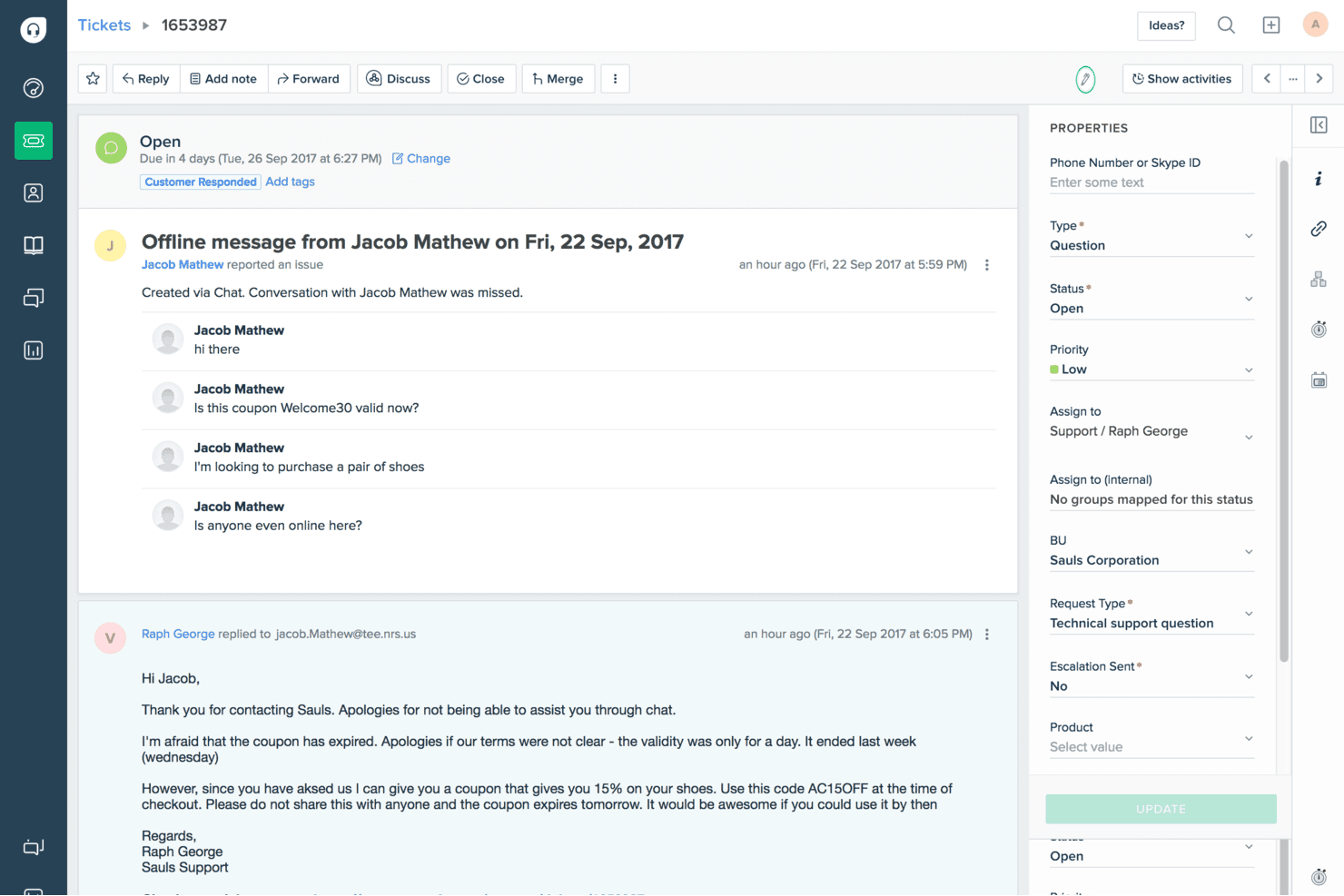
Freshdesk ticket view displaying an offline message submission, with the customer’s inquiry, ticket properties, and internal response panel for managing follow-up and resolution. Freshdesk is a customer support platform from Freshworks that helps SMBs and mid-market teams manage tickets, automate repetitive work, and serve customers across email and other channels—without the cost or complexity of enterprise-tier tools.
Who Is Freshdesk Best For?
Freshdesk is a strong fit for SMB and mid-market support teams that need structured ticket management and automation without the cost or admin overhead of enterprise platforms.
Why I Picked Freshdesk
I picked Freshdesk as one of the best because it gives SMB and mid-market teams a genuinely structured ticket operation without the enterprise price tag. I especially like how SLA policies can be configured by priority, customer segment, or product, so a five-person support team can run the same disciplined escalation workflows a much larger org would. The Freddy AI Agent handles conversational self-service and can take real actions to resolve requests, not just surface articles, which meaningfully reduces ticket volume before it hits your queue.
Freshdesk Key Features
- Shared inbox: A centralized queue where agents can view, assign, and collaborate on incoming tickets using internal notes to avoid duplicate replies.
- Multiple SLA policies: Configurable SLA targets by customer segment, product, or group, with automated reminders and escalations available from the Pro plan.
- Custom real-time dashboards: Build team or goal-specific dashboards that track live ticket counts and selected KPIs, available on Pro and Enterprise.
- 1,000+ Marketplace integrations: A prebuilt app library connecting Freshdesk to tools like Salesforce, Slack, Jira, and Shopify, plus a REST API for custom connections.
Freshdesk Integrations
Freshdesk has 1,000+ ready-to-install Marketplace integrations, including Slack, Microsoft Teams, Salesforce, Jira, and Shopify. It also supports REST APIs and custom Freshworks apps for connecting support workflows to other systems.
Pros and Cons
Pros:
- Staged setup suits lean support teams
- Automation handles repetitive ticket routing
- Ticket histories reduce missed follow-ups
Cons:
- Standalone product lacks unified voice coverage
- Custom reports can feel shallow
Learn more about Freshdesk: Best for SaaS and technology companies
- Free demo available
- From $45/month (billed annually)
Customer Rating:4.5/5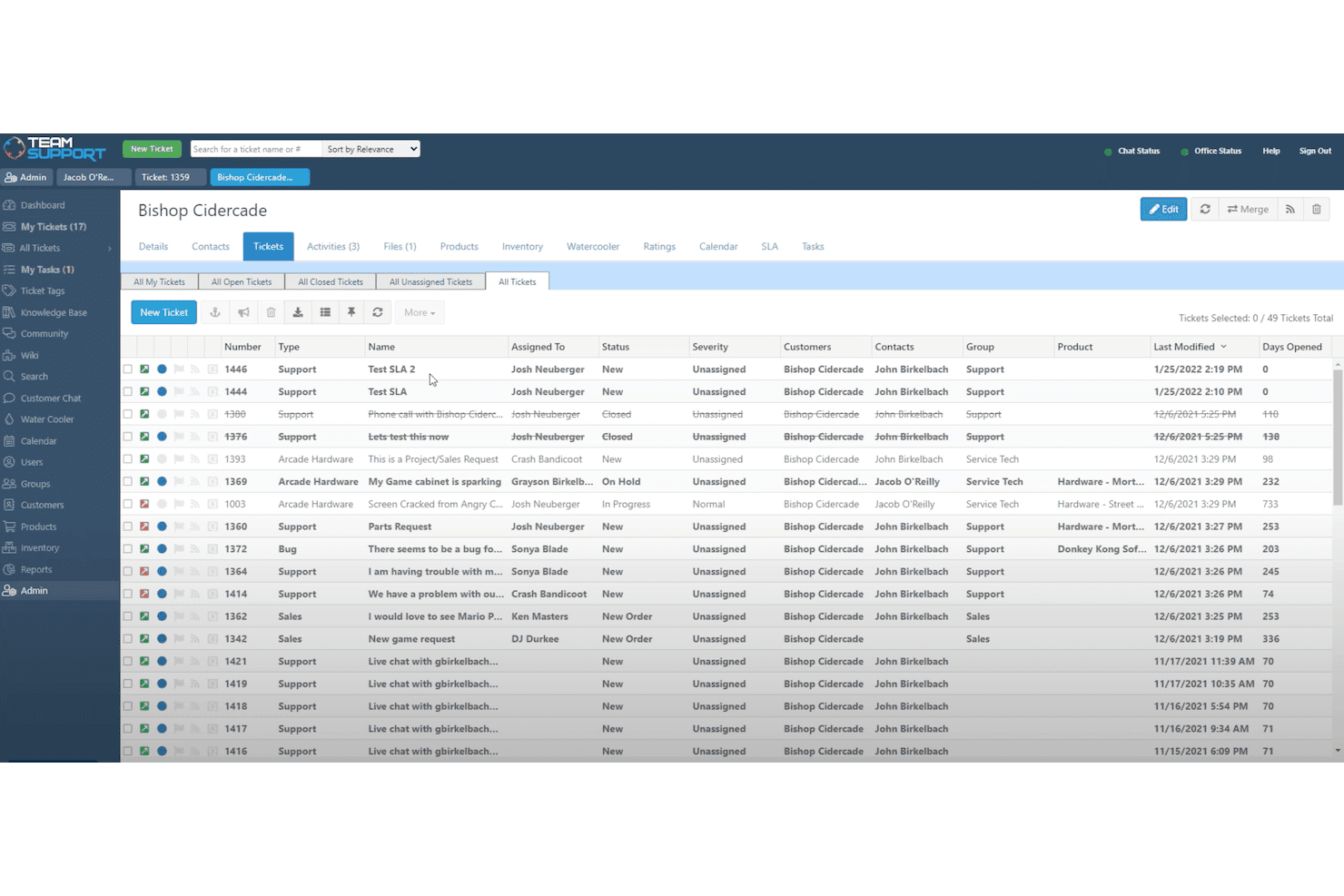
TeamSupport's comprehensive ticketing system includes customer distress tracking, product tagging, and deep analytics. TeamSupport is a B2B customer support platform built for technology and SaaS teams that need account-level context, ticket collaboration across departments, and AI-assisted workflows to manage complex, relationship-driven support.
Who Is TeamSupport Best For?
TeamSupport is a strong fit for B2B technology and SaaS teams that manage support at the account level, where ticket context, customer history, and cross-team collaboration matter as much as raw ticket volume.
Why I Picked TeamSupport
I picked TeamSupport as one of the best because it's purpose-built for B2B support teams where a single account might involve multiple contacts, products, and open tickets at once. I particularly like the Customer Distress Index, which surfaces accounts showing signs of frustration before they escalate, and the account-level Insights dashboards that tie support activity to customer health signals. The AI Agent can retain account context across a conversation and hand off to a human agent with full history intact, which is exactly how B2B escalations need to work.
TeamSupport Key Features
- Automation engine: Create ticket-event and time-based trigger rules with multi-condition logic to auto-assign, tag, close, or reroute tickets without manual intervention.
- Knowledge base with deflection reporting: Publish and organize self-service articles into searchable categories, with built-in traffic reports and a ticket deflection report that tracks when articles resolve issues.
- AI agent with escalation handoff: Deploy an AI agent that handles multi-step troubleshooting and passes conversations to a human agent with full conversation history intact.
- Jira and CRM integrations: Connect tickets directly to Jira, Salesforce, HubSpot, and Microsoft Dynamics to give product, sales, and support teams shared visibility into customer issues.
TeamSupport Integrations
TeamSupport offers 30+ native integrations, including Salesforce, HubSpot, Jira, Microsoft Dynamics, Slack, Microsoft Teams, RingCentral, and SAP. Its REST API supports custom integrations and programmatic access to tickets, customers, and contacts.
Pros and Cons
Pros:
- Distress signals help prioritize at-risk accounts
- Cross-team ticket routing reduces missed requests
- Account histories keep complex B2B cases connected
Cons:
- Report building can feel difficult to configure
- Chat sits outside the core support workspace
Learn more about TeamSupport: Best for HIPAA compliance options
- Free plan + 15-day free trial + free demo available
- From $25/user/month (billed annually)
Visit WebsiteCustomer Rating:4.5/5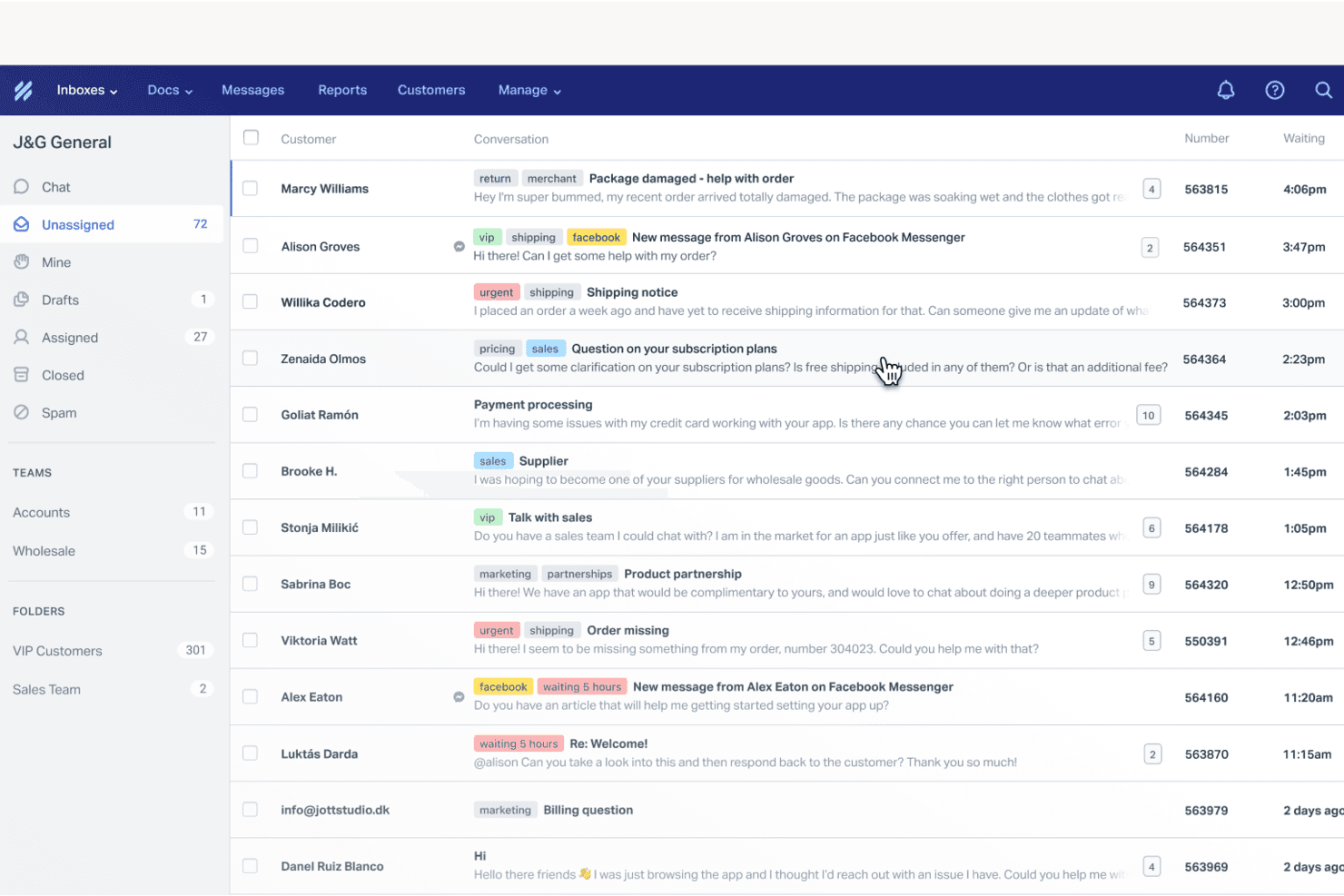
Help Scout allows you to manage every customer interaction, internal note, and help center article directly within the dashboard. Help Scout is a customer support platform built for teams that want a clean, email-like experience for managing conversations across email, chat, and social channels—without the complexity of a traditional ticketing system.
Who Is Help Scout Best For?
Help Scout is a strong fit for teams in healthcare or other regulated industries that need HIPAA-compliant customer support without sacrificing ease of use.
Why I Picked Help Scout
I picked Help Scout as one of the best Zendesk alternatives because it's the only option on my list that includes HIPAA compliance built into a named plan. If your team handles protected health information, Pro gives you a signed BAA and an AI Feature Healthcare Addendum so you can use Scout, the AI agent, without stepping outside compliance. I also appreciate that Scout handles conversations in more than 50 languages and resolves an average of 73% of requests it receives, all while keeping PHI within a SOC 2 Type II certified environment.
Help Scout Key Features
- Shared inbox: Manage customer conversations across email, chat, SMS, WhatsApp, Instagram, and Messenger from a single workspace with full customer context.
- Automatic workflows: Build multi-condition rules with up to 30 conditions to auto-assign, tag, update status, or reply to conversations without manual intervention.
- Signal analytics: Surface conversation topics and trends, track service commitments, and monitor response times, resolution times, and workload metrics in one view.
- Beacon widget: Embed a customizable support hub on your website or app that offers contextual help articles, contact forms, and live chat based on the page a visitor is viewing.
Help Scout Integrations
Help Scout lists 113 integrations, including native integrations with HubSpot, Shopify, Slack, Salesforce, and Jira. It also supports Zapier and offers Inbox, Docs, and Chat APIs plus webhooks for custom connections.
Pros and Cons
Pros:
- Pro supports HIPAA workflows with a signed BAA
- Docs and Beacon help reduce repeat questions
- Shared inbox keeps ownership and follow-ups visible
Cons:
- Zendesk macros and triggers need rebuilding
- Report exports omit conversation thread contents
Learn more about Help Scout: Best for collaborative team inbox support
- 30-day free trial available
- From $14/user/month (billed annually)
Visit WebsiteCustomer Rating:4.8/5
Missive’s shared inbox view shows how teams can collaborate on email threads, assign tasks, and manage client conversations in one workspace. Missive is a collaborative shared inbox that lets small teams manage email, WhatsApp, SMS, and social messaging in one place—making it a lightweight alternative to Zendesk for teams that want to work together on customer conversations without a full ticketing system.
Who Is Missive Best For?
Missive is a strong fit for small teams that want to handle customer conversations collaboratively without the overhead of a full ticketing system.
Why I Picked Missive
I picked Missive as one of the best because it's built from the ground up around team collaboration on customer conversations. I love how private comments let my team discuss a message and coordinate a reply without ever leaving the thread, and collaborative drafts mean two people can co-write a response before it goes out. Missive also brings email, WhatsApp, SMS, Instagram, and Messenger into one shared inbox, so no conversation falls through the cracks across a small team.
Missive Key Features
- Workload distribution: Automatically assigns incoming conversations across your team using round-robin, least-busy-first, all-at-once, or random methods.
- AI rules: Analyzes incoming messages and triggers actions—like creating tasks or alerting a manager—based on message content.
- Canned responses with variable fields: Lets your team reply with reusable templates personalized with dynamic fields for faster, consistent responses.
- Analytics reports: Tracks team performance across five report types, including first-reply time, reply time, and handling time, configurable by business hours.
Missive Integrations
Missive offers 25+ native integrations, including HubSpot, Salesforce, Pipedrive, Shopify, Aircall, Dialpad, Asana, and Trello. It also provides REST API access, webhooks, custom channels, and Zapier connectivity for custom workflows.
Pros and Cons
Pros:
- Rules route messages and trigger follow-ups
- Shared inbox unifies social and email conversations
- Private comments prevent duplicate customer replies
Cons:
- No enforceable SLAs or structured ticket fields
- No customer-facing help center or deflection
Learn more about Missive: Best for AI-driven ticket automation
- Free plan + 21-day trial + demo available
- From $12/user/month (billed annually)
Visit WebsiteCustomer Rating:4.8/5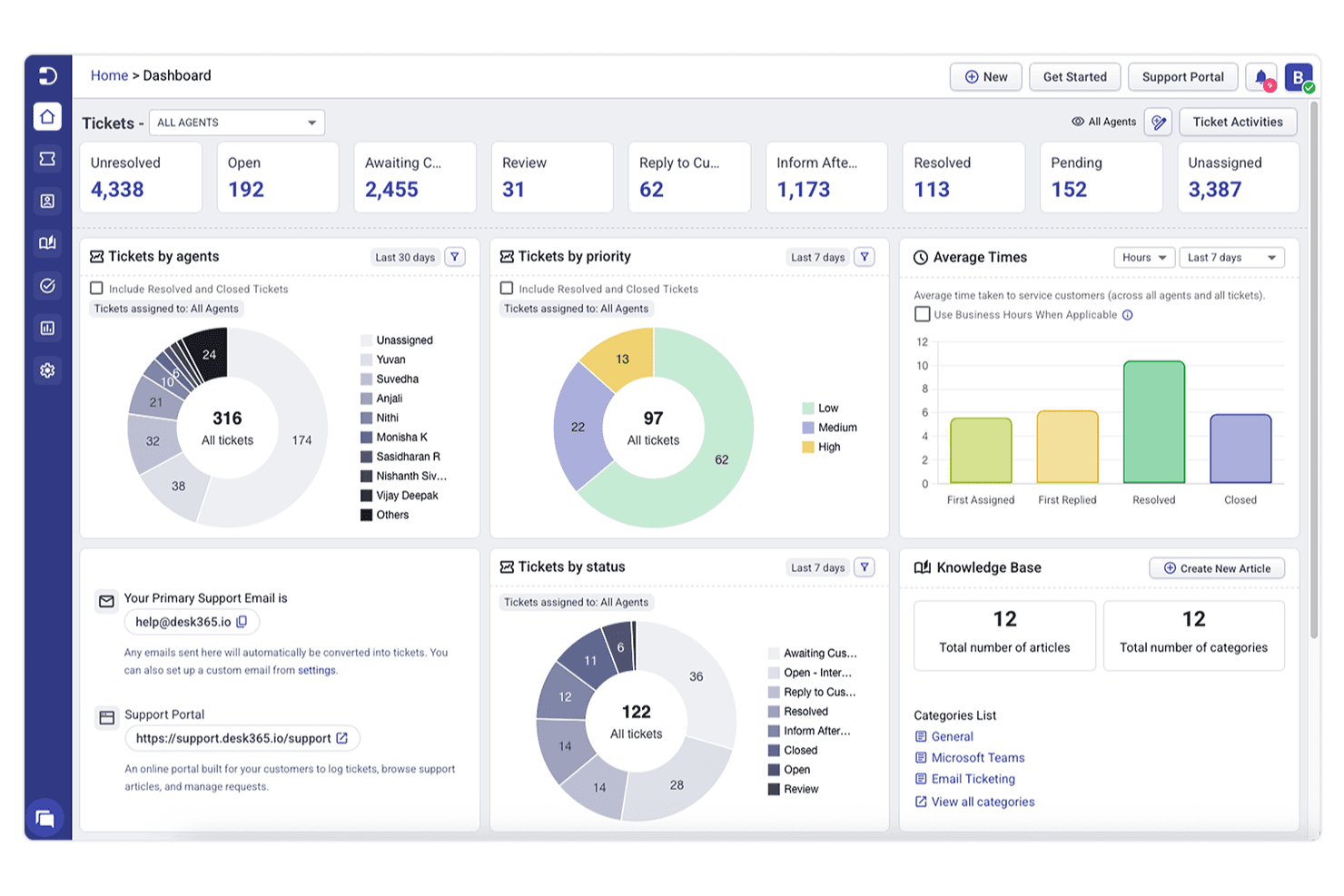
Desk365’s dashboard gives teams real-time visibility into ticket status, priorities, and response times from a single view. Desk365 is a helpdesk platform built for support and IT teams that want deep Microsoft Teams integration, AI-driven ticket automation, and straightforward per-agent pricing—all without the complexity or cost of enterprise-tier tools like Zendesk.
Who Is Desk365 Best For?
Desk365 is a strong fit for IT and support teams already working in Microsoft 365 who want AI-driven ticket automation without paying Zendesk-level prices.
Why I Picked Desk365
I picked Desk365 as one of the best because its AI-driven ticket automation goes beyond simple routing: the AI Agent can hold context across a conversation, resolve straightforward requests on its own, and only escalate to a human when it genuinely can't help. I also appreciate AI Copilot, which lets agents draft replies, summarize long ticket threads, and generate knowledge base articles directly from resolved conversations. Both tools are built into the core platform rather than bolted on as separate products.
Desk365 Key Features
- SLA management: Set SLA policies that trigger automatic reminders and escalation notifications when tickets are due or overdue.
- Microsoft Entra ID Sync: Syncs users, roles, and departments from Microsoft Entra ID to keep agent and contact records current.
- CSAT surveys: Collect customer satisfaction ratings directly after ticket resolution to track service quality over time.
- Multi-condition automation rules: Build ticket-creation and ticket-update rules using "all" or "any" condition sets to route, assign, and update tickets automatically.
Desk365 Integrations
Desk365 offers native integrations across the Microsoft ecosystem, including Microsoft Teams, Entra ID, Intune, Power Automate, and Microsoft 365 Copilot. It connects with Asana and Azure DevOps through Power Automate, Jira and Power BI through its API, and supports REST API and webhooks.
Pros and Cons
Pros:
- Reviewers report setup within a day
- Clear ownership across active tickets
- Configurable rules route tickets by urgency
Cons:
- Complex automation rules need extra configuration
- Built-in reports offer limited actionability
Learn more about Desk365: Best for support-to-sales attribution
- 7-day free trial + free demo available
- From $40/month
Visit WebsiteCustomer Rating:4.6/5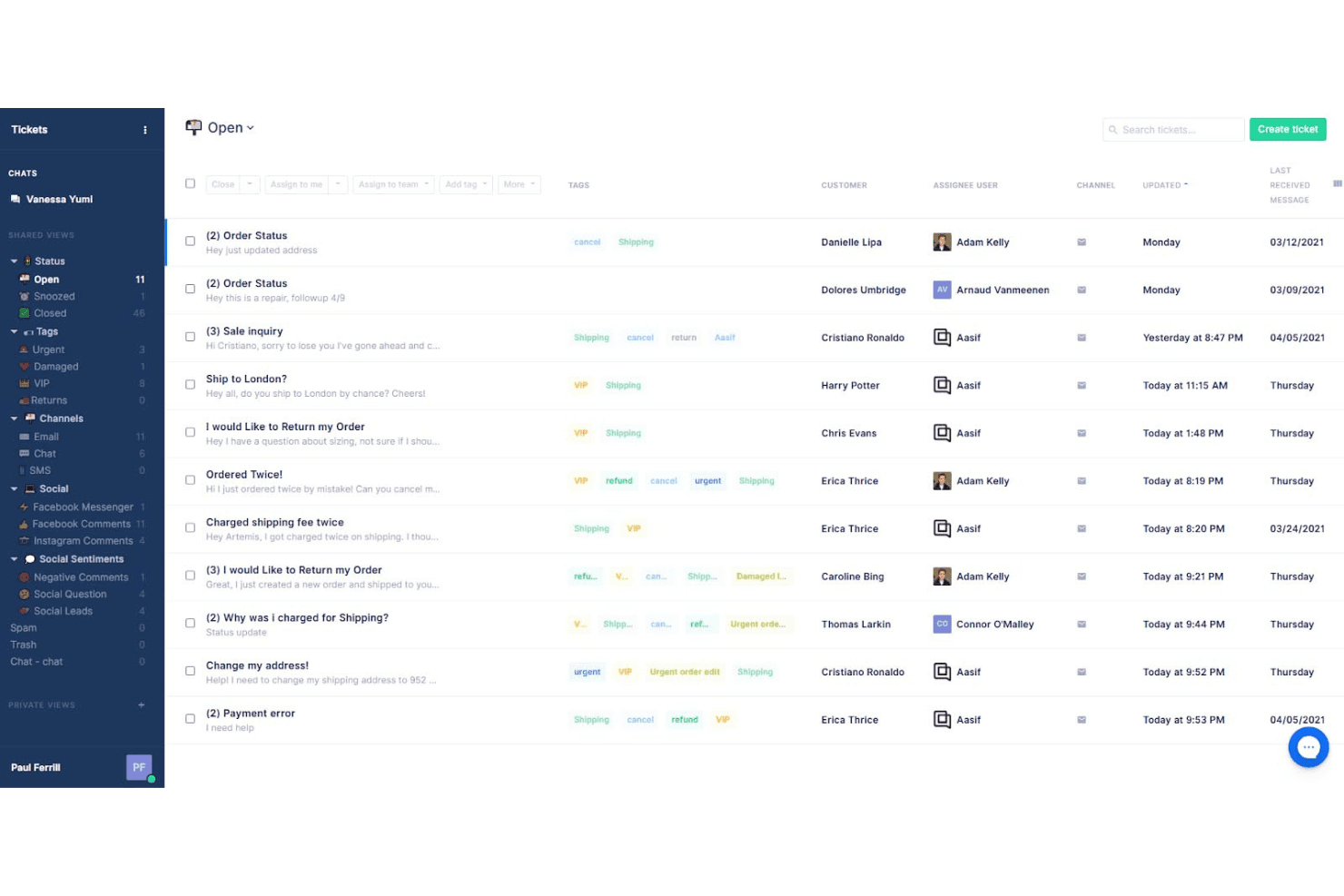
Gorgias streamlines eCommerce support with automation and deep integrations. Gorgias is an ecommerce-focused helpdesk that lets support teams handle email, chat, social, SMS, and voice from one inbox while pulling in live order data and Shopify actions directly inside each ticket.
Who Is Gorgias Best For?
Gorgias is a strong fit for ecommerce teams running on Shopify who want support conversations and order data in the same place.
Why I Picked Gorgias
I picked Gorgias as one of the best because it's the only helpdesk I know that ties support conversations directly to ecommerce revenue. The Revenue Dashboard tracks orders placed within three days of a support interaction, so I can see exactly which tickets converted to sales and how individual agents perform against that number. I also love that the Shopify integration lets my team issue refunds, edit orders, and process cancellations from inside the ticket, making every conversation a potential sales touchpoint.
Gorgias Key Features
- Omnichannel inbox: Centralizes email, live chat, social media, SMS, and voice tickets into a single workspace with full customer history.
- AI tagging and routing: Automatically labels tickets by detected topic and sentiment, then routes them to the right agent or team.
- SLA policy monitoring: Sets and tracks first-response and resolution time targets across channels, with performance data visible in Analytics.
- Help Center with article analytics: Hosts a branded, searchable knowledge base and surfaces popular articles and search terms so teams can fill content gaps.
Gorgias Integrations
Gorgias lists 100+ marketplace apps, while its pricing page cites 150+ app integrations, including Shopify, Recharge, Loop Returns, Klaviyo, Attentive, Yotpo, Facebook, Aircall, Postscript, and NetSuite. It also provides a REST API for custom integrations.
Pros and Cons
Pros:
- Automates routine ticket tagging and routing
- Shows customer history alongside support conversations
- Connects support activity to ecommerce revenue
Cons:
- Migration omits attachments and survey data
- Deeper reporting may require data exports
Learn more about Gorgias: Best for AI-driven support
- 14-day free trial + free demo available
- From $29/seat/month (billed annually)
Visit WebsiteCustomer Rating:4.4/5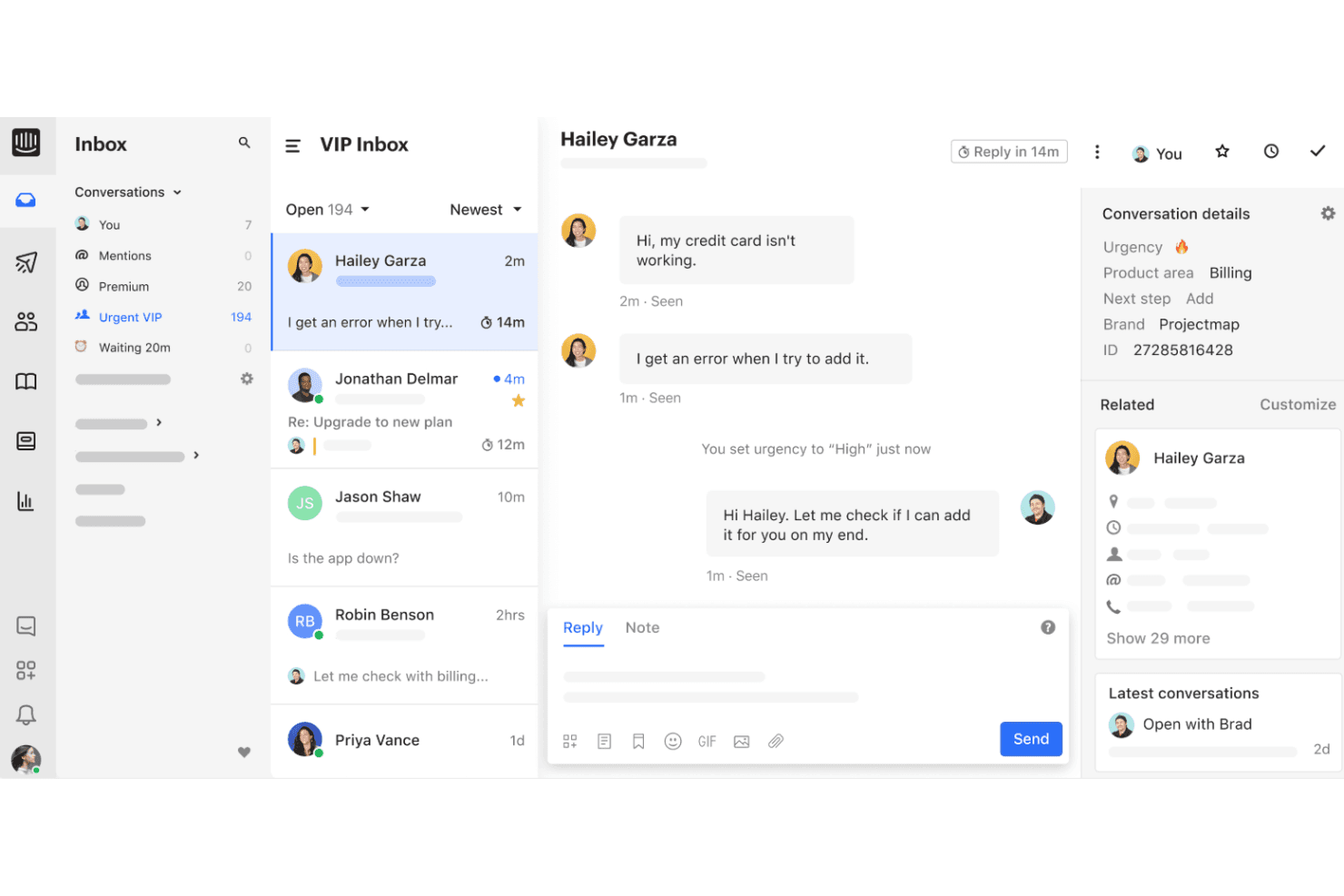
Intercom's AI-driven tools boost automation, efficiency, and engagement. Intercom is an AI-first helpdesk that unifies customer conversations across email, chat, WhatsApp, SMS, and social channels in a single shared inbox—making it a strong fit for support teams that want AI automation and human agents working side by side.
Who Is Intercom Best For?
Intercom is a strong fit for support teams that want AI automation and human agents working from a single, unified inbox across multiple channels.
Why I Picked Intercom
Intercom earns its spot on my shortlist because its AI-driven support model genuinely changes how teams handle volume. Fin, its AI agent, resolves customer conversations autonomously and only charges $0.99 per successful outcome, so you're not paying for failed attempts or default escalations to a human. I also appreciate that Fin and human agents share the same inbox and conversation history, which means handoffs don't lose context mid-conversation.
Intercom Key Features
- Omnichannel shared inbox: Manages email, chat, WhatsApp, SMS, Instagram, Facebook, and phone calls from a single unified workspace.
- No-code workflow builder: Creates automated routing, ticket assignment, tagging, and conversation-closing rules using a visual drag-and-drop editor.
- Custom ticket states: Lets teams define ticket states that map to their own support processes and reporting needs.
- Knowledge Hub: Syncs and imports support content from Zendesk, Confluence, Notion, and Guru into one centralized content library.
Intercom Integrations
Intercom lists 450+ apps and integrations, including native connections with Zendesk, Guru, Confluence, and Notion, plus marketplace integrations for Salesforce, HubSpot, Jira, and Stripe. It also supports APIs, SDKs, webhooks, and Zapier for custom connectivity.
Pros and Cons
Pros:
- Workflows automate ticket routing and assignment
- Shared inbox preserves cross-channel conversation context
- Fin handles routine questions before escalation
Cons:
- Ticket reporting trails Zendesk’s depth
- Fin can answer inaccurately or miss escalations
 Best for support rooted in purchase history
- Free demo available
- Pricing upon request
Visit WebsiteCustomer Rating:4.5/5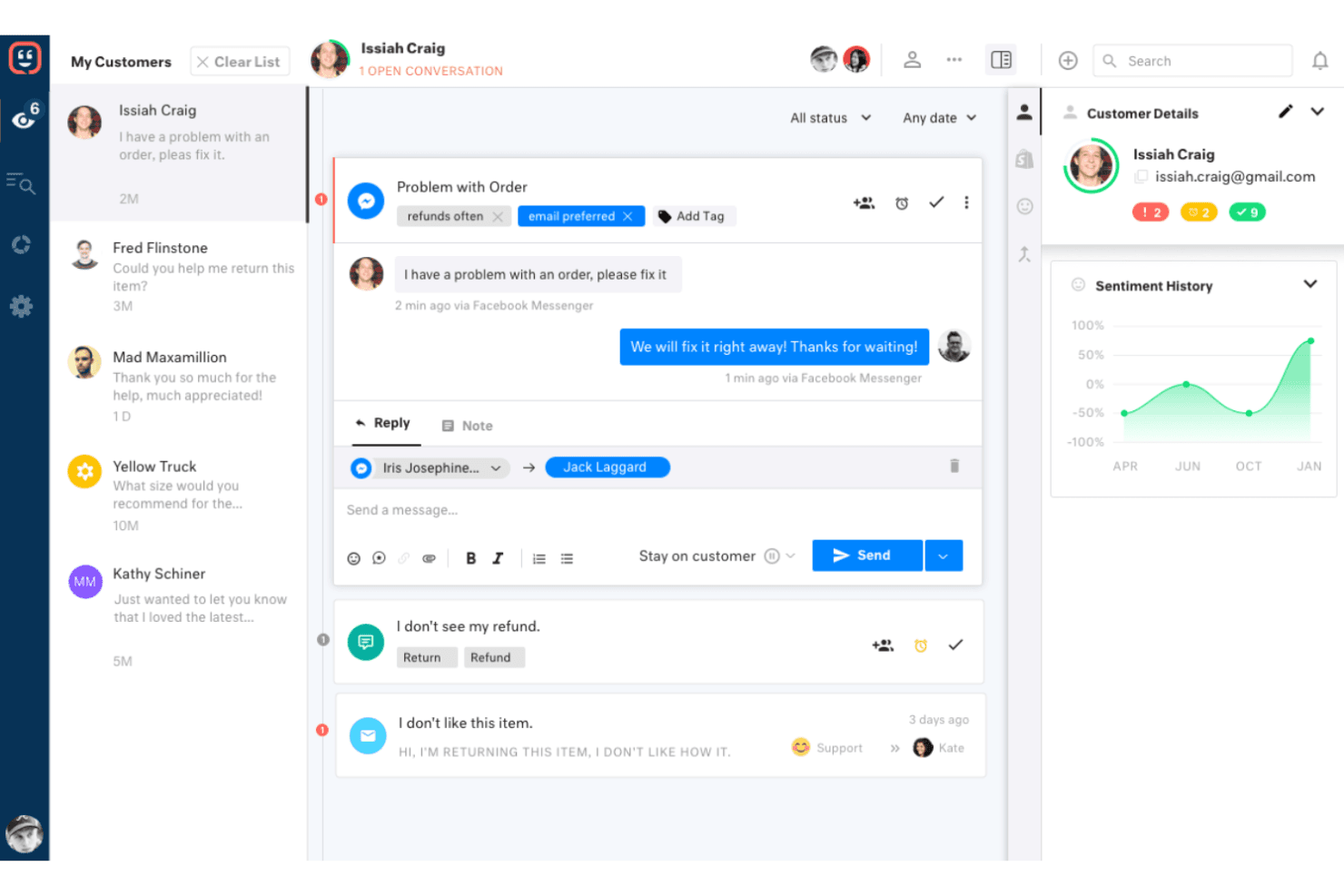
Kustomer enhances support with data insights, automation, and personalization. Kustomer is an AI-native customer experience platform built for ecommerce and high-growth consumer brands that want to manage support across chat, email, voice, SMS, and social from a single customer timeline.
Who Is Kustomer Best For?
Kustomer is a strong fit for ecommerce and consumer brands that need support agents to have full purchase history and order context before they even say hello.
Why I Picked Kustomer
I picked Kustomer as one of the best because it builds support around a full customer timeline that surfaces purchase history, past conversations, and order status before an agent types a single word. I love how Kustomer's Concierge AI can resolve requests using that same context autonomously, routing to a human only when needed and passing along everything it already knows. The customer profile model is what really sets it apart: agents aren't reading a ticket in isolation, they're reading a customer's entire story.
Kustomer Key Features
- Omnichannel conversation threading: Kustomer pulls chat, email, SMS, voice, Slack, and social messages into a single conversation thread so agents never lose context switching channels.
- Skills-based routing: Conversations are automatically directed to agents based on defined skills, keeping queue management aligned with agent capabilities.
- Data Explorer: A natural-language analytics tool that lets you ask plain-language questions about CX data and returns charts, breakdowns, and trend explanations.
- Concierge AI guardrails: Confidence thresholds let you control when Concierge escalates a conversation to a human agent, with live monitoring and supervisor override available.
Kustomer Integrations
Kustomer offers 60+ marketplace integrations, including BigCommerce, Aircall, Amazon Connect, and Amazon Redshift. REST APIs, webhooks, real-time events, and chat SDKs support custom integrations.
Pros and Cons
Pros:
- Workflow automation handles routing and routine requests
- Agents retain context across channel switches
- Purchase history informs every support conversation
Cons:
- Dense settings can complicate setup and onboarding
- Reports can feel slow and hard to verify
Learn more about Kustomer: Best for AI plans without per-agent fees
- 15-day free trial + free demo available
- From $99/month (billed annually)
Visit WebsiteCustomer Rating:4.6/5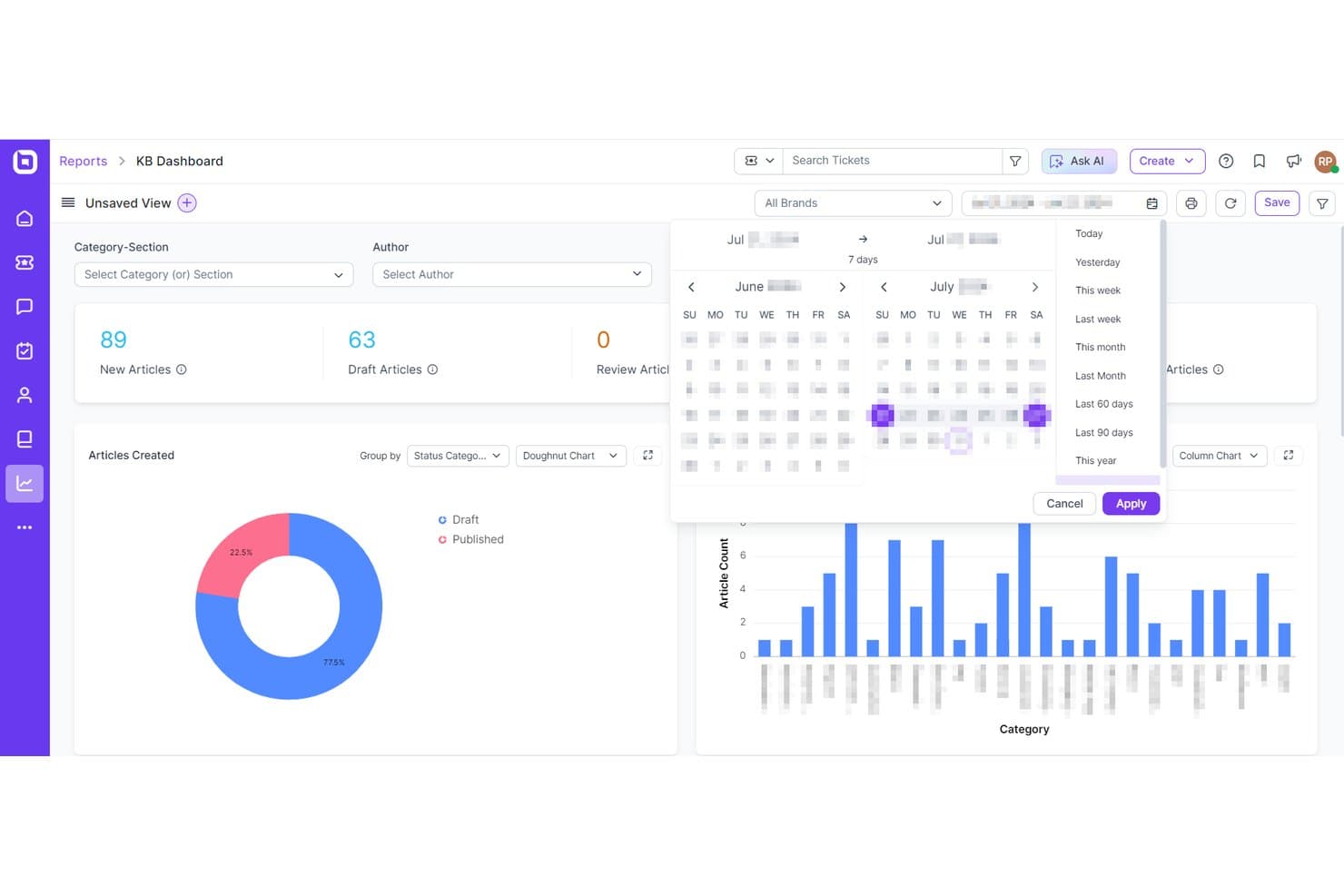
BoldDesk lets users filter KB dashboard data by custom date ranges. BoldDesk is an AI-powered help desk built by Syncfusion that lets support teams handle tickets, automate workflows, and deploy AI agents across email, chat, and social channels from a single workspace.
Who Is BoldDesk Best For?
BoldDesk is a strong fit for growing support teams that want AI-powered automation across channels without paying per agent or per resolution.
Why I Picked BoldDesk
I picked BoldDesk as one of the best because its AI plans charge per account, not per agent or per resolved ticket, which changes the math entirely for growing teams. I really like that you get a Support Agent that handles tickets autonomously across email, chat, WhatsApp, and social channels from a single credit pool, plus a Background Agent that auto-triages and routes incoming work without any manual setup. That means a team scaling from 10 to 50 agents doesn't see its support bill multiply the way it would with Zendesk's per-seat model.
BoldDesk Key Features
- Omnichannel inbox: Manages email, live chat, WhatsApp, Facebook, Instagram, Telegram, SMS, and LINE conversations from a single shared workspace.
- Knowledge base with AI article generation: Lets your team build and publish self-service help content, with AI that drafts and summarizes articles and powers predictive search.
- SLA tracking and escalations: Sets response and resolution targets per ticket, sends reminders before deadlines, and auto-escalates when targets are breached.
- Shopify and WooCommerce integrations: Surfaces customer order details directly on tickets and lets agents issue refunds or cancellations without leaving BoldDesk.
BoldDesk Integrations
BoldDesk offers native integrations with Salesforce, HubSpot, Pipedrive, Shopify, WooCommerce, Jira, Azure DevOps, GitHub, Slack, and Microsoft Teams. It also supports REST APIs, webhooks, an MCP server, and Zapier for custom integrations.
Pros and Cons
Pros:
- Reviewers report smooth assisted Zendesk migrations
- Reviewers praise dashboards for SLA visibility
- AI agents can resolve and triage tickets
Cons:
- Phone support depends on third-party systems
- Advanced reports offer limited personalization
Learn more about BoldDesk: Best for support tied to sales and marketing
- Free plan + 14-day free trial + free demo available
- From $7/seat/month (billed annually)
Visit WebsiteCustomer Rating:4.4/5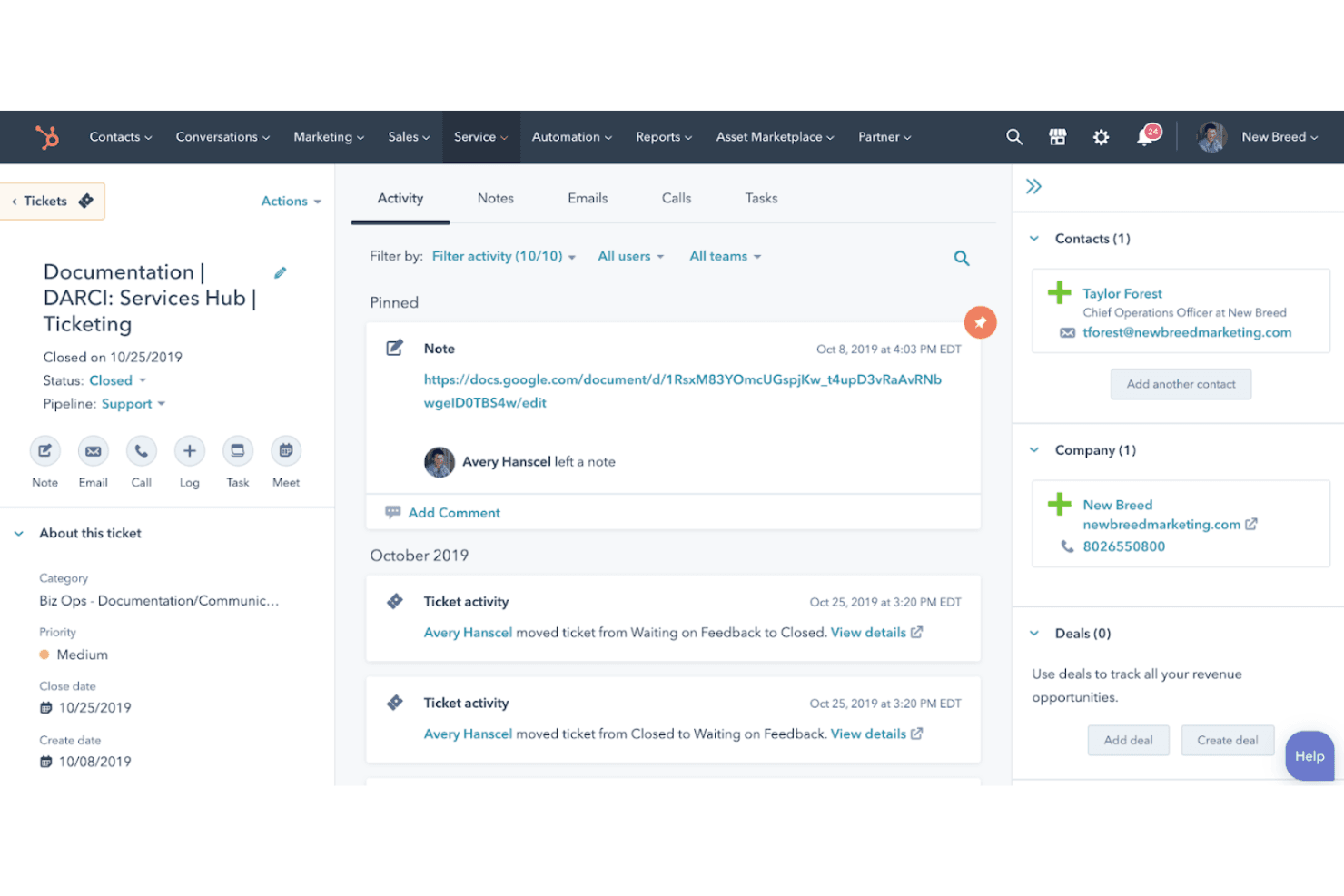
HubSpot Service Hub boosts retention with AI, CRM insights, and automation. HubSpot Service Hub is a customer service platform that connects your support tickets, live chat, and CRM data in one place—making it a strong fit for teams that want their service operations tightly aligned with sales and marketing.
Who Is HubSpot Service Hub Best For?
HubSpot Service Hub is a strong fit for teams that already use HubSpot for sales or marketing and want their support operations connected to the same customer data.
Why I Picked HubSpot Service Hub
I've included HubSpot Service Hub in my top picks because it's the only tool here where your support tickets live inside the same CRM your sales and marketing teams already use. When a customer submits a ticket, your agent can immediately see that person's deal history, marketing engagement, and health score, without switching tabs or pulling data from another system. I particularly like the Customer Success Workspace, which lets support managers monitor account health and flag at-risk customers directly from the same view where they're managing open tickets.
HubSpot Service Hub Key Features
- Multi-channel help desk workspace: Centralizes tickets from email, live chat, forms, calling, WhatsApp, and Facebook Messenger into one unified workspace.
- Customer feedback surveys: Collects NPS, CSAT, and CES responses through customizable surveys to track satisfaction trends over time.
- SLA management: Sets and monitors first-reply, next-reply, and time-to-close goals with scheduled hours, time zones, and pause conditions.
- Skill-based routing: Automatically assigns incoming tickets to agents based on skills, availability, and capacity limits.
HubSpot Service Hub Integrations
HubSpot Service Hub supports 1,900+ marketplace integrations, including Jira, Aircall, Slack, Microsoft Teams, SurveyMonkey, and Zapier, plus a native Salesforce integration. It also offers a REST API for custom integrations.
Pros and Cons
Pros:
- Service analytics link ticket performance with customer health
- Shared inbox consolidates support channels in one workspace
- CRM records give agents sales and marketing context
Cons:
- Help desk setup can feel overwhelming for migrating teams
- Zendesk macros don’t map one-to-one
Learn more about HubSpot Service Hub:
Quando utilizar alternativas ao Zendesk
O Zendesk é um dos nomes mais reconhecidos no apoio ao cliente, mas foi concebido para crescer à escala, o que implica uma complexidade e um custo que não são adequados para todas as equipas. Se algum dos cenários abaixo lhe parecer familiar, vale a pena explorar o que mais existe.
- A sua fatura continua a aumentar à medida que a sua equipa cresce: Adicionou três novos agentes no último trimestre e a sua fatura do Zendesk aumentou várias centenas de dólares. Muitas alternativas oferecem preços fixos ou mais baixos por utilizador, que permitem crescer sem penalizar o crescimento da equipa.
- A configuração está a demorar semanas para tratar pedidos básicos: Configurar o Zendesk significa frequentemente semanas de trabalho administrativo ou a contratação de um consultor antes de a sua equipa o poder utilizar corretamente. Ferramentas mais simples, como o Help Scout ou o Freshdesk, permitem começar a trabalhar em poucos dias, e não em meses.
- A sua equipa de apoio é pequena, mas gere vários canais: Gerir e-mails, conversas em direto e mensagens privadas nas redes sociais em separadores separados está a tornar os seus agentes mais lentos. Plataformas como o Tidio ou o Zoho Desk reúnem tudo numa única caixa de entrada, sem a complexidade das soluções empresariais.
- Está a demorar demasiado tempo a obter os relatórios que a sua direção realmente pretende: Os relatórios prontos a utilizar do Zendesk exigem muita personalização para apresentar as métricas importantes. Alternativas como o Intercom ou o Kustomer disponibilizam painéis pré-configurados que reduzem significativamente o tempo necessário para criar relatórios.
- Tem uma loja de comércio eletrónico e precisa de integrações mais eficazes: O Zendesk liga-se ao Shopify, mas a configuração é pouco prática e os dados das encomendas dos clientes nem sempre aparecem corretamente nos pedidos. Ferramentas como o Gorgias foram criadas especificamente para o comércio eletrónico e importam os detalhes das encomendas diretamente para cada conversa.
Outras alternativas ao Zendesk
Eis algumas alternativas adicionais ao Zendesk que não chegaram à minha lista final, mas que vale a pena conhecer:
- 11VivantioBest for incident management
- 12Salesforce Service CloudBest for AI collaboration
- 13SparrowDeskBest for AI-powered support insights
- 14SolarWinds Service DeskBest for US, EU, or Australia data centers
- 15FreshserviceBest for cross-department employee services
- 16HappyFoxBest for included Zendesk migration
- 17KayakoBest for adding AI before leaving Zendesk
- 18LiveAgentBest for guided Zendesk migration
- 19ManageEngine ServiceDesk PlusBest for on-premises service desk deployment
- 20ServiceNowBest for cross-department case resolution
- 21ProProfs Help DeskBest for support portals with customer forums
- 22CrispBest for live visual customer troubleshooting
- 23DeskproBest for vendor-assisted Zendesk migration
- 24Jira Service ManagementBest for self-managed service operations
- 25Zoho DeskBest for Zendesk contract coverage
- 26CayzuBest for support with billable time tracking
- 27monday serviceBest with fully customizable workflows
- 28GladlyBest for support centered on customer history
- 29FrontBest for cross-system support workflows
How I Evaluate Zendesk Alternatives
I split my evaluation into three parts, with core functionality weighted most: an alternative must handle ticket management and multichannel support. Then I look for standout features like per-resolution pricing or no-code workflow builders. Beyond features, I check onboarding support and pricing transparency.
Core Functionality (Table Stakes For This List)
When I'm selecting tools for my list, I score each one on a scale from 0 (does not offer the functionality) to 5 (excels in this area) for each core functionality listed below. I then convert the total into a percentage to help assess each tool's overall fit, with extra weight on any functionalities I’ve deemed essential.
- Ticket Management (Essential): I look for assignment, status, custom fields, and routing that keep a billing question traceable through handoffs and resolution.
- Multi-Channel Support (Essential): I check whether email, chat, social, and phone conversations land in one workspace with customer context intact.
- Knowledge Base: I assess searchable, organized help content and whether agents can link relevant articles or customers can find answers themselves.
- Automation & Workflows: I look for rules that route urgent cases, set priorities, or trigger replies based on issue type and customer details.
- Reporting & Analytics: I compare dashboards for response and resolution times, backlog, and team-level trends that reveal where service stalls.
- Third-Party Integrations: I check connections to CRM, commerce, and communication tools so agents can see relevant context without duplicating records.
Once I have a list of tools that meet the criteria, I consider what sets each platform apart.
Differentiating Factors (What Sets Vendors Apart)
Here's how I compare and contrast different vendors:
Standout Features
I look for per-resolution pricing models, where you pay for conversations resolved rather than agent seats. This matters when your team scales seasonally or adds part-time agents. I also evaluate no-code workflow builders that let a support lead design escalation paths and routing logic without filing a dev request. Built-in voice channels are another factor—native IVR and call routing save you from stitching together a separate telephony tool just to handle phone support alongside chat and email.
Beyond Features
I check whether a vendor publishes clear pricing tiers and usage-based options, because teams leaving Zendesk often do so after surprise cost jumps at renewal. Migration support matters just as much—I look for dedicated onboarding specialists and ticket-import tooling so a lean team can switch without losing history or momentum. I also evaluate each vendor's AI roadmap and release cadence to gauge long-term viability.
Por que procurar uma alternativa ao Zendesk?
Embora o Zendesk seja uma boa escolha de software de suporte, há várias razões pelas quais alguns utilizadores procuram soluções alternativas. Poderá estar à procura de uma alternativa ao Zendesk porque…
- Precisa de preços mais acessíveis
- A sua equipa precisa de uma configuração mais simples
- Precisa de melhores opções de personalização
- A sua empresa tem necessidades específicas do setor
- Pretende integrações mais flexíveis
- Precisa de controlos reforçados de privacidade dos dados
Se alguma destas situações lhe parece familiar, veio ao sítio certo. A minha lista inclui várias soluções de suporte mais adequadas para equipas que enfrentam estes desafios com o Zendesk e procuram soluções alternativas.
Principais funcionalidades do Zendesk
Ao selecionar alternativas ao Zendesk, tenha em consideração estas principais funcionalidades disponibilizadas pelo Zendesk, para poder encontrar uma substituição adequada:
- Gestão de pedidos: Permite-lhe organizar e acompanhar todos os pedidos dos clientes num único painel. Pode atribuir, definir prioridades e atualizar pedidos, o que significa que nunca perde de vista uma questão de um cliente.
- Suporte multicanal: Permite-lhe tratar das questões dos clientes através de e-mail, chat, telefone, redes sociais e muito mais, tudo num único local. Assim, não precisa de alternar entre plataformas e pode responder mais rapidamente.
- Base de conhecimento: Permite-lhe criar e gerir uma biblioteca de artigos de ajuda e perguntas frequentes. Os clientes podem encontrar as suas próprias respostas, reduzindo a carga de trabalho da sua equipa de suporte e dando mais autonomia aos utilizadores.
- Automação e fluxos de trabalho: Permite-lhe automatizar tarefas de suporte repetitivas, como encaminhar pedidos ou enviar atualizações de estado. Isto acelera os tempos de resolução e mantém tudo a funcionar sem problemas.
- Painéis e relatórios personalizáveis: Disponibiliza ferramentas de elaboração de relatórios para analisar o desempenho da equipa, a satisfação dos clientes e as tendências dos pedidos. Pode utilizar estes dados para otimizar os seus processos de suporte e identificar problemas recorrentes.
- Ferramentas de colaboração: Ajudam a sua equipa a trabalhar em conjunto, permitindo conversas paralelas, notas internas e vistas partilhadas do histórico dos clientes. Todos se mantêm a par da situação, tornando o suporte mais simples.
- Recolha de feedback dos clientes: Permite-lhe recolher classificações, avaliações e respostas a questionários após as interações com os clientes. Esta funcionalidade ajuda-o a identificar o que está a funcionar e onde pode melhorar.
- Integrações com aplicações: Permite-lhe ligar o Zendesk a outras ferramentas empresariais, como plataformas de CRM, soluções de comércio eletrónico ou aplicações de produtividade. A integração simplifica o seu fluxo de trabalho e centraliza os dados dos clientes.
Perguntas frequentes sobre alternativas ao Zendesk
Eis algumas perguntas frequentes sobre alternativas ao Zendesk:
Como se comparam as alternativas ao Zendesk em termos de preços?
As alternativas ao Zendesk variam de preço; muitas oferecem planos flexíveis mensais ou anuais por utilizador, com custos iniciais mais baixos para equipas pequenas. Algumas plataformas têm versões gratuitas ou incluem mais funcionalidades no plano base do que o Zendesk. Tenha atenção aos custos relacionados com funcionalidades avançadas, integrações ou suporte premium. Peça sempre um orçamento detalhado e verifique se existem custos ocultos de migração ou configuração antes de efetuar a mudança.
É fácil migrar do Zendesk para uma plataforma alternativa?
A migração do Zendesk pode ser simples se o novo fornecedor disponibilizar ferramentas de migração ou apoio à integração. Muitas plataformas ajudam a transferir pedidos, contactos e artigos da central de ajuda. Analise os dados que pode exportar e teste primeiro o processo de migração num pequeno conjunto de dados. Envolva o administrador ou a equipa de TI para reduzir o tempo de inatividade.
As alternativas ao Zendesk podem integrar-se com o meu software existente?
Sim, a maioria das alternativas ao Zendesk inclui integrações pré-configuradas para CRM populares, ferramentas de conversação e plataformas de email. Algumas oferecem APIs abertas ou são compatíveis com soluções intermédias, como o Zapier, permitindo ligar-se a uma vasta gama de aplicações empresariais. Peça aos fornecedores exemplos reais de integrações e consulte a documentação para confirmar que funcionarão com o seu conjunto de ferramentas.
Como é que as alternativas ao Zendesk suportam o atendimento ao cliente omnicanal?
A maioria das alternativas ao Zendesk suporta telefone, email, conversação em direto, redes sociais e outros canais numa caixa de entrada unificada. As ferramentas omnicanal permitem que os agentes acompanhem as conversas entre plataformas sem perder o contexto do cliente. Procure plataformas que ofereçam mudança de canal simples, encaminhamento automatizado e relatórios consolidados, para uma experiência de suporte mais integrada.
As alternativas ao Zendesk são adequadas para pequenas empresas?
Sim, muitas alternativas ao Zendesk foram concebidas para pequenas empresas, oferecendo interfaces fáceis de utilizar, planos acessíveis e configuração simples. Algumas concentram-se especificamente nas necessidades das pequenas e médias empresas, disponibilizando funcionalidades essenciais de gestão de pedidos, automatização e relatórios sem a complexidade do software empresarial. Procure opções com preços escaláveis e apoio ao cliente ágil à medida que a sua equipa cresce.
Quais são os desafios comuns ao mudar do Zendesk para outro serviço de apoio?
Os desafios incluem mapear pedidos e dados de clientes, reconstruir automatizações e formar novamente a equipa. Também podem surgir falhas de integração com o conjunto de software existente. Prepare-se auditando a configuração do Zendesk, identificando os fluxos de trabalho essenciais e comunicando claramente com os funcionários antes de efetuar alterações. Considere uma implementação faseada para minimizar as perturbações.
Existe uma alternativa gratuita ao Zendesk?
Sim, existem alternativas gratuitas ao Zendesk que oferecem funcionalidades básicas de gestão de pedidos e apoio ao cliente. Ferramentas como o Freshdesk, o Zoho Desk e o HubSpot Service Hub têm planos gratuitos com funcionalidades essenciais de serviço de apoio, embora possam aplicar-se limites ao número de utilizadores, às funcionalidades ou aos relatórios. As versões gratuitas são excelentes para equipas pequenas ou empresas em fase inicial, mas poderá ter de fazer uma atualização para obter funcionalidades avançadas à medida que as suas necessidades aumentam.
Posso personalizar fluxos de trabalho e automatizações com alternativas ao Zendesk?
Sim, a maioria das principais alternativas ao Zendesk permite criar fluxos de trabalho e automatizações personalizados para gestão de pedidos, encaminhamento, notificações e escalamento. Algumas oferecem editores visuais intuitivos, enquanto outras exigem uma configuração mais técnica. Consulte os recursos do fornecedor ou peça uma demonstração ao vivo para ver a personalização de fluxos de trabalho em ação e confirmar que corresponde às necessidades da sua equipa.
