

The best session replay software captures digital interactions and recreates them as playback, showing where customer journeys stall, fail, or end in abandonment.
This guide compares tools for websites, mobile apps, and complex digital journeys. You’ll see which platforms connect replay with product analytics, error data, AI insights, privacy controls, and revenue signals. Use the comparison to choose software that helps your CX, product, UX, and engineering teams identify affected customers, diagnose friction, and decide what to fix first.
Why Trust Our Software Recommendations
6,700+
Reviews
20
Industry experts
16+
Evaluation factors
14
Years
Our team has been testing and reviewing software since 2012. As CX leaders ourselves, we know how difficult—and important—it is to choose the right software.
For this guide, we evaluated tools using hands-on testing and independent research, scoring tools using our selection criteria.
Our reviews reflect our human editorial judgment, not a sales pitch.
 Gui DrusinaCreative Director
 Tim FisherVP of AI
Comparison Table: Session Replay Software
Compare pricing and specs, side by side, for the best session replay software that made it onto my shortlist.
| Tool | Best For | Trial Info | Price | ||
|---|---|---|---|---|---|
| 1 | Best for full user observability stack | 15-day free trial | From $7/month | Website | |
| 2 | Best for replays linked to product analytics | Free plan available | Pricing upon request | Website | |
| 3 | Best for mobile replay with built-in analytics | Free demo + 14-day free trial available | Pricing upon request | Website | |
| 4 | Best for open-source replay | Free plan available | Pricing upon request | Website | |
| 5 | Best for AI-summarized sessions at scale | Free plan + free demo + 15-day free trial available | From $39/month (billed annually) | Website | |
| 6 | Best for enterprise-scale replay with AI triage | Free demo available | Pricing upon request | Website | |
| 7 | Best for AI-prioritized session insights by revenue | Free plan available | Pricing upon request | Website | |
| 8 | Best for regulated-industry session replays | Free demo available | Pricing upon request | Website | |
| 9 | Best for synced console and network logs | 14-day free trial + free plan available | From $176/month (billed annually) | Website | |
| 10 | Best for replay tied to full-stack observability | Free demo + 14-day free trial available | From $2.50/1,000 sessions/month (billed annually) | Website |


Session Replay Software Reviews
Below are my detailed summaries of the best session replay software on my shortlist. My reviews examine each platform’s features, use cases, and privacy controls to help you find the best fit.
 Best for full user observability stack
- 15-day free trial
- From $7/month
Visit WebsiteCustomer Rating:4.5/5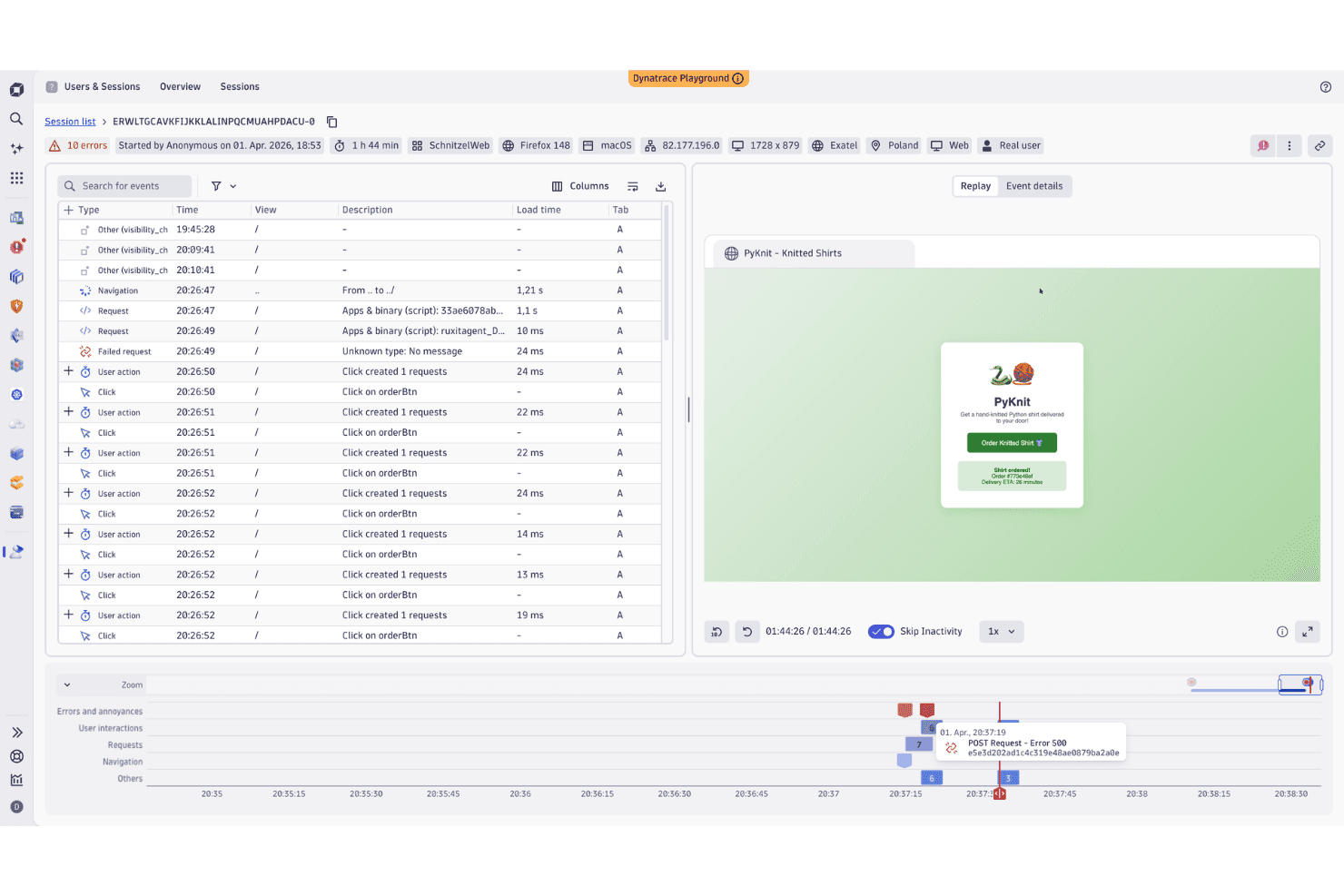
Dynatrace replays user sessions to pinpoint errors and failed requests. Dynatrace is an observability platform that extends into session replay, capturing web and mobile user sessions alongside backend traces, logs, and metrics in a single unified environment.
Who Is Dynatrace Best For?
Dynatrace is a strong fit for enterprise engineering and DevOps teams responsible for root-cause analysis across front-end and back-end systems.
Why I Picked Dynatrace
I picked Dynatrace because it carries a user recording through to backend traces, logs, and metrics without leaving the platform. When a rage click fires or a JS error surfaces, I can follow it to the PurePath trace in the same view. Davis AI also summarizes sessions automatically, surfacing anomalies in plain language so you're not scrubbing hours of recordings to find what broke.
Dynatrace Key Features
- Rage click and rage tap detection: Automatically flags sessions where users click or tap the same area three or more times rapidly, classifying them as frustration events in RUM.
- DQL session segmentation: Use Dynatrace Query Language to write complex, reusable queries across session data—filtering by user, device, error count, location, or custom properties.
- Mobile session replay: Includes gestures, UI states, and navigation paths, with automatic 100% recording of crash sessions on both platforms.
- Configurable privacy masking: Choose from preset masking levels or configure per-element rules to anonymize sensitive data before capture, with permission-gated playback controls by role.
Dynatrace Integrations
Dynatrace Hub supports integrations and extensions across 900+ technologies and major cloud platforms. Grail connects Session Replay with logs, traces, metrics, business events, RUM, and OpenTelemetry/OTLP data.
Pros and Cons
Pros:
- AI summarizes errors across recorded sessions
- DQL enables advanced session segmentation
- Links recordings to backend PurePath traces
Cons:
- Limited support for some cross-platform frameworks
- No native heatmaps for UX analysis
 Best for replays linked to product analytics
- Free plan available
- Pricing upon request
Visit WebsiteCustomer Rating:4.5/5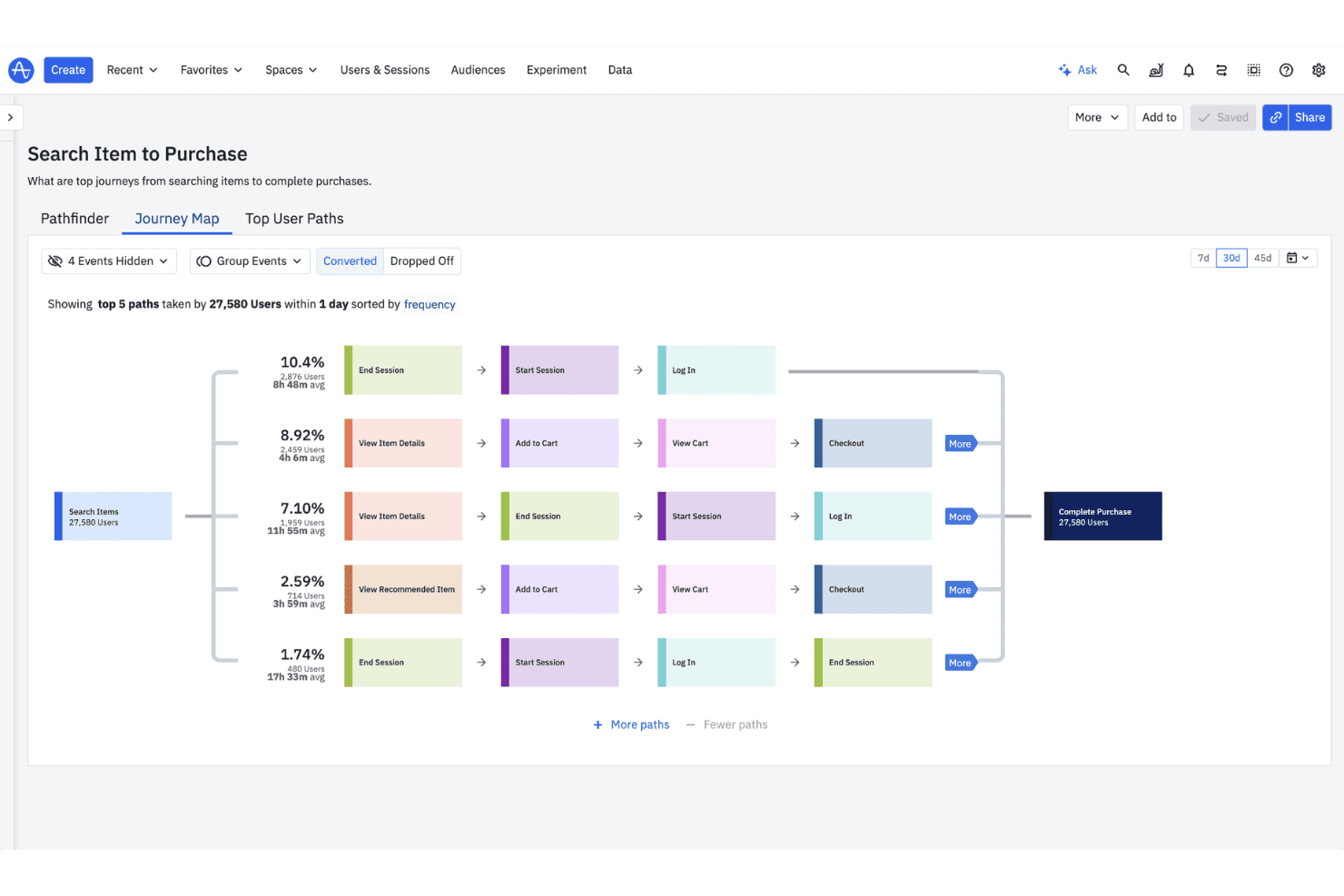
Amplitude maps user journeys from search to purchase visually. Amplitude Session Replay is a session recording and playback module built into the Amplitude product analytics platform, combining replay with heatmaps, frustration signal detection, and native integration with funnels, journeys, and A/B experiments.
Who Is Amplitude Best For?
Amplitude Session Replay is a strong fit for product and engineering teams that already use Amplitude Analytics.
Why I Picked Amplitude
I've included Amplitude in my top picks because the replay module sits inside the same platform as Amplitude's funnels, journeys, and experiment charts, so I can click directly from a funnel drop-off into the sessions behind it without switching tools. I especially like that rage clicks and dead clicks are emitted as first-class Amplitude events, meaning I can chart them at scale rather than hunting through individual recordings. The AI-generated session summaries also cut down the time I'd otherwise spend watching replays to find where users hit friction.
Amplitude Key Features
- Targeted replay capture: Configure capture rules by event, user property, or page URL so you only record the sessions most relevant to your analysis.
- Console and network error logging: Captures console logs, failed network requests, and runtime errors in a panel synced to the replay timeline for debugging.
- Cross-platform SDKs: Browser, iOS, Android, and React Native SDKs let you capture sessions across web and mobile apps from a single platform.
- Masking presets and CSS-selector overrides: Choose from three privacy presets or define custom mask and unmask rules using class names, tags, or data attributes.
Amplitude Integrations
Amplitude integrates with Twilio Segment, Braze, HubSpot, Google Tag Manager, Amazon, and Appcues. An API for custom integrations is also available.
Pros and Cons
Pros:
- Syncs console and network errors to playback
- Charts rage and dead clicks at scale
- No separate replay vendor needed
Cons:
- Search displays no more than 100 replays
- Default replay retention lasts only one month
Learn more about Amplitude: Best for mobile replay with built-in analytics
- Free demo + 14-day free trial available
- Pricing upon request
Visit WebsiteCustomer Rating:4.6/5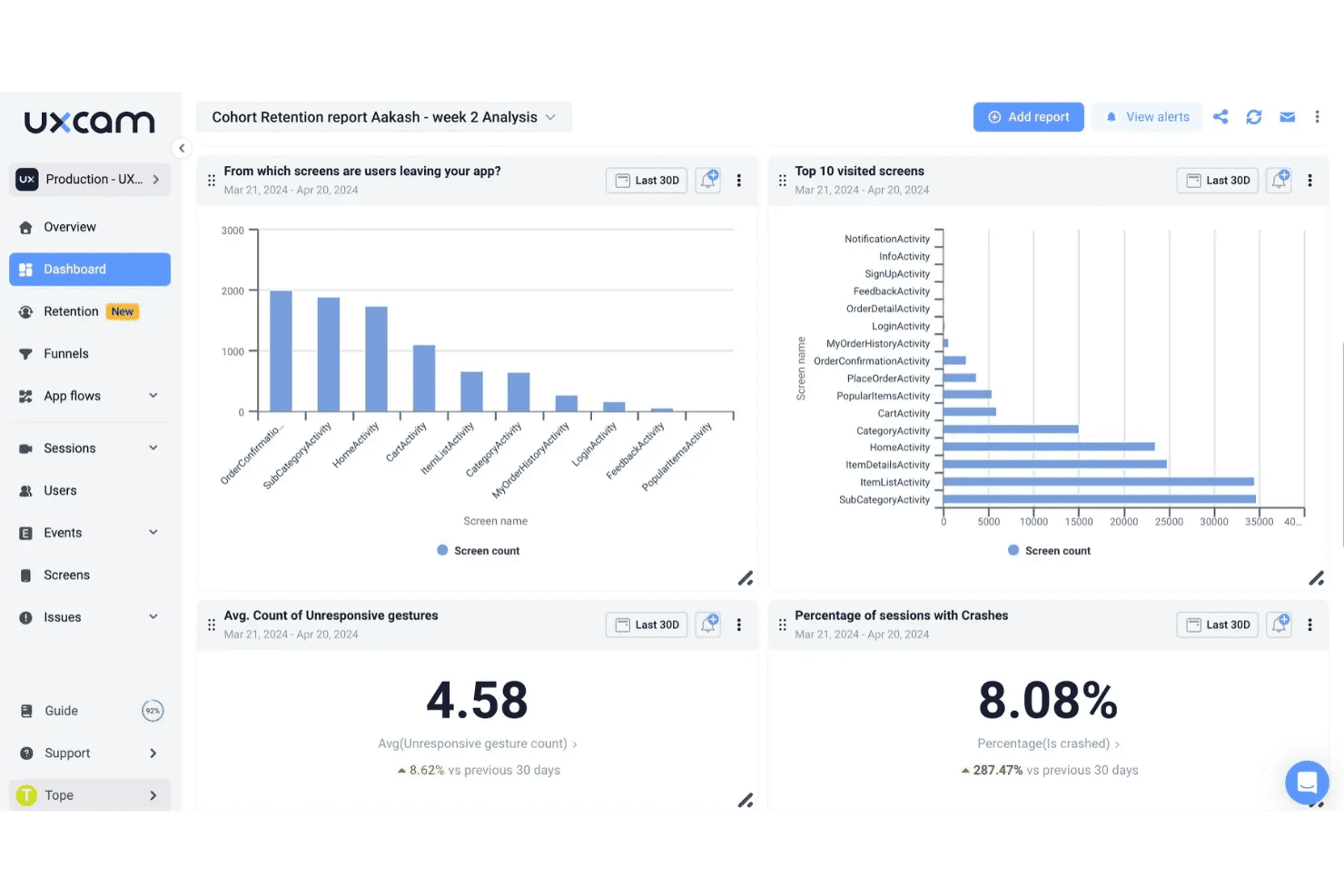
UXCam tracks screen exits, visits, crashes, and gestures in one dashboard. UXCam is a mobile-first session replay and product analytics platform that records interactions, screen flows, and friction events across native and cross-platform apps.
Who Is UXCam Best For?
UXCam is a strong fit for mobile product teams who need session replay and behavioral analytics in one place.
Why I Picked UXCam
UXCam earns its spot on my shortlist because it's built for mobile apps first, which most session replay tools aren't. I love that replays capture gesture-level interactions and connect directly to funnel, retention, and journey analytics, so you can see why a drop-off happens without opening a separate analytics tool. Rage taps, UI freezes, and crashes are detected automatically and marked on the session timeline, which speeds up bug reconstruction without manual tagging.
UXCam Key Features
- Configurable session recording rules: Set sampling rates by percentage and define recording conditions based on device properties, OS version, crash status, session duration, or country.
- Tara AI analyst: An embedded AI layer that watches session recordings, surfaces friction patterns, answers natural-language questions, and delivers daily briefs.
- Regional data hosting: Choose to store session data in the EU, US, or UAE, with SOC 2 Type II, ISO 27001, HIPAA, GDPR, and CCPA compliance certifications.
- Shareable session links: Generate links to individual session recordings and create Jira tickets from within the replay UI for bug handoff.
UXCam Integrations
UXCam integrates with Twilio Segment, Zendesk, Firebase, and Survicate. It also supports an API for custom connections.
Pros and Cons
Pros:
- Speeds up mobile bug reconstruction
- Replays connect directly to funnels and retention
- Mobile gesture capture spans native frameworks
Cons:
- Dashboards and filters can feel cluttered
- Web replay is less mature than mobile
Learn more about UXCam: Best for open-source replay
- Free plan available
- Pricing upon request
Visit WebsiteCustomer Rating:4.5/5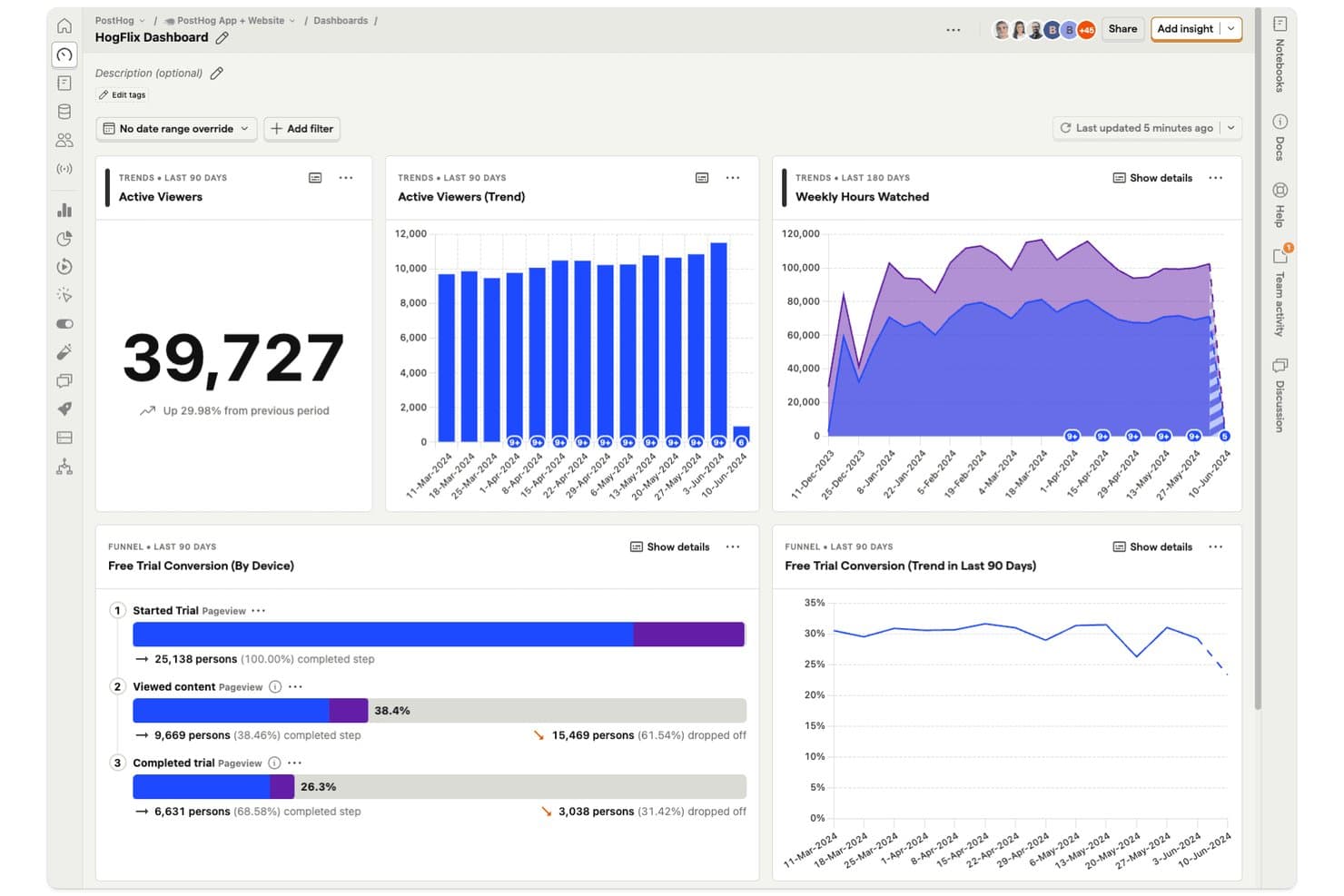
PostHog tracks viewer trends, watch hours, and trial conversion funnels. PostHog is an open-source, all-in-one developer and product OS that combines session replay with product analytics, feature flags, and error tracking.
Who Is PostHog Best For?
PostHog is a strong fit for developer-led teams that want to self-host session replay data.
Why I Picked PostHog
PostHog earns its spot on my shortlist because it pairs open-source, DVR-style playback with an AI layer that does real analytical work. I particularly like Replay Vision, which bulk-scans recordings and surfaces structured observations, like frustration scores and session outcomes, with confidence scores linked to the exact replay moment. The Self-driving inbox clusters friction patterns across sessions automatically, so my team isn't combing through recordings to find where users get stuck.
PostHog Key Features
- Trigger groups: Set distinct recording conditions per group—URL, event, or feature flag—each with its own sample rate and minimum session duration.
- DOM explorer: Inspect the full page HTML at any point during replay without leaving the session view.
- Mobile replay: Capture screen recordings, touches, network requests, and logs across iOS, Android, React Native, and Flutter.
- Video and clip export: Export full sessions as MP4 or create 5-, 10-, or 15-second MP4 or GIF clips directly from any recording.
PostHog Integrations
PostHog offers integrations with Slack, Braze, Customer.io, Salesforce, HubSpot, Vitally, Gainsight, PagerDuty, Intercom, and Crisp. It also offers a public API for custom integrations.
Pros and Cons
Pros:
- Less time combing through recordings
- Open-source code open to inspection
- DVR playback syncs logs, errors, and network
Cons:
- Mobile replays use lower-fidelity wireframes
- Masking requires code-level configuration
Learn more about PostHog: Best for AI-summarized sessions at scale
- Free plan + free demo + 15-day free trial available
- From $39/month (billed annually)
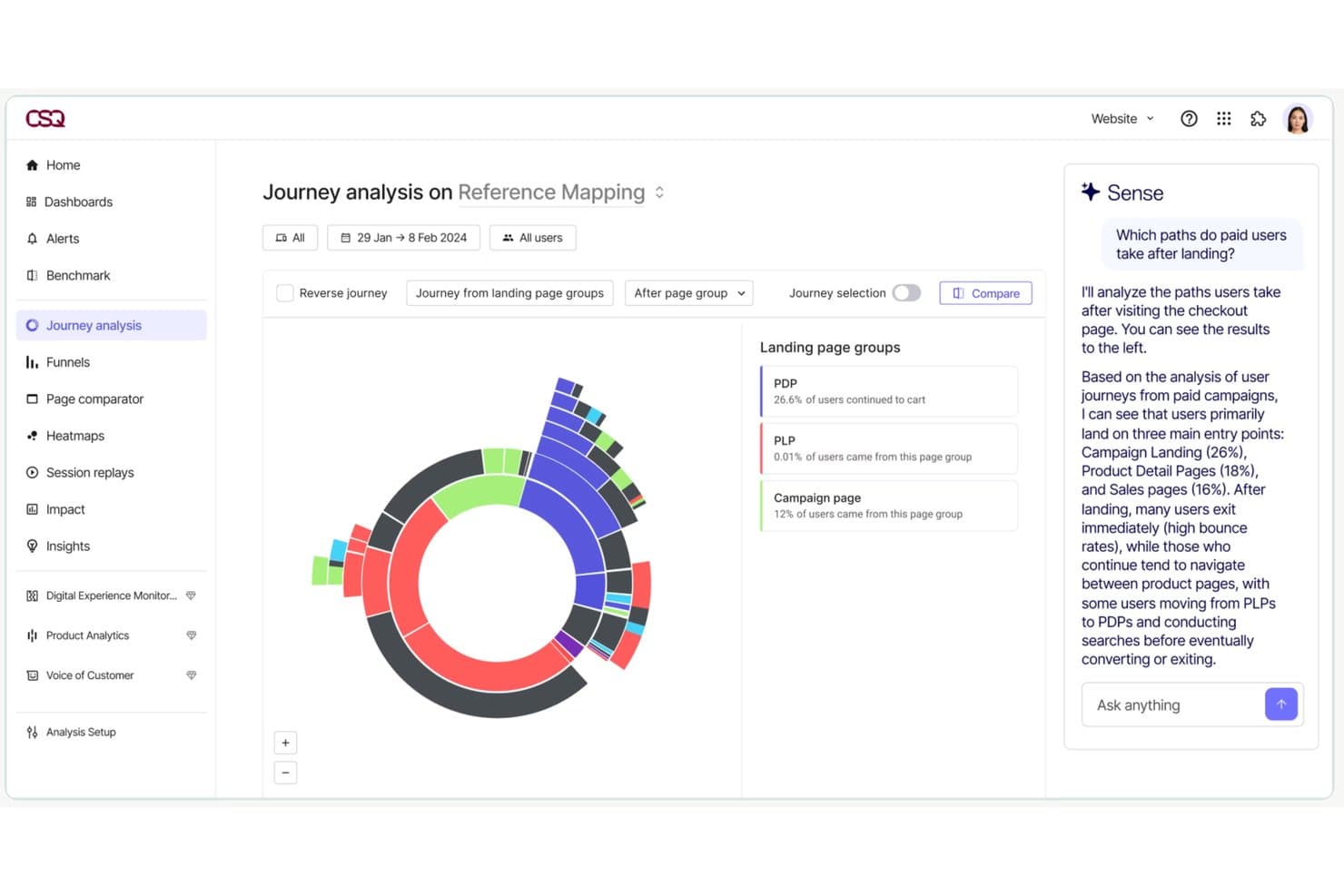
Contentsquare's Journey Analysis maps user paths with AI-driven insights. Contentsquare is a digital experience analytics platform that combines session replay with heatmaps, journey mapping, funnels, and error analysis across web and mobile.
Who Is Contentsquare Best For?
Contentsquare is a strong fit for mid-market and enterprise teams that need to analyze high-volume session behavior.
Why I Picked Contentsquare
Contentsquare earns its spot on my shortlist because of how it handles session replay at scale, specifically through AI-generated session summaries. Instead of watching hundreds of recordings one by one, you can generate a single summary across up to 100 sessions that links to the relevant replay moments. Pair that with the Frustration Score, which surfaces the sessions with the highest friction and ranks issues by revenue impact, and my time goes to the sessions that matter most.
Contentsquare Key Features
- Smart Capture: Automatically records sessions without manual tagging, so you can analyze historical sessions retroactively without re-instrumenting your site.
- Zone-based heatmaps: Visualize click, hover, and scroll behavior at the element level across both web and mobile screens.
- Error Analysis: Detects technical errors, app crashes, and custom errors, then surfaces which segments were affected and links directly to relevant replays.
- Data masking controls: Applies always-on automatic redaction of personal data by default, with configurable page-level masking rules and website-wide masking modes.
Contentsquare Integrations
Contentsquare offers 100+ pre-built integrations, including Unbounce, AWS, Microsoft Azure, Snowflake, and Shopify. It also offers an API for custom integrations.
Pros and Cons
Pros:
- Revenue-weighted friction prioritizes investigations
- Prioritizes fixes by revenue impact
- Reduces time spent on manual reviews
Cons:
- Advanced replay features require higher tiers
- Default sampling misses some sessions
Learn more about Contentsquare: Best for enterprise-scale replay with AI triage
- Free demo available
- Pricing upon request
Visit WebsiteCustomer Rating:4.7/5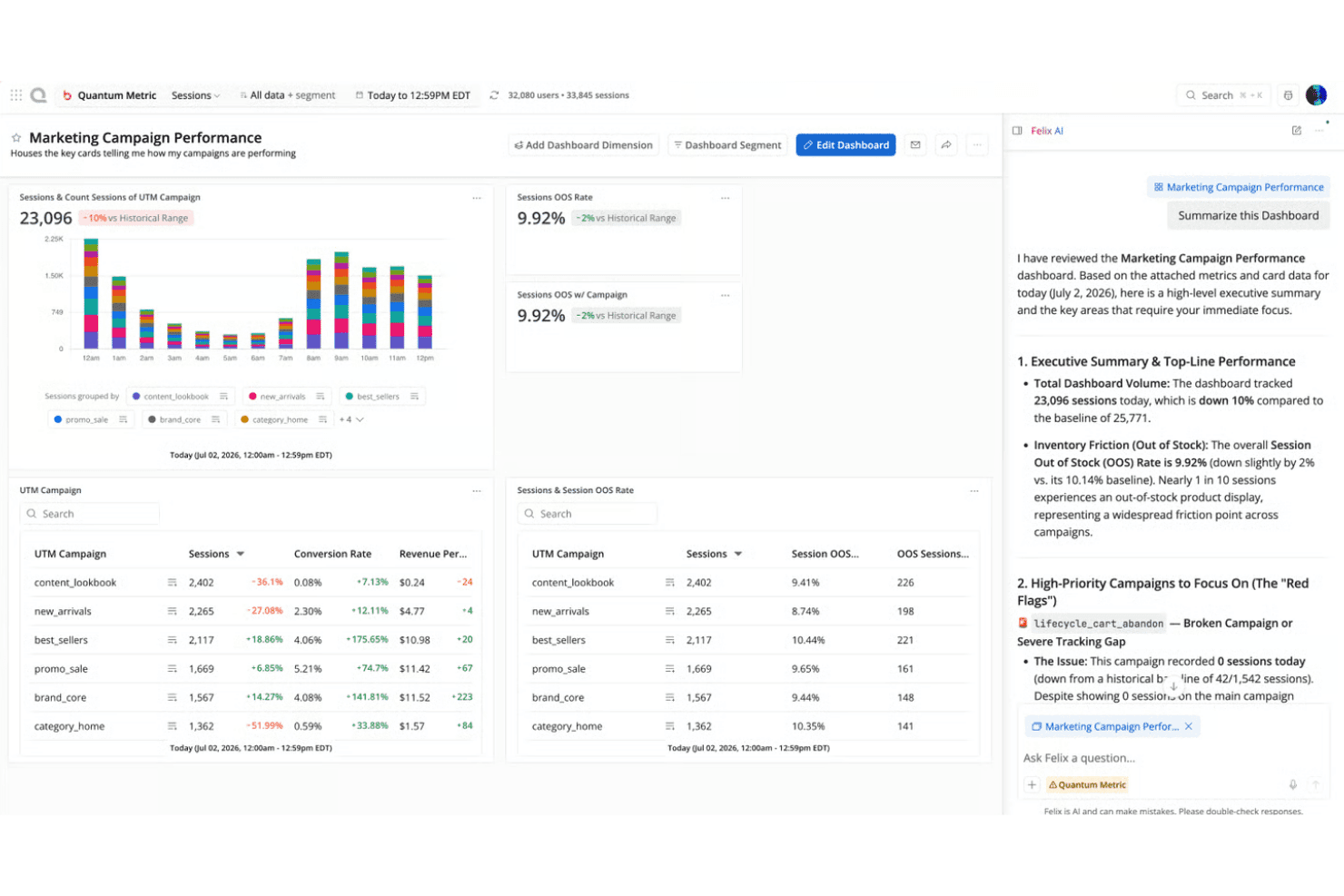
Quantum Metric's Felix AI summarizes campaign dashboards instantly. Quantum Metric is a digital analytics platform that captures and replays web and native mobile sessions alongside friction detection and behavioral analysis.
Who Is Quantum Metric Best For?
Quantum Metric is a strong fit for enterprise digital teams in industries like banking, retail, and insurance that need session replay tied directly to revenue impact analysis.
Why I Picked Quantum Metric
Quantum Metric earns its spot on my shortlist because it captures 100% of sessions, unsampled, across web and native mobile. I especially like Felix AI Summarization, which generates plain-English summaries of individual sessions and full user journeys, so my team isn't scrubbing through recordings to find what matters. Opportunity Analysis builds on that by surfacing friction points and sizing their revenue impact in one click.
Quantum Metric Key Features
- Segment builder: Create nested audience segments using sequential logic operators (and/or/then/where) that apply across every part of the platform, from funnels to dashboards.
- Interaction heatmaps: View click maps, scroll maps, and attention maps on web and mobile, with side-by-side page-version comparison across sessions.
- Cross-platform native mobile replay: Capture and replay native iOS and Android sessions using a single lightweight SDK that supports Flutter, React Native, Cordova, and Ionic.
- Privacy Audit log: Track every session decryption event by user, session, time, and reason, with client-side RSA-2048 encryption and automated PII scanning built in.
Quantum Metric Integrations
Quantum Metric offers integrations with Split, Qualtrics, Looker, Tealium, ServiceNow, Slack, and Adobe Analytics. It also provides a REST API for custom integrations.
Pros and Cons
Pros:
- Technical pane helps reconstruct frontend errors
- AI summaries reduce manual replay review
- Unsampled capture covers every customer session
Cons:
- Search sensitivity complicates session discovery
- Segment navigation can feel slow
Learn more about Quantum Metric: Best for AI-prioritized session insights by revenue
- Free plan available
- Pricing upon request
Visit WebsiteCustomer Rating:4.5/5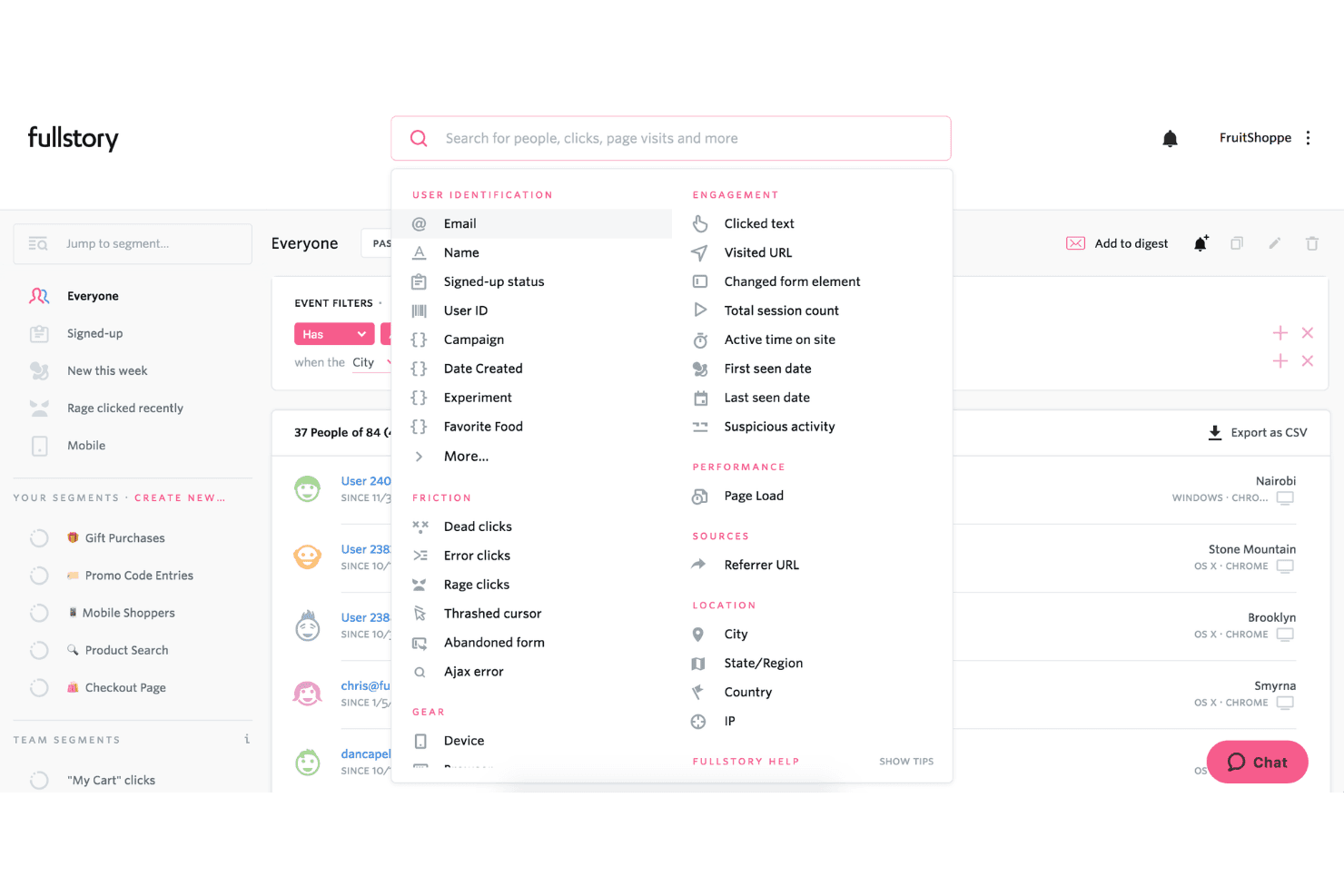
FullStory lets users filter and segment users by behavior, location, and friction signals. Fullstory is a digital experience analytics platform that combines session replay with heatmaps, funnel analysis, and journey mapping across web and native mobile apps.
Who Is Fullstory Best For?
Fullstory is a strong fit for product and CX teams at mid-market and enterprise companies who need to connect session replay data directly to revenue outcomes.
Why I Picked Fullstory
I picked Fullstory because its StoryAI agents don't just surface friction points; they rank them by revenue impact, so you can see which sessions are costing the most before you watch a single recording. The Lost Revenue Report ties rage clicks and error events directly to dollar values, and heatmaps layer in AOV and conversion-rate overlays on the same view. That combination makes it straightforward to prioritize fixes by business outcome.
Fullstory Key Features
- Fullcapture autocapture: Automatically records every click, scroll, form interaction, and navigation event without manual event tagging.
- Dev Tools overlay: Displays JS errors, failed requests, and request timing alongside session playback.
- Cross-platform mobile replay: Native iOS, Android, Flutter, and React Native sessions are captured using draw instructions, with on-device redaction keeping sensitive text off Fullstory's servers.
- Session Playlists: Save and organize filtered sets of sessions into shareable collections for team review or ongoing monitoring.
Fullstory Integrations
Fullstory offers integrations with Twilio Segment, Adobe Experience Cloud, BigQuery, Help Scout, and Google Tag Manager. It also supports APIs and webhooks for custom connections.
Pros and Cons
Pros:
- Syncs console errors with session playback
- No re-instrumenting for new questions
- Captures untagged events for retroactive analysis
Cons:
- Slow connections can affect replay playback
- Add-on modules complicate product planning
Learn more about Fullstory: Best for regulated-industry session replays
- Free demo available
- Pricing upon request
Visit WebsiteCustomer Rating:4.7/5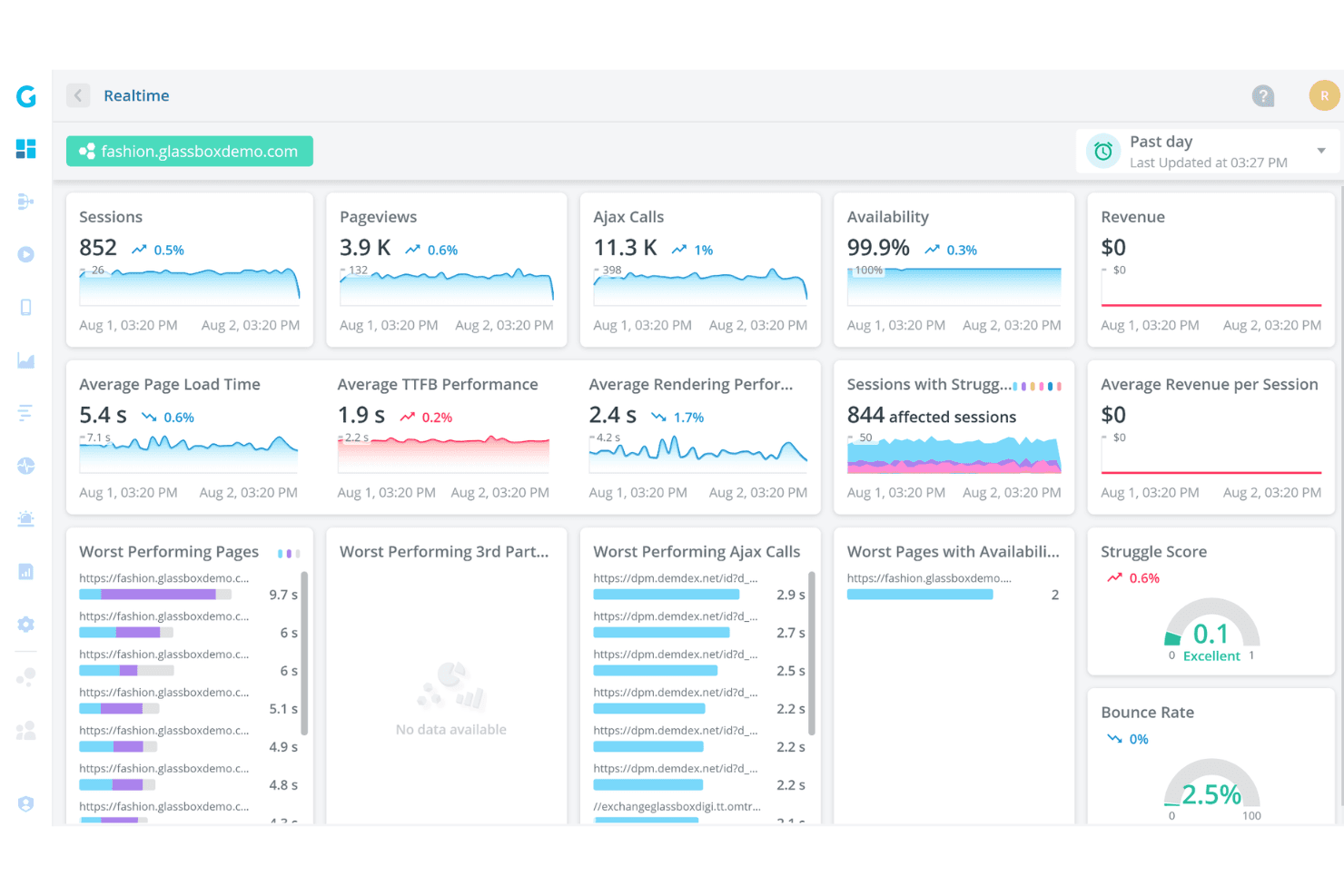
Glassbox provides a real-time analytics dashboard for monitoring site performance. Glassbox is a digital experience analytics platform that captures web and mobile sessions alongside server-side events, heatmaps, and funnel analysis.
Who Is Glassbox Best For?
Glassbox is a strong fit for enterprise teams in heavily regulated industries where compliance-grade data security and audit-ready session records are non-negotiable.
Why I Picked Glassbox
Glassbox earns its spot on my shortlist because it takes compliance seriously in industries like financial services and healthcare, where session replay data carries legal weight. It captures 100% of sessions tagless, paired with Digital Record Keeping that produces audit-ready session records for compliance and dispute resolution. Its proprietary Struggle Score, which Glassbox says is trained on trillions of sessions, lets my team prioritize which pages cause friction without sifting through recordings.
Glassbox Key Features
- GIA session summarization: An AI chat assistant that summarizes any web or mobile session in seconds and answers follow-up queries about the summary.
- Cross-platform capture: A single SDK captures sessions across native iOS, Android, and hybrid frameworks including React Native, Flutter, and Xamarin.
- Funnel analysis: Build ad hoc funnels on the fly and link directly from funnel drop-off points into individual session replays.
- Role-based access control: Granular permission settings with a full audit log, SSO, and MFA via SAML 2.0 to control who can view session data.
Glassbox Integrations
Glassbox offers native integrations with Adobe Analytics, Google Analytics, Qualtrics, SurveyMonkey, Jira, Firebase, Slack, Kameleoon, Optimizely, and Adobe Target. It also provides an open API for custom integrations.
Pros and Cons
Pros:
- Pages ranked for faster triage
- No coverage gaps from sampling
- Supports compliance and dispute reviews
Cons:
- Shared replay links sometimes redirect to login
- Query responses can slow on large histories
Learn more about Glassbox: Best for synced console and network logs
- 14-day free trial + free plan available
- From $176/month (billed annually)
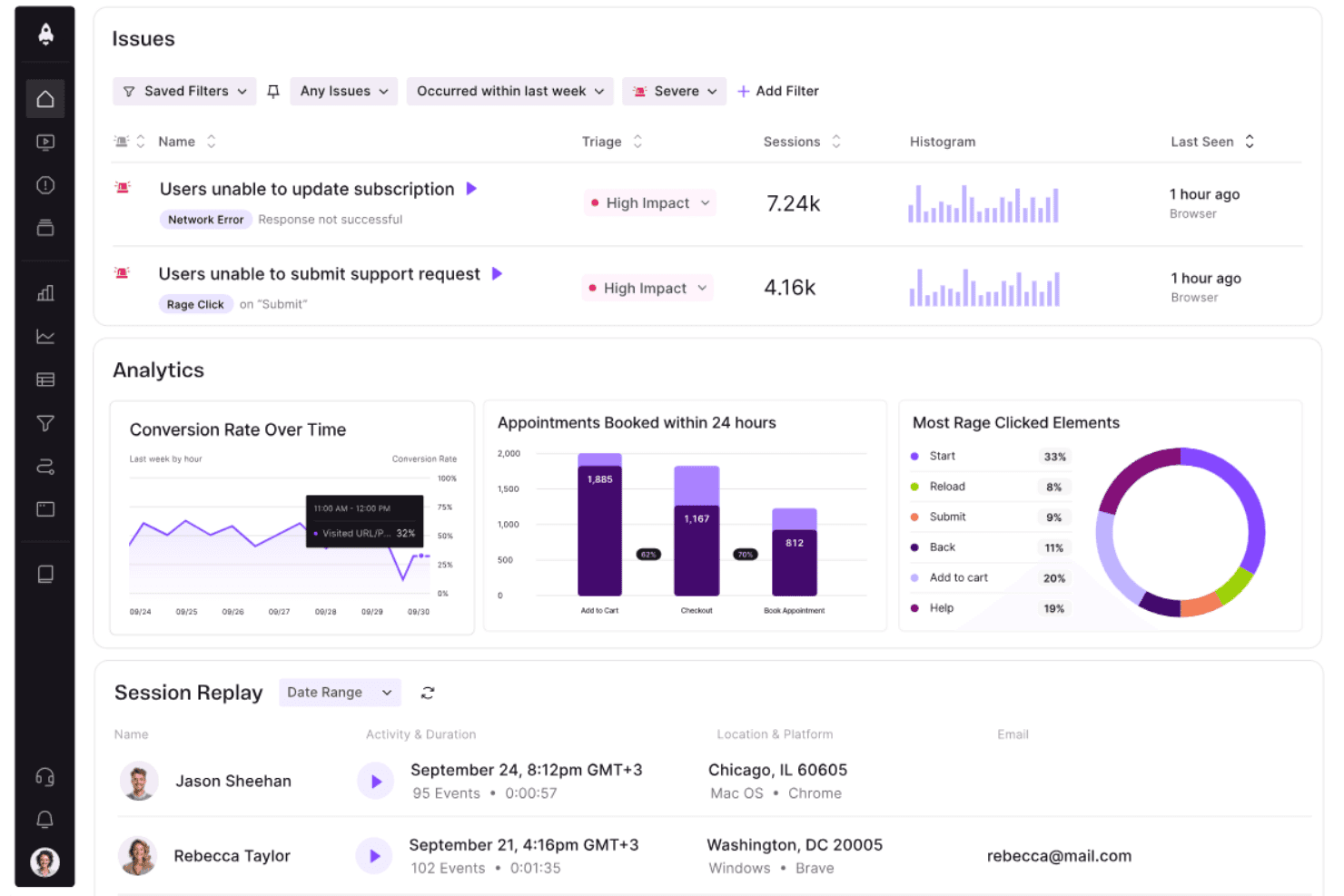
LogRocket surfaces user issues, analytics, and session replays in one dashboard. LogRocket is a session replay platform with built-in product analytics and performance monitoring for web and mobile apps.
Who Is LogRocket Best For?
LogRocket is a strong fit for product and engineering teams that need to connect user behavior to code-level debugging without switching between tools.
Why I Picked LogRocket
LogRocket earns its spot on my shortlist because console logs, network requests, and JavaScript exceptions sit on the same timeline as the replay. When you're diagnosing a bug, you can watch a session and see the network call that failed, the console error it triggered, and the exception that followed, all in sync. Galileo AI then surfaces and scores those friction points by impact, so you're not hunting through sessions to find what broke.
LogRocket Key Features
- Pixel-perfect session replay: Reconstructs your users' exact DOM or mobile screen, including iFrames, so you see the session precisely as the user did.
- Heatmaps and clickmaps: Visualize successful clicks, rage clicks, dead clicks, and scroll depth across any page to spot interaction patterns at a glance.
- Conversion funnel analysis: Build funnels between any steps in your product and jump directly into session replays for users who dropped off.
- Data privacy controls: Block or redact specific fields before data leaves the browser, with a PII audit tool to catch unredacted inputs in network requests.
LogRocket Integrations
LogRocket integrates with AB Tasty, Above Analytics, Bazzavoice, BigQuery, Jira, Mixpanel, GitHub, Zendesk, Google Analytics, and HubSpot. It also provides API access and webhooks for custom connectivity.
Pros and Cons
Pros:
- Galileo prioritizes high-impact friction signals
- Less manual searching for broken sessions
- Shortens the path from bug to fix
Cons:
- Mobile features trail web parity
- Dashboard searches can feel frustrating
Learn more about LogRocket: Best for replay tied to full-stack observability
- Free demo + 14-day free trial available
- From $2.50/1,000 sessions/month (billed annually)
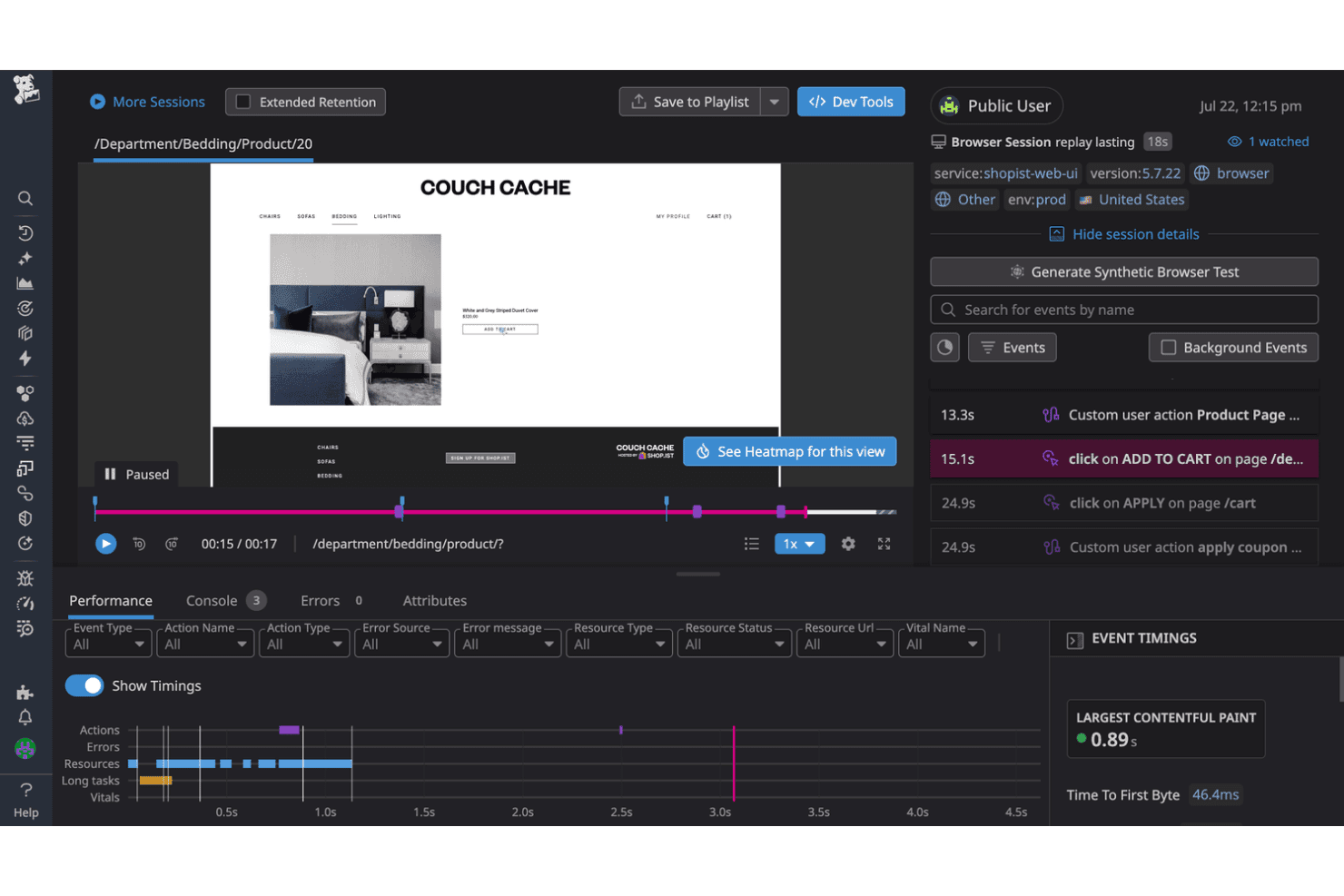
Datadog RUM replays user sessions to reveal exact click paths and actions. Datadog Real User Monitoring is the front-end monitoring product within Datadog's observability platform, combining session replay with performance monitoring, error tracking, and product analytics.
Who Is Datadog Real User Monitoring Best For?
Datadog Real User Monitoring is the right fit for engineering and product teams that already use Datadog for infrastructure or application monitoring.
Why I Picked Datadog Real User Monitoring
I picked Datadog Real User Monitoring because a recorded session links straight to the backend APM trace behind it. When a rage click or JS error surfaces in a replay, you can follow it through to the server-side request that failed, without switching tools. The in-player Dev Tools panel keeps console logs, network requests, and performance data synced to the timeline, which makes bug reconstruction faster.
Datadog Real User Monitoring Key Features
- AI Summaries: Before a replay, an AI-generated summary outlines the user's intent, key actions, friction signals, and session outcome, with hyperlinks that jump to the relevant moments.
- Smart Chapters: Automatically segments sessions into labeled journey stages, with error markers and high-activity markers surfaced on the playback timeline.
- Cross-platform mobile recording: Native SDKs for iOS, Android, Kotlin Multiplatform, React Native, and Flutter capture taps, swipes, and scrolls using wireframe-based rendering.
- Heatmaps: Click, top-elements, and scroll heatmaps overlay on session data, showing you where users interact across your pages.
Datadog Real User Monitoring Integrations
Datadog Real User Monitoring integrates with Datadog APM, Error Tracking, Logs, Product Analytics, Synthetic Monitoring, Feature Flags, Dashboards, and Notebooks, plus Zendesk. A REST API is also available for custom integrations.
Pros and Cons
Pros:
- Low per-session entry price
- Automated summaries highlight friction before playback
- Replays include synchronized error and performance context
Cons:
- Engineering-first workflows challenge nontechnical teams
- High-volume capture can become expensive
Learn more about Datadog Real User Monitoring:
Other Session Replay Software
Here are some additional tools that didn’t make it onto my shortlist, but might be a good fit for your needs:
- 11OpenReplayBest for self-hosted replay with data ownership
- 12SentryBest for errors and stack traces
- 13Crazy EggBest for CRO teams conducting A/B tests
- 14InspectletBest for AI session scoring
- 15Heap (by Contentsquare)Best for replay tied to autocaptured product data
- 16MedalliaBest for replay tied to VoC
- 17PendoBest for web and mobile recording in one tool
- 18Splunk Observability CloudBest for cross-platform span sync
- 19Microsoft ClarityBest for free, unlimited session capture
- 20Wingify (formerly VWO and AB Tasty)Best for CRO-linked heatmaps
How I Evaluate Session Replay Software
I split my evaluation into three parts. Core functionality comes first and carries the most weight: a tool must record real user sessions and reconstruct them into smooth, navigable playback. From there, I look for standout features like AI session summarization, then consider data retention policies and compliance support.
Core Functionality (Table Stakes For This List)
When I'm selecting tools for my list, I score each one on a scale from 0 (does not offer the functionality) to 5 (excels in this area) for each core functionality listed below. I then convert the total into a percentage to help assess each tool's overall fit, with extra weight on any functionalities I've deemed essential.
- Session Recording (Essential): I check whether the tool captures clicks, scrolls, mouse movements, and navigation with consistent fidelity or leaves gaps mid-session.
- Video-Like Playback (Essential): Smooth timeline scrubbing, speed controls, and skip-inactivity options matter here—choppy or delayed replays slow down every investigation.
- Friction and Error Detection: I look for automatic flagging of rage clicks, dead clicks, u-turns, and JavaScript errors so teams can find problem sessions without watching hours of recordings.
- Session Filtering and Segmentation: Building multi-condition filters by device, user attributes, events, or custom properties is how I assess whether a tool scales past small-volume use.
- Cross-Platform Capture: Tools like UXCam focus on mobile while others like PostHog lean web-first, so I evaluate whether feature parity holds across every environment the vendor markets.
- Data Privacy Controls: Granular field-level masking, default redaction of form inputs, and compliance-oriented features like consent management and audit logs all factor into my evaluation.
Once I have a list of tools that meet the criteria, I consider what sets each platform apart.
Differentiating Factors (What Sets Vendors Apart)
Here's how I compare and contrast different vendors:
Standout Features
AI session summarization is the feature I evaluate most closely. Tools like Fullstory and Contentsquare use AI to flag anomalous or high-impact sessions, which saves hours of manual review when you're triaging a spike in checkout abandonment. I also check whether a platform pairs replay with funnel and journey analysis—seeing exactly where users drop off inside a multi-step flow is far more actionable than watching isolated recordings. Console and network logging matters too; when a replay shows a user stuck on a payment screen, synced error logs and failed API calls let your engineering team reproduce the bug in minutes instead of days.
Beyond Features
Data retention policies shape how far back your team can investigate. When a customer reports an issue from last month, short retention windows mean the session is already gone. I check whether vendors gate longer retention behind premium tiers or offer flexible controls. Regulatory compliance matters just as much—session capture touches personal data, so I evaluate whether a platform provides regional data hosting, consent management hooks, and documented data processing agreements for industries like healthcare and finance. I also look at how easily replay evidence connects to existing CX and product stacks, since a session clip linked directly to a Jira ticket or support case saves hours of context-switching.
How to Choose a Session Replay Software
Use the table below to choose the best tool by matching your user monitoring needs with each tool's key capabilities.
| If your priority is | Look for |
|---|---|
| If your priority isInvestigating mobile journeys | Look forDocumented coverage for your mobile platforms and app versions |
| If your priority isProtecting customer data | Look forField-level masking, consent controls, audit logs, and a current DPA |
| If your priority isReviewing older complaints | Look forWritten retention periods by plan, region, and recording type |
| If your priority isConnecting replay to case work | Look forA documented export or case-linking workflow your team can test |
| If your priority isFinding journey breakdowns | Look forFilters that reflect your events, properties, devices, and customer segments |
How to Vet Your Shortlist
- Run a defined trial task: During a trial, investigate one checkout or onboarding complaint from capture through documented finding.
- Request privacy artifacts: Ask for the current DPA, subprocessors list, data-location options, and masking documentation before purchase.
- Test support escalation: File one ticket describing a missing or incorrectly masked customer field, then record the response time and resolution.
- Verify retention in writing: Ask your account contact to confirm retention periods for sampled and unsampled sessions in a dated email or order clause.
- Choose the tradeoff: Decide whether your team values broad enterprise governance or greater data ownership and administrative control.
What Is Session Replay Software?
Session replay software records and reconstructs digital user sessions so teams can review interactions as playback. It captures actions such as clicks, scrolling, navigation, and form activity across websites or mobile apps.
Customer experience, product, and engineering teams use replays to investigate errors, identify journey friction, and understand abandonment. Privacy controls such as masking and consent settings help protect personal data during capture.
Features of Session Replay Software
When selecting the right session replay tool, keep an eye out for the following key features:
- Session recording: Captures clicks, taps, scrolling, navigation, form interactions, and other user actions. Teams can review what happened during a website or mobile app session without relying only on customer descriptions.
- Session playback: Reconstructs recorded interactions as a video-like timeline with controls for pausing, skipping inactivity, changing playback speed, and reviewing specific moments. This helps teams examine customer journeys in detail.
- Session filtering: Lets you find recordings using conditions such as device type, browser, location, user attributes, events, and custom properties. Targeted filters help teams locate sessions connected to a particular complaint or journey stage.
- Friction detection: Identifies behaviors such as rage clicks, dead clicks, repeated taps, rapid backtracking, and form abandonment. Teams can use these signals to prioritize recordings that show possible usability problems.
- Error tracking: Connects session recordings with JavaScript errors, failed requests, console messages, and other technical events. Support and engineering teams can see what the customer experienced alongside the error details.
- Cross-platform capture: Records interactions across the digital environments your customers use, such as websites, mobile apps, and responsive web experiences. This gives teams a consistent way to investigate issues across devices and platforms.
- Privacy controls: Masks sensitive text, form fields, images, and user identifiers before recording or during playback. Consent settings, exclusion rules, and configurable redaction help teams handle personal data responsibly.
- Session segmentation: Groups recordings by customer type, journey stage, account property, event, or behavioral pattern. Teams can compare experiences across segments and investigate whether an issue affects a specific group.
- Data retention controls: Defines how long recorded sessions remain available and whether teams can adjust retention by plan, workspace, or recording type. Clear retention settings help teams investigate older complaints while managing stored customer data.
- Sharing and integrations: Provides links, exports, or connections to support, product management, analytics, and issue-tracking tools. Teams can attach relevant recordings to customer cases or engineering tickets with supporting context.
Common Session Replay Software AI Features
Beyond the standard features listed above, many platforms now incorporate AI through features such as:
- AI-generated session summaries: AI reviews a recorded session and produces a concise account of the user’s actions, path, and notable events. Support teams can scan these summaries before opening the full replay, while product teams can review many sessions faster.
- Natural-language session search: AI lets you search recordings with everyday questions instead of manually building filters. You might ask for sessions where users struggled during checkout, then review recordings matching that description.
- Automated issue clustering: AI groups sessions with similar behaviors, errors, or journey outcomes into recurring issue patterns. This helps teams distinguish an isolated complaint from a broader problem affecting multiple customers.
- Session similarity analysis: AI compares a selected recording with other sessions and identifies similar interaction patterns. After finding one problematic journey, you can locate related sessions to assess its frequency and scope.
- AI-generated journey narratives: AI turns multiple interactions into a written account of how customers move through a workflow. Teams can use these narratives to understand recurring paths, detours, and abandonment points without reviewing every recording individually.
Benefits of Session Replay Software
Using a tool for session replays can be beneficial in many ways:
- Faster issue investigation: Session playback, error tracking, console messages, and failed request details help teams trace customer problems to specific interactions.
- Clearer customer journey insights: Recordings show clicks, scrolling, navigation, form activity, and abandonment points across complete website or app journeys.
- Earlier friction detection: Rage-click, dead-click, repeated-tap, backtracking, and form-abandonment signals help you locate usability problems without reviewing every recording.
- More targeted case resolution: Session filters and segmentation let support teams find recordings by device, account property, event, location, or customer segment.
- Safer customer data handling: Field-level masking, input redaction, consent settings, and exclusion rules help protect personal information during capture and playback.
- Better cross-team collaboration: Shareable recordings and integrations with support, product, and issue-tracking tools connect customer evidence with follow-up work.
- Faster analysis at scale: AI summaries, natural-language search, issue clustering, and similarity analysis help teams review recurring problems across many sessions.
Costs and Pricing of Session Replay Software
Selecting the right session replay tool requires understanding the pricing models and plans. Costs vary based on features, team size, add-ons, and more. The table below summarizes common plans, average prices, and typical features.
Plan Comparison Table for Session Replay Software
| Plan Type | Average Price | Common Features |
|---|---|---|
| Plan TypeFree Plan | Average Price$0 | Common FeaturesSession recording, limited retention, basic playback, and standard privacy controls. |
| Plan TypePersonal Plan | Average Price$5–$25/user/month | Common FeaturesSession recording, playback controls, session filtering, friction detection, and basic integrations. |
| Plan TypeBusiness Plan | Average Price$25–$100/user/month | Common FeaturesHigher recording limits, advanced segmentation, error tracking, longer retention, and team collaboration. |
| Plan TypeEnterprise Plan | Average Price$100–$500+/user/month | Common FeaturesCustom data retention, cross-platform capture, advanced privacy controls, AI analysis, and priority support. |
Session Replay Software FAQs
Here are some answers to common questions about best session replay tool:
Does session replay software slow down a website or app?
Usually, session replay software adds a small capture script or mobile SDK to your product. Its impact depends on the vendor’s loading method, event volume, and recording settings. Test performance before deployment with your real pages, devices, and traffic patterns. Check page-load metrics with recording enabled and disabled. For mobile apps, test battery use, network activity, and crash rates. Also confirm whether the tool supports delayed loading, sampling, or recording exclusions for sensitive workflows.
How should you protect customer data in session replays?
Start with default masking for form fields, payment details, passwords, and personal identifiers. Then review how the tool handles text, images, URLs, cookies, and custom events. Ask the vendor for masking documentation, a current data processing agreement, and its subprocessors list. Confirm where recordings are stored and who can access them. Add consent controls when required by your privacy program. Test masking with realistic customer data before granting broad access to support or product teams.
Can session replay software replace web analytics?
No, session replay platforms complements analytics rather than replacing it. Analytics platforms measure totals, rates, trends, and conversion paths across larger populations. Replay shows the interaction details behind selected outcomes, such as repeated clicks or confusing form behavior. Use analytics to identify a drop-off or unusual segment. Then filter replays using the related event, device, account, or journey stage. This combination helps your team connect aggregate performance data with specific customer experiences.
Is there any free session replay software?
Yes. Microsoft Clarity offers free, unlimited session capture, and several paid platforms, including PostHog, Contentsquare, Fullstory, Sentry, LogRocket, Amplitude, and OpenReplay, offer free plans with limits on volume, retention, or features. Free tiers work for testing replay on a single site or app, but check recording caps and retention windows before relying on one for ongoing investigations.