

Bu kadar çok farklı yardım masası yazılımı çözümü mevcutken, özellikle ücretsiz yardım masası yazılımı kullanmaya kararlıysanız, ihtiyaçlarınıza en uygun olanı belirlemek zordur. Temel destek görevlerini yönetmenize ve müşteri taleplerini verimli bir şekilde gidermenize yardımcı olacak bir yazılım istediğinizi biliyorsunuz; ancak hangi sistemin en iyi seçenek olduğunu belirlemeniz gerekiyor.
Bu makalede, kârlılığınızı etkilemeden müşteri destek taleplerini yönetmek için en iyi ücretsiz yardım masası yazılımı seçenekleri hakkındaki görüşlerimi paylaşarak bu seçimi kolaylaştırmanıza yardımcı olacağım.
Why Trust Our Software Recommendations
6,700+
Reviews
20
Industry experts
16+
Evaluation factors
14
Years
Our team has been testing and reviewing software since 2012. As CX leaders ourselves, we know how difficult—and important—it is to choose the right software.
For this guide, we evaluated tools using hands-on testing and independent research, scoring tools using our selection criteria.
Our reviews reflect our human editorial judgment, not a sales pitch.
 Gui DrusinaCreative Director
 Tim FisherVP of AI
Karşılaştırma Tablosu: Ücretsiz Yardım Masası Yazılımları
Bu karşılaştırma tablosu, en iyi ücretsiz yardım masası yazılımı seçimlerim için fiyatlandırma ayrıntılarını özetlemektedir.
Score legend (out of 5)
- Excellent4.5–5
- Good4–4.4
- Average3–3.9
- Below average2–2.9
- Poor1–1.9
Sorted by: Default
| Tool | Starting Price | Website | |||||||
|---|---|---|---|---|---|---|---|---|---|
Best for omnichannel customer service software | 2.5 out of 5 | 3 | 3 | 2 | 3 | 2 | 2 | $7/user/month Free plan + 15-day trial + demo available | Website |
Best for collaborative email-based ticket handling | Not rated | Not rated | 3 | 3 | 3 | 4 | 3 | $14/user/month 30-day free trial available | Website |
Best for AI-driven ticket automation | 3.8 out of 5 | 4 | 5 | 4 | 3 | 4 | 3 | $16/agent/month Free plan + 14-day trial + free demo available | Website |
Best for its 15 years on the market | 3.2 out of 5 | 3 | 4 | 3 | 3 | 3 | 3 | Pricing upon request Free trial + free demo available | Website |
Best for teams needing EU data residency | 3.5 out of 5 | 4 | 4 | 2 | 3 | 4 | 4 | $17.50/month Free plan available | Website |
Best for Power BI ticket reporting | 3.2 out of 5 | 4 | 3 | 3 | 3 | 3 | 3 | $6/user/month Free plan available | Website |
Best for teams wanting GPL self-hosting | 3.8 out of 5 | 4 | 5 | 4 | 3 | 4 | 3 | $12/user/month Free plan available | Website |
Best for unlimited agents in one queue | 3.2 out of 5 | 4 | 2 | 3 | 3 | 4 | 3 | €69/month Free plan + 15-day free trial + free demo available | Website |
Best for unlimited support agents at no cost | 3.7 out of 5 | 4 | 4 | 3 | 4 | 3 | 4 | $31.10/user/month Free plan + 15-day free trial available | Website |
Best for self-hosting with unlimited agents | 3.3 out of 5 | 4 | 4 | 3 | 2 | 4 | 3 | $22/2 agents/month Free plan + 30-day free trial available | Website |
Best for Shopify order actions in your inbox | 3.2 out of 5 | 4 | 4 | 1 | 4 | 3 | 3 | $24.17/month Free plan available; 7-day free trial | Website |


En İyi Ücretsiz Yardım Masası Yazılımı İncelemeleri
Her bir ücretsiz yardım masası yazılımının en uygun kullanım alanını, dikkat çeken bazı özelliklerini ve kullanıcı arayüzüne genel bir bakış sunan ekran görüntülerini kısaca açıklıyoruz.
 Best for omnichannel customer service software
- Free plan + 15-day trial + demo available
- From $7/user/month (billed annually)
Visit WebsiteCustomer Rating:4.4/5
The Zoho Desk dashboard shows you which tickets are currently in progress. Zoho Desk is free help desk software with a three-agent ticket inbox for email, web forms, and a Help Center, plus canned email templates, two manually triggered macros, and a private knowledge base.
Who Is Zoho Desk Best For?
Zoho Desk suits small businesses with lean customer support teams that want an affordable starting point and room to upgrade as their service needs grow.
Why I Picked Zoho Desk
I rate Zoho Desk as Best for omnichannel customer service software because its free inbox combines email, web form, and Help Center requests with customer histories and ticket timelines. I like that my team can also use canned email templates and two manually triggered macros for repeat tasks. Live chat and social channels require a paid plan.
Zoho Desk Key Features
- Three agent seats: The free edition supports up to three agents.
- Private knowledge base: Share internal information between agents.
- Mobile apps: Access Zoho Desk through native iOS and Android apps.
- Performance insights: Review support metrics through reports and dashboards.
Zoho Desk Integrations
Zoho Desk lists 360+ app integrations, including Jira, Slack, Microsoft Teams, Salesforce, HubSpot, and Zapier; Zoho CRM sync is limited to paid editions. APIs, SDKs, custom functions, and webhooks support custom connections, but their availability on the Free edition isn’t specified.
What's Free?
Zoho Desk offers a free plan for up to three agents, with an inbox for email, web forms, and Help Center requests. Live chat, social channels, and Zoho CRM sync require a paid plan.
Pros and Cons
Pros:
- Ticket views retain customer histories and timelines
- Email, form, portal requests share one inbox
- Affordable free starting point for small teams
Cons:
- Macros need manual triggers; workflows require upgrades
- Three-agent cap limits team growth
Learn more about Zoho Desk: Best for collaborative email-based ticket handling
- 30-day free trial available
- From $14/user/month (billed annually)
Visit WebsiteCustomer Rating:4.8/5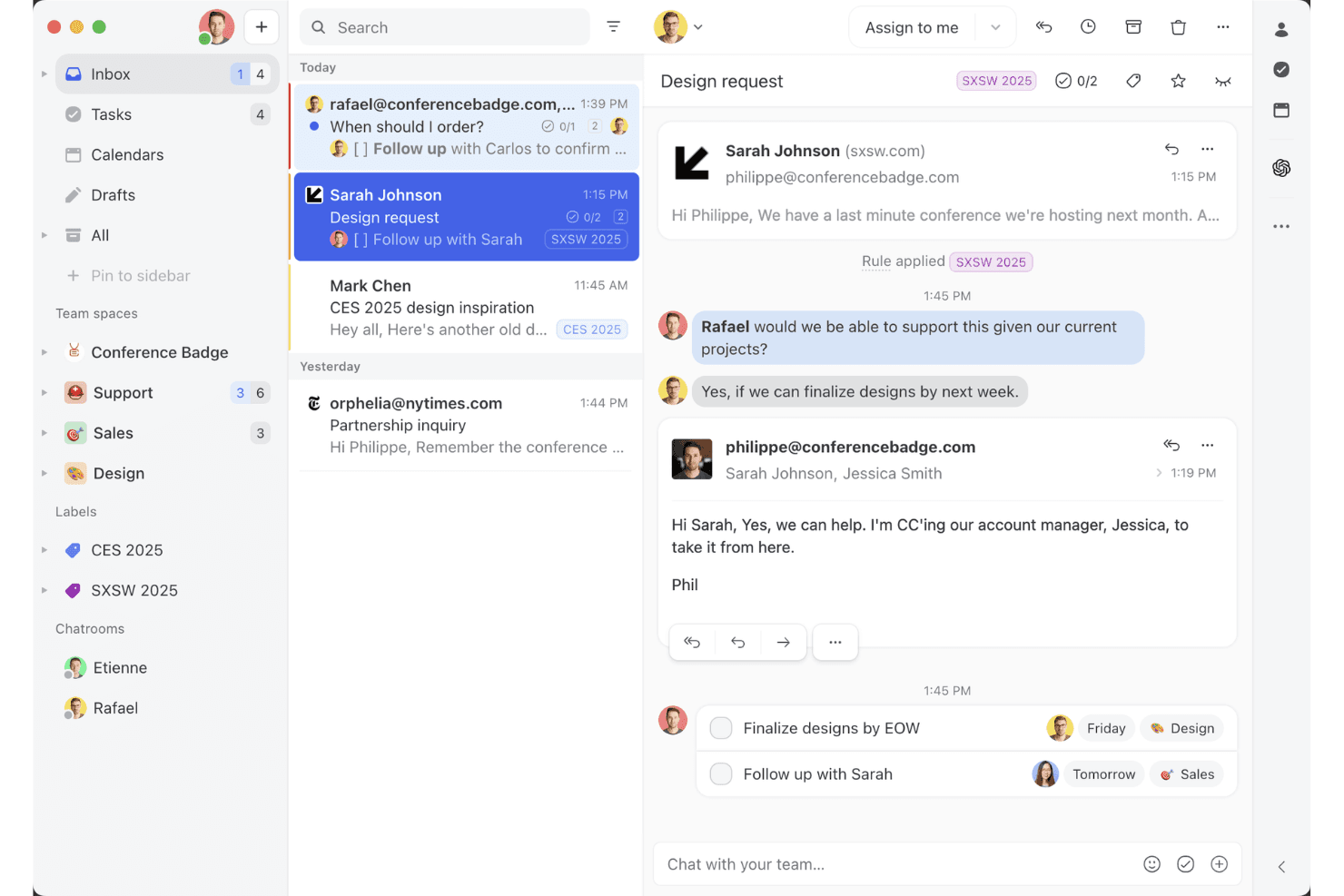
Missive’s shared inbox view shows how teams can collaborate on email threads, assign tasks, and manage client conversations in one workspace. Missive is collaborative email-based help desk software with shared inboxes, conversation assignment, internal comments, canned replies, tasks, and multichannel messaging; it offers a 30-day trial, not a free-forever plan.
Who Is Missive Best For?
Missive suits small customer support teams that need clear ownership of customer conversations and secure collaboration across shared inboxes.
Why I Picked Missive
I picked Missive for collaborative email-based ticket handling because its 30-day Productive trial lets me test a shared support workflow with up to 25 users. My team can assign conversations, discuss them in private comments, and draft replies together to avoid duplicate responses. It also brings email, SMS, and live chat into one inbox. Access pauses when the trial ends unless we choose a paid plan, so it isn’t free-forever software.
Missive Key Features
- Canned responses: Share reply templates with your team and add dynamic variables.
- Conversation-linked tasks: Create tasks from conversations and track assignees, due dates, and status.
- Automation rules: Set rules to assign conversations or send follow-ups; rules require the Productive or Business plan.
- Analytics: Track reply time, handle time, and message volume with Productive-plan analytics.
Missive Integrations
Missive lists 25+ integrations, including native connections to HubSpot, Salesforce, Shopify, Google Drive, Asana, and ClickUp. External integrations, API and MCP access, webhooks, and UI/iFrame integrations require Productive or Business; Zapier is also available.
What's Free?
Missive offers a 30-day Productive trial for up to 25 users, not a free-forever plan. Access pauses when the trial ends unless you choose a paid plan.
Pros and Cons
Pros:
- Collaborative drafts cut forwarding chains
- Private comments support discreet team coordination
- Shared assignment clarifies conversation ownership
Cons:
- No traditional ticket numbers for tracking
- No free-forever access after trial
Learn more about Missive: Best for AI-driven ticket automation
- Free plan + 14-day trial + free demo available
- From $16/agent/month (billed annually)
Visit WebsiteCustomer Rating:4.6/5
SparrowDesk’s omnichannel inbox centralizes customer conversations, ticket status, priority levels, and agent assignments in a single dashboard. SparrowDesk is a free help desk platform with a shared inbox for email and live chat, ticket views, macros, basic workflows, and prebuilt reports, capped at three users and 500 conversations per month.
Who Is SparrowDesk Best For?
Small support teams and startups that need shared inbox tools may find SparrowDesk fits its positioning: “Best for AI-driven ticket automation.”
Why I Picked SparrowDesk
I picked SparrowDesk for its “Best for AI-driven ticket automation” positioning, though AI credits aren’t included on Free. The free plan’s macros can assign tickets, change priority, and apply tags, while basic workflows can assign replies or close inactive tickets. A team of up to three can automate routine triage within the 500-conversation monthly limit.
SparrowDesk Key Features
- Conversation merging: Combine related conversations in one ticket.
- Watchers: Let teammates follow conversations without taking ownership.
- Prebuilt reports: Review conversation, team-performance, and Help Center reports.
- Mobile app: Access SparrowDesk from a mobile app included on the Free plan.
SparrowDesk Integrations
SparrowDesk lists integrations with Gmail, HubSpot, Salesforce, Linear, Jira, Shopify, and Zapier. Free-plan access isn’t specified; Slack, Linear, and HubSpot are listed from Starter.
What's Free?
SparrowDesk offers a free-forever plan for up to three users and 500 conversations per month. AI credits aren’t included, and free-plan access to integrations isn’t specified.
Pros and Cons
Pros:
- Reviewers praise quick setup and a clear inbox
- Macros handle assignment and routine ticket updates
- Email and live chat share one ticket queue
Cons:
- Free excludes ticket forms and the customer portal
- Free plan caps usage at 500 monthly conversations
Learn more about SparrowDesk: Best for its 15 years on the market
- Free trial + free demo available
- Pricing upon request
Visit WebsiteCustomer Rating:4.2/5
ManageEngine ServiceDesk Plus displays real-time helpdesk metrics on one dashboard. ManageEngine ServiceDesk Plus is an IT-focused help desk platform with incident and service-request ticketing, a self-service portal, knowledge management, and IT asset tracking.
Who Is ManageEngine ServiceDesk Plus Best For?
ManageEngine ServiceDesk Plus suits IT service desk teams that handle incidents and service requests alongside IT asset tracking.
Why I Picked ManageEngine ServiceDesk Plus
I picked ManageEngine ServiceDesk Plus as “Best for its 15 years on the market” because its free plan supports IT help desk workflows. Incident and service-request ticketing connects user reports with IT asset tracking, while the self-service portal and knowledge base help users find answers before submitting a ticket.
ManageEngine ServiceDesk Plus Key Features
- SLA management: Set service-level targets and multilevel escalations for requests.
- Automated assignment: Route requests by criteria or distribute them based on technician availability.
- Email-to-ticket conversion: Turn incoming emails into requests and route them automatically.
- Reports and dashboards: Build custom reports and dashboards across service desk data.
ManageEngine ServiceDesk Plus Integrations
ServiceDesk Plus documents integrations with Microsoft Teams, Slack, Jira, Azure DevOps, and Endpoint Central. It also offers APIs for custom connections.
What's Free?
ManageEngine ServiceDesk Plus offers a free Standard edition with no time limit for up to five technicians, plus a 30-day trial of paid editions. The free edition covers service desk features; asset management requires a paid Professional or Enterprise edition.
Pros and Cons
Pros:
- Portal and knowledge base can deflect requests
- Ticket tracking supports automation and resolution
- Free edition has no time limit
Cons:
- Asset management requires a paid edition
- Free edition caps teams at five technicians
Learn more about ManageEngine ServiceDesk Plus: Best for teams needing EU data residency
- Free plan available
- From $17.50/month (billed annually)
Visit WebsiteCustomer Rating:4.7/5
Raiseaticket offers a free cloud-based helpdesk with analytics. Raiseaticket is a help desk platform with a free plan for organizing customer support requests, tracking tickets, and coordinating team responses.
Who Is Raiseaticket Best For?
Raiseaticket’s stated fit is “Best for teams needing EU data residency,” making it a fit for customer support teams with that requirement.
Why I Picked Raiseaticket
I picked Raiseaticket for its stated fit with teams needing EU data residency. Its free plan lets my team organize and track support tickets, then coordinate responses around each request. That gives us a place to manage incoming customer issues while keeping EU data residency in view.
Raiseaticket Key Features
- SLA management: Set response and resolution targets, operational hours, and alerts before deadlines.
- Knowledge base: Publish searchable, categorized articles for customers and agents.
- Reports and analytics: Review ticket volumes, response and resolution times, and team performance.
- Multi-factor authentication: Require a second sign-in factor for agents.
Raiseaticket Integrations
Raiseaticket integrations include Office 365 and Google Workspace mailboxes, Microsoft Teams and Slack notifications, and Power BI. Its REST API is available as a premium add-on for custom connections.
What’s Free?
Raiseaticket’s free plan is free forever, not a time-limited trial, and includes up to five agents and 500 tickets per month. End users are unlimited, but mailbox integrations and the REST API require premium add-ons.
Pros and Cons
Pros:
- Reports track response and resolution times
- Searchable articles support customer self-service
- SLA targets include deadline alerts
Cons:
- Free tier supports up to five agents
- Free tier caps tickets at 500 monthly
Learn more about Raiseaticket: Best for Power BI ticket reporting
- Free plan available
- From $6/user/month (billed annually)
Visit WebsiteCustomer Rating:4.3/5
Spiceworks Help Desk lets users manage and track support tickets in one view. Spiceworks Help Desk is a help desk platform with a free plan for managing support tickets, email intake, a self-service portal, and reporting.
Who Is Spiceworks Help Desk Best For?
It fits IT support teams that want a free help desk and need Power BI ticket reporting.
Why I Picked Spiceworks Help Desk
I picked Spiceworks Help Desk for teams that want free ticket handling alongside Power BI ticket reporting. Its reports help you examine support activity, while email intake captures requests and the self-service portal gives customers another way to submit issues.
Spiceworks Help Desk Key Features
- Ticket assignment and routing: Route tickets by priority and category.
- Custom ticket views: Filter ticket lists by multiple criteria.
- Knowledge base: Create and share help articles with your team.
- Mobile app: Access help desk features from a mobile device.
Spiceworks Help Desk Integrations
Spiceworks Help Desk provides a custom Power BI Desktop data connector to pull help desk data into reports. Native integrations beyond Power BI aren’t clearly documented.
What’s Free?
Spiceworks offers a free Core plan, not a time-limited trial, with unlimited end users. It’s limited to five tech and admin seats; teams with six or more must upgrade to a paid plan.
Pros and Cons
Pros:
- Knowledge base supports repeatable customer answers
- Priority and category routing organizes incoming requests
- Free plan includes core ticket management
Cons:
- IT focus may not suit broader CX queues
- Free plan caps teams at five techs
Learn more about Spiceworks Help Desk: Best for teams wanting GPL self-hosting
- Free plan available
- From $12/user/month
Visit WebsiteCustomer Rating:4.3/5
osTicket tracks ticket activity trends across a date range dashboard. osTicket is a free help desk platform for managing support requests through ticket queues, email, and web forms, with a customer portal and knowledge base.
Who Is osTicket Best For?
Support teams that want to self-host their help desk can choose osTicket: Best for teams wanting GPL self-hosting.
Why I Picked osTicket
I picked osTicket for its fit with “Best for teams wanting GPL self-hosting”: teams can run a free help desk on their own infrastructure. Its ticket queues collect email and web-form requests, while the customer portal and knowledge base give customers a place to check updates and find answers.
osTicket Key Features
- Custom fields: Add request-specific fields to ticket forms and help topics.
- Ticket filters: Set rules to route incoming tickets or trigger actions.
- Agent collision avoidance: Lock tickets while an agent responds to prevent duplicate replies.
- SLA plans: Track due dates and configure overdue alerts and priority escalation.
osTicket Integrations
osTicket integrations include plugin-based connections to Google Drive, OneDrive, and Dropbox, plus Microsoft sign-in through its OAuth2 plugin. Its API supports ticket creation for custom integrations.
What's Free?
osTicket’s open-source edition is free to download and use indefinitely, but you’ll need to host and maintain it on your own server. Its cloud-hosted version is separate, starts at $12 per agent per month, and includes a 30-day free trial.
Pros and Cons
Pros:
- Ticket locks prevent duplicate agent replies
- Email and web requests enter shared queues
- Free GPL deployment on your own server
Cons:
- Reviewers cite an outdated agent interface
- Your team owns updates, backups, and uptime
 Best for unlimited agents in one queue
- Free plan + 15-day free trial + free demo available
- From €69/month
Visit WebsiteCustomer Rating:4.2/5
Bitrix24 centralizes customer communication via Contact Center. Bitrix24 is free help desk software with CRM-linked ticket management, website support forms, live chat, FAQ pages, and social messaging.
Who Is Bitrix24 Best For?
Support teams that need unlimited agents in one queue can use Bitrix24 to coordinate incoming customer requests.
Why I Picked Bitrix24
I picked Bitrix24 for free help desk teams that need unlimited agents in one queue. Its CRM-linked ticket management keeps customer records alongside requests, while website support forms and live chat give customers direct ways to contact support.
Bitrix24 Key Features
- FAQ pages: Publish answers customers can consult before contacting support.
- Social messaging: Receive customer messages from social channels.
- Ticket reports: Review support activity and request volumes.
- Ticket statuses: Track requests as they move through your support process.
Bitrix24 Integrations
Bitrix24 Market includes apps for WhatsApp and RingCentral. Bitrix24 also offers a REST API and webhooks for custom connections, plus Zapier integration.
What's Free?
Bitrix24 has a free-forever plan and a separate 15-day trial of higher-tier features. The pricing page lists the free plan for 1–2 users, though its FAQ says users are unlimited; the free plan includes 5 GB of storage and basic CRM, tasks, calendars, chat, and video calls, while telephony and Bitrix24 Market apps require a paid plan.
Pros and Cons
Pros:
- FAQ pages help customers find answers independently
- Website forms and live chat capture requests
- CRM-linked tickets keep customer records in context
Cons:
- Telephony requires a paid plan
- Free-plan user limits are unclear
Learn more about Bitrix24: Best for unlimited support agents at no cost
- Free plan + 15-day free trial available
- From $31.10/user/month (billed annually)

Odoo Helpdesk organizes support tickets across Kanban stage columns. Odoo Helpdesk is a help desk platform with ticket management, email and live chat channels, website contact forms, SLA tracking, and automated ticket assignment.
Who Is Odoo Helpdesk Best For?
Odoo Helpdesk suits customer support teams that want to manage service requests within a broader Odoo business software setup.
Why I Picked Odoo Helpdesk
I rate Odoo Helpdesk as “Best for unlimited support agents at no cost” because it puts email, live chat, and website-form requests into ticket management. I also like its automated ticket assignment and SLA tracking, which help distribute incoming work and monitor response commitments.
Odoo Helpdesk Key Features
- Custom ticket stages: Set up stages to match your team’s support workflow.
- Customer portal: Let customers view and follow their support tickets online.
- Customer ratings: Request feedback after tickets are resolved.
- Ticket reports: Review support activity through reporting views.
Odoo Helpdesk Integrations
Odoo Helpdesk integrates with Odoo CRM to convert tickets into opportunities and with Data Cleaning to merge tickets. WhatsApp chats can also create tickets; external API access is available on Custom plans.
What's Free?
Odoo offers a free-forever plan for one app with unlimited users, so you can use Helpdesk at no cost on Odoo Online. Installing another app upgrades the account to a paid plan, though apps required by Helpdesk are included free.
Pros and Cons
Pros:
- Automated assignment and SLA tracking
- Email, chat, and forms create tickets
- Unlimited agents without per-seat limits
Cons:
- Standalone teams may find its scope narrow
- Free plan supports only one app
Learn more about Odoo Helpdesk: 10Best for self-hosting with unlimited agents
Uvdesk
- Free plan + 30-day free trial available
- From $22/2 agents/month

UVdesk supports multichannel ticket creation via email, social, and apps. Uvdesk is free help desk software with ticket management, email support, a customer-facing knowledge base, and workflow automation.
Who Is Uvdesk Best For?
Uvdesk is Best for self-hosting with unlimited agents, making it a fit for support teams that want to manage their help desk on their own infrastructure.
Why I Picked Uvdesk
I picked Uvdesk as “Best for self-hosting with unlimited agents” because teams can run the help desk on their own infrastructure without agent-seat limits. Its ticket management and email support organize incoming requests, while workflow automation can handle recurring tasks. I also like its customer-facing knowledge base for answering repeat questions.
UVdesk Key Features
- Custom branding: Adjust the help desk’s branding to match your business.
- Social channel integrations: Connect social channels to handle customer inquiries.
- Reporting insights: Review reports on support activity and performance.
- Predefined email templates: Use ready-made templates for customer email replies.
UVdesk Integrations
UVdesk’s App Center lists integrations for Facebook, WhatsApp, Slack, Shopify, WordPress, and Google Calendar. Its REST API supports custom integrations.
What's Free?
UVdesk’s Open Source plan is free forever and includes unlimited agents, but you’ll need to host and maintain it on your own infrastructure. The 30-day free trial is for paid plans, not the self-hosted plan.
Pros and Cons
Pros:
- Knowledge base can answer repeat questions
- Self-hosting gives teams infrastructure control
- Unlimited agents without seat caps
Cons:
- Free access requires self-hosting
- Hosting and maintenance remain your responsibility
Learn more about Uvdesk: 11Best for Shopify order actions in your inbox
Tidio
- Free plan available; 7-day free trial
- From $24.17/month
Visit WebsiteCustomer Rating:4.7/5
Tidio lets users build chatbot flows with quick reply decision nodes. Tidio is a help desk platform with a free plan that combines live chat, ticketing, and customer conversations in a shared inbox, with chatbot and automation tools.
Who Is Tidio Best For?
Tidio suits ecommerce support teams that use Shopify and want to handle customer questions alongside order-related tasks.
Why I Picked Tidio
I picked Tidio for its Shopify order actions in your inbox, which put order-related customer conversations in the same workspace. Its shared inbox brings live chat and tickets together, and chatbot and automation tools can handle routine questions while your team focuses on cases that need a personal response.
Tidio Key Features
- Visitor tracking: View active visitors and the pages they browse.
- Canned responses: Save replies to answer frequent questions faster.
- Contact tags: Label contacts to organize customer conversations.
- Availability hours: Set when visitors can start a chat with your team.
Tidio Integrations
Tidio lists integrations with Shopify, Instagram, Messenger, WhatsApp, WordPress, and Zendesk, plus Zapier on all plans, including the free plan. Tidio OpenAPI supports custom integrations, with broader custom-app integrations available on Premium.
What's Free?
Tidio has a free-forever plan, and new projects get a 7-day trial of paid features. The free plan allows up to 10 live chat agents, 50 conversations per month, and Flows for 100 unique visitors per month.
Pros and Cons
Pros:
- Tracks active visitors and page activity
- Automates routine questions with chatbot Flows
- Combines live chat and tickets in one inbox
Cons:
- Free Flows reach only 100 unique visitors monthly
- Free plan caps monthly conversations at 50
Learn more about Tidio:
Diğer Ücretsiz Yardım Masası Yazılımları
Ücretsiz planlar veya deneme sürümleri sunan bazı ek yardım masası yazılımı seçenekleri şunlardır. Bu araçlar kısa listeme girememiş olsa da yine de göz atmaya değer:
- 12Help ScoutBest for pairing self-service with an inbox
- 13FrontBest for support tied to CRM and projects
- 14monday serviceBest for linking requests to delivery work
- 15FreshdeskBest for two-agent, six-month support pilots
- 16ZammadBest for self-hosting without license fees
Have an account? Log In
How I Evaluate Free Help Desk Software
First, I define what counts as free. A free help desk plan must last indefinitely, not just through a trial, with workable agent and feature limits for ongoing support. I give the most weight to tracking and assigning tickets, then consider standout features like a self-service portal and beyond-feature factors like a clear upgrade path.
Core Functionality (Table Stakes For This List)
In addition to my free plan requirements, I use a scoring system to select tools for my list. I score each one on a scale from 0 (does not offer the functionality) to 5 (excels in this area) for each core functionality listed below, based on what's available on the free plan. I then convert the total into a percentage to help assess each tool's overall fit, with extra weight on any functionalities I've deemed essential.
- Ticket Management (Essential): I look for assignment, status changes, priorities, and notes, so agents can follow a billing question from intake through resolution.
- Shared Inbox And Collaboration: I check whether agents can see ownership, assign requests, and leave internal notes to prevent duplicate replies or overlooked follow-ups.
- Multi-Channel Intake: I evaluate how email, web forms, or chat requests enter the queue and whether agents can find the conversation context.
- Basic Automation: I look for free-plan rules such as auto-assignment or canned replies that help handle repeat questions while leaving agents able to review responses.
- Status And Reporting: I check whether agents can spot open and resolved requests and whether simple activity views help managers notice backlogs or response delays.
Once I have a list of tools that meet the criteria, I consider what sets each platform apart.
Differentiating Factors (What Sets Vendors Apart)
Here's how I compare and contrast different vendors:
Standout Features
I look for a branded self-service portal where customers can check ticket status and browse help articles on their own. That deflects repetitive "where's my order?" questions before they reach an agent. I also evaluate whether the free plan includes a live chat widget, since teams like Freshdesk and Zoho Desk bundle one in. Chat lets a two-person support team handle real-time conversations right from the same queue as email tickets. Canned responses matter too—I check whether agents can save and share reply templates so answers stay consistent across the team.
Beyond Features
I check whether free plans still include encryption and clear data-ownership terms, since every ticket carries customer PII. I also evaluate how easily a platform scales when your team outgrows the free tier—Freshdesk and Zoho Desk, for example, offer predictable paid tiers that preserve your existing ticket history and workflows. Setup speed matters too: guided wizards, templates, and active community forums help a two-person team go live without paid onboarding or dedicated IT support.
Ücretsiz Yardım Masası Yazılımı Nasıl Seçilir?
Karmaşık özellik listeleri ve fiyatlandırma yapıları, ücretsiz bir yardım masası yazılımıyla gerçekten ne elde ettiğinizi anlamanızı zorlaştırabilir. Yazılım seçme sürecinizde ilerlerken odağınızı korumanıza yardımcı olmak için göz önünde bulundurmanız gereken bazı faktörleri aşağıda bulabilirsiniz:
| Faktör | Dikkat Edilmesi Gerekenler |
|---|---|
| FaktörÜcretsiz Teklifin Kapsamı | Dikkat Edilmesi GerekenlerÜcretsiz planda nelerin bulunduğunu kontrol edin. Gizli maliyetler olmadan bilet sistemi ve çok kanallı destek gibi temel özellikleri kapsadığından emin olun. |
| FaktörÖlçeklenebilirlik | Dikkat Edilmesi GerekenlerYazılımın ekibinizle birlikte büyüyüp büyüyemeyeceğini değerlendirin. İhtiyaçlarınız arttıkça ücretli planlara sorunsuz yükseltme sunan seçenekleri arayın. |
| FaktörEntegrasyonlar | Dikkat Edilmesi GerekenlerCRM veya e-posta gibi mevcut araçlarınızla uyumluluğu doğrulayın. Sorunsuz entegrasyon, ekibinizin zaman kazanmasını ve manuel iş yükünü azaltmasını sağlayabilir. |
| FaktörKullanım Kolaylığı | Dikkat Edilmesi GerekenlerArayüzün sezgisel ve kolayca kullanılabilir olduğundan emin olun. Kullanıcı dostu tasarım, eğitim süresini en aza indirir ve ekibinizin hızlı bir şekilde uyum sağlamasına yardımcı olur. |
| FaktörDestek Seçenekleri | Dikkat Edilmesi GerekenlerÜcretsiz kullanıcılar için sunulan müşteri desteğini değerlendirin. Gerektiğinde ekibinize yardımcı olmak için canlı sohbet, e-posta desteği ve kapsamlı kılavuzlar sunan seçenekleri arayın. |
| FaktörÖzelleştirme | Dikkat Edilmesi GerekenlerSunulan özelleştirme düzeyini belirleyin. Yazılımı iş akışınıza göre uyarlayabilmek üretkenliği artırabilir ve ekibinizin süreçlerine uyum sağlayabilir. |
| FaktörKullanıcı Sınırlamaları | Dikkat Edilmesi GerekenlerÜcretsiz planda kullanıcı sayısına bir sınır getirilip getirilmediğini kontrol edin. Yükseltme zorunluluğu olmadan ekip büyüklüğünüzü karşılayabildiğinden emin olun. |
| FaktörGüvenlik | Dikkat Edilmesi GerekenlerSunulan güvenlik özelliklerini değerlendirin. Müşteri verilerini korumak için şifreleme ve sektör standartlarına uygunluk gibi veri koruma önlemlerinin bulunduğundan emin olun. |
Ücretsiz Destek Masası Yazılımı Nedir?
Ücretsiz destek masası yazılımları, müşteri destek ekiplerinin müşteri taleplerini düzenlemesine, takip etmesine ve çözmesine yardımcı olan ancak aylık maliyeti bulunmayan bulut tabanlı araçlardır.
Bu ücretsiz SaaS çözümleri, sorunları takip etmek için bir bilet sistemi, tekrarlayan görevler için temel otomasyon özellikleri ve müşteri hizmetleri ekiplerinin biletler üzerinde iş birliği yapmasına veya gerektiğinde bunları üst kademeye aktarmasına yardımcı olan iletişim araçları da dahil olmak üzere bekleyeceğiniz temel destek masası özelliklerini sunar. Bunlar, ek aylık maliyetlere katlanmadan müşteri hizmetleri operasyonlarınızın verimliliğini artırmanın uygun maliyetli bir yoludur.
Özellikler
Destek masası yazılımlarında yaygın olarak bulunan özellikleri ve bunlardan hangilerinin genellikle ücretsiz ve ücretli planlara dahil edildiğini inceleyelim.
Genellikle Ücretsiz Destek Masası Yazılımı Özellikleri
- Bilet yönetimi: Kolay takip ve çözüm için müşteri taleplerini yönetilebilir biletler halinde düzenler.
- E-posta entegrasyonu: Müşterilerle iletişimi kolaylaştırmak için e-postanızı destek masası aracına bağlar.
- Bilgi tabanı oluşturma: Kendi kendine destek için sık sorulan sorular ve kılavuzlardan oluşan bir arşiv oluşturmanıza olanak tanır.
- Çok kanallı destek: E-posta, sohbet ve sosyal medya gibi çeşitli kanallardan gelen taleplerin yönetilmesini sağlar.
- Temel raporlama: Bilet durumu ve yanıt sürelerine ilişkin basit raporlarla destek performansı hakkında içgörüler sunar.
Genellikle Ücretli Destek Masası Yazılımı Özellikleri
- Gelişmiş analiz: Ekip performansı ve müşteri memnuniyeti ölçümleri hakkında ayrıntılı içgörüler sunar.
- Yapay zekâ destekli sohbet robotu: Yaygın sorulara verilen yanıtları otomatikleştirerek destek temsilcilerinin karmaşık sorunlara odaklanmasını sağlar.
- Özelleştirilebilir panolar: Arayüzü, ekibinizle ilgili temel ölçümleri ve içgörüleri görüntüleyecek şekilde uyarlamanıza olanak tanır.
- Sosyal medya entegrasyonu: Facebook ve Twitter gibi platformlardaki müşteri etkileşimlerini doğrudan yönetmenizi sağlar.
- Çoklu dil desteği: Müşteri desteğini birden fazla dilde sunma olanağı sağlayarak küresel erişimi artırır.
Faydalar
Ücretsiz destek masası yazılımı kullanmak ekibiniz ve işletmeniz için çeşitli faydalar sağlar. Yararlanabileceğiniz birkaç fayda şunlardır:
- Maliyet açısından uygun çözüm: Bütçe ayırmaya gerek kalmadan temel destek özellikleri sunarak girişimler ve küçük işletmeler için ideal bir seçenek oluşturur.
- Geliştirilmiş organizasyon: Destek taleplerinin yönetimi, müşteri sorularının düzenli tutulmasına yardımcı olur ve ekibinizin talepleri daha verimli bir şekilde ele almasını sağlar.
- Geliştirilmiş iletişim: E-posta entegrasyonu, tüm müşteri etkileşimlerinin tek bir yerde olmasını sağlayarak daha iyi iletişimi kolaylaştırır.
- Kendi kendine hizmet seçenekleri: Bir bilgi tabanı, müşterilerin yanıtları kendi başlarına bulmasına olanak tanıyarak destek ekibinizin üzerindeki yükü azaltır.
- Hızlı kurulum: Kullanıcı dostu arayüzler ve kolay başlangıç süreci, ekibinizin yazılımı çok az eğitimle kullanmaya başlamasını sağlar.
- Ölçeklenebilirlik: Birçok araç yükseltme seçenekleri sunarak başlangıçtaki verileri kaybetmeden işletmeniz büyüdükçe ölçeklenmenize olanak tanır.
- Çok kanallı destek: Farklı platformlardan gelen soruların ele alınması, hiçbir müşteri talebinin gözden kaçmamasını sağlayarak hizmet kalitesini artırır.
Maliyetler ve Fiyatlandırma
Bu makaleye ücretsiz olarak sunulan en iyi yardım masası yazılımı seçeneklerini arayarak geldiğinizi biliyorum. Ancak ücretsiz planlar yalnızca sınırlı özellikler sunduğundan, gelecekte planınızı yükseltmeniz gerekme ihtimali oldukça yüksektir.
Aşağıdaki tablo, yardım masası yazılımı çözümlerinde yaygın planları, bunların ortalama fiyatlarını ve genellikle sunulan özellikleri özetlemektedir:
Yardım Masası Yazılımı İçin Plan Karşılaştırma Tablosu
| Plan Türü | Ortalama Fiyat | Yaygın Özellikler |
|---|---|---|
| Plan TürüÜcretsiz Plan | Ortalama Fiyat$0 | Yaygın ÖzelliklerTemel destek talebi yönetimi, e-posta desteği ve sınırlı bir bilgi tabanı. |
| Plan TürüKişisel Plan | Ortalama Fiyat$5-$25/kullanıcı/ay | Yaygın ÖzelliklerGelişmiş destek talebi yönetimi, temel raporlama ve e-posta ile sohbet platformlarıyla entegrasyonlar. |
| Plan Türüİşletme Planı | Ortalama Fiyat$30-$60/kullanıcı/ay | Yaygın ÖzelliklerÖzelleştirilebilir panolar, çok kanallı destek ve geliştirilmiş analiz ve raporlama özellikleri. |
| Plan TürüKurumsal Plan | Ortalama Fiyat$70-$100/kullanıcı/ay | Yaygın ÖzelliklerAI destekli özellikler, gelişmiş güvenlik seçenekleri ve özel hesap yönetimi ile destek. |
Ücretsiz Yardım Masası Yazılımı Hakkında SSS
Ücretsiz yardım masası yazılımı hakkında bazı sık sorulan soruların yanıtları.
Ücretsiz yardım masası yazılımı diğer araçlarla entegre olabilir mi?
Evet, birçok ücretsiz yardım masası aracı e-posta platformları ve CRM’ler gibi diğer yazılımlarla entegrasyon sunar. Bu entegrasyonlar, farklı sistemleri birbirine bağlayarak ekibinizin iş akışını kolaylaştırır ve uygulamalar arasında geçiş yapmadan müşteri etkileşimlerini yönetmenizi sağlar.
Ücretsiz yardım masası yazılımı nasıl çalışır?
Ücretsiz yardım masası yazılımı, ücretli yardım masası yazılımlarıyla aynı özelliklerin çoğunu sunar. Bu araçlar genellikle daha fazla işlevsellik veya kullanıcı ekledikçe daha yüksek fiyatlı seçeneklere genişleyen başlangıç düzeyi planlardır. Bu listedeki araçların bazıları ücretsiz kullanım sunan planlardır (yani sonsuza dek ücretsizdir), bazıları ise belirli bir süre için ücretsiz deneme sunar.
Ücretsiz yardım masası yazılımı ne kadar güvenlidir?
Ücretsiz yardım masası yazılımı genellikle veri şifreleme ve güvenli erişim denetimleri gibi temel güvenlik özelliklerini içerir. Ancak daha gelişmiş güvenlik seçenekleri için ücretli planları değerlendirmeniz gerekebilir. İşletmenizin gereksinimlerini karşıladığından emin olmak için sağlayıcının güvenlik politikalarını her zaman kontrol edin.
Ücretsiz planlarda kullanıcı sayısıyla ilgili bir sınır var mı?
Ücretsiz yardım masası yazılımı çözümlerinin çoğunda kullanıcı veya temsilci sayısı için bir sınır vardır. Bu sınır sağlayıcıya göre değişir. Bu nedenle, yükseltme yapmanız gerekmeden ekibinizin boyutuna uygun olduğundan emin olmak için her aracın özelliklerini kontrol etmeniz önemlidir.
Ücretsiz kullanıcılar için ne tür bir destek sunuluyor?
Ücretsiz kullanıcılar için destek genellikle SSS, bilgi bankaları ve topluluk forumları gibi çevrimiçi kaynaklara erişimi kapsar. Bazı sağlayıcılar e-posta desteği sunabilir, ancak canlı sohbet ve telefon desteği genellikle ücretli planlara ayrılmıştır.
Ücretsiz yardım masası yazılımında özelleştirme seçenekleri var mı?
Ücretsiz yardım masası yazılımı genellikle talep alanlarını değiştirme veya arayüzü markanıza göre düzenleme gibi temel özelleştirme seçenekleri sunar. Daha kapsamlı özelleştirme için işletmenizin ihtiyaçlarına uyacak şekilde daha derin kişiselleştirmeye olanak tanıyan ücretli bir plana yükseltmeniz gerekebilir.