

Yardım masası yazılımı, BT ve müşteri deneyimi ekiplerinin destek taleplerini yönetmesine, varlıkları takip etmesine ve yanıt sürelerini kısa tutmasına yardımcı olur. Ancak Spiceworks’ü geride bıraktıysanız (örneğin ölçeklenebilirlik, entegrasyonlar veya raporlama konusunda sınırlamalarla karşılaştıysanız) alternatifleri değerlendirme zamanı gelmiş olabilir. Doğru yardım masası çözümü, iş birliğini kolaylaştırabilir, iş akışlarını otomatikleştirebilir ve ekibinizi ve son kullanıcılarınızı memnun tutmak için ihtiyaç duyduğunuz görünürlüğü sağlayabilir.
En iyi Spiceworks alternatiflerini işlevsellik, kullanım kolaylığı, ölçeklenebilirlik, entegrasyonlar ve fiyat-performans açısından inceledim ve test ettim. Bu rehberde, yapay zekâ destekli otomasyondan ücretsiz ve hafif araçlara kadar farklı ihtiyaçlara yönelik en iyi seçenekleri ele alıyorum. Böylece ekibinizin büyüklüğü, bütçesi ve hizmet hedefleriyle uyumlu platformu güvenle seçebilirsiniz.
Spiceworks Nedir?
Spiceworks, BT ekiplerinin talepleri yönetmesi, varlıkları takip etmesi ve ağ performansını tek bir yerden izlemesi için geliştirilmiş bir BT yardım masası platformudur. İletişimi merkezileştirerek, rutin görevleri otomatikleştirerek ve cihazlar ile olaylar genelinde görünürlüğü artırarak teknik desteği kolaylaştırmak üzere tasarlanmıştır. Talep yönetimi, raporlama ve varlık takibi araçlarıyla Spiceworks; BT ve müşteri deneyimi ekiplerinin düzenli kalmasına, sorunları daha hızlı çözmesine ve yoğun kurulum veya yüksek maliyet olmadan altyapıları üzerindeki kontrolü korumasına yardımcı olur.
Neden Bir Spiceworks Alternatifi Aramalısınız?
Spiceworks, yardım masasının temel özelliklerini ücretsiz sunar; ancak otomasyon ve raporlama özellikleri, BT ekibiniz büyüdükçe veya verilerin nerede tutulacağı üzerinde kontrol sahibi olmanız gerektiğinde yetersiz kalabilir. Başka bir aracın daha uygun olabileceği durumlar şunlardır:
- Talepleri karmaşık kurallara göre yönlendiriyorsanız. Bazı kullanıcılar, özellikle yönlendirme konusunda Spiceworks’ün otomasyonunu temel düzeyde buluyor; bu nedenle birçok atama manuel olarak yapılmaya devam ediyor. OTRS gibi platformlar, eskalasyon yönetimiyle gelişmiş süreç otomasyonu sunarken Issuetrak otomatik talep yönlendirme özelliği ekler.
- Ekip performansını raporlamak istiyorsanız. Birçok kullanıcı raporlamayı oldukça sınırlı buluyor ve rapor oluşturmanın beklenenden daha zor olduğunu belirtiyor. SysAid gibi araçlar, talep eğilimlerini ve SLA performansını sizin için analiz eder.
- Reklamsız ücretsiz bir yardım masası istiyorsanız. Spiceworks’ün ücretsiz sürümü, bazı kullanıcıların dikkat dağıtıcı bulduğu reklamlarla çalışır ve reklamları kaldırmak koltuk başına ödeme yapmayı gerektirir. Hesk gibi seçenekler, sınırsız personel ve müşteri hesabıyla ücretsiz ve basit kalır.
- Yardım masasını kendiniz barındırmanız gerekiyorsa. Spiceworks, şirket içi sürümlerini kullanımdan kaldırdı ve yardım masası artık Spiceworks’ün bulutunda çalışıyor. Hesk gibi uygulamalar ise kendi sunucunuzda çalıştırabileceğiniz, kendi barındırdığınız bir sürüm sunar.
Şu durumlarda Spiceworks hâlâ doğru seçimdir: Küçük bir ekip için ücretsiz ve kullanımı kolay bir yardım masasının yanı sıra self servis portalı ve tavsiye alabileceğiniz geniş bir BT topluluğu istiyorsanız. Kısıtlı bütçeye sahip küçük BT ekipleri için bu avantajlar, ücretsiz sürümdeki temel otomasyonun, basit raporların ve reklamların eksilerinden daha ağır basabilir.
Why Trust Our Software Recommendations
6,700+
Reviews
20
Industry experts
16+
Evaluation factors
14
Years
Our team has been testing and reviewing software since 2012. As CX leaders ourselves, we know how difficult—and important—it is to choose the right software.
For this guide, we evaluated tools using hands-on testing and independent research, scoring tools using our selection criteria.
Our reviews reflect our human editorial judgment, not a sales pitch.
 Gui DrusinaCreative Director
 Tim FisherVP of AI
Spiceworks Alternatifleri Karşılaştırma Tablosu
Bu karşılaştırma tablosu, en iyi Spiceworks alternatifi seçimlerimin fiyatlandırma ayrıntılarını özetler:
Score legend (out of 5)
- Excellent4.5–5
- Good4–4.4
- Average3–3.9
- Below average2–2.9
- Poor1–1.9
Sorted by: Default
| Tool | Starting Price | Website | |||||||
|---|---|---|---|---|---|---|---|---|---|
Best for AI-driven omnichannel inbox | Not rated | Not rated | 3 | 2 | 4 | 4 | Not rated | $25/user/month 7-day free trial + free demo available | Book Demo |
Best for Microsoft Teams integration | Not rated | Not rated | 3 | 4 | 4 | 4 | 2 | $12/user/month Free plan + 21-day trial + demo available | Website |
Best for AI-powered integration | 3.5 out of 5 | 3 | 3 | 4 | 3 | 4 | 4 | $59/user/month Free trial + free demo available | Book Demo |
Best for real-time collaboration | 3.2 out of 5 | 1 | 3 | 4 | 4 | 5 | 2 | $29/user/month 14-day free trial + free demo available | Website |
Best for omnichannel ticket submission | Not rated | Not rated | 3 | 2 | 3 | 4 | 2 | $17.50/month Free plan available | Website |
Best for task management | Not rated | Not rated | 3 | 3 | 4 | 4 | 3 | $75/user/month Free demo available | Website |
Best for free and simple use | Not rated | Not rated | 3 | 3 | 3 | 3 | 1 | $29.99/month Free plan + free demo available | Website |
Best for shared inboxes | Not rated | Not rated | 3 | 4 | 4 | 3 | Not rated | $25/user/month 14-day free trial + free demo available | Website |
Best for process automation | 2.8 out of 5 | 1 | 3 | 3 | 4 | 4 | 2 | Pricing upon request Free demo available | Website |
Best for email management | Not rated | Not rated | 3 | 3 | 4 | 4 | 1 | $2,199/year 21-day free trial | Website |


2020’den beri müşteri deneyimi yazılımlarını test ediyor ve inceliyoruz. Biz de müşteri deneyimi yöneticileri olarak yazılım seçerken doğru kararı vermenin ne kadar kritik ve zor olduğunu biliyoruz. Okurlarımızın daha iyi yazılım satın alma kararları verebilmesine yardımcı olmak için kapsamlı araştırmalara yatırım yapıyoruz.
Farklı müşteri deneyimi kullanım alanları için 2.000’den fazla aracı test ettik ve 1.000’den fazla kapsamlı yazılım incelemesi yazdık. Şeffaflığımızı nasıl koruduğumuzu öğrenin ve yazılım inceleme metodolojimize göz atın.
En İyi Spiceworks Alternatifleri İncelemeleri
Kısa listeme giren en iyi Spiceworks alternatifleriyle ilgili ayrıntılı özetlerim aşağıda yer alıyor. İncelemelerim, sizin için en uygun olanı bulmanıza yardımcı olmak amacıyla her aracın temel özelliklerine, artılarına ve eksilerine, entegrasyonlarına ve ideal kullanım alanlarına derinlemesine bir bakış sunuyor.
 Best for AI-driven omnichannel inbox
- 7-day free trial + free demo available
- From $25/user/month (billed annually)
Visit WebsiteCustomer Rating:4.7/5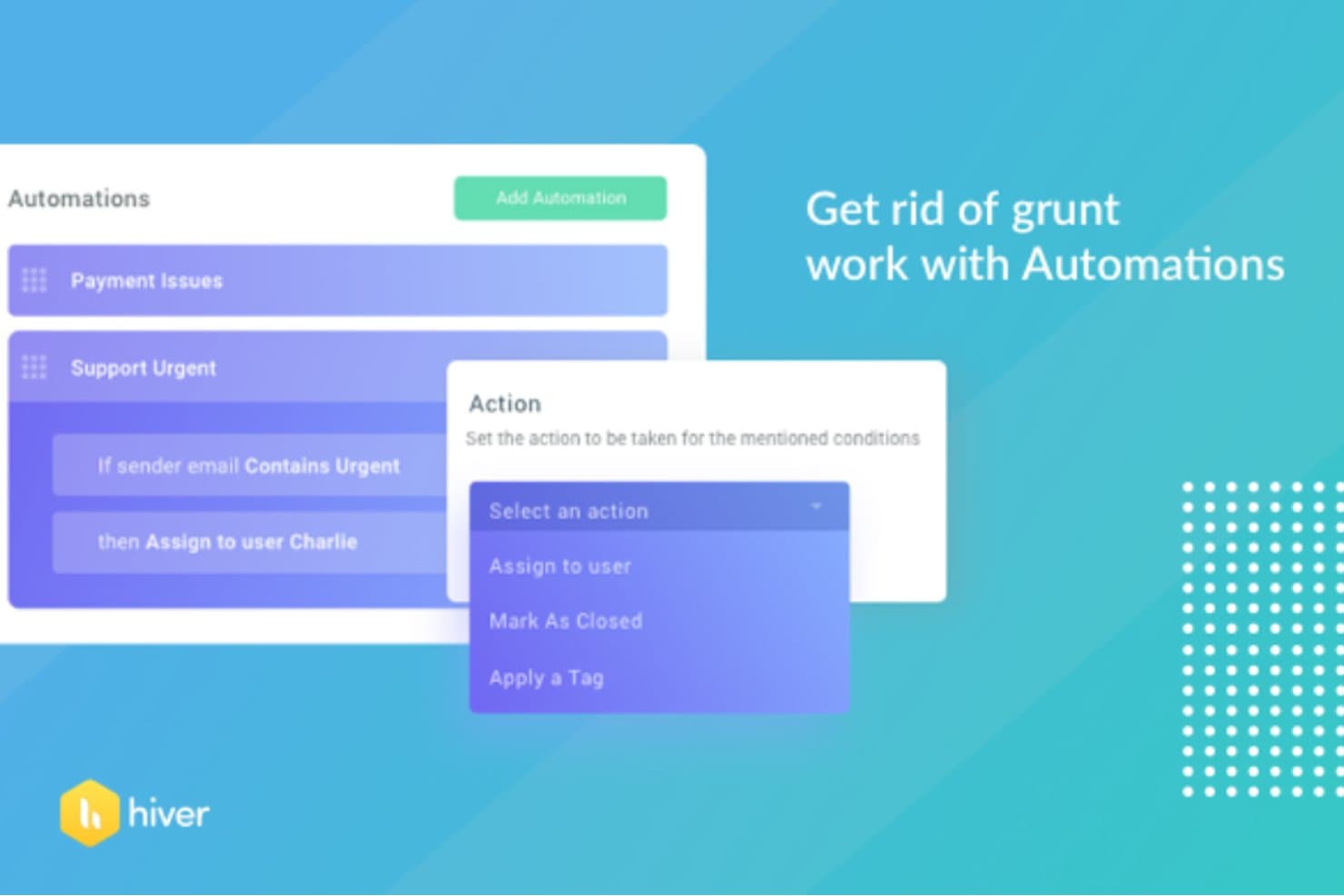
Hiver automates email routing with condition-based rules. Hiver turns Gmail into a shared inbox and ticketing hub, making it a natural fit for support teams that want AI-driven triage, SLA tracking, and workflow automation without leaving the tools they already use.
Who Is Hiver Best For?
Hiver is a strong fit for support teams already working in Gmail who need AI-powered triage and ticketing without adopting an entirely new platform.
Why I Picked Hiver
I picked Hiver as one of the best because it turns Gmail into a full AI-driven ticketing hub, so support teams never have to leave their inbox to triage, assign, or track requests. I love how AI Tagging automatically categorizes incoming conversations and routes them to the right person, while AI Agents can follow multi-step procedures across connected tools like Jira to handle escalations without manual intervention.
Hiver Key Features
- SLA tracking: Monitor response and resolution time targets across shared inboxes to keep support teams accountable.
- Approval workflows: Route sensitive replies through multi-step approval chains before they're sent to the requester.
- CSAT surveys: Collect customer satisfaction ratings automatically at conversation close or on selected replies.
- Jira integration: Create, link, and manage Jira issues directly from a conversation to escalate requests to engineering or IT operations.
Hiver Integrations
Hiver offers native integrations with Google Workspace, Microsoft 365, Slack, and Jira for internal support workflows and escalations. It also provides a REST API and Zapier for custom integrations.
Pros and Cons
Pros:
- Internal knowledge base supports ticket deflection
- Shared ownership helps prevent missed requests
- AI tagging reduces manual ticket triage
Cons:
- No network monitoring or device scanning
- No asset inventory or lifecycle tracking
Learn more about Hiver: Best for Microsoft Teams integration
- Free plan + 21-day trial + demo available
- From $12/user/month (billed annually)
Visit WebsiteCustomer Rating:4.8/5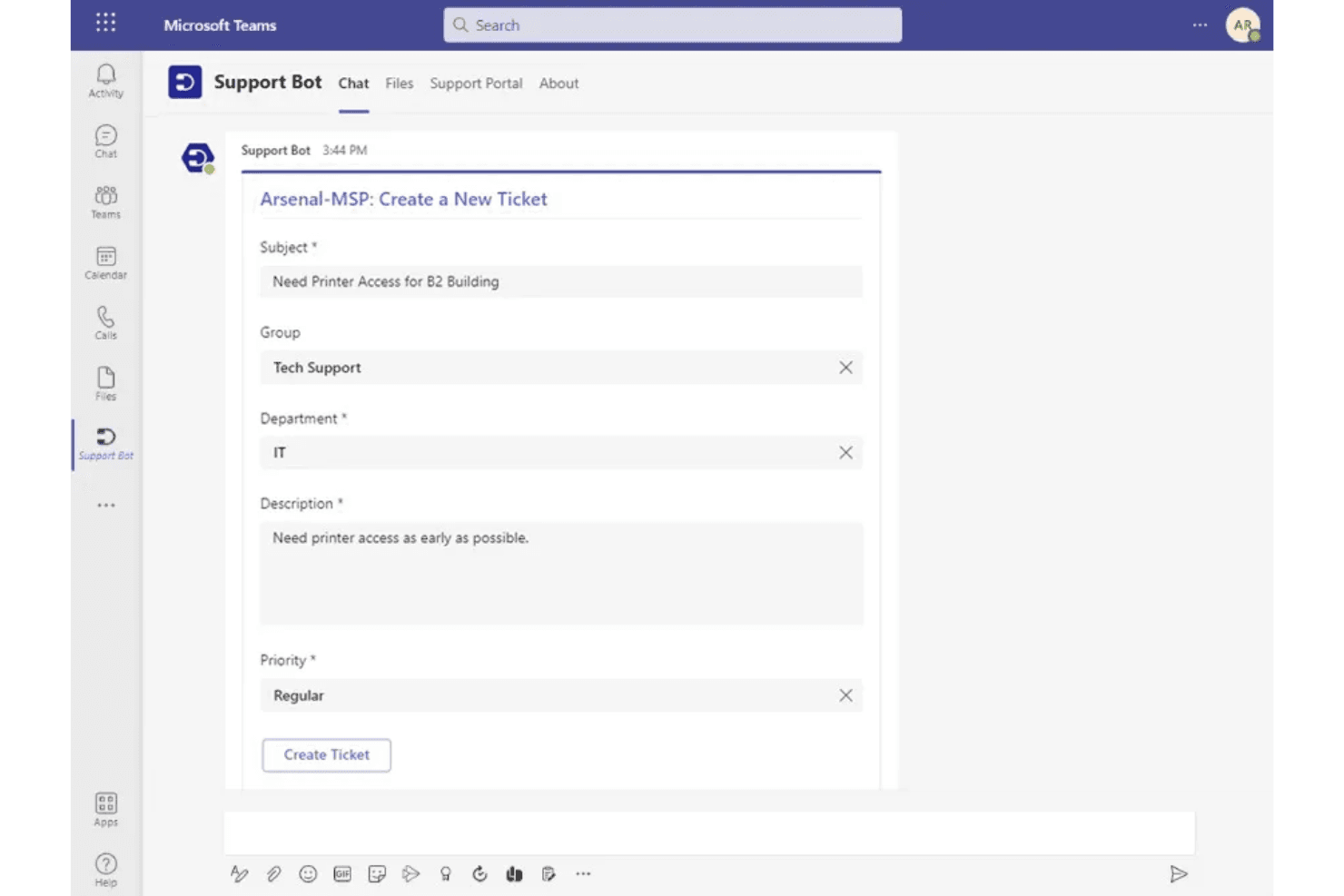
Desk365 lets users submit IT support tickets directly in Microsoft Teams. Desk365 is a helpdesk platform built for IT and support teams who need to manage tickets, automate workflows, and handle service requests—all without leaving the tools they already use.
Who Is Desk365 Best For?
Desk365 fits IT and support teams that run on Microsoft 365 and want to manage tickets directly inside Teams.
Why I Picked Desk365
I picked Desk365 as one of the best because of how deeply it embeds ticketing into Microsoft Teams. Instead of asking staff to log into a separate portal, users submit and track tickets directly in Teams, and agents can reply, update ticket status, and add attachments without ever switching tabs. I also like that the Teams Support Bot can be customized with your branding and trained on your knowledge base to deflect routine questions before they ever become tickets.
Desk365 Key Features
- SLA management: Set response and resolution targets by priority level, with automated reminders and escalation notifications sent via email or Microsoft Teams when deadlines are at risk.
- Workflow automation rules: Trigger actions on ticket creation or updates based on ticket, account, or custom-field conditions, including agent assignment, priority setting, and webhook calls.
- Asset lifecycle tracking: Record hardware, software, and consumable details—including procurement history, warranty data, and lifecycle stage—and link assets directly to tickets and users.
- Multi-channel request intake: Accept ticket submissions through email, a support portal, web forms, and an embeddable web widget, all feeding into a single unified inbox.
Desk365 Integrations
Desk365 offers native integrations across the Microsoft ecosystem, including Microsoft Teams, Microsoft Entra ID, Microsoft Intune, Microsoft 365 Copilot, and Power Automate. It also provides a REST API and webhooks for custom integrations.
Pros and Cons
Pros:
- Asset records link inventory to tickets
- SLA reminders escalate overdue support requests
- Configurable ticket routing earns reviewer praise
Cons:
- Asset tracking relies on manual entry or imports
- No network monitoring for devices or uptime
Learn more about Desk365: Best for AI-powered integration
- Free trial + free demo available
- From $59/user/month (billed annually)
Visit WebsiteCustomer Rating:4.5/5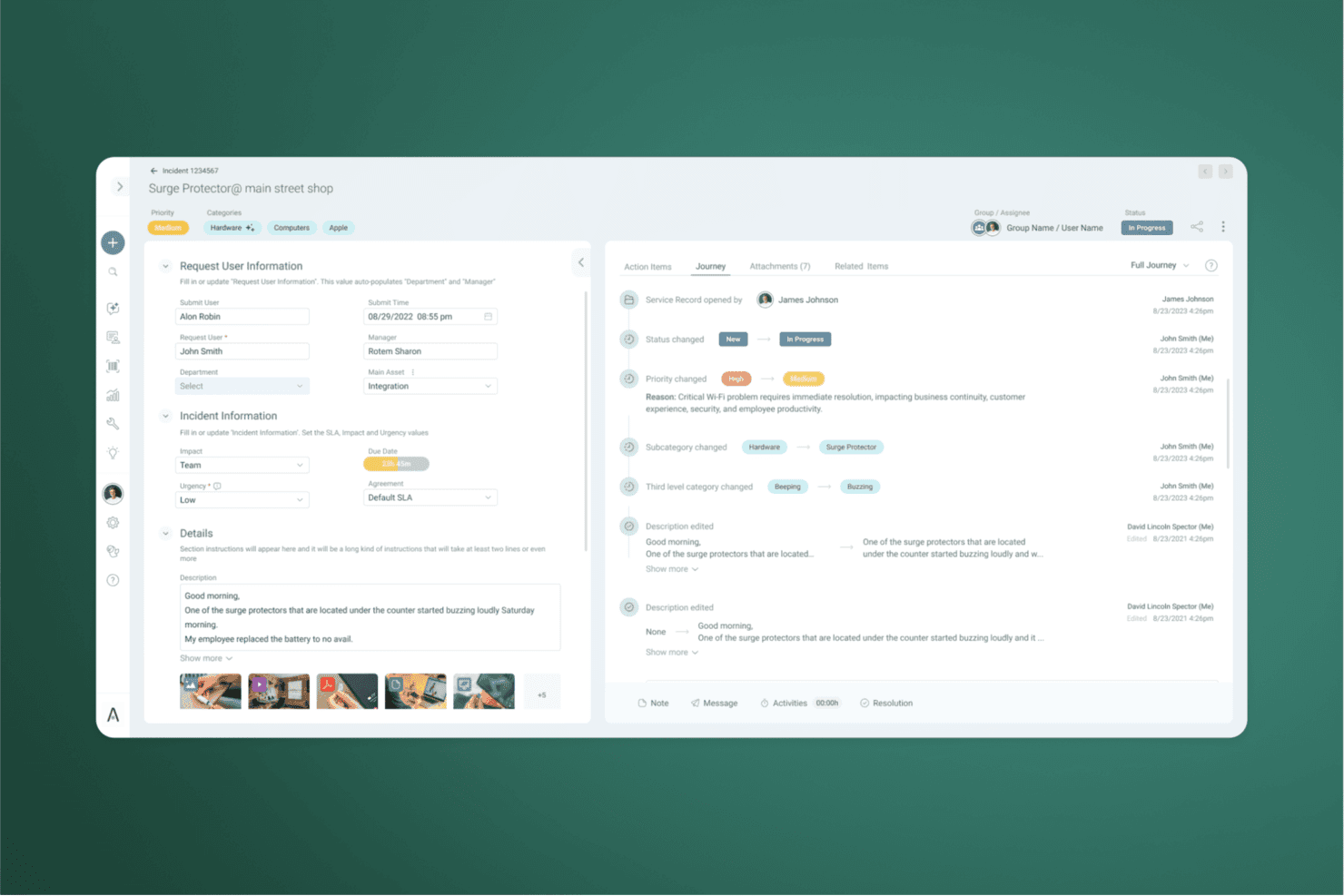
SysAid tracks incident history and changes through a visual journey log. SysAid is an AI-powered ITSM platform built for IT teams that need to manage help desk ticketing, asset inventory, and service workflows in one place—making it a strong fit for mid-sized to enterprise IT departments moving away from basic tools like Spiceworks.
Who Is SysAid Best For?
SysAid is a strong fit for mid-sized to enterprise IT departments that want AI-driven ticket triage, asset management, and a wide integration marketplace in one platform.
Why I Picked SysAid
I picked SysAid as one of the best Spiceworks alternatives because of how far its AI-powered integration actually goes in practice. SysAid Copilot doesn't just surface answers—it categorizes and routes incoming tickets automatically, drafts replies for agents, and pulls in context from your last two years of ticket history to ground every response. I also love that the integrations marketplace covers 1,100+ connectors, including native links to Jira, Microsoft Teams, SolarWinds, and Microsoft Intune, so your existing toolchain plugs in without custom glue work.
SysAid Key Features
- SLA management: Configure service-level agreements that set routing, priority, due dates, escalations, and operating hours for each service record.
- Multi-channel ticket intake: Accept service requests via email, self-service portal, Microsoft Teams, and AI chatbot from a single unified queue.
- Mobile agent app: Create, manage, and close tickets and view or update asset details from iOS and Android devices using the SysAid mobile app.
- Asset discovery and CMDB: Automatically discover hardware and software assets via WMI, Agent, or SNMP scanning, with asset data linked directly to service records.
SysAid Integrations
SysAid lists 1,111 integrations, including native connections with Jira Software, Microsoft Teams, Microsoft Intune, SolarWinds, Splashtop, and Azure, plus 600+ Workato community connectors. It also provides an API for custom integrations.
Pros and Cons
Pros:
- Self-service knowledge base can deflect repeat requests
- Asset discovery links inventory with ticket workflows
- AI categorizes and routes support tickets
Cons:
- Email exchanges inside tickets require extra clicks
- Report creation can hinder ad hoc analysis
Learn more about SysAid: Best for real-time collaboration
- 14-day free trial + free demo available
- From $29/user/month
Visit WebsiteCustomer Rating:4.5/5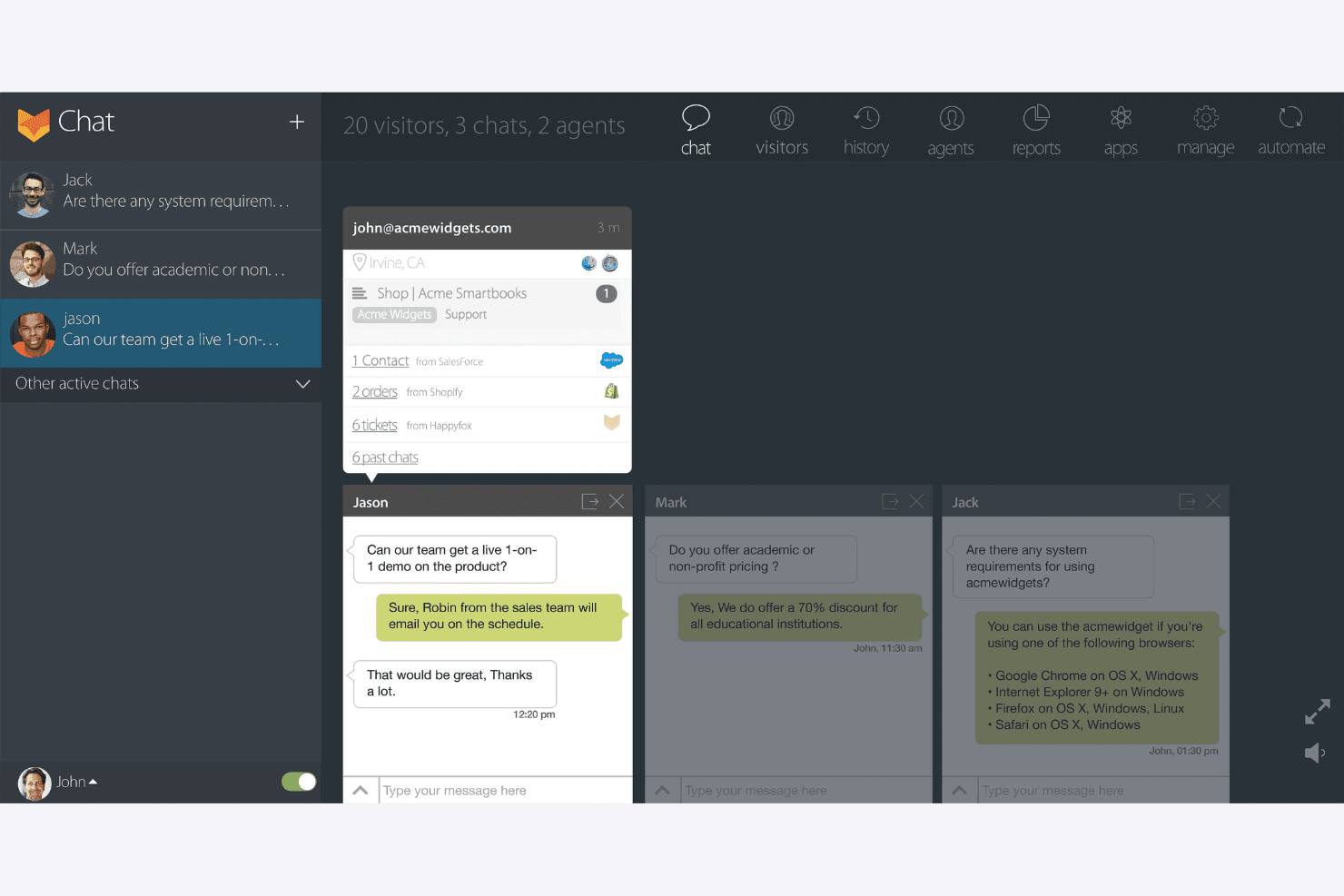
HappyFox lets agents handle multiple live chats simultaneously. HappyFox Help Desk is a ticketing platform built for IT support teams who need to centralize requests, automate workflows with SLA tracking, and give end users a self-service portal to find answers without opening a ticket.
Who Is HappyFox Best For?
HappyFox Help Desk is a strong fit for IT support teams that need structured ticket workflows, SLA tracking, and self-service deflection without managing infrastructure monitoring.
Why I Picked HappyFox
HappyFox earns its spot on my shortlist because of how well it handles real-time collaboration across a support team. I appreciate that agents can work the same ticket without stepping on each other, thanks to collision detection that flags when two people are active on a request simultaneously. Private notes and canned actions keep the team aligned without cluttering the customer-facing thread.
HappyFox Key Features
- Smart Rules automation: Configure rule-based triggers that automatically assign tickets, update properties, send notifications, escalate requests, or fire webhooks when set conditions are met.
- SLA tracking: Set response, assignment, and status milestones with work-schedule-aware timers, breach alerts, and per-category SLA targets.
- Self-service contact portal: Give end users a branded portal to submit tickets, track request status, and search a knowledge base before opening a new request.
- Lansweeper device sync: Connect Lansweeper to pull device and asset data into Help Desk tickets and contact records on a daily sync schedule.
HappyFox Integrations
HappyFox offers 93 marketplace integrations, including Lansweeper, NinjaOne, Microsoft Intune, Jira, Microsoft Teams, Slack, and TeamViewer. It also provides a REST API, conditional webhooks, and a Zapier integration for custom connectivity.
Pros and Cons
Pros:
- Collision alerts coordinate agents on tickets
- SLAs and automated ticket routing
- Spiceworks ticket migration is supported
Cons:
- Asset discovery depends on manual entry or Lansweeper daily sync
- No native network health monitoring
 Best for omnichannel ticket submission
- Free plan available
- From $17.50/month (billed annually)
Visit WebsiteCustomer Rating:4.7/5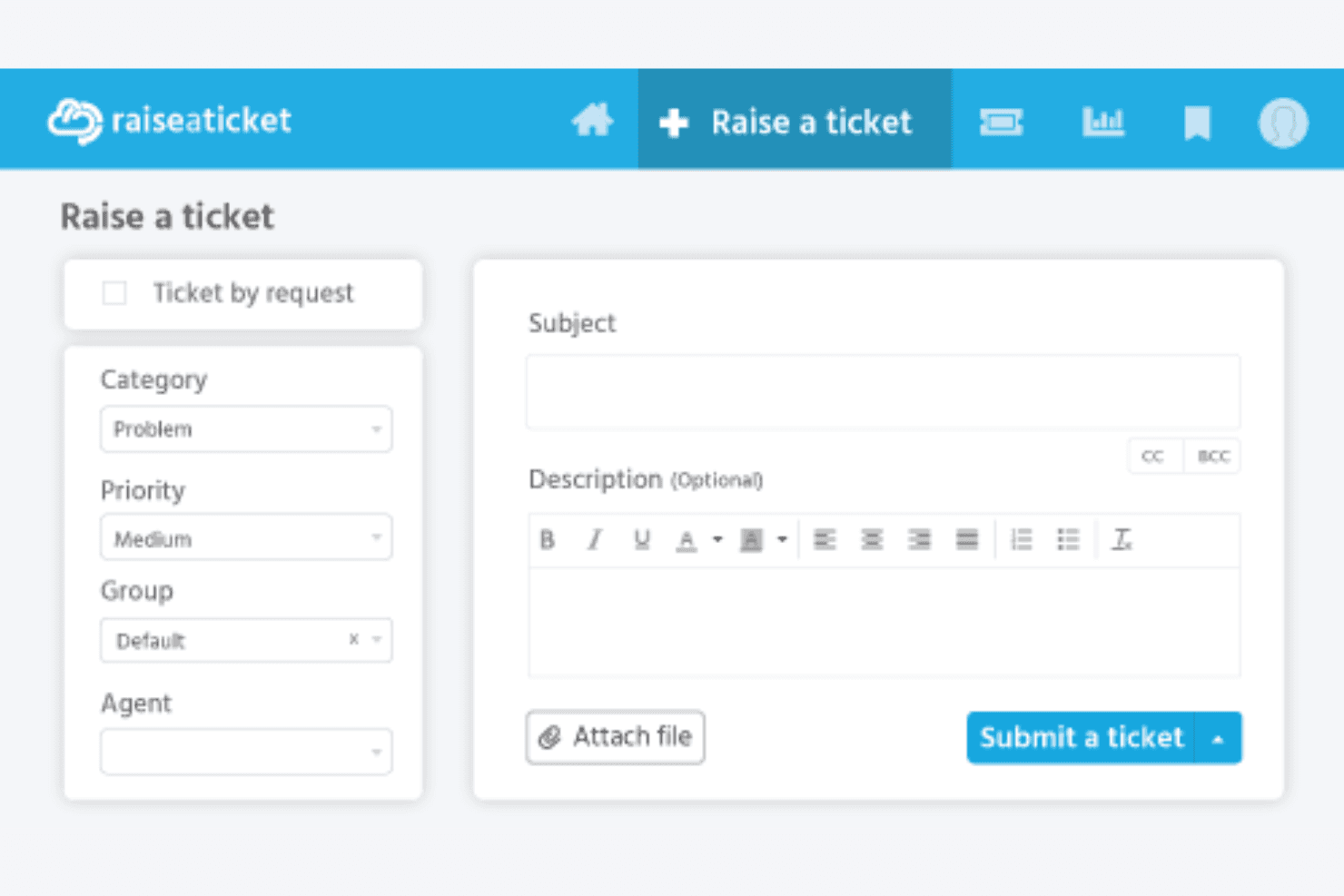
Raiseaticket lets users submit support tickets with priority and category fields. Raiseaticket is a free cloud-based helpdesk ticketing system that suits small IT teams looking for a lightweight, low-cost way to manage support requests across email, a self-service portal, and web forms.
Who Is Raiseaticket Best For?
Raiseaticket is a good fit for small IT support teams that need a free, no-fuss helpdesk to manage tickets across email, a web portal, and web forms.
Why I Picked Raiseaticket
I picked Raiseaticket as one of the best because it handles omnichannel ticket submission better than most free tools in this space. Email, a self-service portal, and web forms all feed into one unified queue, so a technician never has to chase down where a request came from. I especially like that you can forward an existing support address directly into Raiseaticket, which means cutover from a tool like Spiceworks doesn't require retraining end users on how to reach IT.
Raiseaticket Key Features
- SLA policies: Set response and resolution targets by priority, with breach alerts and automatic SLA pausing when waiting on a customer.
- Knowledge base: Create and publish how-to guides, troubleshooting articles, and FAQs for both agents and end users to access.
- Custom dashboards: Tailor dashboard widgets and reports with metrics like first-contact resolution, backlog growth, and escalations for different roles.
- Asset management: Link hardware and software records to users, departments, and tickets so agents can view ownership, status, and support history.
Raiseaticket Integrations
Raiseaticket offers native integrations with Microsoft 365 and Google Workspace mailboxes, plus Slack and Microsoft Teams notifications. A premium REST API supports custom integrations.
Pros and Cons
Pros:
- Free plan suits small ticket-focused teams
- Email and portal requests share one queue
- Reviewers praise ticket categorization and priorities
Cons:
- Asset tracking is a paid add-on
- No network monitoring or device discovery
Learn more about Raiseaticket: Best for task management
- Free demo available
- From $75/user/month (billed annually)
Visit WebsiteCustomer Rating:4.5/5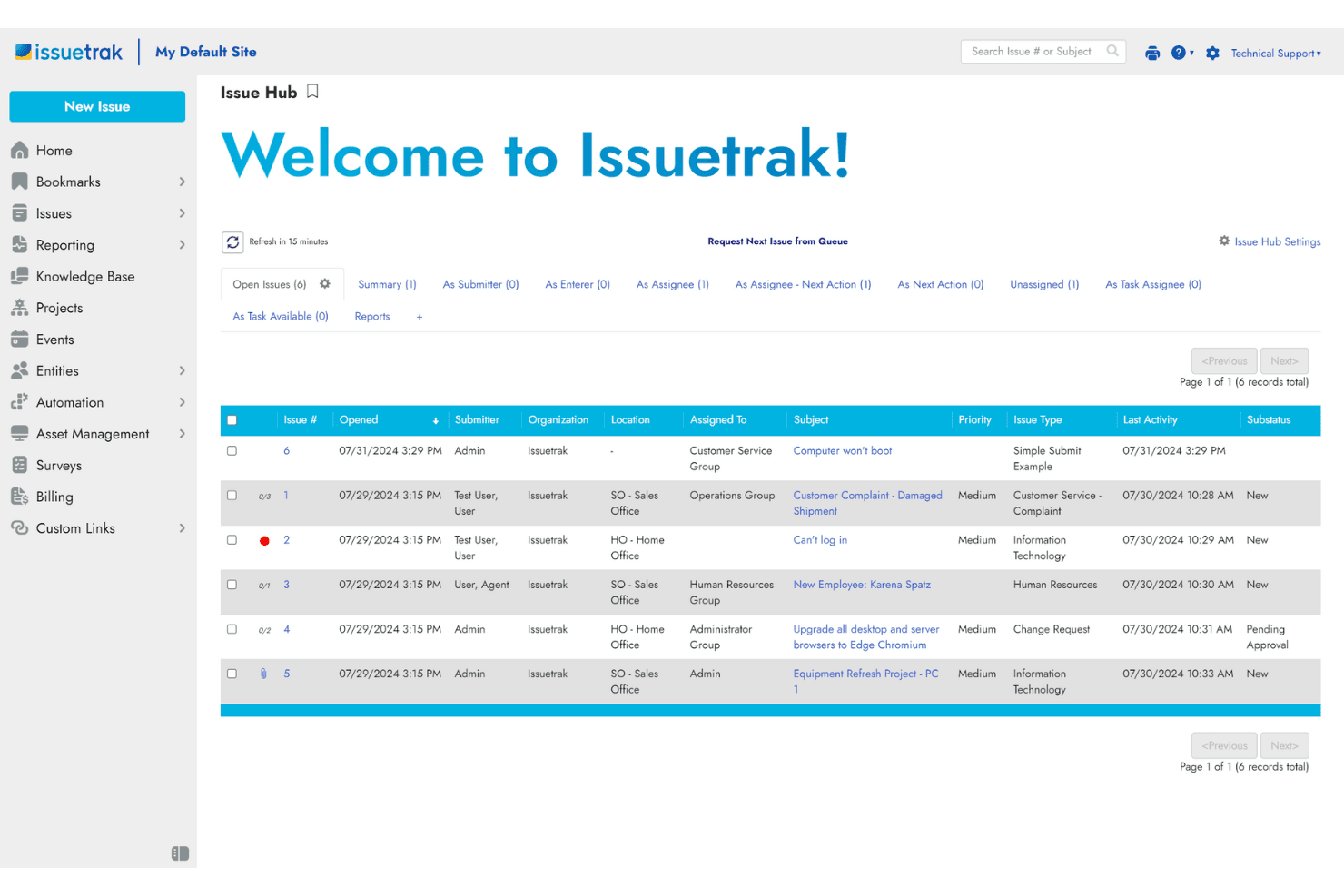
Issuetrak centralizes issue tracking in a unified dashboard view. Issuetrak is a help desk and service operations platform that suits IT teams and multi-department support operations looking to track issues, automate workflows, and manage assets without juggling multiple tools.
Who Is Issuetrak Best For?
Issuetrak is a strong fit for multi-department IT and service teams that need to track, assign, and automate work across a shared queue without losing visibility into who owns what.
Why I Picked Issuetrak
I picked Issuetrak as one of the best because its task management runs deeper than most ticketing tools. I love how task groups and sequential task flows let my team break a single issue into dependent steps, assign each one individually, and track completion without losing sight of the parent ticket. What really sets it apart is that end users can create and complete tasks without a paid seat, so cross-team work doesn't inflate licensing costs.
Issuetrak Key Features
- Email-to-ticket conversion: Incoming emails are automatically captured as tickets, with all communications logged against the issue record.
- SLA policy management: Configure response and resolution targets by severity, group, or organization, with automatic breach alerts and compliance reporting.
- Knowledge base with self-service portal: Create categorized articles with visibility controls, and let end users search public content without logging in.
- Asset tracking with device audits: Track hardware, software, and equipment alongside issues, with scheduled audit runs for PCs, Macs, and Google-managed devices.
Issuetrak Integrations
Issuetrak offers native integrations with LDAP, Active Directory Federation Services, Azure AD, OAuth 2.0/OpenID Connect, Exchange, and Microsoft 365. It provides a REST API for custom integrations and supports Zapier.
Pros and Cons
Pros:
- Knowledge articles can grow from resolved tickets
- Dependent task flows keep work connected
- Custom ticket workflows adapt across departments
Cons:
- Report building feels cumbersome to reviewers
- No real-time network health monitoring
Learn more about Issuetrak:
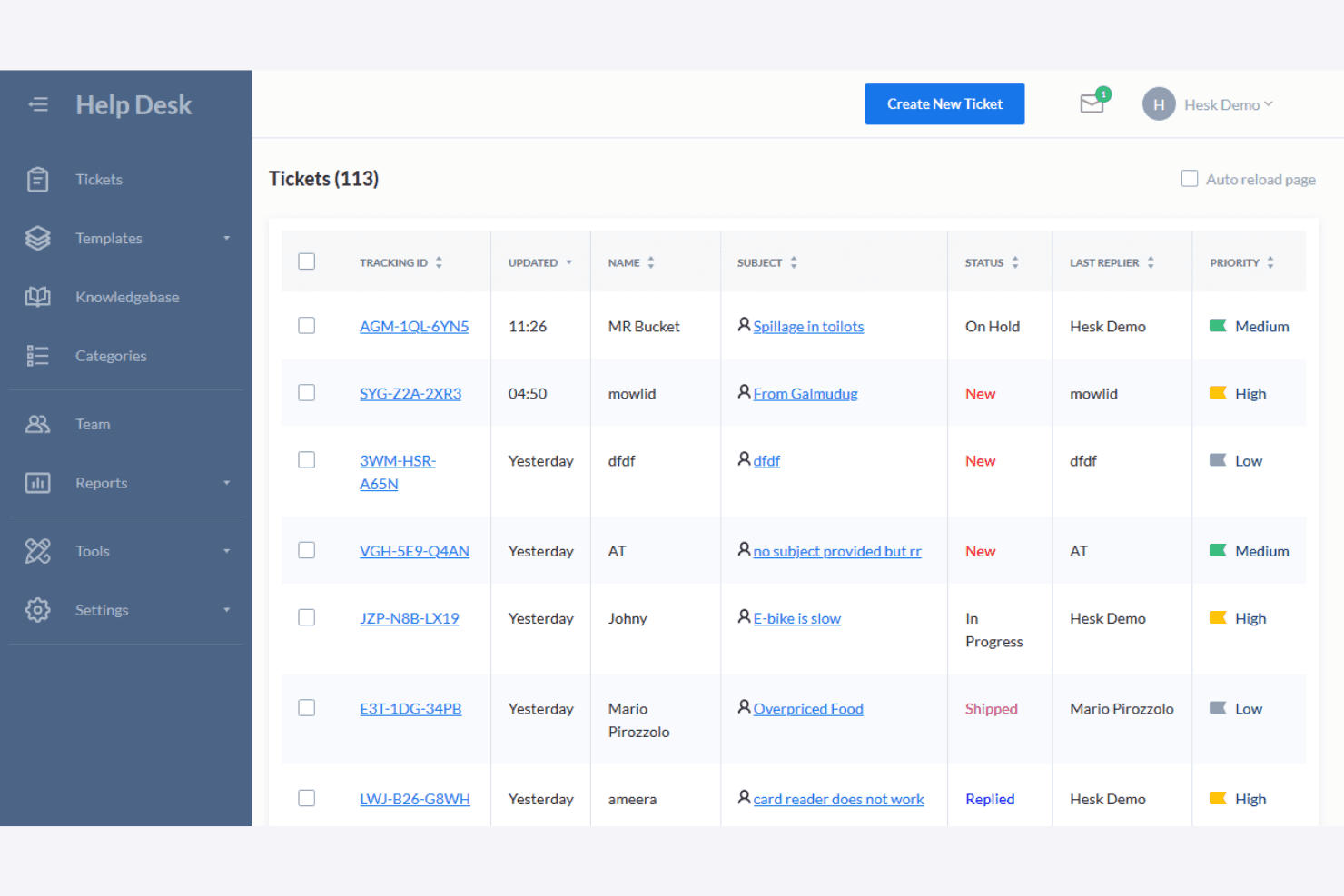
Hesk displays all support tickets with status, priority, and assignee. Hesk is a lightweight, self-hosted help desk tool that lets small IT teams receive, track, and resolve support tickets without paying for features they don't need.
Who Is Hesk Best For?
Hesk is a great fit for small IT teams and solo technicians who need a no-frills ticketing system they can self-host for free or license once at a low cost.
Why I Picked Hesk
I picked Hesk as one of the best because it does something most tools overcomplicate: it lets a small IT team get a working ticket queue up and running without paying for a single seat license. I love that the free self-hosted version includes category-based auto-assignment, so tickets submitted through the web form or email route directly to the right technician without manual triage. The built-in knowledge base also lets my team publish answers to recurring requests, cutting down the ticket volume before it starts.
Hesk Key Features
- Canned replies: Staff can save and reuse pre-written responses to answer common ticket requests without typing the same reply each time.
- Time tracking: Technicians can log time spent on each ticket directly within the help desk interface.
- Custom ticket forms: Teams can create category-specific fields to capture the exact details needed for different request types.
- Multi-language support: Hesk supports more than 35 languages with downloadable translations for localizing the help desk interface.
Hesk Integrations
Hesk doesn't have any native integrations or marketplace integrations. It supports OAuth for email sending and IMAP fetching, but API availability isn't stated.
Pros and Cons
Pros:
- Ticket queues support daily technician workflows
- Knowledge base articles can deflect repeat requests
- Category-based ticket assignment reduces manual triage
Cons:
- No network monitoring for infrastructure health
- No automated asset inventory or lifecycle tracking
Learn more about Hesk: Best for shared inboxes
- 14-day free trial + free demo available
- From $25/user/month (billed annually)
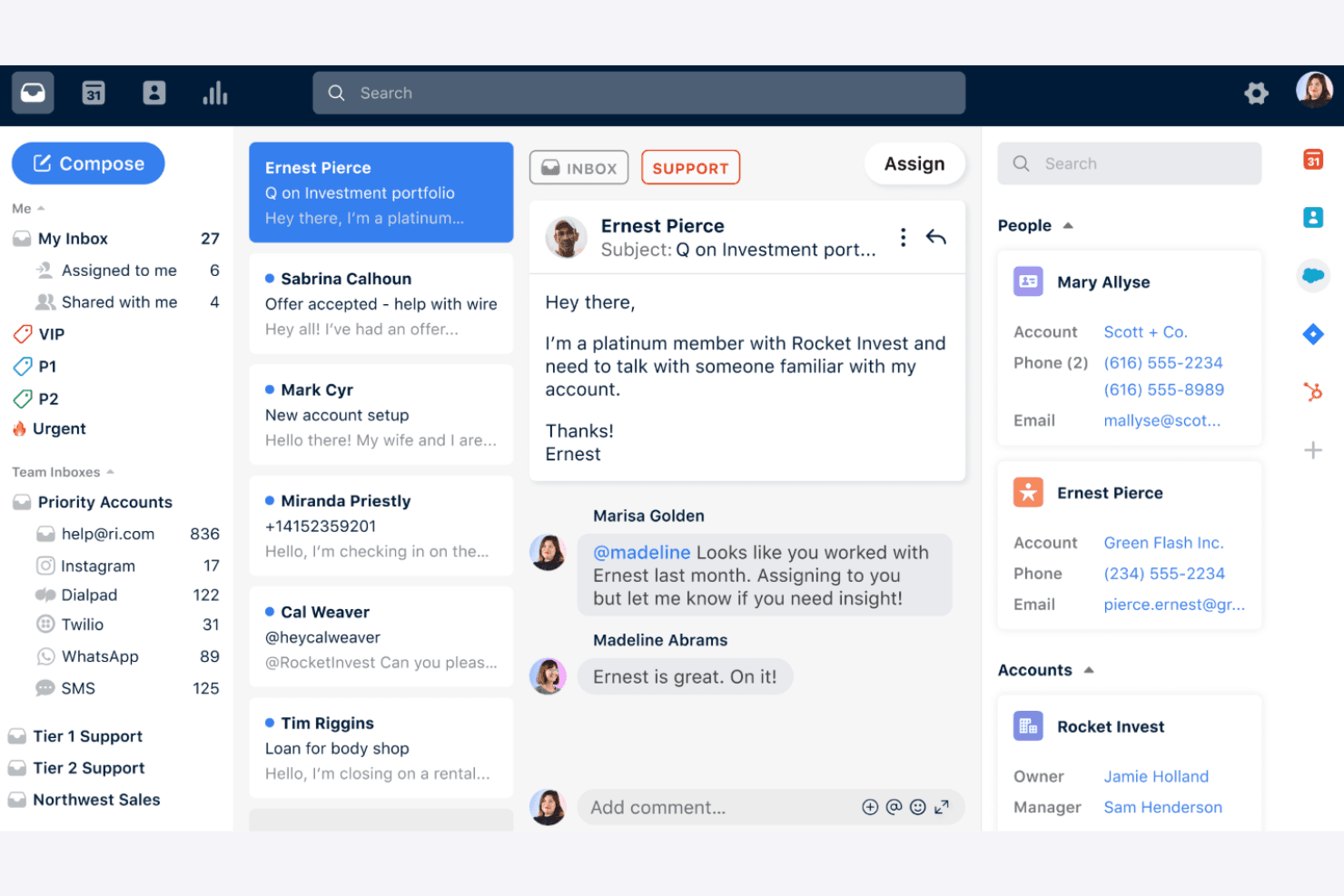
Front centralizes team email, chat, and customer context in one inbox. Front is a customer operations platform that centralizes email, chat, SMS, and social channels into shared inboxes—making it a natural fit for support and success teams that need to coordinate responses, track requests, and keep full conversation context in one place.
Who Is Front Best For?
Front works best for customer support and success teams that handle high volumes of email and need shared inboxes with clear assignment, collaboration, and cross-channel context in one place.
Why I Picked Front
I've included Front in my top picks because shared inboxes are where it genuinely excels, and that matters for teams routing IT requests across multiple people. When a password reset or software-installation request comes in, Front lets you assign it to a specific teammate, leave an internal comment, and track its status without the conversation getting lost or duplicated. I also like that you can build automation rules to tag and route incoming requests automatically, so the right person gets the ticket without manual triage every time.
Front Key Features
- SLA tracking: Set SLA timers with rule-based triggers and monitor breaches directly in analytics reports.
- Ticket status customization: Create custom statuses to reflect internal process stages like "Waiting for Approval" across your team's workflows.
- Customer self-service portal: Give customers a branded portal to submit requests, track progress, and revisit conversations without contacting your team.
- AI-powered conversation summaries: Generate automatic summaries of conversations so teammates can get up to speed without reading full thread histories.
Front Integrations
Front’s product pages claim 160+ integrations, including Jira, Slack, Microsoft 365, HubSpot, Asana, Aircall, Twilio, and WhatsApp Business. Its Core API, webhooks, Connectors, Plugin SDK, and Channel API support custom integrations.
Pros and Cons
Pros:
- Rules automate routine ticket routing and updates
- Cross-channel history keeps request context together
- Shared inboxes clarify ownership and handoffs
Cons:
- No network monitoring or infrastructure alerts
- No IT asset inventory or discovery
Learn more about Front:
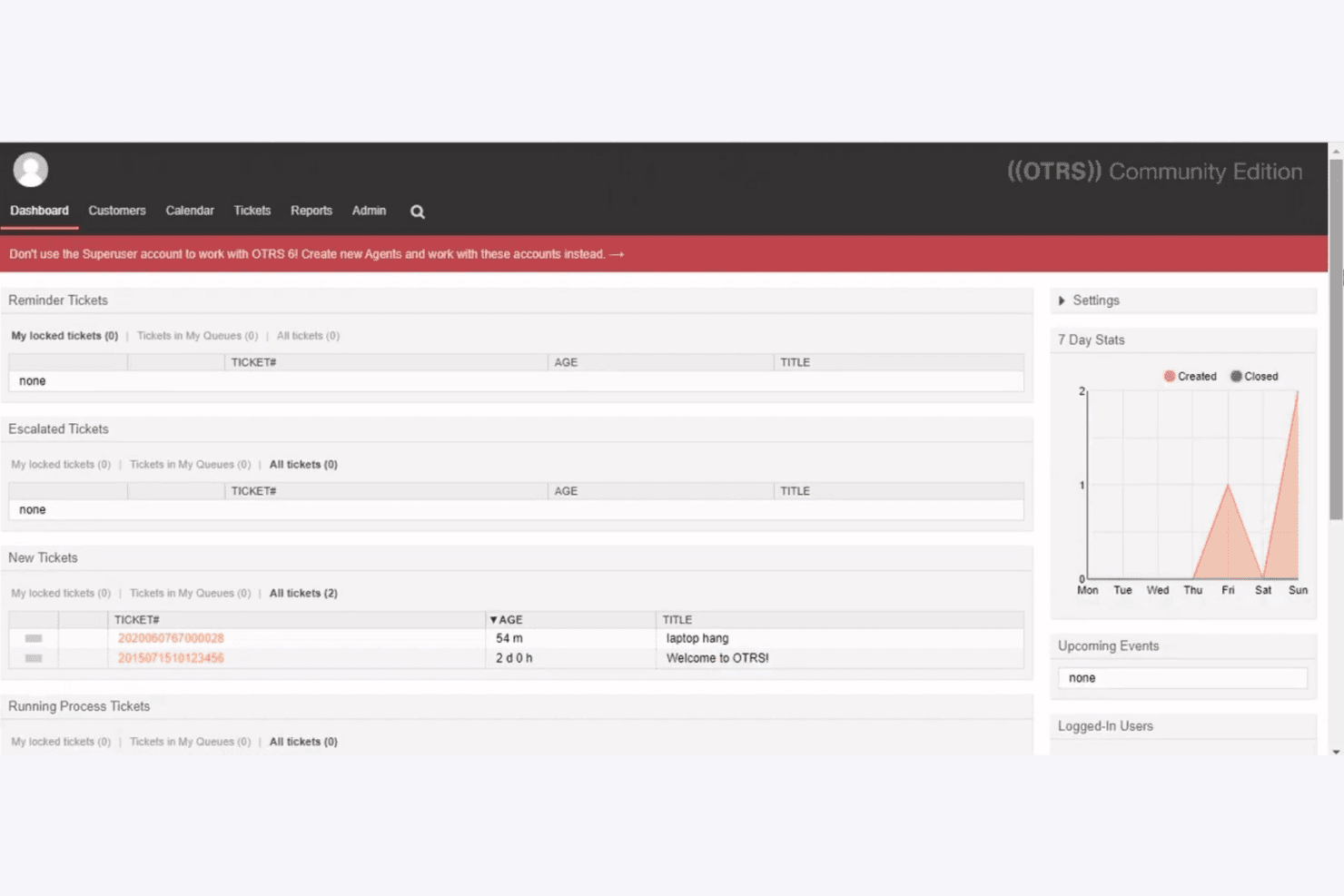
OTRS displays ticket queues and 7-day stats on its dashboard. OTRS is a service management platform built for IT teams that need structured ticket handling, configurable workflows, and process automation across help desk and ITSM operations.
Who Is OTRS Best For?
OTRS suits IT teams and help desk technicians at small-to-midsize organizations that need highly configurable ticket workflows and process automation above all else.
Why I Picked OTRS
I picked OTRS as one of the best because its Process Manager is genuinely one of the more capable automation engines I've seen in a help desk tool. I can build conditional sequence flows that automatically reroute tickets, trigger SLA escalations, or send notifications without any manual intervention. The Generic Agent adds another layer, handling automated data exchanges between OTRS and external systems on a schedule.
OTRS Key Features
- Configuration Management Database (CMDB): Track configuration items, their current status, and relationships to tickets, incidents, and change processes in a central database.
- Customer satisfaction surveys: Create and distribute surveys to customer users of closed tickets, with results displayed as graphical statistics including Net Promoter Score data.
- Multi-account mobile app: Access tickets, appointment details, and customer information on the go, with support for multiple OTRS accounts in a single app.
- Role and access management: Control which agents and teams can view, edit, or act on tickets by assigning permissions through configurable roles and group-based queue access.
OTRS Integrations
OTRS offers native integrations with Checkmk, Icinga, Nagios, Zabbix, Grafana, Baramundi, FileWave, Jira, and EV Observe. Its REST API, SOAP support, and Generic Interface enable custom integrations and configuration-item synchronization.
Pros and Cons
Pros:
- Ticket-time knowledge suggestions surface relevant articles
- Reviewers value centralized ticket histories and assignments
- Automates conditional routing, approvals, and SLA escalations
Cons:
- Setup and process configuration take substantial effort
- Asset tracking lacks automatic network discovery
- No native device, bandwidth, or uptime monitoring
Learn more about OTRS:
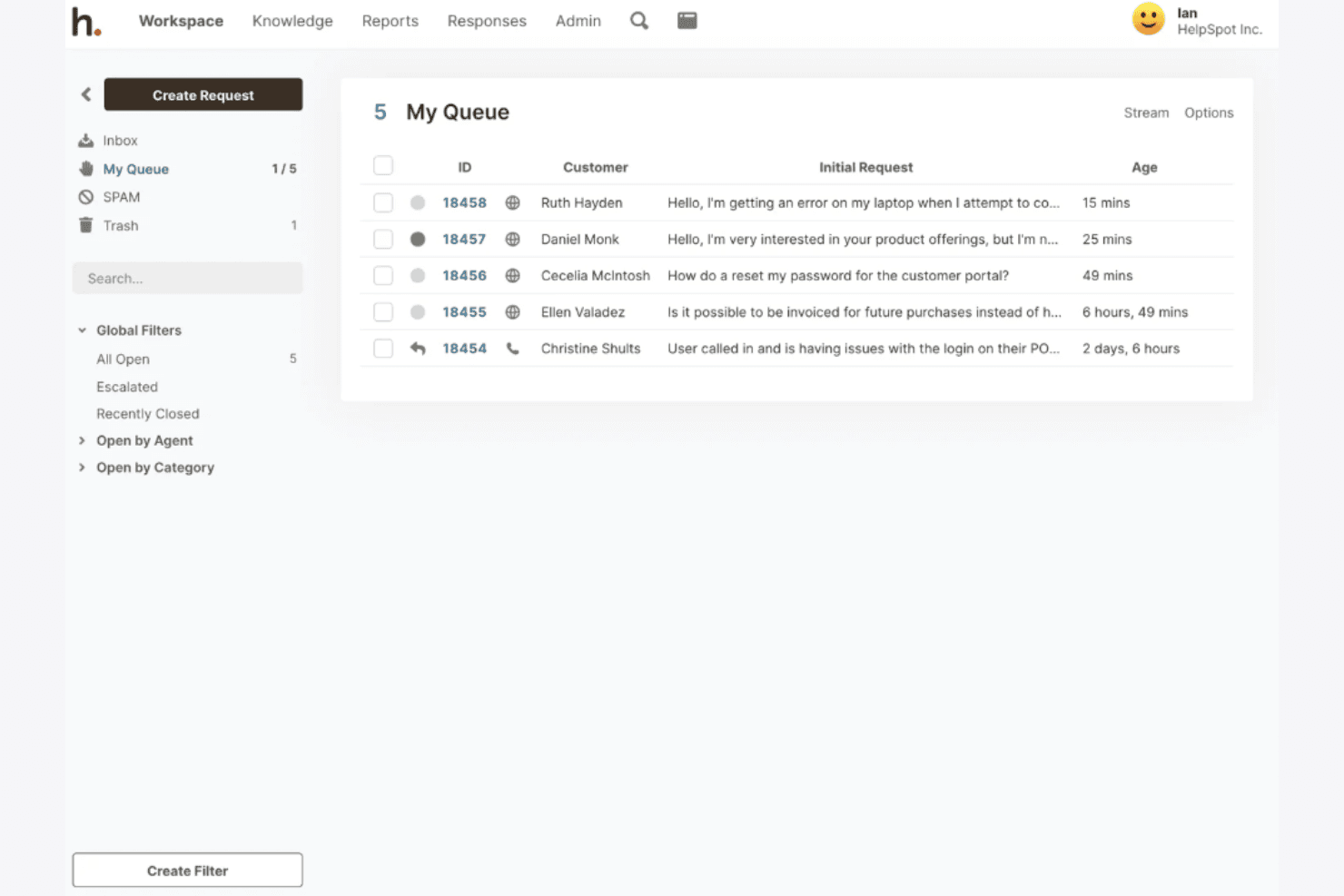
HelpSpot lets users manage support requests in a shared queue. HelpSpot is an email-first help desk built for in-house IT teams that need to turn incoming requests into organized, trackable tickets without the ads, clutter, or feature bloat of tools like Spiceworks.
Who Is HelpSpot Best For?
HelpSpot is a strong fit for in-house IT teams that live in their inbox and need a clean, organized way to turn email requests into trackable tickets.
Why I Picked HelpSpot
I picked HelpSpot as one of the best because it treats email as the foundation of IT support, not an afterthought. Every incoming request becomes a tracked ticket with full history, ownership, and collision detection so two agents never accidentally reply to the same thread. I particularly like the shared inbox's queue filters and AI categorization, which learn from closed tickets to sort new requests automatically, keeping a busy IT inbox organized without manual triage.
HelpSpot Key Features
- Ticket automation rules: Set up triggers, scheduled rules, and mail rules to route incoming requests, assign agents, and escalate stale tickets automatically.
- Live Lookup: Pull real-time employee or device data from an external directory, CRM, or asset database directly into a ticket without syncing a separate copy.
- Customer satisfaction surveys: Automatically send CSAT, loyalty, or thumbs-up/thumbs-down surveys after a ticket closes, with results feeding into reports and automation rules.
- Self-hosted deployment option: Run HelpSpot on your own Linux or Windows server for full control over data storage, with SQL access to your HelpSpot database.
HelpSpot Integrations
HelpSpot offers native integrations with Microsoft 365, Google Workspace, Active Directory, LDAP, Azure AD, and Okta. It also provides an HTTP API, webhooks, and 5,000+ app connections through Zapier.
Pros and Cons
Pros:
- Automation routes, assigns, and escalates tickets
- Email and portal requests become trackable tickets
- Reviewers praise straightforward ticket assignment and history
Cons:
- Cannot monitor network health or uptime
- No native asset discovery or inventory
Learn more about HelpSpot:
Diğer Spiceworks Alternatifleri
Kısa listeme giremeyen, ancak yine de göz atmaya değer bazı ek Spiceworks alternatiflerini burada bulabilirsiniz:
- 11NinjaOneBest for automated endpoint management
- 12Helpy ProBest for data control and security
- 13Alloy SoftwareBest for integrated IT solutions
- 14BOSSDeskBest for AI-driven workflow automation
- 15ManageEngine ServiceDesk PlusBest for ITIL certification
- 16ConnectWiseBest for managed service providers
- 17DeskproBest for customizable interface
- 18Jira Service ManagementBest for agile teams
- 19CayzuBest for cloud-based help desk
- 20PylonBest for small business integration
How I Evaluate Spiceworks Alternatives
I split my evaluation into baseline criteria—like ticket management and SLA tracking—and differentiators that set one platform apart from another for CX teams replacing Spiceworks.
Core Functionality (Table Stakes For This List)
When I'm selecting tools for my list, I rank each one on a scale from 0 (does not offer the functionality) to 5 (excels in this area) for each core functionality listed below. Then, I calculate the tool's total score into a percentage. Each tool needs to achieve a minimum total score of 65% to be considered for inclusion.
- Ticket Management: I look at the full ticket lifecycle—creation, assignment, prioritization, and resolution tracking—and whether agents can merge duplicates, add tags, and use custom fields for real-world triage.
- Multichannel Support: Each tool should unify customer inquiries from email, chat, web forms, phone, and social into one queue so agents aren't toggling between disconnected inboxes.
- Automation & Workflows: I evaluate whether a platform lets you build rules for routing, escalation, and assignment—like auto-assigning billing tickets to a specific team based on subject line keywords.
- Knowledge Base: A solid KB gives customers a way to resolve issues on their own. I check for public and internal article support, categorization, search, and whether agents can surface articles mid-conversation.
- SLA Management: Teams need configurable SLA policies tied to priority levels and business hours. I look for automated alerts and escalation triggers that fire before a breach, not after.
- Reporting & Analytics: I evaluate whether dashboards cover ticket volume, agent performance, response times, and CSAT—and whether you can filter, customize, and schedule reports for stakeholder reviews.
Once I have a list of tools that meet this criteria, I consider what sets each platform apart.
Differentiating Factors (What Sets Vendors Apart)
Here's how I compare and contrast different vendors:
Standout Features
AI-powered assistance is a major differentiator—I look for tools that offer suggested replies, ticket summarization, or chatbot deflection to help agents handle volume without burning out. A branded customer portal also matters because it lets customers submit and track their own tickets, which reduces inbound requests. I also evaluate collaboration features like internal notes, @mentions, and side conversations that keep cross-team troubleshooting inside the ticket instead of scattered across email threads.
Beyond Features
Pricing is top of mind for teams moving off a free tool like Spiceworks, so I check whether vendors offer a free tier, per-agent pricing, or flexible billing that won't punish you for scaling up. Integration ecosystems also carry weight—I look for native connectors to CRMs like Salesforce or HubSpot and communication tools like Slack, plus open API access for custom builds. Implementation speed matters too, especially data migration paths that let you move tickets and KB articles from Spiceworks without starting from scratch.
Spiceworks'ün Temel Özellikleri
Alternatif BT yardım masası çözümlerinin sunduklarını karşılaştırmanıza yardımcı olmak için Spiceworks'ün temel özelliklerinden bazıları şunlardır:
- Özelleştirilebilir talep portalları: Ekibinizin ihtiyaçlarınıza uygun bir talep sistemi oluşturmasını sağlar.
- Mobil uygulama erişimi: Mobil erişim sayesinde talepleri hareket hâlindeyken yönetin.
- Otomatik yanıtlar: Sık sorulan sorulara önceden ayarlanmış yanıtlarla zamandan tasarruf edin.
- Kişiselleştirilmiş bilgi tabanı: Ekibinizin kolayca erişebilmesi için çözüm deposu oluşturun.
- Gelişmiş raporlama özellikleri: Performansı ve verimliliği takip etmek için ayrıntılı raporlar oluşturun.
- Destekleyici topluluk: Sekiz milyondan fazla uzmandan oluşan bir topluluktan yardım alın.
- Görev yönetimi: Platform içinde görevleri takip edin, önceliklendirin ve yönetin.
- Kapsamlı kurulum gerektirmez: Karmaşık bir yükleme işlemi olmadan platformu kullanmaya başlayın.
- Ücretsiz bulut tabanlı araç: İşletmenizin büyüklüğünden bağımsız olarak yazılımı herhangi bir ücret ödemeden kullanın.