

ITSM yardım masası yazılımı, BT desteğini müşteri hizmetlerini, varlıkları ve iş akışlarını yönetmek için kullandığınız araçlara bağlayarak her talebin verimli bir şekilde ele alınmasını sağlar. BT ve müşteri deneyimi ekiplerini uyumlu hâle getiren, hibrit veya çoklu bulut ortamlarını destekleyen ve operasyonların tamamına ilişkin görünürlük sunan bir çözüme ihtiyacınız varsa bu rehber sizin için.
Aşağıda, 2026 için özellikleri, entegrasyonları ve dağıtım seçenekleriyle birlikte en iyi ITSM yardım masası platformları yer alıyor.
Why Trust Our Software Recommendations
6,700+
Reviews
20
Industry experts
16+
Evaluation factors
14
Years
Our team has been testing and reviewing software since 2012. As CX leaders ourselves, we know how difficult—and important—it is to choose the right software.
For this guide, we evaluated tools using hands-on testing and independent research, scoring tools using our selection criteria.
Our reviews reflect our human editorial judgment, not a sales pitch.
 Gui DrusinaCreative Director
 Tim FisherVP of AI
ITSM Yardım Masası Yazılımları Karşılaştırma Tablosu
Bu karşılaştırma tablosu, en iyi ITSM yardım masası yazılımı seçimlerimin fiyatlandırma ayrıntılarını özetlemektedir:
Score legend (out of 5)
- Excellent4.5–5
- Good4–4.4
- Average3–3.9
- Below average2–2.9
- Poor1–1.9
Sorted by: Default
| Tool | Starting Price | Website | |||||||
|---|---|---|---|---|---|---|---|---|---|
Best for IT service desk and asset management | 4.7 out of 5 | 5 | 4 | 5 | 5 | 4 | 5 | $13/user/month 30-day free trial | Website |
Best for unifying IT, HR, and Facilities on one portal | 4.3 out of 5 | 5 | 3 | 4 | 4 | 5 | 5 | £51/user/month Not available | Website |
Best for self-healing hybrid endpoint management | 4.8 out of 5 | 5 | 4 | 5 | 5 | 5 | 5 | Pricing upon request Not available | Website |
Best for licensed ITSM with native CMDB | 4.8 out of 5 | 5 | 4 | 5 | 5 | 5 | 5 | Pricing upon request Free demo available | Website |
Best for rapid deployment and fast-growing IT teams | 4.8 out of 5 | 5 | 4 | 5 | 5 | 5 | 5 | $19/user/month 14-day free trial | Book Demo |
Best for full ITIL coverage at a flat per-agent price | 5.0 out of 5 | 5 | 5 | 5 | 5 | 5 | 5 | £66/user/month Free plan + 30-day trial + demo available | Website |
Best for unifying DevOps and IT support workflows | 4.8 out of 5 | 5 | 4 | 5 | 5 | 5 | 5 | $21.50/user/month Free plan + 14-day trial available | Website |
Best for enterprise multi-cloud environments and AIOps | 5.0 out of 5 | 5 | 5 | 5 | 5 | 5 | 5 | Pricing upon request Free demo available | Website |
Best for large-scale enterprise digital workflows | 5.0 out of 5 | 5 | 5 | 5 | 5 | 5 | 5 | Pricing upon request Free demo available | Website |
Best for omnichannel service and help desk integration | 4.7 out of 5 | 5 | 5 | 3 | 5 | 5 | 5 | $25/agent/month Free trial available | Book Demo |


ITSM Yardım Masası Yazılımları İncelemeleri
Aşağıda, kısa listemdeki en iyi ITSM yardım masası yazılımlarının ayrıntılı özetleri yer alıyor. Her inceleme, doğru seçimi yapmanıza yardımcı olmak için her platformun özelliklerine, entegrasyonlarına ve en uygun kullanım alanlarına ayrıntılı bir bakış sunuyor.
 Best for IT service desk and asset management
- 30-day free trial
- From $13/user/month
Visit WebsiteCustomer Rating:4.4/5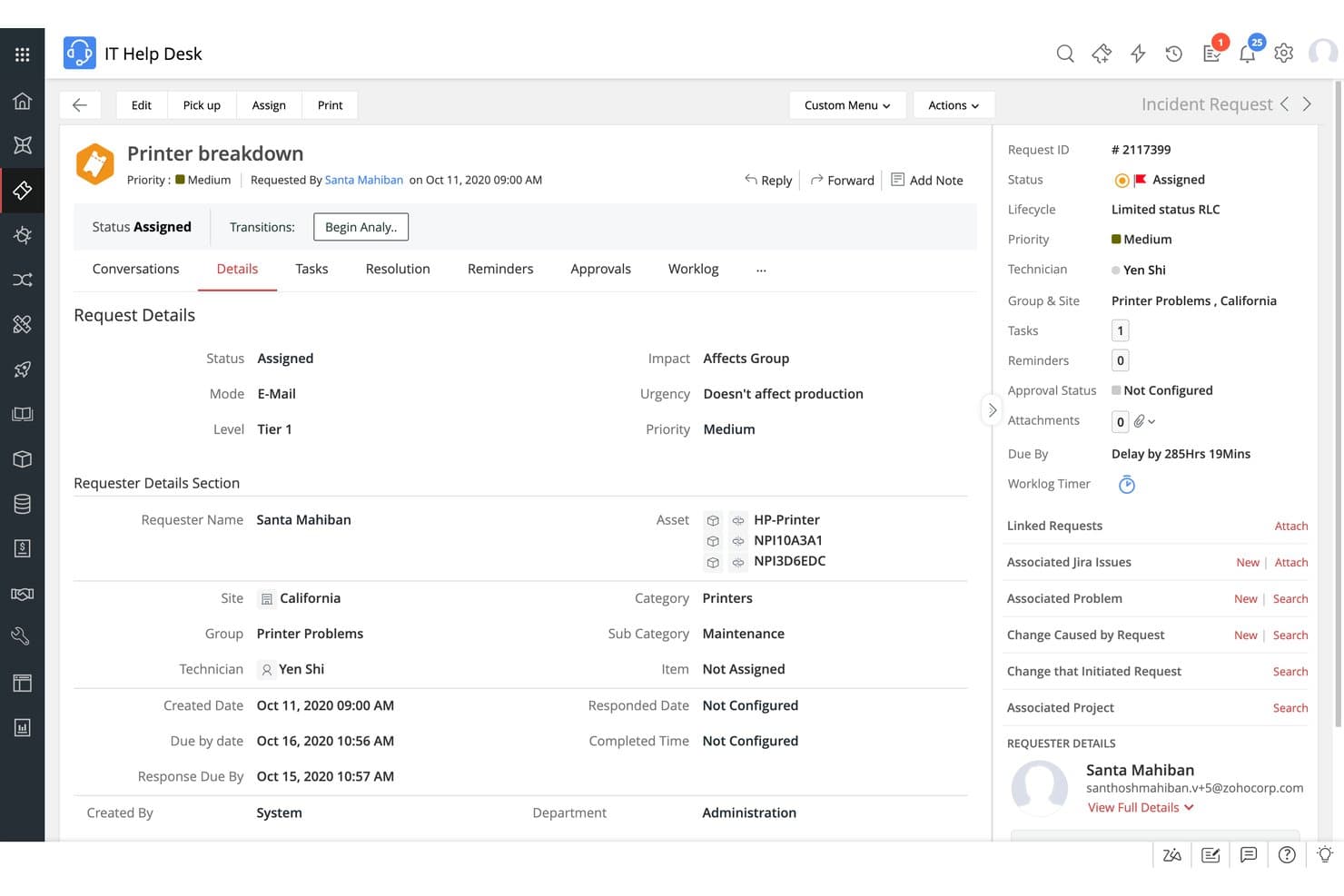
ServiceDesk Plus covers incident status, priority, and technician details. ServiceDesk Plus is an ITSM help desk platform by ManageEngine that covers incident, problem, change, and release management alongside integrated IT asset management and a built-in CMDB.
Who Is ServiceDesk Plus Best For?
ServiceDesk Plus is a strong fit for IT teams that need full ITIL process coverage alongside native asset management in a single platform.
Why I Picked ServiceDesk Plus
I picked ServiceDesk Plus because it bundles native IT asset management and a full CMDB directly into the help desk. When a ticket comes in, I can immediately see the CI relationship map, trace the impacted assets, and link the incident to a known change, all within the same workspace. It's also certified for 14 ITIL practices by PeopleCert, which is the broadest certification coverage I've seen in this category.
ServiceDesk Plus Key Features
- Ask Zia virtual agent: Lets end users log tickets, check status, and get KB suggestions through multi-turn chat without involving a technician.
- Enterprise service management (ESM): Run up to 15 separate service desk instances across departments like HR, Facilities, and Finance.
- No-code workflow automation: Configure ticket routing, approval chains, and escalation rules, with a sandbox environment for testing before deployment.
- Deployment flexibility: Choose between on-premises and cloud (SaaS) deployment, with migration support between both models.
ServiceDesk Plus Integrations
ServiceDesk Plus integrates with Microsoft Teams, Slack, Endpoint Central, Intune, Power BI, Jira, Azure DevOps, and supports REST API, webhooks, Deluge scripting, and Zapier.
Pros and Cons
Pros:
- Unified ITSM, asset, and CMDB platform
- AI and virtual agent features bundled
- Certified for 14 ITIL practices
Cons:
- API rate limits on cloud edition
- Feature depth varies across modules
Learn more about ServiceDesk Plus: Best for unifying IT, HR, and Facilities on one portal
- Not available
- From £51/user/month
Visit WebsiteCustomer Rating:4.3/5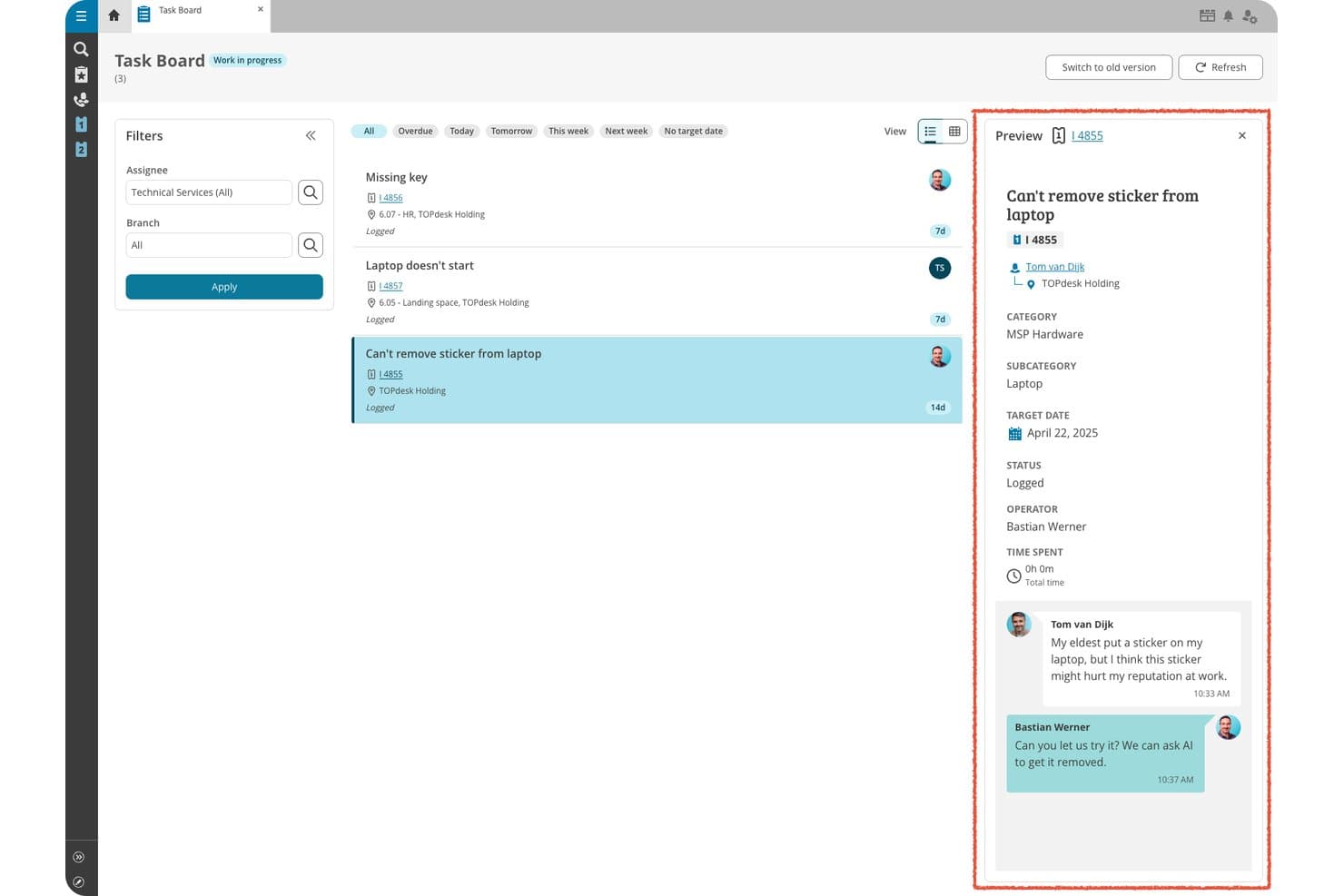
TOPdesk lets users manage and preview IT support tasks on a visual task board. TOPdesk is an ITSM help desk platform built for IT, facilities, and HR teams that covers ticket management, asset tracking, knowledge management, and self-service portals across shared, multi-department service environments.
Who Is TOPdesk Best For?
TOPdesk is a strong fit for mid-sized organizations running shared service centers across IT, HR, and facilities under one roof.
Why I Picked TOPdesk
TOPdesk made it to my shortlist because it stands out for managing shared service environments effectively, allowing IT, HR, and facilities to work on a single platform. Its shared self-service portal lets each department publish service catalogs and request forms together. The plan and Kanban boards offer clear visibility into team workloads and ticket assignments across departments.
TOPdesk Key Features
- IT asset management: Track hardware, software, and other assets, showing who's using each item and how assets connect across your network.
- Change & request management: Plan and execute changes with a built-in planner that sends automated notifications.
- Contract & SLA management: Register service level agreements and monitor compliance so your team knows the right response and resolution standards.
- Problem management: Identify recurring incidents by analyzing ticket patterns, helping your team address root causes proactively.
TOPdesk Integrations
TOPdesk offers 100+ integrations, including Jira, Azure DevOps, Microsoft Entra ID, Dynatrace, Lansweeper, and Make. It supports custom connections via REST API and webhooks.
Pros and Cons
Pros:
- Visual plan board simplifies ticket assignments
- Shared self-service portal for multiple departments
- Handles IT, HR, and facilities requests together
Cons:
- Automation options feel limited for advanced workflows
- Reporting can be difficult to customize
Learn more about TOPdesk: Best for self-healing hybrid endpoint management
- Not available
- Pricing upon request
Visit WebsiteCustomer Rating:4/5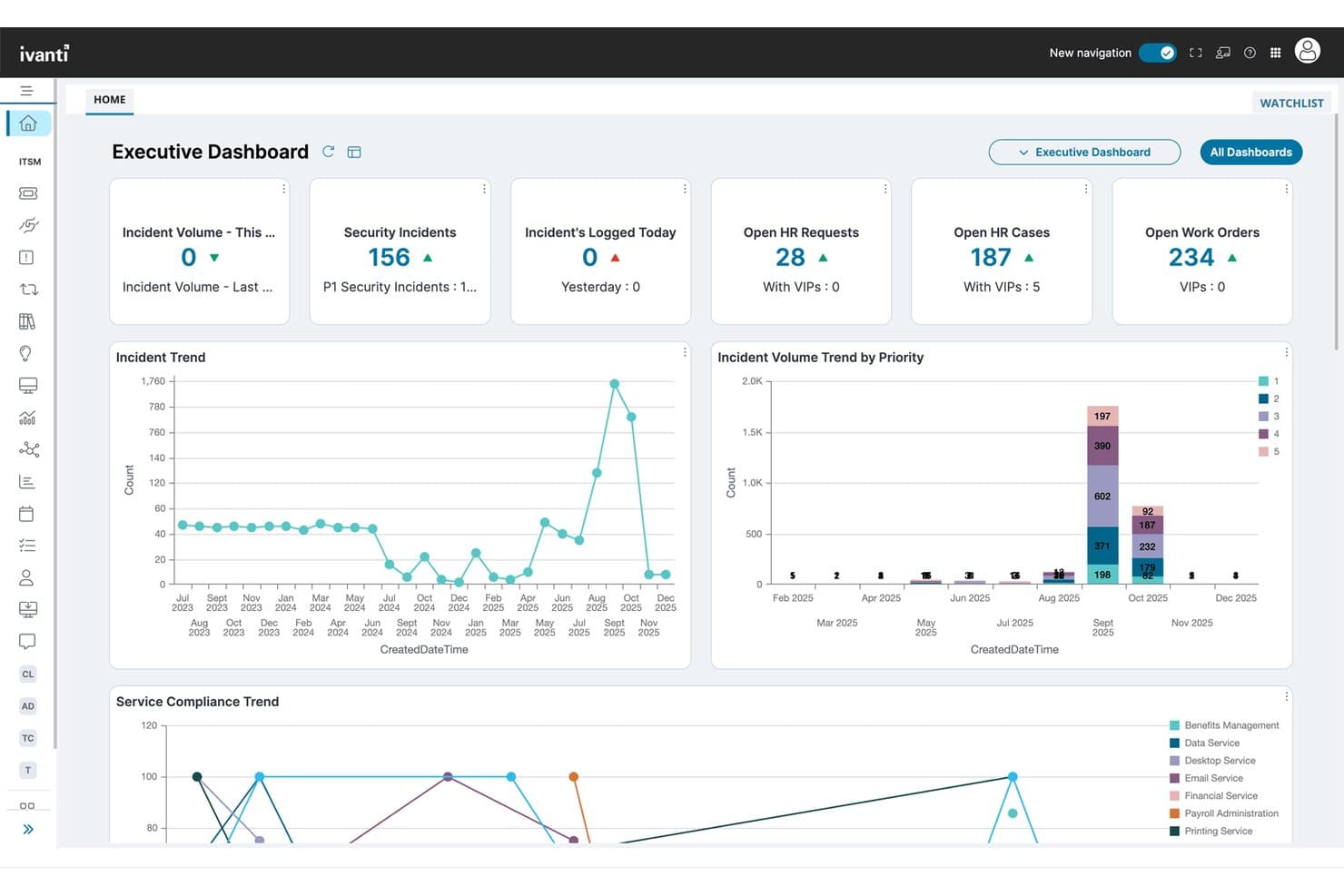
Ivanti Neurons surfaces IT metrics across incidents, HR, and work orders. Ivanti Neurons for ITSM is a flexible ITSM platform that covers the full range of ITIL 4 practices—including incident, change, problem, and request management—alongside integrated IT asset management, a self-service portal, and AI-powered ticket classification and workflow automation.
Who Is Ivanti Neurons Best For?
Ivanti Neurons for ITSM is a strong fit for IT teams in regulated or security-sensitive industries that need the flexibility to run on-premises, in the cloud, or in a hybrid setup.
Why I Picked Ivanti Neurons
Ivanti Neurons is one of the few ITSM tools that supports on-premises, cloud, and hybrid deployment, and lets you switch between them without losing data. That flexibility matters when your industry has strict data residency or compliance requirements. I also like that it's PinkVERIFY certified across 14 ITIL 4 practices, covering everything from change and problem management to release and financial management.
Ivanti Neurons Key Features
- AI-powered ticket classification: Automatically routes, categorizes, and prioritizes incoming tickets using AI to support SLA adherence across channels.
- Healing Bots for endpoint remediation: Autonomous bots detect and fix endpoint issues before users submit a ticket, reducing overall ticket volume.
- No-code workflow designer: Lets IT and non-IT admins build custom request forms, multi-stage approvals, and cross-department workflows.
- CMDB with incident and change linking: Connects CIs to active incidents and change records for real-time impact analysis.
Ivanti Neurons Integrations
Ivanti Neurons for ITSM integrates with Jira, Slack, and Tenable, offers 1,000+ connectors via Workato, and supports custom integrations through its REST API.
Pros and Cons
Pros:
- CMDB links incidents, changes, and assets
- AI classifies and routes tickets automatically
- Flexible cloud, on-premises, or hybrid deployment
Cons:
- Some users report inconsistent customer support
- No public or transparent pricing available
Learn more about Ivanti Neurons: Best for licensed ITSM with native CMDB
- Free demo available
- Pricing upon request

EasyVista maps CI relationships and service health in a visual CMDB explorer. EasyVista is an IT service management software built around a native CMDB that covers incident, problem, change, and service request management, with AI-powered ticket triage, a guided self-service portal, workflow automation, and remote support tools.
Who Is EasyVista Best For?
EasyVista is a strong fit for enterprise IT teams that need ITIL-certified service management built around a native CMDB, especially in regulated industries like healthcare, finance, and the public sector.
Why I Picked EasyVista
I picked EasyVista because its native CMDB is the backbone that ties incidents, changes, and assets together from the start. When a server goes down, I can immediately see every CI linked to that ticket, trace affected services, and route the change through an ITIL-certified workflow without switching tools. EV Pulse AI adds urgency detection and expert routing, so the right technician gets the right ticket faster.
EasyVista Key Features
- EV Self Help: Delivers step-by-step resolution paths through an AI-powered self-service portal, letting users resolve issues without submitting a ticket.
- EV Orchestrate: Builds multi-stage approval and automation sequences across IT and non-IT departments.
- EV Insights: Provides pre-built and custom dashboards tracking ticket volume, SLA compliance, and agent performance metrics.
- EV Reach: Lets technicians securely access and control end-user devices directly from within EV Service Manager workflows.
EasyVista Integrations
EasyVista offers integrations with Datadog, Lansweeper, Microsoft Intune, Power BI, SAP, Genesys, and Cisco CallManager. Its also support custom integrations.
Pros and Cons
Pros:
- Concurrent licensing lowers total user cost
- Native CMDB links tickets to assets
- AI-powered ticket triage and urgency detection
Cons:
- Reporting depth lags behind analytics leaders
- Interface navigation feels clunky for new users
Learn more about EasyVista: Best for rapid deployment and fast-growing IT teams
- 14-day free trial
- From $19/user/month (billed annually)
Visit WebsiteCustomer Rating:4.6/5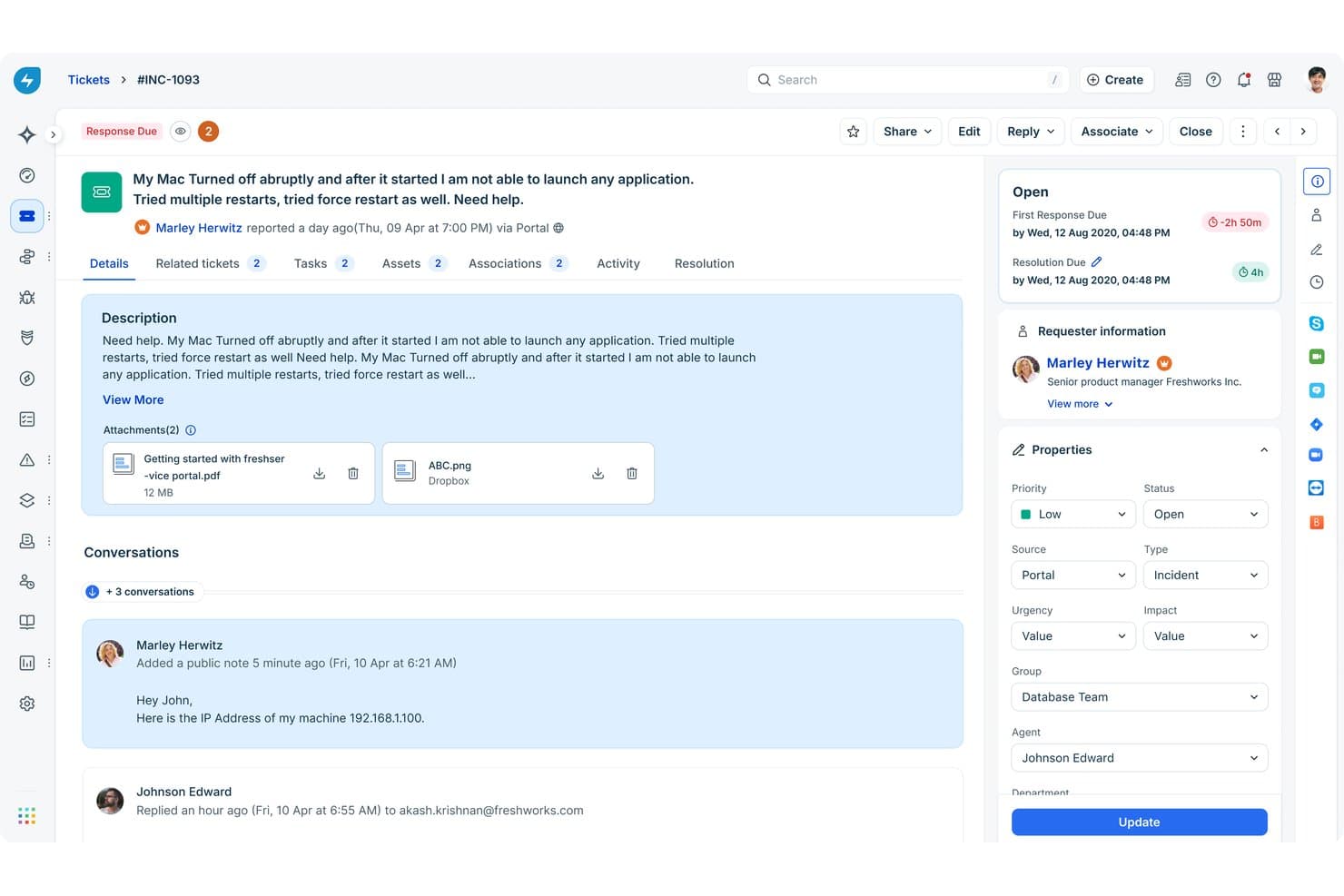
Freshservice groups incident tickets, conversations, and properties in one view. Freshservice is an ITSM help desk platform that covers incident, problem, change, and release management alongside IT asset tracking, a self-service portal, and AI-powered ticket triage through its Freddy AI layer.
Who Is Freshservice Best For?
Freshservice is a strong fit for IT teams that are scaling quickly and need ITIL-aligned incident, change, and problem management without a months-long implementation.
Why I Picked Freshservice
I picked Freshservice because it's designed for IT teams growing faster than they can document processes. Its no-code Workflow Automator ensures consistent ticket handling as queues scale. Plus, its ITIL Gold accreditation across 14 practices means incident, problem, and change management all work in one unified platform.
Freshservice Key Features
- Freddy AI Copilot: Generates reply suggestions, auto-summarizes ticket threads, and recommends field values to speed up agent categorization.
- Native CMDB with dependency mapping: Tracks relationships between assets, services, and infrastructure, linking configuration items to incidents and change records.
- Experience Level Agreements (XLAs): Measure service quality based on employee experience outcomes, not just resolution times.
- Freddy AI Agent Studio: Create custom AI agents that resolve employee requests across MS Teams, Slack, and the self-service portal.
Freshservice Integrations
Freshservice offers 1,000+ integrations with platforms like Microsoft Teams, Slack, Jira, and AWS. It also supports custom integrations via REST APIs, webhooks, and Zapier.
Pros and Cons
Pros:
- Unified ITSM, ITAM, and ITOM platform
- Built-in AI agent for ticket deflection
- Configurable workflows across incident, change, and problem
Cons:
- Limited flexibility in built-in reporting
- Advanced AI features require expensive add-ons
Learn more about Freshservice: 6Best for full ITIL coverage at a flat per-agent price
Halo
- Free plan + 30-day trial + demo available
- From £66/user/month (billed annually)
Visit WebsiteCustomer Rating:4.7/5
Halo tracks problem root causes, assignments, and workflow stages. Halo is an ITSM help desk platform that covers the full ITIL process suite—incident, problem, change, request, release, knowledge, and asset management—alongside omnichannel ticket intake, a no-code workflow builder, native CMDB, AI triage, and built-in customer service management tools.
Who Is Halo Best For?
Halo is a strong fit for IT and service operations teams that need a full ITIL process suite—incident, problem, change, and beyond—without paying extra for each module.
Why I Picked Halo
Halo earns its spot on my shortlist because it includes every ITIL module in one flat per-agent price, with no paywalled tiers. I especially like that the full change management workflow ships out of the box with CAB reviews, risk checks, and a change calendar. The native CMDB links configuration items directly to open incidents and problems, so when something breaks, my team can see what's affected without switching tools.
Halo Key Features
- Omnichannel ticket intake: Captures tickets from email, live chat, phone, SMS, social media, Slack, and a self-service portal into one workspace.
- AI triage and sentiment detection: Automatically categorizes, prioritizes, and routes incoming tickets while analyzing ticket threads for customer sentiment.
- Virtual agent chatbot: Surfaces knowledge base articles and resolved tickets in 40+ languages before a new ticket is logged.
- No-code workflow builder: Lets admins configure routing rules, approval chains, escalation triggers, and automated actions.
Halo Integrations
Halo integrates with 247 Connect, Slack, Atera, GitHub, Azure DevOps, Virima, Confluence, and offers a REST API plus CMDB sync with Lansweeper and Virima.
Pros and Cons
Pros:
- One tenant supports IT and customer support
- AI triage and sentiment analysis built in
- All ITIL process modules included standard
Cons:
- User interface feels dated to some users
- Initial setup requires significant configuration work
Learn more about Halo: Best for unifying DevOps and IT support workflows
- Free plan + 14-day trial available
- From $21.50/user/month
Visit WebsiteCustomer Rating:4/5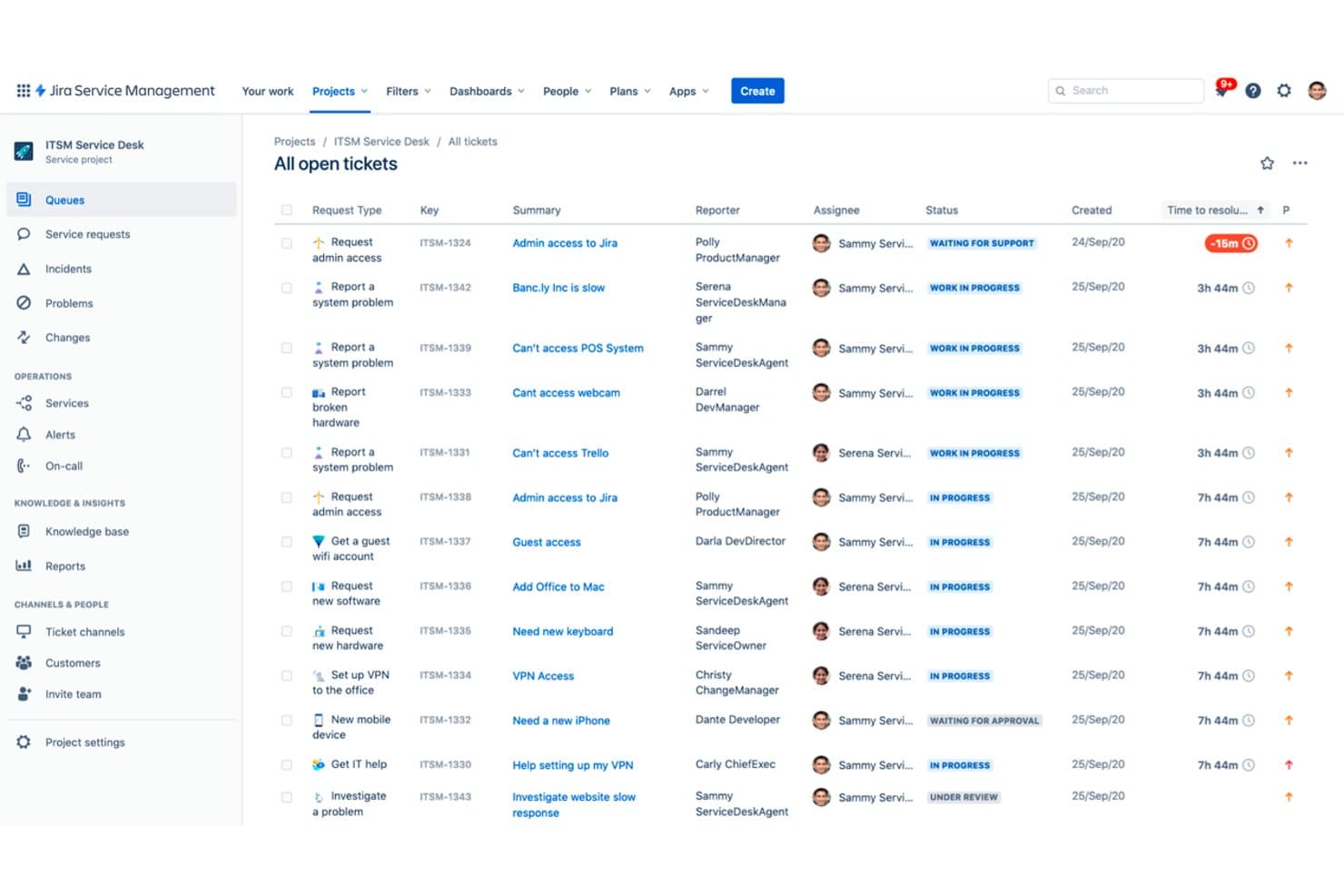
Jira Service Management groups IT support tickets by assignee and request type. Jira Service Management is an ITSM platform from Atlassian that covers incident management, change management, problem tracking, asset and configuration management, and service request handling in a single system.
Who Is Jira Service Management Best For?
Jira Service Management is a natural fit for organizations where dev and IT ops teams work side by side and need a single system to handle both service requests and software issues.
Why I Picked Jira Service Management
I picked Jira Service Management because it's the one ITSM platform where a developer filing a bug and an IT agent resolving an incident are working in the same system, instead of separate tools. When an agent spots a recurring incident pattern, they can link it directly to a Jira issue and hand it off to the dev team without losing any ticket context. I also love that the native CMDB includes network-based asset discovery, so your configuration data stays current without manual updates.
Jira Service Management Key Features
- Virtual Service Agent: Handles Tier-0 and Tier-1 requests in the self-service portal, Slack, and Teams.
- No-code automation builder: Helps with ticket routing, SLA alerts, field updates, and approvals.
- On-call scheduling and escalation: Configurable rotations with automated paging and war rooms in Slack or Teams.
- Atlassian Analytics: Enterprise BI layer with cross-product dashboards and custom reporting via VisualSQL.
Jira Service Management Integrations
Jira Service natively integrates with Jira, Confluence, Bitbucket, Statuspage, and Zoom. It also offers REST API, Workato, MuleSoft, and Zapier.
Pros and Cons
Pros:
- Native CMDB with automated asset discovery
- Virtual Service Agent handles Tier-1 requests
- Unified ticketing system for IT and development teams
Cons:
- External customer support requires separate app
- Advanced analytics only on Enterprise plan
Learn more about Jira Service Management: Best for enterprise multi-cloud environments and AIOps
- Free demo available
- Pricing upon request
Visit WebsiteCustomer Rating:4.1/5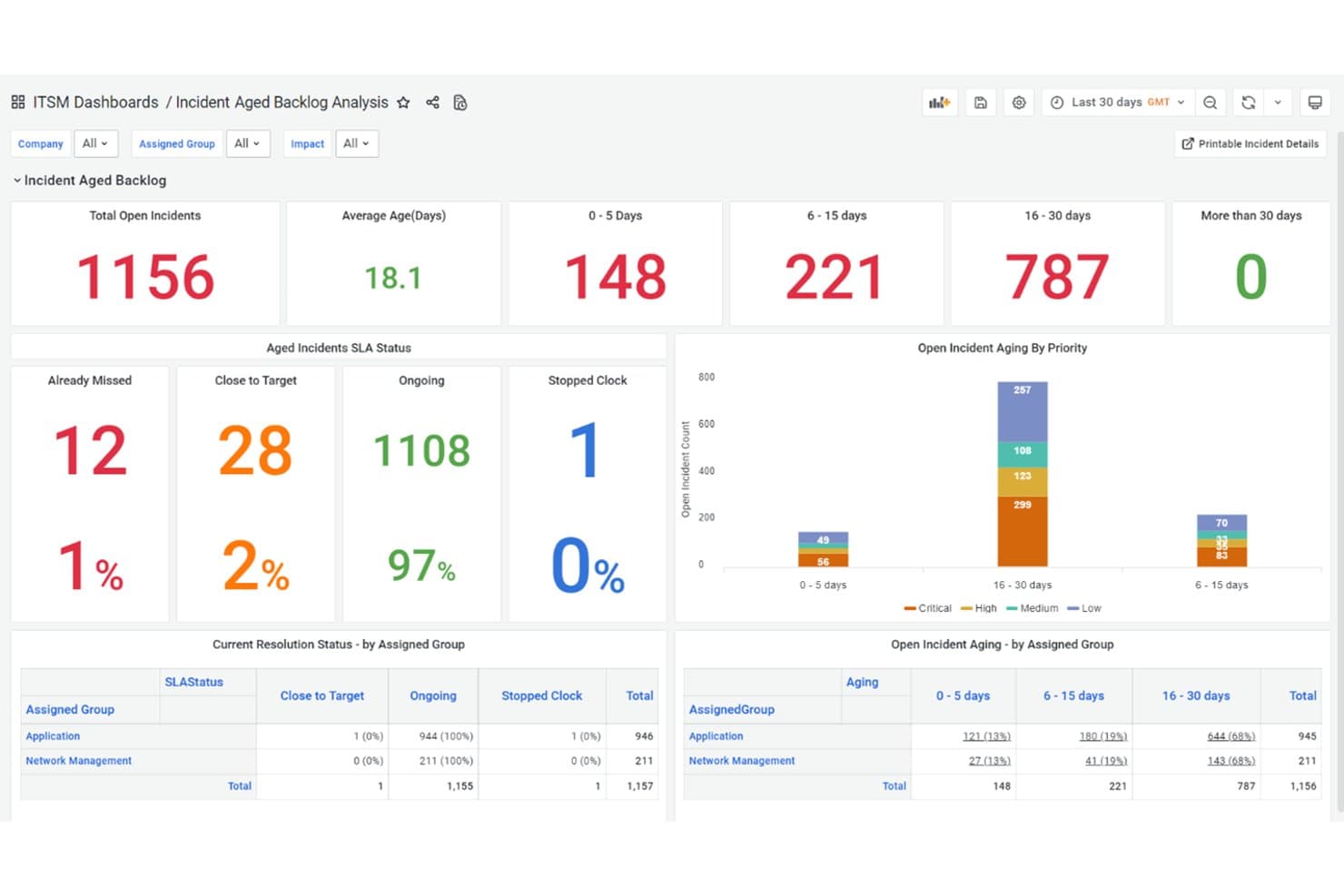
BMC Helix ITSM tracks incident backlog aging, SLA status, and priority. BMC Helix ITSM is an enterprise ITSM platform that covers incident, problem, change, and service request management alongside a native CMDB, agentic AI triage, and a self-service portal with virtual agent capabilities.
Who Is BMC Helix ITSM Best For?
BMC Helix ITSM is built for large enterprises managing IT service operations across multiple cloud environments, on-premises IT infrastructure, or both simultaneously.
Why I Picked BMC Helix ITSM
BMC Helix ITSM earns its spot on my shortlist because it's purpose-built for large enterprises running IT operations across AWS, Azure, GCP, and on-premises infrastructure simultaneously. I like that the native CMDB links directly to every incident, change, and problem ticket, giving teams real-time impact analysis when a CI changes across cloud boundaries. The agentic HelixGPT layer, bundled into existing licenses, handles auto-classification and resolution drafting without requiring a separate AI add-on purchase.
BMC Helix ITSM Key Features
- PinkVERIFY ITIL 4 certified: Covers 18 ITIL 4 practices, including incident, problem, change, release, knowledge, and asset management.
- Innovation Studio: Low-code, drag-and-drop workflow builder for multi-stage approvals and service automations.
- Digital Workplace portal: Self-service with NLP knowledge base, Virtual Agent chatbot, and Live Chat via web, Teams, or Slack.
- Helix ITSM Insights: 100+ pre-built visualizations with natural language reporting and combined ITSM/AIOps data.
BMC Helix ITSM Integrations
BMC Helix ITSM natively integrates with Microsoft Teams and Slack, connects to ServiceNow via Workato, offers a REST API, and integrates with Bright Pattern through third-party marketplaces.
Pros and Cons
Pros:
- Native CMDB enables real-time impact analysis
- Agentic AI for ticket triage and resolution
- Deepest ITIL 4-certified workflows available
Cons:
- Back-office admin interface feels outdated
- Implementation often exceeds twelve months
Learn more about BMC Helix ITSM: Best for large-scale enterprise digital workflows
- Free demo available
- Pricing upon request
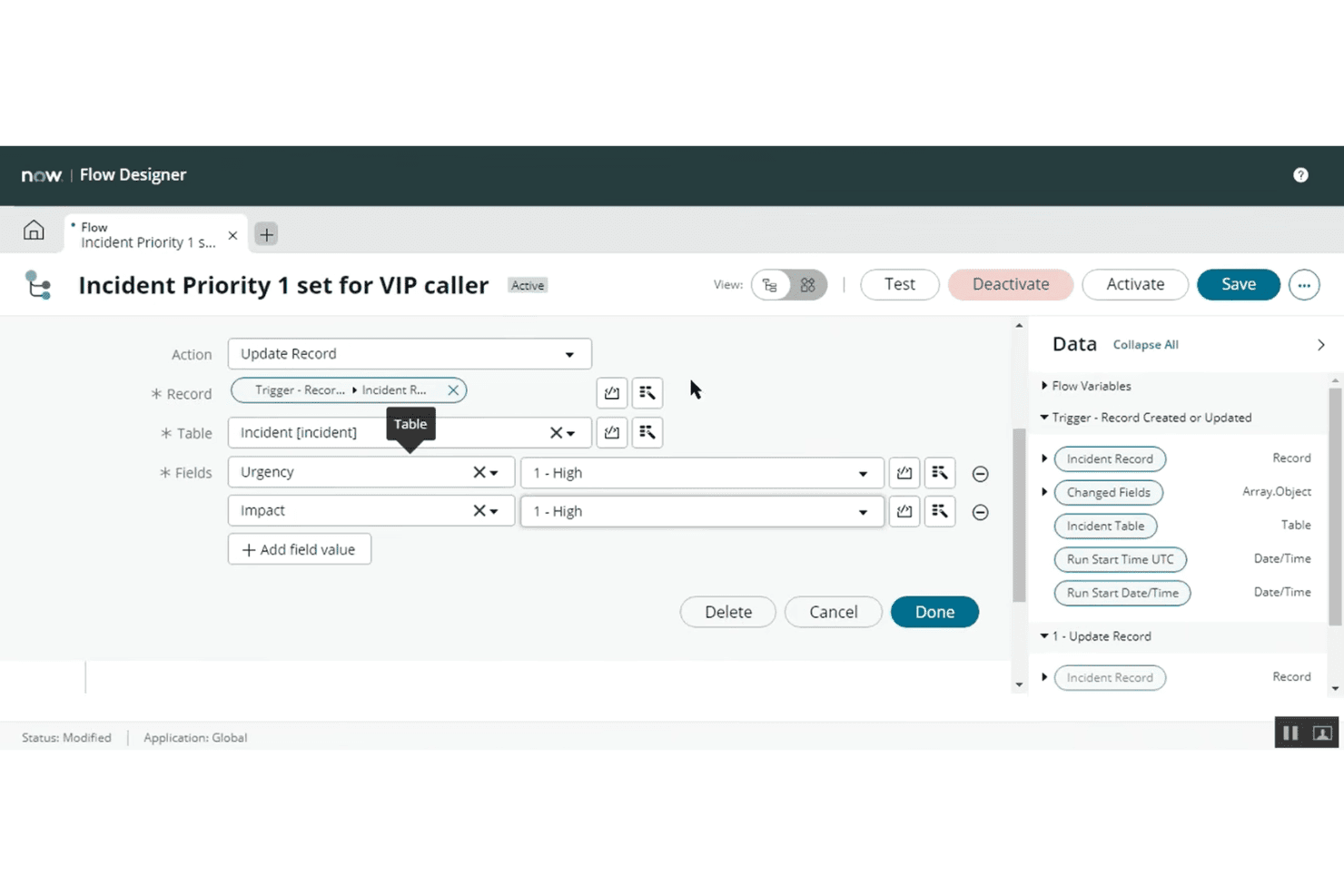
ServiceNow IT Service Management automates incident priority updates. ServiceNow IT Service Management is an enterprise ITSM platform that covers the full ITIL process stack—incident, problem, change, request, and knowledge management—within a single, AI-native system built around a native CMDB and no-code workflow automation.
Who Is ServiceNow IT Service Management Best For?
ServiceNow ITSM is built for large enterprises that need to manage complex, cross-departmental IT workflows at scale—think global organizations with dedicated IT ops teams, compliance requirements, and thousands of daily service requests.
Why I Picked ServiceNow IT Service Management
ServiceNow ITSM earns its spot on my shortlist because no other platform matches its depth for managing enterprise-wide IT workflows at scale. I'm impressed by the native CMDB, which automatically links every incident, problem, and change record to affected configuration items so your team can run real impact analysis before a change window opens. The Service Operations Workspace gives agents a single pane of glass with AI-powered triage via Predictive Intelligence, cutting manual dispatch work significantly across high-volume queues.
ServiceNow IT Service Management Key Features
- Flow Designer: Lets admins design multi-stage approvals and cross-departmental automations without writing code.
- Employee Center: Allows employees to submit requests, search knowledge articles, and track tickets across IT and other departments in one place.
- On-Call Management: Sets escalation schedules and routes alerts to the right team member automatically.
- Platform Analytics Advanced: Offers real-time dashboards, custom reports, and Process Mining for ticket volume, SLA compliance, and agent performance.
ServiceNow IT Service Management Integrations
ServiceNow ITSM integrates with Salesforce, Slack, Microsoft Teams, Jira, PagerDuty, Datadog, and AWS. It also supports REST APIs and iPaaS connections.
Pros and Cons
Pros:
- First SaaS with PinkVERIFY for 11 ITIL processes
- Unlimited AI-powered virtual agent conversations
- Native CMDB links every incident to assets
Cons:
- Most advanced workflows gated to higher tiers
- External user support requires a separate module
Learn more about ServiceNow IT Service Management: 10Best for omnichannel service and help desk integration
Zendesk
- Free trial available
- From $25/agent/month (billed annually)
Visit WebsiteCustomer Rating:4.3/5
Zendesk provides customer ticket details alongside the full conversation history. Zendesk is a help desk and ITSM platform that handles ticket management, omnichannel support intake, AI-powered self-service, SLA tracking, and IT asset management across both internal and customer-facing service operations.
Who Is Zendesk Best For?
Zendesk is a strong fit for mid-size to enterprise teams running both customer-facing support and internal IT service desks from a single platform.
Why I Picked Zendesk
Zendesk stands out for its omnichannel ticket intake, unifying email, live chat, voice, WhatsApp, Instagram DM, Slack, Microsoft Teams, and web portals into a single agent workspace. I like how Intelligent Triage uses AI to auto-classify incoming tickets by intent, sentiment, and language, then routes them without any manual dispatch. On top of that, AI agents handle Tier-0 and Tier-1 requests, like password resets and access inquiries, directly from the help center before a human ever gets involved.
Zendesk Key Features
- IT asset management: Track devices, warranties, OS versions, and ticket history with MDM sync (Jamf, Intune).
- SLA management: Set resolution and first-reply targets by priority, group, or tier with business hours and escalations.
- Service catalog: Structured portal for IT/HR requests with forms, routing, and approvals.
- Zendesk Explore dashboards: Pre-built/custom reports on tickets, SLA, performance, and CSAT with natural language queries.
Zendesk Integrations
Zendesk has 1,800+ marketplace integrations, including Salesforce, Jamf, Microsoft Intune, Datadog, and PagerDuty. It also supports REST APIs, webhooks, and Zapier.
Pros and Cons
Pros:
- Strong dual-use for IT and CX teams
- Omnichannel workspace handles all support channels
- AI-powered ticket triage automates complex workflows
Cons:
- Setup complexity scales with advanced workflows
- No native CMDB for asset management
Learn more about Zendesk:
Diğer ITSM Yardım Masası Yazılımları
İncelemeye değer bazı ek ITSM yardım masası yazılımı seçenekleri şunlardır:
- 11SysAidBest for AI-driven ESM automation
- 12Agentforce Service (formerly Service Cloud)Best for unifying IT and CX on Salesforce CRM
- 13SolarWinds Service DeskBest for real-time IT asset discovery and tracking
- 14HappyFoxBest for high-velocity ticket queue management
- 15InvGate Service ManagementBest for no-code service catalog and workflow setup
- 16TeamDynamixBest for higher ed ITSM, ESM, and project tools
- 17XurrentBest for cross-vendor SLA management and routing
- 18SymphonyAI IT Service ManagementBest for autonomous, agentic AI workflows
- 19Alemba Service ManagerBest for compliance across 25 certified ITIL processes
How I Evaluate ITSM Help Desk Software
I split my evaluation into two layers: the baseline functionality every tool must nail—like multi-channel ticket management and ITIL-aligned workflows—and the differentiators that separate a good platform from the right one for your team.
Core Functionality (Table Stakes for This List)
When I'm selecting tools for my list, I rank each one on a scale from 0 (does not offer the functionality) to 5 (excels in this area) for each core functionality listed below. I then calculate the tool's total score into a percentage, using 75% as a benchmark to help assess its overall fit for the list.
- Ticket management: I evaluate how each tool handles ticket capture, assignment, and tracking across channels—looking for features like automated triage, collision detection, and full audit trails.
- ITIL-aligned workflows: Each platform should support incident, problem, change, and request management modules, ideally with CMDB linkage or formal ITIL certification.
- Self-service portal and knowledge base: I look for branded portals with searchable knowledge bases, service catalogs, and ticket submission—plus extras like AI-powered search or chatbot deflection.
- SLA management and automation: Configurable SLAs with escalation rules, business-hours support, and workflow automation matter here, especially for teams juggling multiple priority tiers or customer segments.
- Reporting and analytics: Dashboards covering ticket volume, agent performance, SLA compliance, and CSAT are the baseline. I also check for custom report builders and scheduled reporting options.
- Integrations and omnichannel intake: The tool should accept tickets via email, chat, portal, phone, and API, and connect to CRM, communication, and asset management platforms through native integrations or an open API.
Once I have a list of tools that meet the criteria, I consider what sets each platform apart.
Differentiating Factors (What Sets Vendors Apart)
Here's how I compare and contrast different vendors:
Standout Features
I look for AI-powered ticket triage that auto-categorizes and routes requests using historical patterns and sentiment—not just keyword matching. This matters when your service desk handles thousands of monthly tickets across IT and CX queues. I also evaluate each platform's low-code workflow builder, checking whether non-technical admins can design multi-stage approvals spanning HR, facilities, and finance without developer help. Sentiment analytics on ticket threads is another factor I check, since it helps CX leaders spot frustrated users before escalation.
Beyond Features
I evaluate whether a platform can run both an internal IT service desk and an external customer-facing help desk from one tenant—separate portals, SLAs, and agent workspaces without double licensing. Total cost of ownership matters just as much: I check how pricing scales with headcount and whether modules like AI or CMDB carry hidden add-on fees. I also look at ecosystem depth, specifically native connectors to CRMs, monitoring tools like Datadog, and iPaaS options such as Workato, since gaps there create manual work that erodes service quality.
ITSM Yardım Masası Yazılımı Nasıl Seçilir?
Doğru ITSM yardım masası platformunu bulmanın en iyi yolu, platformu ekibinizin gerçek destek ihtiyaçları ve gelecekteki büyüme planlarıyla eşleştirmektir.
| Önceliğiniz şuysa | Şunları arayın |
|---|---|
| Önceliğiniz şuysaGelişmiş otomasyon | Şunları arayınYapay zekâ destekli talep yönlendirme ve az kodlu iş akışı oluşturucuları |
| Önceliğiniz şuysaUyumlu CX-IT ekip çalışması | Şunları arayınPaylaşılan CRM verileri ve birleştirilmiş temsilci çalışma alanları |
| Önceliğiniz şuysaOmnikanal destek | Şunları arayınÇok kanallı talep alımı ve iletişim uygulamalarıyla kapsamlı entegrasyonlar |
| Önceliğiniz şuysaUyarlanabilir dağıtım | Şunları arayınBulut, hibrit veya şirket içi seçenekler arasından seçim |
| Önceliğiniz şuysaŞeffaf raporlama | Şunları arayınÖzelleştirilebilir gösterge panelleri ve zamanlanmış analizler |
Kısa Listenizi Nasıl Değerlendirmelisiniz?
- İş akışı yapılandırılabilirliğini test edin: Canlı bir demoda, özel birden çok aşamalı onay veya eskalasyon sürecini bir iş günü içinde oluşturup çalıştırın.
- Entegrasyon kapsamını doğrulayın: Yalnızca yerel seçenekleri kullanarak, özel API çalışması yapmadan, talep yönetimi aracınızı gerçek bir CRM, iletişim uygulaması veya izleme sistemine bağlayın.
- Self servis özelliklerini zorlayarak test edin: Bilgi tabanını ve portalı örnek içeriklerle doldurun, ardından son kullanıcı olarak bir talep gönderip çözüme kavuşturun.
- Modül fiyatlandırması konusunda netlik sağlayın: Hangi gelişmiş özelliklerin (Yapay zekâ, CMDB, API'ler) ayrı lisans veya ücret gerektirdiğine ilişkin açık ve yazılı belgeler isteyin.
- Çevikliği kontrolle birlikte değerlendirin: BT müdahalesi olmadan hızlı, SaaS tabanlı yapılandırmaya mı ihtiyacınız olduğuna, yoksa şirket içi ve özel dağıtımlar üzerinde tam kontrolü mü tercih ettiğinize karar verin ve son seçiminizi buna göre yapın.
ITSM Yardım Masası Yazılımı Nedir?
ITSM yardım masası yazılımı, BT ekiplerinin bir kuruluş içindeki hizmet taleplerini, olayları, sorunları ve değişiklikleri yönetmesini destekleyen dijital platformlardır. Bu araçlar merkezi bilet takibi, iş akışı otomasyonu ve self servis seçenekleri sunarak destek taleplerini işlemenize ve temel BT operasyonlarını sürdürmenize yardımcı olur. Birden fazla iletişim kanalını yönetmesi, hizmet standartlarını uygulaması ve karmaşık iç ve dış destek süreçlerinde performansı ölçmesi gereken ekipler için vazgeçilmezdir.
ITSM Yardım Masası Yazılımının Özellikleri
ITSM yardım masası yazılımı seçerken aşağıdaki temel özelliklere dikkat edin:
- Bilet yönetimi: Çeşitli kanallardan gelen talepleri merkezileştirir, bunları doğru temsilciye veya ekibe atar ve çözülene kadar ilerlemelerini takip eder. Ekibinizin yinelenen çalışmalardan ve gözden kaçan sorunlardan kaçınabilmesi için otomasyon ve anlaşılır denetim izleri sunan çözümleri tercih edin.
- Self servis portalı: Kullanıcıların bilet göndermesine, SSS'lere erişmesine ve bilgi bankası makalelerini kendi başlarına bulmasına olanak tanır. İyi tasarlanmış bir portal, bilet hacmini azaltır ve son kullanıcıların BT'yi beklemeden yaygın sorunları çözmesini sağlar.
- ITIL ile uyumlu iş akışları: Olay, değişiklik, talep ve sorun yönetiminin en iyi uygulama çerçevelerine göre yapılandırılmasına yardımcı olur. Önceden oluşturulmuş iş akışı şablonları tutarlılık sağlarken mevcut süreçlerinize uyacak şekilde özelleştirmeye de olanak tanır.
- SLA yönetimi: Yanıt ve çözüm sürelerini tanımlanmış hizmet hedeflerine göre takip eder. Otomatik yükseltme ve bildirim kuralları, ekiplerin hizmet taahhütlerine uymasını ve müşteri güvenini korumasını kolaylaştırır.
- Bilgi bankası: Yardım makaleleri, sorun giderme kılavuzları ve süreç belgelerinden oluşan aranabilir, düzenli bir kütüphane sunar. Güçlü bir bilgi bankası self servisi geliştirir, işe alıştırma sürecini hızlandırır ve kurum içi eğitimi destekler.
- Raporlama ve analiz: Bilet hacmi, çözüm süresi, SLA karşılama oranı ve müşteri memnuniyeti gibi temel ölçümleri içeren panolar ve raporlar sunar. Özelleştirilebilir analizler eğilimleri takip etmenize, darboğazları belirlemenize ve ekip performansını ölçmenize yardımcı olur.
- Entegrasyon özellikleri: CRM sistemleri, varlık yönetimi platformları, mesajlaşma uygulamaları ve izleme çözümleri gibi araçlara bağlanır. Entegrasyonlar manuel veri girişini azaltır ve ekibinizin bağlam değiştirmeden sistemler arasında çalışmasını sağlar.
- Otomasyon ve iş akışı oluşturucu: Yöneticilerin minimum düzeyde kodlamayla iş kuralları, tetikleyiciler ve onay akışları oluşturmasına olanak tanır. Yinelenen görevlerin otomatikleştirilmesi hataları azaltır ve hem temsilciler hem de son kullanıcılar için çözümü hızlandırır.
- Çok kanallı talep alımı: Web formları, e-posta, sohbet, telefon veya API aracılığıyla talepleri kabul eder. Her kanaldan gelen biletlerin tek bir yerde toplanması, hiçbir şeyin gözden kaçmamasını sağlar ve kullanıcıların bulunduğu kanallardan onlara ulaşır.
- Yapılandırma yönetimi veritabanı (CMDB): Varlıkların, sistemlerin ve bunlar arasındaki ilişkilerin gerçek zamanlı envanterini tutar. CMDB, olayları veya değişiklikleri ele alırken temsilcilere bağlam sağlar ve daha hızlı, daha doğru sorun çözümüne olanak tanır.
ITSM Yardım Masası Yazılımının Faydaları
ITSM yardım masası yazılımını uygulamak ekibiniz ve işletmeniz için çeşitli faydalar sağlar. Yararlanabileceğiniz faydalardan bazıları şunlardır:
- Merkezi bilet yönetimi: E-posta, sohbet, telefon ve web üzerinden gelen talepleri tek bir yerde toplayarak temsilcilerin hiçbir adımı atlamadan sorunları atamasını, takip etmesini ve çözmesini sağlayın.
- Tutarlı, ITIL ile uyumlu süreçler: Sektörün en iyi uygulamalarını izleyen önceden oluşturulmuş şablonları kullanarak iş akışlarınızı olay, sorun, değişiklik ve talep yönetimi etrafında yapılandırın.
- Kullanıcılar için etkin self servis: Son kullanıcıların markalı portallar, aranabilir bilgi bankaları ve yönlendirmeli bilet gönderimi sayesinde BT'yi beklemeden yaygın soruları çözmesini sağlayın.
- Otomatik SLA uygulaması: Otomatik yükseltme ve bildirim kurallarıyla net hizmet hedefleri belirleyerek ekibinizin her taahhüt için planı takip etmesine yardımcı olun.
- Kapsamlı raporlama ve analiz: Eğilimleri tespit edebilmek ve desteği geliştirebilmek için panolar ve özel raporlamayla bilet hacmini, temsilci iş yükünü, CSAT'ı ve SLA performansını izleyin.
- Esnek entegrasyon özellikleri: CRM, varlık yönetimi, izleme ve iletişim araçlarınıza yerel olarak bağlanarak manuel çalışmayı ve teknoloji yığınınızdaki bilgi silolarını azaltın.
- Düşük kodlu iş akışı otomasyonu: Teknik olmayan yöneticilerin çok aşamalı onaylar oluşturmasını ve görevleri hızlıca otomatikleştirmesini sağlayarak süreçleri geliştirici desteği olmadan uyarlayın.
ITSM Yardım Masası Yazılımının Maliyetleri ve Fiyatlandırması
ITSM yardım masası yazılımı seçmek, mevcut çeşitli fiyatlandırma modellerini ve planları anlamayı gerektirir. Maliyetler özelliklere, ekip büyüklüğüne, eklentilere ve daha fazlasına göre değişir. Aşağıdaki tabloda ITSM yardım masası yazılımlarındaki yaygın planlar, ortalama fiyatları ve genellikle sunulan özellikler özetlenmiştir:
ITSM Yardım Masası Yazılımı İçin Plan Karşılaştırma Tablosu
| Plan Türü | Ortalama Fiyat | Yaygın Özellikler |
|---|---|---|
| Plan TürüÜcretsiz Plan | Ortalama Fiyat$0/user/month | Yaygın ÖzelliklerTemel talep yönetimi, e-posta desteği ve sınırlı bilgi tabanı makaleleri. |
| Plan TürüKişisel Plan | Ortalama Fiyat$10-$25/user/month | Yaygın ÖzelliklerTalep atama, self servis portalı, temel raporlama ve tek kanallı talep alımı. |
| Plan Türüİşletme Planı | Ortalama Fiyat$30-$60/user/month | Yaygın ÖzelliklerÇok kanallı talep alımı, iş akışı otomasyonu, SLA yönetimi, raporlama panoları ve gelişen entegrasyon seçenekleri. |
| Plan TürüKurumsal Plan | Ortalama Fiyat$70-$150/user/month | Yaygın ÖzelliklerGelişmiş otomasyon, ITIL ile uyumlu modüller, yapay zekâ destekli özellikler, özel SLA'ler, yapılandırılabilir portallar ve premium entegrasyonlar. |