

VoIP uygulamaları, ekibinizin geleneksel telefon hatları yerine internet üzerinden sesli aramalar yapmasını sağlayan yazılım araçlarıdır. En iyi VoIP uygulamalarını arıyorsanız muhtemelen müşterilerle bağlantı kurmak, uzaktan çalışmak veya yoğun arama trafiğini hiçbir şeyi aksatmadan yönetmek için güvenilir yöntemlere ihtiyacınız vardır. Doğru aracı seçmek, ekibinizin iletişimini, müşteri memnuniyetini ve kârlılığınızı etkiler.
Bu kılavuzda, en iyi VoIP uygulamalarının açık karşılaştırmalarını, onları birbirinden ayıran özelliklere ilişkin bilgileri ve işletmenizin ihtiyaçlarına en uygun seçeneği belirlemeye yönelik ipuçlarını bulacaksınız.
Why Trust Our Software Recommendations
6,700+
Reviews
20
Industry experts
16+
Evaluation factors
14
Years
Our team has been testing and reviewing software since 2012. As CX leaders ourselves, we know how difficult—and important—it is to choose the right software.
For this guide, we evaluated tools using hands-on testing and independent research, scoring tools using our selection criteria.
Our reviews reflect our human editorial judgment, not a sales pitch.
 Gui DrusinaCreative Director
 Tim FisherVP of AI
VoIP Uygulamaları Karşılaştırma Tablosu
Bu karşılaştırma tablosu, en iyi VoIP uygulamaları seçimlerim için fiyatlandırma ayrıntılarını özetlemektedir:
Sorted by: Default
| Tool | Starting Price | Website | |
|---|---|---|---|
Best for analytics-driven call management | 4.2 out of 5 | $25/user/month Free plan + 14-day trial + free demo available | Website |
Best for integrated voice and messaging | 4.3 out of 5 | Pricing upon request 14-day free trial + free demo available | Website |
Best for cloud contact center scaling | 4.5 out of 5 | Pricing upon request Free plan available | Website |
Best for outbound sales teams | 4.1 out of 5 | $29/user/month 14-day free trial | Website |
Best for ticketing-system integration | 4.2 out of 5 | $19/user/month 14-day free trial + free demo available | Website |
Best for automated contact center workflows | 4.4 out of 5 | Pricing upon request Free demo available | Website |
Best for AI-powered customer journeys | 4.4 out of 5 | $75/user/month Free demo available | Website |
Best for omnichannel workforce optimization | 4.3 out of 5 | $110/agent/month Free demo available | Website |
Best for global call routing flexibility | 4.1 out of 5 | $119/seat/month Free demo available | Website |
Best for unified team collaboration | 4.2 out of 5 | £18/user/month 14-day free trial | Website |


En İyi VoIP Uygulamaları İncelemeleri
Aşağıda, kısa listeme giren en iyi VoIP uygulamalarının ayrıntılı özetlerini bulabilirsiniz. İncelemelerim, sizin için en uygun seçeneği bulmanıza yardımcı olmak amacıyla her platformun özelliklerine, entegrasyonlarına ve en iyi kullanım alanlarına ayrıntılı bir bakış sunmaktadır.
 Best for analytics-driven call management
- Free plan + 14-day trial + free demo available
- From $25/user/month (billed annually)
Visit WebsiteCustomer Rating:4.2/5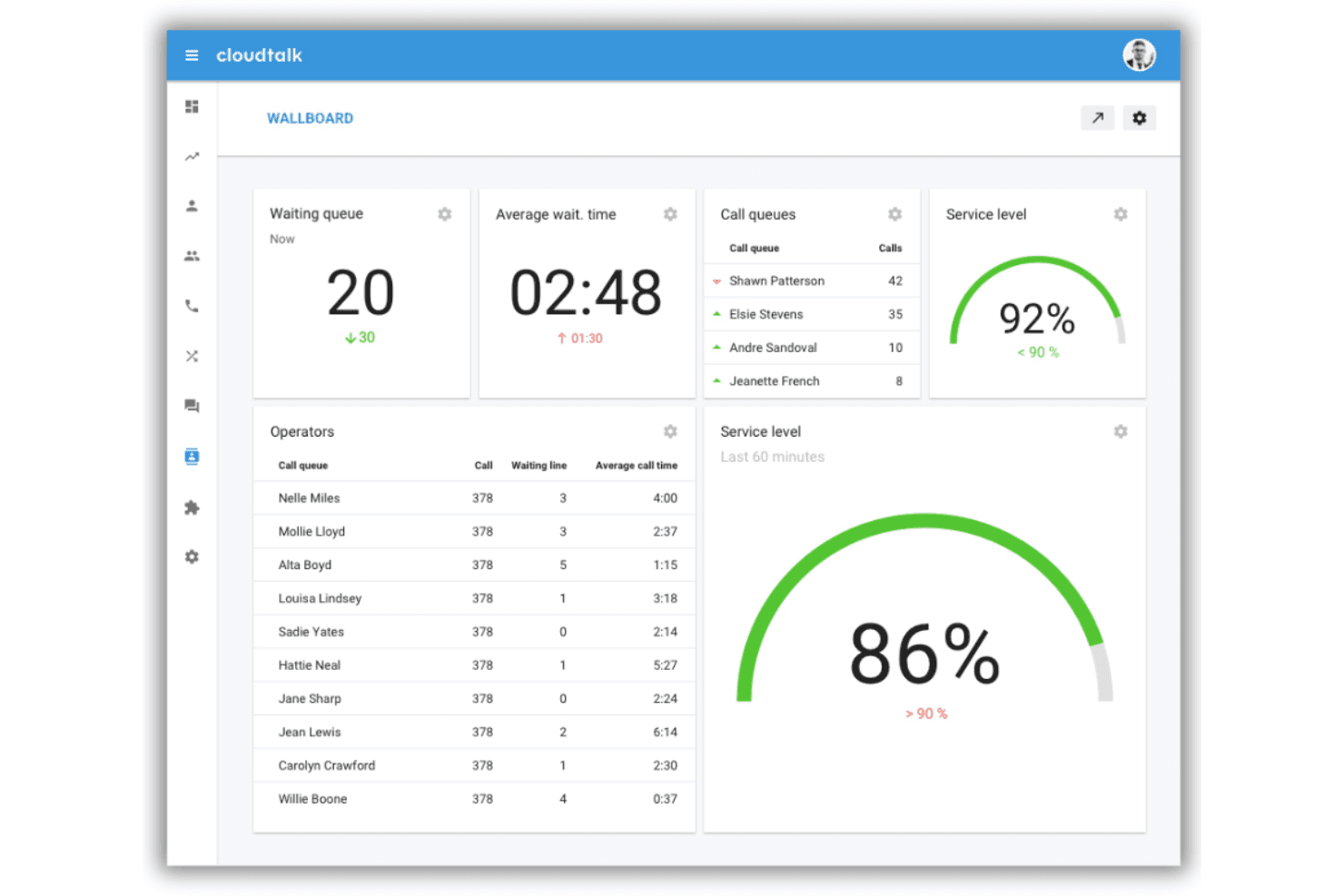
CloudTalk provides cloud VoIP with analytics, automation, and CRM integration. CloudTalk is a cloud-based VoIP app designed for teams needing advanced call analytics, global number coverage, workflow automation, and deep CRM integration within their communications platform.
Who Is CloudTalk Best For?
CloudTalk is a strong choice for mid-sized and global teams that need detailed call analytics and reliable international calling capabilities.
Why I Picked CloudTalk
I picked CloudTalk because its analytics-driven call management stands out in the VoIP space. I use their real-time dashboards to monitor call activity and rely on AI-powered conversation intelligence to review agent calls and boost performance.
CloudTalk Key Features
- AI Voice agents: Automate call handling with configurable AI-powered virtual agents.
- Visual call flow designer: Customize IVR trees and call routing logic with a drag-and-drop builder.
- Integrated messaging: Send and receive SMS, MMS, and WhatsApp messages from your call platform.
- Global number coverage: Get local, toll-free, and mobile numbers in over 160 countries.
CloudTalk Integrations
CloudTalk offers over 100 native integrations, including HubSpot, Salesforce, Pipedrive, Zendesk, Freshdesk, Intercom, Zoho CRM, Slack, Microsoft Teams, and Google Workspace. An API is available for custom integrations, and it connects with Zapier.
Pros and Cons
Pros:
- Visual builder for IVR and routing workflows
- AI voice agents for call automation
- Advanced analytics and live performance dashboards
Cons:
- Some AI features require higher plan tiers
- Limited secondary app options
 Best for integrated voice and messaging
- 14-day free trial + free demo available
- Pricing upon request
Visit WebsiteCustomer Rating:4.3/5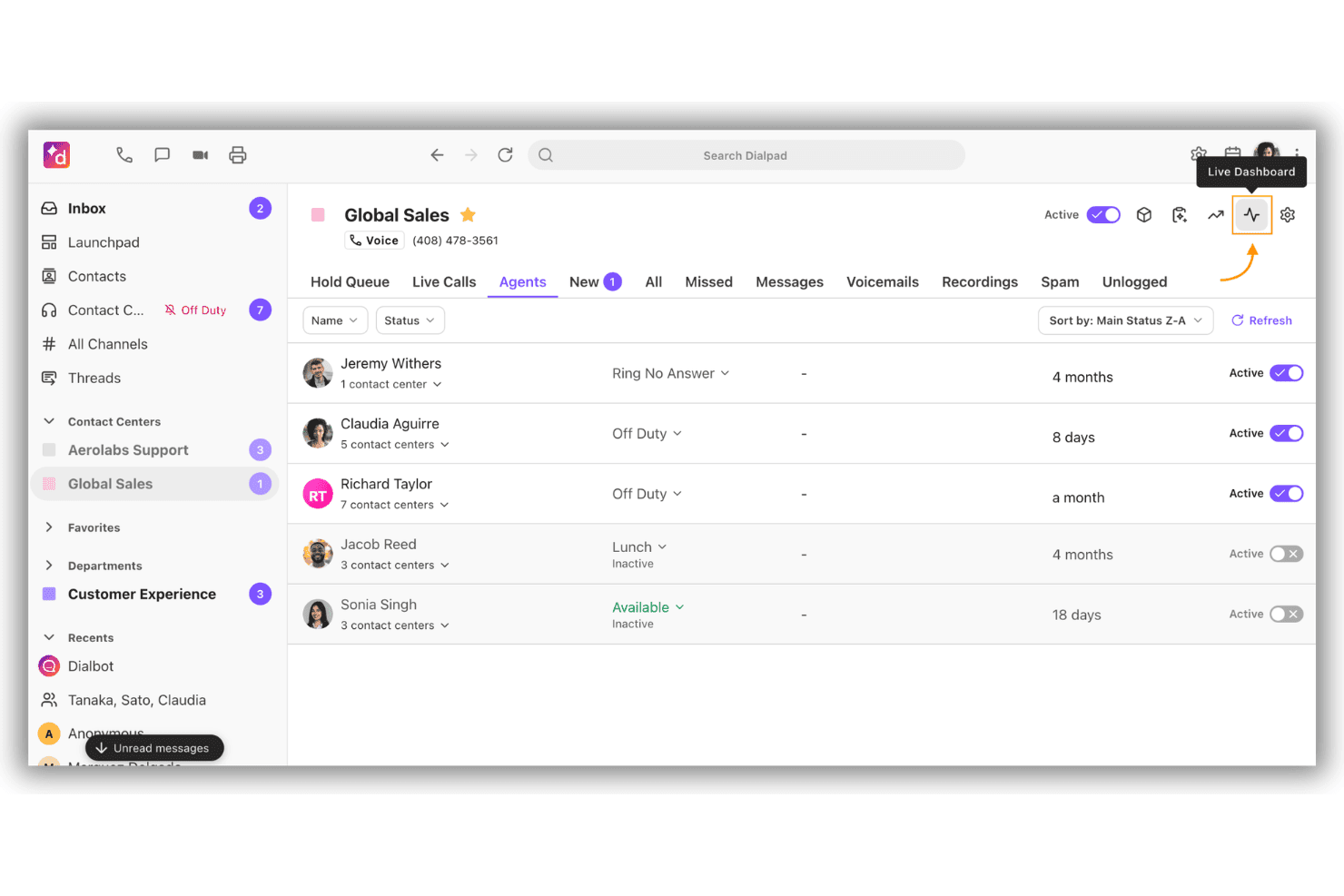
Dialpad unifies calls, messaging, meetings, and AI communications. Dialpad is a cloud-based VoIP app that brings together calling, video meetings, SMS messaging, and AI-powered conversation tools in a unified workspace for business communications.
Who Is Dialpad Best For?
Dialpad is a fit for distributed teams and companies needing AI-powered communication tools that combine voice, messaging, and video in one platform.
Why I Picked Dialpad
I picked Dialpad as one of the best because I can handle voice calls, SMS, and instant messaging all in one workspace. I use built-in AI to get real-time call transcription and automatic post-call summaries. This setup helps my team keep every conversation accessible.
Dialpad Key Features
- AI-powered voicemail transcription: Converts voicemails to searchable text within the app.
- Call routing and IVR: Let you configure custom call flows and interactive voice responses.
- Call recording controls: Offers on-demand and automatic call recording for compliance and training.
- Integrations marketplace: Connects with Salesforce, Google Workspace, Microsoft Teams, and other enterprise tools.
Dialpad Integrations
Dialpad offers native integrations with Salesforce, Zendesk, HubSpot, Google Workspace, Microsoft Teams, Slack, Okta, Front, Zoho CRM, and ServiceNow. An API is available for custom integrations.
Pros and Cons
Pros:
- Quick to deploy for remote or hybrid teams
- Shared screen calling workspace
- AI-powered live transcription for all calls
Cons:
- Reporting features can be limiting for call centers
- SMS coverage limited in some regions
 Best for cloud contact center scaling
- Free plan available
- Pricing upon request
Visit WebsiteCustomer Rating:4.5/5
Amazon Connect handles voice, chat, email, and SMS with AI. Amazon Connect is a cloud-based contact center solution that enables teams to handle voice, chat, email, and SMS interactions with detailed AI-powered features and deep integration across the AWS ecosystem.
Who Is Amazon Connect Best For?
Mid-sized to large enterprises that need a scalable, cloud-based contact center integrated with AWS services.
Why I Picked Amazon Connect
I picked Amazon Connect as one of the best because I rely on its ability to scale voice and omnichannel communications across cloud contact centers. I use its AI-powered agent assist and automated call routing to support high-volume global operations on demand.
Amazon Connect Key Features
- Omnichannel messaging: Connect with customers by voice, chat, email, or SMS all in one platform.
- Visual flow builder: Design and update call flows with a no-code, drag-and-drop interface.
- Real-time analytics dashboards: Monitor contact center activity and agent performance as it happens.
- API integrations: Integrate directly with AWS services and popular business applications for simplified workflows.
Amazon Connect Integrations
Amazon Connect offers native integrations with Salesforce, ServiceNow, Zendesk, Microsoft Teams, and several AWS services such as Lambda, S3, and Lex. An API is available for custom integrations.
Pros and Cons
Pros:
- Visual drag-and-drop flow builder
- Handles high call volumes for global teams
- AI-powered agent assist and analytics included
Cons:
- Usage-based pricing can be unpredictable
- Advanced setup requires AWS technical expertise
Learn more about Amazon Connect: Best for outbound sales teams
- 14-day free trial
- From $29/user/month (billed annually)
Visit WebsiteCustomer Rating:4.1/5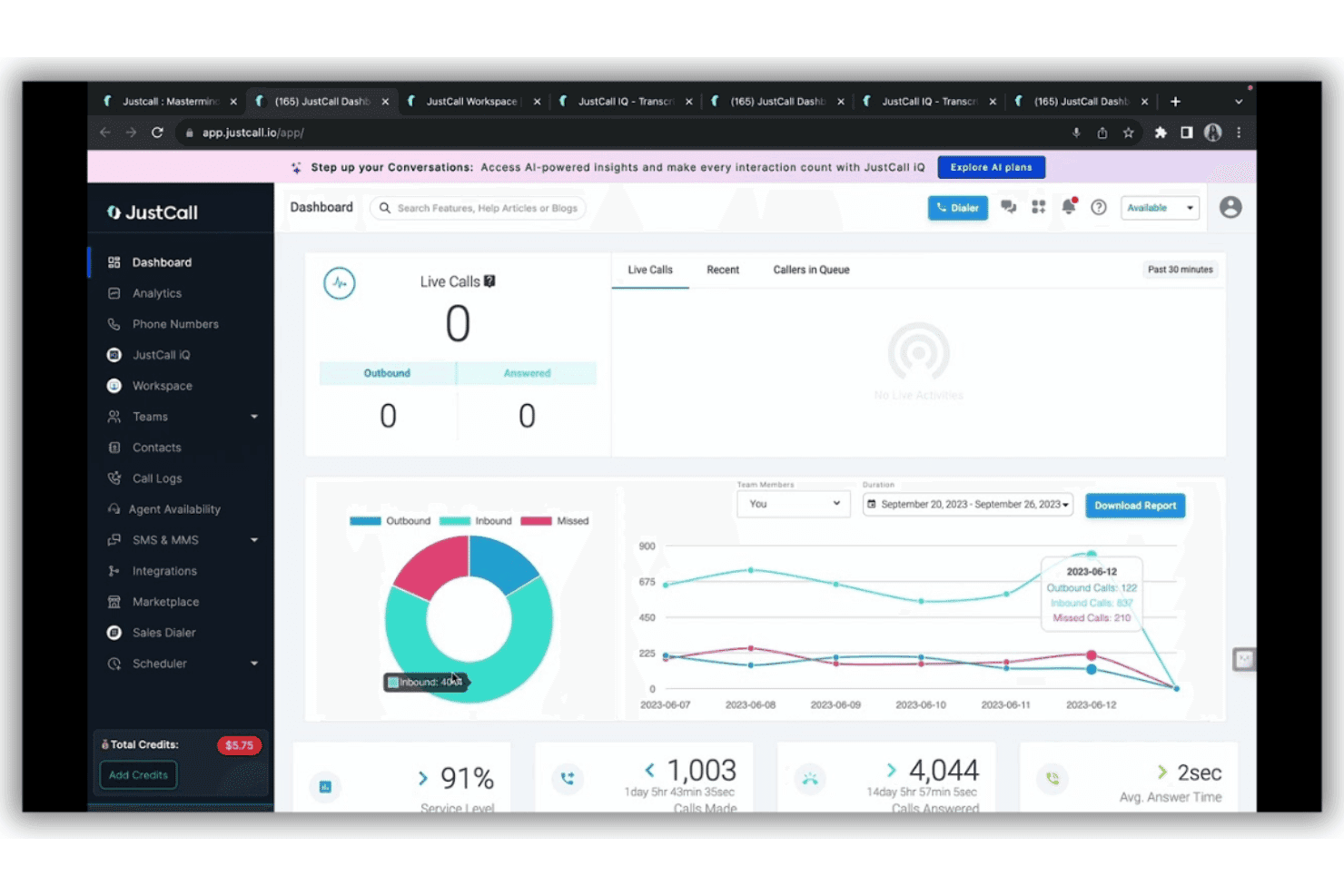
JustCall centralizes calls, SMS, WhatsApp, and CRM interactions with AI. JustCall is a cloud-based VoIP platform that offers outbound sales dialers, contact center capabilities, AI call transcription, and deep CRM integrations for teams looking to centralize phone, SMS, and WhatsApp interactions.
Who Is JustCall Best For?
Outbound sales teams and call centers that need large-scale cloud calling, automated dialling features, and CRM-integrated phone and SMS channels.
Why I Picked JustCall
I picked JustCall as one of the best for outbound sales teams because I can launch predictive and power dialer campaigns, automate call tasks at scale, and trigger automated follow-ups across phone, SMS, and WhatsApp from inside my CRM.
JustCall Key Features
- AI copilot and call summaries: Automatically transcribe and summarize calls with real-time coaching insights.
- Omnichannel inbox: Manage calls, SMS, and WhatsApp interactions in a single unified view.
- IVR call routing: Configure custom call flows and menus for automated call distribution.
- API and webhooks: Integrate JustCall with other apps and automate workflows using the public API and webhook triggers.
JustCall Integrations
JustCall offers 100+ native integrations, including Salesforce, HubSpot, Zoho CRM, Pipedrive, Copper, ActiveCampaign, Freshdesk, Zendesk, monday.com, and Intercom. Zapier and an API are available for custom integrations.
Pros and Cons
Pros:
- Omnichannel SMS and WhatsApp capabilities
- Built-in AI call transcription and summaries
- Predictive and power dialers for fast calling
Cons:
- Requires a minimum of two users per plan
- No built-in video or screen sharing
 Best for ticketing-system integration
- 14-day free trial + free demo available
- From $19/user/month (billed annually)
Visit WebsiteCustomer Rating:4.2/5
Zendesk Talk delivers AI-powered cloud calling with integrated support tickets. Zendesk Talk is a cloud-based VoIP solution built for support teams, delivering AI-powered call management, integrated ticketing, and advanced routing within the Zendesk workspace.
Who Is Zendesk Talk Best For?
Support teams using Zendesk who need integrated voice, ticketing, and AI features in one platform.
Why I Picked Zendesk Talk
I picked Zendesk Talk as one of the best because it lets my team manage calls, tickets, and AI-powered voice support all in one place. I rely on its ticketing system integration to automatically log call details and updates as support tickets.
Zendesk Talk Key Features
- AI copilot for agents: Offers real-time, in-call suggestions and knowledge base answers during live conversations.
- Multi-level IVR menus: Let you customize complex call routing paths to direct callers based on their needs.
- Call transcription and summary: Automatically generates transcripts and summarized notes for every conversation.
- Omnichannel workspace: Enables agents to handle calls, chats, and emails together in a single unified interface.
Zendesk Talk Integrations
Zendesk Talk offers native integrations with Zendesk Support, Salesforce, Slack, Shopify, and Jira. It provides access to 1,800+ marketplace integrations and has an API for custom integrations.
Pros and Cons
Pros:
- Call transcription and analytics are integrated
- Omnichannel workspace combines voice and chat
- AI Copilot assists during live calls
Cons:
- Advanced IVR call menus require higher tiers
- Requires the Zendesk ecosystem for full value
Learn more about Zendesk Talk: Best for automated contact center workflows
- Free demo available
- Pricing upon request
Visit WebsiteCustomer Rating:4.4/5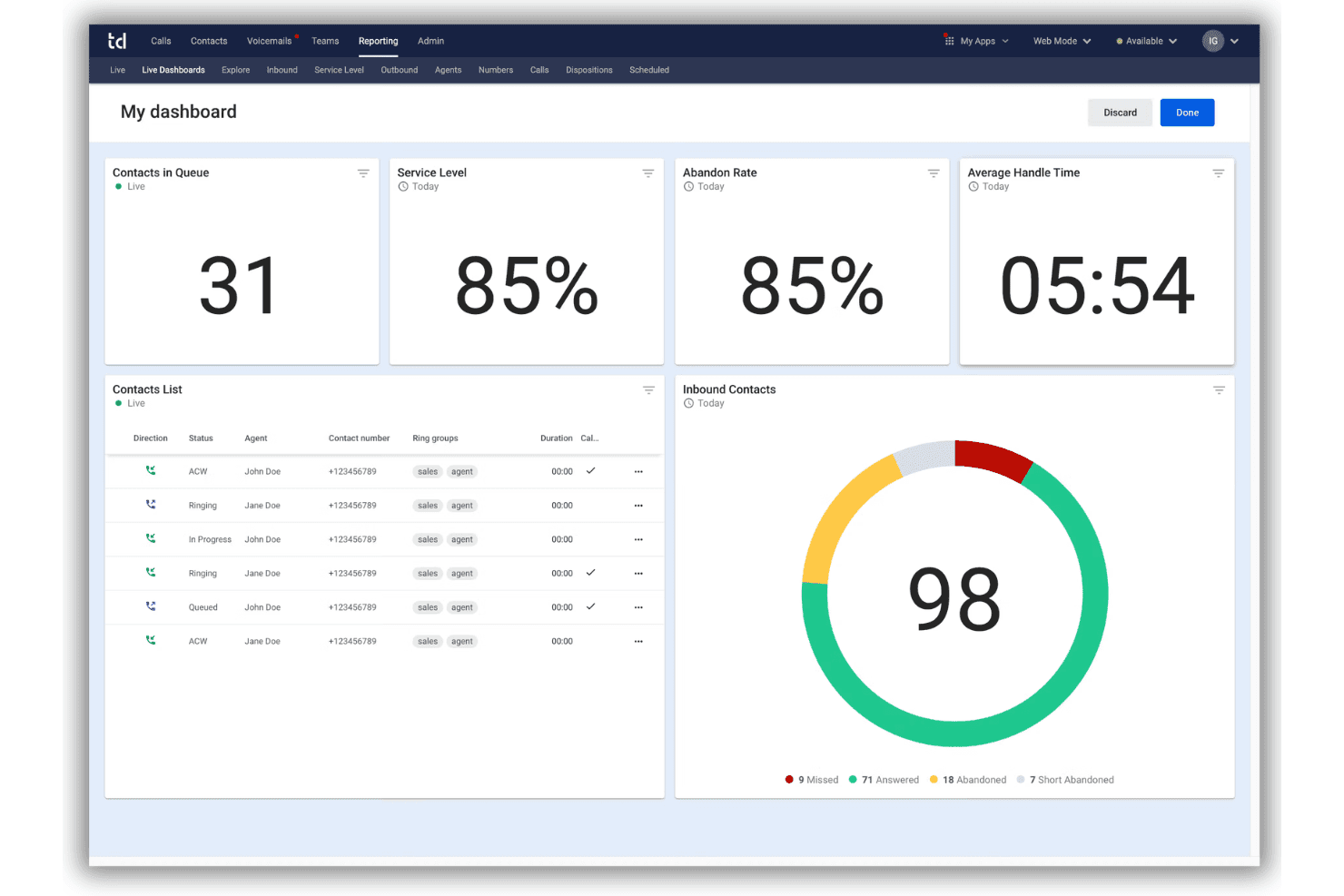
Talkdesk offers AI-powered omnichannel contact center and workflow automation. Talkdesk is an enterprise contact center platform in the VoIP apps space, offering omnichannel engagement, advanced workflow automation, and AI-driven voice and digital customer interactions.
Who Is Talkdesk Best For?
Talkdesk is a good fit for enterprise customer service teams and contact centers that need advanced automation and integration across voice and digital channels.
Why I Picked Talkdesk
I picked Talkdesk as one of the best for VoIP apps because I can use its AI automation tools to set up custom voice workflows and trigger actions across channels. In practice, my team easily automates tasks like call routing and voicemail transcriptions.
Talkdesk Key Features
- Omnichannel engagement: Manage calls, SMS, chat, email, and social messaging in one unified interface.
- Real-time dashboards: Monitor live agent activity, queues, and service levels with visual reporting.
- Screen recording: Capture both audio and screen activity during customer conversations for review or training.
- Workforce management: Access built-in scheduling, forecasting, and agent performance tracking tools.
Talkdesk Integrations
Talkdesk offers native integrations with Salesforce, Zendesk, Microsoft 365, Slack, ServiceNow, and Epic. An API is available for custom integrations.
Pros and Cons
Pros:
- Real-time monitoring and analytics tools
- Automated screen capture tools
- Automated call routing and workflow creation
Cons:
- Mobile app features are highly limited for agents
- Call drops and audio issues reported
Learn more about Talkdesk: Best for AI-powered customer journeys
- Free demo available
- From $75/user/month (billed annually)
Visit WebsiteCustomer Rating:4.4/5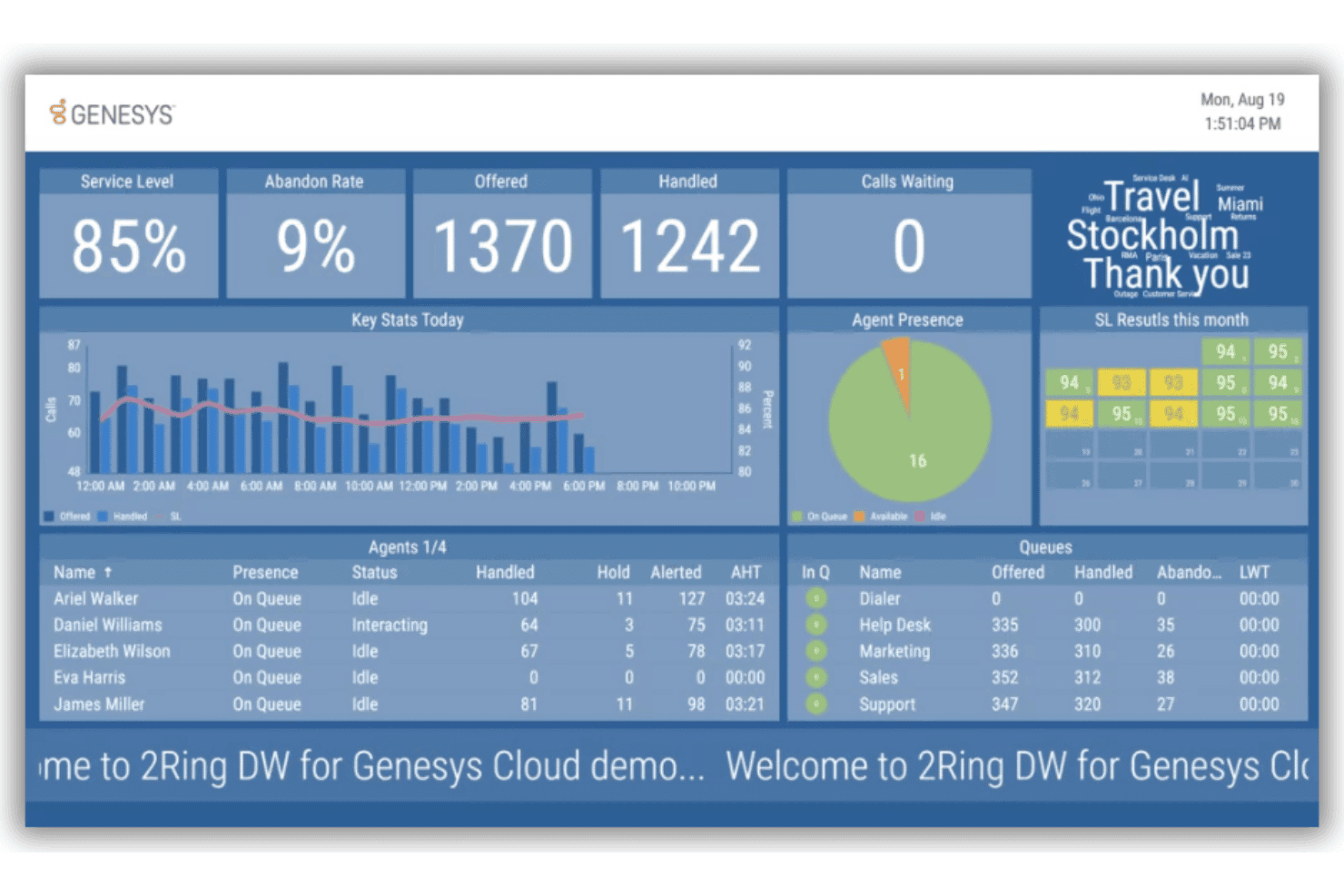
Genesys Cloud CX combines AI routing, omnichannel support, and analytics. Genesys Cloud CX is a cloud contact center platform that combines VoIP calling, omnichannel customer engagement, AI-powered routing, analytics, and integrations with major CRM and communication tools.
Who Is Genesys Cloud CX Best For?
Contact center leaders at midsize to large enterprises who need advanced omnichannel and AI capabilities across voice and digital support.
Why I Picked Genesys Cloud CX
I picked Genesys Cloud CX because I use its AI-driven journey management and predictive routing to customize VoIP interactions at scale. I also like how its real-time analytics let me adapt to customer needs as they happen.
Genesys Cloud CX Key Features
- Omnichannel voice routing: Route incoming VoIP calls alongside chat, email, and social interactions from one agent desktop.
- Call recording and playback: Record every VoIP conversation and access recordings instantly for quality monitoring.
- CRM integrations: Connect VoIP calls directly to Salesforce, Zendesk, or Microsoft Dynamics for fast customer insights.
- Customizable IVR menus: Design multi-level inbound voice menus with drag-and-drop flow builders.
Genesys Cloud CX Integrations
Genesys Cloud CX offers native integrations with Salesforce, Microsoft Dynamics, Zendesk, ServiceNow, Zoom, Microsoft Teams, and 8x8. It supports Amazon Lex and Google Cloud Dialogflow, with an API available for custom integrations.
Pros and Cons
Pros:
- Granular call recording and monitoring options
- Built-in predictive routing algorithms
- Direct CRM screen popups
Cons:
- Some features are locked behind higher tiers
- Advanced setup can require technical expertise
Learn more about Genesys Cloud CX: Best for omnichannel workforce optimization
- Free demo available
- From $110/agent/month (proactive AI extra)
Visit WebsiteCustomer Rating:4.3/5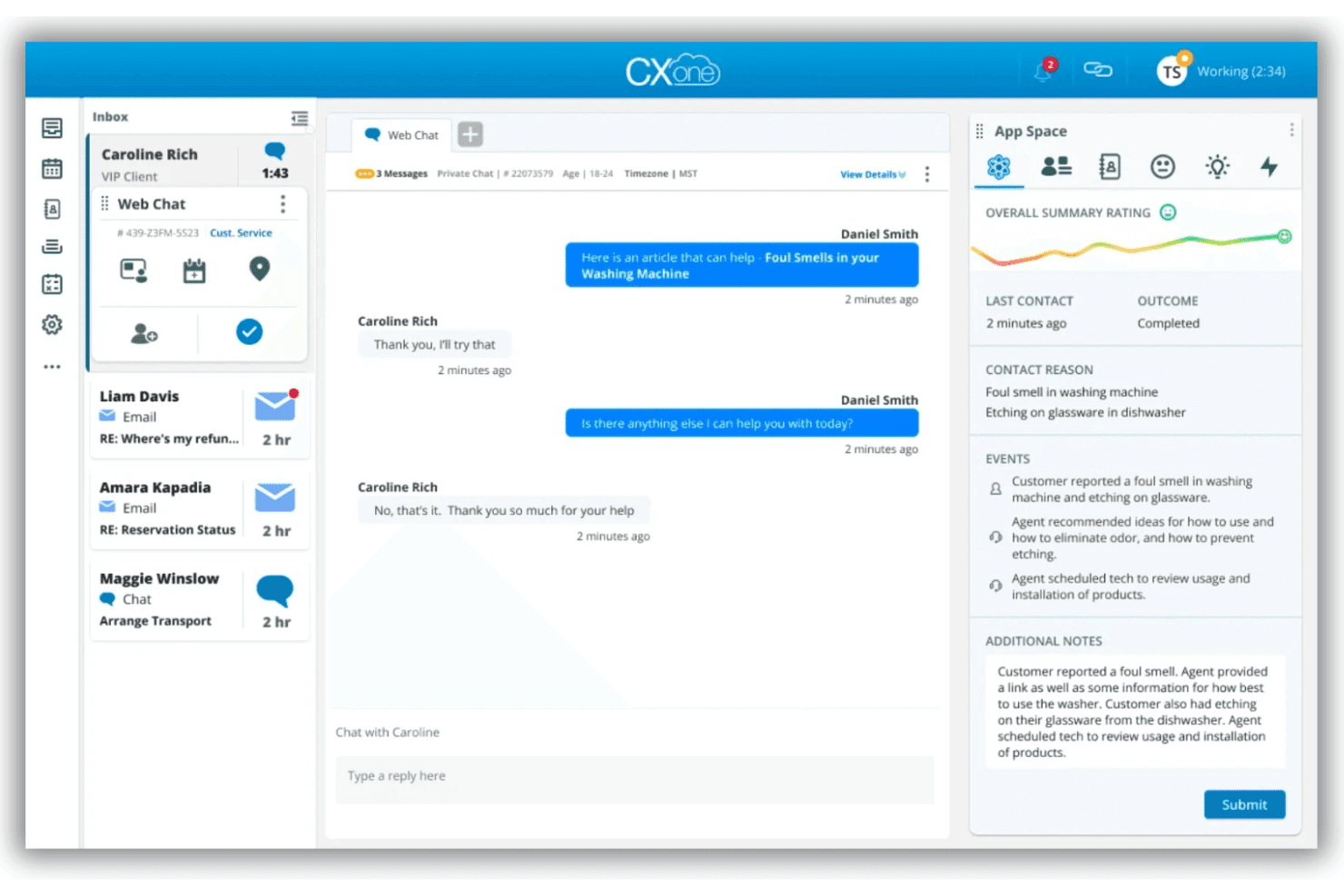
NiCE CXone delivers AI-powered VoIP, call routing, and multilingual support. NiCE CXone is a cloud-based VoIP app that delivers AI-powered voice connectivity, advanced call routing, and multilingual support for enterprise contact centers.
Who Is NiCE CXone Best For?
NiCE CXone is a strong choice for large enterprise contact centers needing global voice connectivity and advanced omnichannel management.
Why I Picked NiCE CXone
I picked NiCE CXone as one of the best for its AI-powered omnichannel workforce optimization, global voice connectivity, real-time translation, and dynamic multi-carrier routing, all built for complex enterprise contact centers.
NiCE CXone Key Features
- Global PSTN connectivity: Offers voice services in more than 150 countries with regional compliance.
- AI-powered noise suppression: Reduces background noise automatically for clearer call audio.
- Real-time call quality monitoring: Continuously tracks and displays call quality metrics during live interactions.
- Developer APIs and SDKs: Enable integration with custom workflows, applications, and business systems.
NiCE CXone Integrations
NiCE CXone offers native integrations with Salesforce, ServiceNow, Zendesk, Microsoft Teams, and Zoom, alongside APIs for custom integrations.
Pros and Cons
Pros:
- Advanced call quality monitoring and reporting
- Real-time AI noise cancellation on every call
- Global voice coverage for large organizations
Cons:
- Customization requires technical resources
- Administration setup can be complex
Learn more about NiCE CXone: Best for global call routing flexibility
- Free demo available
- From $119/seat/month
Visit WebsiteCustomer Rating:4.1/5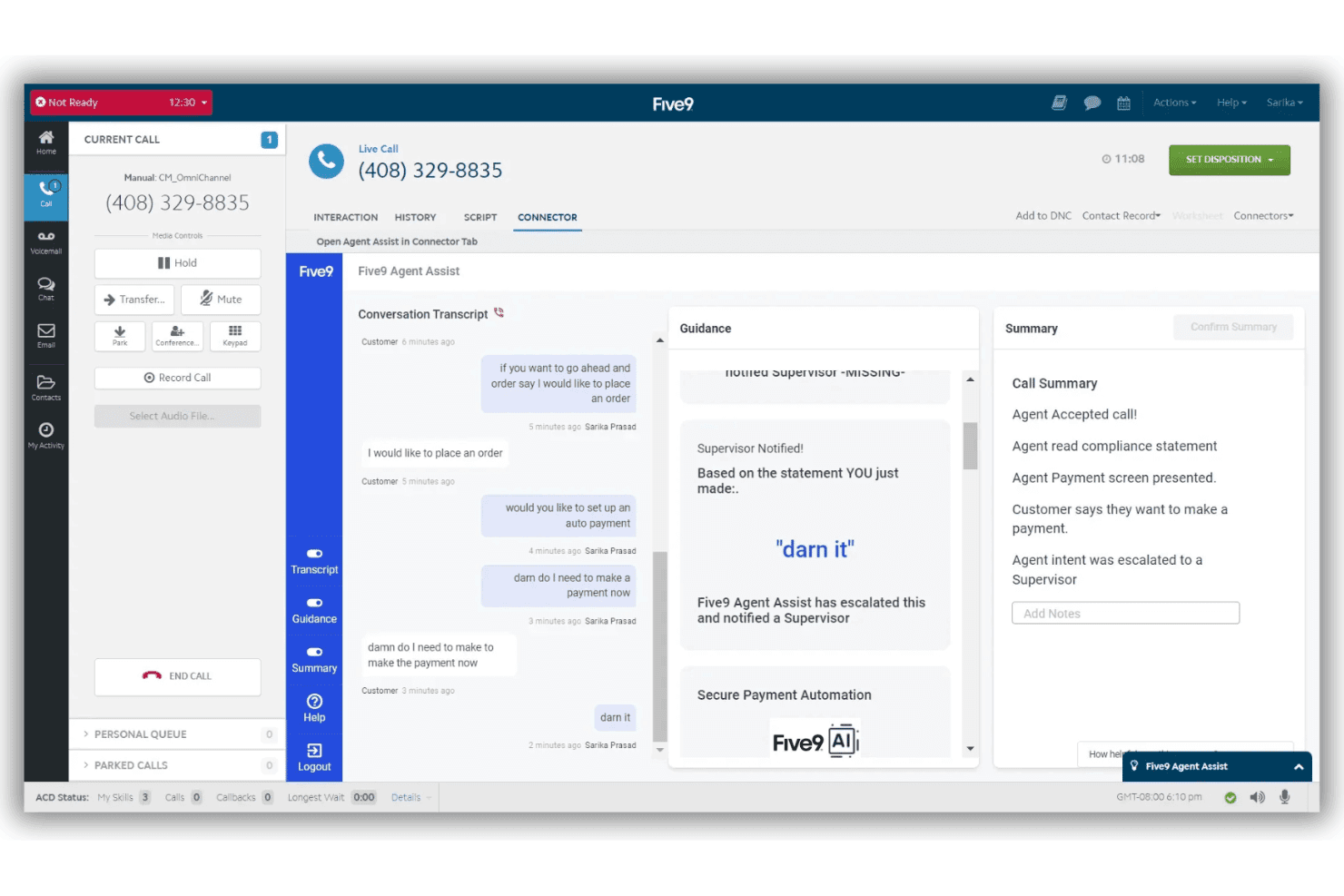
Five9 is a cloud VoIP platform for contact centers with omnichannel support. Five9 is a cloud-based VoIP app designed for contact centers, offering global call routing, multi-channel communication, real-time analytics, and integrations with leading CRM and unified communications platforms.
Who Is Five9 Best For?
Enterprise contact centers with large, distributed teams that require advanced global calling capabilities and deep CRM integrations.
Why I Picked Five9
I picked Five9 as one of the best because I can route calls across continents using its global Core and Voice Edge infrastructure, manage carrier redundancy, and support distributed agents without audio quality issues.
Five9 Key Features
- AI-powered agent assist: Supports agents with live transcription, call summaries, and knowledge base surfacing during calls.
- Integrated CRM connectors: Deliver pre-built integrations with Salesforce, ServiceNow, Microsoft Dynamics, Oracle, and Zendesk.
- Omnichannel communication: Lets teams manage voice, chat, email, SMS/MMS, and social messaging from a single interface.
- Workforce engagement management: Offer built-in tools for scheduling, quality management, analytics, and agent gamification.
Five9 Integrations
Five9 offers native integrations with Salesforce, ServiceNow, Microsoft Dynamics 365, Oracle, Zendesk, Microsoft Teams, Zoom, RingCentral, ATT Office@Hand, Verint, and Calabrio. An API is available for custom integrations.
Pros and Cons
Pros:
- AI-powered live transcription and summaries
- High scalability for large contact centers
- Global call routing with regional optimization
Cons:
- Requires system administrator setup
- Setup is complex for small teams
Learn more about Five9: Best for unified team collaboration
- 14-day free trial
- From £18/user/month
Visit WebsiteCustomer Rating:4.2/5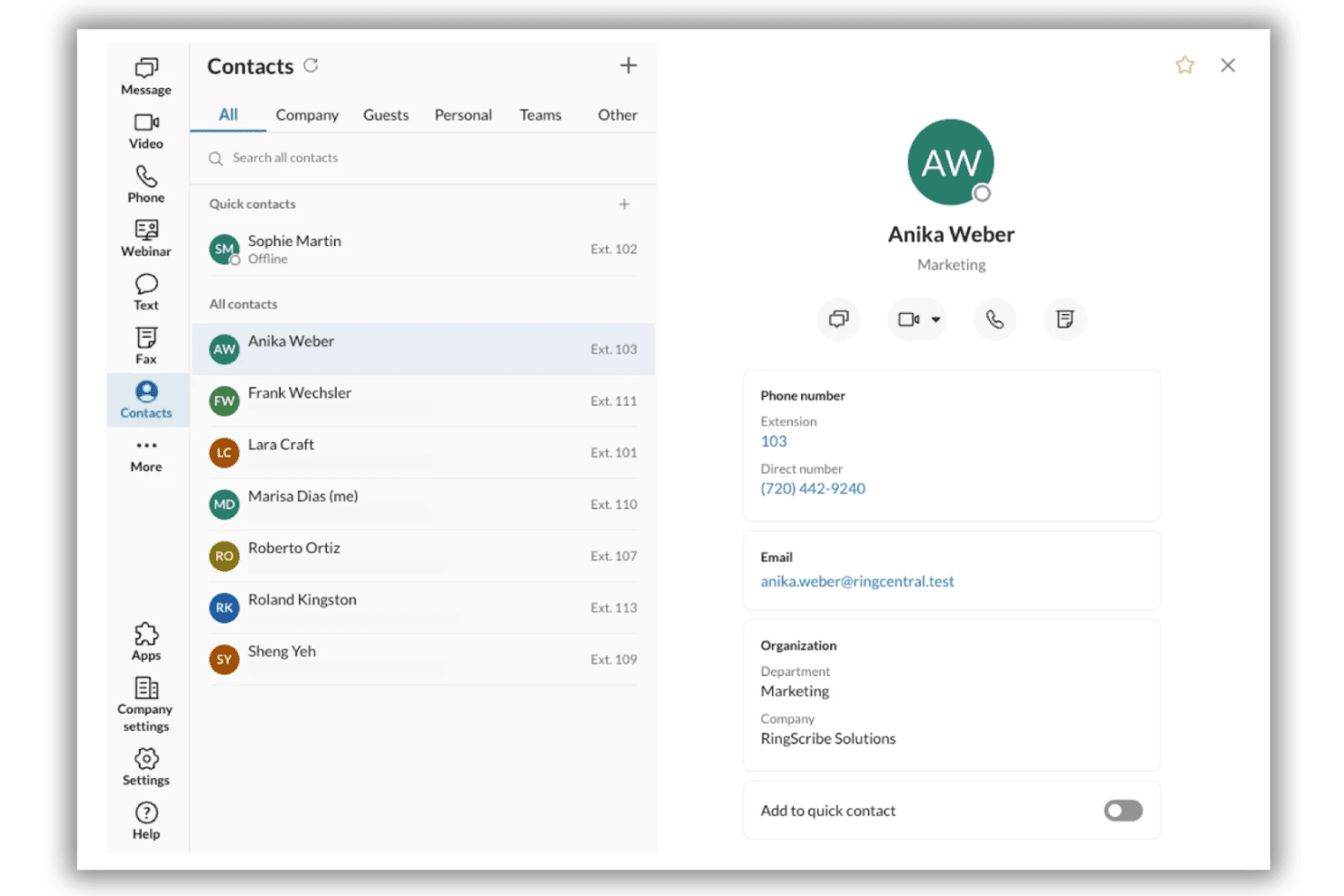
RingCentral RingEX combines cloud calling, video, messaging, and AI tools. RingCentral RingEX is a unified communications solution that combines cloud phone, video meetings, team messaging, AI assistant tools, and over 330 business app integrations for businesses seeking advanced VoIP capabilities.
Who Is RingCentral Best For?
Mid-sized and enterprise teams that need secure, integrated business communications across multiple locations or hybrid work environments.
Why I Picked RingCentral
I picked RingCentral because my team can handle calls, video meetings, and group chat within one platform, making it ideal for unified team collaboration. I also like having AI-generated meeting notes and transcriptions automatically captured.
RingCentral Key Features
- Advanced call routing: Route calls to teams or departments based on custom rules and business hours.
- Integrated fax support: Send and receive digital faxes directly within the app, alongside calls and messages.
- Global phone number provisioning: Instantly set up local, toll-free, or international numbers in over 100 countries.
- Centralized admin console: Manage users, permissions, and analytics from a single online dashboard.
RingCentral Integrations
RingCentral offers native integrations with Salesforce, Zendesk, HubSpot, ServiceNow, Google Workspace, Microsoft Teams, Okta, Box, Slack, and Zapier. An API is available for custom integrations.
Pros and Cons
Pros:
- Built-in AI for meeting transcriptions
- One number for voice, SMS, and fax
- Enterprise-grade uptime and reliability
Cons:
- Extra charges for exceeding fair usage limits
- Requires active network connections
Learn more about RingCentral:
Diğer VoIP Uygulamaları
Kısa listeme giremeyen ancak yine de göz atmaya değer bazı ek VoIP uygulaması seçenekleri şunlardır:
- 118x8 Contact CenterBest for multinational contact centers
- 12AircallBest for plug-and-play CRM integrations
- 13NextivaBest for real-time customer sentiment tracking
- 14Freshworks Contact CenterBest for easy international number provisioning
- 15GoTo ConnectBest for simplified call flow management
- 16Vonage Contact CenterBest for Salesforce-powered communications
- 17Zoom PhoneBest for video and phone integration
- 18QuoBest for tailored API-based voice solutions
- 19Webex CallingBest for enterprise-grade security options
How I Evaluate VoIP Apps
I split my evaluation into two layers: the baseline every contact center needs—think IVR, call recording, and CRM screen pops—and the differentiators that set one platform apart from the rest.
Core Functionality (Table Stakes for This List)
When I'm selecting tools for my list, I rank each one on a scale from 0 (does not offer the functionality) to 5 (excels in this area) for each core functionality listed below. Then, I calculate the tool's total score as a percentage. Each tool needs to achieve a minimum total score of 65% to be considered for inclusion.
- VoIP Calling: I check for HD voice quality across desktop, mobile, and web apps so agents can handle calls from home or the office without drops.
- Call Routing & IVR: Skills-based routing and multi-level IVR menus matter here—customers calling about billing should reach billing, not general support.
- Call Recording & Monitoring: I look for automatic recording with supervisor tools like Whisper and Barge, which are key for live coaching during escalations.
- CRM/Helpdesk Integrations: Screen pops that surface caller history from tools like Salesforce or Zendesk save agents from asking customers to repeat themselves.
- Call Analytics & Reporting: Real-time dashboards showing wait times, abandon rates, and agent performance help supervisors adjust staffing before queues spiral.
- Business Phone Features: Standard PBX capabilities like voicemail, call transfer, hold, and forwarding should all work reliably across every device an agent uses.
Once I have a list of tools that meet the criteria, I consider what sets each platform apart.
Differentiating Factors (What Sets Vendors Apart)
Here's how I compare and contrast different vendors:
Standout Features
AI call intelligence is a major differentiator. I look for platforms that generate real-time transcriptions and post-call summaries, freeing agents from manual note-taking during complex conversations. Mobile/desktop parity matters too, especially for remote teams. Agents should be able to hand off a live call from a laptop to a phone without the customer noticing. I also favour platforms that bundle voice with SMS, team messaging, and video in a single app, cutting down the tool-switching that slows agents during busy queues.
Beyond Features
Reliability is the first thing I evaluate. I check for published uptime SLAs and geo-redundant data centers because a dropped call during a customer escalation erodes trust fast. Compliance matters just as much for teams handling sensitive data. Certifications like SOC 2 Type II and HIPAA tell you whether a vendor takes security seriously or treats it as an afterthought. I also look at total cost beyond the per-seat price, including international minutes, toll-free numbers, and number porting fees that can quietly inflate your monthly spend.
VoIP Uygulamaları Nasıl Seçilir?
Uzun özellik listeleri ve karmaşık fiyatlandırma yapıları içinde kaybolmak kolaydır. Kendinize özgü yazılım seçim sürecinizi yürütürken odaklanmanıza yardımcı olmak için göz önünde bulundurmanız gereken faktörleri içeren bir kontrol listesi hazırladık:
| Faktör | Dikkat Edilmesi Gerekenler |
|---|---|
| FaktörÖlçeklenebilirlik | Dikkat Edilmesi GerekenlerEkibiniz büyüdükçe veya küçüldükçe sistem kullanıcıları kolayca ekleyip çıkarabiliyor mu? Mevsimsel veya hızlı değişiklikler için lisanslama koşullarını kontrol edin. |
| FaktörEntegrasyonlar | Dikkat Edilmesi GerekenlerHangi CRM, yardım masası ve iletişim araçlarının VoIP uygulamanızla veri paylaşması gerekiyor? Temel iş akışları için desteği doğrulayın. |
| FaktörÖzelleştirilebilirlik | Dikkat Edilmesi GerekenlerArama akışlarını, numaraları veya raporları yapılandırmanız gerekiyor mu? Ekibinizin sistemi değişen müşteri deneyimi önceliklerine uyarlayabildiğinden emin olun. |
| FaktörKullanım kolaylığı | Dikkat Edilmesi GerekenlerYeni temsilciler arayüzü ne kadar hızlı öğrenebilir? Personel devir hızının yüksek olduğu ekipler için basit gezinmeyi ve anlaşılır kontrolleri önceliklendirin. |
| FaktörUygulama ve işe alıştırma | Dikkat Edilmesi GerekenlerEkibiniz hangi kaynaklara, desteğe ve eğitime sahip olacak? Zaman çizelgelerini, geçiş sürecini ve numaraları taşımanın zorluk derecesini sorun. |
| FaktörMaliyet | Dikkat Edilmesi GerekenlerAylık ücretler ne kadar öngörülebilir? Uluslararası aramalar, ücretsiz numara ücretleri, özellik ücretleri ve sözleşmedeki asgari taahhütler hakkında bilgi alın. |
| FaktörGüvenlik önlemleri | Dikkat Edilmesi GerekenlerHangi müşteri ve işletme verilerinin korunması gerekiyor? Şifreleme, yönetici kontrolleri ve çağrı kayıtlarına erişim için açık standartlar olup olmadığını kontrol edin. |
| FaktörDestek erişilebilirliği | Dikkat Edilmesi GerekenlerSorunlar ortaya çıktığında canlı destek dahil mi ve hangi düzeyde sunuluyor (7/24, çalışma saatleri)? Ekibinizin çalışma programını ve kapsama ihtiyaçlarını göz önünde bulundurun. |
VoIP Uygulamaları Nedir?
VoIP uygulamaları, ekiplerin geleneksel telefon hatları yerine internet üzerinden sesli aramalar yapmasını ve almasını sağlayan yazılım platformlarıdır. Bu uygulamalar; müşteri hizmetleri ekiplerinin, destek temsilcilerinin ve çağrı merkezlerinin gelen ve giden aramaları yönetmesine, aramaları akıllı bir şekilde yönlendirmesine ve yanıt kalitesini artırmak için mevcut CRM veya yardım masası araçlarıyla entegre olmasına yardımcı olur.
VoIP Uygulamalarının Özellikleri
VoIP uygulamalarını seçerken aşağıdaki temel özelliklere dikkat edin:
- VoIP araması: Temsilcilerin, geleneksel VoIP sistemlerine ihtiyaç duymadan herhangi bir mobil cihazdan veya bilgisayardan sınırsız arama yapmasına ve yüksek kaliteli sesli aramalar almasına olanak tanır.
- Arama yönlendirme ve IVR: Bekleme sürelerini ve yanlış yönlendirilen aramaları azaltmak için otomatik karşılama sistemlerini, menüleri, kuralları ve otomatik telefon menülerini kullanarak arayanları doğru departmana veya temsilciye yönlendirir.
- Arama kaydı ve izleme: Görüşmeleri daha sonra incelenmek üzere kaydeder ve kalite güvencesi amacıyla yöneticilerin canlı aramaları dinlemesine veya görüşme sırasında koçluk yapmasına olanak tanıyan araçlar sunar.
- CRM ve yardım masası entegrasyonları: Müşteri yönetimi platformlarına doğrudan bağlanır, arayanın bilgilerini gösterir ve manuel veri girişini ortadan kaldırmak için arama notlarını otomatik olarak kaydeder.
- Analiz ve raporlama: Ekip performansını ve kaynak planlamasını optimize etmeye yardımcı olan arama hacmini, temsilci etkinliğini, bekleme sürelerini ve diğer ölçümleri izlemek için panolar sunar.
- Sesli mesaj ve arama yönetimi: Temsilciler müsait olmadığında arayanların mesaj bırakmasına olanak tanır ve ekiplere arama aktarma, bekletme, yönlendirme ve mesajları geri alma seçenekleri sunar.
- Birden fazla cihazdan erişim: Temsilcilerin ofiste veya uzaktan çalışırken verimli bir şekilde çalışabilmesi için masaüstü, web ve mobil uygulamalarda sorunsuz arama yönetimini destekler.
- Güvenlik ve uyumluluk: Hassas müşteri ve işletme verilerini korumak için şifreleme, erişim denetimleri ve düzenlemelere (GDPR veya HIPAA gibi) uyum sağlar.
- Konferans görüşmesi: Birden fazla tarafın katıldığı görüşmeleri mümkün kılar; ekiplerin karmaşık sorunları gerçek zamanlı olarak çözmek için ek katılımcıları veya yöneticileri görüşmeye dahil etmesini sağlar.
- Özelleştirilebilir arama akışları: Yöneticilerin, değişen ekip yapılarına, çalışma saatlerine ve eskalasyon politikalarına uyacak şekilde arama yönetimi kurallarını ve yollarını tasarlamasına veya değiştirmesine olanak tanır.
VoIP Uygulamalarının Faydaları
VoIP uygulamalarını kullanıma sunmak, ekibiniz ve işletmeniz için çeşitli faydalar sağlar. Yararlanabileceğiniz birkaç avantaj şunlardır:
- Daha fazla esneklik: Temsilciler internet bağlantısının olduğu her yerden arama yapabilir ve alabilir; bu da hem ofiste hem de uzaktan çalışma düzenlerini destekler.
- Geliştirilmiş müşteri yönlendirme: Akıllı IVR ve beceri tabanlı yönlendirme, arayanları hızla doğru temsilciye bağlayarak aktarmaları azaltır ve ilk aramada çözüm oranını artırır.
- Daha zengin müşteri bağlamı: CRM ve yardım masası entegrasyonları, arayanla ilgili bilgileri anında göstererek temsilcilerin daha kişiselleştirilmiş bir deneyim sunmasını sağlar.
- Daha kolay kalite izleme: Dahili arama kaydı ve yönetici araçları, daha yüksek hizmet standartları için görüşmeleri incelemenize ve temsilcilere koçluk yapmanıza olanak tanır.
- Uygulanabilir içgörüler: Gerçek zamanlı analizler, darboğazları tespit edebilmeniz ve personel planlamasını iyileştirebilmeniz için arama eğilimlerini, bekleme sürelerini ve temsilci iş yükünü ortaya koyar.
- Daha düşük altyapı maliyetleri: VoIP uygulamaları, geleneksel telefon donanımına duyulan ihtiyacı ortadan kaldırır ve kurulumu kolaylaştırarak bütçeden ve BT kaynaklarından tasarruf edilmesini sağlar.
- Gelişmiş veri güvenliği: Şifreleme ve uyumluluk özellikleri, hassas iletişimleri korumaya ve müşteri verileriyle ilgili düzenleyici gereksinimleri karşılamaya yardımcı olur.
VoIP Uygulamalarının Maliyetleri ve Fiyatlandırması
VoIP uygulamalarını seçmek, mevcut çeşitli fiyatlandırma modellerini ve planları anlamayı gerektirir. Maliyetler özelliklere, ekip büyüklüğüne, eklentilere ve diğer unsurlara göre değişir. Aşağıdaki tablo, VoIP uygulaması çözümlerinde yaygın olarak sunulan planları, ortalama fiyatlarını ve tipik özelliklerini özetlemektedir:
VoIP Uygulamaları İçin Plan Karşılaştırma Tablosu
| Plan Türü | Ortalama Fiyat | Yaygın Özellikler |
|---|---|---|
| Plan TürüÜcretsiz Plan | Ortalama Fiyat$0 | Yaygın ÖzelliklerSınırlı arama dakikaları, temel sesli mesaj, basit arama yönlendirme ve tek cihazdan erişim. |
| Plan TürüKişisel Plan | Ortalama Fiyat$5–$15/user/month | Yaygın ÖzelliklerVoIP araması, sesli mesaj, arama yönlendirme, mobil ve masaüstü erişimi ve temel analizler. |
| Plan Türüİşletme Planı | Ortalama Fiyat$20–$35/user/month | Yaygın ÖzelliklerÇok seviyeli IVR, CRM entegrasyonları, arama kaydı, analiz panoları ve ekip mesajlaşması. |
| Plan TürüKurumsal Plan | Ortalama Fiyat$40–$70/user/month | Yaygın ÖzelliklerGelişmiş yönlendirme, yapay zekâ destekli arama zekâsı, uyumluluk araçları, özel entegrasyonlar, öncelikli destek ve çalışma süresi SLA'ları. |
VoIP Uygulamaları SSS
VoIP uygulamaları hakkında sık sorulan bazı soruların yanıtları:
VoIP uygulamaları geleneksel bir işletme telefon sisteminin yerini alabilir mi?
Evet, modern bir VoIP telefon hizmeti küçük bir işletme için geleneksel bir işletme telefon sisteminin yerini tamamen alabilir. Bu hizmetler internet bağlantısı üzerinden telefon görüşmeleri yapmanıza, otomatik operatörlerle gelişmiş çağrı akışları oluşturmanıza, sesli mesajları yönetmenize ve sabit hatları olmayan uzaktan çalışan ekipleri desteklerken sınırsız görüşme yapmanıza olanak tanır.
VoIP uygulamaları özel donanım gerektirir mi?
Hayır, Windows bilgisayarınızda bir masaüstü uygulaması çalıştırabilir veya iPhone ya da Android cihaz gibi bir cep telefonuna arama uygulaması yükleyebilirsiniz. Fiziksel masa telefonlarını kullanabilseniz de kurulum veya günlük kullanım için bunlar gerekli değildir.
VoIP uygulamaları hassas işletme görüşmeleri için ne kadar güvenlidir?
Modern VoIP sistemleri sıkı veri güvenliği göz önünde bulundurularak tasarlanır. Özellikle işletmeniz özel müşteri bilgilerini işliyorsa güvenli arayan kimliği, uçtan uca şifreleme ve HIPAA veya SOC 2 Type II gibi uyumluluk sertifikaları sunan bir internet üzerinden ses protokolü uygulaması arayın.
VoIP uygulaması entegrasyonlarında nelere dikkat etmeliyim?
Önde gelen VoIP sağlayıcıları, işletme telefon numaranızı bağlamak için CRM sisteminizle kullanıcı dostu entegrasyonlar sunar. Bu sayede ekibinizin telefon görüşmelerini, kısa mesajlarını ve görüntülü görüşmelerini tek bir çalışma alanından yönetebilir, tüm iletişim bilgilerinizin tek bir yerde otomatik olarak güncel tutulmasını sağlayabilirsiniz.
Yavaş bir internet bağlantısında VoIP uygulamasının çağrı kalitesi düşer mi?
Wi-Fi veya mobil veri bağlantınız kararsızsa çağrı kalitesi düşebilir. Hareket hâlindeyken mobil VoIP kullanıyorsanız güvenilir bir bağlantı çok önemlidir. Gelişmiş özelliklere sahip uygulamalar, ücretsiz görüşmeler sırasında bile gelen aramaların ve video konferansların net kalmasına yardımcı olur. Ölçeği büyütmeden önce VoIP uygulamanızı ağınızda mutlaka test edin.