

Las mejores alternativas a Vonage ofrecen un servicio telefónico fiable, integraciones flexibles y precios que se adaptan a tu empresa a medida que crece. Si estás buscando alternativas a Vonage, probablemente necesites una solución UCaaS fácil de configurar, que escale con tu equipo y se conecte sin problemas con tus herramientas actuales. Elegir la plataforma de comunicaciones empresariales adecuada puede ayudarte a gestionar grandes volúmenes de llamadas, dar soporte a equipos remotos o híbridos y ofrecer experiencias de cliente coherentes. En esta guía encontrarás una lista cuidadosamente seleccionada de las principales alternativas a Vonage, centrada en las funciones, integraciones y casos de uso más importantes para los profesionales de la experiencia del cliente.
¿Qué es Vonage?
Vonage Business es una plataforma de comunicaciones y una centralita en la nube que permite a las empresas realizar y recibir llamadas telefónicas a través de Internet en lugar de utilizar líneas tradicionales. Como proveedor líder de VoIP, ofrece funciones como enrutamiento de llamadas, buzón de voz, números virtuales e integraciones con herramientas de CRM y servicios de asistencia. Los equipos de experiencia del cliente utilizan Vonage para gestionar las operaciones, facilitar el trabajo remoto y conectar con los clientes a través de varios canales. Su flexibilidad y escalabilidad la hacen popular tanto entre las empresas emergentes en sus primeras etapas como entre las pymes consolidadas.
Tabla comparativa de alternativas a Vonage
Esta tabla comparativa resume los detalles de precios de mi selección de las principales alternativas a Vonage:
| Tool | Best For | Trial Info | Price | ||
|---|---|---|---|---|---|
| 1 | La mejor para la programación de citas impulsada por IA | Demostración gratuita | Desde $15/usuario/mes (facturación anual) | Website | |
| 2 | Mejor para cobertura global de números | Prueba gratuita de 14 días | Desde $25/usuario/mes (facturado anualmente) | Website | |
| 3 | Compatibilidad óptima con el ecosistema AWS | Prueba gratuita de 6 meses | Desde $0.038/minuto | Website | |
| 4 | Ideal para interacciones con clientes orientadas a dispositivos móviles | Demo gratuita disponible | Desde $65/usuario/mes | Website | |
| 5 | Ideal para capacidades de marcación saliente | Demostración gratuita | Desde $119/usuario/mes | Website | |
| 6 | Ideal para provisión instantánea de números | Prueba gratuita de 14 días + demo gratis | Desde $29/usuario/mes (facturado anualmente) | Website | |
| 7 | Ideal para integración con sistemas de tickets | Prueba gratuita de 14 días + demostración gratuita | Desde $19/agente/mes (facturación anual) | Website | |
| 8 | Ideal para recorridos de clientes potenciados por IA | Demo gratuita disponible | Desde $75/usuario/mes (facturación anual) | Website | |
| 9 | Mejor para automatización específica del sector | Demostración gratuita disponible | Desde $85/usuario/mes | Website | |
| 10 | Ideal para análisis omnicanal | Demo gratuita disponible | Precios a consultar | Website |


Por qué confiar en nuestras recomendaciones de software
6,700+
Reviews
20
Industry experts
16+
Evaluation factors
14
Years
Nuestro equipo lleva probando y evaluando software desde 2012. Como líderes de CX, sabemos lo difícil —y lo importante— que es elegir el software adecuado.
Para esta guía, evaluamos las herramientas mediante pruebas prácticas e investigación independiente, puntuando las herramientas según nuestros criterios de selección.
Nuestras reseñas reflejan nuestro criterio editorial humano, no un discurso de ventas.
 Gui DrusinaCreative Director
 Tim FisherVP of AI
Opiniones sobre las alternativas a Vonage
A continuación encontrarás mis resúmenes detallados de las mejores alternativas a Vonage que han formado parte de mi selección. Mis reseñas ofrecen un análisis detallado de las funciones, integraciones y mejores casos de uso de cada software para ayudarte a encontrar la opción más adecuada para ti.
 La mejor para la programación de citas impulsada por IA
- Demostración gratuita
- Desde $15/usuario/mes (facturación anual)
Visit WebsiteCustomer Rating:4.5/5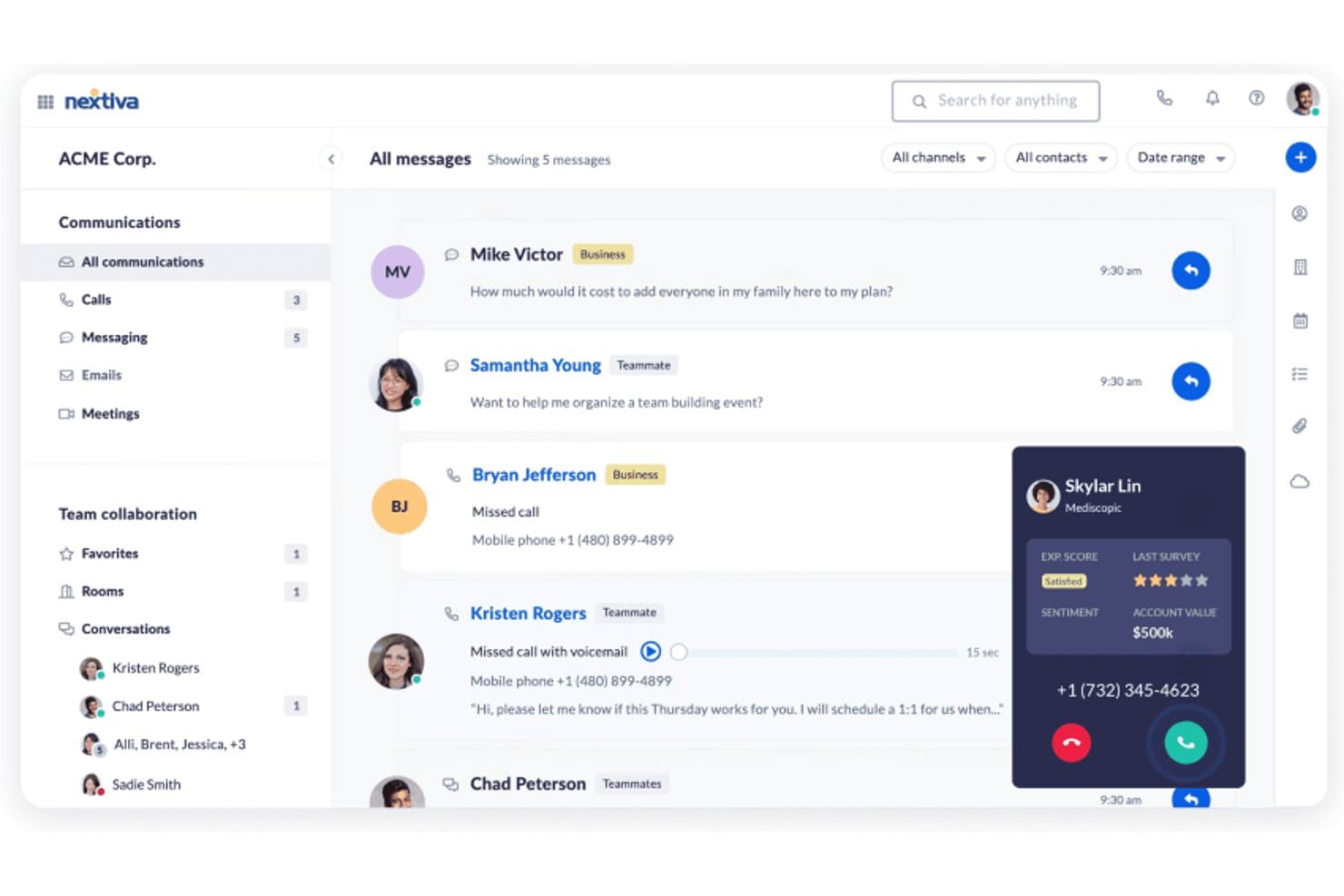
Nextiva ofrece un panel de comunicaciones unificado que muestra mensajes, llamadas y colaboración en equipo junto con el sentimiento del cliente en tiempo real y el valor de la cuenta durante llamadas activas. Nextiva es una plataforma de comunicaciones en la nube y centro de contacto diseñada para equipos medianos y grandes que desean reemplazar las herramientas de VoIP aisladas por un sistema unificado que combine voz, canales digitales, automatización con IA y precios transparentes.
¿Para quién es mejor Nextiva?
Nextiva es ideal para gerentes de operaciones de centros de contacto y directores de experiencia del cliente en empresas norteamericanas que necesitan una única plataforma tanto para la comunicación interna como para la atención al cliente.
¿Por qué Nextiva es una buena alternativa a Vonage?
Elegí Nextiva como una de las mejores porque su suite XBert AI convierte llamadas entrantes en citas agendadas sin necesidad de un agente en vivo. El Empleado IA gestiona toda la conversación, verifica la disponibilidad en tiempo real y confirma la cita de manera autónoma. El Recepcionista IA funciona 24/7, por lo que la programación de citas ocurre a cualquier hora, incluyendo noches y fines de semana, cuando el equipo está fuera de línea.
Funciones clave de Nextiva
- Bandeja omnicanal unificada: Dirige y gestiona interacciones de clientes desde voz, SMS, chat, correo electrónico y redes sociales en una sola vista.
- Enrutamiento de llamadas según habilidades: Asigna llamadas entrantes al agente disponible más adecuado según habilidades y disponibilidad.
- Panel de análisis en tiempo real: Supervisa estadísticas de colas en vivo, el rendimiento de los agentes y el sentimiento en todos los canales.
- Integraciones nativas con CRM: Sincroniza datos de comunicación con HubSpot, Salesforce, Zendesk y Microsoft Dynamics para flujos de trabajo de agentes sin fricciones.
Integraciones de Nextiva
Nextiva ofrece integraciones nativas con Salesforce, HubSpot, Zendesk, Microsoft Dynamics, Zoho CRM, Oracle, ServiceNow, ConnectWise, Google Workspace, Microsoft Teams y más. Se encuentra disponible una API para integraciones personalizadas.
Pros and Cons
Pros:
- La IA gestiona las citas sin necesidad de un agente en vivo
- Enrutamiento unificado de llamadas de voz y canales digitales
- Herramientas integradas de gestión de personal y control de calidad
Cons:
- La cobertura internacional es limitada fuera de Norteamérica
- Carece de APIs CPaaS programables para desarrolladores
 Mejor para cobertura global de números
- Prueba gratuita de 14 días
- Desde $25/usuario/mes (facturado anualmente)
Visit WebsiteCustomer Rating:4.4/5
La cobertura global de números de CloudTalk ayuda a los equipos a atender a los clientes en cualquier lugar CloudTalk es un sistema telefónico basado en la nube diseñado para equipos que necesitan capacidades de llamadas fiables y flexibles en múltiples ubicaciones. Si buscas una solución que soporte operaciones globales y flujos de trabajo modernos para centros de llamadas, CloudTalk merece una mirada más cercana.
¿Para quién es mejor CloudTalk?
CloudTalk es ideal para equipos de soporte al cliente global que necesitan números telefónicos locales en varios países.
Por qué CloudTalk es una buena alternativa a Vonage
Elegí CloudTalk porque mi equipo necesita acceso fiable a números telefónicos locales en docenas de países. Con CloudTalk, puedo suministrar instantáneamente números en más de 160 países. Aprecio lo fácil que es gestionar números internacionales y enrutar llamadas según la región. Este alcance global nos permite atender a los clientes dondequiera que estén sin tener que usar varios proveedores.
Características clave de CloudTalk
- Diseñador de flujo de llamadas: Crea rutas personalizadas de llamadas con un editor visual.
- Panel de análisis en tiempo real: Supervisa métricas de llamadas en directo y la actividad de los agentes.
- Grabación de llamadas: Graba automáticamente llamadas entrantes y salientes para control de calidad.
- Extensión de navegador para llamada con un clic: Realiza llamadas directamente desde tu CRM o mesa de ayuda con un solo clic.
Integraciones de CloudTalk
CloudTalk ofrece integraciones nativas con Salesforce, HubSpot, Zendesk, Pipedrive, Zoho CRM, Freshdesk, Intercom, Microsoft Dynamics 365, Shopify y Slack. También se conecta con Zapier y proporciona una API para integraciones personalizadas.
Pros and Cons
Pros:
- Constructor avanzado de flujos de llamadas con editor visual
- Coaching en tiempo real para agentes y susurro de llamadas
- Integraciones profundas con CRM para registro de llamadas
Cons:
- Sin opción incorporada de videollamadas
- Funciones limitadas de SMS y mensajería
 Compatibilidad óptima con el ecosistema AWS
- Prueba gratuita de 6 meses
- Desde $0.038/minuto
Visit WebsiteCustomer Rating:4.5/5
El panel de Amazon Connect muestra el perfil del cliente, chat y detalles del caso. Amazon Connect es una plataforma de centro de contacto basada en la nube construida sobre AWS, diseñada para empresas que desean gestionar interacciones con clientes a gran escala. Es atractiva para organizaciones que buscan precios flexibles de pago por uso e integración perfecta con otros servicios de AWS para comunicaciones unificadas.
¿Para quién es mejor Amazon Connect?
Amazon Connect es ideal para empresas y equipos tecnológicos que ya utilizan AWS y necesitan una solución de centro de contacto escalable y basada en la nube.
Por qué Amazon Connect es una buena alternativa a Vonage
Elegí Amazon Connect porque se integra directamente en el ecosistema AWS, lo que significa que mi equipo no necesita gestionar infraestructuras separadas para las operaciones del centro de contacto. Utilizo Amazon Lex para construir flujos de IVR conversacional que gestionan consultas rutinarias sin agentes en vivo, y esos bots se conectan de forma nativa a las funciones Lambda para búsquedas de datos en tiempo real. También valoro que Amazon Connect se integre con Amazon S3 y Kinesis para almacenamiento de grabaciones de llamadas y transmisión de datos de contacto en tiempo real, algo difícil de replicar sin construir canales personalizados aparte. Para los equipos que ya ejecutan cargas de trabajo en AWS, esa conectividad nativa elimina un nivel significativo de complejidad de integración.
Funciones clave de Amazon Connect
- Diseñador de flujos por arrastrar y soltar: Una herramienta visual para crear flujos IVR, experiencias de chatbot y guías paso a paso para agentes en todos los canales.
- Enrutamiento basado en habilidades: Asigna los contactos a los agentes según la disponibilidad, habilidades, sentimiento del cliente e historial de interacciones.
- Grabación de pantalla: Graba las pantallas de los agentes junto con el audio durante las interacciones con los clientes para supervisar la calidad y evaluar el desempeño.
- Pronóstico de contactos: Utiliza inteligencia artificial para generar predicciones a corto y largo plazo del volumen de contactos para respaldar la programación de agentes y la planificación de la capacidad.
Integraciones de Amazon Connect
Las integraciones incluyen Salesforce, Zendesk, ServiceNow, Slack, Microsoft Teams y herramientas del ecosistema AWS.
Pros and Cons
Pros:
- Altamente programable
- Escalabilidad global
- Despliegue rápido
Cons:
- Costos ocultos de AWS
- No incluye CRM listo para usar
Learn more about Amazon Connect: 4Ideal para interacciones con clientes orientadas a dispositivos móviles
UJET
- Demo gratuita disponible
- Desde $65/usuario/mes
Visit WebsiteCustomer Rating:4.6/5
Interfaz de chat móvil de UJET con opciones de mensajería, cola y soporte. UJET es una plataforma de centro de contacto en la nube diseñada para empresas que desean unificar la atención digital y por voz en una sola solución compatible con dispositivos móviles. Es una excelente opción para equipos que necesitan automatización avanzada, enrutamiento impulsado por IA e integraciones profundas con CRM para modernizar las interacciones con los clientes.
¿Para quién es mejor UJET?
UJET se adapta a centros de contacto empresariales y equipos de soporte en sectores como retail, finanzas y salud, que requieren un compromiso seguro y omnicanal con los clientes.
Por qué UJET es una buena alternativa a Vonage
Elegí UJET por su enfoque móvil primero, que permite a mi equipo gestionar interacciones de soporte directamente dentro de una aplicación móvil de marca, sin necesidad de una interfaz de terceros. Aprecio cómo el soporte en la aplicación de UJET permite a los clientes compartir fotos, videos y capturas de pantalla durante la conversación, proporcionando contexto real al agente sin idas y vueltas. En la práctica, eso significa que mi equipo puede resolver problemas más rápido al ver exactamente lo que el cliente ve. Para centros de contacto que buscan ir más allá de la telefonía VoIP básica, el enrutamiento impulsado por IA y el escritorio omnicanal para agentes de UJET ofrecen una mejora realmente capaz.
Funciones clave de UJET
- Análisis de sentimiento en tiempo real: Detecta la emoción del cliente durante las llamadas para ayudar a los agentes a ajustar su enfoque durante la interacción.
- Agente virtual: Gestiona consultas rutinarias automáticamente mediante flujos de autoservicio impulsados por IA antes de escalar a un agente en vivo.
- Escritorio omnicanal para agentes: Consolida las interacciones de voz, chat, SMS y correo electrónico en un solo espacio de trabajo para el agente.
- Aparición en pantalla del CRM: Muestra automáticamente la información relevante del cliente de los CRM conectados al iniciar una interacción.
Integraciones de UJET
Las integraciones incluyen Salesforce, Zendesk, Kustomer, ServiceNow, Microsoft Dynamics y Shopify.
Pros and Cons
Pros:
- Sin almacenamiento de datos del usuario
- Menús visuales en la aplicación
- Arquitectura moderna
Cons:
- Curva de aprendizaje
- Costoso para organizaciones pequeñas
Learn more about UJET: Ideal para capacidades de marcación saliente
- Demostración gratuita
- Desde $119/usuario/mes
Visit WebsiteCustomer Rating:4.1/5
El panel de Five9 muestra controles de llamadas en vivo, transcripciones y orientación para agentes. Five9 es una plataforma de centro de contacto basada en la nube, diseñada para empresas que requieren enrutamiento avanzado de llamadas, marcado predictivo y análisis en tiempo real. Es una opción sólida para equipos de ventas, centros de soporte y organizaciones que desean optimizar las comunicaciones entrantes y salientes.
¿Para quién es mejor Five9?
Five9 es ideal para equipos de ventas o soporte de tamaño mediano y grande que necesitan capacidades avanzadas de marcación saliente y gestión de llamadas.
Por qué Five9 es una buena alternativa a Vonage
Las capacidades de marcación saliente de Five9 van mucho más allá de un marcador automático básico. Lo elegí porque ofrece cuatro modos distintos de marcación—predictivo, potenciado, progresivo y previo—para que mi equipo pueda adaptar el enfoque de marcado al tipo de campaña, en lugar de forzar todos los contactos en un solo flujo de trabajo. Para campañas de ventas de alto volumen, utilizo el marcador predictivo para maximizar el tiempo de conversación de los agentes, filtrando automáticamente las llamadas no respondidas, buzones de voz y señales de ocupado. Lo que también valoro es la herramienta de cumplimiento incorporada: la validación Certified Caller (STIR/SHAKEN) de Five9 y la gestión de listas DNC permiten que mi equipo no tenga que recurrir a herramientas externas para cumplir con las regulaciones de la FCC sobre llamadas salientes.
Características clave de Five9
- Asistencia al agente: Herramienta de IA en tiempo real que proporciona información relevante y respuestas sugeridas a los agentes durante las interacciones en vivo con los clientes.
- Analítica de interacciones: Herramienta de análisis de voz y texto que revisa conversaciones grabadas con clientes para identificar tendencias, sentimientos y vacíos de cumplimiento.
- Gestión de fuerza laboral: Herramienta de programación y pronóstico que ayuda a los supervisores a alinear los niveles de personal de agentes con los volúmenes de contacto anticipados.
- Agente Virtual Inteligente (IVA): Herramienta de autoservicio basada en IA que gestiona consultas de rutina entrantes por voz y canales digitales sin la intervención de un agente en vivo.
Integraciones de Five9
Las integraciones incluyen Salesforce, ServiceNow, Microsoft Teams, Oracle, Zendesk, Zoom Phone, Microsoft Dynamics 365, NetSuite, Slack y Google Workspace.
Pros and Cons
Pros:
- Integraciones sólidas con CRM
- Tecnología de voz confiable
- Buenas herramientas para fuerza laboral
Cons:
- Implementación más lenta
- Aplicación móvil poco intuitiva
Learn more about Five9: Ideal para provisión instantánea de números
- Prueba gratuita de 14 días + demo gratis
- Desde $29/usuario/mes (facturado anualmente)
Visit WebsiteCustomer Rating:4.1/5
Panel de JustCall mostrando analíticas de llamadas, actividad y métricas de rendimiento. JustCall es una plataforma de VoIP basada en la nube diseñada para equipos de ventas y soporte que necesitan acceso rápido a números telefónicos globales y funciones avanzadas de llamadas. Es una excelente opción para empresas que buscan SMS integrado, múltiples opciones de marcador y una conectividad profunda con CRM para gestionar grandes volúmenes de llamadas.
¿Para quién es mejor JustCall?
Equipos de ventas y soporte en pequeñas y medianas empresas que necesitan llamadas globales, SMS e integraciones de CRM para la comunicación con clientes.
Por qué JustCall es una buena alternativa a Vonage
Elegí JustCall principalmente por la rapidez con la que puedes tener un número listo y funcionando. A diferencia de Vonage, que puede implicar tiempos de provisión más largos y tareas administrativas, JustCall me permite activar números locales o gratuitos de más de 70 países en segundos—sin esperas ni idas y vueltas con soporte. También valoro la función de cobertura por país, donde simplemente selecciono un país y el código de área y ya estoy listo para hacer y recibir llamadas. Para equipos que se expanden a nuevos mercados o que necesitan abrir líneas regionales rápidamente, ese tipo de acceso instantáneo es difícil de igualar.
Características clave de JustCall
- Marcador de ventas: Ofrece opciones de marcador automático, predictivo, potente y paralelo para automatizar campañas de llamadas salientes.
- Monitoreo en vivo de llamadas: Escucha llamadas activas en tiempo real, susurra instrucciones a los agentes durante la llamada o únete directamente a la conversación.
- Flujos de trabajo SMS: Activa mensajes de texto automáticos según condiciones específicas, como recordatorios de citas o secuencias de seguimiento.
- Puntaje de llamadas: Evalúa automáticamente o manualmente las llamadas para calificar el desempeño de los agentes e identificar oportunidades de capacitación.
Integraciones de JustCall
Las integraciones incluyen Salesforce, HubSpot, Pipedrive, ActiveCampaign, Slack, Intercom, Help Scout, Zendesk, Zoho CRM y monday.com.
Pros and Cons
Pros:
- Muy económico
- Integraciones sencillas
- Ideal para operaciones pequeñas
Cons:
- Aplicación móvil deficiente
- Soporte técnico lento
 Ideal para integración con sistemas de tickets
- Prueba gratuita de 14 días + demostración gratuita
- Desde $19/agente/mes (facturación anual)
Visit WebsiteCustomer Rating:4.2/5
Interfaz de Zendesk Talk mostrando pestañas de chat activo, ticket y conversación. Zendesk Talk incorpora capacidades de voz directamente en la plataforma Zendesk, permitiendo que los equipos de soporte gestionen llamadas junto con tickets y chats. Es una opción sólida para empresas que desean unificar las conversaciones con los clientes y optimizar los flujos de trabajo de los agentes en un solo espacio de trabajo.
¿Para quién es más adecuado Zendesk Talk?
Equipos de soporte de empresas medianas y grandes que ya usan Zendesk y necesitan gestión integrada de voz y tickets.
Por qué Zendesk Talk es una buena alternativa a Vonage
Elegí Zendesk Talk porque integra la voz directamente en el sistema de tickets de Zendesk, de modo que cada llamada genera automáticamente un ticket con la transcripción completa y la grabación adjunta. Me gusta que los agentes nunca tengan que cambiar de herramienta: el contexto de la llamada, el historial del cliente y las tareas de seguimiento se gestionan desde un solo lugar. Mi equipo puede usar el enrutamiento IVR para dirigir llamadas según el tamaño de la cola y el horario comercial, reduciendo el tiempo de espera sin intervención manual. Para los equipos que ya gestionan el soporte a través de Zendesk, este nivel de integración nativa es difícil de igualar en otras plataformas.
Funciones clave de Zendesk Talk
- Transferencia en caliente: Transfiere llamadas a otro agente con una breve reunión privada antes de conectar al cliente.
- Bloqueo de llamadas: Identifica y bloquea números no deseados o de spam directamente en la plataforma.
- Transcripción de buzón de voz: Convierte los mensajes de voz en texto y los adjunta al ticket correspondiente.
- Panel en tiempo real: Supervisa colas de llamadas, disponibilidad de agentes y tiempos de espera desde una sola vista.
Integraciones de Zendesk Talk
Las integraciones incluyen Slack, Shopify, Pipedrive, Trustpilot, Harvest, ChannelReply, Sprout Social, Azure DevOps, Maestro QA y SweetHawk Suite.
Pros and Cons
Pros:
- Gestión unificada de tickets
- Fácil para los agentes
- Enrutamiento simple
Cons:
- Carece de PBX avanzado
- Tarifas de llamadas caras
Learn more about Zendesk Talk: Ideal para recorridos de clientes potenciados por IA
- Demo gratuita disponible
- Desde $75/usuario/mes (facturación anual)

El panel Genesys Cloud CX muestra detalles de manejo de llamadas en vivo y de interacciones. Genesys Cloud CX es una plataforma de centro de contacto basada en la nube, diseñada para organizaciones que desean unificar voz, chat y canales digitales en un solo lugar. Resulta atractiva para equipos que buscan automatización avanzada, encaminamiento omnicanal y análisis en tiempo real para mejorar la interacción con el cliente.
¿Para quién es mejor Genesys Cloud CX?
Grandes empresas y centros de contacto globales que necesitan gestionar interacciones complejas y de alto volumen con clientes a través de múltiples canales.
Por qué Genesys Cloud CX es una buena alternativa a Vonage
Lo que me atrae de Genesys Cloud CX como alternativa a Vonage es lo profundamente que la IA está integrada en la plataforma, en lugar de añadirse como un complemento. Utilizo el Encaminamiento Predictivo para emparejar automáticamente a los clientes con el agente mejor preparado para sus necesidades, no solo por disponibilidad, sino optimizando para un KPI específico como la resolución en la primera llamada. Ese es un nivel de inteligencia en el encaminamiento que Vonage simplemente no ofrece.
También confío en la función Agente Copiloto, que muestra artículos de conocimiento relevantes en tiempo real durante las llamadas en vivo y luego genera automáticamente un resumen post-llamada utilizando IA generativa, recortando así el tiempo que mis agentes dedican al cierre de las interacciones. Para equipos que gestionan grandes volúmenes de interacciones en canales de voz y digitales, el AI Studio nativo de Genesys Cloud CX permite que mi equipo construya y ajuste flujos impulsados por IA sin necesidad de un equipo de ciencia de datos detrás de cada cambio.
Funciones clave de Genesys Cloud CX
- Encaminamiento omnicanal: Encamina interacciones de clientes a través de voz, chat, correo electrónico y redes sociales desde una única cola unificada.
- Gestión del compromiso laboral: Incluye herramientas de programación, gestión de calidad y seguimiento del desempeño integradas directamente en la plataforma.
- Gestión del recorrido del cliente: Conecta datos entre puntos de contacto para rastrear y coordinar recorridos completos de clientes en tiempo real.
- AppFoundry® Marketplace: Proporciona acceso a aplicaciones de terceros preintegradas que amplían las capacidades nativas de la plataforma.
Integraciones de Genesys Cloud CX
Las integraciones incluyen Salesforce, Microsoft Dynamics 365, Zendesk, ServiceNow, Adobe y AWS.
Pros and Cons
Pros:
- Funciones de voz completas
- Verdadero omnicanal
- Analítica avanzada
Cons:
- Despliegue más largo
- Demasiado para pequeñas empresas
Learn more about Genesys Cloud CX: Mejor para automatización específica del sector
- Demostración gratuita disponible
- Desde $85/usuario/mes

El panel de Talkdesk muestra el perfil del cliente, controles de llamadas y detalles en vivo de la llamada. Talkdesk ofrece una plataforma de centro de contacto en la nube diseñada para organizaciones que necesitan automatización avanzada e integración con flujos de trabajo específicos del sector. Es una excelente opción para empresas en sectores regulados o para aquellas que buscan personalizar sus comunicaciones con clientes mediante funciones especializadas.
¿Para quién es mejor Talkdesk?
Talkdesk es ideal para medianas y grandes empresas en los sectores de salud, finanzas, comercio minorista y otras industrias reguladas que requieren automatización del centro de contacto personalizable.
Por qué Talkdesk es una buena alternativa a Vonage
Lo que me atrajo de Talkdesk son sus Talkdesk Industry Experience Clouds™, que van mucho más allá de la funcionalidad genérica de un centro de contacto. Estas son integraciones preconstruidas con sistemas empresariales centrales específicos para industrias como salud, servicios financieros y comercio minorista; así, mi equipo no tiene que empezar desde cero al crear flujos de trabajo. Por ejemplo, en un entorno sanitario, Talkdesk se conecta directamente con los sistemas de gestión de pacientes para casos como la programación de citas de autoservicio mediante Talkdesk Autopilot. También valoro la capa de orquestación de múltiples agentes, que permite a los agentes de IA trabajar juntos a través de diversos canales y sistemas en tiempo real, en lugar de operar en silos. Para los equipos en sectores regulados, la cobertura normativa de la plataforma—HIPAA, PCI-DSS, SOC2 Type II y GDPR—significa que no tengo que añadir herramientas de terceros para cumplir con esos requerimientos.
Funciones clave de Talkdesk
- Intervención en llamadas: Permite a los supervisores unirse a llamadas en vivo para hablar directamente con el agente y el cliente.
- Marcado de presencia local: Selecciona automáticamente un número saliente que coincide con el código de área o país del destinatario para aumentar las tasas de respuesta.
- De voz a caso: Crea y dirige automáticamente tickets de soporte a partir de interacciones de llamadas que requieren seguimiento.
- Constructor de flujos sin código: Permite a los administradores diseñar y ajustar la ruta de llamadas y los flujos IVR usando una interfaz visual basada en clics, sin soporte de desarrolladores.
Integraciones de Talkdesk
Las integraciones incluyen Salesforce, Zendesk, Microsoft Teams, Slack, ServiceNow y Shopify.
Pros and Cons
Pros:
- Automatización avanzada
- Plantillas por industria
- SLA de tiempo de actividad del 100%
Cons:
- Acceso API limitado
- Los complementos tienen costo extra
Learn more about Talkdesk:

El panel de CXone muestra niveles de servicio, estadísticas de agentes y métricas de colas. CXone Mpower es una plataforma de centro de contacto en la nube diseñada para organizaciones que necesitan una gestión avanzada de voz y canales digitales. Resulta atractiva para equipos que buscan escritorios de agente unificados, enrutamiento impulsado por inteligencia artificial y análisis profundos para mejorar las interacciones con los clientes y la eficiencia operativa.
¿Para quién es mejor CXone Mpower?
CXone Mpower es ideal para empresas medianas y grandes con operaciones de servicio al cliente complejas que requieren participación unificada por voz y medios digitales.
Por qué CXone Mpower es una buena alternativa a Vonage
Elegí CXone Mpower porque su análisis omnicanal va mucho más allá de los informes básicos: la plataforma captura datos de intención, sentimiento y resultados de cada interacción por voz y digital, y luego muestra esta información en tiempo real. Esto es especialmente útil gracias a Interaction Analytics, que analiza el 100% de las interacciones en lugar de solo una muestra, por lo que mi equipo no toma decisiones basadas en datos incompletos. También valoro cómo CXone AI Routing utiliza esos mismos datos de interacción para tomar decisiones de enrutamiento predictivo—no sólo por habilidades, sino predicciones sobre qué agente tiene más probabilidades de lograr la mejor CSAT o resolución para un cliente específico.
Funciones clave de CXone Mpower
- Enrutamiento omnicanal: Dirige los contactos de los clientes a través de canales de voz y digitales al agente adecuado según habilidades, disponibilidad y contexto del cliente.
- Gestión de fuerza laboral: Utiliza previsión y programación basadas en IA para alinear la dotación de agentes con los volúmenes de contacto previstos tanto en planificación a corto como a largo plazo.
- Gestión de calidad: Evalúa el 100% de las interacciones con los clientes usando IA para identificar oportunidades de formación y brechas de cumplimiento.
- Compromiso saliente: Automatiza el contacto proactivo en voz y canales digitales mediante marcado predictivo y gestión de campañas impulsada por IA.
Integraciones de CXone Mpower
Las integraciones incluyen Salesforce, Microsoft Dynamics, Zendesk, ServiceNow, Oracle y Bullhorn.
Pros and Cons
Pros:
- Alta confiabilidad
- Potentes análisis con IA
- Gestiona alto volumen
Cons:
- Actualizaciones de UI lentas
- Contratos complejos
Learn more about CXone Mpower:
Otras alternativas a Vonage
Estas son algunas opciones adicionales de alternativas a Vonage que no han formado parte de mi selección, pero que aún merece la pena consultar:
- 11Webex Contact CenterMejor para soporte a equipos híbridos
- 12AircallIdeal para integraciones rápidas con CRM
- 13OomaIdeal para sistemas telefónicos de pequeñas empresas
- 143CXMejor con opciones de implementación en las instalaciones
Cómo evalué las alternativas a Vonage
Divido mi evaluación en dos capas: la base que toda plataforma debe cubrir—canales omnicanal, APIs para desarrolladores, enrutamiento IVR—y los diferenciadores que más importan para los equipos de experiencia del cliente (CX) y centros de contacto.
Funcionalidades básicas (Requisitos indispensables para esta lista)
Al seleccionar herramientas para mi lista, califico cada una en una escala de 0 (no ofrece la funcionalidad) a 5 (destaca mucho en esta área) por cada funcionalidad básica que se detalla abajo. Luego, calculo la puntuación total de la herramienta en porcentaje. Cada una debe alcanzar una puntuación total mínima del 75% para ser considerada para su inclusión.
- Canales de comunicación omnicanal: Verifico si la plataforma unifica voz, SMS, chat, email y mensajería social, de modo que los agentes puedan atender a un cliente que pasa de WhatsApp a una llamada telefónica sin perder el contexto.
- APIs y SDKs programables: La documentación para desarrolladores, entornos sandbox y cobertura de lenguajes en los SDK son elementos clave aquí—sobre todo para equipos que integran funcionalidades como click-to-call o mensajería dentro de sus propios productos.
- Herramientas de centro de contacto en la nube: Evalúo si la plataforma incluye constructores de IVR, ACD, enrutamiento por habilidades y gestión de colas que un equipo de soporte de tamaño medio realmente usaría en el día a día.
- Integraciones con CRM y mesas de ayuda: Busco conectores nativos con plataformas como Salesforce, HubSpot y Zendesk, que permitan sincronizar el historial de interacciones y registros de clientes de forma bidireccional, no solo pop-ups CTI superficiales.
- Capacidades de IA y automatización: Se evalúan chatbots, voicebots, análisis de sentimiento y funciones de asistencia al agente—el enfoque está en cuán bien la IA conversacional resuelve dudas rutinarias como estado de pedidos o agendado de citas.
- Alcance global de voz y mensajería: La capacidad de proveer números en varios países, identificador de llamada local y SMS confiables en diferentes regiones es clave, sobre todo para equipos con clientes en múltiples geografías.
Cuando ya tengo una lista de herramientas que cumplen con estos criterios, considero qué distingue a cada plataforma.
Factores diferenciadores (Qué distingue a los proveedores)
Así comparo y contrasto distintos proveedores:
Funciones destacadas
Un estudio de IA conversacional puede ahorrar mucho tiempo de configuración a los equipos de CX—busco editores de bots drag-and-drop que permitan a agentes no técnicos diseñar flujos IVR y automatizaciones de chat sin abrir tickets al equipo de desarrollo. Los tableros de análisis en tiempo real son igual de importantes, especialmente para supervisores que necesitan ver al instante los tiempos de espera en cola y la disponibilidad de agentes en picos de demanda. También evalúo herramientas de participación de fuerza laboral como puntuación de calidad integrada y seguimiento de adherencia a horarios, que ayudan a los responsables operativos a entrenar agentes y planificar plantillas desde un solo lugar.
Más allá de las funciones
Las certificaciones de cumplimiento como SOC 2, HIPAA y preparación GDPR importan cuando tu centro de contacto gestiona datos sensibles de clientes—verifico si los proveedores ofrecen opciones de residencia de datos y grabaciones cifradas de llamadas. La escalabilidad es otra variable clave, incluyendo SLA de disponibilidad y cómo responde la plataforma ante picos de demanda como las temporadas altas. También valoro la transparencia en los precios, comparando modelos por usuario, por minuto y de pago por uso para entender cómo evolucionarán los costes si tu equipo y volumen de llamadas aumentan.
¿Por qué buscar una alternativa a Vonage?
Aunque Vonage es una buena opción de software VoIP, hay varias razones por las que algunos usuarios buscan soluciones alternativas. Puede que estés buscando una alternativa a Vonage todo en uno porque…
- Sufres demasiadas llamadas interrumpidas y necesitas mejores garantías de disponibilidad
- Necesitas una experiencia de usuario más fluida y una mayor facilidad de uso
- Quieres mejores tarifas para llamadas internacionales que respalden tu alcance global
- Necesitas integraciones más estrechas entre los teléfonos virtuales y los teléfonos de escritorio tradicionales
- Necesitas certificaciones de cumplimiento normativo específicas de tu sector
- Quieres controles más detallados para el enrutamiento de llamadas
Si alguna de estas situaciones te resulta familiar, has llegado al lugar adecuado. Mi lista contiene varias opciones de software VoIP más adecuadas para los equipos que afrontan estos desafíos con Vonage y buscan soluciones alternativas.
Funciones principales de Vonage
A continuación puedes consultar las funciones que ofrece Vonage para contrastar y comparar lo que proporcionan las soluciones alternativas (para obtener más información, consulta sus preguntas frecuentes oficiales y evalúa la curva de aprendizaje de la plataforma):
- Enrutamiento de llamadas: Dirige las llamadas entrantes a la persona o departamento adecuados mediante reglas personalizables, reduciendo los tiempos de espera y mejorando la satisfacción del cliente.
- Recepcionista virtual: Responde y enruta las llamadas automáticamente mediante menús de voz interactivos, ayudando a las empresas a gestionar un gran volumen de llamadas sin personal adicional.
- Del buzón de voz al correo electrónico: Envía los mensajes del buzón de voz como archivos de audio a la bandeja de entrada del correo electrónico, lo que facilita acceder a los mensajes y responder a ellos desde cualquier lugar.
- Grabación de llamadas: Graba las llamadas entrantes y salientes para la formación, el cumplimiento normativo y el control de calidad, con almacenamiento seguro y reproducción sencilla.
- Aplicación móvil: Permite a los usuarios realizar y recibir llamadas profesionales, consultar el buzón de voz y gestionar la configuración directamente desde sus dispositivos móviles, facilitando el trabajo remoto e híbrido.
- Mensajería para equipos: Ofrece mensajería instantánea y chats grupales dentro de la plataforma, permitiendo a los equipos comunicarse y colaborar sin cambiar de herramienta.
- Videoconferencias: Admite reuniones de vídeo en alta definición con uso compartido de pantalla y chat, facilitando la colaboración remota y las interacciones virtuales con los clientes.
- Integraciones con CRM: Se conecta con sistemas CRM populares como Salesforce y HubSpot, permitiendo registrar automáticamente las llamadas y acceder a los datos de los clientes durante las llamadas.
- Análisis e informes: Ofrece paneles e informes detallados sobre la actividad de las llamadas, el rendimiento de los agentes y las interacciones con los clientes para fundamentar las decisiones empresariales.
- Acceso a la API: Permite a los desarrolladores crear integraciones y flujos de trabajo personalizados, ampliando las capacidades de Vonage para adaptarlas a las necesidades específicas de cada empresa.