

10 Mejores Software de Mesa de Ayuda Interna de 2026

10 Mejor software de mesa de ayuda interna - Lista corta


Con tantas opciones de software de mesa de ayuda interna disponibles, encontrar el adecuado para tus necesidades puede ser difícil. Sabes que quieres una herramienta para centralizar y resolver tus solicitudes y consultas internas de soporte, pero necesitas averiguar cuál sistema es el mejor. En este artículo, te ayudaré a facilitar esta elección compartiendo mis conocimientos sobre el mejor software de mesa de ayuda interna para rastrear solicitudes, agilizar la comunicación y mejorar la eficiencia operativa.
Por qué confiar en nuestras recomendaciones de software
Nuestro equipo lleva probando y evaluando software desde 2012. Como líderes de CX, sabemos lo difícil —y lo importante— que es elegir el software adecuado.
Para esta guía, evaluamos las herramientas mediante pruebas prácticas e investigación independiente, puntuando las herramientas según nuestros criterios de selección.
Nuestras reseñas reflejan nuestro criterio editorial humano, no un discurso de ventas.
Resumen del mejor software de mesa de ayuda interna
Esta tabla comparativa resume los detalles de precios de mis principales selecciones de software de mesa de ayuda interna para ayudarte a encontrar el mejor según tu presupuesto y las necesidades de tu empresa.
| Tool | Best For | Trial Info | Price | ||
|---|---|---|---|---|---|
| 1 | Ideal para soporte de TI con herramientas de colaboración integradas | Prueba gratuita de 14 días + demo gratuito disponible | Desde $19/usuario/mes (facturado anualmente) | Website | |
| 2 | Mejor para la gestión de servicios de TI con enfoque en IA | Prueba gratuita de 14 días | Precios bajo solicitud | Website | |
| 3 | Ideal para gestión de tickets y soporte impulsados por IA | Prueba gratuita de 14 días + demo gratis disponible | Desde $19/agente/mes (facturado anualmente) | Website | |
| 4 | Mejor sistema en la nube para personalizar servicios interdepartamentales | Prueba gratuita de 15 días + demo gratuita disponible | Desde $7/usuario/mes (facturado anualmente) | Website | |
| 5 | Ideal para una configuración sencilla | Plan gratuito + prueba gratuita de 7 días + demo gratis disponible | Desde $25/usuario/mes (facturado anualmente) | Website | |
| 6 | Mejor opción para soporte multilingüe tanto a clientes como a compañeros | Demostración gratuita disponible | Precio bajo solicitud | Website | |
| 7 | El mejor software de mesa de ayuda satélite para gestionar múltiples marcas en un solo lugar | Prueba gratuita de 30 días | Desde $12/usuario/mes | Website | |
| 8 | Ideal para personalización sin código | Prueba gratuita de 14 días | Desde $9/asiento/mes (facturado anualmente) | Website | |
| 9 | Ideal para un servicio automatizado que permite rapidez y escalabilidad | Prueba gratuita de 14 días + demo sin costo disponible | Desde $29/usuario/mes (facturado anualmente) | Website | |
| 10 | Mejor mesa de ayuda en la nube para un enfoque 360° en la gestión de servicios TI | Demostración gratuita | Contactar para presupuesto | Website |


Reseña del mejor software de mesa de ayuda interna
A continuación encuentras mis resúmenes detallados del mejor software de mesa de ayuda interna que conforma mi lista corta. Mis reseñas ofrecen una mirada en profundidad a las características clave, ventajas y desventajas, integraciones y casos de uso ideales de cada herramienta para ayudarte a elegir la mejor para ti.
Ideal para soporte de TI con herramientas de colaboración integradas
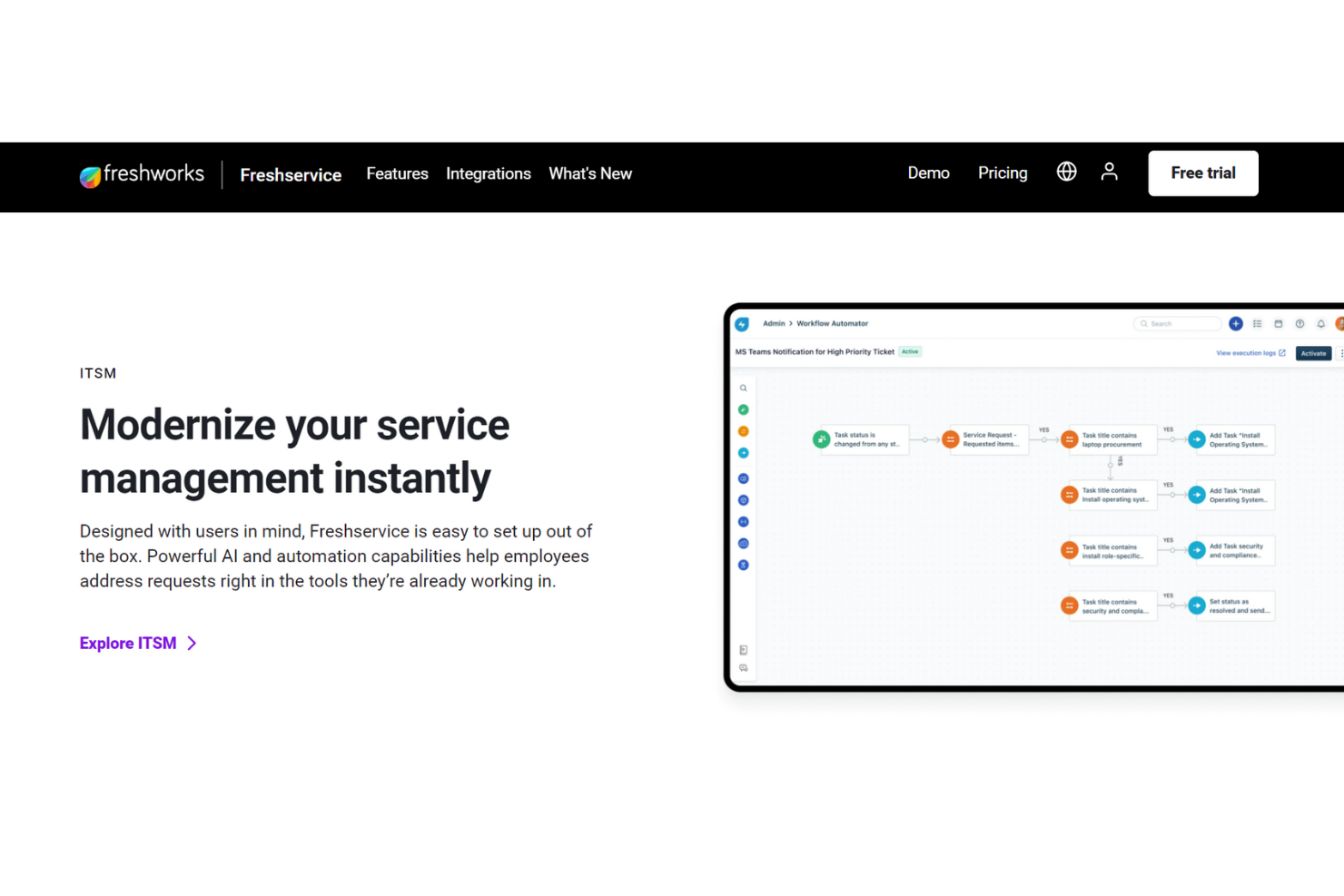
Este software de mesa de ayuda interna de Freshdesk busca brindar soporte de calidad para empleados a través de herramientas de colaboración integradas, desvío de tickets con inteligencia artificial y portales de autoservicio integrales.
La inteligencia artificial de Freshservice es una característica que va más allá de lo básico, con prestación de servicios rápida y gestión de incidentes que abarca el registro, la clasificación, la priorización, la investigación, la resolución y el cierre. Incluso ofrece herramientas de escalamiento según se requiera. Freshservice permite soporte interno multicanal para todos los equipos.
Las herramientas de mesa de ayuda interna se categorizan por separado de otros servicios de Freshdesk y pueden apoyar tanto a pequeñas empresas como a organizaciones de nivel empresarial en diferentes niveles. También ofrecen una variedad de complementos, incluyendo gestión de SaaS, gestión de proyectos y agentes de negocio.
Funciones destacadas e integraciones de Freshservice
Funciones incluyen gestión de cambios, gestión de incidentes, espacios de trabajo, gestión de conocimiento, incorporación de empleados y gestión de activos. La gestión de servicios de TI incluye agrupamiento automatizado de alertas, gestión en guardia y reglas inteligentes de gestión de alertas.
Integraciones incluyen Jira, Detailr, Google Hangouts, Instagram, Office 365 Calendar, Skype, TeamViewer, Trello, WhatsApp y YouTube. Freshservice ofrece integraciones de aplicaciones gratuitas y de pago.
Pros and Cons
Pros:
- API y automatización de flujos de trabajo
- Herramientas flexibles y personalizables
- Fácil de usar
Cons:
- Interfaz de usuario lenta
- Carece de algunas funciones del lado del agente
New Product Updates from Freshservice
 Experience)
Freshservice Introduces a Reimagined IT Asset Management (ITAM) Experience
Freshservice introduces a reimagined IT Asset Management (ITAM) experience with continuous infrastructure discovery, dependency mapping, IPAM, and Software License Management. This update helps teams improve asset visibility and manage connected IT environments more effectively. For more information, visit Freshservice’s official site.
SysAid
Mejor para la gestión de servicios de TI con enfoque en IA
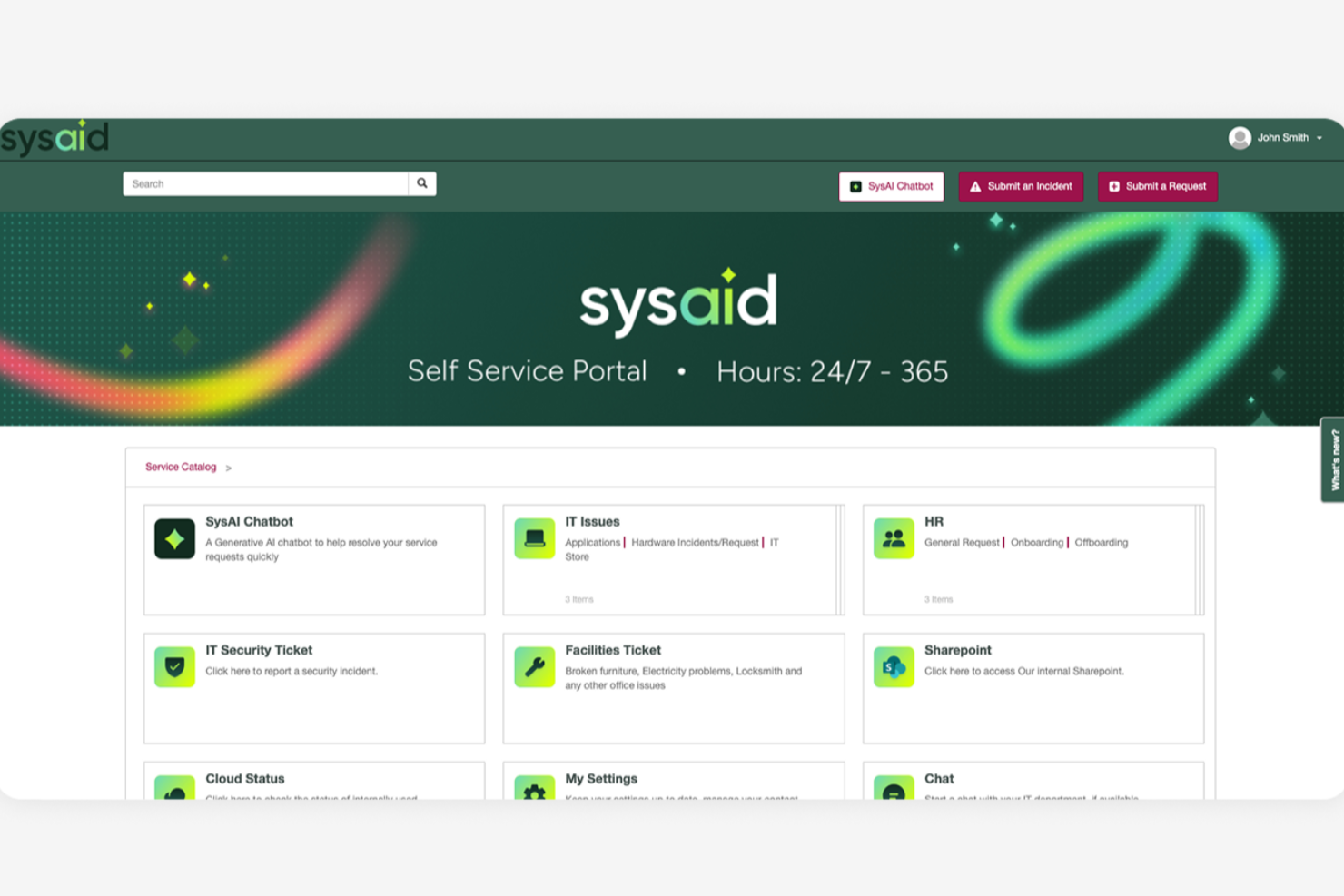
SysAid es una plataforma integral de software de gestión de servicios de TI (ITSM) y mesa de ayuda, diseñada para respaldar las operaciones de TI de organizaciones de diversos tamaños. Ofrece un amplio conjunto de herramientas que ayudan a los equipos a gestionar servicios de TI, solicitudes de soporte e infraestructura desde un sistema centralizado.
Por qué elegí SysAid: Elegí SysAid por sus sólidas capacidades de automatización de servicios de TI, que ayudan a reducir la cantidad de trabajo manual requerido por los equipos de TI. La automatización facilita tareas como el direccionamiento de tickets, la priorización, la escalada y la ejecución de flujos de trabajo, permitiendo que los incidentes y las solicitudes de servicio avancen por el sistema de manera más eficiente. Esto brinda a los equipos de TI más tiempo para centrarse en tareas de mayor valor o estratégicas en lugar de actividades de soporte repetitivas.
SysAid también incluye funcionalidad de autoservicio que ayuda a los usuarios finales a resolver problemas comunes por sí mismos. A través de un portal de autoservicio y una base de conocimientos, los empleados pueden encontrar respuestas, enviar solicitudes o restablecer problemas sin contactar directamente al equipo de TI, lo que puede ayudar a reducir el volumen total de tickets.
Características destacadas e integraciones de SysAid
Las características incluyen gestión de activos, gestión de cambios, gestión de problemas, gestión de incidentes, gestión de solicitudes de servicio, base de conocimientos, informes y analítica, gestión de niveles de servicio, control remoto, gestión de parches, descubrimiento y monitoreo de redes, evaluación comparativa de TI, automatización de flujos de trabajo, catálogo de servicios y gestión de dispositivos móviles.
Las integraciones incluyen Microsoft Active Directory, LDAP, Microsoft Azure, Microsoft 365, Google Workspace, Salesforce, Jira, Slack, Microsoft Teams, Zapier, Zoom, FreshBooks, QuickBooks, Dropbox, OneDrive, AWS y VMware.
Pros and Cons
Pros:
- Interfaz fácil de usar
- Capacidades de automatización completas
- Portal de autoservicio disponible
Cons:
- La configuración puede requerir tiempo
- Los informes podrían ser más personalizables
New Product Updates from SysAid

SysAid Adds Bulk Contract Import
SysAid added bulk contract import to License Manager Essentials, letting admins upload a CSV template, validate entries, and create multiple contracts at once. For more information, visit SysAid's official site.

Ideal para gestión de tickets y soporte impulsados por IA
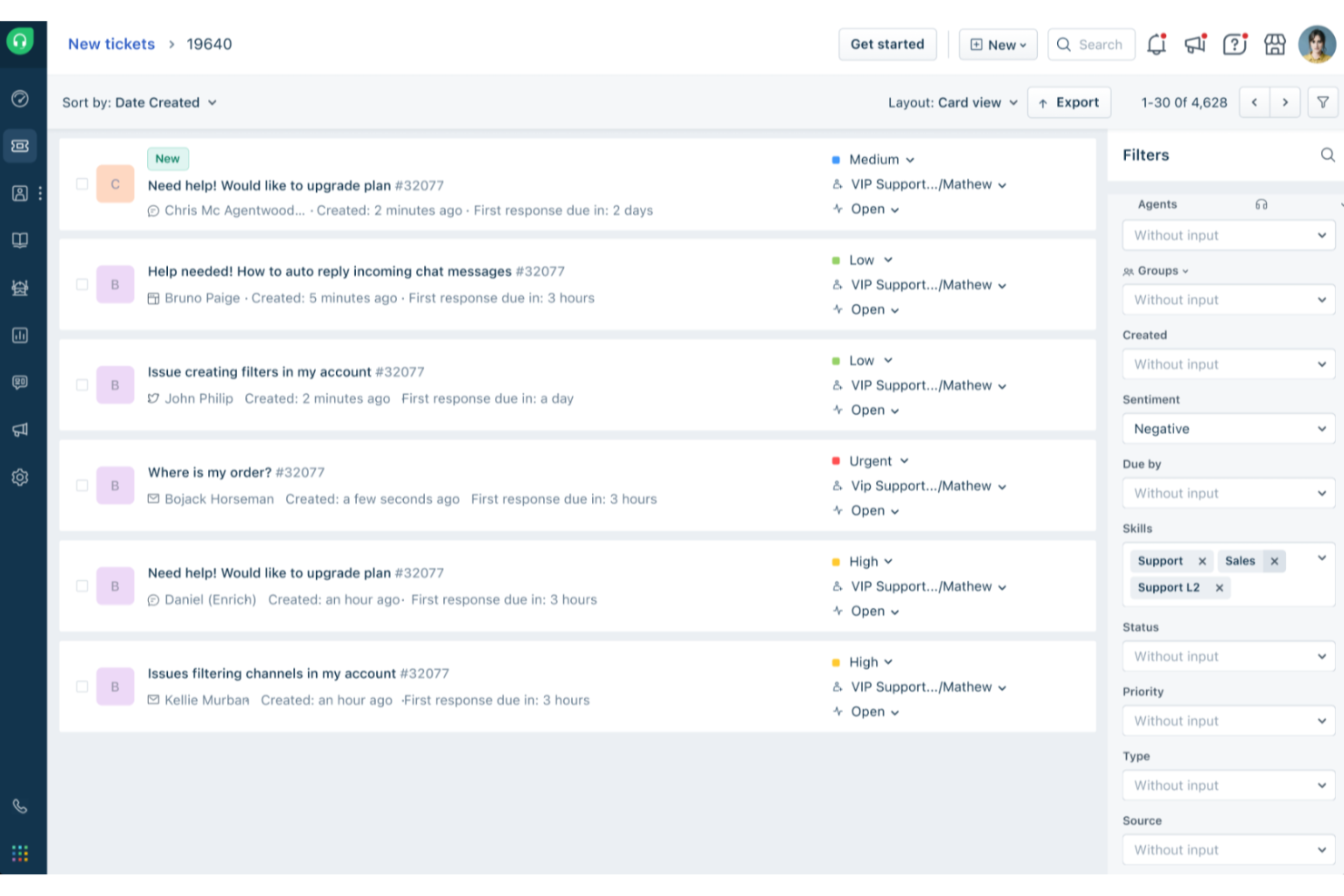
Freshdesk (un producto de Freshworks Inc.) es una plataforma de mesa de ayuda diseñada para respaldar equipos que gestionan solicitudes de servicio a diferentes escalas, incluso tanto para la atención al cliente como para soporte interno. Proporciona herramientas estructuradas que ayudan a los equipos a organizar las solicitudes, rastrear el progreso y mantener la consistencia en las operaciones de soporte.
Por qué elegí Freshdesk: Elegí Freshdesk por la manera en que respalda la gestión de tickets para equipos que manejan grandes volúmenes de solicitudes. La plataforma ofrece automatización integrada y Freddy AI, que puede ayudar con tareas como categorizar y enrutar tickets, contribuyendo a reducir el esfuerzo manual de los equipos de soporte interno.
Este enfoque permite a los agentes dedicar más tiempo a problemas que requieren una investigación más profunda o colaboración, en lugar de actividades administrativas repetitivas.
Características destacadas e integraciones de Freshdesk
Las características incluyen opciones de personalización, informes y análisis, portales de autoservicio, bases de conocimientos, gestión de SLA, soporte multilingüe, herramientas de colaboración y una aplicación móvil.
Las integraciones incluyen Salesforce, Shopify, Slack, Mailchimp, Microsoft Teams, WhatsApp y otras herramientas de terceros comúnmente empleadas por equipos de soporte y operaciones.
Pros and Cons
Pros:
- Funciones sólidas para la gestión de tickets
- Mesa de ayuda de autoservicio
- Automatización y gestión de flujos de trabajo
Cons:
- Falta de informes personalizados
- La base de conocimientos multilingüe está reservada para los planes de nivel superior
New Product Updates from Freshdesk

Freshdesk Adds Voice AI Agents in Freshcaller
Freshdesk introduces Voice AI Agents available through Freshcaller Marketplace apps to handle routine calls and reduce queues. This feature enables automated call handling with real-time, conversational support. For more information, visit Freshdesk's official site.

Mejor sistema en la nube para personalizar servicios interdepartamentales
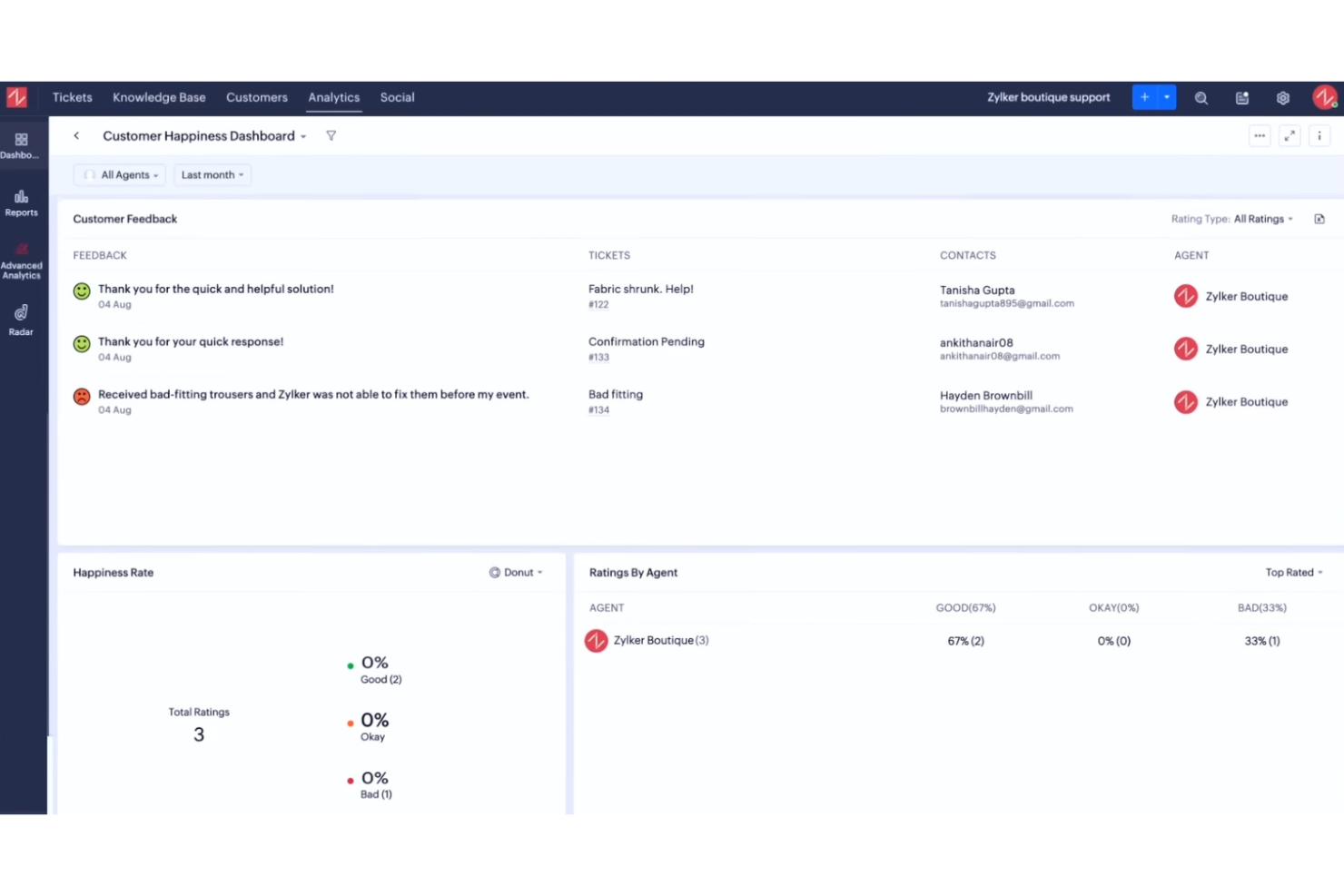
Zoho Desk es una plataforma basada en la nube que ayuda a los equipos a gestionar las operaciones de soporte al cliente entre departamentos. Ofrece a tu empresa un espacio compartido para manejar solicitudes de servicio, organizar la comunicación y mejorar la gestión de respuestas mediante automatización y datos contextuales. Está diseñado para ayudar a los equipos a mantenerse coordinados y ofrecer soluciones más rápidas y personalizadas.
Por qué elegí Zoho Desk: Puedes adaptar Zoho Desk para que se ajuste a los procesos internos de servicio de tu equipo, facilitando la alineación de flujos de trabajo entre departamentos. La plataforma te permite automatizar acciones repetitivas con blueprints, personalizar los formatos de los tickets y definir acuerdos de nivel de servicio que se ajusten a tus políticas internas. Puedes gestionar ciclos complejos de aprobación, hacer un seguimiento del rendimiento a través de paneles de control y dirigir solicitudes según el departamento o la especialización del agente. Esta flexibilidad ayuda a tu equipo a manejar tareas entre departamentos, manteniendo la visibilidad y la coherencia.
Características destacadas e integraciones:
Las características incluyen propiedad compartida de tickets para resolución colaborativa, sugerencias de respuesta impulsadas por IA gracias a Zia, y herramientas integradas para personalizar el centro de ayuda. Puedes configurar centros de ayuda multimarcas, crear reglas de automatización basadas en el contexto y acceder a análisis de rendimiento que muestran cómo los esfuerzos de servicio de tu equipo se alinean con los objetivos internos.
Las integraciones incluyen Zoho CRM, Zoho Books, Zoho Projects, Microsoft Teams, Slack, Google Workspace, Jira, Salesforce, Trello, Shopify y Zapier.
Pros and Cons
Pros:
- Permite personalizar fácilmente los flujos de trabajo
- Permite el enrutamiento interno de tickets
- Ofrece herramientas de IA para respuestas más rápidas
Cons:
- La automatización avanzada requiere capacitación
- Las herramientas de IA necesitan ajustes para mantener precisión

Hiver
Ideal para una configuración sencilla
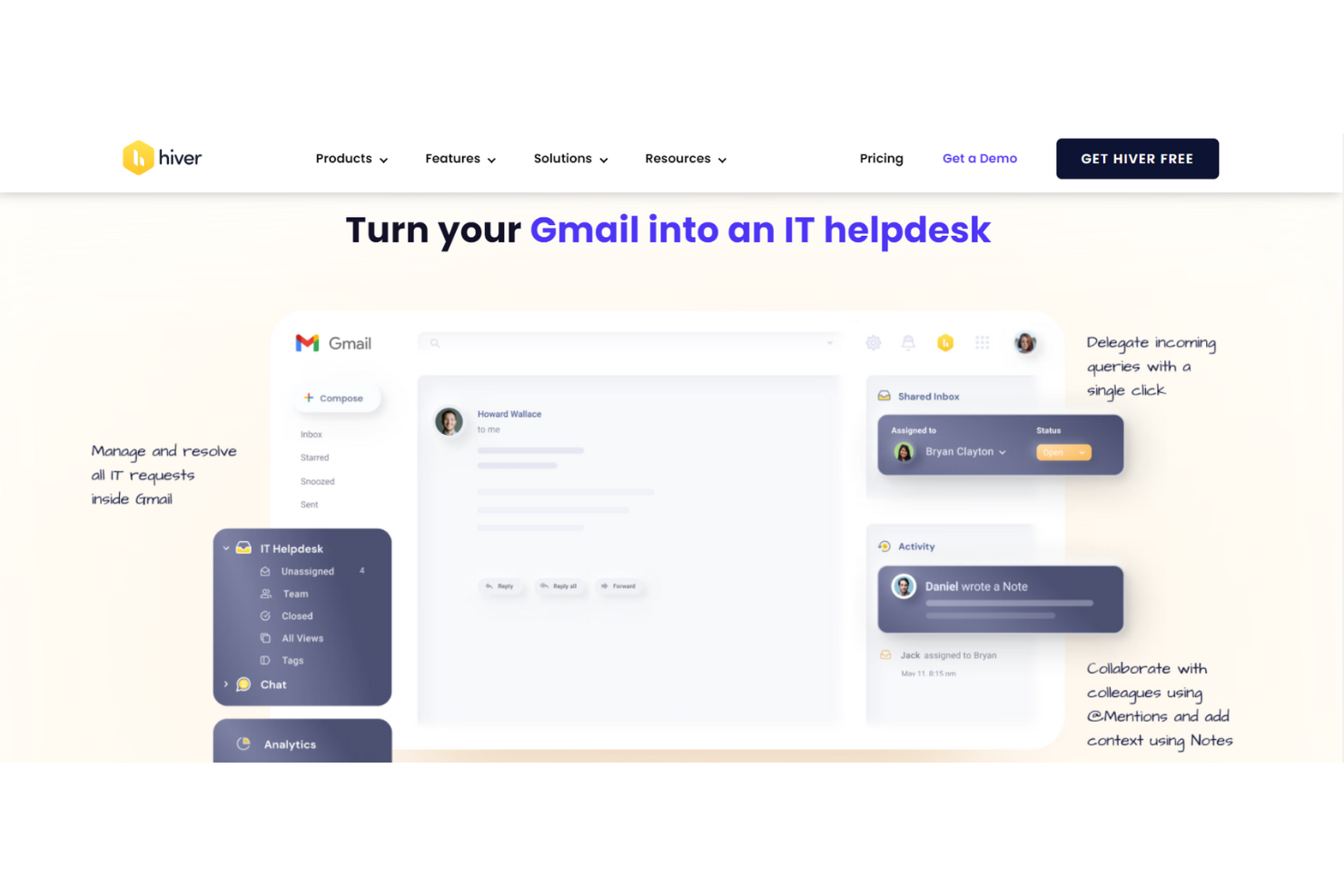
Hiver es una moderna plataforma de mesa de ayuda potenciada por IA que puede utilizarse para soporte interno en todos los equipos. Ya sea gestionando solicitudes de TI de los empleados, atendiendo consultas de RR. HH. o agilizando aprobaciones de finanzas, Hiver te proporciona una bandeja de entrada compartida que actúa como un centro central para toda la comunicación de soporte interno.
Por qué elegí Hiver: Hiver está diseñada para equipos modernos y ágiles que quieren avanzar rápido. Dado que su interfaz similar al correo electrónico resulta familiar para la mayoría, no hay una gran curva de aprendizaje. No necesitas una capacitación extensa para comenzar. Configurar la herramienta solo toma unos minutos. Cuenta con una bandeja de entrada compartida que sirve como el centro principal para todas las consultas de los empleados, con seguimiento de tickets integrado para asegurar que nada quede sin atender. Los equipos también pueden colaborar fácilmente usando notas privadas, @menciones y borradores compartidos, todo dentro de la misma interfaz.
Funciones y integraciones destacadas de Hiver
Funciones incluyen flujos de trabajo de aprobación que facilitan redirigir solicitudes que requieren autorización, como permisos de acceso o aprobaciones de presupuesto. También puedes configurar reglas de automatización para etiquetar, asignar y priorizar tickets según el tipo, ayudando a tu equipo a mantenerse organizado sin esfuerzo manual. El seguimiento de SLA asegura respuestas oportunas, mientras que una base de conocimientos incorporada te permite documentar procesos y políticas internas para que los empleados encuentren respuestas por su cuenta.
Integraciones incluyen Aircall, Asana, Jira, Okta, QuickBooks, Salesforce, Slack, WhatsApp, Zapier y más de 100 otras plataformas.
Pros and Cons
Pros:
- Potentes funciones de colaboración interna
- Soporte al cliente ofrecido por personas reales disponible 24/7 vía chat o correo, en todos los planes (incluido el gratuito)
- Funciones de IA integradas en todas las etapas del recorrido de soporte al cliente
Cons:
- La experiencia móvil no es tan fuerte como la de escritorio
- En comparación con otras plataformas, Hiver ofrece menos integraciones de terceros
New Product Updates from Hiver

Hiver Brings Chat Widget Support to Mobile Apps
Hiver now lets you embed the Hiver Chat Widget in iOS, Android, React Native, and Flutter apps so customers can start chats without leaving your app. For more information, visit Hiver's official site.

HappyFox
Mejor opción para soporte multilingüe tanto a clientes como a compañeros
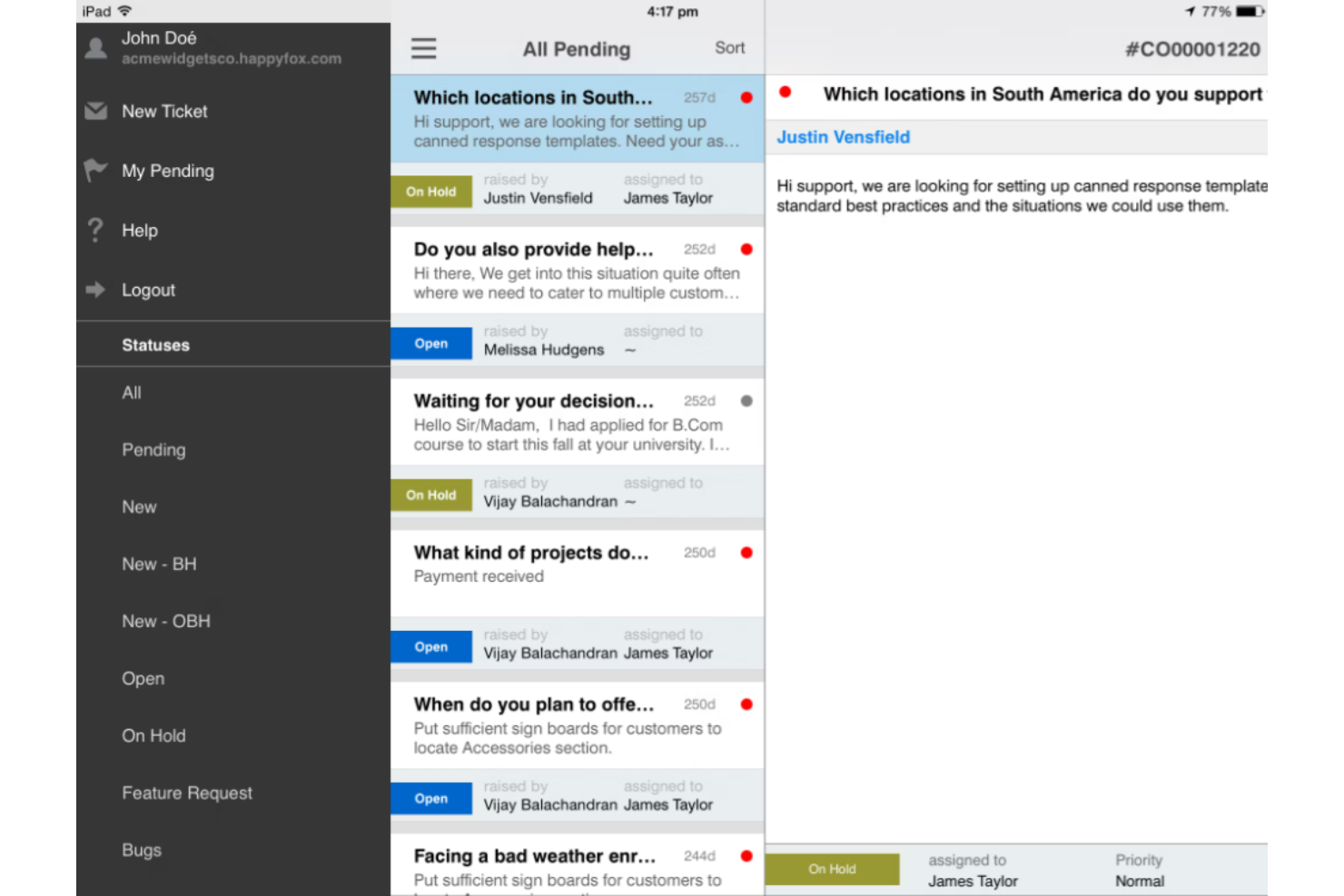
El software de mesa de ayuda HappyFox integra el servicio al cliente y el soporte interno, para que su empresa pueda utilizar una sola herramienta para gestionar ambos aspectos de su organización.
No importa qué idioma hablen su equipo o sus clientes, HappyFox puede ayudarle con soporte multilingüe en 35 idiomas. Con un sistema automatizado de gestión de tickets, los agentes pueden rastrear solicitudes de soporte de los usuarios finales, crear bases de conocimiento internas y externas, y proporcionar comunicación omnicanal a través de mensajes de texto, correo electrónico, voz y redes sociales.
HappyFox es una solución versátil que puede ofrecer opciones para pequeñas y medianas empresas, grandes organizaciones y necesidades a nivel empresarial en diversos sectores, como educación, servicios de TI, comercio minorista, organizaciones sin fines de lucro, aerolíneas, salud y bienes raíces. Ofrecen descuentos para organizaciones sin fines de lucro y educativas.
Características destacadas e integraciones de HappyFox
Características incluyen sistema de tickets, acciones prediseñadas, gestión de tareas, informes de mesa de ayuda, base de conocimientos y automatizaciones. Los usuarios pueden crear una sección de preguntas frecuentes y una base de conocimientos personalizada para necesidades internas y externas.
Integraciones incluyen Azure, Asana, Jira, Microsoft Teams, Okta, Pipedrive, Salesforce, Slack, WhatsApp y Wrike. HappyFox es compatible con integraciones con aplicaciones para contabilidad, automatización, inteligencia empresarial, bots, CRM, gestión de dispositivos y marketing.
Pros and Cons
Pros:
- Escalable a medida que crece la empresa
- Solución personalizable
- Herramientas fáciles de usar
Cons:
- Requisitos de implementación intensivos
- Herramientas de autoformación limitadas

El mejor software de mesa de ayuda satélite para gestionar múltiples marcas en un solo lugar

Vision Helpdesk ofrece cuatro soluciones de mesa de ayuda distintas, incluyendo un sistema básico de tickets para solicitudes de incidentes o servicios, una mesa de servicio ITIL/ITSM para las necesidades del equipo de TI, software de chat en vivo para comunicación en tiempo real y multicompañía, y una opción de mesa de ayuda satélite para gestionar más de una marca en el mismo lugar.
Con la mesa de ayuda satélite, Vision Helpdesk ofrece soporte al cliente y funcionalidad de mesa de servicio de TI para múltiples productos, marcas o empresas en un solo sitio. Sin embargo, incluso gestionando varias empresas desde la misma mesa de ayuda, el sistema mantiene un aislamiento completo para cada categoría, usuario final y equipo de trabajo.
Vision Helpdesk admite licencias en la nube SaaS, descargas de licencias recurrentes y descargas de licencias únicas para adaptarse a las necesidades de su empresa. Cada opción cuenta con un sistema escalonado según la cantidad de agentes en su organización.
Funciones e integraciones distintivas de Vision Helpdesk
Funciones incluyen gestión de incidentes, capacidades multilingües y por zona horaria, gestión de activos CMDB, facturación de incidentes y seguimiento del tiempo, generador de formularios y gestión de cambios. Cada tipo de mesa de ayuda cuenta con características exclusivas.
Integraciones incluyen 2SMS, Active Directory, Clickatell, Clientexec, Drupal, Facebook, Microsoft Office, PayPal, Twitter y WHMCS. Vision Helpdesk también dispone de aplicaciones para iPhone y Android.
Pros and Cons
Pros:
- Gran cantidad de informes en tiempo real
- Requiere poca capacitación
- Solución de software sencilla
Cons:
- La duración de los informes es de hasta tres meses
- Integraciones limitadas
Ideal para personalización sin código

monday service es una plataforma de servicios personalizable para gestionar y automatizar operaciones y procesos de servicio. Ofrece una variedad de soluciones listas para usar para distintos casos de uso de servicios, incluyendo gestión de tickets, soporte multicanal y automatizaciones impulsadas por IA.
Por qué elegí monday service: La configuración sin código del software permite a los usuarios crear flujos de trabajo adaptados a las necesidades únicas de su equipo. Con flujos personalizables, puedes diseñar procesos que se ajusten a la forma en la que tu equipo opera. Además, los tableros visuales te ayudan a ver las solicitudes de soporte en tiempo real y a priorizar tareas en consecuencia.
Características y Conexiones Destacadas de monday service
Características incluyen automatizaciones para que tu equipo pueda centrarse en resolver incidencias en lugar de tareas repetitivas. Notificaciones en tiempo real para mantener informados a los equipos, y herramientas de informes que ofrecen información sobre el rendimiento.
Conexiones incluyen Slack, Zoom, Microsoft Teams, Google Drive, Dropbox, Jira, HubSpot, Salesforce, GitHub y Gmail.
Pros and Cons
Pros:
- Seguimiento visual de solicitudes de soporte
- Flujos de trabajo altamente personalizables
- Escala bien con equipos en crecimiento
Cons:
- Puede requerir tiempo de configuración
- Funcionalidad limitada en la app móvil

Intercom
Ideal para un servicio automatizado que permite rapidez y escalabilidad
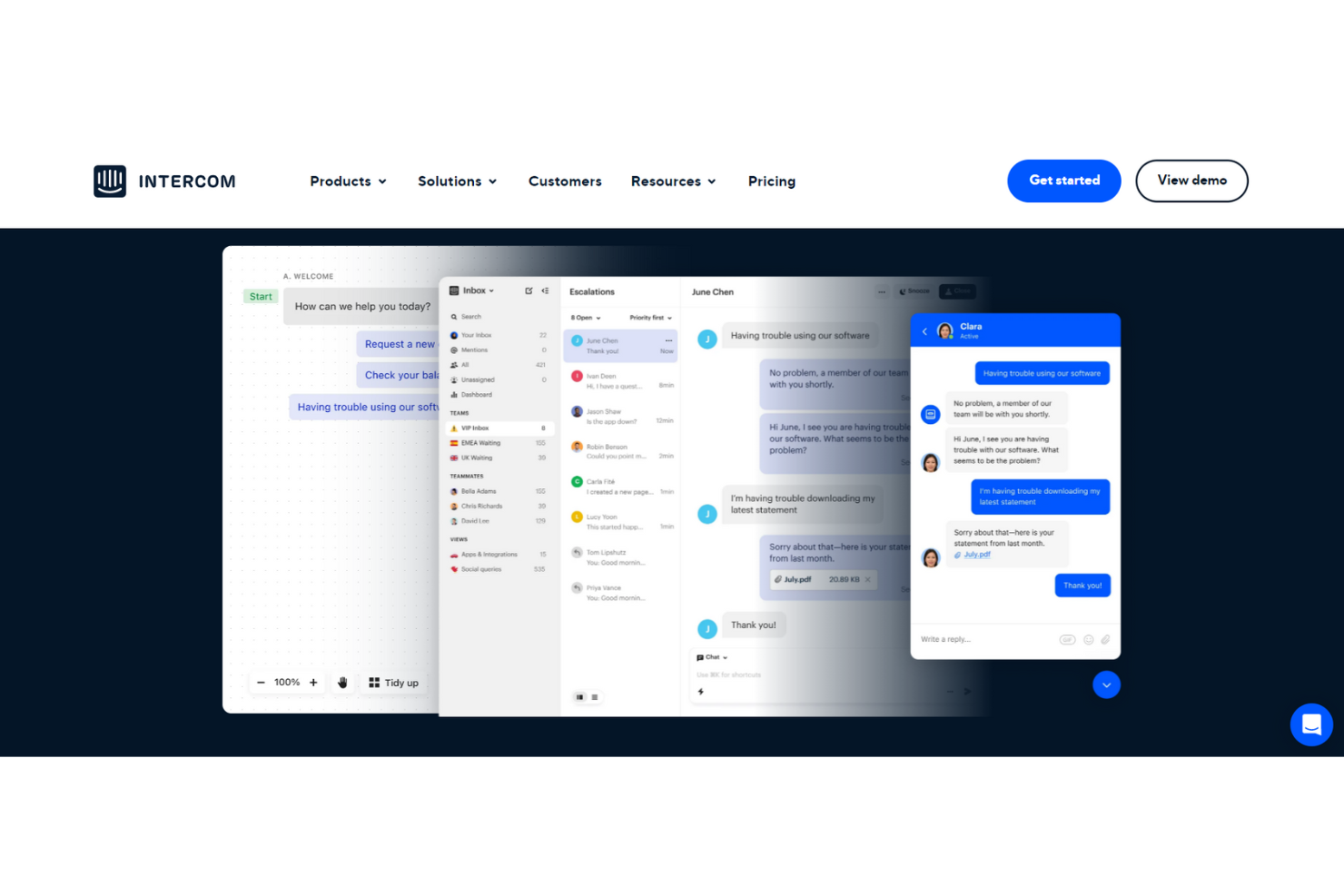
Intercom es una solución integral de servicio al cliente y mesa de ayuda interna que ofrece una experiencia fluida combinando automatización y soporte humano. Esta plataforma proporciona respuestas automáticas que liberan a tu equipo de preguntas repetitivas mediante chatbots y otras herramientas impulsadas por IA.
Con la automatización avanzada del soporte a través de bots de resolución 24/7, Intercom afirma poder ayudar a los equipos de servicio a resolver el 33% de las preguntas comunes. Los estudios de caso de Intercom también muestran que sus soluciones de IA lograron una mejora del 44% en los tiempos de respuesta de los agentes. Este chatbot está disponible en diferentes idiomas y zonas horarias para una cobertura completa.
Intercom da soporte a empresas de todos los tamaños, incluidas startups en etapa inicial, que pueden acceder a Early Stage Academy con un 95% de descuento si califican. Esta plataforma también dispone de soluciones para empresas pequeñas, medianas y grandes en comercio electrónico, educación, salud y servicios financieros.
Características y integraciones destacadas de Intercom
Características incluyen automatización mediante IA, chatbots personalizados, bandejas de entrada compartidas, herramientas de soporte proactivo, mensajería, comunicación por correo electrónico y SMS, artículos de centro de ayuda, herramientas de gestión, encuestas y mensajería transaccional.
Integraciones incluyen Aircall Now, Delighted Inc., Google Calendar, Import, Instagram, Jira Cloud, Marketo, Salesforce, Stripe y WhatsApp.
Pros and Cons
Pros:
- Excelente equipo de soporte
- Navegación y herramientas intuitivas
- Rápido y fácil de aprender
Cons:
- Costoso si se necesita cada servicio por separado
- Precios por módulos adicionales

Mejor mesa de ayuda en la nube para un enfoque 360° en la gestión de servicios TI

ServiceDesk Plus de ManageEngine es una solución de software que combina la gestión de activos de TI y de servicios con CMDB para ofrecer capacidades de nivel empresarial en todos los departamentos, incluidos finanzas, RR. HH. e instalaciones. Disponible tanto en las instalaciones como en la nube, ServiceDesk Plus es de confianza para organizaciones de todo el mundo.
El enfoque holístico de ServiceDesk Plus se centra en la seguridad mediante sus propios centros de datos sin subprocesadores, integraciones nativas profundas con una amplia gama de herramientas de TI y un modelo multiinstancia para una clara segregación de datos y procesos. Esta solución de mesa de ayuda interna está disponible actualmente en 23 idiomas.
ServiceDesk Plus ofrece ediciones flexibles para adaptarse al nivel de madurez de su empresa. Elija entre una plataforma que brinda una mesa de servicio para equipos que no son de TI, una opción con capacidades de ITAM y una solución todo en uno para empresas.
Características y integraciones destacadas de ServiceDesk Plus
Características incluyen gestión multiinstancia, funcionalidades low-code para personalización, gestión de incidentes, gestión de activos, catálogo de servicios, gestión de lanzamientos de TI, gestión de espacios y gestión de cambios.
Integraciones incluyen Jira, Microsoft Outlook, Microsoft Teams, Office 365, TeamViewer, Zoho Cliq, Zoho Flow y Zoho Voice. Los desarrolladores pueden usar APIs públicas basadas en la web para integrar con ServiceDesk Plus.
Pros and Cons
Pros:
- Excelente servicio al cliente
- Automatizaciones administrativas robustas
- Infinitamente configurable
Cons:
- Las configuraciones personalizadas requieren una inversión
- Faltan algunas funcionalidades menores
Otro software de mesa de ayuda interna
Aquí tienes algunas otras opciones de software de mesa de ayuda interna que no entraron en mi lista corta, pero que aún vale la pena revisar:
- Issuetrak
Ideal para la presentación de tickets omnicanal
- InvGate Service Management
Ideal para conectar tickets con activos
- Kayako
Óptimo para ver interacciones internas con colegas
- Guru
Mejor para autoservicio en flujos de trabajo existentes
- Document360
Ideal para crear árboles de decisión
- LiveAgent
Ideal para soporte multilingüe
- Help Scout
Ideal para equipos en crecimiento y empresas en expansión
- Zendesk
Mejor para soporte centralizado de RR. HH. y TI
- Zoho Assist
Ideal para la formación en soporte remoto
- Jitbit Helpdesk
Mejor opción para funcionalidad autoalojada y centrada en el correo electrónico
- OneDesk
Ideal para necesidades de mesa de ayuda a través de la web, la nube y la app móvil


Cómo Evalúo el Software de Mesa de Ayuda Interna
Divido mi evaluación en dos capas: requisitos básicos—gestión de tickets, enrutamiento, acuerdos de nivel de servicio (SLA) y autoservicio—y los diferenciadores que hacen que una herramienta sea la elección correcta para los equipos de soporte al cliente.
Funcionalidad Básica (Condiciones Mínimas para Esta Lista)
Al seleccionar herramientas para mi lista, califico cada una en una escala del 0 (no ofrece la funcionalidad) al 5 (sobresale en esta área) para cada funcionalidad básica listada a continuación. Luego, calculo la puntuación total de la herramienta como un porcentaje. Cada herramienta debe alcanzar una puntuación total mínima del 65% para ser considerada para la inclusión.
- Sistema Interno de Ticketing: Verifico si cada herramienta proporciona una cola interna dedicada para que las solicitudes de los agentes, como restablecimientos de contraseñas o acceso a herramientas, se mantengan separadas de los tickets orientados al cliente.
- Base de Conocimiento: La base de conocimiento debe mostrar respuestas donde los agentes ya trabajan, como sugerir un artículo de resolución de problemas de VPN cuando alguien presenta un ticket de conectividad.
- Enrutamiento y Asignación: Evalúo cómo la herramienta asigna tickets al equipo interno adecuado, ya sea mediante enrutamiento basado en habilidades (como TI vs. RRHH) o distribución balanceada entre turnos.
- Portal de Autoservicio para Empleados: Un buen portal permite a los agentes enviar solicitudes, consultar un catálogo de servicios y hacer seguimiento del estado por sí mismos en lugar de molestar a un gerente por Slack.
- SLA y Automatización de Flujos de Trabajo: Observo si puedes establecer SLAs internos por nivel de prioridad y automatizar las escaladas, como marcar un ticket cuando un agente ha estado bloqueado por más de una hora.
- Informes y Análisis: Los paneles deben seguir KPI internos como tiempo de resolución por categoría y tendencias de problemas recurrentes, para que puedas detectar inconvenientes sistémicos antes de que afecten la satisfacción del cliente.
Una vez que tengo una lista de herramientas que cumplen con estos criterios, considero lo que diferencia a cada plataforma.
Factores Diferenciadores (Lo que Distingue a los Proveedores)
Así es como comparo y contrasto diferentes proveedores:
Características Destacadas
Las integraciones con herramientas de chat son especialmente importantes aquí. Cuando los agentes pueden crear un ticket desde Slack o Microsoft Teams sin cambiar de herramienta, la resolución comienza más rápido. También evalúo las capacidades de desvío mediante IA—herramientas que sugieren automáticamente artículos de la base de conocimiento o generan respuestas a preguntas frecuentes como "¿cómo restablezco mi softphone?" reducen significativamente el volumen de tickets. Un catálogo de solicitudes estructurado es otro diferenciador. Formularios preconfigurados para cosas como cambios de cola, solicitudes de acceso y cambios de turno mantienen las solicitudes organizadas y reducen el ida y vuelta.
Más Allá de las Características
La profundidad de integración es una de las primeras cosas que reviso. Una mesa de ayuda interna que se conecta de manera nativa con tu plataforma CCaaS y sistemas de recursos humanos (HRIS) significa que los agentes obtienen contexto—como rol, ubicación y gerente—sin ingreso manual. La estructura de precios también importa cuando se implementa en un centro de contacto de 200 puestos; analizo si el modelo cobra por agente, empleado o solicitante. El tiempo hasta obtener valor también es crucial. Las plantillas predefinidas de soporte interno y las herramientas de migración de bandejas de entrada pueden marcar la diferencia entre una implementación de dos semanas y un proyecto de dos meses.
Cómo elegir software de mesa de ayuda interna
Es fácil perderse en listas interminables de características y estructuras de precios complejas. Para ayudarte a mantener el enfoque durante tu proceso de selección de software, aquí tienes un checklist de factores a tener en cuenta:
| Factor | Qué tener en cuenta |
|---|---|
| Escalabilidad | ¿Puede el software crecer junto a tu empresa? Considera cuántos usuarios puede soportar y si es capaz de gestionar un número creciente de tickets de manera eficiente. |
| Integraciones | ¿Se conecta con tus herramientas existentes como CRM o sistemas de correo electrónico? Comprueba si tiene integraciones nativas para evitar costosas implementaciones personalizadas. |
| Personalización | ¿Puedes adaptar el software a tus flujos de trabajo? Busca opciones para ajustar los campos de tickets, paneles y reportes para que coincidan con tus procesos. |
| Facilidad de uso | ¿La interfaz es intuitiva para tu equipo? Evita herramientas con una curva de aprendizaje pronunciada que pueda frenar la adopción y la productividad. |
| Implementación y onboarding | ¿Con qué rapidez puedes empezar a trabajar? Evalúa la disponibilidad de guías, tutoriales y soporte para facilitar la transición. |
| Costo | ¿La estructura de precios se ajusta a tu presupuesto? Compara diferentes modelos de precios y revisa si hay costes ocultos como complementos o cargos extra de soporte. |
| Medidas de seguridad | ¿Cumple con tus estándares de seguridad? Busca características como cifrado de datos y controles de acceso para proteger información sensible. |
| Disponibilidad de soporte | ¿Qué tan accesible es la ayuda cuando la necesitas? Considera los horarios de soporte del proveedor, tiempos de respuesta y canales disponibles, como chat o teléfono. |
¿Qué es el software de mesa de ayuda interna?
El software de mesa de ayuda interna es una herramienta que ayuda a las empresas a gestionar y resolver solicitudes internas de soporte de TI. Los profesionales de TI y los equipos de atención al cliente suelen utilizar estas herramientas para mejorar la eficiencia y los tiempos de respuesta. Funciones como la gestión de tickets, la creación de bases de conocimientos y el soporte multicanal ayudan a organizar las solicitudes y proporcionar soluciones rápidas. En general, estas herramientas mejoran la productividad del equipo y aseguran un soporte constante dentro de la organización.
Características
Al seleccionar un software de mesa de ayuda interna, presta atención a las siguientes características clave:
- Gestión de tickets: Organiza y prioriza las solicitudes de soporte para garantizar una resolución oportuna y un flujo de trabajo eficiente.
- Base de conocimientos: Proporciona un repositorio centralizado de información y soluciones para problemas comunes, reduciendo las consultas repetidas.
- Soporte multicanal: Permite gestionar solicitudes desde varios canales de comunicación como correo electrónico, chat y teléfono en un solo lugar.
- Flujos de trabajo automatizados: Optimiza tareas y procesos repetitivos, liberando tiempo para cuestiones más complejas.
- Paneles personalizables: Ofrece vistas y métricas adaptadas para supervisar el rendimiento y rastrear indicadores clave de soporte.
- Capacidad de integración: Se conecta con sistemas existentes como CRM o correo electrónico para ofrecer una experiencia sin interrupciones.
- Salvaguardas de seguridad: Protege los datos sensibles con funciones como cifrado y controles de acceso.
- Reportes y análisis: Proporciona información sobre las operaciones de soporte, ayudando a los equipos a identificar tendencias y mejorar la calidad del servicio.
- Portales de autoservicio: Permite a los usuarios encontrar soluciones por sí mismos, reduciendo la carga de trabajo de los equipos de soporte.
- Acceso mediante aplicación móvil: Permite a los equipos de soporte gestionar y responder a solicitudes en movimiento, garantizando servicio continuo.
Beneficios
Implementar un software de mesa de ayuda interna ofrece varios beneficios para tu equipo y tu empresa. Aquí te mencionamos algunos que puedes esperar:
- Mayor eficiencia: Automatiza tareas repetitivas y organiza solicitudes, ayudando a tu equipo a resolver los problemas más rápidamente.
- Comunicación mejorada: Centraliza las interacciones de diferentes canales, asegurando que nada se pase por alto y mejorando los tiempos de respuesta.
- Mayor productividad: Permite que los miembros del equipo se concentren en problemas complejos al ofrecer opciones de autoservicio y bases de conocimientos para preguntas comunes.
- Mejor seguridad de datos: Protege la información sensible mediante funciones de seguridad como cifrado y controles de acceso.
- Análisis informativos: Ofrece información basada en datos sobre las operaciones de soporte, permitiendo tomar decisiones informadas y mejorar el servicio.
- Escalabilidad: Soporta equipos en crecimiento y un aumento en el volumen de solicitudes, adaptándose a las necesidades de tu empresa a lo largo del tiempo.
- Empoderamiento del usuario: Proporciona herramientas como portales de autoservicio, permitiendo que los usuarios resuelvan problemas de manera independiente y reduzcan la carga al personal de soporte.
Costos y Precios
Seleccionar un software de mesa de ayuda interna requiere comprender los diferentes modelos y planes de precios disponibles. Los costos varían en función de las características, el tamaño del equipo, los complementos y más. La siguiente tabla resume los planes comunes, sus precios promedio y las características típicas incluidas en las soluciones de software de mesa de ayuda interna:
Tabla comparativa de planes para software de mesa de ayuda interna
| Tipo de plan | Precio promedio | Características comunes |
|---|---|---|
| Plan gratuito | $0 | Gestión básica de tickets, reporte limitado y soporte comunitario. |
| Plan personal | $5-$25/user/month | Gestión de tickets, reportes básicos, soporte por correo electrónico y una pequeña base de conocimientos. |
| Plan empresarial | $30-$60/user/month | Reportes avanzados, soporte multicanal, integraciones y características de automatización. |
| Plan corporativo | $70-$150/user/month | Paneles personalizables, soporte prioritario, seguridad avanzada y análisis completos. |
Preguntas frecuentes sobre software de mesa de ayuda interna
Aquí tienes algunas respuestas a preguntas comunes sobre el software de mesa de ayuda interna:
¿Cuál es la diferencia entre el software de mesa de ayuda interna y externa?
El software de mesa de ayuda interna está diseñado para gestionar y soportar solicitudes e incidencias de TI internas dentro de una organización, mientras que el software de mesa de ayuda externa se enfoca en el soporte y servicio al cliente para personas ajenas a la empresa. Los sistemas internos suelen integrarse con herramientas específicas de la compañía y gestionan consultas de empleados, mientras que los sistemas externos están enfocados al servicio al cliente, incorporando frecuentemente integraciones con CRM y portales orientados a clientes.
¿El software de mesa de ayuda interna puede ser utilizado por equipos no relacionados con TI?
Sí, el software de mesa de ayuda interna puede adaptarse para ser utilizado por equipos como recursos humanos o gestión de instalaciones. Estos equipos pueden usar la herramienta para administrar solicitudes internas, como incorporación de nuevos empleados o gestión de incidencias de mantenimiento en la oficina. La flexibilidad de estos programas permite que varios departamentos personalicen flujos de trabajo, garantizando una gestión eficiente de solicitudes en toda la organización.
¿Es necesario capacitar al personal en el nuevo software de mesa de ayuda?
Sí, la capacitación es fundamental al implementar un nuevo software de mesa de ayuda para asegurar que tu equipo pueda utilizar la herramienta de manera efectiva. Una formación adecuada ayuda al personal a entender cómo registrar solicitudes, gestionar tickets y aprovechar funciones como los reportes y la analítica. Invertir tiempo en la formación desde el inicio puede resultar en una mejor adopción y hará a tu equipo más eficiente a largo plazo.
¿Qué sigue?
Si estás investigando opciones de software de mesa de ayuda interna, conéctate con un asesor de SoftwareSelect para obtener recomendaciones gratuitas.
Llenas un formulario y tienes una charla breve donde se analizan los detalles de tus necesidades. Luego recibirás una lista corta de software para revisar. Incluso te acompañarán durante todo el proceso de compra, incluyendo la negociación de precios.