

El futuro de las colas: los 10 mejores sistemas de gestión de colas de 2026

Mejores sistemas de gestión de colas: selección


Navegar por el mundo de los sistemas de gestión de colas puede resultar abrumador, pero he estado en tu situación, buscando la mejor herramienta para agilizar las colas y mejorar la experiencia del cliente. Un sistema de gestión de colas coordina eficazmente el orden y la eficiencia del flujo de clientes.
Con un sistema de este tipo, las empresas pueden reducir considerablemente los tiempos de espera y crear un entorno más satisfactorio para los clientes. He visto la tensión que generan las largas colas y los clientes descontentos; estas herramientas están diseñadas para aliviar precisamente esos problemas. Explora las opciones; creo que encontrarás la solución perfecta para tus necesidades.
Por qué confiar en nuestras recomendaciones de software
Nuestro equipo lleva probando y evaluando software desde 2012. Como líderes de CX, sabemos lo difícil —y lo importante— que es elegir el software adecuado.
Para esta guía, evaluamos las herramientas mediante pruebas prácticas e investigación independiente, puntuando las herramientas según nuestros criterios de selección.
Nuestras reseñas reflejan nuestro criterio editorial humano, no un discurso de ventas.
Resumen de los mejores sistemas de gestión de colas
| Tool | Best For | Trial Info | Price | ||
|---|---|---|---|---|---|
| 1 | Mejor para instituciones del sector público | Not available | Precio a consultar | Website | |
| 2 | Ideal para organizar colas de soporte multicanal | Prueba gratuita disponible | Desde $25/usuario/mes (facturado anualmente) | Website | |
| 3 | Ideal para enrutamiento inteligente de llamadas y control de flujos | Prueba gratuita de 14 días disponible | Desde $25/usuario/mes (facturado anualmente) | Website | |
| 4 | Ideal para necesidades de programación de citas | Plan gratuito limitado disponible | Desde $25/usuario/mes (facturación anual) | Website | |
| 5 | Ideal para obtener información sobre el servicio al cliente | Prueba gratuita de 14 días | Desde $30/usuario/mes (facturado anualmente) | Website | |
| 6 | La mejor para control de tráfico en línea | Not available | Desde $25/usuario/mes (facturación anual) | Website | |
| 7 | Mejor para el enrutamiento de tickets impulsado por IA | Prueba gratuita de 14 días | Desde $9/asiento/mes (facturado anualmente) | Website | |
| 8 | Mejor para la gestión combinada de citas y filas | Demo gratuita disponible | Precio a consultar | Website | |
| 9 | Ideal para la gestión de filas en múltiples plataformas | Prueba gratuita de 14 días | Precios a consultar | Website | |
| 10 | Mayor flexibilidad de integración | Not available | Desde $15/usuario/mes (facturado anualmente) | Website |
Análisis de los mejores sistemas de gestión de colas

WaitWell
Mejor para instituciones del sector público
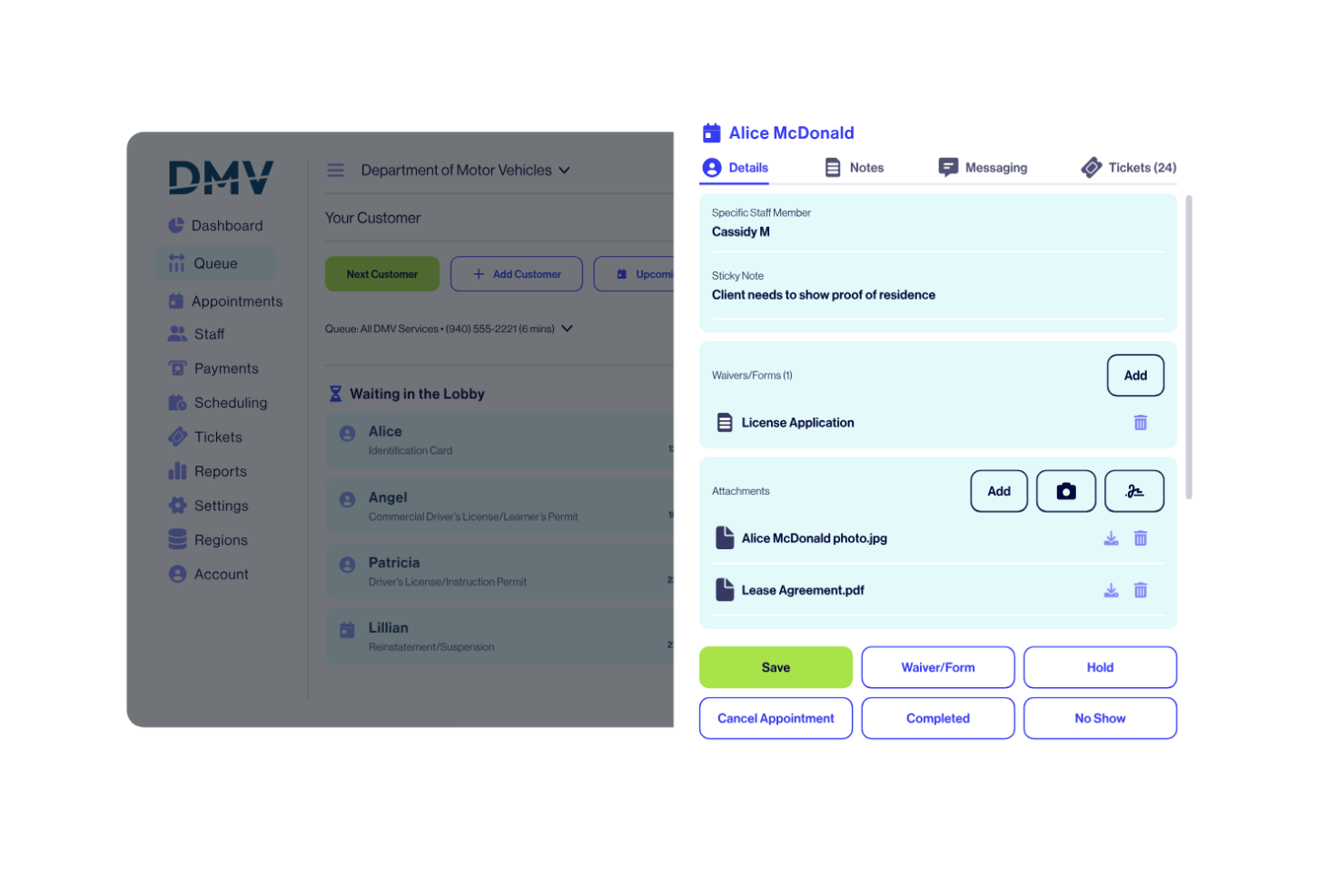
WaitWell es un sistema de gestión de filas diseñado para organizaciones que necesitan listas de espera digitales, programación de citas y análisis del flujo de clientes para gestionar visitas presenciales.
¿Para quién es mejor WaitWell?
WaitWell es ideal para instituciones del sector público como oficinas gubernamentales, autoridades sanitarias y universidades que gestionan un alto volumen de visitantes presenciales.
Por qué elegí WaitWell
He incluido WaitWell en mis selecciones principales porque es uno de los pocos sistemas de gestión de filas construidos pensando específicamente en las demandas de la prestación de servicios en el sector público. Me gustan especialmente las funciones de accesibilidad del servicio—WaitWell admite atención multilingüe y adaptaciones de accesibilidad, lo cual es importante cuando se atiende a un público diverso en un DMV, una oficina municipal o un centro universitario de atención integral. El panel de control para múltiples ubicaciones permite a los administradores configurar flujos de trabajo únicos, tipos de servicio y métodos de registro por ubicación, mientras siguen monitoreando los tiempos de espera y volúmenes de servicio de todos los sitios en una sola vista. La función de priorización de tickets ayuda al personal a dirigir a los ciudadanos según la urgencia del servicio o el tipo de cita, lo cual es esencial para gestionar una mezcla de visitantes sin cita y con reserva previa en una ventanilla gubernamental de alta demanda.
Características clave de WaitWell
- Gestión virtual de filas: Los clientes se unen a la fila mediante código QR, enlace web o kiosco en el lugar y reciben actualizaciones por SMS/correo electrónico sobre su estado en la espera.
- Mensajería bidireccional: El personal puede enviar mensajes a los clientes directamente desde la pantalla de la fila para responder preguntas o solicitar documentos antes del servicio.
- Cobro previo al servicio: Los clientes pueden pagar por servicios antes de llegar al unirse a la fila o al reservar una cita.
- Programación de personal: Crea y administra los horarios del personal con sincronización en tiempo real con la disponibilidad de citas, por lo que los horarios de reserva se actualizan automáticamente cuando cambian los turnos.
Integraciones de WaitWell
Las integraciones nativas incluyen Salesforce, HubSpot, Medi EHR, Charmhealth, Oracle, Zoom, Teams, Google Calendar y Twilio. WaitWell ofrece una API para integraciones personalizadas.
Pros and Cons
Pros:
- Se integra bien con otros softwares del sector público
- Capacidad para manejar grandes multitudes de manera eficiente
- Diseñado específicamente para instituciones del sector público
Cons:
- Potencial dependencia excesiva de integraciones de terceros
- Puede que no sea tan adecuado para empresas del sector privado

Ideal para organizar colas de soporte multicanal
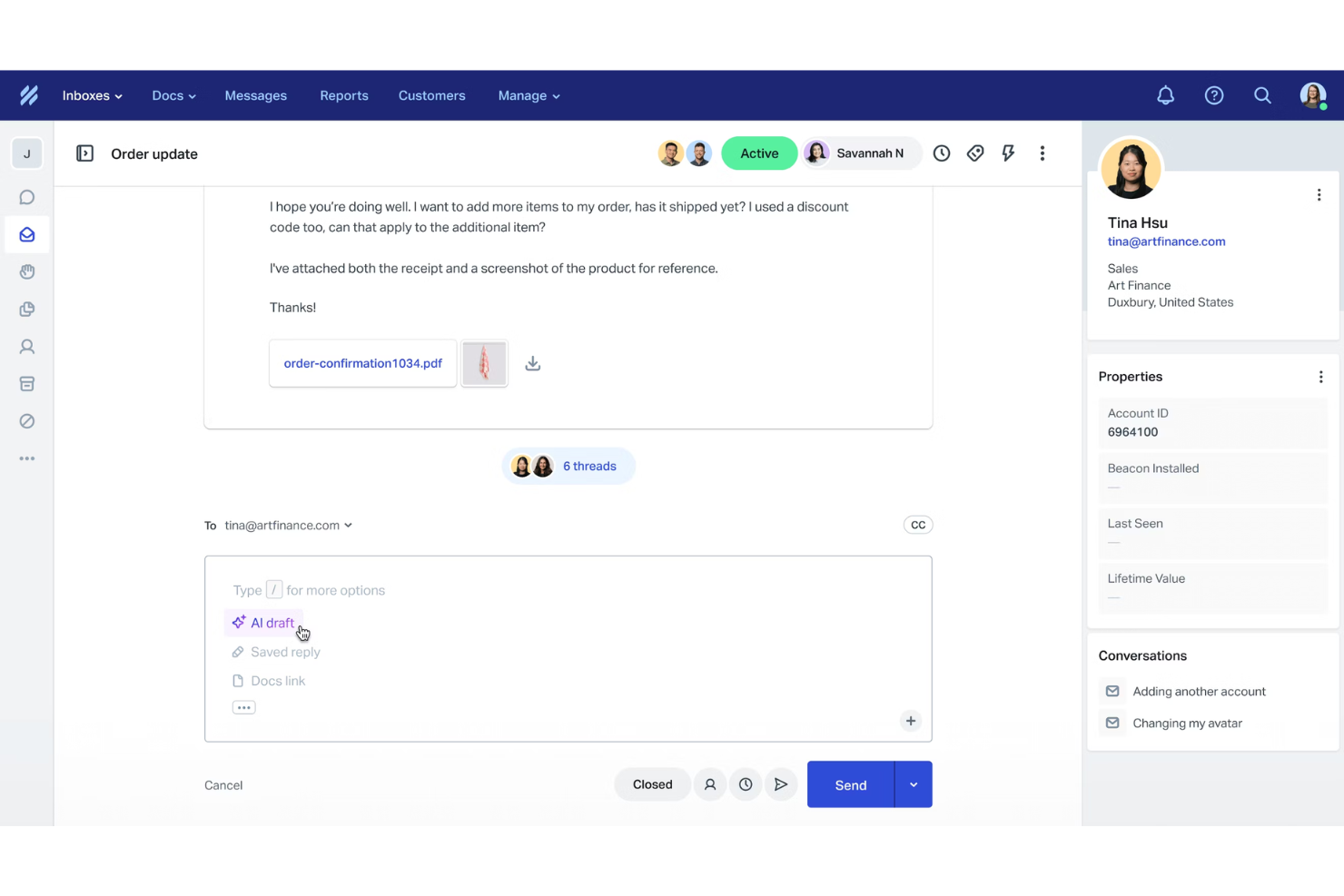
Help Scout es una plataforma de atención al cliente diseñada para gestionar colas de soporte multicanal, combinando buzones de entrada compartidos, chat en vivo y herramientas de base de conocimientos para equipos de soporte.
¿Para quién es mejor Help Scout?
Help Scout es ideal para equipos de soporte pequeños y medianos que gestionan solicitudes de clientes a través de correo electrónico, chat y canales sociales desde un solo espacio de trabajo.
Por qué elegí Help Scout
Help Scout se gana su lugar en mi lista por la manera en que consolida el correo electrónico, chat en vivo, teléfono y redes sociales en un solo buzón compartido, convirtiéndolo en una de las configuraciones de colas multicanal más organizadas con las que he trabajado. Me gusta especialmente la función de Vistas personalizadas, que permite a mi equipo filtrar la cola según condiciones como 'esperando más de 24 horas' o 'cliente VIP' para poder priorizar sin tener que buscar en una bandeja de entrada desordenada. La detección de colisiones es otra función esencial para mí—señala cuando dos agentes están viendo la misma conversación, reduciendo respuestas duplicadas en colas muy activas.
Funciones clave de Help Scout
- Automatización de flujos de trabajo: Configura automatizaciones basadas en reglas para etiquetar, asignar o cerrar conversaciones según condiciones como remitente, asunto o palabra clave.
- Respuestas guardadas: Almacena respuestas preescritas a preguntas frecuentes que los agentes pueden insertar con un solo clic.
- Perfiles de clientes: Extrae detalles de contacto e historial de conversaciones desde aplicaciones conectadas para que los agentes tengan el contexto completo antes de responder.
- Borradores con IA: Genera automáticamente propuestas de respuesta basadas en el contenido de la conversación entrante.
Integraciones de Help Scout
Help Scout ofrece integraciones nativas con Slack, HubSpot, Salesforce, Jira, Shopify, Mailchimp, Google Workspace, Microsoft 365 y WooCommerce. También se conecta con Zapier y proporciona una API para integraciones personalizadas.
Pros and Cons
Pros:
- Fácil consolidación de mensajes multicanal
- Informes y analíticas completas
- Herramientas de IA integradas para respuestas más rápidas
Cons:
- Algunas funciones avanzadas sólo en planes superiores
- Personalización limitada en los planes más bajos
New Product Updates from Help Scout

Help Scout Adds Automatic Conversation Reassignment
Help Scout can now automatically unassign conversations when the assigned teammate has been away long enough, keeping replies moving so others can pick them up. For more information, visit Help Scout's official site.
 .
.
Ideal para enrutamiento inteligente de llamadas y control de flujos
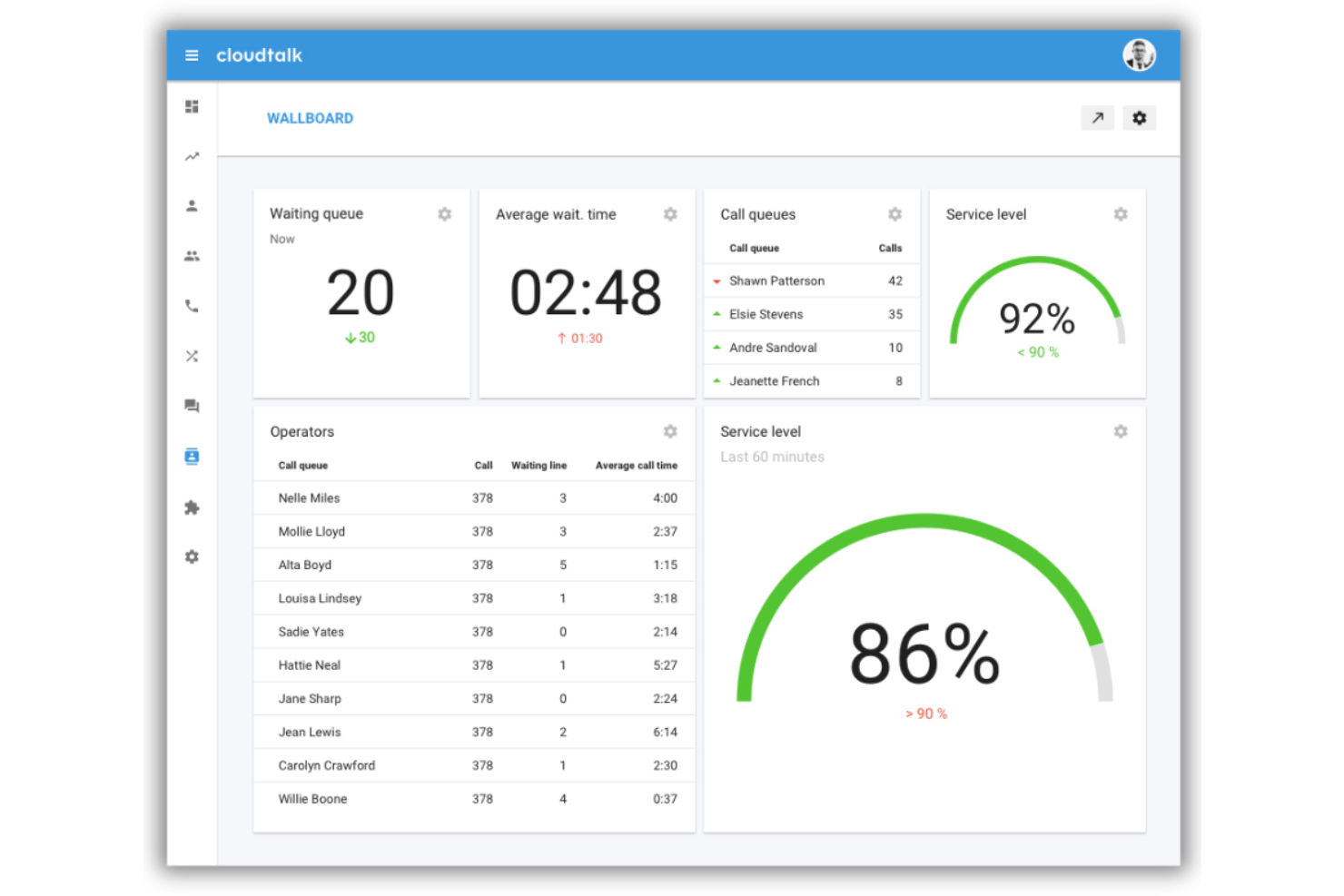
CloudTalk es una plataforma de centro de llamadas basada en la nube que combina en un solo sistema el enrutamiento de llamadas impulsado por IA, el diseño visual de flujos de llamadas, IVR, gestión de colas basadas en habilidades y monitoreo en tiempo real, diseñada para equipos de soporte y ventas.
¿Para Quién es Mejor CloudTalk?
CloudTalk es ideal para pymes en crecimiento que gestionan equipos de soporte entrante o ventas salientes que requieren un enrutamiento de llamadas estructurado sin la complejidad de nivel empresarial.
Por Qué Elegí CloudTalk
CloudTalk gana su lugar en mi lista corta por el nivel de control que te ofrece sobre la lógica de enrutamiento de llamadas, sin necesidad de un desarrollador para configurarlo. Me encanta el Diseñador Visual de Flujos de Llamadas: puedes construir árboles IVR de múltiples ramas, configurar condiciones según el horario laboral y crear carriles prioritarios de cola para clientes VIP, todo en un mismo lienzo de arrastrar y soltar. El enrutamiento basado en habilidades garantiza que los clientes lleguen al agente más capacitado para atenderlos, y no solo al que esté libre primero.
Principales Funciones de CloudTalk
- Monitoreo de llamadas en vivo: Los supervisores pueden escuchar, susurrar o intervenir en llamadas en curso para capacitación y escalamiento en tiempo real.
- Inteligencia de conversaciones con IA: Las llamadas se transcriben automáticamente con análisis de sentimiento y etiquetado inteligente de temas.
- Analítica y paneles en tiempo real: Supervisa el desempeño de las colas, el estado de los agentes y llamadas perdidas con tableros personalizables.
- Soporte internacional de SMS/MMS: Envía y recibe mensajes a nivel global, incluyendo capacidades para WhatsApp y fax.
Integraciones de CloudTalk
CloudTalk ofrece más de 95 integraciones nativas, incluyendo Salesforce, HubSpot, Pipedrive, Slack, Microsoft Teams, Zendesk, Intercom, Freshdesk y Zoho CRM, y una API disponible para integraciones personalizadas.
Pros and Cons
Pros:
- Constructor IVR de arrastrar y soltar con lógica avanzada
- Priorización de colas según las habilidades del agente
- Ofrece monitoreo de llamadas en tiempo real y herramientas para supervisores
Cons:
- Retrasos ocasionales en la conexión de audio de llamada
- Soporte limitado para hardware telefónico local

Ideal para necesidades de programación de citas
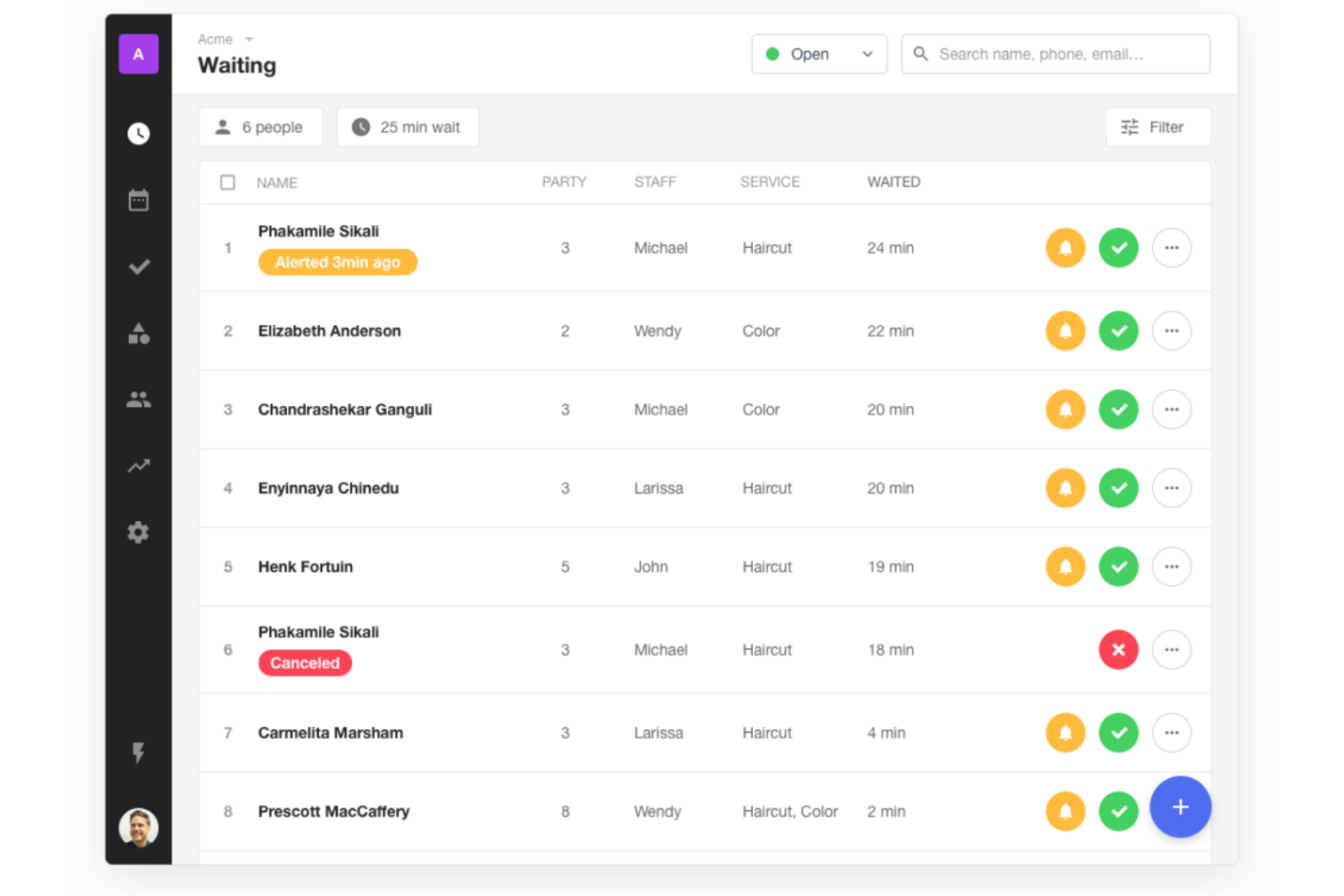
Waitwhile es un sistema de gestión de colas que te permite crear listas de espera virtuales, gestionar registros de clientes, automatizar notificaciones y manejar la programación de citas desde una sola plataforma.
¿Para quién es mejor Waitwhile?
Waitwhile es ideal para negocios de servicios como minoristas, centros de salud y oficinas gubernamentales que necesitan gestionar tanto colas de atención espontánea como citas programadas.
Por qué elegí Waitwhile
Elegí Waitwhile como uno de los mejores porque sus herramientas de programación de citas van mucho más allá de una reserva básica. Me gusta cómo puedes crear páginas de reservas personalizadas con franjas horarias específicas por servicio, asignaciones de personal y direccionamiento por ubicación, asegurando que los clientes siempre lleguen con la persona adecuada. Waitwhile también te permite configurar tiempos de reserva entre citas y enviar recordatorios automáticos por SMS o correo electrónico, lo que reduce las ausencias sin necesidad de seguimiento manual.
Características clave de Waitwhile
- LineSync: Combina listas de espera para clientes espontáneos y citas programadas en un solo flujo para que tu equipo gestione ambas desde una sola vista.
- Estimación de tiempo de espera WaitIQ AI: Utiliza aprendizaje automático para predecir los tiempos de espera a partir de datos en tiempo real e históricos.
- Control de ocupación: Supervisa en tiempo real la cantidad de visitantes en tu ubicación en relación con la capacidad establecida.
- Kiosco de auto registro y check-in: Permite a los clientes unirse a una lista de espera o registrar su llegada en un dispositivo kiosco sin intervención del personal.
Integraciones de Waitwhile
Waitwhile ofrece integraciones nativas con Google Calendar, Outlook, Square, Shopify y Salesforce. También se conecta con Zapier y proporciona una API para integraciones personalizadas.
Pros and Cons
Pros:
- Información en tiempo real para una mejor gestión de colas
- Integraciones completas con plataformas populares
- Interfaz fácil de usar que simplifica el proceso de citas
Cons:
- Puede ser demasiado completo para operaciones muy pequeñas
- La facturación anual puede no adaptarse a todos los negocios

Qminder
Ideal para obtener información sobre el servicio al cliente

Qminder es un sistema de gestión de colas que te permite gestionar registros digitales, supervisar los tiempos de espera en tiempo real y hacer un seguimiento de la actividad del servicio en varias ubicaciones.
¿Para quién es más adecuado Qminder?
Qminder es una buena opción para empresas orientadas al servicio, como comercios minoristas, centros de atención médica y oficinas gubernamentales que gestionan un gran volumen de tráfico de clientes presenciales.
Por qué elegí Qminder
Qminder ocupa un lugar en mi lista de favoritos por la gran visibilidad que ofrece sobre el rendimiento del servicio. Me gusta especialmente el panel de análisis en tiempo real, que muestra los tiempos de espera, la duración de los servicios y el flujo de visitantes a medida que ocurren, para que mi equipo pueda detectar los cuellos de botella antes de que se agraven. Los informes de información del servicio desglosan el rendimiento por ubicación, miembro del personal y hora del día, lo que facilita identificar exactamente dónde se producen las demoras. También considero útil la función de comentarios de los visitantes para relacionar directamente los datos de las colas con las puntuaciones de satisfacción del cliente.
Funciones principales de Qminder
- Quiosco de registro de autoservicio: Convierte cualquier iPad en una estación de registro donde los visitantes pueden registrarse por sí mismos y ser dirigidos automáticamente al servicio o departamento adecuado.
- Registro remoto: Permite que los clientes se incorporen a la cola antes de llegar mediante un código QR o un sitio web para visitantes, para que puedan esperar fuera en lugar de abarrotar el vestíbulo.
- Pantalla de TV de la sala de espera: Muestra actualizaciones en directo de la cola en una pantalla de la sala de espera para mantener informados a los visitantes sobre su posición y el tiempo de espera previsto.
- Flujos de servicio configurables: Configura rutas personalizadas para personas sin cita, citas y visitantes prioritarios según el tipo de servicio o el motivo de la visita.
Integraciones de Qminder
Qminder ofrece integraciones nativas con Twilio, Zendesk y Salesforce, además de una API para integraciones personalizadas.
Pros and Cons
Pros:
- Interfaz fácil de usar, accesible incluso para quienes no tienen muchos conocimientos tecnológicos
- Integración sencilla con diversas herramientas de CRM y comentarios
- Análisis exhaustivos de las experiencias de servicio al cliente
Cons:
- Podría resultar excesivo para empresas con necesidades limitadas de interacción con los clientes
- Puede considerarse costoso para pequeñas empresas o empresas emergentes

Queue-it
La mejor para control de tráfico en línea
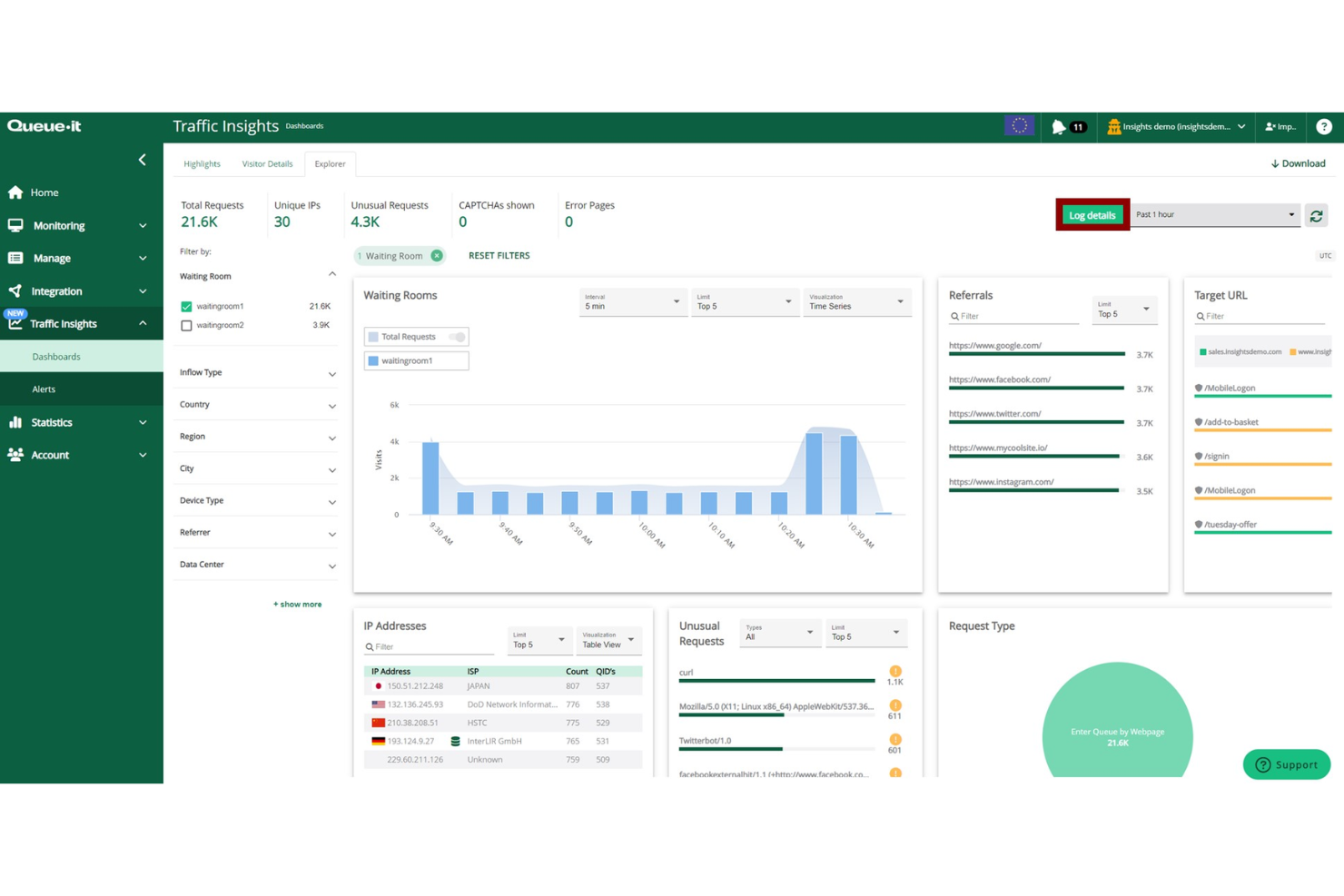
Queue-it es una plataforma de sala de espera virtual para gestionar colas en línea, que ofrece control de tráfico en tiempo real, personalización de colas y análisis para entornos digitales de alta demanda.
¿Para quién es mejor Queue-it?
Queue-it es adecuado para organizaciones de comercio electrónico, venta de entradas y sector público que experimentan picos de tráfico en línea previsibles o inesperados.
Por qué elegí Queue-it
Queue-it está en mi lista de finalistas porque brinda control directo y en tiempo real sobre cómo fluye el tráfico hacia tu sitio durante períodos de máxima demanda. La plataforma GO Queue-it te permite regular el tráfico al alza o a la baja en el momento, mediante API o panel, sin tocar tu infraestructura subyacente. La sala de espera protegida las 24/7 permanece inactiva hasta que el tráfico alcanza el umbral que defines; entonces se activa automáticamente para evitar caídas antes de que ocurran. Queue-it también permite proteger cuellos de botella específicos, como las acciones de “Agregar al carrito” o los gateways de pago, en lugar de poner en cola a todo tu sitio, lo que mantiene una experiencia fluida para los visitantes que no acceden a esos puntos protegidos.
Características clave de Queue-it
- Sala de espera solo por invitación: Controla el acceso a ventas exclusivas o eventos de acceso anticipado verificando a los visitantes mediante autenticación de dos factores antes de que entren en la cola.
- Página de cuenta regresiva previa a la cola: Reúne a los visitantes tempranos en una página de cuenta regresiva personalizada antes de que comience una venta programada y luego asígnalos aleatoriamente a la cola en el lanzamiento.
- Sala de espera multilingüe: Muestra la sala de espera en más de 50 idiomas para adaptar la experiencia a tus mercados objetivo.
- Transferencia de cola a móvil: Permite que los visitantes que han comenzado a hacer la cola en escritorio transfieran su lugar a un dispositivo móvil sin perder su posición.
Integraciones de Queue-it
Queue-it ofrece conectores y admite integraciones mediante API para configuraciones personalizadas.
Pros and Cons
Pros:
- Gestiona picos repentinos de tráfico en línea
- Personalización de la marca en la sala de espera
- Colas justas para todos los visitantes
Cons:
- La configuración puede resultar compleja al inicio
- Requiere una planificación de tráfico clara
Mejor para el enrutamiento de tickets impulsado por IA
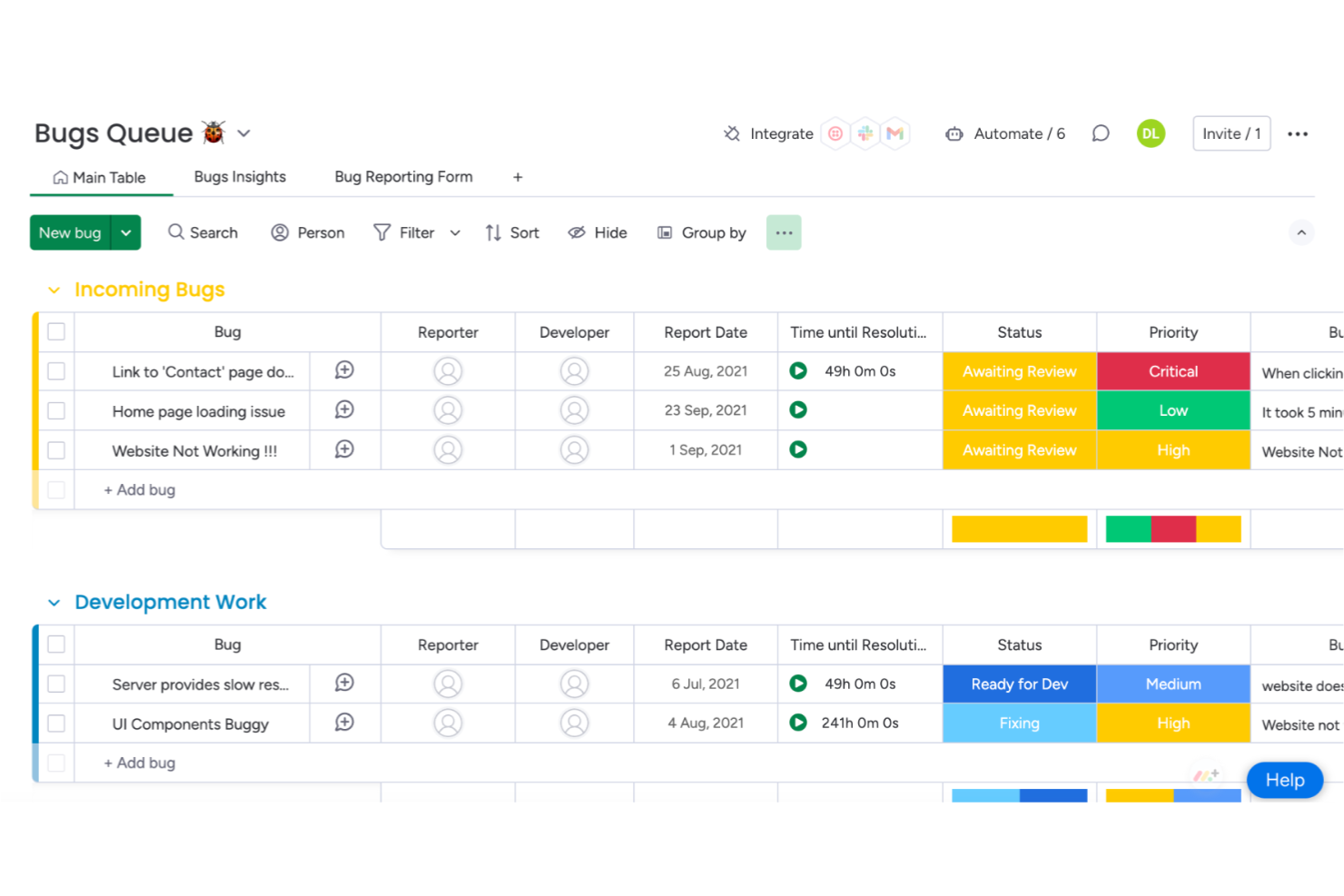
monday service es un sistema de gestión de colas que permite a los equipos organizar, asignar y hacer seguimiento a las solicitudes de los clientes mediante flujos de trabajo personalizables, colas de tickets y herramientas de automatización.
¿Para quién es mejor monday service?
monday service es adecuado para equipos de soporte y operaciones de atención al cliente de tamaño medio a empresarial que necesitan una plataforma flexible y personalizable para gestionar grandes volúmenes de tickets.
Por qué elegí monday service
Elegí monday service como uno de los mejores sistemas de gestión de colas por la forma en que su IA gestiona todo el ciclo de triaje, no solo el enrutamiento. Cuando llega un ticket, la autocategorización de monday service lo clasifica por tipo, urgencia, sentimiento y departamento antes de que llegue a un agente. A partir de ahí, la asignación inteligente se encarga de emparejar cada ticket con el agente adecuado según sus habilidades, carga de trabajo actual y los datos de prioridad o sentimiento del ticket. Me gusta especialmente que estas dos funciones trabajen en conjunto: los resúmenes y categorías generados por la IA se integran directamente en la lógica de asignación, de modo que los tickets pasan del ingreso a la persona correcta sin clasificación manual.
Características clave de monday service
- Portal del cliente: Un portal de autoservicio donde los usuarios finales pueden enviar solicitudes, rastrear el estado de los tickets y acceder a recursos de la base de conocimientos sin necesidad de una cuenta de monday.
- Análisis de servicio en tiempo real: Paneles personalizables que rastrean el rendimiento del servicio, los volúmenes de tickets y las tendencias en tiempo real.
- Tableros y flujos de trabajo de tickets: Espacios de trabajo específicos para el equipo con constructores de flujos de trabajo de arrastrar y soltar para gestionar escalaciones, aprobaciones y seguimientos.
- Agente de servicio con IA: Un agente de IA incorporado que utiliza el historial de tickets y tu base de conocimientos para resolver automáticamente solicitudes repetitivas.
Integraciones de monday service
monday service ofrece integraciones nativas con Slack, Salesforce, HubSpot, Zendesk, Gmail, Microsoft Teams, Google Drive, Outlook, Jira y Zoom. También es compatible con Zapier y proporciona una API para integraciones personalizadas.
Pros and Cons
Pros:
- Capacidad para adaptar flujos de trabajo y paneles
- Integración con varias aplicaciones de terceros
- Los tableros visuales ayudan a los usuarios a seguir fácilmente el progreso del proyecto
Cons:
- El costo puede ser más alto que otras herramientas
- Carece de algunas funciones avanzadas de informes

Mejor para la gestión combinada de citas y filas
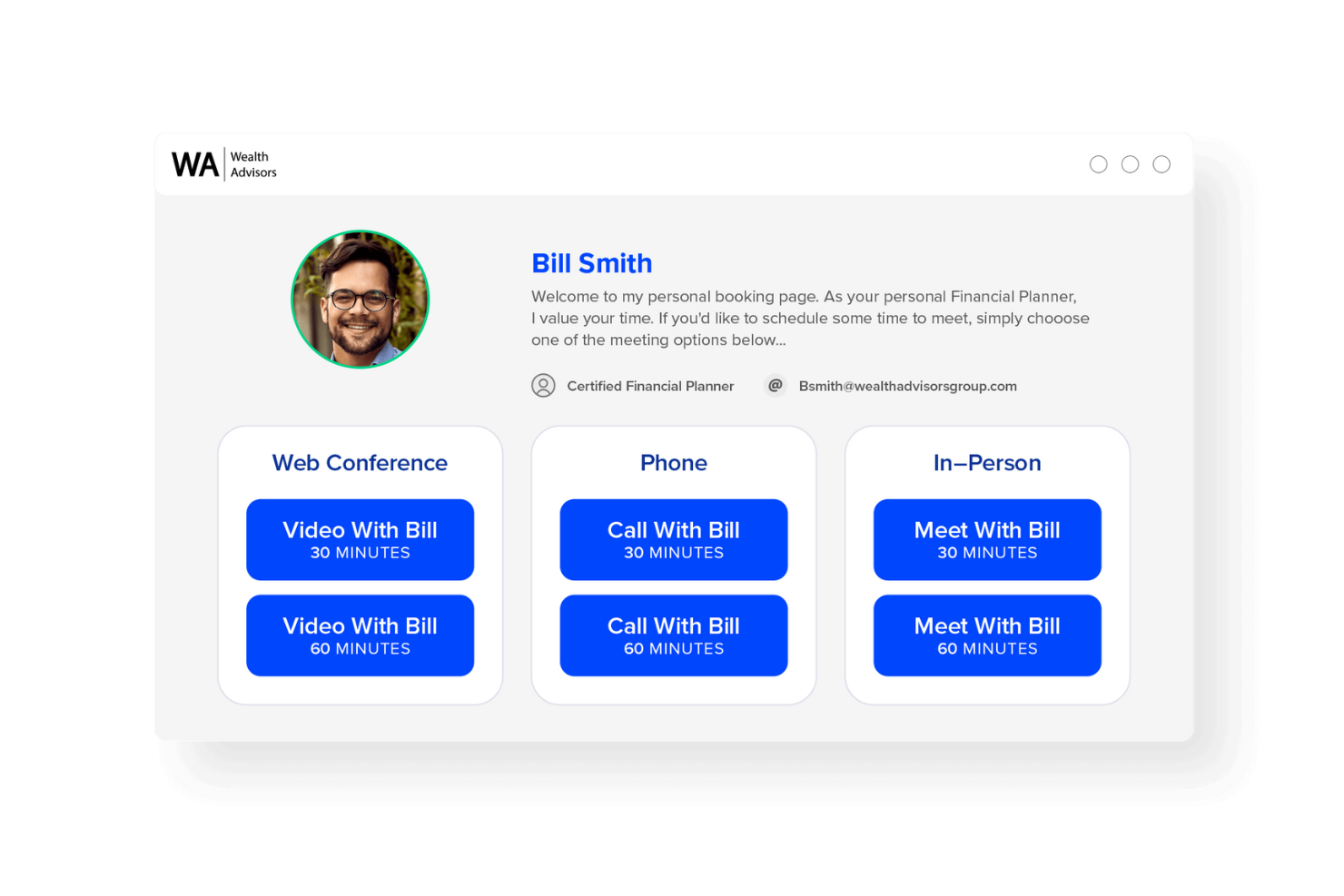
Engageware es un sistema de gestión de filas que combina el seguimiento en tiempo real de las colas, la programación de citas y el análisis del flujo de clientes para empresas que gestionan tanto visitas sin cita previa como programadas.
¿Para Quién es Mejor Engageware?
Engageware es ideal para bancos minoristas, cooperativas de crédito y comercios minoristas que necesitan gestionar tanto citas programadas como colas de clientes sin cita previa en varias ubicaciones.
Por Qué Elegí Engageware
Engageware se gana su lugar en mi lista corta porque es uno de los pocos sistemas de gestión de filas que realmente unifica la gestión de lobbies para clientes sin cita y la programación de citas en una sola plataforma. Lo que encuentro especialmente atractivo es la función de gestión de lobby, que recoge la intención del visitante en el registro a través de quioscos de autoservicio o móvil, y luego dirige a los clientes al miembro del equipo adecuado según la necesidad y la disponibilidad en tiempo real. Eso significa que una sucursal no solo está gestionando una fila, sino que está convirtiendo activamente las llegadas sin cita previa en interacciones estructuradas basadas en asesoría. También me gusta que el panel de análisis rastrea todo el recorrido del cliente, desde la llegada al lobby hasta la transacción o el cierre de un préstamo, para que puedas ver exactamente qué interacciones sin cita previa están generando ingresos.
Características Clave de Engageware
- Enrutamiento basado en habilidades: Asigna cada cliente al miembro del equipo adecuado según su necesidad específica, tipo de servicio y disponibilidad en tiempo real.
- Programación multicanal: Permite a los clientes reservar citas a través de la web, aplicación móvil, búsqueda en Google, códigos QR y SMS desde un solo sistema de reservas.
- Recordatorios automatizados: Envía notificaciones por SMS y correo electrónico a los clientes antes de las citas para reducir las ausencias y cancelaciones tardías.
- Análisis comparativo entre pares: Compara el tráfico sin cita, el volumen de citas y las tasas de conversión con datos de más de 400 instituciones financieras.
Integraciones de Engageware
Las integraciones de Engageware incluyen Salesforce, Zendesk, HubSpot, Freshworks y Zoho. Engageware también ofrece una API para integraciones personalizadas.
Pros and Cons
Pros:
- Combina programación y gestión de filas en un solo lugar
- Reduce los tiempos de espera para clientes sin cita previa
- Mejora la distribución de la carga de trabajo del personal
Cons:
- La configuración puede tardar para equipos grandes
- Requiere capacitación para usuarios primerizos
- Puede depender mucho de la fiabilidad de internet

Qwaiting
Ideal para la gestión de filas en múltiples plataformas
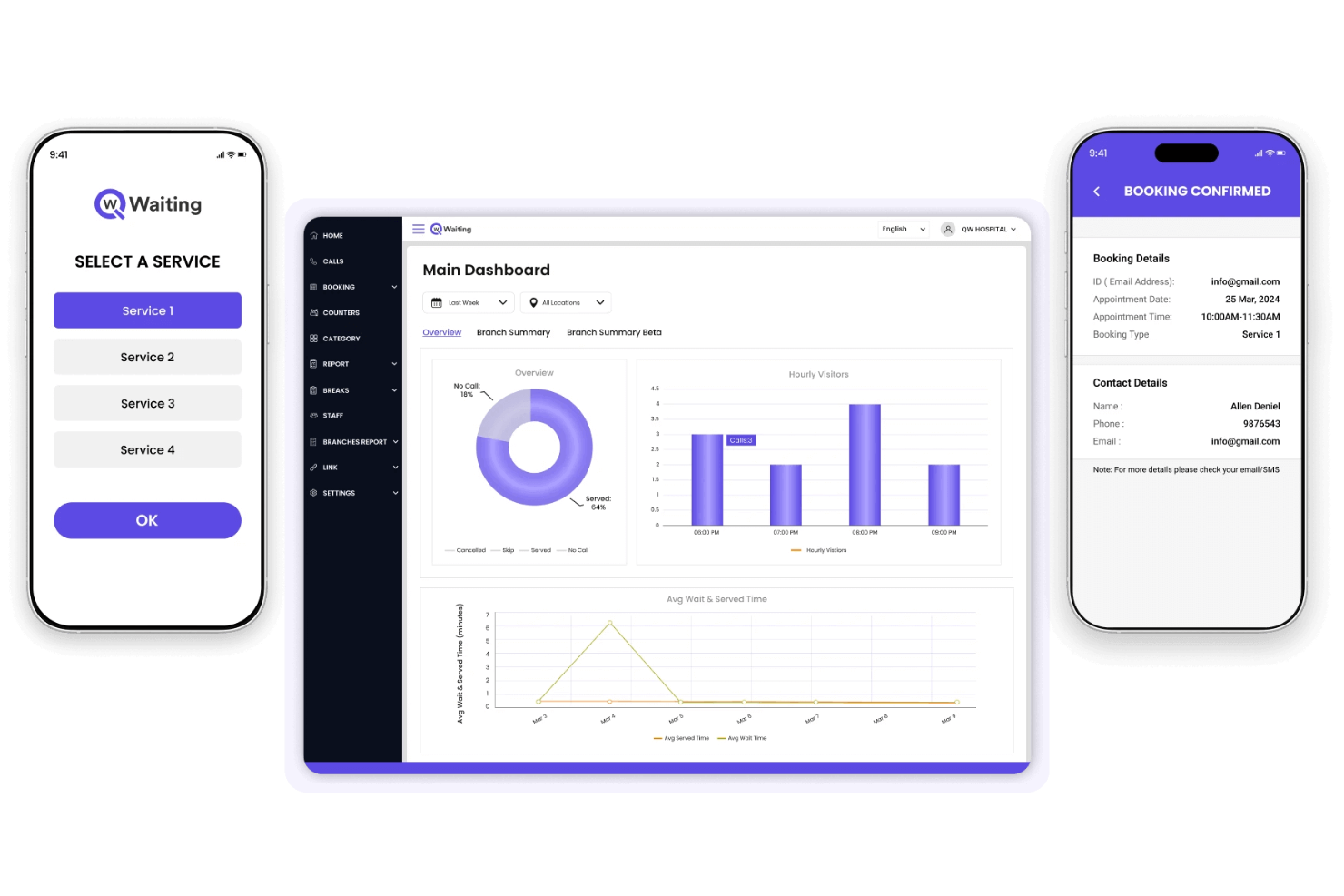
Qwaiting es un sistema de gestión de filas que te permite administrar el flujo de clientes a través de la web, quioscos y canales móviles, ofreciendo seguimiento de filas en tiempo real, tickets virtuales y programación de citas.
¿Para quién es mejor Qwaiting?
Qwaiting es ideal para negocios basados en servicios como comercios minoristas, atención médica y oficinas gubernamentales que necesitan gestionar filas de clientes en múltiples ubicaciones y puntos de contacto.
Por qué elegí Qwaiting
Elegí Qwaiting como uno de los mejores porque realmente cubre la gestión de filas en múltiples plataformas de una manera que la mayoría de las herramientas no hace. Me gusta que los clientes puedan unirse a la fila mediante un navegador web, un quiosco físico o una aplicación móvil, todo sincronizado en un mismo panel en tiempo real. Mi equipo puede monitorear los tiempos de espera y el estado de la fila en todos esos puntos de entrada sin cambiar de sistema. La función de ticket virtual también permite que los clientes aparten su lugar en la fila de forma remota, lo que reduce la aglomeración física en el lugar del servicio.
Características clave de Qwaiting
- Programación de citas: Los clientes pueden reservar turnos con antelación, lo que reduce los tiempos de espera para quienes se presentan sin cita y ayuda al personal a planificar la capacidad del servicio.
- Notificaciones por SMS y correo electrónico: Alertas automáticas mantienen informados a los clientes sobre su posición en la fila y el tiempo estimado de espera.
- Analítica e informes: Un panel integrado rastrea los tiempos de atención, las horas pico y el desempeño de las filas en distintas ubicaciones.
- Soporte para múltiples mostradores: Asigna a los clientes a mostradores de servicio específicos según el tipo de solicitud, la disponibilidad del personal o la ubicación.
Integraciones de Qwaiting
Las integraciones nativas incluyen Google Calendar, Zendesk, Salesforce, Twilio, Paypal, Stripe, Whatsapp y Slack. Qwaiting ofrece una API para integraciones personalizadas.
Pros and Cons
Pros:
- Funciona en varios canales de servicio
- Personalizable para diferentes industrias
- Admite tanto clientes sin cita como con reserva
Cons:
- La configuración avanzada puede requerir capacitación
- Las opciones de informes pueden ser abrumadoras

Mayor flexibilidad de integración
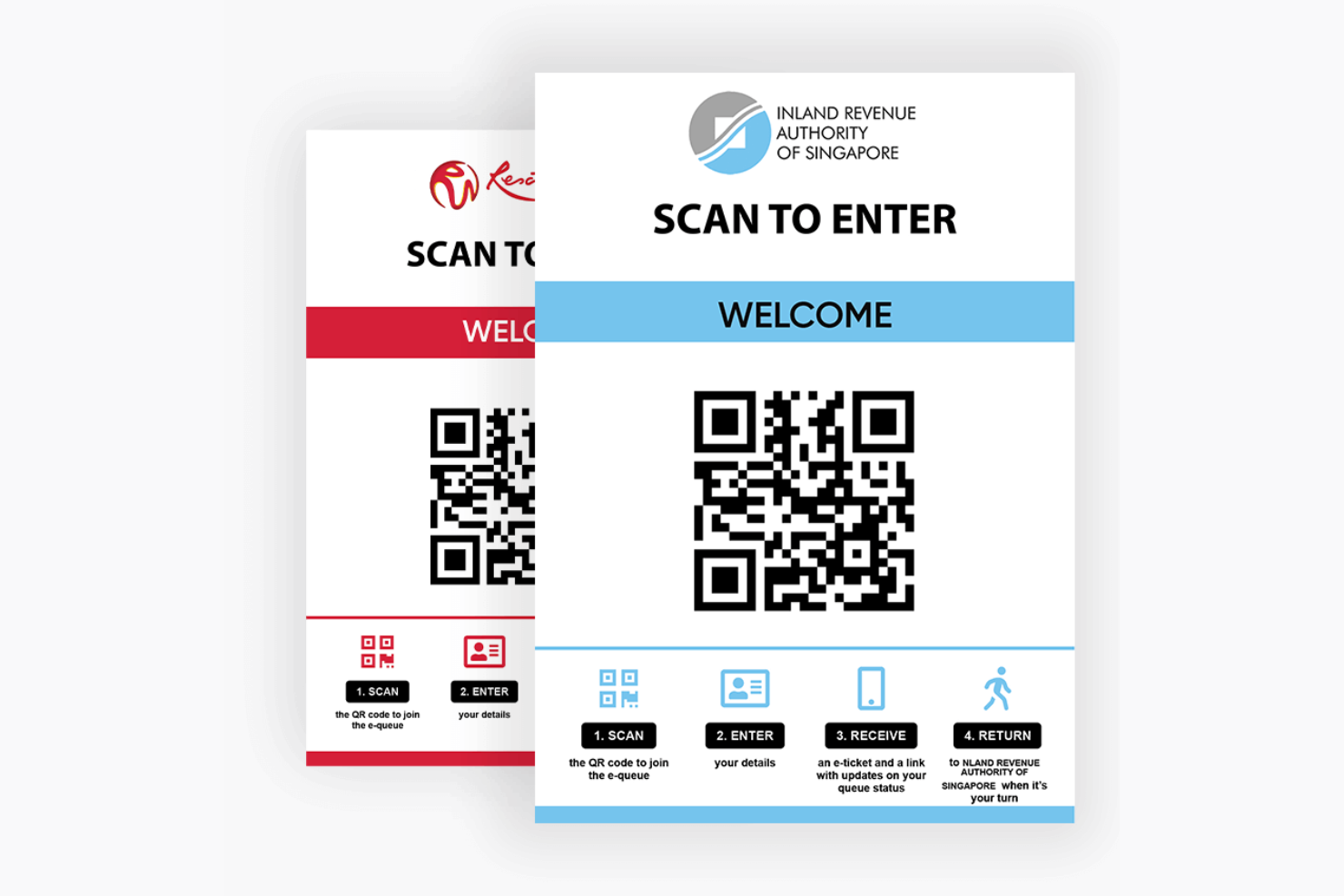
Awebstar Queue Management System es una plataforma de software de gestión de colas que proporciona emisión digital de tickets, seguimiento de colas en tiempo real, flujos de trabajo personalizables y opciones de integración para empresas que gestionan el flujo de clientes.
¿Para quién es mejor Awebstar Queue Management System?
Awebstar Queue Management System es adecuado para empresas de los sectores minorista, sanitario y gubernamental que necesitan un software de gestión de colas que se integre con sus herramientas y sistemas existentes.
Por qué elegí Awebstar Queue Management System
Incluí Awebstar Queue Management System entre mis principales opciones por lo bien que se conecta con los sistemas en los que ya confían las empresas. Me gusta especialmente su integración SSO (Single Sign-On), que permite al personal acceder a la plataforma de colas sin tener que gestionar credenciales por separado, una característica útil en entornos con múltiples sistemas. Su integración con HIS (Hospital Information System) es un verdadero diferenciador para entornos sanitarios, donde los datos de pacientes deben fluir entre la cola y los sistemas clínicos sin traspasos manuales. La API de SMS/Notificaciones permite integrar alertas de cola directamente en tu pila de comunicaciones existente en lugar de estar limitado a un solo canal de notificación.
Características clave de Awebstar Queue Management System
- Entrada a la cola por código QR: Los clientes escanean un código QR para unirse a una cola de forma remota y reciben su número de ticket directamente en su smartphone.
- Pantalla de tokens: Un monitor de mostrador muestra los números actuales, llamados y omitidos, junto con avisos de audio para una visibilidad clara en la sucursal.
- Soporte para dispensador de tickets: Un dispensador físico de tickets asigna números únicos por cliente en múltiples departamentos y tipos de servicio.
- Mensajería personalizable en pantallas: Los administradores pueden enviar mensajes promocionales a todas las pantallas de visualización de todas las ubicaciones desde el propio sistema.
Integraciones de Awebstar Queue Management System
Awebstar Queue Management System ofrece integraciones nativas con sistemas de información hospitalaria (HIS) y es compatible con proveedores de Single Sign-On (SSO). Dispone de una API para integraciones personalizadas.
Pros and Cons
Pros:
- Amplias posibilidades de integración
- Funciones sólidas de colas virtuales
- Sistema en la nube que ofrece fácil accesibilidad
Cons:
- Requiere ciertos conocimientos técnicos para aprovechar todas las funcionalidades
- Puede ser abrumador para pequeños negocios
Otros sistemas de gestión de colas destacados
A continuación se muestra una lista de sistemas de gestión de colas adicionales que seleccioné, pero que no llegaron a estar entre los 15 mejores. Sin duda, merece la pena echarles un vistazo.
- QLess
Ideal para minimizar las filas físicas
- Skiplino
Ideal para colas digitales y presenciales
- Wavetec
Ideal para la gestión de filas virtuales
- NEMO-Q
La mejor adaptabilidad para múltiples industrias
- Qsome
Ideal para configuraciones de colas simples
- Q-flow
Ideal para recorridos de pacientes y clientes
- Tensator
Ideal para la gestión de espacios físicos


Cómo evalúo los sistemas de gestión de colas
Mi evaluación se divide en dos capas: el mínimo que una herramienta debe cumplir (colas en tiempo real, asignación de personal, alertas al cliente) y los diferenciadores que la hacen adecuada para un hospital, banco o tienda minorista.
Funcionalidad principal (Requisitos indispensables para esta lista)
Estas capacidades esenciales sirven como criterio de aceptación para incluir un sistema de gestión de colas en mi lista:
- Cola virtual y registro: Evalúo qué canales de registro admite cada plataforma (por ejemplo, códigos QR, enlaces móviles, quioscos, SMS) y si los clientes pueden unirse a una cola antes de llegar en persona.
- Supervisión de colas en tiempo real: Los paneles en vivo para el personal y clientes son importantes aquí, así que busco tiempos de espera estimados, seguimiento de posición y visibilidad en múltiples ubicaciones.
- Notificaciones y alertas al cliente: Reviso si la plataforma envía alertas automáticas por SMS, correo electrónico o notificaciones push en momentos clave, como cuando se acerca el turno del cliente o se abre un mostrador.
- Asignación de servicios y personal: La lógica de asignación separa las herramientas básicas de las útiles. Busco asignaciones basadas en reglas según tipo de servicio, habilidad del personal, nivel de prioridad o disponibilidad de mostradores.
- Integración con programación de citas: Es necesario que las visitas sin cita y las reservadas convivan en una sola cola. Evalúo cómo cada herramienta integra las citas programadas con la afluencia espontánea.
- Análisis y paneles de informes: Las métricas como el tiempo medio de espera, duración del servicio y rendimiento del personal deben estar accesibles sin exportaciones manuales. Busco paneles filtrables y en tiempo real.
Califico a cada proveedor en una escala de 0 (no ofrece la funcionalidad) a 5 (destaca en este área) para cada criterio.
Los proveedores deben lograr una puntuación media mínima para ser considerados en mi lista. A partir de ahí, considero qué distingue a cada plataforma.
Factores diferenciadores (Qué distingue a los proveedores)
Una vez que tengo mi lista, así comparo y contrasto los diferentes proveedores en el área de sistemas de gestión de colas:
Características destacadas
La integración con señalización digital puede ser clave para equipos que quieren involucrar a los clientes y mantener las filas en movimiento en tiempo real, mientras que la gestión en múltiples ubicaciones es esencial si supervisa colas en varias sucursales o centros de servicio desde un panel centralizado. También considero cómo las apps móviles para el personal ayudan a gestionar colas en planta sin regresar a un puesto fijo, y si la plataforma utiliza IA para predecir tiempos de espera, lo que puede impulsar decisiones de personal y operación en periodos pico.
Más allá de las características
La seguridad y el cumplimiento son especialmente importantes en entornos de salud y gobierno, por lo que verifico si cuentan con preparación para HIPAA, cumplimiento con GDPR y controles de acceso basados en roles. El ecosistema de integración es igual de importante. Un sistema de colas que se conecta con su CRM, EHR o POS mantiene el flujo de datos del cliente sin trabajo manual. También evalúo la flexibilidad de implementación, ya que algunas organizaciones necesitan SaaS en la nube mientras que otras requieren alojamiento local para cumplir políticas internas de IT.
Cómo elegir un sistema de gestión de colas
Es fácil perderse entre largas listas de funciones y estructuras de precios complejas. Para ayudarte a mantener el enfoque mientras avanzas en tu proceso particular de selección de software, esta es una lista de factores que debes tener en cuenta:
| Factor | Qué debes tener en cuenta |
|---|---|
| Escalabilidad | ¿Puede el sistema gestionar más ubicaciones, empleados o clientes a medida que creces? Evita las herramientas con límites rígidos o tarifas elevadas por usuario que se acumulan rápidamente. |
| Integraciones | ¿Se conecta con tu CRM, POS o herramientas de calendario? Las soluciones manuales consumen tiempo. Comprueba si ofrece opciones prediseñadas o basadas en API. |
| Personalización | ¿Puedes ajustar los flujos de las colas, la imagen de marca o las pantallas orientadas al cliente sin la ayuda de desarrolladores? Algunas herramientas te obligan a utilizar las opciones predeterminadas. |
| Facilidad de uso | ¿Puede el personal de primera línea utilizarlo con poca formación? Busca herramientas de arrastrar y soltar, etiquetas claras y diseños adaptados a dispositivos móviles. |
| Implementación e incorporación | ¿Cuánto tiempo llevará la configuración y quién debe participar? Pregunta si ofrecen plantillas, ayuda para la migración o asistencia durante la incorporación. |
| Coste | ¿Qué incluye cada plan? Presta atención a los límites de colas, usuarios o asistencia. Pregunta si el precio cambia según el volumen o el tráfico. |
| Medidas de seguridad | ¿Ofrece acceso basado en roles, cifrado y registros de auditoría? Si recopilas datos de clientes, analiza detenidamente las afirmaciones sobre cumplimiento normativo. |
| Disponibilidad del soporte | ¿Puedes contactar con alguien durante las horas punta? Pregunta por los canales de asistencia, los tiempos de respuesta y si se incluye ayuda para la incorporación. |
¿Qué es un sistema de gestión de colas?
Un sistema de gestión de colas es un conjunto de herramientas y procesos diseñados para controlar y organizar el flujo de clientes o usuarios que esperan en una fila, ya sea física o virtual. Diversos sectores, como el comercio minorista, la atención sanitaria, la banca y las oficinas gubernamentales, utilizan estos sistemas para agilizar las operaciones, reducir los tiempos de espera y mejorar la experiencia del cliente.
Al utilizar estos sistemas, las organizaciones buscan que el proceso de espera sea más eficiente, transparente y cómodo tanto para los proveedores de servicios como para las personas que esperan en la cola.
Funciones de los sistemas de gestión de colas
Al seleccionar un sistema de gestión de colas, presta atención a las siguientes características clave:
- Integraciones con terceros: Se conecta con plataformas de CRM, POS o mensajería para optimizar los flujos de trabajo y reducir los silos de datos.
- Colas virtuales: Permite que los clientes se unan a una cola de forma remota mediante el móvil, la web o un quiosco para reducir las aglomeraciones físicas y mejorar la transparencia del tiempo de espera.
- Notificaciones en tiempo real: Envía alertas por SMS o mediante la aplicación para mantener informados a los clientes sobre su posición en la cola y el tiempo de espera estimado.
- Programación de citas: Permite que los clientes reserven franjas horarias con antelación para ayudar a gestionar el flujo y reducir los tiempos de espera de quienes acuden sin cita.
- Análisis y generación de informes de colas: Realiza un seguimiento de los tiempos de espera, la duración del servicio y el rendimiento del personal para identificar cuellos de botella y mejorar las operaciones.
- Acceso multicanal: Admite el registro de clientes a través de diversos canales, como quioscos en la tienda, sitios web o aplicaciones móviles, para mayor comodidad.
- Panel de gestión del personal: Proporciona a los miembros del equipo herramientas para gestionar las colas, asignar tareas y supervisar las métricas del servicio en tiempo real.
- Recopilación de comentarios de los clientes: Permite realizar encuestas o recopilar valoraciones después del servicio para obtener información sobre la satisfacción y la calidad del servicio.
- Compatibilidad con varios idiomas: Atiende a clientes en diferentes idiomas para garantizar la accesibilidad de poblaciones diversas.
- Interfaz personalizable: Permite modificar la imagen de marca y el diseño para adaptar la apariencia y la experiencia a tu estrategia de experiencia del cliente.
Beneficios de los sistemas de gestión de colas
La implementación de un sistema de gestión de colas ofrece varios beneficios para tu equipo y tu empresa. Estos son algunos de los que puedes esperar:
- Seguimiento más sencillo de los comentarios: Las herramientas de encuestas integradas te permiten conocer la opinión de los clientes justo después del servicio, cuando aún lo tienen reciente.
- Tiempos de espera más cortos: Las colas virtuales y la reserva de citas ayudan a reducir las aglomeraciones y a mantener el flujo de las filas.
- Mejor experiencia del cliente: Las actualizaciones en tiempo real y las opciones flexibles de registro hacen que la espera sea menos frustrante.
- Personal más eficiente: Los paneles y la información sobre el servicio permiten al personal gestionar las colas y las tareas con menos suposiciones.
- Menos ausencias: Las notificaciones de recordatorio y los registros digitales ayudan a que los clientes sigan el proceso.
- Decisiones más inteligentes: Las herramientas de generación de informes proporcionan datos sobre los tiempos de servicio y las tendencias de afluencia para que puedas ajustar el personal y los horarios.
- Servicio coherente: Los procesos de cola estandarizados reducen la confusión y ayudan al personal a ofrecer la misma experiencia en todo momento.
Costes y precios de los sistemas de gestión de colas
Seleccionar sistemas de gestión de colas requiere comprender los diversos modelos de precios y planes disponibles. Los costes varían según las características, el tamaño del equipo, los complementos y otros factores. La siguiente tabla resume los planes habituales, sus precios medios y las características que suelen incluir los sistemas de gestión de colas:
Tabla comparativa de planes para sistemas de gestión de colas
| Tipo de plan | Precio medio | Características habituales |
|---|---|---|
| Plan gratuito | $0 | Incluye seguimiento básico de colas, notificaciones limitadas a los clientes y una ubicación. |
| Plan personal | $10–$25/usuario/mes | Incluye colas virtuales, reserva de citas, análisis básicos y asistencia por correo electrónico. |
| Plan empresarial | $30–$60/usuario/mes | Incluye compatibilidad con varias ubicaciones, notificaciones por SMS, informes avanzados e integraciones. |
| Plan para empresas | $75–$150/usuario/mes | Incluye flujos de trabajo personalizados, permisos basados en roles, acceso a la API y asistencia dedicada. |
Preguntas frecuentes sobre sistemas de gestión de colas
Estas son algunas respuestas a preguntas frecuentes sobre los sistemas de gestión de colas:
¿Cómo funcionan los sistemas de gestión de colas con la programación de citas?
La mayoría de los sistemas permiten ofrecer tanto colas para clientes sin cita como citas programadas. Los clientes pueden reservar franjas horarias en línea o mediante una aplicación móvil. El sistema los añade automáticamente a la cola cuando se acerca la hora de su cita. Esto te ayuda a equilibrar las visitas reservadas previamente con la demanda en tiempo real.
¿Pueden los sistemas de gestión de colas integrarse con mi software actual?
Sí, muchos sistemas se integran con herramientas como CRM, plataformas de punto de venta, calendarios y servicios de mensajería. Algunos ofrecen opciones listas para usar, mientras que otros requieren configurar una API. Asegúrate de comprobar si tus herramientas actuales son compatibles o si necesitarás un trabajo de integración personalizado.
¿Cuánto tiempo se tarda en configurar un sistema de gestión de colas?
El tiempo de configuración varía según la herramienta y tus recursos internos. Algunos sistemas pueden estar operativos en pocos días gracias a plantillas prediseñadas. Otros pueden tardar semanas si personalizas los flujos de trabajo, conectas aplicaciones de terceros o implementas el sistema en varias ubicaciones. Pregunta a los proveedores qué asistencia ofrecen durante la incorporación.
¿Puedes indicar un rango habitual de precios para estos sistemas?
El precio puede oscilar entre tan solo $10 al mes para soluciones básicas dirigidas a pequeñas empresas y más de $1,000 al mes para soluciones de nivel empresarial con funciones integrales.
¿Son adecuados los sistemas de gestión de colas para las pequeñas empresas?
Sí, muchos sistemas ofrecen planes gratuitos o de bajo costo para equipos de una sola ubicación. Busca herramientas con seguimiento básico de colas, registros mediante dispositivos móviles y paneles sencillos. Solo asegúrate de no quedar sujeto a contratos a largo plazo ni a complementos costosos que no vayas a utilizar.
¿Hay opciones gratuitas de sistemas de gestión de colas disponibles?
Algunas herramientas ofrecen versiones gratuitas, a menudo denominadas modelos «gratuitos con opciones prémium». Estas suelen incluir funciones básicas; las empresas pueden actualizar el plan para desbloquear funcionalidades más avanzadas. Es importante investigar y asegurarse de que la versión gratuita satisfaga tus necesidades específicas antes de integrarla en tus operaciones.
¿Qué tipo de hardware necesito para un sistema de gestión de colas?
Depende de cómo quieras que los clientes se registren. Algunos equipos utilizan tabletas o quioscos en la entrada, mientras que otros recurren a códigos QR, SMS o aplicaciones móviles. La mayoría de las plataformas están basadas en la nube, por lo que no necesitarás servidores, solo dispositivos que puedan conectarse a internet.
¿Qué opinas?
He procurado ofrecer una lista completa basada en mis experiencias e investigaciones, pero el panorama tecnológico es amplio y está en constante evolución. Si has encontrado un sistema de gestión de colas que te haya resultado invaluable y no aparece en esta lista, me encantaría conocerlo.
Ya que estás aquí, suscríbete a nuestro boletín para recibir las últimas novedades sobre experiencia del cliente, guías prácticas, estrategias y recursos de los principales expertos en el ámbito de la experiencia del cliente.