

10 Mejores Software de Éxito del Cliente de 2026

10 Lista corta de software para el éxito del cliente


El software para el éxito del cliente ayuda a tu equipo a gestionar cuentas de manera proactiva, reducir la rotación y detectar oportunidades de crecimiento. Si te enfrentas a datos fragmentados, incorporación de clientes inconsistente, gestión reactiva de clientes o visibilidad limitada sobre el riesgo de cuentas y potencial de renovación, el software adecuado puede resolver la mayoría de estos problemas.
En este artículo, analizaré los mejores programas de éxito del cliente disponibles en el mercado que pueden ayudarte a escalar las iniciativas de retención y mejorar la satisfacción.
Por qué confiar en nuestras recomendaciones de software
Nuestro equipo lleva probando y evaluando software desde 2012. Como líderes de CX, sabemos lo difícil —y lo importante— que es elegir el software adecuado.
Para esta guía, evaluamos las herramientas mediante pruebas prácticas e investigación independiente, puntuando las herramientas según nuestros criterios de selección.
Nuestras reseñas reflejan nuestro criterio editorial humano, no un discurso de ventas.
Tabla resumen de las mejores soluciones de software para el éxito del cliente
Aquí tienes una comparación lado a lado de mis 20 principales recomendaciones:
| Tool | Best For | Trial Info | Price | ||
|---|---|---|---|---|---|
| 1 | Ideal para prevenir la pérdida silenciosa de clientes | Prueba gratis de 7 días + demo gratuita disponible | Desde $199/mes (facturado anualmente) | Website | |
| 2 | Ideal para soporte al cliente potenciado por IA | Prueba gratuita de 14 días + demo gratis disponible | Desde $19/agente/mes (facturado anualmente) | Website | |
| 3 | Ideal para obtener información sobre sentimiento impulsada por IA | Prueba gratuita de 14 días | Desde $19/mes (facturación anual) | Website | |
| 4 | Ideal para la resolución de incidencias del cliente con ciclo cerrado | Demostración gratuita disponible | Precio a consultar | Website | |
| 5 | Ideal para interacción proactiva con clientes | Prueba gratuita disponible | Desde $25/usuario/mes (facturación anual) | Website | |
| 6 | Lo mejor para rastrear los puntajes de salud del cliente | Demostración gratuita disponible | Precio bajo consulta | Website | |
| 7 | Ideal para funciones de automatización del ciclo de vida | Demo gratuita disponible | Desde $45/mes (facturado anualmente) | Website | |
| 8 | La mejor para interacciones unificadas con clientes | Prueba gratis de 14 días + demo gratuita disponible | Desde $19/agente/mes (facturación anual) | Website | |
| 9 | La mejor opción por su seguridad y privacidad de nivel empresarial | Plan gratuito disponible | Desde $32/mes (facturado anualmente) | Website | |
| 10 | Ideal para integrar operaciones de cliente unificadas | Plan gratuito disponible | Desde $29/mes (facturado anualmente) | Website |


Reseñas del mejor software para el éxito del cliente
Aquí tienes una breve descripción de cada aplicación de éxito del cliente para mostrar el mejor caso de uso de cada herramienta, algunas funciones destacadas y capturas de pantalla que ofrecen una idea de la interfaz de usuario.

Ideal para prevenir la pérdida silenciosa de clientes
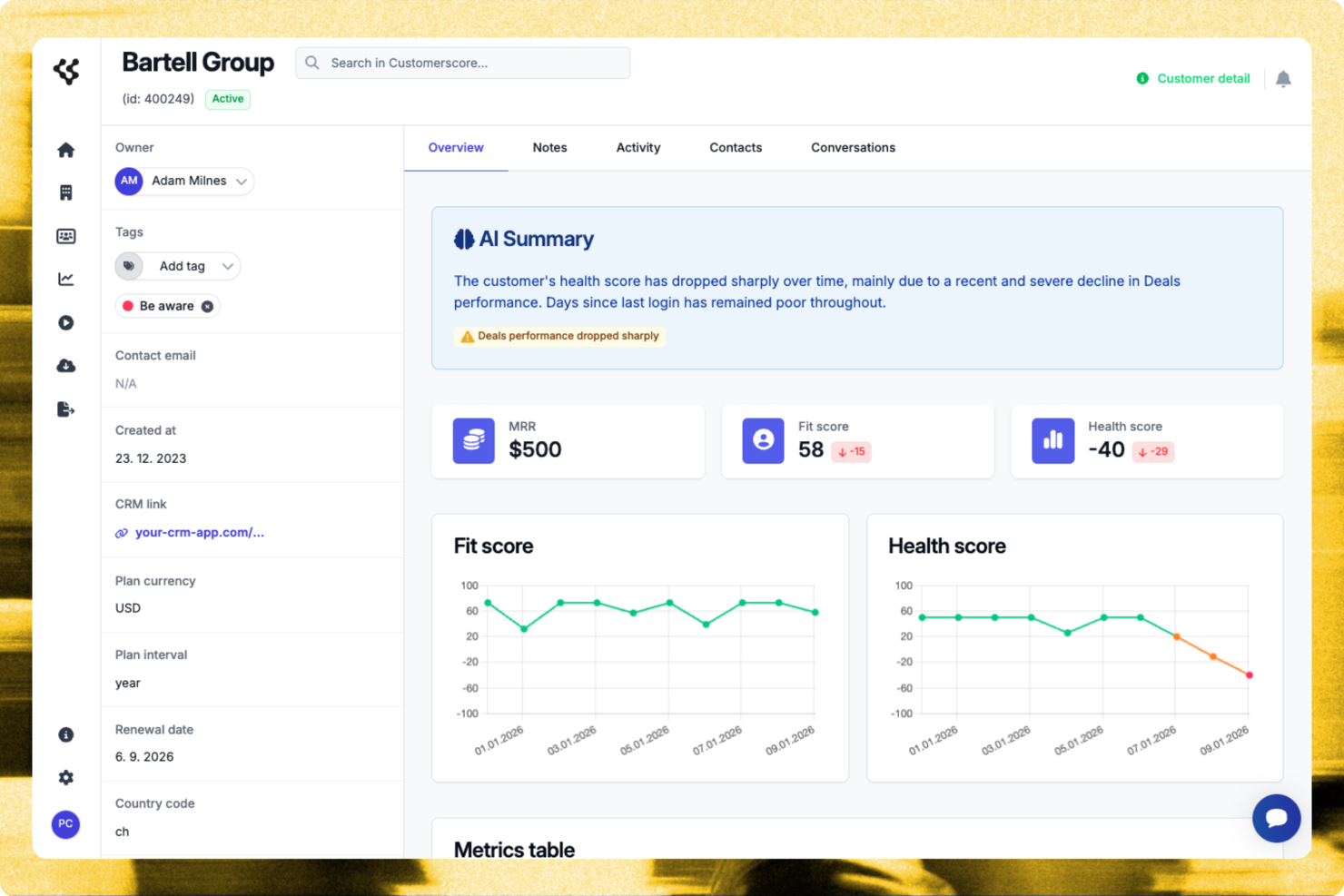
Customerscore.io permite a los equipos de experiencia del cliente y a las empresas SaaS hacer seguimiento de la salud de los clientes, predecir la pérdida de clientes y automatizar el compromiso, para que puedan centrarse en las cuentas que más atención necesitan.
¿Para quién es mejor Customerscore.io?
Customerscore.io es una excelente opción para empresas SaaS con equipos de éxito del cliente dedicados que necesitan monitorizar la salud de las cuentas y actuar ante señales de pérdida antes de que escalen.
Por qué elegí Customerscore.io
Customerscore.io se gana su lugar en mi lista porque aborda directamente el problema de la pérdida silenciosa—clientes que se desconectan y cancelan en silencio sin llegar a crear un ticket de soporte. Me gusta cómo su puntuación de salud basada en IA recopila señales de toda tu infraestructura (datos de uso, facturación, actividad de soporte) y activa flujos de trabajo automáticos en cuanto una puntuación baja, de modo que ninguna cuenta en riesgo pase desapercibida. Esto significa que mi equipo puede poner en marcha un plan de prevención que envía un correo de seguimiento personalizado cuando la puntuación de salud cae por debajo de 60, sin que nadie tenga que revisar manualmente el panel. El flujo de protección de renovaciones es otra función que encuentro realmente útil: señala cuentas de bajo uso 30 días antes de la renovación y lanza un contacto proactivo de forma automática.
Características clave de Customerscore.io
- Automatización de flujos para expansión: Envía automáticamente un correo de upsell cuando el uso del cliente alcanza el 80% del límite de su plan.
- Disparadores para activación durante onboarding: Envía un correo tutorial el día 14 si aún no se ha adoptado una funcionalidad clave.
- Detección de señales desde múltiples fuentes: Recopila datos de engagement, facturación y soporte de herramientas como Mixpanel, Stripe e Intercom en una sola vista de salud.
- Panel de medición de impacto: Hace seguimiento de cuentas en riesgo detectadas, tasa de retención y ARR protegido para que veas exactamente qué está funcionando.
Integraciones de Customerscore.io
Customerscore.io ofrece integraciones nativas con Intercom, Mixpanel, Stripe, HubSpot, Salesforce, Segment y Zapier. También dispone de una API para integraciones personalizadas.
Pros and Cons
Pros:
- Visibilidad clara de riesgos de pérdida
- Información accionable de oportunidades de upsell
- Fuertes integraciones nativas con CRM
Cons:
- Precios no publicados públicamente
- Curva de aprendizaje en análisis

Ideal para soporte al cliente potenciado por IA
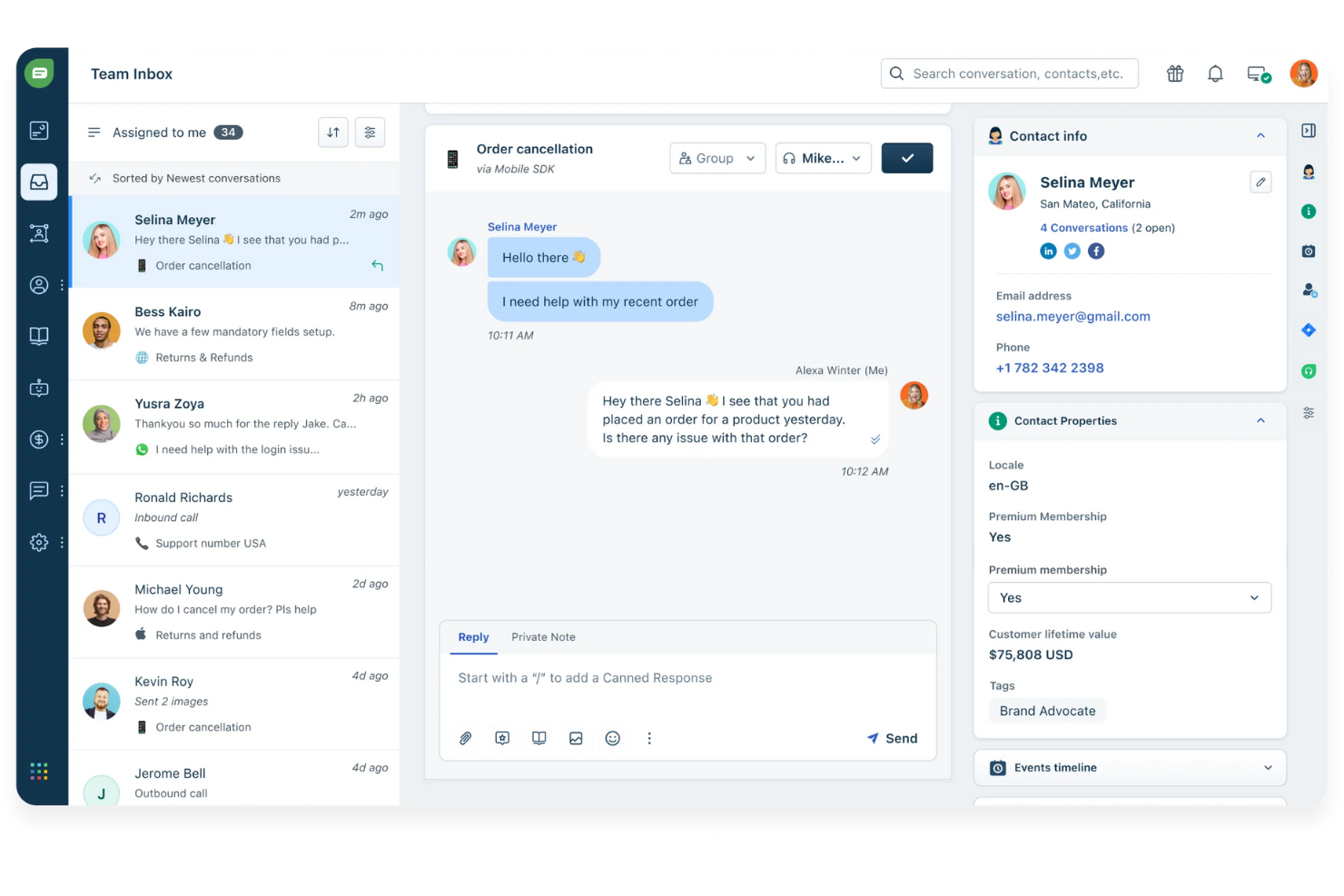
Freshdesk es una plataforma de éxito del cliente basada en la nube, diseñada para equipos de experiencia del cliente (CX) que necesitan gestionar solicitudes de soporte, automatizar flujos de trabajo y ofrecer un servicio coherente a través de canales como correo electrónico, chat y redes sociales.
¿Para quién es mejor Freshdesk?
Freshdesk es una buena opción para pequeñas y medianas empresas que necesitan una plataforma de soporte multicanal escalable sin una gran carga de TI.
Por qué elegí Freshdesk
Freshdesk merece su lugar en mi lista porque su suite Freddy AI gestiona todo el ciclo de vida del soporte, no solo una etapa. Me gusta especialmente Freddy AI Copilot, que ofrece sugerencias de respuesta en tiempo real, traducciones en vivo y resúmenes de tickets, para que los agentes puedan responder más rápido sin sacrificar la precisión. Freddy AI Agent resuelve de forma autónoma consultas repetitivas las 24 horas del día, liberando a mi equipo de responder a las mismas preguntas una y otra vez. Freddy AI Insights lo complementa brindando alertas proactivas y respondiendo preguntas de liderazgo sobre tendencias de soporte bajo demanda.
Funciones clave de Freshdesk
- Bandeja de entrada compartida omnicanal: Gestiona conversaciones de clientes desde correo electrónico, chat, teléfono y redes sociales en una sola bandeja de entrada unificada.
- Asignación de tickets basada en habilidades: Asigna automáticamente los tickets entrantes a los agentes en función de sus habilidades o áreas de especialización.
- Gestión de políticas SLA: Configura y aplica múltiples políticas de SLA para supervisar los objetivos de tiempo de respuesta y resolución en diferentes segmentos de clientes.
- Base de conocimientos: Crea un portal de autoservicio multilingüe donde los clientes pueden encontrar respuestas sin contactar a tu equipo de soporte.
Integraciones de Freshdesk
Freshdesk ofrece más de 1,000 integraciones nativas, incluyendo Salesforce, HubSpot, Jira, Slack, Shopify, Mailchimp, Google Workspace, Microsoft Teams, WhatsApp, Zoom y Zapier. Hay una API disponible para integraciones personalizadas.
Pros and Cons
Pros:
- Los chatbots de IA y la automatización reducen tareas repetitivas
- La interfaz intuitiva permite una rápida adopción
- Sólidas herramientas de informes y análisis para obtener información del rendimiento
Cons:
- Capacidades de personalización limitadas
- Las funciones avanzadas de IA requieren configuración y capacitación adicionales
New Product Updates from Freshdesk

Freshdesk Adds Voice AI Agents in Freshcaller
Freshdesk introduces Voice AI Agents available through Freshcaller Marketplace apps to handle routine calls and reduce queues. This feature enables automated call handling with real-time, conversational support. For more information, visit Freshdesk's official site.

Ideal para obtener información sobre sentimiento impulsada por IA
SurveySparrow ofrece a los equipos de experiencia del cliente (CX) una forma de recopilar, analizar y actuar sobre comentarios de los clientes mediante encuestas conversacionales y automatización, ayudando a las empresas de cualquier sector a comprender las necesidades de sus clientes y mejorar su satisfacción.
¿Para quién es mejor SurveySparrow?
SurveySparrow es ideal para empresas medianas y grandes que administran programas continuos de retroalimentación de clientes y necesitan una herramienta dedicada para diseñar, distribuir y analizar encuestas.
Por qué elegí SurveySparrow
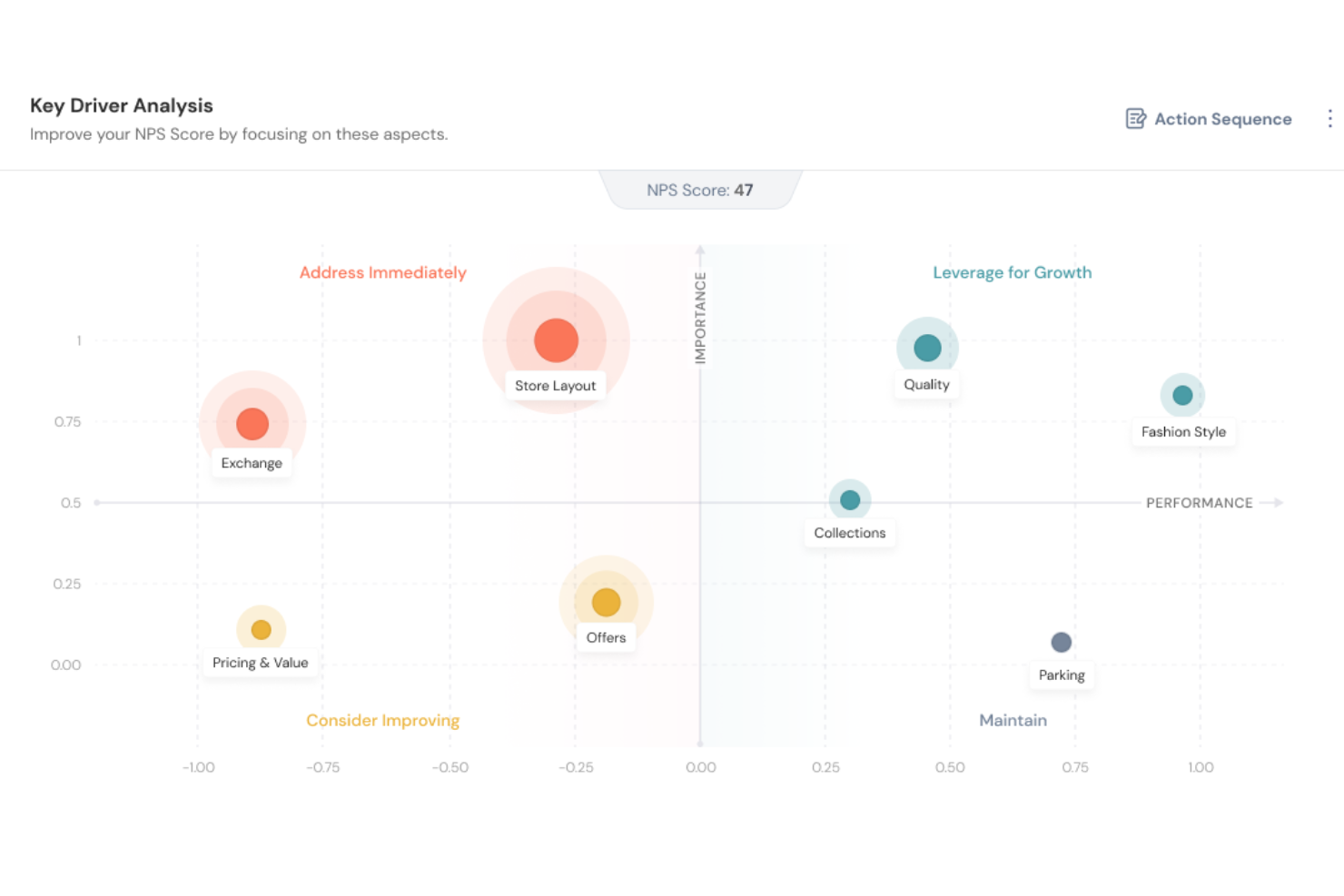
SurveySparrow se gana su lugar en mi lista gracias a CogniVue, su motor de análisis de texto potenciado por IA que ofrece mucho más que una simple puntuación de sentimiento. CogniVue extrae y categoriza automáticamente los temas de las respuestas abiertas, de modo que mi equipo no tenga que etiquetar cientos de comentarios para determinar de qué hablan los clientes. El análisis de los principales impulsores es especialmente útil: revela las causas raíz detrás de métricas de experiencia del cliente como el NPS, permitiéndome ver no solo que la satisfacción ha bajado, sino también qué temas están originando ese descenso. La función de monitorización de temas rastrea cambios de sentimiento en tiempo real, y así puedo identificar problemas emergentes antes de que se conviertan en patrones.
Funciones clave de SurveySparrow
- Gestión de tickets: Convierte respuestas de encuestas en tickets asignables y rastreables para que tu equipo pueda hacer seguimiento de los problemas de clientes directamente desde la plataforma.
- Encuestas recurrentes: Programa y automatiza encuestas para que se envíen en intervalos establecidos, manteniendo un pulso continuo sobre la satisfacción del cliente sin esfuerzo manual.
- Recopilación omnicanal de comentarios: Distribuye encuestas por correo electrónico, incrustadas en web, código QR, SMS y redes sociales para captar retroalimentación en cada punto de contacto con el cliente.
- Flujos de trabajo visuales: Activa acciones automáticas según las respuestas de encuestas utilizando un constructor de flujos de trabajo sin código con lógica condicional.
Integraciones de SurveySparrow
SurveySparrow ofrece más de 40 integraciones nativas, incluyendo Salesforce, HubSpot, Slack, Google Sheets, Intercom, Zendesk, Mailchimp, Freshdesk, Microsoft Teams, Shopify, y Zapier. También dispone de una API para integraciones personalizadas.
Pros and Cons
Pros:
- Las encuestas conversacionales aumentan la tasa de respuesta y participación
- La IA analiza los comentarios de texto en busca de tono y emoción
- Ideal para rastrear la satisfacción a través de programas de CX
Cons:
- La configuración de lógica compleja puede ser un desafío para usuarios no técnicos
- Profundidad limitada en análisis y reportes personalizados

Ideal para la resolución de incidencias del cliente con ciclo cerrado
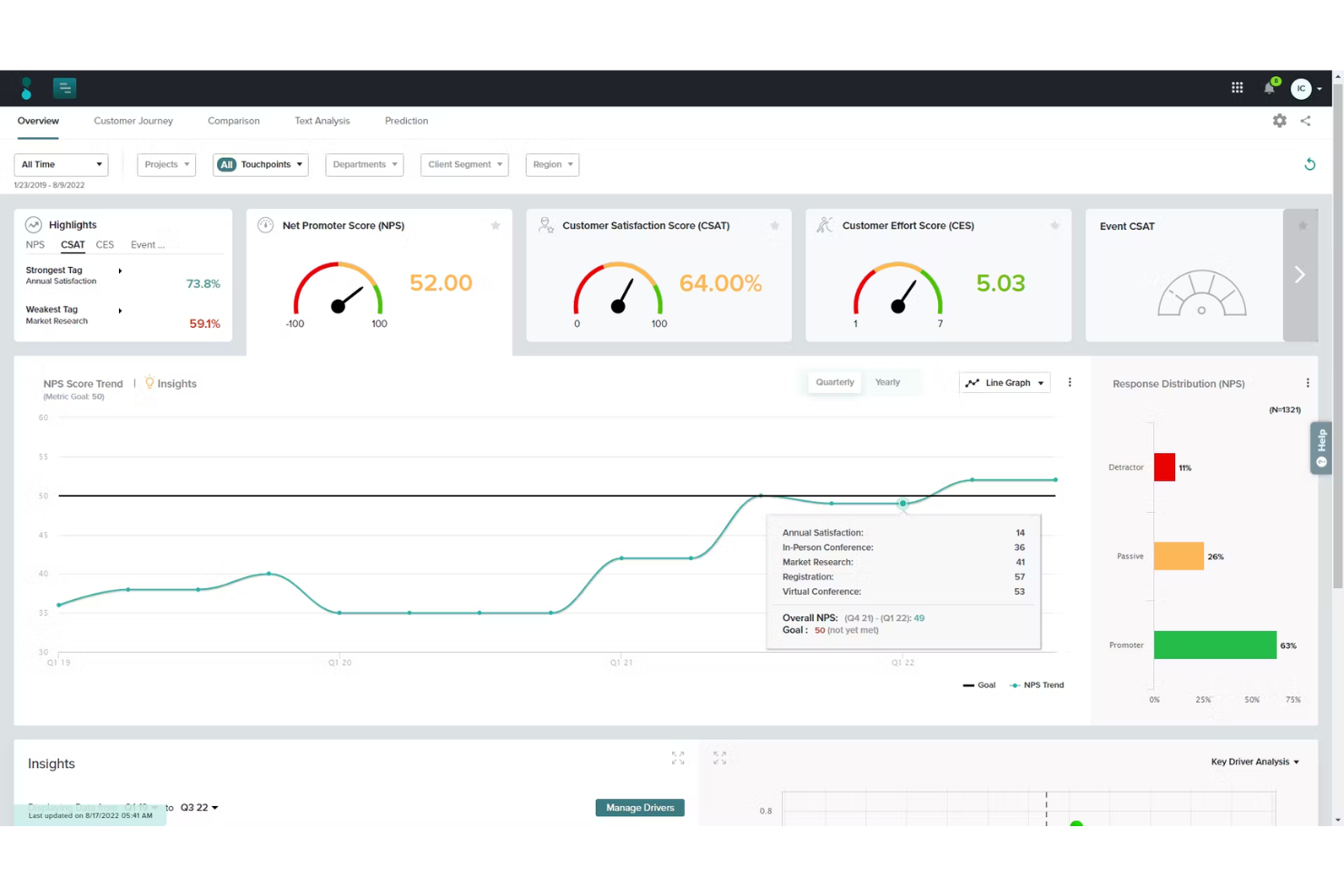
Sogolytics ofrece a los equipos de experiencia del cliente (CX) en empresas orientadas al servicio una forma de capturar, analizar y actuar sobre la retroalimentación del cliente mediante herramientas avanzadas de encuestas y flujos de trabajo automáticos para el seguimiento, lo que mejora las relaciones con los clientes y genera resultados medibles.
¿Para quién es mejor Sogolytics?
Sogolytics es una excelente opción para organizaciones medianas a grandes que cuentan con equipos dedicados a CX o a análisis de clientes y que necesitan programas estructurados de retroalimentación conectados a acciones concretas.
Por qué elegí Sogolytics
Sogolytics se gana su lugar entre los mejores de mi lista porque gestiona de manera óptima todo el ciclo de un problema del cliente: desde el momento en que se recibe la retroalimentación hasta su resolución. Me encanta que SogoConnect, su módulo de gestión de tickets de ayuda, redirige automáticamente la retroalimentación entrante al equipo adecuado y pone en marcha un temporizador de respuesta, para que nada quede sin reconocer. Cuando un asunto requiere atención urgente, mi equipo puede escalarlo manual o automáticamente al estado de 'Crítico', lo que activa alertas para las personas adecuadas. La función de alertas y planes de acción en SogoCX aporta otra capa, ya que permite a mi equipo configurar notificaciones automáticas cuando los indicadores de CX bajan de cierto umbral y crear planes de seguimiento estructurados vinculados directamente a esas señales.
Principales características de Sogolytics
- Distribución omnicanal de encuestas: Envía solicitudes de retroalimentación por correo electrónico, SMS, web, códigos QR y canales dentro de la aplicación desde una sola plataforma.
- Análisis de los principales impulsores: Identifica qué variables específicas de los puntos de contacto tienen el mayor impacto estadístico en los puntajes de NPS, CSAT o CES.
- Mapeo del recorrido del cliente: Visualiza los datos de CX a través de múltiples puntos de contacto en una sola vista, usando etiquetas para agrupar y comparar etapas o segmentos.
- Análisis de texto impulsado por PLN: Clasifica y extrae automáticamente el sentimiento de respuestas abiertas sin tener que revisarlas una por una manualmente.
Integraciones de Sogolytics
Sogolytics ofrece integraciones nativas con Salesforce, HubSpot, Microsoft Teams, Slack, Zendesk, Google Sheets, Mailchimp y Zapier. También hay una API disponible para integraciones personalizadas.
Pros and Cons
Pros:
- Gráficas y exportación de resultados sencilla
- Su sólida biblioteca de plantillas agiliza la creación de encuestas
- Adecuado tanto para retroalimentación de empleados como de clientes
Cons:
- La interfaz requiere desplazamiento y resulta recargada
- La compatibilidad con formatos de datos antiguos puede causar problemas
New Product Updates from Sogolytics
Sogolytics Adds Teams and Slack Surveys and Custom Automations
Sogolytics adds native Microsoft Teams and Slack survey distribution, a Custom Automations Builder, Derived Fields, PointClickCare integration, and authenticator-based MFA. These updates expand survey distribution and workflow automation while adding new data management and security capabilities. For more information, visit Sogolytics’ official site.
 .
.
Ideal para interacción proactiva con clientes
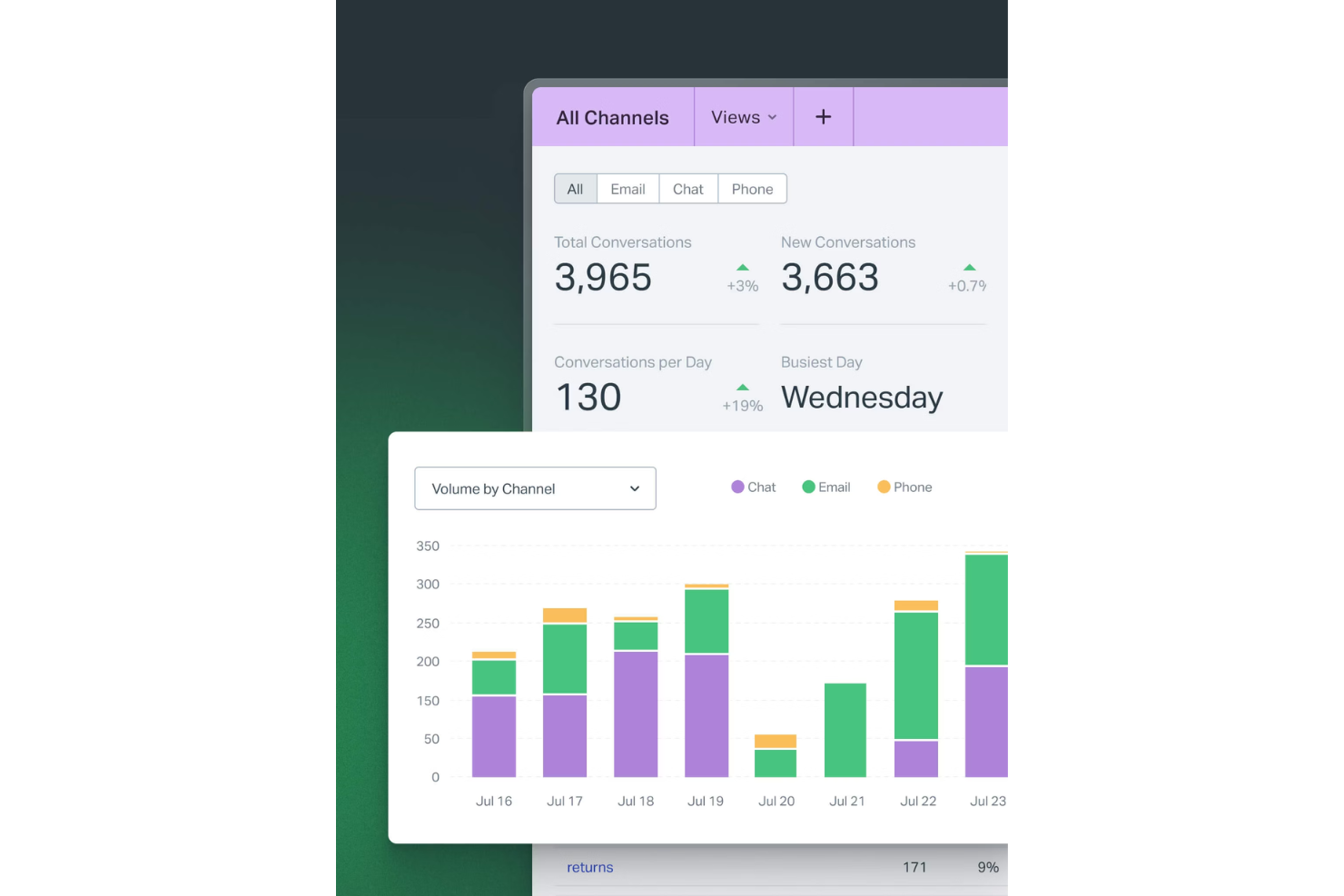
Help Scout ofrece a los equipos de experiencia del cliente en SaaS, comercio electrónico y empresas de servicios una bandeja de entrada compartida, perfiles de clientes y herramientas de automatización para gestionar conversaciones, brindar soporte personalizado y mantener las relaciones con los clientes encaminadas.
¿Para quién es mejor Help Scout?
Help Scout es una excelente opción para equipos pequeños y medianos que gestionan grandes volúmenes de conversaciones con clientes y necesitan una herramienta colaborativa, sencilla y sin una curva de aprendizaje pronunciada.
Por qué elegí Help Scout
Help Scout se gana su lugar entre los mejores de mi lista por la eficacia con la que gestiona la interacción proactiva con clientes sin requerir una herramienta adicional. Me gusta especialmente la función Mensajes, que permite a mi equipo enviar mensajes dirigidos dentro de la app o en el sitio, activados por comportamientos específicos del cliente, como tiempo en la página, URL o número de visitas, así podemos llegar a los clientes en el momento exacto durante la incorporación o en un paso clave del producto. Las encuestas NPS y de sentimiento integradas en Help Scout me permiten medir cómo se sienten los clientes sin añadir otra plataforma. El widget Beacon lo une todo mostrando artículos de la base de conocimientos dentro de la app antes de que el cliente piense siquiera en contactar con nosotros.
Funciones clave de Help Scout
- Bandeja de entrada compartida: Gestiona conversaciones de correo electrónico, chat, teléfono y redes sociales desde una sola bandeja de entrada, con asignación automática de conversaciones al miembro adecuado del equipo.
- Perfiles de clientes: Consulta datos del cliente e historial completo de conversaciones de apps conectadas directamente en cada hilo de soporte, sin cambiar de herramienta.
- Automatización de flujos de trabajo: Configura flujos de trabajo basados en reglas para asignar, etiquetar y dirigir conversaciones automáticamente según condiciones como remitente, asunto o palabras clave.
- Respuestas guardadas: Almacena y reutiliza respuestas preescritas para preguntas frecuentes, para que los agentes respondan consultas repetitivas sin redactar desde cero.
Integraciones de Help Scout
Help Scout ofrece más de 90 integraciones nativas, incluidas Salesforce, HubSpot, Slack, Jira, Shopify, Mailchimp, Google Workspace, Trello, Intercom, Aircall y Zapier. Dispone de una API para integraciones personalizadas.
Pros and Cons
Pros:
- Bandeja de entrada centralizada que simplifica la gestión de la comunicación
- La mensajería proactiva reduce la pérdida de clientes y aumenta la participación
- Análisis sólidos para el seguimiento del rendimiento del equipo
Cons:
- Algunas funciones avanzadas de chat solo están disponibles en niveles superiores
- Las opciones de personalización para la base de conocimientos son limitadas
New Product Updates from Help Scout

Help Scout Adds Automatic Conversation Reassignment
Help Scout can now automatically unassign conversations when the assigned teammate has been away long enough, keeping replies moving so others can pick them up. For more information, visit Help Scout's official site.
 .
.
Velaris
Lo mejor para rastrear los puntajes de salud del cliente
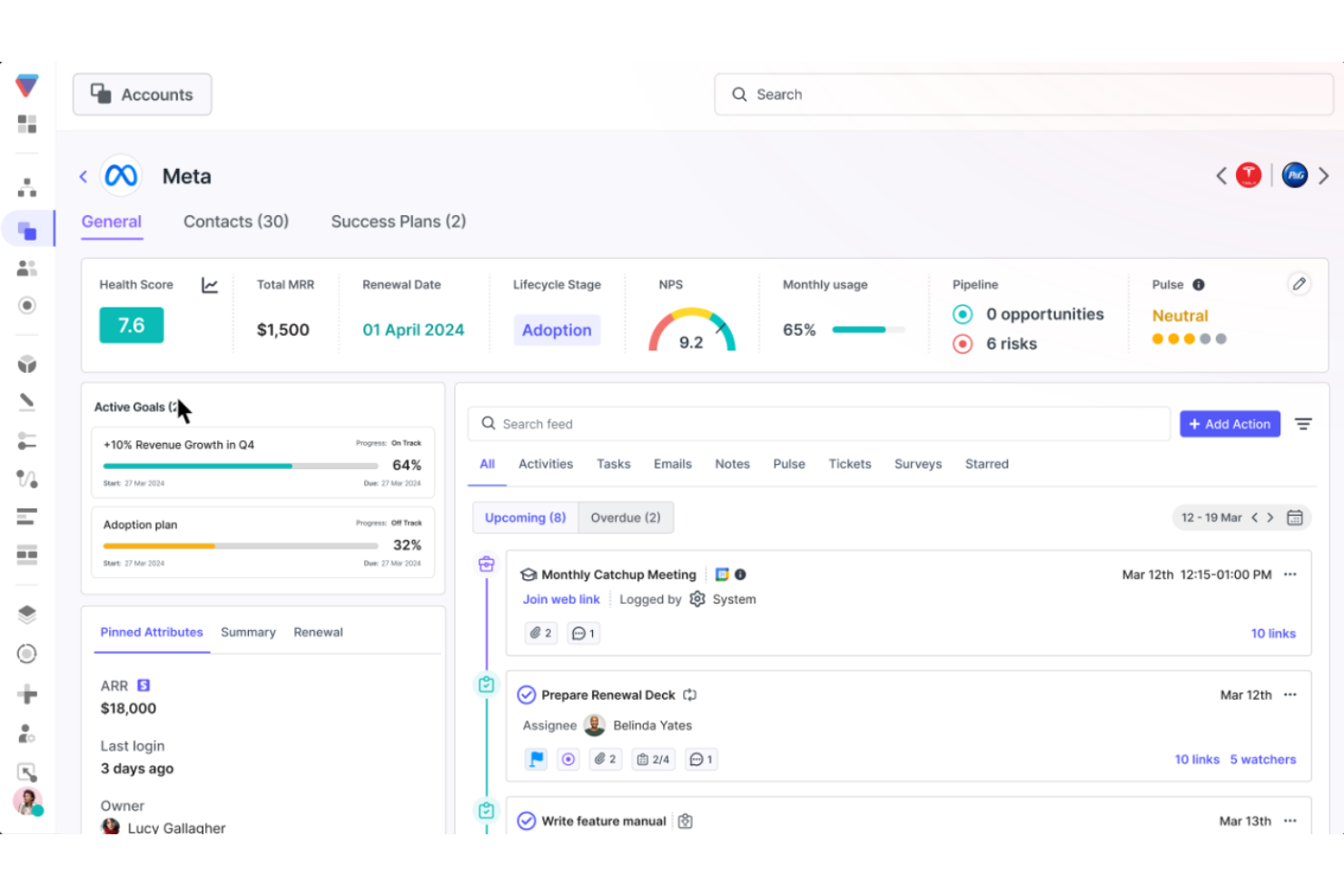
Velaris ofrece a los equipos de experiencia del cliente y a los gerentes de éxito del cliente una plataforma unificada para monitorear los recorridos de los clientes, automatizar flujos de trabajo y mostrar información procesable que ayuda a reducir la pérdida de clientes y aumentar el crecimiento de las cuentas.
¿Para quién es mejor Velaris?
Velaris es muy adecuado para empresas B2B SaaS con equipos dedicados de éxito del cliente que buscan pasar de un soporte reactivo a una gestión de cuentas proactiva.
Por qué elegí Velaris
Elegí Velaris como uno de los mejores por el control total que ofrece sobre la configuración de los puntajes de salud. La mayoría de las herramientas ofrecen una fórmula fija; Velaris te permite crear puntajes de salud desde cero usando exactamente las métricas que más importan a tu negocio, ya sea el uso del producto, el volumen de tickets de soporte, calificaciones NPS u otro dato personalizado que incluyas. También me gusta que los puntajes se acumulen en toda la organización, a nivel de cuenta y de contacto, para que mi equipo pueda detectar un contacto con dificultades dentro de una cuenta que por lo demás se considera saludable. Además, la función CSM Pulse permite que los CSM agreguen sus propias valoraciones manuales, lo que significa que el puntaje refleja tanto los datos como el juicio humano que ningún algoritmo puede reemplazar completamente.
Funciones clave de Velaris
- Guías de acción: Crea guías estandarizadas paso a paso que se activan automáticamente según el comportamiento del cliente o la etapa del ciclo de vida.
- Constructor visual de flujos de trabajo: Diseña flujos de trabajo automatizados usando activadores personalizados para enviar comunicaciones, actualizar registros o alertar a tu equipo.
- Encuestas: Crea y envía encuestas NPS, CSAT y CES directamente desde la plataforma para recopilar comentarios estructurados de los clientes.
- Inteligencia de cuentas con IA: Genera resúmenes históricos instantáneos de cualquier cuenta, reuniendo actividades, comunicaciones y contexto en una sola vista.
Integraciones de Velaris
Velaris ofrece integraciones nativas con Salesforce, HubSpot, Intercom, Zendesk, Slack, Microsoft Teams, Google Workspace, Jira y Zapier. Hay una API disponible para integraciones personalizadas.
Pros and Cons
Pros:
- La vista centralizada combina uso, sentimiento y compromiso
- La puntuación de salud dinámica se adapta a los cambios en el ciclo de vida
- Los flujos de trabajo automatizados reducen el seguimiento y el contacto manual
Cons:
- Las organizaciones pequeñas pueden no aprovechar al máximo el alcance de la plataforma
- Menos integraciones disponibles

Ideal para funciones de automatización del ciclo de vida
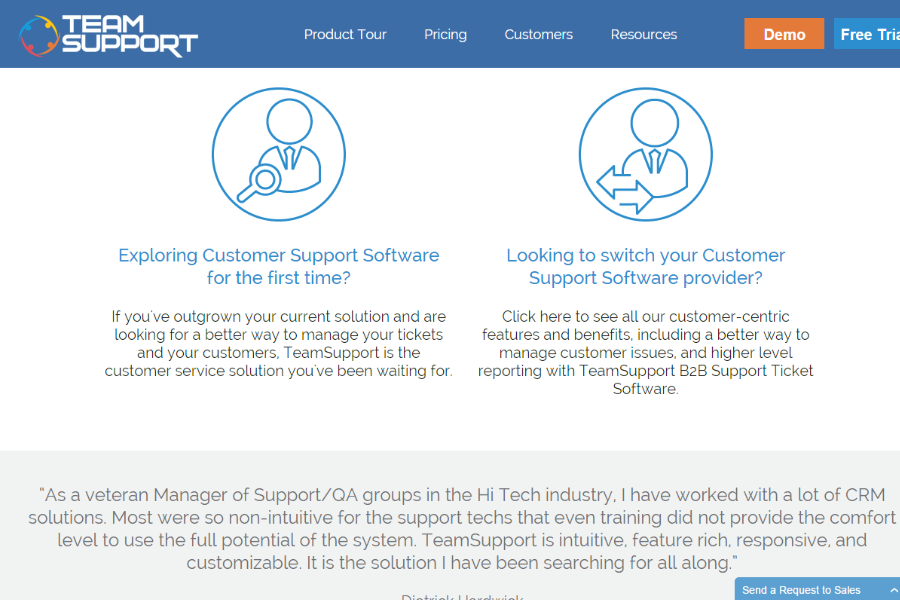
TeamSupport es una plataforma de éxito del cliente diseñada para equipos B2B de soporte y experiencia del cliente (CX) que necesitan gestionar relaciones complejas con clientes, agilizar la comunicación y abordar de manera proactiva las necesidades de los clientes a lo largo de todo el ciclo de vida.
¿Para quién es mejor TeamSupport?
TeamSupport es ideal para empresas B2B con equipos dedicados de soporte o éxito del cliente que gestionan relaciones continuas con clientes en múltiples cuentas.
Por qué elegí TeamSupport
Elegí TeamSupport como uno de los mejores porque su función Playbooks gestiona la automatización del ciclo de vida de extremo a extremo. Playbooks cubre la incorporación, la prevención de abandono, las renovaciones y acciones de upsell en una sola capa de flujo de trabajo, sin necesidad de herramientas externas ni listas de verificación manuales. Cuando se cierra un trato en Salesforce o HubSpot, Playbooks crea automáticamente un nuevo registro de cliente e inicia el flujo de trabajo de incorporación. También activa flujos de prevención de abandono cuando baja la puntuación de salud, para que mi equipo responda a las señales de riesgo antes de que se agraven.
Características clave de TeamSupport
- Índice de angustia del cliente: Sistema de puntuación propietario que supervisa los patrones de interacción y el sentimiento en todos los puntos de contacto para señalar cuentas en riesgo.
- Agente con IA: Un agente impulsado por inteligencia artificial que atiende consultas rutinarias de soporte, recopila información y deriva casos complejos a agentes humanos.
- Vista unificada de tareas: Una vista única de todos los asuntos abiertos organizados por cliente, usuario, ticket o producto en toda la cartera de cuentas.
- Panel de análisis avanzado: Plantillas de informes predefinidas y personalizables con métricas en tiempo real y alertas para monitorear el rendimiento a nivel de cuenta.
Integraciones de TeamSupport
TeamSupport ofrece integraciones nativas con Salesforce, HubSpot, Jira, Slack, Mailchimp, Microsoft Teams y QuickBooks, y se conecta con Zapier. Hay una API disponible para integraciones personalizadas.
Pros and Cons
Pros:
- Automatización de tickets impulsada por IA
- Información de sentimiento en tiempo real
- Centro de autoservicio para clientes personalizable
Cons:
- La base de conocimientos carece de opciones de configuración
- Funcionalidad limitada de la app móvil

Zendesk
La mejor para interacciones unificadas con clientes
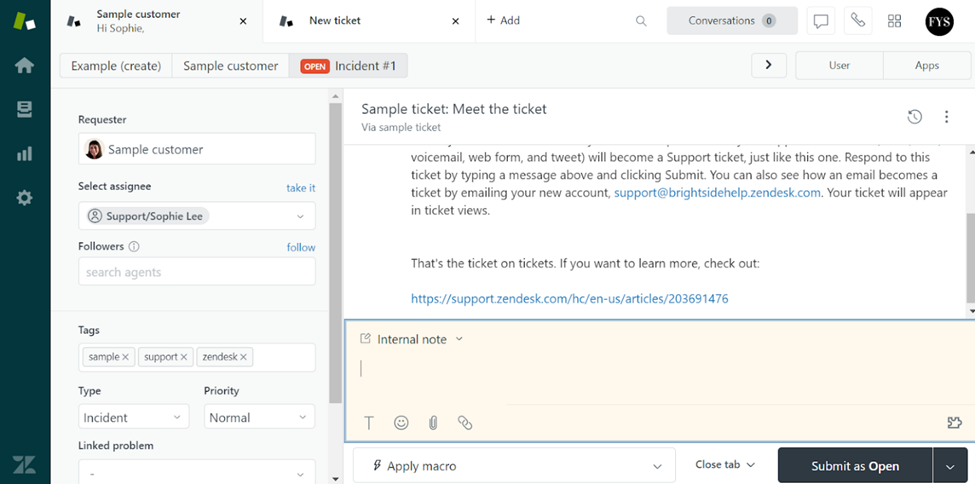
Zendesk ofrece a los equipos de experiencia del cliente (CX) en empresas de todos los tamaños una plataforma única para gestionar conversaciones con clientes, tickets de soporte y la interacción a través de múltiples canales, ayudando a los equipos a ofrecer un servicio rápido y consistente y a resolver los problemas con prontitud.
¿Para quién es mejor Zendesk?
Zendesk es ideal para los equipos de experiencia del cliente y soporte de tamaño mediano a empresarial que manejan grandes volúmenes de interacciones con clientes a través de múltiples canales.
Por qué elegí Zendesk
Zendesk merece estar en mi lista porque integra perfectamente todas las interacciones de los clientes en un solo lugar: correo electrónico, chat, voz, redes sociales y mensajería se agrupan en un único espacio de trabajo para agentes. Me gusta que los agentes puedan ver el historial completo de conversaciones a través de todos los canales sin cambiar de herramienta, para que puedan retomar desde donde se quedó la interacción anterior. Mi equipo también confía en los perfiles unificados de cliente de Zendesk, que muestran detalles de la cuenta, tickets pasados y el contexto de las interacciones junto a la conversación. Ese nivel de visibilidad reduce los intercambios innecesarios que molestan a los clientes y ayuda a los agentes a responder con el contexto adecuado desde el principio.
Funciones clave de Zendesk
- Enrutamiento de tickets impulsado por IA: Asigna automáticamente los tickets entrantes al agente adecuado según disponibilidad, habilidades y carga de trabajo en todos los canales.
- Enrutamiento omnicanal: Dirige las conversaciones de correo electrónico, voz, mensajería y redes sociales a una única cola para que los agentes no tengan que clasificar manualmente las solicitudes entrantes.
- Constructor de base de conocimientos: Permite a los equipos crear, gestionar y mostrar artículos de autoservicio utilizando IA generativa para convertir tickets históricos en contenido del centro de ayuda.
- Paneles de informes personalizados: Ofrece a los equipos de experiencia del cliente paneles preconstruidos y totalmente personalizables para hacer seguimiento del volumen de tickets, desempeño de los agentes y tendencias de servicio.
Integraciones de Zendesk
Zendesk ofrece más de 1,500 integraciones nativas a través de su marketplace, incluyendo Salesforce, Slack, Jira, Shopify, Mailchimp, HubSpot, Google Workspace, Microsoft Teams, Zoom, Trello y Zapier. Se dispone de una API para integraciones personalizadas.
Pros and Cons
Pros:
- Reúne correo electrónico, chat, teléfono y redes sociales en un solo espacio de trabajo
- Automatiza el enrutamiento y los flujos de respuesta, reduciendo tareas manuales
- Amplias integraciones con sistemas CRM, telefonía y sociales
Cons:
- La configuración e implementación son complejas y requieren muchos recursos
- Funciones avanzadas disponibles solo en complementos o personalización de nivel superior
New Product Updates from Zendesk
Zendesk Adds Email AI Replies and Predictive Routing
Zendesk’s latest email AI agents update brings configurable knowledge and welcome replies and adds predictive routing for email tickets, so you can tailor your automated emails and get inquiries resolved faster. For more information, visit Zendesk’s official site.

Chatbase
La mejor opción por su seguridad y privacidad de nivel empresarial
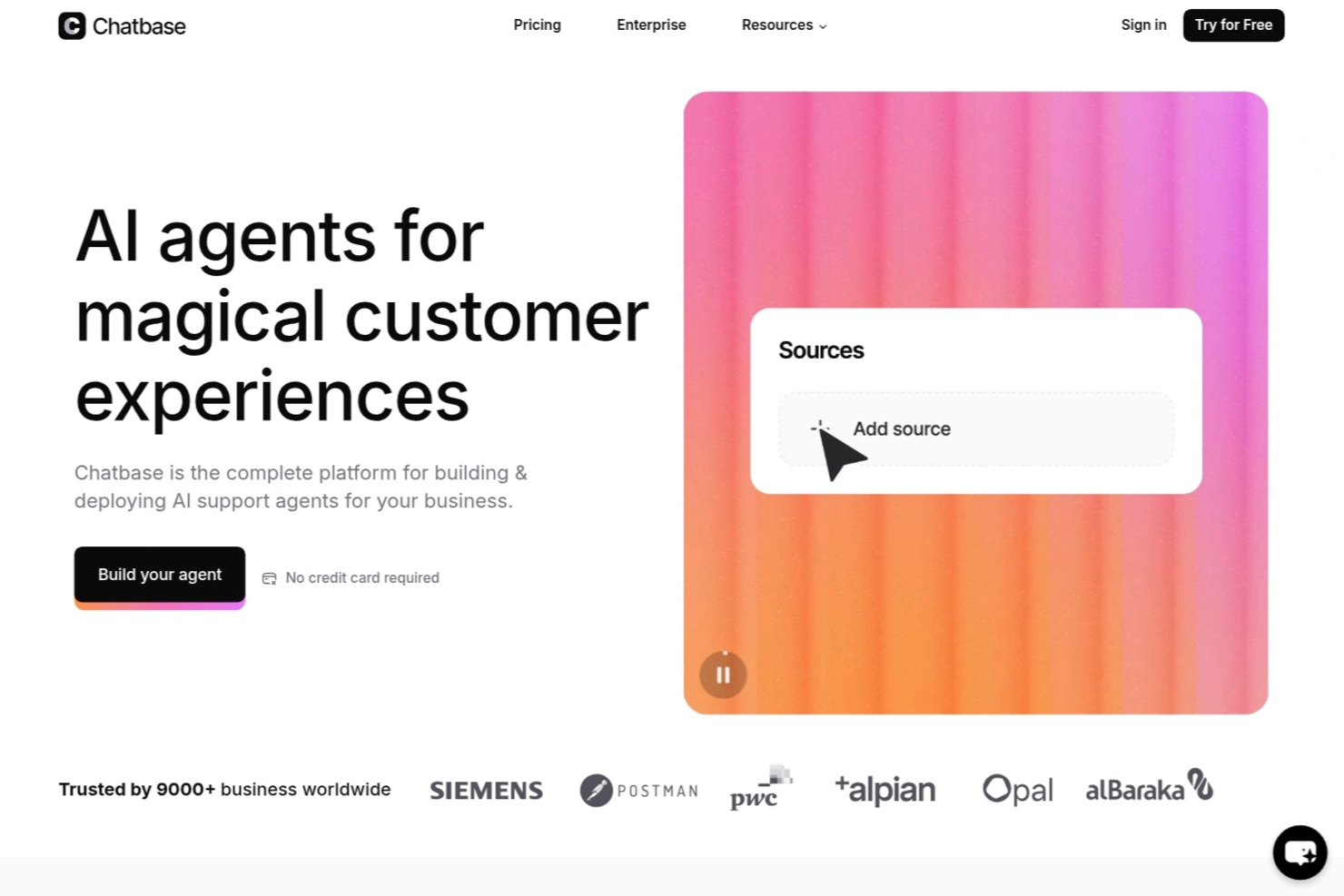
Chatbase es una plataforma de chatbots de IA para equipos de éxito del cliente que permite crear, implementar y gestionar agentes de IA personalizados, automatizar flujos de trabajo de soporte y conectar chatbots con los datos y sistemas de tu empresa.
¿Para quién es más adecuado Chatbase?
Chatbase es ideal para equipos de éxito del cliente de empresas en crecimiento que necesitan automatizar el soporte y conectar los chatbots con sus sistemas internos.
Por qué elegí Chatbase
Elegí Chatbase como una de las mejores opciones porque proporciona a mi equipo controles de seguridad y privacidad de nivel empresarial, esenciales para gestionar datos confidenciales de los clientes. Me gusta que Chatbase ofrezca funciones como cifrado de datos, registros de auditoría y una estricta gestión de accesos. En la práctica, esto significa que mi equipo puede implementar chatbots de IA con confianza en sectores regulados sin preocuparse por brechas de cumplimiento.
Características principales de Chatbase
- Constructor de agentes de IA personalizados: Crea y entrena chatbots de IA utilizando tus propios datos y documentos empresariales.
- Compatibilidad con varios idiomas: Implementa chatbots que puedan interactuar con los clientes en varios idiomas.
- Análisis de conversaciones: Supervisa y analiza las interacciones de los chatbots para identificar tendencias y mejorar las respuestas.
- Acceso a la API: Integra Chatbase con tus sistemas y flujos de trabajo empresariales existentes mediante API sólidas.
Integraciones de Chatbase
Chatbase ofrece integraciones nativas con Zendesk, Notion, Slack, Stripe, Salesforce, Cal.com, Calendly, WhatsApp y Messenger. También se conecta con Make y Zapier, y proporciona una API para integraciones personalizadas.
Pros and Cons
Pros:
- Acceso a la API para una integración avanzada con los sistemas empresariales
- La personalización del widget se adapta fácilmente a la imagen de marca de la empresa
- El panel de análisis de conversaciones destaca las tendencias de los usuarios
Cons:
- No incluye una función integrada para transferir la conversación a un agente en directo
- Carece de herramientas avanzadas de automatización de flujos de trabajo

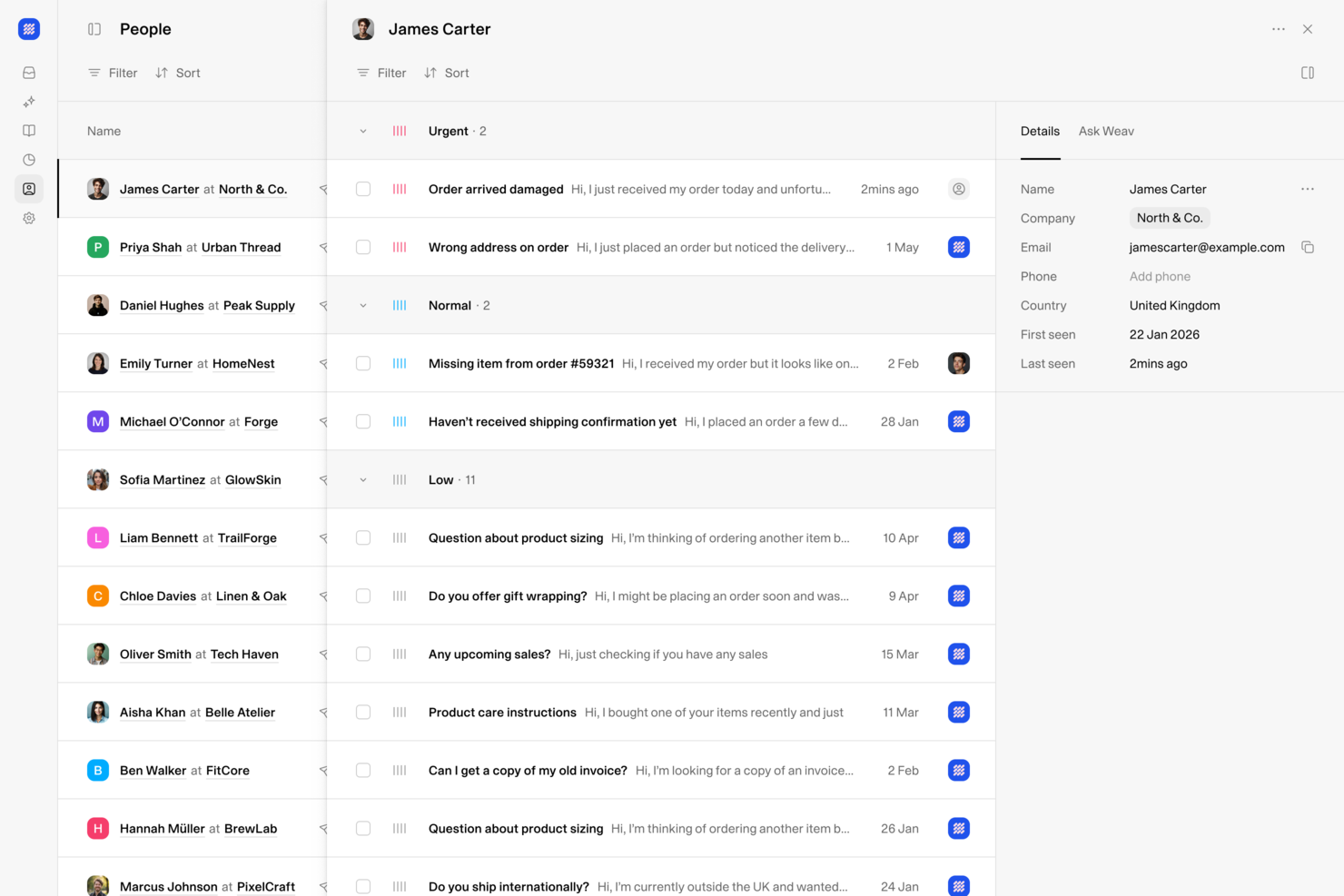
Weav es una plataforma de soporte al cliente impulsada por IA que combina una bandeja de entrada unificada, agentes de IA, chatbots y herramientas de resolución automática de tickets para equipos de soporte que gestionan interacciones de clientes a través de múltiples canales.
¿Para Quién es Mejor Weav?
Weav es ideal para equipos de soporte pequeños y medianos que necesitan centralizar las comunicaciones con los clientes y automatizar la gestión repetitiva de tickets sin gran carga de ingeniería.
Por Qué Elegí Weav
Weav se gana un lugar en mi lista porque su bandeja de entrada unificada reúne agentes de IA y representantes humanos en un único espacio de trabajo compartido, de modo que cada conversación con el cliente, sin importar el canal, permanece en un solo lugar y con todo el contexto intacto. Me gusta mucho que la IA de Weav redacta respuestas para todas las bandejas de entrada simultáneamente, lo que significa que mi equipo no tiene que alternar entre herramientas para manejar correo electrónico, chat y otros canales. La función 'Preguntar a Weav' también proporciona una capa de conocimiento interna rápida para que los representantes obtengan respuestas sobre productos sin salir del espacio de trabajo.
Características Clave de Weav
- Constructor de chatbots con IA: Crea y despliega chatbots impulsados por IA entrenados con tu propia documentación de producto y contenido de ayuda para gestionar las consultas entrantes de los clientes.
- Enrutamiento inteligente de tickets: Redirige automáticamente los tickets entrantes al agente humano correcto según el tema, la prioridad o el equipo, para que las conversaciones lleguen a la persona adecuada sin triaje manual.
- Entrenamiento con base de conocimientos: Sube documentos internos, preguntas frecuentes y artículos para entrenar la IA de Weav en tu producto específico, garantizando respuestas precisas en tu contexto.
- Paneles de análisis personalizados: Haz seguimiento del volumen de tickets, tiempos de respuesta y tasas de resolución con vistas de panel configurables adaptadas a las necesidades de informes de tu equipo.
Integraciones de Weav
Las integraciones nativas no están claramente documentadas. Weav ofrece una API REST orientada a desarrolladores donde toda acción disponible en el panel puede ser accedida programáticamente, junto con webhooks en tiempo real para crear flujos de trabajo personalizados.
Pros and Cons
Pros:
- Agentes de IA se entrenan con tickets resueltos
- Bandeja de entrada unificada para todos los canales
- Sin coste por asiento para colaboradores
Cons:
- Integraciones nativas de terceros limitadas
- El plan gratuito limita la IA a 20 mensajes
Otros programas para el éxito del cliente
Aquí tienes algunos más que no llegaron a la lista principal.
- Missive
Ideal para la comunicación colaborativa con clientes
- Nextiva
Ideal para la orquestación personalizada del recorrido del cliente
- Dock
Ideal para espacios de trabajo orientados al cliente
- Tidio
Ideal para el análisis del comportamiento del cliente
- ChurnZero
Ideal para gestionar riesgos de abandono de clientes
- Guidde
Ideal para crear videos instructivos con IA
- Planhat
Mejor software multicanal de éxito del cliente
- Front
Ideal para la coordinación de flujos de trabajo entre equipos
- GUIDEcx
Ideal para la incorporación de clientes y usuarios
- Catalyst
El mejor software de éxito del cliente para ventas adicionales y retención
- Skilljar
Mejor software de éxito del cliente para la educación del cliente
- Podium
El mejor software de éxito del cliente para marketing por SMS y texto
- Sprout Social
Mejor para centralizar bandejas de entrada sociales
- Akita
Mejor para reducir la pérdida de clientes
- Guru
Ideal para sugerencias de respuestas al cliente con IA
- Front
Ideal para gestionar la comunicación con clientes
- Quidget
Mejor para automatización de chat en vivo potenciada por IA
- Hiver
Ideal para brindar experiencias mejoradas a los clientes
- Product Fruits
Ideal para recopilar comentarios detallados de incorporación de clientes
- eDesk
Ideal para equipos de soporte de comercio electrónico


Cómo evalúo el software de éxito del cliente
Divido mi evaluación en dos niveles: las capacidades principales—como la puntuación de salud del cliente, alertas de pérdida de clientes y playbooks de ciclo de vida—que califican una herramienta para la lista, y los diferenciadores que separan a los mejores del resto.
Funcionalidad principal (Requisitos indispensables para esta lista)
Cuando selecciono herramientas para mi lista, califico cada una en una escala de 0 (no ofrece la funcionalidad) a 5 (sobresale en esta área) para cada funcionalidad principal listada a continuación. Luego, calculo la puntuación total de la herramienta como porcentaje. Cada herramienta necesita alcanzar una puntuación total mínima del 65% para ser considerada para su inclusión.
- Puntuación de salud del cliente: Busco puntuaciones de salud configurables y multifactoriales—herramientas donde se puedan ponderar entradas como tendencias de tickets de soporte, frecuencia de inicio de sesión y respuestas de NPS por segmento de cuenta.
- Riesgo de deserción y alertas: Los sistemas de alerta temprana son fundamentales aquí. Evalúo si una plataforma identifica automáticamente cuentas en riesgo y direcciona las alertas al CSM adecuado antes de iniciar conversaciones de renovación.
- Playbooks de ciclo de vida y automatización: Cada herramienta debe permitirte construir playbooks activados para etapas clave como onboarding, revisiones de adopción y QBRs en lugar de depender de la creación manual de tareas.
- Analítica del uso del producto: Verifico si la plataforma ingiere datos de telemetría y los traduce en métricas de adopción—elementos como la participación a nivel de funcionalidad, utilización de licencias y tendencias de uso a lo largo del tiempo.
- Gestión de renovaciones y expansión: Herramientas como Gainsight y ChurnZero abordan esto de manera diferente, así que evalúo si la plataforma ofrece vistas de pipeline, previsión de ingresos y seguimiento de NRR/GRR en un solo lugar.
- Vista unificada del cliente e integraciones: Un CSM no debería necesitar cuatro pestañas abiertas para prepararse para una llamada. Busco una línea de tiempo de cuenta unificada que extraiga datos de CRM, soporte, facturación y sistemas de producto.
Una vez tengo una lista de herramientas que cumplen con este criterio, considero qué distingue a cada plataforma.
Factores diferenciadores (Lo que distingue a los proveedores)
Así es como comparo y contrasto los diferentes proveedores:
Características destacadas
La inteligencia artificial predictiva es un gran diferenciador. Evalúo si una plataforma puede pronosticar la probabilidad de pérdida o expansión en función de patrones de comportamiento—no solo señalar cuentas que ya presentan problemas. También destacan los espacios de trabajo orientados al cliente. Los planes de éxito compartidos donde tus clientes siguen hitos de onboarding o revisan resultados de QBR convierten al área de éxito del cliente en una colaboración visible en vez de una función interna. También observo las herramientas de involucramiento dentro de la aplicación, ya que activar recordatorios de adopción o encuestas NPS directamente en el producto elimina la fricción que el contacto por correo electrónico no puede resolver.
Más allá de las funciones
La profundidad de la integración es muy importante aquí. Verifico si una plataforma se sincroniza bidireccionalmente con tu CRM y sistema de facturación, ya que los datos obsoletos en una puntuación de salud son peores que no tener puntuación en absoluto. Las líneas de tiempo de implementación también varían ampliamente: algunas plataformas permiten que un equipo de éxito de diez personas esté en funcionamiento en semanas, mientras que otras requieren meses de servicios profesionales. También evalúo el ajuste según el segmento, porque una herramienta diseñada para movimientos empresariales de alto contacto suele abrumar a un equipo SMB ágil que opera una estrategia de éxito digital.
Cómo elegir un software para el éxito del cliente
Es fácil perderse entre listas interminables de funciones y estructuras de precios complejas. Para ayudarte a mantener la concentración durante tu proceso de selección de software, aquí tienes una lista de elementos a tener en cuenta:
| Factor | Qué considerar |
|---|---|
| Escalabilidad | Asegúrate de que el software pueda crecer con tu empresa. Busca soluciones que gestionen un mayor volumen de datos de clientes y más usuarios sin sacrificar el rendimiento. |
| Integraciones | Verifica si se conecta fácilmente con tus herramientas existentes como CRMs y plataformas de comunicación para agilizar procesos. |
| Personalización | Necesitas un software que pueda adaptarse a tus flujos de trabajo y puntos de contacto con clientes para obtener la máxima eficiencia. |
| Facilidad de uso | Elige un programa que sea intuitivo para que tu equipo lo aprenda y use a diario, minimizando el tiempo de capacitación y aumentando la productividad. |
| Presupuesto | Alinea el precio del software con tus necesidades financieras. Considera tanto los costos iniciales como las tarifas recurrentes para evitar sorpresas. |
| Medidas de seguridad | Asegúrate de que cuente con sólidas medidas de protección de datos para proteger la información del cliente y cumplir con las regulaciones. |
Tendencias en los programas para el éxito del cliente
Es fundamental que los responsables de éxito del cliente y los equipos de soporte permanezcan atentos a las tendencias en el software para el éxito del cliente para optimizar sus estrategias y mejorar las experiencias de los usuarios. Mantenerse al día con los avances más recientes permite a los CSM aprovechar funciones y características innovadoras que ofrecen estas soluciones para impulsar el éxito del cliente.
Además, estar informado sobre las tendencias emergentes permite a los CSM adaptar sus procesos de trabajo, optimizar flujos y adelantarse a la competencia en este entorno en constante cambio. Aquí tienes cuatro tendencias recientes que hay que conocer en 2026:
Análisis impulsados por IA para obtener conocimientos integrales del cliente
La inteligencia artificial está revolucionando la forma en que se analiza y utiliza la información de los clientes, permitiendo a los CSM recopilar y visualizar fácilmente datos integrales de los clientes. La IA también puede ayudar a rastrear las interacciones con los clientes y proporcionar conocimientos sobre los clientes utilizando diversas funciones, incluyendo el procesamiento automatizado de datos, análisis predictivos y personalización.
Intenta implementar herramientas de análisis impulsadas por IA para obtener conocimientos más profundos sobre tus clientes. Esto no solo te ahorrará tiempo, sino que también ayudará a adaptar tus servicios para satisfacer las necesidades de los clientes de manera más efectiva.
¿Quieres saber más sobre cómo recopilar y almacenar datos para el éxito del cliente? Consulta nuestro artículo sobre software gratuito de bases de datos de clientes.
Plataformas unificadas de comunicación
Las plataformas unificadas de comunicación se están volviendo esenciales para cerrar las brechas de comunicación y colaboración entre diferentes equipos. A través del software de éxito del cliente, esto puede ofrecer beneficios como comunicación centralizada, integración con otras herramientas CRM y colaboración en tiempo real para la resolución de problemas entre equipos.
Adopta una plataforma unificada de comunicación para mejorar la colaboración del equipo, asegurando que todos estén alineados y trabajando hacia un objetivo común, como maximizar el éxito y la satisfacción del cliente.
Accesibilidad móvil y soluciones en la nube
Al adoptar soluciones móviles y basadas en la nube, puedes gestionar eficientemente grandes volúmenes de interacciones con clientes con funciones como acceso remoto, permitiendo que los miembros del equipo accedan a los datos de los clientes desde cualquier lugar para un soporte remoto más ágil, y actualizaciones en tiempo real a través de aplicaciones móviles, asegurando que todos los miembros del equipo estén informados y alineados con las últimas interacciones de los clientes. Este enfoque aumenta la flexibilidad y escalabilidad en la gestión de interacciones con los clientes.
Informes avanzados y personalización de paneles
Esta tendencia destaca el cambio hacia la mejora de la eficiencia al reducir procesos manuales, a través de funciones como informes personalizables que se pueden ajustar para enfocarse en métricas clave del negocio, generación automática de informes para ahorrar tiempo y paneles interactivos que facilitan una toma de decisiones rápida y fundamentada.
Invertir en un software de éxito del cliente con estas funciones avanzadas permite una mayor automatización y personalización del análisis de datos, liberando tiempo para tareas más estratégicas y abordando desafíos clave en las operaciones orientadas al éxito del cliente.
¿Qué es el software de éxito del cliente?
El software de éxito del cliente es una plataforma que ayuda a las empresas a rastrear la salud, participación y resultados del cliente para impulsar proactivamente la retención y el crecimiento. Se utiliza para monitorizar el uso, identificar riesgos y garantizar que los clientes reciban un valor continuo de tu producto o servicio.
Características del software de éxito del cliente
Al seleccionar un software de éxito del cliente, ten en cuenta las siguientes características clave:
- Perfiles de clientes completos: Recoge y organiza todos los datos esenciales de los clientes en una sola vista fácil de navegar. Esta perspectiva holística te permite personalizar las interacciones y comprender rápidamente el recorrido de cada cliente, para que nadie se sienta como un simple ticket en tu sistema.
- Herramientas de comunicación automatizadas: Programa correos electrónicos, configura recordatorios y activa alertas para optimizar el contacto con los clientes. Al automatizar estos puntos de contacto, puedes mantener una comunicación coherente y amistosa—adiós a los momentos de “¡Ups, se me olvidó hacer el seguimiento!”
- Seguimiento de uso: Supervisa en tiempo real cómo los clientes interactúan con tu producto. Esta función detecta tendencias de comportamiento, permitiéndote intervenir con soporte oportuno o identificar oportunidades de mejora mucho antes de que un cliente piense en abandonar.
- Métricas de puntuación de salud: Calcula y actualiza los puntajes de salud de los clientes en función de sus patrones de uso, interacciones con soporte y satisfacción general. Piensa en estas puntuaciones como tu sistema de alerta temprana, avisándote de clientes que pueden necesitar ayuda antes de que aparezcan los problemas.
- Automatización de tareas y flujos de trabajo: Deja que el software se encargue de tareas repetitivas como asignar seguimientos o actualizar campos de estado. Automatizar estos flujos de trabajo te libera para planificar estrategias y construir relaciones significativas, en vez de luchar con hojas de cálculo.
- Herramientas de planificación del éxito: Define objetivos y metas individualizadas para cada cliente. Podrás seguir el progreso, celebrar logros juntos y guiar a tus clientes para sacar el máximo partido a tu producto, mientras construyes una lealtad duradera.
- Mecanismos de recolección de feedback: Envía encuestas o solicita opiniones dentro de la aplicación. Disponer de canales directos para recopilar ideas te permite adaptarte rápidamente a las nuevas necesidades y demostrar que realmente valoras su opinión.
- Informes y analíticas: Explora paneles que traducen tus esfuerzos de éxito del cliente en datos accionables. Estas analíticas te permiten identificar lo que funciona, ajustar tu enfoque y destacar el impacto de tu equipo.
- Capacidades de integración: Conéctate sin problemas con CRM, herramientas de marketing y soporte, de modo que toda la información de los clientes se mantenga actualizada y accesible desde un solo lugar. Estas integraciones te ayudan a ofrecer un servicio coordinado sin esfuerzo adicional.
- Soporte de onboarding: Ofrece a los nuevos usuarios guías interactivas, tutoriales y recursos directamente en el software. Un onboarding sólido marca la pauta para una satisfacción a largo plazo y reduce esos molestos tickets de soporte de “¿Cómo empiezo?”
Funciones comunes de IA en el software de éxito del cliente
Más allá de las funciones estándar mencionadas anteriormente, muchas de estas soluciones están incorporando IA con funciones como:
- Análisis predictivo de abandono: La IA analiza los patrones de comportamiento de los clientes para prever qué usuarios tienen mayor probabilidad de abandonar. Esto te permite anticiparte y aplicar estrategias de retención personalizadas antes de que sea demasiado tarde.
- Análisis automatizado de sentimiento: El software escanea correos, chats y feedback para detectar el sentimiento del cliente en tiempo real. Obtienes una visión rápida de quién está satisfecho y quién está frustrado, para priorizar tu comunicación en consecuencia.
- Recomendaciones de contenido personalizadas: La IA sugiere artículos, tutoriales o novedades relevantes según el uso y las preferencias de cada cliente. Esto mantiene a los usuarios interesados con consejos y recursos que realmente les importan.
- Priorización automática de casos: Con un poco de magia de IA, los tickets de soporte y solicitudes se ordenan y priorizan según su urgencia, probabilidad de escalación o valor del cliente, para que siempre atiendas primero lo más importante.
- Mapeo inteligente del recorrido del cliente: La IA recopila interacciones y uso del producto para trazar el recorrido ideal de cada cuenta. Puedes intervenir en el momento justo y transformar usuarios indiferentes en verdaderos fans.
- Ajustes dinámicos del puntaje de salud: En vez de depender solo de métricas estáticas, la IA reajusta los puntajes de salud en tiempo real a medida que llega nueva información, lo que te ayuda a centrarte en los clientes en riesgo conforme evolucionan las circunstancias.
Beneficios del software de éxito del cliente
El software de éxito del cliente ofrece una amplia gama de beneficios que pueden tener un efecto dominó en toda tu organización. De hecho, un estudio de Forrester de 2021 encontró que las empresas con un enfoque liderado por el cliente en la inversión tecnológica crecieron 1.8 veces más rápido que sus competidores.
Al elegir el software de éxito del cliente adecuado, puedes esperar los siguientes beneficios:
1. Mejora en la retención de clientes: Este software ayuda a tu equipo a abordar proactivamente las necesidades y preocupaciones de los clientes, lo que se traduce en mayores tasas de satisfacción y menor abandono. Al identificar oportunamente a los clientes en riesgo, se pueden implementar estrategias de retención de manera efectiva.
2. Información basada en datos: El software de éxito del cliente proporciona herramientas de análisis e informes que ofrecen información profunda sobre el comportamiento y las preferencias de los clientes. Estos datos te permiten tomar decisiones informadas que mejoran la lealtad, la experiencia y los resultados de los clientes.
3. Mayor eficiencia operativa: Automatizar tareas rutinarias como seguimientos, gestión de tickets y consultas de clientes con software de éxito del cliente libera al equipo para enfocarse en actividades más estratégicas. Esto aumenta la productividad y optimiza el uso de los recursos.
4. Interacciones personalizadas con los clientes: El software permite rastrear y comprender el recorrido del cliente para personalizar la comunicación y los servicios en función de los datos de cada cliente. Las interacciones personalizadas tienen más probabilidades de aumentar la participación y la lealtad del cliente.
5. Interacción con clientes escalable: A medida que tu empresa crece, gestionar un mayor volumen de interacciones con los clientes puede resultar desafiante. El software de éxito del cliente se adapta para gestionar este crecimiento, manteniendo la calidad del servicio al cliente sin necesidad de aumentar proporcionalmente el personal.
El uso estratégico de esta tecnología no solo mejora el recorrido del cliente, sino que también impulsa el crecimiento sostenible del negocio al mantener la satisfacción del cliente como prioridad.
Costos y precios del software de éxito del cliente
El software de éxito del cliente ofrece una variedad de opciones de precios y planes, cada una diseñada para cubrir diferentes necesidades y tamaños empresariales. Familiarizarte con estos planes y sus características es fundamental para elegir una solución que se alinee con los objetivos y limitaciones presupuestarias de tu organización. A continuación, un resumen de las opciones de planes típicas que podrías encontrar:
| Tipo de plan | Precio promedio | Características comunes |
|---|---|---|
| Gratis | $0 | Análisis básicos, perfiles de cliente limitados, soporte por correo electrónico |
| Básico | $25 por usuario/mes | Perfiles de cliente mejorados, soporte por correo y chat, informes básicos |
| Profesional | $75 por usuario/mes | Seguimiento completo del ciclo de vida del cliente, informes avanzados, integraciones, soporte prioritario |
| Empresarial | $150 por usuario/mes | Funciones personalizadas, gestor de cuenta dedicado, soporte 24/7, capacidades de IA |
Al seleccionar un plan, considera la complejidad de las relaciones con tus clientes, el tamaño de tu base de clientes y el nivel de soporte y personalización que prevés necesitar. El software adecuado debe cubrir no solo tus necesidades actuales, sino también crecer junto con tu organización, asegurando un buen equilibrio entre funcionalidad y costo para maximizar el valor y apoyar de manera efectiva los objetivos de éxito del cliente de tu empresa.
Preguntas frecuentes sobre la satisfacción del cliente
Aquí tienes respuestas a las preguntas frecuentes sobre el software de éxito del cliente que utilizan los equipos de experiencia del cliente.
¿Cuáles son los tipos de software de éxito del cliente?
El software de éxito del cliente suele dividirse en tres tipos principales: plataformas todo en uno, herramientas especializadas y soluciones de análisis. Las plataformas todo en uno combinan la incorporación, la puntuación de salud y el engagement en una sola herramienta. Las herramientas especializadas se centran en una necesidad específica, como las encuestas, feedback o renovaciones. Las soluciones de análisis ofrecen información profunda sobre los datos de los clientes para hacer un seguimiento de la retención y las oportunidades de venta adicional. Elegir el tipo adecuado depende de los objetivos de tu equipo, los desafíos actuales y cómo se integra la herramienta en tu flujo de trabajo.
rnrnrn
¿Cómo puedo medir el ROI del software de éxito del cliente?
rnrnPuedes medir el ROI siguiendo métricas como la tasa de retención de clientes, el aumento de ingresos, la reducción de la pérdida de clientes y las mejoras en el Net Promoter Score (NPS). Compara estos valores antes y después de implementar el software. Ten en cuenta el tiempo ahorrado al automatizar tareas manuales, la mejora de la productividad del equipo y el aumento de oportunidades de upselling. Informar sobre estos resultados concretos te ayudará a justificar tu inversión ante las partes interesadas.rnrnrnrnrn
¿Qué integraciones debo priorizar al elegir software de éxito del cliente?
Prioriza integraciones con tu CRM (como Salesforce o HubSpot), sistemas de tickets de soporte y herramientas de comunicación como Slack o plataformas de correo electrónico. Una integración fluida con tu stack existente garantiza que los datos de los clientes estén actualizados y reduce el trabajo manual. Para los responsables de éxito del cliente, las integraciones sólidas con herramientas de análisis y facturación son especialmente valiosas para obtener visibilidad y reportes a lo largo del ciclo de vida del cliente.
¿Cómo ayudan las plataformas de éxito del cliente a reducir la pérdida de clientes?
Las plataformas de éxito del cliente ayudan a reducir la pérdida de clientes proporcionando señales de alerta temprana a través de puntuaciones de salud, automatizando procesos de seguimiento y destacando cuentas en riesgo. Funciones como el seguimiento del uso, recordatorios automáticos y la interacción personalizada facilitan la intervención proactiva. Esto ayuda a tu equipo a construir relaciones sólidas y resolver problemas antes de que tus clientes consideren darse de baja.
¿Cuáles son los errores comunes que se deben evitar al implementar un software de éxito del cliente?
Entre los errores más comunes se encuentran omitir la evaluación de necesidades, subestimar los retos de migración de datos y no involucrar a los usuarios de primera línea en la configuración. No olvides capacitar a tu equipo ni definir criterios claros de éxito. Evita personalizar en exceso los flujos de trabajo al principio: obtén logros rápidos con las funciones básicas y luego ve iterando. La gestión del cambio es clave para una alta adopción.
¿El software de éxito del cliente puede mejorar la colaboración entre equipos?
Sí, el software de éxito del cliente puede mejorar la colaboración al centralizar los datos de los clientes y facilitar el intercambio de información con los equipos de ventas, producto y soporte. Funciones como notas compartidas, asignación de tareas y paneles ejecutivos mantienen a todos alineados. Esto ayuda a romper silos y a ofrecer una experiencia de cliente unificada.
¿Qué opinas de esta lista?
Los clientes que obtienen lo que necesitan de los productos y servicios son clientes satisfechos y continuarán generando ingresos para tu empresa. Atraer nuevos clientes resulta más costoso y lleva más tiempo que retener a los actuales. Por eso, las empresas deben centrarse en el éxito del cliente.
El software de éxito del cliente es una excelente herramienta para ayudarte a atender las preocupaciones de los clientes y ofrecer un servicio excepcional que convierta a los clientes casuales en seguidores leales.
Además del software de éxito del cliente, existen otras herramientas útiles que tu empresa puede utilizar para hacer crecer el negocio y atraer nuevos clientes, y puedes informarte sobre ellas cuando te suscribas a The CX Lead.