

Le 10 migliori alternative a monday CRM per i team di vendita nel 2026

Elenco delle migliori alternative a monday CRM


Una valida alternativa a monday CRM offre una gestione flessibile delle pipeline, una facile integrazione con gli strumenti già in uso e funzionalità adatte al processo di vendita del tuo team. Se stai cercando alternative a monday CRM, probabilmente cerchi una piattaforma che si adatti al tuo flusso di lavoro, supporti i tuoi obiettivi relativi all’esperienza del cliente e cresca insieme alla tua attività. Questo elenco ti aiuterà a confrontare le principali opzioni, capire cosa distingue ciascuna soluzione e scegliere un CRM in linea con le esigenze del tuo team.
Che cos’è monday CRM?
monday CRM è una piattaforma di gestione delle relazioni con i clienti basata sul Work OS di monday.com, che aiuta i team a gestire le pipeline di vendita, monitorare le attività e organizzare i dati dei clienti in un unico luogo. Combina le funzionalità fondamentali di un CRM con strumenti di gestione del lavoro come elenchi di attività, visualizzazione del calendario e flussi di lavoro personalizzabili, diventando un’opzione flessibile per i team che desiderano più di un CRM tradizionale.
Progettato per essere facile da usare, monday CRM supporta i piccoli team e le aziende in crescita con la gestione visiva delle pipeline, l’automazione e gli strumenti di collaborazione. Sebbene offra piani scalabili con funzionalità avanzate nelle opzioni di livello superiore, alcuni team che stanno valutando alternative a monday.com potrebbero cercare funzionalità più approfondite come diagrammi di Gantt, dipendenze o monitoraggio del tempo per progetti complessi o flussi di lavoro di sviluppo software.
Tabella di confronto delle alternative a monday CRM
Questa tabella di confronto riassume i dettagli dei prezzi delle mie migliori alternative a monday CRM:
| Tool | Best For | Trial Info | Price | ||
|---|---|---|---|---|---|
| 1 | Ideale per le informazioni integrate sulle vendite basate sull'AI | Piano gratuito disponibile | Da $9/utente/mese (con fatturazione annuale) | Website | |
| 2 | Ideale per l'integrazione dell'automazione del marketing | Demo gratuita disponibile | Prezzi su richiesta | Website | |
| 3 | Ideale per la gestione semplice dei contatti | Prova gratuita di 15 giorni | Da $9.99/mese (fatturato annualmente) | Website | |
| 4 | Compatibilità ottimale con l'ecosistema Microsoft 365 | Piano gratuito disponibile | A partire da $14/utente/mese (con fatturazione annuale) | Website | |
| 5 | Ideale per la gestione visiva del flusso di vendita | Prova gratuita di 14 giorni disponibile | Da $14/utente/mese (con fatturazione annuale) | Website | |
| 6 | Ideale con l'integrazione della pianificazione delle risorse aziendali | Demo gratuita disponibile | Prezzo su richiesta | Website | |
| 7 | Ideale per le funzionalità di gestione dei progetti | Prova gratuita di 14 giorni disponibile | Da $29/utente/mese (con fatturazione annuale) | Website | |
| 8 | Ideale per gli strumenti di collaborazione del team | Prova gratuita di 14 giorni | Da $13/utente/mese (con fatturazione annuale) | Website | |
| 9 | Ideale per le pipeline delle piccole imprese | Prova gratuita di 15 giorni | A partire da $7/utente/mese (fatturato annualmente) | Website | |
| 10 | Ideale con l'integrazione di Google Workspace | Prova gratuita di 14 giorni disponibile | A partire da $29/utente/mese | Website |
Perché fidarsi dei nostri consigli sui software
Il nostro team testa e recensisce software dal 2012. In quanto leader CX noi stessi, sappiamo quanto sia difficile — e importante — scegliere il software giusto.
Per questa guida, abbiamo valutato gli strumenti attraverso test pratici e ricerche indipendenti, assegnando un punteggio agli strumenti in base ai nostri criteri di selezione.
Le nostre recensioni riflettono il nostro giudizio editoriale umano, non un discorso di vendita.
Recensioni delle alternative a monday CRM
Di seguito trovi i miei riepiloghi dettagliati delle alternative a monday CRM incluse nel mio elenco. Le mie recensioni offrono uno sguardo approfondito alle funzionalità, alle integrazioni e ai migliori casi d’uso di ciascuna piattaforma, per aiutarti a trovare quella più adatta a te.

Ideale per le informazioni integrate sulle vendite basate sull'AI
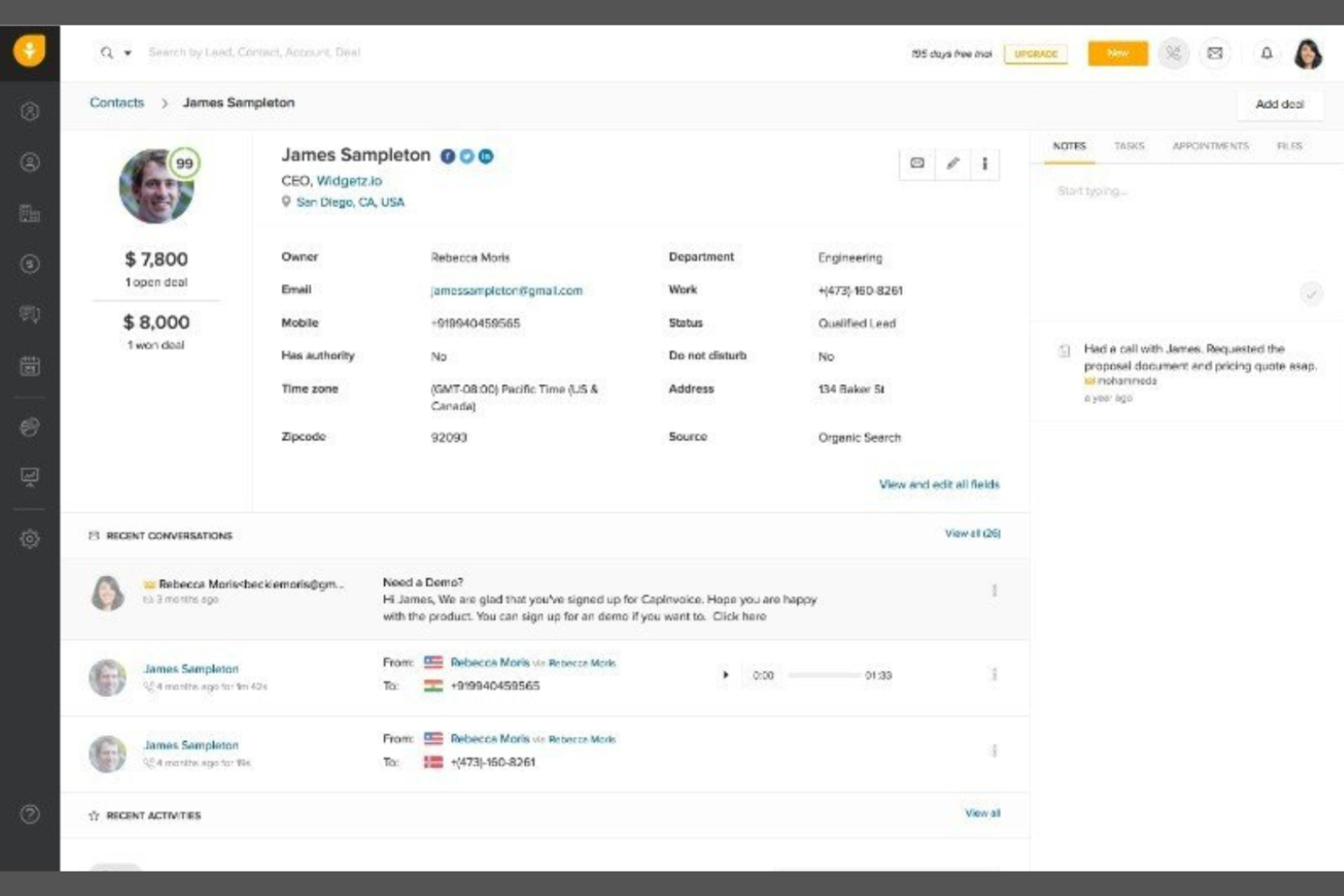
I team di vendita alla ricerca di un'AI integrata per guidare le proprie attività di contatto potrebbero prendere in considerazione Freshsales. Questo CRM è progettato per le aziende che desiderano informazioni predittive, assegnazione automatica dei punteggi ai potenziali clienti e consigli sulle attività di vendita senza dover ricorrere ad add-on di terze parti. A differenza di monday CRM, Freshsales pone le informazioni sulle vendite basate sull'AI al centro della sua piattaforma, aiutando i team a stabilire le priorità dei potenziali clienti e a concludere gli affari più rapidamente.
Perché Freshsales è una buona alternativa a monday CRM
Ciò che distingue Freshsales da monday CRM è l'attenzione rivolta alle informazioni integrate sulle vendite basate sull'AI, che aiutano i team a lavorare in modo più efficiente. Ho scelto Freshsales perché offre, già pronto all'uso, l'assegnazione dei punteggi ai potenziali clienti basata sull'AI e le informazioni sulle opportunità, permettendo di identificare rapidamente i potenziali clienti con maggiori probabilità di conversione. La piattaforma fornisce inoltre suggerimenti sulle attività di vendita e previsioni predittive, aiutando i rappresentanti di vendita a stabilire le priorità delle attività quotidiane di contatto. Se desideri un CRM che guidi attivamente il processo di vendita del tuo team con informazioni utili e operative, Freshsales è una valida alternativa.
Funzionalità principali di Freshsales
Altre funzionalità di Freshsales aiutano i team a gestire in modo più efficiente le relazioni con i clienti e le attività di vendita:
- Telefono ed e-mail integrati: Effettua chiamate e invia e-mail direttamente dal CRM senza cambiare strumento.
- Processo di vendita visivo: Tieni traccia delle opportunità nelle varie fasi personalizzabili del processo utilizzando un'interfaccia con trascinamento.
- Gestione di contatti e account: Archivia, organizza e visualizza tutti i dettagli e le interazioni con i clienti in un unico luogo.
- Automazione dei flussi di lavoro: Configura attività, promemoria e ricontatti automatici per mantenere attivi i processi di vendita.
Integrazioni di Freshsales
Le integrazioni includono Mailchimp, PandaDoc, HubSpot, QuickBooks, Xero, Stripe, Freshservice, Freshdesk e Trello.
Pros and Cons
Pros:
- L'assegnazione dei punteggi basata sull'AI aiuta a stabilire le priorità dei potenziali clienti e a monitorare i progressi
- Gli strumenti di comunicazione integrati semplificano i flussi di lavoro per le attività di contatto
- L'automazione supporta le attività e i ricontatti ricorrenti
Cons:
- Le funzionalità di reportistica non sono abbastanza approfondite per le analisi avanzate
- L'esperienza da dispositivi mobili può essere incostante
Ideale per l'integrazione dell'automazione del marketing

Se stai cercando un CRM che colleghi vendite e marketing in un unico posto, vale la pena prendere in considerazione HubSpot CRM. Questa piattaforma si distingue per l'automazione del marketing integrata e la profonda integrazione con gli strumenti di marketing di HubSpot. È una soluzione ideale per i team che desiderano allineare le attività di vendita e marketing senza dover gestire più sistemi.
Perché HubSpot CRM è una buona alternativa a monday CRM
Ciò che distingue HubSpot CRM sono le sue solide funzionalità di automazione del marketing, che vanno oltre quelle offerte da monday CRM. Ho scelto HubSpot CRM per i team che desiderano automatizzare le campagne e-mail, la gestione dei lead e la segmentazione dei clienti direttamente nel loro CRM. L'automazione dei flussi di lavoro della piattaforma consente di attivare azioni in base al comportamento dei clienti, aiutandoti a fornire comunicazioni tempestive e personalizzate. Per le aziende che devono far lavorare vendite e marketing in stretta collaborazione, HubSpot CRM riunisce queste funzioni in un'unica piattaforma.
Funzionalità principali di HubSpot CRM
Alcune altre funzionalità di HubSpot CRM aiutano i team a gestire le relazioni con i clienti in modo più efficiente:
- Schede dei contatti e delle aziende: Archivia e organizza informazioni dettagliate su ogni contatto e azienda presenti nel tuo database.
- Monitoraggio delle trattative: Visualizza e aggiorna lo stato delle trattative mentre avanzano nella pipeline di vendita.
- Pianificazione delle riunioni: Consenti ai clienti di prenotare riunioni direttamente con il tuo team utilizzando i link integrati del calendario.
- Gestione delle attività: Assegna, monitora e assegna priorità alle attività relative a contatti, trattative o aziende all'interno del CRM.
Integrazioni di HubSpot CRM
Le integrazioni includono Gmail, Outlook, Slack, Mailchimp, Shopify, Asana, Google Ads, Intercom, Zoom e Microsoft Dynamics 365.
Pros and Cons
Pros:
- Automazione del marketing integrata per i flussi di lavoro delle campagne
- Pipeline di vendita visiva con fasi trascinabili
- Monitoraggio delle e-mail e modelli per mantenere coerenti le attività di contatto
Cons:
- La personalizzazione dei report è limitata nei piani inferiori
- I piani a pagamento entry-level prevedono limiti sui flussi di lavoro

Ideale per la gestione semplice dei contatti
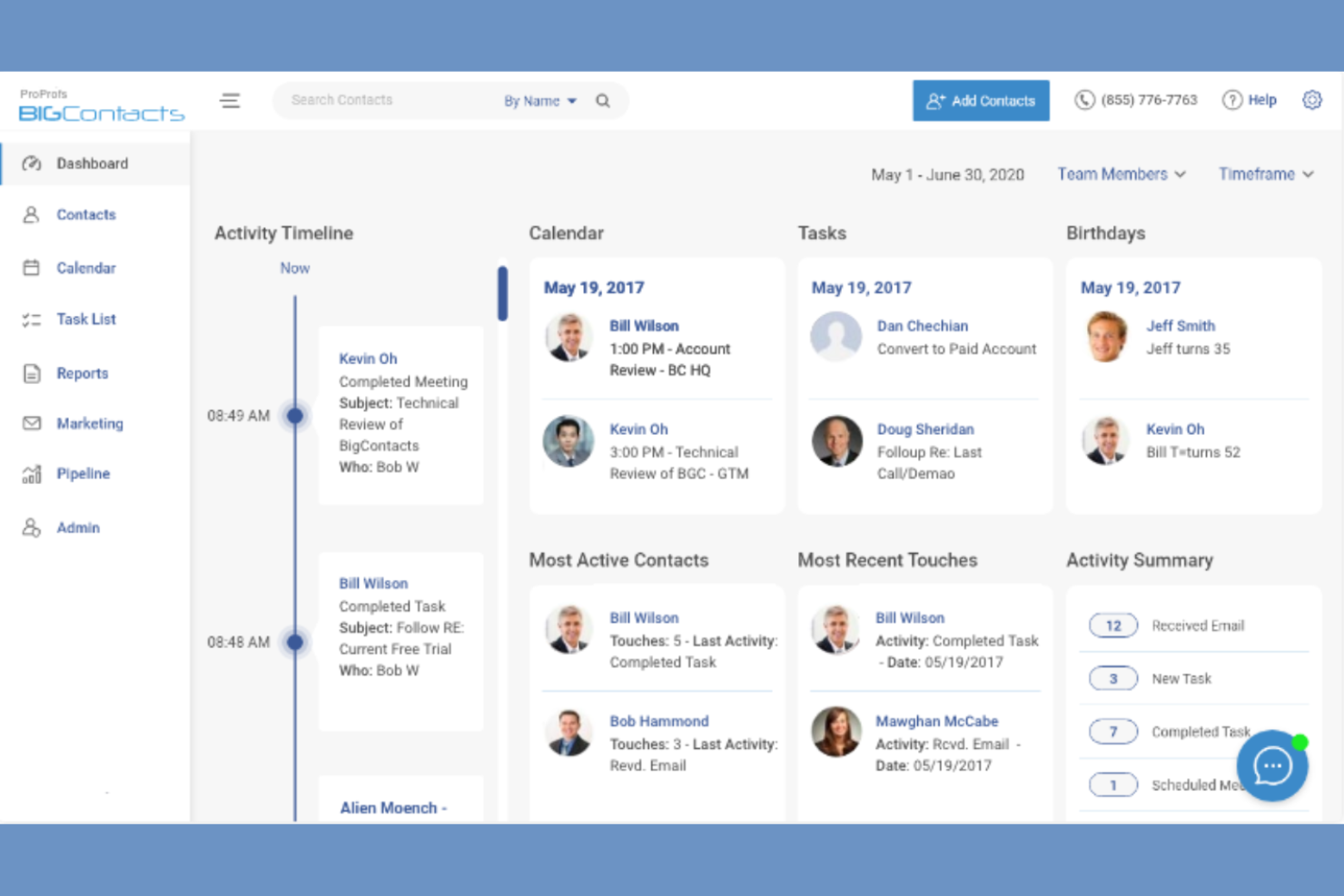
Se desideri un CRM incentrato sulla gestione semplice dei contatti, vale la pena prendere in considerazione BIGContacts. Questa piattaforma è progettata per le piccole imprese e i team che hanno bisogno di un modo facile per organizzare i contatti, monitorare le interazioni e gestire i promemoria senza complessità aggiuntive. A differenza di monday CRM, BIGContacts mantiene il suo insieme di funzionalità essenziale, risultando più facile da usare per chi non necessita di strumenti avanzati di automazione o gestione dei progetti.
Perché BIGContacts è una buona alternativa a monday CRM
Per i team che desiderano un CRM incentrato sulla gestione dei contatti senza livelli aggiuntivi, BIGContacts è una soluzione efficace. Ho scelto BIGContacts perché si concentra sull'organizzazione dei contatti, sul monitoraggio di ogni interazione e sull'impostazione di promemoria automatici per le attività successive. I campi dei contatti personalizzabili e le cronologie dettagliate delle attività della piattaforma ti aiutano a conservare tutti i dettagli delle relazioni in un unico posto. Se il tuo obiettivo principale è gestire i contatti e la cronologia delle comunicazioni, BIGContacts offre un'alternativa più semplice all'approccio più ampio e incentrato sui progetti di monday CRM.
Funzionalità principali di BIGContacts
Altre funzionalità che rendono BIGContacts interessante per esigenze CRM semplici includono:
- Strumenti di marketing via email: Invia email di massa e monitora le prestazioni delle campagne direttamente dalla piattaforma.
- Gestione delle attività e del calendario: Pianifica attività, appuntamenti e riunioni con gli strumenti di calendario integrati.
- Archiviazione dei documenti: Allega e organizza i file all'interno di ogni scheda contatto per accedervi facilmente.
- Resoconti personalizzati: Crea ed esporta resoconti sui contatti, sulle attività e sui processi di vendita.
Integrazioni di BIGContacts
Le integrazioni includono ActiveCampaign, Skype, Mailchimp, HubSpot, QuickBooks, Outlook, Google Contacts, Shopify, Zendesk e FreshBooks.
Pros and Cons
Pros:
- L'interfaccia intuitiva semplifica la gestione dei contatti e delle attività
- I promemoria automatici aiutano a gestire gli elenchi di attività e le attività successive
- I campi personalizzati favoriscono un monitoraggio organizzato dei contatti
Cons:
- Funzionalità limitate per il monitoraggio di processi di vendita complessi
- I resoconti non offrono una profondità sufficiente per ottenere informazioni sulle prestazioni

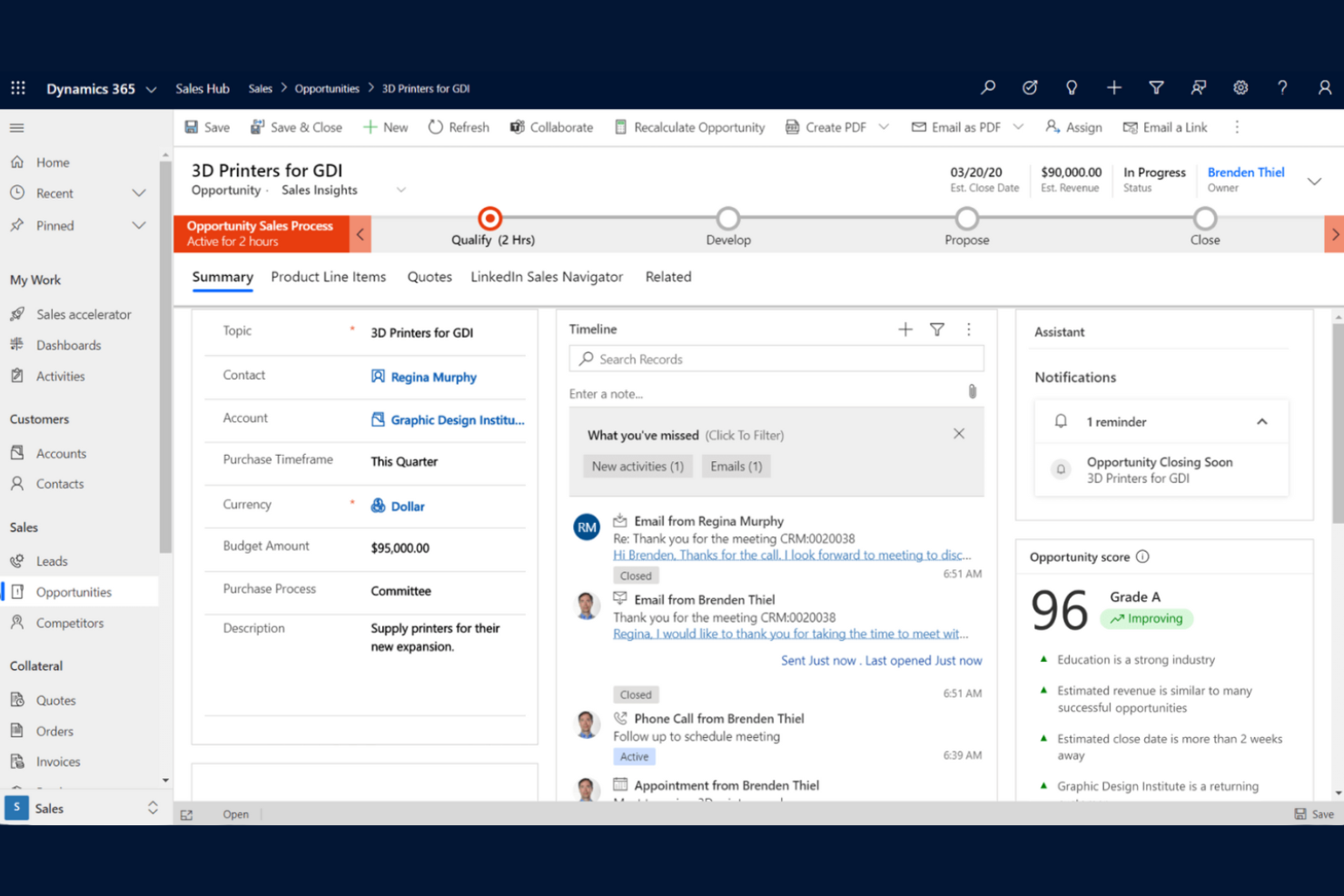
Per le organizzazioni che già utilizzano Microsoft 365, Microsoft Dynamics 365 Sales offre un CRM che si integra perfettamente nei flussi di lavoro esistenti. Questa piattaforma è particolarmente utile per i team di vendita che si affidano a Outlook, Teams ed Excel per gestire le relazioni con i clienti e le attività di vendita. A differenza di monday CRM, Dynamics 365 Sales offre un'integrazione avanzata con gli strumenti di produttività Microsoft, semplificando la sincronizzazione dei dati e l'automazione delle attività in tutta l'azienda.
Perché Microsoft Dynamics 365 Sales è una buona alternativa a monday CRM
Per i team che dipendono dagli strumenti Microsoft 365, Dynamics 365 Sales si distingue come CRM che funziona nativamente all'interno di questo ecosistema. Ho scelto Dynamics 365 Sales perché consente di gestire lead, contatti e opportunità direttamente da Outlook e Teams, mantenendo i dati di vendita collegati agli strumenti di comunicazione e collaborazione utilizzati quotidianamente. La piattaforma si sincronizza inoltre con Excel per la creazione di report e previsioni avanzate, una funzione utile per i team che già utilizzano i fogli di calcolo per analizzare le prestazioni di vendita. Se la tua azienda ha già investito in Microsoft 365, Dynamics 365 Sales offre un livello di integrazione e continuità dei flussi di lavoro che monday CRM non è in grado di eguagliare.
Funzionalità principali di Microsoft Dynamics 365 Sales
Altre funzionalità di Dynamics 365 Sales aiutano i team a gestire in modo più completo le relazioni con i clienti e i processi di vendita:
- Approfondimenti sulle vendite basati sull'IA: Ottieni la valutazione predittiva dei lead e l'analisi delle opportunità per stabilire le priorità delle attività di vendita.
- Dashboard personalizzabili: Crea dashboard visive per monitorare i KPI e le prestazioni di vendita in tempo reale.
- Accesso tramite app mobile: Gestisci contatti, trattative e attività ovunque ti trovi utilizzando l'app mobile dedicata.
- Progettazione di flussi di lavoro automatizzati: Configura automazioni personalizzate dei processi di vendita con gli strumenti integrati per i flussi di lavoro.
Integrazioni di Microsoft Dynamics 365 Sales
Le integrazioni includono Microsoft Teams, Outlook, Excel, Power BI, SharePoint, LinkedIn Sales Navigator, OneDrive, Power Automate, Azure e Microsoft 365.
Pros and Cons
Pros:
- La profonda integrazione con Microsoft 365 supporta la gestione del lavoro tutto in uno
- Gli approfondimenti basati sull'IA aiutano a monitorare i progressi e a stabilire la priorità delle opportunità
- Le dashboard personalizzate supportano flussi di lavoro e report complessi
Cons:
- Curva di apprendimento ripida per i nuovi utenti
- Richiede una configurazione tecnica per le impostazioni avanzate

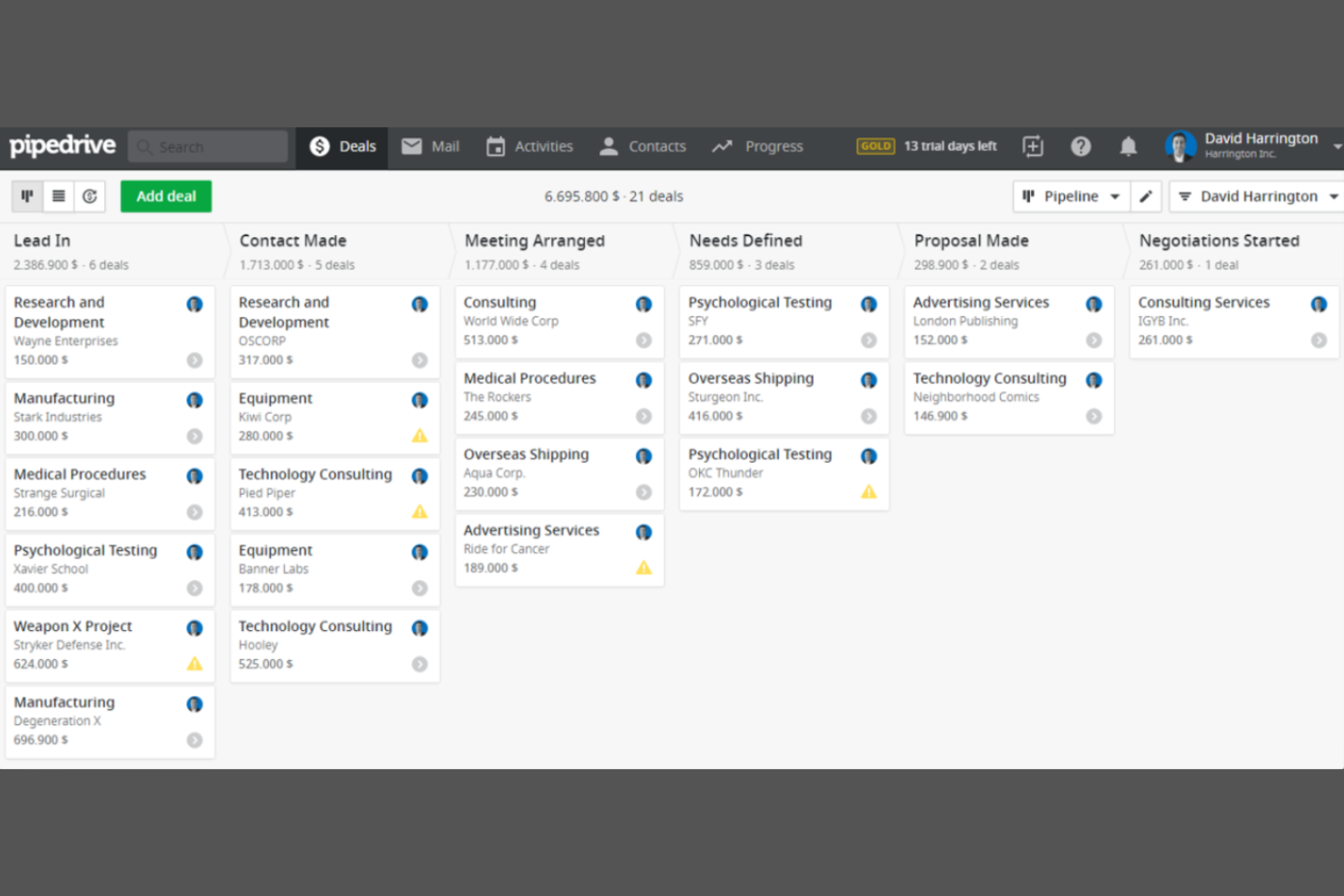
I team di vendita alla ricerca di un modo chiaro e visivo per monitorare le trattative spesso scelgono Pipedrive. Questo CRM è progettato per le aziende che desiderano gestire il proprio flusso di vendita con bacheche basate sul trascinamento e fasi personalizzabili. A differenza di monday CRM, Pipedrive mette la gestione visiva del flusso di vendita al centro del proprio flusso di lavoro, facilitando l'individuazione dei colli di bottiglia e la definizione delle priorità delle trattative.
Perché Pipedrive è una buona alternativa a monday CRM
Se il tuo team ha bisogno di un CRM che metta in primo piano la gestione visiva del flusso di vendita, vale la pena prendere in considerazione Pipedrive. Ho scelto Pipedrive perché le sue bacheche del flusso di vendita con funzionalità di trascinamento consentono di organizzare le trattative per fase e aggiornare rapidamente i progressi. La piattaforma offre inoltre fasi del flusso di vendita personalizzabili e indicatori delle trattative codificati per colore, rendendo facile individuare le trattative bloccate o le opportunità ad alta priorità. Per i team orientati alle vendite che desiderano una panoramica chiara e visiva del proprio flusso di vendita, Pipedrive offre un approccio più specializzato rispetto a monday CRM.
Funzionalità principali di Pipedrive
Altre funzionalità di Pipedrive aiutano i team a gestire in modo più completo le attività di vendita e i dati dei clienti:
- Integrazione e-mail: Collega il tuo account e-mail per inviare, ricevere e monitorare i messaggi direttamente all'interno di Pipedrive.
- Pianificatore delle attività: Pianifica chiamate, riunioni e attività con promemoria integrati per mantenere sotto controllo le attività di vendita.
- Posta in arrivo dei contatti potenziali: Raccogli e organizza i contatti potenziali in entrata in uno spazio dedicato prima di aggiungerli al flusso di vendita.
- Rapporti sulle vendite: Genera rapporti dettagliati sulle prestazioni delle vendite, sulle attività e sullo stato del flusso di vendita.
Integrazioni di Pipedrive
Le integrazioni includono PandaDoc, Leadfeeder, JustCall, LinkPort, Outfunnel, Slack, QuickBooks, Trello, Zoom e Gmail.
Pros and Cons
Pros:
- Il flusso di vendita visivo supporta un'interfaccia intuitiva per monitorare le trattative
- Il pianificatore delle attività aiuta a monitorare con chiarezza le attività e le attività successive
- I rapporti personalizzati offrono visibilità sulle prestazioni del flusso di vendita
Cons:
- Mancano funzionalità integrate di software per la gestione dei progetti
- L'app mobile non dispone di alcune funzionalità della versione desktop

Ideale con l'integrazione della pianificazione delle risorse aziendali
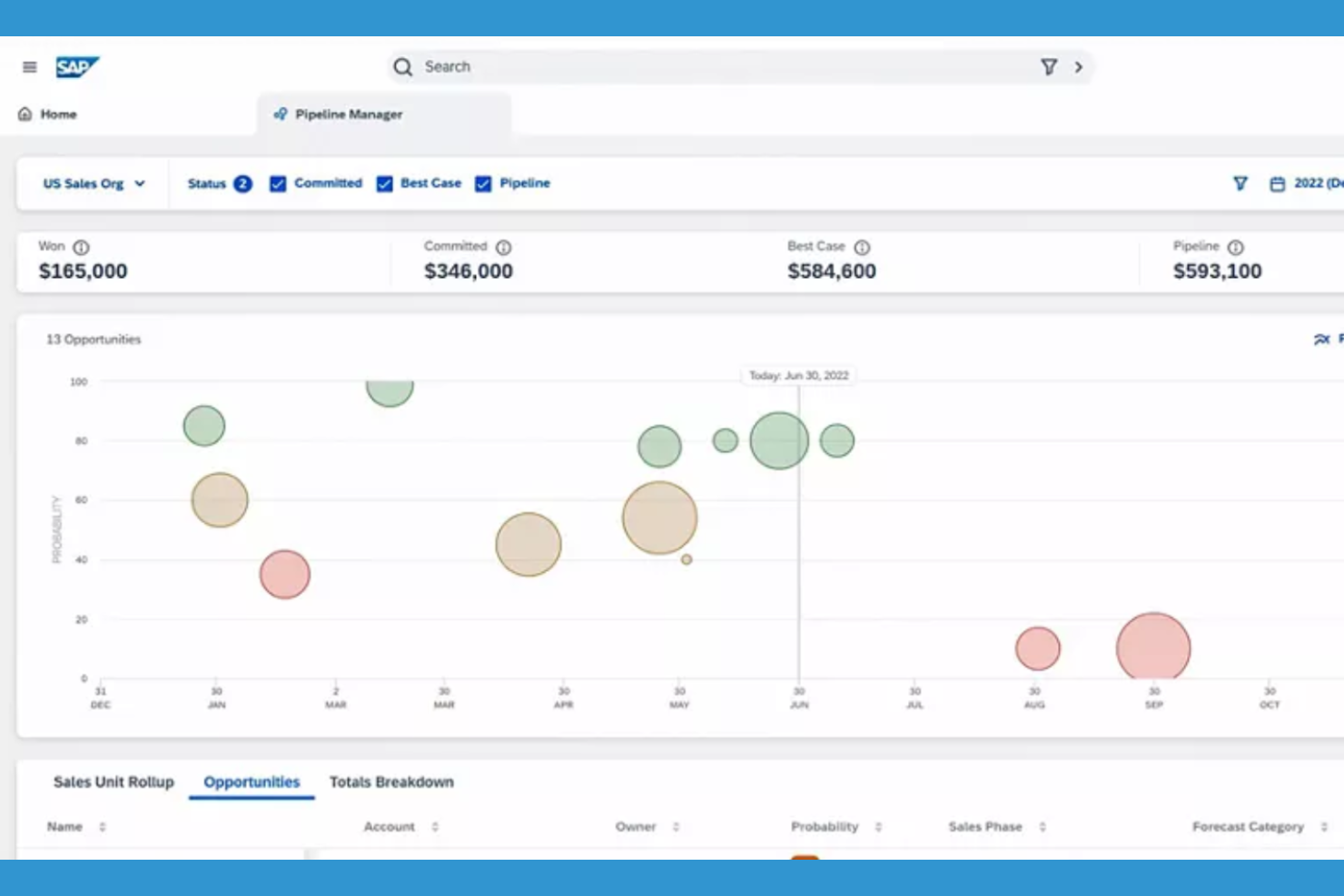
Per le organizzazioni che necessitano di una profonda integrazione tra CRM e pianificazione delle risorse aziendali, SAP Sales Cloud offre un approccio unificato. Questa piattaforma è progettata per grandi aziende e produttori che desiderano collegare in tempo reale i dati relativi a vendite, inventario e catena di approvvigionamento. A differenza di monday CRM, SAP Sales Cloud si distingue per la capacità di sincronizzare le interazioni con i clienti con le operazioni aziendali fondamentali tra team globali.
Perché SAP Sales Cloud è una buona alternativa a monday CRM
Se stai cercando un CRM che si colleghi direttamente ai sistemi di pianificazione delle risorse aziendali, SAP Sales Cloud è una scelta solida. Ho scelto SAP Sales Cloud perché consente di gestire i processi di vendita insieme ai dati relativi a inventario, gestione degli ordini e catena di approvvigionamento in un'unica piattaforma. La sincronizzazione dei dati in tempo reale e le funzionalità avanzate di previsione dello strumento aiutano le grandi organizzazioni a mantenere allineate le informazioni sui clienti con le operazioni aziendali. Per i team che necessitano di qualcosa di più del semplice monitoraggio delle vendite, SAP Sales Cloud offre un livello di integrazione operativa che monday CRM non garantisce.
Funzionalità principali di SAP Sales Cloud
Tra le altre funzionalità che rendono SAP Sales Cloud interessante per i team aziendali ci sono:
- App mobile per le vendite: Accedi ai dati dei clienti, aggiorna le opportunità e gestisci le attività da qualsiasi dispositivo.
- Strumenti CPQ (Configurazione, Prezzo, Preventivo): Genera preventivi e proposte complesse direttamente all'interno della piattaforma.
- Gestione dei territori e delle quote: Assegna i territori di vendita e imposta le quote in linea con gli obiettivi aziendali.
- Valutazione delle opportunità basata sull'IA: Utilizza l'analisi predittiva per dare priorità agli affari con maggiori probabilità di chiusura.
Integrazioni di SAP Sales Cloud
Le integrazioni includono SAP S/4HANA, SAP ERP Central Component, SAP CPQ, SAP Commerce Cloud, SAP Service Cloud, Microsoft Outlook, Microsoft Teams, Google Workspace, Docusign e Adobe Sign.
Pros and Cons
Pros:
- Ideale per progetti complessi collegati alle operazioni aziendali
- La funzionalità CPQ integrata supporta flussi di lavoro dettagliati per le vendite
- La previsione avanzata aiuta a monitorare i progressi tra team numerosi
Cons:
- Curva di apprendimento ripida per gli utenti non aziendali
- L'interfaccia può sembrare obsoleta

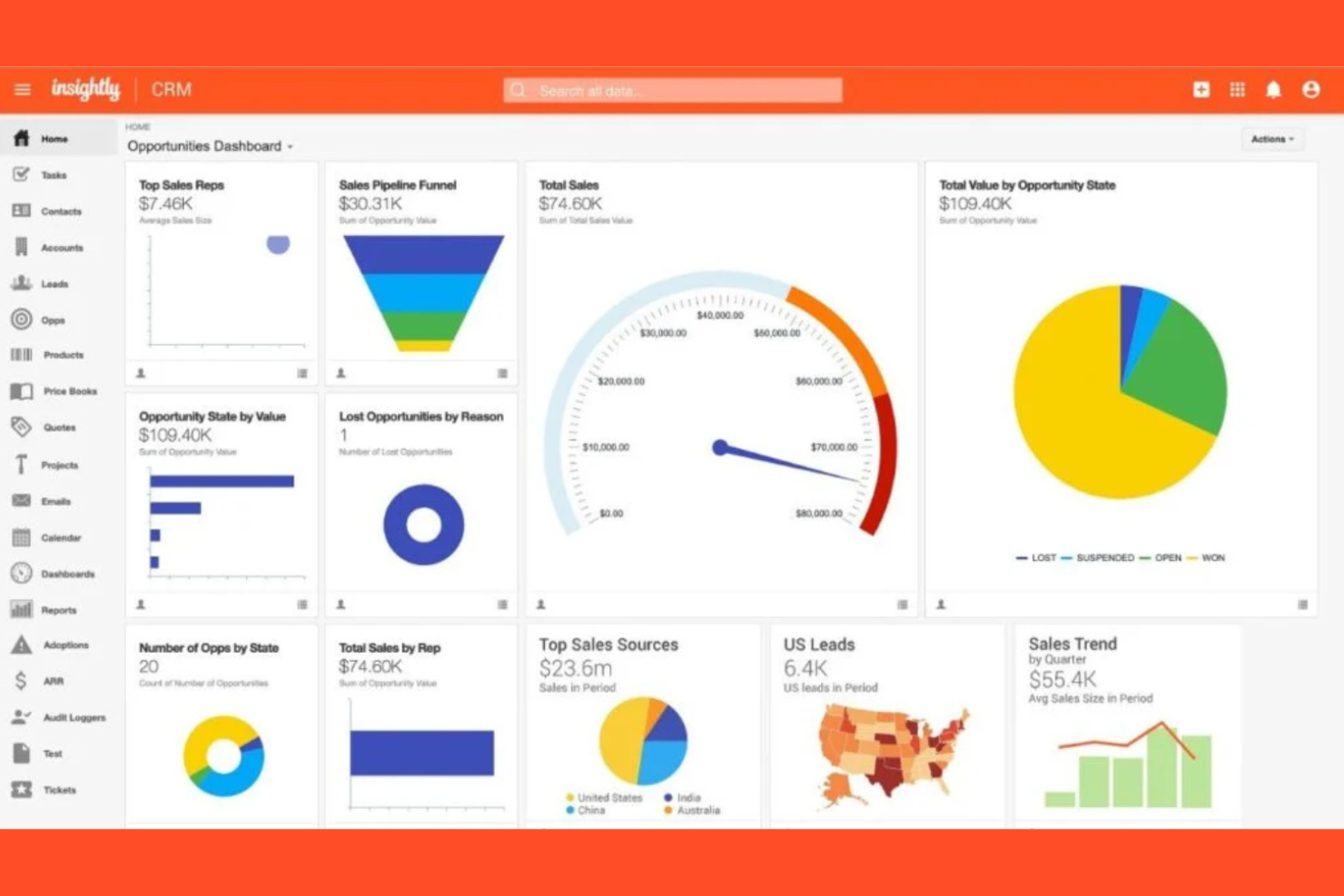
Se hai bisogno di un CRM che aiuti anche a gestire i progetti dall'inizio alla fine, Insightly CRM merita di essere preso in considerazione. Questa piattaforma è progettata per i team che vogliono monitorare vendite, progetti e consegne post-vendita in un unico posto, risultando particolarmente utile per le aziende di servizi e le agenzie. A differenza di monday CRM, Insightly CRM combina la gestione dei clienti con strumenti integrati per la gestione dei progetti, consentendoti di passare senza interruzioni dalla chiusura di un accordo alla consegna del lavoro.
Perché Insightly CRM è una valida alternativa a monday CRM
Insightly CRM si distingue per i team che hanno bisogno di funzionalità di gestione dei progetti integrate direttamente nel CRM. Ho scelto Insightly CRM perché consente di trasformare le opportunità vinte in progetti, permettendoti di monitorare la consegna e l'esecuzione senza dover cambiare piattaforma. Lo strumento include la gestione delle attività, il monitoraggio delle tappe fondamentali e i flussi di progetto, semplificando la gestione delle relazioni con i clienti e del lavoro in corso in un unico posto. Se la tua azienda ha bisogno di colmare il divario tra vendite e consegna dei progetti, Insightly CRM offre un approccio unificato che monday CRM non riesce a eguagliare.
Funzionalità principali di Insightly CRM
Oltre alle sue funzionalità di gestione dei progetti, Insightly CRM offre diverse altre funzioni che supportano la gestione delle relazioni con i clienti:
- Campi personalizzati e layout delle pagine: Personalizza i record e le visualizzazioni per adattarli ai processi e alle esigenze di dati specifici del tuo team.
- Monitoraggio e modelli per le email: Monitora le aperture e i clic sulle email e utilizza modelli predefiniti per comunicazioni coerenti.
- Instradamento dei lead: Assegna automaticamente i lead ai membri del team appropriati in base alle regole impostate.
- Collegamento delle relazioni: Collega contatti, organizzazioni e opportunità per visualizzare reti di clienti complesse.
Integrazioni di Insightly CRM
Le integrazioni includono Gmail, Outlook, QuickBooks Online, Xero, Mailchimp, Slack, Dropbox, Docusign, Microsoft Teams e Unbounce.
Pros and Cons
Pros:
- Combina le funzionalità di un CRM con quelle di un software per la gestione dei progetti
- I flussi di progetto aiutano a monitorare attività, tappe fondamentali e scadenze
- Gli oggetti personalizzati supportano progetti e flussi di lavoro complessi
Cons:
- Funzionalità di reportistica avanzata limitate per il monitoraggio dei dati dei progetti
- L'app mobile non offre accesso a tutte le funzionalità


Se il tuo team ha bisogno di un CRM che dia priorità alla collaborazione, Nutshell CRM è progettato pensando al lavoro condiviso. È particolarmente adatto ai team di vendita e ai gruppi di assistenza che desiderano gestire le pipeline, condividere note e coordinare le attività in un unico luogo. A differenza di monday CRM, Nutshell CRM mette la comunicazione del team e il monitoraggio delle attività di gruppo al centro della sua piattaforma.
Perché Nutshell CRM è una buona alternativa a monday CRM
Nutshell CRM si distingue per i team che desiderano strumenti di collaborazione integrati nel proprio flusso di lavoro CRM. Ho scelto Nutshell CRM perché consente agli utenti di assegnare attività, condividere note e commentare direttamente offerte o contatti, rendendo il lavoro di squadra più visibile e concreto. I feed delle attività del team e le pipeline condivise della piattaforma aiutano tutti a rimanere allineati sui progressi dei clienti e sui passaggi successivi. Se la tua priorità è mantenere il team connesso e coordinato, Nutshell CRM offre funzionalità di collaborazione che vanno oltre ciò che offre monday CRM.
Funzionalità principali di Nutshell CRM
Tra le altre funzionalità che rendono Nutshell CRM interessante per i team ci sono:
- Flussi di lavoro per l'automazione delle vendite: Automatizza le attività di vendita ripetitive e le attività successive per mantenere le trattative in corso.
- Cruscotti di report personalizzabili: Crea e condividi report visivi sulle prestazioni delle vendite e sulle attività del team.
- Sequenze di e-mail: Configura sequenze e-mail automatizzate per contattare e coltivare i potenziali clienti.
- Moduli di acquisizione dei contatti: Crea e incorpora moduli web per raccogliere i contatti direttamente nel tuo CRM.
Integrazioni di Nutshell CRM
Le integrazioni includono Gmail e Google Calendar, Outlook, Google Sheets, Facebook Messenger, Dropbox Sign, Calendly, Dialpad, DocSend, Google Meet e RevenueCloudFX.
Pros and Cons
Pros:
- Gli strumenti di collaborazione aiutano i team a monitorare le attività e i compiti condivisi
- La sequenza e-mail integrata supporta le campagne di marketing
- I cruscotti di report offrono visibilità sul carico di lavoro del team
Cons:
- Nessun supporto per flussi di lavoro complessi di gestione dei progetti
- Funzionalità limitate di automazione avanzata del marketing

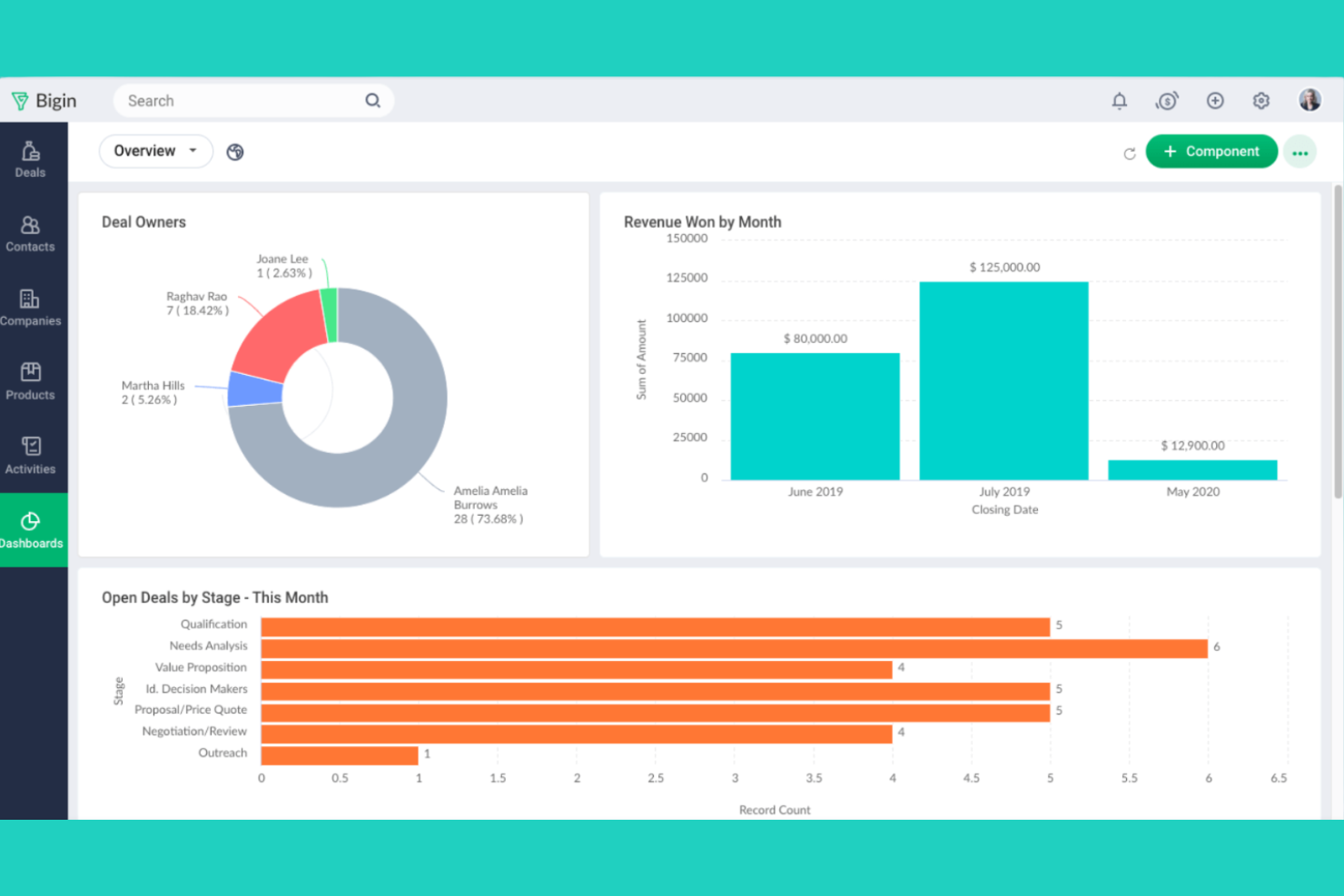
Zoho Bigin è pensato per le piccole imprese che desiderano un CRM semplice e incentrato sulle pipeline, senza complessità aggiuntive. È particolarmente utile per i team che devono monitorare visivamente le trattative e gestire le interazioni con i clienti in modo diretto. A differenza di monday CRM, Zoho Bigin mantiene l'attenzione sulla gestione delle pipeline e sulla configurazione rapida, rendendo semplice per i team più piccoli iniziare velocemente.
Perché Zoho Bigin è una buona alternativa a monday CRM
Per le piccole imprese che desiderano un CRM focalizzato sulla gestione delle pipeline, Zoho Bigin offre un approccio semplificato difficile da eguagliare. Ho scelto Zoho Bigin perché consente agli utenti di creare più pipeline, personalizzare le fasi e spostare le trattative con una semplice interfaccia di trascinamento. Lo strumento include anche funzionalità integrate di telefonia ed e-mail, così i team possono gestire le comunicazioni direttamente insieme al processo di vendita. Se cerchi un CRM che mantenga tutto semplice e incentrato sulle pipeline, Zoho Bigin è una valida alternativa a monday CRM.
Funzionalità principali di Zoho Bigin
Alcune delle altre funzionalità che rendono Zoho Bigin interessante per i team delle piccole imprese includono:
- Automazione dei flussi di lavoro: Configura azioni automatizzate per le attività e i promemoria ripetitivi.
- Campi e moduli personalizzati: Adatta il CRM ai processi aziendali e alle esigenze di dati specifici.
- App per dispositivi mobili: Accedi a pipeline, contatti e attività da dispositivi iOS e Android.
- Analisi integrate: Genera rapporti e cruscotti visivi per monitorare le prestazioni di vendita.
Integrazioni di Zoho Bigin
Le integrazioni includono Zoho Books, Zoho CRM, Zoho Desk, Google Workspace, Microsoft 365, Microsoft Teams, WhatsApp, Mailchimp, Shopify e QuickBooks Online.
Pros and Cons
Pros:
- La semplice progettazione delle pipeline offre un'elevata facilità d'uso per le nuove imprese
- Gli strumenti di comunicazione integrati supportano il monitoraggio delle attività quotidiane
- Più pipeline aiutano a organizzare flussi di lavoro e fasi delle trattative
Cons:
- Scalabilità limitata per processi di vendita complessi
- Funzionalità di reportistica di base per monitorare le prestazioni

Copper
Ideale con l'integrazione di Google Workspace
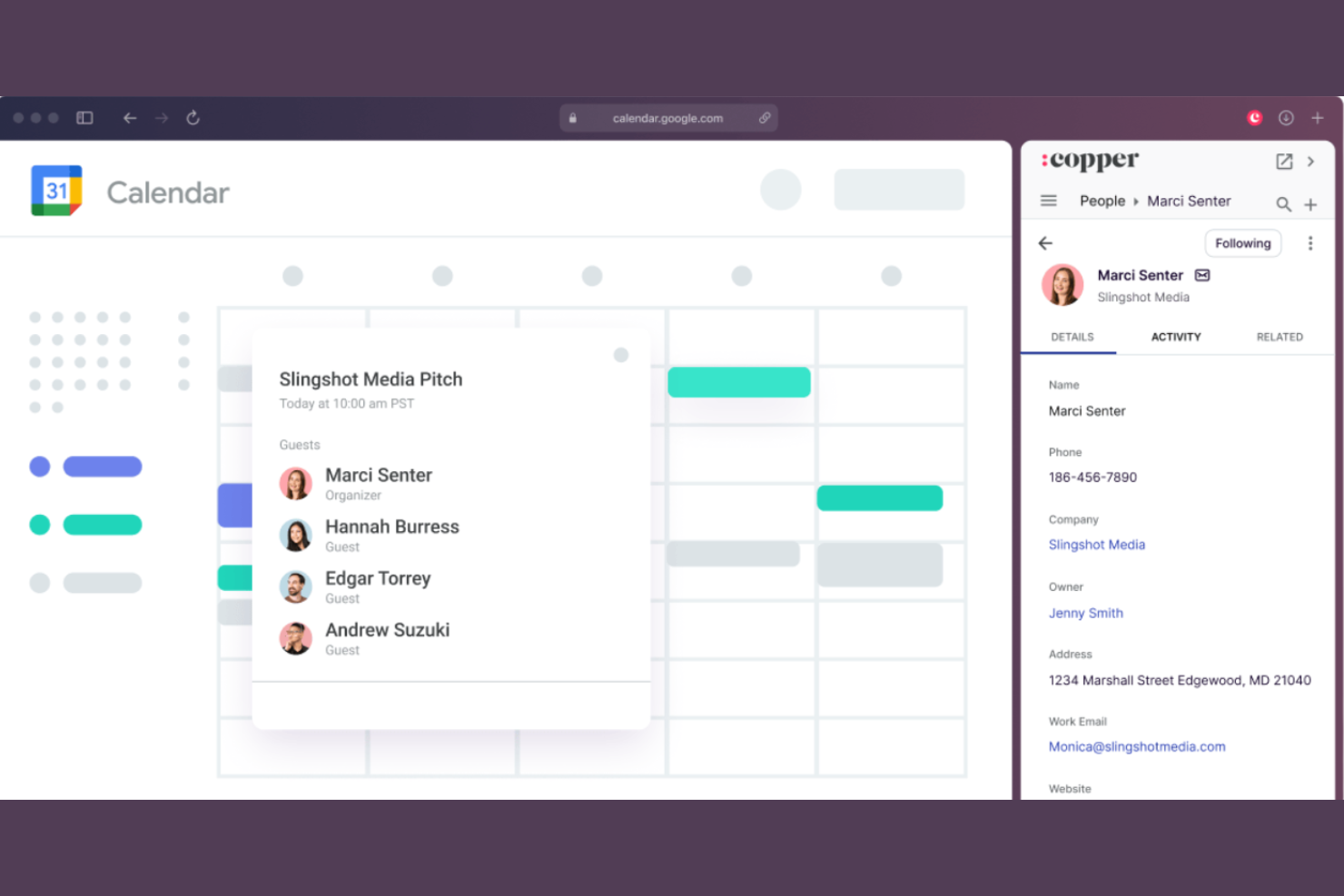
Copper è progettato per i team che si affidano a Google Workspace e desiderano un CRM che si integri perfettamente nei flussi di lavoro esistenti. È particolarmente utile per le aziende che gestiscono le relazioni con i clienti tramite Gmail, Google Calendar e Google Drive. A differenza di monday CRM, Copper offre un'integrazione nativa e approfondita con le app Google, consentendo di gestire contatti, trattative e attività senza uscire dalla posta in arrivo.
Perché Copper è una buona alternativa a monday CRM
Se il tuo team dipende da Google Workspace, Copper offre un livello di integrazione che monday CRM non riesce a eguagliare. Ho scelto Copper perché sincronizza automaticamente email, eventi del calendario e file di Gmail, Google Calendar e Google Drive direttamente nei record del CRM. L'estensione per Chrome ti consente di gestire potenziali clienti e opportunità direttamente dalla posta in arrivo, così non devi cambiare scheda. Per le aziende che desiderano che il CRM sembri un'estensione naturale di Google Workspace, Copper è una valida alternativa.
Funzionalità principali di Copper
Alcune altre funzionalità che rendono Copper interessante per la gestione delle relazioni con i clienti includono:
- Gestione del processo di vendita: Visualizza e organizza le trattative nelle varie fasi di vendita personalizzabili.
- Automazione delle attività: Configura promemoria automatici e attività di ricontatto per potenziali clienti e opportunità.
- Arricchimento dei contatti: Recupera automaticamente i profili social e i dettagli aziendali dei contatti.
- Pannello di controllo per i rapporti: Accedi a rapporti in tempo reale sulle vendite e sulle attività tramite pannelli di controllo personalizzabili.
Integrazioni di Copper
Le integrazioni includono Gmail, Google Calendar, Google Drive, Google Sheets, Mailchimp, LinkedIn, RingCentral, Docusign, QuickBooks e JustCall.
Pros and Cons
Pros:
- L'integrazione approfondita con Google Workspace supporta flussi di lavoro tutto-in-uno
- La raccolta automatica dei dati aiuta a semplificare la gestione dei contatti
- L'interfaccia intuitiva facilita il monitoraggio di attività e trattative
Cons:
- Personalizzazione limitata per flussi di lavoro complessi
- Gli strumenti di reportistica non offrono funzionalità avanzate sufficienti
Altre alternative a monday CRM
Ecco alcune ulteriori alternative a monday CRM che non sono state incluse nel mio elenco, ma che vale comunque la pena prendere in considerazione:
- Salesforce CRM
Ideale per opzioni di personalizzazione avanzate
- Zoho CRM
Ideale per gli strumenti di comunicazione multicanale
- Creatio CRM
Ideale per l'automazione dei processi senza codice
- ClickUp
Ideale per le funzionalità di allineamento tra attività e obiettivi


Come Valuto le Alternative a Monday CRM
Considero ogni strumento su due livelli: le funzionalità di base del CRM di cui ogni team CX ha bisogno per tracciare i contatti e gestire i pipeline, e i fattori distintivi che determinano quale strumento sia effettivamente il più adatto.
Funzionalità Principali (Requisiti Fondamentali per Questa Lista)
Quando seleziono gli strumenti per la mia lista, valuto ciascuno su una scala da 0 (non offre la funzionalità) a 5 (eccelle in questa area) per ogni funzionalità principale indicata di seguito. Poi calcolo il punteggio totale dello strumento in percentuale. Ogni strumento deve raggiungere un punteggio totale minimo del 65% per essere preso in considerazione per l'inclusione.
- Gestione Contatti e Account: Cerco un database centralizzato dove i team CX possono archiviare i dati dei clienti, mappare le gerarchie degli account e visualizzare l'intera cronologia delle interazioni senza dover cambiare scheda.
- Pipelines e Workflow Personalizzabili: Ogni strumento dovrebbe permettere di creare pipeline per processi come rinnovi, fasi di onboarding o percorsi di escalation con fasi configurabili e campi personalizzati.
- Automazione dei Workflow: Valuto se sia possibile automatizzare attività CX ricorrenti come inviare follow-up quando un affare passa di fase o assegnare account in base al segmento di cliente.
- Tracciamento Comunicazioni e Interazioni: Ogni punto di contatto è importante, quindi verifico la sincronizzazione email, la registrazione delle chiamate e il tracciamento delle riunioni collegati direttamente ai record di contatto o account.
- Report e Dashboard Analitici: Lo strumento dovrebbe offrire dashboard personalizzabili dove poter monitorare lo stato dei pipeline, i tempi di risposta o i tassi di rinnovo tramite visualizzazioni sulle quali il team può intervenire.
- Integrazioni con Terze Parti: Controllo la presenza di collegamenti nativi con strumenti di helpdesk, piattaforme email e app di comunicazione, oltre all'accesso API per costruire workflow CX personalizzati.
Una volta che ho una lista di strumenti che soddisfano questi criteri, considero ciò che distingue ciascuna piattaforma.
Fattori Distintivi (Cosa Distingue i Fornitori)
Ecco come confronto e metto in contrasto i diversi fornitori:
Funzionalità Distintive
La valutazione della salute del cliente è un grande elemento distintivo. Cerco strumenti che assegnano livelli di rischio in base ai pattern di coinvolgimento e segnalano account a rischio prima che si verifichi l'abbandono. Le funzionalità di insight basate sull'AI aggiungono un ulteriore valore, specialmente quando una piattaforma può riassumere le interazioni passate o suggerire i prossimi passi durante una conversazione di rinnovo. Valuto anche se uno strumento offre una casella di posta omnicanale che raccoglie email, chat e messaggi social in una sola vista. In questo modo, il team non deve passare da una piattaforma all'altra per ricostruire la cronologia di un cliente.
Oltre le Funzionalità
La rapidità con cui un team può migrare da Monday CRM è importante, quindi verifico la presenza di modelli preimpostati, strumenti di importazione e onboarding guidato che riducono il tempo necessario per generare valore. Anche la compatibilità con il resto della tecnologia CX in uso è una priorità. Il CRM deve sincronizzarsi con gli strumenti di helpdesk, sondaggi e comunicazione su cui il team già fa affidamento. Valuto inoltre la trasparenza dei prezzi, nello specifico se funzionalità chiave come automazione o reportistica sono disponibili solo nei piani superiori, rischiando di obbligare a un upgrade man mano che il team CX cresce.
Perché cercare un’alternativa a monday CRM?
Sebbene monday CRM sia una buona scelta come piattaforma di gestione delle relazioni con i clienti, ci sono diversi motivi per cui alcuni utenti cercano soluzioni alternative. Potresti cercare un’alternativa a monday CRM perché…
- Hai bisogno di un’integrazione più approfondita con Google Workspace
- Vuoi funzionalità integrate per effettuare chiamate o inviare messaggi
- Hai bisogno di strumenti di automazione delle vendite più avanzati
- Hai bisogno di report e analisi personalizzabili
- Lavori in una regione in cui il supporto di monday CRM è limitato
Se ti riconosci in una di queste situazioni, sei nel posto giusto. Il mio elenco contiene diverse opzioni di piattaforme di gestione delle relazioni con i clienti più adatte ai team che affrontano queste difficoltà con monday CRM e cercano soluzioni alternative.
Funzionalità principali di monday CRM
Ecco alcune delle funzionalità principali di monday CRM, che ti aiuteranno a mettere a confronto ciò che offrono le soluzioni alternative:
- Riquadri visivi della pipeline di vendita
- Campi personalizzabili per trattative e contatti
- Assegnazioni automatizzate di flussi di lavoro e attività
- Integrazione e monitoraggio delle e-mail
- Registri delle attività e delle comunicazioni
- Gestione dei documenti integrata
- Dashboard e report personalizzabili
- Strumenti di collaborazione del team e di menzione
- Moduli di acquisizione dei lead e automazione dal web ai lead
- App mobile per iOS e Android