

Overvåkingssystemer for kundesentre hjelper CX-ledere og teamledere med å håndtere utfordringer som å balansere kundetilfredshet med agentenes prestasjoner, oppdage muligheter for veiledning i sanntid og effektivisere driften på tvers av kanaler. Med den rette plattformen kan du forbedre servicekvaliteten, redusere ineffektivitet og gi kundesenteragentene verktøyene de trenger for å levere jevnt over gode kundeopplevelser.
Jeg har gjennomgått og testet disse systemene basert på funksjonalitet, brukervennlighet, integrasjoner, skalerbarhet og valuta for pengene. I denne artikkelen presenterer jeg mine beste anbefalinger, hva som skiller hver av dem ut, og hvordan du kan velge det beste alternativet for teamets størrelse, budsjett og mål.
Why Trust Our Software Recommendations
6,700+
Reviews
20
Industry experts
16+
Evaluation factors
14
Years
Our team has been testing and reviewing software since 2012. As CX leaders ourselves, we know how difficult—and important—it is to choose the right software.
For this guide, we evaluated tools using hands-on testing and independent research, scoring tools using our selection criteria.
Our reviews reflect our human editorial judgment, not a sales pitch.
 Gui DrusinaCreative Director
 Tim FisherVP of AI
Sammenligningstabell for overvåkingssystemer for kundesentre
Denne sammenligningstabellen oppsummerer prisopplysningene for mine beste anbefalinger av overvåkingssystemer for kundesentre.
| Tool | Best For | Trial Info | Price | ||
|---|---|---|---|---|---|
| 1 | Best for AI-powered call insights | 14-day free trial | From $25/user/month (billed annually) | Website | |
| 2 | Best with no-code AI workflow orchestration | Free demo available | Pricing upon request | Website | |
| 3 | Best for performance analytics | Free demo available | From $25/month (billed annually) | Website | |
| 4 | Best for AI-driven insights | Free demo available | Pricing upon request | Website | |
| 5 | Best for real-time transcriptions | 14-day free trial + free demo available | Pricing upon request | Website | |
| 6 | Best for startups and SMBs | 10-day free trial | From $18/user/month (billed annually) | Website | |
| 7 | Best for large enterprises | Free demo available | From $110/agent/month (proactive AI extra) | Website | |
| 8 | Best for analytics capabilities | Free demo available | Available upon request | Website | |
| 9 | Best for remote teams | 14-day free trial | From $15/user/month (billed annually) | Website | |
| 10 | Best for small to mid-sized teams | Free trial + free demo available | From $19/agent/month (billed annually) | Website |


Anmeldelser av de beste overvåkingssystemene for kundesentre
Nedenfor finner du mine detaljerte sammendrag av de beste verktøyene for overvåking av kundesentre som kom med på kortlisten min. Anmeldelsene mine gir en detaljert gjennomgang av de viktigste funksjonene, fordelene og ulempene, integrasjonene og de ideelle bruksområdene for hvert verktøy, slik at du kan finne det beste alternativet for deg.
 Best for AI-powered call insights
- 14-day free trial
- From $25/user/month (billed annually)
Visit WebsiteCustomer Rating:4.4/5
CloudTalk’s dashboard provides a clear overview of call activity and agent performance in real time. CloudTalk is a cloud-based call center monitoring system that helps sales and support teams manage calls efficiently. It combines AI-powered analytics, real-time monitoring, and global calling features to improve visibility into agent performance and overall call quality.
Why I Picked CloudTalk: I picked CloudTalk for its advanced AI-powered insights that help you evaluate agent performance and customer sentiment without manual review. Features like AI call summaries, sentiment analysis, and topic extraction turn complex call data into actionable feedback so you can coach your team more effectively.
I also like how CloudTalk supports global operations, letting you obtain local numbers in more than 160 countries and use branded caller IDs to strengthen your local presence. Combined with reliable call quality and intuitive monitoring dashboards, it’s a strong choice for teams that need both scale and intelligence in their call center system.
Standout Features & Integrations
Features include real-time call monitoring, AI call tagging and transcription, and spam protection to maintain call integrity. Managers can also use live listening and analytics dashboards for performance tracking and coaching.
Integrations include HubSpot, Pipedrive, Zoho CRM, Salesforce, MS Dynamics, OdooCRM, Intercom, Zendesk, Salesloft, Outreach, Bullhorn, Monday.com, and MS Teams.
Pros and Cons
Pros:
- User-friendly interface
- Global number availability
- Offers AI-powered call analytics
Cons:
- Occasional mobile app issues
- Learning curve for advanced tools
 Best with no-code AI workflow orchestration
- Free demo available
- Pricing upon request
Visit WebsiteCustomer Rating:5/5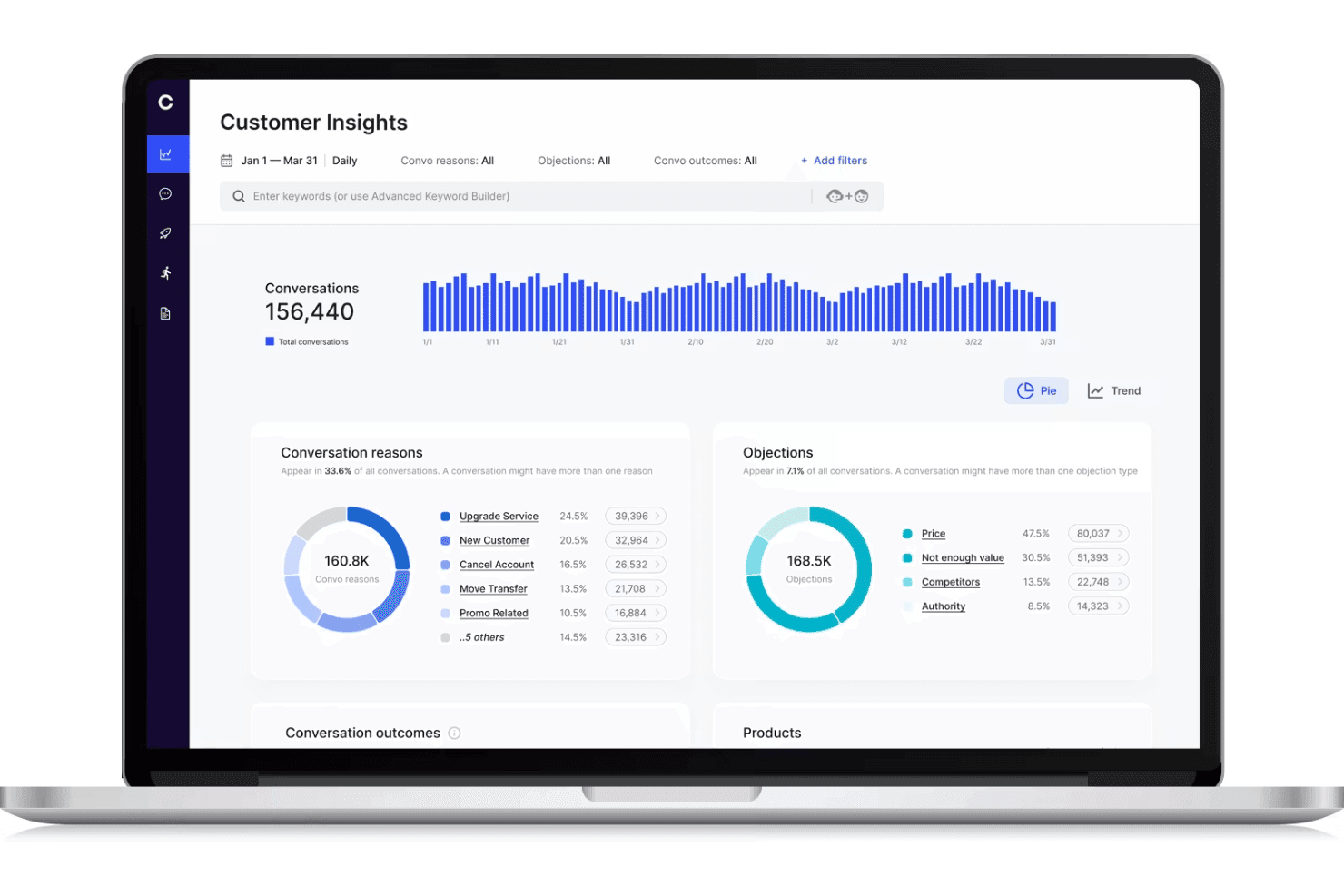
Cresta displays a call center monitoring dashboard with customer conversation analytics, objection tracking, and conversation trends. Cresta is an AI-powered call center monitoring platform that offers real-time conversation intelligence, workflow orchestration, and automated quality management for voice and digital channels.
Who Is Cresta Best For?
Enterprise support teams and contact centers seeking scalable AI-powered quality monitoring and workflow automation across multiple channels.
Why I Picked Cresta
I picked Cresta as one of the best because its no-code AI workflow orchestration lets my team build and update real-time coaching and compliance automations fast. I use Cresta’s drag-and-drop tools to automate quality monitoring and trigger proactive interventions during calls.
Cresta Key Features
- Real-time transcription: Converts calls and chats into text instantly for analysis and record keeping.
- Automated quality scoring: Scores 100% of customer interactions against custom criteria without manual review.
- Multi-channel monitoring: Monitors voice, chat, and digital channels from one centralized interface.
- Supervisor dashboards: Lets supervisors access live and historical performance metrics, transcripts, and flagged interactions.
Cresta Integrations
Cresta offers native integrations with Salesforce, Twilio, Pipedrive, BigCommerce, Five9, Zendesk, and more. An API is available for custom integrations.
Pros and Cons
Pros:
- Script adherence and compliance monitoring
- Automated quality scoring across all channels
- Real-time coaching for live call agents
Cons:
- Knowledge Assist needs ongoing model tuning
- AI guidance can require manual overrides
Learn more about Cresta: Best for performance analytics
- Free demo available
- From $25/month (billed annually)
Visit WebsiteCustomer Rating:4.8/5
Squaretalk dashboard tracks call volume, agent activity, and performance metrics in real time. Squaretalk is a call center monitoring system built to support customer service teams and track daily call activity, with a focus on performance analytics. It offers real-time monitoring tools that help supervisors view call metrics, agent activity, and queue performance. Whether you're managing a small team or a larger operation, Squaretalk also includes reporting options and integrations with existing tools to help teams review call center performance and manage operations.
Why I Picked Squaretalk
I picked Squaretalk for its performance analytics, which helps track call activity, agent output, and queue performance. It also includes real-time monitoring tools that let supervisors review live calls and identify issues as they happen. The dashboards present call metrics in one place, making it easier to review trends and evaluate team performance.
Squaretalk Key Features
In addition to performance analytics, Squaretalk offers:
- Customizable Reporting: Tailor reports to track the metrics that are most important to your business.
- Integration Capabilities: Seamlessly connect with existing tools to streamline workflows and enhance productivity.
- User-Friendly Dashboards: Easily visualize data and gain insights into agent performance and customer interactions.
- Workflow Automation: Automate repetitive tasks so your team can focus on more complex issues.
Squaretalk Integrations
Integrations include Zoho, Salesforce, Freshworks CRM, Pipedrive, Antelope CRM, and WhatsApp Business.
Pros and Cons
Pros:
- Offers AI-powered transcripts, summaries, sentiment analysis
- Comprehensive analytics tools provide valuable insights for decision-making
- Predictive dialers boost agent productivity and efficiency
Cons:
- Connectivity or lag issues may occur under heavy usage
- Advanced workflows take time to set up correctly
Learn more about Squaretalk: Best for AI-driven insights
- Free demo available
- Pricing upon request
Visit WebsiteCustomer Rating:4.4/5
Talkdesk uses AI to deliver data-driven insights for better customer interactions. Talkdesk is a call center monitoring system designed for businesses seeking advanced insights through AI technology. It's ideal for teams that want to enhance customer interactions by utilizing data-driven insights for decision-making.
Why I picked Talkdesk: Talkdesk offers AI-driven insights that help your team make informed decisions. The tool provides real-time analytics and sentiment analysis, allowing you to understand customer emotions during calls.
It includes features like automated quality management and predictive forecasting to improve service delivery. These capabilities make it a great choice for teams focused on leveraging AI for better customer experiences.
Standout features & integrations:
Features include call recording and transcription, which ensure you have a complete record of customer interactions. The software also offers customizable dashboards, so you can tailor the view to your team's needs. Additionally, it provides workforce management tools to optimize scheduling and resource allocation.
Integrations include Salesforce, Zendesk, Slack, Microsoft Teams, Google Workspace, Shopify, HubSpot, ServiceNow, Okta, and Zoom.
Pros and Cons
Pros:
- Includes predictive forecasting tools
- Provides automated quality management
- Offers real-time sentiment analysis
Cons:
- May need IT support for integration
- Requires ongoing training for staff
Learn more about Talkdesk: Best for real-time transcriptions
- 14-day free trial + free demo available
- Pricing upon request
Visit WebsiteCustomer Rating:4.3/5
Dialpad offers real-time call transcription to improve team communication. Dialpad is a call center monitoring system that caters to businesses needing real-time call transcription services. It’s designed for teams that want to enhance their communication by capturing and analyzing calls as they happen.
Why I picked Dialpad: Dialpad offers real-time transcriptions that help your team capture important details during calls. This feature is invaluable for training and quality assurance, allowing you to review conversations instantly.
The platform also includes call routing and analytics to help your team manage and understand call data. Its focus on real-time insights makes it ideal for teams looking to improve communication efficiency.
Standout features & integrations:
Features include voicemail transcription, which converts voicemails into text for easy review. The platform provides call analytics to give you insights into team performance and customer interactions. Additionally, it offers a smart call routing feature to ensure calls reach the right team members quickly.
Integrations include Salesforce, Slack, Microsoft Teams, Google Workspace, HubSpot, Zendesk, ServiceNow, Okta, LinkedIn, and Zoho CRM.
Pros and Cons
Pros:
- Includes voicemail transcription
- Offers smart call routing
- Provides real-time call transcriptions
Cons:
- Can be complex for new users
- Occasional transcription errors
 Best for startups and SMBs
- 10-day free trial
- From $18/user/month (billed annually)
Visit WebsiteCustomer Rating:4.4/5
CallHippo provides essential call tools for startups and growing teams. CallHippo is a call center monitoring system tailored for startups and small to medium-sized businesses. It offers essential call management features that help teams manage customer interactions efficiently.
Why I picked CallHippo: CallHippo is designed with startups and SMBs in mind, providing essential features without unnecessary complexity. It includes tools like virtual phone numbers and call recording, which are crucial for small teams.
The platform is easy to set up, so your team can start using it quickly. Its affordability and focus on core functionalities make it a smart choice for smaller businesses looking to grow.
Standout features & integrations:
Features include call analytics that give you insights into call performance and trends. The platform also offers call forwarding, so your team can direct calls to the right person easily. Additionally, it provides voicemail features that ensure no customer query goes unanswered.
Integrations include Zoho CRM, Slack, HubSpot, Pipedrive, Zendesk, Salesforce, Shopify, Zapier, Freshdesk, and Intercom.
Pros and Cons
Pros:
- Provides essential call recording
- Offers virtual phone numbers
- Easy setup process
Cons:
- Requires stable internet connection
- Can have occasional call drops
 Best for large enterprises
- Free demo available
- From $110/agent/month (proactive AI extra)
Visit WebsiteCustomer Rating:4.3/5
NICE CXone supports large enterprises with scalable customer interaction tools. NiCE CXone is a comprehensive contact center platform tailored for large enterprises looking to enhance customer interactions. It serves businesses that require a scalable solution to manage complex call center operations efficiently.
Why I picked NiCE CXone: NiCE CXone is built for large enterprises that need a scalable solution to handle high call volumes. It offers features like automatic call distribution and workforce management, which are crucial for large teams.
The platform provides real-time analytics to help your team make data-driven decisions. Its focus on scalability and efficiency makes it ideal for big organizations looking to streamline their contact center operations.
Standout features & integrations:
Features include omnichannel routing, which lets your team manage customer interactions across various channels seamlessly. The platform also offers quality management tools to ensure high service standards. Additionally, it provides predictive dialing to optimize call efficiency and reduce wait times.
Integrations include Salesforce, Microsoft Dynamics, Zendesk, ServiceNow, Oracle, SAP, Google Cloud, Amazon Web Services, Zoom, and Genesys.
Pros and Cons
Pros:
- Includes quality management tools
- Supports omnichannel routing
- Offers predictive dialing
Cons:
- Occasional feature updates needed
- Requires technical expertise for setup
Learn more about NiCE CXone: Best for analytics capabilities
- Free demo available
- Available upon request
Visit WebsiteCustomer Rating:4.2/5
Calabrio ONE enhances call center performance with analytics-driven insights. Calabrio ONE is a workforce optimization suite designed for call centers looking to leverage analytics for improved performance. It's targeted at teams that want to enhance decision-making through data-driven insights and analytics.
Why I picked Calabrio One: Calabrio ONE excels in analytics capabilities, providing tools that help your team understand customer interactions better. It offers speech analytics and quality management features, allowing you to gain insights into customer sentiment.
The platform also includes workforce management tools to optimize scheduling and resource allocation. These features make it perfect for teams focused on using analytics to drive performance improvements.
Standout features & integrations:
Features include advanced reporting tools that provide in-depth analysis of call center operations. The software also offers voice-of-the-customer analytics to help you understand customer needs and preferences. Additionally, it supports performance management with customizable dashboards to track key metrics effectively.
Integrations include Salesforce, Microsoft Dynamics, Cisco, Avaya, Genesys, Amazon Connect, Five9, RingCentral, NICE, and Zoom.
Pros and Cons
Pros:
- Includes performance management features
- Provides in-depth reporting tools
- Offers speech analytics
Cons:
- Needs time for full implementation
- Can be complex for beginners
Learn more about Calabrio ONE: Best for remote teams
- 14-day free trial
- From $15/user/month (billed annually)
Visit WebsiteCustomer Rating:4.1/5
Freshcaller supports remote teams with tools for efficient call management. Freshcaller is a cloud-based call center monitoring system designed for remote teams. It helps businesses manage calls efficiently with features that support distributed workforces.
Why I picked Freshcaller: Freshcaller is built to support remote teams, offering cloud-based solutions that don't require physical infrastructure. It provides features like call masking and number porting, which are essential for remote operations.
Freshcaller also offers call queues and routing to ensure your team handles calls efficiently. Its focus on remote accessibility makes it an excellent choice for businesses with distributed teams.
Standout features & integrations:
Features include call recording, which helps you keep track of all conversations for quality assurance. The system also offers real-time call monitoring, allowing supervisors to listen in and provide immediate feedback. This ensures higher call resolution rates and adherence to quality standards. Additionally, it supports multi-level IVR to direct customers to the right department seamlessly.
Integrations include Freshdesk, Slack, HubSpot, Salesforce, Zendesk, Shopify, Google Contacts, Office 365, Pipedrive, and Zapier.
Pros and Cons
Pros:
- Multi-level IVR available
- Offers call masking features
- Supports remote work environments
Cons:
- Occasional call quality issues
- Limited advanced analytics
Learn more about Freshcaller: 10Best for small to mid-sized teams
Zendesk
- Free trial + free demo available
- From $19/agent/month (billed annually)

Zendesk helps small teams manage calls and track customer interactions. Zendesk is a call center monitoring system designed for businesses looking to deliver personalized customer experiences. It's widely used by small to mid-sized teams to manage calls efficiently and track customer interactions.
Why I picked Zendesk: Zendesk is tailored for small to mid-sized teams with features like call routing and AI-driven insights. It lets you manage calls in one place, giving your team full context for every interaction.
The system offers tools like IVR and group routing to support faster customer service. Zendesk’s AI agents help resolve calls quickly, making it ideal for smaller teams looking to boost efficiency without overwhelming complexity.
Standout features & integrations:
Features include call monitoring that tracks all conversations, allowing you to identify performance trends. AI agents provide instant insights, helping your team resolve calls faster. The system also offers post-call summaries directly in your workspace to streamline workflow.
Integrations include Salesforce, Slack, Shopify, Mailchimp, Google Analytics, HubSpot, Microsoft Teams, Jira, Trello, and Asana.
Pros and Cons
Pros:
- Flexible call routing options
- AI-powered call summaries
- Offers real-time call monitoring
Cons:
- Occasional system lag reported
- Some features require additional purchases
Learn more about Zendesk:
Andre overvåkingssystemer for kundesentre
Her er noen flere alternativer for overvåkingssystemer for kundesentre som ikke kom med på kortlisten min, men som likevel er verdt å undersøke:
- 11Twilio FlexBest for customizability
- 12PlayvoxBest for workforce engagement
- 13ComputerTalk iceBest for Microsoft integration
- 14LiveAgentBest for multi-channel support
- 15Zoho DeskBest for budget-conscious users
- 16AircallBest for remote team collaboration
- 17RingCentralBest for unified communications
- 18KixieBest for sales-focused teams
- 19RingoverBest for call monitoring simplicity
- 20Five9Best for performance management tools
- 21MightyCallBest for small business needs
- 22ConvinBest for call conversation analysis
- 23GenesysBest for customer experience solutions
- 24Enthu.AIBest for call quality insights
- 25TethrBest for voice data mining
How I Evaluate Call Center Monitoring Systems
I split my evaluation into baseline requirements—like live monitoring and call recording—and the differentiators, like AI coaching and omnichannel QA, that separate good tools from great ones.
Core Functionality (Table Stakes For This List)
When I'm selecting tools for my list, I rank each one on a scale from 0 (does not offer the functionality) to 5 (excels in this area) for each core functionality listed below. Then, I calculate the tool's total score into a percentage. Each tool needs to achieve a minimum total score of 65% to be considered for inclusion.
- Call Recording & Storage: I check whether recordings are automatic, searchable, and paired with retention controls—especially for teams that revisit calls during disputes or escalations.
- Live Call Monitoring: Supervisors need listen, whisper, and barge options at minimum. I look for how easily a manager can jump into a live call to coach an agent mid-conversation.
- Quality Scoring & Evaluations: Customizable scorecards matter here. I evaluate whether the tool lets QA analysts build evaluation forms tied to specific call types, like billing inquiries vs. complaints.
- Speech & Interaction Analytics: Good tools go beyond transcription. I look for keyword spotting and sentiment analysis that help teams surface patterns across thousands of calls.
- Performance Dashboards & Reporting: I evaluate whether dashboards offer real-time and historical views, and whether supervisors can filter by agent, team, or queue without building reports from scratch.
- Compliance & Security Controls: Features like PCI redaction, role-based access, and encrypted storage all factor in, particularly for teams handling sensitive customer data in regulated industries.
Once I have a list of tools that meet the criteria, I consider what sets each platform apart.
Differentiating Factors (What Sets Vendors Apart)
Here's how I compare and contrast different vendors:
Standout Features
Omnichannel monitoring is a major differentiator. Teams handling chat, email, and voice need QA visibility across all channels, not just phone calls. I also look for AI coaching tools that surface targeted recommendations for agents, since they save supervisors hours of manual review. Customer journey playback adds another layer. It lets evaluators see the full sequence of interactions a customer had before a call, giving QA scores much richer context.
Beyond Features
I evaluate how well each tool connects with the broader tech stack. A monitoring system that integrates with your CCaaS platform, CRM, and workforce management tools keeps QA data flowing where supervisors actually work. Compliance and data governance also weigh heavily—I check for configurable recording rules and data residency controls, since teams in regulated industries need granular control over where and how long recordings are stored. Pricing transparency matters, too. Storage costs and add-on fees for analytics modules can quietly inflate total cost of ownership.
Slik velger du et overvåkingssystem for kundesentre
Med så mange overvåkingssystemer for kundesentre på markedet er det lett å bli sittende fast i sammenligninger av funksjonslister eller forvirrende prisnivåer. I stedet for å gå deg vill i mengden bør du fokusere på disse faktorene, som faktisk vil påvirke teamets evne til å overvåke samtaler effektivt og forbedre servicekvaliteten.
| Faktor | Hva du bør vurdere |
|---|---|
| FaktorSkalerbarhet | Hva du bør vurdereVil verktøyet vokse i takt med virksomhetens behov? Kan det håndtere større samtalevolumer, nye agenter eller utvidelse til flere kanaler etter hvert som virksomheten vokser? |
| FaktorIntegrasjoner | Hva du bør vurdereKobler overvåkingssystemet seg sømløst til CRM-et, brukerstøttesystemet og samarbeidsverktøyene dine, slik at du unngår siloer i arbeidsflyten? |
| FaktorTilpasningsmuligheter | Hva du bør vurdereKan du tilpasse kontrollpaneler, rapporter og arbeidsflyter for samtaleovervåking slik at de samsvarer med resultatmålingene og behovene for veiledning? |
| FaktorBrukervennlighet | Hva du bør vurdereEr grensesnittet intuitivt nok til at arbeidsledere og agenter raskt kan ta det i bruk uten omfattende opplæring? |
| FaktorImplementering og oppstart | Hva du bør vurdereHvor lang tid vil det ta å sette opp systemet? Ta hensyn til tiden og ressursene som kreves for full utrulling, og om leverandøren tilbyr støtte i denne fasen. |
| FaktorKostnad | Hva du bør vurdereEr det innenfor budsjettet ditt? Utover abonnementsavgiftene, kommer det tilleggskostnader for funksjoner som samtaleopptak eller analyse? Sammenlign prismodellene med funksjonene du faktisk trenger. |
| FaktorSikkerhetstiltak | Hva du bør vurdereEr dataene og samtalene dine beskyttet? Se etter funksjoner som kryptering og samsvar med bransjestandarder for å beskytte sensitiv informasjon. |
| FaktorTilgjengelig kundestøtte | Hva du bør vurdereKan du få hjelp når du trenger det? Undersøk om leverandøren tilbyr brukerstøtte døgnet rundt og flere kontaktalternativer, som telefon, chat og e-post, slik at problemer kan løses raskt. |
Hva er et overvåkingssystem for kundesentre?
Et overvåkingssystem for kundesentre er programvare som sporer, tar opp og analyserer kundesamtaler, slik at ledere kan forbedre agentenes prestasjoner og servicekvaliteten. Med funksjoner som direkteovervåking, samtaleopptak og analyse gir disse systemene handlingsrettet innsikt som trengs for å lære opp kundesenteragenter, sikre jevn kvalitet og levere bedre kundeopplevelser.
Funksjoner i et overvåkingssystem for kundesentre
Når du velger programvare for kvalitetsovervåking av kundesentre, bør du se etter følgende viktige funksjoner:
- Samtaleopptak: Tar opp og lagrer samtaler for kvalitetssikring og opplæringsformål.
- Direkte overvåking: Gjør det mulig for ledere av kundesentre å lytte til pågående samtaler og gi agenter tilbakemeldinger og støtte i sanntid.
- Analysefunksjoner: Gir innsikt i resultater og prestasjoner, slik at team kan ta datadrevne beslutninger for å forbedre effektiviteten i kundesenteret.
- Tilpassbare dashbord: Lar brukerne tilpasse grensesnittet slik at det viser de mest relevante måleverdiene og opplysningene for deres spesifikke behov.
- Automatisk samtalefordeling: Ruter innkommende samtaler til de best egnede agentene, noe som reduserer gjennomsnittlig behandlingstid og ventetid.
- Kvalitetsstyring: Tilbyr verktøy for å evaluere og forbedre agentenes prestasjoner og sikre høye servicestandarder.
- Omnikanalstøtte: Håndterer kundeinteraksjoner på tvers av flere kanaler, som telefon, e-post og chat, fra én enkelt plattform.
- Prediktiv oppringing: Automatiserer utgående samtaler og optimaliserer agentenes tilgjengelighet ved å ringe numre basert på prediktive algoritmer.
- Sentimentanalyse: Analyserer kundenes følelser under samtaler for å gi innsikt i kundetilfredshet og områder som kan forbedres.
- Bemanningsstyring: Bidrar til å optimalisere agentenes arbeidsplaner og ressurser i tråd med behovene i kundesenteret og forbedre produktiviteten.
Fordeler med et overvåkingssystem for kundesentre
Implementering av et overvåkingssystem for kundesentre gir flere fordeler for teamet og virksomheten din. Her er noen av fordelene du kan se frem til:
- Forbedrede agentprestasjoner: Med direkte overvåking og tilbakemeldinger får agentene veiledning i sanntid for å forbedre ferdighetene og servicekvaliteten.
- Økt kundetilfredshet: Kvalitetsstyring og sentimentanalyse sikrer at kundeinteraksjonene holder høy standard, noe som fører til mer fornøyde kunder.
- Datadrevne beslutninger: Analysefunksjoner gir innsikt i driften av kundesenteret, slik at ledere kan ta informerte beslutninger for å øke effektiviteten.
- Effektiv samtalehåndtering: Funksjoner som automatisk samtalefordeling og prediktiv oppringing sikrer at samtaler rutes og håndteres raskt, noe som reduserer ventetiden.
- Ressursoptimalisering: Verktøy for bemanningsstyring bidrar til å tilpasse agentenes arbeidsplaner etter behovet, noe som forbedrer produktiviteten og reduserer kostnadene.
- Tilpasset innsikt: Tilpassbare dashbord gjør det mulig for team å fokusere på de viktigste måleverdiene og tilpasse innsikten til sine spesifikke mål.
- Konsekvent kvalitetssikring: Verktøy for samtaleopptak og kvalitetsstyring opprettholder et jevnt servicenivå og bygger tillit hos kundene.
Kostnader og priser for overvåkingssystemer for kundesentre
Når du velger et overvåkingssystem for kundesentre, må du forstå de ulike prismodellene og tilgjengelige abonnementene. Kostnadene varierer ut fra funksjoner, teamets størrelse, tilleggstjenester og mer. Tabellen nedenfor oppsummerer vanlige abonnementer, gjennomsnittsprisene deres og typiske funksjoner som er inkludert i løsninger for overvåkingssystemer for kundesentre:
Sammenligningstabell for abonnementer for overvåkingssystemer for kundesentre
| Abonnementstype | Gjennomsnittspris | Vanlige funksjoner |
|---|---|---|
| AbonnementstypeGratisabonnement | Gjennomsnittspris$0 | Vanlige funksjonerGrunnleggende samtaleovervåking, begrenset analyse og viktige rapporter. |
| AbonnementstypePersonlig abonnement | Gjennomsnittspris$15-$30 per bruker/måned | Vanlige funksjonerSamtaleopptak, direkte overvåking og grunnleggende analyse. |
| AbonnementstypeForretningsabonnement | Gjennomsnittspris$50-$75 per bruker/måned | Vanlige funksjonerAvansert analyse, automatisk samtalefordeling og tilpassbare dashbord. |
| AbonnementstypeEnterprise-abonnement | Gjennomsnittspris$100-$150 per bruker/måned | Vanlige funksjonerOmnikanalstøtte, prediktiv oppringing og omfattende verktøy for kvalitetsstyring. |
Vanlige spørsmål om systemer for overvåking av kundesentre
Her er noen svar på vanlige spørsmål om systemer for overvåking av kundesentre:
Hva er 80/20-regelen i et kundesenter?
80/20-regelen i et kundesenter betyr at 80 prosent av samtalene skal besvares innen 20 sekunder. Denne standarden bidrar til å sikre korte svartider og øke kundetilfredsheten. Det er et vanlig referansepunkt som brukes til å sette resultatmål for driften av kundesentre.
Hvordan fungerer samtaleovervåking?
Samtaleovervåking innebærer å observere og lytte til samtaler enten i sanntid eller via opptak. Det brukes til å evaluere kundebehandlernes prestasjoner, tildele kvalitetspoeng og forbedre kundeservicen. Ved å overvåke samtaler kan du gi tilbakemeldinger til kundebehandlerne og identifisere områder for opplæring og utvikling.
Hva er de 5 viktigste nøkkelindikatorene for et kundesenter?
Nøkkelindikatorer (KPI-er) i et kundesenter omfatter kundetilfredshetspoeng, andel samtaler løst ved første kontakt, første responstid, utnyttelsesgrad for kundebehandlere og andel avbrutte samtaler. Disse målingene hjelper deg med å vurdere hvor effektiv driften av kundesenteret er, og identifisere områder som kan forbedres.
Hvilke 7 viktige ferdigheter bør alle kundebehandlere ha?
Viktige ferdigheter for kundebehandlere omfatter aktiv lytting, effektiv kommunikasjon, empati, problemløsning, produktkunnskap, tidsstyring og evnen til å håndtere flere oppgaver samtidig. Disse ferdighetene gjør kundebehandlerne i stand til å håndtere kundehenvendelser effektivt og yte service av høy kvalitet.
Hvordan kan overvåking av kundesenteret forbedre servicekvaliteten?
Overvåking av kundesenteret gjør det mulig å gjennomgå interaksjoner og gi målrettede tilbakemeldinger til kundebehandlerne. Ved å identifisere styrker og forbedringsområder kan du tilpasse opplæringsprogrammene og forbedre den samlede servicekvaliteten. Overvåkingsprosessen bidrar også til å opprettholde ensartede servicestandarder i hele teamet.
Hvilke verktøy brukes vanligvis til overvåking av kundesentre?
Vanlige verktøy som brukes til overvåking av kundesentre, omfatter programvare for samtaleopptak, systemer for liveovervåking, analyseplattformer og verktøy for kvalitetsstyring. De riktige verktøyene for overvåking av kundesentre hjelper deg med å følge med på prestasjoner, analysere data og sikre at teamet oppfyller forventningene til servicen og løser kundeproblemer raskt.