

O software de gestão de tickets de help desk é uma plataforma digital que a sua equipa utiliza para acompanhar, gerir e resolver pedidos de apoio ao cliente em todos os canais. Se está a comparar as principais ferramentas de help desk, é provável que esteja a tentar equilibrar a pressão para prestar um apoio mais rápido e personalizado sem perder o controlo nem esgotar a sua equipa. Este guia ajuda-o a separar o que realmente importa, mostrando exatamente como as diferentes soluções se comparam relativamente a fluxos de trabalho omnicanal, automatização, colaboração da equipa e integração com as operações mais abrangentes de apoio ao cliente — para que possa encontrar a solução que melhor se adapta à sua estratégia de apoio.
Why Trust Our Software Recommendations
6,700+
Reviews
20
Industry experts
16+
Evaluation factors
14
Years
Our team has been testing and reviewing software since 2012. As CX leaders ourselves, we know how difficult—and important—it is to choose the right software.
For this guide, we evaluated tools using hands-on testing and independent research, scoring tools using our selection criteria.
Our reviews reflect our human editorial judgment, not a sales pitch.
 Gui DrusinaCreative Director
 Tim FisherVP of AI
Tabela comparativa de software de gestão de tickets de help desk
Esta tabela comparativa resume os detalhes de preços das minhas principais escolhas de software de gestão de tickets de help desk.
| Tool | Best For | Trial Info | Price | ||
|---|---|---|---|---|---|
| 1 | Best for AI-native escalation and deflection | Free plan + free demo available | From $150/month (billed annually) | Website | |
| 2 | Best for outcome-based AI ticket resolution | Free plan available; 14-day free trial | From $16/user/month | Website | |
| 3 | Best for unified customer data and insights | Free demo available | Pricing upon request | Website | |
| 4 | Best for Gmail-based multichannel support | Free plan available | From $35/user/month | Website | |
| 5 | Best for intuitive team collaboration tools | Free plan available | From $25/user/month | Website | |
| 6 | Best for fast multi-department implementation | 14-day free trial | From $24/user/month (billed annually) | Website | |
| 7 | Best for native AI agent and human collaboration | 14-day free trial | From $29/user/month (billed annually) | Website | |
| 8 | Best for CRM service integration | 14-day free trial | From $20/user/month | Website | |
| 9 | Best for open source ticketing flexibility | Free plan available | From $12/user/month | Website | |
| 10 | Best for cross-team customer operations management | 14-day free trial | From $25/user/month (billed annually) | Website |


Avaliações de software de gestão de tickets de help desk
Apresento abaixo os meus resumos detalhados do melhor software de gestão de tickets de help desk que integrou a minha seleção. As minhas avaliações analisam detalhadamente as funcionalidades, as integrações e os melhores casos de utilização de cada plataforma, para o ajudar a encontrar a opção mais adequada para si.
 Best for AI-native escalation and deflection
- Free plan + free demo available
- From $150/month (billed annually)
Visit WebsiteCustomer Rating:4.5/5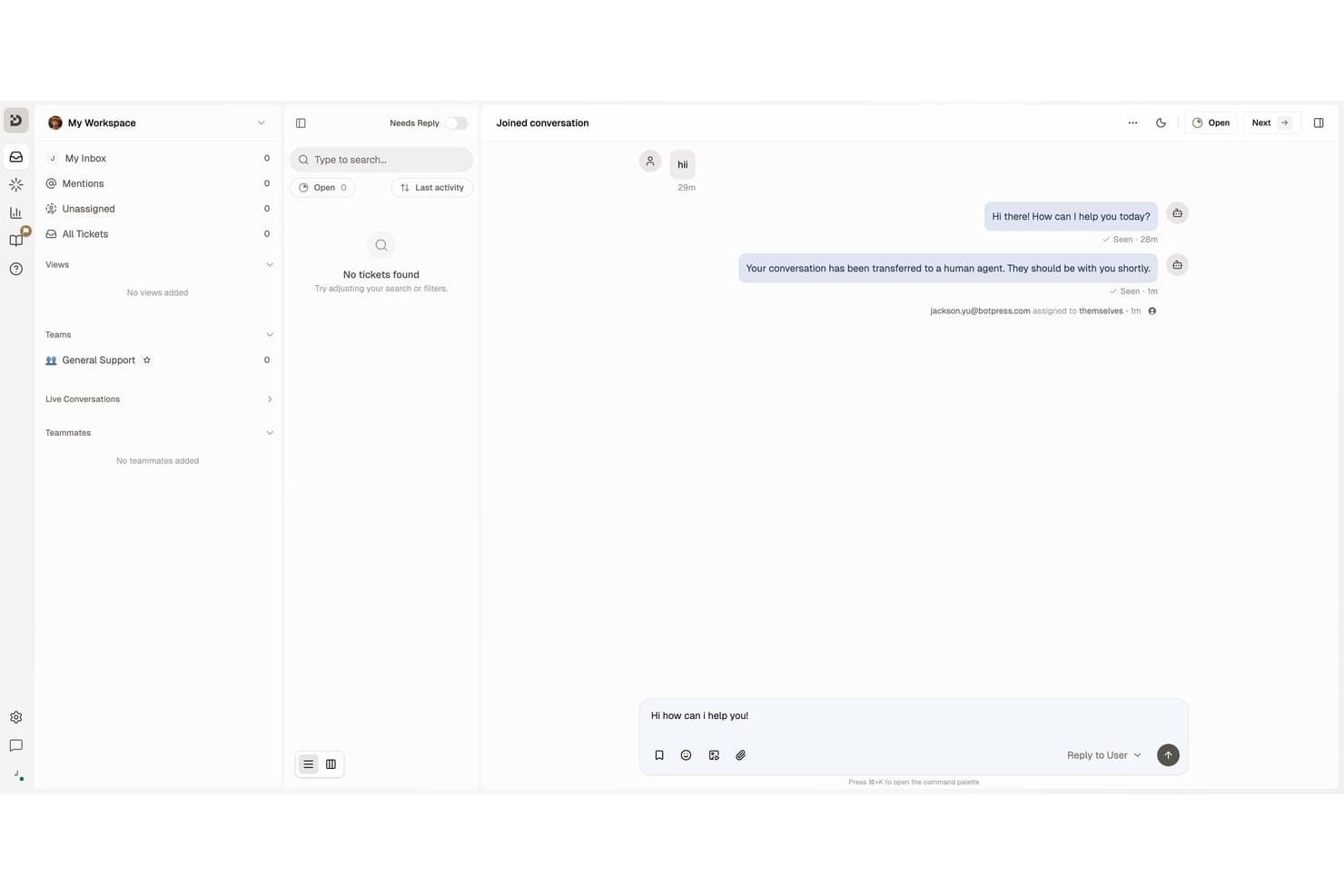
Botpress lets agents manage live conversations and reply to users in one inbox. Botpress Desk is an AI-native help desk ticketing platform that handles support tickets across webchat, email, WhatsApp, and voice, with built-in escalation routing, SLA tracking, and a self-service Help Center.
Who Is Botpress Best For?
Botpress Desk is a strong fit for customer support teams that want AI to handle deflection and escalation automatically before a human agent ever gets involved.
Why I Picked Botpress
I've included Botpress in my top picks because it's one of the few help desk platforms where AI handles deflection and escalation as core functions, not add-ons. Before a ticket ever reaches an agent, Botpress can answer questions from your existing knowledge base and hand off only when its confidence drops below a threshold you set. When escalation does happen, the agent receives an AI-generated summary of what was asked, what was tried, and a suggested next step.
Botpress Key Features
- Multi-channel intake: Desk captures conversations from webchat, email, WhatsApp, Slack, Discord, Telegram, Instagram, and Facebook Messenger into a single ticketing workspace.
- SLA timers and breach notifications: Configurable SLA clocks track first-response and follow-up targets, with alerts at personal, team, and workspace levels when deadlines approach or are missed.
- Capacity-based routing: Conversations are automatically assigned to agents based on capacity and business hours, with teams, routing rules, and RBAC available on the Team plan.
- CSAT surveys: Localized satisfaction surveys are sent automatically after ticket resolution, with rating labels and reminders adapted to the ticket's language.
Botpress Integrations
Botpress Desk offers two documented native integrations, Zendesk and Intercom, with OAuth connections, synced customer data, and pre-enriched handoffs. Botpress also provides HTTP Chat, Admin, Files, Tables, and Runtime APIs for custom integrations.
Pros and Cons
Pros:
- SLA alerts track human response targets
- Escalations carry summaries and conversation context
- AI answers deflect routine support tickets
Cons:
- Agent collaboration workflows are thinly documented
- Advanced bot setup can burden support teams
Learn more about Botpress: Best for outcome-based AI ticket resolution
- Free plan available; 14-day free trial
- From $16/user/month
Visit WebsiteCustomer Rating:4.6/5
SparrowDesk uses AI copilot and agentic workflows to handle customer support. SparrowDesk is an AI-native help desk ticketing platform that unifies email, live chat, WhatsApp, Facebook Messenger, and Slack into a shared inbox alongside automated routing, SLA management, a self-service knowledge base, and built-in AI ticket resolution.
Who Is SparrowDesk Best For?
SparrowDesk is a strong fit for growing support teams that want AI to handle a significant portion of ticket resolution without heavy setup or maintenance overhead.
Why I Picked SparrowDesk
SparrowDesk earns its spot on my shortlist because of how it approaches AI resolution differently from every other tool here. Zoona AI doesn't just suggest replies, it closes tickets autonomously across email, chat, and messaging, and you only pay $0.49 when it actually resolves something. I also like that Zoona trains directly from your existing knowledge base and past conversations, then flags gaps and proposes new articles when it hits a question it can't answer.
SparrowDesk Key Features
- Omnichannel shared inbox: Consolidates email, live chat, WhatsApp, Facebook Messenger, and Slack into a single unified queue for your team.
- SLA breach alerts: Sends real-time alerts before SLA deadlines are missed, with pause and resume controls for pending tickets.
- Round robin assignment: Automatically distributes incoming tickets across available agents on the Professional plan and above.
- CSAT surveys: Triggers post-ticket satisfaction surveys automatically at ticket close, with scores tied to individual conversations.
SparrowDesk Integrations
SparrowDesk offers native integrations with Salesforce, HubSpot, Shopify, Slack, WhatsApp, Facebook Messenger, Gmail, Jira, Linear, and Notion. It also supports custom integrations through its developer API and Zapier.
Pros and Cons
Pros:
- SLA breach alerts are proactive and configurable
- Ticket linking and parent-child relationships supported
- AI resolves tickets without agent intervention
Cons:
- AI performance depends on knowledge base quality
- No voice or SMS channel options
Learn more about SparrowDesk: Best for unified customer data and insights
- Free demo available
- Pricing upon request
Visit WebsiteCustomer Rating:4.5/5
Kustomer centralizes customer conversations with real-time ticket insights. Kustomer is an AI-native customer service CRM that replaces traditional ticket queues with a unified customer timeline, combining omnichannel inbox management, workflow automation, AI agents, and real-time reporting in one platform.
Who Is Kustomer Best For?
Kustomer is a strong fit for mid-market and enterprise B2C brands running high-volume, omnichannel support operations across multiple teams and channels.
Why I Picked Kustomer
I've included Kustomer in my top picks because its unified customer timeline is unlike anything a traditional ticket-based system offers. Instead of treating each inquiry as an isolated ticket, every email, chat, call, and social message appears in one chronological view per customer. I also like that sentiment tracking and CSAT data surface directly in that same view, so agents aren't digging through separate dashboards to understand how a customer feels before responding.
Kustomer Key Features
- Multichannel intake: Consolidates customer messages from email, chat, voice, SMS, and social media into a single workspace.
- Automated workflow builder: Lets you automate repetitive tasks with customizable, no-code rules and macros.
- Knowledge base portal: Provides both internal and customer-facing help center tools with multilingual support.
- SLA and escalation management: Supports setting and tracking SLA policies with automated breach alerts and escalation triggers.
Kustomer Integrations
Kustomer offers native integrations with Salesforce, Shopify, Jira, Slack, Magento, Microsoft Teams, Facebook, Instagram, WhatsApp Business, and Twilio. An API is available for custom integrations.
Pros and Cons
Pros:
- Sentiment and CSAT surfaced in agent view
- AI triage routes tickets without manual rules
- Full conversation history per customer, not ticket
Cons:
- Reporting dashboards limited without custom development
- Complex to configure without dedicated admin support
Learn more about Kustomer: Best for Gmail-based multichannel support
- Free plan available
- From $35/user/month
Visit WebsiteCustomer Rating:4.7/5
Hiver lets teams collaborate on support tickets via Slack-style threads. Hiver is a help desk ticketing platform built around Gmail and Outlook, combining shared inboxes, ticket management, omnichannel intake, automated routing, and AI-driven support workflows.
Who Is Hiver Best For?
Hiver is a strong fit for small and mid-sized support teams already running on Google Workspace who want ticketing without leaving Gmail.
Why I Picked Hiver
Hiver earns its spot on my shortlist because it's the only help desk that runs inside Gmail rather than alongside it. I like how shared inboxes, ticket assignment, and internal notes all appear directly in the Gmail interface, so my team never has to context-switch into a separate tool. The omnichannel layer pulls live chat and WhatsApp threads into the same queue, and the AI Copilot drafts replies by drawing from connected help docs in real time.
Hiver Key Features
- Omnichannel queue: Collects support requests from email, live chat, WhatsApp, and voice into one unified workspace.
- SLA management: Lets teams define, track, and escalate tickets based on response and resolution targets.
- Knowledge base builder: Provides a public help center for customers to search articles and resolve common issues.
- Advanced analytics: Offers dashboards for monitoring ticket trends, agent metrics, and customer satisfaction scores.
Hiver Integrations
Hiver offers native integrations with Aircall, Slack, WhatsApp Business, and Google Workspace. An API is available for custom integrations.
Pros and Cons
Pros:
- Shared inboxes with threaded collision detection
- AI Copilot drafts replies from help docs
- Lives entirely inside Gmail's interface
Cons:
- Not viable for teams outside Google Workspace
- Thin reporting compared to standalone help desks
Learn more about Hiver: Best for intuitive team collaboration tools
- Free plan available
- From $25/user/month
Visit WebsiteCustomer Rating:4.5/5
Help Scout offers all customer conversations in a shared team inbox. Help Scout is a shared inbox and help desk platform that combines email-based ticket management, live chat, a knowledge base, AI-assisted replies, and team collaboration tools into a single support workspace.
Who Is Help Scout Best For?
Help Scout is a strong fit for small to mid-sized support teams that run email-first operations and want a clean, collaborative workspace without the complexity of enterprise ticketing systems.
Why I Picked Help Scout
Help Scout earns its spot on my shortlist because of how naturally it handles team collaboration inside a live support queue. Collision detection flags when two agents open the same conversation, which prevents duplicate replies before they happen. Internal lets me pull in a subject matter expert without leaving the thread, and conversations can be grouped by company, so my team always has full account context before responding.
Help Scout Key Features
- Multi-channel inbox: Collects customer inquiries from email, chat, social media, and SMS in a unified workspace.
- Beacon widget: Lets you embed chat, contact forms, and knowledge base content directly into your site or app.
- Configurable SLA policies: Enables you to set, track, and escalate support tickets based on response and resolution commitments.
- Docs knowledge base: Offers a public help center with search, categories, analytics, and multi-site management.
Help Scout Integrations
Help Scout offers native integrations with Slack, HubSpot, Salesforce, Jira, Shopify, Mailchimp, Zapier, and provides an API for custom integrations.
Pros and Cons
Pros:
- Built-in CSAT surveys on every conversation
- AI drafts replies directly within conversations
- Collision detection prevents duplicate agent replies
Cons:
- No native voice or phone channel
- Weak reporting depth for high-volume teams
Learn more about Help Scout: Best for fast multi-department implementation
- 14-day free trial
- From $24/user/month (billed annually)
Visit WebsiteCustomer Rating:4.5/5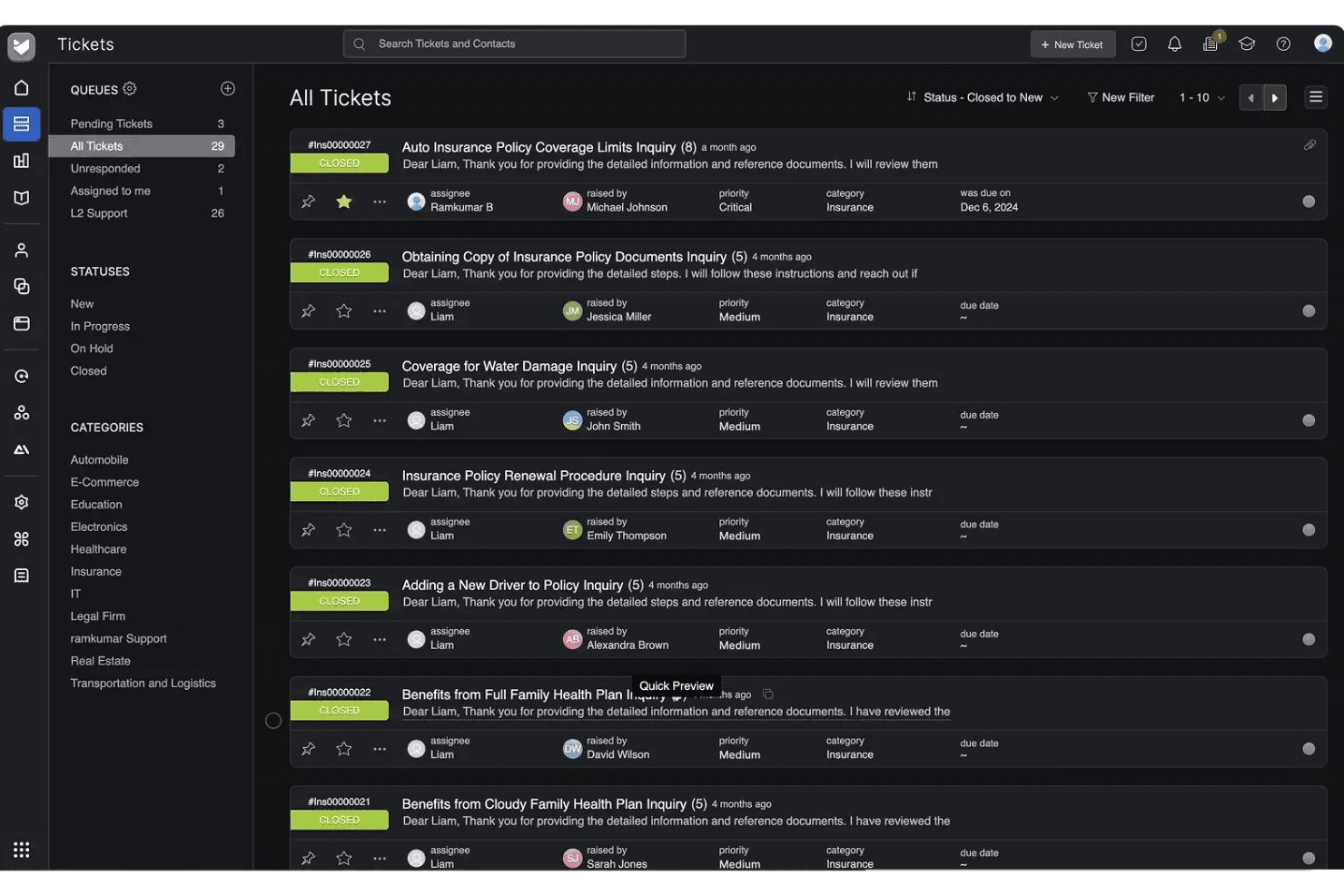
HappyFox organizes all support tickets in a centralized queue view. HappyFox is a cloud-based help desk ticketing platform that centralizes customer inquiries from email, chat, phone, social media, and web forms into a unified queue with SLA management, automation rules, and a self-service knowledge base.
Who Is HappyFox Best For?
HappyFox is a strong fit for small to mid-sized businesses running support across multiple departments, like IT, HR, and customer service, from a single platform.
Why I Picked HappyFox
HappyFox earns its spot on my shortlist because of how quickly you can stand up separate support queues for distinct departments. I love that IT, HR, and customer service teams each get their own ticket queues, SLA policies, and canned responses without any overlap or configuration conflict. The multi-brand helpdesk feature also lets each department run its own branded support portal and knowledge base from day one.
HappyFox Key Features
- AI-powered ticket triage: Uses machine learning to categorize, prioritize, and route incoming tickets automatically.
- Omnichannel ticket capture: Consolidates tickets from email, web forms, chat, phone, and social media into a single queue.
- SLA management and escalation: Lets you define custom SLAs, trigger automated escalations, and track business hours for compliance.
- Custom workflow automation: Offers rule builders and macros to automate assignment, status changes, and follow-up notifications.
HappyFox Integrations
HappyFox offers native integrations with Slack, Salesforce, Jira, Microsoft Teams, Zoom, Aircall, RingCentral, Shopify, Microsoft 365, and Google Workspace. An API is available for custom integrations.
Pros and Cons
Pros:
- Built-in knowledge base per department
- Configurable SLA policies with breach alerts
- Fast multi-department queue setup
Cons:
- Mobile app lacks full desktop functionality
- Advanced reporting requires manual workarounds
 Best for native AI agent and human collaboration
- 14-day free trial
- From $29/user/month (billed annually)
Visit WebsiteCustomer Rating:4.4/5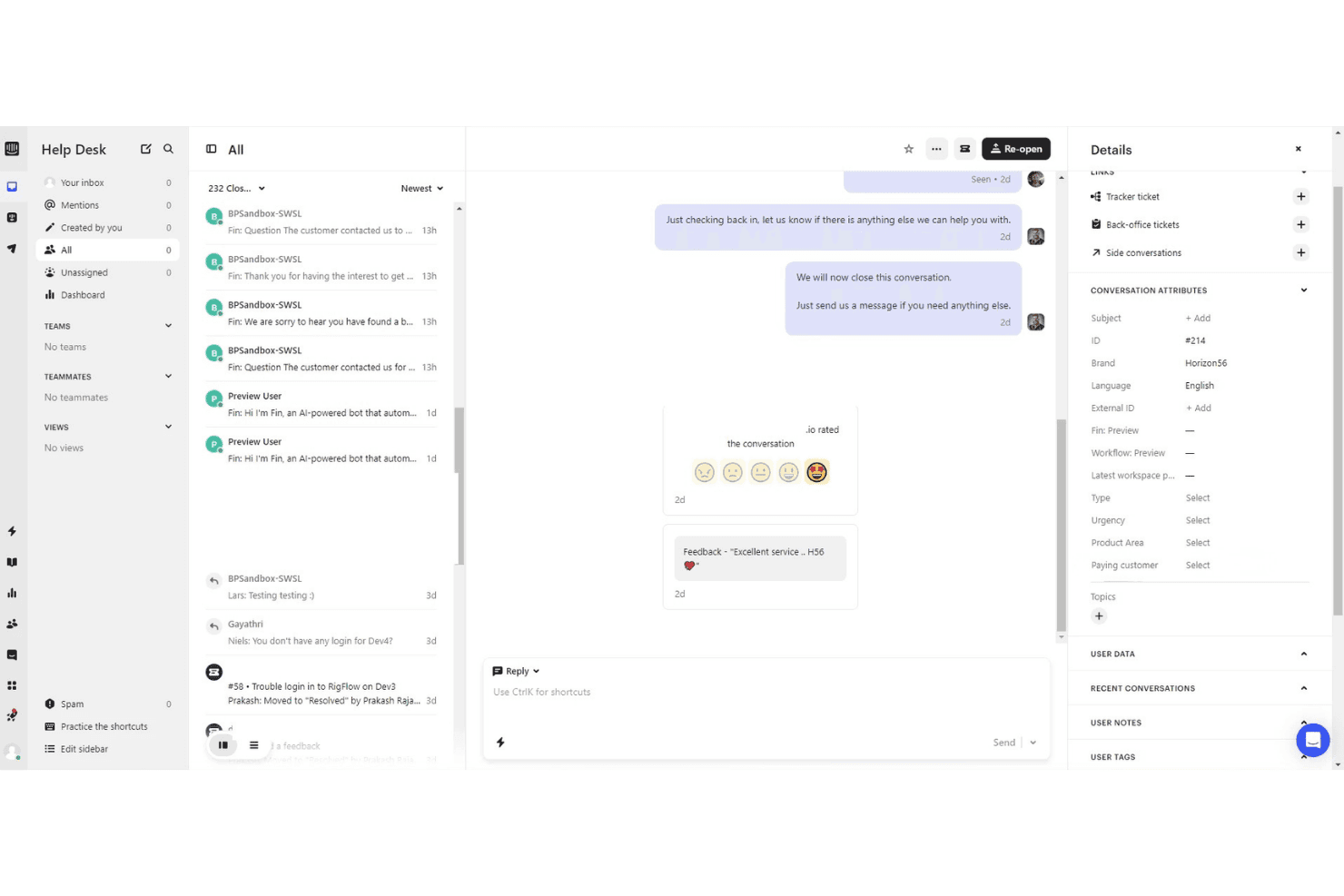
Intercom centralizes customer conversations with details and CSAT ratings. Intercom is an AI-native customer service platform that unifies omnichannel ticketing, a built-in AI agent, no-code workflow automation, knowledge base management, and agent-facing AI assistance in one workspace.
Who Is Intercom Best For?
Intercom is a strong fit for mid-market and enterprise support teams that want to automate a significant share of customer interactions through AI before routing to human agents.
Why I Picked Intercom
I've included Intercom in my top picks because the collaboration between its Fin AI Agent and human agents is genuinely native, not a bolt-on. Fin resolves conversations autonomously and, when it can't, hands off to a human agent with the full conversation context already attached. I also like Copilot, which sits inside the agent inbox and drafts replies and surfaces relevant knowledge base articles in real time, so agents aren't context-switching to find answers mid-conversation.
Intercom Key Features
- Omnichannel inbox: Combine email, chat, phone, WhatsApp, SMS, and social messages in a single agent view.
- Workflow automation: Use no-code tools to automate ticket routing, prioritization, and repetitive actions.
- Integrated knowledge base: Manage a searchable public or private help center with support for multiple brands and languages.
- Advanced reporting and insights: Access dashboards for ticket volume, resolution times, CSAT, and agent performance metrics.
Intercom Integrations
Intercom offers native integrations with Salesforce, HubSpot, Slack, Zendesk, WhatsApp, Facebook, Google Analytics, Shopify, Stripe, Zapier, and provides an API for custom integrations.
Pros and Cons
Pros:
- Omnichannel inbox unifies email, chat, and social
- Copilot surfaces answers inside the agent inbox
- Fin AI agent resolves tickets autonomously
Cons:
- Custom report building limited on lower plans
- Costs scale steeply with added seats
 Best for CRM service integration
- 14-day free trial
- From $20/user/month
Visit WebsiteCustomer Rating:4.4/5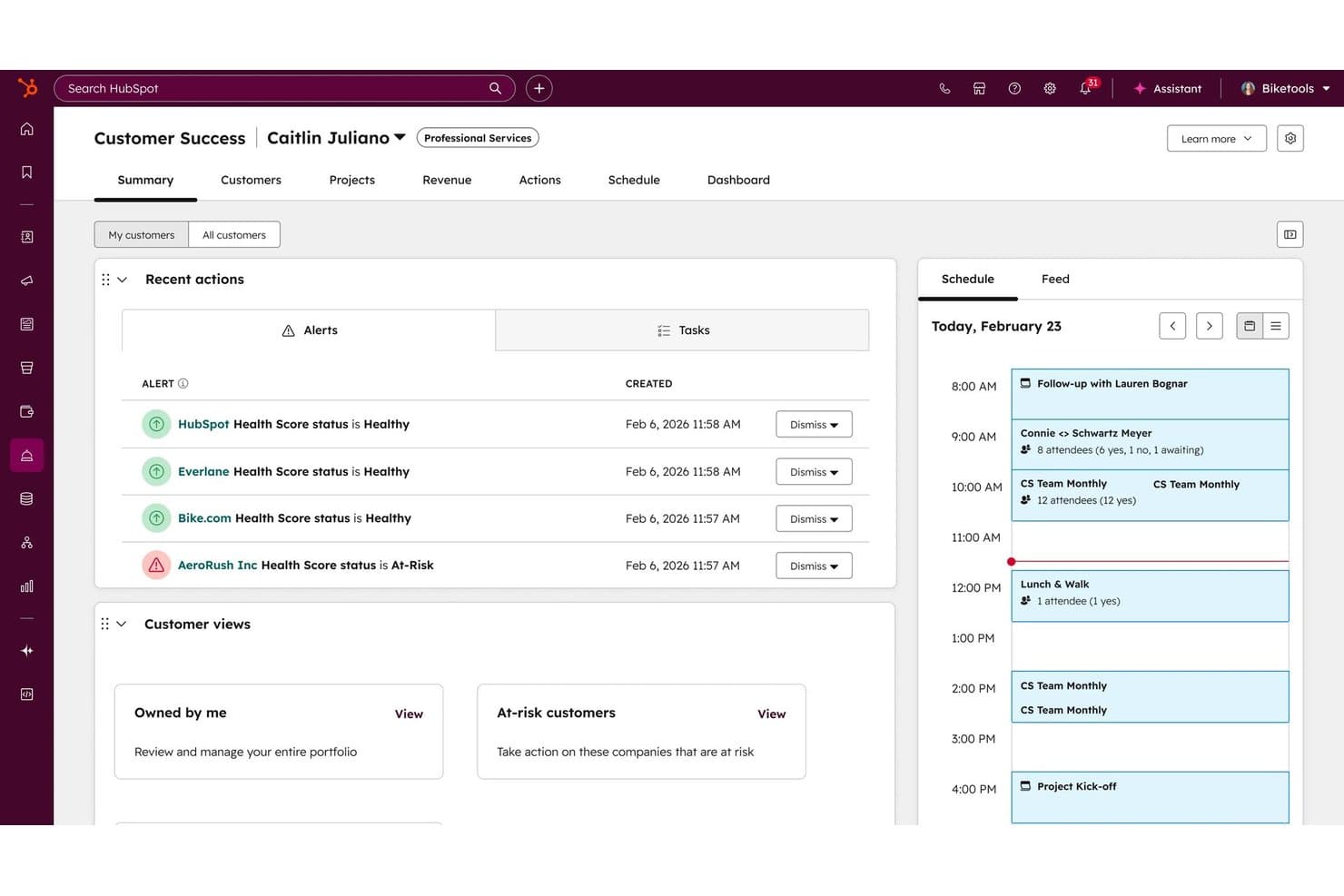
HubSpot Service Hub centralizes customer health alerts and daily schedules in one workspace. HubSpot Service Hub is an AI-powered help desk and ticketing platform that combines omni-channel support, SLA management, a knowledge base, and customer success tools within HubSpot's native CRM.
Who Is HubSpot Service Hub Best For?
It's a natural fit for mid-market teams already running sales and marketing on HubSpot who want support operations on the same platform.
Why I Picked HubSpot Service Hub
I've included HubSpot Service Hub in my top picks because the CRM integration isn't a bolt-on connector. Every ticket opens with the customer's full deal history, marketing touchpoints, and lifecycle stage already visible. I love how the Customer Success Workspace pulls health scoring and account data directly from the CRM, so my team can prioritize high-risk accounts without switching tools. The Customer Agent uses that same CRM context to personalize AI responses for email ticketing and live chat.
HubSpot Service Hub Key Features
- Omnichannel messaging: Manage customer inquiries from email, chat, social, phone, and SMS in a single agent workspace.
- Knowledge base management: Create, organize, and analyze a public-facing help center to deflect repetitive tickets.
- SLA management: Set custom SLA targets, automate escalation, and receive alerts if tickets approach breach.
- Service analytics dashboard: Track ticket volume, agent workload, and satisfaction metrics with prebuilt and customizable reports.
HubSpot Service Hub Integrations
HubSpot Service Hub offers native integrations with Salesforce, Slack, Jira, Zoom, Microsoft Teams, Shopify, Facebook Messenger, WhatsApp, and Mailchimp, plus Zapier and an API for custom integrations.
Pros and Cons
Pros:
- Customer health scores tied to open tickets
- AI agent handles chat and email replies
- Native CRM data visible on every ticket
Cons:
- Setup complexity grows with CRM data volume
- Advanced reporting locked behind higher tiers
Learn more about HubSpot Service Hub: Best for open source ticketing flexibility
- Free plan available
- From $12/user/month
Visit WebsiteCustomer Rating:4.3/5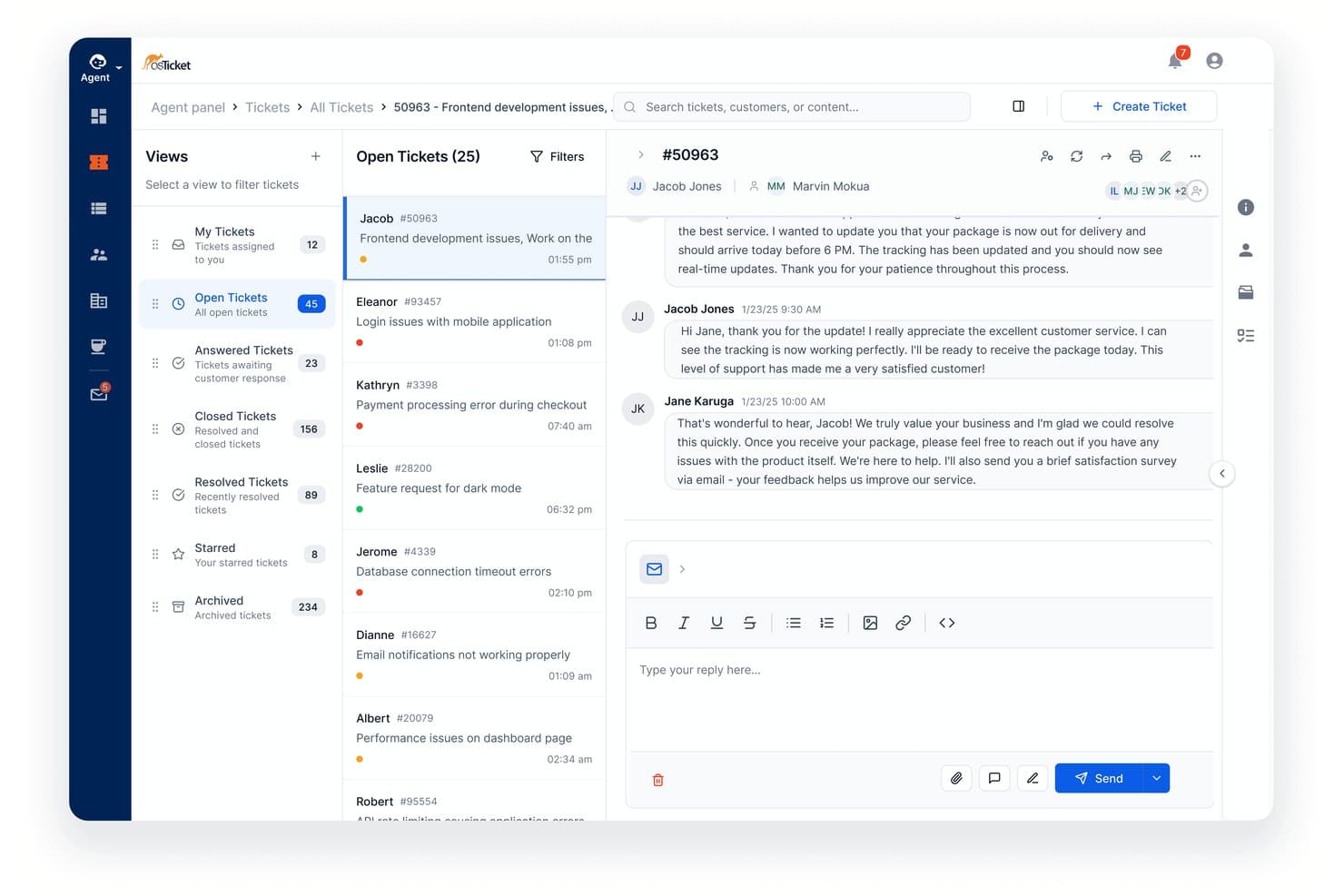
osTicket allows agents manage and reply to support tickets in one view. osTicket is an open-source ticketing system that consolidates email, web form, and API-based support requests into a unified queue with configurable routing, SLA tracking, and a customer-facing portal.
Who Is osTicket Best For?
It's a strong fit for small to mid-sized support teams with technical resources to self-host and a need for a fully customizable, zero-licensing-cost ticketing setup.
Why I Picked osTicket
I've included osTicket in my top picks because the level of structural customization it offers is rare in a free ticketing system. I like that you can build custom intake forms tied to specific help topics, so a billing ticket and a technical issue never share the same fields or queue. Ticket filters then let you define granular routing rules across multiple attributes, and since the source code is fully open, my team is able to modify behavior at the code level when built-in options fall short.
osTicket Key Features
- Agent collision avoidance: Locks tickets while an agent is replying to prevent simultaneous responses.
- Custom columns and queues: Lets you design views with fields and filters tailored to each team's process.
- Thread actions: Supports creating a new ticket or task directly from an entry within a ticket thread.
- Advanced search and export: Enables saving custom searches and exporting selected ticket data to CSV.
osTicket Integrations
Native integrations are not clearly documented. osTicket provides an API for custom integrations.
Pros and Cons
Pros:
- Ticket filters support granular multi-attribute routing
- Custom intake forms per help topic
- Self-hosted with full source code access
Cons:
- Reporting lacks customizable dashboards and CSAT tracking
- No native live chat channel support
 10Best for cross-team customer operations management
Front
- 14-day free trial
- From $25/user/month (billed annually)
Visit WebsiteCustomer Rating:4.6/5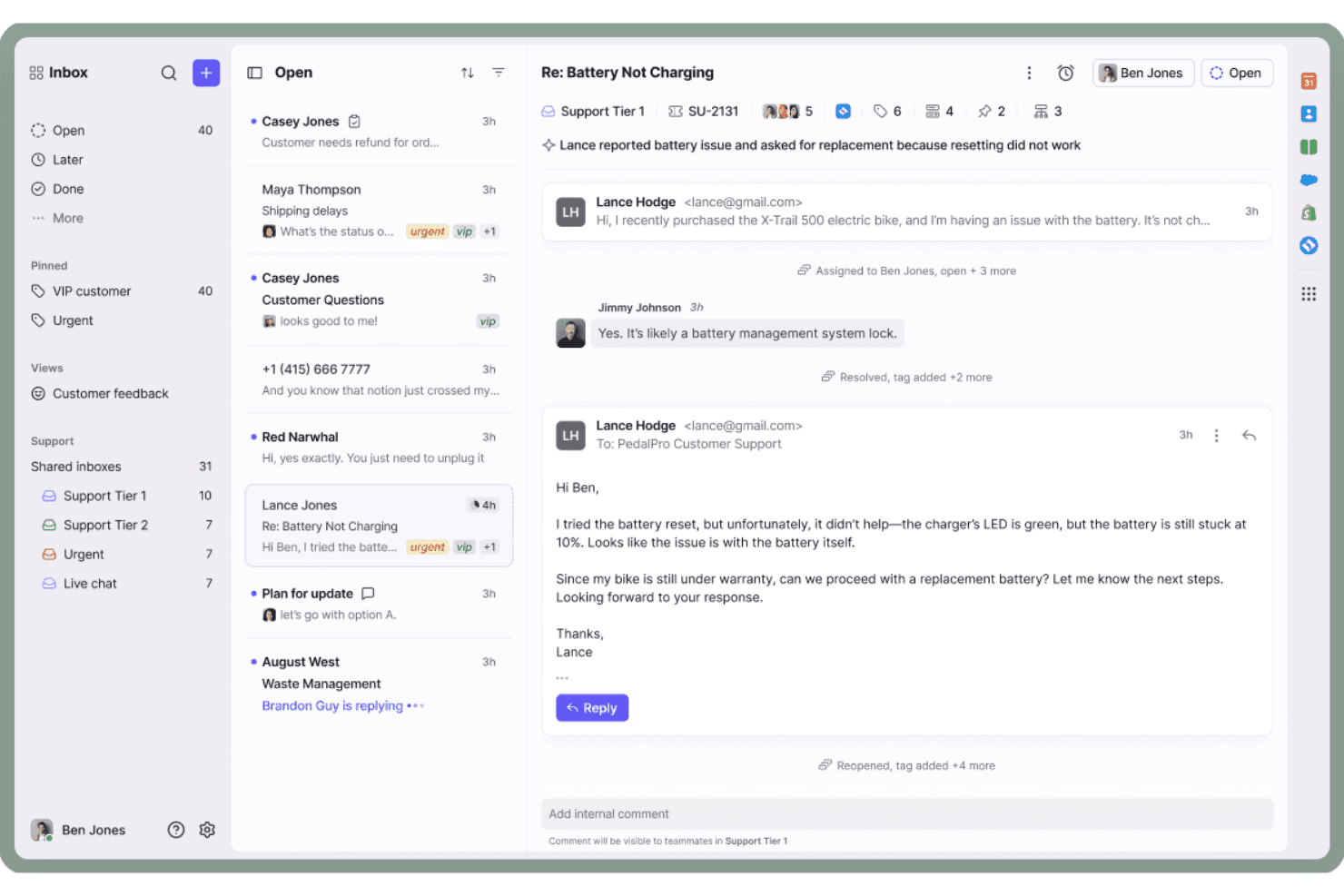
Front centralizes customer emails with threaded replies and team assignments. Front is a customer operations platform that combines shared inbox management, omnichannel ticketing, workflow automation, live chat, and a built-in knowledge base into a single collaborative workspace.
Who Is Front Best For?
Front is a strong fit for mid-sized teams where support, operations, and customer success work across the same conversations and need more than a traditional ticket queue.
Why I Picked Front
Front earns its spot as one of the best on my shortlist because of how it handles cross-team ticket ownership. I love that support, ops, and success agents can all work inside the same conversation thread using internal comments and assignments, without creating duplicate replies or losing context mid-resolution. Front's AI Topics automatically categorize incoming conversations, so my team can route and prioritize without relying on manual tagging across a high-volume shared inbox.
Front Key Features
- Omnichannel inbox: Consolidates email, chat, social, SMS, WhatsApp, and voice channels in one platform.
- Configurable SLAs: Lets you set, track, and escalate tickets against custom service level agreements.
- No-code knowledge base: Publishes public self-service help sites with article search and feedback collection.
- Real-time CX analytics: Provides dashboards for ticket volume, resolution times, CSAT, and team performance.
Front Integrations
Front offers 100+ native integrations, including Salesforce, HubSpot, Jira, Slack, Microsoft Teams, Aircall, Dialpad, WhatsApp, Shopify, and Asana. It connects with Zapier and provides an API for custom integrations.
Pros and Cons
Pros:
- Built-in CSAT tracking per conversation thread
- AI Topics auto-categorizes incoming conversations
- Shared inbox keeps all teams in sync
Cons:
- Not built for IT help desk workflows
- Search across archived conversations can be slow
Learn more about Front:
Outro software de gestão de tickets de help desk
Eis algumas opções adicionais de software de gestão de tickets de help desk que não entraram na minha seleção, mas que ainda vale a pena considerar:
- 11ZendeskBest for AI-powered omnichannel automation
- 12FreshdeskBest for guided AI onboarding support
- 13Zoho DeskBest for fast self-service help center setup
- 14Agentforce Service (formerly Service Cloud)Best for complex enterprise service needs
- 15KayakoBest for unified customer journey views
- 16Jitbit HelpdeskBest for quick on-premise deployment
- 17Re:amazeBest for integrated live chat and ticketing
- 18ProProfs Help DeskBest for simple ticketing with shared inboxes
- 19GorgiasBest for ecommerce platform integration
- 20TidioBest for chatbot-driven ticket automation
How I Evaluate Help Desk Ticketing Software
I evaluate help desk platforms on two layers: baseline capabilities like SLA management, multi-channel intake, and ticket workflows, plus differentiators like AI triage and automation depth.
Core Functionality (Table Stakes For This List)
When I'm selecting tools for my list, I rank each one on a scale from 0 (does not offer the functionality) to 5 (excels in this area) for each core functionality listed below. I then calculate the tool's total score into a percentage, using 75% as a benchmark to help assess its overall fit for the list.
- Ticket Management: I look for full lifecycle tracking with status workflows, conversation threading, and custom fields so agents can handle anything from a simple password reset to a multi-touch billing dispute without losing context.
- Multi-Channel Intake: Every tool should consolidate inquiries from email, chat, social media, phone, and web forms into a single queue rather than forcing agents to jump between disconnected dashboards.
- Automated Routing & Assignment: I evaluate how the platform assigns incoming tickets—whether it uses round-robin, skill-based matching, or AI-driven intent detection to get the right issue to the right agent fast.
- SLA Management: Configurable SLA policies with escalation rules and breach alerts matter here, especially for teams juggling different response targets across customer tiers or regions.
- Knowledge Base & Self-Service: I check whether the platform offers a public-facing help center with search, categorization, and ideally AI-suggested articles so customers can resolve common questions before ever creating a ticket.
- Reporting & CX Analytics: Dashboards covering ticket volume, resolution times, CSAT, and agent performance give support leaders the visibility they need to spot bottlenecks and justify staffing decisions.
Once I have a list of tools that meet the criteria, I consider what sets each platform apart.
Differentiating Factors (What Sets Vendors Apart)
Here's how I compare and contrast different vendors:
Standout Features
AI-powered ticket triage is a major differentiator. I look for platforms where machine learning auto-categorizes and prioritizes incoming tickets, so a billing complaint gets flagged as urgent and routed to a specialist without manual sorting. Custom workflow automation also separates strong tools from basic ones. No-code rule builders that handle tagging, status updates, and follow-up notifications save agents from repetitive clicks they'd otherwise repeat hundreds of times a day.
Beyond Features
Integrations carry a lot of weight in my evaluation. I check whether a platform connects natively to CRMs like Salesforce or HubSpot and collaboration tools like Slack, plus whether it offers open APIs for custom builds. Pricing structure matters too—per-agent models can get expensive as your team scales, so I look at whether tiered or volume-based plans are available. Implementation speed is the other factor I focus on, especially whether migration tools exist to move tickets from a legacy system without losing history.
Como escolher um software de gestão de tickets de help desk
Que software de gestão de tickets de help desk corresponde realmente às prioridades de apoio e às exigências do fluxo de trabalho da sua equipa? Utilize esta tabela para alinhar a sua escolha com os resultados mais importantes para a sua operação:
| Se a sua prioridade é… | Procure… |
|---|---|
| Se a sua prioridade é…Apoio omnicanal sem falhas entre canais | Procure…Uma caixa de entrada unificada para pedidos por e-mail, chat e redes sociais |
| Se a sua prioridade é…Manter os tempos de resposta/resolução dentro do objetivo | Procure…Alertas automatizados de SLA e fluxos de trabalho de escalamento |
| Se a sua prioridade é…Desviar consultas repetitivas | Procure…Uma base de conhecimento de autoatendimento e um centro de ajuda |
| Se a sua prioridade é…Automatização que poupa tempo | Procure…Criadores de fluxos de trabalho sem código e motores de regras |
| Se a sua prioridade é…Integrar com o seu CRM ou conjunto de ferramentas de colaboração | Procure…Conectores pré-configurados e suporte para API aberta |
Como avaliar a sua seleção
- Registe um ticket de teste multicanal: Envie pedidos através de, pelo menos, três canais e verifique se chegam à mesma fila, agrupados por contacto.
- Analise o acompanhamento de SLA e a configuração do escalamento: Peça à equipa de apoio que lhe mostre alertas reais de violação de SLA e ações de escalamento.
- Audite a facilidade de utilização da base de conhecimento: Crie e publique um artigo de ajuda e, em seguida, peça a um colega que o encontre através da pesquisa, tal como faria um utilizador final.
- Peça a documentação das integrações: Solicite documentação atualizada da API ou uma lista de conectores nativos de terceiros — analise o nível de detalhe e a clareza.
- Compromisso — Simplicidade vs. Personalização: Decida se valoriza mais uma configuração pronta a utilizar do que uma personalização profunda, uma vez que raramente as plataformas oferecem ambas em igual medida.
O que é um software de gestão de tickets de help desk?
O software de gestão de pedidos de suporte técnico é uma plataforma que a sua equipa utiliza para registar, organizar e resolver questões dos clientes provenientes de todos os canais de suporte, num espaço de trabalho centralizado. Mantém o controlo do estado de cada pedido, automatiza a atribuição e o escalonamento e conserva um registo completo das interações relativas a cada questão. Isto ajuda as equipas de suporte a responder mais rapidamente, a cumprir consistentemente os SLA e a criar um arquivo pesquisável das conversas anteriores.
Funcionalidades
Ao selecionar um software de gestão de pedidos de suporte técnico, procure as seguintes funcionalidades essenciais:
- Gestão de pedidos: Regista cada incidente, pergunta ou pedido como um pedido de suporte, regista atualizações, atribui estados e cria um histórico de todas as interações com o cliente, desde a receção até à resolução.
- Suporte multicanal: Consolida mensagens de e-mail, chat, formulários da Web, telefone e redes sociais, para que os agentes possam trabalhar a partir de uma caixa de entrada única e unificada.
- Encaminhamento automatizado: Utiliza regras ou IA para atribuir e dar prioridade aos pedidos com base nas competências dos agentes, na carga de trabalho ou na urgência do pedido, garantindo que os clientes chegam rapidamente à pessoa certa.
- Monitorização de SLA: Monitoriza os prazos de resposta e resolução, acionando alertas e escalonamentos quando os acordos de nível de serviço estão em risco ou são violados.
- Portal de autosserviço: Dá aos clientes acesso a perguntas frequentes, artigos de ajuda e uma base de conhecimento pesquisável, ajudando-os a resolver problemas comuns sem o apoio de um agente.
- Relatórios e análise: Apresenta visualmente métricas da equipa, como o volume de pedidos, o tempo de resolução, o CSAT e as tendências dos problemas dos clientes, para ajudar os responsáveis a tomar decisões baseadas em dados.
- Ferramentas de colaboração interna: Permite aos agentes adicionar notas privadas, mencionar colegas ou iniciar conversas paralelas dentro dos pedidos para partilhar contexto e resolver problemas em equipa.
- Automatização personalizada de fluxos de trabalho: Permite aos administradores configurar regras para automatizar processos repetitivos, como a aplicação de etiquetas, as notificações ou o escalonamento de pedidos, melhorando a consistência e a rapidez.
- Capacidades de integração: Liga-se a ferramentas de CRM, colaboração e negócio, para que os agentes possam aceder ao contexto do cliente, desencadear ações entre plataformas ou elaborar relatórios sobre os dados do serviço.
- Campos e formulários personalizáveis: Permite às equipas criar campos de dados, tipos de pedidos e formulários de receção personalizados para recolher informações específicas das suas necessidades empresariais.
Benefícios
A implementação de um software de gestão de pedidos de suporte técnico proporciona vários benefícios à sua equipa e à sua empresa. Eis alguns dos que pode esperar:
- Tempos de resposta mais rápidos: O encaminhamento automatizado e uma fila de pedidos unificada ajudam os agentes a responder aos pedidos recebidos de qualquer canal sem deixar passar questões urgentes.
- Experiências consistentes para os clientes: A automatização dos fluxos de trabalho, a monitorização de SLA e o histórico de conversas garantem o cumprimento dos processos de suporte e um serviço fiável para todos os clientes.
- Maior eficiência da equipa: As opções de autosserviço, as funcionalidades de colaboração interna e os fluxos de trabalho personalizados libertam tempo dos agentes e reduzem o trabalho manual repetitivo.
- Melhorias baseadas em dados: Os relatórios e a análise dão aos gestores visibilidade sobre as tendências de desempenho, o volume de pedidos e a satisfação dos clientes, permitindo-lhes otimizar as operações.
- Maior facilidade de expansão: A receção multicanal, as capacidades de integração e a gestão flexível de utilizadores simplificam a expansão ou adaptação da operação de suporte à medida que a empresa cresce.
- Maior satisfação dos clientes: As resoluções rápidas, as opções de autoajuda e o suporte personalizado resultam em clientes mais satisfeitos e com maior probabilidade de voltar.
- Gestão centralizada do conhecimento: As bases de conhecimento e os arquivos de pedidos pesquisáveis registam a experiência dos agentes e facilitam a integração de novos membros da equipa.
Custos e preços
A seleção de um software de gestão de pedidos de suporte técnico exige compreender os vários modelos de preços e planos disponíveis. Os custos variam consoante as funcionalidades, o tamanho da equipa, os complementos, entre outros fatores. A tabela abaixo resume os planos comuns, os respetivos preços médios e as funcionalidades normalmente incluídas nas soluções de software de gestão de pedidos de suporte técnico:
Tabela de comparação de planos
| Tipo de plano | Preço médio | Funcionalidades comuns |
|---|---|---|
| Tipo de planoPlano gratuito | Preço médio$0 | Funcionalidades comunsGestão básica de pedidos, canais limitados, suporte por e-mail e uma base de conhecimento simples. |
| Tipo de planoPlano pessoal | Preço médio$5-$25/utilizador/mês | Funcionalidades comunsReceção multicanal, funcionalidades básicas de automatização, monitorização de SLA, relatórios e integrações com outro software. |
| Tipo de planoPlano empresarial | Preço médio$25-$60/utilizador/mês | Funcionalidades comunsAutomatização avançada de fluxos de trabalho, campos personalizados, painéis de desempenho, colaboração interna e acesso à API. |
| Tipo de planoPlano empresarial avançado | Preço médio$60-$150/utilizador/mês | Funcionalidades comunsSLA personalizados, opções de segurança, registos de auditoria, suporte prioritário, integração dedicada e integrações avançadas. |
Perguntas frequentes sobre software de gestão de tickets de suporte
Eis algumas respostas a perguntas comuns sobre software de gestão de tickets de suporte:
Que canais posso gerir com software de suporte?
Pode gerir pedidos de clientes provenientes de e-mail, chat em direto, formulários web, redes sociais e, por vezes, telefone ou aplicações de mensagens, tudo numa caixa de entrada unificada.
O software de gestão de tickets de suporte pode automatizar a atribuição de tickets?
Sim, a maioria dos sistemas disponibiliza encaminhamento baseado em regras ou orientado por IA, que atribui automaticamente os tickets ao agente ou à equipa certa com base na prioridade, nas competências ou na carga de trabalho.
Como funciona o acompanhamento de SLA no software de gestão de tickets de suporte?
O acompanhamento de SLA permite definir prazos de resposta e resolução e, em seguida, monitoriza os tickets para verificar o cumprimento, enviando alertas ou escalamentos caso exista o risco de os objetivos não serem cumpridos.
Existe alguma forma de os clientes resolverem os seus próprios problemas?
Sim, muitas plataformas incluem um portal de autosserviço ou uma base de conhecimento onde os clientes podem encontrar respostas, enviar pedidos e consultar o estado dos tickets a qualquer momento.
Que integrações devo esperar do software de gestão de tickets de suporte?
Deve esperar integrações com plataformas de CRM populares, ferramentas de conversação para equipas e aplicações de produtividade, bem como acesso à API para ligações personalizadas.