

Why Trust Our Software Recommendations
6,700+
Reviews
20
Industry experts
16+
Evaluation factors
14
Years
Our team has been testing and reviewing software since 2012. As CX leaders ourselves, we know how difficult—and important—it is to choose the right software.
For this guide, we evaluated tools using hands-on testing and independent research, scoring tools using our selection criteria.
Our reviews reflect our human editorial judgment, not a sales pitch.
 Gui DrusinaCreative Director
 Tim FisherVP of AI
Call Center Speech Analytics Software Comparison Table
This comparison table summarizes pricing details for my top call center speech analytics software selections:
| Tool | Best For | Trial Info | Price | ||
|---|---|---|---|---|---|
| 1 | Best for analytics built into your phone system | Free plan + 14-day trial + free demo available | From $25/user/month (billed annually) | Website | |
| 2 | Best for real-time conversation compliance | Free demo available | Pricing upon request | Website | |
| 3 | Best for omnichannel customer sentiment analysis | Free demo available | Pricing upon request | Website | |
| 4 | Best for multichannel AI-based transcript analysis | Free demo available | Pricing upon request | Website | |
| 5 | Best for proactive topic and trend discovery | Free plan available | From $85/user/month | Website | |
| 6 | Best for AI-driven agent coaching insights | Free demo available | Pricing upon request | Website | |
| 7 | Best for native omnichannel analytics integration | Free trial available | From $75/user/month (billed annually) | Website | |
| 8 | Best for cloud-native real-time analytics at scale | Free demo available | From $110/agent/month (proactive AI extra) | Website | |
| 9 | Best for customizable QA scorecards and dashboards | Free demo available | Pricing upon request | Website | |
| 10 | Best for advanced emotion and sentiment detection | Free demo available | Pricing upon request | Website |


Call Center Speech Analytics Software Reviews
Below are my detailed summaries of the best call center speech analytics software that made it onto my shortlist. My reviews offer a detailed look at the capabilities, features, and best use cases of each platform to help you find the best one for you.
 Best for analytics built into your phone system
- Free plan + 14-day trial + free demo available
- From $25/user/month (billed annually)
Visit WebsiteCustomer Rating:4.2/5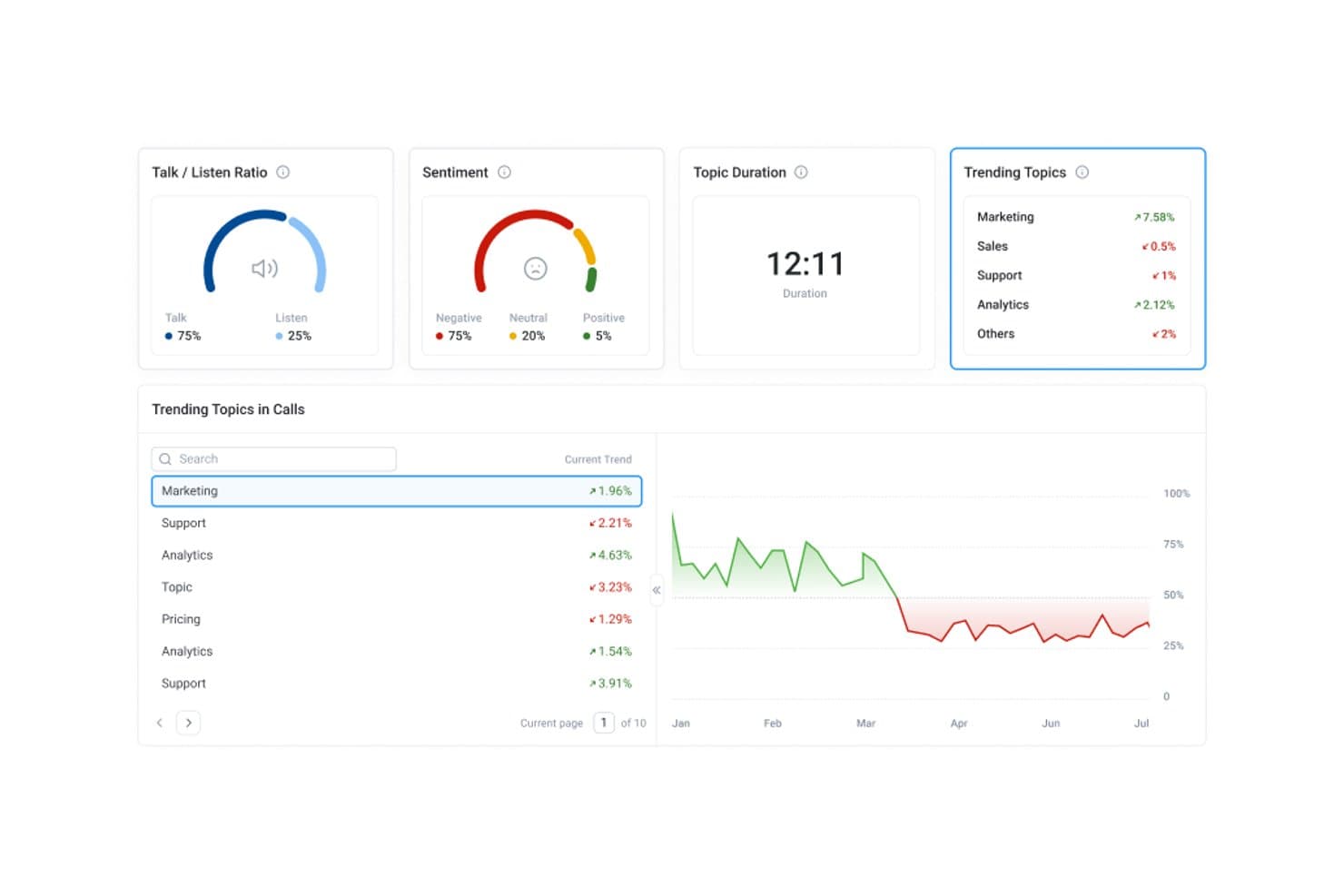
CloudTalk's conversation intelligence shows trending topics, sentiment, and talk ratios for each call. CloudTalk is a cloud-based call center phone system that includes speech analytics, like call transcription, sentiment analysis, topic extraction, and AI call scoring, as part of its telephony platform.
Who Is CloudTalk Best For?
CloudTalk suits SMB and mid-market sales and support teams that want a cloud phone system and don't want to manage a separate speech analytics tool on top of it.
Why I Picked CloudTalk
I picked CloudTalk because it builds speech analytics directly into the phone system your team already uses to make and take calls. Call transcription, sentiment analysis, and topic extraction run on your calls without a separate data pipeline, and AI insights write back to your CRM after every call. I especially like AI Call Scoring, which lets you build custom QA scorecards and automatically score your full call volume instead of reviewing a small sample by hand.
CloudTalk Key Features
CloudTalk also offers tools that help supervisors turn call insights into coaching.
- Live call monitoring and whisper coaching: Supervisors can listen in on active calls and coach agents in real time without the customer hearing.
- AI Trending Topics: Surfaces and tracks recurring themes across your call volume over time.
- Multilingual call analysis: Supports transcription and analysis in 50+ languages for distributed or international teams.
- Call summaries and notes: Generates AI summaries, notes, and tags for each call so agents spend less time on after-call work.
CloudTalk Integrations
Integrations include HubSpot, Salesforce, Zendesk, Freshdesk, Intercom, Microsoft Dynamics 365, Gong, Playvox, Nicereply, and Zapier.
Pros and Cons
Pros:
- AI call scoring for every conversation
- Real-time coaching with live listen and whisper
- Speech analytics built into phone platform
Cons:
- Cannot analyze third-party platform audio
- No real-time agent assist features
 Best for real-time conversation compliance
- Free demo available
- Pricing upon request
Visit WebsiteCustomer Rating:4.7/5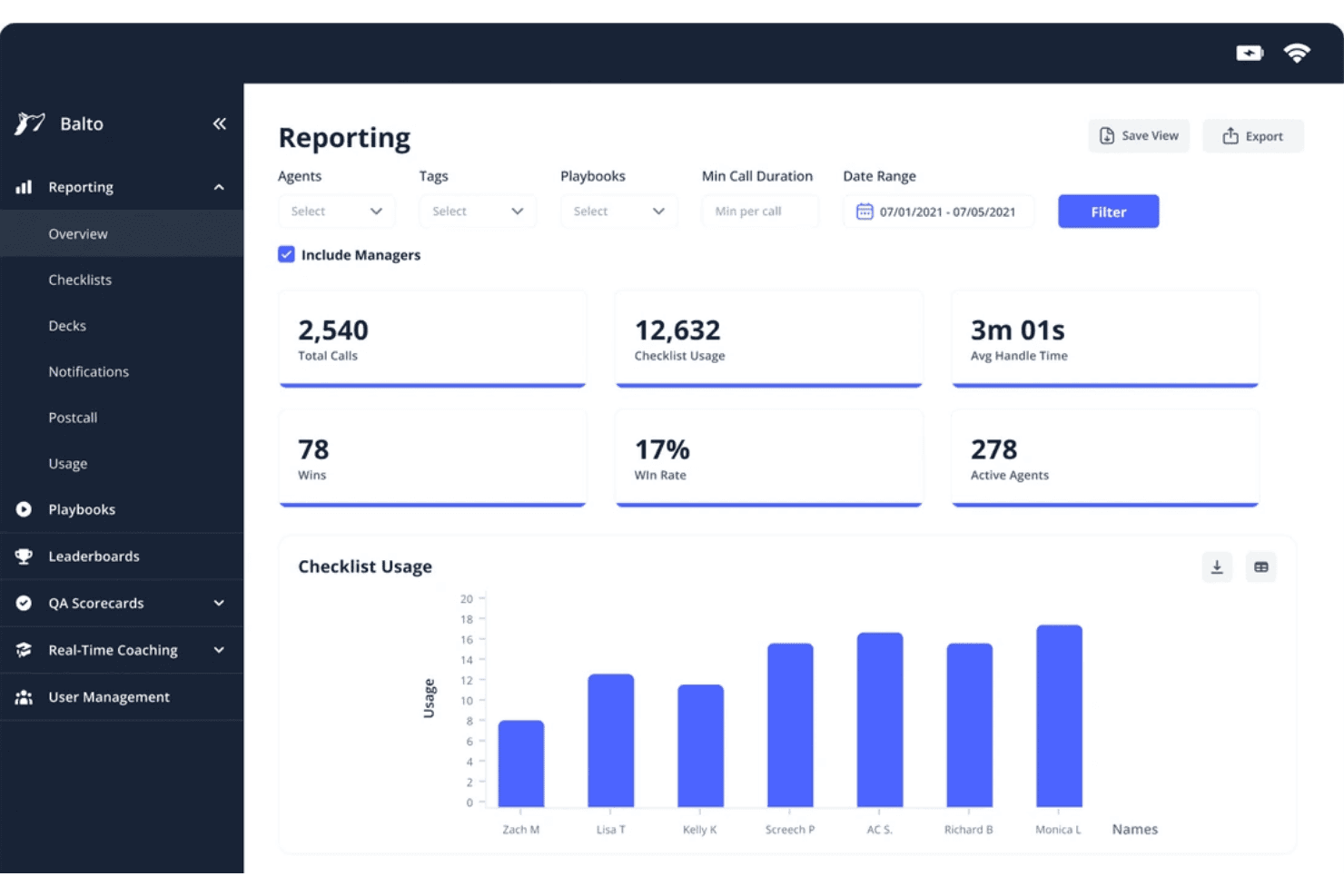
Balto's reporting dashboard tracks call metrics and agent checklist usage. Balto is a real-time contact center AI platform that combines live agent guidance, automated QA, compliance monitoring, and conversation analytics across 100% of voice interactions.
Who Is Balto Best For?
Balto is a strong fit for contact centers in regulated industries like insurance, financial services, and healthcare, where in-call compliance and real-time oversight are non-negotiable.
Why I Picked Balto
Balto earns its spot as one of the best on my shortlist because it's the only platform I've worked with that intercepts compliance risk while a call is still live. I like how the compliance module triggers on-screen agent guidance and supervisor alerts the moment a required disclosure is missed or a risky phrase is detected. I also rely on the Auto-QA module, which scores 100% of calls against configurable scorecards, so my team isn't dependent on random sampling to catch violations.
Balto Key Features
- Multilingual transcription: Transcribes calls in 20+ languages and captures searchable transcripts across diverse accents.
- AI-driven topic discovery: Uses machine learning to categorize and trend call topics and emerging drivers.
- Real-time agent guidance: Delivers contextual prompts, escalation cues, and knowledge base answers as conversations unfold.
- Automated call notes: Generates accurate, configurable summaries and action items for each call without manual input.
Balto Integrations
Balto offers native integrations with Genesys, Five9, NICE CXone, Amazon Connect, Talkdesk, Zoom Contact Center, Salesforce, HubSpot, and more. An API is available for custom integrations.
Pros and Cons
Pros:
- Generates automated call summaries directly into connected CRMs
- Triggers live supervisor alerts during critical conversation moments
- Delivers in-call agent prompts within sub-200ms latency
Cons:
- Requires pre-uploaded custom playbooks for dynamic prompt triggers
- Lacks deep native capabilities for non-voice channels
Learn more about Balto: Best for omnichannel customer sentiment analysis
- Free demo available
- Pricing upon request
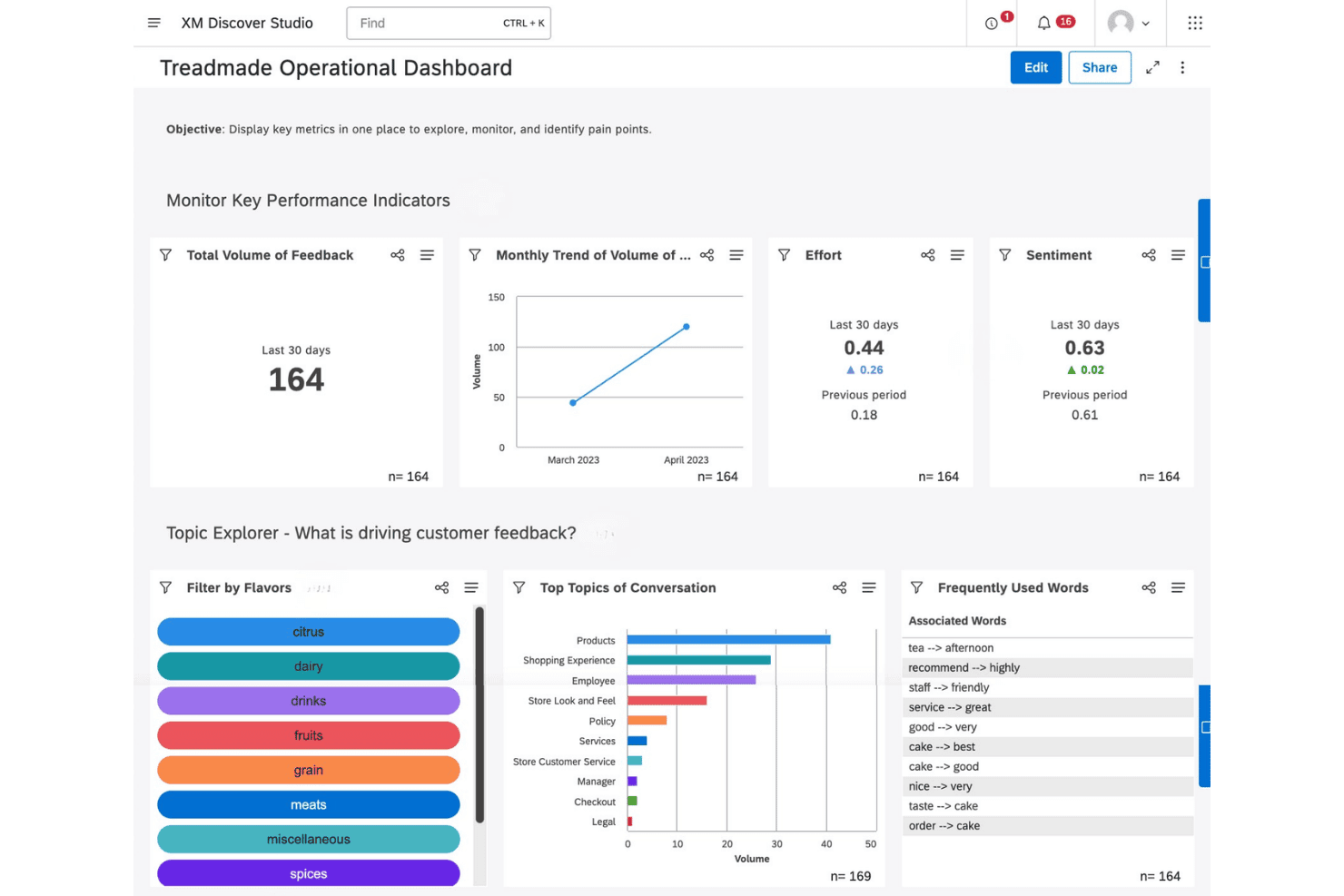
Qualtrics XM Discover offers an operational dashboard with KPIs, topic exploration, and customer feedback analysis tools. Qualtrics XM Discover is a conversational analytics platform that applies NLU-based sentiment, emotion, intent, and effort scoring across call transcripts, chat, email, and other customer interaction channels at enterprise scale.
Who Is Qualtrics XM Discover Best For?
It's a strong fit for enterprise contact center and VoC teams that need to analyze interactions across multiple channels from a single platform.
Why I Picked Qualtrics XM Discover
Qualtrics XM Discover earns its spot on my shortlist because of the depth of its sentiment engine. The platform scores emotion, effort, and intent at the sentence level, not just the call level, which means I can pinpoint exactly where a conversation turned negative. Pair that with Emerging Themes Detection across calls, chat, email, and reviews simultaneously, and I get a genuinely omnichannel view of what's driving customer dissatisfaction.
Qualtrics XM Discover Key Features
- Multichannel connectors: Import and analyze data from calls, chat, email, social media, and review sites in one platform.
- Custom attribute mapping: Map conversation data fields to custom attributes for deeper segmentation and reporting.
- Configurable metric and verbatim alerts: Set up rule-based triggers to notify teams about key events or issues in real time.
- Role-specific dashboards: Create and share dashboards tailored for agents, supervisors, or QA analysts, highlighting the metrics most relevant to each role.
Qualtrics XM Discover Integrations
Qualtrics XM Discover offers native integrations with Genesys Cloud, NICE CXone, Salesforce, Amazon Connect, and Zendesk. An API is available for custom integrations.
Pros and Cons
Pros:
- Strong emotion and acoustic analysis capabilities
- Unsupervised topic discovery without pre-built queries
- Sentence-level sentiment scoring across all channels
Cons:
- Limits dataset interaction uploads to strict monthly quotas
- Consumes annual interaction caps with automatic data purge
Learn more about Qualtrics XM Discover: Best for multichannel AI-based transcript analysis
- Free demo available
- Pricing upon request
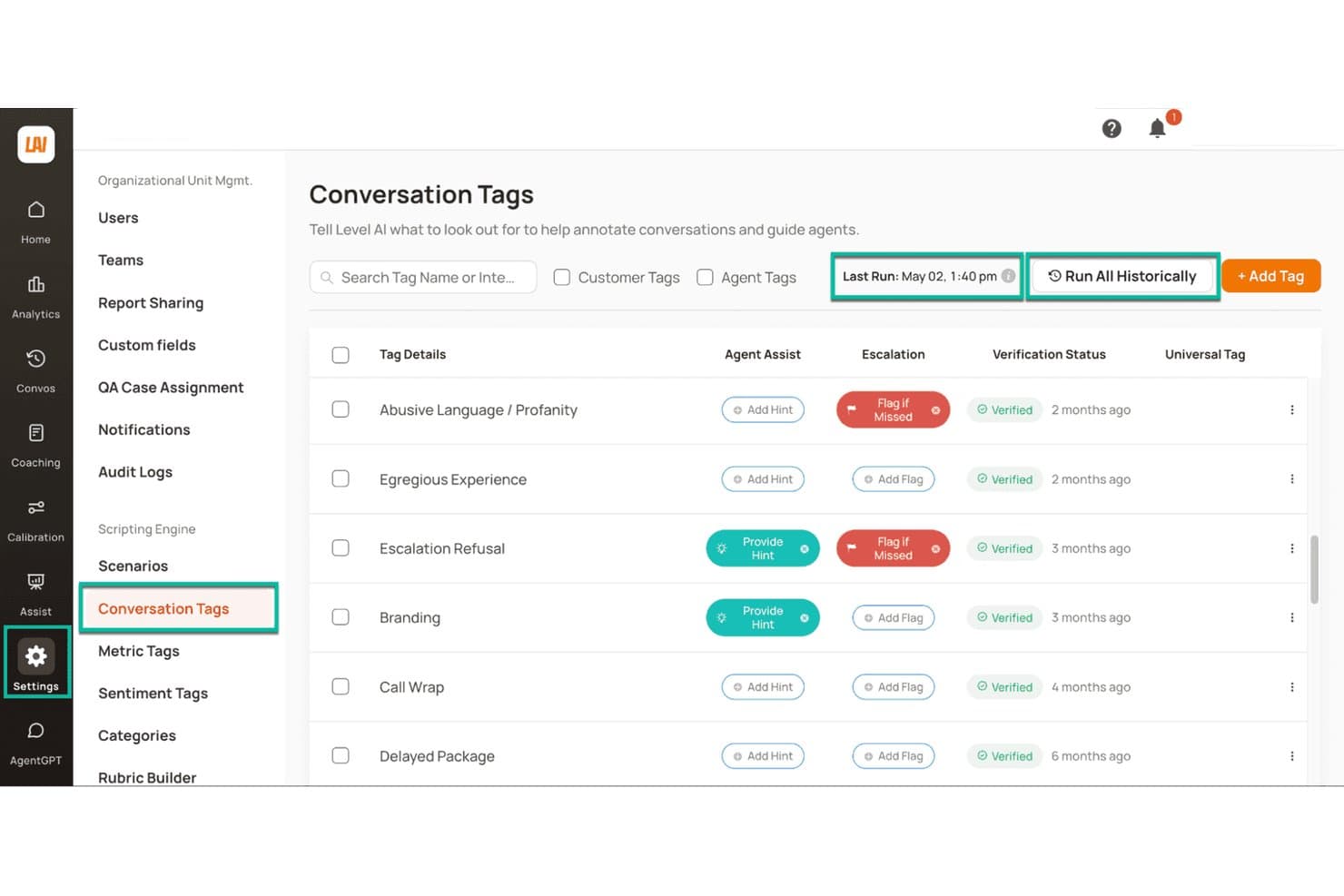
Level AI offers customizable conversation tags for call annotation. Level AI is a contact center conversation intelligence platform that analyzes voice, chat, and email interactions through AI-based transcription, 8-emotion detection, automated QA scoring across 100% of calls, and real-time agent guidance.
Who Is Level AI Best For?
Level AI is a strong fit for mid-market and enterprise contact centers running high volumes of voice, chat, and email interactions across QA, VoC, and operations teams.
Why I Picked Level AI
I picked Level AI as one of the best because it runs the same AI analysis pipeline across voice, chat, and email transcripts. Where most speech analytics tools focus on calls alone, Level AI's 8-emotion detection and iCSAT scoring (which blends sentiment, customer effort, and resolution into a single score) work consistently across every channel. That means I can compare interaction quality across call and chat without switching tools or reconciling separate scoring methodologies.
Level AI Key Features
- Blended QA scoring: Combine automated InstaScore with manual QA audits and calibration tools on the same conversation set.
- Persona-based dashboards: Pre-built reports for roles like QA, coaching, and voice of the customer with drill-down views.
- AI workers for analytics: Purpose-built natural language analyst bots surface custom insights from any conversation dataset.
- PCI and HIPAA redaction: Real-time sensitive data masking for transcripts and screen recordings to support compliance needs.
Level AI Integrations
Level AI offers native integrations with Salesforce, Zendesk, Five9, Genesys, NICE CXone, Amazon Connect, and Slack. An API is available for custom integrations.
Pros and Cons
Pros:
- AI surfaces emerging call drivers without manual queries
- iCSAT scoring without requiring post-call surveys
- Emotion detection spans voice, chat, and email
Cons:
- Semantic AI depth restricted to select primary languages
- Initial QA scorecard configuration requires significant setup time
Learn more about Level AI: Best for proactive topic and trend discovery
- Free plan available
- From $85/user/month
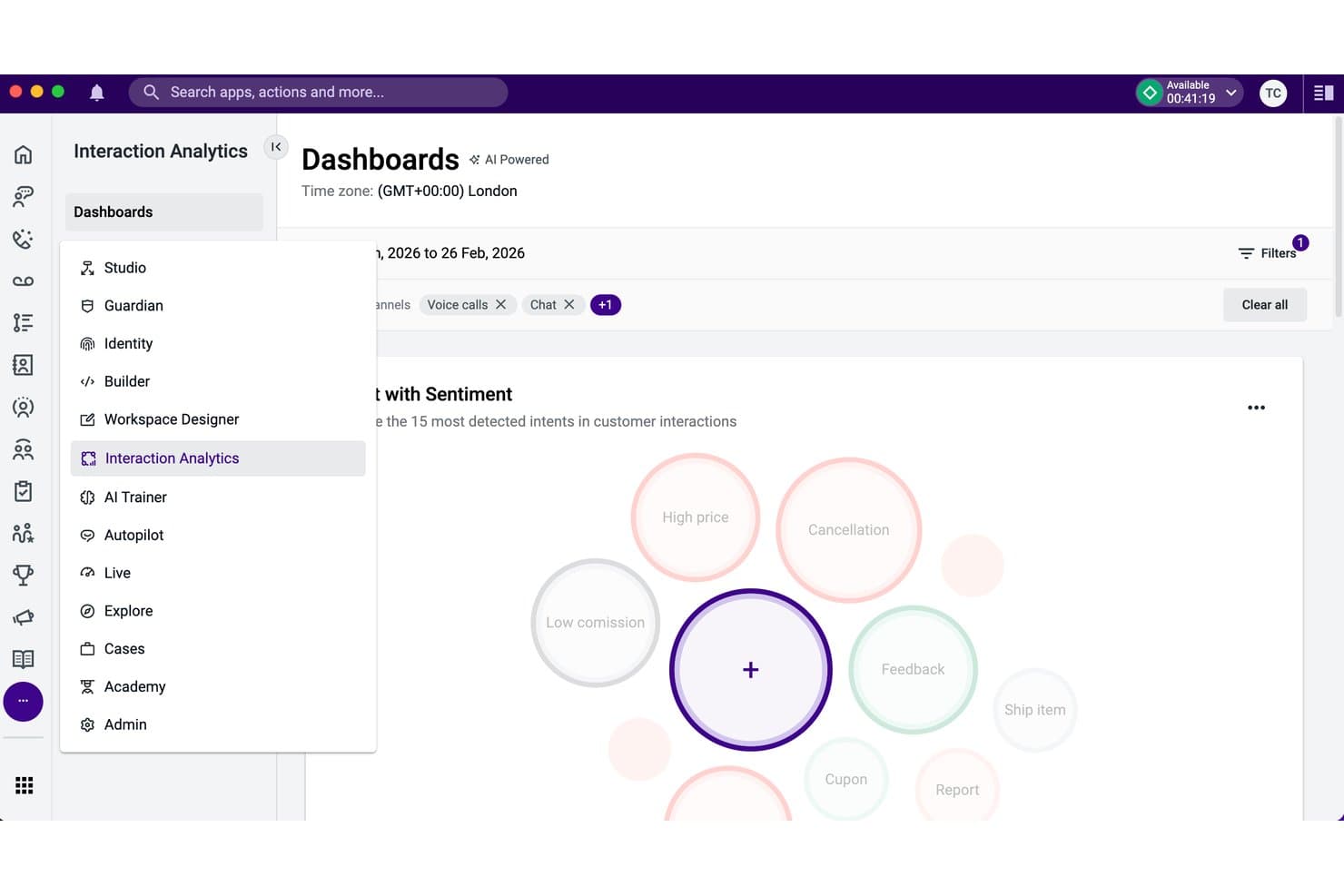
Talkdesk Interaction Analytics offers an AI-powered intent bubble dashboard. Talkdesk Interaction Analytics is an AI-powered speech analytics tool that transcribes 100% of contact center calls and automatically identifies topics, sentiment, and emerging customer trends without manual configuration.
Who Is Talkdesk Interaction Analytics Best For?
It's a strong fit for mid-to-large contact centers where CX and VoC teams need to analyze high call volumes without relying on manual sampling or pre-configured topic lists.
Why I Picked Talkdesk Interaction Analytics
I've included Talkdesk Interaction Analytics in my top picks because it finds topics you didn't know to look for. Most speech analytics tools require you to define keyword lists upfront, but Interaction Analytics uses unsupervised AI to surface emerging patterns across 100% of calls automatically. I also like Automation Mining, which reconstructs agent workflows from conversation and screen recording data to flag automation opportunities before you commit to deploying anything.
Talkdesk Interaction Analytics Key Features
- Transcription cards: Automatically create searchable text records and conversation insights for every customer call.
- Mood insights: Detect and track shifts in customer and agent sentiment throughout each interaction.
- Ring group analysis: Display ring group assignments for every call, including multiple group participation.
- Configurable data retention: Set custom retention periods for call transcripts and analytic data according to compliance needs.
Talkdesk Interaction Analytics Integrations
Talkdesk Interaction Analytics offers native integrations with Salesforce, Microsoft Teams, Slack, Zendesk, and ServiceNow. An API is available for custom integrations.
Pros and Cons
Pros:
- Automates PII redaction on voice transcripts
- Transcribes interactions in over 30 languages
- Uncovers emerging call topics automatically without setup
Cons:
- PII redaction capabilities restricted to English text
- Bundled only in top tier pricing plans
Learn more about Talkdesk Interaction Analytics: Best for AI-driven agent coaching insights
- Free demo available
- Pricing upon request
Visit WebsiteCustomer Rating:4.6/5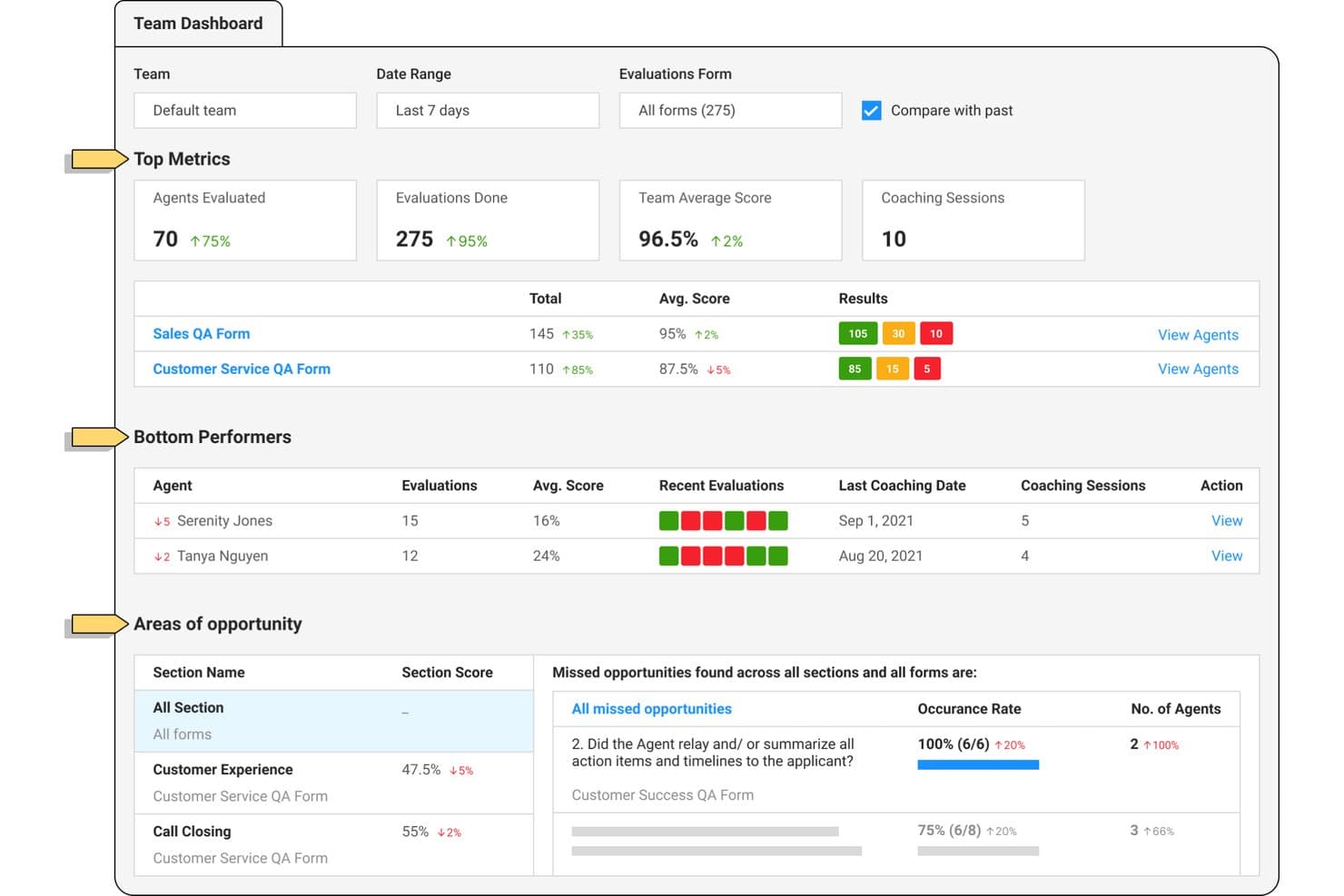
Observe.AI offers a team dashboard for agent performance and coaching. Observe.AI is a contact center AI platform that transcribes and analyzes 100% of voice and digital interactions using automated QA scoring, sentiment analysis, topic detection, and agent coaching workflows.
Who Is Observe.AI Best For?
It's a strong fit for mid-market and enterprise contact centers with dedicated QA teams that need to score and coach agents at scale.
Why I Picked Observe.AI
I picked Observe.AI as one of the best because its Auto QA engine scores 100% of interactions, not just a sample, with evidence-linked transcript moments behind every score. What I find most valuable is how those QA signals feed directly into structured coaching workflows, so agents receive targeted feedback tied to specific conversation moments. The calibration tools between AI and human evaluators also keep scoring consistent across the entire QA team.
Observe.AI Key Features
- Transcription and redaction: Transcribes voice and digital interactions with automatic masking of PII and sensitive data.
- Custom keyword and topic detection: Identifies and trends emerging themes across every call using flexible category creation.
- Omnichannel case stitching: Combines customer conversations from voice, chat, and email into unified case records.
- Audit trails and bias controls: Maintains detailed logs of QA scoring decisions and provides tools to manage evaluator and AI bias.
Observe.AI Integrations
Observe.AI provides native integrations with ActiveCampaign, Adobe Commerce, ADP Workforce Now, Epic, Five9, GitHub, Paylocity, and more. An API is available for custom integrations.
Pros and Cons
Pros:
- Real-time agent assist during live calls
- Coaching workflows tied to specific call moments
- Auto QA scores 100% of call volume
Cons:
- Sentiment signals may misread conversational context
- Transcript accuracy can drop on unclear calls
Learn more about Observe.AI: Best for native omnichannel analytics integration
- Free trial available
- From $75/user/month (billed annually)
Visit WebsiteCustomer Rating:4.4/5
Genesys Cloud CX offers a multi-panel agent UI with simultaneous email interaction, customer journey timeline, canned responses, and AI-powered wrap-up codes in a single workspace. Genesys Cloud CX is an AI-powered contact center platform that unifies voice transcription, sentiment analysis, topic detection, automated QA scoring, and real-time agent guidance across voice and digital channels in a single native environment.
Who Is Genesys Cloud CX Best For?
Genesys Cloud CX is a strong fit for enterprise contact centers that need speech analytics, QA, and omnichannel routing managed within a single platform.
Why I Picked Genesys Cloud CX
Genesys Cloud CX earns its spot as one of the best on my shortlist because speech and text analytics live natively inside the same platform that handles routing, WEM, and digital messaging. When I run Topic Miner across voice calls, the sentiment and topic trends connect directly to interaction data from chat, email, and social. I also like that customer sentiment and acoustic analysis are both native, so there's no stitching together a third-party speech tool with a separate QA layer.
Genesys Cloud CX Key Features
- Agent empathy analysis: Detects and classifies agent behaviors that impact customer experience during calls.
- Customizable QA scorecards: Lets you design and manage call evaluation forms to fit your contact center's specific needs.
- Content search with topic and sentiment filters: Enables quick location of calls with specific phrases, topics, or sentiment trends for targeted reviews.
- Low-latency real-time transcription: Provides near-instant voice-to-text conversion for live monitoring or post-call analysis.
Genesys Cloud CX Integrations
Genesys Cloud CX offers native integrations with Salesforce, Zendesk, Microsoft Teams, Zoom, Oracle, ServiceNow, SAP, HubSpot, and has native integrations across the Microsoft ecosystem, including Microsoft 365 and Azure. An API is available for custom integrations.
Pros and Cons
Pros:
- AI-driven topic discovery without pre-built queries
- Real-time agent guidance during live calls
- Speech analytics and QA are fully native
Cons:
- Full analytics feature access consumes AI tokens
- Core speech analytics limited to higher tiers
Learn more about Genesys Cloud CX: Best for cloud-native real-time analytics at scale
- Free demo available
- From $110/agent/month (proactive AI extra)
Visit WebsiteCustomer Rating:4.3/5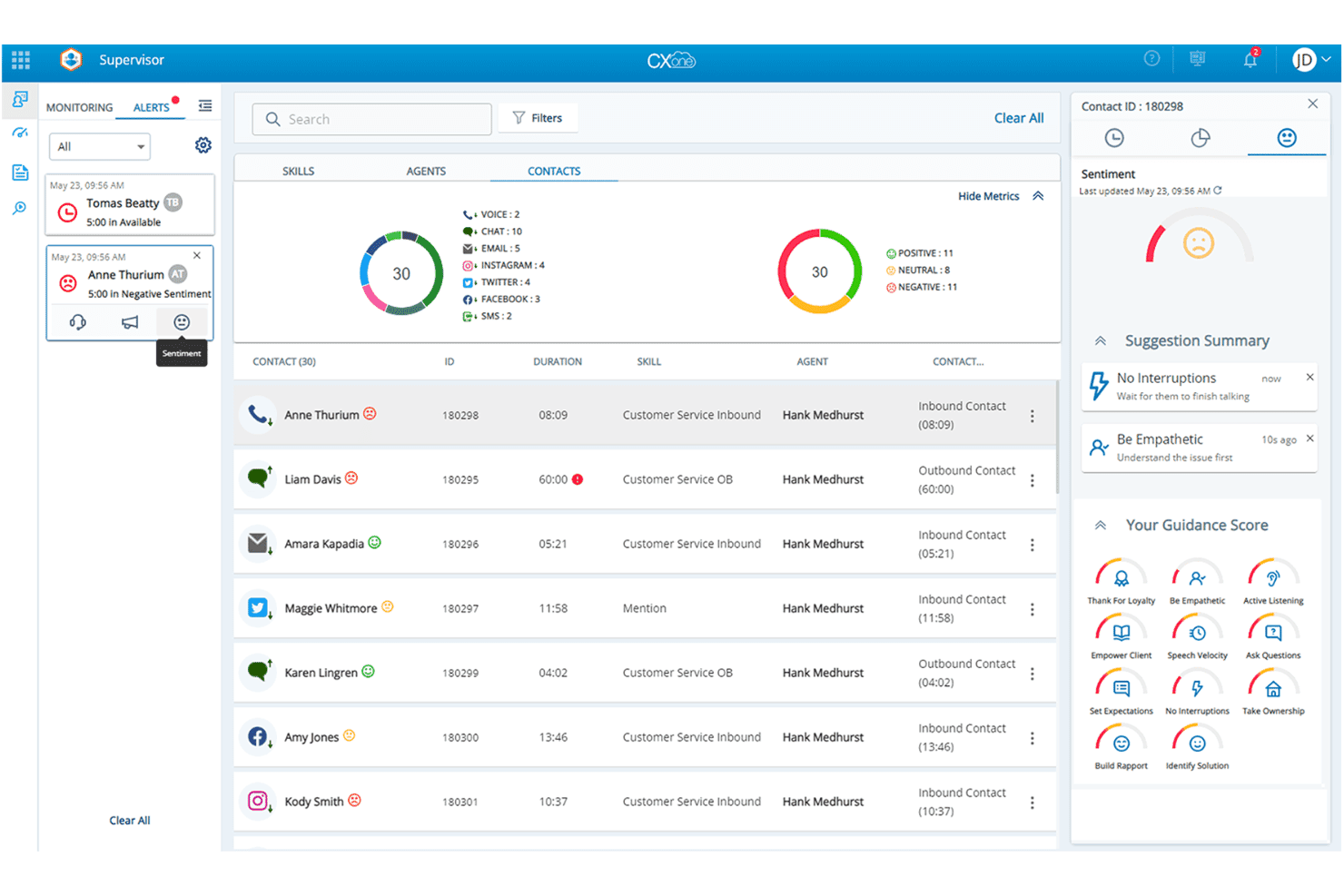
NICE CXone offers a supervisor dashboard with real-time contact monitoring, sentiment analysis, and AI-powered agent guidance scores. NiCE CXone is an AI-first contact center platform with built-in speech analytics, automated call scoring, real-time agent guidance, sentiment detection, and topic analysis across voice and digital interactions.
Who Is NiCE CXone Best For?
NiCE CXone is a strong fit for mid-market to enterprise contact centers that need analytics at high interaction volumes across voice and digital channels.
Why I Picked NiCE CXone
NiCE CXone earns its spot on my shortlist because of how it handles real-time speech analysis at genuine enterprise scale. I love that CXone Copilot processes live conversations and surfaces next-best-action guidance to agents mid-call, not after the fact. The platform's Enlighten AI also combines acoustic signals like volume and pitch with linguistic models simultaneously, which gives its sentiment detection a depth most tools don't match.
NiCE CXone Key Features
- Automated speech-to-text transcription: Converts live or recorded calls into searchable text across 30+ languages with high accuracy and redaction options.
- AI-driven topic modeling: Uses unsupervised algorithms to surface emerging conversation trends and root causes without manual keyword setup.
- Configurable QA scorecards: Lets teams auto-score all calls using customizable forms that reflect internal quality and compliance standards.
- Multi-channel analytics coverage: Analyzes calls, chat, email, and other contact center channels in one unified analytics workspace.
NiCE CXone Integrations
NiCE CXone offers native integrations with Salesforce, Zendesk, Microsoft Dynamics 365, ServiceNow, Oracle, and Zoom, and provides an API for custom integrations.
Pros and Cons
Pros:
- Built for high-volume enterprise call centers
- Scores 100% of calls without sampling
- Real-time agent guidance fires mid-call
Cons:
- Complex routing logic can increase admin workload
- Advanced AI capabilities are spread across higher tiers
Learn more about NiCE CXone: Best for customizable QA scorecards and dashboards
- Free demo available
- Pricing upon request
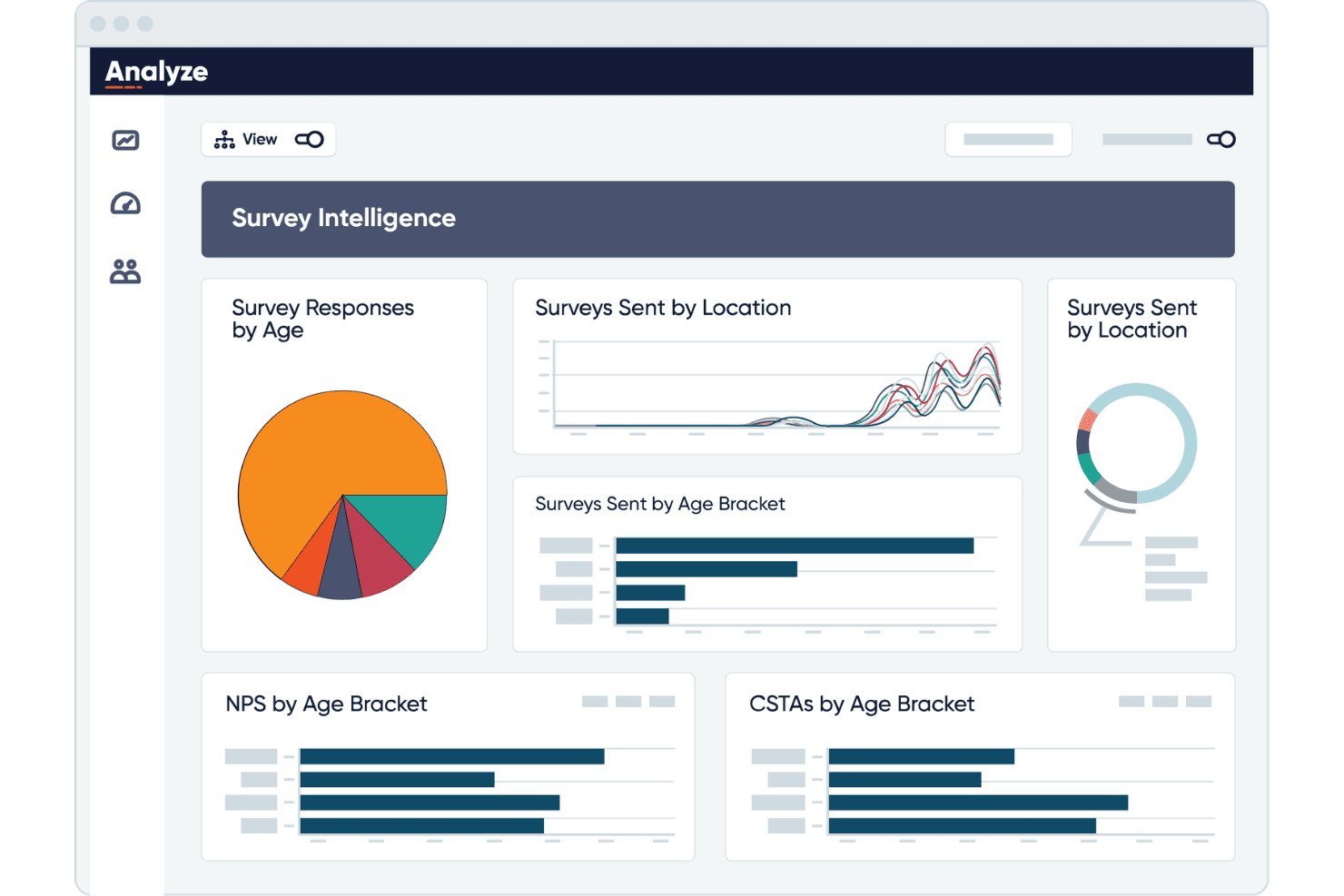
CallMiner visualizes survey data by age, location, and NPS scores. CallMiner Eureka is a conversation intelligence platform that uses AI to transcribe, score, and analyze 100% of voice and digital customer interactions across omnichannel contact center environments.
Who Is CallMiner Best For?
CallMiner is a strong fit for mid-size to enterprise contact centers with 60+ agents in regulated industries like financial services and healthcare.
Why I Picked CallMiner
CallMiner earns its spot as one of the best on my shortlist because its Coach and Visualize modules give QA teams genuinely configurable control over how calls get scored and reported. I like that you can build scorecards around specific behaviors, like compliance language or empathy markers, and surface those scores in drag-and-drop dashboards. The Solution Catalogue adds pre-built scoring templates you can customize, cutting the time it takes to stand up a QA program at scale.
CallMiner Key Features
- Real-time agent assist: Provides live speech analysis and on-screen prompts to agents during customer calls.
- Predictive topic discovery: Uses unsupervised AI to automatically surface emerging call drivers and complaint trends.
- PII/PCI automated redaction: Automatically removes sensitive information from audio recordings and transcripts for compliance.
- Multi-language transcription: Supports call transcription and analysis in multiple languages and dialects, including speaker separation.
CallMiner Integrations
CallMiner offers native integrations with Genesys, Amazon Connect, Five9, NICE, Salesforce, and more. An API is available for custom integrations.
Pros and Cons
Pros:
- Pre-built industry query libraries speed deployment
- Acoustic emotion detection beyond text analysis
- Scores 100% of calls automatically
Cons:
- UI feels dated compared to newer competitors
- Initial implementation typically takes several months
Learn more about CallMiner: Best for advanced emotion and sentiment detection
- Free demo available
- Pricing upon request
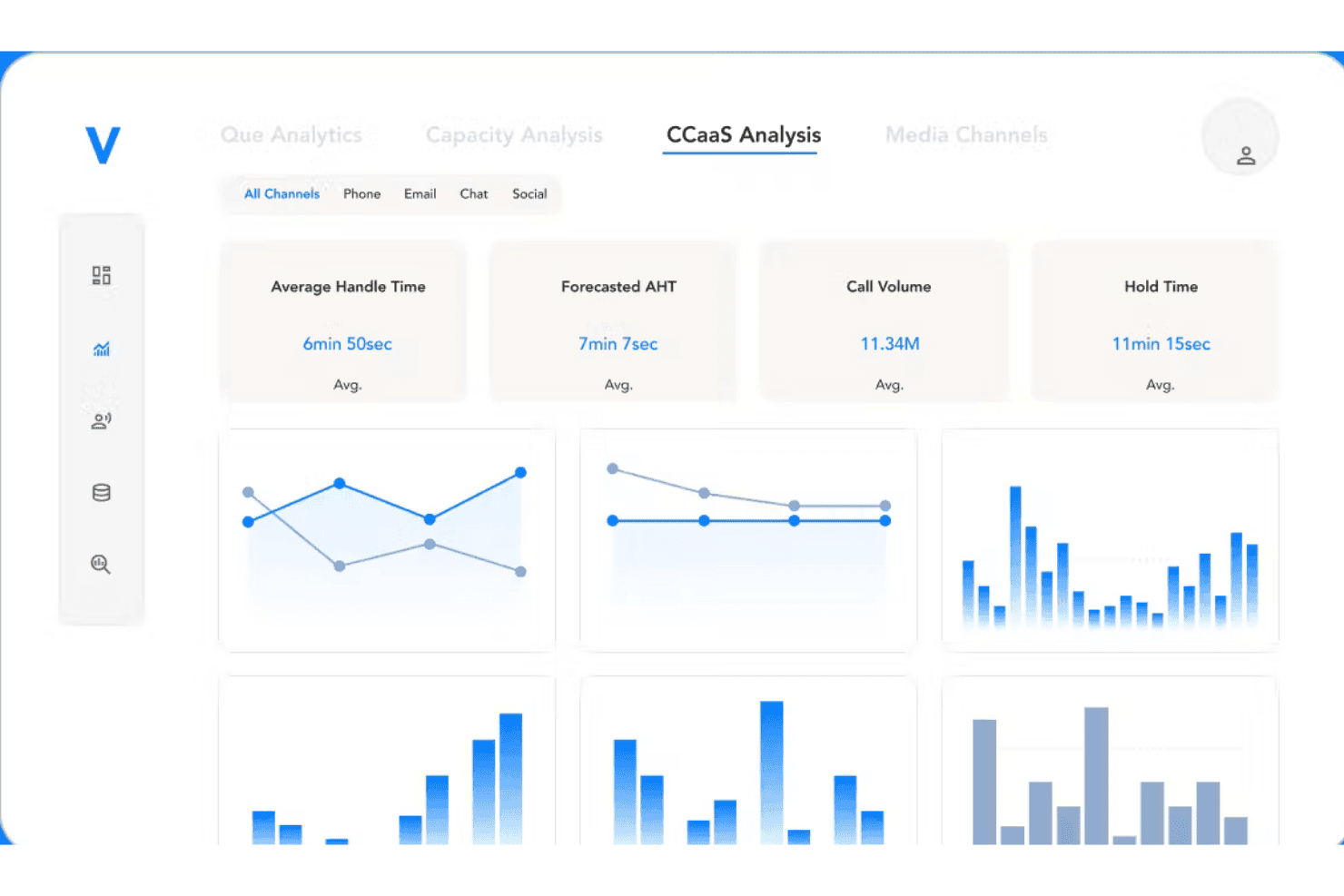
Verint Speech Analytics tracks call volume, handle time, and channel metrics in one dashboard. Verint Speech Analytics is an enterprise-grade call center speech analytics platform that applies a suite of AI-powered bots to automatically transcribe, categorize, score, and surface sentiment insights across 100% of voice and digital customer interactions.
Who Is Verint Speech Analytics Best For?
It's a natural fit for large enterprise contact centers in industries like insurance, healthcare, and financial services that have dedicated analytics teams.
Why I Picked Verint Speech Analytics
Verint Speech Analytics earns its spot on my shortlist because of how deeply the Sentiment Bot is woven into the platform. It scores every call using both acoustic and linguistic signals, meaning it picks up on tone and word choice together, not just surface-level keywords. I also like that the unified visual player layers emotion scores, transcripts, and QA evaluations in a single view, so I can immediately pinpoint exactly where a call turned negative.
Verint Speech Analytics Key Features
- Exact Transcription Bot: Converts all call audio to searchable text with market-leading accuracy and automated redaction of sensitive information.
- Genie Bot: Lets you query unstructured voice data using generative AI for immediate answers to business questions.
- Unified visual player: Shows transcripts, emotions, topics, screen recordings, and QA evaluations in a synchronized, interactive view.
- Salesforce Service Cloud integration: Connects analytics insights with CRM records to enrich case management and performance tracking.
Verint Speech Analytics Integrations
Verint Speech Analytics offers native integrations with Genesys Cloud CX, Amazon Connect, and more. An API is available for custom integrations.
Pros and Cons
Pros:
- Combines root cause analysis across call subsets
- Performs software-based speaker separation on mono call recordings
- Auto-categorizes call topics without upfront manual tagging
Cons:
- Scorecards and eLearning coaching require separate add-on modules
- Requires Verint Text Analytics for non-voice messaging channels
Learn more about Verint Speech Analytics:
Other Call Center Speech Analytics Software
Here are some additional call center speech analytics software options that didn’t make it onto my shortlist, but are still worth checking out:
- 11Five9 Interaction AnalyticsBest for reporting across voice and digital
- 12Amazon Connect CustomerBest for integration with AWS infrastructure
- 13CrestaBest for live agent assist next-action guidance
- 14MaestroQABest for custom quality assurance analytics
- 15DialpadBest for live transcript search during calls
- 16ConvinBest for real-time coaching recommendations
- 17AmplifAIBest for AI-driven agent performance insights
- 18Enthu.AIBest for automated QA with configurable workflows
- 19CallFinderBest for PCI and HIPAA-compliant speech redaction
- 20Medallia SpeechBest for multi-language transcription & sentiment
How I Evaluate Call Center Speech Analytics Software
I evaluate these platforms in two layers: the core functionality QA teams and CX leaders depend on, and the differentiators—like emotion detection depth or real-time agent assist—that set tools apart.
Core Functionality (Table Stakes For This List)
When I'm selecting tools for my list, I rank each one on a scale from 0 (does not offer the functionality) to 5 (excels in this area) for each core functionality listed below. I then calculate the tool's total score into a percentage, using 65% as a benchmark to help assess its overall fit for the list.
- Speech-to-Text Transcription: I check for accuracy across accents and telephony-grade audio, plus speaker separation that correctly distinguishes agent from customer turns.
- Sentiment & Emotion Analysis: Beyond basic positive/negative flags, I look for turn-level scoring that captures shifts in tone mid-call—like frustration building before an escalation.
- Topic & Keyword Detection: AI-driven topic discovery matters here, especially the ability to surface emerging call drivers without requiring analysts to build queries from scratch.
- Automated Call Scoring & QA: I evaluate whether the platform can score 100% of calls against configurable scorecards, replacing the old model of supervisors sampling a handful per week.
- Agent Coaching Insights: Strong tools connect conversation data to coaching workflows, flagging behaviors like long hold times or missed compliance phrases for targeted follow-up.
- Real-Time Analysis & Alerts: I look for live agent guidance that surfaces prompts mid-call—such as compliance reminders or next-best-action suggestions when sentiment drops.
Once I have a list of tools that meet the criteria, I consider what sets each platform apart.
Differentiating Factors (What Sets Vendors Apart)
Here's how I compare and contrast different vendors:
Standout Features
Real-time agent assist is a major differentiator—I look for platforms that push live prompts and compliance reminders to agents mid-call, not just flag issues after the fact. Generative AI call summaries also save significant after-call work by auto-drafting dispositions and extracting follow-up actions. Predictive topic discovery stands out when it surfaces emerging call drivers and churn signals without analysts needing to build queries first.
Beyond Features
Integration depth matters—I check whether a platform connects bi-directionally with your existing CCaaS and CRM so transcripts carry full customer context into tools like Salesforce or Zendesk. Compliance is equally important, especially automated PII and PCI redaction for teams in regulated industries like healthcare or finance. I also evaluate multilingual transcription accuracy, since contact centers serving diverse populations need reliable results across accents and telephony-grade audio quality.
How to Choose a Call Center Speech Analytics Software
Are you wondering how to narrow down the best speech analytics solution for your contact center’s operational, compliance, and reporting needs?
| If your priority is... | Look for... |
|---|---|
| If your priority is...Automated, accurate QA at scale | Look for...100% auto-scoring with customizable evaluation forms |
| If your priority is...Real-time compliance and risk mitigation | Look for...Live agent assist and mid-call alerts |
| If your priority is...Deep analysis of emerging CX issues | Look for...Predictive topic discovery and root-cause analytics |
| If your priority is...Seamless integration with CCaaS/CRM tools | Look for...Bi-directional connectors for your core contact center |
| If your priority is...High transcription accuracy | Look for...Multi-language support, low word error rates, accent handling |
How to Vet Your Shortlist
- Request a real-world demo: Watch the platform transcribe and score at least five diverse calls representative of your volume and accents.
- File an integration test ticket: Submit a request to connect the tool to your CCaaS or CRM and require proof of transcript fields in a downstream platform.
- Ask for a compliance artifacts package: Request SOC 2 Type II, PCI, or HIPAA documentation and review automated redaction features firsthand.
- Trial multilingual or noisy call scenarios: Run a minimum of ten calls with different accents or sub-par audio to validate claimed accuracy.
- Tradeoff to consider: Decide if you need maximum real-time guidance and deep root-cause analytics or streamlined batch reporting with basic compliance workflows.
What Is Call Center Speech Analytics Software?
Call center speech analytics software automatically transcribes and analyzes voice interactions between customers and agents to extract insights about quality, sentiment, and compliance. This software is designed to help teams identify customer concerns, track agent behaviors, and surface trends with less manual review. By converting calls into searchable data, it enables quality assurance, customer experience optimization, and more data-driven coaching for contact center operations.
Features
Here are the core features any great call center speech analytics software should have:
- Automated speech-to-text transcription: Uses automatic speech recognition to capture spoken conversations in real time or post-call, turning voice data into searchable, structured text for analysis and reporting.
- Sentiment and emotion detection: Uses natural language processing and voice signals to assess customer and agent mood, helping interpret customer feedback and flag frustration or satisfaction during calls.
- Topic and keyword identification: Applies natural language understanding to categorize calls based on recurring themes, phrases, customer intent, or issues across large volumes.
- Automated QA scoring: Evaluates calls against customizable scorecards, supporting consistent quality monitoring without relying solely on manual supervisor reviews.
- Real-time agent guidance: Provides live prompts, reminders, or coaching tips to agents during calls, helping improve first-call resolution and overall agent performance.
- Compliance and redaction tools: Automatically redacts sensitive information such as credit card numbers or personal details from recordings and transcripts to support data privacy requirements.
- Call trend dashboards: Visualizes voice analytics and trends such as call reasons, average handle time, sentiment shifts, or coaching needs over time.
- Multilingual support: Allows analysis of calls in multiple languages, accommodating teams and customers across different regions and linguistic backgrounds.
- Integration capabilities: Connects with major CCaaS, CRM, or workforce management systems to enrich call records with customer intelligence and enable closed-loop reporting.
- Root cause analysis: Uses artificial intelligence to uncover the underlying drivers behind repeat contacts, escalations, customer churn, or negative customer experiences.
Benefits
Implementing call center speech analytics software provides several benefits for your team and your business. Here are a few you can look forward to:
- Full call coverage for QA: Automatically scoring 100% of calls ensures quality and compliance standards are consistently met across your entire operation.
- Faster root cause identification: AI-powered topic detection and trend dashboards surface the underlying drivers of repeat contacts and emerging customer issues.
- Actionable agent coaching: Real-time feedback and targeted performance management insights help supervisors create more relevant coaching plans for each agent.
- Improved customer experience: Sentiment analysis can uncover dissatisfaction while trends in customer satisfaction scores help teams understand the broader customer experience.
- Ensured compliance and data privacy: Automated redaction tools protect sensitive customer information in transcripts and recordings, supporting regulatory requirements.
- Operational efficiencies: Speech analytics can reveal patterns affecting metrics such as average handle time and first-call resolution, helping teams identify areas for improvement.
- Stronger integration with core systems: Seamless connections to CCaaS and CRM platforms enrich call records with customer context and make reporting more robust.
Costs and Pricing
Selecting call center speech analytics software requires an understanding of the various pricing models and plans available. Costs vary based on features, team size, add-ons, and more. The table below summarizes common plans, their average prices, and typical features included in call center speech analytics software solutions:
Plan Comparison Table for Call Center Speech Analytics Software
| Plan Type | Average Price | Common Features |
|---|---|---|
| Plan TypeFree Plan | Average Price$0 | Common FeaturesLimited transcription, basic keyword search, simple sentiment analysis, and restricted storage. |
| Plan TypePersonal Plan | Average Price$30–$60/user/month | Common FeaturesHigher transcription limits, basic QA scorecards, sentiment and topic analysis, and email support. |
| Plan TypeBusiness Plan | Average Price$80–$150/user/month | Common FeaturesAutomated QA, topic trending, multi-language support, integrations with CCaaS and CRM, and advanced analytics. |
| Plan TypeEnterprise Plan | Average Price$200–$300/user/month | Common FeaturesCustom workflows, real-time agent assist, predictive analytics, dedicated onboarding, and enhanced compliance tools. |
FAQs
Here are some answers to common questions about call center speech analytics software:
How accurate are call center speech analytics software with different accents and noisy calls?
Accuracy depends on each platform’s speech recognition models, but many now handle a range of accents and telephony audio thanks to industry-tuned acoustic models and noise reduction. Test transcription quality using real recordings from your team to set realistic expectations.
Can you use call center speech analytics software alongside your existing CCaaS or CRM?
Yes, most solutions offer connectors for popular CCaaS and CRM platforms, so you can enrich call transcripts, trigger workflows, and keep contact records updated without manual uploads or workarounds.
Is it possible to automate QA and compliance monitoring for every call?
Yes, modern platforms automate QA evaluations and compliance checks using customizable scorecards, redacting sensitive information and scoring 100% of calls for quality and risk factors.
What data privacy concerns come with call center speech analytics software?
Data privacy is critical—look for automated redaction of PII or payment data, region-based data residency options, and strong access controls to meet global compliance requirements.
How do call center speech analytics software support teams that serve multiple languages?
Many platforms offer multilingual transcription and analytics with support for major world languages, helping you monitor agent performance and customer sentiment across all regions your team serves.