Net Promoter Score (NPS) software helps CX teams capture, analyze, and act on customer sentiment in a way that drives business value. If you're exploring NPS survey tools, chances are your data feels unreliable, you’re collecting scores but struggling to make them actionable, or you’re stuck in survey spam purgatory. Maybe you’re under pressure to tie feedback to revenue.
With over a decade in CX, I’ve seen how easily feedback gets buried, misread, or ignored. The right software doesn’t just send surveys; it helps you close the loop and surface insights that inform retention, growth, and product decisions.
In this article, I’ve reviewed the best NPS software and survey tools to help you capture feedback at scale, identify churn risk early, and improve customer loyalty. Whether you’re just getting started or looking to replace a tool that’s not pulling its weight, you’ll find practical, experience-backed recommendations here.
What is NPS Software?
Net promoter score (NPS) software is a tool that collects and analyzes customer feedback to calculate how many customers are active promoters of your brand, products, or services. It’s used to measure sentiment, identify trends, and improve customer experience across key touchpoints.
NPS tools allow you to analyze customer loyalty and your overall brand health over time.
Why Trust Our Software Recommendations
6,700+
Reviews
20
Industry experts
16+
Evaluation factors
14
Years
Our team has been testing and reviewing software since 2012. As CX leaders ourselves, we know how difficult—and important—it is to choose the right software.
For this guide, we evaluated tools using hands-on testing and independent research, scoring tools using our selection criteria.
Our reviews reflect our human editorial judgment, not a sales pitch.
 Gui DrusinaCreative Director
 Tim FisherVP of AI
Net Promoter Score Software Comparison Table
This comparison table summarizes basic details about each of my top NPS software selections.
| Tool | Best For | Trial Info | Price | ||
|---|---|---|---|---|---|
| 1 | Best for multi-channel NPS survey distribution | Free demo available | Pricing upon request | Website | |
| 2 | Best for customer journey tracking with NPS | Free demo available | Pricing upon request | Website | |
| 3 | Best NPS survey building with AI | 14-day free trial + free plan + free demo available | Pricing upon request | Website | |
| 4 | Best for customizable NPS beyond simple surveys | 7-day free trial + free demo available | From $55/user/month | Website | |
| 5 | Best NPS surveys with integrated workflows | 10-day free trial + free plan + free demo available | From $89/month | Website | |
| 6 | Best for in-app NPS with session replay context | Free plan available | From $29/month (billed annually) | Website | |
| 7 | Best for engaging mobile surveys | Free plan available | From $19/month | Website | |
| 8 | Best for custom-triggered NPS surveys | Free plan available | From $25/month | Website | |
| 9 | Best net promoter score software with a free plan | Free plan available | From $30/user/month (billed annually) | Website | |
| 10 | Best NPS software for translating your surveys into different languages | Free trial for up to 100 responses | From $49/month/up to 300 responses | Website |


Overviews of the 20 Best NPS Software
Here are brief descriptions of each my top 20 choices for net promoter score software that show what each system does best, plus screenshots to showcase some of the features. Plus, if you’d like even more choices to consider, I’ve included additional bonus options below.
 Best for multi-channel NPS survey distribution
- Free demo available
- Pricing upon request
Visit WebsiteCustomer Rating:4.7/5
Users can monitor customer satisfaction in real-time with Sogolytics' dynamic dashboard, featuring detailed NPS metrics and insightful analytics. Sogolytics is an advanced online survey and feedback management platform designed to help businesses gather valuable insights through various forms of surveys. It offers a comprehensive solution for creating, distributing, and analyzing surveys, enabling organizations to make data-driven decisions.
Why I picked Sogolytics: Sogolytics stands out with its robust features tailored specifically for NPS tracking and analysis. The platform allows for the creation of customized NPS surveys that can be distributed through multiple channels. It also offers real-time reporting and analytics, enabling businesses to monitor their NPS in real time and act on the feedback quickly. The ability to segment respondents based on their NPS ratings helps organizations identify promoters, passives, and detractors, allowing for targeted follow-ups and personalized engagement strategies
Sogolytics Standout Features and Integrations:
Features include advanced survey logic, multi-channel distribution, real-time analytics, automated reminders, customizable survey templates, anonymous survey options, sentiment analysis, quiz creation tools, and detailed reporting.
Integrations include Salesforce, Zapier, Google Analytics, Slack, Microsoft Teams, HubSpot, and Mailchimp.
Pros and Cons
Pros:
- Robust analytics and segmentation for action-oriented insights
- Multi-channel distribution covers mobile, email, web
- Strong logic and branching for complex surveys
Cons:
- Some advanced features require considerable setup time
- Interface layout can feel cluttered and outdated
Learn more about Sogolytics: Best for customer journey tracking with NPS
- Free demo available
- Pricing upon request
Visit WebsiteCustomer Rating:4.7/5
Ask questions in plain language and get instant answers from your customer feedback with Zonka Feedback AI. Zonka Feedback is an AI-powered NPS and customer feedback platform that combines multichannel survey distribution, real-time score calculation, closed-loop workflows, and AI-driven thematic analysis across email, SMS, web, in-app, and offline touchpoints.
Who Is Zonka Feedback Best For?
Zonka Feedback suits CX and customer success teams at small to mid-sized businesses that need to run NPS programs across multiple touchpoints and close the feedback loop quickly.
Why I Picked Zonka Feedback
Zonka Feedback earns its spot as one of the best on my shortlist because of how well it maps NPS scores to specific moments in the customer journey. I particularly like the contact and user journey tracking feature, which lets me see exactly where in the lifecycle a score was given, whether at onboarding, renewal, or post-support. NPS Impact Analysis then shows me which journey stages are driving detractor responses, so I know exactly where to focus first.
Zonka Feedback Key Features
- AI text analytics: Automatically surfaces common themes and sentiment from open-text NPS responses.
- Multi-language survey engine: Allows users to create and deliver surveys in multiple languages.
- Role-based dashboards: Provides distinct analytics views and permissions for executives, managers, and frontline users.
- Native CRM and helpdesk integrations: Connects directly with tools like Salesforce, HubSpot, Zendesk, and Intercom to sync NPS data.
Zonka Feedback Integrations
Zonka Feedback offers native integrations with Salesforce, HubSpot, Zendesk, Intercom, Freshdesk, Jira, Slack, Microsoft Teams, Google Sheets, and Mailchimp. It also supports Zapier and provides an API for custom integrations.
Pros and Cons
Pros:
- Supports kiosk and offline survey collection
- Built-in AI for open-text feedback analysis
- Maps NPS scores to specific customer journeys
Cons:
- Advanced feature setup carries learning curve
- Reporting customizations can be limited for teams
Learn more about Zonka Feedback: Best NPS survey building with AI
- 14-day free trial + free plan + free demo available
- Pricing upon request
Visit WebsiteCustomer Rating:4.4/5
SurveySparrow collects CX data, conveys it into easy-to-read charts and graphs, and delivers an NPS. SurveySparrow offers a dynamic Net Promoter Score software solution that caters to a diverse range of industries. This tool is particularly appealing to organizations looking to enhance customer loyalty and satisfaction through customizable surveys and real-time data analytics. Whether you're in healthcare, education, retail, or any other sector, SurveySparrow provides the resources needed to understand and improve customer experiences by integrating with existing systems and offering a user-friendly interface for continuous engagement.
Why I Picked SurveySparrow
I picked SurveySparrow for its AI-powered survey feature, which stands out in the realm of Net Promoter Score software. This feature allows you to create customizable surveys efficiently, generating up to 10 questions in seconds, and catering to various formats like multiple-choice and open-ended questions. The integration with CRM systems facilitates deeper data analysis, enabling your team to derive actionable insights from customer feedback. Additionally, its multichannel sharing options make it easier to reach your audience, ensuring that you gather comprehensive feedback that can drive meaningful improvements in customer satisfaction.
SurveySparrow Key Features
In addition to its AI-powered survey capabilities, SurveySparrow offers a range of features that make it a versatile choice for Net Promoter Score software.
- Conversational Surveys: Transform surveys into engaging, conversational experiences to increase response rates and gather more insightful feedback.
- Executive Dashboard: Visualize survey data using various chart types to gain a deeper understanding of customer feedback and trends.
- Ticket Management: Convert survey responses into actionable tasks, allowing your team to prioritize and address customer feedback effectively.
- Workflows & Automations: Streamline processes by automating actions based on survey responses, ensuring timely follow-ups and task completion.
SurveySparrow Integrations
Integrations include Salesforce, HubSpot, Zendesk, Mailchimp, Slack, Google Sheets, Microsoft Teams, Intercom, Freshdesk, and Shopify.
Pros and Cons
Pros:
- Integrates smoothly with CRM and collaboration tools
- Embedded NPS flows within product or UX contexts supported
- Conversational survey format tends to boost NPS response rates
Cons:
- Logic complexity can confuse non-technical users initially
- Analytics depth—especially for large-scale NPS programmes—is limited
Learn more about SurveySparrow: Best for customizable NPS beyond simple surveys
- 7-day free trial + free demo available
- From $55/user/month
Visit WebsiteCustomer Rating:4.4/5
The Alchemer dashboard displays Net Promoter Score rankings by brand across all product lines with corresponding market share percentages by category. Alchemer offers a flexible platform for teams that need to gather, analyze, and act on customer feedback through net promoter score surveys. It’s well-suited for organizations that want to customize survey workflows and integrate feedback into their existing business systems. If you’re looking for a solution that adapts to complex requirements and supports advanced reporting, Alchemer is worth considering.
Who Is Alchemer Best For?
Alchemer is a good fit for mid-sized to large organizations that need advanced survey customization and integration capabilities to support customer experience, product, or operations teams.
Why I Picked Alchemer
When I need net promoter score software that connects easily with the rest of my tech stack, Alchemer stands out for its extensive integration options. With support for over 400 business systems, I can automate the flow of NPS data into CRM, marketing, and analytics platforms without manual work. This level of connectivity means I can trigger follow-up actions or alerts based on NPS responses in real time. I also appreciate that Alchemer’s integrations help centralize feedback, making it easier to share insights across teams.
Alchemer Key Features
Some other features in Alchemer that support NPS programs include:
- NPS survey templates: Pre-built templates let you launch net promoter score surveys quickly and customize them to fit your brand.
- Role-based access controls: Assign permissions to users based on their role, ensuring sensitive feedback data is only accessible to the right team members.
- Automated survey distribution: Schedule and send NPS surveys through multiple channels, including email, SMS, and web links.
- Advanced reporting dashboards: Visualize NPS trends and segment results by customer group, product, or region for deeper analysis.
Alchemer Integrations
Integrations include Salesforce, Microsoft Dynamics 365, HubSpot, Zendesk, Slack, Power BI, Tableau, Snowflake, Marketo, and Google Sheets.
Pros and Cons
Pros:
- Real-time NPS response tracking and alerts
- Advanced survey logic and branching options
- SAML 2.0 single sign-on for secure access
Cons:
- Survey customization can be complex for new users
- Some advanced analytics require higher-tier plans
Learn more about Alchemer: Best NPS surveys with integrated workflows
- 10-day free trial + free plan + free demo available
- From $89/month
Visit WebsiteCustomer Rating:4.6/5
Reach your customers on the web or mobile. Survicate is an online survey tool for measuring NPS, CSAT, CES, and other customer service variables. It has customizable surveys that allow you to change the colors, fonts, and layouts and brand your survey to make it unique. You can use Survicate to automate surveys using customer behaviors like exit intents, length of website visits, and website scrolling speed.
Why I picked Survicate: Understanding your NPS data can guide you on how to improve your products and services, and Survicate has a built-in analytics feature to help you. It lets you view the NPS completion rates on different channels, knowing which channels are not eliciting customer responses. Additionally, Survicate's integrated workflows automate NPS data collection and follow-up actions by triggering surveys, segmenting respondents based on their scores, and integrating feedback into CRM, email, or task management tools.
Standout Features and Integrations:
Standout features include a range of survey distribution methods, encompassing link sharing, email, and embedded forms. In addition, Survicate offers question-branching logic that helps to create a personalized, targeted survey experience.
The software also includes a Feedback Hub where all collected feedback can be viewed in a single location, helping team members analyze the data and draw actionable conclusions.
Integrations include Mailchimp, Marketo, Microsoft Teams, and Google Analytics.
Pros and Cons
Pros:
- Allows embedding surveys inside products or websites for context
- Strong segmentation and filtering help analyse NPS results
- Multi-channel NPS support reaching users via web/email/app
Cons:
- Some analytics visualisation options feel basic
- Advanced logic and custom workflows require setup effort
Learn more about Survicate: Best for in-app NPS with session replay context
- Free plan available
- From $29/month (billed annually)
Visit WebsiteCustomer Rating:4.8/5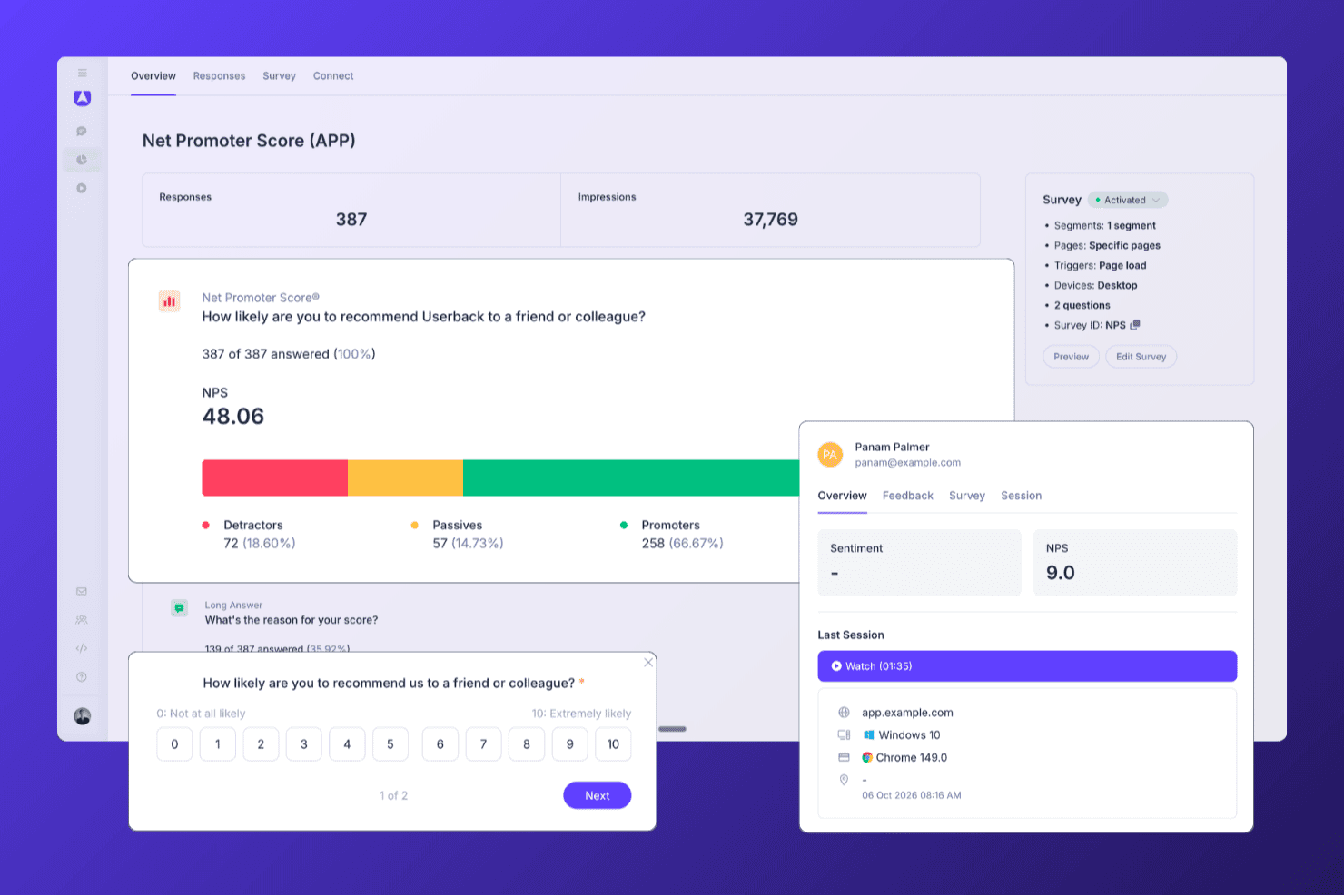
Userback helps teams run NPS surveys and analyze responses, promoter segments, and customer feedback from one dashboard. Userback is a product feedback platform that combines in-app NPS, CSAT, and CES surveys with session replay, AI-powered feedback analysis, and automated closed-loop workflows.
Who Is Userback Best For?
Userback is a strong fit for product teams that want to collect in-app NPS alongside session replay, so they can see exactly what users experienced before submitting a score.
Why I Picked Userback
Userback earns its spot on my shortlist because it pairs in-app NPS surveys with session replay, so when a user scores your product a 3, you can watch exactly what they experienced before submitting that score. I love how behavioral targeting lets you trigger the NPS survey at a specific in-app moment, like after a user completes a key workflow, rather than blasting it to your entire list. The AI-powered feedback automation then routes detractor responses to the right team member automatically, with status updates synced back to tools like Jira or Slack.
Userback Key Features
- NPS, CSAT, and CES survey templates: Pre-built survey templates for all three major satisfaction metrics, each with a standard rating scale and a follow-up open-text question.
- Behavioral and event-based survey triggers: Surveys can be triggered by specific in-app events, user segments, page targets, or device type to reach the right users at the right moment.
- AI feedback categorization and routing: AI automatically tags incoming responses by theme and sentiment, then routes them to the right team member with configurable due dates.
- Bi-directional integration sync: Status updates flow two ways between Userback and connected tools like Jira, ClickUp, and Linear, keeping feedback resolution visible across your stack.
Userback Integrations
Userback offers 20+ native integrations, including Zendesk, Intercom, Jira, Slack, ClickUp, Linear, and Microsoft Teams, plus REST API, webhooks, and Zapier.
Pros and Cons
Pros:
- AI routes detractor feedback to teams
- Behavioral targeting for in-app NPS prompts
- Combines NPS surveys with session replay
Cons:
- NPS surveys are not available on the free plan
- No native email or SMS survey delivery
Learn more about Userback:

SurveyLegend allows you to drag and drop a multitude of question types into an attractive template. SurveyLegend is a web-based platform designed to create, distribute, and analyze surveys, forms, and polls. Its emphasis on mobile-ready design and interactive elements positions it as a suitable choice for conducting engaging surveys on mobile devices, catering to the increasing number of users who prefer to interact with content on-the-go.
Why I picked SurveyLegend: I selected SurveyLegend due to its user-friendly interface that simplifies the creation of surveys that are visually appealing and engaging on both desktop and mobile devices. What distinguishes SurveyLegend is its emphasis on design aesthetics, allowing for the creation of branded surveys with a variety of question types and fields, such as picture selection and file uploads. I believe SurveyLegend is best for engaging mobile surveys because of its mobile optimization, which ensures a smooth experience for respondents using their smartphones or tablets, thereby potentially increasing response rates and the quality of feedback received.
Standout Features and Integrations:
Features include elegant pre-designed templates, language localization, offline survey collection, and extensive customization options, including custom branding and question formatting, conditional logic, and customizable buttons and icons.
Integrations include Google Drive, Dropbox, Mailchimp, and Salesforce, as well as social media platforms like Facebook and Twitter for survey sharing.
Pros and Cons
Pros:
- Clear UI supports users with minimal survey experience
- Quick to set up simple NPS surveys with style
- Highly visual and mobile-responsive survey experience for NPS
Cons:
- Scale and role-governance features less mature
- Logic, branching and segmentation limited
Learn more about SurveyLegend: Best for custom-triggered NPS surveys
- Free plan available
- From $25/month
Visit WebsiteCustomer Rating:4.7/5
Mouseflow allows you to choose from free text, rating scale NPS, and multiple choice to conduct surveys. Mouseflow is a comprehensive analytics tool designed to provide deep insights into user behavior on websites. It offers a variety of features, including session replay, heatmaps, funnels, form analytics, and user feedback tools. By capturing user interactions and visualizing them through reports and recordings, Mouseflow enables businesses to understand how visitors navigate their websites.
Why I picked Mouseflow: The tool allows for the creation of custom-triggered surveys that can be strategically placed at different touchpoints in the user journey. It allows for various types of surveys including NPS, multiple choice, free text, and rating scales, ensuring businesses can gather precise and contextual feedback, directly contributing to an accurate Net Promoter Score (NPS).
Mouseflow Standout Features and Integrations:
Features that complement Mouseflow's user feedback tools include session replay, which allows businesses to watch recordings of individual user sessions, and heatmaps, which offer a visual representation of user engagement, highlighting the most and least interacted with areas of a webpage.
Integrations include HubSpot, AB Tasty, Convert Experiences, BigCommerce, WooCommerce, Google Analytics, Google Tag Manager, Zendesk, Omniconvert, Adobe Target, Shopify, Intercom, WordPress, and others.
Pros and Cons
Pros:
- Combines behavior analytics (heatmaps, session replays) with feedback tools
- Users report it helps uncover ‘why’ behind low NPS scores
- Good for embedding NPS and feedback widgets where UX matters.
Cons:
- Survey/feedback modules lacking advanced features
- Setup and filtering can get complex for non-analyst teams
Learn more about Mouseflow: Best net promoter score software with a free plan
- Free plan available
- From $30/user/month (billed annually)
Visit WebsiteCustomer Rating:4.6/5
Simple NPS questions to track customer satisfaction. SurveyMonkey is a comprehensive survey tool that offers a free plan with out-of-the-box surveys to get you started. Under their free plan, you can create a survey with up to 10 questions and collect up to 100 responses per survey.
Why I picked SurveyMonkey: Their free plan includes a lot of helpful features that you need to pay for in other survey tools, including skip logic, data exports, a selection of question types, basic analysis & reporting features, and simple visuals to help you digest your data more easily. You can view summary statistics such as response counts and percentages.
I also like the fact that you can integrate SurveyMonkey's net promoter score software with Salesforce to enrich your Salesforce dashboard by incorporating NPS calculations.
SurveyMonkey Standout Features and Integrations:
SurveyMonkey is an excellent net promoter score software because it allows you to prompt customers to provide real-time feedback after using your product. You can integrate SurveyMonkey into your website to gauge NPS without disrupting customers’ shopping experience. SurveyMonkey also lets you target a customer demographic to get the NPS of a specific customer group.
Using SurveyMonkey, you can also collect metadata on website users like browser type, location, and device to help you optimize customers’ online experience.
Integrations include Slack, Microsoft Teams, Akita, Freshservice, HubSpot, Zendesk, Google Sheets, Google Analytics, Adobe Analytics, A/B Tasty, Zoho CRM, Gainsight, and Salesforce.
Pros and Cons
Pros:
- Strong logic branching and analytics for NPS plus beyond
- Easy distribution via web link, email invite or panel
- Massive template and question-type library
Cons:
- Interface designed for general use rather than NPS workflows
- Free plan very limited in survey depth and analytics
Learn more about SurveyMonkey: Best NPS software for translating your surveys into different languages
- Free trial for up to 100 responses
- From $49/month/up to 300 responses
Visit WebsiteCustomer Rating:4.8/5
Track how many promoters, passives, and detractors you have. SatisMeter is a feedback collection tool to gauge customer satisfaction throughout multiple touchpoints. It has pre-built templates allowing you to quickly launch surveys for CES, NPS, CSAT, or PMF. You can use SatisMeter to create automated recurring surveys to help you save time while continuously gauging customer satisfaction.
Why I picked SatisMeter: Not all customers speak or read English, and SatisMeter is the best NPS software for you if you want to translate your surveys into different languages. SatisMeter automatically translates surveys depending on the language settings of the device your customers are using so you can survey customers with different nationalities and language preferences. You can also manually translate a survey to target specific customer demographics.
SatisMeter Standout Features and Integrations:
Recently added features include per-project user permissions, the option to select multiple responses, new data filters per quarter, a Survey Delay trigger feature, a survey event trigger, and an overlay pop-up.
Integrations are available with other customer satisfaction tools, including Salesforce, CustomerGauge, Bigcommerce, Productboard, and Slack. You can connect SatisMeter to a paid Zapier account to access premium apps.
Pros and Cons
Pros:
- Easy to embed surveys in apps or via web links
- Users praise rapid support responses and platform updates
- Clean tool for tracking NPS, CSAT and feedback in real-time
Cons:
- Tagging and issue classification features are missing
- Advanced segmentation/custom report building feels limited
Learn more about SatisMeter:
Other Net Promoter Score Software Options
Here are some more NPS survey software that didn’t make the top list but are still worth checking out. You can use any one of these NPS systems to reach customers at vital touchpoints of their interaction with your entire organization.
- 11NicereplyBest lightweight option for user-friendly NPS software
- 12ProProfs Survey MakerBest for polls, popups, sidebar, and in-app surveys.
- 13PodiumBest for contextual feedback, like which channel respondents come from
- 14SprigBest for capturing and analyzing customer feedback at scale with AI
- 15CustomerSureBest NPS software for accessing multiple feedback channels: email, SMS, in-app, and in-website
- 16OrbitricsBest for optional open-ended questions after the NPS
- 17InputKitBest NPS software for small companies and start-ups
- 18JotformBest for B2B companies wanting to quickly build and deploy NPS surveys
- 19UserGuidingBest for collecting real-time insights
- 20Product FruitsBest user onboarding software that includes NPS and in-app surveys
- 21VelarisBest for automated feedback collection
- 22InformizelyBest customizable email surveys.
- 23BazaarvoiceBest sample services to spur reviews.
- 24Reputation.comBest for customer journey tracking.
- 25BirdeyeBest for being the customer experience software with the most awards.
- 26SightMillBest for plotting follow-up surveys.
- 27DelightedBest for survey delivery: email, SMS, or a link.
- 28ChattermillBest collaborative platform for building surveys.
- 29Zonka Feedback Best for offline CSAT, CES, and NPS surveys.
- 30CannyBest transactional NPS.
- 31WootricBest NPS question feedback loop.
- 32VitallyBest real-time survey results.
- 33eNPSBest for employee-based NPS score.
- 34DownrightBest for customer segments.
- 35Ask NicelyBest focus on modern, relatable customer loyalty.
- 36RelentlyBest email and in-app templates.
- 37ChekkitBest way for customers to text you directly from your website.
- 38Satmetrix Systems, IncBest for automated analytics using text and speech.
How I Evaluate Net Promoter Score Software
I evaluate NPS tools on two layers: the baseline a tool must have—like automated scoring and closed-loop workflows—and the differentiators that set the best options apart for CX teams.
Core Functionality (Table Stakes For This List)
When I'm selecting tools for my list, I rank each one on a scale from 0 (does not offer the functionality) to 5 (excels in this area) for each core functionality listed below. Then, I calculate the tool's total score into a percentage. Each tool needs to achieve a minimum total score of 65% to be considered for inclusion.
- NPS Survey Builder: I look for a dedicated NPS template with the 0–10 scale, follow-up question, and branding options—not just a generic form builder with a rating field.
- Multi-Channel Survey Distribution: Whether it's an in-app prompt after onboarding or a post-support email, I check that tools can reach customers across at least three channels.
- Automatic Score Calculation: Real-time promoter, passive, and detractor categorization with a live NPS dashboard matters here—I evaluate whether the math happens automatically.
- Segmentation & Trend Analysis: I look at how each tool lets you slice scores by cohort, product line, or region and track movement over time to spot emerging patterns.
- Closed-Loop Feedback Workflows: Tools like Medallia and Qualtrics route detractor alerts to account owners automatically. I evaluate how each platform handles follow-up triggers and task assignment.
- CRM & Business Tool Integrations: Connecting NPS data to customer records in tools like Salesforce or HubSpot is essential, so I check for native connectors, open API access, and webhook support.
Once I have a list of tools that meet the criteria, I consider what sets each platform apart.
Differentiating Factors (What Sets Vendors Apart)
Here's how I compare and contrast different vendors:
Standout Features
AI-powered text analytics is a major differentiator. I evaluate whether a tool can surface recurring themes from thousands of open-ended responses without manual tagging. Benchmarking data also matters—knowing your score is 42 means little until you can compare it against your industry. I also look at predictive churn signals, where platforms correlate detractor patterns with renewal or usage data to flag at-risk accounts before they leave.
Beyond Features
Pricing structure is something I evaluate closely. Some vendors charge per response while others price per user or contact, and the right model depends on your survey volume and team size. Compliance also matters when NPS surveys collect customer PII—I check for GDPR readiness, SOC 2 certification, and data residency options. Time-to-value is another factor I consider, since a CX team launching its first relational NPS program needs pre-built templates and quick setup, not a months-long implementation.
How to Choose Net Promoter Score Software
It’s easy to get bogged down in long feature lists and complex pricing structures. To help you stay focused as you work through your unique software selection process, here’s a checklist of factors to keep in mind:
| Factor | What to Consider |
|---|---|
| FactorScalability | What to ConsiderCan the software grow with your business? Look for solutions that can handle increased data volume and user numbers without performance issues. |
| FactorIntegrations | What to ConsiderDoes it integrate with your existing systems like CRM or helpdesk software? Ensure seamless data flow between platforms to avoid manual data entry. |
| FactorCustomizability | What to ConsiderCan you tailor the software to fit your specific needs? Check if it allows for custom surveys, branding, and reporting to match your workflow. |
| FactorEase of use | What to ConsiderIs the software intuitive for your team? A complex interface can hinder adoption. Look for user-friendly options with straightforward navigation. |
| FactorImplementation and onboarding | What to ConsiderHow long will it take to get up and running? Assess the vendor's support and training resources to ensure a smooth transition. |
| FactorCost | What to ConsiderAre there hidden fees? Compare pricing models and check for any extra charges for additional users or features. |
| FactorSecurity safeguards | What to ConsiderHow does the software protect your data? Verify that it complies with industry standards and offers encryption and access controls. |
| FactorSupport availability | What to ConsiderWhat support does the vendor offer? Consider the availability of customer service and technical support when issues arise. |
Features of Net Promoter Score Software
When selecting net promoter score software, keep an eye out for the following key features:
- Survey customization: Create, modify, and brand surveys to match your organization's voice and style, making it easy for you to connect with your audience and gather the insights that matter most.
- Multi-channel distribution: Send surveys through email, SMS, web, or in-app prompts, so you can reach users wherever they are and maximize your response rates.
- Real-time analytics: Access live feedback as it comes in, allowing you to spot trends and act on insights without delay. This helps you address issues quickly and improve customer experiences.
- Automated follow-up workflows: Set up triggers to automatically respond to detractors, passives, or promoters. This hands-off approach lets you deliver timely responses and show customers that you value their input.
- Response segmentation: Break down data by customer type, segment, region, or other categories, so you can understand how different groups feel and tailor your strategies accordingly.
- Historical tracking: Monitor NPS scores over time, making it easy to see what’s changing, understand the impacts of your efforts, and celebrate your progress.
- Data integration: Connect NPS data with your CRM, help desk, or marketing platforms, giving you a more complete view of the customer journey and making it easier to act on what you learn.
- Permission controls: Decide who in your team can view or manage survey data, keeping sensitive information secure and in the right hands.
Common Net Promoter Score Software AI Features
Beyond the standard net promoter score software features listed above, many of these solutions are incorporating AI with features like:
- Sentiment analysis: Automatically interpret open-ended survey responses to determine whether feedback is positive, negative, or neutral, saving you hours and surfacing insights you might have missed.
- Predictive churn detection: Use AI to flag customers who are most likely to leave, so you can take proactive steps to retain them before it’s too late.
- Automated theme extraction: Let AI group feedback into common topics or themes, making it easy to spot root causes behind your NPS scores and prioritize improvements.
- AI-powered response suggestions: Get recommended follow-up actions for different types of feedback, helping you engage with customers in meaningful ways without second-guessing your approach.
- Text summarization: Turn lengthy customer comments into quick, digestible insights, so you can keep your finger on the pulse without drowning in data.
Benefits of Net Promoter Score Software
Implementing net promoter score software provides several benefits for your team and your business. Here are a few you can look forward to:
- Data-driven insights: The software helps in making informed decisions by providing insights based on customer feedback and scores.
- Improved collaboration: It enhances team collaboration, allowing multiple users to contribute to customer feedback and strategy.
- Customer segmentation: The software enables segmentation of feedback by customer type, which helps in understanding diverse customer needs.
- User-friendly interface: An intuitive design makes it easy for team members to navigate and utilize the software effectively.
- Integration capabilities: The software can be integrated with existing tools, allowing seamless incorporation into current workflows.
- Scalability: It supports the growth of your business by adapting to increasing feedback and customer data.
- Strategic alignment: The software ensures your team's efforts align with strategic business goals by maintaining a clear focus on customer satisfaction metrics.
Costs and Pricing of Net Promoter Score Software
Selecting net promoter score software requires an understanding of the various pricing models and plans available. Costs vary based on features, team size, add-ons, and more. The table below summarizes common plans, their average prices, and typical features included in net promoter score software solutions:
Plan Comparison Table for Net Promoter Score Software
| Plan Type | Average Price | Common Features |
|---|---|---|
| Plan TypeFree Plan | Average Price$0 | Common FeaturesBasic survey creation, limited responses, and basic analytics. |
| Plan TypePersonal Plan | Average Price$10-$30/user/month | Common FeaturesCustom branding, moderate response limits, and basic integrations. |
| Plan TypeBusiness Plan | Average Price$50-$100/user/month | Common FeaturesAdvanced analytics, team collaboration tools, and priority support. |
| Plan TypeEnterprise Plan | Average PriceCustom pricing | Common FeaturesFull API access, dedicated support, advanced user management, and SSO options. |
FAQ: All About NPS and Customer Satisfaction
Looking for more info about the customer feedback loop and how to measure customer satisfaction? Here are a few answers to common questions:
How can you use net promoter score data?
You can use NPS data to identify loyal customers, uncover sources of dissatisfaction, and drive organizational improvements. Most NPS survey tools help you automate follow-ups with detractors, celebrate promoters, and set internal alerts for at-risk accounts. By analyzing comments and score breakdowns, you can share actionable insights with product, support, and leadership teams. Linking NPS data to specific customer journeys lets you pinpoint where experiences break down so you can address issues quickly and measure the results of change over time.
Is there a free NPS score tool?
Yes, there are several NPS software options offering forever-free plans or trial versions. These typically allow you to create simple NPS surveys, distribute them via email or web, and view real-time feedback dashboards. Popular platforms like SurveyMonkey, Hotjar, and Startquestion provide free options, but remember free plans might limit survey frequency, response volumes, branding options, and data export capabilities. If you’re assessing NPS tools for your team, try a few to see which best matches your workflow, data needs, and future integration plans.
If you’re looking for something analog, the original free net promoter score tool is a calculator, followed by an Excel spreadsheet.
How do I integrate NPS software with my CRM or helpdesk?
Most leading NPS platforms make integration with major CRMs or helpdesk systems straightforward, offering native connectors to Salesforce, HubSpot, Zendesk, Intercom, and others. Integration means you can trigger NPS surveys after support interactions or at key journey stages, log responses in customer records, and automate workflows based on survey results. Some tools provide APIs or work with middleware like Zapier or Make if you need more complex or customized connections. Before choosing a platform, review its pre-built integration catalog and check if setup requires coding or specialized technical support.
What should I look for when choosing NPS software for my team?
Prioritize software that enables easy survey creation and launch, with templates flexible enough for different touchpoints. Look for robust analytics to break down scores by customer segment, journey stage, or channel. Solid integration capabilities let you connect NPS data with CRM, helpdesk, or BI tools, making it actionable for your entire team. Features like workflow automation, closed-loop feedback tools, and role-based dashboards will help scale your CX program. Check each solution’s support resources, security certifications, custom branding options, and how well the pricing scales with your expected usage.
What are best practices for increasing NPS survey response rates?
To boost NPS response rates:
- Keep your surveys concise—typically one to two questions—so they’re easy to complete on any device.
- Personalize outreach by including the customer’s name and referencing their recent interaction with your brand.
- Email surveys tend to perform better when sent promptly after a key event, like a purchase or a support call.
- Make sure you explain why you’re asking for feedback and how you’ll use the results to improve their experience.
- You can also experiment with different subject lines, reminders for non-respondents, and in-app survey widgets for higher engagement.
How can NPS software help close the feedback loop?
NPS platforms help you close the feedback loop by automatically flagging negative responses for follow-up, assigning tickets, and sending reminders to your CX team. Many tools let you create workflows, so detractors receive personalized outreach or managers are alerted about urgent issues. You can set SLAs for response times and track which contacts have been resolved or need escalation. Closing the loop not only improves customer satisfaction but also shows customers that their feedback leads to real change, ultimately driving loyalty and advocacy.
Can NPS software track trends over time and segment responses?
Yes, most NPS tools provide time-based analytics so you can monitor how scores evolve month to month or after key initiatives. Advanced segmentation lets you break down responses by product line, region, team, or customer persona, helping you identify which areas are improving and which need more focus. These insights can be visualized in dashboards, exported for deeper analysis, or used to inform quarterly business reviews. With ongoing tracking and segmentation, you can demonstrate the ROI of customer experience initiatives and focus resources on the factors that have the biggest impact on loyalty.
More Software for Customer Feedback
NPS software isn't the only kid on the block worth considering. While you're here, you may find exactly what you're looking for in these other feedback survey tools:
- Customer Feedback Software
- Online Survey Software
- Customer Experience Management Software
- Survey Analysis Software
- Free Survey Tools