

10 Best Zoho CRM Alternatives for Customer Service in 2026

Best Zoho CRM Alternatives Shortlist


A strong Zoho CRM alternative offers cloud-based customer relationship management with flexible customization, reliable integrations, and features that fit your team’s sales and service workflows. If you’re searching for Zoho CRM alternatives, you’re likely looking for a solution that better matches your business processes, scales with your growth, or addresses gaps in automation, reporting, or usability.
This list will help you compare top options, understand what sets each apart, and choose a CRM that aligns with your goals for customer experience, collaboration, and efficiency.
What Is Zoho CRM?
Zoho CRM is a cloud-based customer relationship management platform designed to help businesses manage sales, marketing, and customer support activities in one place. It offers tools for lead tracking, workflow automation, analytics, and integration with other business apps. Zoho CRM is used by teams to organize customer data, automate routine tasks, and improve collaboration across sales and service functions.
Zoho CRM Alternatives Comparison Table
This comparison table summarizes pricing details for my top Zoho CRM alternative selections:
| Tool | Best For | Trial Info | Price | ||
|---|---|---|---|---|---|
| 1 | Best for multichannel communication tools | 15-day free trial | From $23/user/month (billed annually) | Website | |
| 2 | Best for workflow automation flexibility | 14-day free trial | From $40/user/month (billed annually) | Website | |
| 3 | Best for marketing and sales team alignment | Free plan available | From $20/user/month | Website | |
| 4 | Best for built-in telephony features | 15-day free trial + free demo available | From $12/user/month (billed annually) | Website | |
| 5 | Best for large enterprises | 30-day free trial | From $25/user/month | Website | |
| 6 | Best for visual sales pipeline management | 14-day free trial available | From $14/user/month (billed annually) | Website | |
| 7 | Best for global compliance requirements | Free demo available | Pricing upon request | Website | |
| 8 | Best for project management integration | 14-day free trial | From $29/user/month (billed annually) | Website | |
| 9 | Best for modular app customization | Free trial available | From $15/user/month (billed annually) | Website | |
| 10 | Best with native Microsoft 365 integration | 30-day free trial available | From $50/user/month (billed annually) | Website |
Why Trust Our Software Recommendations
Our team has been testing and reviewing software since 2012. As CX leaders ourselves, we know how difficult—and important—it is to choose the right software.
For this guide, we evaluated tools using hands-on testing and independent research, scoring tools using our selection criteria.
Our reviews reflect our human editorial judgment, not a sales pitch.
Zoho CRM Alternatives Reviews
Below are my detailed summaries of the Zoho CRM alternatives that made it onto my shortlist. My reviews offer a detailed look at the features, integrations, and best use cases of each platform to help you find the best one for your team.
Best for multichannel communication tools
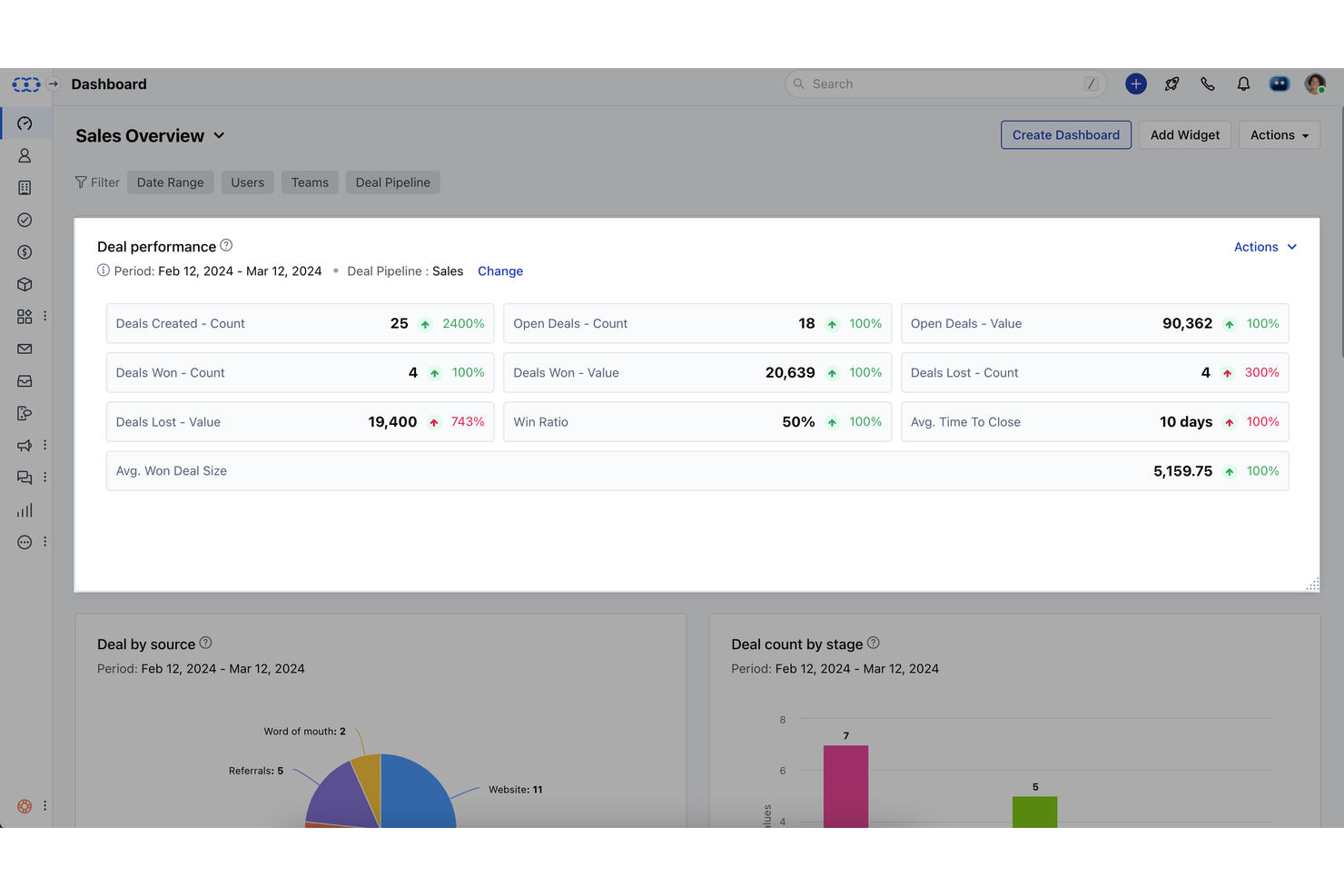
Salesmate stands out for teams that need to manage customer conversations across multiple channels from one place. It’s a strong fit for sales and support teams in small to midsize businesses that want to unify email, SMS, calling, and chat within their CRM. Unlike Zoho CRM, Salesmate puts multichannel communication tools at the center of its platform, helping you keep every customer interaction organized and accessible.
Who Is Salesmate Best For?
Salesmate is best suited to sales and customer-facing teams at SMBs that manage customer interactions across phone, email, text, and other communication channels.
Why Salesmate Is a Good Zoho CRM Alternative
If your team relies on communicating with customers through several channels, Salesmate offers a focused solution that’s hard to match. I picked Salesmate because it brings email, SMS, calling, and live chat together in one CRM, so you don’t have to juggle separate tools. The built-in shared inbox and conversation timelines help your team track every interaction, no matter where it happens. For businesses that want multichannel communication at the core of their CRM, Salesmate is a strong alternative to Zoho CRM.
Salesmate Key Features
Some other features that stood out to me include:
- Sales Automation Workflows: Set up automated sequences for tasks, emails, and follow-ups to reduce manual work.
- Built-In Calling: Make and record calls directly from the CRM with click-to-call functionality.
- Deal Pipeline Management: Visualize, track, and update deals through customizable sales pipelines.
- Sales Forecasting: Generate sales forecasts based on real-time pipeline data and historical trends.
Salesmate Integrations
Integrations include Shopify, QuickBooks Online, Mailchimp, Google Calendar, Microsoft Teams, Docusign, Xero, Slack, BigCommerce, and Zoom.
Pros and Cons
Pros:
- Chrome extension for Gmail contact syncing
- Built-in calling with call recording included
- Multichannel inbox combines email, SMS, and chat
Cons:
- Workflow automation lacks conditional branching
- Limited territory management for large sales teams
Creatio
Best for workflow automation flexibility

If your team needs a CRM that adapts to complex, changing processes, Creatio is worth a look. This platform is designed for organizations that want to build, modify, and automate workflows without heavy IT involvement. Unlike Zoho CRM, Creatio’s low-code tools let you customize automation for sales, service, and marketing in detail.
Who Is Creatio Best For?
Creatio is best suited to operations, sales, and process management teams at mid-sized and enterprise organizations that need flexible workflow automation across customer-facing activities.
Why Creatio Is a Good Zoho CRM Alternative
Creatio stands out for teams that want to automate and adapt workflows without relying on developers. I picked Creatio as a Zoho CRM alternative because its low-code process designer lets you build, modify, and automate sales, service, and marketing workflows visually. You can set up conditional logic, approvals, and multi-step automations tailored to your business needs. This flexibility makes Creatio a strong fit for organizations with complex or evolving processes that need more than standard CRM automation.
Creatio Key Features
Some other features in Creatio that may be useful for your team include:
- Omnichannel Communication: Manage customer interactions across email, phone, chat, and social channels in one place.
- Lead Scoring: Automatically prioritize leads based on custom criteria and engagement signals.
- Knowledge Base: Create and organize articles, FAQs, and documentation for internal or customer use.
- Contract Management: Store, track, and manage contracts with version control and approval workflows.
Creatio Integrations
Integrations include Microsoft 365, Gmail, and more.
Pros and Cons
Pros:
- Lead scoring with customizable criteria
- Visual process designer for mapping business logic
- Low-code workflow builder for custom automation
Cons:
- Mobile app updates less frequent
- Fewer out-of-the-box templates

HubSpot
Best for marketing and sales team alignment
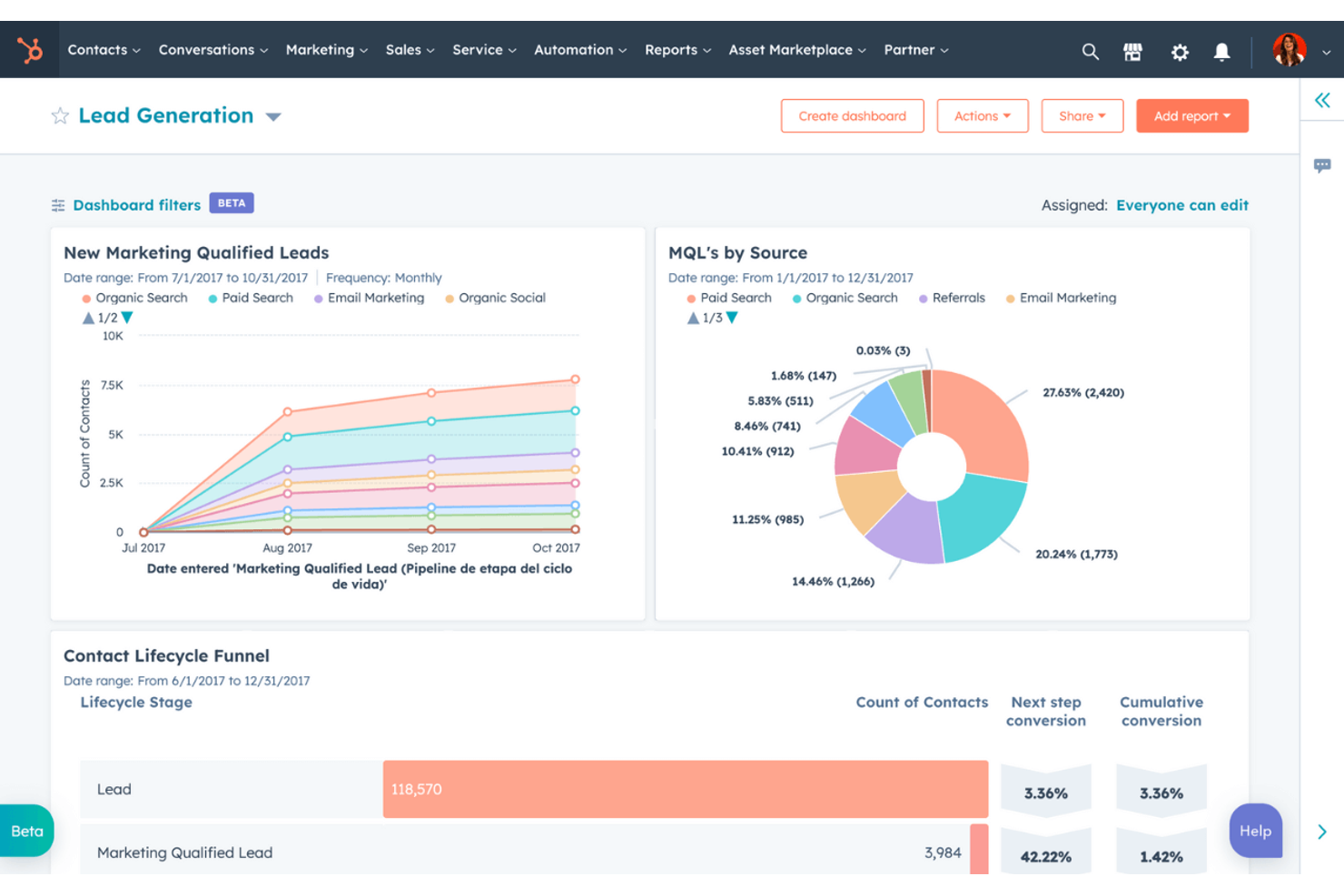
If you’re looking for a CRM that brings marketing and sales teams together, HubSpot is worth considering. It’s designed for businesses that want unified contact management, campaign tracking, and lead nurturing in one place. HubSpot stands out for its built-in marketing automation and handoff between marketing and sales activities.
Who Is HubSpot Best For?
HubSpot is best suited to marketing and sales teams at small and mid-sized businesses that need closer alignment between lead generation, customer engagement, and pipeline management activities.
Why HubSpot Is a Good Zoho CRM Alternative
Unlike many CRMs, HubSpot is built to help marketing and sales teams work from a single platform. I picked it as a Zoho CRM alternative because it offers shared contact records, marketing automation, and sales pipeline management all in one place. The marketing hub lets you create, track, and optimize campaigns, while the sales hub provides tools for deal tracking and follow-up. If your business needs tight alignment between marketing and sales, HubSpot’s unified approach makes collaboration much easier.
HubSpot Key Features
Some other HubSpot features that may be useful for your team include:
- Live Chat: Connect with website visitors in real time and route conversations to the right team members.
- Email Tracking: Get notifications when contacts open emails or click links, helping you time your follow-ups.
- Customizable Dashboards: Build dashboards to visualize sales, marketing, and service metrics in one place.
- Knowledge Base: Create and manage a searchable library of help articles for customers and internal teams.
HubSpot Integrations
Integrations include Shopify, Gmail, Outlook, Slack, Mailchimp, Asana, Google Ads, Intercom, Meta Ads, and more.
Pros and Cons
Pros:
- Native email tracking and scheduling tools
- Visual sales pipeline with drag-and-drop stages
- Built-in marketing automation for lead nurturing
Cons:
- Workflow automation limits on lower plans
- Marketing features require higher-tier plans

Vtiger
Best for built-in telephony features
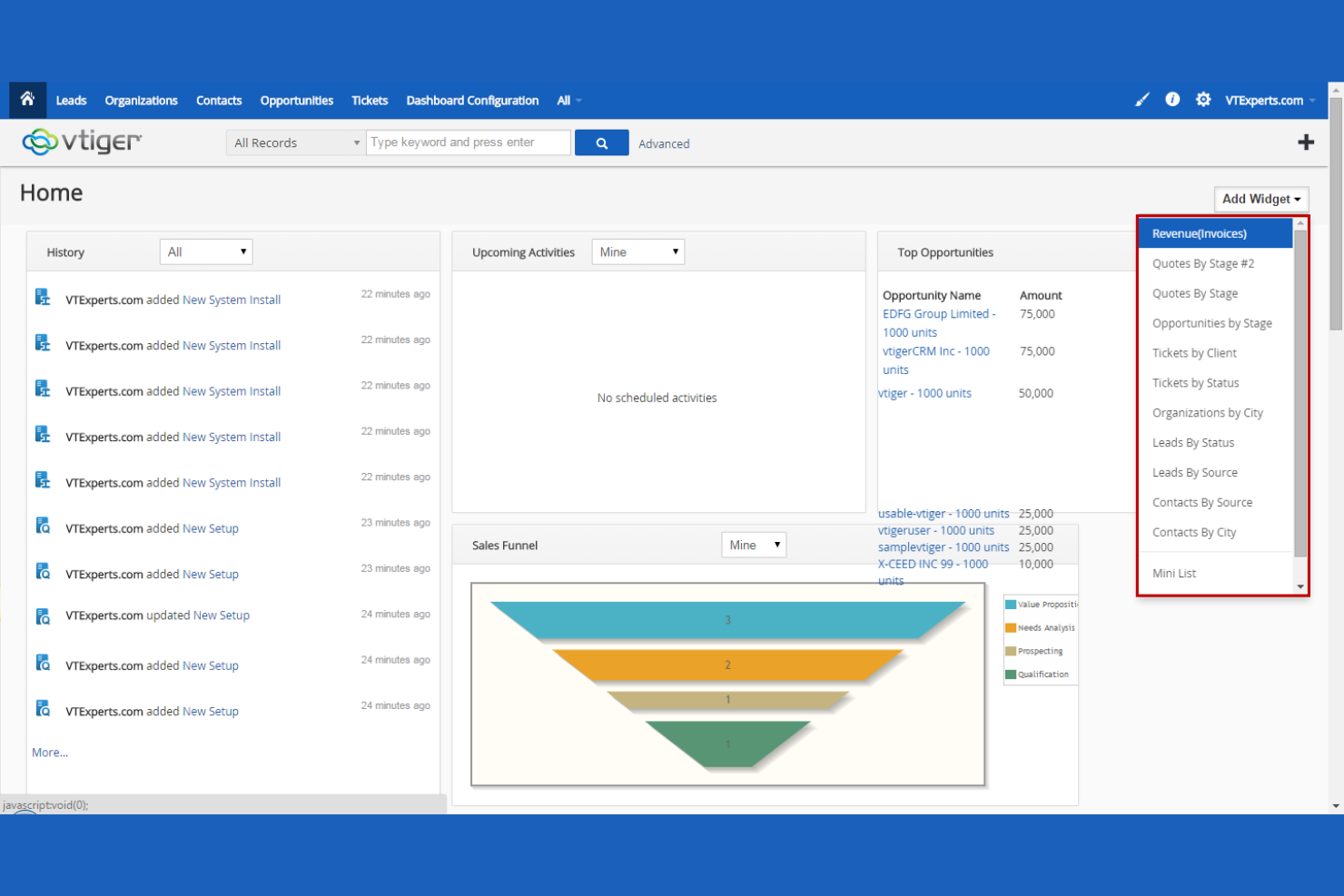
Sales and support teams that rely on phone communication may find Vtiger especially useful. This CRM stands out for its built-in telephony features, letting you make, receive, and log calls directly within the platform. Unlike Zoho CRM, Vtiger’s native calling tools help teams centralize customer conversations and track call activity without third-party add-ons.
Who Is Vtiger Best For?
Vtiger is best suited to sales and customer service teams at small and mid-sized businesses that rely on phone-based communication as part of their customer engagement strategy.
Why Vtiger Is a Good Zoho CRM Alternative
For teams that want telephony built right into their CRM, Vtiger offers a unique advantage. I picked Vtiger as a Zoho CRM alternative because it lets you make, receive, and record calls directly from the platform, without needing extra software. The system automatically logs call details and links them to contact records, so you always have a complete communication history. This makes Vtiger a strong choice for sales and support teams that rely on phone outreach and want everything tracked in one place.
Vtiger Key Features
Some other features in Vtiger that may be helpful for your team include:
- Case Management: Track, assign, and resolve customer support cases within the CRM.
- Sales Pipeline Visualization: View and manage deals through customizable pipeline stages.
- Document Management: Store, share, and organize files directly in contact and deal records.
- Workflow Automation: Set up automated actions and notifications based on triggers and conditions.
Vtiger Integrations
Integrations include Google Workspace, Microsoft Teams, WhatsApp, Microsoft Outlook, Docusign, Mailchimp, QuickBooks, Xero, and Zoom Meetings.
Pros and Cons
Pros:
- Document management linked to contact records
- Case management for customer support tracking
- WhatsApp and Microsoft Teams native integration
Cons:
- No built-in social media management tools
- Limited marketing automation features
Best for large enterprises
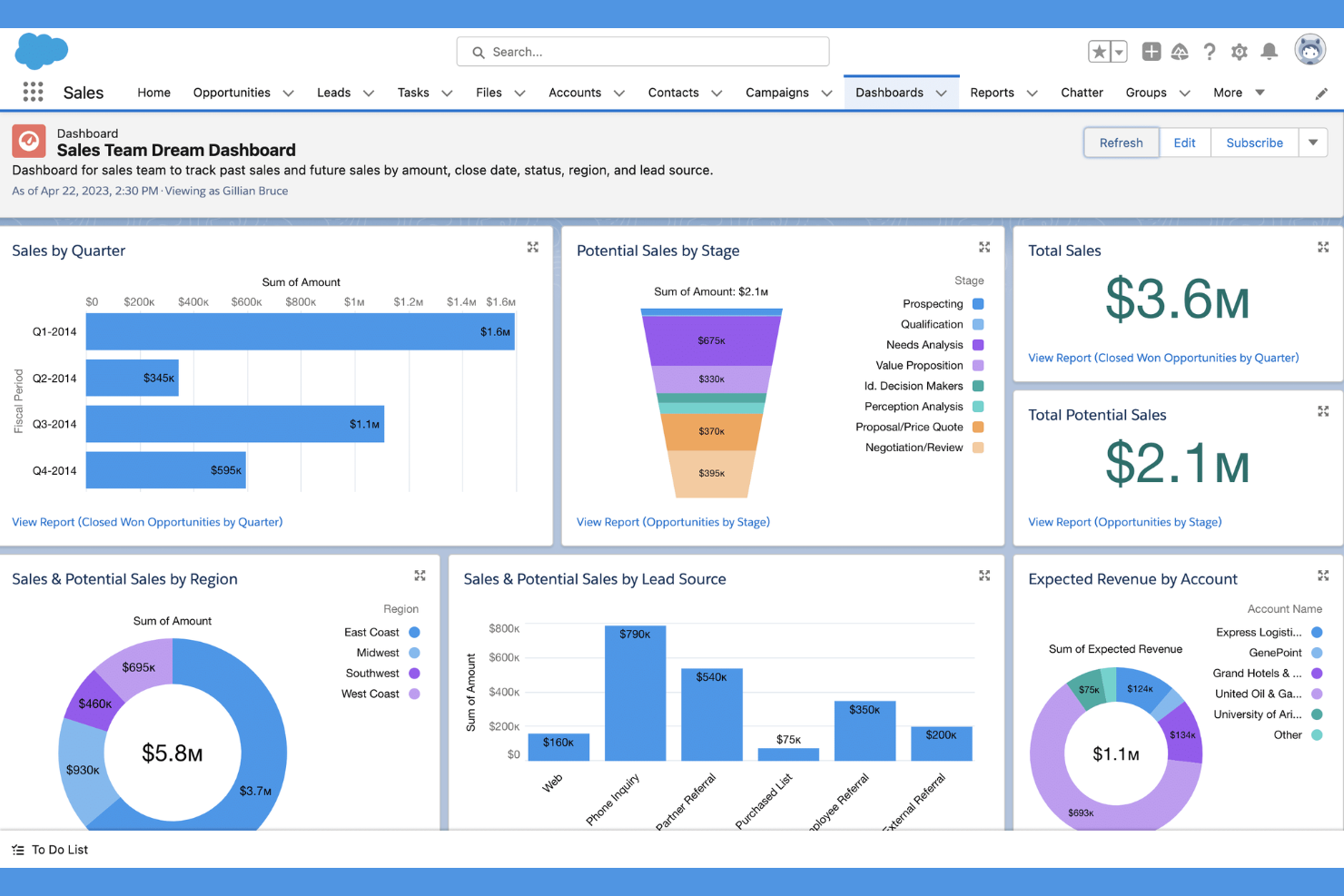
Salesforce is a cloud-based CRM platform built for organizations that need deep customization and advanced automation. It’s a strong fit for large enterprises or teams with complex sales processes and integration requirements. If your business needs to tailor workflows, automate multi-step processes, or connect with a wide range of third-party tools, Salesforce offers flexibility beyond most CRM systems.
Who Is Salesforce Best For?
Salesforce is best suited to sales operations, revenue, and CRM teams at large enterprises that need extensive customization to support complex sales processes and customer management requirements.
Why Salesforce Is a Good Zoho CRM Alternative
For teams that need advanced customization, Salesforce stands out as a flexible CRM platform. I picked it as a Zoho CRM alternative because it lets you design custom objects, automate complex workflows, and build tailored dashboards for unique business processes. Its process builder and flow automation tools support intricate sales cycles and approval chains. If your organization requires a CRM that adapts to specialized requirements, Salesforce offers a level of configurability that’s hard to match.
Salesforce Key Features
Some other Salesforce features that may interest teams considering a new CRM include:
- Einstein AI: This feature uses artificial intelligence to provide predictive lead scoring and sales insights directly within the platform.
- Case Management: Manage customer support cases with automated assignment, escalation rules, and a unified view of all interactions.
- AppExchange Marketplace: Access thousands of third-party apps and add-ons to extend Salesforce’s core functionality.
- Mobile App: Use the Salesforce mobile app to access CRM data, update records, and manage tasks from anywhere.
Salesforce Integrations
Integrations include Slack, Google Workspace, Microsoft 365, QuickBooks, Mailchimp, Docusign, Shopify, Dropbox, and more.
Pros and Cons
Pros:
- Scalable for global, multi-division organizations
- Large ecosystem of third-party app integrations
- Highly configurable for complex sales cycles
Cons:
- Add-ons and upgrades raise total cost
- Requires dedicated admin for management

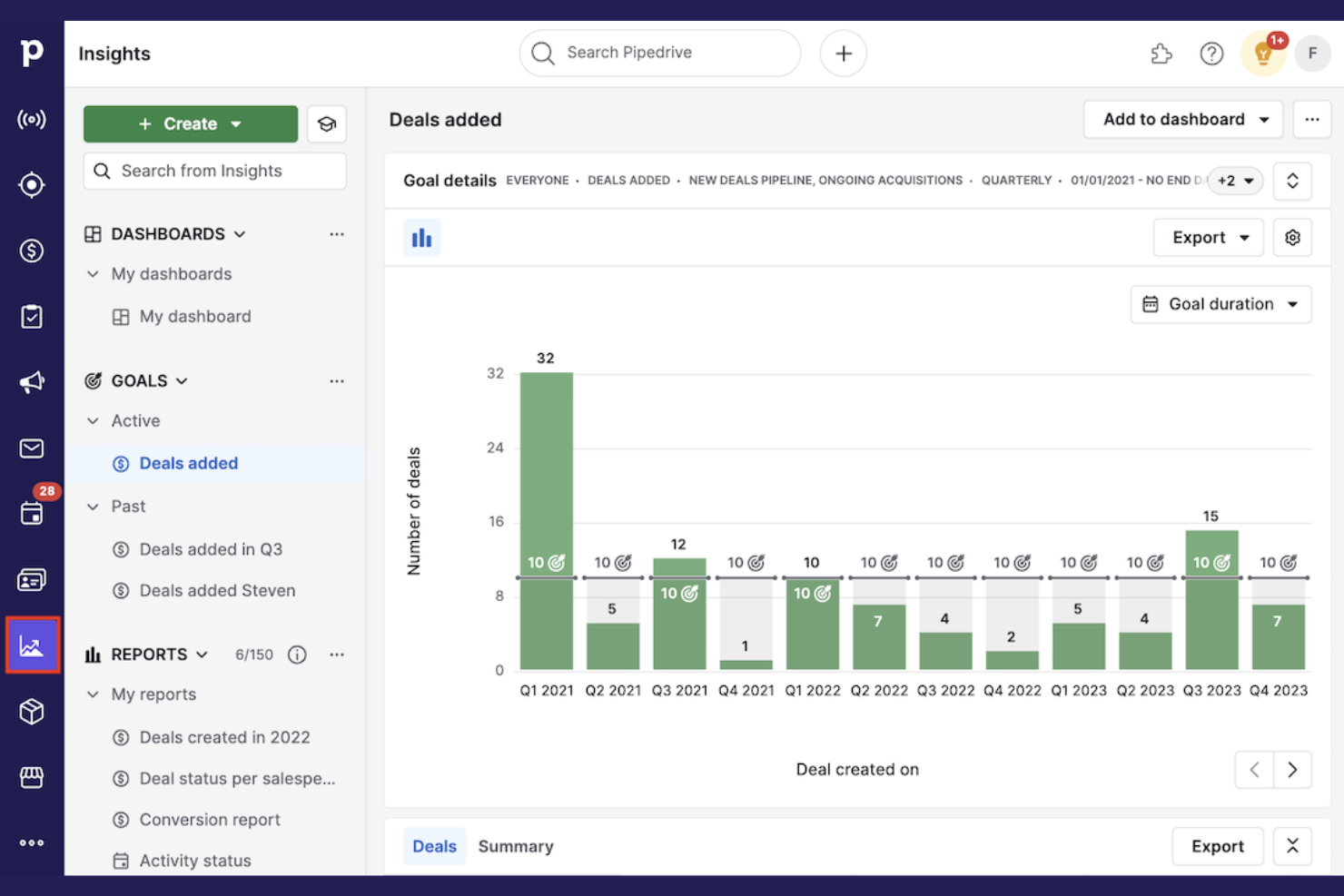
Sales teams looking for a highly visual way to manage deals often turn to Pipedrive. This CRM is designed for professionals who want to track sales progress using customizable pipelines and drag-and-drop deal stages. Pipedrive stands out from Zoho CRM with its intuitive, kanban-style interface that helps users quickly spot bottlenecks and prioritize follow-ups.
Who Is Pipedrive Best For?
Pipedrive is best suited to sales teams at startups and SMBs that need a visual approach to tracking opportunities and managing sales pipelines.
Why Pipedrive Is a Good Zoho CRM Alternative
For teams that want a clear, visual overview of their sales process, Pipedrive offers a unique approach. I picked it as a Zoho CRM alternative because its kanban-style pipeline lets you drag and drop deals between stages, making it easy to track progress at a glance. The platform also provides customizable pipeline views and color-coded deal indicators, so you can quickly identify stalled deals or high-priority opportunities. If your sales process relies on visual cues and hands-on management, Pipedrive’s pipeline management features set it apart.
Pipedrive Key Features
Some other features in Pipedrive that may be useful for your team include:
- Email Integration: Sync your email accounts to send, receive, and track messages directly within Pipedrive.
- Activity Scheduler: Schedule calls, meetings, and tasks with a built-in calendar and reminders.
- Sales Reporting Dashboard: Access real-time sales metrics and customizable reports to monitor team performance.
- Lead Capture Web Forms: Create and embed web forms to automatically collect and route new leads into your pipeline.
Pipedrive Integrations
Integrations include PandaDoc, Leadfeeder, JustCall, LinkPort, Outfunnel, Slack, QuickBooks, Trello, Zoom, and Gmail.
Pros and Cons
Pros:
- Web forms for direct lead capture
- Email sync with tracking and templates
- Built-in activity scheduler with reminders
Cons:
- No built-in inventory management features
- No built-in customer support ticketing

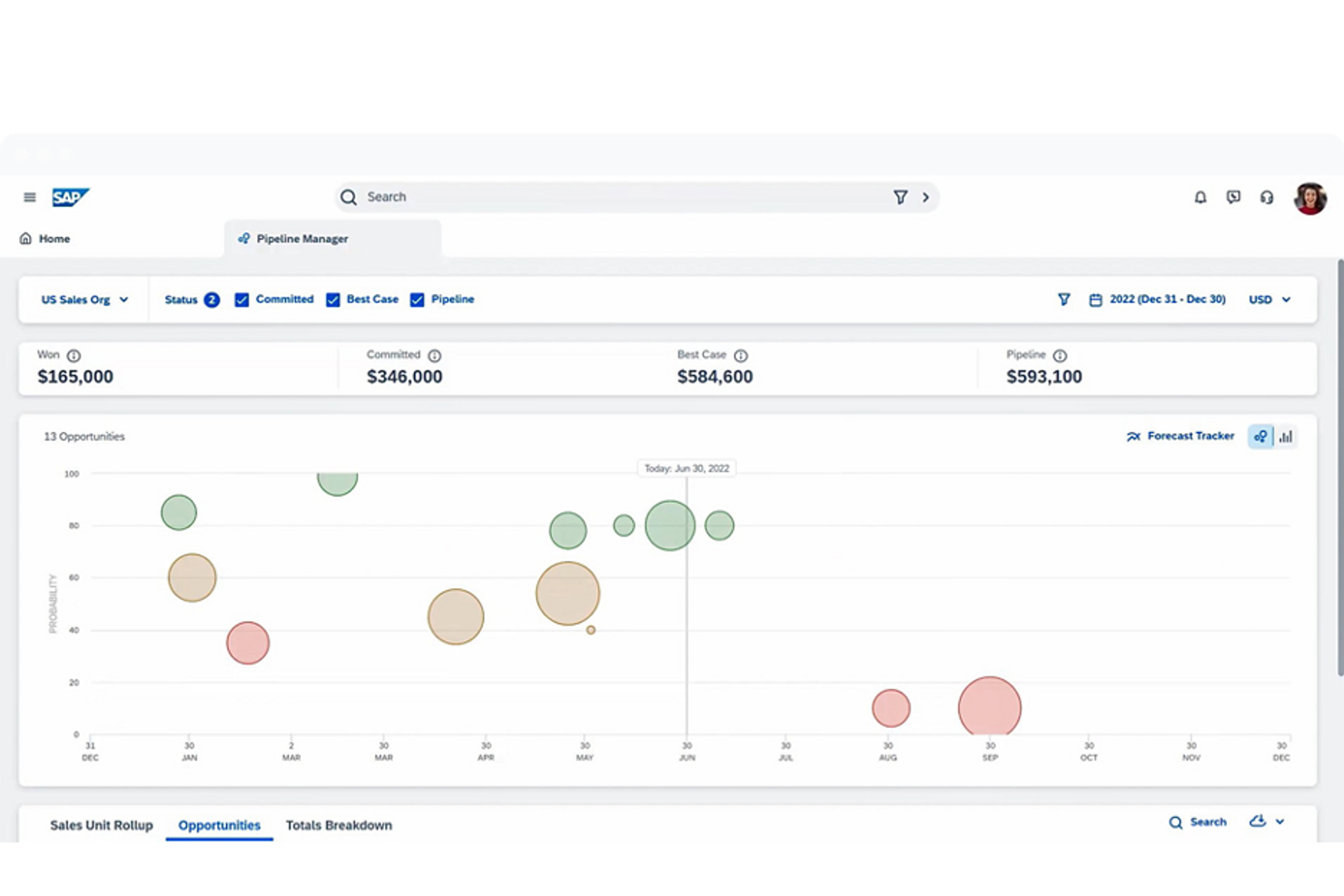
For organizations operating across multiple countries, SAP Sales Cloud offers a CRM solution built with global compliance in mind. This platform is designed for enterprises that need to manage complex sales processes while meeting strict data privacy and regulatory standards. Unlike Zoho CRM, SAP Sales Cloud provides advanced tools for handling regional compliance, multi-currency transactions, and cross-border sales governance.
Who Is SAP Sales Cloud Best For?
SAP Sales Cloud is best suited to sales and compliance teams at multinational enterprises that operate across regulated industries and multiple geographic markets.
Why SAP Sales Cloud Is a Good Zoho CRM Alternative
If your business needs to navigate complex international regulations, SAP Sales Cloud is built for that challenge. I picked SAP Sales Cloud as a Zoho CRM alternative because it offers advanced compliance management tools, including support for GDPR, CCPA, and other regional data privacy laws. The platform also handles multi-currency and multi-language requirements, making it easier to manage sales operations across borders. These features make SAP Sales Cloud a strong choice for global organizations that need to stay compliant while scaling their customer relationship management.
SAP Sales Cloud Key Features
Some other features in SAP Sales Cloud that may be valuable for your team include:
- Sales Performance Management: Track quotas, incentives, and sales targets within the platform.
- AI-Powered Forecasting: Use predictive analytics to improve sales pipeline accuracy.
- Mobile Sales App: Access customer data and manage opportunities from any device.
- Product Configuration Tool: Build and manage complex product bundles and pricing rules.
SAP Sales Cloud Integrations
Integrations include the native SAP ecosystem, including SAP S/4HANA, SAP ERP Central Component, SAP CPQ, and SAP Intelligent Product Recommendation.
Pros and Cons
Pros:
- Advanced product configuration and quoting features
- Deep integration with SAP enterprise products
- Multi-currency and multi-language support
Cons:
- Implementation requires significant IT resources
- Pricing details not publicly available


Teams that need CRM and project management in one place often turn to Insightly. This platform is designed for businesses that want to manage sales pipelines and post-sale project delivery without switching tools. Unlike Zoho CRM, Insightly offers built-in project management features that help you track tasks, milestones, and project progress alongside your customer data.
Who Is Insightly Best For?
Insightly is best suited to sales and project management teams at SMBs that need to connect customer relationship management with project delivery and client work.
Why Insightly Is a Good Zoho CRM Alternative
If you’re looking for a CRM that also handles project management, Insightly is worth considering. I picked it as a Zoho CRM alternative because it lets you manage both customer relationships and project workflows in one platform. You can create projects directly from opportunities, assign tasks, set milestones, and track project progress without leaving the CRM. This makes Insightly a strong fit for teams that want to connect sales and project delivery in a single cloud-based solution.
Insightly Key Features
Some other features in Insightly that may be valuable for your team include:
- Custom Fields and Page Layouts: Tailor records and layouts to match your business processes and data needs.
- Email Tracking: Monitor when emails are opened and clicked directly from the CRM.
- Lead Routing: Automatically assign incoming leads to the right team members based on custom rules.
- Relationship Linking: Connect contacts, organizations, and opportunities to visualize complex relationship networks.
Insightly Integrations
Integrations include QuickBooks Online, Workday, Unbounce, ZoomInfo, Slack, Jira, Shopify, Xero, and ADP Workforce Now.
Pros and Cons
Pros:
- Lead routing with customizable assignment rules
- Relationship linking for complex account mapping
- Built-in project management with task tracking
Cons:
- API access restricted to the Professional plan and above
- No built-in marketing automation features
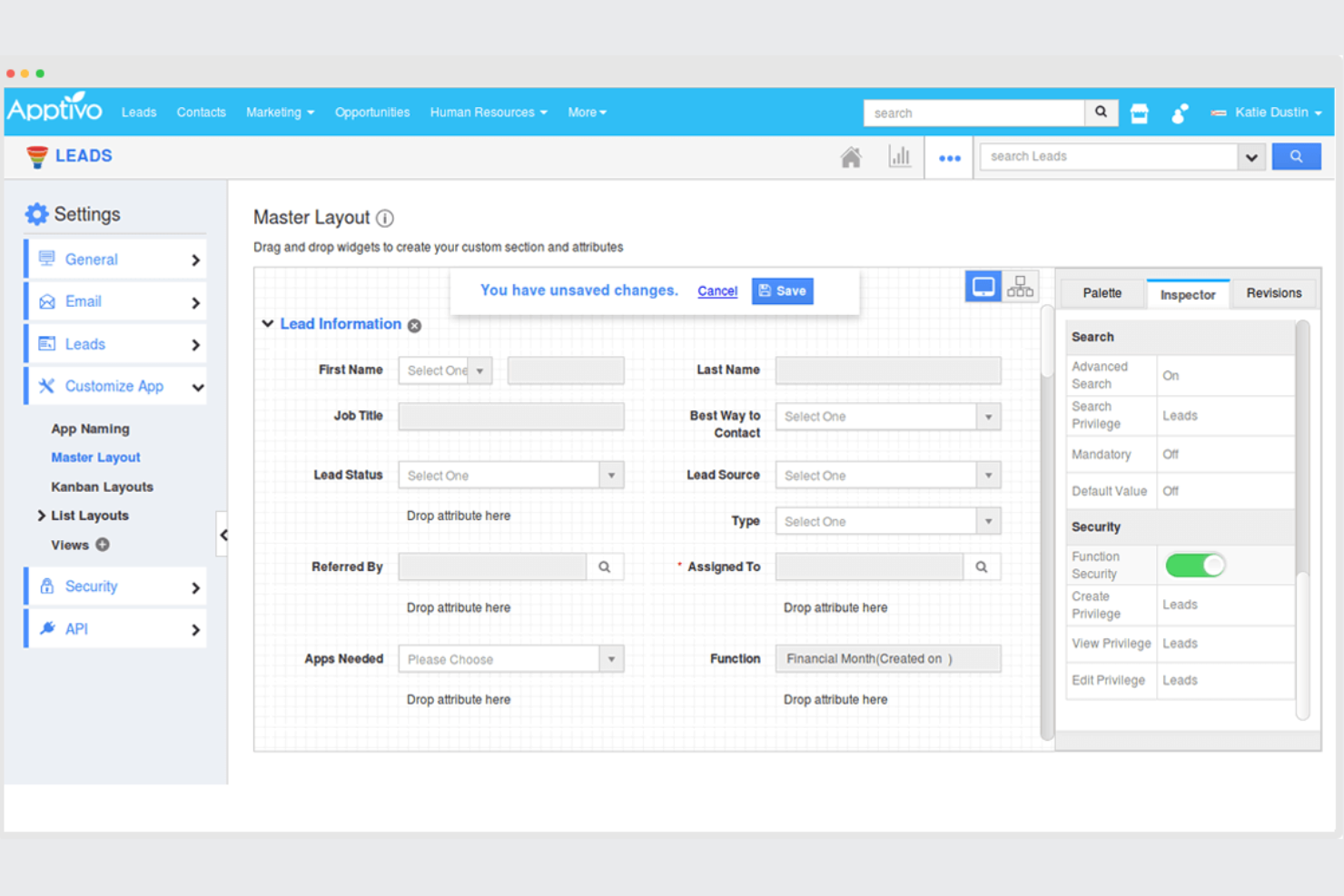
If you’re looking for a CRM that adapts to your business processes, Apptivo offers a modular approach to customization. This platform is a strong fit for small and midsize businesses that want to tailor their CRM with a wide range of add-on apps. Unlike Zoho CRM, Apptivo lets you mix and match modules for sales, support, invoicing, and project management to fit your exact workflow.
Who Is Apptivo Best For?
Apptivo is best suited to operations and sales teams at small and growing businesses that need a CRM platform that can be adapted through modular business applications.
Why Apptivo Is a Good Zoho CRM Alternative
What sets Apptivo apart for me is its modular app customization, which gives you control over how your CRM works. You can add or remove modules for sales, support, invoicing, and project management, so your team only uses what’s relevant. I appreciate that Apptivo lets you configure workflows, fields, and dashboards for each module, making it easy to match your unique business processes. This flexibility makes Apptivo a strong Zoho CRM alternative for teams that want a CRM tailored to their exact needs.
Apptivo Key Features
In addition to its modular customization, I also found these features worth noting:
- Email Integration: Connect your CRM with Gmail, Office 365, and other email providers to track communications directly within Apptivo.
- Lead Scoring: Automatically assign scores to leads based on custom criteria to help prioritize follow-up.
- Expense Management: Track and manage business expenses within the same platform as your CRM data.
- Customer Portal: Give customers access to their own portal for submitting requests and viewing updates.
Apptivo Integrations
Integrations include QuickBooks, Xero, Authorize.Net, PayPal, Stripe, Google Workspace, Office 365, Slack, Dropbox, and more.
Pros and Cons
Pros:
- Customer portal for direct client interactions
- Built-in project management and invoicing tools
- Modular apps let you build custom workflows
Cons:
- Limited automation for complex sales processes
- Fewer advanced analytics than Zoho CRM
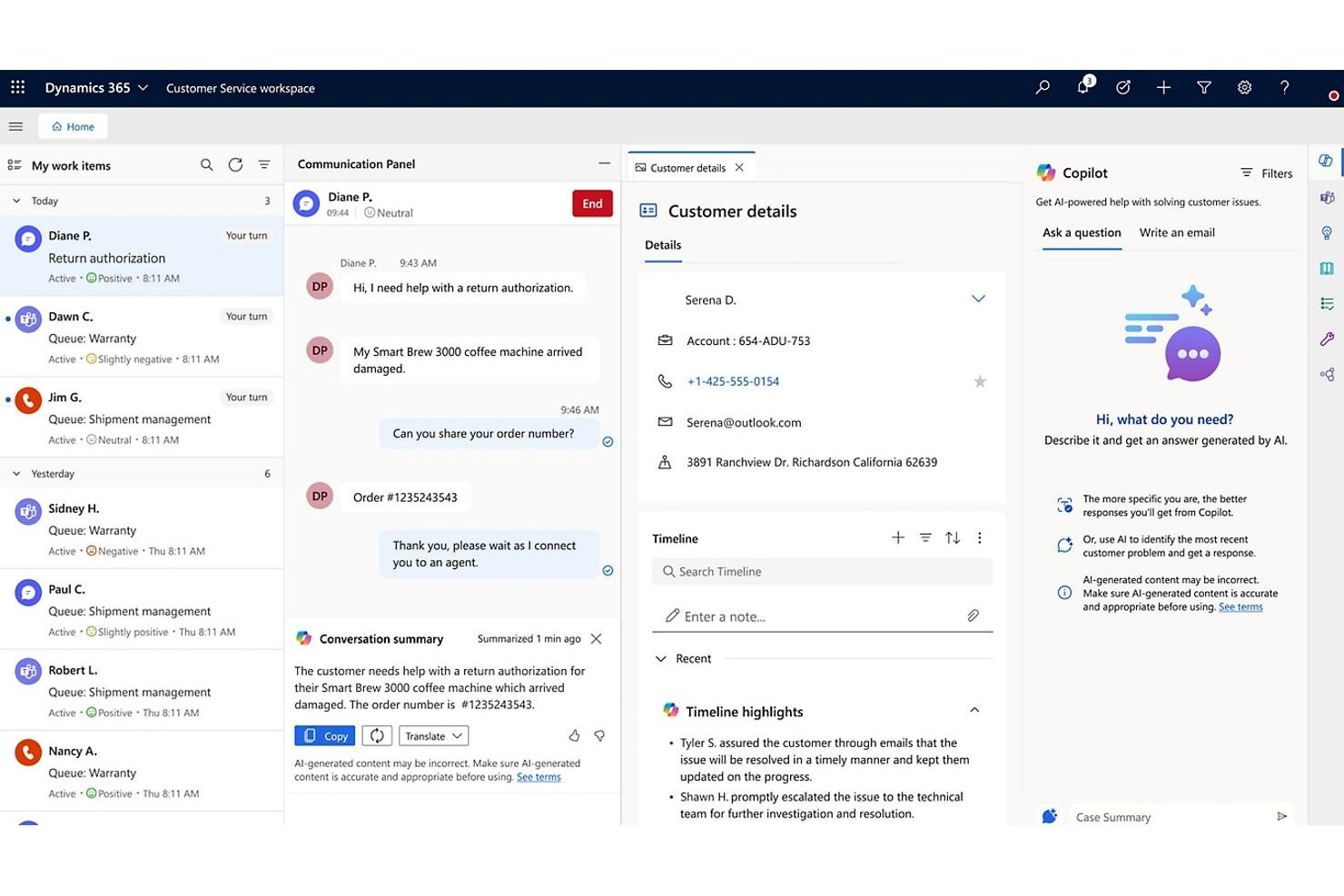
For organizations already using Microsoft 365, Microsoft Dynamics 365 offers a CRM that fits right into your existing workflows. It’s especially useful for teams that want to connect customer data, sales activities, and communications across Outlook, Teams, and other Microsoft apps. Dynamics 365 stands out for its deep native integration with the Microsoft ecosystem, making it easier to manage customer relationships without switching between platforms.
Who Is Microsoft Dynamics 365 Best For?
Microsoft Dynamics 365 is best suited to sales, operations, and IT teams at mid-sized and enterprise organizations that rely on Microsoft 365 tools across their business workflows.
Why Microsoft Dynamics 365 Is a Good Zoho CRM Alternative
If your team relies on Microsoft 365 tools, Dynamics 365 is a natural fit for your CRM needs. I picked it as a Zoho CRM alternative because it offers direct integration with Outlook, Teams, and SharePoint, allowing you to manage customer interactions and documents without leaving your familiar apps. The platform also supports real-time collaboration on sales and service records within Microsoft Teams. For businesses that want to keep all customer data and communications tightly connected to their Microsoft environment, Dynamics 365 delivers a smooth experience.
Microsoft Dynamics 365 Key Features
Some other features in Microsoft Dynamics 365 that may interest you include:
- AI-Powered Sales Insights: Get predictive analytics and recommendations to help prioritize leads and opportunities.
- Customizable Workflows: Design and automate business processes to match your team’s unique requirements.
- Customer Service Case Management: Track, assign, and resolve customer service cases from a centralized dashboard.
- Mobile App Access: Manage sales, service, and customer data from anywhere using the Dynamics 365 mobile app.
Microsoft Dynamics 365 Integrations
Integrations include Docusign, Meta, Twilio, SAP, Mailchimp, Zendesk, and more.
Pros and Cons
Pros:
- Advanced security and compliance features
- AI-driven sales and customer insights
- Deep integration with Microsoft 365 applications
Cons:
- Navigation can be slow with large datasets
- Complex setup for non-Microsoft environments
Other Zoho CRM Alternatives
Here are some additional Zoho CRM alternative options that didn’t make it onto my shortlist, but are still worth checking out:
- Copper
With Google Workspace integration
- Freshsales
For AI-powered lead scoring
- Agile CRM
For all-in-one sales and marketing tools
- ConvergeHub
For managing B2B customer lifecycles
- OnePageCRM
For action-focused sales workflows
- Odoo
For integrated business management apps
- Zendesk
For customer support ticketing
- Bitrix24
For unlimited free user accounts
- monday CRM
For customizable team collaboration


How I Evaluate Zoho CRM Alternatives
I split my evaluation into two layers: baseline criteria a CRM must clear—unified customer records, omnichannel engagement, case management—and the differentiators that set tools apart for CX teams.
Core Functionality (Table Stakes For This List)
When I'm selecting tools for my list, I rank each one on a scale from 0 (does not offer the functionality) to 5 (excels in this area) for each core functionality listed below. Then, I calculate the tool's total score into a percentage. Each tool needs to achieve a minimum total score of 65% to be considered for inclusion.
- Unified Customer Database: I check whether the platform consolidates contacts, accounts, and interaction history into a single profile—so a support rep sees recent purchases and open tickets without switching tabs.
- Omnichannel Engagement: Each tool should support email, phone, chat, and social from one interface. I look at whether reps can switch channels mid-conversation without losing thread context.
- Workflow & Journey Automation: I evaluate the automation builder for multi-step triggers—things like auto-escalating a case when an SLA breach is approaching or enrolling a new customer in an onboarding sequence.
- Pipeline & Case Management: CX teams need configurable pipelines for both sales handoffs and service cases. I look for custom stages, queue assignment rules, and SLA tracking in a single view.
- CX Reporting & Analytics: Dashboards should cover CX-specific KPIs like CSAT, first response time, and ticket resolution trends. I look for custom report builders, not just static prebuilt views.
- Third-Party Integrations & API: The tool should connect natively to helpdesks, telephony platforms, and marketing tools your team already uses. I also check for open API access and iPaaS support through tools like Zapier or Make.
Once I have a list of tools that meet this criteria, I consider what sets each platform apart.
Differentiating Factors (What Sets Vendors Apart)
Here's how I compare and contrast different vendors:
Standout Features
AI-driven capabilities like predictive churn scoring and sentiment analysis help CX teams prioritize outreach before a customer disengages. I evaluate how deeply those insights connect to the contact record. Built-in VoC tools carry extra weight when CSAT or NPS surveys feed directly into customer profiles for closed-loop follow-up. No-code customization is worth checking too—teams that can build custom fields, layouts, and objects without developer support adapt faster as their CX processes evolve.
Beyond Features
Pricing transparency matters—I check whether tiers are clearly differentiated and whether CX-specific features like omnichannel routing sit behind costly upgrades. Scalability is equally important; a five-person support team and a 200-seat contact center have very different needs around record limits, multi-brand support, and regional deployment. I also evaluate implementation speed, looking for prebuilt migration tools, onboarding templates, and guided setup flows that help CX teams get productive without a months-long rollout.
Why Look For a Zoho CRM Alternative?
While Zoho CRM is a good choice of cloud-based customer relationship management software, there are a number of reasons why some users seek out alternative solutions. You might be looking for a Zoho CRM alternative because…
- You need deeper integration with Google Workspace
- You want more advanced workflow automation options
- You require industry-specific CRM features
- You find Zoho CRM’s interface too complex for your team
- You need better support for multi-currency or multi-language operations
- You want more flexible reporting and analytics tools
If any of these sound like you, you’ve come to the right place. My list contains several cloud-based customer relationship management software options that are better suited for teams facing these challenges with Zoho CRM and looking for alternative solutions.
Zoho CRM Key Features
Here are some of the key features of Zoho CRM to help you contrast and compare what alternative solutions offer:
- Lead and contact management: This CRM simplifies lead management by automating lead scoring and eliminating manual data entry for small teams looking to organize their prospect databases.
- Sales pipeline and deal tracking: Moving beyond traditional Excel spreadsheets, this module offers a drag-and-drop interface to track deals, tailored specifically to the pipeline needs of growing medium-sized businesses.
- Workflow automation and process management: While setting up complex, automated workflows can present a slightly steep learning curve at first, it significantly maximizes daily crm functionality by handling repetitive sales tasks.
- Customizable dashboards and reporting: Featuring an incredibly user-friendly interface, this module delivers advanced reporting on key sales metrics to help businesses of all sizes make data-driven decisions.
- Email integration and tracking: This feature bridges the user experience between sales communication and email marketing by letting reps monitor email opens, clicks, and replies directly inside the client record.
- AI-powered sales assistant (Zia): Zia expands the platform's core CRM capabilities as one of its most advanced features, predicting deal outcomes and analyzing customer sentiment in real time.
- Web forms and lead capture tools: Designing a custom landing page form to capture prospects is easier due to the platform's highly intuitive interface.
- Multi-channel communication (phone, chat, social, email): It unifies phone, chat, social media, and broadcast email campaigns into a single dashboard, so reps have complete context for every customer interaction.
- Role-based access controls: This security layer allows admins to restrict data visibility based on team hierarchy, ensuring long-term scalability as the organization expands.
- Integration with Zoho and third-party apps: The versatile CRM software is praised for its overall ease of use, offering integration with native tools, ecommerce platforms, and hundreds of popular third-party integrations.