

Müşteri desteğini yönetmek, özellikle kullandığınız araçlar ihtiyaçlarınıza tam olarak uymadığında gerçekten baş ağrıtabilir. Zoho Desk'in ekibiniz için yeterli olmadığını düşünüyorsanız yalnız değilsiniz. Birçok müşteri deneyimi yöneticisi benzer zorluklarla karşılaşıyor ve kendine özgü işletme ihtiyaçlarını daha iyi karşılayan alternatifler arıyor.
Çeşitli müşteri hizmetleri yazılımlarını bağımsız olarak test edip inceledim ve sizin ve ekibiniz için gerçekten önemli olan noktalara odaklandım. Bu makalede, Zoho Desk alternatifleri için en iyi seçimlerimi paylaşarak tarafsız ve kapsamlı araştırmalara dayanan bir bakış açısı sunacağım.
Zoho Desk Nedir?
Zoho Desk, ekibinizin destek taleplerini yönetmesine ve müşteri etkileşimlerini iyileştirmesine yardımcı olmak için tasarlanmış bir müşteri hizmetleri yazılımıdır. Genellikle talepleri verimli bir şekilde ele almak için güvenilir bir araca ihtiyaç duyan destek temsilcileri, yöneticiler ve müşteri deneyimi profesyonelleri tarafından kullanılır. Otomasyon, çok kanallı destek ve raporlama özellikleri; görevleri düzenlemeye, müşterilerle iletişim kurmaya ve performansı izlemeye yardımcı olur. Genel olarak Zoho Desk, ekibinizin zamanında ve etkili müşteri desteği sunma becerisini geliştirebilir.
Neden Zoho Desk Alternatifi Aramalısınız?
Zoho Desk'in kurulumu ve öğrenilmesi zaman alır. Ayrıca bazı gelişmiş özellikler, hızlı ve anlaşılır raporlara ihtiyaç duyan küçük ekipler için önemli olabilecek şekilde, yalnızca en üst pakette sunulur. Başka bir araç şu durumlarda daha uygun olabilir:
- En üst paket olmadan gelişmiş özellikler istiyorsunuz. Birden fazla marka için yardım merkezleri yalnızca Zoho Desk'in en üst paketinde sunulur ve bazı kullanıcılar gelişmiş özelliklerin pahalı olduğunu düşünüyor. Help Scout gibi araçlar canlı sohbet, ortak gelen kutusu ve yanıt süreleri ile memnuniyet hakkında raporlama özelliklerini içerir.
- Ekibinizin kısa sürede işe hâkim olmasını istiyorsunuz. Bazı kullanıcılar Zoho Desk'te gezinmenin başlangıçta zor olduğunu ve gelişmiş kurulumların dışarıdan yardım gerektirebileceğini düşünüyor. Groove gibi seçenekler, kısa bir öğrenme sürecine sahip anlaşılır bir arayüz sunar.
- Performansı her hafta raporlarla takip ediyorsunuz. Bazı kullanıcılar raporlama bölümünü düzensiz buluyor ve büyük veri kümelerinde gecikme bildiriyor. Freshdesk gibi platformlar gerçek zamanlı, özelleştirilebilir panolar sunarken SparrowDesk etkileşimli analizler sağlar.
- Temsilcileriniz telefonlardan veya Microsoft Teams üzerinden çalışıyor. Bazı kullanıcılar mobil uygulamanın masaüstü sürümüne kıyasla daha az kapsamlı olduğunu düşünüyor. Desk365 gibi uygulamalar mobil erişim sunar ve temsilcilerin talepleri doğrudan Microsoft Teams içinde yönetmesine olanak tanır.
Zoho Desk şu durumda hâlâ doğru seçimdir: Talepleri etiketleyen ve özetleyen, yanıt taslakları hazırlayan ve bilgi tabanınızdan müşterilere yanıt veren yerleşik AI özelliğini, AI için ekstra ücret ödemeden istiyorsanız. Ayrı bir eklenti kullanmadan AI desteği isteyen destek ekipleri için bu özellik, bazı işlevlerdeki daha yavaş kurulumu ve en üst paket fiyatlandırmasını dengeleyebilir.
Why Trust Our Software Recommendations
6,700+
Reviews
20
Industry experts
16+
Evaluation factors
14
Years
Our team has been testing and reviewing software since 2012. As CX leaders ourselves, we know how difficult—and important—it is to choose the right software.
For this guide, we evaluated tools using hands-on testing and independent research, scoring tools using our selection criteria.
Our reviews reflect our human editorial judgment, not a sales pitch.
 Gui DrusinaCreative Director
 Tim FisherVP of AI
Karşılaştırma Tablosu: Zoho Desk Alternatifleri
Bu karşılaştırma tablosu, Zoho Desk alternatifleri için en iyi seçimlerimin fiyatlandırma ayrıntılarını özetlemektedir.
Score legend (out of 5)
- Excellent4.5–5
- Good4–4.4
- Average3–3.9
- Below average2–2.9
- Poor1–1.9
Sorted by: Default
| Tool | Starting Price | Website | |||||||
|---|---|---|---|---|---|---|---|---|---|
Best for AI-assisted multilingual support | 3.8 out of 5 | 4 | 3 | 4 | 4 | 4 | 4 | $29/user/month 14-day free trial available | Book Demo |
Best for an AI copilot assistant | 4.2 out of 5 | 4 | 4 | 4 | 4 | 5 | 4 | $16/agent/month Free plan + 14-day trial + free demo available | Website |
Best for managing high volumes of inquiries | 3.8 out of 5 | 4 | 4 | 3 | 3 | 5 | 4 | $25/user/month Free plan + 15-day free trial + free demo available | Website |
Best for ecommerce inbox management | 3.7 out of 5 | 4 | 3 | 4 | 3 | 5 | 3 | $45/user/month 14-day free trial + free demo available | Website |
Best with guest access for external collaboration | Not rated | 3 | 3 | 4 | 3 | 4 | Not rated | $14/user/month 30-day free trial available | Website |
Best for Microsoft Teams integration | 3.3 out of 5 | 4 | 3 | 3 | 3 | 4 | 3 | $12/user/month Free plan + 21-day trial + demo available | Website |
Best for AI-native ticket resolution | 3.2 out of 5 | 3 | 3 | 4 | 2 | 4 | 3 | $150/month Free plan + free trial + free demo available | Website |
Best for AI-first service | 4.3 out of 5 | 4 | 4 | 5 | 4 | 5 | 4 | $19/user/month 14-day free trial + demo available | Website |
Best for multilingual support | 4.3 out of 5 | 4 | 4 | 5 | 4 | 5 | 4 | $39/user/month Free demo available | Website |
Best for automating tasks | 4.2 out of 5 | 4 | 4 | 4 | 3 | 5 | 5 | Pricing upon request Not available | Website |
Best for large enterprises | 4.2 out of 5 | 4 | 4 | 4 | 4 | 5 | 4 | $19/user/month 14-day free trial | Website |
Best for enterprise IT service | 4.2 out of 5 | 4 | 4 | 4 | 4 | 5 | 4 | Pricing upon request Free demo available | Website |
Best for retail support and in-chat shopping | 4.2 out of 5 | 4 | 4 | 5 | 4 | 5 | 3 | Pricing upon request Free demo available | Website |


2020'den beri müşteri deneyimi yazılımlarını test ediyor ve inceliyoruz. Biz de müşteri deneyimi yöneticileri olduğumuz için yazılım seçerken doğru kararı vermenin ne kadar kritik ve zor olduğunu biliyoruz. Okurlarımızın daha iyi yazılım satın alma kararları vermesine yardımcı olmak için kapsamlı araştırmalara yatırım yapıyoruz.
Farklı müşteri deneyimi kullanım senaryoları için 2.000'den fazla aracı test ettik ve 1.000'in üzerinde kapsamlı yazılım incelemesi yazdık. Şeffaflığımızı nasıl koruduğumuzu öğrenin & yazılım inceleme metodolojimize göz atın.
En İyi Zoho Desk Alternatifleri İncelemeleri
Aşağıda, kısa listeme giren en iyi Zoho Desk alternatiflerine ilişkin ayrıntılı özetlerimi bulabilirsiniz. İncelemelerim, sizin için en uygun seçeneği bulmanıza yardımcı olmak amacıyla her aracın temel özelliklerine, artılarına & eksilerine, entegrasyonlarına ve ideal kullanım alanlarına ayrıntılı bir bakış sunuyor.
 Best for AI-assisted multilingual support
- 14-day free trial available
- From $29/user/month (billed annually)
Visit WebsiteCustomer Rating:4.4/5
Freshdesk lets users manage ticket status, priority, and assignments. Freshdesk Omni is an omnichannel customer service platform that brings email, chat, social messaging, and AI-powered automation into a single agent workspace—making it a strong fit for support teams that need to manage high conversation volumes across multiple channels without losing context.
Who Is Freshdesk Omni Best For?
Freshdesk Omni is a strong fit for support teams handling customers across multiple languages and messaging channels from a single workspace.
Why I Picked Freshdesk Omni
I picked Freshdesk Omni because it handles multilingual support in a way that's genuinely practical: the Live Translate feature lets agents translate ticket conversations in real time directly from the ticket view, so a single agent can support customers across languages without rerouting. I also appreciate how Freddy AI Agent can be configured to respond in multiple languages automatically across chat, WhatsApp, and email, cutting down on manual triage. The multilingual knowledge base adds another layer, letting teams organize content by language so customers self-serve in their own language before a ticket is ever created.
Freshdesk Omni Key Features
- SLA management: Automatically tracks response and resolution deadlines per ticket, with configurable policies that vary by priority, channel, or customer type.
- Collision detection: Alerts agents when another team member is already viewing or replying to the same ticket, preventing duplicated effort.
- CSAT survey module: Sends configurable customer satisfaction surveys on ticket resolution via email, Web Chat, WhatsApp, Instagram, or Facebook, with filterable trend reports.
- Freddy AI Insights: Analyzes support trends, surfaces proactive alerts, and runs root-cause analysis on issues like declining CSAT or rising SLA breaches (Enterprise plan).
Freshdesk Omni Integrations
Freshdesk Omni supports 1,200+ claimed ticketing integrations, with Marketplace integrations including Slack, Microsoft Teams, Google Calendar, Atlassian Jira Plus, and Freshsales Suite. REST APIs and webhooks support custom integrations.
Pros and Cons
Pros:
- CSAT and SLA insights guide service improvements
- Shared inbox keeps cross-channel tickets visible
- Live translation reduces bilingual-agent handoffs
Cons:
- Channel follow-ups can create duplicate tickets
- AI sometimes gives wrong answers or actions
Learn more about Freshdesk: Best for an AI copilot assistant
- Free plan + 14-day trial + free demo available
- From $16/agent/month (billed annually)
Visit WebsiteCustomer Rating:4.6/5
SparrowDesk lets teams manage live chats and AI-assisted support in one inbox. SparrowDesk is an AI-powered customer support platform that centralizes email, live chat, and messaging channels in one inbox, making it a practical fit for small businesses and growing support teams that want smarter ticket management without the complexity of a large suite.
Who Is SparrowDesk Best For?
SparrowDesk is a strong fit for small and growing support teams that want AI-assisted ticket handling without the overhead of a large, complex platform.
Why I Picked SparrowDesk
I've included SparrowDesk in my top picks because its AI Copilot lives directly inside the agent inbox, so my team isn't switching tabs to get help mid-conversation. I particularly like how Copilot can summarize long ticket threads instantly, which is a real time-saver when an agent picks up an escalated conversation cold. The in-inbox AI assistance pairs well with Zoona, SparrowDesk's AI agent that handles repetitive queries before they ever reach a human.
SparrowDesk Key Features
- No-code workflow builder: A drag-and-drop interface lets you create automated workflows using event triggers, conditions, and routing rules without writing code.
- SLA management: Set response and resolution targets by priority or ticket attributes, with automatic reminders and escalation emails when deadlines approach.
- CSAT surveys: Automatically send customizable satisfaction surveys after a support interaction closes and view each rating alongside its conversation.
- Custom reports: Build tailored reports by selecting metrics across conversations, agents, SLAs, and CSAT, then apply filters and chart breakdowns to surface the data you need.
SparrowDesk Integrations
SparrowDesk offers native integrations with Zoho CRM, Salesforce, HubSpot, Pipedrive, Slack, WhatsApp, Shopify, Jira, Linear, and Asana. It supports REST API, webhooks, MCP, JavaScript, React, iOS, and Android SDKs, plus Zapier.
Pros and Cons
Pros:
- Reports drill down to underlying conversations
- Intuitive routing and SLA rule setup
- Copilot summarizes long tickets in agent inbox
Cons:
- Knowledge editor lacks advanced formatting
- Complex workflows offer limited configuration
Learn more about SparrowDesk: Best for managing high volumes of inquiries
- Free plan + 15-day free trial + free demo available
- From $25/user/month (billed annually)
Visit WebsiteCustomer Rating:4.5/5
Help Scout surfaces AI draft suggestions directly in the reply composer. Help Scout is a customer support platform built around a shared inbox that brings email, chat, and social conversations together—making it a natural fit for small to mid-sized teams that want an intuitive, email-like alternative to more complex help desk tools.
Who Is Help Scout Best For?
Help Scout is a strong fit for small to mid-sized support teams that prioritize a clean, email-like experience over deep configuration.
Why I Picked Help Scout
I picked Help Scout as one of the best because it's genuinely built to absorb high conversation volumes without things slipping through the cracks. The shared Inbox uses collision detection to flag when two agents are viewing the same conversation, and automatic workflows can silently tag, route, and assign incoming emails before anyone has to touch them. I also rely on SLA policies to keep response and resolution times measurable across the whole team, which is something you feel immediately when volume spikes.
Help Scout Key Features
- Collision detection: Flags when two agents are viewing or typing in the same conversation to prevent duplicate replies.
- Scout AI agent: Automatically resolves customer questions using connected knowledge sources like your help center or website, with built-in escalation to a human agent.
- Beacon widget: Embeds a customizable support hub on your website or app, surfacing help articles, live chat, contact forms, and proactive messages in one place.
- Signal analytics: Organizes conversations into topics and tracks trends across Inboxes, channels, and teams to surface recurring issues and performance patterns.
Help Scout Integrations
Help Scout offers 100+ marketplace integrations, including Salesforce, HubSpot, Jira, Slack, Shopify, WhatsApp, and Aircall. It also provides Inbox, Chat, and Docs APIs, webhooks, Apps, MCP, and Zapier.
Pros and Cons
Pros:
- Email-like inbox feels simpler than Zoho Desk
- Workflows auto-tag and route incoming conversations
- Collision alerts help prevent duplicate replies
Cons:
- Phone support depends on external call tools
- Reporting lacks depth for granular team analysis
Learn more about Help Scout: Best for ecommerce inbox management
- 14-day free trial + free demo available
- From $45/user/month (billed annually)
Visit WebsiteCustomer Rating:4.4/5
eDesk centralizes customer support tickets with AI classification. eDesk is an ecommerce-focused helpdesk that pulls customer messages, orders, and tracking details from 300+ marketplaces and sales channels into one inbox, making it a natural fit for online sellers who need to manage multi-channel support without juggling multiple seller accounts.
Who Is eDesk Best For?
eDesk is a strong fit for multichannel ecommerce sellers who need customer messages, orders, and tracking details from dozens of marketplaces in one place.
Why I Picked eDesk
I picked eDesk as one of the best because it's built specifically for multichannel ecommerce sellers in a way that Zoho Desk simply isn't. When a customer messages about an Amazon order, eDesk pulls that order's status, tracking details, and history directly into the ticket view without any custom API work. I also love that the AI Agent can handle routine requests like refund inquiries and order status checks using your actual procedures and brand tone, across all your connected channels simultaneously.
eDesk Key Features
- Collision detection: Alerts agents when another team member is already viewing or replying to the same ticket, preventing duplicate responses.
- CSAT surveys: Automatically sends customer satisfaction surveys after ticket resolution, with results available in the reporting dashboard.
- SLA rules and escalation: Lets you set response-time targets by channel or priority and automatically escalates tickets that are at risk of breaching those targets.
- Role-based access controls: Assigns permissions by role so agents, managers, and administrators each see and act on only what their role requires.
eDesk Integrations
eDesk offers 300+ native marketplace, webstore, and social-channel integrations, including Amazon, eBay, Shopify, Magento, WooCommerce, Instagram, WhatsApp Business, and Aircall. It also provides a REST API and webhooks for custom integrations.
Pros and Cons
Pros:
- Reviewers praise shared inbox and support
- Automation handles repeat order-status questions
- Order context stays beside marketplace tickets
Cons:
- AI suggestions can miss technical-product context
- Reporting offers limited agent-level detail
Learn more about eDesk: Best with guest access for external collaboration
- 30-day free trial available
- From $14/user/month (billed annually)
Visit WebsiteCustomer Rating:4.8/5
Missive combines email, tasks, and team chat in one inbox view. Missive is a collaborative inbox platform that appeals to small teams wanting to manage email, SMS, WhatsApp, and live chat in one shared workspace—without the complexity of a traditional help desk.
Who Is Missive Best For?
Missive suits small teams that need a shared inbox for email, chat, and social channels but don't require a formal ticketing system.
Why I Picked Missive
I picked Missive as one of the best Zoho Desk alternatives because of how it handles guest access for external collaboration. You can invite contractors, clients, or agency partners into specific conversations without giving them a full seat, which means your external stakeholders can weigh in on a support thread without ever getting access to your broader inbox. I also appreciate the shared drafting feature, where multiple teammates can co-write a reply in real time before it goes out.
Missive Key Features
- AI rules: Automatically analyze incoming emails and trigger actions like task creation or conversation escalation based on message content.
- Workload balancing: Distribute incoming conversations across your team using round-robin, least-busy-first, all-at-once, or random assignment.
- Canned responses with variables: Build reusable reply templates with dynamic variable fields to personalize outgoing messages at scale.
- Multi-channel unified inbox: Manage email, SMS, WhatsApp, Live Chat, Messenger, and Instagram conversations from one shared workspace.
Missive Integrations
Missive offers 25+ native integrations, including HubSpot, Salesforce, Pipedrive, Shopify, Aircall, Dialpad, Asana, ClickUp, and Trello, plus Zapier. It also supports API, MCP, webhooks, and custom iFrame integrations.
Pros and Cons
Pros:
- Unified inbox coordinates email, chat, and social
- Shared drafts prevent duplicate or conflicting replies
- Guest access brings external collaborators into conversations
Cons:
- No customer-facing knowledge base for self-service
- No native ticket numbers or SLA management
Learn more about Missive: Best for Microsoft Teams integration
- Free plan + 21-day trial + demo available
- From $12/user/month (billed annually)
Visit WebsiteCustomer Rating:4.8/5
Desk365 lets users submit IT support tickets directly within Microsoft Teams. Desk365 is a helpdesk platform built natively for Microsoft 365 that lets teams manage customer and IT support tickets directly inside Microsoft Teams, making it a natural fit for organizations already running their work inside the Microsoft ecosystem.
Who Is Desk365 Best For?
Desk365 is a strong fit for IT and support teams already working inside Microsoft 365, where managing tickets directly in Teams is a priority.
Why I Picked Desk365
I picked Desk365 because it's genuinely built around Microsoft Teams, not just bolted onto it. My team can create, track, and respond to tickets without ever leaving Teams, and direct messages or channel conversations can be converted into tickets instantly. I also appreciate that the AI Agent deploys directly into Teams, so routine questions get answered in the same space where my team already works.
Desk365 Key Features
- SLA reminders and escalations: Automatically sends reminders and escalation notifications when tickets are approaching or have breached defined service-level agreements.
- CSAT and NPS surveys: Collects customer satisfaction ratings on configurable scales after ticket resolution, with survey results available in the reporting area.
- Role-based permissions and password policies: Lets admins set feature access by agent role and configure password complexity, expiration, session timeouts, and automatic sign-outs.
- Asset lifecycle management: Tracks hardware, software, and consumables from procurement through depreciation, with records for vendors, locations, and procurement history.
Desk365 Integrations
Desk365 offers native Microsoft ecosystem integrations, including Microsoft Teams, Microsoft Entra ID, Power Automate, Microsoft 365 Copilot, and Intune. It also connects with Asana, Microsoft Planner, Azure DevOps, Jira, and Power BI, with REST API and webhook support.
Pros and Cons
Pros:
- AI-generated knowledge articles support self-service
- Responsive help resolving setup issues
- Clearer ticket routing and SLA escalation
Cons:
- No native phone or social support channels
- Basic reports limit deeper performance analysis
Learn more about Desk365: Best for AI-native ticket resolution
- Free plan + free trial + free demo available
- From $150/month (billed annually)
Visit WebsiteCustomer Rating:4.5/5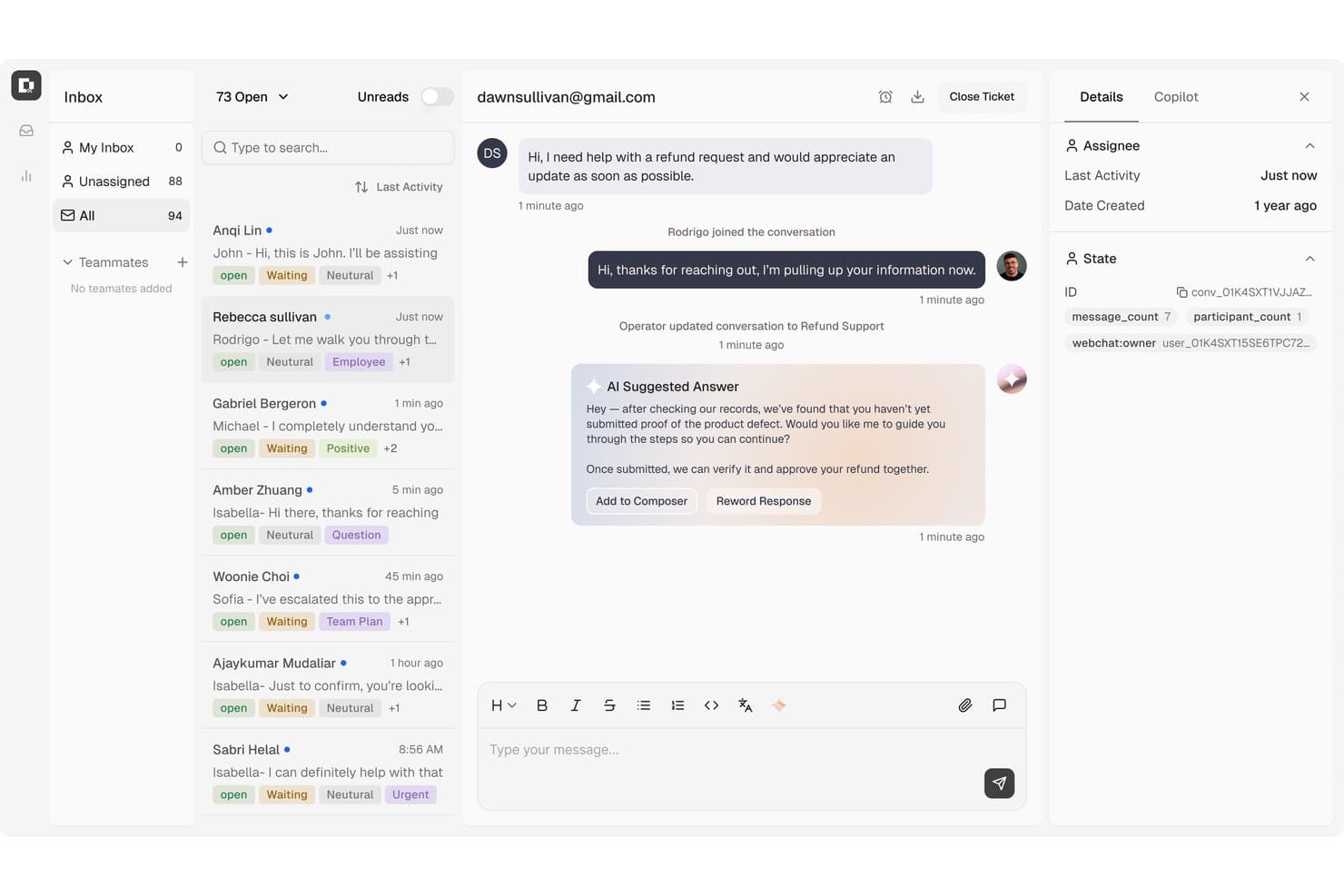
Botpress centralizes customer support tickets with AI-suggested replies. Botpress is an AI agent platform that doubles as a full helpdesk through Botpress Desk, making it a strong fit for support teams that want AI to handle ticket resolution end-to-end rather than just assist human agents.
Who Is Botpress Best For?
Botpress is a strong fit for support teams that want AI to resolve tickets autonomously, with human agents handling only the cases that genuinely need them.
Why I Picked Botpress
I've included Botpress in my top picks because it treats AI resolution as the default, not a add-on. Before an agent ever opens a ticket, Botpress Desk pulls in CRM context, billing history, and past similar cases, then suggests a likely cause and fix. The AI can also take real actions like processing refunds or account updates autonomously, which means your agents are only handling the cases that genuinely need a human.
Botpress Key Features
- Omnichannel inbox: Manage conversations from webchat, email, WhatsApp, Slack, Instagram, Telegram, and Facebook Messenger in a single shared inbox.
- Ticket enrichment: Before an agent opens a ticket, Botpress pulls in CRM data, billing history, and past similar cases to suggest a likely cause and resolution.
- SLA management: Set SLA rules scoped to individual bots, with automated notifications and clocks that start when a ticket is escalated to a human agent.
- Knowledge base with AI sourcing: Build a public Help Center that pulls content from Notion, Confluence, Google Drive, SharePoint, and more, feeding both the AI and your human agents.
Botpress Integrations
Botpress offers integrations with Zendesk, Intercom, HubSpot, Salesforce, Zoho SalesIQ, Shopify, Jira, Slack, and other documented platforms. It also supports REST API, webhooks, ADK/SDK, MCP, and Zapier connections for custom workflows.
Pros and Cons
Pros:
- AI-to-human handoffs retain conversation context
- Enrichment gives agents account and billing context
- AI handles routine tickets before escalation
Cons:
- Reviewers report basic analytics and limited exports
- No direct Zoho Desk migration path
Learn more about Botpress: Best for AI-first service
- 14-day free trial + demo available
- From $19/user/month (billed annually)
Visit WebsiteCustomer Rating:4.4/5
Intercom centralizes customer conversations with contact details in one view. Intercom is an AI-first helpdesk that unifies customer conversations from email, live chat, phone, and social channels into a shared inbox—making it a strong fit for support teams that want AI automation, omnichannel coverage, and ticketing all in one platform.
Who Is Intercom Best For?
Intercom is a strong fit for mid-market support teams that want AI automation and omnichannel conversations managed from a single inbox.
Why I Picked Intercom
I picked Intercom as one of the best Zoho Desk alternatives because it's built from the ground up around AI, not bolted on as an afterthought. Its Fin AI Agent resolves customer questions autonomously across every channel in the shared inbox, while Copilot works alongside agents in real time, surfacing answers, drafting replies, and summarizing conversations so teammates spend less time digging and more time resolving.
Intercom Key Features
- Omnichannel shared inbox: Consolidates conversations from email, live chat, phone, SMS, WhatsApp, Instagram, Facebook, Slack, and Discord into one workspace.
- Ticket portal: Gives customers a central portal to view, track, and act on their open tickets without contacting support.
- Knowledge Hub: Centralizes internal articles, past conversations, PDFs, and third-party content sources so both AI and agents draw from the same pool.
- Custom reporting dashboards: Lets teams build reports with customizable layouts, charts, filters, and targets beyond the 12 pre-built options.
Intercom Integrations
Intercom offers 450+ first- and third-party integrations, including marketplace integrations with Salesforce, HubSpot CRM, Shopify, Stripe, Jira, Twilio, and Slack. It also provides REST APIs, SDKs, and webhooks for custom integrations.
Pros and Cons
Pros:
- Configurable workflows prioritize ticket triage
- Unified inbox keeps channel context beside tickets
- AI triage summarizes conversations and autofills tickets
Cons:
- Support delays can leave account issues unresolved
- High seat costs can burden growing teams
 Best for multilingual support
- Free demo available
- From $39/user/month
Visit WebsiteCustomer Rating:4.5/5
Deskpro centralizes ticket conversations, notes, and customer details in one view. Deskpro is a help desk platform that unifies email, chat, voice, social, and messaging channels in one workspace, making it a strong fit for support teams that need omnichannel ticket management, AI-assisted workflows, and deep integration flexibility without switching between tools.
Who Is Deskpro Best For?
Deskpro is a strong fit for support teams that handle customers across multiple languages, regions, or brands from a single workspace.
Why I Picked Deskpro
I picked Deskpro as one of the best Zoho Desk alternatives because it handles multilingual support in a way that's genuinely built into the product, not bolted on. Teams serving customers across regions can publish localized Help Center content, run multilingual search inside the Messenger widget, and get AI-generated ticket summaries and draft replies in non-English languages. I especially appreciate that incoming tickets can be routed by detected language automatically, so the right agent picks up the conversation without manual triage.
Deskpro Key Features
- Multi-step workflow automation: Build branching, conditional workflows with no automation-volume cap, available across all plans.
- 150+ built-in reports: Access pre-built reports covering ticket volume, agent activity, resolution rates, and customer satisfaction across channels.
- Role-based permissions and SSO: Control agent and customer access separately with granular permissions and SSO support via Okta, SAML, Azure, and more.
- Native VoIP with call routing: Handle inbound and outbound calls directly in the platform with IVR, call recordings, round-robin distribution, and work-shift rules.
Deskpro Integrations
Deskpro offers marketplace integrations with Salesforce, HubSpot, Jira, Slack, Microsoft Teams, Shopify, and WooCommerce, plus REST API, webhooks, and a JavaScript and HTML app framework for custom connections. Zapier connects Deskpro to 1,000+ apps.
Pros and Cons
Pros:
- Branching workflows have no automation-volume cap
- Shared channel history helps agents manage context
- Multilingual content and AI replies support global teams
Cons:
- Article editor bugs can lose edits
- Ticket searches and inboxes can lag
Learn more about Deskpro:

Kayako offers live chat, automation, shared inbox & customer journey mapping. Kayako is a customer service software designed to help teams automate their support processes and manage customer interactions efficiently. It's used by businesses that want to enhance their support capabilities with automation.
Why Kayako is a good Zoho Desk Alternative: Kayako offers a live chat function that allows your team to engage with customers in real-time. Its automation features help reduce repetitive tasks, giving your team more time for complex inquiries.
The shared inbox ensures all team members are on the same page, improving communication and collaboration. Additionally, Kayako's customer journey mapping helps your team understand customer interactions and improve service delivery.
Standout features & integrations:
Features include a knowledge base for self-service support, ticket management for organized and timely responses, and customer satisfaction surveys for valuable feedback. These features help reduce workload, improve efficiency, and enhance the customer experience.
Integrations include Slack, Shopify, Zapier, Salesforce, Trello, Jira, Google Workspace, Microsoft Teams, Mailchimp, and QuickBooks.
Pros and Cons
Pros:
- High service standards
- Maps customer journeys
- Reduces repetitive tasks
Cons:
- Integration complexity
- Frequent updates


Zendesk offers analytics, scalability, and multi-channel support. Zendesk is a user-friendly customer service platform designed for large enterprises, providing tools to manage customer interactions and support operations. It's widely used by teams that need to handle a high volume of customer inquiries efficiently.
Why Zendesk is a good Zoho Desk Alternative: With advanced analytics, Zendesk helps your team make data-driven decisions, a key advantage for large enterprises. Its customizable dashboards allow you to tailor insights to your needs, providing clarity on performance metrics.
The platform's scalability ensures it can handle growing demands as your business expands. Additionally, Zendesk offers cloud-based multi-channel support, allowing your team to engage customers across various platforms.
Standout features & integrations:
Features include a ticketing system that efficiently organizes customer interactions, ensuring smooth issue resolution. It also features a help center for self-service, enabling customers to find answers independently. Additionally, workflow automation reduces repetitive tasks, allowing your team to focus on delivering high-quality customer support.
Integrations include Slack, Salesforce, Shopify, Mailchimp, Trello, Google Workspace, Microsoft Teams, Jira, HubSpot, and Dropbox.
Pros and Cons
Pros:
- Strong automation capabilities
- Advanced analytics tools
- Scales with large teams
Cons:
- Limited export functionality at basic levels
- Support limitations
Learn more about Zendesk: Best for enterprise IT service
- Free demo available
- Pricing upon request

ServiceNow Customer Service Management tracks cases, priority, and satisfaction in one dashboard. ServiceNow Customer Service Management (CSM) is an enterprise-grade platform that connects front-office case management with back-office workflows, making it a strong fit for large organizations that need AI-driven triage, omnichannel support, and deep cross-team coordination in one place.
Who Is ServiceNow Customer Service Management Best For?
ServiceNow CSM is a strong fit for large enterprises that need to connect front-office support with back-office workflows across IT, operations, and service teams.
Why I Picked ServiceNow Customer Service Management
I picked ServiceNow CSM because it's purpose-built for large organizations that need customer-facing case work and back-office resolution to happen in one connected system. When a warranty claim comes in, Otto can confirm coverage, trigger a technician dispatch, and ship a replacement part, all without an agent manually coordinating across teams. The CRM Case Management AI Specialist goes further by self-assigning cases, building action plans, and routing policy exceptions through the right approval chains automatically.
ServiceNow Customer Service Management Key Features
- Omnichannel customer engagement: Routes and tracks conversation history across voice, SMS, chat, web, and portal channels from a single workspace.
- Skills-based advanced work assignment: Matches incoming cases to agents using skills-based routing rules and intelligent assignment logic.
- Customer satisfaction surveys: Automatically sends CSAT surveys when an agent closes a case or a customer accepts a proposed solution via the portal or email.
- Knowledge management with AI Search: Provides a searchable knowledge base with granular access controls and AI-powered search results for agents and customers.
ServiceNow Customer Service Management Integrations
ServiceNow Customer Service Management integrates with Genesys, Five9, Amazon Connect, Amazon Lex, Amazon Transcribe, and Amazon Comprehend. It also supports REST and web services APIs, webhooks, and data import and export for custom integrations.
Pros and Cons
Pros:
- Tracks backlog, SLA, and agent outcomes
- Automates routing across complex service teams
- Connects customer cases with back-office resolution
Cons:
- Report tailoring can require technical expertise
- Specialized workflows demand admin configuration
Learn more about ServiceNow Customer Service Management:

Gladly unifies chat, calls, and customer history in one view. Gladly is a customer service platform built for retail and high-volume consumer brands that unifies every customer conversation—across chat, email, SMS, voice, and social—into a single, lifelong record that both AI and human agents can act on.
Who Is Gladly Best For?
Gladly is built for retail and consumer brands with high-volume support needs, where agents handle everything from order questions to in-chat purchases across multiple channels.
Why I Picked Gladly
I picked Gladly as one of the best because it's the only platform I've seen that lets customers browse, buy, and pay entirely within a chat conversation, without ever leaving to complete a purchase. That in-chat shopping experience is powered by a customer profile that already knows a shopper's past orders, sizes, and style preferences, so product recommendations are specific rather than generic. Agents can also process refunds and cancellations in the same thread, keeping the full order history together.
Gladly Key Features
- Omnichannel conversation timeline: Every email, chat, SMS, call, and social message from a customer is grouped into one continuous thread, so agents have full context without toggling between tools.
- People Match® routing: Conversations are routed to agents based on customer history, lifetime value, sentiment, and required skills, and can return a customer to the same agent across channels.
- Built-in voice and IVR: Gladly includes a native phone system with configurable IVR menus, queue settings, and AI-generated call summaries alongside other channel conversations.
- Workflow automation with AI branching: Workflows can branch on expression-based or AI-evaluated conditions, collect customer information, run external actions, and route or close conversations automatically.
Gladly Integrations
Gladly lists 60+ apps and integrations, including marketplace integrations with Shopify, Salesforce, Slack, Amazon Connect, Klaviyo, and AfterShip. REST APIs, a Lookup API, webhooks, an App Platform, and Chat SDKs support custom integrations.
Pros and Cons
Pros:
- Tasks and routing organize follow-ups
- In-chat purchases use shopper preferences
- Unified customer history across channels
Cons:
- Workflow rules take time to configure
- Reporting can require manual assembly
Learn more about Gladly:
Diğer Zoho Desk Alternatifleri
İşte kısa listeme girmeyen ancak yine de göz atmaya değer bazı ek Zoho Desk alternatifleri:
- 14TeamSupportBest for B2B SaaS support
- 15Vision HelpdeskBest for satellite help desks
- 16HappyFoxBest for IT integrations
- 17LiveAgentBest for omnichannel support
- 18VivantioBest for service management
- 19HiverBest for AI tagging
- 20ProProfs Help DeskBest for knowledge base integration
- 21Jira Service ManagementBest for agile teams
- 22CayzuBest for small business support
- 23KustomerBest for customer relationship insights
- 24GorgiasBest for support-led ecommerce sales
- 25TidioBest for smart ticket management
- 26HubSpot Service HubBest for all-in-one support
- 27SysAidBest for IT service management
- 28FrontBest for team collaboration
- 29Microsoft Dynamics 365 Customer ServiceBest for contact center workforce planning
- 30Salesforce Service CloudBest for AI-driven service
- 31Manage Engine ServiceDesk PlusBest for ITIL compliance
How I Evaluate a Zoho Desk Alternative
I split my evaluation into three parts. First, core functionality: any alternative must handle ticket management and multi-channel support—this carries the most weight. Second, I look for standout features like AI-powered chatbots or native VoIP. Third, I consider pricing transparency and onboarding support.
Core Functionality (Table Stakes For This List)
When I'm selecting tools for my list, I score each one on a scale from 0 (does not offer the functionality) to 5 (excels in this area) for each core functionality listed below. I then convert the total into a percentage to help assess each tool’s overall fit, with extra weight on any functionalities I’ve deemed essential.
- Ticket Management (Essential): I look for clear assignment, priority, and status tracking, so agents can follow a billing issue or product fault through to resolution.
- Multi-Channel Support (Essential): I check whether email, chat, phone, and social inquiries come together with customer context in one workspace.
- Knowledge Base: I assess whether customers can find organized, searchable answers to recurring questions, such as setup steps, without contacting support.
- Workflow Automation: I look for rules that route tickets by topic or urgency, escalate overdue cases, and handle repetitive agent tasks.
- Reporting & Analytics: I check for dashboards that track response and resolution times, ticket volume, and team workload.
- Third-Party Integrations: I consider connections to tools such as CRMs, communication apps, and ecommerce platforms, including how they fit existing workflows.
Once I have a list of tools that meet the criteria, I consider what sets each platform apart.
Differentiating Factors (What Sets Vendors Apart)
Here's how I compare and contrast different vendors:
Standout Features
I look for AI-powered chatbots that can resolve common questions—like order status or password resets—without a human agent ever touching the ticket. The best bots learn from your knowledge base and improve over time. I also evaluate built-in customer satisfaction surveys tied directly to resolved tickets, since that real-time feedback loop tells you more about agent performance than any dashboard alone. Native VoIP is another factor I check; platforms like Freshdesk and Zoho Desk bundle cloud telephony, but I compare call routing and IVR depth before assuming parity.
Beyond Features
I evaluate how easy it is to migrate from Zoho Desk—vendors like Freshdesk and Zendesk offer dedicated import tools for tickets and knowledge base articles, while others require CSV workarounds that slow cutover. Pricing transparency matters just as much, especially whether per-agent costs stay sustainable as your team scales or whether AI and automation features hide behind expensive add-on tiers. I also check onboarding support: a five-person team needs quick setup wizards, but a 200-agent operation needs structured rollout plans and admin training.
Zoho Desk'in Temel Özellikleri
Alternatif çözümlerin sunduklarını karşılaştırmanıza yardımcı olmak için Zoho Desk'in bazı temel özelliklerini aşağıda bulabilirsiniz:
- Çok kanallı destek: Ekibinizin müşterilerle bulundukları her yerde etkileşim kurabilmesini sağlamak için sosyal medya ve canlı sohbet de dâhil olmak üzere birden fazla platformdaki müşteri etkileşimlerini kolaylaştırır.
- Yapay zekâ entegrasyonu: Yapay zekâ asistanı Zia; bağlama dayalı destek sunar, talepleri otomatik olarak etiketler, duygu analizi gerçekleştirir ve yanıtların özelleştirilmesi için üretken yapay zekâ özellikleri sağlar. Böylece ekibiniz talepleri verimli bir şekilde yönetebilir.
- Kendi kendine hizmet seçenekleri: Müşteriler, hızlı yanıtlar almak için yönlendirmeli görüşmelere ve bilgi tabanına erişebilir; bu da ekibinizin iş yükünü azaltır.
- Temsilci üretkenliği araçları: Çalışma modları, yanıt verimliliği ve mobil kullanım gibi özellikler iş birliğini ve taleplerin yönetimini geliştirerek ekibinizin daha etkili çalışmasını sağlar.
- Otomasyon: Verimliliği artırmak için tekrarlanan görevleri, talep atamalarını ve bildirimleri otomatikleştirir; ekibinizin karmaşık sorunlara odaklanmasını sağlar.
- Genişletilebilirlik: Diğer yazılımlarla entegre olur ve özel işlevlere ve modüllere izin verir; böylece yardım masasını işletmenizin özel ihtiyaçlarına göre uyarlayabilirsiniz.
- İçgörüler ve analizler: Performans izleme ve zaman takibi için raporlar ve panolar sunarak ekibinize hizmeti geliştirmek için değerli içgörüler sağlar.
- Özelleştirme: Kuruluşunuzun ihtiyaçlarına uyacak şekilde markalama, şablonlar ve düzenler için kapsamlı seçenekler sunar.
- Güvenlik: Rol tabanlı erişim, GDPR uyumluluğu ve denetim günlükleriyle veri koruması sağlayarak ekibinizin müşteri verilerini güvenli bir şekilde işlemesine olanak tanır.