

Çağrı merkezi izleme sistemleri, müşteri deneyimi liderlerinin ve ekip yöneticilerinin müşteri memnuniyetini temsilci performansıyla dengeleme, gerçek zamanlı koçluk fırsatlarını belirleme ve kanallar genelindeki operasyonları kolaylaştırma gibi zorlukların üstesinden gelmesine yardımcı olur. Doğru platformla hizmet kalitesini artırabilir, verimsizlikleri azaltabilir ve çağrı merkezi temsilcilerinize sürekli olarak harika deneyimler sunmaları için ihtiyaç duydukları araçları sağlayabilirsiniz.
Bu sistemleri işlevsellik, kullanılabilirlik, entegrasyonlar, ölçeklenebilirlik ve fiyat-performans açısından inceledim ve test ettim. Bu makalede en iyi seçimlerimi, her birinin öne çıkmasını sağlayan özellikleri ve ekibinizin büyüklüğüne, bütçesine ve hedeflerine en uygun seçeneği nasıl belirleyebileceğinizi anlatacağım.
Why Trust Our Software Recommendations
6,700+
Reviews
20
Industry experts
16+
Evaluation factors
14
Years
Our team has been testing and reviewing software since 2012. As CX leaders ourselves, we know how difficult—and important—it is to choose the right software.
For this guide, we evaluated tools using hands-on testing and independent research, scoring tools using our selection criteria.
Our reviews reflect our human editorial judgment, not a sales pitch.
 Gui DrusinaCreative Director
 Tim FisherVP of AI
Çağrı Merkezi İzleme Sistemi Karşılaştırma Tablosu
Bu karşılaştırma tablosu, en iyi çağrı merkezi izleme sistemi seçimlerim için fiyatlandırma ayrıntılarını özetlemektedir.
Sorted by: Default
| Tool | Starting Price | Website | |
|---|---|---|---|
Best for shared QA across human and AI agents | 4.5 out of 5 | Pricing upon request Free demo available | Website |
Best for performance analytics | 4.8 out of 5 | $25/month Free demo available | Website |
Best for AI-powered call insights | 4.2 out of 5 | $25/user/month Free plan + 14-day trial + free demo available | Website |
Best with no-code AI workflow orchestration | 5.0 out of 5 | Pricing upon request Free demo available | Website |
Best for AI-driven insights | 4.4 out of 5 | Pricing upon request Free demo available | Website |
Best for real-time transcriptions | 4.3 out of 5 | Pricing upon request 14-day free trial + free demo available | Website |
Best for startups and SMBs | 4.4 out of 5 | $18/user/month 10-day free trial | Website |
Best for large enterprises | 4.3 out of 5 | $110/agent/month Free demo available | Website |
Best for analytics capabilities | 4.2 out of 5 | Available upon request Free demo available | Website |
Best for remote teams | 4.1 out of 5 | $15/user/month 14-day free trial | Website |


En İyi Çağrı Merkezi İzleme Sistemi İncelemeleri
Aşağıda, kısa listeme giren en iyi çağrı merkezi izleme araçlarının ayrıntılı özetlerini bulabilirsiniz. İncelemelerim, sizin için en iyi seçeneği bulmanıza yardımcı olmak amacıyla her aracın temel özelliklerine, artılarına ve eksilerine, entegrasyonlarına ve ideal kullanım alanlarına ayrıntılı bir bakış sunmaktadır.
 Best for shared QA across human and AI agents
- Free demo available
- Pricing upon request
Visit WebsiteCustomer Rating:4.5/5
Verint tracks service level vs. forecasted capacity across queues and campaigns. Verint is a workforce engagement management platform that combines interaction recording, AI-driven quality evaluation, compliance monitoring, workforce management, and speech analytics across voice and digital channels.
Who Is Verint Best For?
Verint is a strong fit for enterprise contact centers that need to evaluate both human agents and AI agents against a unified quality standard.
Why I Picked Verint
I picked Verint as one of the best because it's the only platform I've seen that evaluates human agents and AI agents against the same quality standard in a single shared view. Quality Intelligence automates evaluations across up to 100% of voice and digital interactions, then links every AI-generated score back to the exact moment in the conversation that drove it. That explainability makes it genuinely useful when coaching agents or auditing AI bot performance side by side.
Verint Key Features
- Omnichannel interaction recording: Captures voice, digital, and screen interactions across contact center and back-office environments and feeds them into quality and analytics workflows.
- PII redaction: Automatically detects and redacts sensitive information across voice recordings, transcripts, and screen captures.
- Supervisor Assist: Lets WFM administrators and supervisors query workforce management data using plain-language questions and follow-up prompts.
- Agent gamification: Supports personalized leaderboards, ad hoc competitions, and learning assignments based on agent role, skill, and performance data.
Verint Integrations
Verint offers more than 500 marketplace integrations across 300 vendors, including Salesforce, Microsoft, Workday, and ServiceNow. It also provides an API library and gateway for custom integrations, including user provisioning, interaction enrichment, WFM data, speech transcription, and performance-management KPIs.
Pros and Cons
Pros:
- AI scores human and AI agents consistently
- Forecasting and adherence help manage coverage
- Queue analytics support intraday staffing decisions
Cons:
- Reviewers report slow loading and occasional bugs
- No documented live listening, whisper, or barge-in
Learn more about Verint: Best for performance analytics
- Free demo available
- From $25/month (billed annually)
Visit WebsiteCustomer Rating:4.8/5
Squaretalk dashboard tracks call volume, agent activity, and performance metrics in real time. Squaretalk is a call center monitoring system built to support customer service teams and track daily call activity, with a focus on performance analytics. It offers real-time monitoring tools that help supervisors view call metrics, agent activity, and queue performance. Whether you're managing a small team or a larger operation, Squaretalk also includes reporting options and integrations with existing tools to help teams review call center performance and manage operations.
Why I Picked Squaretalk
I picked Squaretalk for its performance analytics, which helps track call activity, agent output, and queue performance. It also includes real-time monitoring tools that let supervisors review live calls and identify issues as they happen. The dashboards present call metrics in one place, making it easier to review trends and evaluate team performance.
Squaretalk Key Features
In addition to performance analytics, Squaretalk offers:
- Customizable Reporting: Tailor reports to track the metrics that are most important to your business.
- Integration Capabilities: Seamlessly connect with existing tools to streamline workflows and enhance productivity.
- User-Friendly Dashboards: Easily visualize data and gain insights into agent performance and customer interactions.
- Workflow Automation: Automate repetitive tasks so your team can focus on more complex issues.
Squaretalk Integrations
Integrations include Zoho, Salesforce, Freshworks CRM, Pipedrive, Antelope CRM, and WhatsApp Business.
Pros and Cons
Pros:
- Offers AI-powered transcripts, summaries, sentiment analysis
- Comprehensive analytics tools provide valuable insights for decision-making
- Predictive dialers boost agent productivity and efficiency
Cons:
- Connectivity or lag issues may occur under heavy usage
- Advanced workflows take time to set up correctly
Learn more about Squaretalk: Best for AI-powered call insights
- Free plan + 14-day trial + free demo available
- From $25/user/month (billed annually)
Visit WebsiteCustomer Rating:4.2/5
CloudTalk’s dashboard provides a clear overview of call activity and agent performance in real time. CloudTalk is a cloud-based call center monitoring system that helps sales and support teams manage calls efficiently. It combines AI-powered analytics, real-time monitoring, and global calling features to improve visibility into agent performance and overall call quality.
Why I Picked CloudTalk: I picked CloudTalk for its advanced AI-powered insights that help you evaluate agent performance and customer sentiment without manual review. Features like AI call summaries, sentiment analysis, and topic extraction turn complex call data into actionable feedback so you can coach your team more effectively.
I also like how CloudTalk supports global operations, letting you obtain local numbers in more than 160 countries and use branded caller IDs to strengthen your local presence. Combined with reliable call quality and intuitive monitoring dashboards, it’s a strong choice for teams that need both scale and intelligence in their call center system.
Standout Features & Integrations
Features include real-time call monitoring, AI call tagging and transcription, and spam protection to maintain call integrity. Managers can also use live listening and analytics dashboards for performance tracking and coaching.
Integrations include HubSpot, Pipedrive, Zoho CRM, Salesforce, MS Dynamics, OdooCRM, Intercom, Zendesk, Salesloft, Outreach, Bullhorn, Monday.com, and MS Teams.
Pros and Cons
Pros:
- User-friendly interface
- Global number availability
- Offers AI-powered call analytics
Cons:
- Occasional mobile app issues
- Learning curve for advanced tools
 Best with no-code AI workflow orchestration
- Free demo available
- Pricing upon request
Visit WebsiteCustomer Rating:5/5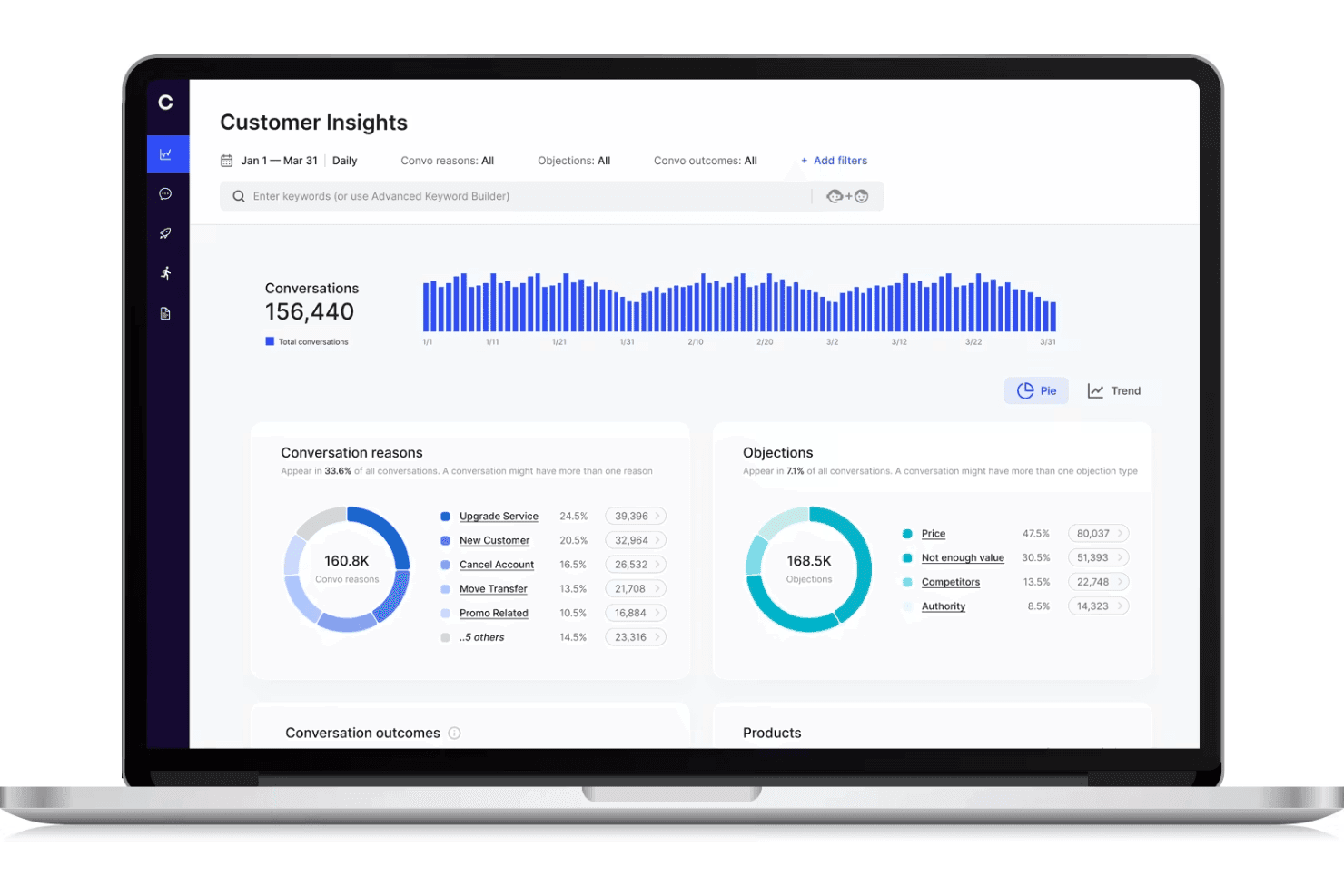
Cresta displays a call center monitoring dashboard with customer conversation analytics, objection tracking, and conversation trends. Cresta is an AI-powered call center monitoring platform that offers real-time conversation intelligence, workflow orchestration, and automated quality management for voice and digital channels.
Who Is Cresta Best For?
Enterprise support teams and contact centers seeking scalable AI-powered quality monitoring and workflow automation across multiple channels.
Why I Picked Cresta
I picked Cresta as one of the best because its no-code AI workflow orchestration lets my team build and update real-time coaching and compliance automations fast. I use Cresta’s drag-and-drop tools to automate quality monitoring and trigger proactive interventions during calls.
Cresta Key Features
- Real-time transcription: Converts calls and chats into text instantly for analysis and record keeping.
- Automated quality scoring: Scores 100% of customer interactions against custom criteria without manual review.
- Multi-channel monitoring: Monitors voice, chat, and digital channels from one centralized interface.
- Supervisor dashboards: Lets supervisors access live and historical performance metrics, transcripts, and flagged interactions.
Cresta Integrations
Cresta offers native integrations with Salesforce, Twilio, Pipedrive, BigCommerce, Five9, Zendesk, and more. An API is available for custom integrations.
Pros and Cons
Pros:
- Script adherence and compliance monitoring
- Automated quality scoring across all channels
- Real-time coaching for live call agents
Cons:
- Knowledge Assist needs ongoing model tuning
- AI guidance can require manual overrides
Learn more about Cresta: Best for AI-driven insights
- Free demo available
- Pricing upon request
Visit WebsiteCustomer Rating:4.4/5
Talkdesk uses AI to deliver data-driven insights for better customer interactions. Talkdesk is a call center monitoring system designed for businesses seeking advanced insights through AI technology. It's ideal for teams that want to enhance customer interactions by utilizing data-driven insights for decision-making.
Why I picked Talkdesk: Talkdesk offers AI-driven insights that help your team make informed decisions. The tool provides real-time analytics and sentiment analysis, allowing you to understand customer emotions during calls.
It includes features like automated quality management and predictive forecasting to improve service delivery. These capabilities make it a great choice for teams focused on leveraging AI for better customer experiences.
Standout features & integrations:
Features include call recording and transcription, which ensure you have a complete record of customer interactions. The software also offers customizable dashboards, so you can tailor the view to your team's needs. Additionally, it provides workforce management tools to optimize scheduling and resource allocation.
Integrations include Salesforce, Zendesk, Slack, Microsoft Teams, Google Workspace, Shopify, HubSpot, ServiceNow, Okta, and Zoom.
Pros and Cons
Pros:
- Includes predictive forecasting tools
- Provides automated quality management
- Offers real-time sentiment analysis
Cons:
- May need IT support for integration
- Requires ongoing training for staff
Learn more about Talkdesk: Best for real-time transcriptions
- 14-day free trial + free demo available
- Pricing upon request
Visit WebsiteCustomer Rating:4.3/5
Dialpad offers real-time call transcription to improve team communication. Dialpad is a call center monitoring system that caters to businesses needing real-time call transcription services. It’s designed for teams that want to enhance their communication by capturing and analyzing calls as they happen.
Why I picked Dialpad: Dialpad offers real-time transcriptions that help your team capture important details during calls. This feature is invaluable for training and quality assurance, allowing you to review conversations instantly.
The platform also includes call routing and analytics to help your team manage and understand call data. Its focus on real-time insights makes it ideal for teams looking to improve communication efficiency.
Standout features & integrations:
Features include voicemail transcription, which converts voicemails into text for easy review. The platform provides call analytics to give you insights into team performance and customer interactions. Additionally, it offers a smart call routing feature to ensure calls reach the right team members quickly.
Integrations include Salesforce, Slack, Microsoft Teams, Google Workspace, HubSpot, Zendesk, ServiceNow, Okta, LinkedIn, and Zoho CRM.
Pros and Cons
Pros:
- Includes voicemail transcription
- Offers smart call routing
- Provides real-time call transcriptions
Cons:
- Can be complex for new users
- Occasional transcription errors
 Best for startups and SMBs
- 10-day free trial
- From $18/user/month (billed annually)
Visit WebsiteCustomer Rating:4.4/5
CallHippo provides essential call tools for startups and growing teams. CallHippo is a call center monitoring system tailored for startups and small to medium-sized businesses. It offers essential call management features that help teams manage customer interactions efficiently.
Why I picked CallHippo: CallHippo is designed with startups and SMBs in mind, providing essential features without unnecessary complexity. It includes tools like virtual phone numbers and call recording, which are crucial for small teams.
The platform is easy to set up, so your team can start using it quickly. Its affordability and focus on core functionalities make it a smart choice for smaller businesses looking to grow.
Standout features & integrations:
Features include call analytics that give you insights into call performance and trends. The platform also offers call forwarding, so your team can direct calls to the right person easily. Additionally, it provides voicemail features that ensure no customer query goes unanswered.
Integrations include Zoho CRM, Slack, HubSpot, Pipedrive, Zendesk, Salesforce, Shopify, Zapier, Freshdesk, and Intercom.
Pros and Cons
Pros:
- Provides essential call recording
- Offers virtual phone numbers
- Easy setup process
Cons:
- Requires stable internet connection
- Can have occasional call drops
 Best for large enterprises
- Free demo available
- From $110/agent/month (proactive AI extra)
Visit WebsiteCustomer Rating:4.3/5
NICE CXone supports large enterprises with scalable customer interaction tools. NiCE CXone is a comprehensive contact center platform tailored for large enterprises looking to enhance customer interactions. It serves businesses that require a scalable solution to manage complex call center operations efficiently.
Why I picked NiCE CXone: NiCE CXone is built for large enterprises that need a scalable solution to handle high call volumes. It offers features like automatic call distribution and workforce management, which are crucial for large teams.
The platform provides real-time analytics to help your team make data-driven decisions. Its focus on scalability and efficiency makes it ideal for big organizations looking to streamline their contact center operations.
Standout features & integrations:
Features include omnichannel routing, which lets your team manage customer interactions across various channels seamlessly. The platform also offers quality management tools to ensure high service standards. Additionally, it provides predictive dialing to optimize call efficiency and reduce wait times.
Integrations include Salesforce, Microsoft Dynamics, Zendesk, ServiceNow, Oracle, SAP, Google Cloud, Amazon Web Services, Zoom, and Genesys.
Pros and Cons
Pros:
- Includes quality management tools
- Supports omnichannel routing
- Offers predictive dialing
Cons:
- Occasional feature updates needed
- Requires technical expertise for setup
Learn more about NiCE CXone: Best for analytics capabilities
- Free demo available
- Available upon request
Visit WebsiteCustomer Rating:4.2/5
Calabrio ONE enhances call center performance with analytics-driven insights. Calabrio ONE is a workforce optimization suite designed for call centers looking to leverage analytics for improved performance. It's targeted at teams that want to enhance decision-making through data-driven insights and analytics.
Why I picked Calabrio One: Calabrio ONE excels in analytics capabilities, providing tools that help your team understand customer interactions better. It offers speech analytics and quality management features, allowing you to gain insights into customer sentiment.
The platform also includes workforce management tools to optimize scheduling and resource allocation. These features make it perfect for teams focused on using analytics to drive performance improvements.
Standout features & integrations:
Features include advanced reporting tools that provide in-depth analysis of call center operations. The software also offers voice-of-the-customer analytics to help you understand customer needs and preferences. Additionally, it supports performance management with customizable dashboards to track key metrics effectively.
Integrations include Salesforce, Microsoft Dynamics, Cisco, Avaya, Genesys, Amazon Connect, Five9, RingCentral, NICE, and Zoom.
Pros and Cons
Pros:
- Includes performance management features
- Provides in-depth reporting tools
- Offers speech analytics
Cons:
- Needs time for full implementation
- Can be complex for beginners
Learn more about Calabrio ONE: Best for remote teams
- 14-day free trial
- From $15/user/month (billed annually)
Visit WebsiteCustomer Rating:4.1/5
Freshcaller supports remote teams with tools for efficient call management. Freshcaller is a cloud-based call center monitoring system designed for remote teams. It helps businesses manage calls efficiently with features that support distributed workforces.
Why I picked Freshcaller: Freshcaller is built to support remote teams, offering cloud-based solutions that don't require physical infrastructure. It provides features like call masking and number porting, which are essential for remote operations.
Freshcaller also offers call queues and routing to ensure your team handles calls efficiently. Its focus on remote accessibility makes it an excellent choice for businesses with distributed teams.
Standout features & integrations:
Features include call recording, which helps you keep track of all conversations for quality assurance. The system also offers real-time call monitoring, allowing supervisors to listen in and provide immediate feedback. This ensures higher call resolution rates and adherence to quality standards. Additionally, it supports multi-level IVR to direct customers to the right department seamlessly.
Integrations include Freshdesk, Slack, HubSpot, Salesforce, Zendesk, Shopify, Google Contacts, Office 365, Pipedrive, and Zapier.
Pros and Cons
Pros:
- Multi-level IVR available
- Offers call masking features
- Supports remote work environments
Cons:
- Occasional call quality issues
- Limited advanced analytics
Learn more about Freshcaller:
Diğer Çağrı Merkezi İzleme Sistemleri
Kısa listeme giremeyen ancak yine de incelemeye değer bazı ek çağrı merkezi izleme sistemi seçenekleri şunlardır:
- 11ZendeskBest for small to mid-sized teams
- 12Twilio FlexBest for customizability
- 13PlayvoxBest for workforce engagement
- 14ComputerTalk iceBest for Microsoft integration
- 15LiveAgentBest for multi-channel support
- 16Zoho DeskBest for budget-conscious users
- 17AircallBest for remote team collaboration
- 18RingCentralBest for unified communications
- 19KixieBest for sales-focused teams
- 20RingoverBest for call monitoring simplicity
- 21Five9Best for performance management tools
- 22MightyCallBest for small business needs
- 23ConvinBest for call conversation analysis
- 24GenesysBest for customer experience solutions
- 25Enthu.AIBest for call quality insights
- 26TethrBest for voice data mining
Related Reviews
How I Evaluate Call Center Monitoring Systems
I split my evaluation into baseline requirements—like live monitoring and call recording—and the differentiators, like AI coaching and omnichannel QA, that separate good tools from great ones.
Core Functionality (Table Stakes For This List)
When I'm selecting tools for my list, I rank each one on a scale from 0 (does not offer the functionality) to 5 (excels in this area) for each core functionality listed below. Then, I calculate the tool's total score into a percentage. Each tool needs to achieve a minimum total score of 65% to be considered for inclusion.
- Call Recording & Storage: I check whether recordings are automatic, searchable, and paired with retention controls—especially for teams that revisit calls during disputes or escalations.
- Live Call Monitoring: Supervisors need listen, whisper, and barge options at minimum. I look for how easily a manager can jump into a live call to coach an agent mid-conversation.
- Quality Scoring & Evaluations: Customizable scorecards matter here. I evaluate whether the tool lets QA analysts build evaluation forms tied to specific call types, like billing inquiries vs. complaints.
- Speech & Interaction Analytics: Good tools go beyond transcription. I look for keyword spotting and sentiment analysis that help teams surface patterns across thousands of calls.
- Performance Dashboards & Reporting: I evaluate whether dashboards offer real-time and historical views, and whether supervisors can filter by agent, team, or queue without building reports from scratch.
- Compliance & Security Controls: Features like PCI redaction, role-based access, and encrypted storage all factor in, particularly for teams handling sensitive customer data in regulated industries.
Once I have a list of tools that meet the criteria, I consider what sets each platform apart.
Differentiating Factors (What Sets Vendors Apart)
Here's how I compare and contrast different vendors:
Standout Features
Omnichannel monitoring is a major differentiator. Teams handling chat, email, and voice need QA visibility across all channels, not just phone calls. I also look for AI coaching tools that surface targeted recommendations for agents, since they save supervisors hours of manual review. Customer journey playback adds another layer. It lets evaluators see the full sequence of interactions a customer had before a call, giving QA scores much richer context.
Beyond Features
I evaluate how well each tool connects with the broader tech stack. A monitoring system that integrates with your CCaaS platform, CRM, and workforce management tools keeps QA data flowing where supervisors actually work. Compliance and data governance also weigh heavily—I check for configurable recording rules and data residency controls, since teams in regulated industries need granular control over where and how long recordings are stored. Pricing transparency matters, too. Storage costs and add-on fees for analytics modules can quietly inflate total cost of ownership.
Çağrı Merkezi İzleme Sistemi Nasıl Seçilir?
Piyasada bu kadar çok çağrı merkezi izleme sistemi varken, özellik listelerini karşılaştırırken veya kafa karıştırıcı fiyatlandırma katmanlarını değerlendirirken takılıp kalmak kolaydır. Gürültü içinde kaybolmak yerine, ekibinizin çağrıları etkili bir şekilde izleme ve hizmet kalitesini artırma becerisini gerçekten etkileyecek şu faktörlere odaklanın.
| Faktör | Dikkat Edilmesi Gerekenler |
|---|---|
| FaktörÖlçeklenebilirlik | Dikkat Edilmesi GerekenlerAraç, işletmenizin ihtiyaçlarıyla birlikte büyüyebilir mi? İşletmeniz büyüdükçe daha yüksek çağrı hacimlerini, yeni temsilcileri veya çok kanallı genişlemeyi destekleyebilir mi? |
| FaktörEntegrasyonlar | Dikkat Edilmesi Gerekenlerİş akışı siloları oluşturmamanız için izleme sistemi CRM'inize, yardım masanıza ve iş birliği araçlarınıza sorunsuz bir şekilde bağlanabiliyor mu? |
| FaktörÖzelleştirilebilirlik | Dikkat Edilmesi GerekenlerPanoları, raporları ve çağrı izleme iş akışlarını performans ölçümlerinize ve koçluk ihtiyaçlarınıza uyacak şekilde özelleştirebilir misiniz? |
| FaktörKullanım kolaylığı | Dikkat Edilmesi GerekenlerArayüz, yöneticilerin ve temsilcilerin kapsamlı bir eğitim almadan hızlı bir şekilde benimseyebileceği kadar sezgisel mi? |
| FaktörUygulama ve işe alıştırma | Dikkat Edilmesi GerekenlerKurulum ne kadar sürecek? Tam dağıtım için gereken zamanı ve kaynakları, ayrıca sağlayıcının bu aşamada destek sunup sunmadığını göz önünde bulundurun. |
| FaktörMaliyet | Dikkat Edilmesi GerekenlerBütçeniz dahilinde mi? Abonelik ücretlerinin ötesinde, çağrı kaydı veya analiz gibi özellikler için ek maliyetler var mı? Fiyatlandırma modellerini gerçekten ihtiyaç duyduğunuz özelliklerle karşılaştırın. |
| FaktörGüvenlik önlemleri | Dikkat Edilmesi GerekenlerVerileriniz ve çağrılarınız korunuyor mu? Hassas bilgileri güvence altına almak için şifreleme ve sektör standartlarına uyumluluk gibi özellikleri arayın. |
| FaktörDestek erişilebilirliği | Dikkat Edilmesi Gerekenlerİhtiyaç duyduğunuzda yardım alabilir misiniz? Sorunları hızlı bir şekilde çözmek için sağlayıcının 7/24 destek ve telefon, sohbet ve e-posta gibi birden fazla iletişim seçeneği sunup sunmadığını kontrol edin. |
Çağrı Merkezi İzleme Sistemi Nedir?
Çağrı merkezi izleme sistemi, yöneticilerin temsilci performansını ve hizmet kalitesini iyileştirebilmesi için müşteri çağrılarını takip eden, kaydeden ve analiz eden bir yazılımdır. Canlı izleme, çağrı kaydı ve analiz gibi özelliklere sahip bu sistemler; iletişim merkezi temsilcilerini eğitmek, tutarlılığı sağlamak ve daha iyi müşteri deneyimleri sunmak için gereken uygulanabilir içgörüleri sağlar.
Çağrı Merkezi İzleme Sisteminin Özellikleri
Bir çağrı merkezi kalite izleme yazılımı seçerken aşağıdaki temel özelliklere dikkat edin:
- Çağrı kaydı: Kalite güvencesi ve eğitim amaçlarıyla çağrı görüşmelerini kaydeder ve depolar.
- Canlı izleme: Çağrı merkezi yöneticilerinin canlı çağrıları dinlemesine ve temsilcilere gerçek zamanlı geri bildirim ve destek sağlamasına olanak tanır.
- Analiz yetenekleri: Performans hakkında içgörüler sunarak ekiplerin çağrı merkezi verimliliğini artırmak için verilere dayalı kararlar almasına yardımcı olur.
- Özelleştirilebilir panolar: Kullanıcıların, arayüzü kendi özel ihtiyaçlarıyla en ilgili ölçümleri ve bilgileri gösterecek şekilde uyarlamasına olanak tanır.
- Otomatik çağrı dağıtımı: Gelen çağrıları en uygun temsilcilere yönlendirerek ortalama işlem süresini ve bekleme sürelerini azaltır.
- Kalite yönetimi: Temsilci performansını değerlendirmek ve geliştirmek için araçlar sunarak yüksek hizmet standartlarının korunmasını sağlar.
- Çok kanallı destek: Telefon, e-posta ve sohbet gibi birden çok kanaldaki müşteri etkileşimlerini tek bir platformdan yönetir.
- Tahmine dayalı arama: Tahmine dayalı algoritmalara göre numaraları arayarak dış aramaları otomatikleştirir ve temsilci kullanılabilirliğini en iyi duruma getirir.
- Duygu analizi: Müşteri memnuniyeti ve iyileştirilmesi gereken alanlar hakkında içgörüler sunmak için çağrılar sırasında müşterilerin duygularını analiz eder.
- İşgücü yönetimi: Temsilci programlarını ve kaynaklarını çağrı merkezi talepleriyle uyumlu hâle getirerek verimliliği artırmaya yardımcı olur.
Çağrı Merkezi İzleme Sisteminin Faydaları
Bir çağrı merkezi izleme sisteminin uygulanması ekibiniz ve işletmeniz için çeşitli faydalar sağlar. Yararlanmayı bekleyebileceğiniz birkaç fayda şunlardır:
- Geliştirilmiş temsilci performansı: Canlı izleme ve geri bildirim sayesinde temsilciler, becerilerini ve hizmet kalitesini geliştirmek için gerçek zamanlı yönlendirme alır.
- Artırılmış müşteri memnuniyeti: Kalite yönetimi ve duygu analizi, müşteri etkileşimlerinin yüksek standartları karşılamasını sağlayarak daha memnun müşterilere yol açar.
- Verilere dayalı kararlar: Analiz yetenekleri, çağrı merkezi operasyonları hakkında içgörüler sunarak yöneticilerin verimliliği artırmak için bilinçli kararlar almasına yardımcı olur.
- Verimli çağrı yönetimi: Otomatik çağrı dağıtımı ve tahmine dayalı arama gibi özellikler, çağrıların hızlı bir şekilde yönlendirilmesini ve ele alınmasını sağlayarak bekleme sürelerini azaltır.
- Kaynakların en iyi duruma getirilmesi: İşgücü yönetimi araçları, temsilci programlarını taleple uyumlu hâle getirerek verimliliği artırır ve maliyetleri azaltır.
- Özelleştirilmiş içgörüler: Özelleştirilebilir panolar, ekiplerin en önemli ölçümlere odaklanmasına ve içgörüleri kendi özel hedeflerine göre uyarlamasına olanak tanır.
- Tutarlı kalite güvencesi: Çağrı kaydı ve kalite yönetimi araçları, tutarlı bir hizmet düzeyini koruyarak müşterilerin güvenini oluşturur.
Çağrı Merkezi İzleme Sisteminin Maliyetleri ve Fiyatlandırması
Bir çağrı merkezi izleme sistemi seçmek, mevcut çeşitli fiyatlandırma modellerinin ve planların anlaşılmasını gerektirir. Maliyetler özelliklere, ekip büyüklüğüne, eklentilere ve daha fazlasına göre değişir. Aşağıdaki tablo, çağrı merkezi izleme sistemi çözümlerinde yaygın planları, ortalama fiyatlarını ve genellikle sunulan özellikleri özetlemektedir:
Çağrı Merkezi İzleme Sistemi İçin Plan Karşılaştırma Tablosu
| Plan Türü | Ortalama Fiyat | Yaygın Özellikler |
|---|---|---|
| Plan TürüÜcretsiz Plan | Ortalama Fiyat$0 | Yaygın ÖzelliklerTemel çağrı izleme, sınırlı analiz ve temel raporlama. |
| Plan TürüKişisel Plan | Ortalama Fiyat$15-$30/kullanıcı/ay | Yaygın ÖzelliklerÇağrı kaydı, canlı izleme ve temel analiz. |
| Plan Türüİşletme Planı | Ortalama Fiyat$50-$75/kullanıcı/ay | Yaygın ÖzelliklerGelişmiş analiz, otomatik çağrı dağıtımı ve özelleştirilebilir panolar. |
| Plan TürüKurumsal Plan | Ortalama Fiyat$100-$150/kullanıcı/ay | Yaygın ÖzelliklerÇok kanallı destek, tahmine dayalı arama ve kapsamlı kalite yönetimi araçları. |
Çağrı Merkezi İzleme Sistemi SSS
Çağrı merkezi izleme sistemleri hakkında sık sorulan soruların bazı yanıtları:
Çağrı merkezinde 80/20 kuralı nedir?
Çağrı merkezinde 80/20 kuralı, çağrıların yüzde 80’inin 20 saniye içinde yanıtlanması gerektiği anlamına gelir. Bu standart, hızlı yanıt sürelerinin sağlanmasına yardımcı olur ve müşteri memnuniyetini artırır. Çağrı merkezi operasyonları için performans hedefleri belirlemede kullanılan yaygın bir ölçüttür.
Çağrı izleme nasıl çalışır?
Çağrı izleme, çağrıların gerçek zamanlı olarak veya kayıtlar üzerinden gözlemlenmesini ve dinlenmesini içerir. Temsilci performansını değerlendirmek, kalite puanları vermek ve müşteri hizmetlerini iyileştirmek için kullanılır. Çağrıları izleyerek temsilcilere geri bildirim sağlayabilir ve eğitim ve gelişim gerektiren alanları belirleyebilirsiniz.
Çağrı merkezinin 5 temel performans göstergesi nelerdir?
Bir çağrı merkezindeki temel performans göstergeleri (KPI’lar) arasında müşteri memnuniyeti puanları, ilk aramada çözüm oranı, ilk yanıt süresi, temsilci kullanım oranı ve çağrı terk oranı bulunur. Bu ölçütler, çağrı merkezi operasyonlarınızın etkinliğini değerlendirmenize ve iyileştirme gerektiren alanları belirlemenize yardımcı olur.
Her temsilcinin sahip olması gereken 7 önemli çağrı merkezi becerisi nelerdir?
Çağrı merkezi temsilcileri için temel beceriler arasında etkin dinleme, etkili iletişim, empati, problem çözme, ürün bilgisi, zaman yönetimi ve çoklu görev yürütme bulunur. Bu beceriler, temsilcilerin müşteri taleplerini verimli bir şekilde ele almasını ve yüksek kaliteli hizmet sunmasını sağlar.
Çağrı merkezi izleme hizmet kalitesini nasıl iyileştirebilir?
Çağrı merkezi izleme, etkileşimleri incelemenize ve temsilcilere hedefe yönelik geri bildirim sağlamanıza olanak tanır. Güçlü yönleri ve iyileştirilmesi gereken alanları belirleyerek eğitim programlarını ihtiyaçlarınıza göre düzenleyebilir ve genel hizmet kalitesini artırabilirsiniz. İzleme süreci ayrıca ekibiniz genelinde tutarlı hizmet standartlarının korunmasına yardımcı olur.
Çağrı merkezi izlemede yaygın olarak hangi araçlar kullanılır?
Çağrı merkezi izlemede yaygın olarak kullanılan araçlar arasında çağrı kayıt yazılımları, canlı izleme sistemleri, analiz platformları ve kalite yönetimi araçları bulunur. Doğru çağrı merkezi izleme araçları performansı takip etmenize, verileri analiz etmenize ve ekibinizin hizmet beklentilerini karşılayarak müşteri sorunlarını hızla çözmesini sağlamanıza yardımcı olur.