

Üstün müşteri hizmetleri sunmak hiç olmadığı kadar zor. Müşteri deneyimi alanında çalışan bir profesyonel olarak, kaynakları verimli bir şekilde yönetirken artan beklentileri karşılama baskısını biliyorsunuz. Müşteri hizmetleri otomasyon yazılımları tam da bu noktada devreye girerek karmaşık görevleri basitleştirmeye ve ekibinizin üretkenliğini artırmaya yönelik çözümler sunar.
Bu makalede, bu zorlukların üstesinden gelmenize yardımcı olabilecek otomasyon araçları için en iyi seçimlerimi paylaşacağım. Bu araçlar yalnızca zamandan tasarruf etmenizi sağlamakla kalmaz; müşteri etkileşimlerinizi iyileştirmenize ve her deneyimi değerli kılmanıza da yardımcı olur. İhtiyaçlarınıza en uygun yazılım çözümlerini keşfetmek için incelemeye başlayın.
Why Trust Our Software Recommendations
6,700+
Reviews
20
Industry experts
16+
Evaluation factors
14
Years
Our team has been testing and reviewing software since 2012. As CX leaders ourselves, we know how difficult—and important—it is to choose the right software.
For this guide, we evaluated tools using hands-on testing and independent research, scoring tools using our selection criteria.
Our reviews reflect our human editorial judgment, not a sales pitch.
 Gui DrusinaCreative Director
 Tim FisherVP of AI
Müşteri Hizmetleri Otomasyon Yazılımları Karşılaştırma Tablosu
Bu karşılaştırma tablosu, en iyi müşteri hizmetleri otomasyon yazılımı seçimlerimin fiyatlandırma ayrıntılarını özetler:
Score legend (out of 5)
- Excellent4.5–5
- Good4–4.4
- Average3–3.9
- Below average2–2.9
- Poor1–1.9
Sorted by: Default
| Tool | Starting Price | Website | |||||||
|---|---|---|---|---|---|---|---|---|---|
Best for pricing based on resolved tickets | 4.2 out of 5 | 5 | 4 | 4 | 4 | 4 | 4 | $1.20/resolution Free demo + 30-day free trial available | Website |
Best help desk with dedicated mobile application | 3.0 out of 5 | 2 | 2 | 3 | 4 | 4 | 3 | $29/user/month 14-day free trial available | Book Demo |
Best for L1–L3 AI ticket resolution | 3.7 out of 5 | 4 | 4 | 4 | 3 | 4 | 3 | $150/month Free plan + free trial + free demo available | Website |
Best for real-time reporting and analytics | 2.3 out of 5 | 4 | 1 | 2 | 1 | 3 | 3 | $30/user/month Free demo available | Website |
Best scalable automation software | 3.8 out of 5 | 4 | 4 | 4 | 4 | 4 | 3 | $75/user/month Free trial available | Website |
Best for customizable ticket management | 3.7 out of 5 | 5 | 3 | 3 | 4 | 4 | 3 | $7/user/month Free plan + 15-day trial + demo available | Website |
Best for helpdesk auto-replies | 3.5 out of 5 | 3 | 4 | 4 | 4 | 3 | 3 | $199/month 30-day free trial | Website |
Best for real-time data syncing | 4.2 out of 5 | 5 | 4 | 4 | 5 | 3 | 4 | $32/month 7-day free trial + demo available | Website |
Best AI-powered interaction insights | 3.3 out of 5 | 3 | 4 | 3 | 4 | 3 | 3 | $29/month Free plan available | Website |
Best for automated customer email rules | 2.2 out of 5 | 4 | 1 | 2 | 1 | 3 | 2 | $14/user/month 30-day free trial available | Website |
Best for AI-to-agent call handoffs | 4.5 out of 5 | 5 | 4 | 4 | 5 | 5 | 4 | $25/agent/month Free trial available | Book Demo |
Best for phone and digital support teams | 3.7 out of 5 | 5 | 3 | 3 | 4 | 4 | 3 | $15/user/month Free trial available | Website |


En İyi Müşteri Hizmetleri Otomasyon Yazılımları İncelemeleri
En iyi müşteri hizmetleri otomasyon yazılımlarının her biri hakkında kısa bir açıklamayı burada bulabilirsiniz. Her birinin en iyi yaptığı şeyi, en uygun olduğu kullanıcıları ve bazı özelliklerini sergileyen ekran görüntülerini göstereceğim.
 1Best for pricing based on resolved tickets
Yuma
- Free demo + 30-day free trial available
- From $1.20/resolution
Visit WebsiteCustomer Rating:3.3/5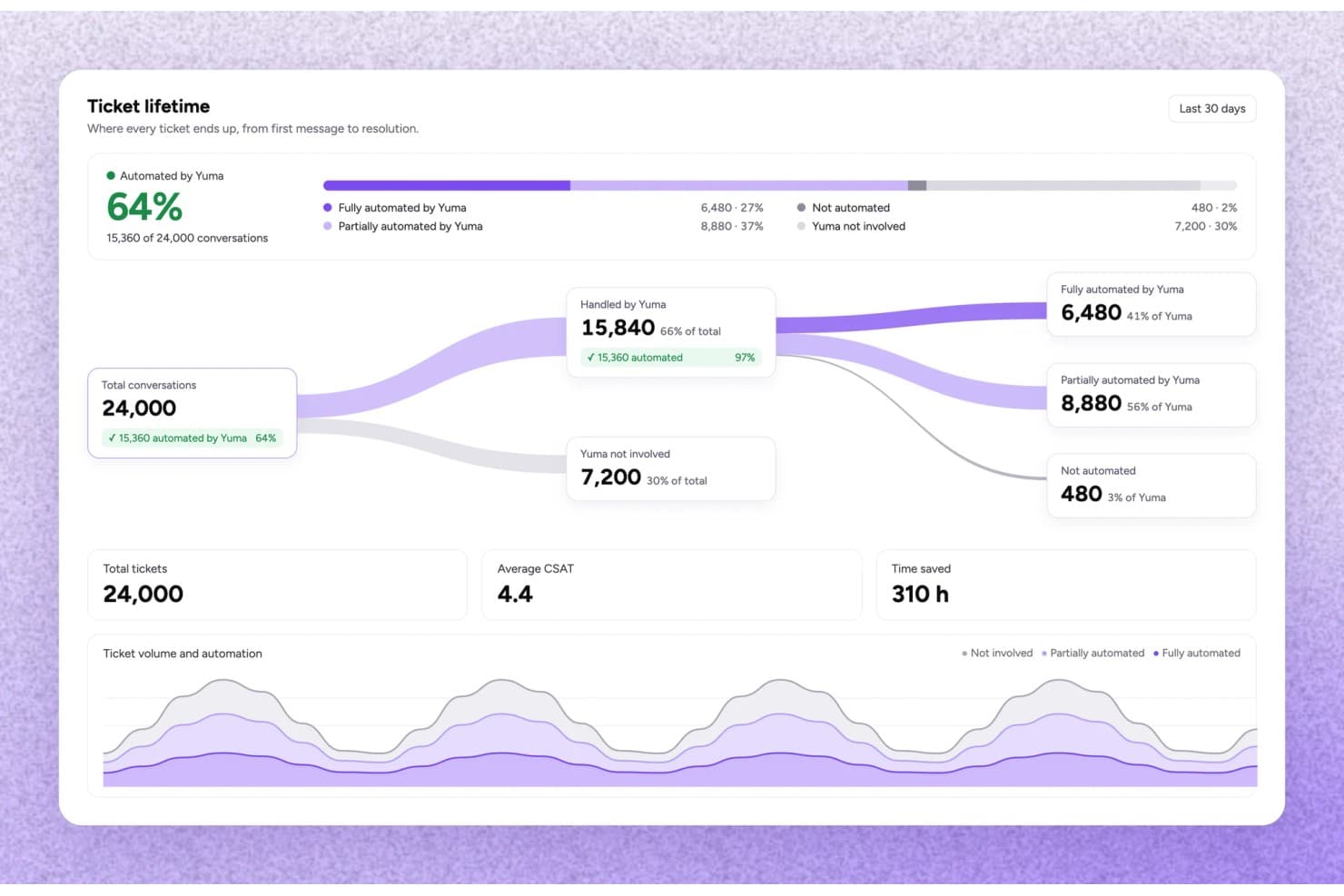
Yuma tracks ticket automation rates and time saved across conversations. Yuma is an ecommerce-focused customer service automation platform that uses AI agents to handle support tickets end to end—covering order changes, refunds, returns, subscription requests, and shipment questions—across email, chat, SMS, and social channels.
Who Is Yuma Best For?
Yuma is built for ecommerce brands—particularly in fashion, beauty, and consumer electronics—that need an AI agent to fully resolve support tickets, not just draft replies.
Why I Picked Yuma
Yuma's outcome-based pricing is what earns it a spot on my shortlist: you pay only for tickets the AI fully resolves without any human involvement, so your costs scale directly with the value you receive. I love that this model is backed by specific guardrails, like Hard Limits that cap refund amounts the AI can approve and Gradual Rollout that lets you release a new playbook to a fraction of conversations before going wide. In practice, that means I can grow automation confidently without worrying about runaway costs or unchecked AI decisions.
Yuma Key Features
- Handbook playbook system: A versioned, centralized set of brand pages, playbooks, and procedures that governs how the AI handles every customer conversation.
- Outbound event triggers: Starts automated email or SMS conversations based on commerce events like order placement, parcel delivery, or abandoned checkout.
- Media Brain: Opens and analyzes images, videos, and PDFs within a conversation to support defect claims, SKU matching, and receipt extraction.
- 180+ language support: Auto-detects a customer's language and responds accordingly, including regional dialects and right-to-left scripts.
Yuma Integrations
Yuma lists 60+ integrations, including native Shopify, Gorgias, and Zendesk connections, plus Recharge, Klaviyo, Loop Returns, and AfterShip. It supports custom integrations through APIs and MCP servers.
Pros and Cons
Pros:
- Maintains support during high-volume periods
- Automates refunds, returns, and order changes
- Resolves order-status tickets without agent involvement
Cons:
- Designed for ecommerce, not SaaS support
- Needs clean policies and operational data
Learn more about Yuma: Best help desk with dedicated mobile application
- 14-day free trial available
- From $29/user/month (billed annually)
Visit WebsiteCustomer Rating:4.4/5
Easily auto-assign and sort tickets by importance. Freshdesk (a product of Freshworks Inc.) is a customer service platform used to manage support tickets and workflows across multiple communication channels. It supports email, chat, phone, and social media inquiries, allowing teams to handle customer interactions within a single system.
Why I picked Freshdesk: I picked Freshdesk for its mobile application, which allows support teams to manage requests while away from their desks. The app supports ticket tracking, internal collaboration, and customer responses directly from a mobile device. Features such as push notifications, offline access to tickets, and voice support help teams stay informed and continue work without relying on a desktop setup.
Standout features & integrations:
Features include automation tools that support ticket categorization, prioritization, and routing based on predefined rules such as agent workload or expertise. Freddy AI is available within the platform to assist with these workflows as part of the existing ticketing system. Reporting tools provide visibility into response activity, resolution timelines, and customer feedback.
Integrations include Slack, Microsoft Teams, Shopify, Salesforce, Jira, QuickBooks, Zapier, Zoho CRM, HubSpot, and Google Workspace.
Pros and Cons
Pros:
- Omnichannel support in one dashboard
- AI-driven ticket categorization
- Mobile app with full help desk access
Cons:
- Occasional delays in mobile app syncing
- Some advanced features require add-ons
Learn more about Freshdesk: Best for L1–L3 AI ticket resolution
- Free plan + free trial + free demo available
- From $150/month (billed annually)
Visit WebsiteCustomer Rating:4.5/5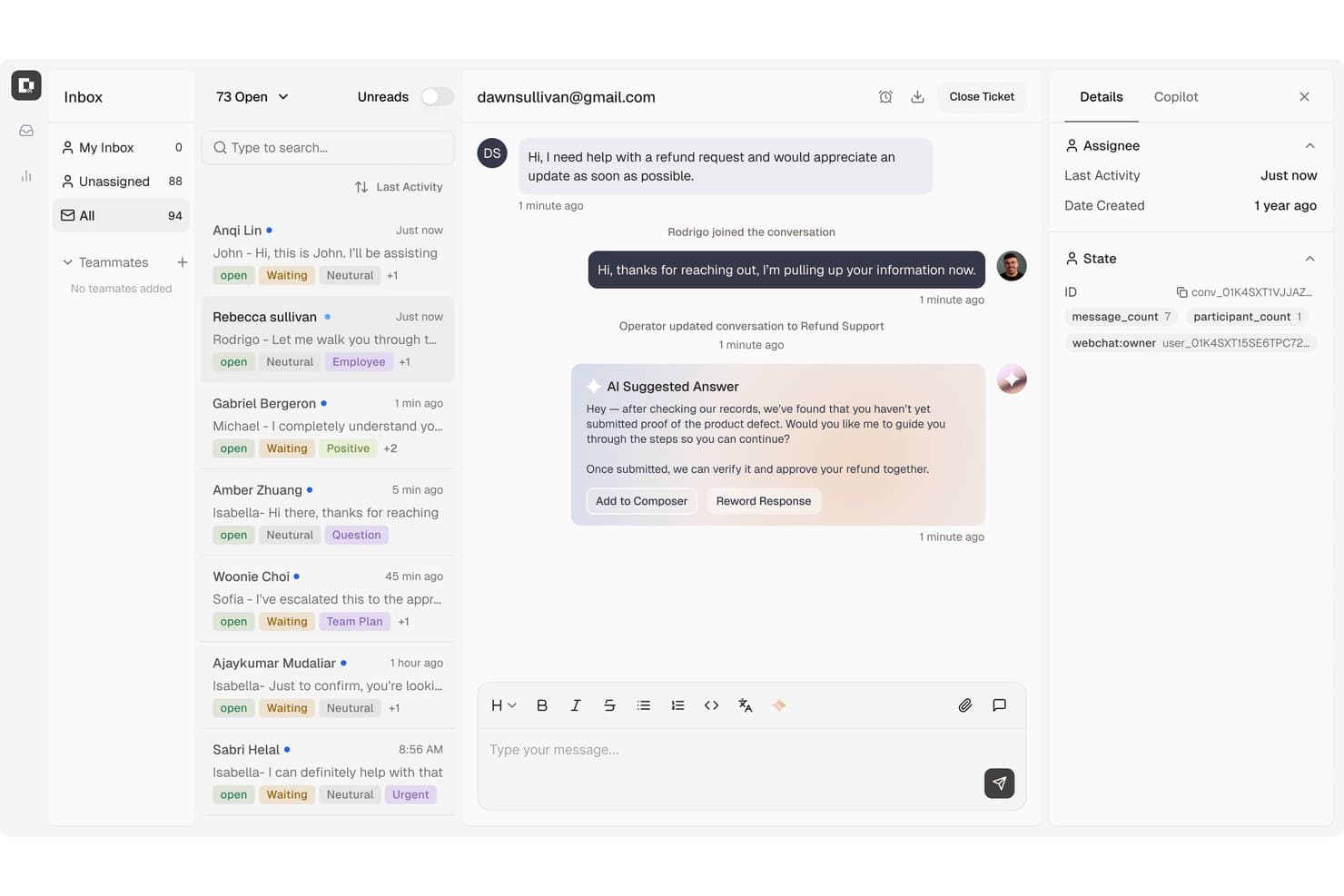
Botpress surfaces AI-suggested replies to speed up customer support. Botpress Desk is an AI-powered helpdesk platform that handles support tickets across L1 through L3, with automated routing, knowledge base-driven deflection, multi-channel coverage, and native integrations with Zendesk and Intercom.
Who Is Botpress Best For?
Botpress Desk is a strong fit for support operations teams that need AI to handle the full ticket spectrum—from routine L1 deflection to complex L3 resolution—without replacing their existing Zendesk or Intercom setup.
Why I Picked Botpress
I picked Botpress as one of the best because it's built to handle the full ticket spectrum—L1 through L3—without routing everything to a human agent. I particularly like how its AI actions can issue refunds, update CRM records, and pull live subscription data mid-conversation, so agents only step in when genuinely needed. Sentiment-based escalation and confidence-threshold handoffs keep that line between bot and human precise.
Botpress Key Features
- Ticket enrichment: Surfaces account health, subscription status, recent activity, and prior ticket history directly within each conversation for faster agent context.
- Multi-channel coverage: Supports webchat, email, WhatsApp, Slack, Discord, Telegram, Instagram, and Facebook Messenger from a single platform.
- Context-rich handoff: Transfers the full conversation history, an AI-generated summary, agent notes, and a suggested next step when escalating to a human.
- Zendesk and Intercom sync: Syncs workspace and customer data natively with Zendesk or Intercom and creates pre-enriched tickets for human handoff.
Botpress Integrations
Botpress offers native integrations with Zendesk, Intercom, WhatsApp, Slack, Discord, Telegram, Instagram, Messenger, and Facebook. It also provides HTTP Chat, Admin, Files, Tables, and Runtime APIs for custom integrations.
Pros and Cons
Pros:
- Reviewers praise its visual bot builder
- Enriches tickets with account and history context
- Automates refunds and customer-record updates
Cons:
- Reviewers say advanced setup can challenge nontechnical teams
- Reviewers report inconsistent results across knowledge bases
Learn more about Botpress: Best for real-time reporting and analytics
- Free demo available
- From $30/user/month (billed annually)
Visit WebsiteCustomer Rating:5/5
RingCentral provides automated insights and analytics in a centralized dashboard. RingCentral is a comprehensive customer service automation software that uses an AI-driven approach to communication. It caters to businesses of all sizes across a wide range of industries, ensuring you can provide tailored support based on your customers' needs.
Why I Picked RingCentral: The platform is compatible across many different channels. This means that it not only supports queries based on a customer's preferred methods but it also collects real-time data and analytics across all channels, giving you a holistic overview of customer experience and agent performance. These AI-driven reports include metrics like call volumes, agent activities, customer sentiment, and trending topics.
Standout Features & Integrations
Standout features include AI to handle tasks throughout the customer query process. These functionalities include IVR/self-service, automatic callback, AI-enabled virtual agents, and call deflection. Additionally, the AI assistant can take real-time call notes, provide writing and translation for digital messages, and offer conversation insights for quicker, higher-quality service.
Other notable features include intelligent routing, which matches customer queries with the right resources based on the chosen communication channel, intent of the message, agent skill profiles, CRM data, and more. RingCentral also offers real-time automated coaching to help improve customer interactions.
Integrations include Microsoft Teams, Salesforce, Google Workspace, Beetexting, HubSpot, Asana, Zendesk, Appointment Reminder, Aha!, Trello, Zapier, Automator, and more.
Pros and Cons
Pros:
- Comprehensive analytics and reporting
- Includes advanced AI features for self-service
- Offers omnichannel support
Cons:
- Can be a learning curve for new users
- Pricing structure may be higher
Learn more about RingCentral Contact Center: Best scalable automation software
- Free trial available
- From $75/user/month
Visit WebsiteCustomer Rating:4.4/5
Salesforce Service Cloud provides organizations with a workflow builder to automate certain processes, including handling customer cases and other processes. Salesforce Service Cloud is a customer service automation software with features that help businesses scale their service processes as they grow. This solution helps teams manage customer queries, resolve cases, and connect customers with the right people to resolve issues through live chat while streamlining the entire process with only a few clicks.
Why I Picked Salesforce Service Cloud: Salesforce Service Cloud makes complicated processes easier with the platform’s builders. These builders are low- and no-code, making it easy to automate workflows, simplify complex processes, and adapt processes with a flexible customer service platform.
Standout Features & Integrations
Features include case management to automatically create cases from web queries and emails, send auto-responses, and route cases to certain queues or agents to resolve cases at a faster rate. The platform also effectively helps businesses manage their workflows and handle large numbers of cases through auto-responses and auto-assignments, which improves the quality of customer service.
Utilizing Salesforce Service Cloud’s automation features helps improve a company’s efficiency in handling cases. Lightning Flow Automation can also be used by Essentials and Professional users for five processes and flows each, while Enterprise and Unlimited users can create an unlimited number of processes and workflows. This means the relatively affordable Service Cloud plans are still useful and functional for smaller businesses.
Integrations include Slack, Mailchimp, QuickBooks, Zendesk, HubSpot, Dropbox, Google Workspace, Microsoft Teams, SurveyMonkey, and JIRA.
Pros and Cons
Pros:
- Easy to learn and use
- Includes pre-built integrations
- Uses AI for automations
Cons:
- Could use better email functionality
- Can be expensive for small teams
Learn more about Agentforce Service (formerly Service Cloud): Best for customizable ticket management
- Free plan + 15-day trial + demo available
- From $7/user/month (billed annually)
Visit WebsiteCustomer Rating:4.4/5
Zoho Desk's ticket management system is highly customizable, with the option to automate various tasks. Zoho Desk is a comprehensive customer support and help desk software designed to assist businesses in managing their customer service operations efficiently. It offers a variety of features including ticket management, self-service options, and robust reporting and analytics.
Why I Picked Zoho Desk: Zoho Desk has a robust ticket management system, which allows businesses to efficiently track and manage customer inquiries. It allows for the assignment of tickets to specific team members or departments, improving response times and ensuring that the appropriate personnel handle each inquiry. Additionally, the ticket management system includes tools for tracking the status of tickets and analyzing customer inquiries.
Standout Features & Integrations
Features include tools for automating routine customer support tasks, such as workflow rules and macros, which can trigger specific actions based on predefined conditions. This automation reduces the manual workload on support agents, allowing them to focus on more complex issues. Additionally, Zoho Desk offers a self-service portal where customers can find answers to common questions and resolve issues independently.
Integrations include Google Workspace, Microsoft Office 365, Slack, Jira, Trello, Asana, Dropbox, OneDrive, Box, GitHub, Bitbucket, Zendesk, Salesforce, HubSpot, Intercom, Freshdesk, and other Zoho apps.
Pros and Cons
Pros:
- Omnichannel support integration
- AI-powered automation features
- Affordable pricing for small businesses
Cons:
- Mobile app needs improvement
- Limited third-party integrations
Learn more about Zoho Desk:

My AskAI integrates with your existing helpdesk like HubSpot and has the feature to automatically notify a human agent and leave an internal comment when a user requests to speak to a person. My AskAI is an AI customer service agent platform that plugs into existing helpdesks like Zendesk, Intercom, and Freshdesk to autonomously handle customer inquiries, auto-tag tickets, and trigger automated actions across chat, email, and messaging channels.
Who Is My AskAI Best For?
My AskAI is a strong fit for SaaS and ecommerce support teams that already run a helpdesk and want to layer in AI-driven ticket deflection without switching platforms.
Why I Picked My AskAI
I've included My AskAI in my top picks because its self-learning knowledge base does something I haven't seen elsewhere: it spots gaps in your documentation and generates new articles from resolved past tickets automatically. That means your helpdesk auto-replies get sharper over time without any manual curation. I also like that the AI tagging feature classifies and tags incoming Zendesk tickets in real time, keeping your queue organized even during high-volume surges.
My AskAI Key Features
- Multi-channel coverage: Delivers automated support across chat, email, WhatsApp, and Messenger using built-in helpdesk integrations.
- Automated knowledge syncing: Continuously ingests and updates information from your knowledge base, website, and documentation sources.
- AI-powered ticket tagging: Automatically classifies and tags incoming support tickets from platforms like Zendesk in real time.
- Slack and Teams chatbot: Provides an internal AI assistant for employee support and quick answers within Slack and Microsoft Teams.
My AskAI Integrations
My AskAI offers native integrations with Zendesk, Intercom, Gorgias, Freshdesk, HubSpot, and Freshchat.
Pros and Cons
Pros:
- Connects to existing helpdesks without migration
- Self-learning knowledge base fills documentation gaps
- Automatically deflects repetitive helpdesk tickets
Cons:
- Automation analytics lack depth for enterprise teams
- No native voice channel automation support
Learn more about My AskAI: Best for real-time data syncing
- 7-day free trial + demo available
- From $32/month (billed annually)
Visit WebsiteCustomer Rating:4.4/5
Chatbase is an AI chatbot platform that automates support across websites and messaging apps using your data. Chatbase is an AI chatbot platform that automates customer service conversations across websites and messaging channels. It stands out for its ability to sync chatbots with live business data, allowing teams to deliver automated responses that reflect real-time information.
Who Is Chatbase Best For?
Chatbase suits support teams and businesses that want to automate customer service interactions using customizable chatbots connected to internal data sources.
Why I Picked Chatbase
I picked Chatbase because it connects chatbots directly to live business systems through APIs and webhooks. This enables real-time data syncing, so customers receive current information such as order status, account details, or inventory availability. Instead of relying only on static knowledge bases, teams can automate responses that reflect changing data. Security controls and role-based permissions help manage access while scaling automation.
Chatbase Key Features
- No-code chatbot builder: Build and customize AI chatbots using a drag-and-drop interface without coding.
- Multi-channel deployment: Deploy chatbots across web, messaging apps, and other digital channels from a single dashboard.
- Custom data source integration: Connect your chatbot to PDFs, websites, or knowledge bases to answer customer questions with your own data.
- Conversation analytics: Track chatbot interactions and performance with built-in analytics and reporting tools.
Chatbase Integrations
Integrations include Slack, WhatsApp, Facebook Messenger, and automation platforms such as Make. API and webhook access are available for custom integrations.
Pros and Cons
Pros:
- No-code builder for fast chatbot creation
- Multi-channel support including web and messaging apps
- Real-time data syncing with business systems
Cons:
- Some integrations require manual API setup
- Limited built-in escalation to human agents
Learn more about Chatbase: 9Best AI-powered interaction insights
Weav
- Free plan available
- From $29/month (billed annually)
Visit WebsiteCustomer Rating:4.7/5
Weav offers a detailed performance report dashboard showing conversation metrics for customer service teams. Weav is a customer service automation platform that combines AI agents, chatbots, a shared inbox, agent-assist tools, training, and reporting to automate and manage customer support across channels.
Who Is Weav Best For?
Weav is a good fit for ecommerce and SaaS support teams that want to automate customer interactions without fully removing human agents from the loop.
Why I Picked Weav
I've included Weav in my top picks because of how it surfaces AI-powered insights directly within live agent conversations. The Ask Weav feature pulls answers from your existing documentation and resolved tickets in real time, so agents aren't switching tabs or guessing. I also like that Weav's reporting tracks resolution outcomes at the conversation level, giving teams concrete data on where AI assist actually changes the result.
Weav Key Features
- AI chatbots: Deploy customer-facing chatbots trained on your product documentation to resolve incoming queries without human involvement.
- Smart escalation: Build routing rules that automatically hand off conversations to the right human agent when AI can't resolve the issue.
- Conversation tone and prohibited phrase controls: Set your agent's tone, response length, and a list of off-limits words to keep every reply on-brand.
- Unified inbox: Manage AI-handled and human-handled conversations in one shared workspace, with full cross-channel conversation history intact.
Weav Integrations
Weav offers a smaller set of native integrations, including Stripe, Shopify, and Google Drive, along with custom actions that let AI agents connect to third-party APIs during conversations. A REST API and real-time webhooks are available for custom integrations.
Pros and Cons
Pros:
- Internal knowledge tool for agents
- Fact-checked sources shown with replies
- Tone and response controls per agent
Cons:
- Free plan caps AI messages at 20
- Limited third-party app integrations
Learn more about Weav: 10Best for automated customer email rules
Missive
- 30-day free trial available
- From $14/user/month (billed annually)
Visit WebsiteCustomer Rating:4.8/5
Missive lets you set automated rules to sort, classify, and route incoming emails using AI. Missive is a shared inbox and collaborative email platform that centralizes email, SMS, WhatsApp, and social messaging into a unified workspace with AI-powered routing rules, automated triage, and agent-assist drafting tools.
Who Is Missive Best For?
Missive is a strong fit for small-to-midsize support teams that manage high volumes of customer email and need smart, rule-based routing without a complex enterprise setup.
Why I Picked Missive
I picked Missive as one of the best because its AI Rules engine is genuinely impressive for email-heavy support teams. Using plain-language prompts, it classifies incoming messages by content, like detecting a frustrated customer and escalating automatically, without any training data required. I also love that it pairs this with workload-balancing assignment methods, like least-busy-first, so routed emails actually land with the right agent at the right time.
Missive Key Features
- Multi-provider AI support: Connect to OpenAI, Anthropic, or Google Gemini—or bring your own API key—to power drafts, summaries, and translations inside the inbox.
- Omnichannel unified inbox: Manage email, SMS, WhatsApp, Instagram, Facebook Messenger, and live chat from a single workspace.
- Canned responses with shortcodes: Save and trigger pre-written reply snippets using shortcodes for faster, consistent agent responses.
- Missive MCP Server: Connect external AI tools (like Claude or ChatGPT) to query customer service data, check calendars, and draft replies—while keeping agent approval required before sending.
Missive Integrations
Missive integrates with HubSpot, Salesforce, Pipedrive, Shopify, Stripe, Notion, Linear, Twilio, WhatsApp Business, and Facebook Messenger. Productive and Business plans include an Open REST API, webhooks, Zapier, and its new MCP Server (requires admin activation).
Pros and Cons
Pros:
- Flexible automation built with plain-language rules
- Omnichannel inbox supports email, SMS, messaging
- AI classifies and routes emails automatically
Cons:
- Not designed for full ticket lifecycle tracking
- No native chatbot or self-service portal
Learn more about Missive: 11Best for AI-to-agent call handoffs
Zendesk
- Free trial available
- From $25/agent/month (billed annually)
Visit WebsiteCustomer Rating:4.3/5
Zendesk has a ticketing system for managing customer concerns efficiently. Zendesk is a customer service automation platform designed to help businesses manage customer inquiries across multiple channels with the support of AI. It offers tools to automate repetitive tasks, route tickets intelligently, and maintain high-quality support experiences while safeguarding customer data.
Why I Picked Zendesk: I picked Zendesk for its ability to use AI agents to handle inquiries across email, chat, phone, and more—freeing up your team to focus on complex issues. Its advanced call routing assigns tickets to the right agents based on skill or workload, helping reduce wait times. I also like its robust time-based automation, which can, for example, escalate tickets that remain unresolved for 48 hours, ensuring important issues get attention without manual tracking.
Standout features & integrations:
Features include workforce management tools that help balance team workloads, a secure knowledge base for both agents and customers, and data privacy safeguards that comply with industry regulations. AI admin tools surface customer trends and allow teams to refine workflows based on real-time insights.
Integrations include Slack, HubSpot, Marketo, Twilio, Zapier, Jira, Trello, Hootsuite, Mailchimp, PandaDoc, Dialpad, and Zoho Analytics.
Pros and Cons
Pros:
- Strong compliance and data privacy controls
- Advanced call routing to match issues with the right agent
- AI agents handle routine inquiries across channels
Cons:
- Complex setup for advanced workflows
- Automation limits may require higher-tier plans
Learn more about Zendesk: Best for phone and digital support teams
- Free trial available
- From $15/user/month (billed annually)
Visit WebsiteCustomer Rating:4.6/5
LiveAgent lets you customize the look of your chat widget to align with your brand. LiveAgent is a customer service automation software that helps businesses manage support tickets, live chat, and multi-channel communication in one place. It’s designed to improve response times by automating ticket distribution and streamlining customer interactions.
Why I picked LiveAgent: LiveAgent ensures that support tickets are automatically assigned based on workload, skills, or priority, so no request gets overlooked. It uses automation rules to distribute tickets efficiently across your team, reducing response delays. The system also includes real-time chat and call routing to connect customers with the right agent instantly. If your team handles a high volume of customer requests, LiveAgent helps balance workloads and improve service quality.
Standout features & integrations:
Features include automated ticket routing that assigns requests based on predefined rules. Real-time live chat and call distribution connect customers to available agents quickly. A built-in knowledge base lets customers find answers on their own before submitting tickets.
Integrations include Slack, Salesforce, HubSpot, Shopify, WordPress, Zapier, Microsoft Teams, Trello, Pipedrive, and Mailchimp.
Pros and Cons
Pros:
- Knowledge base for self-service support
- Multi-channel support in one platform
- Customizable ticketing workflows
Cons:
- Some automation settings require manual setup
- Reporting options could be more advanced
Learn more about LiveAgent:
How I Evaluate Customer Service Automation Software
I split my evaluation into three parts, giving the most weight to core functions: resolve common questions, route tickets, and pass context to agents. Next, I look for differentiators such as sentiment-based escalation to a human. Finally, I consider onboarding, integration support, and pricing as volume grows.
Core Functionality (Table Stakes For This List)
When I'm selecting tools for my list, I score each one on a scale from 0 (does not offer the functionality) to 5 (excels in this area) for each core functionality listed below. I then convert the total into a percentage to help assess each tool's overall fit, with extra weight on any functionalities I’ve deemed essential.
- Automated Request Handling (Essential): I look for workflows that resolve common requests, such as order-status questions, or move them forward without an agent handling every step.
- Conversational AI (Essential): I assess how bots handle varied phrasing, follow-up questions, and context, and whether they pass unresolved issues to an agent with useful details.
- Workflow & Ticket Automation: I check whether rules can route, prioritize, tag, and escalate requests based on factors like topic, urgency, or customer status.
- Knowledge Base Integration: I look for automated answers grounded in maintained help content, so customers get consistent guidance and agents can check the source.
- Multi-Channel Support: I compare automation across channels such as chat, email, and voice, including whether context carries over when an issue changes channels.
- Reporting & Analytics: I assess whether reports show resolution, deflection, and volume trends by channel or topic, helping teams spot gaps in automation.
Once I have a list of tools that meet the criteria, I consider what sets each platform apart.
Differentiating Factors (What Sets Vendors Apart)
Here's how I compare and contrast different vendors:
Standout Features
I look for sentiment-based escalation that reroutes a conversation the moment a customer's tone shifts toward frustration—before the interaction spirals into a complaint. Generative AI resolution matters too. I evaluate whether a tool can draft nuanced replies to open-ended questions instead of forcing every answer through a rigid decision tree. I also check for automation performance simulation, which lets you test a new bot flow against past tickets so you can spot failures before customers do.
Beyond Features
I check how quickly a platform goes live—some vendors offer plug-and-play chat widgets, while others require weeks of configuration before you see any return. Pricing models matter just as much at scale, since per-resolution billing and per-seat licensing hit budgets very differently as ticket volume climbs. I also evaluate human-AI handoff quality, because a bot that drops conversation context during escalation actually adds work for agents instead of reducing it.
Müşteri Hizmetleri Otomasyon Yazılımı Nasıl Seçilir?
Uzun özellik listeleri ve karmaşık fiyatlandırma yapılarına takılıp kalmak kolaydır. Benzersiz yazılım seçimi sürecinizde ilerlerken odağınızı korumanıza yardımcı olmak için göz önünde bulundurmanız gereken faktörleri içeren bir kontrol listesi hazırladım:
| Faktör | Dikkat Edilmesi Gerekenler |
|---|---|
| FaktörÖlçeklenebilirlik | Dikkat Edilmesi GerekenlerYazılımın işletmenizle birlikte büyüyebildiğinden emin olun. Artan kullanıcı sayısını ve veri hacmini işleyip işleyemediğini kontrol edin. |
| FaktörEntegrasyonlar | Dikkat Edilmesi GerekenlerSorunsuz veri akışı sağlamak için CRM sistemleri gibi mevcut araçlarınızla uyumluluk arayın. |
| FaktörÖzelleştirilebilirlik | Dikkat Edilmesi GerekenlerYazılımı ekibinizin özel iş akışına ve gereksinimlerine uyacak şekilde uyarlayıp uyarlayamayacağınızı belirleyin. |
| FaktörKullanım Kolaylığı | Dikkat Edilmesi GerekenlerEkibinizin kapsamlı bir eğitim almadan hızlıca kullanmaya başlayabilmesi için arayüzün kullanıcı dostu olup olmadığını değerlendirin. |
| FaktörBütçe | Dikkat Edilmesi GerekenlerMali planlarınızla uyumlu olduğundan emin olmak için gizli ücretler de dahil olmak üzere toplam maliyeti analiz edin. |
| FaktörGüvenlik Önlemleri | Dikkat Edilmesi GerekenlerYazılımın hassas müşteri verilerini korumak için güçlü güvenlik önlemlerine sahip olduğunu doğrulayın. |
| FaktörDestek Seçenekleri | Dikkat Edilmesi GerekenlerKullanılabilirlik ve sohbet ya da telefon desteği gibi kanallar da dahil olmak üzere güvenilir müşteri desteği sunulduğunu kontrol edin. |
| FaktörAnalizler | Dikkat Edilmesi GerekenlerYazılımın müşteri hizmetleri stratejilerinizi geliştirmenize yardımcı olacak faydalı raporlar sunup sunmadığını değerlendirin. |
Müşteri Hizmetleri Otomasyon Yazılımlarındaki Trendler
Müşteri hizmetleri gelişmeye, kuruluşların değişen taleplerine uyum sağlamaya ve yapay zekâ (AI) gibi teknolojik gelişmeleri benimsemeye devam ediyor. Müşteri hizmetleri otomasyon yazılımının gelişimini şu anda etkileyen bazı yeni trendler şunlardır:
- Duygu Tanıma Teknolojileri: Etkileşimler sırasında müşteri duyarlılığını ölçmek için duygu algılamanın kullanılması, çığır açıcı bir değişimi temsil ediyor. Bu benzersiz özellik, dijital etkileşimleri daha insani hâle getirerek daha empatik ve etkili iletişim kurulmasını amaçlıyor.
- Entegre Müşteri İlişkileri Yönetimi (CRM): Müşteri hizmetleri otomasyon platformlarında sıkı bir şekilde entegre edilmiş CRM sistemlerine yönelik talep, müşterinin 360 derecelik görünümüne sahip olmanın önemini vurguluyor. Bu özellik, kişiselleştirilmiş hizmet sunmak ve müşterinin tüm temas noktalarındaki geçmişini takip etmek için kritik önem taşıyor.
- Konuşmaya Dayalı Yapay Zekâ Geliştirmeleri: Sohbet robotlarını ve sanal asistanları daha karmaşık talepleri karşılayabilecek hâle getiren konuşmaya dayalı yapay zekâ yenilikleri, en hızlı gelişen özelliği temsil ediyor. Bu durum, etkileşim kalitesinden ödün vermeden daha fazla müşteri hizmetleri görevini otomatikleştirme hedefini yansıtıyor.
- Self Servis Araçlarına Odaklanma: Daha sezgisel bilgi tabanları ve gelişmiş sohbet robotları da dâhil olmak üzere self servis araçlarını geliştirmeye verilen önem, müşterilerin kendi sorunlarını verimli bir şekilde çözmelerini sağlamaya yönelik bir değişime işaret ediyor. Bu gelişme, doğrudan insan müdahalesini zorunlu olarak artırmadan anında çözüm talebini karşılıyor.
- Gerçek Zamanlı Analizler ve İçgörüler: Müşteri görüşmelerini ve temsilci verimliliğini takip etmeye yönelik gerçek zamanlı analizler ve içgörülerdeki gelişmeler, sektörün veri odaklı karar alma yaklaşımına yöneldiğini gösteriyor. Bu trend, uygulanabilir ölçümlere dayalı sürekli gelişim ihtiyacını karşılıyor.
Teknoloji ilerledikçe müşteri hizmetleri profesyonelleri, otomasyon yazılımlarının giderek daha sezgisel ve müşteri odaklı hâle gelmesini, temelde müşteri deneyimi otomasyon platformlarına dönüşerek müşteri etkileşimlerini yönetmenin karmaşıklığını daha da azaltmasını ve genel hizmet deneyimini geliştirmesini bekleyebilir.
Müşteri Hizmetleri Otomasyon Yazılımı Nedir?
Müşteri hizmetleri otomasyon yazılımı, işletmelerin destek hizmetlerini daha verimli ve etkili hâle getirmek için kullandığı bulut tabanlı bir araçtır. Yaygın sorulara hızlı yanıtlar göndermek, müşteri mesajlarını doğru kategorilere ayırmak ve görüşmelerin bir destek temsilcisinden diğerine aktarılırken kaydını tutmak gibi basit görevleri otomatikleştirir.
Destek ekipleri bu yazılımı kullanarak yoğunluk altında kalmadan daha fazla talebi yönetebilir ve insan temsilciler müsait olmadığında bile işletme günün her saati yardım sunabilir. Tüm bunlar, müşteri hizmetleri ekiplerinin verimliliğini artırır ve yüksek düzeyde müşteri etkileşiminin korunmasına yardımcı olur.
Özellikler
Otomasyon yazılımı, özellikle tekrarlayan görevlerin, karmaşık sorunların ve etkileşim takibinin yoğun olduğu durumlarda müşteri hizmetlerinin verimliliğini ve etkinliğini artırmak için hayati bir araçtır. Burada, müşteri hizmetleri otomasyon yazılımında dikkate alınması gereken en önemli özellikleri ele alıyorum.
- Otomatik Bilet Yönlendirme - Önceden tanımlanmış ölçütlere göre talepleri uygun temsilciye veya departmana yönlendirir. Bu, müşterilerin en yetkin kişiden yardım almasını sağlayarak çözüm sürelerini kısaltır.
- Kendi Kendine Hizmet Portalları - Müşterilerin doğrudan yardıma ihtiyaç duymadan sık sorulan soruların yanıtlarını bulmasını sağlar. Bu, genel destek talebi hacmini azaltarak temsilcilerin daha karmaşık sorunlarla ilgilenmesine olanak tanır.
- Yapay Zekâ Destekli Sohbet Robotları - Müşteri taleplerine 7/24 anında yanıt verir. Sohbet robotları çok çeşitli basit görevleri yerine getirerek insan temsilcilerin daha ayrıntılı destek gereksinimlerine zaman ayırmasını sağlar.
- Özelleştirilebilir Biletleme Sistemi - Belirli işletme ihtiyaçlarına göre uyarlanmış bir biletleme sisteminin oluşturulmasını sağlar. Bu özellik, müşteri sorunlarını etkili bir şekilde düzenlemek ve önceliklendirmek için kritik öneme sahiptir.
- Çok Kanallı Destek - Çeşitli kanallardan gelen müşteri etkileşimlerini tek bir platformda birleştirir. Bu sorunsuz entegrasyon, kullanılan iletişim kanalı ne olursa olsun hiçbir müşteri talebinin yanıtsız kalmamasını sağlar.
- Analiz ve Raporlama Araçları - Müşteri hizmetleri operasyonları ve temsilci verimliliği hakkında içgörüler sunar. İşletmeler verileri analiz ederek iyileştirme alanlarını belirleyebilir ve bilinçli kararlar alabilir.
- Bilgi Yönetimi - Bilgileri merkezileştirerek hem müşteriler hem de temsilciler için kolayca erişilebilir hâle getirir. Bu, sorunların verimli bir şekilde çözülmesini ve tutarlı bir destek kalitesini teşvik eder.
- İş Akışı Otomasyonu - Önceden tanımlanmış kurallar ve tetikleyiciler aracılığıyla tekrarlayan görevleri kolaylaştırır. Bu görevlerin otomatikleştirilmesi, insan hatası olasılığını azaltır ve operasyonel verimliliği artırır.
- Müşteri Geri Bildirimi Toplama - Müşteri görüşlerinin ve memnuniyet düzeylerinin toplanmasını kolaylaştırır. Geri bildirim, sürekli iyileştirme ve hizmetlerin müşteri beklentilerini karşılayacak şekilde uyarlanması için kritik öneme sahiptir.
- Temsilci Performansı Takibi - Temsilci verimliliğini değerlendirmek ve geliştirmek için temel performans göstergelerini (KPI'lar) izler. Temsilci performansını anlamak, eğitim ve gelişim stratejilerinin optimize edilmesine yardımcı olur.
Bu özelliklere sahip müşteri hizmetleri otomasyon yazılımını benimsemek, ekibinizin müşterilerle etkileşim kurma biçimini önemli ölçüde dönüştürebilir. İşletmeniz gelişmeye devam ederken gelişmiş otomasyon araçlarına yatırım yapmak, başarılı müşteri hizmetleri stratejilerinin temel taşlarından biri olmaya şüphesiz devam edecektir.
Faydalar
Müşteri hizmetleri otomasyon yazılımı, müşteri destek iş akışınızın her yönünü geliştirmek üzere tasarlanmıştır. Gelişmiş müşteri hizmetleri otomasyon araçlarını kullanarak ekibiniz manuel görevleri azaltabilir, veriye dayalı içgörülerle karar alma süreçlerini iyileştirebilir ve müşteri hizmetlerinizin etkinliğini artıracak uygulanabilir stratejiler keşfedebilir. Bu yazılımı ekibiniz için kullanmanın beş temel avantajı şunlardır:
- Artan Verimlilik ve Üretkenlik: Otomasyon, tekrarlayan görevleri hızlı bir şekilde yerine getirerek ekibinizin daha karmaşık müşteri ihtiyaçlarına odaklanmasını sağlar. Bu değişim yalnızca yanıt sürelerini hızlandırmakla kalmaz, aynı zamanda daha iyi üretkenlik için ekibinizin iş yükünü optimize eder.
- Geliştirilmiş Müşteri Memnuniyeti: 7/24 sohbet robotları ve kendi kendine hizmet seçenekleri gibi özellikler sayesinde müşteriler daha hızlı ve daha bağımsız destek alır. Yardıma anında erişim, genel müşteri deneyimini geliştirerek bağlılığı ve memnuniyeti güçlendirir.
- Gelişmiş Hizmet Kalitesi: Rutin talepleri otomatikleştirip daha karmaşık sorunları doğru temsilcilere yönlendirerek hizmet kaliteniz yükselir. Otomatik iş akışları, her müşteri etkileşiminin uygun düzeyde özen ve uzmanlıkla ele alınmasını sağlar.
- Daha İyi Karar Alma İçin Veriye Dayalı İçgörüler: Yazılımın analiz yetenekleri, müşteri etkileşimleri ve hizmet performansı hakkında derinlemesine bilgi sunar. Bu içgörüler, bilinçli kararlar almanıza, hizmetlerinizi müşteri beklentilerini daha iyi karşılayacak şekilde uyarlamanıza ve iyileştirme alanlarını belirlemenize olanak tanır.
- Ölçeklenebilirlik: İşletmeniz büyüdükçe müşteri hizmetleri otomasyon yazılımı da sizinle birlikte ölçeklenerek destek personelinizi orantılı olarak artırmanıza gerek kalmadan artan talep hacmini yönetir. Bu ölçeklenebilirlik, talep dalgalansa veya artsa bile müşteri hizmetlerinizin kalitesinin yüksek kalmasını sağlar.
Müşteri hizmetleri operasyonlarını geliştirmeyi, manuel iş yüklerini azaltmayı ve müşteri memnuniyetini artırmayı hedefleyen kuruluşlar için müşteri hizmetleri otomasyon yazılımı ikna edici bir çözüm sunar. Bu sistemler yalnızca müşteri hizmetlerinin etkinliğini ve doğruluğunu artırmakla kalmaz, aynı zamanda müşteri memnuniyetinin yükselmesine ve müşteri hizmetlerinin daha stratejik bir şekilde yönetilmesine katkıda bulunur.
CX Otomasyon Süreci ve Uygulaması: En İyi Uygulamalar
Müşteri deneyimi (CX) otomasyonu, işletmelerin maliyetleri azaltırken daha hızlı, daha verimli ve kişiselleştirilmiş etkileşimler sunmasına yardımcı olur. Ancak başarılı bir uygulama, otomasyonun müşteri deneyimini olumsuz etkilemek yerine geliştirmesini sağlamak için dikkatli bir yaklaşım gerektirir. En iyi sonuçları elde etmek için şu en iyi uygulamaları izleyin:
- Net Hedefler Belirleyin – Daha hızlı yanıt süreleri, daha yüksek müşteri memnuniyeti veya maliyetlerin azaltılması gibi belirli hedefler belirleyin.
- Müşteri İhtiyaçlarını Anlayın – Sorun yaşanan noktaları belirleyin ve sıkça sorulan sorular, sipariş takibi ve öneriler gibi görevleri otomatikleştirin.
- Doğru Araçları Seçin – Yapay zekâ sohbet robotlarından, CRM otomasyonundan, e-posta iş akışlarından ve self servis portallarından yararlanın.
- Otomasyonu İnsan Dokunuşuyla Dengeleyin – Rutin görevleri otomatikleştirin, ancak karmaşık sorunlar için insan temsilcileri bulundurun.
- Etkileşimleri Kişiselleştirin – Otomatik yanıtların ilgili ve ilgi çekici görünmesini sağlamak için müşteri verilerinden yararlanın.
- Çok Kanallı Desteği Sağlayın – Sorunsuz bir deneyim sunmak için otomasyonu e-posta, sohbet, sosyal medya ve telefon kanallarına entegre edin.
- Sürekli Test Edin ve İyileştirin – Performansı izleyin, geri bildirim toplayın ve otomatik iş akışlarını geliştirin.
- Veri Güvenliğine ve Uyumluluğa Öncelik Verin – Müşteri bilgilerini korumak ve güveni sürdürmek için düzenlemelere uyun.
Müşteri Hizmetleri Otomasyonunun Olası Dezavantajları
Müşteri hizmetleri otomasyonu birçok avantaj sunsa da bazı olası dezavantajları da vardır. İşte başlıca dezavantajlardan bazıları:
- İnsan Dokunuşunun Eksikliği – Otomatik yanıtlar kişisellikten uzak görünebilir ve empatiye veya kişiselleştirilmiş yardıma ihtiyaç duyan müşterileri hayal kırıklığına uğratabilir.
- Sınırlı Sorun Çözme Yeteneği – Botlar ve yapay zekâ, karmaşık veya alışılmadık sorunlarda zorlanır ve insan müdahalesi gerektirir.
- Müşteri Hayal Kırıklığı – Kötü tasarlanmış otomasyon, müşterilerin bir insan temsilcisine ulaşmasını zorlaştıran bitmek bilmeyen döngülere yol açabilir.
- Yüksek Başlangıç Maliyetleri – Gelişmiş otomasyon araçlarının uygulanması pahalı olabilir ve önemli ölçüde kurulum süresi gerektirebilir.
- Veri Gizliliğiyle İlgili Endişeler – Otomasyon müşteri verilerine dayanır ve bu da güvenlik ile mevzuata uyumluluk konusunda endişelere yol açar.
- Bakım ve Güncellemeler – Otomatik sistemlerin etkili ve güncel kalması için düzenli olarak izlenmesi ve güncellenmesi gerekir.
- Olası İş Kayıpları – Otomasyona aşırı güvenilmesi, insan müşteri hizmetleri pozisyonlarının azalmasına ve istihdamın etkilenmesine neden olabilir.
Maliyet ve Fiyatlandırma
Müşteri hizmetleri otomasyon yazılımının maliyeti büyük ölçüde değişebilir. Bu maliyet, ihtiyaç duyduğunuz özelliklerin sayısına ve müşteri hizmetleri operasyonlarınızın büyüklüğüne bağlıdır. Küçük ekipler için basit araçlardan büyük şirketler için güçlü sistemlere kadar çeşitli seçenekleri bir araya getirdik.
Farklı planlara ve bunların maliyetlerine göz atalım:
| Plan Türü | Ortalama Fiyat | Yaygın Özellikler |
|---|---|---|
| Plan TürüÜcretsiz | Ortalama Fiyat$0 | Yaygın ÖzelliklerTemel otomasyon, talep yönetim sistemi, sınırlı raporlama |
| Plan TürüTemel | Ortalama Fiyat$10 - $50/ temsilci/ay | Yaygın ÖzelliklerGelişmiş talep yönetim sistemleri, otomasyon kuralları, temel analizler |
| Plan TürüProfesyonel | Ortalama Fiyat$50 - $100/ temsilci/ay | Yaygın ÖzelliklerÇok kanallı destek, gelişmiş analizler, artırılmış otomasyon özellikleri |
| Plan TürüKurumsal | Ortalama Fiyat$100+/ temsilci/ay | Yaygın ÖzelliklerÖzelleştirilebilir iş akışları, kapsamlı analizler, öncelikli destek, API erişimi |
Müşteri hizmetleri otomasyon yazılımı planı seçerken ekibinizin gerçekten neye ihtiyaç duyduğunu ve ne kadar harcayabileceğinizi dikkatlice düşünün. Bütçenizi aşmadan doğru özellikleri sunan bir plan akıllıca bir seçimdir. Sizin için uygun olup olmadığını görmek üzere ücretsiz bir planla başlamak, ardından işletmeniz büyüdükçe ve ihtiyaçlarınız değiştikçe daha gelişmiş planlara geçmek isteyebilirsiniz.
SSS
Müşteri hizmetleri otomasyonu nedir?
Müşteri hizmetleri otomasyonu, verimliliği artırmak ve müşteri deneyimini iyileştirmek amacıyla müşteri destek süreçlerini yönetmek ve kolaylaştırmak için yazılım araçlarının kullanılmasını içerir. Yaygın soruları önceden belirlenmiş yanıtlarla yanıtlama, talepleri uygun departmana yönlendirme ve müşteri sorunlarıyla ilgili talepleri yönetme gibi tekrarlayan görevleri otomatikleştirir.
Müşteri hizmetleri otomasyonuna bir örnek nedir?
Müşteri hizmetleri otomasyonları, müşteri taleplerini daha verimli bir şekilde çözen süreçler oluşturur. Bunlar şunları içerebilir:
\u003cul\u003e
\t\u003cli\u003eKendi kendine hizmet bilgi tabanları\u003c/li\u003e
\t\u003cli\u003eSohbet robotları\u003c/li\u003e
\t\u003cli\u003eEtkileşimli sesli yanıt (IVR)\u003c/li\u003e
\t\u003cli\u003eOtomatik e-posta yanıtları\u003c/li\u003e
\u003c/ul\u003e
Otomasyonun müşteri deneyimini geliştirmesini nasıl sağlarsınız?
Otomasyonun müşteri deneyimini geliştirmesini sağlamak için insan empatisi veya karmaşık karar verme gerektirmeyen basit ve tekrarlayan görevleri otomatikleştirmeye odaklanın. Buna SSS’ler için sohbet robotlarının, sipariş güncellemeleri için otomatik e-postaların ve hesap yönetimi için kendi kendine hizmet portallarının kullanılması dahildir. Başarının temelinde, müşterilerin otomatik hizmetlerle etkileşimleri hakkındaki geri bildirimlerinin sürekli olarak toplanması ve analiz edilmesi yer alır. Bu geri bildirim, otomasyon stratejilerinin aşamalı olarak iyileştirilmesine yön vermeli ve memnuniyet açısından insan unsurunun kritik olduğu noktaları ortadan kaldırmadan müşteri ihtiyaçlarını etkili bir şekilde karşılamalarını sağlamalıdır.
Hizmet otomasyonuyla hangi metrikler iyileşir?
Hizmet otomasyonu, birkaç temel metrikte iyileşme sağlayabilir: otomatik sistemler talepleri anında ele aldığı için yanıt süreleri kısalır; otomatik yanıtların verimliliği ve 7/24 erişilebilirliği sayesinde müşteri memnuniyeti puanları genellikle yükselir; iyi tasarlanmış otomatik sistemler yaygın sorunları üst birime aktarmadan çözebildiği için ilk iletişimde çözüm oranları da iyileşir; ayrıca otomasyon insan temsilcilerin iş yükünü azalttığından operasyonel maliyetler düşebilir ve temsilciler daha fazla katma değer sağlayan faaliyetlere odaklanabilir.
Müşteri hizmetleri otomasyonunun sınırlamaları nelerdir?
Müşteri hizmetleri otomasyonu verimliliği ve müşteri memnuniyetini önemli ölçüde artırabilse de bazı sınırlamaları vardır. İnsan sezgisi ve empatisi gerektiren karmaşık müşteri hizmetleri sorunlarında zorlanabilir. Ayrıca otomasyona aşırı güvenmek, kişisellikten uzak müşteri etkileşimlerine yol açabilir. Bu sınırlamaları etkili bir şekilde ele almak için otomatik ve insan destekli müşteri hizmetleri arasında doğru dengeyi kurmak önemlidir.
Müşteri deneyimi otomasyonu neden önemlidir?
Müşteri deneyimi otomasyonu önemlidir çünkü işletmelerin maliyetleri azaltırken hızlı, tutarlı ve kişiselleştirilmiş hizmet sunmasına yardımcı olur. Önemli olmasının nedenleri şunlardır:
\u003cul\u003e
\t\u003cli\u003e\u003cstrong\u003eDaha Hızlı Yanıtlar\u003c/strong\u003e: Sohbet robotları ve yapay zekâ asistanları gibi otomatik sistemler müşteri sorularını anında yanıtlayarak memnuniyeti artırabilir.\u003c/li\u003e
\t\u003cli\u003e\u003cstrong\u003eTutarlılık\u003c/strong\u003e: Otomasyon, insan hatalarını veya tutarsızlıklarını önleyerek her müşterinin aynı yüksek kaliteli hizmeti almasını sağlar.\u003c/li\u003e
\t\u003cli\u003e\u003cstrong\u003eKişiselleştirme\u003c/strong\u003e: Yapay zekâ, özel öneriler, e-postalar ve destek sunmak için müşteri verilerini analiz edebilir.\u003c/li\u003e
\t\u003cli\u003e\u003cstrong\u003eMaliyet Tasarrufu\u003c/strong\u003e: İnsan temsilcilere duyulan ihtiyacın azaltılması, verimliliği korurken operasyonel maliyetleri düşürür.\u003c/li\u003e
\t\u003cli\u003e\u003cstrong\u003e7/24 Destek\u003c/strong\u003e: Otomatik sistemler günün her saati çalışarak müşterilere gecikme olmadan istedikleri zaman yardımcı olur.\u003c/li\u003e
\t\u003cli\u003e\u003cstrong\u003eÖlçeklenebilirlik\u003c/strong\u003e: İşletmeler büyüdükçe otomasyon, daha fazla personel işe almadan daha çok müşteriye hizmet vermeyi kolaylaştırır.\u003c/li\u003e
\u003c/ul\u003e
Rutin görevleri otomatikleştiren işletmeler, ilişkileri geliştirmeye ve daha karmaşık müşteri sorunlarını çözmeye odaklanabilir.
Müşteri deneyiminde orkestrasyon nedir?
\u003cstrong\u003eMüşteri deneyiminde orkestrasyon (CX)\u003c/strong\u003e, sorunsuz ve kişiselleştirilmiş bir müşteri yolculuğu oluşturmak için çeşitli temas noktalarını, kanalları ve otomasyon araçlarını koordine etme sürecini ifade eder. Orkestrasyon, her etkileşimi ayrı ayrı ele almak yerine sohbet, e-posta, telefon veya yüz yüze gerçekleşen tüm müşteri etkileşimlerinin birbirine bağlı ve tutarlı olmasını sağlar.
\u003ch3\u003e\u003cstrong\u003eCX Orkestrasyonunun Temel Unsurları:\u003c/strong\u003e\u003c/h3\u003e
\u003cul\u003e
\t\u003cli\u003e\u003cstrong\u003eKişiselleştirme\u003c/strong\u003e – Deneyimleri farklı kanallara göre uyarlamak için müşteri verilerini kullanır.\u003c/li\u003e
\t\u003cli\u003e\u003cstrong\u003eOmnikanal Entegrasyonu\u003c/strong\u003e – Sohbet robotları, insan temsilciler, e-postalar ve sosyal medya arasındaki geçişlerin sorunsuz olmasını sağlar.\u003c/li\u003e
\t\u003cli\u003e\u003cstrong\u003eOtomasyon \u0026 Yapay Zekâ Koordinasyonu\u003c/strong\u003e – Birleşik bir deneyim için farklı otomasyon araçlarını (sohbet robotları ve CRM’ler gibi) bir araya getirir.\u003c/li\u003e
\t\u003cli\u003e\u003cstrong\u003eGerçek Zamanlı Karar Verme\u003c/strong\u003e – Müşteri davranışına göre yanıtları ve hizmetleri dinamik olarak ayarlar.\u003c/li\u003e
\t\u003cli\u003e\u003cstrong\u003eVeriye Dayalı İçgörüler\u003c/strong\u003e – Müşteri etkileşimini ve memnuniyetini geliştirmek için etkileşimleri analiz eder.\u003c/li\u003e
\u003c/ul\u003e
Etkili CX orkestrasyonu, daha iyi etkileşim, daha az sürtüşme ve müşteriler için daha memnuniyet verici bir deneyim sağlar.
Otomasyon, segmentasyon yoluyla kişiselleştirmeye nasıl yardımcı olur?
Otomasyon, verileri ve yapay zekâyı kullanarak müşterileri davranışlarına, tercihlerine ve ihtiyaçlarına göre gruplandırıp her segmente özel deneyimler sunarak \u003cstrong\u003esegmentasyon yoluyla kişiselleştirmeye\u003c/strong\u003e yardımcı olur. Süreç şu şekilde işler:
\u003cul\u003e
\t\u003cli\u003e\u003cstrong\u003eMüşteri Verilerinin Toplanması\u003c/strong\u003e – Otomasyon; web sitesi ziyaretlerinden, satın alımlardan, e-postalardan ve destek etkileşimlerinden veri toplar.\u003c/li\u003e
\t\u003cli\u003e\u003cstrong\u003eDavranışa Dayalı Segmentasyon\u003c/strong\u003e – Yapay zekâ, müşterileri sık alışveriş yapanlar, ilk kez ziyaret edenler veya pasif kullanıcılar gibi eylemlerine göre sınıflandırır.\u003c/li\u003e
\t\u003cli\u003e\u003cstrong\u003eÖzelleştirilmiş Mesajlaşma\u003c/strong\u003e – Otomatik sistemler müşteri segmentlerine göre hedeflenmiş e-postalar, teklifler veya ürün önerileri gönderir.\u003c/li\u003e
\t\u003cli\u003e\u003cstrong\u003eDinamik İçerik Kişiselleştirme\u003c/strong\u003e – Web siteleri ve sohbet robotları içeriği müşteri profillerine göre gerçek zamanlı olarak uyarlar.\u003c/li\u003e
\t\u003cli\u003e\u003cstrong\u003eTahmine Dayalı Analitik\u003c/strong\u003e – Yapay zekâ, müşteri ihtiyaçlarını öngörür ve proaktif olarak ilgili çözümler veya promosyonlar sunar.\u003c/li\u003e
\t\u003cli\u003e\u003cstrong\u003eOtomatik Takipler\u003c/strong\u003e – Manuel çaba gerektirmeden hatırlatıcılar, terk edilmiş sepet e-postaları veya kişiselleştirilmiş destek yanıtları gönderir.\u003c/li\u003e
\u003c/ul\u003e
İşletmeler otomasyon ve segmentasyonu bir araya getirerek daha alakalı ve ilgi çekici deneyimler sunabilir, müşteri memnuniyetini ve dönüşüm oranlarını artırabilir.
Otomasyonda gelecekteki trendler nelerdir?
\u003cp data-start=\u00220\u0022 data-end=\u002286\u0022\u003eİşte sektörler genelinde \u003cstrong data-start=\u002234\u0022 data-end=\u002265\u0022\u003eotomasyonda gelecekteki trendler\u003c/strong\u003e için bazı önemli öngörüler:\u003c/p\u003e
\u003cul data-start=\u002288\u0022 data-end=\u00221361\u0022\u003e
\t\u003cli data-start=\u002288\u0022 data-end=\u0022226\u0022\u003e\u003cstrong data-start=\u002290\u0022 data-end=\u0022125\u0022\u003eYapay Zekâ Destekli Hiper-Kişiselleştirme\u003c/strong\u003e – Otomasyon, gerçek zamanlı olarak daha da özel müşteri deneyimleri sunmak için gelişmiş yapay zekâ kullanacak.\u003c/li\u003e
\t\u003cli data-start=\u0022227\u0022 data-end=\u0022365\u0022\u003e\u003cstrong data-start=\u0022229\u0022 data-end=\u0022269\u0022\u003eKonuşmaya Dayalı Yapay Zekâ \u0026 Sesli Asistanlar\u003c/strong\u003e – Sohbet robotları ve sesli asistanlar daha insansı hâle gelerek müşteri etkileşimlerini geliştirecek.\u003c/li\u003e
\t\u003cli data-start=\u0022366\u0022 data-end=\u0022490\u0022\u003e\u003cstrong data-start=\u0022368\u0022 data-end=\u0022401\u0022\u003eKodsuz \u0026 Az Kodlu Otomasyon\u003c/strong\u003e – İşletmeler, geliştiricilere olan bağımlılığı azaltarak kolayca oluşturulabilen otomasyon araçlarını kullanacak.\u003c/li\u003e
\t\u003cli data-start=\u0022491\u0022 data-end=\u0022605\u0022\u003e\u003cstrong data-start=\u0022493\u0022 data-end=\u0022530\u0022\u003eTahmine Dayalı \u0026 Proaktif Otomasyon\u003c/strong\u003e – Yapay zekâ müşteri ihtiyaçlarını öngörecek ve sorunlar ortaya çıkmadan önce harekete geçecek.\u003c/li\u003e
\t\u003cli data-start=\u0022606\u0022 data-end=\u0022735\u0022\u003e\u003cstrong data-start=\u0022608\u0022 data-end=\u0022644\u0022\u003eSorunsuz Omnikanal Entegrasyonu\u003c/strong\u003e – Otomasyon, tutarlı bir deneyim için tüm platformlardaki etkileşimleri birbirine bağlayacak.\u003c/li\u003e
\t\u003cli data-start=\u0022736\u0022 data-end=\u0022871\u0022\u003e\u003cstrong data-start=\u0022738\u0022 data-end=\u0022773\u0022\u003eEtik Yapay Zekâ \u0026 Veri Gizliliğine Odaklanma\u003c/strong\u003e – Daha fazla düzenleme ve yapay zekâ şeffaflığı çalışması, otomasyonun müşteri verilerini ele alma biçimini şekillendirecek.\u003c/li\u003e
\t\u003cli data-start=\u0022872\u0022 data-end=\u0022993\u0022\u003e\u003cstrong data-start=\u0022874\u0022 data-end=\u0022908\u0022\u003eAkıllı Süreç Otomasyonu (SPA)\u003c/strong\u003e – Yapay zekâ ve makine öğrenimi iş akışı otomasyonunu geliştirerek manuel görevleri azaltacak.\u003c/li\u003e
\t\u003cli data-start=\u0022994\u0022 data-end=\u00221116\u0022\u003e\u003cstrong data-start=\u0022996\u0022 data-end=\u00221038\u0022\u003eİK \u0026 Çalışan Deneyiminde Otomasyon\u003c/strong\u003e – Yapay zekâ destekli araçlar işe alımı, işe alıştırmayı ve çalışan bağlılığını geliştirecek.\u003c/li\u003e
\t\u003cli data-start=\u00221117\u0022 data-end=\u00221248\u0022\u003e\u003cstrong data-start=\u00221119\u0022 data-end=\u00221149\u0022\u003eYapay Zekâ Destekli Karar Verme\u003c/strong\u003e – İşletmeler pazarlama, satış ve operasyonlarda stratejik seçimler yapmak için yapay zekâya daha fazla güvenecek.\u003c/li\u003e
\t\u003cli data-start=\u00221249\u0022 data-end=\u00221361\u0022\u003e\u003cstrong data-start=\u00221251\u0022 data-end=\u00221275\u0022\u003eOtonom Yapay Zekâ Aracıları\u003c/strong\u003e – Yapay zekâ sistemleri bağımsız olarak çalışacak ve görevleri insan müdahalesi olmadan yerine getirecek.\u003c/li\u003e
\u003c/ul\u003e
\u003cp data-start=\u00221363\u0022 data-end=\u00221506\u0022 data-is-last-node=\u0022\u0022\u003eTeknoloji ilerledikçe otomasyon gelişmeye devam edecek; işletmeleri daha verimli hâle getirirken müşteri ve çalışan deneyimlerini iyileştirecek.\u003c/p\u003e