

10 beste SurveyMonkey-Alternativen für Feedback im Jahr 2026

Die besten SurveyMonkey-Alternativen – Übersicht


SurveyMonkey ist eine beliebte Online-Umfragesoftware, die für ihre benutzerfreundlichen Tools zur Erstellung von Umfragen bekannt ist. Einige Nutzer suchen jedoch möglicherweise nach Alternativen, da die Anpassungsmöglichkeiten begrenzt sind und erweiterte Funktionen mehr kosten.
Auf Grundlage meiner Erfahrung mit Software für Kundenerlebnisse habe ich mehrere der besten verfügbaren SurveyMonkey-Alternativen getestet und verglichen. Anschließend habe ich meine Ergebnisse in ausführlichen Bewertungen zusammengestellt, damit du die beste Software für deine individuellen Anforderungen findest.
Was ist SurveyMonkey?
SurveyMonkey ist eine Online-Umfragesoftware, mit der du ganz einfach Umfragen erstellen und verteilen kannst. Sie wird häufig von Marketingfachleuten, Forschern und Personalteams eingesetzt, um Erkenntnisse und Feedback zu sammeln.
Funktionen wie anpassbare Vorlagen, Analysen und die Kompatibilität mit Mobilgeräten helfen dir dabei, Umfragen zu gestalten, Antworten zu sammeln und Ergebnisse effizient auszuwerten. Insgesamt bietet SurveyMonkey deinem Team eine unkomplizierte Möglichkeit, Feedback von Kunden und Mitarbeitern zu sammeln und zu verstehen.
Warum Sie unseren Software-Empfehlungen vertrauen können
Unser Team testet und bewertet Software seit 2012. Als CX-Führungskräfte selbst wissen wir, wie schwierig – und wichtig – es ist, die richtige Software auszuwählen.
Für diesen Leitfaden haben wir Tools mithilfe von praktischen Tests und unabhängiger Recherche bewertet und dabei unsere Bewertungskriterien angewendet.
Unsere Bewertungen spiegeln unser menschliches redaktionelles Urteilsvermögen wider, keine Verkaufsstrategie.
Vergleichstabelle der SurveyMonkey-Alternativen
Diese Vergleichstabelle fasst die Preisdetails meiner besten Auswahl an SurveyMonkey-Alternativen zusammen:
| Tool | Best For | Trial Info | Price | ||
|---|---|---|---|---|---|
| 1 | Am besten für das Sammeln von standortbasiertem Feedback geeignet | Ab $49/Nutzer/Monat | Website | ||
| 2 | Am besten für kanalübergreifendes Feedback | Kostenlose 10-tägige Testversion verfügbar | Ab $55.99/Monat | Website | |
| 3 | Am besten für dialogorientierte Umfragen | 14-tägige kostenlose Testversion + kostenlose Demo verfügbar | Preise auf Anfrage | Website | |
| 4 | Am besten für die Automatisierung von Feedback-zu-Aktion-Workflows geeignet | 7-tägige kostenlose Testversion + kostenlose Demo verfügbar | Ab $55/Benutzer/Monat | Website | |
| 5 | Am besten geeignet für KI-gestützte Umfragen | Kostenlose Demo verfügbar | Preise auf Anfrage | Website | |
| 6 | Ideal für konversationelle Formulare | Kostenlose Demo verfügbar | Ab $18/Monat | Website | |
| 7 | Am besten geeignet für unternehmensweite Forschungstools | 10-tägige kostenlose Testversion + kostenloser Tarif verfügbar | Ab $83/Nutzer/Monat (jährliche Abrechnung) | Website | |
| 8 | Am besten für Echtzeit-Nutzerfeedback | Kostenloser Plan + kostenlose Demo verfügbar | Ab $19,99/Monat (jährlich abgerechnet) | Website | |
| 9 | Am besten für Salesforce-Integration | 14-tägige kostenlose Testphase + kostenlose Demo verfügbar | Ab $59/Monat | Website | |
| 10 | Am besten für KI-gestützte Einblicke | Kostenlose Testversion + kostenlose Demo verfügbar | Preis auf Anfrage | Website |


Bewertungen der besten SurveyMonkey-Alternativen
Nachfolgend findest du meine ausführlichen Zusammenfassungen der besten SurveyMonkey-Alternativen, die es in meine engere Auswahl geschafft haben. Meine Bewertungen bieten einen detaillierten Überblick über die wichtigsten Funktionen, Vor- & Nachteile, Integrationen und idealen Einsatzmöglichkeiten jedes Tools, damit du die beste Lösung für dich findest.

Am besten für das Sammeln von standortbasiertem Feedback geeignet

Zonka Feedback ist eine Umfrage- und Feedback-Plattform, die für Unternehmen entwickelt wurde, die Feedback über mehrere Kanäle, sowohl online als auch vor Ort, einholen möchten. Wenn Ihr Team detaillierte Analysen, Benachrichtigungen in Echtzeit und flexible Umfrageverteilung benötigt, bietet Zonka eine fokussierte Lösung, um Kunden- und Mitarbeitererlebnisse zu verbessern.
Für wen ist Zonka Feedback am besten geeignet?
Organisationen, die Kunden- oder Mitarbeitererlebnisse an mehreren physischen Standorten oder in verschiedenen Geschäftseinheiten verwalten.
Warum Zonka Feedback eine gute Alternative zu SurveyMonkey ist
Ich habe Zonka Feedback für diesen Platz ausgewählt, weil es das Sammeln von Feedback über mehrere Standorte hinweg von einem einzigen Dashboard aus sehr gut abbildet. Während SurveyMonkey alles auf Kontoebene hält, ermöglicht es Zonka, Antworten nach Standort, Filiale oder Region zu segmentieren, sodass Sie die Leistung zwischen Standorten vergleichen können, ohne Daten manuell sortieren zu müssen. Besonders gut gefallen mir die standortbasierten Analysen, mit denen leicht zu erkennen ist, welche Standorte schlechter abschneiden und schnell gehandelt werden kann. Für Teams, die Feedback-Programme in Einzelhandelsgeschäften, Kliniken oder Hotels betreiben, spart diese integrierte Struktur viel manuelle Arbeit.
Zonka Feedback Hauptfunktionen
- Multikanal-Umfrageverteilung: Versenden Sie Umfragen per E-Mail, SMS, WhatsApp, QR-Code oder als eingebettetes Website-Widget.
- White-Label-Umfrage-Branding: Passen Sie Umfragen mit Ihrem eigenen Logo, Farben und Ihrer Domain für ein vollständig gebrandetes Erlebnis an.
- Echtzeit-Benachrichtigungen und Alarme: Lösen Sie sofort Benachrichtigungen an Teammitglieder aus, wenn eine Antwort unter einen festgelegten Zufriedenheitsschwellenwert fällt.
- Geschlossenes Feedback-Management: Weisen Sie Follow-up-Aufgaben direkt aus negativen Antworten Teammitgliedern zu, um Probleme schnell zu lösen.
Zonka Feedback Integrationen
Zonka Feedback bietet native Integrationen mit HubSpot, Salesforce, Zendesk, Freshdesk, Intercom, Slack, Microsoft Teams, Google Sheets, Mailchimp und Shopify. Außerdem ist eine Verbindung zu Zapier möglich und eine API für individuelle Integrationen vorhanden.
Pros and Cons
Pros:
- Optionen zur Umfrageverteilung über mehrere Kanäle
- Benachrichtigungen über Antworten in Echtzeit für Teams
- Kann standortbasiertes, detailliertes Feedback erfassen
Cons:
- Begrenzte erweiterte Analysevisualisierungen
- Weniger Optionen für Fragenlogik als einige Mitbewerber

Am besten für kanalübergreifendes Feedback
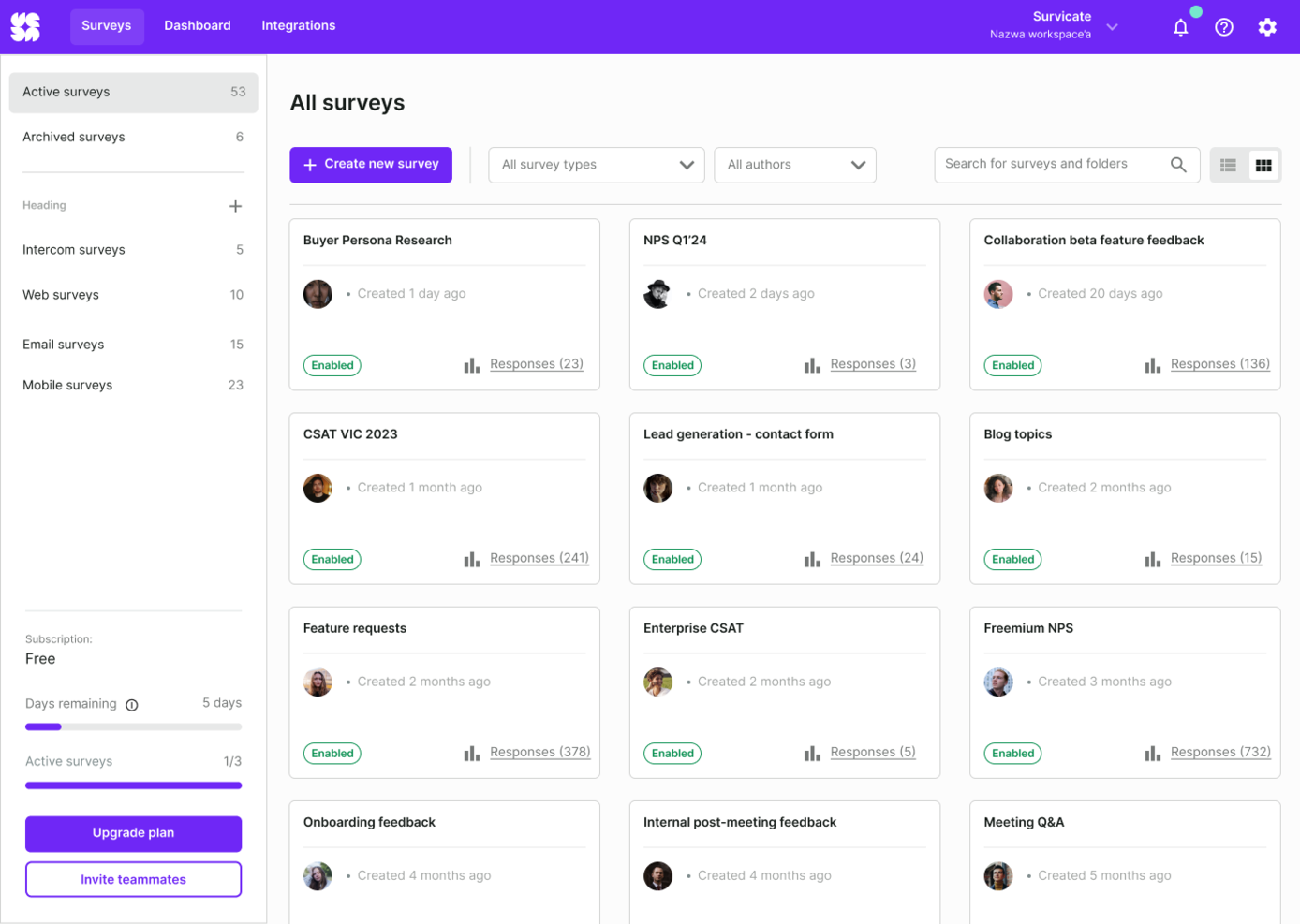
Survicate ist ein Tool zur Feedbacksammlung, das sich an Unternehmen und Teams richtet, die Erkenntnisse über verschiedene Kundenkontaktpunkte hinweg gewinnen möchten. Es unterstützt Organisationen dabei, Kundenerfahrungen zu verbessern, indem Feedback über mehrere Kanäle gesammelt wird.
Warum Survicate eine gute Alternative zu SurveyMonkey ist: Die Möglichkeit von Survicate, Feedback über verschiedene Kanäle wie Websites, E-Mails und mobile Apps zu sammeln, macht es vielseitig. Sie können problemlos Umfragen erstellen, die auf die spezifischen Anforderungen jedes Kanals zugeschnitten sind. Außerdem ermöglicht die Echtzeitanalyse des Feedbacks Ihrem Team, schnell auf Kundenmeinungen zu reagieren, was es besonders für Unternehmen geeignet macht, die ihre Feedback-Strategie verbessern möchten.
Hervorstechende Funktionen & Integrationen:
Funktionen umfassen Echtzeit-Datenerfassung, Integration mit bekannten Tools wie Intercom und HubSpot sowie umfangreiche Berichte und Analysen. Das benutzerfreundliche Design ermöglicht eine schnelle Erstellung und Anpassung von Umfragen.
Integrationen umfassen Slack, HubSpot, Intercom, Salesforce, Mailchimp, Google Analytics, Zendesk, Shopify, WordPress und Zapier.
Pros and Cons
Pros:
- Kanalübergreifendes Feedback
- Echtzeitanalyse
- Schnelle Umfrage-Erstellung
Cons:
- Benötigt Einrichtungszeit
- Eingeschränkte erweiterte Berichte
New Product Updates from Survicate

Survicate MCP Support Now Available
Survicate now supports MCP, letting teams use AI tools like Claude, ChatGPT, and Slack to explore survey results, analyze responses and insights, and draft new surveys. For more information, visit Survicate's official site.
 .
.
Am besten für dialogorientierte Umfragen
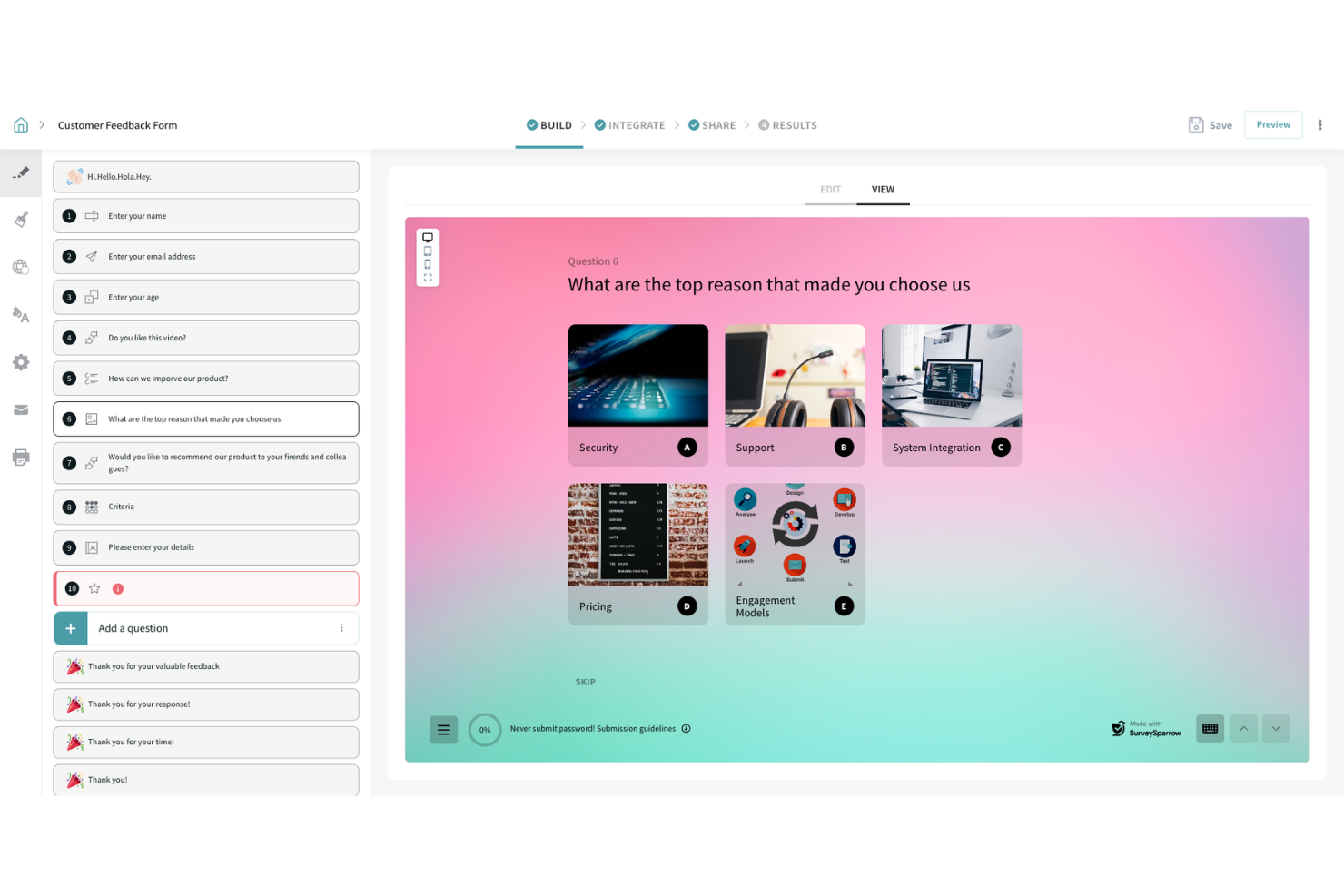
SurveySparrow ist für Unternehmen konzipiert, die nach einer intuitiven und ansprechenden Möglichkeit suchen, Kundenfeedback einzuholen. Wenn Sie ein Tool suchen, das Umfragen in dialogorientierte Erlebnisse verwandelt, könnte SurveySparrow Ihre bevorzugte Lösung sein.
Warum ich SurveySparrow ausgewählt habe
Ich habe mich für SurveySparrow entschieden, weil der Fokus auf dialogorientierten Umfragen einzigartig ist und die Rücklaufquoten deutlich erhöhen kann. Diese Funktion macht die Feedback-Erfassung zu einem ansprechenden Dialog mit Ihrer Zielgruppe und ist daher besonders attraktiv für Unternehmen mit Kundenfokus. Zudem helfen die KI-gestützten Einblicke von SurveySparrow über CogniVue dabei, verwertbare Daten aus Feedback zu gewinnen, was fundiertere Entscheidungen ermöglicht. Diese Eigenschaften passen hervorragend zu den Anforderungen von Organisationen, die nach stärkerer Einbindung und intelligenteren Erkenntnissen aus ihren Umfrageaktivitäten suchen.
SurveySparrow Hauptfunktionen
Neben den dialogorientierten Umfragen und KI-gestützten Erkenntnissen werden Sie folgende Funktionen als nützlich empfinden:
- Reputationsmanagement: Mit dieser Funktion können Sie Online-Bewertungen auf über 100 Plattformen verwalten, um Vertrauen aufzubauen und die Glaubwürdigkeit Ihrer Marke zu stärken.
- Ticket-System: Unterstützt die schnelle Bearbeitung von Anliegen, die aus Umfragen hervorgehen, sorgt für einen geschlossenen Feedback-Kreislauf und zufriedene Kunden.
- Multikanal-Feedback-Erhebung: Ermöglicht die Sammlung von Feedback über verschiedene Kanäle, einschließlich WhatsApp, um Ihre Zielgruppe dort zu erreichen, wo sie ist.
- SpotChecks: Sammelt kontextbezogenes Mikrofeedback direkt auf Ihrer Website und in Apps und bietet detaillierte Einblicke in Nutzererfahrungen.
SurveySparrow Integrationen
Integrationen umfassen Salesforce, Slack, HubSpot, Mailchimp, Google Sheets, Zapier, Intercom, Zendesk, Microsoft Teams und Shopify. Eine API steht für individuelle Integrationen zur Verfügung.
Pros and Cons
Pros:
- Unterstützt verschiedene Fragetypen für vielfältige Feedback-Erfassung.
- Stellt KI-gestützte Erkenntnisse für umsetzungsorientierte Entscheidungen bereit.
- Bietet einfache Freigabeoptionen über Web, Mobilgerät und E-Mail.
Cons:
- Für mobile oder Offline-Umfragen kann im Außendienst eine zusätzliche Konfiguration erforderlich sein.
- Begrenzte Exportoptionen für Daten, was die Flexibilität im Reporting einschränkt.

Alchemer
Am besten für die Automatisierung von Feedback-zu-Aktion-Workflows geeignet
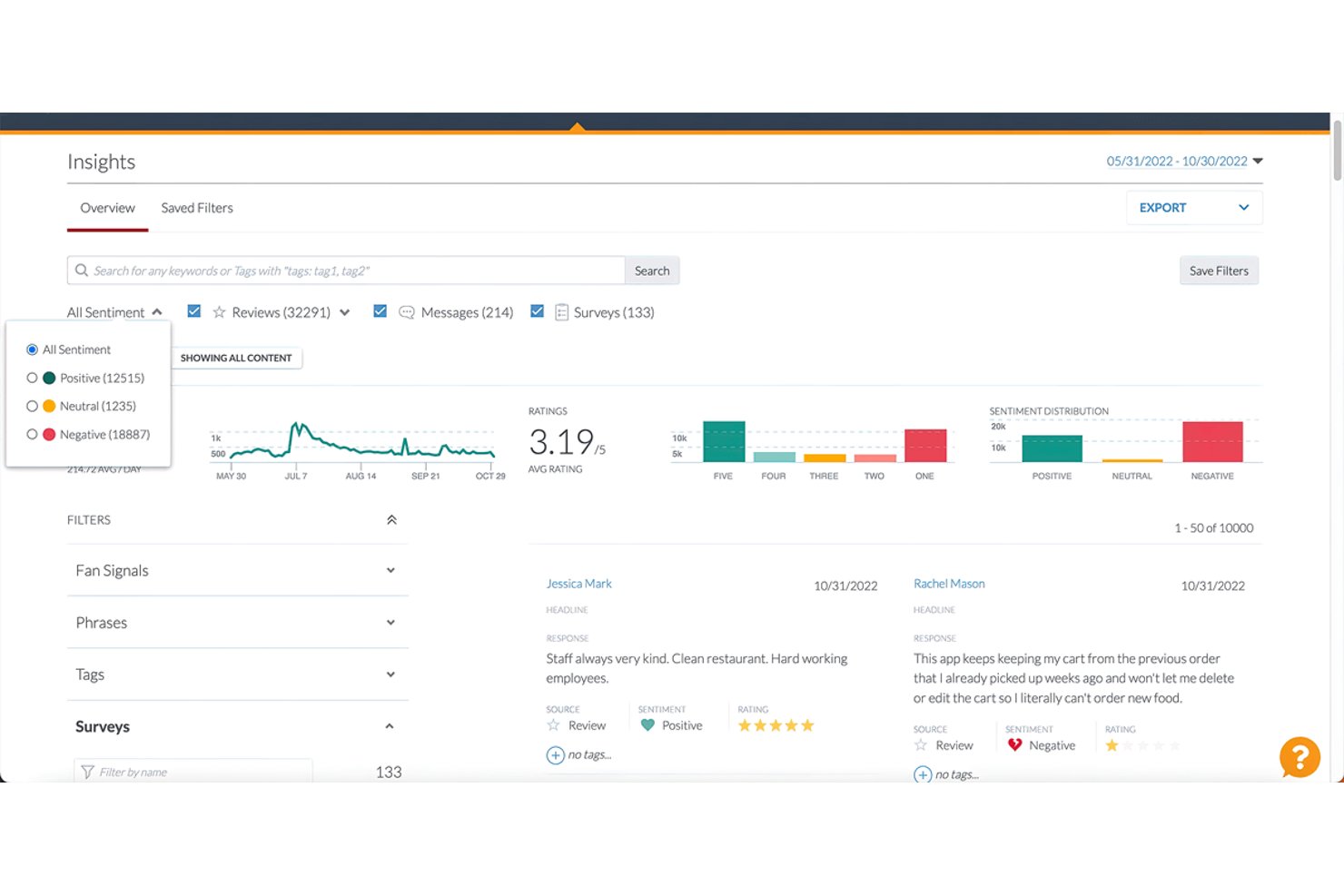
Alchemer ist eine kanalübergreifende Feedbackplattform für CX-, VoC- und Marktforschungsteams, die über das Sammeln von Umfrageantworten hinausgehen und Erkenntnisse tatsächlich an die Personen und Systeme weiterleiten müssen, die darauf reagieren können.
Für wen ist Alchemer am besten geeignet?
Alchemer eignet sich besonders für mittelständische und große Unternehmen mit strukturierten CX- oder VoC-Programmen, bei denen Feedback konkrete Aktionen in ihrem bestehenden Technologie-Stack auslösen soll.
Warum Alchemer eine der besten SurveyMonkey-Alternativen ist
Ich habe Alchemer als eine der besten Lösungen ausgewählt, weil der Connect-Workflow-Editor etwas ermöglicht, was SurveyMonkey einfach nicht kann: Er verwandelt eine niedrige NPS-Antwort ohne manuelles Eingreifen in ein sofortiges Zendesk-Ticket oder eine Salesforce-Aufgabe. Ich habe Workflows erstellt, die kritische Antworten innerhalb weniger Minuten nach der Übermittlung direkt an einen CS-Mitarbeiter weiterleiten. Der Editor ohne Code macht dies ohne Unterstützung durch die Entwicklung zugänglich, was ich in schnelllebigen CX-Teams sehr schätze.
Die wichtigsten Funktionen von Alchemer
- KI-Textanalyse: Erkennt mithilfe der integrierten Verarbeitung natürlicher Sprache automatisch die Stimmung und Themen in offenen Feedbacktexten.
- Erweiterte Personalisierung: Passt Umfragen mithilfe von dynamischer Variablenübernahme, Branding und auf Daten basierender, individueller Sprache für jeden Befragten an.
- Rollenbasierte Dashboards: Bietet maßgeschneiderte Analyseansichten für verschiedene Benutzertypen, etwa Führungskräfte, Manager und Teams an der Kundenfront.
- Mehrsprachige Unterstützung: Ermöglicht die Erstellung und Verteilung von Umfragen in Dutzenden von Sprachen zur globalen Erfassung und Analyse von Feedback.
Alchemer-Integrationen
Alchemer bietet mehr als 400 direkte Integrationen, darunter Salesforce, HubSpot, Zendesk, ServiceNow, Slack, Shopify, Jira, Klaviyo und Tableau. Für individuelle Integrationen ist eine API verfügbar.
Pros and Cons
Pros:
- Leistungsstarke integrierte Automatisierung von Workflows mit geschlossenem Regelkreis
- Umfangreiche Verzweigungslogik für komplexe Umfragepfade
- Leistungsstarke Funktionen für VoC-Programme in großen Unternehmen
Cons:
- Die Ersteinrichtung erfordert einen erheblichen Konfigurationsaufwand
- Die Benutzeroberfläche der Berichte wirkt im Vergleich zu Wettbewerbern veraltet

Unwrap
Am besten geeignet für KI-gestützte Umfragen
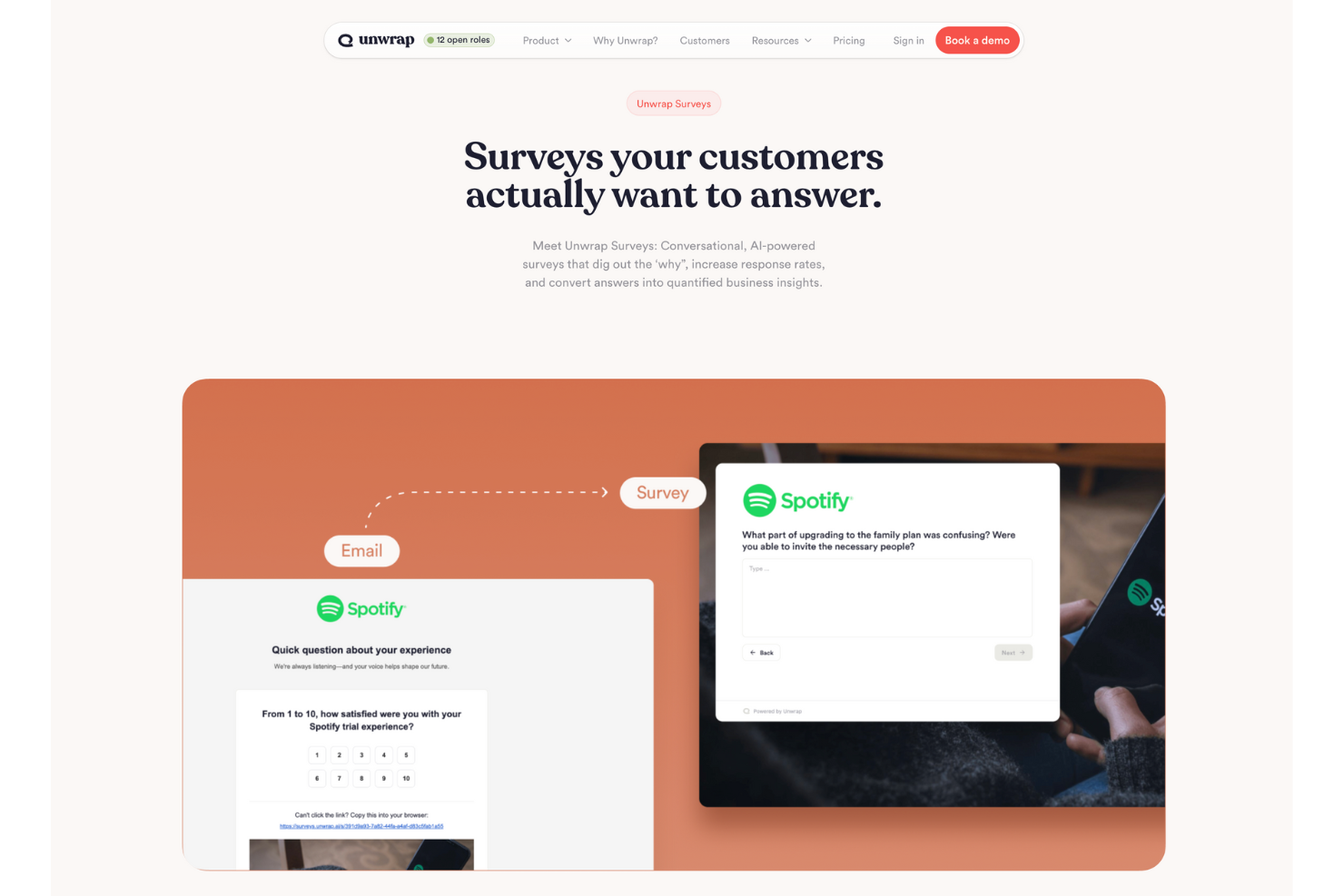
Wenn Sie nach einem Tool suchen, das über traditionelle Umfragemethoden hinausgeht, könnte Unwrap genau das Richtige für Sie sein. Entwickelt für Unternehmen, die ihr Verständnis für Kundenfeedback vertiefen möchten, bietet Unwrap einen einzigartigen Ansatz zur Sammlung und Analyse von Kundenmeinungen. Es richtet sich an Branchen mit Kundenfokus wie Einzelhandel und Software, die Feedback in umsetzbare Erkenntnisse zur Verbesserung ihrer Produkte und Dienstleistungen verwandeln möchten.
Warum ich Unwrap AI gewählt habe
Ich habe Unwrap wegen seiner KI-gestützten Umfragen ausgewählt, die unter den Alternativen zu SurveyMonkey herausstechen. Die Plattform ist in der Lage, konversationelle Umfragen zu führen, die automatisch intelligente Folgefragen stellen und so zum Kern des Kundenfeedbacks vordringen. Zudem beseitigt die Auto-Tagging-Funktion von Unwrap AI den manuellen Aufwand zur Kategorisierung von Rückmeldungen, sodass sich Ihr Team auf strategische Initiativen konzentrieren kann. Diese Funktionen sind besonders wertvoll für Unternehmen, die ihre Kundenbindung und Produktentwicklungsprozesse verbessern möchten.
Unwrap AI Hauptfunktionen
Neben KI-gesteuerten Umfragen bietet Unwrap:
- Anpassbare Dashboards: Ermöglichen es Ihrem Team, Kundeneinblicke im gesamten Unternehmen zu visualisieren und zu teilen.
- Assistent für natürliche Sprache: Gibt sofortige Antworten auf Ihre Anfragen und unterstützt so Entscheidungsprozesse.
- Echtzeit-Benachrichtigungen: Informieren Sie über Datenanomalien, sodass Sie Probleme proaktiv angehen können.
- Multi-Channel-Responder: Erlaubt die Kommunikation mit Kunden auf verschiedenen Plattformen und sorgt für einen nahtlosen Feedback-Prozess.
Unwrap AI Integrationen
Integrationen umfassen Salesforce, Slack, Zendesk, HubSpot, Intercom, Jira, Microsoft Teams, Trello, Google Analytics und Shopify. Eine API steht für kundenspezifische Integrationen zur Verfügung.
Pros and Cons
Pros:
- Individuelle Onboarding-Unterstützung hilft, den vollen Nutzen des Tools auszuschöpfen
- Mehrsprachige Unterstützung für internationale Nutzergruppen
- KI-basierte Umfragen verbessern die Kundenbindung und die Qualität des Feedbacks
Cons:
- Gelegentliche Lücken bei nativen Plattformintegrationen im Vergleich zur Konkurrenz
- Eine zu starke Abhängigkeit von KI kann zu Vernachlässigung menschlicher Analysen führen

Ideal für konversationelle Formulare
Draftalizer-Link: https://stg.draftalizer.com/app/jobs/29887
Screenshot-Galerie-Link: https://stg.draftalizer.com/app/gallery/5674
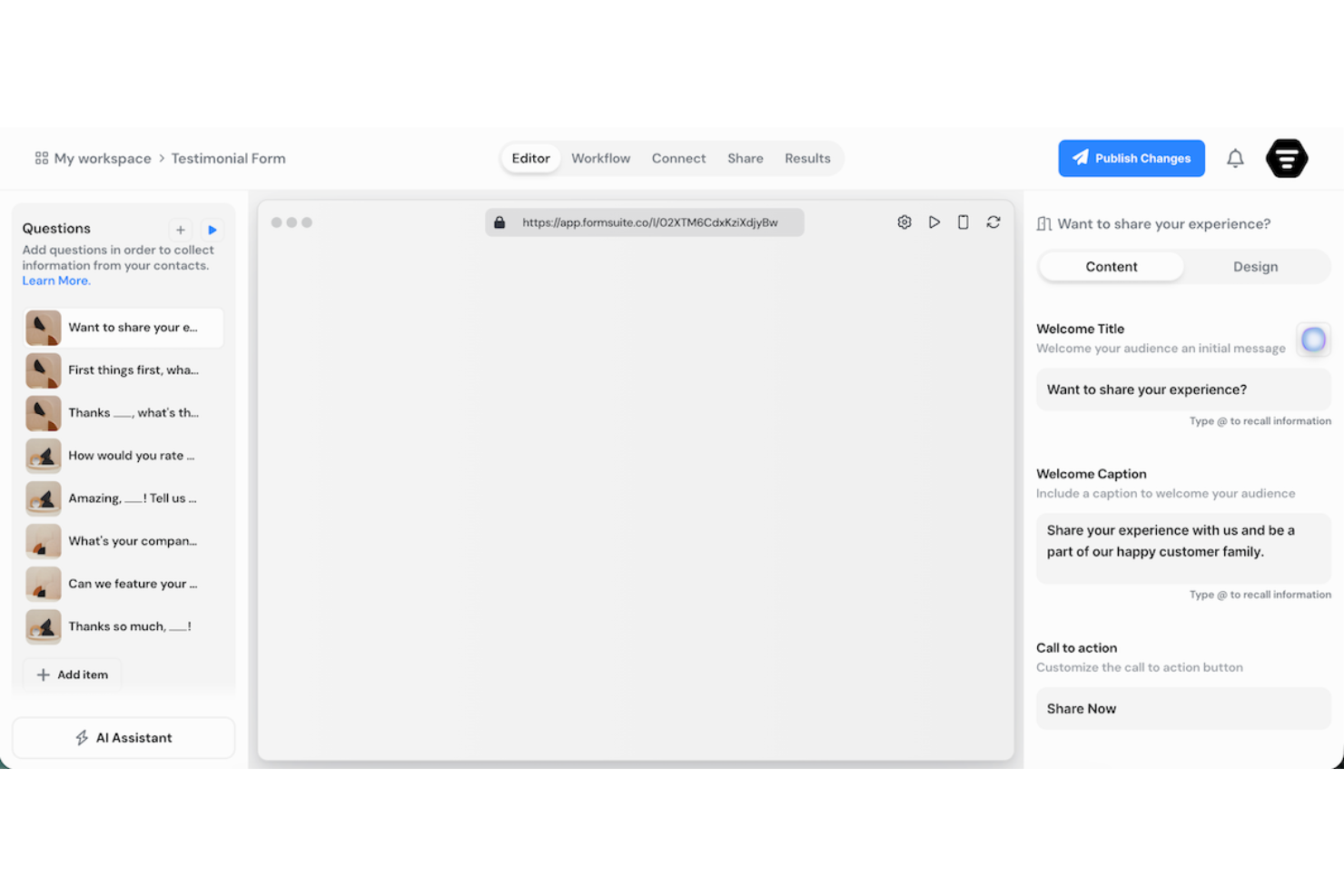
FormSuite ist eine Online-Lösung für Umfragen und Formulare für Teams, die flexible Möglichkeiten zur Sammlung von Feedback, Leads und internen Anfragen benötigen. Die Lösung zeichnet sich durch KI-gestützte Formulareerstellung, konversationelle Formulare, bedingte Logik und Antwortanalyse aus und ist somit eine starke Option für Teams, die dynamischere Datenerfassung wünschen als einfache Formular-Builder bieten.
Für wen ist Formsuite am besten geeignet?
Formsuite ist eine gute Wahl für CX-Teams, HR- und Forschungsexperten, die anpassbare Umfragen mit dynamischer Fragenlogik benötigen.
Warum Formsuite eine gute Alternative zu SurveyMonkey ist
Ich habe FormSuite als gute Alternative zu SurveyMonkey ausgewählt, weil Ihr Team damit konversationelle Formulare erstellen kann, die interaktiver wirken als standardmäßige Umfrageseiten. Das Ein-Frage-pro-Seite-Format, Fortschrittsanzeigen und antwortbasierte Wege machen das Ausfüllen von Umfragen leichter, gerade für Feedback, Lead-Erfassung und Nachkontakt-Formulare. Mir gefällt außerdem, dass FormSuite bedingte Logik unterstützt, sodass Sie Fragen basierend auf vorherigen Antworten ein- oder ausblenden und jede Umfrage für die Teilnehmenden relevant halten können. Das macht es vor allem für CX- und Marketing-Teams nützlich, die kürzere, personalisierte Umfragen wünschen, ohne für jede Zielgruppe ein eigenes Formular zu erstellen.
Wichtige Funktionen von Formsuite
Weitere FormSuite-Funktionen unterstützen Ihr Team bei der effizienten Erstellung, Verteilung und Auswertung von Umfragen:
- KI-Formularersteller: Erstellen oder bearbeiten Sie Formulare, indem Sie im Chat-Stil mit dem KI-Assistenten von FormSuite beschreiben, was Sie benötigen.
- Antwortverwaltung: Organisieren Sie Formulareinsendungen an einem Ort und nutzen Sie KI, um Muster, Stimmung und Themen über alle Antworten hinweg zu erkennen.
- Abbruch-Tracking: Ermitteln Sie, an welcher Stelle Teilnehmer Ihr Formular verlassen, mit visuellen Berichten zu Aufrufen, Starts und Abschlussraten.
- Flexible Veröffentlichungsoptionen: Formulare über eine eigene URL teilen, auf einer Webseite einbinden, auf der eigenen Domain bereitstellen oder als Pop-up/Banner anzeigen.
Formsuite-Integrationen
Integrationen umfassen Google Sheets, Google Analytics, Stripe, Slack und Zapier.
Pros and Cons
Pros:
- Bedingte Logik hält die Fragen für jeden Befragten relevant
- Konversationelle Formulare erleichtern das Ausfüllen von Umfragen
- KI-Assistent beschleunigt die Formularerstellung und -bearbeitung
Cons:
- Erweiterte Recherchefunktionen sind weniger klar als bei SurveyMonkey
- Native Integrationen scheinen sich auf Kern-Tools zu beschränken

Am besten geeignet für unternehmensweite Forschungstools
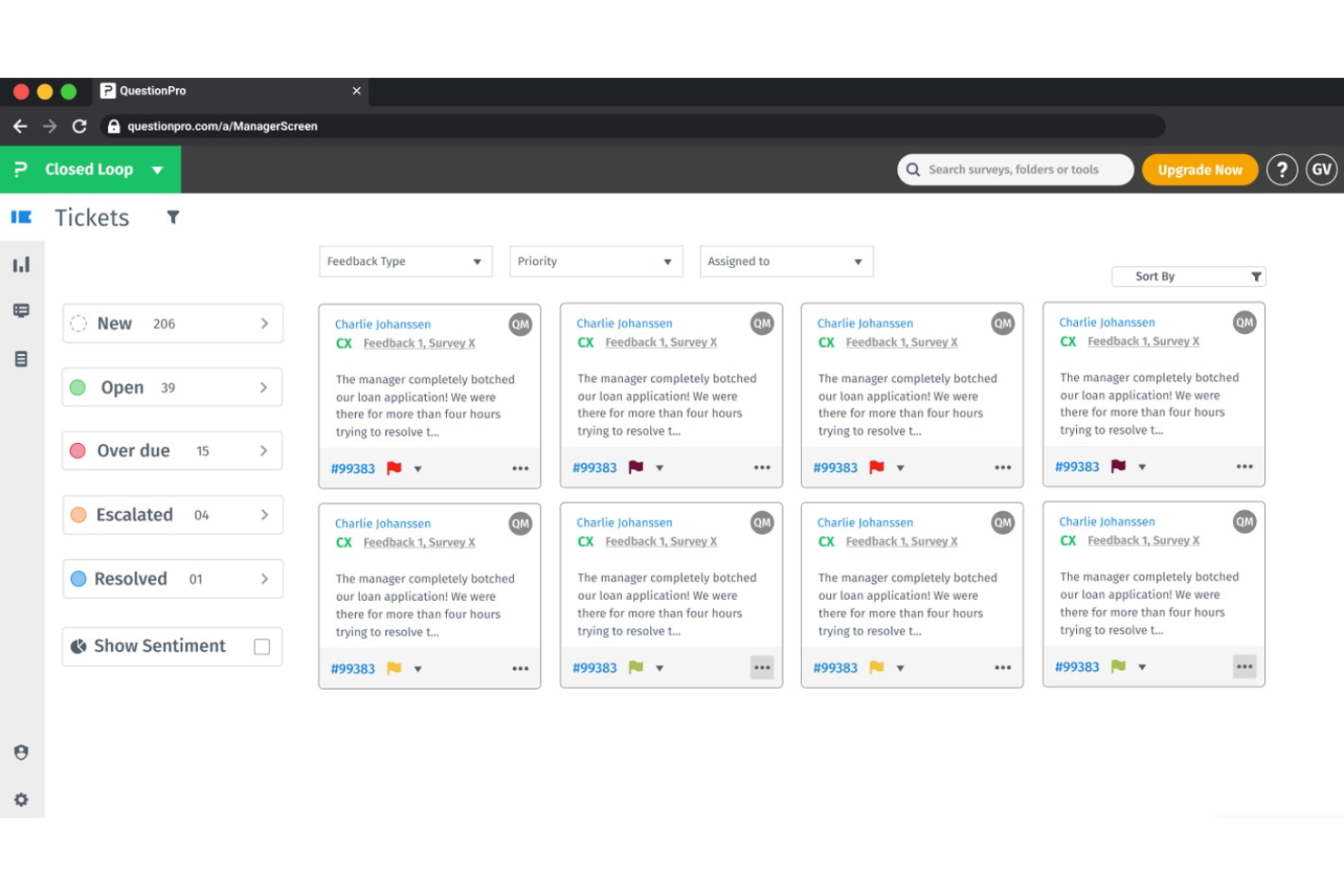
QuestionPro ist eine fortschrittliche Umfrage- und Forschungsplattform, die für Unternehmen und Forschende entwickelt wurde, die eine umfassende Datenerhebung und -analyse benötigen. Sie unterstützt Teams bei der Durchführung von Marktanalysen, Kundenfeedbacks und Mitarbeiterbefragungen.
Warum QuestionPro eine gute Alternative zu SurveyMonkey ist: Die Funktionen auf Unternehmensebene von QuestionPro ermöglichen umfangreiche Anpassungen von Umfragen und fortschrittliche Analysen und erfüllen so komplexe Forschungsanforderungen. Sie erhalten Zugriff auf eine große Auswahl an Fragetypen und Umfragevorlagen für verschiedenste Szenarien. Die Plattform bietet außerdem leistungsstarke Reportingtools, um Daten in groß angelegten Forschungsprojekten effektiv auszuwerten.
Herausragende Funktionen & Integrationen:
Funktionen umfassen erweiterte Fragetypen, logische Verzweigungen und Echtzeitanalysen. Es stehen außerdem anpassbare Vorlagen, Integrationen mit Plattformen wie Salesforce sowie Unterstützung für Multi-Channel-Verteilung zur Verfügung, was die Plattform ideal für Feedback-Sammlungen, Forschung und das Management von Kundenerfahrungen macht.
Integrationen umfassen Salesforce, Tableau, Slack, Google Analytics, HubSpot, Marketo, Zapier, Microsoft Teams, Zendesk und Mailchimp.
Pros and Cons
Pros:
- Umfassende Umfrageanpassung
- Erweiterte Analyseoptionen
- Große Auswahl an Fragetypen
Cons:
- Komplexer Einrichtungsprozess
- Höhere Lernkurve

Qualaroo
Am besten für Echtzeit-Nutzerfeedback
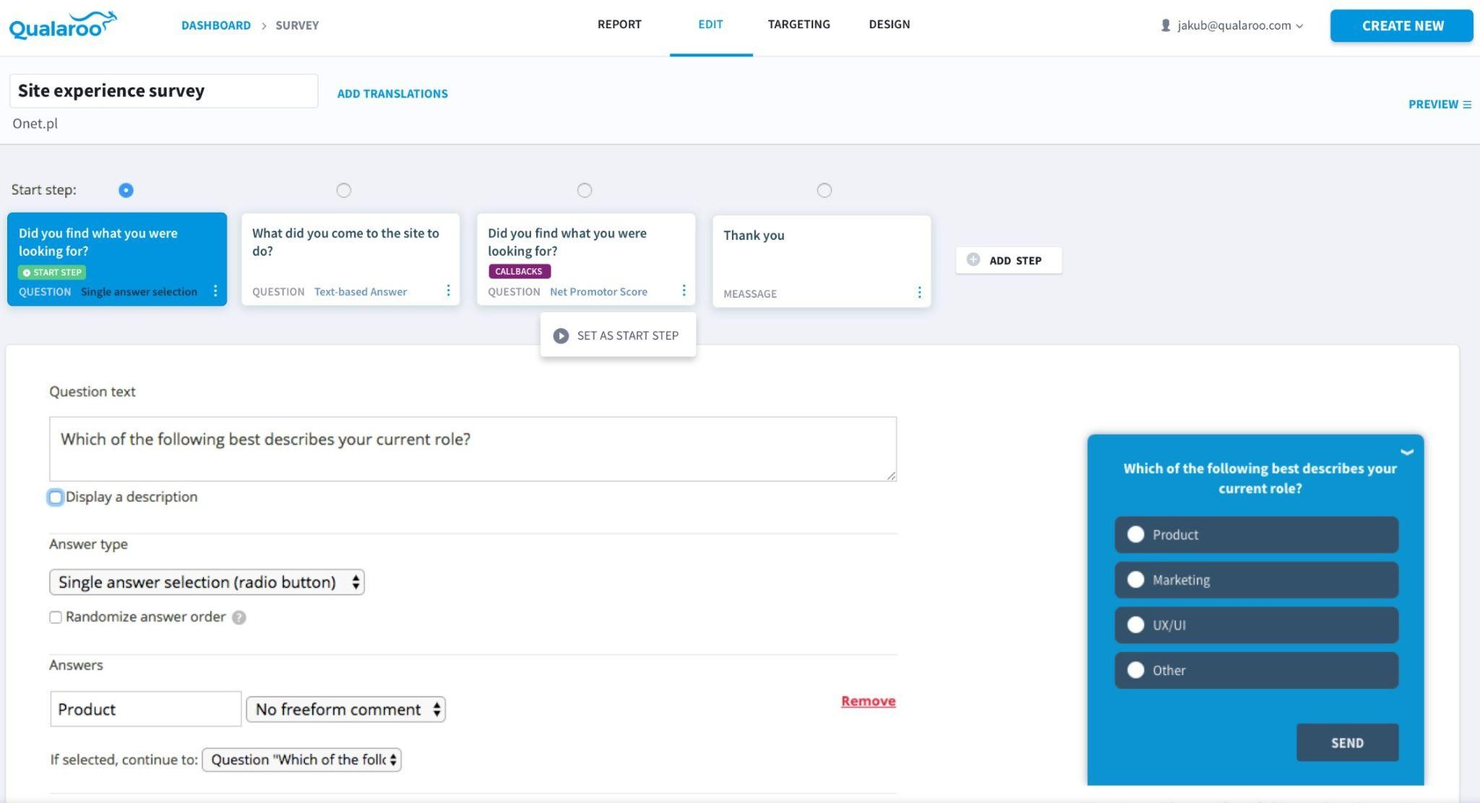
Qualaroo ist ein Umfrage-Tool, das in erster Linie für Marketer und UX-Profis entwickelt wurde, um Nutzer-Insights direkt von ihren Websites oder Apps zu sammeln. Es hilft Teams, das Nutzerverhalten zu verstehen und Feedback an bestimmten Touchpoints zu erfassen.
Warum Qualaroo eine gute SurveyMonkey-Alternative ist: Die Echtzeit-Feedbackfunktionen von Qualaroo ermöglichen es, Erkenntnisse zu gewinnen, während Nutzer mit Ihrer Website interagieren. Mit anpassbaren Hinweisen können Sie die richtigen Fragen zur richtigen Zeit stellen. Darüber hinaus helfen die zielgerichteten Umfragen der Software, relevante Daten zu sammeln, ohne das Nutzererlebnis zu stören. Diese Funktionen sind besonders für Teams gedacht, die sofort umsetzbare Erkenntnisse suchen.
Herausragende Funktionen & Integrationen:
Funktionen sind unter anderem fortgeschrittenes Targeting und Verzweigungslogik, nahtlose Integrationen mit verschiedenen Plattformen sowie eine KI-gestützte Sentiment-Analyse, um Antworten besser zu verstehen. Außerdem können nicht aufdringliche Feedback-Umfragen erstellt werden, die direkt auf Websites oder in Apps erscheinen.
Integrationen umfassen Google Analytics, Slack, HubSpot, Salesforce, Zapier, Marketo, Intercom, Segment, Adobe Analytics und Mailchimp.
Pros and Cons
Pros:
- Echtzeit-Feedback
- Gezielt ausgelieferte Fragen
- Anpassbare Umfrage-Hinweise
Cons:
- Begrenzte Fragetypen
- Technische Einrichtung erforderlich

Am besten für Salesforce-Integration
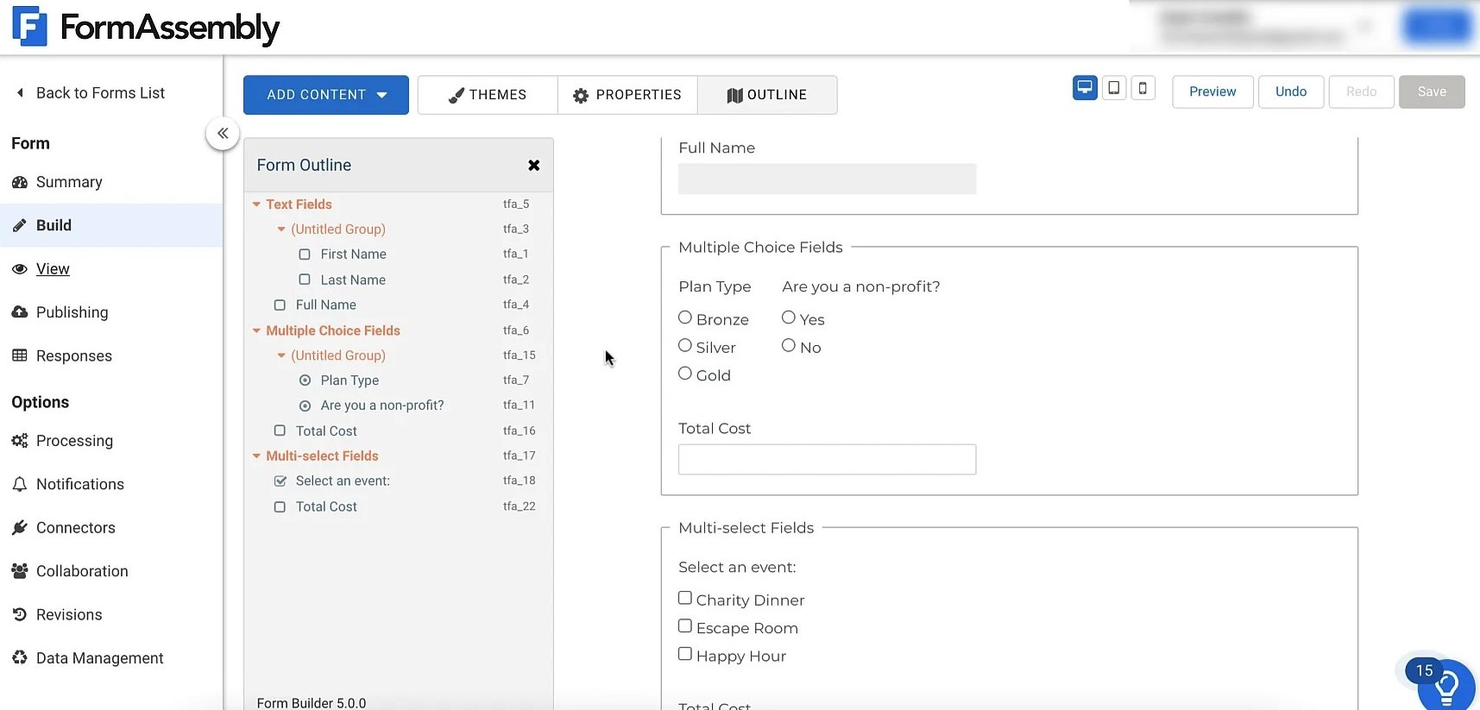
FormAssembly ist eine Webformular- und Datenerfassungsplattform, die sich an Unternehmen und Organisationen richtet, die eine nahtlose Datenverwaltung benötigen. Sie wird vor allem von Teams genutzt, die Datenerfassung direkt in ihre bestehenden Arbeitsabläufe integrieren möchten.
Warum FormAssembly eine gute Alternative zu SurveyMonkey ist: Die starke Integration von FormAssembly mit Salesforce hilft Ihrem Team, Dateneingabe und -verwaltung zu optimieren. Mit Funktionen wie individuell anpassbaren Formularen und fortschrittlichem Datenrouting wird gewährleistet, dass Daten dort ankommen, wo sie benötigt werden. Zudem profitieren Sie von der Einhaltung von Datenschutzstandards, wodurch Ihre Informationen sicher bleiben.
Herausragende Funktionen & Integrationen:
Funktionen sind unter anderem umfassende Sicherheits- und Compliance-Maßnahmen wie HIPAA-, DSGVO- und PCI DSS-Konformität, was es ideal für Organisationen macht, die mit sensiblen Daten arbeiten. Außerdem gibt es leistungsstarke Workflow-Automatisierungen und umfangreiche Anpassungsmöglichkeiten.
Integrationen umfassen Salesforce, Google Sheets, PayPal, Mailchimp, Pardot, Box, Stripe, Microsoft Dynamics 365, Slack und HubSpot.
Pros and Cons
Pros:
- Starke Salesforce-Integration
- Individuell anpassbare Formularoptionen
- Fortschrittliches Datenrouting
Cons:
- Benötigt technische Einrichtung
- Gelegentliche Leistungsprobleme

Qualtrics
Am besten für KI-gestützte Einblicke
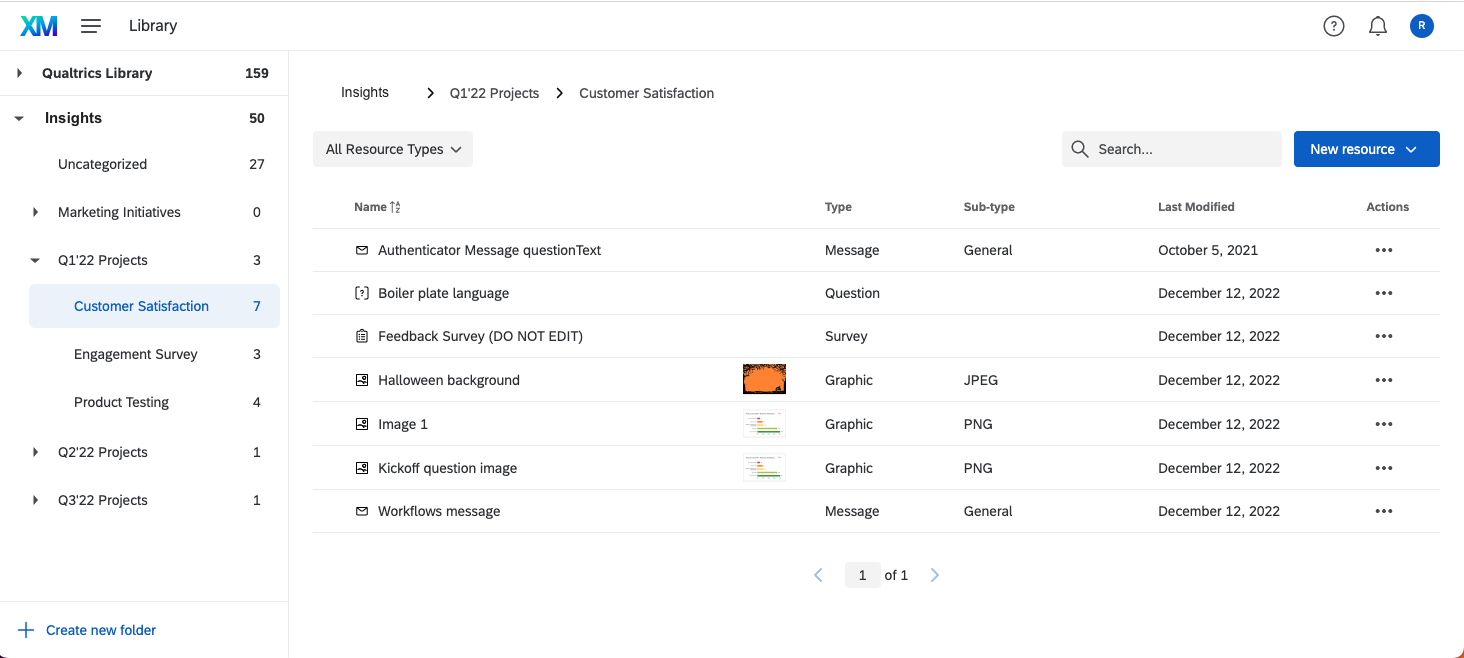
Qualtrics ist eine anspruchsvolle Plattform für Umfragen und Experience Management, die von großen Unternehmen und Organisationen genutzt wird, um tiefgehende Einblicke zu gewinnen. Sie richtet sich an Teams, die sich auf Kundenerlebnis, Mitarbeitererfahrung und Marktforschung konzentrieren.
Warum Qualtrics eine gute Alternative zu SurveyMonkey ist: Die fortschrittlichen Analysefunktionen von Qualtrics, einschließlich KI-gestützter Erkenntnisse, ermöglichen ein tieferes Verständnis der Umfrageergebnisse. Ebenso hilft die prädiktive Intelligenzfunktion der Software, Trends und Muster zu erkennen, sodass fundierte Entscheidungen getroffen werden können. Neben diesen zentralen Komponenten bieten die leistungsstarken Reporting-Tools eine detaillierte Analyse und Visualisierung, um Unternehmenskennzahlen übersichtlich darzustellen.
Herausragende Funktionen & Integrationen:
Funktionen umfassen Echtzeit-Berichterstattung, Stimmungsanalyse und prädiktive Analytik. Darüber hinaus lässt es sich mit verschiedenen Plattformen integrieren und ermöglicht nahtlose Zusammenarbeit sowie die Verteilung von Erkenntnissen über Teams hinweg.
Integrationen umfassen Salesforce, Adobe, SAP, Slack, Microsoft Teams, ServiceNow, Zendesk, Tableau, Google Analytics und Marketo.
Pros and Cons
Pros:
- Tools für prädiktive Intelligenz
- Detaillierte Berichtsfunktionen
- Anpassbare Umfrageoptionen
Cons:
- Steile Lernkurve
- Komplexer Einrichtungsprozess
Weitere SurveyMonkey-Alternativen
Hier sind einige zusätzliche SurveyMonkey-Alternativen, die es nicht in meine engere Auswahl geschafft haben, aber dennoch einen Blick wert sind:
- Formstack
Am besten geeignet für die Formularerstellung ohne Programmieraufwand
- Zoho Survey
Am besten für Datenschutz-Fokus geeignet
- LimeSurvey
Am besten für Self-Hosting
- SurveyPlanet
Am besten geeignet für unbegrenzte kostenlose Umfragen
- SurveyKing
Am besten geeignet für fortschrittliche Fragetypen
- Great Question
Am besten für die Integration von UX-Forschung
- Tripetto
Ideal für das Formulardesign im Storyboard-Stil


Wie ich SurveyMonkey-Alternativen bewerte
Ich unterteile meine Bewertung in zwei Ebenen: die grundlegenden Fähigkeiten, die ein Tool aufweisen muss, um NPS-, CSAT- und CES-Programme im großen Maßstab durchzuführen, und die Unterscheidungsmerkmale, die die besten Optionen für CX-Teams hervorheben.
Kernfunktionen (Muss-Kriterien für diese Liste)
Bei der Auswahl von Tools für meine Liste bewerte ich jedes einzelne auf einer Skala von 0 (bietet die Funktion nicht) bis 5 (übertrifft in diesem Bereich) für jede unten aufgeführte Kernfunktionalität. Anschließend rechne ich die Gesamtbewertung des Tools in einen Prozentsatz um. Jedes Tool muss mindestens eine Gesamtbewertung von 65 % erreichen, um für die Aufnahme in Betracht gezogen zu werden.
- CX-Umfragevorlagen: Ich prüfe, ob jedes Tool einsatzbereite NPS-, CSAT- und CES-Vorlagen beinhaltet, sodass Teams ein Feedback-Programm in wenigen Minuten starten können, ohne es von Grund auf neu zu gestalten.
- Multi-Channel-Umfrageverteilung: Es ist entscheidend, Kunden dort zu erreichen, wo sie sind. Daher bewerte ich, ob ein Tool die Zustellung von Umfragen per E-Mail, SMS, Web, In-App und mobil mit einheitlichem Tracking unterstützt.
- Umfragelogik & Verzweigungen: Ich achte auf bedingte Pfade, die sich an die Eingaben von Befragten anpassen, etwa indem ein Detraktor zu einer Folgefrage weitergeleitet wird, während Förderer sie überspringen.
- Berichterstattung & Analyse: Dashboards sollten es ermöglichen, Antworten nach Kundensegment zu filtern, Trendverläufe über die Zeit zu verfolgen und Themen aus offenen Antworten automatisch zu extrahieren, ohne manueller Verschlagwortung.
- CX-Plattform-Integrationen: Ich prüfe native Anbindungen an CRMs, Helpdesks und CS-Plattformen wie Salesforce, Zendesk und HubSpot, um sicherzustellen, dass Antwortdaten dort synchronisiert werden, wo die Teams bereits arbeiten.
- Closed-Loop-Workflows: Tools, die Benachrichtigungen auslösen, Tickets erstellen oder Nachfassaktionen zuweisen, wenn Kunden negatives Feedback geben, helfen CX-Teams, Erkenntnisse umzusetzen, bevor das Churn-Risiko steigt.
Nachdem ich eine Liste von Tools zusammengestellt habe, die diese Kriterien erfüllen, prüfe ich, wodurch sich jede Plattform abhebt.
Unterscheidungsmerkmale (Was unterscheidet die Anbieter?)
So vergleiche und kontrastiere ich verschiedene Anbieter:
Herausragende Funktionen
KI-gestützte Textanalysen sind ein wichtiges Unterscheidungsmerkmal. Ich achte auf Tools, die automatisch Themen verschlagworten und Stimmungen in tausenden offenen Antworten erkennen, um Stunden manueller Auswertung einzusparen. Benchmark-Daten sind ebenfalls wichtig, denn zu wissen, dass Ihr NPS bei 42 liegt, bringt wenig ohne den Branchenkontext zum Vergleich. Außerdem sind Journey-basierte Trigger spannend – etwa, eine CES-Umfrage direkt nach Abschluss eines Support-Tickets zu senden, anstatt auf manuelle Sammelaussendungen zu setzen.
Mehr als Funktionen
Datensicherheit hat Priorität, denn CX-Umfragen erfassen personenbezogene Kundendaten. Ich prüfe auf DSGVO- und SOC 2-Konformität sowie SSO- und Datenresidenz-Optionen für Teams, die globale Programme durchführen. Ebenso wichtig ist die Skalierbarkeit – ich bewerte, ob eine Plattform mehrsprachige Umfragen und Multi-Brand-Setups unter einem Account unterstützt. Zudem berücksichtige ich auch die Tiefe des Ökosystems, insbesondere ob ein Tool Verbindungen zu Data Warehouses wie Snowflake oder BI-Tools wie Tableau für tiefere CX-Analysen bietet.
Warum nach einer SurveyMonkey-Alternative suchen?
SurveyMonkey ist zwar eine gute Wahl für Online-Umfragesoftware, doch es gibt mehrere Gründe, warum manche Nutzer nach alternativen Lösungen suchen. Du suchst möglicherweise aus folgenden Gründen nach einer SurveyMonkey-Alternative:
- Du benötigst erweiterte Anpassungsmöglichkeiten
- Dein Budget ist für Premium-Funktionen begrenzt
- Du möchtest bessere Integrationsmöglichkeiten
- Du wünschst dir einen reaktionsschnelleren Kundensupport
- Dein Team benötigt mehrsprachige Unterstützung
- Du benötigst eine bessere Einhaltung von Datenschutzbestimmungen
Wenn du dich darin wiedererkennst, bist du hier genau richtig. Meine Liste enthält mehrere Online-Umfragesoftwarelösungen, die besser für Teams geeignet sind, die mit diesen Herausforderungen bei SurveyMonkey konfrontiert sind und nach alternativen Lösungen suchen.
Wichtige Funktionen von SurveyMonkey
Hier sind einige der wichtigsten Funktionen von SurveyMonkey, damit du die Angebote alternativer Lösungen gegenüberstellen und vergleichen kannst:
- Anpassbare Vorlagen: Ermöglicht Ihnen, aus verschiedenen Vorlagen auszuwählen, um Ihre Umfragen an spezifische Anforderungen anzupassen. Dadurch sparen Sie Zeit und gewährleisten Konsistenz. Vishveshwar Jatain, Gründer von And/or Labs, äußert sich sehr positiv über die Software. "SurveyMonkey unterstützt verschiedene Frageformate für die Erfassung qualitativer und quantitativer Daten, darunter Bewertungsskalen, offene Fragen und Fragen mit bedingter Logik."
- Vorhersage des Fragentyps: Verwendet KI-gestützte Technologie, um die besten Frageformate vorzuschlagen, und hilft Ihnen dabei, schnell effektive Umfragen zu erstellen.
- Mehrsprachige Unterstützung: Hilft Ihnen, Umfragen in mehreren Sprachen zu erstellen, um ein größeres Publikum zu erreichen und vielfältige Erkenntnisse leichter zu gewinnen.
- Erweiterte Analysen: Analysiert Ihre Daten mit leistungsstarken Filter- und Berichtstools, sodass Sie Trends erkennen und datengestützte Entscheidungen treffen können.
- Werkzeuge für die Zusammenarbeit: Ermöglicht Ihnen, Umfragen mit Ihrem Team zu teilen, Berechtigungen zu verwalten und Feedback zentral zu bündeln, um die Teamarbeit zu verbessern und Prozesse zu optimieren.
- Methoden zur Erfassung von Antworten: Ermöglicht Ihnen, verschiedene Kanäle wie E-Mail, QR-Codes und soziale Medien zu nutzen, um Antworten zu sammeln und sicherzustellen, dass Sie Ihre Zielgruppe erreichen. "Ich fand auch die Möglichkeit wertvoll, Zielgruppenpanels zu bilden oder Umfrageteilnehmer anhand bestimmter demografischer und zielgruppenbezogener Parameter auszuwählen, da dies die Genauigkeit der Umfrage und die Relevanz der Antworten verbessert", fügte Vishveshwar Jatain hinzu.
- Funktionen zum Datenschutz: Trägt dazu bei, die Sicherheit Ihrer Daten zu gewährleisten, mit anonymen Antworten, Passwortschutz sowie der Einhaltung von GDPR und CCPA.
- Integrationsmöglichkeiten: Verbindet Sie mit über 200 Anwendungen, um Arbeitsabläufe zu automatisieren und die Produktivität Ihres Teams zu steigern.