

10 beste Softwarelösungen für Kundenfeedback im Jahr 2026

10 Bestenliste der besten Kundenfeedback-Software


Kundenfeedback-Software hilft CX-, Produkt- und Supportteams, Schlussfolgerungen ohne ausreichende Grundlage zu vermeiden und zu erfassen, was Kunden wirklich denken. Doch ein Tool zu finden, das verwertbare Erkenntnisse liefert (und nicht nur Umfragemüdigkeit verursacht), ist leichter gesagt als getan.
In diesem Leitfaden habe ich die besten Kundenfeedback-Tools bewertet, die Ihnen helfen, schneller den Feedbackkreislauf zu schließen, Ursachen aufzudecken und Rohfeedback in echte Geschäftsergebnisse umzuwandeln. Ganz gleich, ob Sie die Kundenbindung verbessern, den Produkt-Markt-Fit testen oder einfach eine engere Beziehung zu Ihren Kunden aufbauen möchten – hier finden Sie eine Lösung, die zu Ihrem Technologie-Stack und Entwicklungsstand passt.
Warum Sie unseren Software-Empfehlungen vertrauen können
Unser Team testet und bewertet Software seit 2012. Als CX-Führungskräfte selbst wissen wir, wie schwierig – und wichtig – es ist, die richtige Software auszuwählen.
Für diesen Leitfaden haben wir Tools mithilfe von praktischen Tests und unabhängiger Recherche bewertet und dabei unsere Bewertungskriterien angewendet.
Unsere Bewertungen spiegeln unser menschliches redaktionelles Urteilsvermögen wider, keine Verkaufsstrategie.
Vergleichstabelle der 20 besten Kundenfeedback-Softwarelösungen
Diese Vergleichstabelle fasst grundlegende Informationen zu jeder meiner besten Kundenfeedback-Softwarelösungen zusammen. Sie können Preisinformationen sowie die Verfügbarkeit kostenloser Testversionen oder Demos direkt miteinander vergleichen, um die beste Software für Ihr Budget und Ihre geschäftlichen Anforderungen zu finden.
| Tool | Best For | Trial Info | Price | ||
|---|---|---|---|---|---|
| 1 | Am besten geeignet für zentralisiertes Kundenfeedback | Kostenlose Demo verfügbar | Preise auf Anfrage | Website | |
| 2 | Am besten für KI-gestütztes Themen-Tagging | Kostenlose Demo verfügbar | Preise auf Anfrage | Website | |
| 3 | Am besten geeignet für fortschrittliche KI-Kundenumfragen | Kostenlose Testversion + kostenloser Plan + kostenlose Demo verfügbar | Ab $39/Monat (jährliche Abrechnung) | Website | |
| 4 | Am besten für den Assistenten für natürliche Sprache geeignet | Kostenlose Demo verfügbar | Preis auf Anfrage | Website | |
| 5 | Beste flexible Kundenumfragen mit bedingter Logik | 14-tägige kostenlose Testphase + kostenlose Demo verfügbar | Preise auf Anfrage | Website | |
| 6 | Am besten geeignet zur mehrsprachigen Feedback-Erhebung | Ab $49/Nutzer/Monat. | Website | ||
| 7 | Am besten geeignet für KI-gestützte Feedback-Einblicke | 7-tägige kostenlose Testphase | Ab $55/Nutzer/Monat | Website | |
| 8 | Am besten für integrierte CSAT-Umfragen | Kostenlose Demo + 14-tägige kostenlose Testphase verfügbar | Ab $19/Benutzer/Monat (jährliche Abrechnung) | Website | |
| 9 | Am besten geeignet, um Kundenfeedback und Feature-Anfragen zu verfolgen | Kostenloser Plan verfügbar | Ab $19/Monat | Website | |
| 10 | Am besten geeignet für visuelles Feedback mit Bildschirmkommentaren | Kostenloser Tarif verfügbar | Ab $7/Nutzer/Monat | Website |


Bewertungen der besten Kundenfeedback-Software
Hier finden Sie kurze Beschreibungen meiner 20 besten Kundenfeedback-Softwarelösungen, die den jeweils besten Anwendungsfall und bemerkenswerte Funktionen hervorheben. Außerdem zeigen Screenshots einen Einblick in die Benutzeroberfläche. Weiter unten habe ich zusätzliche Bonuslösungen aufgenommen, falls Sie noch mehr Optionen in Betracht ziehen möchten.

Am besten geeignet für zentralisiertes Kundenfeedback
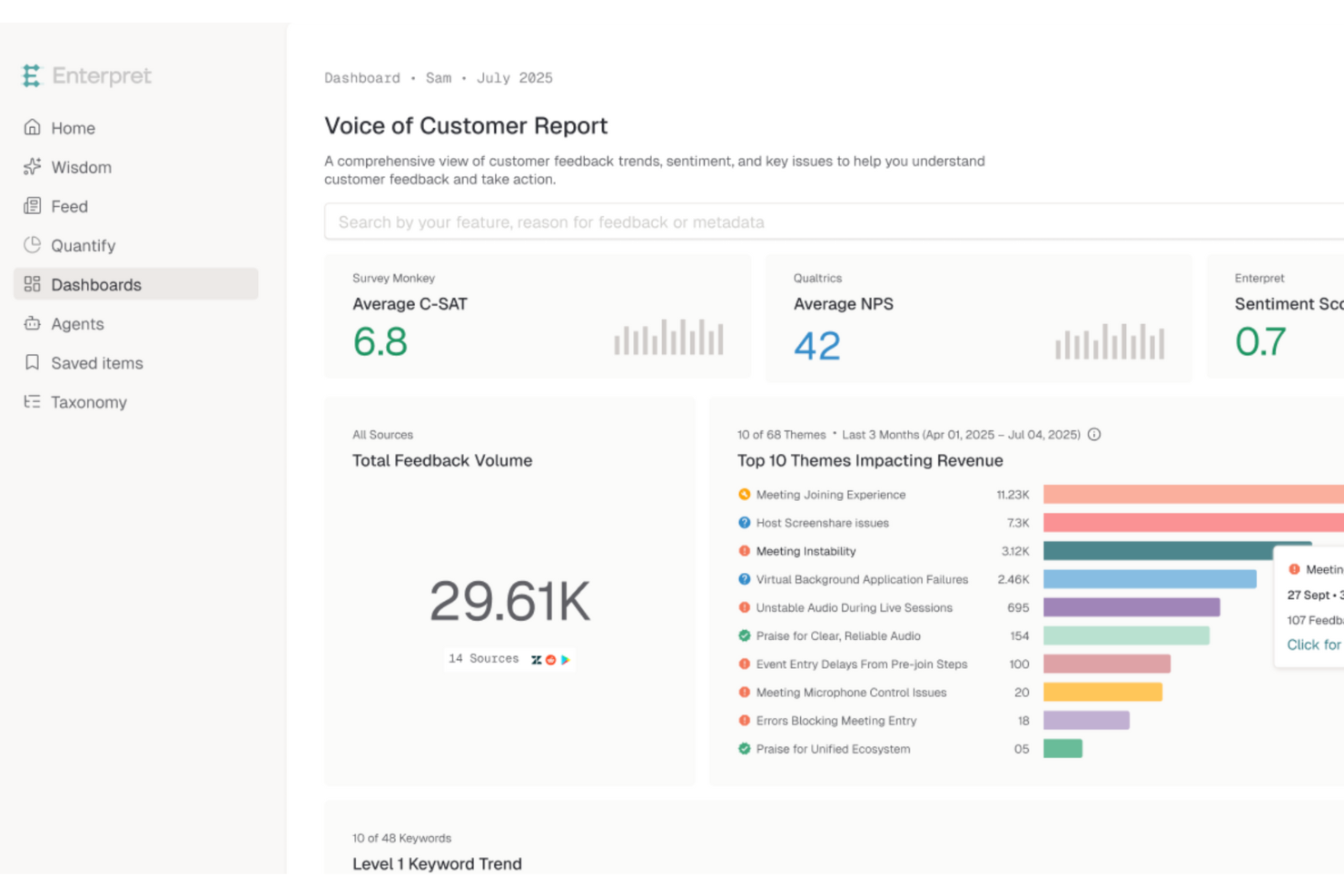
Enterpret ist eine KI-gestützte Plattform, die darauf ausgelegt ist, die Art und Weise, wie Unternehmen Kundenfeedback verstehen und daraus Maßnahmen ableiten, zu transformieren. Sie spricht Unternehmen an, die sich auf die Verbesserung der Kundenerfahrung konzentrieren, indem sie umsetzbare Erkenntnisse aus vielfältigen Feedbackquellen gewinnen. Die Plattform löst das Problem verstreuter Kundensignale, sodass Unternehmen Kundenbedürfnisse und -präferenzen schnell erkennen und darauf reagieren können.
Für wen ist Enterpret am besten geeignet?
Produktmanager und Teams für Kundenerfahrung in mittelgroßen bis großen Unternehmen weltweit, die Feedback aus mehreren Kundenkanälen zentralisieren.
Warum ich Enterpret ausgewählt habe
Ich habe Enterpret wegen seiner einzigartigen Fähigkeit ausgewählt, Feedback aus über 50 Quellen zu integrieren und mithilfe KI-gestützter Analysen in umsetzbare Erkenntnisse zu verwandeln. Diese Funktion ist entscheidend für Unternehmen, die Kundenfeedback zentralisieren und ein umfassendes Verständnis der Kundensentiments gewinnen möchten. Zusätzlich bieten Enterprets adaptive Taxonomie und Wissensgraph des Kunden tiefe kontextuelle Einblicke, die es Teams ermöglichen, Trends zu erkennen und fundierte Entscheidungen zu treffen.
Wichtige Funktionen von Enterpret
Neben zentralisiertem Kundenfeedback bietet Enterpret:
- KI-Agenten: Automatisieren Reaktionen und Maßnahmen auf der Basis von Kundenfeedback, um die Effizienz bei der Bearbeitung von Kundenanliegen zu erhöhen.
- Anpassbare Feedback-Themen: Erlauben es Unternehmen, Feedback-Themen spezifisch anzupassen und so sicherzustellen, dass relevante Erkenntnisse priorisiert werden.
- Echtzeit-Einblicke: Bieten aktuelle Analysen des Kundenfeedbacks, um schnelle Strategieanpassungen und proaktives Lösen von Problemen zu ermöglichen.
- Feedback-Visualisierungstools: Bieten Diagramme und Grafiken, die Teams helfen, Trends und Muster im Kundenfeedback für eine bessere strategische Planung zu visualisieren.
Enterpret-Integrationen
Integrierbar mit Salesforce, Zendesk, Slack, Microsoft Teams, Intercom, HubSpot, Freshdesk, Jira, Asana und Trello.
Pros and Cons
Pros:
- KI-gestützte Analyse bietet umsetzbare Erkenntnisse zu Kunden-Trends
- Automatisierte Kategorisierung spart Zeit bei der Analyse von Feedback
- Bündelt Feedback aus verschiedenen Quellen und liefert umfassende Einblicke
Cons:
- Anwender berichten gelegentlich von Verzögerungen
- KI-generierte Zusammenfassungen sind manchmal inkonsistent

Am besten für KI-gestütztes Themen-Tagging
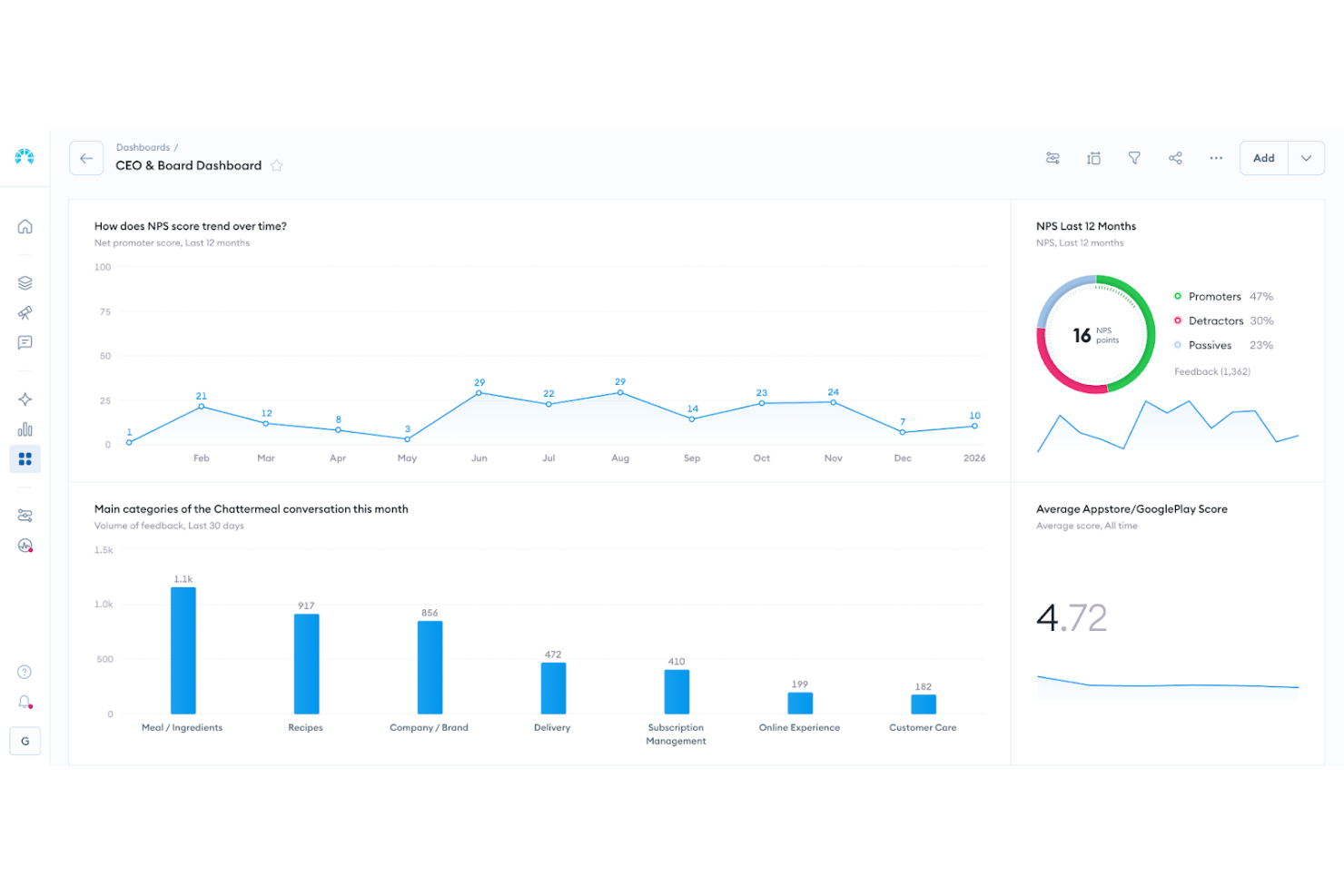
Chattermill ist für Unternehmen konzipiert, die Kundenfeedback in bedeutungsvolle, strategische Maßnahmen umwandeln möchten. Es unterstützt kundenorientierte Organisationen in Branchen wie Einzelhandel, Finanzen und Technologie, die das Kundenerlebnis stärken und die Produktentwicklung vorantreiben wollen. Mithilfe KI-gestützter Analysen erkennt Chattermill Trends, hebt aufkommende Probleme hervor und hilft Ihnen, Verbesserungen zu priorisieren, sodass Sie datenbasierte Entscheidungen treffen und eng am sich wandelnden Kundenverhalten und den Bedürfnissen bleiben können.
Warum ich Chattermill ausgewählt habe
Ich habe Chattermill wegen seiner ausgefeilten, KI-gestützten Analysen ausgewählt, die Rückmeldungen aus mehreren Kanälen auf einer Plattform vereinen. Dieses Feature ermöglicht es Ihnen, die Stimmung und Präferenzen der Kunden schnell zu verstehen, ohne sich durch unzählige Daten zu arbeiten. Die sofortige KI-Kategorisierung von Themen und Stimmungen stellt sicher, dass Ihr Team kritische Probleme und Trends erkennt, sobald sie auftreten. Darüber hinaus halten automatische Benachrichtigungen über bedeutende Stimmungsveränderungen Sie informiert und ermöglichen zeitnahe Interventionen, um die Kundenzufriedenheit zu steigern.
Chattermill Hauptfunktionen
Zusätzlich zu Chattermills Kernkompetenz in der Analyse fand ich folgende Funktionen besonders wertvoll für Software zum Kundenfeedback:
- Zentrales Feedback-Management: Vereint Rückmeldungen aus verschiedenen Quellen auf einer Plattform und bietet einen umfassenden Einblick in die Kundenerkenntnisse.
- Trendverfolgung: Überwacht Veränderungen der Kundenstimmung im Zeitverlauf und hilft, Muster zu erkennen und künftige Bedürfnisse vorauszusehen.
- Messung des Einflusses auf NPS und CSAT: Bewertet, wie Feedback-Themen wichtige Leistungskennzahlen beeinflussen und unterstützt Ihre strategische Planung.
- Automatische Benachrichtigungen: Informiert über kritische Erkenntnisse und Veränderungen in der Kundenstimmung, sodass ein proaktives Management möglich ist.
Chattermill Integrationen
Integrationen umfassen Zendesk, Typeform, Salesforce, Trustpilot, Sprinklr, Google Cloud Platform, Dropbox, HubSpot, Slack und Amazon S3.
Pros and Cons
Pros:
- Echtzeit-Stimmungsverfolgung
- KI-gestütztes Themen-Tagging
- Branchenspezifische Sentiment-Modelle
Cons:
- Preise nicht öffentlich verfügbar
- Eventuell Enterprise-Einführung erforderlich

Am besten geeignet für fortschrittliche KI-Kundenumfragen
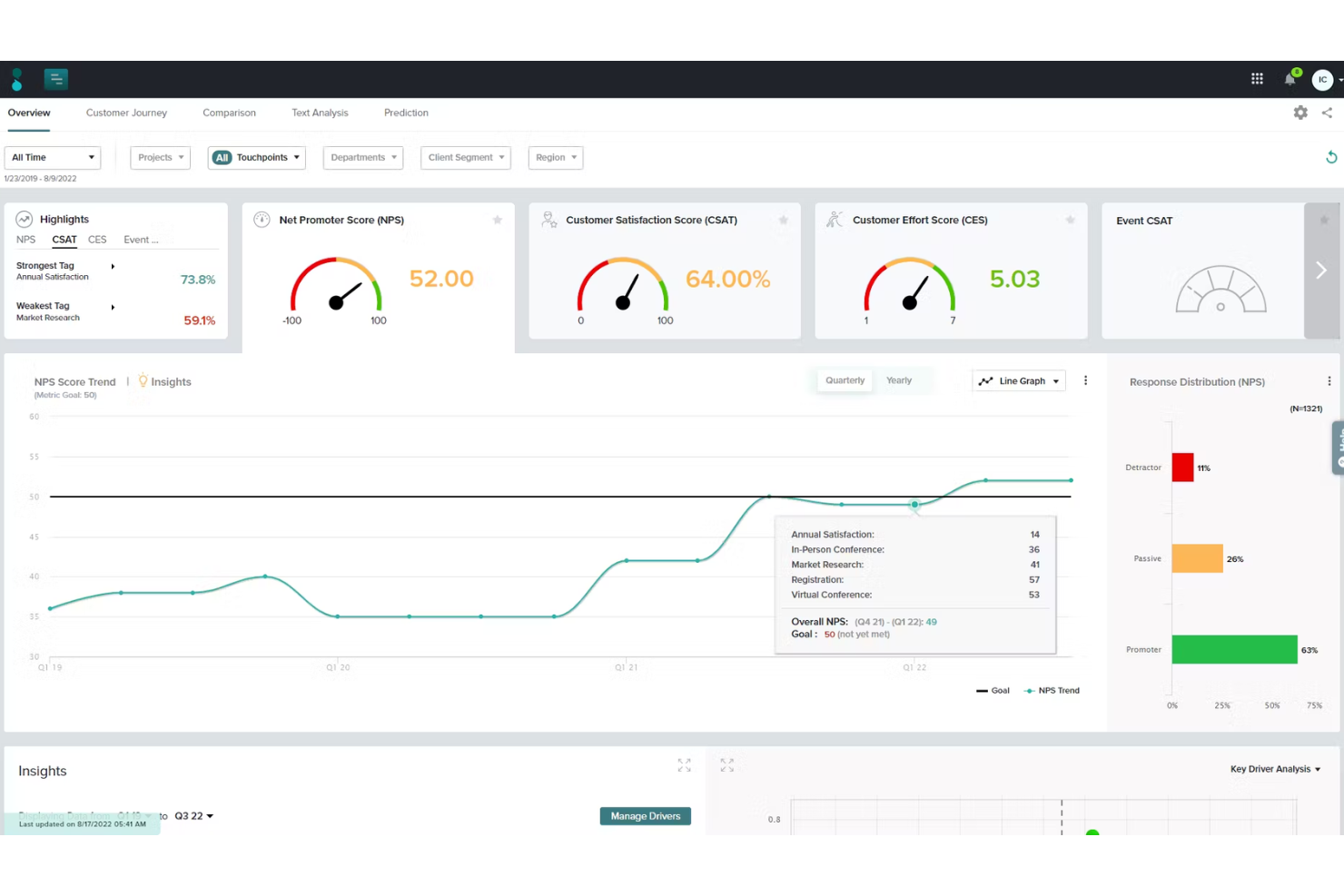
Sogolytics ist für Teams konzipiert, die eine fortschrittliche Kontrolle über den Aufbau und Ablauf ihrer Umfragen benötigen. Mit den maßgeschneiderten Werkzeugen für das Umfragedesign und der detaillierten Verzweigungslogik können Sie differenziertes Feedback verschiedener Kundengruppen erfassen. Damit ist Sogolytics besonders geeignet für Organisationen, die jeden Aspekt des Feedbackprozesses gezielt auf bestimmte Zielgruppen oder Kontaktpunkte abstimmen möchten.
Für wen ist Sogolytics am besten geeignet?
Forschungs- und Insight-Teams in mittelgroßen bis großen Unternehmen weltweit, die maßgeschneiderte Umfragen mit ausgefeilter Verzweigungslogik gestalten.
Warum ich Sogolytics gewählt habe
Was mich an Sogolytics besonders überzeugt hat, ist die umfassende Anpassbarkeit des Umfragedesigns und der Frageverzweigungen. Die Plattform ermöglicht es, komplexe Umfragen mit fortschrittlicher Übersprung-Logik zu erstellen, sodass Teilnehmende je nach Antwort verschiedene Wege einschlagen können. Ich schätze, dass Sogolytics eine breite Auswahl an Fragetypen und bedingten Anzeigeoptionen unterstützt, was die gezielte Gestaltung für unterschiedliche Zielgruppen und Feedbacksituationen erleichtert. Dieses Maß an Kontrolle ist besonders wertvoll für Teams, die detailreiche, kontextspezifische Erkenntnisse von ihren Kunden gewinnen möchten.
Sogolytics Hauptfunktionen
Zusätzlich zu den ausgefeilten Verzweigungsmöglichkeiten sind mir diese Funktionen besonders positiv aufgefallen:
- Mehrsprachige Umfragen: Erstellen und verteilen Sie Umfragen in mehreren Sprachen, um ein größeres Publikum zu erreichen.
- Echtzeit-Reporting-Dashboards: Überwachen Sie Umfrageantworten und wichtige Kennzahlen unmittelbar beim Eingang der Daten.
- Anonyme Feedback-Erfassung: Teilnehmende können ihr Feedback anonym abgeben, ohne ihre Identität preiszugeben.
- Automatisierte E-Mail-Einladungen und Erinnerungen: Planen und versenden Sie Umfrageeinladungen sowie Erinnerungen direkt über die Plattform.
Sogolytics Integrationen
Zu den Integrationen gehören Salesforce, Microsoft Teams und nativer API-Zugang für individuelle Anbindungen.
Pros and Cons
Pros:
- Hochflexible Logik unterstützt komplexe Frageabläufe
- Umfangreiche Designoptionen für Umfragen mit ausgefeilter Verzweigungslogik
- Leistungsstarke Export- und Reportingfunktionen, die von Nutzern gelobt werden
Cons:
- Die Benutzeroberfläche kann überladen wirken und ist teilweise schwierig zu navigieren
- Umfangreiches Funktionsspektrum kann bei kleinen, einfachen Anwendungsfällen überfordern
New Product Updates from Sogolytics
Sogolytics Adds Teams and Slack Surveys and Custom Automations
Sogolytics adds native Microsoft Teams and Slack survey distribution, a Custom Automations Builder, Derived Fields, PointClickCare integration, and authenticator-based MFA. These updates expand survey distribution and workflow automation while adding new data management and security capabilities. For more information, visit Sogolytics’ official site.
 .
.
Unwrap
Am besten für den Assistenten für natürliche Sprache geeignet
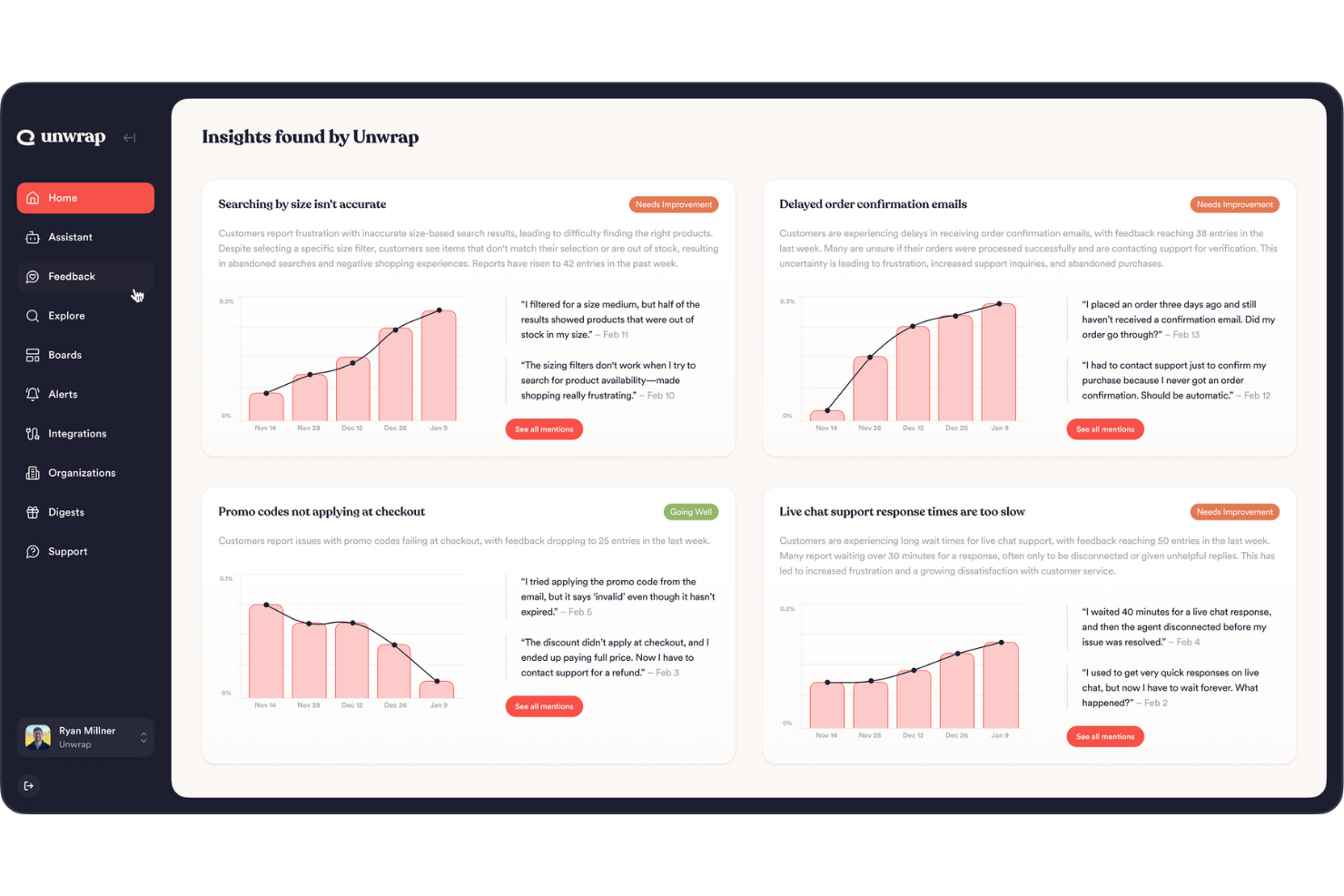
Unwrap ist eine KI-gestützte Plattform, die die Erfassung und Analyse von Kundenfeedback für Unternehmen verbessert und sich ideal für alle eignet, die Erkenntnisse in fundierte Entscheidungen umwandeln möchten. Wenn Sie in einer Position arbeiten, in der das Verständnis der Kundenmeinungen entscheidend ist, wie etwa im Kundensupport oder der Produktentwicklung, kann Unwraps Fähigkeit, Rohdaten in umsetzbare Erkenntnisse zu verwandeln, ein echter Wendepunkt sein. Die Plattform begegnet gängigen Herausforderungen wie Datenüberflutung und manueller Analyse durch automatisches Tagging und Trenderkennung, sodass Sie sich auf strategische Maßnahmen statt auf Datenverarbeitung konzentrieren können.
Für wen ist Unwrap am besten geeignet?
Produkt- und CX-Analysten in mittelgroßen Unternehmen weltweit, die natürliche Sprachtools zur Interpretation von Kundenfeedback in großem Maßstab nutzen.
Warum ich mich für Unwrap entschieden habe
Ich habe Unwrap wegen seines innovativen Ansatzes zur Automatisierung der Kundenfeedback-Analyse ausgewählt, ein entscheidender Aspekt von Feedback-Software. Besonders hervorzuheben ist der Auto Tagger, der Feedback in intuitive Kategorien organisiert und Ihnen Zeit und Aufwand spart. Darüber hinaus bieten die anpassbaren Dashboards einen klaren Überblick über Kundenmeinungen, was das Verfolgen von Trends und das Treffen datenbasierter Entscheidungen erleichtert. Wer immer einen Schritt voraus bei wechselnden Kundenbedürfnissen sein möchte, wird durch die automatischen Benachrichtigungen stets über wichtige Veränderungen oder neue Muster im Feedback informiert.
Unwrap Hauptfunktionen
Neben den Alleinstellungsmerkmalen habe ich auch mehrere weitere Funktionen gefunden, die Unwrap zu einer überzeugenden Wahl für Feedback-Software machen:
- Assistent für natürliche Sprache: Mit dieser Funktion können Sie Feedbackdaten mühelos abfragen und erhalten sofortige Einblicke und Antworten auf dringende Fragen.
- Organisationsübergreifender Zugriff: Für die Nutzung in verschiedenen Rollen innerhalb des Unternehmens konzipiert, sodass Feedback zeitnah und effektiv bearbeitet wird.
- Datensicherheit und Compliance: Unwrap erfüllt SOC 2 Typ II und DSGVO-Anforderungen, was Datensicherheit und Datenschutz unterstreicht.
- Benutzerfreundliche Oberfläche: Die Plattform ist leicht zu bedienen und erfordert nur minimale Einrichtung, was eine breite Akzeptanz im Team fördert.
Unwrap Integrationen
Integrationen umfassen Slack, Salesforce, Zendesk, HubSpot, Intercom, Microsoft Teams, Jira, Asana, Trello und Google Workspace.
Pros and Cons
Pros:
- Zentralisiert Feedback aus mehreren Quellen
- Identifiziert Themen und Stimmungstrends
- Automatisiert die Feedback-Analyse im großen Maßstab
Cons:
- Weniger effektiv bei geringem Feedback
- Begrenzte Optionen für fortgeschrittene Anpassungen

Beste flexible Kundenumfragen mit bedingter Logik
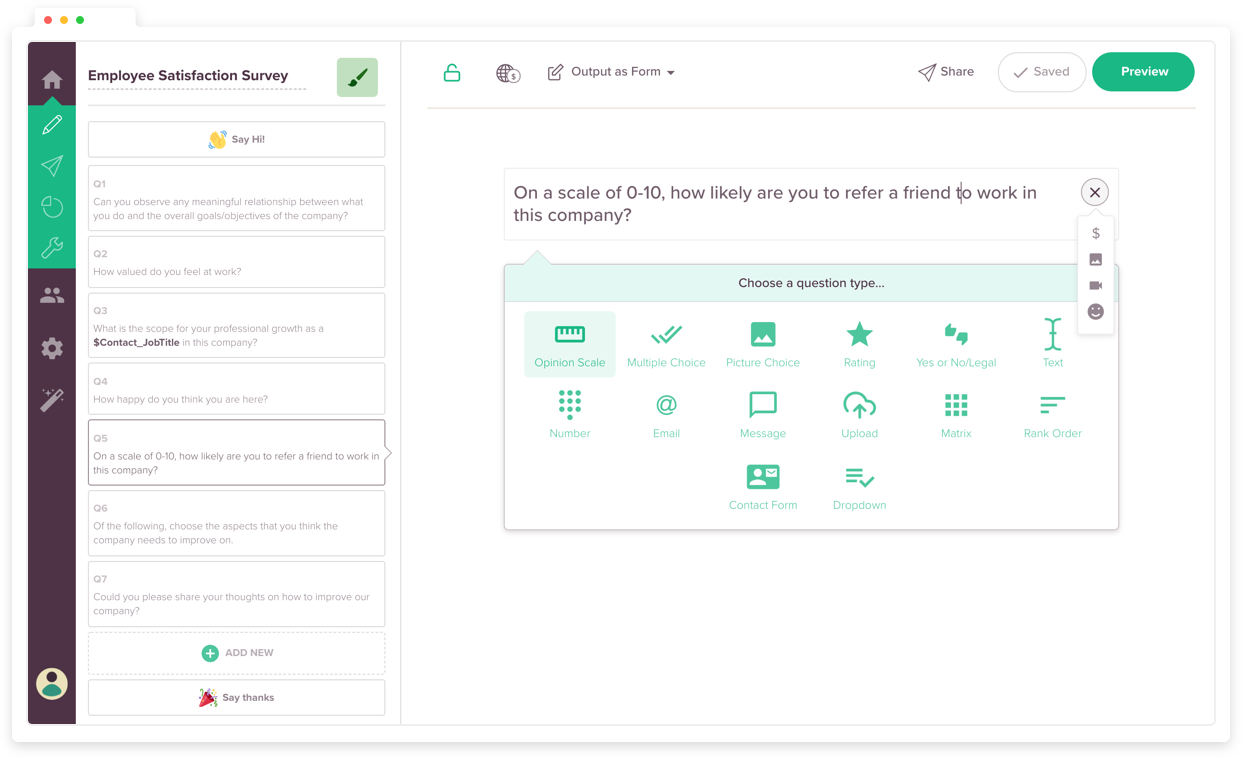
SurveySparrow bietet eine dynamische Lösung, um Kundenfeedback in umsetzbare Erkenntnisse zu verwandeln, was es ideal für Branchen wie Gesundheitswesen, Bildung und Gastgewerbe macht. Das mobile Design und die vielfältigen Umfragetypen, einschließlich NPS und Offline-Umfragen, ermöglichen es Ihnen, jederzeit und überall Feedback zu sammeln. Durch Funktionen wie Chatbot-Integration und anpassbare Workflows können Sie das Kundenengagement vertiefen und das Unternehmenswachstum fördern.
Für wen ist SurveySparrow am besten geeignet?
Teams für Kundenerfahrung und Marktforschung in mittelständischen Unternehmen in Nordamerika und Europa, die flexible Umfragen mit bedingter Logik durchführen.
Warum habe ich SurveySparrow gewählt
Ich habe SurveySparrow aufgrund seiner flexiblen Kundenumfragen mit bedingter Logik ausgewählt. Diese Funktion ermöglicht es, die Umfragefragen basierend auf vorherigen Antworten anzupassen und so sicherzustellen, dass das gesammelte Feedback relevant und aussagekräftig ist. Die Fähigkeit des Tools, Offline-Datenerfassung zu unterstützen und mehrere Sprachen zu bedienen, erhöht zudem die Anpassungsfähigkeit an unterschiedliche Geschäftsanforderungen. Mit diesen Funktionen ist SurveySparrow eine ausgezeichnete Wahl, um Ihren Kundenfeedback-Prozess zu optimieren.
SurveySparrow Hauptfunktionen
Neben den flexiblen Kundenumfragen mit bedingter Logik bietet SurveySparrow mehrere weitere Funktionen, die den Nutzen als Feedback-Software steigern.
- Konversationelle Umfragen: Erstellen Sie interaktive Umfragen, die das Sammeln von Feedback in ein ansprechendes Erlebnis verwandeln.
- Mehrsprachige Unterstützung: Führen Sie Umfragen in mehreren Sprachen durch, um eine vielfältige Zielgruppe zu erreichen.
- Omnikanal-Feedbacksammlung: Teilen Sie Umfragen über verschiedene Plattformen wie soziale Medien, E-Mail oder QR-Codes.
- Visuelle Workflows: Automatisieren Sie Aktionen basierend auf Umfrageantworten, um Ihren Feedback-Prozess zu vereinfachen.
SurveySparrow Integrationen
Integrationen umfassen Salesforce, HubSpot, Mailchimp, Zendesk, Slack, Google Sheets, Trello, Intercom, Freshdesk und Microsoft Teams.
Pros and Cons
Pros:
- Einfache Erstellung von Umfragen mit dynamischen Variablen
- Integration mit Zendesk für Chat-Feedback
- Intuitive Benutzeroberfläche mit vielen nützlichen Funktionen
Cons:
- Begrenzte Anpassungsmöglichkeiten schränken das Design der Umfragen ein
- Probleme bei der Drag-and-Drop-Ausrichtung erschweren die Umfrageerstellung

Am besten geeignet zur mehrsprachigen Feedback-Erhebung
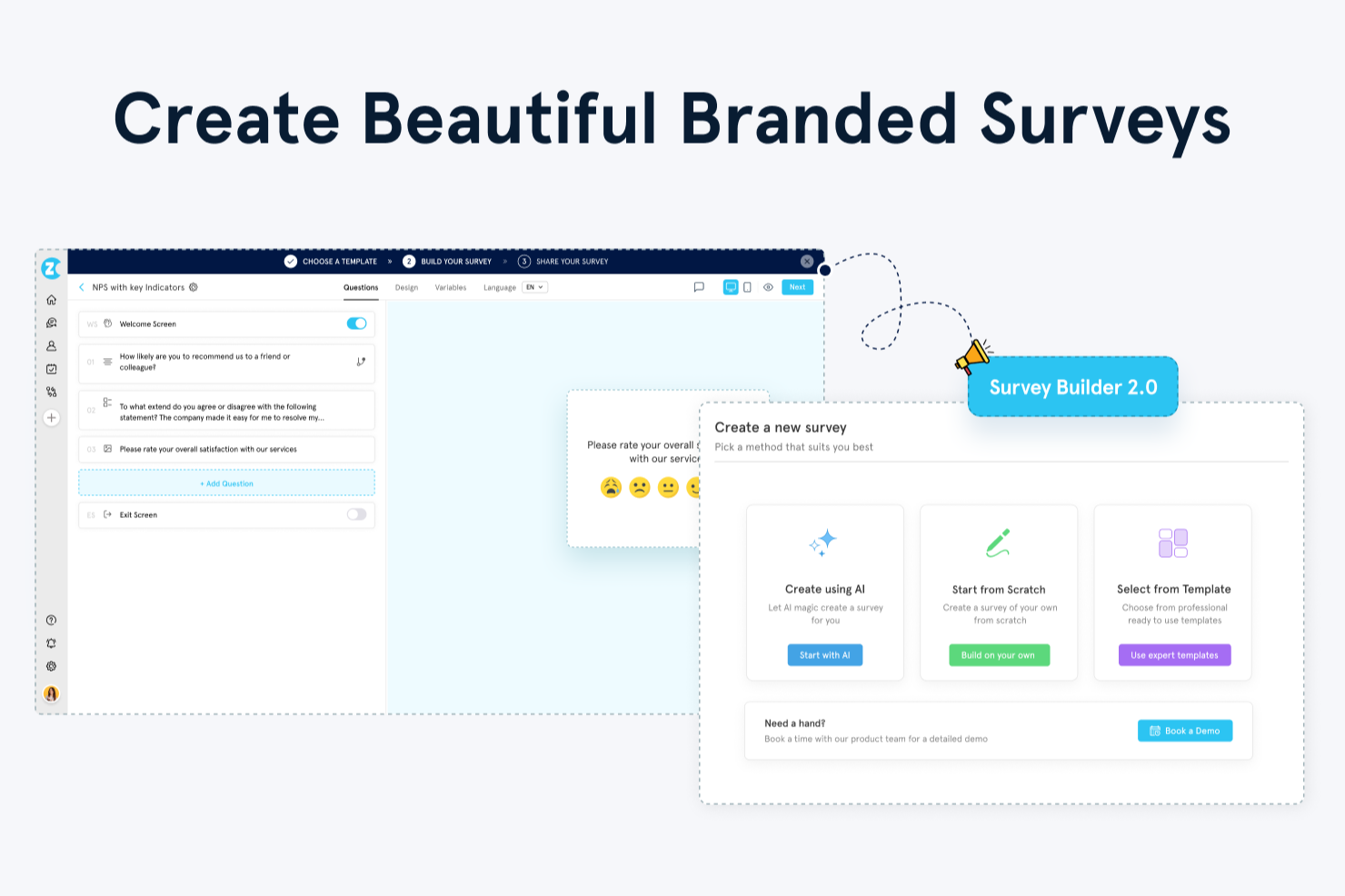
Zonka Feedback ist ein umfragebasiertes Kundenfeedback-Tool, das Multikanal-Distribution, CX-Metrikverfolgung, KI-gestützte Analyse und Closed-Loop-Case-Management auf einer Plattform vereint.
Für wen ist Zonka Feedback am besten geeignet?
Zonka Feedback eignet sich besonders für CX- und Support-Teams von mittelständischen bis großen Unternehmen, die Feedback über mehrere Kanäle und Kontaktpunkte hinweg erfassen müssen.
Warum ich Zonka Feedback ausgewählt habe
Ich habe Zonka Feedback unter meine Top-Auswahl aufgenommen, weil seine Funktionen für mehrsprachige Umfragen weit über einen einfachen Sprachumschalter hinausgehen. Sie können Umfragen in über 30 Sprachen erstellen, darunter Rechts-nach-Links-Schriften wie Arabisch und Urdu, wobei sich das Layout automatisch anpasst, damit die Umfrage für jeden Befragten korrekt angezeigt wird. Die KI-Übersetzung per Mausklick bedeutet, dass nicht jede Frage einzeln übersetzt werden muss. Befragte können sogar mitten in der Umfrage die Sprache wechseln, wodurch Abbrüche reduziert werden, wenn jemand merkt, dass die Standardsprache nicht die eigene ist.
Wichtige Funktionen von Zonka Feedback
- NPS-, CSAT- und CES-Vorlagen: Vorgefertigte Umfragevorlagen für die drei wichtigsten CX-Metriken, sofort einsatzbereit ohne eigene Erstellung.
- KI-Stimmungsanalyse: Kennzeichnet freie Textantworten mit Sentiment-Scores, um Muster in großen Mengen von Feedback sichtbar zu machen.
- Closed-Loop-Case-Management: Weist Folgeaufgaben bei negativem Feedback direkt Teammitgliedern zu, sodass kein Feedback unbeantwortet bleibt.
- Echtzeit-Benachrichtigungen zu Antworten: Löst sofortige Benachrichtigungen aus, wenn eine Umfrageantwort eingeht, gefiltert nach Score, Segment oder Kanal.
Zonka Feedback Integrationen
Zonka Feedback integriert sich mit Salesforce, HubSpot, Zendesk, Freshdesk, Intercom, HelpScout, Front, Pipedrive, Slack, Microsoft Teams, Jira, Google Sheets und Zoom. Außerdem funktioniert es über Zapier, Make und Integrately für Automatisierungen. Webhooks und eine API ermöglichen individuelle Integrationen.
Pros and Cons
Pros:
- Echtzeit-Benachrichtigungen bei negativem Feedback
- Umfragen funktionieren auch ohne Internetverbindung
- Verfolgt NPS, CSAT und CES direkt in der Plattform
Cons:
- Berichte bieten keine tiefergehenden Analysen
- Die Ersteinrichtung kann überwältigend sein

Alchemer
Am besten geeignet für KI-gestützte Feedback-Einblicke
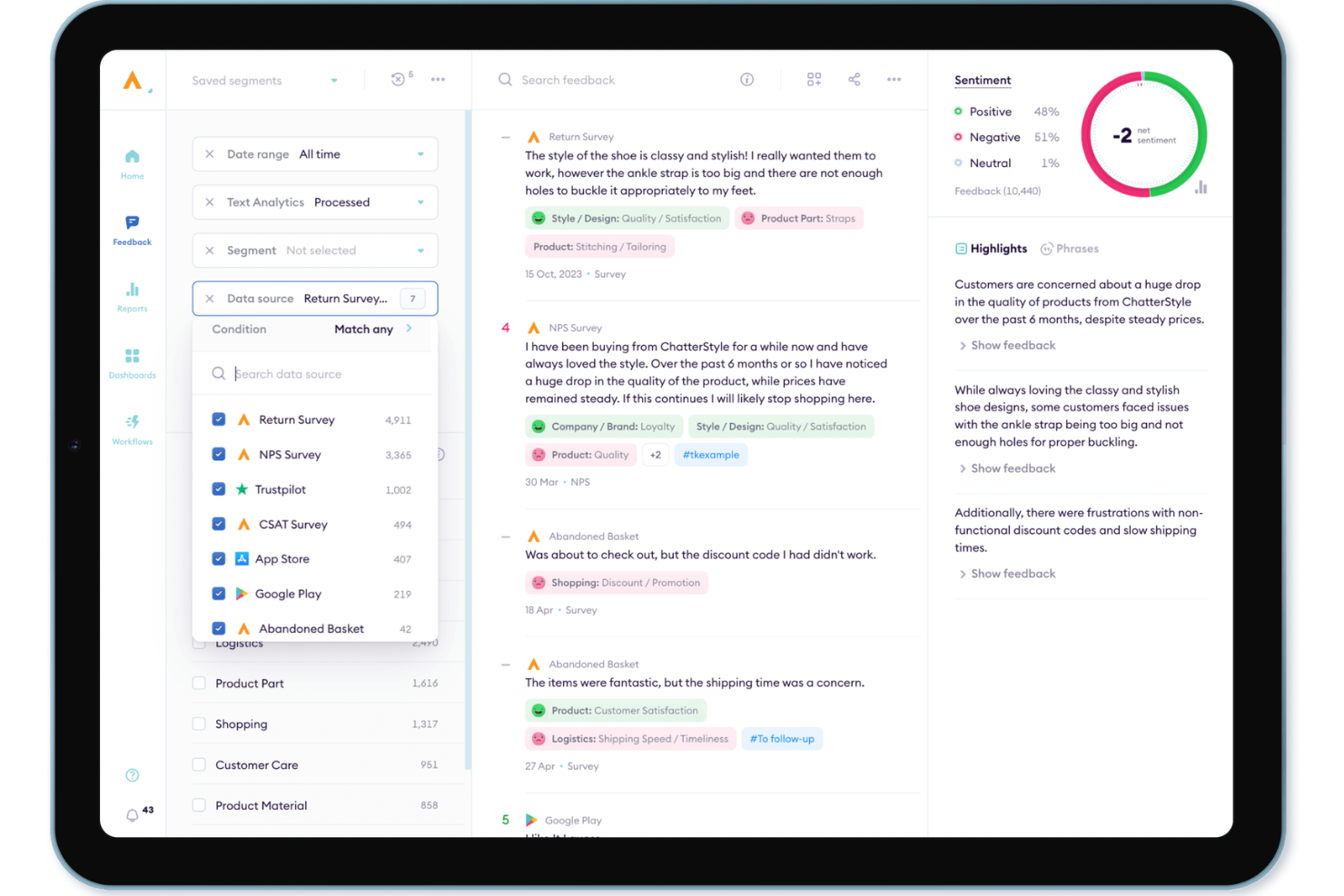
Alchemer ist eine Lösung auf Unternehmensebene, die für Organisationen entwickelt wurde, die mehr als nur statische Datenerfassung benötigen und strategische Feedbackschleifen etablieren wollen. Die Plattform richtet sich an Branchen von SaaS bis hin zu Einzelhandelsunternehmen mit hohem Volumen und überzeugt bei der Erfassung von hochwertigen Daten, die direkt in bestehende Geschäftsprozesse integriert werden. Durch die Fokussierung auf das 'Wie' und 'Wo' der Datenerhebung schließt Alchemer die Lücke zwischen Kundenerwartungen und Entscheidungen auf Führungsebene und schafft ein zentrales System für Feedbackmanagement.
Warum ich Alchemer ausgewählt habe
Ich habe Alchemer für diese Liste ausgewählt, weil die fortschrittliche Alchemer Pulse-Engine das 'Schwarze Loch' von Freitext-Feedback löst. Während die meisten Tools mit unstrukturierten Daten kämpfen, nutzt Pulse KI, um Themen und Stimmungen in Echtzeit automatisch zu kategorisieren. Teams können dadurch Produktwünsche und Serviceanpassungen sofort priorisieren. Es ist eine überzeugende Wahl für erfahrene CX-Teams, die große Mengen globalen Feedbacks in eine einheitliche, nachvollziehbare Darstellung für Stakeholder überführen müssen.
Wichtige Funktionen von Alchemer
Neben KI-gestützten Einblicken habe ich auch folgende Funktionen als besonders nützlich empfunden:
- Anpassbare Umfragen: Passen Sie Feedback-Formulare individuell an Ihre spezifischen Geschäftsanforderungen an, um die relevantesten Daten zu erfassen.
- Echtzeit-Feedbackerfassung: Interagieren Sie mit Kunden über verschiedene Kanäle wie SMS, E-Mail und In-App-Prompts und erhalten Sie sofortige Einblicke.
- Automatisierte Feedback-Weiterleitung: Leiten Sie Rückmeldungen schnell an die zuständigen Teams weiter, um zügig analysieren und reagieren zu können – das erhöht die betriebliche Effizienz.
- Mobile App & Digitale Intercepts: Sprechen Sie Nutzer im richtigen Moment mit gezielten Aufforderungen und 'Mikro-Umfragen' innerhalb mobiler Apps und Websites an – für Feedback ohne Unterbrechung der User Journey.
Alchemer-Integrationen
Zu den Integrationen gehören Salesforce, Microsoft Dynamics, HubSpot, Slack, Zendesk, Tableau, Google Analytics, Marketo und Adobe Analytics.
Pros and Cons
Pros:
- Bietet umfangreiche Fragetypen für vielfältige Feedbackanforderungen
- Erweiterte Datenanalysefunktionen mit Filter- und Exportoptionen
- Stellt anpassbare Umfragelogik für individuelle Datenerhebung bereit
Cons:
- Die kostenlose Version bietet wenig ausgeprägte Analyse- und Logikfunktionen
- Einige Nutzer empfinden trotz des Funktionsumfangs die Kosten als Nachteil

Am besten für integrierte CSAT-Umfragen
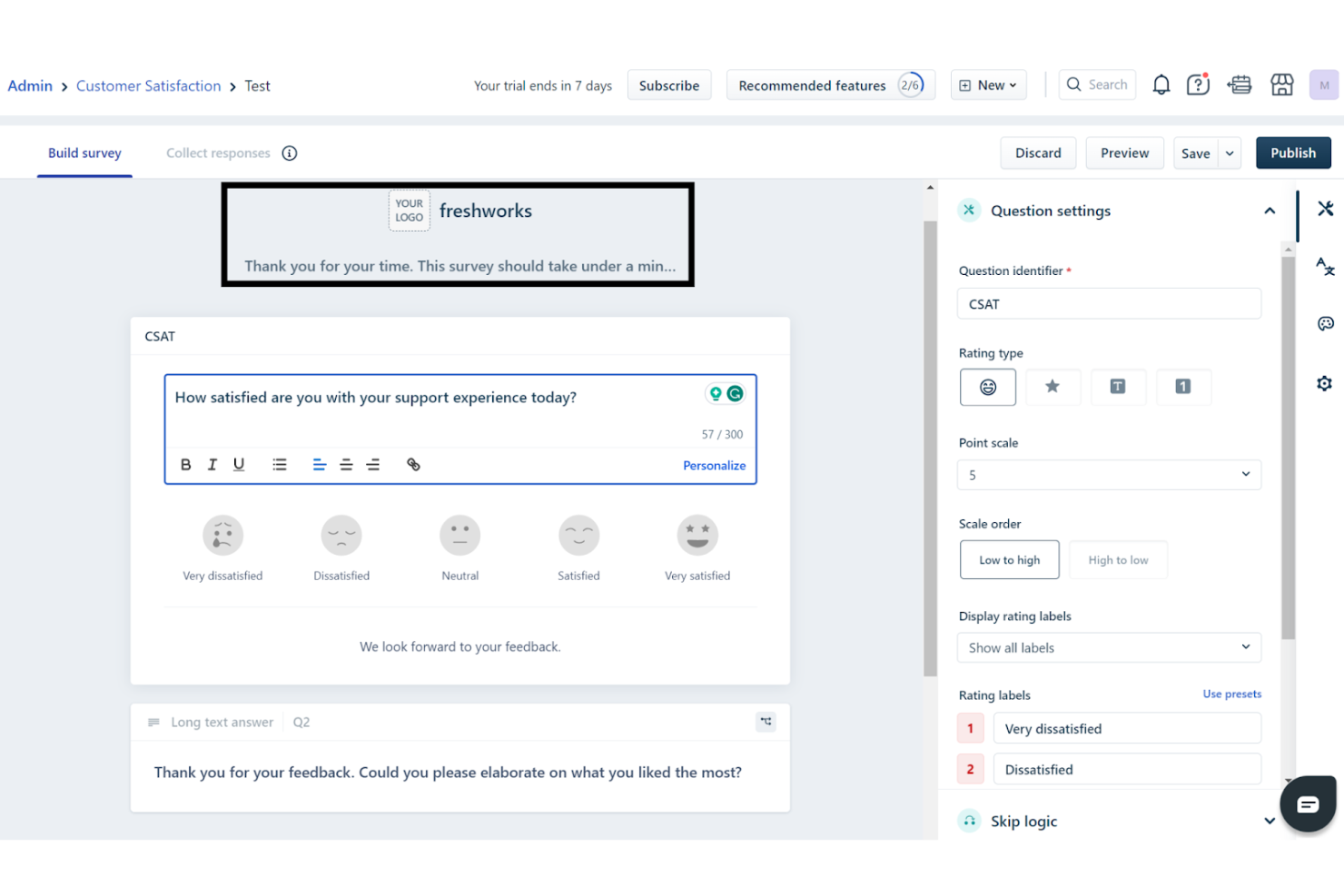
Freshdesk ermöglicht es Ihrem Team, Kundeninteraktionen mithilfe einer KI-gesteuerten Plattform zu transformieren, die darauf ausgelegt ist, Supportprozesse zu optimieren und das Feedbackmanagement zu verbessern. Es richtet sich an Unternehmen unterschiedlichster Branchen und bietet einen zentralen Arbeitsbereich, der die Kommunikation fördert und eine schnellere Klärung von Kundenanfragen ermöglicht.
Für wen eignet sich Freshdesk am besten?
Kundenservice-Leiter und Support-Teams in kleinen bis mittelgroßen Unternehmen in Nordamerika und Europa, die Support-Interaktionen managen und CSAT-Feedback über eine einzige Plattform sammeln möchten.
Warum habe ich Freshdesk ausgewählt?
Ich habe Freshdesk ausgewählt, weil die Sammlung von Kundenfeedback direkt in Ihren Support-Workflow integriert ist – so können Sie Zufriedenheit und Kundenloyalität messen, ohne eine separate Lösung aufbauen zu müssen. Mit dem CSAT-Umfragen-Builder können Sie individuell anpassbare Umfragen versenden, die zu Schlüsselmomenten wie der Ticketlösung automatisch ausgelöst werden. Jede Rückmeldung wird der ursprünglichen Interaktion und dem zugehörigen Support-Mitarbeiter zugeordnet.
Sie können Freshdesk zudem mit Apps aus dem Marktplatz erweitern, die NPS- und CES-Umfragen direkt in Ihr Helpdesk bringen – so bleiben Kundenzufriedenheit und Ihre Support-Kennzahlen eng verzahnt. Für Teams, die Feedback wünschen, das sowohl kontextbezogen als auch quantitativ ist – also an reale Support-Ereignisse gebunden statt an verstreute Einblicke – machen diese integrierten Feedback-Tools Freshdesk zu einer starken Lösung.
Zentrale Funktionen von Freshdesk
Neben den Kernfunktionen gefällt mir insbesondere:
- Self-Service-Tools: Freshdesk bietet ein individuell anpassbares Kundenportal und eine mehrsprachige Wissensdatenbank, damit Nutzer eigenständig Lösungen finden können.
- Routing und SLA-Management: Automatisierte Ticket-Kategorisierung, Priorisierung und Weiterleitung sorgen für zeitnahe Antworten und effizientes Feedbackmanagement.
- Sicherheitsfunktionen: Umsetzung von rollenbasiertem Zugriff und IP-Whitelist zum Schutz sensibler Kundendaten.
- Geschäftszeiten-Management: Ermöglicht die Definition der Arbeitszeiten des Support-Teams und die Automatisierung von Workflows für durchgängigen Support.
Freshdesk-Integrationen
Integriert werden können unter anderem Slack, Microsoft Teams, Shopify, Google Workspace, Jira, Salesforce, HubSpot, Zoom, Mailchimp und WooCommerce. Eine API für individuelle Integrationen ist verfügbar.
Pros and Cons
Pros:
- Umfragen können bei Ticketlösung automatisiert werden
- KI-Automatisierung verbessert die Reaktionszeiten und reduziert den Arbeitsaufwand.
- Omnichannel-Support integriert verschiedene Kommunikationsplattformen.
Cons:
- Die nativen Umfrageoptionen sind im Vergleich zu spezialisierten Tools eher einfach
- Die mobile App verfügt nicht über einige erweiterte Funktionen der Desktop-Version, was den Support unterwegs einschränkt.
New Product Updates from Freshdesk

Freshdesk Adds Voice AI Agents in Freshcaller
Freshdesk introduces Voice AI Agents available through Freshcaller Marketplace apps to handle routine calls and reduce queues. This feature enables automated call handling with real-time, conversational support. For more information, visit Freshdesk's official site.

Canny
Am besten geeignet, um Kundenfeedback und Feature-Anfragen zu verfolgen
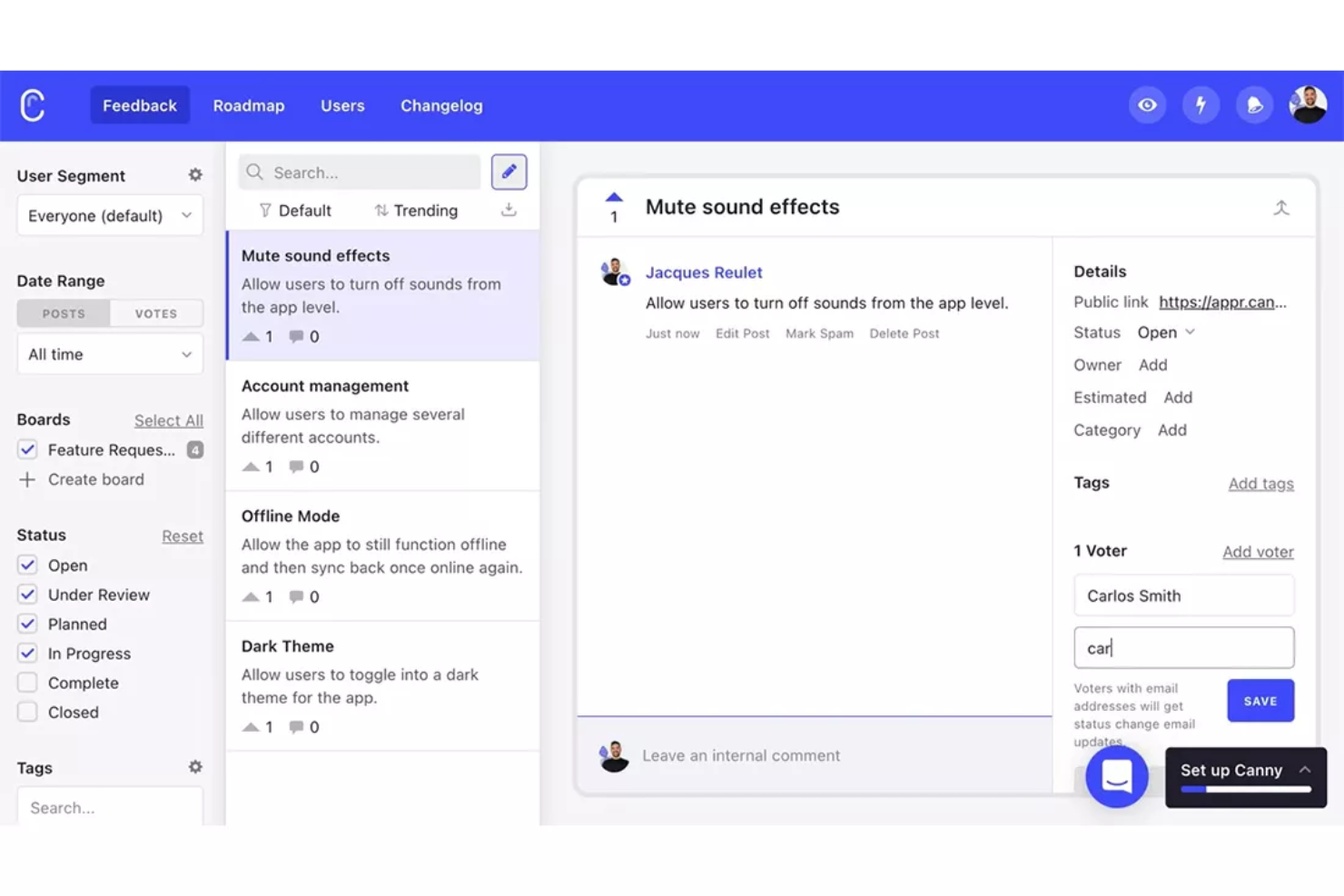
Wenn Sie eine Möglichkeit benötigen, Produktfeedback zu organisieren und zu priorisieren, bietet Canny eine fokussierte Lösung. Produktteams und SaaS-Unternehmen nutzen es, um Feature-Anfragen von Kunden zu sammeln, zu verfolgen und umzusetzen. Canny hilft Ihnen, den Feedbackprozess zu schließen, indem es einfach macht, Nutzer zu informieren, sobald ihre Vorschläge durch Ihre Roadmap weitergeleitet werden.
Für wen ist Canny am besten geeignet?
Produktmanager in Softwareunternehmen, die Kundenvorschläge organisieren und Roadmap-Entscheidungen basierend auf nachverfolgten Anfragen priorisieren.
Warum ich Canny gewählt habe
Canny zeichnet sich dadurch aus, Kundenfeedback und Feature-Anfragen transparent und organisiert zu verfolgen. Ich habe Canny ausgewählt, weil Teams ein öffentliches Board erhalten, auf dem Nutzer Ideen einreichen und über die für sie wichtigsten Funktionen abstimmen können. Die Statusverfolgung und das Changelog helfen, Kunden informiert zu halten, während ihre Wünsche den Entwicklungsprozess durchlaufen. Diese Struktur macht es einfacher, die Roadmap anhand realer Kundenrückmeldungen zu priorisieren.
Wichtige Funktionen von Canny
Neben öffentlichen Boards und Statusverfolgung bietet Canny weitere Funktionen für das Management von Kundenfeedback:
- Private Boards: Erstellen Sie Boards, die nur für interne Teams oder ausgewählte Nutzer sichtbar sind, um vertrauliches Feedback zu sammeln.
- Nutzersegmentierung: Filtern und analysieren Sie Feedback nach Nutzertyp, Unternehmen oder anderen benutzerdefinierten Attributen.
- Benutzerdefinierte Felder: Fügen Sie Feedback-Beiträgen zusätzliche Datenfelder hinzu, um mehr Kontext zu erfassen oder Anfragen zu kategorisieren.
- API-Zugang: Nutzen Sie die API von Canny, um die Feedbacksammlung zu automatisieren oder Daten mit Ihren bestehenden Tools zu synchronisieren.
Canny-Integrationen
Zu den Integrationen gehören Jira, GitHub, ClickUp, Linear, Azure DevOps, Asana, Intercom, Zendesk, Salesforce und HubSpot.
Pros and Cons
Pros:
- Übersichtliche, intuitive Oberfläche zum Einreichen von Feedback
- Changelog-Funktion zeigt Produktfortschritt klar an
- Äußerst reaktionsschneller Support und engagierte Gründer
Cons:
- Kein Dark Mode; das Widget passt nicht zum Interface
- Es fehlt eine globale Suchfunktion für Feedback

Userback
Am besten geeignet für visuelles Feedback mit Bildschirmkommentaren
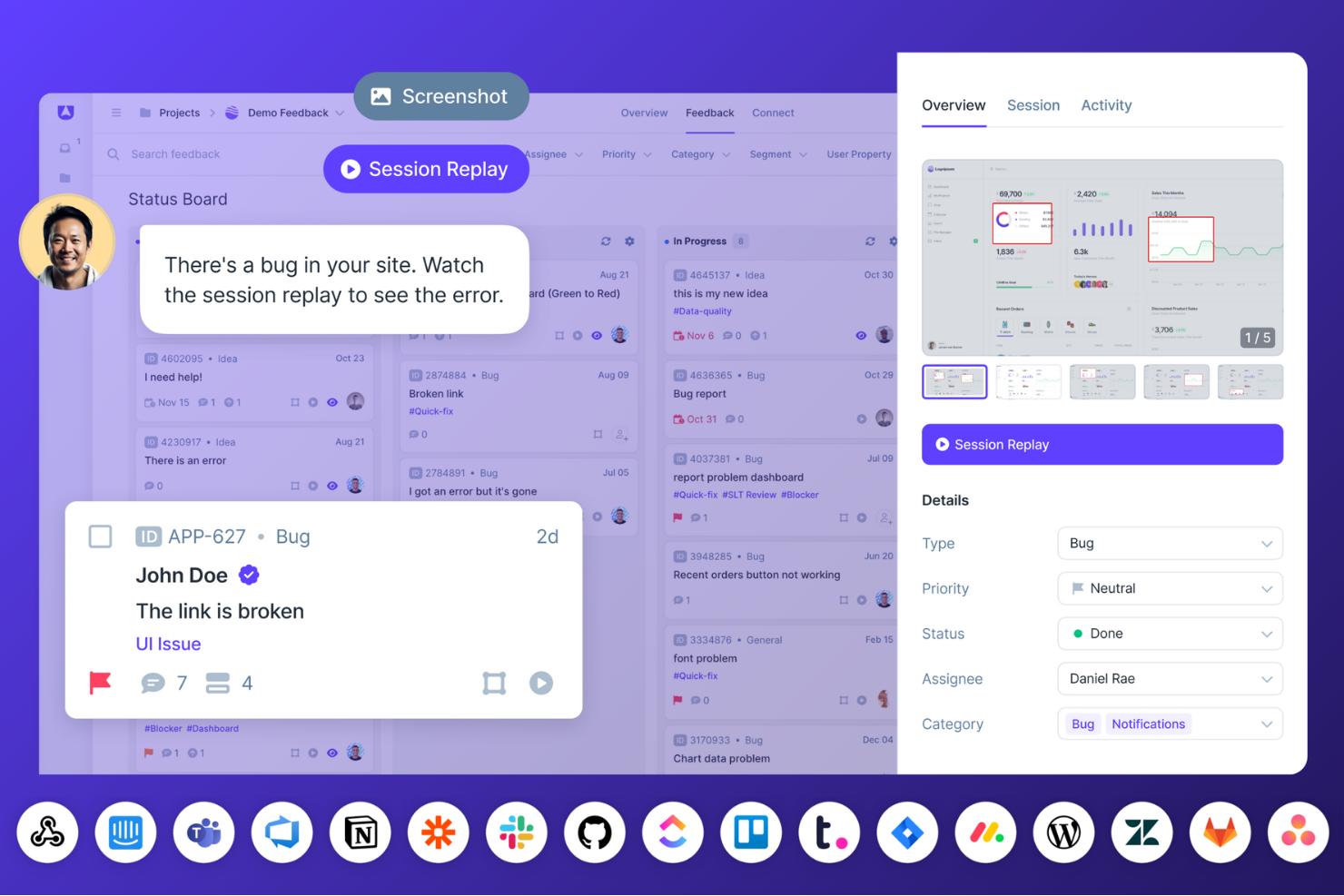
Userback ist auf Teams zugeschnitten, die ihre Feedback-Erfassung und -Verwaltung verbessern möchten. Es spricht Unternehmen an, die das Nutzererlebnis besser verstehen, die Meldung von Fehlern optimieren und die Produktentwicklung vorantreiben wollen. Durch Werkzeuge wie Feedback-Widgets, Sitzungsaufzeichnungen und Nutzerumfragen löst Userback die Herausforderung, verwertbare Erkenntnisse von Nutzern zu gewinnen, und ist damit eine ideale Wahl für Produktmanager und Entwicklungsteams, die ihre Angebote weiter verbessern wollen.
Warum ich Userback gewählt habe
Ich habe Userback wegen seiner einzigartigen Fähigkeit ausgewählt, Feedback durch Funktionen wie Bildschirmkommentare und Videoaufzeichnungen mit visuellem Kontext anzureichern. Diese Werkzeuge ermöglichen es Ihrem Team, genau zu sehen, was die Nutzer erleben, wodurch Probleme leichter identifiziert und gelöst werden können. Die Sitzungswiedergabe bietet zudem eine Wiederholung der Nutzerinteraktionen und verschafft ein tieferes Verständnis des Nutzerverhaltens.
Userback Hauptfunktionen
Neben den visuellen Feedbackoptionen bietet Userback:
- Feedback-Widgets: Nutzer können direkt aus Ihrer Anwendung oder Webseite Feedback geben, wodurch Meinungen in Echtzeit erfasst werden können.
- Nutzerumfragen: An Ihre Zielgruppen oder spezifische Bedürfnisse anpassbare Umfragen ermöglichen die strukturierte Erfassung von Feedback.
- Öffentliche Roadmap: Teilen Sie Ihre Entwicklungspläne mit Ihren Nutzern, damit diese Funktionen bewerten und kommentieren können – das sorgt für Transparenz und stärkere Einbindung.
- Automatisierungstools: Automatisiert wiederkehrende Aufgaben beim Feedback-Prozess, damit Ihr Team sich auf wichtige Themen fokussieren kann.
Userback Integrationen
Zu den Integrationen zählen Jira, Slack, GitHub, Trello, WordPress, Zendesk, Wrike, Teamwork, Webhooks und Zapier. Für eigene Schnittstellen steht zudem eine API zur Verfügung.
Pros and Cons
Pros:
- Anpassbare Feedback-Widgets erfassen Nutzereingaben mühelos
- Zentrales Dashboard zur Organisation von Kundenfeedback
- Lässt sich reibungslos in Projektmanagement-Workflows integrieren
Cons:
- Einige Funktionslücken im Vergleich zu größeren Feedback-Plattformen
- Nutzeranzahl und erweiterte Steuerungen in niedrigeren Tarifen eingeschränkt
New Product Updates from Userback

Userback Mobile SDK Adds In-App Surveys
Userback’s Mobile SDK now supports in-app surveys, enabling iOS and Android users to submit NPS, CSAT, and other survey responses without leaving your app. For more information, visit Userback's official site.
 .
.Weitere Kundenfeedback-Software
Hier sind einige weitere lohnenswerte Optionen, die es nicht in meine Top-20-Liste der besten Kundenfeedback-Software geschafft haben, die sich aber dennoch anzusehen lohnen:
- TeamSupport
Am besten geeignet für Kundenanalytik und Feedbackschleifen
- Survicate
Am besten geeignet zur Gewinnung von Kundenerkenntnissen
- Hotjar (by Contentsquare)
Es Tool für Nutzeranalysen mit Feedback- & Umfragefunktionen
- Qualaroo
Am besten geeignet für die Erfassung von Feedback in Echtzeit
- Intercom
Es Business Messaging mit integriertem Feedback
- Pendo
E Feedback-Software für Kundensegmente
- Clootrack
Am besten für unüberwachte Themen, die Entscheidungen vorantreiben
- Gainsight
Es Feedback für Produktnutzungs-Analysen und Berichte
- Usersnap
Am besten für die Erfassung von visuellem Feedback
- Lumoa
Am besten für Echtzeit-Feedback-Einblicke
- GatherUp
E Kundenrückmeldungen für Unternehmensbewertungen
- AskNicely
Am besten geeignet für die Anbindung an Bewertungsplattformen von Drittanbietern
- InputKit
E automatisierte Umfragen für Kundenservice-Feedback
- Jotform
Es anpassbares digitales Formular für Feedback-Erfassung
- Hiver
Ideal für die Konsolidierung von Omnichannel-Postfächern
- LiveAgent
Am besten geeignet, um Feedback in Tickets umzuwandeln
- UserGuiding
Besonders geeignet für Kunden-Mikroumfragen mit Echtzeiteinblicken
- Product Fruits
Am besten geeignet aufgrund seines Feedback-Widgets und der In-App-Umfragefunktion
- ReviewFlowz
Am besten für SaaS-Bewertungsgenerierung
- PathPro
Am besten geeignet für ein Feature-Voting-System


Ähnliche Kundenfeedback-Software
Wenn Sie hier noch nicht gefunden haben, wonach Sie suchen, sehen Sie sich diese verwandten Kundenfeedback-Softwarelösungen an, die wir getestet und bewertet haben.
- Kundenservice-Software
- Helpdesk-Software
- Callcenter-Software
- Plattform für Kundenkommunikation
- Plattform für digitale Erlebnisse
- Tools zur Stimmungsanalyse
Was ist Kundenfeedback-Software?
Kundenfeedback-Software ist eine Plattform, die Feedback über verschiedene Kontaktpunkte mit Kunden sammelt, verwaltet und analysiert. Sie hilft Unternehmen dabei, Erkenntnisse zu gewinnen, um Produkte, Dienstleistungen und Kundenerlebnisse zu verbessern.
Wie ich Kundenzufriedenheitssoftware bewerte
Ich betrachte Plattformen für Kundenfeedback auf zwei Ebenen: Kernanforderungen wie Closed-Loop-Workflows und Sentiment-Analysen sowie die Alleinstellungsmerkmale, die ein Tool besonders geeignet für Ihr CX-Team machen.
Kernfunktionen (Mindestvoraussetzungen für diese Liste)
Wenn ich Tools für meine Liste auswähle, bewerte ich jedes einzelne auf einer Skala von 0 (bietet diese Funktion nicht) bis 5 (hervorragend in diesem Bereich) für jede unten aufgeführte Kernfunktion. Anschließend rechne ich die Gesamtpunktzahl des Tools in einen Prozentsatz um. Jedes Tool muss insgesamt mindestens 65% erreichen, um berücksichtigt zu werden.
- Multi-Channel-Umfrageverteilung: Ich prüfe, ob ich Umfragen über E-Mail, Web, In-App, SMS und Mobilgerät von einer einzigen Plattform aus bereitstellen kann – und ob die Antwortdaten in einer Ansicht zusammengeführt werden.
- Vorlagen für CX-Metrik-Umfragen: Vorgefertigte NPS-, CSAT- und CES-Vorlagen sollten mit minimalem Aufwand startklar sein, damit ein CX-Team bereits am ersten Tag strukturierte Metriken erfassen kann.
- Text- und Sentiment-Analyse: Ich bewerte, wie gut das Tool Themen und Stimmungen aus offenen Antworten herausfiltert, z. B. indem es einen Anstieg an Versandbeschwerden aus Tausenden von Umfragekommentaren erkennt.
- Closed-Loop-Feedback-Workflows: Die Möglichkeit, Alarme auszulösen, Vorgänge weiterzuleiten und Nachverfolgungen zuzuweisen ist entscheidend – besonders für Teams, die schnell auf Kritiker reagieren müssen, bevor ein Abwanderungsrisiko entsteht.
- Reporting und Dashboards: Ich achte auf Segmentierung, Trendverfolgung und rollenbasierte Ansichten, sodass ein VoC-Analyst und ein CS-Ops-Leiter jeweils die für sie relevanten Daten aus demselben Dashboard abrufen können.
- Integration in die CX-Toollandschaft: Tools wie Salesforce, Zendesk und HubSpot sind zentral für die meisten CX-Workflows, deshalb prüfe ich, ob es native Connectoren und offene API-Zugänge gibt, um Feedbackdaten vernetzt zu halten.
Habe ich eine Liste mit Tools, die diese Kriterien erfüllen, schaue ich, wodurch sich die einzelnen Plattformen voneinander abheben.
Unterscheidungsmerkmale (Wodurch heben sich Anbieter ab?)
So vergleiche und kontrastiere ich verschiedene Anbieter:
Herausragende Funktionen
KI-gestützte Analysen sind ein zentrales Unterscheidungsmerkmal – ich suche nach Tools, die Tausende von Freitextantworten automatisch zusammenfassen und Ursachen aufdecken, ohne dass manuell getaggt werden muss. Feedbacksammlung entlang der Customer Journey ist besonders wichtig, wenn das Team genau erkennen muss, wo im Onboarding- oder Verlängerungsprozess Kunden auf Hürden stoßen. Prädiktive Analytik bietet eine weitere Ebene, indem VoC-Analysten Accounts erkennen können, die auf Abwanderung zusteuern, noch bevor ein Kritiker-Score überhaupt erscheint.
Jenseits der Funktionen
Skalierbarkeit und Preisstruktur verdienen besondere Aufmerksamkeit – ich prüfe, ob eine Plattform nach Anzahl der Antworten, nach Nutzern oder beidem abrechnet und wie sich die Kosten verändern, wenn sich Ihr Feedbackprogramm von einer auf fünf Regionen ausweitet. Compliance spielt ebenfalls eine Rolle. Teams, die Kundendaten mit Personenbezug verarbeiten, benötigen SOC 2 Type II-Zertifizierung und GDPR-Konformität sowie Wahlmöglichkeiten beim Datenstandort für den Betrieb in verschiedenen Rechtsräumen. Außerdem berücksichtige ich die Time-to-Value: Ein Tool mit gutem Onboarding und vorgefertigten Vorlagen ermöglicht es CX-Teams, Wochen schneller mit der Erfassung von Insights zu starten als eines, das auf umfassende Professional Services angewiesen ist.
So wählen Sie Kundenfeedback-Software aus
Es ist leicht, sich in langen Funktionslisten und komplexen Preisstrukturen zu verlieren. Damit Sie sich während Ihres individuellen Auswahlprozesses auf das Wesentliche konzentrieren können, finden Sie hier eine Checkliste mit Faktoren, die Sie berücksichtigen sollten:
| Faktor | Was zu beachten ist |
|---|---|
| Skalierbarkeit | Stellen Sie sicher, dass die Software mit Ihrem Unternehmen wachsen kann. Sie sollte eine zunehmende Datenmenge und Nutzerzahl ohne Leistungseinbußen verarbeiten können. |
| Integrationen | Achten Sie auf Software, die sich mit den bestehenden Tools Ihres Teams verbinden lässt, etwa CRM-Systemen oder E-Mail-Plattformen, um Arbeitsabläufe zu optimieren. |
| Anpassbarkeit | Die Software sollte eine Personalisierung ermöglichen, damit sie zu Ihren Prozessen passt, beispielsweise durch die Anpassung von Feedbackformularen oder Dashboards an spezifische Anforderungen. |
| Benutzerfreundlichkeit | Wählen Sie eine Plattform, die für alle Teammitglieder intuitiv bedienbar ist. Eine steile Lernkurve kann die Akzeptanz und Wirksamkeit verlangsamen. |
| Budget | Berücksichtigen Sie nicht nur die anfänglichen Kosten, sondern auch die laufenden Ausgaben. Stellen Sie sicher, dass die Software in Ihre Finanzplanung passt und keine versteckten Gebühren anfallen. |
| Sicherheitsvorkehrungen | Vergewissern Sie sich, dass robuste Sicherheitsmaßnahmen vorhanden sind, um sensible Kundendaten vor Verstößen zu schützen und Vorschriften wie die DSGVO einzuhalten. |
| Berichtstools | Stellen Sie sicher, dass die Software umfassende Berichtsfunktionen bietet, die bei der effizienten Analyse von Feedback helfen und Daten in umsetzbare Erkenntnisse verwandeln. |
| Kundensupport | Entscheiden Sie sich für einen Anbieter mit umfassenden Supportleistungen, die Ihr Team bei der Implementierung und der Fehlerbehebung unterstützen. |
Trends bei Software für Kundenfeedback
Die Entwicklung von Software für Kundenfeedback ist durch mehrere deutliche Trends gekennzeichnet, die eine Verlagerung hin zu ansprechenderen, stärker integrierten und erkenntnisreicheren Ansätzen zur Erfassung von Kundenfeedback widerspiegeln.
Hier ist eine zusammengefasste Übersicht der wichtigsten Trends:
- Ganzheitliche Erfassung und Analyse von Feedback: Umfassende Lösungen, die Feedback über mehrere Kontaktpunkte hinweg sammeln, erfassen das gesamte Spektrum der Kundenerfahrungen und vermitteln Unternehmen ein detaillierteres und nuancierteres Verständnis ihrer Kunden.
- Höhere Interaktion und Antwortraten: Es ist eine deutliche Entwicklung hin zu ansprechenderen und interaktiveren Feedbackmechanismen zu beobachten. Der Einsatz dialogorientierter Benutzeroberflächen und die Automatisierung der Feedbackerfassung in entscheidenden Momenten erhöhen die Antwortraten, indem der Prozess für Kunden intuitiver und weniger aufdringlich gestaltet wird.
- Priorisierung von Barrierefreiheit und benutzerfreundlichem Design: Indem Unternehmen sicherstellen, dass diese Tools unkompliziert und für alle Nutzer zugänglich sind, können sie ihre Reichweite vergrößern und sicherstellen, dass kein wertvolles Feedback aufgrund technischer Barrieren oder übersehener Designaspekte verloren geht.
- Abnehmende Bedeutung herkömmlicher Umfragen: Die Abkehr von herkömmlichen, langwierigen Umfragen zugunsten dynamischerer und ansprechenderer Feedbackformulare weist auf eine sich wandelnde Landschaft hin. Dieser Trend spiegelt die zunehmende Erkenntnis wider, dass die Zeit der Kunden begrenzt ist und Feedbackprozesse nicht nur effizient sein, sondern auch hochwertige Erkenntnisse erfassen müssen.
Zusammengenommen weisen diese Trends auf eine Zukunft hin, in der Mechanismen für Kundenfeedback stärker integriert, reaktionsfähiger und nutzerorientierter sind. Diese Entwicklung deutet darauf hin, dass Unternehmen Zugang zu tiefergehenden und besser umsetzbaren Erkenntnissen erhalten werden, die es ihnen ermöglichen, engere und fundiertere Beziehungen zu ihren Kunden aufzubauen.
Funktionen von Software für Kundenfeedback
Achten Sie bei der Auswahl von Software für Kundenfeedback auf die folgenden wichtigen Funktionen:
- Feedback innerhalb der App: Erfassen Sie unmittelbare Gedanken von Nutzern, ohne dass diese Ihr Produkterlebnis verlassen müssen. Beim Feedback innerhalb der App geht es darum, Eindrücke und Reaktionen in Echtzeit zu sammeln, meist über kurze Umfragen, die nahtlos innerhalb Ihrer Software eingeblendet werden. So erhalten Sie authentischere und zeitnahe Antworten.
- Automatisierte Umfragen: Richten Sie Umfragen ein, die nach bestimmten Interaktionen oder Ereignissen automatisch ausgelöst werden. Mit dieser Funktion bleibt der Feedback-Kreislauf automatisch aktiv, sodass Sie leichter frische und unverfälschte Rückmeldungen genau dann sammeln können, wenn die Kundenerlebnisse noch präsent sind – ohne dass Sie zusätzlich nachhaken müssen.
- Werkzeuge zur Umfrageerstellung: Erstellen Sie individuelle Umfragen, Quizze und Fragebögen mithilfe intuitiver Werkzeuge zum Ziehen und Ablegen oder praktischer Vorlagen. Ein leistungsfähiges Werkzeug zur Umfrageerstellung gibt Ihnen die Flexibilität, die Fragen zu stellen, die Ihnen tatsächlich wichtig sind, und macht den Prozess sowohl für Sie als auch für Ihre Befragten reibungsloser (und weniger einschüchternd).
- Analysen: Untersuchen Sie alle von Ihnen gesammelten Feedbackdaten im Detail. Mit integrierten Analysefunktionen können Sie Muster erkennen, Kundentrends verstehen und Problembereiche ermitteln. So lassen sich einzelne Meinungen in umsetzbare geschäftliche Verbesserungen übertragen.
- Segmentierung: Unterteilen Sie Feedback nach verschiedenen Nutzergruppen, basierend auf demografischen Merkmalen, der Kaufhistorie oder dem Engagement. Durch die Segmentierung sehen Sie, was bestimmte Zielgruppen sagen, sodass Sie Ihre Antworten personalisieren und Ihr Produkt oder Ihre Dienstleistung für eine maximale Wirkung anpassen können.
- Arbeitsabläufe: Automatisieren Sie den Umgang mit eingehendem Feedback – von der Weiterleitung bis zu Folgemaßnahmen. Mit Arbeitsabläufen stellen Sie sicher, dass jedes Feedback die richtige Aufmerksamkeit erhält, indem Sie Aufgaben zuweisen, Benachrichtigungen auslösen oder sogar automatisch Dankesnachrichten versenden. So geht nichts unter.
- Funktionswünsche: Verfolgen, priorisieren und organisieren Sie Vorschläge für neue Funktionen oder Verbesserungen. Diese Funktion verwandelt Ihren Feedback-Kreislauf in eine direkte Verbindung zur Produktinnovation und hilft Ihnen, Ihre Entwicklungsarbeit auf die Aktualisierungen zu konzentrieren, die Ihre Nutzer tatsächlich wünschen.
- Formularerstellung: Erstellen Sie flexible, individuelle Feedbackformulare, die auf verschiedene Kontaktpunkte in der Nutzerreise zugeschnitten sind. Mit einem Werkzeug zur Formularerstellung können Sie gezielte Fragen stellen, unabhängig davon, ob Sie die Zufriedenheit nach einem Kauf untersuchen oder Meinungen zu Interaktionen mit dem Kundendienst einholen möchten.
- Sentiment-Analyse: Erkennen Sie automatisch die emotionalen Untertöne Ihres Kundenfeedbacks. Die Sentiment-Analyse zeigt, ob Ihre Nutzer frustriert, begeistert oder irgendwo dazwischen sind, und schärft Ihr Gespür dafür, wo Sie Ihre Strategie verstärken oder ändern sollten.
Vorteile von Kundenfeedback-Software
Durch den Einsatz von Kundenfeedback-Software können Unternehmen direkt den Puls ihrer Kundschaft erfassen und wertvolle Erkenntnisse gewinnen, die in die Produktentwicklung, die Verbesserung von Dienstleistungen und Strategien für das Kundenerlebnis einfließen. Hier sind fünf wesentliche Vorteile von Kundenfeedback-Software:
- Einblicke in die Bedürfnisse und Vorlieben der Kunden: Ermöglicht eine präzise Anpassung von Produkten und Dienstleistungen. Diese direkte Verbindung zum Kundenfeedback macht sichtbar, was Nutzer wirklich wollen. So können Unternehmen ihre Angebote optimieren und sicherstellen, dass sie die Marktanforderungen wirksam erfüllen.
- Erkennen von Verbesserungsmöglichkeiten: Zeigt konkrete Herausforderungen innerhalb des Kundenerlebnisses auf. Durch die systematische Analyse von Kundenfeedback können Unternehmen Probleme erkennen und zeitnah beheben, wodurch sich die allgemeine Qualität ihrer Dienstleistungen und Produkte verbessert.
- Datenbasierte Entscheidungsfindung: Unterstützt fundierte strategische Entscheidungen. Kundenfeedback bietet eine solide Datengrundlage und hilft Unternehmen, sich von Vermutungen zu lösen und Entscheidungen auf der Grundlage realer Nutzererfahrungen und -vorlieben zu treffen.
- Höhere Kundenzufriedenheit und Kundenbindung: Stärkt die Beziehungen zu Kunden. Wenn Unternehmen auf Feedback reagieren, zeigen sie ihren Kunden, dass deren Meinungen geschätzt werden. Das fördert ein Gefühl der Zugehörigkeit und Loyalität und kann zu einer höheren Kundenbindung sowie positiver Mundpropaganda führen.
- Wettbewerbsfähigkeit: Sichert die Relevanz in einem schnelllebigen Markt. Regelmäßiges Feedback hilft Unternehmen, an den Erwartungen der Kunden ausgerichtet zu bleiben und Entwicklungen frühzeitig zu erkennen. Dadurch können sie sich schnell anpassen und ihren Wettbewerbsvorsprung behaupten.
Kosten und Preise für Kundenfeedback-Software
Ob Sie ein junges Unternehmen oder ein großes Unternehmen führen – es gibt eine große Auswahl an Kundenfeedback-Software. Jede Lösung bietet eigene Funktionen, Möglichkeiten und Preismodelle. Das Angebot reicht von einfachen Umfragewerkzeugen bis hin zu umfassenden Plattformen zur Feedbackverwaltung und deckt unterschiedliche geschäftliche Anforderungen und Budgets ab.
Für Personen mit wenig oder keiner Erfahrung im Umgang mit solcher Software kann das Verständnis der verschiedenen Tarifoptionen und ihrer Preise ein entscheidender Schritt bei der Auswahl des richtigen Werkzeugs für das eigene Unternehmen sein.
| Plantyp | Durchschnittlicher Preis | Übliche Funktionen |
|---|---|---|
| Kostenlos | $0 | Grundlegende Umfragen, Begrenzte Antworten, E-Mail-Support, Grundlegende Analysen |
| Basis | $10 - $50/Monat | Erweiterte Umfrageoptionen, Unbegrenzte Antworten, E-Mail- und Chat-Support, Grundlegende Analysen, Individuelles Branding |
| Professionell | $50 - $200/Monat | Umfassende Feedback-Tools, Erweiterte Analysen, Zugriff für mehrere Benutzer, Integration in CRM-Systeme, Priorisierter Support |
| Unternehmen | $200+/Monat | Anpassbare Feedbackkanäle, Vollständige Analysesuite, Persönlicher Account-Manager, Individuelle Integrationen, Support rund um die Uhr |
Bei der Auswahl einer Software für Kundenfeedback ist es wichtig, sowohl Ihre aktuellen als auch Ihre zukünftigen Anforderungen sowie Ihr Budget zu berücksichtigen. Beginnen Sie mit einem Plan, der die wesentlichen Funktionen bietet, die Sie heute benötigen, und bedenken Sie, dass Sie ein Upgrade durchführen können, wenn Ihr Unternehmen wächst und Ihre Anforderungen anspruchsvoller werden.
FAQs zu Software für Kundenfeedback
Hier sind einige Fragen, die ich beim Schreiben darüber beantworten wollte, welches Tool Feedback zur Kundenerfahrung liefert.
Welche Arten von Feedback kann Software für Kundenfeedback erfassen?
Software für Kundenfeedback kann verschiedene Eingabearten wie Umfragen, NPS, CSAT, offene Kommentare, Produktvorschläge und Bewertungen innerhalb der App erfassen. Sie können Feedback per E-Mail, SMS, Website-Pop-ups und eingebetteten Widgets sammeln. Einige Plattformen erfassen auch Sprachfeedback oder analysieren Interaktionen mit dem Kundensupport, damit Sie die Erfahrung an wichtigen Kontaktpunkten verstehen. Wählen Sie Tools, die Flexibilität bei den Formaten bieten, damit Sie die Feedbackkanäle an Ihre Kundenreise anpassen können.
Wie erstelle ich ein System für Kundenfeedback?
Beginnen Sie damit, die Reibungspunkte zu erfassen, die Sie in Ihrer Kundenreise messen möchten. Wählen Sie ein Softwaretool, das mehrere Feedbackkanäle unterstützt und sich in Ihre zentralen Systeme integrieren lässt. Legen Sie klare Ziele fest – etwa die Verfolgung des NPS oder die Identifizierung von Supportproblemen. Nutzen Sie Vorlagen oder Automatisierungen, um die Kontaktaufnahme zu planen. Die meisten Plattformen ermöglichen es Ihnen, Umfragen nach dem Kauf, nach einem Supportkontakt oder zu anderen Meilensteinen auszulösen. Überprüfen Sie die Ergebnisse regelmäßig und passen Sie Ihr System an die sich entwickelnden Geschäftsanforderungen an.
Wie gehen diese Tools für Kundenfeedback mit Datenschutz und der Einhaltung der DSGVO um?
Die meisten führenden Tools sind DSGVO-konform und bieten Kontrollen für Datenaufbewahrung, Einwilligungsverwaltung und Benutzerzugriff. Achten Sie auf Plattformen, die Prüfprotokolle, Optionen zur Anonymisierung und eine sichere Datenspeicherung in Ihrer Region bieten. Prüfen Sie stets die Datenschutzrichtlinie und Einstellungen des jeweiligen Anbieters, um sicherzustellen, dass Sie die Unternehmensanforderungen und Erwartungen der Kunden erfüllen können.
Kann Software für Kundenfeedback dabei helfen, Kundentrends im Laufe der Zeit zu erkennen?
Ja, Software für Kundenfeedback kann Antworten im Zeitverlauf analysieren, um Muster und Veränderungen bei Stimmung, NPS oder Zufriedenheitswerten zu erkennen. Die meisten Tools verfügen über Dashboards und Trendberichte, mit denen Sie Ergebnisse nach Datum, Team oder Produkt filtern können. Dadurch können CX-Verantwortliche langfristige Veränderungen leicht nachvollziehen, aufkommende Probleme proaktiv angehen oder eine positive Entwicklung nutzen.
Wie kann ich Folgeaktionen auf Grundlage von Kundenfeedback automatisieren?
In den meisten Plattformen können Sie Regeln festlegen, um automatische Benachrichtigungen auszulösen, negatives Feedback an den Support weiterzuleiten oder nach einer Antwort Dankes-E-Mails zu versenden. Durch die Integration in CRM- oder Workflow-Tools können Sie Folgeaufgaben zuweisen oder dringende Probleme eskalieren. Automatisierung stellt sicher, dass kein Feedback verloren geht, und hält Ihr Team ohne manuellen Aufwand in der Verantwortung.
Auf welche Integrationen sollte ich bei Software für Kundenfeedback achten?
Priorisieren Sie Integrationen mit Ihrem CRM (wie Salesforce oder HubSpot), Helpdesk (Zendesk, Intercom) und Kommunikationsplattformen (Slack, Teams). Verbindungen zu E-Mail-Marketing- und Analysetools sind ebenfalls wertvoll. Nahtlose Integrationen ermöglichen es Ihnen, Kundenerkenntnisse zentral zu verwalten, die Feedbackerfassung zu automatisieren und schneller auf Erkenntnisse zu reagieren.
Wie kann ich die Rücklaufquote bei Anfragen nach Kundenfeedback erhöhen?
Halten Sie Umfragen kurz und relevant. Personalisieren Sie Einladungen und teilen Sie Kunden mit, wie ihr Feedback verwendet wird. Senden Sie Anfragen nach einer bedeutsamen Interaktion – zum Beispiel nach einem Supportgespräch oder der Lieferung eines Produkts. Einige Tools ermöglichen Erinnerungen oder Anreize, doch achten Sie stets auf ein ausgewogenes Verhältnis zwischen Häufigkeit und Nutzen, um eine Umfragemüdigkeit zu vermeiden.
Welche Fehler sollte ich bei der Einführung von Software für Kundenfeedback vermeiden?
Sammeln Sie kein Feedback ohne einen klaren Plan, wie Sie darauf reagieren – Kunden bemerken, wenn ihr Beitrag ins Leere läuft. Vermeiden Sie es, Kunden mit zu vielen Anfragen zu überfordern, und verlassen Sie sich nicht nur auf eine Umfrageart. Wenn wichtige interne Teams nicht einbezogen werden, kann dies die Akzeptanz verlangsamen. Testen Sie Ihren Prozess zunächst in kleinem Umfang, um Workflowprobleme vor dem Start zu erkennen.
Was halten Sie von dieser Liste?
Bis zu 74 % der Kunden wechseln zu einem Wettbewerber, wenn der Weg zum Kauf für sie zu schwierig zu bewältigen ist. Das Sammeln von Feedback ist der beste Weg, die Informationen zu erhalten, die Sie zum Aufbau erstklassiger CX-Produkte benötigen. Hier kann Software für Kundenfeedback helfen. Diese Liste enthält einige der besten verfügbaren Optionen zum Sammeln dieses Feedbacks.
Einige der Tools sind dieser einzelnen Aufgabe gewidmet, während andere über komplexere Funktionen verfügen. Wählen Sie das für Sie am besten geeignete Tool aus, indem Sie berücksichtigen, was Sie benötigen, und anschließend einige der Tools ausprobieren, die diese Funktionalität bieten.
Weitere Informationen zur Verbesserung des Kundenerlebnisses Ihres Unternehmens finden Sie hier: Melden Sie sich für unseren Newsletter an.