Software für den Net Promoter Score (NPS) hilft CX-Teams dabei, die Kundenstimmung zu erfassen, zu analysieren und Maßnahmen daraus abzuleiten, sodass ein geschäftlicher Mehrwert entsteht. Wenn Sie NPS-Umfragetools prüfen, sind Ihre Daten wahrscheinlich unzuverlässig, Sie erfassen zwar Bewertungen, haben aber Schwierigkeiten, sie in konkrete Maßnahmen umzuwandeln, oder Sie stecken in der Spam-Hölle von Umfragen fest. Vielleicht stehen Sie auch unter Druck, Feedback mit dem Umsatz zu verknüpfen.
Mit mehr als einem Jahrzehnt Erfahrung im CX-Bereich habe ich erlebt, wie leicht Feedback vergraben, falsch interpretiert oder ignoriert wird. Die richtige Software versendet nicht nur Umfragen, sondern hilft Ihnen auch, den Feedbackkreislauf zu schließen und Erkenntnisse aufzudecken, die Entscheidungen zu Kundenbindung, Wachstum und Produktentwicklung unterstützen.
In diesem Artikel habe ich die beste NPS-Software und die besten Umfragetools geprüft, damit Sie Feedback in großem Umfang erfassen, Abwanderungsrisiken frühzeitig erkennen und die Kundenloyalität verbessern können. Ganz gleich, ob Sie gerade erst anfangen oder ein Tool ersetzen möchten, das nicht die erwartete Leistung erbringt: Hier finden Sie praktische, erfahrungsbasierte Empfehlungen.
Was ist NPS-Software?
Software für den Net Promoter Score (NPS) ist ein Tool, das Kundenfeedback sammelt und analysiert, um zu berechnen, wie viele Kunden aktive Befürworter Ihrer Marke, Produkte oder Dienstleistungen sind. Sie wird verwendet, um die Stimmung zu messen, Trends zu erkennen und die Kundenerfahrung an wichtigen Kontaktpunkten zu verbessern.
Mit NPS-Tools können Sie die Kundenloyalität und die allgemeine Gesundheit Ihrer Marke im Zeitverlauf analysieren.
Warum Sie unseren Software-Empfehlungen vertrauen können
6,700+
Reviews
20
Industry experts
16+
Evaluation factors
14
Years
Unser Team testet und bewertet Software seit 2012. Als CX-Führungskräfte selbst wissen wir, wie schwierig – und wichtig – es ist, die richtige Software auszuwählen.
Für diesen Leitfaden haben wir Tools mithilfe von praktischen Tests und unabhängiger Recherche bewertet und dabei unsere Bewertungskriterien angewendet.
Unsere Bewertungen spiegeln unser menschliches redaktionelles Urteilsvermögen wider, keine Verkaufsstrategie.
 Gui DrusinaCreative Director
 Tim FisherVP of AI
Vergleichstabelle für Net Promoter Score-Software
Diese Vergleichstabelle fasst grundlegende Informationen zu jeder meiner besten NPS-Software-Auswahlen zusammen.
| Tool | Best For | Trial Info | Price | ||
|---|---|---|---|---|---|
| 1 | Am besten geeignet für die Verteilung von NPS-Umfragen über mehrere Kanäle | Kostenlose Testphase + kostenloser Plan + kostenlose Demo verfügbar | Ab $39/Monat (jährliche Abrechnung) | Website | |
| 2 | Am besten geeignet für Customer-Journey-Tracking mit NPS | 14-tägige kostenlose Testphase + kostenlose Demo verfügbar | Preise auf Anfrage | Website | |
| 3 | Beste NPS-Umfrageerstellung mit KI | Kostenlose 14-tägige Testphase + kostenlose Demo verfügbar | Preise auf Anfrage | Website | |
| 4 | Am besten geeignet für anpassbares NPS über einfache Umfragen hinaus | 7-tägige kostenlose Testphase + kostenlose Demo verfügbar | Ab $55/Nutzer/Monat | Website | |
| 5 | Beste NPS-Umfragen mit integrierten Workflows | Kostenlose 10-tägige Testversion verfügbar | Ab $55.99/Monat | Website | |
| 6 | Am besten für In-App-NPS mit Kontext durch Sitzungswiedergabe | Kostenloser Tarif verfügbar | Ab 29 $/Monat (jährliche Abrechnung) | Website | |
| 7 | Am besten für ansprechende mobile Umfragen | Kostenloser Tarif verfügbar | Ab $19/Monat | Website | |
| 8 | Am besten geeignet für benutzerdefiniert ausgelöste NPS-Umfragen | 14-tägige kostenlose Testphase + kostenloser Plan + kostenlose Demo verfügbar | Ab $25/Monat (jährliche Abrechnung) | Website | |
| 9 | Beste Net Promoter Score-Software mit kostenlosem Tarif | Kostenloser Tarif verfügbar | Ab $30/Nutzer/Monat (jährliche Abrechnung) | Website | |
| 10 | Beste NPS-Software, um Ihre Umfragen in verschiedene Sprachen zu übersetzen | Kostenlose Testversion für bis zu 100 Antworten | Ab $49/Monat/bis zu 300 Antworten | Website |


Übersicht über die 20 besten NPS-Softwarelösungen
Hier finden Sie kurze Beschreibungen meiner 20 besten Lösungen für Net Promoter Score-Software. Sie zeigen, wofür jedes System am besten geeignet ist, und enthalten Bildschirmfotos, die einige der Funktionen veranschaulichen. Wenn Sie noch mehr Auswahlmöglichkeiten in Betracht ziehen möchten, habe ich darunter außerdem zusätzliche Bonusoptionen aufgenommen.
 Am besten geeignet für die Verteilung von NPS-Umfragen über mehrere Kanäle
- Kostenlose Testphase + kostenloser Plan + kostenlose Demo verfügbar
- Ab $39/Monat (jährliche Abrechnung)
Visit WebsiteCustomer Rating:4.7/5
Benutzer können die Kundenzufriedenheit in Echtzeit mit dem dynamischen Dashboard von Sogolytics überwachen, das detaillierte NPS-Kennzahlen und aufschlussreiche Analysen bietet. Sogolytics ist eine fortschrittliche Online-Plattform für Umfragen und Feedback-Management, die Unternehmen dabei unterstützt, wertvolle Einblicke durch verschiedene Arten von Umfragen zu gewinnen. Sie bietet eine umfassende Lösung zum Erstellen, Verteilen und Analysieren von Umfragen und ermöglicht Organisationen, datenbasierte Entscheidungen zu treffen.
Warum ich Sogolytics ausgewählt habe: Sogolytics überzeugt durch seine leistungsstarken Funktionen, die speziell für das NPS-Tracking und die Analyse entwickelt wurden. Die Plattform ermöglicht die Erstellung individualisierter NPS-Umfragen, die über verschiedene Kanäle verteilt werden können. Zudem bietet sie Echtzeit-Reporting und Analysen, sodass Unternehmen ihren NPS in Echtzeit überwachen und schnell auf Feedback reagieren können. Die Möglichkeit, die Befragten nach ihren NPS-Bewertungen zu segmentieren, hilft Organisationen dabei, Promotoren, Passive und Kritiker zu identifizieren, was gezielte Nachfassaktionen und personalisierte Engagement-Strategien ermöglicht.
Sogolytics Herausragende Funktionen und Integrationen:
Funktionen umfassen erweiterte Umfragelogik, Multi-Channel-Verteilung, Echtzeit-Analysen, automatische Erinnerungen, anpassbare Umfragevorlagen, Optionen für anonyme Umfragen, Stimmungsanalysen, Tools zur Erstellung von Quizzen und detaillierte Berichte.
Integrationen umfassen Salesforce, Zapier, Google Analytics, Slack, Microsoft Teams, HubSpot und Mailchimp.
Pros and Cons
Pros:
- Starke Logik und Verzweigungen für komplexe Umfragen
- Multi-Channel-Verteilung umfasst Mobilgeräte, E-Mail, Web
- Leistungsstarke Analysen und Segmentierung für handlungsorientierte Einblicke
Cons:
- Layout der Benutzeroberfläche kann überladen und veraltet wirken
- Einige erweiterte Funktionen erfordern erheblichen Einrichtungsaufwand
Learn more about Sogolytics: Am besten geeignet für Customer-Journey-Tracking mit NPS
- 14-tägige kostenlose Testphase + kostenlose Demo verfügbar
- Preise auf Anfrage
Visit WebsiteCustomer Rating:4.7/5
Stellen Sie Fragen in Alltagssprache und erhalten Sie mit Zonka Feedback AI sofortige Antworten aus Ihrem Kundenfeedback. Zonka Feedback ist eine KI-gestützte NPS- und Kundenfeedback-Plattform, die Multichannel-Umfrageverteilung, Echtzeit-Punktzahlberechnung, Closed-Loop-Workflows und KI-basierte Themenanalysen über E-Mail, SMS, Web, In-App und Offline-Kontaktpunkte hinweg kombiniert.
Für wen ist Zonka Feedback am besten geeignet?
Zonka Feedback ist ideal für CX- und Customer-Success-Teams in kleinen bis mittelständischen Unternehmen, die NPS-Programme über mehrere Kontaktpunkte durchführen und Rückmeldungen schnell abschließen müssen.
Warum ich Zonka Feedback ausgewählt habe
Zonka Feedback verdient seinen Platz auf meiner Auswahlliste, weil es NPS-Scores hervorragend auf spezifische Momente in der Customer Journey abbildet. Besonders gefällt mir das Kontakt- und Nutzerverfolgungsfeature, das mir genau zeigt, an welcher Stelle im Lebenszyklus eine Bewertung abgegeben wurde – sei es beim Onboarding, bei der Verlängerung oder nach dem Support. Die NPS Impact Analyse zeigt mir anschließend, welche Phasen der Journey für Detraktoren-Antworten verantwortlich sind, sodass ich gezielt dort ansetzen kann.
Zonka Feedback Hauptfunktionen
- KI-Textanalyse: Erkennt automatisch häufige Themen und Stimmungen in offenen NPS-Antworten.
- Mehrsprachige Umfrage-Engine: Ermöglicht das Erstellen und Ausliefern von Umfragen in mehreren Sprachen.
- Rollenbasierte Dashboards: Bietet unterschiedliche Analyseansichten und Berechtigungen für Führungskräfte, Manager und Frontline-Nutzer.
- Native CRM- und Helpdesk-Integrationen: Verbindet sich direkt mit Tools wie Salesforce, HubSpot, Zendesk und Intercom zur Synchronisation von NPS-Daten.
Zonka Feedback Integrationen
Zonka Feedback bietet native Integrationen mit Salesforce, HubSpot, Zendesk, Intercom, Freshdesk, Jira, Slack, Microsoft Teams, Google Sheets und Mailchimp. Es unterstützt zudem Zapier und verfügt über eine API für individuelle Integrationen.
Pros and Cons
Pros:
- Ordnet NPS-Bewertungen spezifischen Kundenreisen zu
- Integrierte KI zur Analyse von offenen Textfeedbacks
- Unterstützt Kiosk- und Offline-Umfrageerhebung
Cons:
- Anpassungen der Berichte können für Teams eingeschränkt sein
- Einrichtung fortgeschrittener Funktionen erfordert Einarbeitung
Learn more about Zonka Feedback: Beste NPS-Umfrageerstellung mit KI
- Kostenlose 14-tägige Testphase + kostenlose Demo verfügbar
- Preise auf Anfrage
Visit WebsiteCustomer Rating:4.4/5
SurveySparrow sammelt CX-Daten, wandelt sie in übersichtliche Diagramme und Grafiken um und liefert einen NPS. SurveySparrow bietet eine dynamische Net Promoter Score Software-Lösung, die sich an eine Vielzahl von Branchen richtet. Dieses Tool ist besonders attraktiv für Organisationen, die die Kundentreue und -zufriedenheit durch anpassbare Umfragen und Echtzeit-Datenanalysen verbessern möchten. Ganz gleich, ob Sie im Gesundheitswesen, im Bildungssektor, im Einzelhandel oder in einer anderen Branche tätig sind, stellt SurveySparrow die nötigen Ressourcen zur Verfügung, um Kundenerlebnisse zu verstehen und zu optimieren. Die Software lässt sich in bestehende Systeme integrieren und bietet eine benutzerfreundliche Oberfläche für kontinuierliche Interaktion.
Warum ich SurveySparrow gewählt habe
Ich habe mich für SurveySparrow aufgrund der KI-gestützten Umfragefunktion entschieden, die im Bereich der Net Promoter Score Software hervorsticht. Mit dieser Funktion lassen sich effizient anpassbare Umfragen erstellen: In Sekunden werden bis zu 10 Fragen generiert, in unterschiedlichen Formaten wie Multiple-Choice oder offenen Fragen. Die Integration mit CRM-Systemen ermöglicht eine tiefere Datenanalyse, sodass Ihr Team aus dem Kundenfeedback umsetzbare Erkenntnisse gewinnen kann. Zusätzlich erleichtern Multikanal-Freigabeoptionen die Reichweite Ihrer Zielgruppe, wodurch ein umfassendes Feedback eingeholt wird, das zu spürbaren Verbesserungen der Kundenzufriedenheit führt.
SurveySparrow Hauptfunktionen
Neben den KI-gestützten Umfragefunktionen bietet SurveySparrow eine Reihe weiterer Features, die das Tool zu einer vielseitigen Wahl für Net Promoter Score Software machen.
- Konversationelle Umfragen: Verwandeln Sie Umfragen in ansprechende, dialogorientierte Erlebnisse, um die Rücklaufquoten zu steigern und aufschlussreicheres Feedback zu erhalten.
- Executive Dashboard: Visualisieren Sie Umfragedaten mit verschiedenen Diagrammtypen, um ein tieferes Verständnis des Kundenfeedbacks und von Trends zu gewinnen.
- Ticket-Management: Wandeln Sie Umfrageantworten in umsetzbare Aufgaben um, sodass Ihr Team Kundenfeedback effektiv priorisieren und bearbeiten kann.
- Workflows & Automatisierungen: Optimieren Sie Prozesse, indem Sie Aktionen basierend auf Umfrageantworten automatisieren, um eine pünktliche Nachverfolgung und Aufgabenabschlüsse sicherzustellen.
SurveySparrow Integrationen
Zu den Integrationen zählen Salesforce, HubSpot, Zendesk, Mailchimp, Slack, Google Sheets, Microsoft Teams, Intercom, Freshdesk und Shopify.
Pros and Cons
Pros:
- Konversationelle Umfragen führen meist zu höheren NPS-Antwortquoten
- Eingebettete NPS-Flows innerhalb von Produkt- oder UX-Kontexten werden unterstützt
- Nahtlose Integration mit CRM- und Kollaborations-Tools
Cons:
- Analytics-Tiefe – besonders bei groß angelegten NPS-Programmen – ist begrenzt
- Komplexe Logik kann zu Beginn für nicht-technische Nutzer verwirrend sein
Learn more about SurveySparrow: Am besten geeignet für anpassbares NPS über einfache Umfragen hinaus
- 7-tägige kostenlose Testphase + kostenlose Demo verfügbar
- Ab $55/Nutzer/Monat
Visit WebsiteCustomer Rating:4.4/5
Das Alchemer Dashboard zeigt Net Promoter Score (NPS) Rankings nach Marke über alle Produktlinien hinweg mit entsprechenden Marktanteils-Prozentwerten pro Kategorie. Alchemer bietet eine flexible Plattform für Teams, die Kundenfeedback durch Net Promoter Score (NPS)-Umfragen erfassen, analysieren und darauf reagieren möchten. Sie eignet sich besonders für Unternehmen, die Umfrage-Workflows individuell anpassen und Rückmeldungen in bestehende Geschäftssysteme integrieren wollen. Wenn Sie nach einer Lösung suchen, die sich an komplexe Anforderungen anpasst und fortgeschrittenes Reporting unterstützt, ist Alchemer eine Überlegung wert.
Für wen ist Alchemer am besten geeignet?
Alchemer ist ideal für mittelgroße bis große Organisationen, die erweiterte Anpassungs- und Integrationsmöglichkeiten für Umfragen benötigen, um Teams aus den Bereichen Kundenerfahrung, Produkt oder Betrieb zu unterstützen.
Warum ich Alchemer gewählt habe
Wenn ich eine Net Promoter Score (NPS) Software brauche, die sich einfach in meinen restlichen Technologie-Stack einfügt, hebt sich Alchemer durch seine umfangreichen Integrationsmöglichkeiten hervor. Mit Unterstützung für über 400 Geschäftssysteme kann ich den Fluss von NPS-Daten in CRM-, Marketing- und Analyseplattformen automatisieren, ohne manuelle Arbeit. Dieses Maß an Konnektivität erlaubt es mir, in Echtzeit Folgeaktionen oder Benachrichtigungen entsprechend den NPS-Antworten auszulösen. Ich schätze auch, dass die Integrationen von Alchemer dabei helfen, Feedback zentral zu bündeln, sodass Erkenntnisse leichter im Team geteilt werden können.
Alchemer Hauptfunktionen
Weitere Funktionen von Alchemer, die NPS-Programme unterstützen, sind unter anderem:
- NPS-Umfragevorlagen: Vorgefertigte Vorlagen ermöglichen das schnelle Starten von Net Promoter Score (NPS) Umfragen und die individuelle Anpassung an Ihre Marke.
- Rollenbasierte Zugriffskontrollen: Weisen Sie Benutzern je nach Rolle Berechtigungen zu, sodass sensible Feedbackdaten nur für die richtigen Teammitglieder zugänglich sind.
- Automatisierter Umfrageversand: Planen und versenden Sie NPS-Umfragen über verschiedene Kanäle, darunter E-Mail, SMS und Weblinks.
- Erweiterte Reporting-Dashboards: Visualisieren Sie NPS-Trends und segmentieren Sie Ergebnisse nach Kundengruppe, Produkt oder Region für eine tiefere Analyse.
Alchemer Integrationen
Integrationen umfassen Salesforce, Microsoft Dynamics 365, HubSpot, Zendesk, Slack, Power BI, Tableau, Snowflake, Marketo und Google Sheets.
Pros and Cons
Pros:
- SAML 2.0 Single Sign-on für sicheren Zugriff
- Erweiterte Umfragelogik und Verzweigungsoptionen
- Echtzeit-Tracking und Benachrichtigung über NPS-Antworten
Cons:
- Einige erweiterte Analysen erfordern höhere Tarifstufen
- Die Anpassung von Umfragen kann für neue Nutzer komplex sein
Learn more about Alchemer: Beste NPS-Umfragen mit integrierten Workflows
- Kostenlose 10-tägige Testversion verfügbar
- Ab $55.99/Monat
Visit WebsiteCustomer Rating:4.6/5
Erreichen Sie Ihre Kunden im Web oder auf Mobilgeräten. Survicate ist ein Online-Umfrage-Tool zur Messung von NPS, CSAT, CES und anderen Kundendienst-Kennzahlen. Es verfügt über anpassbare Umfragen, mit denen Sie Farben, Schriftarten und Layouts ändern und Ihre Umfrage individuell gestalten können. Survicate ermöglicht es Ihnen, Umfragen basierend auf dem Verhalten von Kunden zu automatisieren, etwa bei Exit-Intents, Dauer von Webseiten-Besuchen und Scroll-Geschwindigkeit auf der Website.
Warum ich Survicate ausgewählt habe: Das Verständnis Ihrer NPS-Daten kann Ihnen Hinweise geben, wie Sie Ihre Produkte und Services verbessern können, und Survicate verfügt über ein integriertes Analyse-Feature, das Sie dabei unterstützt. Es ermöglicht Ihnen, die Abschlussraten von NPS-Umfragen über verschiedene Kanäle hinweg anzuzeigen, sodass Sie wissen, welche Kanäle keine Kundenreaktionen hervorrufen. Zudem automatisieren die integrierten Workflows von Survicate die Erhebung der NPS-Daten und die Nachverfolgung, indem Umfragen ausgelöst, Teilnehmende basierend auf ihren Bewertungen segmentiert und das Feedback in CRM-, E-Mail- oder Aufgabenmanagement-Tools integriert wird.
Hervorstechende Funktionen und Integrationen:
Zu den hervorstechenden Funktionen zählen verschiedene Methoden zur Verteilung von Umfragen, darunter das Teilen von Links, E-Mail und eingebettete Formulare. Zusätzlich bietet Survicate eine logisch verzweigte Fragestruktur, mit der Sie personalisierte, zielgerichtete Umfragen erstellen können.
Die Software enthält zudem ein Feedback-Hub, in dem alle gesammelten Rückmeldungen an einem Ort angezeigt werden, sodass Teammitglieder die Daten analysieren und umsetzbare Schlüsse ziehen können.
Integrationen umfassen Mailchimp, Marketo, Microsoft Teams und Google Analytics.
Pros and Cons
Pros:
- Multi-Channel-NPS-Unterstützung erreicht Nutzer über Web/E-Mail/App
- Starke Segmentierung und Filter helfen bei der Analyse der NPS-Ergebnisse
- Erlaubt das Einbetten von Umfragen in Produkte oder Webseiten für Kontext
Cons:
- Fortgeschrittene Logik und individuelle Workflows erfordern Einrichtungsaufwand
- Einige Analyse-Visualisierungsoptionen wirken einfach
Learn more about Survicate: Am besten für In-App-NPS mit Kontext durch Sitzungswiedergabe
- Kostenloser Tarif verfügbar
- Ab 29 $/Monat (jährliche Abrechnung)
Visit WebsiteCustomer Rating:4.8/5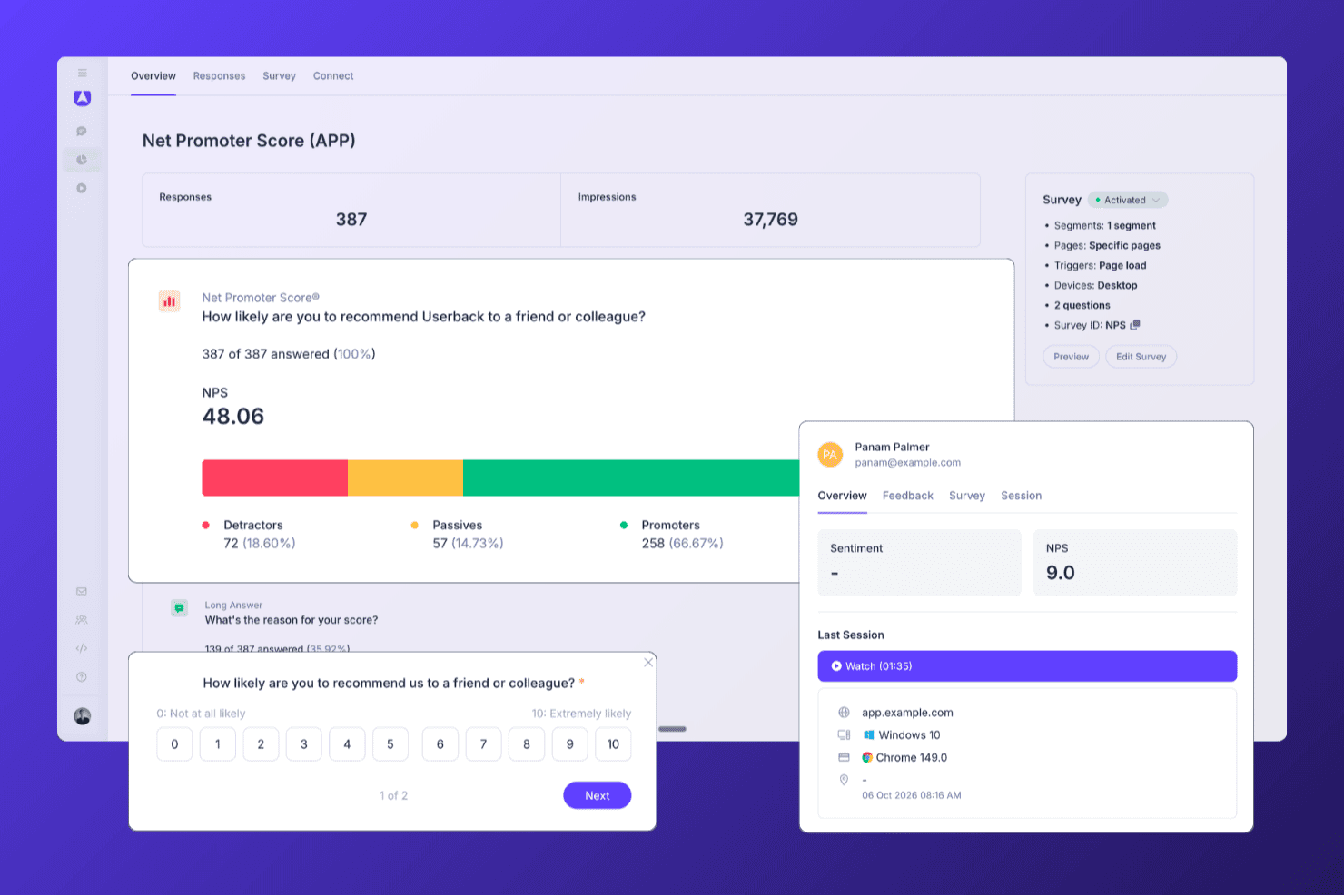
Userback hilft Teams, NPS-Umfragen durchzuführen und Antworten, Promotorensegmente sowie Kundenfeedback auf einer einzigen Übersichtsseite zu analysieren. Userback ist eine Plattform für Produktfeedback, die In-App-NPS-, CSAT- und CES-Umfragen mit Sitzungswiedergabe, KI-gestützter Feedbackanalyse und automatisierten Feedbackprozessen kombiniert.
Für wen ist Userback am besten geeignet?
Userback eignet sich besonders für Produktteams, die In-App-NPS zusammen mit Sitzungswiedergabe erfassen möchten, damit sie genau sehen können, was Nutzer vor der Abgabe einer Bewertung erlebt haben.
Warum ich Userback ausgewählt habe
Userback schafft es auf meine engere Auswahl, weil es In-App-NPS-Umfragen mit Sitzungswiedergabe kombiniert. Wenn ein Nutzer Ihr Produkt mit 3 bewertet, können Sie genau ansehen, was er vor der Abgabe dieser Bewertung erlebt hat. Besonders gut gefällt mir, dass Sie mit verhaltensbasierter Zielgruppenansprache die NPS-Umfrage zu einem bestimmten Zeitpunkt innerhalb der Anwendung auslösen können, etwa nachdem ein Nutzer einen wichtigen Arbeitsablauf abgeschlossen hat, anstatt sie an Ihre gesamte Liste zu senden. Die KI-gestützte Feedbackautomatisierung leitet Antworten von Kritikern anschließend automatisch an das richtige Teammitglied weiter, wobei Statusaktualisierungen mit Werkzeugen wie Jira oder Slack synchronisiert werden.
Die wichtigsten Funktionen von Userback
- Umfragevorlagen für NPS, CSAT und CES: Vorgefertigte Umfragevorlagen für alle drei wichtigen Zufriedenheitskennzahlen, jeweils mit einer standardisierten Bewertungsskala und einer anschließenden Freitextfrage.
- Verhaltens- und ereignisbasierte Auslöser für Umfragen: Umfragen können durch bestimmte Ereignisse innerhalb der Anwendung, Nutzersegmente, bestimmte Seiten oder den Gerätetyp ausgelöst werden, um die richtigen Nutzer zum richtigen Zeitpunkt zu erreichen.
- KI-gestützte Kategorisierung und Weiterleitung von Feedback: Die KI versieht eingehende Antworten automatisch mit Schlagwörtern zu Thema und Stimmung und leitet sie anschließend mit konfigurierbaren Fälligkeitsdaten an das richtige Teammitglied weiter.
- Bidirektionale Integrationssynchronisierung: Statusaktualisierungen werden zwischen Userback und verbundenen Werkzeugen wie Jira, ClickUp und Linear in beide Richtungen übertragen, sodass die Bearbeitung von Feedback in der gesamten Werkzeugumgebung sichtbar bleibt.
Userback-Integrationen
Userback bietet mehr als 20 integrierte Verbindungen, darunter Zendesk, Intercom, Jira, Slack, ClickUp, Linear und Microsoft Teams, sowie eine REST-API, Webhooks und Zapier.
Pros and Cons
Pros:
- Kombiniert NPS-Umfragen mit Sitzungswiedergabe
- Verhaltensbasierte Zielgruppenansprache für In-App-NPS-Aufforderungen
- KI leitet Feedback von Kritikern an Teams weiter
Cons:
- Keine integrierte Zustellung von Umfragen per E-Mail oder SMS
- NPS-Umfragen sind im kostenlosen Tarif nicht verfügbar
Learn more about Userback: Am besten für ansprechende mobile Umfragen
- Kostenloser Tarif verfügbar
- Ab $19/Monat
Visit WebsiteCustomer Rating:4.5/5
Mit SurveyLegend können Sie eine Vielzahl von Fragetypen per Drag-und-Drop in ein attraktives Template einfügen. SurveyLegend ist eine webbasierte Plattform zur Erstellung, Verteilung und Analyse von Umfragen, Formularen und Abstimmungen. Der Fokus auf mobiloptimiertes Design und interaktive Elemente macht sie zu einer geeigneten Wahl, um ansprechende Umfragen auf mobilen Geräten durchzuführen – insbesondere für die wachsende Anzahl von Nutzern, die Inhalte unterwegs konsumieren möchten.
Warum ich SurveyLegend gewählt habe: Ich habe SurveyLegend aufgrund der benutzerfreundlichen Oberfläche ausgewählt, die die Erstellung optisch ansprechender und interaktiver Umfragen sowohl am Desktop als auch auf mobilen Geräten vereinfacht. Was SurveyLegend auszeichnet, ist der starke Fokus auf Designästhetik: So können gebrandete Umfragen mit einer Vielzahl von Fragetypen und Feldern erstellt werden, wie Bildauswahl und Datei-Uploads. Ich denke, SurveyLegend eignet sich am besten für mobilfreundliche, ansprechende Umfragen , da die mobile Optimierung eine reibungslose Nutzererfahrung für Befragte auf Smartphones oder Tablets sicherstellt. Dies kann die Rücklaufquoten erhöhen und die Qualität des erhaltenen Feedbacks steigern.
Hervorstechende Funktionen und Integrationen:
Funktionen umfassen elegante, vorgefertigte Vorlagen, Sprachlokalisierung, Offline-Datenerfassung sowie weitreichende Anpassungsmöglichkeiten inklusive individueller Markenintegration und Fragen-Formatierung, bedingter Logik sowie anpassbaren Buttons und Symbolen.
Integrationen gibt es mit Google Drive, Dropbox, Mailchimp und Salesforce sowie sozialen Medien wie Facebook und Twitter zur Umfrageverbreitung.
Pros and Cons
Pros:
- Sehr visuelle und mobiloptimierte Umfrageerfahrung für NPS
- Schnelles Einrichten von einfachen, stilvollen NPS-Umfragen
- Übersichtliche Benutzeroberfläche unterstützt auch Nutzer ohne Umfrageerfahrung
Cons:
- Logik, Verzweigungen und Segmentierung eingeschränkt
- Skalierbarkeit und Rollenverwaltung weniger ausgeprägt
Learn more about SurveyLegend: Am besten geeignet für benutzerdefiniert ausgelöste NPS-Umfragen
- 14-tägige kostenlose Testphase + kostenloser Plan + kostenlose Demo verfügbar
- Ab $25/Monat (jährliche Abrechnung)
Visit WebsiteCustomer Rating:4.7/5
Mit Mouseflow können Sie zwischen Freitext, Bewertungsskala (NPS) und Multiple Choice wählen, um Umfragen durchzuführen. Mouseflow ist ein umfassendes Analysetool, das tiefe Einblicke in das Nutzerverhalten auf Websites bietet. Es stellt eine Vielzahl von Funktionen bereit, darunter Sitzungsaufzeichnungen, Heatmaps, Conversion-Trichter, Formularanalysen und Werkzeuge für Nutzerfeedback. Durch das Erfassen von Nutzerinteraktionen und deren Visualisierung in Berichten und Aufzeichnungen ermöglicht Mouseflow Unternehmen, zu verstehen, wie Besucher durch ihre Websites navigieren.
Warum ich Mouseflow gewählt habe: Das Tool ermöglicht die Erstellung von benutzerdefinierten, auslöserbasierten Umfragen, die strategisch an verschiedenen Kontaktpunkten der Nutzerreise platziert werden können. Es unterstützt verschiedene Umfragetypen wie NPS, Multiple Choice, Freitext und Bewertungsskalen, wodurch Unternehmen präzises und kontextbezogenes Feedback einholen können – ein direkter Beitrag zur genauen Ermittlung des Net Promoter Score (NPS).
Herausragende Funktionen und Integrationen von Mouseflow:
Funktionen, die die Feedback-Werkzeuge von Mouseflow ergänzen, beinhalten Sitzungsaufzeichnungen, mit denen Unternehmen einzelne Nutzer-Sessions als Video ansehen können, und Heatmaps, die eine visuelle Darstellung des Nutzerengagements bieten und die am meisten sowie am wenigsten genutzten Bereiche einer Webseite hervorheben.
Integrationen umfassen HubSpot, AB Tasty, Convert Experiences, BigCommerce, WooCommerce, Google Analytics, Google Tag Manager, Zendesk, Omniconvert, Adobe Target, Shopify, Intercom, WordPress und weitere.
Pros and Cons
Pros:
- Gut für das Einbinden von NPS- und Feedback-Widgets an UX-relevanten Stellen.
- Anwender berichten, es hilft, das 'Warum' hinter niedrigen NPS-Werten aufzudecken
- Kombiniert Verhaltensanalyse (Heatmaps, Sitzungsaufzeichnungen) mit Feedback-Tools
Cons:
- Einrichtung und Filterung können für nicht-analytische Teams komplex werden
- Umfrage-/Feedbackmodule verfügen über keine erweiterten Funktionen
Learn more about Mouseflow: Beste Net Promoter Score-Software mit kostenlosem Tarif
- Kostenloser Tarif verfügbar
- Ab $30/Nutzer/Monat (jährliche Abrechnung)
Visit WebsiteCustomer Rating:4.6/5
Einfache NPS-Fragen zur Messung der Kundenzufriedenheit. SurveyMonkey ist ein umfassendes Umfragetool, das einen kostenlosen Tarif mit sofort einsatzbereiten Umfragen anbietet, um Ihnen den Einstieg zu erleichtern. Im Rahmen des kostenlosen Tarifs können Sie eine Umfrage mit bis zu 10 Fragen erstellen und bis zu 100 Antworten pro Umfrage sammeln.
Warum ich SurveyMonkey gewählt habe: Der kostenlose Tarif beinhaltet viele hilfreiche Funktionen, für die man bei anderen Umfragetools bezahlen muss, darunter Sprunglogik, Datenexporte, eine Auswahl an Fragetypen, grundlegende Analyse- und Berichtsfunktionen sowie einfache Visualisierungen, die das Verständnis Ihrer Daten erleichtern. Sie können zusammenfassende Statistiken wie Antwortanzahl und -prozente einsehen.
Gut gefällt mir auch, dass Sie die Net Promoter Score-Software von SurveyMonkey mit Salesforce integrieren können, um Ihr Salesforce-Dashboard durch NPS-Berechnungen zu erweitern.
Herausragende Funktionen und Integrationen von SurveyMonkey:
SurveyMonkey ist eine ausgezeichnete Net Promoter Score-Software, weil sie es ermöglicht, Kunden direkt nach der Nutzung Ihres Produkts um Feedback zu bitten. Sie können SurveyMonkey in Ihre Website integrieren, um den NPS zu erheben, ohne das Einkaufserlebnis der Kunden zu stören. SurveyMonkey erlaubt Ihnen außerdem, eine bestimmte Kundendemografie anzusprechen, um den NPS einer bestimmten Kundengruppe zu messen.
Mit SurveyMonkey können Sie zudem Metadaten über Website-Benutzer wie Browsertyp, Standort und Gerät erfassen, um das Online-Erlebnis Ihrer Kunden zu optimieren.
Integrationen umfassen Slack, Microsoft Teams, Akita, Freshservice, HubSpot, Zendesk, Google Sheets, Google Analytics, Adobe Analytics, A/B Tasty, Zoho CRM, Gainsight und Salesforce.
Pros and Cons
Pros:
- Riesige Vorlagen- und Fragetypbibliothek
- Einfache Verteilung per Weblink, E-Mail-Einladung oder Panel
- Starke Logikverzweigungen und Analysen für NPS und mehr
Cons:
- Kostenloser Tarif sehr eingeschränkt in Umfragetiefe und Analysen
- Oberfläche eher auf allgemeine Nutzung als auf NPS-Workflows ausgelegt
Learn more about SurveyMonkey: Beste NPS-Software, um Ihre Umfragen in verschiedene Sprachen zu übersetzen
- Kostenlose Testversion für bis zu 100 Antworten
- Ab $49/Monat/bis zu 300 Antworten
Visit WebsiteCustomer Rating:4.8/5
Verfolgen Sie, wie viele Promotoren, Passive und Kritiker Sie haben. SatisMeter ist ein Tool zur Erfassung von Feedback zur Messung der Kundenzufriedenheit an verschiedenen Kontaktpunkten. Es bietet vorgefertigte Vorlagen, mit denen Sie schnell Umfragen für CES, NPS, CSAT oder PMF starten können. Mit SatisMeter können Sie automatisierte, wiederkehrende Umfragen erstellen, um Zeit zu sparen und gleichzeitig die Kundenzufriedenheit kontinuierlich zu messen.
Warum ich SatisMeter ausgewählt habe: Nicht alle Kunden sprechen oder lesen Englisch, und SatisMeter ist die beste NPS-Software, wenn Sie Ihre Umfragen in verschiedene Sprachen übersetzen möchten. SatisMeter übersetzt Umfragen automatisch, abhängig von den Spracheinstellungen des Gerätes, das Ihre Kunden verwenden, sodass Sie Kunden mit unterschiedlichen Nationalitäten und Sprachpräferenzen befragen können. Sie können eine Umfrage auch manuell übersetzen, um gezielt bestimmte Kundendemografien anzusprechen.
SatisMeter: Herausragende Funktionen und Integrationen:
Kürzlich hinzugefügte Funktionen umfassen benutzerspezifische Berechtigungen pro Projekt, die Option, mehrere Antworten auszuwählen, neue Datenfilter pro Quartal, eine Verzögerungsauslösung für Umfragen, einen Ereignisauslöser für Umfragen und ein Overlay-Pop-up.
Integrationen sind verfügbar mit anderen Kundenzufriedenheitstools, darunter Salesforce, CustomerGauge, Bigcommerce, Productboard und Slack. Sie können SatisMeter mit einem kostenpflichtigen Zapier-Konto verbinden, um Zugang zu Premium-Apps zu erhalten.
Pros and Cons
Pros:
- Übersichtliches Tool zur Echtzeit-Verfolgung von NPS, CSAT und Feedback
- Nutzer loben die schnellen Support-Antworten und regelmäßigen Plattform-Updates
- Umfragen lassen sich einfach in Apps oder über Weblinks einbetten
Cons:
- Erweiterte Segmentierung/individuelle Berichtserstellung wirkt eingeschränkt
- Tagging- und Problemklassifizierungsfunktionen fehlen
Learn more about SatisMeter:
Weitere Optionen für Net Promoter Score-Software
Hier sind einige weitere NPS-Umfragesoftwarelösungen, die es nicht in die Top-Liste geschafft haben, aber dennoch einen Blick wert sind. Sie können jedes dieser NPS-Systeme nutzen, um Kunden an wichtigen Kontaktpunkten ihrer Interaktion mit Ihrer gesamten Organisation zu erreichen.
- 11NicereplyBeste schlanke Option für benutzerfreundliche NPS-Software
- 12ProProfs Survey MakerAm besten geeignet für Umfragen, Popups, Seitenleisten- und In-App-Umfragen.
- 13PodiumAm besten geeignet für kontextbezogenes Feedback, z. B. aus welchem Kanal die Befragten kommen
- 14SprigAm besten geeignet, um Kundenfeedback mittels KI in großem Umfang zu erfassen und zu analysieren
- 15CustomerSureBeste NPS-Software für den Zugriff auf mehrere Feedback-Kanäle: E-Mail, SMS, In-App und auf der Website
- 16OrbitricsAm besten geeignet für optionale offene Fragen nach dem NPS
- 17InputKitBeste NPS-Software für kleine Unternehmen und Start-ups
- 18JotformAm besten geeignet für B2B-Unternehmen, die schnell NPS-Umfragen erstellen und bereitstellen möchten
- 19UserGuidingAm besten geeignet für das Sammeln von Echtzeit-Insights
- 20Product FruitsBeste Onboarding-Software für Nutzer mit integrierten NPS- und In-App-Umfragen
- 21VelarisAm besten geeignet für die automatisierte Sammlung von Kundenfeedback
- 22CannyBester transaktionaler NPS.
- 23WootricBester Feedback-Loop für NPS-Fragen.
- 24VitallyBeste Echtzeit-Umfrageergebnisse.
- 25eNPSAm besten geeignet für mitarbeiterbasierte NPS-Bewertungen.
Wie ich Net Promoter Score Software bewerte
Ich bewerte NPS-Tools auf zwei Ebenen: die Grundfunktionen, die ein Tool haben muss – wie automatisierte Auswertung und geschlossene Feedback-Workflows – und die Alleinstellungsmerkmale, die die besten Optionen für CX-Teams auszeichnen.
Kernfunktionen (Mindestanforderungen für diese Liste)
Wenn ich Tools für meine Liste auswähle, bewerte ich jedes auf einer Skala von 0 (Funktion nicht vorhanden) bis 5 (hervorragend in diesem Bereich) für jede der unten aufgeführten Kernfunktionen. Anschließend rechne ich die Gesamtpunktzahl des Tools in einen Prozentwert um. Jedes Tool muss eine Mindestpunktzahl von 65 % erreichen, um in die Auswahl zu kommen.
- NPS-Umfrage-Editor: Ich achte auf eine spezielle NPS-Vorlage mit der 0–10-Skala, Folgefrage und Anpassungsmöglichkeiten für das Branding – nicht nur auf einen generischen Formular-Editor mit Bewertungsfeld.
- Multi-Channel-Umfrageversand: Ob als In-App-Abfrage nach dem Onboarding oder als E-Mail nach dem Support – ich prüfe, ob Tools Kunden mindestens über drei verschiedene Kanäle erreichen können.
- Automatische Punkteberechnung: Die Echtzeit-Kategorisierung in Promotoren, Passive und Kritiker mit einem Live-NPS-Dashboard ist hier entscheidend – ich werte aus, ob die Berechnung automatisch erfolgt.
- Segmentierung & Trendanalyse: Ich schaue, wie jedes Tool die Auswertung nach Cohorts, Produktlinien oder Regionen erlaubt und zeitliche Entwicklungen sichtbar macht, um aufkommende Muster zu erkennen.
- Geschlossene Feedback-Workflows: Tools wie Medallia und Qualtrics leiten Kritiker-Benachrichtigungen automatisch an Account-Verantwortliche weiter. Ich bewerte, wie jede Plattform Folgeaufgaben und Workflows steuert.
- CRM- & Business-Tool-Integrationen: Die Verknüpfung von NPS-Daten mit Kundenakten in Tools wie Salesforce oder HubSpot ist essenziell, deshalb prüfe ich auf native Schnittstellen, offene API-Zugänge und Webhook-Support.
Wenn ich eine Liste von Tools habe, die die Kriterien erfüllen, überlege ich, was jedes Produkt besonders macht.
Unterscheidungsmerkmale (Was Anbieter voneinander abhebt)
So vergleiche und bewerte ich verschiedene Anbieter:
Herausragende Funktionen
KI-gestützte Textanalyse ist ein entscheidendes Unterscheidungsmerkmal. Ich bewerte, ob ein Tool wiederkehrende Themen aus Tausenden von offenen Antworten ohne manuelle Verschlagwortung herausfiltern kann. Auch Benchmarking-Daten sind wichtig – zu wissen, dass Ihr Score 42 beträgt, bringt erst dann etwas, wenn Sie diesen mit der Branche vergleichen können. Zudem prüfe ich Vorhersagefunktionen für Abwanderungen, bei denen Plattformen Muster von Kritikern mit Verlängerungs- oder Nutzungsdaten verknüpfen, um gefährdete Accounts rechtzeitig zu identifizieren.
Über die Funktionen hinaus
Die Preisgestaltung beurteile ich sehr genau. Einige Anbieter berechnen pro Antwort, andere pro Nutzer oder Kontakt – das passende Modell hängt von Ihrem Umfragevolumen und der Teamgröße ab. Compliance spielt ebenfalls eine Rolle, wenn NPS-Umfragen Kundendaten (PII) erfassen – ich prüfe auf DSGVO-Konformität, SOC 2-Zertifizierung und Möglichkeiten zur Datenspeicherung im gewünschten Land. Die Zeit bis zur Wertschöpfung ist ein weiterer Aspekt: Ein CX-Team, das sein erstes relationales NPS-Programm startet, benötigt vorgefertigte Vorlagen und eine schnelle Einrichtung, keine monatelange Implementierung.
So wählen Sie Net Promoter Score-Software aus
Bei langen Funktionslisten und komplexen Preisstrukturen verliert man leicht den Überblick. Damit Sie sich bei Ihrem individuellen Auswahlprozess auf das Wesentliche konzentrieren können, finden Sie hier eine Checkliste mit den Faktoren, die Sie berücksichtigen sollten:
| Faktor | Was zu beachten ist |
|---|---|
| FaktorSkalierbarkeit | Was zu beachten istKann die Software mit Ihrem Unternehmen wachsen? Achten Sie auf Lösungen, die ein höheres Datenvolumen und mehr Benutzer ohne Leistungseinbußen bewältigen können. |
| FaktorIntegrationen | Was zu beachten istLässt sie sich in Ihre bestehenden Systeme wie CRM- oder Helpdesk-Software integrieren? Stellen Sie einen nahtlosen Datenfluss zwischen den Plattformen sicher, um die manuelle Dateneingabe zu vermeiden. |
| FaktorAnpassbarkeit | Was zu beachten istKönnen Sie die Software an Ihre spezifischen Anforderungen anpassen? Prüfen Sie, ob individuelle Umfragen, Branding und Berichte möglich sind, damit sie zu Ihrem Arbeitsablauf passen. |
| FaktorBenutzerfreundlichkeit | Was zu beachten istIst die Software für Ihr Team intuitiv bedienbar? Eine komplexe Benutzeroberfläche kann die Akzeptanz beeinträchtigen. Achten Sie auf benutzerfreundliche Optionen mit einer unkomplizierten Navigation. |
| FaktorImplementierung und Einarbeitung | Was zu beachten istWie lange dauert es, bis die Software einsatzbereit ist? Bewerten Sie den Support und die Schulungsressourcen des Anbieters, um einen reibungslosen Übergang sicherzustellen. |
| FaktorKosten | Was zu beachten istGibt es versteckte Gebühren? Vergleichen Sie die Preismodelle und prüfen Sie, ob zusätzliche Kosten für weitere Benutzer oder Funktionen anfallen. |
| FaktorSicherheitsvorkehrungen | Was zu beachten istWie schützt die Software Ihre Daten? Vergewissern Sie sich, dass sie den Branchenstandards entspricht und Verschlüsselung sowie Zugriffskontrollen bietet. |
| FaktorSupportverfügbarkeit | Was zu beachten istWelchen Support bietet der Anbieter? Berücksichtigen Sie die Verfügbarkeit des Kundenservice und des technischen Supports, wenn Probleme auftreten. |
Funktionen von Software für den Net Promoter Score
Achten Sie bei der Auswahl einer Software für den Net Promoter Score auf die folgenden wichtigen Funktionen:
- Anpassung von Umfragen: Erstellen, ändern und individualisieren Sie Umfragen entsprechend der Sprache und dem Stil Ihres Unternehmens, damit Sie einfach eine Verbindung zu Ihrer Zielgruppe herstellen und die wichtigsten Erkenntnisse gewinnen können.
- Verteilung über mehrere Kanäle: Versenden Sie Umfragen per E-Mail, SMS, Web oder In-App-Einblendungen, um Benutzer überall zu erreichen und Ihre Rücklaufquoten zu maximieren.
- Analysen in Echtzeit: Greifen Sie auf eingehendes Feedback in Echtzeit zu, um Trends zu erkennen und unverzüglich auf Erkenntnisse zu reagieren. So können Sie Probleme schnell beheben und die Kundenerfahrung verbessern.
- Automatisierte Folgeprozesse: Richten Sie Auslöser ein, die automatisch auf Kritiker, Passive oder Promotoren reagieren. Dieser automatisierte Ansatz ermöglicht zeitnahe Antworten und zeigt Kunden, dass Sie ihre Rückmeldungen schätzen.
- Segmentierung von Antworten: Unterteilen Sie Daten nach Kundentyp, Segment, Region oder anderen Kategorien, um zu verstehen, wie verschiedene Gruppen empfinden, und Ihre Strategien entsprechend anzupassen.
- Historische Nachverfolgung: Überwachen Sie NPS-Werte im Zeitverlauf, um Veränderungen leicht zu erkennen, die Auswirkungen Ihrer Maßnahmen zu verstehen und Ihre Fortschritte zu feiern.
- Datenintegration: Verbinden Sie NPS-Daten mit Ihrem CRM, Helpdesk oder Ihren Marketingplattformen. Dadurch erhalten Sie einen umfassenderen Überblick über die Kundenreise und können leichter auf Ihre Erkenntnisse reagieren.
- Berechtigungssteuerung: Legen Sie fest, wer in Ihrem Team Umfragedaten anzeigen oder verwalten darf, damit vertrauliche Informationen sicher bleiben und nur in die richtigen Hände gelangen.
Gängige KI-Funktionen von Software für den Net Promoter Score
Über die oben aufgeführten Standardfunktionen von Software für den Net Promoter Score hinaus integrieren viele dieser Lösungen KI mit Funktionen wie:
- Stimmungsanalyse: Interpretieren Sie offene Antworten aus Umfragen automatisch, um festzustellen, ob das Feedback positiv, negativ oder neutral ist. So sparen Sie Stunden und gewinnen Erkenntnisse, die Ihnen möglicherweise entgangen wären.
- Vorhersage der Abwanderungswahrscheinlichkeit: Nutzen Sie KI, um Kunden zu kennzeichnen, die höchstwahrscheinlich abwandern, damit Sie rechtzeitig proaktive Maßnahmen zu ihrer Bindung ergreifen können.
- Automatisierte Themenextraktion: Lassen Sie KI Feedback nach gemeinsamen Themen oder Schwerpunkten gruppieren, um die Ursachen Ihrer NPS-Werte leichter zu erkennen und Verbesserungen zu priorisieren.
- KI-gestützte Antwortvorschläge: Erhalten Sie empfohlene Folgemaßnahmen für verschiedene Arten von Feedback. So können Sie sinnvoll mit Kunden interagieren, ohne Ihren Ansatz ständig infrage stellen zu müssen.
- Textzusammenfassung: Verwandeln Sie umfangreiche Kundenkommentare in schnelle, leicht verständliche Erkenntnisse, damit Sie den Überblick behalten, ohne in Daten zu ertrinken.
Vorteile von Software für den Net Promoter Score
Die Implementierung einer Software für den Net Promoter Score bietet Ihrem Team und Ihrem Unternehmen mehrere Vorteile. Hier sind einige davon:
- Datenbasierte Erkenntnisse: Die Software unterstützt fundierte Entscheidungen, indem sie Erkenntnisse auf Grundlage von Kundenfeedback und Bewertungen bereitstellt.
- Verbesserte Zusammenarbeit: Sie verbessert die Zusammenarbeit im Team und ermöglicht es mehreren Benutzern, zum Kundenfeedback und zur Strategie beizutragen.
- Kundensegmentierung: Die Software ermöglicht die Segmentierung des Feedbacks nach Kundentyp, was dabei hilft, die unterschiedlichen Bedürfnisse der Kunden zu verstehen.
- Benutzerfreundliche Oberfläche: Ein intuitives Design erleichtert Teammitgliedern die Navigation und die effektive Nutzung der Software.
- Integrationsmöglichkeiten: Die Software lässt sich in bestehende Tools integrieren und ermöglicht so eine nahtlose Einbindung in aktuelle Arbeitsabläufe.
- Skalierbarkeit: Sie unterstützt das Wachstum Ihres Unternehmens, indem sie sich an zunehmendes Feedback und wachsende Kundendatenmengen anpasst.
- Strategische Ausrichtung: Die Software stellt sicher, dass die Anstrengungen Ihres Teams auf die strategischen Geschäftsziele ausgerichtet sind, indem sie einen klaren Fokus auf Kennzahlen zur Kundenzufriedenheit beibehält.
Kosten und Preise von Software für den Net Promoter Score
Die Auswahl von Software für den Net Promoter Score erfordert ein Verständnis der verschiedenen verfügbaren Preismodelle und Tarife. Die Kosten variieren je nach Funktionen, Teamgröße, Zusatzoptionen und weiteren Faktoren. Die folgende Tabelle gibt einen Überblick über gängige Tarife, deren Durchschnittspreise und die typischen Funktionen, die in Softwarelösungen für den Net Promoter Score enthalten sind:
Vergleichstabelle der Tarife für Software für den Net Promoter Score
| Tariftyp | Durchschnittlicher Preis | Übliche Funktionen |
|---|---|---|
| TariftypKostenloser Tarif | Durchschnittlicher Preis$0 | Übliche FunktionenErstellung grundlegender Umfragen, begrenzte Anzahl an Antworten und grundlegende Analysen. |
| TariftypPersönlicher Tarif | Durchschnittlicher Preis$10-$30/pro Benutzer/Monat | Übliche FunktionenIndividuelle Gestaltung der Marke, moderate Antwortlimits und grundlegende Integrationen. |
| TariftypGeschäftstarif | Durchschnittlicher Preis$50-$100/pro Benutzer/Monat | Übliche FunktionenErweiterte Analysen, Werkzeuge für die Zusammenarbeit im Team und bevorzugte Unterstützung. |
| TariftypUnternehmenstarif | Durchschnittlicher PreisIndividuelle Preisgestaltung | Übliche FunktionenVollständiger API-Zugriff, dedizierte Unterstützung, erweiterte Benutzerverwaltung und SSO-Optionen. |
FAQ: Alles über NPS und Kundenzufriedenheit
Sie suchen weitere Informationen zur Kundenfeedbackschleife und dazu, wie sich Kundenzufriedenheit messen lässt? Hier finden Sie einige Antworten auf häufige Fragen:
Wie können Sie Daten zum Net Promoter Score nutzen?
Sie können NPS-Daten nutzen, um loyale Kunden zu identifizieren, Ursachen für Unzufriedenheit aufzudecken und organisatorische Verbesserungen voranzutreiben. Die meisten NPS-Umfragetools helfen Ihnen dabei, Nachfassaktionen bei Kritikern zu automatisieren, Fürsprecher zu feiern und interne Warnmeldungen für gefährdete Kundenkonten einzurichten. Durch die Analyse von Kommentaren und Aufschlüsselungen der Punktwerte können Sie umsetzbare Erkenntnisse mit Produkt-, Support- und Führungsteams teilen. Wenn Sie NPS-Daten mit bestimmten Kundenreisen verknüpfen, können Sie genau feststellen, an welchen Stellen Erlebnisse beeinträchtigt werden, um Probleme schnell zu beheben und die Ergebnisse von Änderungen im Laufe der Zeit zu messen.
Gibt es ein kostenloses Tool zur Ermittlung des NPS?
Ja, es gibt mehrere NPS-Softwareoptionen mit dauerhaft kostenlosen Tarifen oder Testversionen. Damit können Sie in der Regel einfache NPS-Umfragen erstellen, per E-Mail oder über das Web verteilen und Feedback-Dashboards in Echtzeit anzeigen. Beliebte Plattformen wie SurveyMonkey, Hotjar und Startquestion bieten kostenlose Optionen an. Beachten Sie jedoch, dass kostenlose Tarife möglicherweise die Häufigkeit von Umfragen, das Antwortvolumen, Branding-Optionen und die Möglichkeiten zum Datenexport begrenzen. Wenn Sie NPS-Tools für Ihr Team bewerten, probieren Sie mehrere aus, um festzustellen, welches am besten zu Ihrem Arbeitsablauf, Ihrem Datenbedarf und Ihren künftigen Integrationsplänen passt.
Wenn Sie nach etwas Analogem suchen, ist das ursprüngliche kostenlose Tool zur Ermittlung des Net Promoter Score ein Rechner, gefolgt von einer Excel-Tabelle.
Wie integriere ich NPS-Software in mein CRM oder mein Kundenservice-System?
Die meisten führenden NPS-Plattformen ermöglichen eine unkomplizierte Integration in gängige CRM- oder Kundenservice-Systeme und bieten native Verbindungen zu Salesforce, HubSpot, Zendesk, Intercom und anderen. Durch die Integration können Sie NPS-Umfragen nach Support-Interaktionen oder in wichtigen Phasen der Kundenreise auslösen, Antworten in Kundendatensätzen protokollieren und Arbeitsabläufe auf Grundlage der Umfrageergebnisse automatisieren. Einige Tools stellen APIs bereit oder funktionieren mit Middleware wie Zapier oder Make, wenn Sie komplexere oder individuellere Verbindungen benötigen. Prüfen Sie vor der Auswahl einer Plattform deren Katalog vorgefertigter Integrationen und stellen Sie fest, ob für die Einrichtung Programmierkenntnisse oder spezialisierter technischer Support erforderlich sind.
Worauf sollte ich bei der Auswahl einer NPS-Software für mein Team achten?
Priorisieren Sie Software, mit der sich Umfragen einfach erstellen und starten lassen und deren Vorlagen flexibel genug für verschiedene Kontaktpunkte sind. Achten Sie auf leistungsfähige Analysen, mit denen sich Punktwerte nach Kundensegment, Phase der Kundenreise oder Kanal aufschlüsseln lassen. Solide Integrationsmöglichkeiten erlauben es Ihnen, NPS-Daten mit CRM-, Kundenservice- oder BI-Tools zu verbinden und sie so für Ihr gesamtes Team nutzbar zu machen. Funktionen wie Arbeitsablaufautomatisierung, Tools für Feedbackschleifen und rollenbasierte Dashboards helfen Ihnen dabei, Ihr CX-Programm zu skalieren. Prüfen Sie die Support-Ressourcen, Sicherheitszertifizierungen und individuellen Branding-Optionen jeder Lösung sowie, wie gut sich die Preise an Ihre erwartete Nutzung anpassen lassen.
Welche Best Practices gibt es, um die Antwortraten bei NPS-Umfragen zu erhöhen?
Um die Antwortraten bei NPS-Umfragen zu erhöhen:
- Halten Sie Ihre Umfragen kurz – in der Regel mit ein bis zwei Fragen –, damit sie auf jedem Gerät einfach ausgefüllt werden können.
- Personalisieren Sie Ihre Ansprache, indem Sie den Namen des Kunden verwenden und auf seine letzte Interaktion mit Ihrer Marke Bezug nehmen.
- E-Mail-Umfragen erzielen tendenziell bessere Ergebnisse, wenn sie zeitnah nach einem wichtigen Ereignis wie einem Kauf oder einem Supportanruf versendet werden.
- Erklären Sie, warum Sie um Feedback bitten und wie Sie die Ergebnisse zur Verbesserung des Kundenerlebnisses verwenden werden.
- Sie können auch mit verschiedenen Betreffzeilen, Erinnerungen für Personen ohne Antwort und Umfrage-Widgets in der App experimentieren, um die Interaktion zu erhöhen.
Wie kann NPS-Software dabei helfen, die Feedbackschleife zu schließen?
NPS-Plattformen helfen Ihnen dabei, die Feedbackschleife zu schließen, indem sie negative Antworten automatisch zur Nachverfolgung kennzeichnen, Tickets zuweisen und Erinnerungen an Ihr CX-Team senden. Mit vielen Tools können Sie Arbeitsabläufe erstellen, sodass Kritiker personalisierte Nachrichten erhalten oder Führungskräfte über dringende Probleme informiert werden. Sie können SLAs für Antwortzeiten festlegen und nachverfolgen, welche Kontakte bearbeitet wurden oder eine Eskalation benötigen. Das Schließen der Feedbackschleife verbessert nicht nur die Kundenzufriedenheit, sondern zeigt Kunden auch, dass ihr Feedback zu tatsächlichen Veränderungen führt und letztlich Loyalität und Weiterempfehlungen fördert.
Kann NPS-Software Trends im Zeitverlauf verfolgen und Antworten segmentieren?
Ja, die meisten NPS-Tools bieten zeitbasierte Analysen, mit denen Sie verfolgen können, wie sich Punktwerte von Monat zu Monat oder nach wichtigen Maßnahmen entwickeln. Mit einer erweiterten Segmentierung können Sie Antworten nach Produktlinie, Region, Team oder Kundenpersönlichkeit aufschlüsseln und so erkennen, welche Bereiche sich verbessern und welche mehr Aufmerksamkeit benötigen. Diese Erkenntnisse lassen sich in Dashboards visualisieren, für eine eingehendere Analyse exportieren oder zur Vorbereitung vierteljährlicher Geschäftsbesprechungen verwenden. Durch kontinuierliche Nachverfolgung und Segmentierung können Sie den ROI von Initiativen zur Verbesserung des Kundenerlebnisses nachweisen und Ressourcen auf die Faktoren konzentrieren, die den größten Einfluss auf die Loyalität haben.
Weitere Software für Kundenfeedback
NPS-Software ist nicht die einzige Option, die eine Überlegung wert ist. Da Sie schon hier sind, finden Sie vielleicht genau das, wonach Sie suchen, in diesen anderen Tools für Feedback-Umfragen:
- Kundenfeedback-Software
- Online-Umfragesoftware
- Software für das Management der Kundenerfahrung
- Umfrageanalysesoftware
- Kostenlose Umfragetools