

10 migliori alternative a Sentry per il monitoraggio degli errori nel 2026

Elenco delle alternative a Sentry


Una valida alternativa a Sentry offre un monitoraggio affidabile degli errori, un monitoraggio in tempo reale e una diagnostica operativa che aiutano il tuo team a risolvere rapidamente i problemi. Se stai cercando alternative a Sentry, probabilmente cerchi strumenti che si adattino al tuo flusso di lavoro, si integrino con il tuo stack tecnologico o offrano funzionalità che Sentry non ha.
Con così tante opzioni disponibili, è difficile sapere quale piattaforma ti aiuterà davvero a rilevare gli errori, comprenderne le cause principali e mantenere le tue applicazioni operative senza problemi. Questo elenco analizza le migliori alternative a Sentry per il 2026, così potrai confrontarne i punti di forza e trovare quella più adatta alle esigenze del tuo team.
Che cos'è Sentry?
Sentry è una piattaforma per il monitoraggio degli errori e delle applicazioni che aiuta i team a identificare, diagnosticare e risolvere i problemi software in tempo reale. Offre una serie di funzionalità di monitoraggio che acquisiscono i dati sugli errori nelle applicazioni, raggruppano gli eventi correlati e rendono disponibili informazioni dettagliate per il debug. Grazie al supporto di diversi linguaggi di programmazione e flussi di lavoro, Sentry viene utilizzato da team di ogni dimensione, comprese le aziende emergenti, per mantenere l'affidabilità delle applicazioni. Sebbene per impostazione predefinita non sia una piattaforma di osservabilità autogestita, offre flessibilità di distribuzione insieme a funzionalità avanzate a supporto dei moderni ambienti di sviluppo.
Tabella di confronto delle alternative a Sentry
Questa tabella di confronto riassume i dettagli sui prezzi delle mie migliori alternative a Sentry:
| Tool | Best For | Trial Info | Price | ||
|---|---|---|---|---|---|
| 1 | Ideale per l'osservabilità dell'intero stack | Piano gratuito disponibile | A partire da $49/utente/mese | Website | |
| 2 | Ideale per una diagnostica dettagliata degli utenti | Prova gratuita di 14 giorni + demo gratuita disponibile | A partire da $40/100,000 errori/mese (con fatturazione annuale) | Website | |
| 3 | Ideale per l'integrazione dell'analisi dei prodotti | Piano gratuito disponibile | A partire da $0.00005/evento | Website | |
| 4 | Ideale per le funzionalità di riproduzione delle sessioni | Prova gratuita di 14 giorni + piano gratuito + demo gratuita disponibile | A partire da $69/mese (fatturato annualmente) | Website | |
| 5 | Ideale per la reportistica dei punteggi di stabilità | Prova gratuita di 14 giorni + piano gratuito + dimostrazione gratuita disponibile | Da $20/mese (con fatturazione annuale) | Website | |
| 6 | Ideale per il raggruppamento degli errori in tempo reale | Prova gratuita di 14 giorni + demo gratuita disponibile | A partire da $15.83/mese (con fatturazione annuale) | Website | |
| 7 | Ideale per una configurazione semplice nelle app Ruby | Prova gratuita di 30 giorni + piano gratuito disponibile | A partire da €18.25/mese (fatturato annualmente) | Website | |
| 8 | Ideale per gli avvisi sull’operatività e sugli errori | Prova gratuita di 30 giorni + piano gratuito + demo gratuita disponibili | A partire da $26/mese (con fatturazione annuale) | Website | |
| 9 | Ideale per individuare con precisione i colli di bottiglia delle prestazioni | Prova gratuita + piano gratuito + demo gratuita disponibili | A partire da $19/mese | Website | |
| 10 | Ideale per il monitoraggio cloud-native | Prova gratuita di 14 giorni + piano gratuito disponibile | A partire da $15/host/mese (fatturato annualmente) | Website |
Perché fidarsi dei nostri consigli sui software
Il nostro team testa e recensisce software dal 2012. In quanto leader CX noi stessi, sappiamo quanto sia difficile — e importante — scegliere il software giusto.
Per questa guida, abbiamo valutato gli strumenti attraverso test pratici e ricerche indipendenti, assegnando un punteggio agli strumenti in base ai nostri criteri di selezione.
Le nostre recensioni riflettono il nostro giudizio editoriale umano, non un discorso di vendita.
Recensioni delle alternative a Sentry
Di seguito trovi le mie analisi dettagliate delle migliori alternative a Sentry incluse nel mio elenco. Le mie recensioni offrono uno sguardo approfondito sulle funzionalità, le integrazioni e i casi d’uso migliori di ogni piattaforma, per aiutarti a trovare quella più adatta a te.

Ideale per l'osservabilità dell'intero stack

Quando è necessaria visibilità sull'intero stack tecnologico, New Relic offre un'osservabilità unificata per applicazioni, infrastruttura ed esperienze digitali. È una soluzione adatta ai team di ingegneria e operazioni che desiderano monitorare tutto, dalle prestazioni del frontend ai servizi backend, in un unico posto.
A differenza di molte alternative a Sentry, New Relic riunisce il monitoraggio degli utenti reali, il tracciamento distribuito e gli approfondimenti sull'infrastruttura per una visione completa dello stato del sistema.
Perché New Relic è una buona alternativa a Sentry
Se cerchi un'alternativa a Sentry che copra ogni livello del tuo stack, New Relic è progettato per offrire osservabilità dell'intero stack. Ho scelto New Relic perché combina il monitoraggio delle prestazioni delle applicazioni, il monitoraggio dell'infrastruttura e il monitoraggio degli utenti reali in un'unica piattaforma.
Con il tracciamento distribuito e analisi dettagliate degli errori, puoi monitorare i problemi dal frontend al backend e comprenderne l'impatto sugli utenti. Questo approccio aiuta i team a identificare, assegnare la priorità e risolvere rapidamente i problemi negli ambienti complessi.
Funzionalità principali di New Relic
Alcune altre funzionalità di New Relic utili per i team che valutano alternative a Sentry includono:
- Dashboard personalizzate: Crea visualizzazioni e report adattati alle specifiche esigenze di monitoraggio del tuo team.
- Politiche di avviso: Configura condizioni di avviso dettagliate e canali di notifica per una risposta proattiva agli incidenti.
- Gestione dei log: Acquisisci, cerca e analizza i log insieme agli altri dati di telemetria in un unico posto.
- Monitoraggio sintetico: Simula le interazioni degli utenti per verificare la disponibilità e le prestazioni delle applicazioni da più località.
Integrazioni di New Relic
Le integrazioni includono AWS, Azure, Google Cloud Platform, Kubernetes, Docker, Jenkins, PagerDuty, Slack, Datadog e GitHub.
Pros and Cons
Pros:
- L'osservabilità dell'intero stack copre frontend e backend
- Il monitoraggio degli utenti reali traccia le sessioni effettive degli utenti
- Il generatore di query consente un'analisi personalizzata delle metriche
Cons:
- La configurazione degli avvisi può richiedere molto tempo
- Le prestazioni dell'interfaccia rallentano con grandi volumi di dati

Raygun
Ideale per una diagnostica dettagliata degli utenti
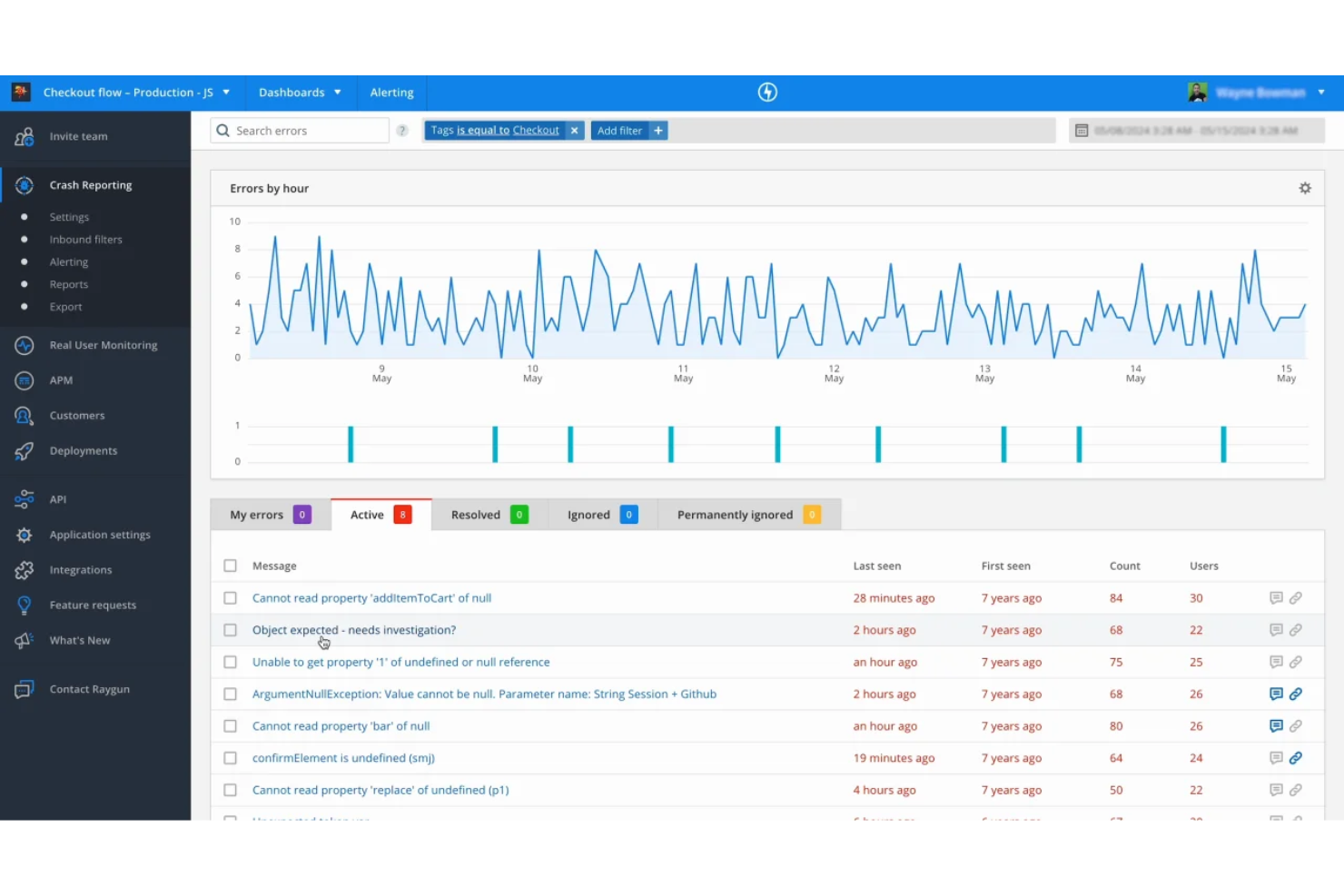
Per i team che devono approfondire la diagnostica a livello utente, Raygun offre un approccio unico al monitoraggio degli errori e delle prestazioni. Questa piattaforma è particolarmente utile per le aziende SaaS e i team di prodotto che desiderano ricondurre i problemi ai singoli utenti e alle singole sessioni. Raygun si distingue dalle alternative a Sentry grazie al monitoraggio dettagliato degli utenti e alle sequenze temporali delle sessioni, rendendo più semplice comprendere il reale impatto degli errori sui clienti.
Perché Raygun è una valida alternativa a Sentry
A differenza di molti strumenti di monitoraggio degli errori, Raygun offre una visione chiara di come i problemi influenzano i singoli utenti. Ho scelto Raygun come alternativa a Sentry perché le sue funzionalità di diagnostica degli utenti consentono di ricondurre gli errori e i problemi di prestazioni a sessioni e percorsi utente specifici.
Grazie alle sequenze temporali dettagliate delle sessioni e al monitoraggio a livello utente, puoi vedere esattamente quando e come si è verificato un problema. Questo livello di granularità è particolarmente utile per i team che desiderano dare priorità alle correzioni in base al reale impatto sui clienti.
Funzionalità principali di Raygun
Altre funzionalità di Raygun preziose per i team che stanno valutando alternative a Sentry includono:
- Monitoraggio degli utenti reali: monitora le esperienze degli utenti effettivi e le metriche delle prestazioni nelle applicazioni web e mobile.
- Segnalazione degli arresti anomali: acquisisce e segnala automaticamente gli arresti anomali delle applicazioni con tracce dello stack dettagliate.
- Monitoraggio delle distribuzioni: collega gli errori e le variazioni delle prestazioni a specifiche distribuzioni del codice per semplificare la risoluzione dei problemi.
- Dashboard personalizzate: crea dashboard personalizzate per visualizzare i dati relativi agli errori e alle prestazioni più importanti per il tuo team.
Integrazioni di Raygun
Le integrazioni includono GitHub, Jira Software, Slack, Asana, Amazon SQS, Azure DevOps Services, Bitbucket, GitLab, Lighthouse, Microsoft Teams, Trello, Zendesk e altro.
Pros and Cons
Pros:
- Le sequenze temporali delle sessioni mostrano chiaramente l'impatto sugli utenti
- Il monitoraggio degli utenti reali copre web e mobile
- Il monitoraggio delle distribuzioni collega gli errori alle release
Cons:
- Il prezzo aumenta con volumi di eventi più elevati
- Opzioni limitate di SDK open source

PostHog
Ideale per l'integrazione dell'analisi dei prodotti
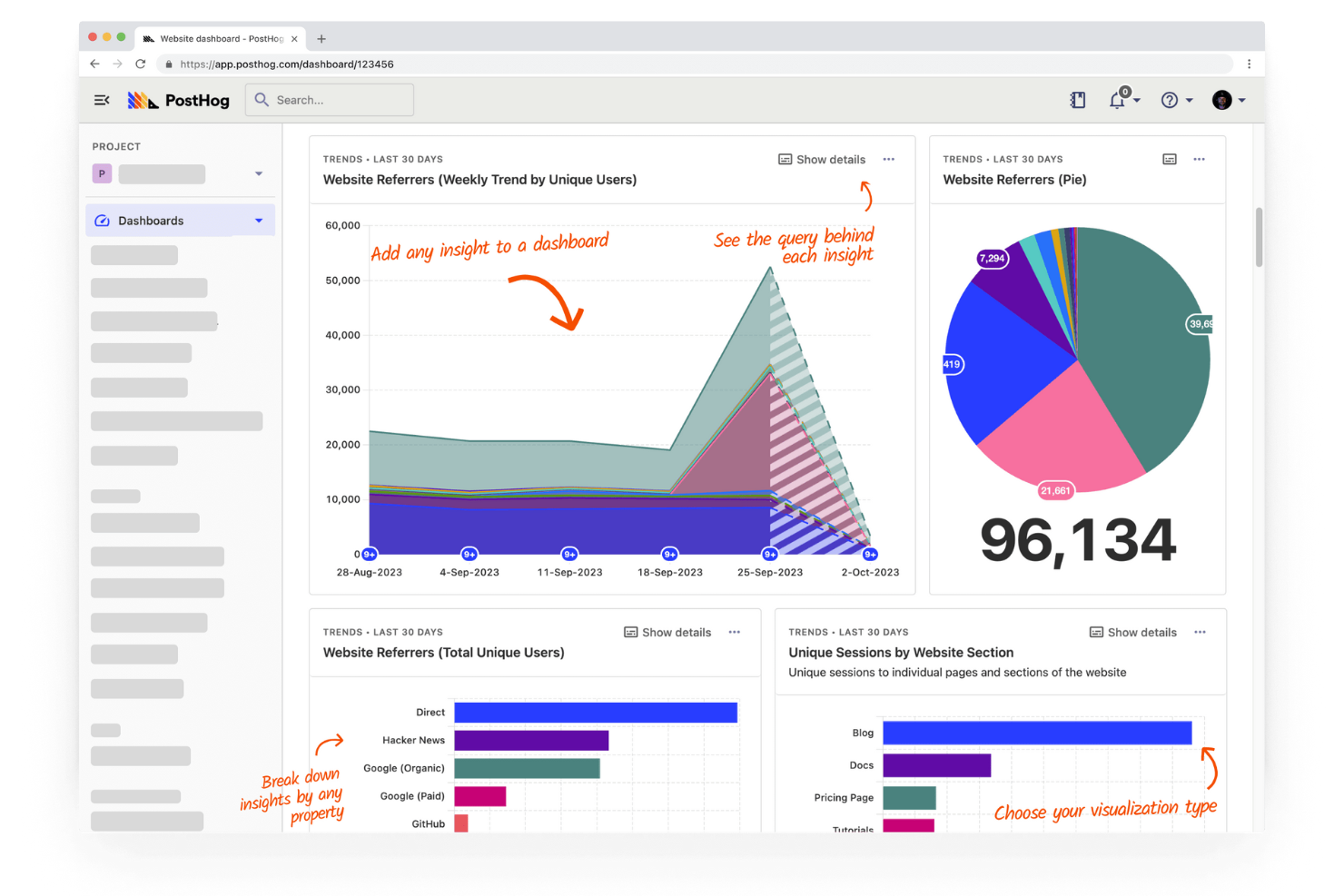
Se cerchi un'alternativa a Sentry con analisi dei prodotti integrata, vale la pena prendere in seria considerazione PostHog. Questa piattaforma combina il monitoraggio degli errori con le informazioni sul comportamento degli utenti, risultando particolarmente adatta ai team di prodotto e alle aziende SaaS. PostHog ti aiuta a collegare i problemi tecnici alle azioni reali degli utenti, così puoi dare priorità alle correzioni più importanti.
Perché PostHog è una buona alternativa a Sentry
Ciò che distingue PostHog come alternativa a Sentry è la sua profonda integrazione tra analisi dei prodotti e monitoraggio degli errori. Ho scelto PostHog per i team che vogliono vedere in un unico posto come le azioni degli utenti e i problemi tecnici si intersecano. Puoi monitorare gli errori insieme ai percorsi degli utenti, ai funnel e alle registrazioni delle sessioni, comprendendo così l'impatto reale dei bug sull'esperienza del prodotto. Questa combinazione facilita la definizione delle priorità per le correzioni sulla base del comportamento effettivo degli utenti, non solo della frequenza degli errori.
Funzionalità principali di PostHog
Tra le altre funzionalità di PostHog che si distinguono per i team che confrontano le alternative a Sentry figurano:
- Monitoraggio personalizzato degli eventi: acquisisci e analizza qualsiasi evento nella tua applicazione con definizioni flessibili degli eventi.
- Flag delle funzionalità: distribuisci nuove funzionalità a segmenti specifici di utenti e controlla i rilasci senza ridistribuire il codice.
- Test A/B: esegui esperimenti direttamente nella piattaforma per misurare l'impatto delle modifiche sul comportamento degli utenti.
- Accesso API: integra i dati di PostHog con gli strumenti e i flussi di lavoro esistenti utilizzando un'API completa.
Integrazioni di PostHog
Le integrazioni includono Slack, Segment, Shopify, WordPress, Google Tag Manager, Webflow, WooCommerce, Django, Next.js e Vercel.
Pros and Cons
Pros:
- Combina il monitoraggio degli errori con l'analisi dei prodotti
- Offre la riproduzione delle sessioni per il contesto del debug
- Supporta i flag delle funzionalità e i test A/B
Cons:
- Non offre funzionalità di avviso avanzate rispetto a Sentry
- Meno integrazioni con gli strumenti per sviluppatori

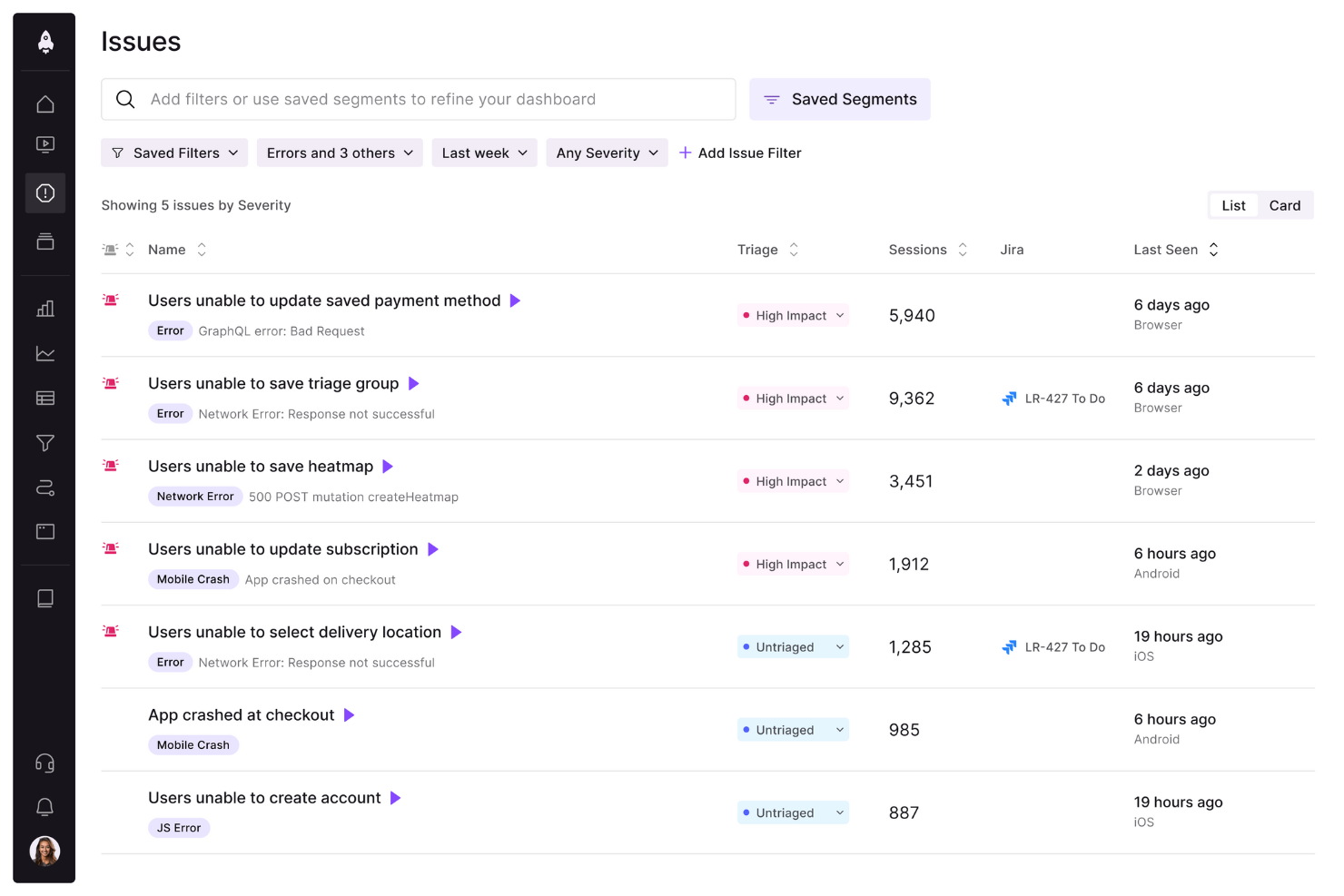
Per i team che vogliono vedere esattamente ciò che gli utenti hanno sperimentato prima di un bug, LogRocket offre una riproduzione dettagliata delle sessioni insieme al monitoraggio degli errori. È particolarmente utile per i product manager, i team QA e gli ingegneri front-end che devono comprendere il comportamento degli utenti e i problemi dell’interfaccia nel loro contesto. A differenza della maggior parte delle alternative a Sentry, LogRocket consente di guardare le sessioni degli utenti e analizzare l’attività di rete, i log della console e le modifiche al DOM in un unico posto.
Perché LogRocket è una buona alternativa a Sentry
Ciò che distingue LogRocket da Sentry è la sua attenzione alle funzionalità di riproduzione delle sessioni, che consentono di vedere esattamente ciò che gli utenti hanno sperimentato prima e durante un problema. Ho scelto LogRocket perché registra le sessioni degli utenti, acquisendo clic, scorrimenti ed eventi di navigazione insieme ai dati sugli errori.
È inoltre possibile analizzare le richieste di rete, i log della console e le modifiche al DOM direttamente dalla sequenza temporale della sessione. Questo livello di contesto visivo aiuta i team a riprodurre rapidamente i bug e a comprenderne la causa principale in un modo che gli strumenti tradizionali di monitoraggio degli errori non possono eguagliare.
Funzionalità principali di LogRocket
Alcune altre funzionalità di LogRocket utili per i team che confrontano le alternative a Sentry includono:
- Monitoraggio delle prestazioni: Monitora i tempi di caricamento delle pagine, l’utilizzo delle risorse e le metriche delle prestazioni front-end.
- Monitoraggio degli eventi personalizzati: Definisci e acquisisci azioni specifiche degli utenti o traguardi all’interno della tua applicazione.
- Integrazione con la gestione dei problemi: Collegati a strumenti come Jira e GitHub per creare e monitorare i problemi direttamente da LogRocket.
- Identificazione degli utenti: Collega i dati delle sessioni a profili utente specifici per un debugging e un’assistenza più mirati.
Integrazioni di LogRocket
Al momento non sono elencate integrazioni native.
Pros and Cons
Pros:
- La riproduzione della sessione mostra le azioni degli utenti prima degli errori
- Log di rete e della console acquisiti insieme alle sessioni
- Monitoraggio degli eventi personalizzati per flussi utente specifici
Cons:
- Nessun monitoraggio o tracciamento degli errori del back-end
- Le opzioni di esportazione dei dati sono limitate

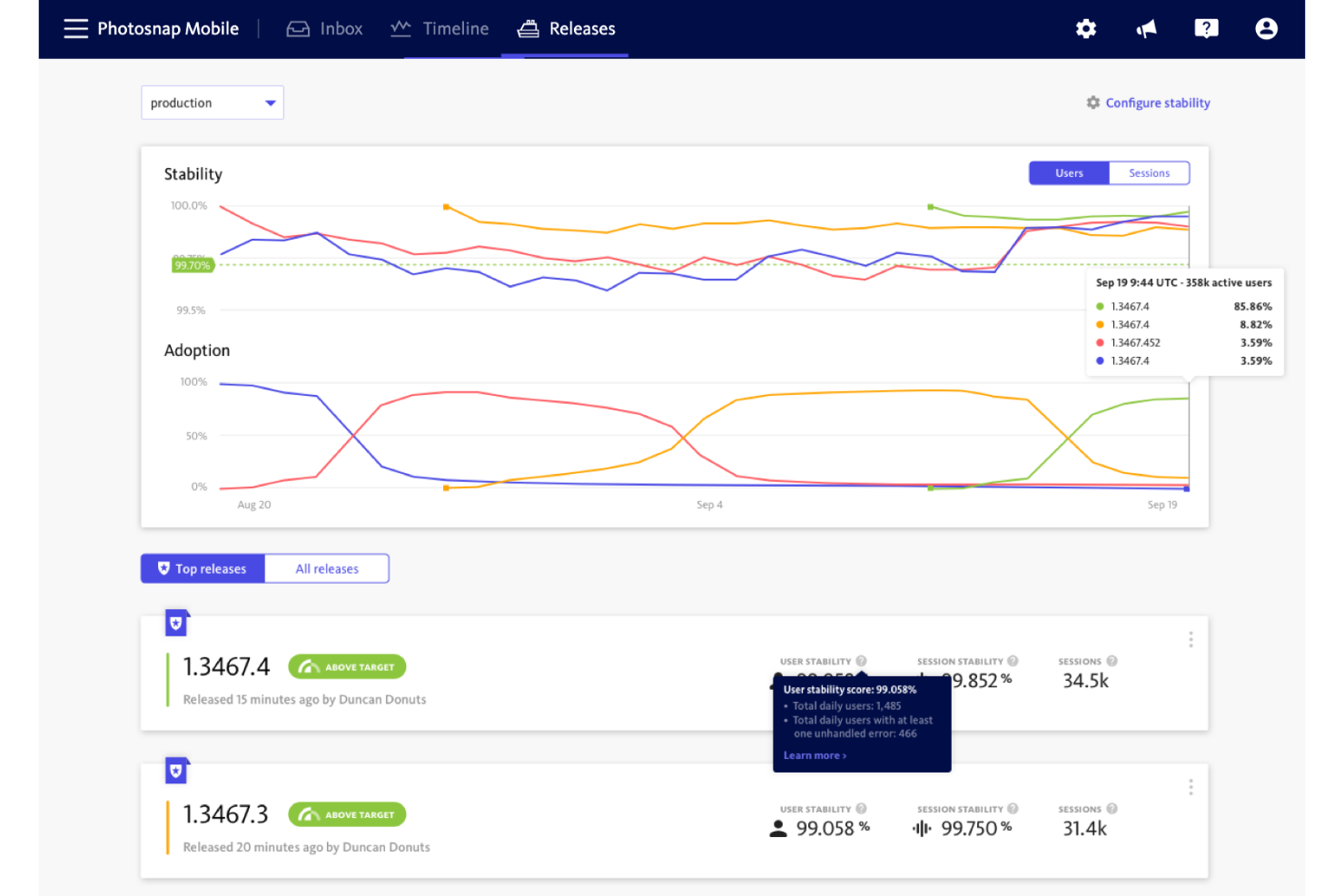
I team che desiderano misurare e migliorare l'affidabilità delle applicazioni spesso si rivolgono a BugSnag come alternativa a Sentry. È progettato per i team di ingegneria e prodotto che hanno bisogno di punteggi dettagliati sulla stabilità e di informazioni utili sugli errori nelle applicazioni web e mobili. BugSnag si distingue per la reportistica dei punteggi di stabilità, che aiuta a dare priorità alle correzioni in base all'impatto reale sugli utenti, anziché basarsi semplicemente sul volume degli errori.
Perché BugSnag è una buona alternativa a Sentry
A differenza di molti strumenti di monitoraggio degli errori, BugSnag fornisce un punteggio di stabilità che quantifica l'affidabilità dell'applicazione per gli utenti finali. Ho scelto BugSnag perché la sua reportistica dei punteggi di stabilità consente di monitorare lo stato delle versioni e di fissare obiettivi chiari per i budget degli errori.
Puoi analizzare in dettaglio le tendenze degli errori per versione, dispositivo o segmento di utenti, semplificando la definizione delle priorità per le correzioni più importanti. Questa attenzione alle metriche di affidabilità utili all'azione aiuta i team a superare il semplice monitoraggio degli errori e a migliorare concretamente l'esperienza utente.
Funzionalità principali di BugSnag
Tra le altre funzionalità di BugSnag utili ai team che confrontano le alternative a Sentry ci sono:
- Tracce di navigazione: acquisisci una sequenza temporale degli eventi che precedono ogni errore per facilitare il debug.
- Monitoraggio delle sessioni: monitora le sessioni degli utenti per capire in che modo gli errori influiscono sull'esperienza utente.
- Raggruppamento personalizzato degli errori: modifica il modo in cui gli errori vengono raggruppati per ridurre il rumore e concentrarti sui problemi unici.
- Monitoraggio delle versioni: monitora gli errori per versione di distribuzione per identificare rapidamente le versioni problematiche.
Integrazioni di BugSnag
Le integrazioni includono Slack, Microsoft Teams, Jira, PagerDuty e altro.
Pros and Cons
Pros:
- Il punteggio di stabilità quantifica le tendenze dell'affidabilità dell'applicazione
- Supporta il monitoraggio degli errori sulle piattaforme mobili
- Il raggruppamento personalizzato degli errori riduce il rumore degli avvisi
Cons:
- Nessuno strumento integrato per il monitoraggio delle prestazioni
- Supporto limitato per il tracciamento distribuito

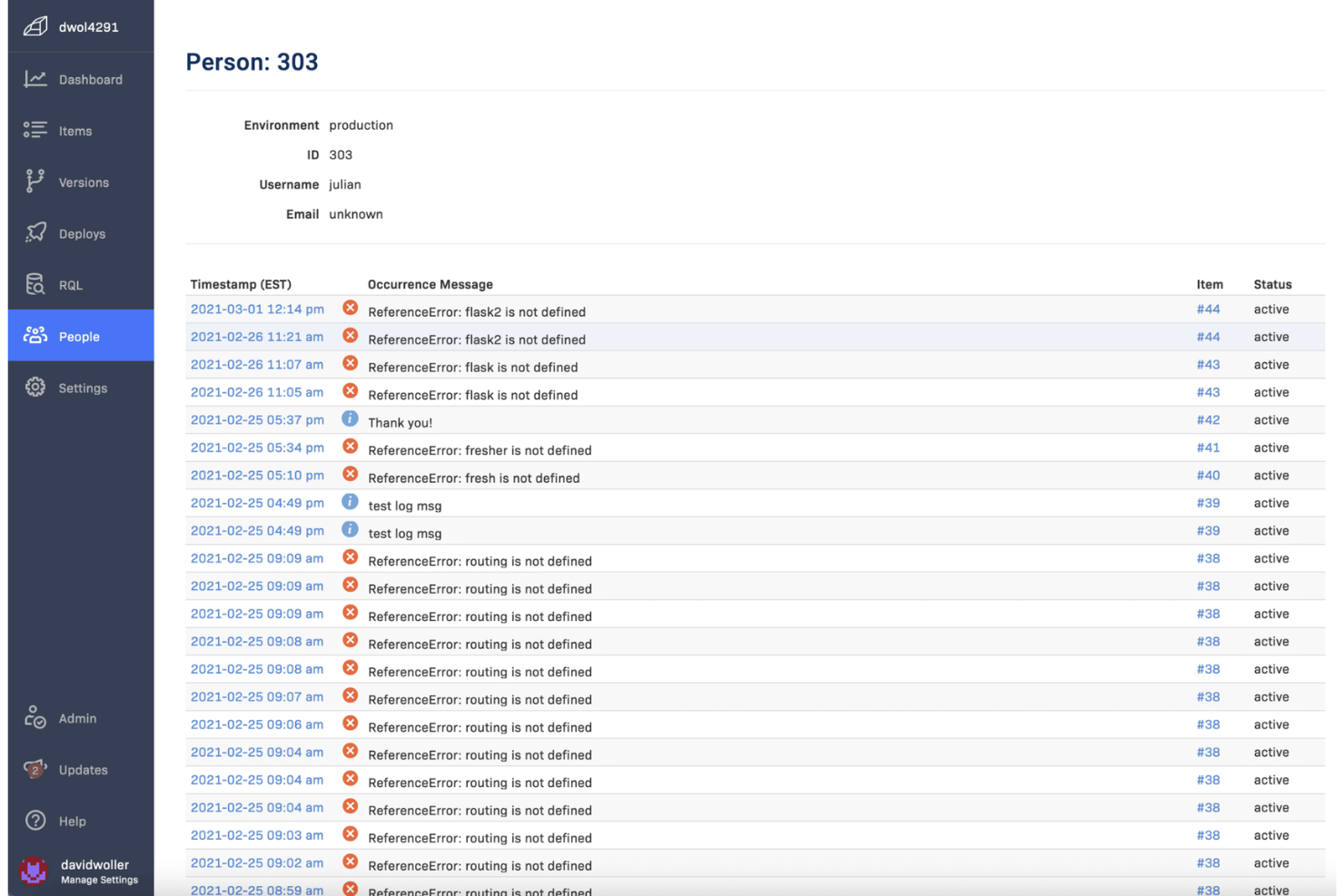
I team che hanno bisogno di una visibilità immediata sugli errori di produzione spesso si affidano a Rollbar per le sue funzionalità di raggruppamento degli errori in tempo reale. Questo strumento è particolarmente utile per i team di ingegneria e DevOps che desiderano identificare, categorizzare e risolvere rapidamente i problemi man mano che si verificano. Rollbar aiuta a filtrare il rumore raggruppando automaticamente gli errori correlati, così puoi concentrarti su ciò che conta di più.
Perché Rollbar è una buona alternativa a Sentry
Se cerchi uno strumento eccellente nell'individuare e organizzare gli errori mentre si verificano, Rollbar è una valida alternativa a Sentry. Ho scelto Rollbar perché il suo raggruppamento degli errori in tempo reale riunisce automaticamente i problemi correlati, evitando di perdere tempo a esaminare avvisi duplicati.
Il feed degli errori in tempo reale e le notifiche immediate della piattaforma aiutano i team a rispondere ai nuovi problemi non appena si verificano. Questa attenzione al raggruppamento e alla visibilità in tempo reale rende Rollbar particolarmente utile per i team di sviluppo che lavorano a ritmi elevati.
Funzionalità principali di Rollbar
Altre funzionalità di Rollbar utili per i team che confrontano le alternative a Sentry includono:
- Monitoraggio delle distribuzioni: Monitora gli errori introdotti dalle nuove distribuzioni del codice e collegali a release specifiche.
- Dati di telemetria: Acquisisci log dettagliati e breadcrumb che precedono ogni errore per ottenere un contesto migliore durante il debug.
- Regole personalizzate per gli avvisi: Configura trigger di notifica personalizzati in base al tipo, alla frequenza o alla gravità dell'errore.
- Supporto SDK per più linguaggi: Integra Rollbar con applicazioni sviluppate in Python, JavaScript, Ruby, PHP e altri linguaggi.
Integrazioni di Rollbar
Le integrazioni includono Slack, Jira, GitHub, GitLab, Microsoft Teams, PagerDuty, Trello, Asana, Bitbucket e FullStory.
Pros and Cons
Pros:
- Il raggruppamento degli errori in tempo reale riduce il rumore degli avvisi
- Supporta il monitoraggio delle distribuzioni per il controllo delle release
- I dati di telemetria forniscono un contesto dettagliato per il debug
Cons:
- Supporto limitato per il monitoraggio delle prestazioni
- Meno funzionalità di analisi rispetto a Sentry

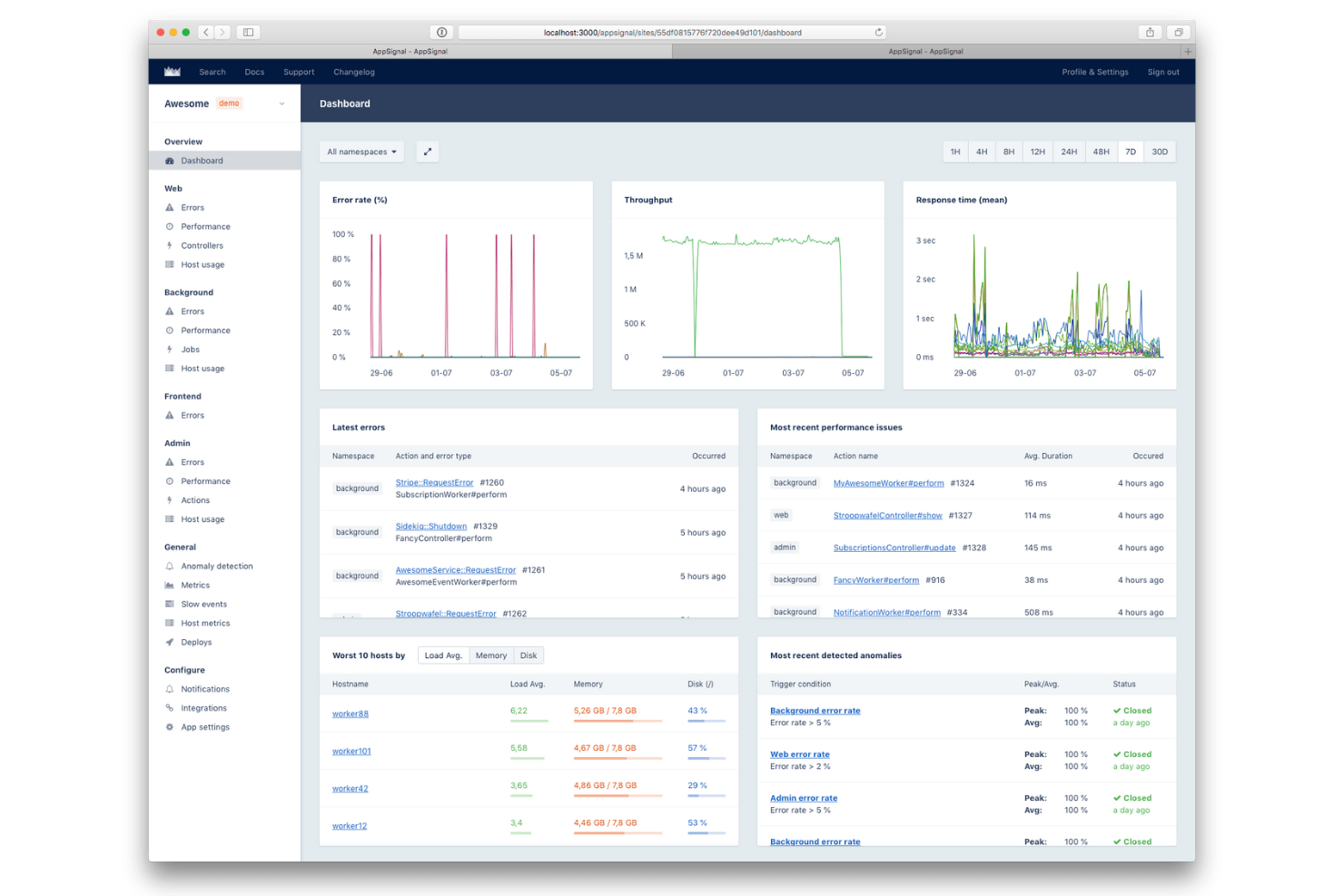
Se cerchi un'alternativa a Sentry particolarmente facile da configurare negli ambienti Ruby, vale la pena dare un'occhiata ad AppSignal. È progettato per sviluppatori e team di ingegneria che desiderano un monitoraggio degli errori e delle prestazioni rapido e affidabile, senza configurazioni complesse.
AppSignal si distingue per il suo approccio incentrato su Ruby, offrendo integrazioni native e strumentazione automatica che aiutano i team a iniziare rapidamente e a concentrarsi sul debug, non sulla configurazione.
Perché AppSignal è una valida alternativa a Sentry
Per i team che lavorano principalmente con applicazioni Ruby, AppSignal offre un processo di configurazione molto più semplice rispetto alla maggior parte delle alternative a Sentry. Ho scelto AppSignal perché fornisce supporto nativo per Ruby, strumentazione automatica e dashboard predefinite personalizzate per gli ambienti Ruby.
Puoi monitorare errori, prestazioni e metriche dell'host senza dover configurare manualmente impostazioni complesse o aggiungere dipendenze aggiuntive. Questa attenzione alle funzionalità incentrate su Ruby aiuta gli sviluppatori a ottenere rapidamente informazioni utili, rendendolo una scelta eccellente per chiunque dia priorità a una distribuzione rapida nei progetti Ruby.
Funzionalità principali di AppSignal
Alcune altre funzionalità di AppSignal utili per i team che valutano alternative a Sentry includono:
- Rilevamento delle anomalie: Segnala automaticamente picchi o cali insoliti nelle metriche dell'applicazione.
- Dashboard personalizzate: Crea e personalizza dashboard per visualizzare metriche ed eventi chiave.
- Monitoraggio dell'host: Monitora lo stato del server, l'utilizzo di CPU, memoria e disco insieme ai dati dell'applicazione.
- Sistema di avvisi: Configura avvisi per errori, problemi di prestazioni o soglie personalizzate delle metriche.
Integrazioni di AppSignal
Le integrazioni includono Ruby on Rails, Elixir, Phoenix, Sidekiq, Redis, PostgreSQL, MySQL e AWS Lambda.
Pros and Cons
Pros:
- Supporto nativo per Ruby, Elixir e Node.js
- Strumentazione automatica per i processi in background
- Rilevamento integrato delle anomalie per le metriche
Cons:
- Nessun supporto per framework mobile o frontend
- Supporto limitato ai linguaggi al di fuori di Ruby ed Elixir

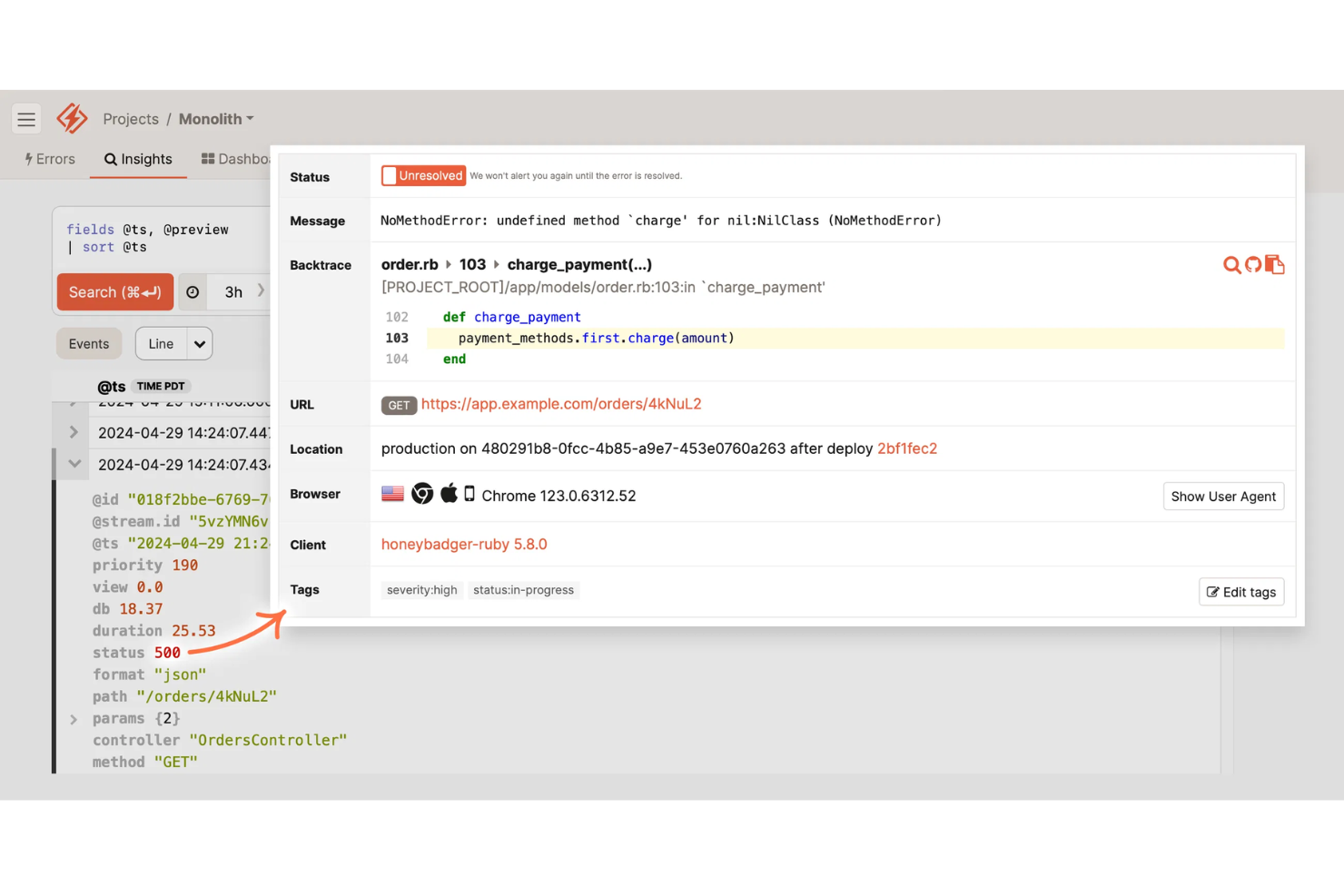
Se stai cercando un’alternativa a Sentry che combini il monitoraggio dell’operatività con gli avvisi relativi agli errori, vale la pena esaminare attentamente Honeybadger. È progettato per i team di ingegneria e le aziende SaaS che vogliono rilevare interruzioni ed errori delle applicazioni in un unico posto. Honeybadger si distingue perché offre avvisi unificati sia per i periodi di inattività sia per le eccezioni, permettendoti di intervenire rapidamente sui problemi che influiscono sui tuoi utenti.
Perché Honeybadger è una buona alternativa a Sentry
Per i team che desiderano avvisi sia sull’operatività sia sugli errori in un’unica piattaforma, Honeybadger offre un approccio unico rispetto a Sentry. Ho scelto Honeybadger perché combina il monitoraggio dell’operatività in tempo reale con il tracciamento dettagliato degli errori, permettendoti di rilevare sia le interruzioni sia le eccezioni delle applicazioni da un unico pannello.
Lo strumento invia avvisi istantanei per i periodi di inattività e gli errori, aiutandoti a rispondere rapidamente agli incidenti che hanno un impatto sugli utenti. Questo sistema di avvisi tutto-in-uno è particolarmente utile per le aziende SaaS e i team che sviluppano applicazioni web e devono ridurre al minimo sia le interruzioni sia i bug.
Funzionalità principali di Honeybadger
Alcune altre funzionalità di Honeybadger utili per i team che confrontano le alternative a Sentry includono:
- Aggregazione degli errori: Raggruppa gli errori simili per ridurre l’affaticamento causato dagli avvisi e concentrarti sui problemi unici.
- Tracciamento delle distribuzioni: Monitora le distribuzioni e correla questi eventi con nuovi errori o interruzioni.
- Canali di avviso personalizzabili: Invia notifiche a Slack, tramite e-mail, SMS o webhook in base alle preferenze del tuo team.
- Pagine di stato pubbliche: Condividi informazioni in tempo reale sull’operatività e sugli incidenti con i tuoi utenti tramite pagine di stato ospitate.
Integrazioni di Honeybadger
Le integrazioni includono GitHub, GitLab, Bitbucket, Slack, PagerDuty, Jira, Trello, Microsoft Teams, AWS Lambda e Heroku.
Pros and Cons
Pros:
- Avvisi sull’operatività e sugli errori in un unico pannello
- Pagine di stato pubbliche per la comunicazione degli incidenti
- Il tracciamento delle distribuzioni collega gli errori alle release
Cons:
- Non dispone di funzionalità di tracciamento distribuito
- Meno SDK per i linguaggi meno comuni

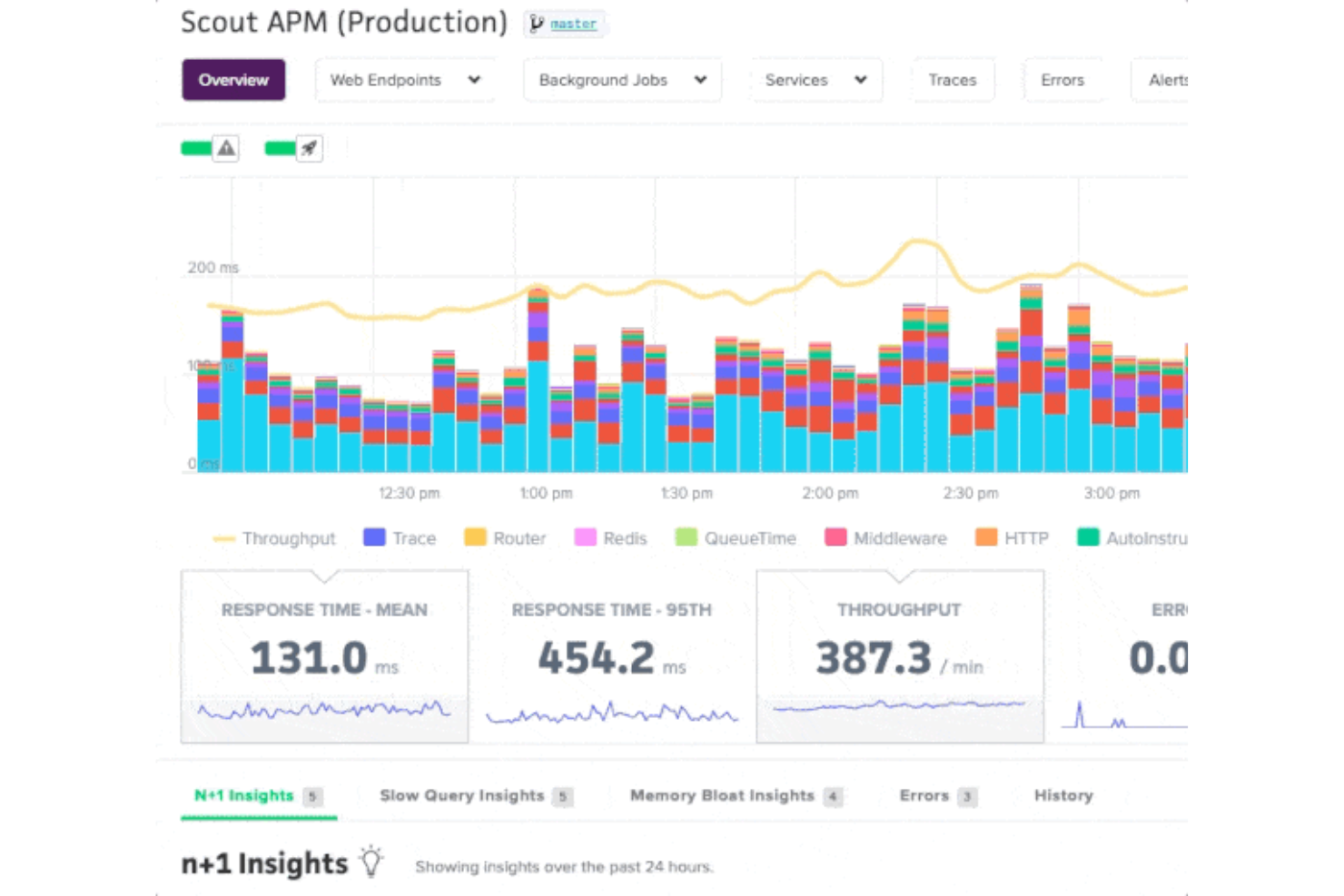
Quando è necessario identificare esattamente il punto in cui la tua applicazione rallenta, Scout offre informazioni approfondite sulle prestazioni che vanno oltre il monitoraggio degli errori. Questo strumento è particolarmente adatto ai team di ingegneria e alle aziende SaaS che desiderano diagnosticare e risolvere i colli di bottiglia delle prestazioni a livello di codice. A differenza di Sentry, Scout è specializzato nel monitoraggio delle query lente del database, dell'aumento eccessivo dell'utilizzo della memoria e della latenza degli endpoint, aiutandoti a ottimizzare l'esperienza degli utenti.
Perché Scout è una buona alternativa a Sentry
Se la tua preoccupazione principale è trovare e risolvere i colli di bottiglia delle prestazioni, Scout offre una soluzione mirata che Sentry non è in grado di eguagliare. Ho scelto Scout perché fornisce tracce dettagliate delle transazioni e individua le query lente del database, consentendoti di identificare rapidamente ciò che rallenta la tua applicazione.
Lo strumento evidenzia inoltre l'aumento eccessivo dell'utilizzo della memoria e monitora la latenza degli endpoint, offrendo una visione chiara dell'origine dei problemi di prestazioni. Per i team che desiderano andare oltre gli avvisi sugli errori e ottimizzare concretamente la velocità delle applicazioni, Scout offre funzionalità specializzate che colmano la lacuna lasciata da Sentry.
Funzionalità principali di Scout
Tra le altre funzionalità di Scout utili per i team che stanno valutando alternative a Sentry figurano:
- Integrazione con GitHub: Collega i problemi di prestazioni direttamente a commit e modifiche del codice specifici.
- Dashboard personalizzate: Crea dashboard per visualizzare metriche chiave e tendenze delle tue applicazioni.
- Regole di avviso: Configura avvisi personalizzati per soglie di prestazioni specifiche o anomalie.
- Filtraggio basato sui tag: Filtra e segmenta i dati sulle prestazioni in base a tag come ambiente, server o distribuzione.
Integrazioni di Scout
Le integrazioni includono GitHub, GitLab, Bitbucket, Slack, PagerDuty, Datadog, New Relic, AWS, Heroku e Azure.
Pros and Cons
Pros:
- L'integrazione con GitHub collega i problemi ai commit
- Dashboard personalizzate per la visualizzazione delle prestazioni
- Filtraggio basato sui tag per un'analisi dettagliata dei dati
Cons:
- Nessun monitoraggio degli errori per JavaScript frontend
- Nessuna funzionalità integrata per la gestione dei log
Datadog
Ideale per il monitoraggio cloud-native
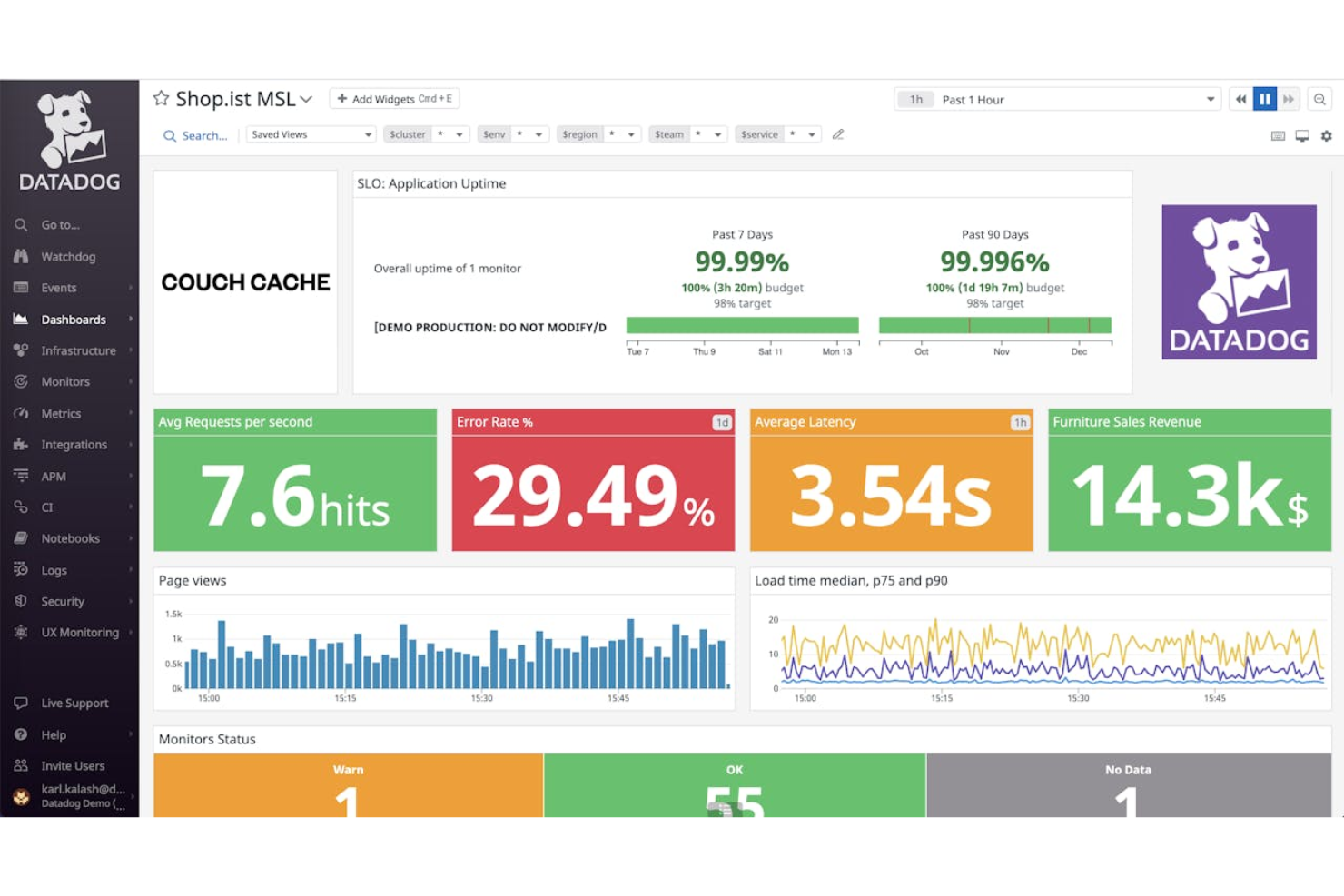
Se il tuo team gestisce applicazioni e infrastrutture cloud-native, Datadog riunisce monitoraggio, tracciamento degli errori e osservabilità in un'unica piattaforma. È particolarmente utile per i team DevOps e le aziende che gestiscono sistemi distribuiti e devono correlare gli errori con lo stato dell'infrastruttura e dei servizi. Datadog si distingue dalle altre alternative a Sentry grazie alle integrazioni approfondite con i provider cloud e alla visibilità in tempo reale sull'intero stack.
Perché Datadog è una buona alternativa a Sentry
Per i team che operano in ambienti cloud-native, Datadog offre funzionalità di monitoraggio che vanno ben oltre il semplice tracciamento degli errori. Ho scelto Datadog come alternativa a Sentry perché fornisce una visibilità unificata sia sugli errori delle applicazioni sia sull'infrastruttura cloud sottostante.
Grazie a funzionalità come il tracciamento distribuito e le mappe dei servizi in tempo reale, puoi individuare rapidamente la causa principale dei problemi nei complessi sistemi multi-cloud. Ciò rende Datadog particolarmente prezioso per le organizzazioni che devono collegare lo stato delle applicazioni alle prestazioni dell'infrastruttura.
Funzionalità principali di Datadog
Alcune altre funzionalità di Datadog utili per i team che confrontano le alternative a Sentry includono:
- Gestione dei log: Raccogli, cerca e analizza i log provenienti da più fonti in un'unica piattaforma.
- Monitoraggio sintetico: Simula le interazioni degli utenti per testare proattivamente gli endpoint e i flussi di lavoro delle applicazioni.
- Monitoraggio della sicurezza: Rileva le minacce e monitora i segnali di sicurezza nella tua infrastruttura e nelle tue applicazioni.
- Avvisi personalizzati: Configura avvisi personalizzati in base a metriche, soglie specifiche o al rilevamento delle anomalie.
Integrazioni Datadog
Le integrazioni includono AWS, Azure, Google Cloud Platform, Kubernetes, Docker, Slack, PagerDuty, Jenkins, GitHub e Terraform.
Pros and Cons
Pros:
- Il monitoraggio cloud-native copre infrastruttura e applicazioni
- Il tracciamento distribuito visualizza i flussi delle richieste da un'estremità all'altra
- Il monitoraggio sintetico testa API e percorsi degli utenti
Cons:
- La conservazione dei log è limitata nei piani inferiori
- Complessità di configurazione per gli ambienti multi-cloud
Altre alternative a Sentry
Ecco alcune alternative aggiuntive a Sentry che non sono state incluse nel mio elenco, ma che vale comunque la pena prendere in considerazione:
- Better Stack
Ideale per la visualizzazione della sequenza temporale degli incidenti
- Dash0
Ideale per il monitoraggio degli errori in più lingue


Come valuto le alternative a Sentry
Quando un rilascio problematico fa crollare le conversioni del checkout, ho bisogno di saperlo immediatamente: valuto le alternative a Sentry su due livelli: requisiti minimi imprescindibili e fattori distintivi che separano le migliori.
Funzionalità fondamentali (requisiti minimi per questo elenco)
Quando seleziono gli strumenti per il mio elenco, assegno a ciascuno un punteggio su una scala da 0 (non offre la funzionalità) a 5 (eccelle in quest'area) per ogni funzionalità fondamentale elencata di seguito. Quindi, converto il punteggio totale dello strumento in una percentuale. Ogni strumento deve raggiungere un punteggio totale minimo del 65% per essere preso in considerazione.
- Monitoraggio di errori ed eccezioni: cerco acquisizione automatica, deduplicazione e contesto della traccia dello stack sia sul frontend sia sul backend: gli strumenti dovrebbero raggruppare un'ondata di errori identici del checkout in un unico problema risolvibile.
- Monitoraggio delle prestazioni in tempo reale: il caricamento lento delle pagine riduce le conversioni, quindi valuto se uno strumento offre il monitoraggio degli utenti reali, il tracciamento distribuito e il monitoraggio dei Core Web Vitals direttamente.
- Riproduzione delle sessioni e contesto dell'utente: verifico se le riproduzioni includono log della console, richieste di rete e istantanee del DOM collegate all'evento di errore, così il team può vedere esattamente l'esperienza del cliente.
- Avvisi e definizione delle priorità dei problemi: qui sono importanti il raggruppamento intelligente e l'instradamento su più canali: verifico se gli avvisi raggiungono il tecnico di turno corretto tramite Slack, PagerDuty o webhook, con informazioni utili sulla gravità.
- Monitoraggio di rilasci e distribuzioni: ogni strumento dovrebbe correlare i nuovi errori a rilasci o commit specifici, rendendo semplice individuare le regressioni nel momento stesso in cui una distribuzione diventa operativa.
- Integrazioni e copertura degli SDK: il supporto per numerosi linguaggi e framework è un requisito minimo, ma valuto anche le connessioni native a strumenti come Jira e GitHub e a piattaforme per l'esperienza del cliente come Zendesk o Intercom.
Una volta ottenuto un elenco di strumenti che soddisfano questo criterio, considero ciò che distingue ogni piattaforma.
Fattori distintivi (ciò che differenzia i fornitori)
Ecco come confronto e metto in contrapposizione i diversi fornitori:
Funzionalità distintive
L'analisi delle cause principali basata sull'intelligenza artificiale è un importante fattore distintivo: quando un flusso di pagamento si interrompe, voglio uno strumento che individui automaticamente la causa sottostante invece di richiedere una revisione manuale della traccia. Valuto inoltre se una piattaforma è in grado di correlare gli errori a specifiche fasi del percorso del cliente, ad esempio collegando un picco di errori API all'abbandono del carrello. Per i team che gestiscono dati utente sensibili, vale la pena verificare la presenza del mascheramento integrato delle informazioni personali identificabili nelle riproduzioni delle sessioni, soprattutto se si opera in settori regolamentati in cui ci si aspetta la conformità a GDPR o HIPAA.
Oltre le funzionalità
La prevedibilità dei prezzi è molto importante in questo settore. Gli strumenti di monitoraggio degli errori spesso applicano un costo in base al volume di eventi, quindi verifico come ogni fornitore gestisce i picchi di traffico: un aumento imprevisto durante il lancio di un prodotto non dovrebbe far esplodere il budget. Valuto inoltre la rapidità con cui un team può ottenere valore dalla piattaforma. La strumentazione automatica e i modelli di avviso predefiniti possono fare la differenza tra essere operativi in un giorno e dover dedicare settimane alla configurazione. Anche le integrazioni con gli strumenti per l'esperienza del cliente sono un fattore che considero, in particolare le connessioni native a Zendesk, Intercom o Salesforce Service Cloud, che consentono ai team di supporto di collegare direttamente gli errori ai ticket aperti.
Perché cercare un'alternativa a Sentry?
Sebbene Sentry sia una buona scelta tra le alternative a Sentry, ci sono diversi motivi per cui alcuni utenti cercano soluzioni alternative. Potresti cercare un'alternativa a Sentry perché…
- Hai bisogno di un monitoraggio delle prestazioni più approfondito rispetto al solo monitoraggio degli errori
- Il tuo team desidera opzioni di integrazione più flessibili
- Hai bisogno del supporto per linguaggi di programmazione meno comuni
- Hai bisogno di una visibilità migliore sui problemi del backend o dell'infrastruttura
- La tua organizzazione ha requisiti rigorosi di residenza dei dati
- Desideri strumenti più avanzati per l'analisi delle cause principali
Se ti riconosci in una di queste situazioni, sei nel posto giusto. Il mio elenco contiene diverse alternative a Sentry più adatte ai team che affrontano queste difficoltà con Sentry e cercano soluzioni alternative.
Funzionalità principali di Sentry
Ecco alcune delle funzionalità principali di Sentry, che ti aiuteranno a mettere a confronto ciò che offrono le soluzioni alternative:
- Monitoraggio e avvisi degli errori in tempo reale
- Monitoraggio delle prestazioni per applicazioni web e mobili
- Tracce dello stack dettagliate per il debug
- Monitoraggio dei rilasci e gestione delle versioni
- Integrazione con i più diffusi repository di codice
- Assegnazione dei problemi e gestione del flusso di lavoro
- Analisi dell'impatto sugli utenti e monitoraggio delle sessioni
- Supporto per più linguaggi di programmazione
- Pannelli di controllo e rapporti personalizzabili
- Percorsi di navigazione per tracciare le azioni degli utenti che portano agli errori