Verktøy for analyse av kundeopplevelser hjelper deg med å forstå hvordan mennesker faktisk beveger seg gjennom produktet, tjenesten eller supportreisen din. De synliggjør øyeblikkene der kunder blir stående fast, faller fra eller konverterer, slik at du kan handle med trygghet.
Med over 10 års erfaring innen CX-forskning har jeg evaluert og kuratert de beste verktøyene for analyse av kundeopplevelser, som er mest effektive til å omgjøre rå interaksjonsdata til tydelig innsikt. Enten du følger digital atferd, kartlegger kundereiser eller dokumenterer effekten av CX-initiativene dine, kan disse plattformene hjelpe deg med å ta smartere og raskere beslutninger.
Hvorfor du kan stole på våre programvareanbefalinger
6,700+
Reviews
20
Industry experts
16+
Evaluation factors
14
Years
Teamet vårt har testet og anmeldt programvare siden 2012. Vi er selv CX-ledere, så vi vet hvor vanskelig og hvor viktig det er å velge riktig programvare.
I denne guiden har vi vurdert verktøyene gjennom praktisk testing og uavhengig research og gitt dem poeng ut fra våre utvelgelseskriterier.
Anmeldelsene våre bygger på vår egen redaksjonelle vurdering. De er ikke et salgsargument.
 Gui DrusinaCreative Director
 Tim FisherVP of AI
Sammenligningstabell for verktøy for analyse av kundeopplevelser
Denne sammenligningstabellen oppsummerer prisdetaljene for mine utvalgte verktøy for analyse av kundeopplevelser:
| Tool | Best For | Trial Info | Price | ||
|---|---|---|---|---|---|
| 1 | Best for understanding customer sentiment | 30-day free trial | From $2,000/month (billed annually) | Website | |
| 2 | Best for AI-driven insights | Free demo available | Pricing upon request | Website | |
| 3 | Best for unifying customer feedback | Free demo available | Pricing upon request | Website | |
| 4 | Best for real-time data activation | Free plan available | From $20/month | Website | |
| 5 | Best for B2B support environments | 14-day free trial | From $45/user/month (billed annually) | Website | |
| 6 | Best for understanding health of customer portfolios | Free demo available | Pricing upon request | Website | |
| 7 | Best tool with a smart summary generator | Free demo available | Pricing upon request | Website | |
| 8 | Best for ecommerce cart abandonment analysis | Free plan available | Pricing upon request | Website | |
| 9 | Best for NLP-driven voice of customer analysis | Free demo available | Pricing upon request | Website | |
| 10 | Best for closing the loop on VoC at scale | Free demo available | Pricing upon request | Website |


Oversikt over de 20 beste verktøyene for analyse av kundeopplevelser
For å hjelpe deg med å ta det riktige valget får du her en vurdering av de beste verktøyene for analyse av kundeopplevelser, inkludert en oppsummering av de viktigste funksjonene, skjermbilder og informasjon om prøveperioder og priser.
 Best for understanding customer sentiment
- 30-day free trial
- From $2,000/month (billed annually)
Visit WebsiteCustomer Rating:4.8/5
Unwrap offers automated feedback analysis for efficient customer insights. Unwrap helps you turn the voice of your customers into decisions you can act on by automatically collecting and analyzing feedback from everywhere it lives—so you can understand trends, sentiment, and themes without digging through spreadsheets or siloed tools.
Why I Picked Unwrap
I picked Unwrap because its AI-driven feedback analysis directly addresses one of the biggest challenges in customer analytics—making sense of vast amounts of unstructured feedback. The platform’s automated feedback categorization uses advanced natural language processing to organize and surface meaningful sentiment patterns without manual tagging. This capability is especially valuable if your team needs to prioritize product improvements or support responses based on what customers are actually saying.
Unwrap Key Features
In addition to its standout capabilities, I also like that Unwrap offers:
- Alert Systems: Notify your team of new insights as they emerge, ensuring timely responses to customer needs.
- Customizable Dashboards: Tailor your data visualization to suit your team's specific requirements and focus areas.
- Real-Time Anomaly Detection: Alerts you when new trends or issues emerge.
- Feedback Assistant: Offers an interface where you can query your feedback and get answers in natural language.
Unwrap Integrations
Integrations include Salesforce, Zendesk, Intercom, Slack, HubSpot, Mailchimp, Google Analytics, Asana, Trello, and Jira.
Pros and Cons
Pros:
- Sentiment analysis helps teams quantify how users feel over time.
- AI tools surface emerging trends without manually scanning large datasets.
- Automates categorization of unstructured feedback into meaningful groups with NLP.
Cons:
- Feedback taxonomy setup may require extra effort to customize.
- Occasional gaps in native platform integrations compared to competitors.
Learn more about Unwrap: Best for AI-driven insights
- Free demo available
- Pricing upon request
Visit WebsiteCustomer Rating:4.8/5
Enterpret uses AI to surface sentiment trends and revenue-impacting feedback themes. Enterpret is a customer analytics tool that uses AI-driven insights to analyze feedback from multiple sources in one place. By pulling data from sources like support tickets, surveys, and reviews, Enterpret helps teams identify recurring issues, customer needs, and trends. This makes it easier for product, support, and CX teams to act on feedback and improve customer experience with clearer direction.
Why I Picked Enterpret
I picked Enterpret because of its unique ability to integrate AI-powered insights directly into the customer analytics process. The platform's AI Insights feature lets you query customer feedback and gain contextual insights, which can be a game-changer for understanding underlying trends. Additionally, Enterpret's Real-Time Alerts feature ensures your team is immediately notified of emerging issues, enabling proactive responses. These features help teams analyze customer feedback more quickly and consistently, making it easier to act on what customers are saying.
Enterpret Key Features
In addition to AI-driven insights, Enterpret offers:
- Feedback Centralization: Organizes customer feedback into customizable themes, allowing your team to prioritize insights based on their impact.
- Automated Actions: Utilizes AI Agents to streamline workflows and resolve customer issues promptly, enhancing operational efficiency.
- Customer Knowledge Graph: Connects feedback to its impact on customers and products, providing a deeper understanding of customer needs.
- Workflow Integration: Seamlessly connects with tools like Jira, ensuring actions based on insights are efficiently executed.
Enterpret Integrations
Integrations include Jira, Slack, Zendesk, Intercom, Salesforce, HubSpot, Amplitude, Segment, Freshdesk, and Asana.
Pros and Cons
Pros:
- Aggregates customer feedback from multiple sources for comprehensive views
- Offers customizable dashboards for visualizing feedback metrics
- Supports automated reporting and proactive alerts via Slack or email
Cons:
- AI insights may need human review for context
- Less useful for teams with low feedback volume
Learn more about Enterpret: Best for unifying customer feedback
- Free demo available
- Pricing upon request
Visit WebsiteCustomer Rating:4.4/5
Chattermill dashboard visualizing sentiment themes, feedback volume, and trend changes over time. Chattermill is a customer feedback analytics platform designed to help businesses better understand and act on customer sentiment. It’s particularly well suited to customer-focused teams in industries such as retail, financial services, and travel, where experience and retention are closely tied to feedback quality. By centralizing and analyzing unstructured feedback from surveys, reviews, support tickets, and other channels, Chattermill enables teams to uncover trends, prioritize improvements, and make more informed decisions about the customer journey.
Why I Picked Chattermill
I picked Chattermill because of its capabilities in unifying and analyzing customer feedback from diverse sources. Its automatic tagging and AI-generated summaries provide your team with clear and actionable insights, reducing the time spent on manual data analysis. Moreover, Chattermill's trend tracking feature allows you to monitor shifts in customer sentiment, enabling you to proactively address potential issues. This focus on actionable insights makes it a valuable tool for teams looking to enhance their customer experience strategies.
Chattermill Key Features
In addition to its core features, I also found several other capabilities that might interest you:
- Feedback Consolidation: Integrates feedback from surveys, online reviews, and support conversations into a single platform.
- AI-Driven Insights: Utilizes artificial intelligence to generate summaries and actionable insights from unstructured data.
- Customizable Dashboards: Offers customizable dashboards that allow your team to visualize and track key metrics.
- Sentiment Analysis: Provides sentiment analysis to help you understand the emotional tone of customer feedback.
Chattermill Integrations
Integrations include Zendesk, Trustpilot, Qualtrics, Salesforce, Slack, Intercom, HubSpot, Medallia, SurveyMonkey, and Typeform.
Pros and Cons
Pros:
- Industry specific sentiment models
- AI powered theme tagging
- Real time sentiment tracking
Cons:
- May require enterprise onboarding
- Pricing not publicly available
Learn more about Chattermill: Best for real-time data activation
- Free plan available
- From $20/month
Visit WebsiteCustomer Rating:4.6/5
Klaviyo provides real-time analytics in a centralized dashboard. Klaviyo gives you a way to turn the customer data you’re already collecting into clear insights about buying behavior, lifecycle progression, and campaign performance so you can make better decisions without juggling separate analytics tools. It’s geared toward B2C marketers and ecommerce owners who want to understand and act on what customers do across channels like email, SMS, and ads, helping you tailor your outreach based on actual behavior and journey trends.
Why I Picked Klaviyo
I picked Klaviyo because of its real-time data unification and activation capabilities, which are pivotal for businesses looking to leverage customer analytics. The platform's advanced segmentation tools allow you to categorize customers based on behavioral and transactional data, providing a deeper understanding of customer needs. Additionally, Klaviyo's AI-driven insights help predict future trends, enabling your team to make informed decisions that enhance customer engagement and satisfaction.
Klaviyo Key Features
In addition to its real-time data capabilities, Klaviyo offers several other features:
- Omnichannel Marketing: This feature allows you to engage with customers across various platforms, ensuring consistent messaging and improved customer experiences.
- Email and SMS Marketing: Klaviyo provides tools for creating targeted email and SMS campaigns, helping you reach customers with personalized messages.
- Customer Profiles: You can create detailed customer profiles, integrating data from multiple sources to gain a comprehensive view of customer interactions.
- Attribution Reporting: Track how different campaigns and flows contribute to conversions and revenue across channels.
Klaviyo Integrations
Integrations include Shopify, Magento, WooCommerce, BigCommerce, Salesforce, Stripe, Facebook, Instagram, Google Ads, and Zendesk.
Pros and Cons
Pros:
- Supports omnichannel marketing, including email, SMS, and social media.
- Provides AI-driven insights for personalized marketing strategies.
- Offers comprehensive data integration for unified customer profiles.
Cons:
- Pricing can escalate quickly as contact lists grow.
- Some users desire more customization options.
Learn more about Klaviyo: Best for B2B support environments
- 14-day free trial
- From $45/user/month (billed annually)
Visit WebsiteCustomer Rating:4.5/5
TeamSupport interface displaying customer support features and platform navigation. TeamSupport is a B2B customer support platform built for companies managing complex service environments. It combines ticket automation, workflow management, and built-in customer data tracking to help support teams coordinate across accounts and resolve issues efficiently. With native CRM integrations and an open API for custom connections, it gives teams clear visibility into customer history, active cases, and performance metrics so they can manage support at scale.
Why I Picked TeamSupport
I picked TeamSupport because of its focus on enhancing team collaboration through customer analytics. Its centralized hub for customer interactions allows you to maintain a comprehensive view of customer history, which is crucial for analytics. Additionally, the platform's AI capabilities, such as ticket summarization and intelligent assistance, provide actionable insights into customer interactions, helping you identify trends and areas for improvement. These features align perfectly with the needs of businesses seeking to optimize their customer support operations through analytics.
TeamSupport Key Features
In addition to its collaboration and AI features, TeamSupport offers several other functionalities that make it a strong candidate for customer analytics:
- Internal Chat: Facilitates seamless communication within your support team to address customer issues more efficiently.
- Collision Detection: Prevents multiple agents from working on the same ticket simultaneously, ensuring a streamlined support process.
- Ticket Assignment Rules: Allows you to automate the distribution of support tickets based on predefined criteria, optimizing team workload.
- Reporting Tools: Provides actionable insights into support metrics, helping you track performance and identify areas for improvement.
TeamSupport Integrations
Integrations include Salesforce, HubSpot, Microsoft Teams, SAP Sales and Service Clouds, Jira, and MailChimp. An open API is available for custom integrations.
Pros and Cons
Pros:
- Customizable customer self service hub
- Real time sentiment insights
- AI powered ticket automation
Cons:
- Limited mobile app functionality
- Knowledge base lacks configurability
Learn more about TeamSupport: Best for understanding health of customer portfolios
- Free demo available
- Pricing upon request
Visit WebsiteCustomer Rating:4.6/5
Valaris offers customer success teams the ability to view customer health and other key metrics using its dashboard. Velaris empowers your team with AI-driven insights to transform customer interactions into strategic opportunities. Designed for customer success leaders, sales teams, and executives, Velaris integrates with over 70 applications to provide a seamless view of customer data and health, enabling proactive engagement and decision-making. By predicting churn and automating low-value tasks, it allows you to focus on crafting personalized journeys and fostering lasting relationships without increasing your workload.
Why I Picked Velaris
I picked Velaris because it excels in providing a comprehensive understanding of customer portfolios through its AI-driven health monitoring and customizable health scores. This feature allows your team to proactively manage customer relationships by identifying at-risk accounts and addressing potential issues before they escalate. Additionally, Velaris offers real-time dashboards that centralize customer data, giving you a 360-degree view that supports strategic decision-making. By automating routine tasks, Velaris frees up your resources to focus on nurturing valuable customer interactions, making it an ideal choice for those seeking to enhance customer experience analytics.
Velaris Key Features
In addition to its strengths in understanding the health of customer portfolios, Velaris offers a suite of features designed to enhance your team's customer experience analytics capabilities.
- Customer 360 View: This feature provides a comprehensive overview of customer accounts, consolidating information for easy access and pipeline management.
- Sentiment Analysis: Utilizing AI, this feature assesses customer sentiment and identifies common issues, providing insights into customer interactions.
- Custom Objects: Allows you to create custom data fields for complex processes, offering flexibility in managing unique business needs.
- Collaboration Tools: Facilitates customer interactions through a dedicated portal, enhancing communication and engagement with clients.
Velaris Integrations
Integrations include Hubspot, Intercom, and over 70 other native tools. Velaris also supports custom integrations to align with your business needs.
Pros and Cons
Pros:
- Customizable dashboards allow tailored data visualization
- Good customer data aggregation
- Advanced analytics and success plans powered by AI
Cons:
- Integration effectiveness varies depending on existing systems
- Lack of sufficient user feedback for comprehensive evaluation
Learn more about Velaris: Best tool with a smart summary generator
- Free demo available
- Pricing upon request
Visit WebsiteCustomer Rating:4.7/5
InMoment centralizes contact center QA, NPS, and agent metrics in one dashboard. InMoment is a customer experience analytics platform that ingests feedback from surveys, calls, reviews, and digital channels, and applies AI-driven text analytics, sentiment analysis, and predictive modeling to surface actionable insights.
Who Is InMoment Best For?
InMoment is a strong fit for enterprise CX and VoC teams that need to pull feedback from dozens of sources and quickly surface themes without drowning in raw data.
Why I Picked InMoment
InMoment earns its spot on my shortlist because its Smart Summaries feature does something genuinely useful: it takes hundreds of raw feedback comments and collapses them into plain-language summaries, cutting analysis time by 75%. I also love that each summary links back to the source comments, so I can verify what the AI surfaced rather than just trusting it. Paired with Lexalytics-powered text analytics that detects intent, effort, and emotion across 26 languages, InMoment turns massive feedback volume into something a VoC team can actually act on.
InMoment Key Features
- Multi-channel data ingestion: Pulls feedback from surveys, calls, chat, email, IVR, reviews, social media, and CRM data into a single platform.
- Conversational Intelligence: Transcribes and analyzes calls, chats, and email threads, then generates AI summaries and agent scorecards for quality tracking.
- Impact Prediction: Models which CX factors drive NPS, CSAT, and CES scores, and simulates how specific improvements could affect business outcomes.
- Closed-loop case management: Assigns, tracks, and resolves customer issues with AI-drafted responses, and integrates with Salesforce, Zendesk, and Microsoft Dynamics.
InMoment Integrations
InMoment offers documented integrations with Salesforce, Zendesk, Microsoft Dynamics, Power BI, Tableau, Databricks, Shopify, Stripe, Google, and Trustpilot. It also supports REST APIs and webhooks for custom integrations.
Pros and Cons
Pros:
- Multi-channel insights support enterprise VoC programs
- Strong sentiment, intent, effort, and emotion detection
- Smart summaries reduce manual feedback analysis
Cons:
- Advanced AI capabilities require additional packages
- Complex filtering slows detailed feedback exploration
Learn more about InMoment: Best for ecommerce cart abandonment analysis
- Free plan available
- Pricing upon request
Visit WebsiteCustomer Rating:4.5/5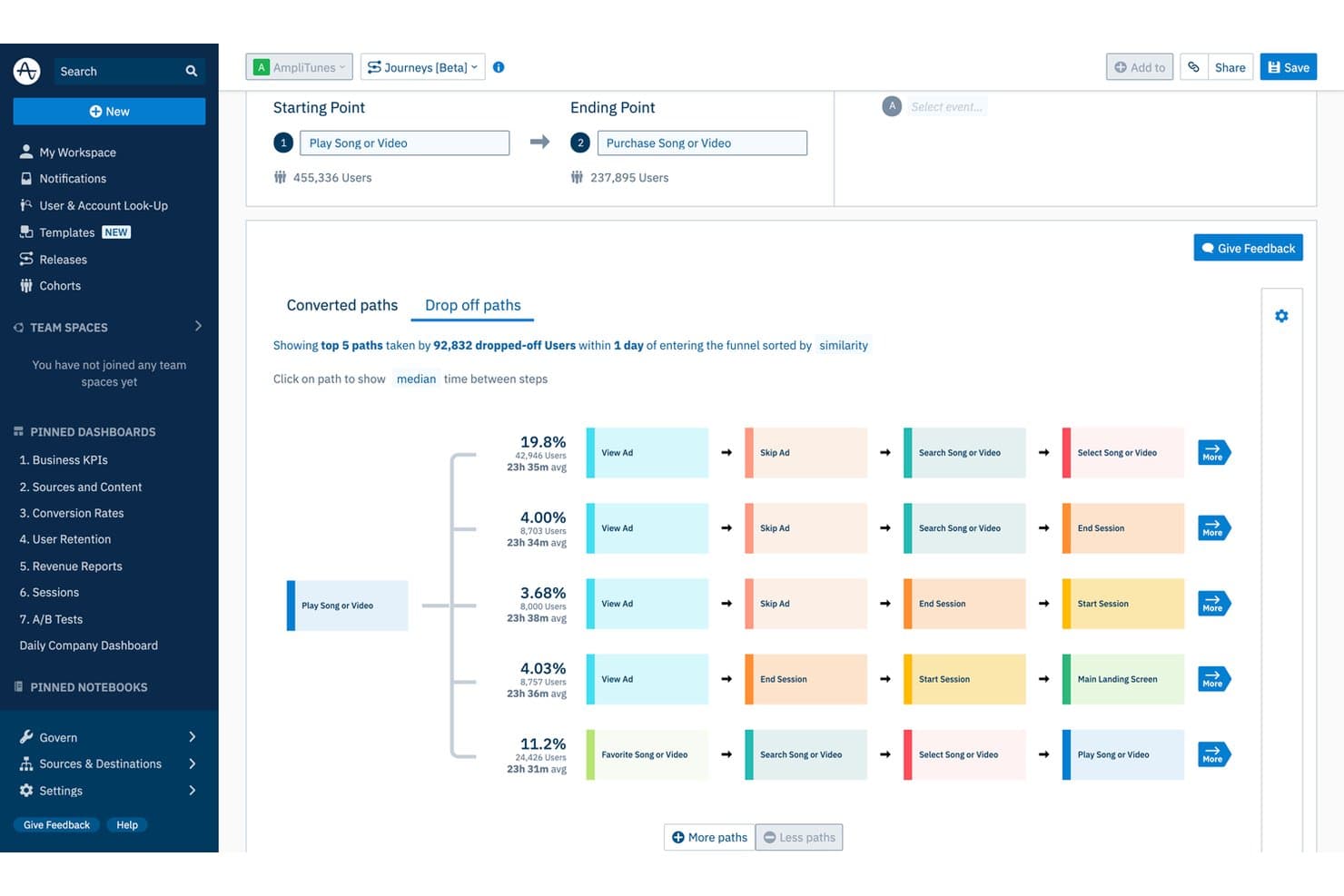
Amplitude reveals drop-off paths to optimize the customer journey. Amplitude is a behavioral and digital analytics platform that combines funnel analysis, journey mapping, session replay, AI-powered feedback aggregation, and predictive analytics to surface how users move through your product or ecommerce experience.
Who Is Amplitude Best For?
Amplitude is a strong fit for ecommerce and product-led teams that want to connect behavioral data, cart analysis, and predictive insights in one place.
Why I Picked Amplitude
I picked Amplitude as one of the best because its Cart Analysis feature goes deeper than standard funnel reporting. It breaks down abandonment by SKU, category, brand, and price, so you can see exactly which products are losing customers and at what basket size. I also love how Journeys maps the paths of users who converted versus those who dropped off, making it easy to spot where cart friction actually starts.
Amplitude Key Features
- AI Feedback aggregation: Pulls in reviews, support tickets, surveys, and social media posts into a single dashboard, linking feedback themes to in-product behavior.
- Predictive cohorts: Groups users by their likelihood to convert, churn, or purchase using a transformer-based model trained on hundreds of behavioral signals.
- Guides and surveys: Triggers NPS, microsurveys, and visitor feedback forms based on user behavior, with controls to limit how often individual users see them.
- Behavioral benchmarks: Compares your acquisition, activation, and retention metrics against anonymized data from over 2,600 companies across 17 industries and 102 countries.
Amplitude Integrations
Amplitude offers native integrations with Zendesk, Intercom, Freshdesk, Salesforce, Snowflake, BigQuery, Segment, Qualtrics, and Sprig. Its Profile API, Behavioral Cohorts API, and data access APIs support custom integrations.
Pros and Cons
Pros:
- Predictive cohorts support retention targeting
- Journey maps expose conversion friction
- Cart analysis pinpoints product-level abandonment
Cons:
- Feedback analysis lacks native speech analytics
- Advanced reports require substantial instrumentation expertise
Learn more about Amplitude: Best for NLP-driven voice of customer analysis
- Free demo available
- Pricing upon request
Visit WebsiteCustomer Rating:4.4/5
Gainsight tracks individual user engagement metrics across features and sessions. Gainsight is a customer success and experience analytics platform that combines NLP-driven feedback analysis, health scoring, predictive churn modeling, and product behavioral analytics across a unified customer data platform.
Who Is Gainsight Best For?
Gainsight is a strong fit for B2B SaaS customer success teams that need to turn survey responses, support conversations, and product usage data into clear retention and expansion signals.
Why I Picked Gainsight
I picked Gainsight as one of the best because its proprietary NLP engine goes deeper than most feedback tools, scoring sentiment from −10 to +10 while accounting for negation, sarcasm, and mixed signals in open-text responses. Its Impact Analyzer connects those sentiment patterns directly to NPS, CSAT, and renewal outcomes, so you can see which topics are actually driving churn. Staircase AI adds real-time conversation intelligence across emails, tickets, and meetings, surfacing risk signals before they become losses.
Gainsight Key Features
- Customer 360: A unified account view that surfaces health scores, product usage, support history, renewal data, and stakeholder maps in one place.
- Digital orchestration: Automates customer journeys by combining emails, in-app guides, surveys, and human touchpoints, with AI suggesting timing and content.
- Pre-built AI agents: Risk, handoff, and expansion agents that surface signals and recommend next-best actions tied to retention and revenue outcomes.
- In-app surveys: Deploys targeted CSAT, NPS, and CES surveys directly inside your product on web, mobile, and desktop with real-time feedback tracking.
Gainsight Integrations
Gainsight’s integrations marketplace includes Salesforce, Zendesk, Intercom, Snowflake, BigQuery, Redshift, Gong, Zoom, Slack, and Productboard. It also supports data connectivity through Fivetran and Segment.
Pros and Cons
Pros:
- Product analytics links behavior with retention
- Conversation signals surface churn risk early
- NLP connects sentiment to renewal outcomes
Cons:
- Complex administration slows broad team adoption
- English translation limits multilingual feedback analysis
Learn more about Gainsight: Best for closing the loop on VoC at scale
- Free demo available
- Pricing upon request

Qualtrics CustomerXM tracks NPS, CSAT, and CES metrics in one dashboard. Qualtrics CustomerXM is an enterprise customer experience analytics suite that brings together VoC survey data, contact centre conversation analytics, digital experience analytics, and AI-powered text and sentiment analysis into unified customer profiles.
Who Is Qualtrics CustomerXM Best For?
Qualtrics CustomerXM is built for enterprise CX and VoC teams that need to collect feedback at scale and turn it into closed-loop action across complex, multi-location organizations.
Why I Picked Qualtrics CustomerXM
Qualtrics CustomerXM earns its spot on my shortlist because it's purpose-built for closing the loop on VoC at scale, not just collecting feedback. I love that XM Discover ingests 100% of contact-centre interactions (calls, chat, email) alongside survey responses, then surfaces intent, effort, and emotion through NLP, so nothing slips through. Closed-loop workflows automatically route tickets to Zendesk, Jira, or ServiceNow, which is how teams like ServiceNow's run 10,000+ automatic follow-up actions across 1,700+ experience owners.
Qualtrics CustomerXM Key Features
- Digital Experience Analytics: Session replay, heatmaps, and funnel analysis help you pinpoint where customers drop off or encounter friction in digital experiences.
- XM Directory segmentation: Dynamic contact segments update twice daily based on demographics, needs, and interests, and can be used directly within CX dashboards.
- Industry benchmarking: Built-in syndicated benchmarks let you compare your NPS, CSAT, and custom KPIs against industry peers, competitors, or best-in-class brands.
- Qualtrics Assist for CX: A generative AI assistant that answers plain-language questions and surfaces summaries across open-text survey responses and reviews inside your dashboards.
Qualtrics CustomerXM Integrations
Qualtrics CustomerXM offers native integrations with Salesforce, Microsoft Dynamics, HubSpot, Zendesk, ServiceNow, Jira, Slack, Microsoft Teams, Tableau, and Snowflake. It also provides an API, Professional Services connector builds, and Zapier.
Pros and Cons
Pros:
- Benchmarking contextualizes CX performance
- Unified survey and conversation insights
- Closed-loop VoC workflows at scale
Cons:
- Enterprise scope can overwhelm smaller teams
- Predictive modeling requires account-team involvement
Learn more about Qualtrics CustomerXM:
Andre alternativer
Her er noen flere verktøy for analyse av kundeopplevelser som ikke kom med på min liste over de 20 beste, men som likevel er verdt å se nærmere på:
- 11ContentsquareBest for integrated behavioral analytics
- 12Medallia Experience CloudBest for enterprise-wide CX program scalability
- 13Sprout SocialBest for social media customer analytics
- 14Treasure DataBest for predicting customer churn probabilities
- 15ChurnZeroBest for identifying cross-sell opportunities
- 16CleverTapBest for spotting mobile app user trends
- 17PendoBest for generating retroactive analytics
- 18Adobe Customer Journey AnalyticsBest for cross-channel journey analytics at scale
- 19MonkeyLearnBest for omnichannel text and speech analytics
How I Evaluate Customer Experience Analytics Tools
I split my evaluation into two layers: baseline capabilities—like journey analytics and NPS dashboards—every tool must offer, and differentiators that separate the best options from the rest.
Core Functionality (Table Stakes For This List)
When I'm selecting tools for my list, I rank each one on a scale from 0 (does not offer the functionality) to 5 (excels in this area) for each core functionality listed below. Then, I calculate the tool's total score into a percentage. Each tool needs to achieve a minimum total score of 75% to be considered for inclusion.
- Multi-Channel Data Ingestion: I check whether a tool can pull in data from CRM, support tickets, surveys, chat, and social channels so you're working from a unified customer view.
- Customer Segmentation: The ability to build dynamic segments by behavior, lifecycle stage, or sentiment matters here—static demographic filters alone aren't enough.
- Behavioral & Journey Analytics: I evaluate how well a tool maps customer journeys across touchpoints, including funnel analysis, path visualization, and drop-off detection.
- Sentiment & Feedback Analysis: I look for NLP-driven analysis that extracts themes and sentiment from open-text responses, reviews, and support conversations beyond simple keyword tagging.
- CX Metrics & KPI Dashboards: Dashboards should let you track NPS, CSAT, CES, and churn in real time with enough flexibility to build role-specific views for analysts and leadership.
- Predictive Analytics: I evaluate whether the tool offers ML-based models for churn risk, CLV forecasting, or propensity scoring rather than just backward-looking trend reports.
Once I have a list of tools that meet the criteria, I consider what sets each platform apart.
Differentiating Factors (What Sets Vendors Apart)
Here's how I compare and contrast different vendors:
Standout Features
Closed-loop feedback workflows are a big differentiator. I look for tools that route a low CSAT score directly to the right team and track resolution. A generative AI assistant adds real value for VoC analysts who need to query data in plain language instead of building complex reports. Real-time alerting matters just as much. When NPS drops after a product release, your CX team should know within minutes, not days.
Beyond Features
Integration depth is one of the first things I evaluate. A customer analytics tool that connects natively with your CRM, support desk, and data warehouse means your team spends less time stitching data together. Compliance also carries weight—I check for GDPR and CCPA readiness, PII redaction, and SOC 2 certification, especially when customer feedback contains sensitive data. Implementation speed matters too. Prebuilt dashboards and onboarding support help VoC analysts start delivering insights in weeks rather than months.
Hva er verktøy for analyse av kundeopplevelser?
Verktøy for analyse av kundeopplevelser er programvareplattformer som analyserer data om kundeinteraksjoner for å avdekke mønstre, preferanser og friksjonspunkter. De hjelper virksomheter med å forstå atferd på tvers av kanaler, slik at de kan forbedre beslutningstakingen og optimalisere kundereisen.
Slik velger du de beste verktøyene for analyse av kundeopplevelser
Bruk denne praktiske sjekklisten for å finne de beste verktøyene for analyse av kundeopplevelser for deg og teamet ditt.
☐ Har X-programvaren de 2–3 funksjonene jeg setter høyest?
☐ Hvilke nisjefunksjoner eller andre enestående funksjoner har X-programvaren?
☐ Passer X-programvaren best for teamstørrelsen min, enten den er stor eller liten?
☐ Integreres X-programvaren med apper jeg bruker hver dag (e-post, Slack osv.)?
☐ Er X-programvaren kjent for å være enkel å lære og bruke?
☐ Samsvarer verdiene til X-programvaren med mine egne?
☐ Er X-programvaren innenfor budsjettet mitt?
Hvis du ser etter en mer helhetlig programvare for kundeopplevelser med funksjoner utover analyse, har jeg snevret det inn til de 10 beste programvarene for kundeopplevelser i 2026.
Trender innen verktøy for analyse av kundeopplevelser
Verktøy for analyse av kundeopplevelser utvikler seg, og nye trender former bransjen.
Integrasjon av kunstig intelligens og maskinlæring
Kunstig intelligens og maskinlæring blir stadig viktigere, og gir dypere innsikt samtidig som de automatiserer komplekse analyser. Denne trenden er viktig for å forbedre prediksjonsmulighetene.
Databehandling i sanntid
Databehandling i sanntid blir stadig mer populært og gjør det mulig for virksomheter å ta umiddelbare beslutninger. Denne trenden er avgjørende for å holde seg konkurransedyktig i markeder med høyt tempo.
Dataintegrasjon på tvers av kanaler
Integrering av data fra flere kanaler blir stadig mer vanlig og gir et helhetlig bilde av kundeatferden. Denne trenden er avgjørende for å få omfattende innsikt i kundene.
Forbedrede tiltak for personvern
Etter hvert som bekymringene rundt personvern øker, tar verktøyene i bruk avanserte sikkerhetsfunksjoner. Denne trenden er avgjørende for å opprettholde kundenes tillit.
Tilpassbare dashbord
Tilpassbare dashbord blir stadig mer utbredt og lar brukerne skreddersy analyseopplevelsen sin. Denne trenden er viktig for å møte ulike forretningsbehov.
Funksjoner i verktøy for analyse av kundeopplevelsen
Når du velger verktøy for analyse av kundeopplevelsen, bør du se etter følgende nøkkelfunksjoner:
- Omfattende dataintegrasjon: Koble sømløst sammen data fra flere kilder, for eksempel nettsteder, mobilapper, kundestøtte og sosiale medier, for å danne et komplett bilde av kundeatferden. Denne funksjonen hjelper deg med å bryte ned datasiloer og gir deg en samlet oversikt over kundereisen.
- Sanntidsanalyse: Få tilgang til oppdaterte innsikter mens kundeinteraksjonene finner sted. Sanntidsanalyse lar deg raskt oppdage trender eller problemer, slik at du kan reagere smidig og begeistre kundene når det betyr mest.
- Tilpassbare dashbord: Tilpass dashbordene slik at de viser beregningene og visualiseringene som betyr mest for deg og teamet ditt. Det gjør det enkelt å følge med på KPI-er og dele innsikt med andre interessenter uten å måtte lete gjennom store mengder data.
- Segmentering og filtrering: Gruppér kunder basert på atferd, demografi eller tilbakemeldinger. Med segmentering kan du identifisere ulike kundebehov og tilpasse strategiene dine for størst mulig effekt.
- Kartlegging av kundereisen: Visualiser hvert trinn i kundereisen for å identifisere problemer, frafall og muligheter for forbedring. Denne funksjonen hjelper deg med å sette deg inn i kundens situasjon og skape smidigere og mer behagelige opplevelser.
- Innsamling og analyse av tilbakemeldinger: Samle enkelt inn og analyser tilbakemeldinger fra undersøkelser, anmeldelser, chatter og mer. Du får bedre forståelse av holdninger og kan oppdage områder der tjenesten din utmerker seg – eller trenger litt ekstra oppmerksomhet.
- Varsler og meldinger: Konfigurer automatiske varsler for viktige hendelser, for eksempel fall i tilfredshetsskårer eller økning i antallet kundestøttehenvendelser. Da holder du deg orientert og klar til å handle før små problemer blir store hodepiner.
- Omfattende rapportering: Generer detaljerte og lettforståelige rapporter som bryter ned funnene for alle nivåer i organisasjonen. Del suksesser, lærdommer og handlingsplaner uten regnearkdramaet.
Vanlige AI-funksjoner i verktøy for analyse av kundeopplevelsen
I tillegg til standardfunksjonene i verktøyene for analyse av kundeopplevelsen som er nevnt ovenfor, tar mange av disse løsningene i bruk AI med funksjoner som:
- Prediktiv kundeinnsikt: Bruk AI til å forutsi kundeatferd, for eksempel hvem som kan avslutte kundeforholdet eller bli dine største tilhengere. Dette hjelper deg med å pleie relasjoner og unngå overraskelser senere.
- Naturlig språkbehandling (NLP): Analyser automatisk åpne tilbakemeldinger, kundestøttechatter eller anmeldelser for å finne holdninger og tilbakevendende temaer, og få raskt mening ut av store mengder ustrukturerte data.
- Automatisert holdningsanalyse: La AI vurdere kundenes humør og tilfredshetsnivå ut fra e-poster, samtaler eller kommentarer. Du oppdager raskt mønstre og kan håndtere bekymringer, noen ganger før kundene i det hele tatt tar kontakt.
- Avviksdeteksjon: AI identifiserer uventede endringer i kundeatferd eller tilbakemeldinger, slik at du kan undersøke plutselige skift og opprettholde en jevn tjenestekvalitet.
- Smarte anbefalinger: Få AI-drevne forslag til neste steg, for eksempel hvilke forbedringer du bør prioritere, eller hvilke kunder du bør kontakte først. Dette sikrer at tiltakene dine samsvarer med det som betyr mest for kundene.
Fordeler med verktøy for analyse av kundeopplevelsen
Verktøy for analyse av kundeopplevelse gir flere fordeler for brukere og organisasjoner. Her er de viktigste fordelene:
- Bedre kundeinnsikt: Gir dyp innsikt i kundenes atferd og preferanser.
- Bedre beslutningstaking: Tilrettelegger for datadrevne beslutninger med nøyaktig og tidsriktig informasjon.
- Økt kundelojalitet: Identifiserer kunder som står i fare for å falle fra, og bidrar til å utvikle målrettede strategier for å beholde dem.
- Optimaliserte markedsføringskampanjer: Muliggjør presis målretting og personalisering av markedsføringsinnsatsen.
- Inntektsvekst: Driver virksomhetens vekst ved å identifisere nye muligheter og optimalisere eksisterende.
Disse fordelene fremhever verdien av verktøy for analyse av kundeopplevelse for virksomheter.
Kostnader og priser for analyseverktøy for kundeopplevelse
Verktøy for analyse av kundeopplevelse varierer i pris basert på funksjoner og plantyper.
| Plantype | Gjennomsnittspris | Vanlige funksjoner |
|---|---|---|
| PlantypeGratisplan | Gjennomsnittspris$0 | Vanlige funksjonerGrunnleggende analyse, begrenset datalagring, standardrapporter |
| PlantypePersonlig plan | Gjennomsnittspris$20/måned | Vanlige funksjonerAvansert analyse, mer datalagring, tilpassbare rapporter |
| PlantypeForretningsplan | Gjennomsnittspris$100/måned | Vanlige funksjonerOmfattende analyse, tilgang for flere brukere, sanntidsdata |
| PlantypePlan for store virksomheter | Gjennomsnittspris$500/måned | Vanlige funksjonerKomplett funksjonalitet, dedikert kundestøtte, avansert sikkerhet |
Denne oversikten gir et estimat over gjennomsnittlige planer og kostnader for kundeanalyseverktøy.
Vanlige spørsmål
Her er noen svar på vanlige spørsmål om analyseverktøy for kundeopplevelse:
Hvordan velger jeg riktig analyseverktøy for kundeopplevelse for teamet mitt?
Start med å kartlegge teamets viktigste mål, for eksempel å forbedre NPS, øke kundebevaringsgraden eller effektivisere tilbakemeldinger fra kunder. Evaluer verktøyene basert på funksjoner som spesifikt løser utfordringene deres – for eksempel innsamling av tilbakemeldinger fra flere kanaler, avansert rapportering eller AI-drevet følelsesanalyse. Ta hensyn til læringskurven for teamet; et verktøy med et brukervennlig kontrollpanel er avgjørende for å få det tatt i bruk. Kontroller integrasjonsmulighetene med eksisterende systemer som CRM-, brukerstøtte- eller markedsføringsplattformer for å unngå datasiloer. Vurder leverandørens brukerstøtte, sikkerhet og samsvarssertifiseringer, og prioriter leverandører som tilbyr tilpassede demonstrasjoner eller prøveperioder, slik at dere kan teste arbeidsflytene før dere tar en endelig beslutning.
Hvilke måltall bør jeg følge med på med analyseverktøy for kundeopplevelse?
Du bør følge med på en blanding av kvantitative og kvalitative måltall for å få et helhetlig bilde. Begynn med grunnleggende målinger som Net Promoter Score (NPS), Customer Satisfaction (CSAT) og Customer Effort Score (CES) for å måle lojalitet og umiddelbare inntrykk. Gå dypere inn i driftsmåltall som kundefrafallsrate, første svartid og løsningsgrad for å avdekke flaskehalser i prosessene. Bruk kundereiseanalyse til å følge med på frafallspunkter og konverteringsrater langs ulike kontaktpunkter. Med noen verktøy kan du analysere følelser ved å undersøke innhold i sosiale medier, chatter eller e-poster, og avdekke skjulte frustrasjoner eller positive trender som undersøkelser kanskje ikke fanger opp. Når du følger med på disse måltallene samlet, blir det enklere å justere CX-strategien i sanntid.
Kan analyseverktøy for kundeopplevelse integreres med eksisterende CRM- eller brukerstøtteplattformer?
Ja, integrasjon er en viktig vurdering for CX-ledere, og de fleste ledende verktøy tilbyr ferdigbygde koblinger til populære CRM-systemer (som Salesforce, monday CRM eller HubSpot) og brukerstøtteplattformer (som Zendesk eller Freshdesk). Dette gjør det mulig å synkronisere kundeinteraksjoner, saker og tilbakemeldingsdata automatisk på tvers av plattformene, slik at man unngår manuelle dataoverføringer og reduserer feil. Noen plattformer støtter også API-tilgang for mer tilpassede integrasjoner, slik at du kan opprette skreddersydde kontrollpaneler eller arbeidsflyter som er spesifikke for teamets behov. Før implementeringen bør du gå gjennom integrasjonsprosessen, tilgjengelig dokumentasjon og leverandørens brukerstøtte for å sikre et problemfritt oppsett og minimal nedetid.
Hvordan kan analyseverktøy for kundeopplevelse bidra til å redusere kundefrafall?
Analyseverktøy for kundeopplevelse bidrar til å identifisere kunder i faresonen ved å analysere atferdsmønstre, bruksdata og trender i tilbakemeldinger. Hvis verktøyet for eksempel avdekker redusert engasjement eller negative anmeldelser etter bestemte produktendringer, kan teamet handle raskt for å løse problemene. Du kan konfigurere automatiserte varsler for viktige indikatorer som økt antall klager eller synkende NPS-skårer, slik at det utløses umiddelbar oppfølging. Noen plattformer tilbyr prediktiv analyse som fremhever brukere med størst sannsynlighet for å falle fra, slik at du kan iverksette personlig oppfølging på forhånd. Når du konsekvent omsetter innsikt til konkrete tiltak – som å forbedre selvbetjeningsressurser eller lære opp brukerstøttepersonell – kan du løse kundefrafall ved roten og øke kundebevaringen.
Finnes det personvern- eller samsvarsutfordringer med analyseverktøy for kundeopplevelse?
Ja, personvern og samsvar bør ha høyeste prioritet når du håndterer kundedata med analyseverktøy. Se etter plattformer som er sertifisert i henhold til personvernreglene som gjelder for virksomheten din, for eksempel GDPR i EU eller CCPA i California. Sørg for at verktøyet støtter sikker datalagring, strukturerte tilgangskontroller og åpenhetsverktøy som samtykkehåndtering. Det kan være lurt å diskutere regioner for datalagring med leverandøren, spesielt hvis kundene dine befinner seg over hele verden. Vurder hvordan plattformen samler inn, behandler og deler data, og sørg for at de juridiske teamene og IT-teamene dine deltar i vurderingsprosessen. Prioriter leverandører som tilbyr tydelig dokumentasjon og støtte for samsvarsrevisjoner, slik at du minimerer risikoen senere.
Hvordan bruker bedrifter data og analyse til å forbedre kundeopplevelsen?
Bedrifter bruker analyseverktøy for kundeopplevelse til å samle inn tilbakemeldinger i sanntid, kartlegge kundereiser og oppdage trender som tidligere ikke var synlige. Detaljhandelsbedrifter analyserer for eksempel brukerstøttesaker og interaksjoner på nettet for å finne ut hvor kundene står fast, og oppdaterer deretter produktsider eller effektiviserer brukerstøtteflyter. SaaS-bedrifter bruker følelsesanalyse for å følge med på økende frustrasjon og iverksette målrettet oppfølging før risikoen for kundefrafall øker. Mange CX-ledere integrerer analysedata med CRM-systemet og markedsføringsautomatisering for å tilpasse oppfølgingen og raskt håndtere viktige klager. Ved å omsette innsikt til konkrete og målbare tiltak kan bedrifter lukke gap i kundeopplevelsen og skape høyere kundelojalitet.
Anmeldelser av andre verktøy for kundeopplevelse
Før du bytter fane, får du her noen flotte innlegg som hjelper deg med å bli bedre kjent med kundene dine:
- Plattformer for kundeinnsikt
- Programvare for håndtering av kundeopplevelser
- VOC-programvare for kundeanalyse
- Programvare for kvalitativ dataanalyse
- Programvare for kundetilbakemeldinger
- Plattformer for kundeengasjement
- Programvare for håndtering av kunderelasjoner
- Programvare for håndtering av kundestrøm