
O software de Net Promoter Score (NPS) ajuda as equipas de CX a recolher, analisar e agir com base no sentimento dos clientes, de uma forma que gera valor para a empresa. Se está a explorar ferramentas de inquéritos NPS, é provável que os seus dados pareçam pouco fiáveis, que esteja a recolher pontuações mas tenha dificuldades em transformá-las em ações concretas, ou que esteja preso num ciclo interminável de spam de inquéritos. Talvez esteja sob pressão para associar o feedback às receitas.
Com mais de uma década de experiência em CX, vi como é fácil o feedback ficar enterrado, ser mal interpretado ou ignorado. O software certo não se limita a enviar inquéritos; ajuda a fechar o ciclo e a revelar informações que orientam a retenção, o crescimento e as decisões sobre o produto.
Neste artigo, analisei o melhor software e as melhores ferramentas de inquéritos NPS para o ajudar a recolher feedback em grande escala, identificar precocemente o risco de abandono e melhorar a fidelização dos clientes. Quer esteja a começar ou à procura de substituir uma ferramenta que não está a corresponder às expectativas, encontrará aqui recomendações práticas baseadas na experiência.
O que é o software de NPS?
O software de pontuação líquida de promotores (NPS) é uma ferramenta que recolhe e analisa o feedback dos clientes para calcular quantos são promotores ativos da sua marca, dos seus produtos ou dos seus serviços. É utilizado para medir o sentimento, identificar tendências e melhorar a experiência do cliente nos principais pontos de contacto.
As ferramentas de NPS permitem analisar a fidelização dos clientes e a saúde geral da sua marca ao longo do tempo.
Porque pode confiar nas nossas recomendações de software
6,700+
Reviews
20
Industry experts
16+
Evaluation factors
14
Years reviewing software
A nossa equipa testa e analisa software desde 2012. Como líderes de experiência do cliente (CX), sabemos o quão difícil — e importante — é escolher o software certo.
Para este guia, avaliámos as ferramentas através de testes práticos e pesquisa independente, pontuando-as de acordo com os nossos critérios de seleção.
As nossas análises refletem o juízo da nossa equipa editorial, e não um discurso de vendas.
 Gui DrusinaCreative Director
 Tim FisherVP of AI
Tabela comparativa de software de pontuação líquida de promotores
Esta tabela comparativa resume os dados básicos de cada uma das minhas principais escolhas de software NPS.
Sorted by: Default
| Tool | Starting Price | Website | |
|---|---|---|---|
Best NPS survey building with AI | 4.4 out of 5 | $19/user/month Free plan available | Website |
Best for customer journey tracking with NPS | 4.7 out of 5 | Pricing upon request 14-day free trial available | Website |
Best for customizable NPS beyond simple surveys | 4.4 out of 5 | $55/user/month 7-day free trial | Book Demo |
Best NPS surveys with integrated workflows | 4.6 out of 5 | $114/month 10-day free trial | Website |
Best for in-app NPS with session replay context | 4.8 out of 5 | $39/month Free plan + free demo available | Website |
Best for engaging mobile surveys | 4.5 out of 5 | $19/month Free plan available | Website |
Best for custom-triggered NPS surveys | 4.7 out of 5 | $25/month Free plan + 14-day trial + demo available | Website |
Best net promoter score software with a free plan | 4.6 out of 5 | $39/user/month Free plan + free demo available | Website |
Best NPS software for translating your surveys into different languages | 4.8 out of 5 | $49/month/up to 300 responses Free trial for up to 100 responses | Website |
Best lightweight option for user-friendly NPS software | 4.6 out of 5 | $39/month/up to 100 responses 14-day free trial | Website |


Apresentação dos 20 melhores softwares NPS
Eis breves descrições de cada uma das minhas 20 principais escolhas de software de pontuação líquida de promotores, que mostram aquilo que cada sistema faz melhor, acompanhadas de capturas de ecrã que destacam algumas das funcionalidades. Além disso, se quiser considerar ainda mais opções, incluí abaixo algumas alternativas bónus.
 Best NPS survey building with AI
- Free plan available
- From $19/user/month (billed annually)
Visit WebsiteCustomer Rating:4.4/5
SurveySparrow collects CX data, conveys it into easy-to-read charts and graphs, and delivers an NPS. SurveySparrow offers a dynamic Net Promoter Score software solution that caters to a diverse range of industries. This tool is particularly appealing to organizations looking to enhance customer loyalty and satisfaction through customizable surveys and real-time data analytics. Whether you're in healthcare, education, retail, or any other sector, SurveySparrow provides the resources needed to understand and improve customer experiences by integrating with existing systems and offering a user-friendly interface for continuous engagement.
Why I Picked SurveySparrow
I picked SurveySparrow for its AI-powered survey feature, which stands out in the realm of Net Promoter Score software. This feature allows you to create customizable surveys efficiently, generating up to 10 questions in seconds, and catering to various formats like multiple-choice and open-ended questions. The integration with CRM systems facilitates deeper data analysis, enabling your team to derive actionable insights from customer feedback. Additionally, its multichannel sharing options make it easier to reach your audience, ensuring that you gather comprehensive feedback that can drive meaningful improvements in customer satisfaction.
SurveySparrow Key Features
In addition to its AI-powered survey capabilities, SurveySparrow offers a range of features that make it a versatile choice for Net Promoter Score software.
- Conversational Surveys: Transform surveys into engaging, conversational experiences to increase response rates and gather more insightful feedback.
- Executive Dashboard: Visualize survey data using various chart types to gain a deeper understanding of customer feedback and trends.
- Ticket Management: Convert survey responses into actionable tasks, allowing your team to prioritize and address customer feedback effectively.
- Workflows & Automations: Streamline processes by automating actions based on survey responses, ensuring timely follow-ups and task completion.
SurveySparrow Integrations
Integrations include Salesforce, HubSpot, Zendesk, Mailchimp, Slack, Google Sheets, Microsoft Teams, Intercom, Freshdesk, and Shopify.
Pros and Cons
Pros:
- Integrates smoothly with CRM and collaboration tools
- Embedded NPS flows within product or UX contexts supported
- Conversational survey format tends to boost NPS response rates
Cons:
- Logic complexity can confuse non-technical users initially
- Analytics depth—especially for large-scale NPS programmes—is limited
Learn more about SurveySparrow: Best for customer journey tracking with NPS
- 14-day free trial available
- Pricing upon request
Visit WebsiteCustomer Rating:4.7/5
Ask questions in plain language and get instant answers from your customer feedback with Zonka Feedback AI. Zonka Feedback is an AI-powered NPS and customer feedback platform that combines multichannel survey distribution, real-time score calculation, closed-loop workflows, and AI-driven thematic analysis across email, SMS, web, in-app, and offline touchpoints.
Who Is Zonka Feedback Best For?
Zonka Feedback suits CX and customer success teams at small to mid-sized businesses that need to run NPS programs across multiple touchpoints and close the feedback loop quickly.
Why I Picked Zonka Feedback
Zonka Feedback earns its spot as one of the best on my shortlist because of how well it maps NPS scores to specific moments in the customer journey. I particularly like the contact and user journey tracking feature, which lets me see exactly where in the lifecycle a score was given, whether at onboarding, renewal, or post-support. NPS Impact Analysis then shows me which journey stages are driving detractor responses, so I know exactly where to focus first.
Zonka Feedback Key Features
- AI text analytics: Automatically surfaces common themes and sentiment from open-text NPS responses.
- Multi-language survey engine: Allows users to create and deliver surveys in multiple languages.
- Role-based dashboards: Provides distinct analytics views and permissions for executives, managers, and frontline users.
- Native CRM and helpdesk integrations: Connects directly with tools like Salesforce, HubSpot, Zendesk, and Intercom to sync NPS data.
Zonka Feedback Integrations
Zonka Feedback offers native integrations with Salesforce, HubSpot, Zendesk, Intercom, Freshdesk, Jira, Slack, Microsoft Teams, Google Sheets, and Mailchimp. It also supports Zapier and provides an API for custom integrations.
Pros and Cons
Pros:
- Supports kiosk and offline survey collection
- Built-in AI for open-text feedback analysis
- Maps NPS scores to specific customer journeys
Cons:
- Advanced feature setup carries learning curve
- Reporting customizations can be limited for teams
Learn more about Zonka Feedback: Best for customizable NPS beyond simple surveys
- 7-day free trial
- From $55/user/month
Customer Rating:4.4/5
The Alchemer dashboard displays Net Promoter Score rankings by brand across all product lines with corresponding market share percentages by category. Alchemer offers a flexible platform for teams that need to gather, analyze, and act on customer feedback through net promoter score surveys. It’s well-suited for organizations that want to customize survey workflows and integrate feedback into their existing business systems. If you’re looking for a solution that adapts to complex requirements and supports advanced reporting, Alchemer is worth considering.
Who Is Alchemer Best For?
Alchemer is a good fit for mid-sized to large organizations that need advanced survey customization and integration capabilities to support customer experience, product, or operations teams.
Why I Picked Alchemer
When I need net promoter score software that connects easily with the rest of my tech stack, Alchemer stands out for its extensive integration options. With support for over 400 business systems, I can automate the flow of NPS data into CRM, marketing, and analytics platforms without manual work. This level of connectivity means I can trigger follow-up actions or alerts based on NPS responses in real time. I also appreciate that Alchemer’s integrations help centralize feedback, making it easier to share insights across teams.
Alchemer Key Features
Some other features in Alchemer that support NPS programs include:
- NPS survey templates: Pre-built templates let you launch net promoter score surveys quickly and customize them to fit your brand.
- Role-based access controls: Assign permissions to users based on their role, ensuring sensitive feedback data is only accessible to the right team members.
- Automated survey distribution: Schedule and send NPS surveys through multiple channels, including email, SMS, and web links.
- Advanced reporting dashboards: Visualize NPS trends and segment results by customer group, product, or region for deeper analysis.
Alchemer Integrations
Integrations include Salesforce, Microsoft Dynamics 365, HubSpot, Zendesk, Slack, Power BI, Tableau, Snowflake, Marketo, and Google Sheets.
Pros and Cons
Pros:
- Real-time NPS response tracking and alerts
- Advanced survey logic and branching options
- SAML 2.0 single sign-on for secure access
Cons:
- Survey customization can be complex for new users
- Some advanced analytics require higher-tier plans
Learn more about Alchemer: Best NPS surveys with integrated workflows
- 10-day free trial
- From $114/month (billed annually)
Visit WebsiteCustomer Rating:4.6/5
Reach your customers on the web or mobile. Survicate is an online survey tool for measuring NPS, CSAT, CES, and other customer service variables. It has customizable surveys that allow you to change the colors, fonts, and layouts and brand your survey to make it unique. You can use Survicate to automate surveys using customer behaviors like exit intents, length of website visits, and website scrolling speed.
Why I picked Survicate: Understanding your NPS data can guide you on how to improve your products and services, and Survicate has a built-in analytics feature to help you. It lets you view the NPS completion rates on different channels, knowing which channels are not eliciting customer responses. Additionally, Survicate's integrated workflows automate NPS data collection and follow-up actions by triggering surveys, segmenting respondents based on their scores, and integrating feedback into CRM, email, or task management tools.
Standout Features and Integrations:
Standout features include a range of survey distribution methods, encompassing link sharing, email, and embedded forms. In addition, Survicate offers question-branching logic that helps to create a personalized, targeted survey experience.
The software also includes a Feedback Hub where all collected feedback can be viewed in a single location, helping team members analyze the data and draw actionable conclusions.
Integrations include Mailchimp, Marketo, Microsoft Teams, and Google Analytics.
Pros and Cons
Pros:
- Allows embedding surveys inside products or websites for context
- Strong segmentation and filtering help analyse NPS results
- Multi-channel NPS support reaching users via web/email/app
Cons:
- Some analytics visualisation options feel basic
- Advanced logic and custom workflows require setup effort
Learn more about Survicate: Best for in-app NPS with session replay context
- Free plan + free demo available
- From $39/month (billed annually)
Visit WebsiteCustomer Rating:4.8/5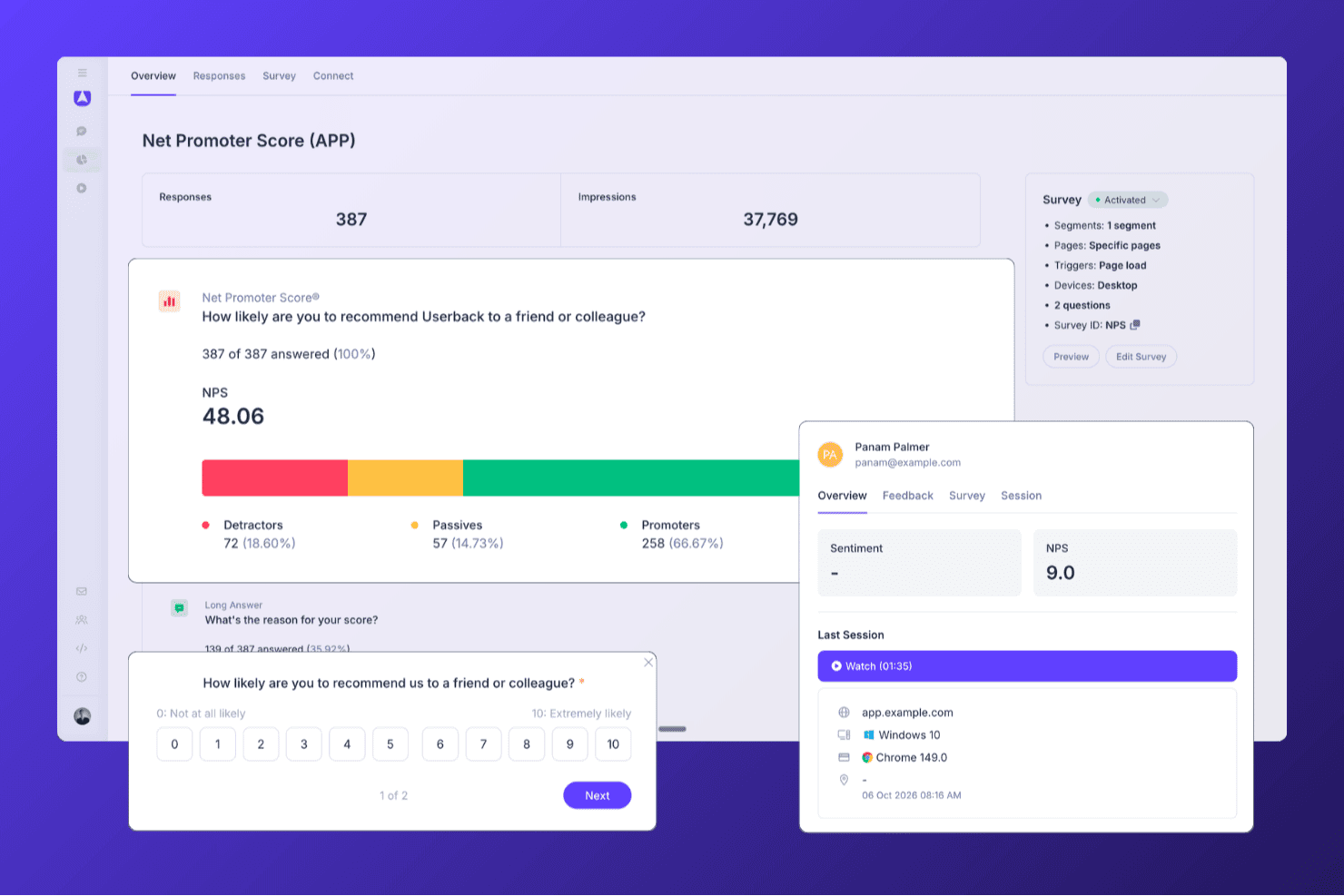
Userback helps teams run NPS surveys and analyze responses, promoter segments, and customer feedback from one dashboard. Userback is a product feedback platform that combines in-app NPS, CSAT, and CES surveys with session replay, AI-powered feedback analysis, and automated closed-loop workflows.
Who Is Userback Best For?
Userback is a strong fit for product teams that want to collect in-app NPS alongside session replay, so they can see exactly what users experienced before submitting a score.
Why I Picked Userback
Userback earns its spot on my shortlist because it pairs in-app NPS surveys with session replay, so when a user scores your product a 3, you can watch exactly what they experienced before submitting that score. I love how behavioral targeting lets you trigger the NPS survey at a specific in-app moment, like after a user completes a key workflow, rather than blasting it to your entire list. The AI-powered feedback automation then routes detractor responses to the right team member automatically, with status updates synced back to tools like Jira or Slack.
Userback Key Features
- NPS, CSAT, and CES survey templates: Pre-built survey templates for all three major satisfaction metrics, each with a standard rating scale and a follow-up open-text question.
- Behavioral and event-based survey triggers: Surveys can be triggered by specific in-app events, user segments, page targets, or device type to reach the right users at the right moment.
- AI feedback categorization and routing: AI automatically tags incoming responses by theme and sentiment, then routes them to the right team member with configurable due dates.
- Bi-directional integration sync: Status updates flow two ways between Userback and connected tools like Jira, ClickUp, and Linear, keeping feedback resolution visible across your stack.
Userback Integrations
Userback offers 20+ native integrations, including Zendesk, Intercom, Jira, Slack, ClickUp, Linear, and Microsoft Teams, plus REST API, webhooks, and Zapier.
Pros and Cons
Pros:
- AI routes detractor feedback to teams
- Behavioral targeting for in-app NPS prompts
- Combines NPS surveys with session replay
Cons:
- NPS surveys are not available on the free plan
- No native email or SMS survey delivery
Learn more about Userback:

SurveyLegend allows you to drag and drop a multitude of question types into an attractive template. SurveyLegend is a web-based platform designed to create, distribute, and analyze surveys, forms, and polls. Its emphasis on mobile-ready design and interactive elements positions it as a suitable choice for conducting engaging surveys on mobile devices, catering to the increasing number of users who prefer to interact with content on-the-go.
Why I picked SurveyLegend: I selected SurveyLegend due to its user-friendly interface that simplifies the creation of surveys that are visually appealing and engaging on both desktop and mobile devices. What distinguishes SurveyLegend is its emphasis on design aesthetics, allowing for the creation of branded surveys with a variety of question types and fields, such as picture selection and file uploads. I believe SurveyLegend is best for engaging mobile surveys because of its mobile optimization, which ensures a smooth experience for respondents using their smartphones or tablets, thereby potentially increasing response rates and the quality of feedback received.
Standout Features and Integrations:
Features include elegant pre-designed templates, language localization, offline survey collection, and extensive customization options, including custom branding and question formatting, conditional logic, and customizable buttons and icons.
Integrations include Google Drive, Dropbox, Mailchimp, and Salesforce, as well as social media platforms like Facebook and Twitter for survey sharing.
Pros and Cons
Pros:
- Clear UI supports users with minimal survey experience
- Quick to set up simple NPS surveys with style
- Highly visual and mobile-responsive survey experience for NPS
Cons:
- Scale and role-governance features less mature
- Logic, branching and segmentation limited
Learn more about SurveyLegend: Best for custom-triggered NPS surveys
- Free plan + 14-day trial + demo available
- From $25/month (billed annually)
Visit WebsiteCustomer Rating:4.7/5
Mouseflow allows you to choose from free text, rating scale NPS, and multiple choice to conduct surveys. Mouseflow is a comprehensive analytics tool designed to provide deep insights into user behavior on websites. It offers a variety of features, including session replay, heatmaps, funnels, form analytics, and user feedback tools. By capturing user interactions and visualizing them through reports and recordings, Mouseflow enables businesses to understand how visitors navigate their websites.
Why I picked Mouseflow: The tool allows for the creation of custom-triggered surveys that can be strategically placed at different touchpoints in the user journey. It allows for various types of surveys including NPS, multiple choice, free text, and rating scales, ensuring businesses can gather precise and contextual feedback, directly contributing to an accurate Net Promoter Score (NPS).
Mouseflow Standout Features and Integrations:
Features that complement Mouseflow's user feedback tools include session replay, which allows businesses to watch recordings of individual user sessions, and heatmaps, which offer a visual representation of user engagement, highlighting the most and least interacted with areas of a webpage.
Integrations include HubSpot, AB Tasty, Convert Experiences, BigCommerce, WooCommerce, Google Analytics, Google Tag Manager, Zendesk, Omniconvert, Adobe Target, Shopify, Intercom, WordPress, and others.
Pros and Cons
Pros:
- Combines behavior analytics (heatmaps, session replays) with feedback tools
- Users report it helps uncover ‘why’ behind low NPS scores
- Good for embedding NPS and feedback widgets where UX matters.
Cons:
- Survey/feedback modules lacking advanced features
- Setup and filtering can get complex for non-analyst teams
Learn more about Mouseflow: Best net promoter score software with a free plan
- Free plan + free demo available
- From $39/user/month (billed annually)
Visit WebsiteCustomer Rating:4.6/5
Simple NPS questions to track customer satisfaction. SurveyMonkey is a comprehensive survey tool that offers a free plan with out-of-the-box surveys to get you started. Under their free plan, you can create a survey with up to 10 questions and collect up to 100 responses per survey.
Why I picked SurveyMonkey: Their free plan includes a lot of helpful features that you need to pay for in other survey tools, including skip logic, data exports, a selection of question types, basic analysis & reporting features, and simple visuals to help you digest your data more easily. You can view summary statistics such as response counts and percentages.
I also like the fact that you can integrate SurveyMonkey's net promoter score software with Salesforce to enrich your Salesforce dashboard by incorporating NPS calculations.
SurveyMonkey Standout Features and Integrations:
SurveyMonkey is an excellent net promoter score software because it allows you to prompt customers to provide real-time feedback after using your product. You can integrate SurveyMonkey into your website to gauge NPS without disrupting customers’ shopping experience. SurveyMonkey also lets you target a customer demographic to get the NPS of a specific customer group.
Using SurveyMonkey, you can also collect metadata on website users like browser type, location, and device to help you optimize customers’ online experience.
Integrations include Slack, Microsoft Teams, Akita, Freshservice, HubSpot, Zendesk, Google Sheets, Google Analytics, Adobe Analytics, A/B Tasty, Zoho CRM, Gainsight, and Salesforce.
Pros and Cons
Pros:
- Strong logic branching and analytics for NPS plus beyond
- Easy distribution via web link, email invite or panel
- Massive template and question-type library
Cons:
- Interface designed for general use rather than NPS workflows
- Free plan very limited in survey depth and analytics
Learn more about SurveyMonkey: Best NPS software for translating your surveys into different languages
- Free trial for up to 100 responses
- From $49/month/up to 300 responses
Visit WebsiteCustomer Rating:4.8/5
Track how many promoters, passives, and detractors you have. SatisMeter is a feedback collection tool to gauge customer satisfaction throughout multiple touchpoints. It has pre-built templates allowing you to quickly launch surveys for CES, NPS, CSAT, or PMF. You can use SatisMeter to create automated recurring surveys to help you save time while continuously gauging customer satisfaction.
Why I picked SatisMeter: Not all customers speak or read English, and SatisMeter is the best NPS software for you if you want to translate your surveys into different languages. SatisMeter automatically translates surveys depending on the language settings of the device your customers are using so you can survey customers with different nationalities and language preferences. You can also manually translate a survey to target specific customer demographics.
SatisMeter Standout Features and Integrations:
Recently added features include per-project user permissions, the option to select multiple responses, new data filters per quarter, a Survey Delay trigger feature, a survey event trigger, and an overlay pop-up.
Integrations are available with other customer satisfaction tools, including Salesforce, CustomerGauge, Bigcommerce, Productboard, and Slack. You can connect SatisMeter to a paid Zapier account to access premium apps.
Pros and Cons
Pros:
- Easy to embed surveys in apps or via web links
- Users praise rapid support responses and platform updates
- Clean tool for tracking NPS, CSAT and feedback in real-time
Cons:
- Tagging and issue classification features are missing
- Advanced segmentation/custom report building feels limited
Learn more about SatisMeter: Best lightweight option for user-friendly NPS software
- 14-day free trial
- From $39/month/up to 100 responses
Visit WebsiteCustomer Rating:4.6/5
Colored graphics and text make Nicereply inviting to survey respondents. Nicereply's software helps you create and send one-click surveys to customers to measure CES, CSAT, and NPS. Nicereply surveys include customization options for using your colors, font, and logo to promote brand loyalty.
Why I picked Nicereply: If your main communication tool with customers is using your email, then Nicereply is the best NPS software because it lets you include your NPS survey in your email signature. What’s great about this feature is you can gauge your customer sentiment after every interaction. Using Nicereply’s in-signature NPS survey can also improve survey bounce rates because customers are more likely to open an email response than an email solely for an NPS survey.
Nicereply Standout Features and Integrations:
It has a customer sync feature that automatically matches feedback to a customer profile to help you better understand the feedback provider. Nicereply also has a net promoter score leaderboard that automatically compares your NPS score to the top performers in your industry.
Integrations include Zendesk, LiveAgent, Freshdesk, Front, PipeDrive, HelpScout, Dixa, Aircall, Evaluagent, Kustomer, Gladly, Mailchimp, Daktela, Gmail, Microsoft Outlook, and Cloudtalk.
Pros and Cons
Pros:
- Clear trend tracking at agent-team-company level
- Embeds seamlessly within support/email workflows for NPS
- Very intuitive interface, minimal training required
Cons:
- Branding/customisation limited
- Some users note weighting/scoring logic lacks flexibility
Learn more about Nicereply:
Outras opções de software de pontuação líquida de promotores
Eis mais alguns softwares de inquéritos NPS que não entraram na lista principal, mas que vale a pena conhecer. Pode utilizar qualquer um destes sistemas NPS para chegar aos clientes em pontos de contacto essenciais da sua interação com toda a organização.
- 11ProProfs Survey MakerBest for polls, popups, sidebar, and in-app surveys.
- 12PodiumBest for contextual feedback, like which channel respondents come from
- 13SprigBest for capturing and analyzing customer feedback at scale with AI
- 14CustomerSureBest NPS software for accessing multiple feedback channels: email, SMS, in-app, and in-website
- 15OrbitricsBest for optional open-ended questions after the NPS
- 16InputKitBest NPS software for small companies and start-ups
- 17JotformBest for B2B companies wanting to quickly build and deploy NPS surveys
- 18UserGuidingBest for collecting real-time insights
- 19Product FruitsBest user onboarding software that includes NPS and in-app surveys
- 20SogolyticsBest for multi-channel NPS survey distribution
- 21VelarisBest for automated feedback collection
- 22InformizelyBest customizable email surveys.
- 23BazaarvoiceBest sample services to spur reviews.
- 24Reputation.comBest for customer journey tracking.
- 25BirdeyeBest for being the customer experience software with the most awards.
- 26SightMillBest for plotting follow-up surveys.
- 27DelightedBest for survey delivery: email, SMS, or a link.
- 28ChattermillBest collaborative platform for building surveys.
- 29Zonka Feedback Best for offline CSAT, CES, and NPS surveys.
- 30CannyBest transactional NPS.
- 31WootricBest NPS question feedback loop.
- 32VitallyBest real-time survey results.
- 33eNPSBest for employee-based NPS score.
- 34DownrightBest for customer segments.
- 35Ask NicelyBest focus on modern, relatable customer loyalty.
- 36RelentlyBest email and in-app templates.
- 37ChekkitBest way for customers to text you directly from your website.
- 38Satmetrix Systems, IncBest for automated analytics using text and speech.
How I Evaluate Net Promoter Score Software
I evaluate NPS tools on two layers: the baseline a tool must have—like automated scoring and closed-loop workflows—and the differentiators that set the best options apart for CX teams.
Core Functionality (Table Stakes For This List)
When I'm selecting tools for my list, I rank each one on a scale from 0 (does not offer the functionality) to 5 (excels in this area) for each core functionality listed below. Then, I calculate the tool's total score into a percentage. Each tool needs to achieve a minimum total score of 65% to be considered for inclusion.
- NPS Survey Builder: I look for a dedicated NPS template with the 0–10 scale, follow-up question, and branding options—not just a generic form builder with a rating field.
- Multi-Channel Survey Distribution: Whether it's an in-app prompt after onboarding or a post-support email, I check that tools can reach customers across at least three channels.
- Automatic Score Calculation: Real-time promoter, passive, and detractor categorization with a live NPS dashboard matters here—I evaluate whether the math happens automatically.
- Segmentation & Trend Analysis: I look at how each tool lets you slice scores by cohort, product line, or region and track movement over time to spot emerging patterns.
- Closed-Loop Feedback Workflows: Tools like Medallia and Qualtrics route detractor alerts to account owners automatically. I evaluate how each platform handles follow-up triggers and task assignment.
- CRM & Business Tool Integrations: Connecting NPS data to customer records in tools like Salesforce or HubSpot is essential, so I check for native connectors, open API access, and webhook support.
Once I have a list of tools that meet the criteria, I consider what sets each platform apart.
Differentiating Factors (What Sets Vendors Apart)
Here's how I compare and contrast different vendors:
Standout Features
AI-powered text analytics is a major differentiator. I evaluate whether a tool can surface recurring themes from thousands of open-ended responses without manual tagging. Benchmarking data also matters—knowing your score is 42 means little until you can compare it against your industry. I also look at predictive churn signals, where platforms correlate detractor patterns with renewal or usage data to flag at-risk accounts before they leave.
Beyond Features
Pricing structure is something I evaluate closely. Some vendors charge per response while others price per user or contact, and the right model depends on your survey volume and team size. Compliance also matters when NPS surveys collect customer PII—I check for GDPR readiness, SOC 2 certification, and data residency options. Time-to-value is another factor I consider, since a CX team launching its first relational NPS program needs pre-built templates and quick setup, not a months-long implementation.
Como escolher software de pontuação líquida de promotores
É fácil ficar atolado em listas intermináveis de funcionalidades e estruturas de preços complexas. Para o ajudar a manter o foco enquanto analisa o seu processo específico de seleção de software, eis uma lista de verificação dos fatores a ter em conta:
| Fator | O que considerar |
|---|---|
| FatorEscalabilidade | O que considerarO software consegue acompanhar o crescimento da sua empresa? Procure soluções capazes de gerir um maior volume de dados e um maior número de utilizadores sem problemas de desempenho. |
| FatorIntegrações | O que considerarIntegra-se com os seus sistemas existentes, como o CRM ou o software de assistência? Garanta um fluxo de dados contínuo entre plataformas para evitar a introdução manual de dados. |
| FatorPossibilidade de personalização | O que considerarPode adaptar o software às suas necessidades específicas? Verifique se permite personalizar os inquéritos, a marca e os relatórios para corresponder ao seu fluxo de trabalho. |
| FatorFacilidade de utilização | O que considerarO software é intuitivo para a sua equipa? Uma interface complexa pode dificultar a adoção. Procure opções fáceis de utilizar e com uma navegação simples. |
| FatorImplementação e integração inicial | O que considerarQuanto tempo demorará até estar operacional? Avalie os recursos de apoio e formação disponibilizados pelo fornecedor para garantir uma transição tranquila. |
| FatorCusto | O que considerarExistem custos ocultos? Compare os modelos de preços e verifique se há encargos adicionais para utilizadores ou funcionalidades adicionais. |
| FatorMedidas de segurança | O que considerarComo protege o software os seus dados? Verifique se cumpre as normas do setor e se disponibiliza encriptação e controlos de acesso. |
| FatorDisponibilidade do apoio | O que considerarQue apoio oferece o fornecedor? Tenha em conta a disponibilidade do serviço de apoio ao cliente e do suporte técnico quando surgirem problemas. |
Funcionalidades do software de pontuação líquida de promotores
Ao escolher software de pontuação líquida de promotores, procure as seguintes funcionalidades essenciais:
- Personalização de inquéritos: Crie, modifique e aplique a identidade da sua marca aos inquéritos para corresponderem à voz e ao estilo da sua organização, facilitando a ligação ao seu público e a recolha dos dados mais relevantes.
- Distribuição multicanal: Envie inquéritos por e-mail, SMS, Web ou através de mensagens na aplicação, para alcançar os utilizadores onde quer que estejam e maximizar as suas taxas de resposta.
- Análise em tempo real: Aceda ao feedback à medida que este é recebido, permitindo-lhe identificar tendências e agir sobre os dados sem demora. Isto ajuda a resolver problemas rapidamente e a melhorar as experiências dos clientes.
- Fluxos de trabalho automatizados de acompanhamento: Configure acionadores para responder automaticamente a detratores, passivos ou promotores. Esta abordagem sem intervenção permite-lhe dar respostas atempadas e mostrar aos clientes que valoriza a sua opinião.
- Segmentação das respostas: Divida os dados por tipo de cliente, segmento, região ou outras categorias, para compreender como se sentem os diferentes grupos e adaptar as suas estratégias em conformidade.
- Acompanhamento histórico: Monitorize as pontuações NPS ao longo do tempo, facilitando a identificação do que está a mudar, a compreensão do impacto dos seus esforços e a celebração do seu progresso.
- Integração de dados: Ligue os dados NPS ao seu CRM, serviço de assistência ou plataformas de marketing, obtendo uma visão mais completa da jornada do cliente e facilitando a ação com base no que aprendeu.
- Controlos de permissões: Decida quem, na sua equipa, pode visualizar ou gerir os dados dos inquéritos, mantendo as informações sensíveis seguras e nas mãos certas.
Funcionalidades comuns de IA do software de pontuação líquida de promotores
Para além das funcionalidades padrão do software de pontuação líquida de promotores apresentadas acima, muitas destas soluções estão a incorporar IA com funcionalidades como:
- Análise de sentimento: Interprete automaticamente as respostas abertas dos inquéritos para determinar se o feedback é positivo, negativo ou neutro, poupando horas e revelando dados que poderia não ter detetado.
- Deteção preditiva de abandono: Utilize a IA para sinalizar os clientes com maior probabilidade de abandonar a empresa, para que possa tomar medidas proativas para os reter antes que seja demasiado tarde.
- Extração automatizada de temas: Permita que a IA agrupe o feedback em tópicos ou temas comuns, facilitando a identificação das causas fundamentais das suas pontuações NPS e a definição de prioridades para melhorias.
- Sugestões de resposta baseadas em IA: Obtenha recomendações de ações de acompanhamento para diferentes tipos de feedback, ajudando-o a interagir com os clientes de forma significativa sem ter de questionar a sua abordagem.
- Resumos de texto: Transforme comentários longos dos clientes em dados rápidos e fáceis de compreender, para se manter a par da situação sem se perder numa quantidade excessiva de dados.
Benefícios do software de pontuação líquida de promotores
A implementação de software de pontuação líquida de promotores proporciona vários benefícios à sua equipa e à sua empresa. Eis alguns que pode esperar:
- Dados úteis para a tomada de decisões: O software ajuda a tomar decisões informadas, fornecendo dados baseados no feedback e nas pontuações dos clientes.
- Colaboração melhorada: Melhora a colaboração da equipa, permitindo que vários utilizadores contribuam para o feedback dos clientes e para a estratégia.
- Segmentação de clientes: O software permite segmentar o feedback por tipo de cliente, o que ajuda a compreender as diversas necessidades dos clientes.
- Interface fácil de utilizar: Um design intuitivo facilita a navegação e a utilização eficaz do software pelos membros da equipa.
- Capacidades de integração: O software pode ser integrado nas ferramentas existentes, permitindo uma incorporação perfeita nos fluxos de trabalho atuais.
- Escalabilidade: Suporta o crescimento da sua empresa, adaptando-se ao aumento do feedback e dos dados dos clientes.
- Alinhamento estratégico: O software assegura que os esforços da sua equipa estão alinhados com os objetivos estratégicos da empresa, mantendo um foco claro nas métricas de satisfação dos clientes.
Custos e preços do software de pontuação líquida de promotores
A seleção de software de pontuação líquida de promotores exige uma compreensão dos vários modelos e planos de preços disponíveis. Os custos variam consoante as funcionalidades, o tamanho da equipa, os complementos e outros fatores. A tabela abaixo resume os planos comuns, os seus preços médios e as funcionalidades normalmente incluídas nas soluções de software de pontuação líquida de promotores:
Tabela de comparação de planos de software de pontuação líquida de promotores
| Tipo de plano | Preço médio | Funcionalidades comuns |
|---|---|---|
| Tipo de planoPlano gratuito | Preço médio$0 | Funcionalidades comunsCriação básica de inquéritos, respostas limitadas e análises básicas. |
| Tipo de planoPlano pessoal | Preço médio$10-$30/utilizador/mês | Funcionalidades comunsIdentidade de marca personalizada, limites moderados de respostas e integrações básicas. |
| Tipo de planoPlano empresarial | Preço médio$50-$100/utilizador/mês | Funcionalidades comunsAnálises avançadas, ferramentas de colaboração em equipa e suporte prioritário. |
| Tipo de planoPlano empresarial de grande dimensão | Preço médioPreço personalizado | Funcionalidades comunsAcesso completo à API, suporte dedicado, gestão avançada de utilizadores e opções de SSO. |
Perguntas frequentes: tudo sobre NPS e satisfação do cliente
Procura mais informações sobre o ciclo de feedback dos clientes e sobre como medir a satisfação dos clientes? Aqui ficam algumas respostas a perguntas comuns:
Como pode utilizar os dados do Net Promoter Score?
Pode utilizar os dados do NPS para identificar clientes fiéis, descobrir as fontes de insatisfação e promover melhorias organizacionais. A maioria das ferramentas de inquéritos NPS ajuda a automatizar os acompanhamentos com detratores, a celebrar os promotores e a configurar alertas internos para contas em risco. Ao analisar comentários e repartições das pontuações, pode partilhar informações práticas com as equipas de produto, suporte e liderança. Associar os dados do NPS a jornadas específicas dos clientes permite identificar exatamente onde as experiências falham, para que possa resolver rapidamente os problemas e medir os resultados das alterações ao longo do tempo.
Existe alguma ferramenta gratuita de pontuação NPS?
Sim, existem várias opções de software NPS que oferecem planos gratuitos permanentes ou versões de avaliação. Normalmente, estas permitem criar inquéritos NPS simples, distribuí-los por e-mail ou na Web e consultar painéis de feedback em tempo real. Plataformas populares como a SurveyMonkey, a Hotjar e a Startquestion disponibilizam opções gratuitas, mas lembre-se de que os planos gratuitos podem limitar a frequência dos inquéritos, o volume de respostas, as opções de marca e as capacidades de exportação de dados. Se estiver a avaliar ferramentas NPS para a sua equipa, experimente algumas para perceber qual se adapta melhor ao seu fluxo de trabalho, às suas necessidades de dados e aos seus futuros planos de integração.
Se procura algo analógico, a ferramenta gratuita original de Net Promoter Score é uma calculadora, seguida de uma folha de cálculo do Excel.
Como integro o software NPS no meu CRM ou sistema de assistência?
A maioria das principais plataformas NPS facilita a integração com os principais sistemas CRM ou de assistência, disponibilizando conectores nativos para Salesforce, HubSpot, Zendesk, Intercom e outros. A integração significa que pode desencadear inquéritos NPS após interações com o suporte ou em fases importantes da jornada, registar as respostas nos dados dos clientes e automatizar fluxos de trabalho com base nos resultados dos inquéritos. Algumas ferramentas disponibilizam APIs ou funcionam com middleware como o Zapier ou o Make se precisar de ligações mais complexas ou personalizadas. Antes de escolher uma plataforma, consulte o respetivo catálogo de integrações pré-criadas e verifique se a configuração exige conhecimentos de programação ou suporte técnico especializado.
O que devo procurar ao escolher software NPS para a minha equipa?
Dê prioridade a software que permita criar e lançar inquéritos facilmente, com modelos suficientemente flexíveis para diferentes pontos de contacto. Procure análises robustas que permitam decompor as pontuações por segmento de clientes, fase da jornada ou canal. Boas capacidades de integração permitem ligar os dados do NPS a ferramentas de CRM, assistência ou BI, tornando-os úteis para toda a equipa. Funcionalidades como a automatização de fluxos de trabalho, ferramentas de feedback em circuito fechado e painéis baseados em funções ajudarão a expandir o seu programa de CX. Verifique os recursos de suporte de cada solução, as certificações de segurança, as opções de personalização da marca e a forma como os preços acompanham o crescimento da utilização prevista.
Quais são as melhores práticas para aumentar as taxas de resposta aos inquéritos NPS?
Para aumentar as taxas de resposta aos inquéritos NPS:
- Mantenha os seus inquéritos concisos — normalmente, com uma ou duas perguntas — para que sejam fáceis de preencher em qualquer dispositivo.
- Personalize o contacto, incluindo o nome do cliente e fazendo referência à sua interação mais recente com a sua marca.
- Os inquéritos por e-mail tendem a ter melhores resultados quando são enviados prontamente após um evento importante, como uma compra ou uma chamada para o suporte.
- Explique por que motivo está a pedir feedback e como utilizará os resultados para melhorar a experiência do cliente.
- Pode também experimentar diferentes linhas de assunto, lembretes para quem não respondeu e widgets de inquéritos na aplicação para aumentar o envolvimento.
Como pode o software NPS ajudar a fechar o ciclo de feedback?
As plataformas NPS ajudam a fechar o ciclo de feedback, assinalando automaticamente as respostas negativas para acompanhamento, atribuindo pedidos e enviando lembretes à sua equipa de CX. Muitas ferramentas permitem criar fluxos de trabalho, para que os detratores recebam um contacto personalizado ou os gestores sejam alertados para problemas urgentes. Pode definir SLA para os tempos de resposta e acompanhar quais os contactos que foram resolvidos ou que precisam de ser escalados. Fechar o ciclo não só melhora a satisfação dos clientes, como também mostra aos clientes que o seu feedback conduz a mudanças reais, promovendo, em última análise, a lealdade e a recomendação.
O software NPS pode acompanhar tendências ao longo do tempo e segmentar respostas?
Sim, a maioria das ferramentas NPS disponibiliza análises baseadas no tempo, para que possa acompanhar a evolução das pontuações de mês para mês ou após iniciativas importantes. A segmentação avançada permite decompor as respostas por linha de produto, região, equipa ou perfil de cliente, ajudando a identificar as áreas que estão a melhorar e aquelas que precisam de maior atenção. Estas informações podem ser visualizadas em painéis, exportadas para uma análise mais aprofundada ou utilizadas para fundamentar as revisões empresariais trimestrais. Com um acompanhamento e uma segmentação contínuos, pode demonstrar o ROI das iniciativas de experiência do cliente e concentrar os recursos nos fatores que têm o maior impacto na lealdade.
Mais software para feedback dos clientes
O software NPS não é a única opção a considerar. Já que aqui está, poderá encontrar exatamente o que procura nestas outras ferramentas de inquéritos de feedback:
- Software de feedback dos clientes
- Software de inquéritos online
- Software de gestão da experiência do cliente
- Software de análise de inquéritos
- Ferramentas gratuitas para inquéritos