

AI customer experience automation systems are software platforms that use artificial intelligence to automate, personalize, and manage customer interactions across support, service, and engagement channels. If you’re searching for ways to handle higher volumes, deliver faster responses, and deepen relationships without burning out your team, these solutions are built for you.
I know how challenging it is to balance quality with efficiency and keep pace with rising customer expectations. In this guide, you’ll find the most effective, feature-rich options to help you pick the right AI automation system for your team’s needs this 2026.
Why Trust Our Software Recommendations
6,700+
Reviews
20
Industry experts
16+
Evaluation factors
14
Years
Our team has been testing and reviewing software since 2012. As CX leaders ourselves, we know how difficult—and important—it is to choose the right software.
For this guide, we evaluated tools using hands-on testing and independent research, scoring tools using our selection criteria.
Our reviews reflect our human editorial judgment, not a sales pitch.
 Gui DrusinaCreative Director
 Tim FisherVP of AI
AI Customer Experience Automation Systems Comparison Table
This comparison table summarizes pricing details for my top AI customer experience automation systems selections:
| Tool | Best For | Trial Info | Price | ||
|---|---|---|---|---|---|
| 1 | Best with instant helpdesk integration | 30-day free trial | From $199/month | Website | |
| 2 | Best voice AI for modern contact centers | Free demo available | Pricing upon request | Website | |
| 3 | Best low-code CX automations for scaling teams | 14-day free trial + free demo available | From $29/user/month (billed annually) | Website | |
| 4 | Best outbound and predictive dialer capabilities | Free demo available | From $119/seat/month | Website | |
| 5 | Best for workflow automation in chat and messaging | Free demo available | Pricing upon request | Website | |
| 6 | Best for unified omnichannel journey orchestration | Free trial available | From $75/user/month (billed annually) | Website | |
| 7 | Best for real-time sentiment detection on social | Free demo available | Pricing upon request | Website | |
| 8 | Best analytics suite for actionable CX insights | Free demo available | From $110/agent/month (proactive AI extra) | Website | |
| 9 | Best for workforce automation and quality insights | Free demo available | Pricing upon request | Website | |
| 10 | Best generative agent copilot for support teams | 14-day free trial + free demo available | From $0.99/outcome | Website |


Best AI Customer Experience Automation Systems Reviews
Below are my detailed summaries of the best AI customer experience automation systems that made it onto my shortlist. My reviews offer a detailed look at the features, capabilities, and integrations of each platform to help you find the best one for you.
 Best with instant helpdesk integration
- 30-day free trial
- From $199/month
Visit WebsiteCustomer Rating:4.5/5
My AskAI displays a chat interface on HubSpot with AI-powered responses, a session-end message, and a prompt to start a new chat. My AskAI is an AI customer service agent platform that deploys generative AI agents inside your existing help desk to handle support tickets, automate in-conversation actions, and surface conversational insights across chat and email channels.
Who Is My AskAI Best For?
It's a strong fit for support operations teams at SaaS and ecommerce companies that want AI-driven ticket deflection without replacing their existing help desk.
Why I Picked My AskAI
I picked My AskAI because it deploys a generative AI agent directly inside Zendesk, Intercom, or Gorgias without any migration. Beyond answering questions, it executes in-conversation tasks like refunds and order changes using plain-language instructions. I also love the Knowledge Improvement Studio, which scans past tickets to identify documentation gaps and auto-generates new knowledge snippets.
My AskAI Key Features
- Multi-language responses: AI agent detects language automatically and replies in over 95 supported languages.
- Real-time conversational insights: Generates analytics and alerts when new topics or patterns emerge in customer interactions.
- Automated Zendesk ticket tagging: Applies AI-powered tags to tickets for improved categorization and reporting.
- Internal Slack and Teams bots: Lets employees ask questions and get instant answers from internal knowledge sources via chat.
My AskAI Integrations
My AskAI offers native integrations with Zendesk, Intercom, Gorgias, Freshdesk, HubSpot, and Freshchat.
Pros and Cons
Pros:
- Executes in-conversation actions like refunds autonomously
- Auto-detects knowledge gaps from past tickets
- Deploys inside existing help desks instantly
Cons:
- Predictive customer intelligence features are limited
- No native voice bot or IVR capability
Learn more about My AskAI: Best voice AI for modern contact centers
- Free demo available
- Pricing upon request
Visit WebsiteCustomer Rating:4.4/5
Talkdesk offers a visual AI agent builder with an orchestrator, condition routing, and specialized sub-agents for FAQs, customer accounts, and orders. Talkdesk is a cloud-native CCaaS and CX automation platform that combines AI virtual agents, omnichannel engagement, interaction analytics, and workforce management into a unified contact center system.
Who Is Talkdesk Best For?
Talkdesk is a strong fit for mid-market and enterprise contact centers in regulated industries like financial services, healthcare, and retail.
Why I Picked Talkdesk
I've included Talkdesk in my top picks because its voice AI capabilities go well beyond basic IVR. Talkdesk Autopilot can autonomously handle end-to-end voice interactions, resolving customer issues without any agent involvement. I also find Talkdesk Identity genuinely useful, as it performs real-time voice biometrics authentication mid-call, eliminating manual verification steps. Talkdesk Navigator routes calls using natural conversation and live context rather than rigid menu trees.
Talkdesk Key Features
- Industry experience clouds: Pre-built workflows, dashboards, and automations for financial services, healthcare, retail, and other regulated sectors.
- Studio workflow designer: Low-code visual tool to customize customer journeys and automate cross-channel processes.
- Interaction and quality analytics: AI-powered transcription and analysis of every conversation for topic, intent, and agent performance insights.
- Native CRM integrations: Certified connectors for Salesforce, Microsoft Teams, Zendesk, ServiceNow, and HubSpot for unified customer context.
Talkdesk Integrations
Talkdesk offers 60+ native integrations, including Salesforce, HubSpot, Zendesk, Microsoft Teams, ServiceNow, Zoom, Slack, Microsoft Dynamics 365, Oracle Service Cloud, and SAP C4C. An API is available for custom integrations.
Pros and Cons
Pros:
- Low-code visual workflow designer
- Autopilot resolves customer issues without agent involvement
- Real-time voice biometric authentication
Cons:
- Enterprise setup requires dedicated IT resources
- Default reporting templates lack custom options
Learn more about Talkdesk: Best low-code CX automations for scaling teams
- 14-day free trial + free demo available
- From $29/user/month (billed annually)
Visit WebsiteCustomer Rating:4.4/5
Freshdesk Omni offers an AI-powered customer support inbox with bot conversation summaries, tone enhancement tools, and order details panel for streamlined agent workflows. Freshdesk Omni is an AI-powered omnichannel customer service platform that unifies email, chat, voice, and messaging into a single command center, with built-in AI agents, copilot assistance, and low-code workflow automations.
Who Is Freshdesk Omni Best For?
It's a strong fit for mid-size to enterprise support teams that need to scale customer service operations across multiple channels without heavy developer involvement.
Why I Picked Freshdesk Omni
I've included Freshdesk Omni in my top picks because its low-code automation layer lets scaling teams build and adjust CX workflows without needing engineering support. Freddy AI Agent resolves inquiries autonomously across chat, email, and messaging right out of the box. I also like that IntelliAssign and skill-based routing dynamically redistribute workloads as agent headcount grows, so you're not rebuilding your routing logic every time the team changes.
Freshdesk Omni Key Features
- Freddy AI Copilot: Provides live agent assistance by suggesting replies, surfacing knowledge, and drafting conversation summaries.
- Omnichannel command center: Centralizes tickets and conversations from chat, email, phone, and social in a single workspace.
- Sentiment and intent detection: Uses AI to analyze customer messages for urgency, emotion, and intent across channels.
- Extensive CX integrations: Connects natively to tools like HubSpot, Shopify, Jira, and telephony platforms through the Freshworks Marketplace.
Freshdesk Omni Integrations
Freshdesk Omni offers over 150 native integrations, including HubSpot, Shopify, Jira, Slack, MS Teams, Stripe, WhatsApp, Facebook Messenger, Instagram, and LINE. An API is available for custom integrations.
Pros and Cons
Pros:
- Omnichannel inbox retains full conversation context
- Low-code automation builder needs no developer support
- Handles multi-channel ticket resolution autonomously
Cons:
- Voice AI requires third-party telephony providers
- Advanced predictive features require external tools
Learn more about Freshdesk Omni: Best outbound and predictive dialer capabilities
- Free demo available
- From $119/seat/month
Visit WebsiteCustomer Rating:4.1/5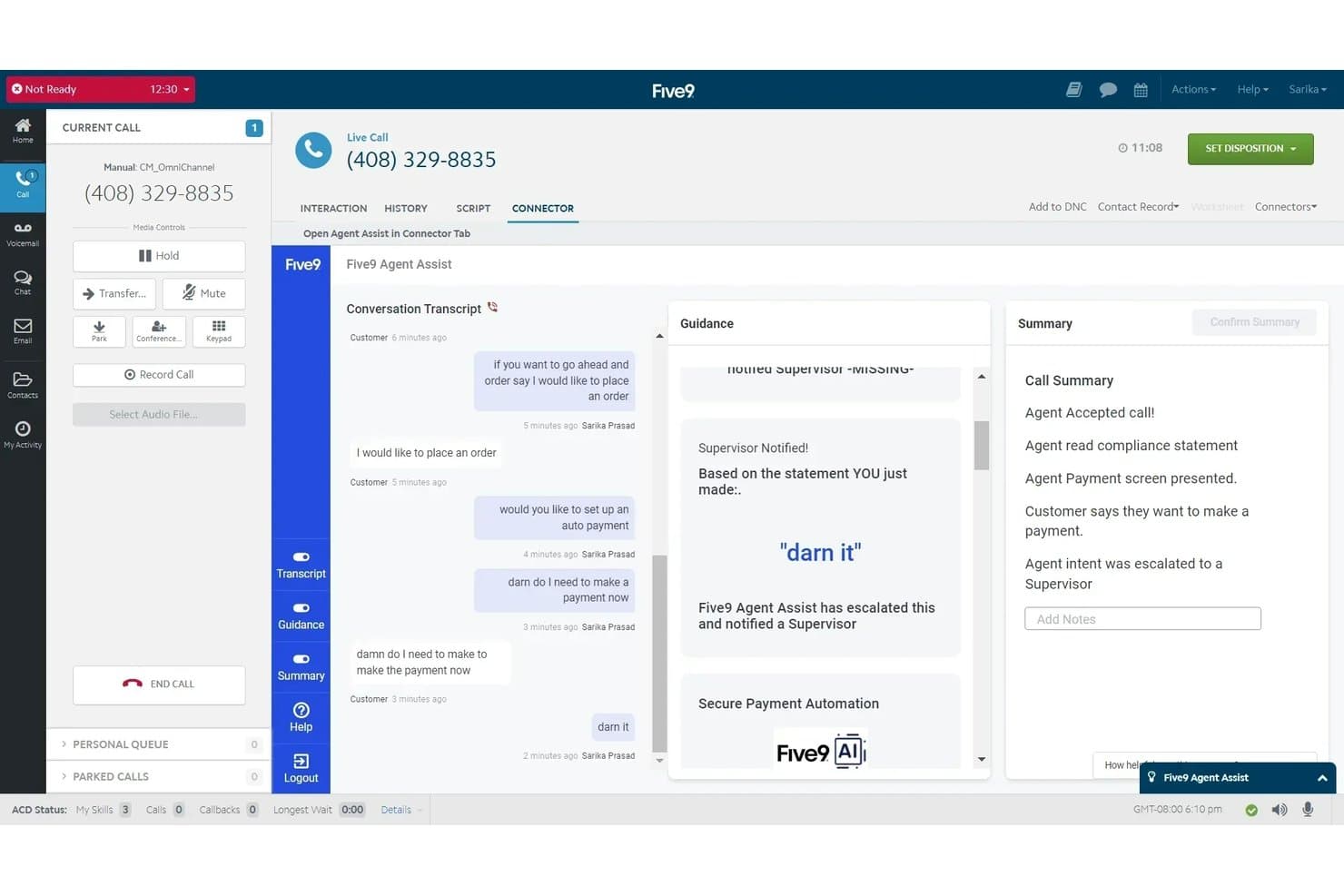
Five9 offers an AI-powered Agent Assist tool that provides real-time conversation transcripts, supervisor escalation alerts, and automated call summaries during live customer calls. Five9 is a cloud-based contact center platform that combines AI-powered virtual agents, omnichannel customer engagement, predictive dialling, workforce management, and real-time interaction analytics across voice, chat, email, SMS, and social channels.
Who Is Five9 Best For?
Five9 is built for mid-market and enterprise contact centers running high-volume inbound and outbound operations across multiple channels.
Why I Picked Five9
Five9 earns its spot as one of the best on my shortlist because its predictive dialer is genuinely AI-driven, not just automated. I like that it supports four distinct dialling modes (predictive, progressive, power, and preview), so outbound teams can match the dialling approach to the campaign type. The Proactive Notification feature uses predictive analytics to determine the optimal time to place outbound calls automatically, which increases live contact rates without adding manual effort.
Five9 Key Features
- AI-powered virtual agents: Handle customer interactions autonomously across multiple channels with natural language understanding.
- Omnichannel agent desktop: Unifies voice, chat, email, SMS, and social messages into a single agent interface.
- Real-time sentiment analytics: Surfaces customer sentiment, emotion, and intent throughout live conversations for agents and supervisors.
- Workforce engagement management: Includes built-in tools for quality monitoring, performance dashboards, and agent scheduling.
Five9 Integrations
Five9 offers native integrations with Salesforce, ServiceNow, Microsoft Dynamics, Oracle, Zendesk, Zoom, Microsoft Teams, RingCentral, AT&T Office@Hand, Verint, and Calabrio. An API is available for custom integrations.
Pros and Cons
Pros:
- Four distinct outbound dialling modes
- Real-time sentiment analytics surface insights mid-call
- Predictive dialer supports four distinct outbound modes
Cons:
- Minimum seat count excludes small team deployments
- Journey workflow sequences lack multi-day scheduling capability
Learn more about Five9: 5Best for workflow automation in chat and messaging
Ada
- Free demo available
- Pricing upon request
Visit WebsiteCustomer Rating:4.7/5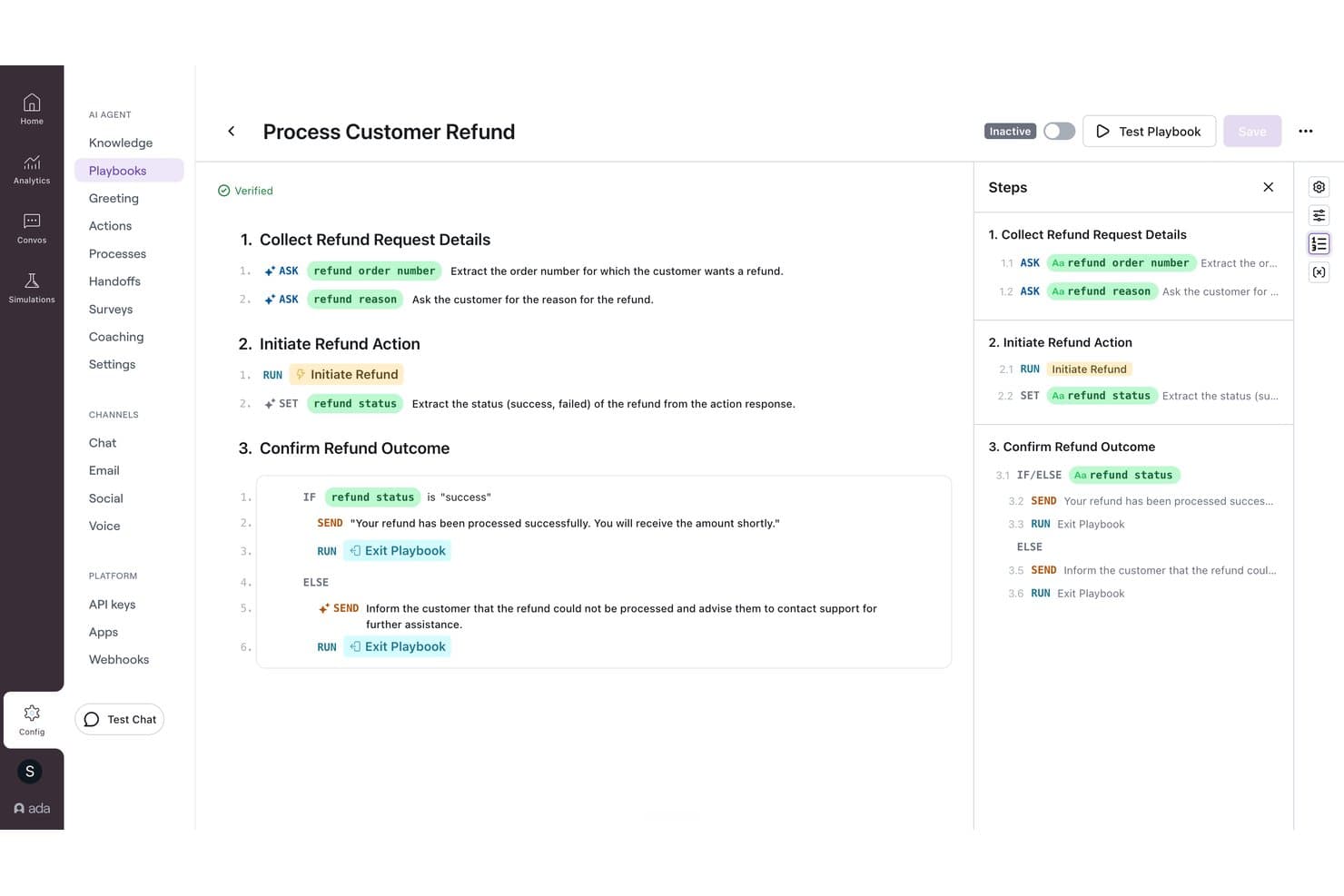
Ada offers a visual playbook builder that automates customer refund workflows with conditional logic and step-by-step AI-driven actions. Ada is an agentic customer experience platform that automates customer interactions across chat, voice, and email using generative AI agents, multi-step Playbooks, and omnichannel workflow orchestration.
Who Is Ada Best For?
Ada is a strong fit for enterprise contact centers in industries like financial services, travel, and insurance that handle high volumes of customer interactions across multiple service channels.
Why I Picked Ada
I've included Ada in my top picks because its Playbooks feature handles multi-step service logic that most chatbots can't. A single Playbook can retrieve an order, verify its shipping status, collect a new address, update the record, and confirm the change, all within one chat conversation. The Reasoning Engine, launched in early 2026, extends that same workflow logic into voice channels, so automation you build once runs consistently across web chat, WhatsApp, Instagram DMs, and phone.
Ada Key Features
- Voice AI agent: Handles inbound and outbound phone conversations using natural language understanding and automated call resolution.
- Multilingual support: Delivers conversations and workflow automation in over 50 languages with built-in translation.
- Native CX integrations: Connects directly with platforms like Salesforce, Zendesk, NICE CXone, and ServiceNow for unified customer data and escalation.
- Coaching feedback loop: Gathers feedback after each conversation to refine automations and improve AI agent performance over time.
Ada Integrations
Ada offers native integrations with Salesforce, Zendesk, NICE CXone, ServiceNow, Microsoft Dynamics, Genesys, Twilio Flex, Amazon Connect, Freshworks, Kustomer, and Contentful. An API is available for custom integrations.
Pros and Cons
Pros:
- High automation containment rates
- Consistent automation across voice and chat
- Playbooks automate complex multi-step conversations
Cons:
- No built-in predictive churn scoring model
- Reporting lacks depth for advanced analytics needs
Learn more about Ada: Best for unified omnichannel journey orchestration
- Free trial available
- From $75/user/month (billed annually)
Visit WebsiteCustomer Rating:4.4/5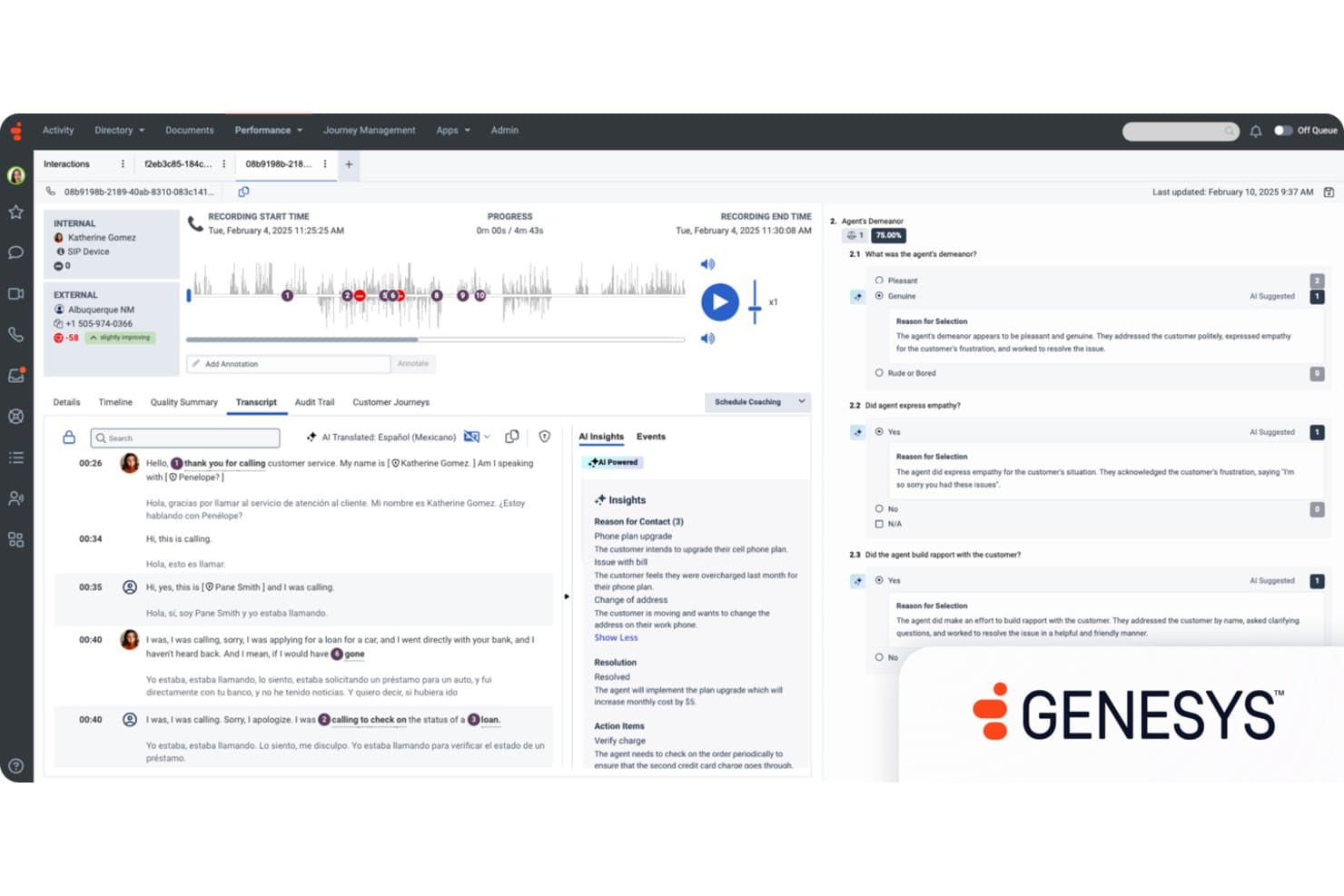
Genesys Cloud CX offers AI-powered quality evaluation with automated agent demeanor scoring, empathy detection, and real-time call transcript translation for customer experience management. Genesys Cloud CX is a cloud-native contact center platform that combines AI-powered virtual agents, omnichannel routing, workforce engagement management, predictive analytics, and journey orchestration across voice, chat, email, SMS, and social channels.
Who Is Genesys Cloud CX Best For?
Genesys Cloud CX is a strong fit for enterprise and mid-market contact centers managing high interaction volumes across multiple channels and agent teams.
Why I Picked Genesys Cloud CX
Genesys Cloud CX earns its spot on my shortlist because of how its single orchestration engine connects every channel, from voice to WhatsApp to SMS, without losing customer context mid-journey. I particularly like predictive routing combined with journey management, which lets my team build real-time flows that adapt to customer behaviour, not just queue logic. Architect and AI Studio make it possible to design and adjust those journeys without heavy developer involvement.
Genesys Cloud CX Key Features
- Agent Assist Copilot: AI supports agents in real time with reply suggestions, context, and knowledge surfacing.
- Sentiment and intent analytics: AI analyzes customer conversations to detect emotion, urgency, and intent across channels.
- Voice AI and conversational IVR: Natural language bots handle spoken interactions and transcribe calls for analytics.
- Generative knowledge management: AI generates, updates, and optimizes help articles from real agent and customer conversations.
Genesys Cloud CX Integrations
Genesys Cloud CX offers native integrations with Salesforce, ServiceNow, Zoom, Microsoft Teams, 8x8, Amazon Lex, and Google Dialogflow, and features over 450 marketplace integrations via the AppFoundry. An open API is available for custom integrations.
Pros and Cons
Pros:
- Predictive routing improves queue and agent matching
- Journey orchestration adapts in real time
- Unified contact center platform across channels
Cons:
- Custom reports require developer setup
- Initial Architect configuration is time-consuming
Learn more about Genesys Cloud CX: Best for real-time sentiment detection on social
- Free demo available
- Pricing upon request
Visit WebsiteCustomer Rating:4.2/5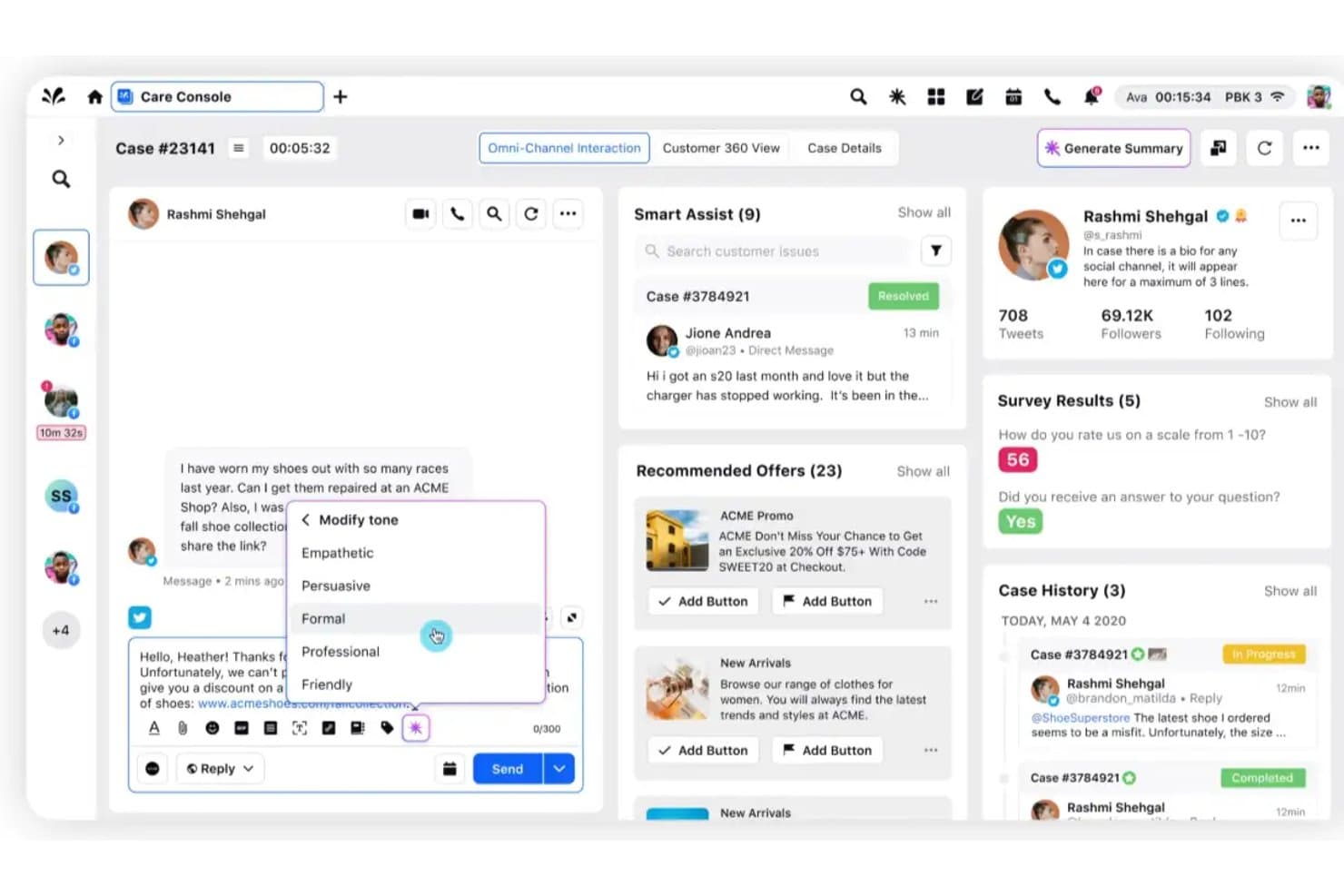
Sprinklr Service offers an AI-powered Care Console with tone modification, smart assist, and omni-channel interaction tools for customer support automation. Sprinklr Service is an AI-native contact center platform that unifies voice, chat, social, and email interactions with conversational AI, omnichannel routing, agent assist, automated quality management, and real-time conversational analytics.
Who Is Sprinklr Service Best For?
Sprinklr Service is a strong fit for large enterprise teams managing high-volume, multi-channel customer interactions across global markets.
Why I Picked Sprinklr Service
Sprinklr Service earns its spot on my shortlist because of how it handles social at a scale most platforms can't match. I picked it specifically for its real-time sentiment detection across 25+ social channels from a single unified dashboard. What I find genuinely impressive is that the AI classifies incoming queries by intent, urgency, and sentiment simultaneously, so my team can catch negative trends before they escalate into reputation issues.
Sprinklr Service Key Features
- Agent Copilot: AI-powered assistant that drafts case summaries, suggests replies, and automates repetitive tasks for agents.
- Unified agent desktop: Single interface for managing conversations across voice, chat, email, and 25+ social channels.
- AI quality management: Automatically evaluates 100% of customer interactions for compliance and coaching opportunities.
- Conversational IVR: Natural language voice bot that replaces traditional IVR menus and guides callers using spoken interactions.
Sprinklr Service Integrations
Sprinklr Service offers native integrations with Salesforce, Zendesk, Freshdesk, Dynamics 365, Jira, ServiceNow, Slack, Twilio, Trustpilot, and Reddit. An open API is available for custom integrations.
Pros and Cons
Pros:
- Unifies voice, chat, and social channels natively
- Evaluates every agent interaction for quality automatically
- Monitors sentiment across 25+ channels simultaneously
Cons:
- Dashboard reporting is difficult to customize
- Enterprise onboarding requires technical staff
Learn more about Sprinklr Service: Best analytics suite for actionable CX insights
- Free demo available
- From $110/agent/month (proactive AI extra)
Visit WebsiteCustomer Rating:4.3/5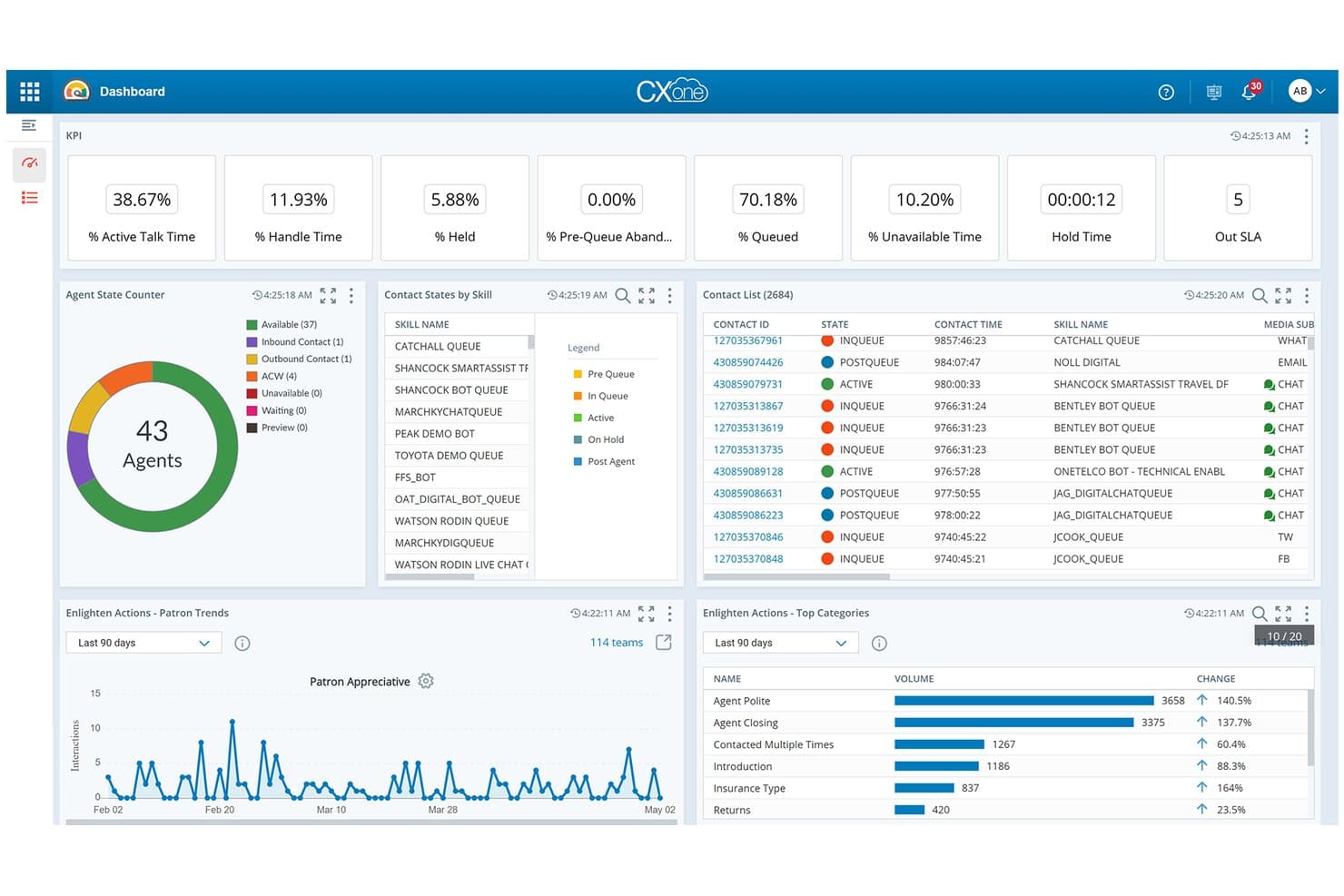
NiCE CXone offers a real-time AI-powered dashboard with KPI metrics, agent state tracking, contact lists, and Enlighten Actions analytics for automated customer experience management. NiCE CXone is an enterprise CCaaS platform that combines AI conversational automation, omnichannel orchestration, workforce engagement, and interaction analytics across voice, chat, email, and digital channels.
Who Is NiCE CXone Best For?
NiCE CXone is a strong fit for enterprise contact centers that need a unified platform to manage high interaction volumes across large agent teams.
Why I Picked NiCE CXone
I picked NiCE CXone as one of the best because its Interaction Analytics module goes well beyond standard sentiment scoring. It surfaces emotion, intent, and topic trends across every conversation, with Copilot for Supervisors delivering real-time sentiment alerts on live calls. I also like how agentic analytics connects those insights to root-cause analysis, so my team can act on patterns rather than just observe them.
NiCE CXone Key Features
- Omnichannel routing and queueing: Routes and manages customer interactions across voice, chat, email, SMS, and social channels from one platform.
- Voice AI & conversational IVR: Natural language voice bots replace traditional menus, handling spoken requests and capturing detailed interaction transcripts.
- Generative knowledge management: AI updates and creates knowledge base articles automatically from agent conversations and resolved tickets.
- Pre-built CRM and service integrations: Connects natively to systems like Salesforce, Microsoft Dynamics, and Zendesk for unified customer profiles.
NiCE CXone Integrations
NiCE CXone offers native integrations with Salesforce, Microsoft Dynamics, Oracle, Zendesk, ServiceNow, SAP, HubSpot, Freshdesk, Zoho CRM, and SugarCRM. An API is available for custom integrations.
Pros and Cons
Pros:
- AI agents handle complex multilingual voice interactions
- Real-time sentiment alerts during live calls
- Deep interaction analytics across all channels
Cons:
- Report customization has a steep configuration curve
- Implementation requires significant IT involvement
Learn more about NiCE CXone: Best for workforce automation and quality insights
- Free demo available
- Pricing upon request
Visit WebsiteCustomer Rating:3.7/5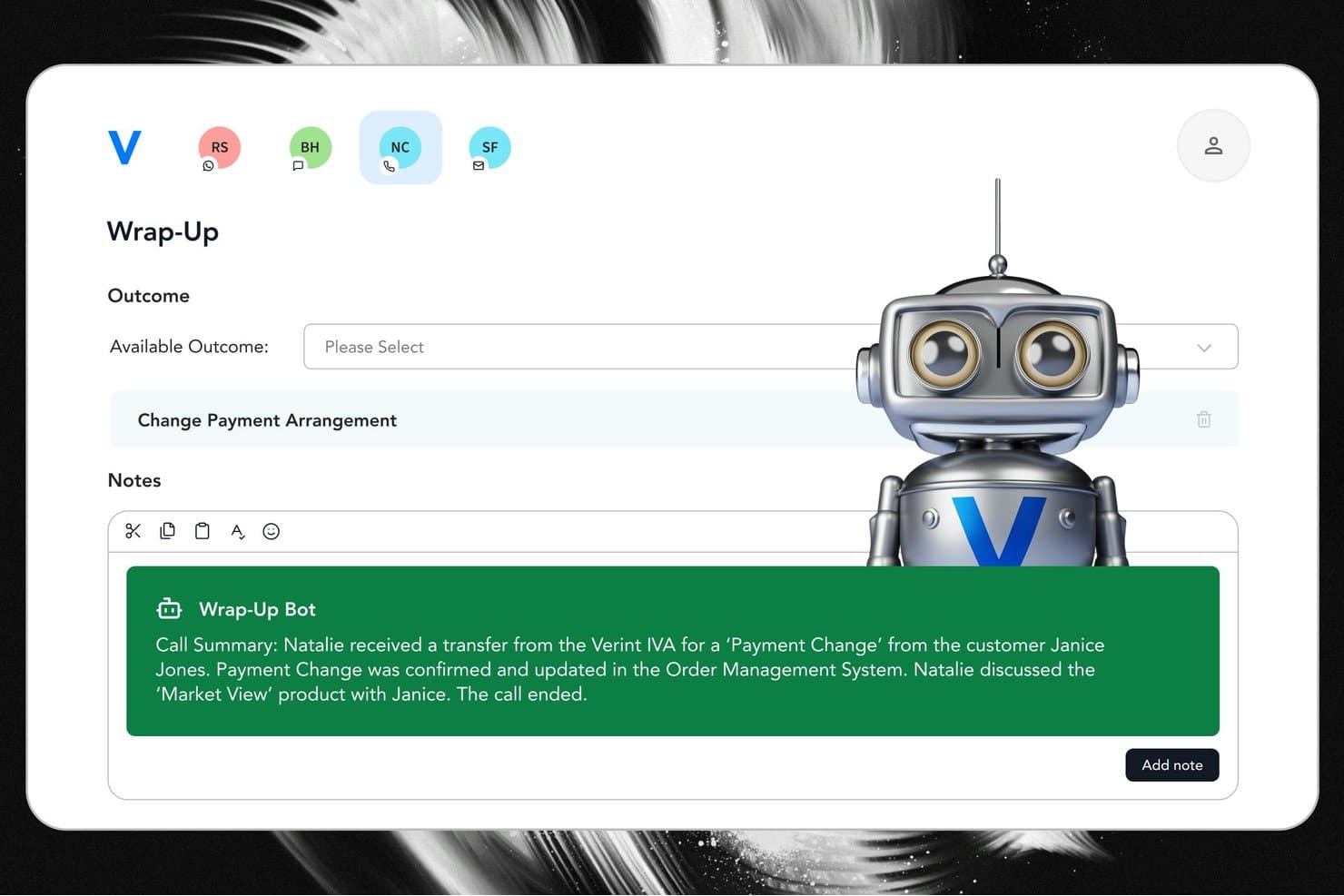
Verint offers an AI-powered Wrap-Up Bot that automatically generates call summaries and suggested outcomes to streamline agent after-call work. Verint is a CX automation platform that combines agentic AI, workforce management, quality automation, omnichannel orchestration, and speech and text analytics for contact center and customer engagement operations.
Who Is Verint Best For?
Verint is a strong fit for large enterprises in regulated industries like financial services, telecom, and healthcare that run high-volume contact center operations.
Why I Picked Verint
Verint earns its spot on my shortlist because of how it handles quality management at scale. I love that Automated Quality Management scores 100% of interactions automatically, removing manual sampling entirely. The Quality Bot then surfaces targeted coaching recommendations to supervisors based on those scores. Pair that with AI-powered workforce forecasting and scheduling, and I can see performance gaps and staffing inefficiencies in the same platform.
Verint Key Features
- Omnichannel agent workspace: Unifies voice, chat, SMS, and social messaging conversations in one interface for your CX teams.
- Real-time speech and text analytics: Captures 100% of multi-channel interactions and surfaces emotion, intent, and topic trends automatically.
- Predictive AI customer insights: Uses machine learning to score customer behaviour, churn risk, and next-best actions across journeys.
- CX Integration Studio: Provides 500+ prebuilt connectors for syncing with CRMs, help desks, telephony, and marketing automation platforms.
Verint Integrations
Verint offers native integrations with Salesforce, Microsoft 365, ServiceNow, Workday, and Oracle, and provides 500+ prebuilt connectors for CRM, help desk, and contact center platforms. An open API is available for custom integrations.
Pros and Cons
Pros:
- Speech analytics covers every channel simultaneously
- AI workforce forecasting built into the platform
- Scores 100% of interactions automatically
Cons:
- System deployment requires extended onboarding
- Advanced report building requires technical skills
Learn more about Verint: 10Best generative agent copilot for support teams
Fin.ai
- 14-day free trial + free demo available
- From $0.99/outcome
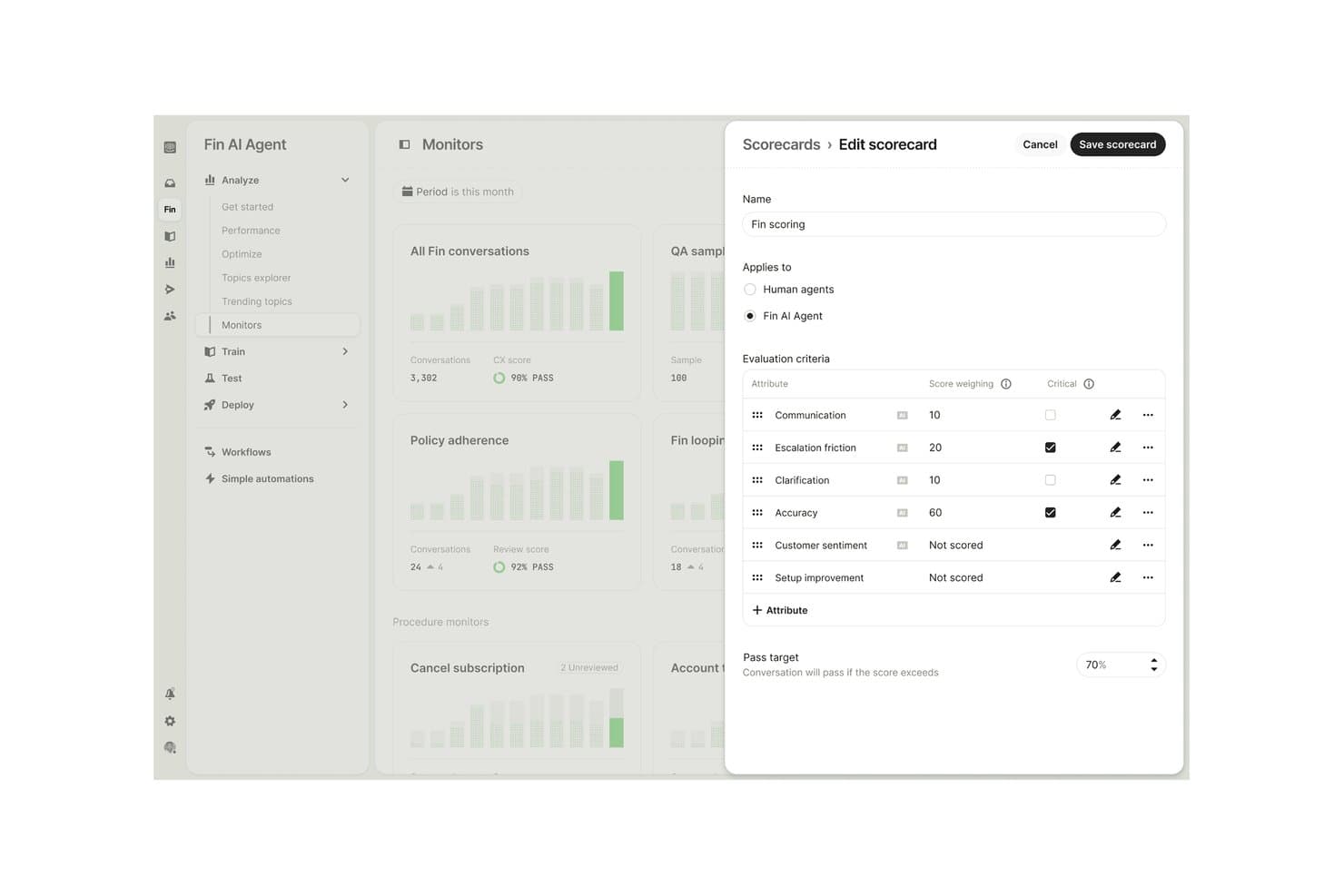
Fin.ai offers a customizable AI scorecard editor where users can define evaluation criteria, score weightings, and pass targets for Fin AI Agent conversations. Fin.ai is a generative AI agent platform that handles customer support interactions across chat, email, voice, SMS, and social channels using custom-trained AI models, multi-step conversational workflows, and integrated analytics.
Who Is Fin.ai Best For?
Fin.ai is a strong fit for mid-market and enterprise support teams that handle high conversation volumes and want AI-driven ticket resolution without migrating off their existing helpdesk.
Why I Picked Fin.ai
I've included Fin.ai in my top picks because its Procedures feature lets me build multi-step workflows that combine natural language instructions with deterministic business logic, so Fin handles complex support queries from start to finish. I also like that Fin Operator autonomously monitors performance and keeps the knowledge base current without manual oversight. The Analyze suite surfaces CX Scores, AI Topics, and Monitors so I can pinpoint exactly where Fin resolves well and where it needs adjustment.
Fin.ai Key Features
- Fin Voice: Lets you automate voice interactions and handle customer calls using Apex Flash for natural language conversations.
- Multilingual support: Enables interactions in over 45 languages along with tone and policy customization across channels.
- Analyze suite: Combines CX Score, AI Topics, Trends, Monitors, and custom AI Scorecards for conversation analytics.
- Omnichannel integration: Connects across helpdesks like Zendesk, Salesforce, HubSpot, Freshdesk, and messaging channels including WhatsApp, SMS, and social platforms.
Fin.ai Integrations
Fin.ai offers native integrations with Intercom, Zendesk, Salesforce, HubSpot, Freshdesk, Dixa, Front, Zoho, Sprinklr, Gorgias, Shopify, and Stripe, with an API platform available for custom integrations.
Pros and Cons
Pros:
- Generative AI handles complex multi-step workflows
- Self-maintaining knowledge base via Fin Operator
- High autonomous ticket resolution rates
Cons:
- Journey orchestration is limited to support channels
- Predictive intelligence limited to conversation-level intent
Learn more about Fin.ai:
Other AI Customer Experience Automation Systems
Here are some additional AI customer experience automation systems options that didn’t make it onto my shortlist, but are still worth checking out:
- 11Yellow.aiBest for multilingual conversational AI at scale
- 12Salesforce Agentforce ServiceBest for deep CRM and service integration
- 13ZendeskBest for automated omnichannel ticket deflection
- 14LivePersonBest for open, enterprise conversational AI stack
- 15MedalliaBest for AI action from real-time feedback
- 16Observe.AIBest for multi-agent CX lifecycle orchestration
- 17Kore.aiBest for pre-built AI agents across industries
- 18Qualtrics XMBest for unified experience profiles
- 19CrestaBest for coaching with live AI insights
- 20SierraBest for outcome-based conversational automation
How I Evaluate AI Customer Experience Automation Systems
Every platform here needs to deliver real AI value—actually reducing agent workload and personalizing journeys, not just adding a chatbot layer. I evaluate each one across two layers: the core functionality required to qualify and the differentiating factors that set leaders apart.
Core Functionality (Table Stakes For This List)
When I'm selecting tools for my list, I rank each one on a scale from 0 (does not offer the functionality) to 5 (excels in this area) for each core functionality listed below. Then, I calculate the tool's total score as a percentage. Each tool needs to achieve a minimum total score of 75% to be considered for inclusion.
- AI Conversational Automation: I look for bots that handle multi-turn conversations—like processing a return and upselling a replacement—without needing a live agent.
- Omnichannel Orchestration: Context persistence matters most here. A customer who starts on chat and calls back shouldn't have to repeat their issue.
- Predictive Customer Intelligence: I evaluate whether the platform can score churn risk or surface next-best-actions from real interaction data, not just static segments.
- Sentiment & Interaction Analytics: Each tool should detect emotion and intent in real time, so agents or workflows can adapt before a frustrated customer escalates.
- Automated Journey Workflows: I check for AI-triggered journeys that respond to live behaviour—like sending a proactive message when a user stalls during onboarding.
- CX Systems Integration: The platform should connect to your CRM, help desk, and contact center natively, keeping customer profiles unified across tools.
Once I have a list of tools that meet the criteria, I consider what sets each platform apart.
Differentiating Factors (What Sets Vendors Apart)
Here's how I compare and contrast different vendors:
Standout Features
Agent assist copilots are a big differentiator—I look for AI that suggests replies and drafts summaries mid-conversation, not just after the fact. Voice AI matters too, especially platforms that replace rigid IVR menus with natural language bots that can handle spoken requests like rebooking a delivery. I also evaluate generative knowledge management, where the system auto-creates and updates help articles from resolved tickets. This keeps self-service content fresh without manual effort from your team.
Beyond Features
AI model transparency is something I evaluate closely—can you set guardrails on tone and brand voice for customer-facing bot responses? That matters when a virtual agent handles thousands of conversations daily. Deployment model plays a role too. Platforms with pre-built intents and low-code workflow builders let CX ops teams launch faster without waiting on engineering. I also check data privacy controls like PII redaction and data residency options, especially for teams in regulated industries like healthcare or finance.
How to Choose AI Customer Experience Automation Systems
It’s easy to get bogged down in long feature lists and complex pricing structures. To help you stay focused as you work through your unique software selection process, here’s a checklist of factors to keep in mind:
| Factor | What to Consider |
|---|---|
| FactorScalability | What to ConsiderCan the platform handle peaks in interaction volume as your team or business grows—across all intended channels? |
| FactorIntegrations | What to ConsiderDoes the system connect natively to your CRM, help desk, and voice solutions, or will you need complex custom work? |
| FactorCustomizability | What to ConsiderWill your team be able to adjust workflows, bot behaviour, and reporting without developer involvement? |
| FactorEase of use | What to ConsiderIs the interface intuitive enough for CX managers and agents to configure, use, and adapt quickly on their own? |
| FactorImplementation and onboarding | What to ConsiderHow long will roll-out take and what resources or vendor assistance will you need to reach full value? |
| FactorCost | What to ConsiderDoes the pricing model (per agent, per conversation, per resolution) scale predictably with your projected usage? |
| FactorSecurity safeguards | What to ConsiderAre data privacy, encryption, and role-based access controls aligned to your industry requirements? |
| FactorCompliance requirements | What to ConsiderDoes the platform meet certifications (SOC 2, GDPR, HIPAA) needed for your sector or regions of operation? |
What Are AI Customer Experience Automation Systems?
AI customer experience automation systems are software platforms that use artificial intelligence to handle, personalize, and analyze customer interactions across multiple channels. These systems can automate conversations, predict intent, and guide customers through their journeys, giving CX teams the tools to boost efficiency and deliver more tailored support at scale.
Features of AI Customer Experience Automation Systems
When selecting AI customer experience automation systems, keep an eye out for the following key features:
- AI conversational bots: Automate customer interactions using chatbots and virtual agents capable of understanding and responding to natural language across channels.
- Omnichannel routing: Manage customer conversations across chat, email, phone, SMS, and social—with consistent context and history.
- Sentiment analysis: Use AI to detect customer emotions, urgency, and intent in real time so teams can prioritize or escalate cases as needed.
- Predictive analytics: Analyze conversation and behavioural data to anticipate customer needs, potential churn, and recommend next-best actions.
- Automated workflow orchestration: Build and trigger complex, multi-step customer journeys based on live behaviours, lifecycle events, or segmentation.
- Integration with CX systems: Connect easily to CRM, help desk, and contact center technology to ensure a unified customer profile and connected workflows.
- Agent assist tools: Provide agents with in-conversation suggestions, auto-filled fields, and knowledge surfacing to reduce handle time and improve consistency.
- Self-service content management: Automatically generate, update, and gap-check knowledge articles using insights drawn from previous customer interactions.
- Security and compliance controls: Protect sensitive customer data using encryption, role-based access, and compliance with relevant industry standards.
- Reporting and analytics dashboards: Visualize customer interactions, channel performance, and automation outcomes to inform continuous improvement and ROI tracking.
Implementing AI customer experience automation systems provides several benefits for your team and your business. Here are a few you can look forward to:
Benefits of AI Customer Experience Automation Systems
- Lower response times: Automated bots and intelligent routing help customers get answers quickly, reducing wait times and agent workload.
- Personalized experiences: Predictive analytics and sentiment detection adapt conversations and outreach based on each customer’s unique needs and behaviours.
- Greater consistency: Omnichannel orchestration and integrated agent assist tools keep messaging, tone, and support processes reliable across every channel.
- Improved self-service: AI-driven content management keeps knowledge bases current, helping customers find answers on their own 24/7.
- Scalability for growth: Automated workflows and integrations with your CX stack allow you to handle larger volumes of interactions without sacrificing service quality.
- Actionable insights: Real-time analytics and reporting surface trends, pain points, and results, making it easier to refine journeys and prove ROI.
- Stronger data security: Built-in safeguards and compliance controls reduce risk and keep sensitive customer information protected as you automate more processes.
Costs and Pricing of AI Customer Experience Automation Systems
Selecting AI customer experience automation systems requires an understanding of the various pricing models and plans available. Costs vary based on features, team size, add-ons, and more. The table below summarizes common plans, their average prices, and typical features included in AI customer experience automation systems solutions:
Plan Comparison Table for AI Customer Experience Automation Systems
| Plan Type | Average Price | Common Features |
|---|---|---|
| Plan TypeFree Plan | Average Price$0 | Common FeaturesBasic conversational bots, limited channel support, basic reporting, and community support. |
| Plan TypePersonal Plan | Average Price$20-$50/user/month | Common FeaturesMulti-channel automation, limited integrations, simple workflows, email support, and starter analytics. |
| Plan TypeBusiness Plan | Average Price$60-$150/user/month | Common FeaturesAdvanced AI bots, omnichannel orchestration, integrations with CX systems, agent assist tools, and analytics. |
| Plan TypeEnterprise Plan | Average Price$200+/user/month | Common FeaturesCustom workflows, advanced security, compliance controls, dedicated onboarding, priority support, and API access. |
AI Customer Experience Automation Systems FAQs
Here are some answers to common questions about AI customer experience automation systems:
How do AI customer experience automation systems differ from traditional chatbots?
Unlike a simple bot, AI-powered systems and generative AI virtual assistants leverage artificial intelligence, machine learning, and conversational AI to manage complex, multi-turn customer interactions. They analyze intent, sentiment analysis, and customer preferences in real-time across omnichannel touchpoints to optimize response times and elevate customer satisfaction.
Can AI customer experience automation systems be integrated with existing CRM or help desk platforms?
Yes, AI-driven orchestration platforms offer open APIs and pre-built connectors for crm software, contact center tech, and knowledge base tools. Integrating these systems connects your data ecosystem, unifies customer data, simplifies routing, and helps AI agents assist human agents across the entire customer journey to address unique customer needs.
What are the risks or limitations of using automation in customer experience?
Automation should complement—not replace—the human touch. Relying entirely on AI models without oversight can cause misrouted complex issues or inaccurate responses for sensitive requests. Maintaining quality service requires end-to-end monitoring, predictive analytics, and regular tuning by human agents to protect customer loyalty and meet customer expectations.
How long does it take to implement an AI customer experience automation system?
Timelines vary by use case. Straightforward setups using pre-built templates for FAQs, routine tasks, and basic messaging take a few weeks. Custom enterprise rollouts involving data-driven decision-making, advanced copilot tools, and complex workflow customization across customer support channels can take several months, but deliver long-term operational efficiency and cost savings.
Are these systems suitable for small teams or only large enterprises?
They benefit teams of all sizes. Small teams can use scalable AI agents to handle repetitive tasks and self-service queries, reducing wait times and handling time while lowering operational costs. Large enterprises can analyze customer behaviour, metrics, and customer insights to deliver personalized experiences at scale, boosting retention and customer relationship trust.